#kurosaki._
1 messages · Page 1 of 1 (latest)
 agile flower
 exotic solar
First you would want to look at the request on your Dashboard log https://dashboard.stripe.com/test/logs
Sign in to the Stripe Dashboard to manage business payments and operations in your account. Manage payments and refunds, respond to disputes and more.
 soft copper
I'm on that page right now, and see one request from 3 hours ago, not from when we tested tho
exotic solar
Double check your secret key, is it belonged to a different account?
soft copper
We set up the key and put it in our settings.py it is on the correct account yes
but we named it something else, could that be the problem?
we have an original secret key, but we created a different secret key and used that
I can view the logs, on the key we created so I have an idea that our code is connecting with stripe
but something is going wrong
I can g ive other code if neccessary, like our checkout page
exotic solar
Can you show some screenshot around the 400 error?
soft copper
exotic solar
Can you show some screenshot around the 400 error?
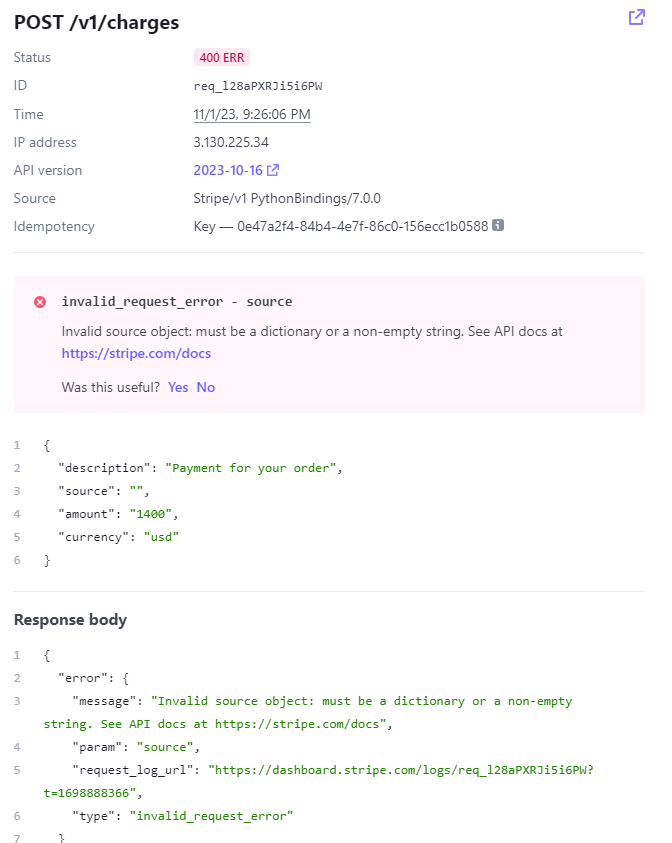

let me know if you need anything else
exotic solar
You found it don't you?
IT says the source parameter is invalid. In the screenshot you can see you are passing an empty string
source=token around here you would want to log this token value
soft copper
what would I put there?
we tried some fixes, but nothing seemed to work
try:
charge = stripe.Charge.create(
amount=amount,
currency='usd',
source=token,
description='Payment for your order',
)
is there anything else that shold be in the token field?
exotic solar
You take this token from
token = request.POST['stripeToken']
You want to log this value to ensure it isn't empty
soft copper
exotic solar
You take this token from
```
token = request.POST['stripeToken']
```
def payment_view(request):
if request.method == 'POST':
payment_form = PaymentForm(request.POST)
    if payment_form.is_valid():
        token = request.POST['stripeToken']
        amount = int(payment_form.cleaned_data['amount'] * 100)  # Convert amount to cents

        stripe.api_key = settings.STRIPE_SECRET_KEY

        try:
            charge = stripe.Charge.create(
                amount=amount,
                currency='usd',
                source=token,
                description='Payment for your order',
            )

            # Payment was successful, you can handle success scenarios here
            return render(request, 'auctions/payment_success.html')

        except stripe.error.StripeError as e:
            # Payment failed, you can handle error scenarios here
            return render(request, 'auctions/payment_error.html')

else:
    payment_form = PaymentForm()

return render(request, 'auctions/checkout.html', {'payment_form': payment_form})
we have it logged here
if payment_form.is_valid():
token = request.POST['stripeToken']
amount = int(payment_form.cleaned_data['amount'] * 100) # Convert amount to cents
and we have this defined in checkout.html to, before our button pay now
<input type="hidden" name="stripeToken" id="stripeToken">
<button type="submit" class="btn btn-primary">Pay Now</button>
exotic solar
Yes but on PHP you can log it out and check its value. What was its value?
soft copper
exotic solar
Yes but on PHP you can log it out and check its value. What was its value?
we're using Django
do you have an idea of what it looks like?
exotic solar
Oh sorry, but any language should have its logging system, right? You want to log the value and check in your server log then
soft copper
Django doesnt have one built in, do i need to manually set it up?
exotic solar
Probably yes. You would want to look through Django documentation