#b33fb0n3
1 messages · Page 1 of 1 (latest)
 woven ferry
Hi
This form is for Stripe Products,. You can achieve this using Stripe Element:
https://stripe.com/docs/payments/save-during-payment
 still lava
I already done that
still lava
woven ferry
Hi
This form is for Stripe Products,. You can achieve this using Stripe Element:...
I would like to integrate it via link
woven ferry
What you mean exactly by "link"? Stripe PaymentLinks (https://stripe.com/docs/payment-links) or Stripe Payment Method Link (https://stripe.com/docs/payments/link) ?
Sell online without building a digital storefront.
Learn how to accept payments using one-click checkout with Link.
still lava
woven ferry
What you mean exactly by "link"? Stripe PaymentLinks (https://stripe.com/docs/...
I mean this one: https://stripe.com/de/payments/link
woven ferry
but it does not give me the option to enter the verification code. There is also none send
So in order to test this you can set whatever code you want
still lava
I wont get this field:
 still lava
woven ferry
> but it does not give me the option to enter the verification code. There is al...
still lava
woven ferry
> but it does not give me the option to enter the verification code. There is al...
I just get this field (when using LinkAuth-Component):
 woven ferry
still lava
I wont get this field:
woven ferry
still lava
I wont get this field:
yes just set any 6 digits code
still lava
I WON'T get this field
woven ferry
woven ferry
<https://stripe.com/docs/payments/link/accept-a-payment?platform=web&ui=checkout...
Follow the link I shared with you
I'm not understanding you, could you please clarify more ?
still lava
woven ferry
I'm not understanding you, could you please clarify more ?
Yeah, I am using the payment element to collect the payment method. Now I want to have one click payments via link. Now I tried to add the LinkAuth Element (where you enter the email) and entered my email. Nothing happend. Than I tried to follow both doc-guides (for LinkAuth Element & Save Payments with Link) and integrated them. Now I am able to see the option "save paymentmethod for later", but only for cards. So I am now here to get help, how to get this field to enter the 6 digit code
still lava
woven ferry
I'm not understanding you, could you please clarify more ?
If I enter a normal checkout session on other plattforms with the same email I instantly get a code to my phone and the field pop out
woven ferry
and entered my email. Nothing happend.
You need to complete a Payment at the first time with an email. And try doing another payment with the same email in order to get details filled with Link
still lava
yeah, like I said:
If I enter a normal checkout session on other plattforms with the same email I instantly get a code to my phone and the field pop out
still lava
woven ferry
> and entered my email. Nothing happend.
You need to complete a Payment at the f...
... the same email ...
woven ferry
You are in test or live mode? in test mode you want get a code to your phone
still lava
woven ferry
You are in test or live mode? in test mode you want get a code to your phone
I am currently in testmode. I won't get any code, because the field does not appear!
still lava
woven ferry
You are in test or live mode? in test mode you want get a code to your phone
Maybe I am expressing myself wrongly or understanding something wrongly, but the field does NOT appear
woven ferry
Try completing that payment form till the end and then retry another payment with the same email.
still lava
I already done.
Link knows my email.
Link knows my phone number.
I already completed serveral payments with link
woven ferry
Could you share a screenvideo recording of the flow you are testing with ?
still lava
woven ferry
Could you share a screenvideo recording of the flow you are testing with ?
I'm afraid I can't show you anything that isn't there. It's a custom flow, so I'm unsure how that will help you, precisely because that field does NOT appear.
woven ferry
I need to understand the flow you are testing. Otherwise I'm affraid I can't help you.
still lava
woven ferry
I need to understand the flow you are testing. Otherwise I'm affraid I can't hel...
let me make it...
still lava
woven ferry
I need to understand the flow you are testing. Otherwise I'm affraid I can't hel...
here you can see the video: https://youtu.be/IUGgi6MQjiM
woven ferry
You didn't checked the Link button
 still lava
yeah, like I said:
I can only save the details for "card" payments, but I also want to save it for like klarna or sepa or sofort or
woven ferry
Try making a first purchase by checking the Link checkbox and then do another æatempt with te same email
still lava
woven ferry
Try making a first purchase by checking the Link checkbox and then do another æa...
I already completed serveral payments with link
Link know my payment details
woven ferry
Could you please make these two payment in the same video ?
In that session, your Link account may be logged out
still lava
woven ferry
In that session, your Link account may be logged out
but where's the field to login to link?
woven ferry
That checkbox
still lava
woven ferry
Could you please make these two payment in the same video ?
what do you mean? I want to save it for klarna
woven ferry
No Link is for Card payment and not for Klarna
still lava
Link safes my payment details and link can also safe my klarna details
woven ferry
In the video you are sharing, you are testing card payment no ?
woven ferry
In order to use Link, you need to complete a first payment by checking that check box and then do another payment with the same email
still lava
woven ferry
In order to use Link, you need to complete a first payment by checking that chec...
Like I said:
#1140581211631255674 message
woven ferry
No in that test session it doesn't seem to know.
 green mothBOT
still lava
woven ferry
No in that test session it doesn't seem to know.
green mothBOT
still lava
woven ferry
No in that test session it doesn't seem to know.
but I also does not give me the field to enter the 6 digit code to login 🤷♂️
hey @hushed hornet
 hushed hornet
How can I help
still lava
hushed hornet
How can I help
I am using the payment element to collect the payment method. Now I want to have one click payments via link. Now I tried to add the LinkAuth Element (where you enter the email) and entered my email. Nothing happend. Than I tried to follow both doc-guides (for LinkAuth Element & Save Payments with Link) and integrated them. Now I am able to see the option "save paymentmethod for later", but only for cards. So I am now here to get help, how to get this field to enter the 6 digit code
this is what I am trying to archive
hushed hornet
Can you share some code?
Now I am able to see the option "save paymentmethod for later", but only for cards
Seems expected given that Link only works for cards/ACH
still lava
hushed hornet
> Now I am able to see the option "save paymentmethod for later", but only for ...
you can see here that link can save all of the paymentmethods: https://stripe.com/docs/payments/save-during-payment?platform=web#charge-saved-payment-method
hushed hornet
That doc is not for Link, that's just for saving details to a Customer object
still lava
hushed hornet
> Now I am able to see the option "save paymentmethod for later", but only for ...
you can see some code here: https://paste.gg/p/anonymous/4f297d5f4a9d43e78741da619b41946a
hushed hornet
2 entirely different concepts
hushed hornet
still lava
you can see some code here: https://paste.gg/p/anonymous/4f297d5f4a9d43e78741da6...
Don't see anythign Link specific there
still lava
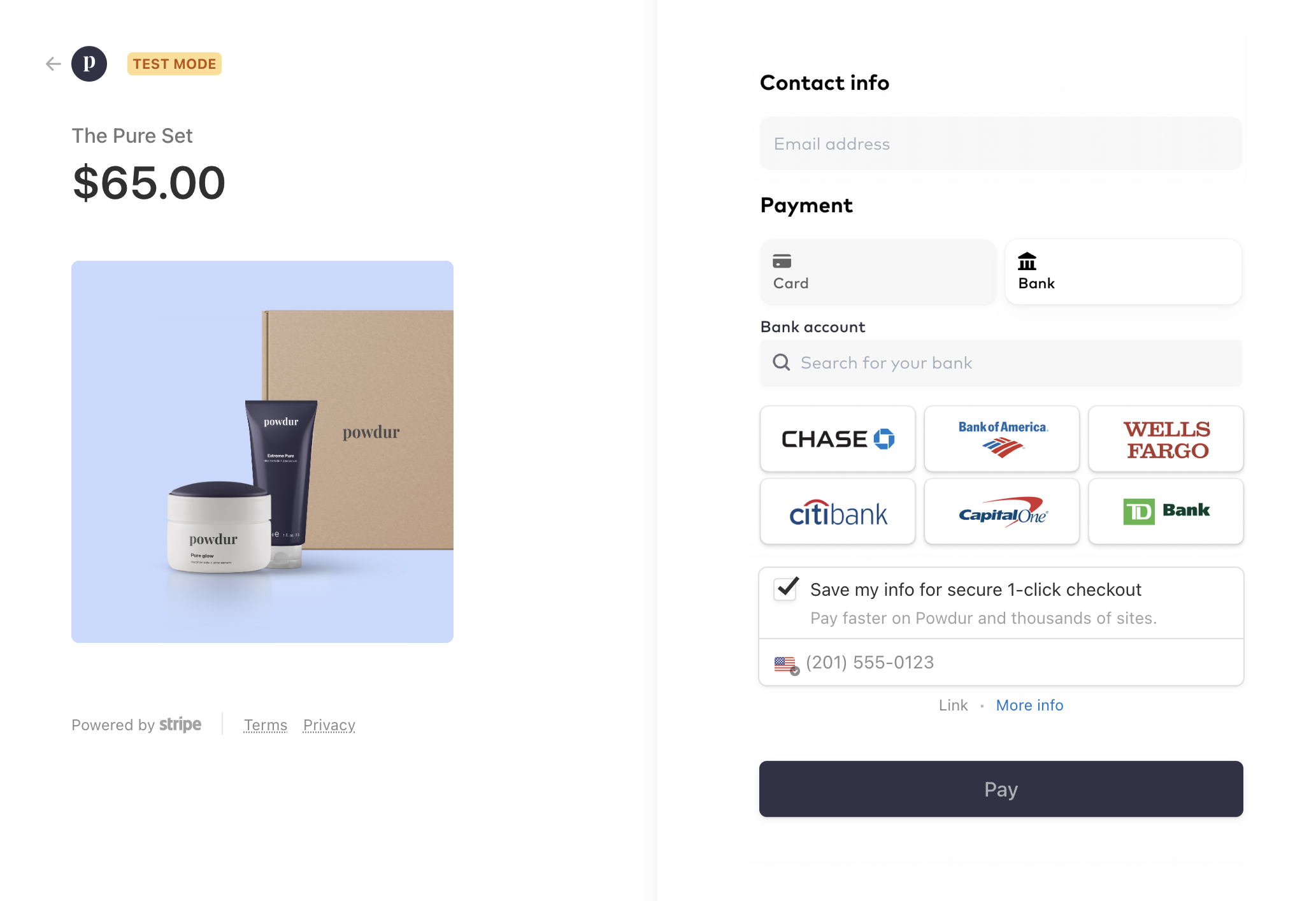
It seems that link is avaiable also for "Bank"
https://b.stripecdn.com/docs-statics-srv/assets/link_in_checkout_opt_in_form.3ffb1abd98e3cd51f73d07cbbcd78b00.png

 hushed hornet
Yes, ACH Debit (US) as stated earlier. But not Klarna
still lava
ah got it. I followed the rules in the docs and there it said that you should only deposit a "defaultValue.email" for it to work. I have done that: https://stripe.com/docs/payments/link/save-and-reuse?platform=web#web-collect-payment-details
Save your Link customers' details and charge them later.
hushed hornet
And pi.receipt_email is the address of a Link account?
still lava
it is, yes
hushed hornet
So what do you see in the Payment Element?
still lava
hushed hornet
So what do you see in the Payment Element?
this:
 hushed hornet
Can you give me a pi_xxx ID?
still lava
yeah, it's pi_3Ney12D4LgnRPd5t0BuCvpD3
For me it seems that link can save more than just a card payment method.
You can see that there's a setupintent: https://stripe.com/docs/payments/link/save-and-reuse?platform=web#web-submit-payment
That has only a little bit with Link to do, but it will be saved...
Then later the server is asking for the paymentMethods which have the type "link": https://stripe.com/docs/payments/link/save-and-reuse?platform=web#charge-saved-payment-method
The customer may see the available options (returned payment methods from the server) and choose one (if there are multiple) and than the paymentintent will be created and confirmed. What does link have to do with all that..?
hushed hornet
You're not using an Address Element, no?
hushed hornet
still lava
For me it seems that link can save more than just a card payment method.
You ca...
Link only supports cards and US bank accounts: https://stripe.com/docs/payments/link#:~:text=Your customers can use different funding sources with Link%2C including credit cards%2C debit cards%2C and US bank accounts
Learn how to accept payments using one-click checkout with Link.
Is there somewhere where I can reproduce the issue?
Because honestly I don't know why it's not showing from what you've shared
still lava
hushed hornet
Is there somewhere where I can reproduce the issue?
currently not, no. It's only on my localhost
hushed hornet
Anything in the browser console?
Could be that your have third-party extensions that are preventing session/cookies? I honestly don't know. Nothing looks off from your integration
still lava
nothing. I just logged myself now in to link and even now no code 😦
hushed hornet
What would be helpful would be a reproduction somewhere that we can access
still lava
hushed hornet
What would be helpful would be a reproduction somewhere that we can access
I can open an ngrok channel for you, so you can test it, if that would help you?
hushed hornet
Sure
still lava
hushed hornet
Sure
you can view it here: https://privnote.com/NlumdpEe#i2lawLQSo
I created the video you saw in my youtube video a little bit at the bottom. If you only want to see that video, please go into your developer tools and in the local storage, change the key "allowedPVId" to "d_12345" and delete the key "renderedContent". Then reload the page and you only see this one video
still lava
hushed hornet
Sure
got it?
hushed hornet
I'd recommend you write in to my team: https://support.stripe.com/contact/email?topic=api_integration
Find help and support for Stripe. Our support center provides answers on all types of situations, including account information, charges and refunds, and subscriptions information. Get your questions answered and find international support for Stripe.
still lava
hushed hornet
I'd recommend you write in to my team: https://support.stripe.com/contact/email?...
I think they would recommend me to go here. Here is the place where developers can solve stripe problems..
hushed hornet
As stated, not specifically an integration issue from what I can tell. We need more time to investigate
still lava
hushed hornet
As stated, not specifically an integration issue from what I can tell. We need m...
for sure, take your time
hushed hornet
You need to write inas recommended
still lava
hushed hornet
You need to write inas recommended
and then it would take days after days until anything is solved... then I also need to tell the whole story again, get the same answers and at the end no one knows what happends and I am losing weeks 😦
hushed hornet
Yep, Link is difficult to debug for sure. But the nature of the issue is beyond the purpose of this channel
Equally, this server is technically has been closed and is closed for the next couple hours
still lava
it's closed? It's monday I think 🤔
still lava
hushed hornet
Yep, Link is difficult to debug for sure. But the nature of the issue is beyond ...
well, thats a problem...
can you tell me what I am write to them, that I am not being redirected to this discord?
hushed hornet
still lava
can you tell me what I am write to them, that I am not being redirected to this ...
That link will go directly to our team. We can work async to identify the issue
hushed hornet
still lava
it's closed? It's monday I think 🤔
still lava
alright, than I wish you a great EMEA 🙂