#RJ01
1 messages · Page 1 of 1 (latest)
 pine shuttle
 fossil timber
Hi there, how can I help?
 strong flicker
Hello
I already installed Stripe Extension and follow this instruction


I cant still use Stripe Extension in VS Code
 fossil timber
Have you add stripe.exe to your system PATH variable?
strong flicker
here?
 fossil timber
There should be a PATH variable in this list
strong flicker
what I did earlier
- Install Stripe in VS Code
- Download Stripe Exe as per instruction here https://stripe.com/docs/stripe-cli#install
- Use stripe login and I got confirmation that it is Access Granted
- On what I saw in the YT of Stripe, After Logging In I must restart VS Code. Which I did that. But nothing happens.
What did I missed?
The path environmental that you mention is not in the instruction on your site.
Can you give instructions on how can I install and setup properly the stripe extension in Windows 11?
Thank you..
Build, test, and manage your Stripe integration directly from the command line.
fossil timber
It's the same step as you install any CLI application in the windows machine.
I don't have a win 11 machine with me now, but you can follow this guide to add stripe.exe to your system PATH environment https://www.computerhope.com/issues/ch000549.htm#windows11
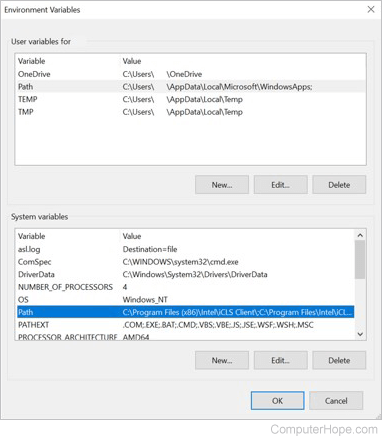
Information on how to set the path and environment variables in Windows 2000, Windows XP, Windows Vista, and Windows 7.
strong flicker
Do you have sample value that I need to see/add in the Path environment?
fossil timber
That's where your stripe.exe locate in your machine.
strong flicker
something like this?
 fossil timber
No
You should append the path to your stripe.exe in the PATH environment variable
For example, if you system path is currenlty
C:\Program Files;C:\Winnt;C:\Winnt\System32
and your stripe.exe is at C:\Downloads\stripe.exe, your new system path should be
C:\Program Files;C:\Winnt;C:\Winnt\System32;C:\Downloads\stripe.exe