

1 messages · Page 1 of 1 (latest)
 coarse jacinth
I have this problem, i went from issues at xtem to wails and now we are here:
wails issue: https://github.com/wailsapp/wails/issues/2799
xtermjs issue: https://github.com/xtermjs/xterm.js/discussions/4615
i've been having this problem all day, im hoping on a fix 🙂
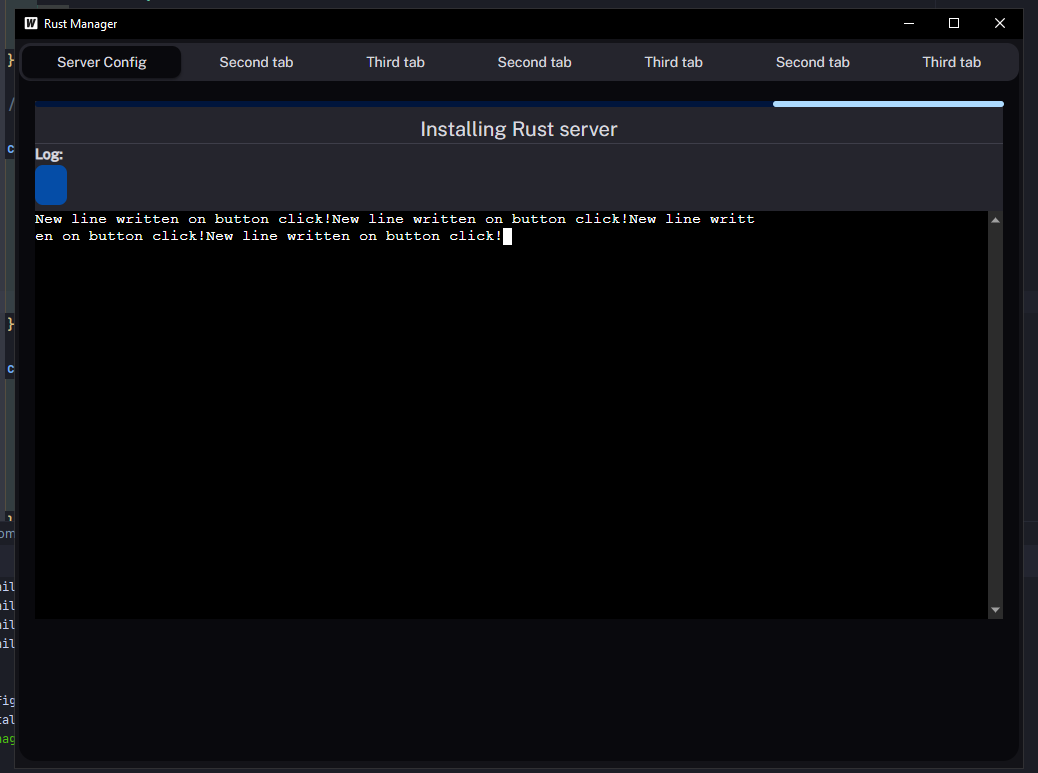
Wails dev:
https://user-images.githubusercontent.com/85284773/256568474-47ebc9de-ae54-4d07-bf93-0053db4c6262.png
Wails build:
https://imgur.com/a/Als8qRq
Description Im using xterm to emulate a console in the frontend, but when using wails dev no new lines are created is i use wails build it works fine! Using wails dev: Using wails build: I have alr...
*Edit: in production it works fine Details Browser and browser version: microsoft webview2 / wails (electron alternative) OS version: windows 10 22h2 pro xterm.js version: 5.2.1 Steps to reproduce ...
code:
import {Component} from "react";
import React from "react";
import {Alert, Button, Divider, LinearProgress, styled, Theme, useTheme} from "@mui/joy";
import WarningAmberRoundedIcon from '@mui/icons-material/WarningAmberRounded';
import '../../../wailsjs/runtime/runtime';
import {EventsOff, EventsOn, LogPrint} from "../../../wailsjs/runtime";
import {Install} from '../../../wailsjs/go/installer/Installer';
//ts
interface State {
    buttonVisible: boolean;
}


export class Installer extends Component<{}, State> {

    //PROPS AND STATE
    constructor(props: {}) {
        super(props);
        this.state = {
            buttonVisible: true,
        };

        // Bind the method to the correct context in the constructor
        this.RenderStatus = this.RenderStatus.bind(this);
    }

    // region EVENTS

    componentDidMount() {
        EventsOn("printToConsole", (line: string) => {
            this.WriteLineToLog(line);
        });
    }

    componentWillUnmount() {
        // Cleanup the event listener here when the component is unmounted
        EventsOff("printToConsole");
    }
    //endregion

    //region HANDLERS

    handleInstallButtonClick = () => {
        this.setState({buttonVisible: false});
        //start install function
        Install().then(r => {});
    };

    //endregion

    //region METHODS

    WriteLineToLog(line: string){
        let log = document.getElementById("log");

        if(log != null){
            log.innerHTML += "=> " + line + "<br>";
            //LogPrint("'"+"=> " + line + "'" + " added to log div");
            //make sure to scroll to bottom
            log.scrollTop = log.scrollHeight - log.clientHeight;
        }
    }

    //endregion

    //region RENDERS

    InstallButton(){
        const Level1Div = styled('div')(({ theme }) => ({
            // The result is 'var(--joy-palette-primary-500)'
            backgroundColor: theme.vars.palette.background.level1,
        }));
        return (
            <Level1Div className="rounded-lg p-1 min-h-[87.5vh] max-h-[87.5vh] text-center w-1/2 mx-auto">
                <Alert color="warning" ><WarningAmberRoundedIcon/><p className="pl-1">This Instance has no installed server!</p></Alert>
                <div className="mt-56">
                    <Button  onClick={this.handleInstallButtonClick} className="">Install server</Button>
                </div>
            </Level1Div>
        )
    }

    RenderStatus() {
        const theme = useTheme();
        const Level1Div = styled('div')(({ theme }) => ({
            // The result is 'var(--joy-palette-primary-500)'
            backgroundColor: theme.vars.palette.background.level1,
        }));

        return (
            <>
                <Level1Div className="w-full p-1 rounded-lg drop-shadow-md    min-h-[87.5vh] max-h-[87.5vh]">
                    <LinearProgress value={40} className="mt-1" />
                    <p className="text-center text-xl mt-2">Installing Rust server </p>
                    <Divider orientation="horizontal"/>
                    <p className="font-bold ">Log:</p>
                    <div id="log" className="bg-black p-1 rounded-lg w-1/2 mt-1  overflow-y-auto min-h-[70.5vh] max-h-[70.5vh]">

                    </div>
                </Level1Div>

            </>
        )
    }


    render() {
        return (
            <>
                <div className="mt-1" id={'installdiv'}>
                    {
                        this.state.buttonVisible ? this.InstallButton() : <this.RenderStatus />
                    }
                </div>
                </>
        );
    }

    //endregion
}
for more info just ask 🙂
more context with xtermjs debug log:
https://cdn.discordapp.com/attachments/1134151661179375676/1134241403816390697/image.png

Aslo, i made a new react + vite project where it works fine im also using mui wich isnt the problem either 😦
the vite an @ vite/plugin-react were outdated, after i updated the it still happens
coarse jacinth
Nvm
