#How can I mark a component as deprecated?

8 messages · Page 1 of 1 (latest)

frigid dove
#

Let's say I have a component from an outside library, that another project was using, but now I want to "deprecate" that component and eventually remove it entirely, but marking it as "deprecated" would cause the build OR eslint to throw an error for anywhere, including the HTML template that component was being used.

// Somehow mark this component as "deprecated"
@Component({
  selector: 'test-component',
})
<!-- Linter or Angular CLI should show warning/error about component being "deprecated" -->
<test-component></test-component>

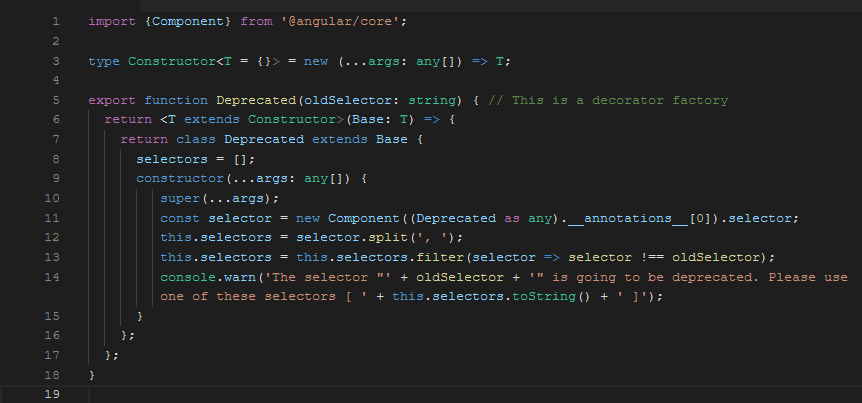
So far the only thing I've found is this - https://medium.com/@dileepkumarjami/how-to-mark-an-angular-components-selector-as-deprecated-aad11bb9feda -- but that only outputs something to the console, which would be useless since most of our developers don't pay attention to those warnings 😕
Medium

In this post, I would like to show how I leveraged on the concepts of Decorators and Mixins in typescript to mark the selectors of angular…

sleek shadow
#

Try something like:

/**
 * The base class for controls that can be rendered.
 *
 * @deprecated Use the new {@link Control} base class instead.
 */
@Component({
  selector: 'test-component',
})
export class VisualControl {

https://tsdoc.org/pages/tags/deprecated/

frigid dove
#

@sleek shadow that doesn't do what I want either - the build won't show any warning and neither will the linting -- doesn't seem like it hooks into Angular templates or anything else -- this will however show a "strikethrough" on the component class if it's used anywhere e.g. import { ~~VisualControl~~ } from ...

sleek shadow
frigid dove
#

haha looked into that one as well, but doesn't hook into the Angular to throw error if component selector is used in an HTML template

frigid dove
#

@sleek shadow actually, tried using the eslint-plugin-deprecation and it doesn't even throw warning for the Angular code, only when the @deprecated tag is used against a method directly, not on @Component or @NgModule

sleek shadow
#

Well to me this seems like trying to solve a human problem with technology. If an email won't suffice then I can only imagine the hellish environment you are working in 🙂

frigid dove
#

For the time being we're just going to use the @deprecated tag on the @Component and @NgModule to mark it as "deprecated" - doesn't seem like there's anything that will provide a way to mark the HTML, but I guess that doesn't matter since you would get a warning if you try to use a component in the HTML that wasn't imported anywhere