#Lenovo ThinkSmart View
1 messages · Page 3 of 1
 long reef
Ok. Well reflashing to 201006.099 now to start with clean slate

Me trying to plug the power connector in
 next mural
I'm always afraid yanking it out is gonna kill it one day
 sweet wren
That barrel connector is awful
next mural
Gonna start looking hard for barrel jack to USB c soon
So can just leave the barrel jack in
And just disconnect USB c
It's abt 30 watt adapter so any other the PD stuff we use for Pc hamhelds would likely work on the adapter end of things
To juice the machine
Just have to find the compat size barrel jack
long reef
Ok this thing has been on the lenovo logo an unusual amount of time now..
long reef
yeah flashing again to double check
next mural
Usually when flashing and after screen is basically black for me
Until I unplug n replug
To turn it back on
long reef
Yes. I got success and finish download. Re plug. Now it's sitting on the logo
 hoary current
Did you factory reset after flashing?
long reef
where do I access that
hoary current
Recovery menu
 devout cradle
Watching this is like watching a fish evolve into a salamander while forgetting to grow lungs.
long reef
Hm still no dice
 fluid hemlock
Got Mario Kart 64 running finally lmao
next mural
fluid hemlock
Got Mario Kart 64 running finally lmao
Sheeeesh 
long reef
I had no problems on the other image, weird. Welp off to do other things. I'll have more time Tuesday when I'm "working from home"
fluid hemlock
Couldn't get DS to load
next mural
Try older APKs sometimes depends
fluid hemlock
I'll have to give it a shot
long reef
Now of course I went to change the build and I get this infinite logo
Ok removed the modified boot.img and it worked
next mural
🙏🏽
next mural
Hm but you can get into adb or
long reef
maybe I'm dumb and this is a fastboot driver issue
"If a device is not listed, you may need to go into Device Manager > Other Devices > Android device with question mark. Right click > Update Drivers > Browse My Local Drivers > Let me pick from a list > Change to Fastboot Drivers."
what is the driver supposed to be called
long reef


 next mural

GitHub
A Simple Android Driver installer tool for windows (Always installs the latest version) - GitHub - fawazahmed0/Latest-adb-fastboot-installer-for-windows: A Simple Android Driver installer tool for ...
Then restart
long reef
got it
 long reef
I guess I hadn't needed fastboot yet so didn't realize I did not have those drivers. oops
But now that I flashed the magisk boot.img it is stuck on boot again 😦
are you guys using magisk with 201006.099
it worked fine with 200628.084
next mural
long reef
are you guys using magisk with 201006.099
Yes I did originally
First installed the magisk app
Let it load then after flashed image for magisk
long reef
Is it a long boot?
I installed 2001006.099 - everything fine. turned on oem unlocking, went to fastboot, unlocked, flashed boot.img, relocked, reboot - now stuck on lenovo logo
same as when I flashed the rooted boot.img with QFIL
long reef
oh maybe I am impatient then
next mural
long reef
I installed 2001006.099 - everything fine. turned on oem unlocking, went to fast...
You can install that 20001 infinite times
And try whatever you'd like
 next mural
long reef
ok install magisk boot.img and going to take a shower then lol.
next mural
long reef
ok install magisk boot.img and going to take a shower then lol.
Any luck
long reef
Was still on the logo when I left home
next mural
🤔
fluid hemlock

next mural
fluid hemlock
<:kek:993736782845845504>
 I dunno if it's comical that you got yours working at this point
 thank god you're not into science experis 🧪
fluid hemlock
Need to find that one rom hack that adds more characters
next mural
ironically I'm not a retro gamer
fluid hemlock
Game streaming on your ThinkSmart View I could tell
next mural
But it's for the community
Everyone else here
Buys 17 underpowered handhelds with same chip every 2 months
might as well get a little boost in 🐎

Be able to play games unrealistically upscaled for cheap
fluid hemlock
Hey at least those handhelds are portable
 rough eagle
Whatever. I'm bringing this thing on my next plane trip
next mural
rough eagle
Whatever. I'm bringing this thing on my next plane trip
Planes even have ports for plugs
And you can actually fit it in a backpack with the box
And if you got a cover of some sort that would be even less space being used
@sweet wren 3d print shell cover to make it Porto
Protect the screen all gravy 
next mural
fluid hemlock
Hey at least those handhelds are portable
So is this just find a barrel jack to USBc
We need to do that anyways soon
fluid hemlock

next mural
I'm certain that barrel jack connection being yanked out all the time ain't gonna survive
fluid hemlock
Absolutely not
fluid hemlock

rough eagle
I did blind and deafen my two units before plugging them in
next mural
rough eagle
I did blind and deafen my two units before plugging them in
Do they work
 inland hollow
Hey guys i failed at this device. I got mine today with older software 200410.067and i tried upgrading to the 201006.099 version. Using qfil i was able to normally "download" the new firmware but even though its "sucsessful" the device remains on a black screen. Pluging power on and off results in the same black screen.
I have tried different versions of the img but its the same issues no matter what version i use
windoes always detects the device and i can redownload the firmware but same black screen nothing happenes
next mural
inland hollow
windoes always detects the device and i can redownload the firmware but same bla...
@green dirge you think it's stuck in edl mode 🤔
 green dirge
next mural
<@751602835082182682> you think it's stuck in edl mode 🤔
green dirge
next mural
<@751602835082182682> you think it's stuck in edl mode 🤔
Probably, I wonder if they tried the original version. 🤔
rough eagle
Download Fail:FireHose Fail:FHLoader Fail:The system cannot find the file specified
Oh it boots though
next mural
rough eagle
Oh it boots though
So you're at main menu now?
rough eagle
I got into Teams>Gear>About and am showing the 201006.099 firmware and have enabled developer mode
 next mural
Your got installed?
 sweet wren
yea one line
next mural
That should bring up a message for default launcher pick the unlauncher then after that click always
So it becomes default
rough eagle
Yep done
But apparently I should've looked into Unlauncher more
now I'm stuck in a calendar app lol
Oh just ran the adb command again and now I'm good
next mural
You can install this to get a navigation bar so you can go back
Run this to get rid of garbage apps
next mural
After doing so restart the tablet and check to see if it launches into UN
If it does then you're set for gaming for now
The rest should act like regular tab on aosp rom more or less
rough eagle
Oh yeah I'm up and running
next mural
next mural
Indeed
next mural
rough eagle
Oh yeah I'm up and running
welcome to the clan
next mural
rough eagle
And even the newest Plex apk supports Android 5.0 and up
Wow awesome
I've only tried Amazon prime
But I'm sure any works as that
And YouTube at 1080 work
So streaming vid no problema
next mural
green dirge
Probably, I wonder if they tried the original version. 🤔
Could you take a look at it w him I'm unsure but he says it gets recognized so you could get a dump possibly and see what's going on 🤔
rough eagle
Anybody mount SMB shares in Android before? I'm using the abandoned Android Samba Client right now but open to something still being maintained
SMB share from my NAS is my plan for roms for RetroArch
long reef
next mural
Any luck
3 hours later no boot. Guess I’m not getting root anymore
next mural
long reef
I installed 2001006.099 - everything fine. turned on oem unlocking, went to fast...
Probably need to just go back to this
rough eagle
My biggest frustration so far is Android 8.1. So many QOL settings in the system settings are missing in 8.1 compared to the 13 I'm used to on my phone.
next mural
rough eagle
My biggest frustration so far is Android 8.1. So many QOL settings in the system...
what you trying to use it as a webcam
 rough eagle
Just getting access to ROMs over network shares is annoying
next mural
rough eagle
Just getting access to ROMs over network shares is annoying
I typically get roms from devices
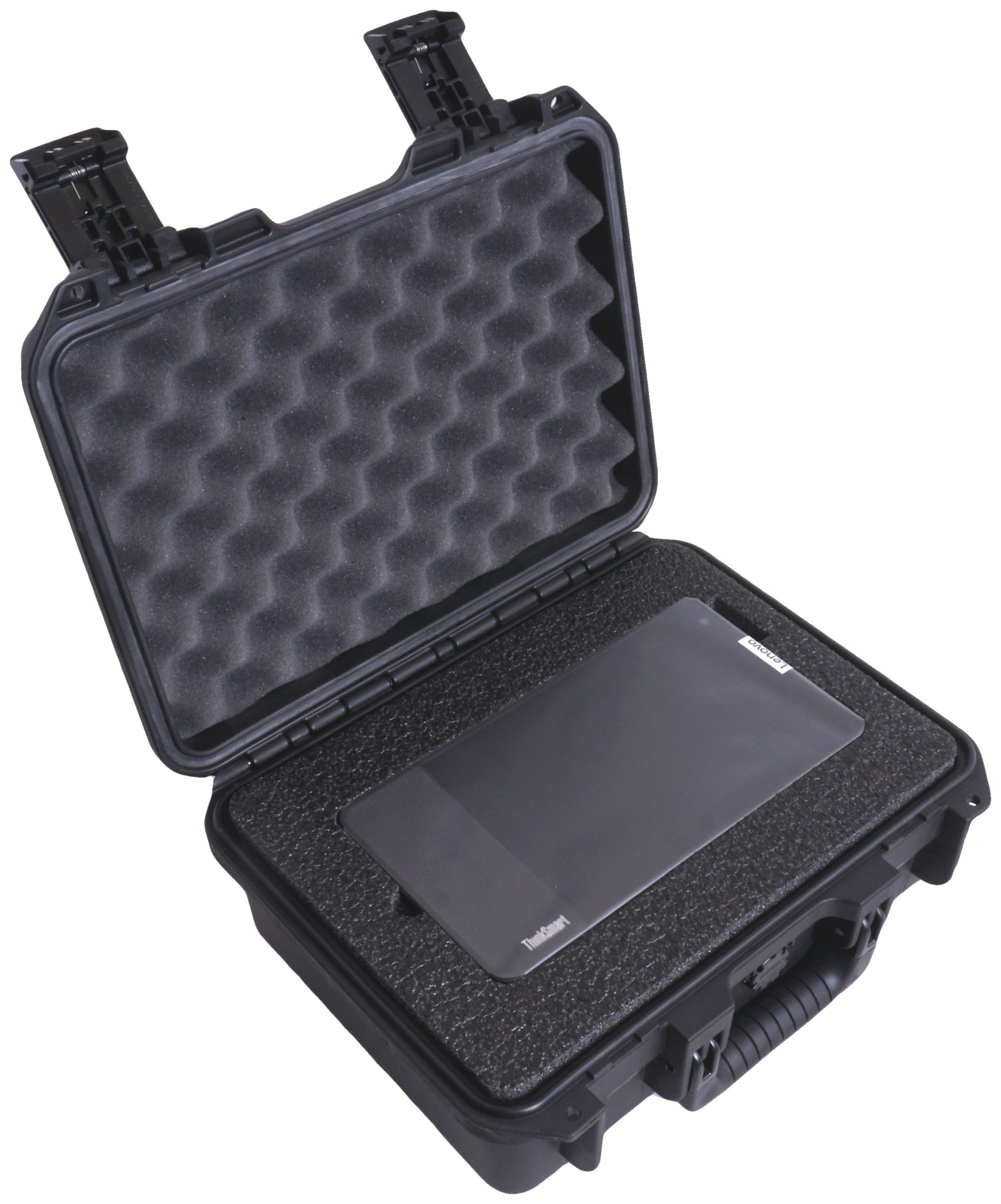


@sweet wren must see this in your review
Would be a gangster entrance for the device
Walkin the intro wearing a tux and lay the briefcase of the table
 hoary current
The case is 5x as much as the device 😂 why is that even a thing? Who would be bringing these places individually? lol
rough eagle
I mean the internal storage on this thing is pathetic so going for SMB/NFS is the only way I'm going to be able to play heavier roms on it
Maybe I'll just make a curated list of NES/SNES/GBC/GBA/MD roms that's under 2GB
Maybe someone can swap the emmc chip 🤔
 jolly pivot
rough eagle
I mean the internal storage on this thing is pathetic so going for SMB/NFS is th...
jolly pivot
rough eagle
I mean the internal storage on this thing is pathetic so going for SMB/NFS is th...
How fast will it be over network
next mural
yeah like games that are actually played
 hidden dune
next mural
<:kek:993736782845845504> yeah like games that are actually played
hidden dune
next mural
<:kek:993736782845845504> yeah like games that are actually played
Hey, I completed gravity rush on the Pocket Air yesterday 😛
I wonder if this thing works with Vita3k....
Actually, if it's got 2gb ram, probably not.
Does it still work with the camera after rooting and things?
next mural
hidden dune
Hey, I completed gravity rush on the Pocket Air yesterday 😛
I wonder if this t...
Chip can run some vita3k on newer android yes
Shovel knight level albeit
But who cares
Shovel knight is awesome
and at 29 bucks this would become the first to even run vita
next mural

usb c to usb c Cable
I would highly recommend this for anyone flashing and in general extremely solid cable
Use it for all hamheld
And the light on the cable lights up only when the connection is established
So it saves you from misflashes
I've used on dozens of these as well as PC hamhelds to load os and transfer multiple gigs within seconds
Also has pretty high output so can charge anything between your phone to a full grown 100w hamheld no problema
Noticed some ppl having some possible flash issues due to bad USB cable/connection thought would recommend 
Per usual not a paid link 🖇️ I don't make a penny off any of this stuff
Just here to help the community
next mural

System Specs:
An Android 8.1 based device (Android Things), with a SnapDragon 625 at 1.8ghz, 2gb of ram, 8gb of internal storage and a 1280x800 HD IPS screen make this an interesting device by LENOVO with emulation potential..
The hype train continues
 wide glen
I had to get one those eBay toys

 gleaming cliff
First cult I joined
 next mural
welcome to the clan @gleaming cliff @wide glen
anyone have setup pics please share
love to see it
 golden laurel
uh oh, what have I done. This is all @next mural 's fault.


 carmine apex
#notacult
 hidden dune
 sweet wren
 next mural
sweet wren
https://tenor.com/view/mike-valenti-jim-costa-kool-aid-cash-the-ticket-971-gif-2...
next mural
sweet wren
https://tenor.com/view/mike-valenti-jim-costa-kool-aid-cash-the-ticket-971-gif-2...
why is this actually rob
His clone brother
With no beard***
hidden dune
 sweet wren
next mural
<:kek:993736782845845504> why is this actually rob
sweet wren
next mural
<:kek:993736782845845504> why is this actually rob
Haha I was thinking that 🤣🤣
next mural
hidden dune
https://tenor.com/view/futurama-cult-gif-25342307
we just need to defeat the surface duo
Then we will be the ultimate OTHER device

Rise to the occasion

It is the Legion Go Mini afterall
worked out for the Miyoo mini after it wasn't mini anymore
sticking with the branding
next mural
sweet wren
Haha I was thinking that 🤣🤣
 rough eagle
Weren't there some good zoomed in pics of the different chips on the motherboard?
I've been meaning to learn how to do BGA soldering 


 rough eagle
I found that pin but I swear there were some really well focused shots zoomed in on the chips
next mural
rough eagle
I've been meaning to learn how to do BGA soldering <:lol:908803196909158411>
 rough eagle
These are cheap enough to practice on
next mural
This all we got chief
Indeed
Buy 10🤠
10 of 10 attempts can't fail
at least a few might work out
Anyone else get there's in today
rough eagle
next mural
This all we got chief<:doggylol:908803097319579659>
#1199440904566620260 message
Found em
next mural
Ahh probably didn't get all of em
rough eagle
KLM8G1GETF-B041 is the eMMC
@sick snow can I tap your knowledge? I'm curious about the possibility of swapping the eMMC chip on this thing (8GB) for more space.
https://semiconductor.samsung.com/us/estorage/emmc/emmc-5-1/
I can find a few with same dimensions but not sure how to further refine which might work as a drop in replacement. Is the -B041 ending important here?
 sick snow
rough eagle
<@791833220005625906> can I tap your knowledge? I'm curious about the possibilit...
sick snow
rough eagle
<@791833220005625906> can I tap your knowledge? I'm curious about the possibilit...
couple of important factors. This is a standard BGA153 eMMC, so that's good. It's eMMC 5.1, which means it's not the newer UFS standards, also good. And then finally, the stock eMMC is HS400 rated. You'll want to match these as closely as possible, there may be a higher capacity version of this line of eMMC's that might be the safest choice. It's also likely any eMMC 5.1 HS400 chip will work
 sick snow
you going to give this a go?
rough eagle
I might
This device is cool but 8GB of internal storage with no expansion options is so limiting
And they're only $30 so if I ruin it who cares
sick snow
$40 for a new one, yeah, might as well give it a whirl
rough eagle
Found a 128GB chip. Only 0.2mm taller.
 sick snow
the exterior demensions don't really matter for emmc, the pads are all the same
just make sure it's 128 giga-byte and not 128 giga-bit
one last thing to worry about
will the software expand to use all the storage
for example android will if you fresh install it, but not if you image it
in this case, if there's a factory restore process, that should work to essentially reformat an use the whole storage space
next mural
rough eagle
KLM8G1GETF-B041 is the eMMC
@full heron need more memory halp
green dirge
Also, the digitizer is glued on and needs to be removed first, then the LCD, and bracket.
next mural
green dirge
Also, the digitizer is glued on and needs to be removed first, then the LCD, and...
someone can do mine for me
sick snow
oh man we have all the usual suspects here
next mural
sick snow
oh man we have all the usual suspects here
Yeah I put together the avengers
 carmine apex
sick snow
oh man we have all the usual suspects here
carmine apex
sick snow
oh man we have all the usual suspects here
kaizer soze is here?
sick snow
this is very similar to the eMMC's I replace or put into several 3566 devices
next mural
notacultnotacultnotacultnotacult
sick snow
for example, I put a 128GB eMMC in a RG503
next mural
sick snow
this is very similar to the eMMC's I replace or put into several 3566 devices
so in other words you're ready to join
sick snow
I'll take a back seat, but i'm here for the ride
next mural
 next mural
sick snow
I'll take a back seat, but i'm here for the ride
next mural
sick snow
I'll take a back seat, but i'm here for the ride
gammas here for that too
Man I'm gonna need a party bus
sick snow
 next mural
 next mural
@carmine apex @quaint marsh when is yours coming guise
 quaint marsh
soon™️
 full heron
next mural
<@334229146806910978> need more memory halp <:linkyay:917524292428763137>
full heron
next mural
<@334229146806910978> need more memory halp <:linkyay:917524292428763137>
lol you keep summoning me to random channels in random discords....
next mural
full heron
lol you keep summoning me to random channels in random discords....
they keep needing more ram
🐏
You're the ram pro
Ally modder
Steam Deck modder
it's time for lenoNO
next mural
you should get one of these btw
full heron
i just learnt this stuff for like the lolz i know nothing
next mural
30 bucks snapdragon
full heron
i dont even know what we are talking about
sick snow
i know nothing as well, i just do what Beardy has already done
except for arm devices, i think i experiment with arm devices more
full heron
 next mural
full heron
i dont even know what we are talking about
next mural
full heron
i dont even know what we are talking about
8 inch snapdragon tablet from lenoNO that we're hacking atm
Well it was a teams conferencing device until I repurposed for gaming
And well


eBay
• A collaborative smart device that works with your PC. • First-of-its-kind device to free up your PC’s resources. Product Details. SAFE & SECURE.
30 buck snap 🐉
next mural
join the movement
full heron
lol
next mural

 next mural
sick snow
not bad
next mural
sick snow
not bad
not bad indeed
 next mural

System Specs:
Android AOSP 8.1
8" HD (1200 x 800) IPS Multi Touch Display
Processor
Qualcomm® Snapdragon™ 624 (8C, 8x A53 @ 1.8GHz)
Cameras
5MP wide angle (720p)
Memory
2GB RAM (Soldered)
Storage
8GB eMMC
Audio
1.75" 10W full-range speakers with 2 passive tweeters
2 x 360-degree, dual-array microphones
Lmao shipping
Get it from states parcel 📦
sick snow
maaaaaan they're using the wrong shipping
full heron
pirateship it~~
lol also how do i have engineer role here already did i do it myself?
next mural
full heron
pirateship it~~
OkEST said he's gonna hop the border to get one @golden laurel @winter lichen
Maybe he smuggle a few more
 next mural
full heron
lol also how do i have engineer role here already did i do it myself?
next mural
full heron
lol also how do i have engineer role here already did i do it myself?
The streets know abt you and your mega ram 🐏 ally
rough eagle
I think the engineering role is given by mods
sick snow
NGL, my interest level is maybe increasing a tiny bit
full heron
 rough eagle
sick snow
NGL, my interest level is maybe increasing a tiny bit
rough eagle
sick snow
NGL, my interest level is maybe increasing a tiny bit
You can do my 2 units
I want it to be a RetroArch+Plex device in my guest room
next mural
sick snow
NGL, my interest level is maybe increasing a tiny bit
Me first
next mural
sick snow
NGL, my interest level is maybe increasing a tiny bit
Can cook up 3/4k n64
POWA
 rough eagle
I followed the steps in the pins last night and had very few hiccups
gleaming cliff
which pins exactly? Gh0sty made a couple and there's also a website link
rough eagle
My first time doing ADB stuff too
The website link is where you start
Nevermind
#1199440904566620260 message
This is where you start
Then you do these
#1199440904566620260 message
next mural
@golden laurel there you champ ^
Something I may add use quality USB c pd cable so yuno not losing out there 🤠also click download the moment the com3 pops up in qfil and you hear the ding from window connecting and keep device manager open on one side when the ding happens and you notice its missing a driver for gods sake don't flash fix the driver run the pinned adb fastboot tool then unplug power cable from tab n try again
Read instructions twice flash once
Not the other way around 🧱
gleaming cliff
I can install the qualcomm drivers and fastbook before I plug it in right?
sweet wren
Yes
gleaming cliff
holding down volume up and down, it just boots into the lenovo screen
hoary current
Start holding them down before plugging it in
gleaming cliff
yep, doing that
next mural
You can plug in the USB c cable while it's off even only thing you should have to do when flashing is plugin barrel jack and holding the buttons for that part on the tablet side
Rest of magic happens on pc
gleaming cliff
Installed the qualcom drivers, fast boot and QFIL
next mural
Sweet
gleaming cliff
i plug it in while holding it down, get mutliple windows pings and no port detected on qfil
rough eagle
I had to manually choose the port the first time
It didn't show up automatically at the top of QFIL like it did the second time
next mural
Or that
 rough eagle
My first time I got the Sahara error so I got to do it twice
rough eagle
Yep second time I did it went well
gleaming cliff
keep getting that error
rough eagle
I think the xda forum page mentioned doing it as quickly as possible
gleaming cliff
failed to open com port handle, could not connect to com port, shara fail
rough eagle
 hoary current
Keep it plugged into the pc, run the command, hold the volume buttons down & then plug in the power
gleaming cliff
I'm getting different results with different USB cables
hoary current
I had that problem too, used the same cable I'd used to flash another device a week prior & it failed
rough eagle
I actually did USB-C to USB-c when I did mine
gleaming cliff
yeah, I'm chaging devices to get a USB C port
hoary current
Mine worked fine with a to c, but whatever your best cable is
golden laurel
next mural
OkEST said he's gonna hop the border to get one <:kek:993736782845845504> <@2180...

breh stop pinging me with your esoteric instructions, I have videos to not make.
next mural
golden laurel
breh stop pinging me with your esoteric instructions, I have videos to not make.
use AI to flash your ThinkSmart
That's it or else
golden laurel
next mural
<:kek:993736782845845504> use AI to flash your ThinkSmart
I am the AI remember.
 next mural
I'm the OG
 sick snow
yeah if you guys are using EDL mode to flash, then i'd think replacing the eMMC could be pretty straightforward
golden laurel
sick snow
yeah if you guys are using EDL mode to flash, then i'd think replacing the eMMC ...
did anyone teardown and try that yet? how involved is it you wager?
next mural
golden laurel
https://tenor.com/view/familyguy-spiderman-everybodygetsone-gif-4513402
ThinkSmart it gets the ppl going @sweet wren


 sick snow
i saw a pic of the emmc earlier, just a matter of gettin' some heat on it
golden laurel
next mural
ThinkSmart it gets the ppl going <@349040433869094914> <:kek:993736782845845504>
imma report you to lenovo right now
 next mural
sick snow
i saw a pic of the emmc earlier, just a matter of gettin' some heat on it
next mural
sick snow
i saw a pic of the emmc earlier, just a matter of gettin' some heat on it
Can it be installed like deck
That have eMMC tew
2280 nvme wen
golden laurel
next mural
sick snow
unfortunately not, needs to be removed by hot air and then reflowed back on
golden laurel
sick snow
i saw a pic of the emmc earlier, just a matter of gettin' some heat on it
ngl that sounds like a @full heron summon.
sick snow
oh snap this thing has the DDR on the mobo instead of on top of the CPU
rough eagle
I just don't think 2GB ram will limit my use case
next mural
sick snow
oh snap this thing has the DDR on the mobo instead of on top of the CPU
32gb ram 🐏
Special edition for the creator
sick snow
but yeah, back to the eMMC, should be pretty straightforward, hot air the existing one off, then reflow a new one on, pick up the steps starting the EDL restore step
next mural
breath of the wild
rough eagle
Oh cool so no USB eMMC adapter necessary
sick snow
right
rough eagle
Sweet.
And that means no stencil too right?
I'll still order them for future projects
sick snow
yeah, still buy the stencil and you'll need solder paste for that as well
i like to buy a backup chip too
rough eagle
Ive been trying to find a reason to buy solder paste for a while
Oh I ordered 5 (128GB) eMMC chips for my 2 units
I'm fully expecting to botch something
(https://a.aliexpress.com/_mqfiXXG) link in case anyone else is interested
sick snow
not sure but often the problem is drivers
sweet wren
🤣🤣
rough eagle
Would lineage bring an android version bump?
next mural
rough eagle
Would lineage bring an android version bump?
Yes
Significant one too
Not sure abt lineage in particular but will work with notime soon
For newer os
hoary current
I'd like to see if we could run power to the usb port & have it work with usb host without the need for a powered hub (if that actually works, dunno if anyone's tested that yet with the software fix)
next mural
As someone pointed out one of devs have every gotten several images to boot


It's just a matter of when get free time to work on
Android 11 is pretty much working
And A12 maybe a possibility since minimum reqs didn't really go up until 13
So it's moving along hopefully not if but when at this point
next mural
hoary current
I'd like to see if we could run power to the usb port & have it work with usb ho...
This is 🗝️
gleaming cliff
alright, new problems. Gave me a message saying 6% files transfered, and a success, but it seems to have done nothing
then it gave me a firehose fail message
hoary current
Usb cable probably, mine was doing similar things until i swapped it
Used the shortest, thickest one I had
rough eagle
hoary current
I'd like to see if we could run power to the usb port & have it work with usb ho...
That USB port is so terribly located for landscape use though 😔
gleaming cliff
switched over to the best cable i had
it's getting partway through the flash, then booting into the regular lenovo screen and failing
next mural
@inland hollow having similar issues as your machine ^ tap in can work on it yours as well together
next mural
rough eagle
That USB port is so terribly located for landscape use though 😔
You can have it sit landscape
Other way around
hoary current
rough eagle
That USB port is so terribly located for landscape use though 😔
There are truly flush 90° adapters out there
next mural
Just logo is upside down but who cares
It works
if you're really psycho can take out ThinkSmart logo n try to flip it
gleaming cliff
Took a break, I've run into a wall here.
rough eagle
next mural
Just logo is upside down but who cares
Upside down landscape means the volume buttons aren't accessible
next mural
Pls everyone that is just getting in theres and in the midst of flashing let your tab fully boot one time and write down what firmware number you are on so if we spot any similarities between multiple on the same being unable to flash we can blacklist those particular versions and you guys can ship them back to receive a diff revision hopefully 🙏🏽
next mural
rough eagle
Upside down landscape means the volume buttons aren't accessible
Use Bluetooth remote
I can't perform every miracle
 next mural
Pls everyone that is just getting in theres and in the midst of flashing let you...
rough eagle
next mural
next mural
Pls everyone that is just getting in theres and in the midst of flashing let you...
rough eagle
Oh nevermind you can self assign the engineer role. I'm one now
next mural
So far I've noticed the 2004 build acting abit fucky for some folks need to see bigger sample size to be sure I suspect it maybe 🤔 too old and require a double flash once to the 2004 build on xda then after that to the one we are shooting for but who knows might just be mega locked 🔐
next mural

eBay
Color: crystal white. Stereo, mini jack x 1. LCD display Main unit display. It is in good condition as it has been used carefully. Panel type. TFT color LCD. FeliCa port.
oof wonder how hard it would be to toss a n100 in here
Wish these weren't criminally underpowered
 atomic ether
wish me luck boys, curently waiting for the devices to reboot after flashing the modified boot.img and locking the bootloader
just got mine in the mail today
can't wait to see what this thing can do
though I'm not sure if it's supposed to take this long to boot. might have borked it and have to start over
 full grove
I think bassderek ran into the same issue
atomic ether
do you remember what he had to do to solve it?
full grove
iirc he said he ended up flashing the original boot.img
atomic ether
might try that. I assume I can find that in the image I originally flashed
I just reflashed boot again and relocked, if that doesn't work, I'll do that.
okay, found the old boot.img, so at least I have that option. not sure how I'll get magisk though other than a full re-flash with the modified boot.img
gleaming cliff
Does this mean it flashed?
 atomic ether
it's definitely a learning process. haven't touched android mods in probably 8 years
rough eagle
gleaming cliff
Does this mean it flashed?
Yes! 006.099
rough eagle
When it's plugged in does it show as an android device in windows device manager?
gleaming cliff
No
rough eagle
Hmmm then windows doesn't see it as connected I think
gleaming cliff
This is device manager
 rough eagle
Oh it'd be at the very top under its own >Android
gleaming cliff
Nada
rough eagle
 next mural
gleaming cliff
Does this mean it flashed?
next mural
gleaming cliff
Does this mean it flashed?
What did you end up doing that worked
That didn't before
@inland hollow write this down
gleaming cliff
I gvae me failure errors, but that was the firmware when i did the setup
next mural
gleaming cliff
I gvae me failure errors, but that was the firmware when i did the setup
Yeah but then how'd you get it to boot
Wasn't it black
rough eagle
There was one error QFIL threw when I flashed mine but it didn't seem to matter
next mural
Or what
gleaming cliff
rough eagle
it's not there
atomic ether
with respect to my issue booting after replacing the boot.img, mine did reboot installing the original boot.img using fastboot, but I think I need magisk for my needs so I'm trying fully reflashing the device.
rough eagle
gleaming cliff
Does this mean it flashed?
@next mural he's got the right firmware
gleaming cliff
yes
next mural
Lemme c
rough eagle
USB debugging is in Developer Options right?
gleaming cliff
where is the usb debug option?
next mural
You will have to go into setting
rough eagle
Settings>Developer Options (near the bottom)
gleaming cliff
I thought i was in dev, i don't see the options
next mural
^
gleaming cliff
"you are already a dev"
 gleaming cliff
My settings menu is completely different
next mural
gleaming cliff
My settings menu is completely different
No problem
rough eagle
BRB
gleaming cliff
no ding
next mural
Do you have adb installed I mean you likely do if you got this far
gleaming cliff
yeah, it's installed
atomic ether
anyone know if the modified boot.img for magisk is specific to the version you run? I have a hunch that might be my problem. I'm installing 201006.099 and am using the image from XDA here: https://xdaforums.com/t/guide-root-unlocking-and-improving-your-lenovo-thinksmart-view-cd-18781y.4584033/

XDA Forums
Improving Your Lenovo ThinkSmart View (Custom Recovery, Root, Play Store, Custom Webview)
Huge credit to @deadman96385 on how to flash your Lenovo Thinksmart View device and providing access to the firmware files! Credit to @WhyPartyPizza on...
gleaming cliff
 next mural
Type adb devices
gleaming cliff
Empty list
gleaming cliff
Nope
 next mural
atomic ether
okay, found the old boot.img, so at least I have that option. not sure how I'll ...
next mural
atomic ether
okay, found the old boot.img, so at least I have that option. not sure how I'll ...
Need to install magisk apk before pushing image or you sit infinite bootloop ie black screen
gleaming cliff
 gleaming cliff
logging level
enable logging (low)
Reset custom config
Reset Factory Defaults
that's what's there
next mural
gleaming cliff
reboot it maybe?
Yeah you can reboot but hmm try a different USB cable
Luckily you're past the part now where you can brick 🧱
This is easy part likely one driver prob 🤔
Or the cable
But if it flashed cable should be okay
gleaming cliff
nothing new on reboot
this is the same cable, tried others and nothing happens either
next mural
GitHub
A Simple Android Driver installer tool for windows (Always installs the latest version) - GitHub - fawazahmed0/Latest-adb-fastboot-installer-for-windows: A Simple Android Driver installer tool for ...
gleaming cliff
tried a third cable, it's showing up now
next mural
next mural
https://github.com/fawazahmed0/Latest-adb-fastboot-installer-for-windows
Okay did you install this
Or already had adb
If you had already or if you got this
 next mural
You're in business chief 🎉
gleaming cliff
Really weird that the flashing cable didn't, but it's good now
next mural
Okay in adb now you need to nuke the kiosk mode
Otherwise you'll be facked upon reboot
It'll boot back into other launcher
gleaming cliff
alright, where's the step for that?
next mural
Push this to install on the tablet first
And setup your navigation bar 🍻
So you don't get lost in menus
next mural
gleaming cliff
alright, where's the step for that?
adb shell
pm uninstall -k --user 0 com.microsoft.skype.teams.ipphone
pm uninstall -k --user 0 com.kingston.kioskmodeapp
pm uninstall -k --user 0 jp.co.fsi.fskaren.lenovo
pm uninstall -k --user 0 com.microsoft.windowsintune.companyportal
pm uninstall -k --user 0 com.microsoft.teams.ipphone.admin.agent
pm uninstall -k --user 0 com.kingston.devicesettings
pm uninstall -k --user 0 com.android.music
pm uninstall -k --user 0 com.android.deskclock
pm uninstall -k --user 0 com.android.contacts
pm uninstall -k --user 0 com.android.providers.calendar
pm uninstall -k --user 0 com.android.calendar
pm uninstall -k --user 0 org.codeaurora.snapcam
pm uninstall -k --user 0 com.android.quicksearchbox
Installed F-Droid:
adb install F-Droid.apk
This has the kiosk mode all the company portal and everything else including the cursed menu you were in
After doing both these things go ahead and reboot and go ahead and enjoy
Install Amazon prime get nachos and fiest your eyes at screen
gleaming cliff
Getting an ADB not found error for f-droid
next mural
gleaming cliff
Getting an ADB not found error for f-droid
You can skip
F droid APK need to be in your adb folder
Btw can use that command to install most of anything
Drop your APKs and put adb install xyzwhatevername.apk
But now that you have diff launcher can do from regular file manager as well np
Good to go
 gleaming cliff
I'm back for troubleshooting lol
can't install any more apks, i'm getting an adb not found error
next mural
Are they in your adb folder
gleaming cliff
yep
next mural
Go to your settings turn on mtp in dev settings
Instead of charging
Drag and drop the apks onto device
Install by clicking in file manager
If the APK is not compat then it's likely too new n will give parsing error
atomic ether
hmm. so I patched the exact boot.img that I have, ran fastboot flash boot magisk_patched...img, fastboot flashing lock and now magisk doesn't actually show as installed.
strange
anyone actually have magisk working with 201006.099?
next mural
Me
next mural
But I'm the only one so far everyone is bricking with their attempts so not recommending bc then ppl don't wanna put in effort to fix lol
next mural
atomic ether
any advice?
Install magisk app first
atomic ether
brick as in unrecoverable?
next mural
Load into it
atomic ether
sorry, continue
next mural
atomic ether
brick as in unrecoverable?
Soft brick 🧱
next mural
next mural
Install magisk app first
Load into it
Then afterwards just flash the image
atomic ether
via fastboot?
next mural
Install the Magisk app
Enable OEM unlocking in Developer Settings
Unplug the device. Hold Vol- and plug in the device to boot into fastboot mode.
In command prompt, execute
Code:
fastboot devices
to make sure the device is discovered. If a device is not listed, you may need to go into Device Manager > Other Devices > Android device with question mark. Right click > Update Drivers > Browse My Local Drivers > Let me pick from a list > Change to Fastboot Drivers.
Code:
fastboot oem unlock-go
This will unlock your bootloader.
Unplug the device. Hold Vol- and plug in the device to boot into fastboot mode.
In command prompt, navgiate to the directory where your Magisk boot.img is downloaded. Run
Code:
fastboot flash boot boot.img
After the boot.img is flashed, you need to lock your bootloader to be able to boot back into the device. If you're not in fastboot mode, you can once again unplug the device. Hold Vol- and plug in the device to boot into fastboot mode.
Run either of the 2 commands to lock the bootloader. You can restart the device and boot into the device once you are finished.
Code:
fastboot oem lock
atomic ether
gonna follow that to the letter. I have the magisk app installed now, and OEM unlocking is already enabled. wish me luck!
thanks for the advice
next mural
Should be good
The mistake ppl are making are simultaneously trying to flash new fw and magisk
That's just asking the PC to go boom 📚
atomic ether
I'm as far as flashing the boot.img. should I reboot before relocking?
atomic ether
do I run just "fastboot oem lock" OR "fastboot flashing lock"?
I assume they do the same thing
atomic ether
how long should it take? like 2 minutes? 10?
next mural
10 minutes or so After flashing magisk it wipes and you have to redo pushing the home launcher and stuff typically
But that's not a big deal
Not bricking the device is
atomic ether
okay, gonna go make a cup of tea then while it cooks
next mural
Yeh takes a moment to brew
atomic ether
I might have pulled power too soon when I had done it right in the first place, thinking I had soft bricked it
and might have repeated that at least 3 times
next mural
I see I see
atomic ether
it seemed like it took too long when the fastboot stuff takes seconds and even totally reflashing from qfil is like 4 minutes
next mural
Yeah definitely
atomic ether
but I guess I was being impatient
next mural
Luckily you see how to flash now
atomic ether
can't wait to get homeassistant on this thing. the wife acceptance factor is so high she made me buy a second one for her desk.
next mural
Yeah it's perfect solo Amazon prime machine tbh
Screen is impeccable
And the 10w speaker is loco
I watched gen v in like 2 days
And I barely ever have the patience to watch through stuff
atomic ether
it's not bad. tiny bit of bloom, but fantastic for $30. lenovo really screwed up thinking this would sell as a dedicated MS teams device
their loss is our gain
next mural
Well they banked on Google tbh
And Google pulled out
Technically it's another abandoned Google project
atomic ether
my current desk tablet thing is my old verizon GS4 running google play edition rom via the LOKI exploit.
next mural
It runs on android things technically
atomic ether
that's how long it's been since I did any android modding
next mural
Which was supposed to be their connected os
next mural
atomic ether
my current desk tablet thing is my old verizon GS4 running google play edition r...
last time I facked with an android was when cyanogen mod existed
When real hacking was live
Nowadays if you buy a calculator it has a locked Bootloader
atomic ether
i miss cyanogenmod
next mural
And most Samsung phones are pathetic in that aspect
atomic ether
used to run that on my nexus 7 gen 1
next mural
It's lineage" now
But I have yet to run one of those
This will likely be the first device
atomic ether
that's what I loved about my verizon galaxy S4. they screwed up coding their signature verification. The Loki exploit tells the recovery to load itself overtop the signature verification. it was "locked" but gimped at that point and could run TWRP and flash anything
I'm probably grossly oversimplifying
but if I remember correctly, the exploit just overwrites the signature verification
they forgot to protect against that
next mural
Looking into the nook color atm 🤔might be a pretty powerful ereader if it's able to run a newer Gsi rom
But it doesn't go up to 8.1 alas so it doesn't qualify unfortunately
atomic ether
hmm. 13 minutes in and it's still on the red Lenovo(tm) screen
atomic ether
without reflashing?
recovery is volume up, right?
wiped cache too for good measure
gleaming cliff
Up and running as a kitchen assistant, doing great
next mural
atomic ether
wiped cache too for good measure
Sweet otherwise just redo the process for magisk n see
sick snow
but at how many FPS?!
next mural
N if it doesn't work then just flash back to the last config that booted and call it a day
next mural
sick snow
but at how many FPS?!
All of them
atomic ether
probably time to go to bed for me, but If it doesn't boot by the morning, I'll try reflashing, then having magisk patch the boot.img on the device and flash that.
and if that doesn't work, I'll find a way to make it work without it until somebody comes up with a more automated solution, such as a pre-built rom with magisk root and up to date webview or something like that.
next mural
atomic ether
and if that doesn't work, I'll find a way to make it work without it until someb...
sounds good
gleaming cliff
Thanks @next mural @rough eagle @hoary current for the help
next mural

We're pulling up on the duo real quick
Keep fueling the fire 🔥🥵

they're at 3377
We just passed 2700
long reef
atomic ether
do you remember what he had to do to solve it?
Yeah I couldn’t get the provided rooted boot.img to work. It worked with a different image but not the one recommended in the pin. Only with stock boot.img
I left it for a few hours and nothing. Couldn’t get patched boot working.
Tried multiple times with factory resets reflashes etc.
I will have some time tomorrow to tinker
rough eagle
green dirge
Also, the digitizer is glued on and needs to be removed first, then the LCD, and...
Wait, how the hell do I get in to this thing? Liberal heatgun to the screen? Wear to pry?
green dirge
rough eagle
Wait, how the hell do I get in to this thing? Liberal heatgun to the screen? Wea...
Take off the speaker cover first. Then you can pry from that side. Then order another one when the glass cracks. 😂
rough eagle
Oh good I've got two already
 raven pagoda
Sounds like the job for the ifixit kit
 atomic ether
next mural
<:linkyay:917524292428763137> sounds good
atomic ether
next mural
<:linkyay:917524292428763137> sounds good
got magisk working. decided to go with the testbed build according to the thread, 200628.084. flashed with patched boot.img in the image, then installed and launched magisk and let it reinstall directly as the magisk app recommended.
sick snow
Notime you on this boat too?
next mural
sick snow
Notime you on this boat too?
Yeah he bought ii
He's the one that ripped it apart n did tear down
next mural
atomic ether
got magisk working. decided to go with the testbed build according to the thread...
Check your sound
Inside emulators*
atomic ether
next mural
Inside emulators*
sound worked fine, though I just installed webview manager (after installing google play store and getting that working, and now on boot it drops me into recovery.
so I guess I won't be installing that again
especially since I had homeassistant and youtube working, and that's probably all I need it for.
atomic ether
I did get magisk working though
so it's progress, and I'm at least getting to the point where starting from scratch doesn't take that long
hmm. it booted this time
weird
next mural
Yeah it's particularly buggy Which is good just not worth the risk entailed for most ppl in here not smth I'm personally recommending
If someone wants to experiment sure
All the tools are available
Even twrp is possible
Flash away
next mural
atomic ether
so it's progress, and I'm at least getting to the point where starting from scra...
Yeah qfil eventually gets okay
wish it was more intuitive like odin
Possibly the only good thing Samsung ever did
Having an okay flashing tool
 edgy moth
fwiw, i got one based on this thread , followed this directions first, no issues https://community.home-assistant.io/t/is-this-the-perfect-standalone-tablet-for-ha/658422

Home Assistant Community
I may have created the perfect home assistant tablet, for anywhere but a wall. Actually, Lenovo created it, I just fixed their software, haha! This post details a Home Assistant themed custom ROM for the ThinkSmart View 8" CD-18781Y. Installation info is below! The device was intended for enterprise video conferencing; the Qualcomm SoC is ...
next mural
edgy moth
fwiw, i got one based on this thread , followed this directions first, no issues...
Whatever works for you personally don't recommend that way as ppl in here have had issues w it getting stuck in edl mode and no return
This is abit more safer🙏🏽
@hidden dune @upper totem
https://gitlab.com/kaechele/pmaports/-/commit/4124de79cba0905beb3904033c14ec8def8b7954
Early Alpha Lin project 🤗

GitLab
Signed-off-by: Felix Kaechele
Lin making headway
Is officially a ting
@brittle magnet any Linux devs in here as well?
next mural
next mural
https://gitlab.com/kaechele/pmaports/-/commit/4124de79cba0905beb3904033c14ec8def...
long reef
Hm tried flashing a .img and now it only boots into fastboot 💩
atomic ether
is this the modified boot.img for magisk?
I had a bunch of issues with that last night. what eventually worked was running the 200628.084 image and flashing that with the magisk boot.img
but if you didn't lock the bootloader after fastboot flashing, you need to lock before it will boot normally. the command for that is fastboot flashing lock
or fastboot oem lock
long reef
No, I'm trying to flash a complete image from XDA post
and yeah it's relocked
I gave up on boot.img with the 201006.099 Build. I had it working with 200628.084, but no sound in some emulators.
So, same conclusion as you
atomic ether
hmm. it occurs to me I haven't tested sound yet in 200628.084
I don't really need it, it's just a homeassistant surface for me
long reef
So far My Conclusions:
- 200628.084: Works with Magisk boot.img, no sound in some emulators (Drastic for one). I also had custom webview, etc working with this.
- 201006.099: Does not work with magisk boot.img (so far). Sound should work according to others.
Right now I am playing with flashing other images but no success
atomic ether
well at least youtube audio is working on 200628.084
holy crap this display is nice
tack sharp
long reef
Oh, I'm dumb. Did not follow proper instructions for the flash I did. trying again
 rough eagle
Perfect for Plex 
atomic ether
rough eagle
Perfect for Plex <:chefskiss:920032577832767498>
ah, I see you have taste
though I bet at least half the people buying these also run plex and homeassistant
or emby or jellyfin
I never know what the cool kids are running these days
rough eagle
Yeah I really should switch to jellyfin eventually
next mural
atomic ether
I never know what the cool kids are running these days
Microsoft teams
atomic ether
LOL
rough eagle
Damn zoomers and their zoom

 next mural
need to get Capitan up in here too@bronze anchor
it's 29 buck for a snapdragon tab
Ik you're team android don't play
Odin ii has you written all over it
join mi cult
 bronze anchor
I have an Odin 2. I have literally no use for this lol
next mural
bronze anchor
I have an Odin 2. I have literally no use for this lol
Me 2 I have purp max Movies 🍿and tinkering
Is awesome
ereader for the learned ones
Spotify music player for the degenerates
Web browser for the memes
It can do it all
@upper pilot join us
 upper pilot
👀
next mural
upper pilot
👀
New android tab from Lenovo 29 bucks
Featuring a snap dragon 🐉
Used to be teams conferencing device I repurposed for gaming
 ancient raven
I bought a second one to turn into a digital picture frame/music player for the living room
next mural

I will get it's bigger brother after we fig out some more things here then development shall start on that
next mural
ancient raven
I bought a second one to turn into a digital picture frame/music player for the ...
I may get some more soon we shall see
bronze anchor
Gh0sty is now running a pyramid scheme 👀
 solar bane
Micro Best Set
long reef
nano pico best set?
next mural
bronze anchor
Gh0sty is now running a pyramid scheme 👀

it would be if I got paid a penny
not my fault if ppl only see value in the 40th rk3566 hamheld being released in a row
if my pyramid you mean most powerful in 29 buck maybe ever
Then yes yes it is
edgy moth
next mural
Whatever works for you <:linkyay:917524292428763137> personally don't recommend ...
Oh interesting. I found all of this afterwards. I've had it get stuck in a few differnet modes, but was able to eventually get out of them and back into fastboot or recovery mode.
next mural
Yehh
edgy moth
Reading through how to try some GSI images and watching linux
next mural
@carmine apex ordered a dozen different barrel jacks
We shall find out very soon

Thinkview will be portable
Or start a forest fire
Whatever comes first
bronze anchor
next mural
<:linkyay:917524292428763137> if my pyramid you mean most powerful in 29 buck ma...
Stop trying to sell this to me! 🤣

 bronze anchor
 next mural
Double the shaders of t618 and dusts the 3566
would you like it served on a gold or silver platter at this point
next mural
bronze anchor
Stop trying to sell this to me! 🤣
Best thing since slice 🍕
You NEED this
mfs spend more money at one trip to Starbucks ⭐
sick snow
those snappy dragons bringing the heat
 sacred vigil
does this have a USB otg port?
 next mural
sacred vigil
does this have a USB otg port?
next mural
sacred vigil
does this have a USB otg port?
Has USB c
Otg has not been confirmed yet
Can do adb fastboot mtp though
No problem
sacred vigil
it would be really nice if I could get a hub with an sdcard slot
next mural
sacred vigil
it would be really nice if I could get a hub with an sdcard slot
You can attempt
With a powered USB hub
N see
sacred vigil
Id have to buy one first lol. Still in wait and see mode
sacred vigil
still having trouble coming with with a specific use case haha
 lilac flint
next mural
Otg has not been confirmed yet
lilac flint
next mural
Otg has not been confirmed yet
OTG does not work, tried both active and passive ones
Also hello 0/ I am the guy who posted the firmware and stuff on xda
If anyone has questions about the device or anything lemme know
next mural
lilac flint
Also hello 0/ I am the guy who posted the firmware and stuff on xda
awesome
long reef
lilac flint
Also hello 0/ I am the guy who posted the firmware and stuff on xda
Oh snap, you're here. Can you tell someone less smart how to flash the GSI images lol. I tried using the PHH images you mentioned but can't get them to boot after flashing.
next mural
Welcome
long reef
I might be going about it totally wrong
next mural
 lilac flint
Sure one moment I was planning on writing that up
long reef
Awesome, thanks. I wasn't sure if there was some treble partitioning magic that needed to happen or what
lilac flint
No its pretty much unlock BL, flash system, lock bl, have stock recovery erase the data (twrp breaks it)
long reef
Hm ok then not sure what I'm doing wrong. I had the device working on a factory image, unlocked BL, flashed system via fastboot, relocked, wiped.. maybe I didn't wipe at the right step... I just have factory recovery still.
fastboot oem unlock-go
power cycle, enter fastboot vol-
fastboot erase system
fastboot flash system system-roar-arm-aonly-vanilla.img
fastboot flash vendor kingston_wifi_vendor.img
fastboot -w
fastboot oem lock
fastboot oem unlock-go
power cycle, enter fastboot vol-
fastboot flash system system-roar-arm-aonly-vanilla.img
fastboot flash vendor kingston_wifi_vendor.img
fastboot flashing lock```the fastboot wipe may break it
next mural
As the a1 with similar chip apparently hit over 3ghz
lilac flint
In the past on other devices, but not here I imagine any msm8953 family OC commits could be used
msm8953 was used in a lot of versions and chip names
next mural
Hm 🤔
Reddit
Explore this post and more from the EmulationOnAndroid community
Was looking at this although it might be fud
But the chip in general doesn't seem to run too hot even in game
So with correct support I think could manage it
lilac flint
Mi A1 has a kernel that can do
CPU OC to 3.1Ghz
GPU OC to 850Mhz
I wouldn't run that high, but defintly possible
next mural
lilac flint
I wouldn't run that high, but defintly possible
If we can get close that's good enough
Especially once on new android version
That will unlock alot more emus
For indies
Especially
lilac flint
Android 10/11 is working properly so far in my testing but haven't done performance stuff
next mural
Yeh we need 11 at least I think 12 maybe manageable I mean a1 running on 13
But they upped minimum specs on 13
lilac flint
Yeah to do 12/13 it needs a custom rom
next mural
So it's probably a cooked experience
next mural
lilac flint
Yeah to do 12/13 it needs a custom rom
we will get this np
That's what cults are for
Welcome
next mural
@green dirge @raven pagoda another dev in here now so you guys can collab
long reef
lilac flint
```enter fastboot vol-
fastboot oem unlock-go
power cycle, enter fastboot vol-
f...
Ok did this, then after locking it did it's erase thing, waited on that to finish. Then power cycled into recovery, wiped data/factory reset. rebooted. Now I'm sitting at the logo. Not sure how long this should sit, other attempts it was still on the logo after hours 😬
lilac flint
The extra reset isn't needed and I don't do it. But it does take a minute or so to get to the boot animation
long reef
Do you start the process by flashing a stock image with QFIL, then doing all those steps
lilac flint
Stock or Magisk boot work, then I have my custom vendor with wifi firmware, everything else is any of the firmware I posted.
long reef
Just now, I flashed it to the latest teams and it booted up no issue, then started this flashing process. Now I'm at the lenovo logo for about 5 minutes already
raven pagoda
Does the kernel support erofs?
next mural
@lilac flint anyway for you to inject otg support
lilac flint
Sorry I guess I should say any of the firmware that has adb enabled. I only took the vendor partition from the latest firmware. Haven't tested gsi's with its whole stack. But I would assume they didn't change enough to break it.
raven pagoda
Reads should be faster with erofs, it'll be read only though. Compresses better than ext4 with shared blocks
Would require updating of the fstab
next mural
Since I'm sure on newer android the port probably isn't recognized as a recovery port
And maybe 🤔 just regular USB c slot
Considering it can push data outwards is possible?🤔
lilac flint
I don't beleive there is erofs for linux 3.18
next mural
I think it's also 3.2 so can push sufficient bandwidth and otg been integrated since android 4.4 or so
lilac flint
OTG might be possible to get working it depends how its wired
raven pagoda
Sound like something that might need to be enabled in the kernel / dtb for otg
raven pagoda
lilac flint
I don't beleive there is erofs for linux 3.18
Oooooft. That's an old kernel
next mural
Yeah as far as I was aware thought it's software implementation
 lilac flint
msm8953 can do 4.9
next mural
raven pagoda
https://tenor.com/view/peace-out-peace-gif-10549939500999441284
X28 doing better?
too soon?
lilac flint
next mural
Yeah as far as I was aware thought it's software implementation <:linkyay:917524...
No it also requires proper wiring of the port
raven pagoda
next mural
X28 doing better? <:kek:993736782845845504>
I'm not touching any device at the moment, I've earned my break
lilac flint
      System.putInt(this.getContentResolver(), "screen_off_timeout", 600000);
      ContentResolver var1 = this.getContentResolver();
      Secure.putInt(var1, "high_text_contrast_enabled", 0);
      Secure.putInt(var1, "accessibility_display_daltonizer_enabled", 0);
      System.putFloat(var1, "font_scale", 1.0F);
      System.putInt(var1, "accessibility_display_daltonizer", 12);
      Secure.putInt(var1, "accessibility_display_daltonizer_enabled", 0);
      Global.putInt(var1, "auto_time", 1);
      System.putString(var1, "time_12_24", "12");
      AlarmManager var2 = (AlarmManager)this.getSystemService("alarm");
      System.putInt(var1, "screen_brightness_mode", 1);
      System.putInt(var1, "screen_brightness", 127);
      System.putInt(var1, "debug_level_key", 0);
      System.putInt(var1, "phone_lock_enable", 0);
      Secure.putInt(var1, "screensaver_activate_on_sleep", 0);
      this.setCountryCode();
   }```

This is what settings get changed by the kiosk mode btwWe can probably also turn statusbar back on stock
      LogUtil.d("ttt", "kai shi fan she she zhi");
      Object var3 = this.getSystemService("statusbar");

      try {
         Class var4 = Class.forName("android.app.StatusBarManager");
         Method var2 = var4.getMethod("disable", Integer.TYPE);
         int var1 = var4.getDeclaredField("DISABLE_MASK").getInt(var4);
         var2.invoke(var3, var1);
         StringBuilder var6 = new StringBuilder();
         var6.append("method excu complete --flag=");
         var6.append(var1);
         LogUtil.d("ttt", var6.toString());
      } catch (Exception var5) {
         LogUtil.d("ttt", "yi chang le");
         var5.printStackTrace();
      }

   }```

I need to reverse this function moreAh well no luck with flashing GSI for me still. I will await those smarter than me to figure this out, heh.
lilac flint
Try with only what I posted no extra wiping or anything
This device is pretty fragile they did very little testing
long reef
I did yeah, Used QFIL to install the 201006.099. Then did the steps, no extra wipe. After lock it did the erasing screen, rebooted, been at lenovo logo since
lilac flint
Try with 200628.084 or 200809.091 maybe the new firmware breaks it
long reef
This error is not important, right?

 long reef
hm
next mural
lilac flint
No it also requires proper wiring of the port
Can't it be fed external power
Like USB hub for example
lilac flint
No there is an id pin needed for otg
 long reef
oh woops
i was doing aonly, i redownloaded to make sure it wasn't a file issue
wasn't paying attention

aonly still gives me the error
lilac flint

From yesterday
I hold the volume - before sending the oem unlock-go command so it instantly reboots to bootloader
Trying to think what may be different
long reef
yeah, dunno redid it all once last time, held down vol- after unlock as suggested, don't want to waste your time going in circles here. Started with 200628.084 and flashed PHH AOSP 11.0 v313 (Arm A-only Vanilla). after lock command and reboot it just stays at logo
lilac flint
No adb/fastboot?
long reef
neither
just logo
Doesn't show up in QFIL either so it's not in 900E
When i first install the factory firmware do I need to do anything before flashing
lilac flint
I flash it with qfil, let it bootup and then adb reboot bootloader
long reef
Only difference is I power cycled after it booting up
lilac flint
That shouldn't matter, but idk its odd
long reef
I don't think anyone besides yourself so far has installed GSI. The other thread on home assistant site I think is using a factory image with some modifications.
lilac flint
Yeah nobody on xda had posted about it either

Also tested the kernel source lenovo provided and it does work minus it missing the non-gpl wifi driver. I'll add back in once I am done splitting up the history
 sweet wren
Whoa, this is huge
 sweet wren
This is my next video I’m working on, I wonder if I should hold off on it to see if we end up with a newer Android build
lilac flint
fastboot version 34.0.1-9979309
sweet wren
And this is way cool that we have @lilac flint here from XDA
lilac flint
O/ glad to help and find people interested in this device. Smart displays haven't had a lot of love
long reef
I think we got intersted when it was only $30 ha. And @next mural hyping it up.
sweet wren
It’s fun to see how different communities embraced the device
Like the home assistant folks are excited about it for completely different reasons
lilac flint
Yeah dashboard, where as I assume you want it for emulator display?
long reef
lilac flint
```fastboot version 34.0.1-9979309```
Ok interesting - no error with the new fastboot:

But still stuck on Lenovo Logo so far 🤷♂️
lilac flint
I'll think about it some more, but I am not really sure
long reef
No worries. Can still use with stock FW, just wanted to see what I could get working
lilac flint
With twrp you can mount vendor and switch the qemu.hw.mainkeys=1 in system/build.prop to 0 and that should enable the navbar again on stock
hoary current
lilac flint
OTG does not work, tried both active and passive ones
Hey thanks for joining us. Really hope we can get usb host enabled, loses a lot of utility for our purposes otherwise with only 3gb usable space to work with (& for stuff like non-bt gamepads). Hopefully it can be enabled in the kernel/dtb as Gamma suggested.
rough eagle
I'm still determined to swap the emmc chip once it arrives from China but it's likely I just destroy my two units instead
rough eagle
I believe in you
hoary current
rough eagle
I'm still determined to swap the emmc chip once it arrives from China but it's l...
I love to see it, just hope we can come up with something for people who don't have the balls skill/equipment to pull it off 😂
rough eagle
I might have the balls but not the skills
hoary current
Sometimes that's all you need 😎
rough eagle
It's gotten me pretty far
@sick snow does this kind of stuff on a washing machine so I have them beat at least. I have a desk!
next mural
@lilac flint ha community is working on Linux after I told them we're working on android