#ToolKitty
1 messages · Page 7 of 1
 dark bay
Initial plan:
type Note = {
  isAlive: boolean,
  prev: Note,
  next: Note | undefined,
};

type NotesGLState = {
  maxNotes: number,
  numNotes: number,
  notesGLVertexBuffer: WebGLBuffer | undefined,
  notesHead: Note | undefined,
  notesTail: Note | undefined,
  freeNotesHead: Note | undefined,
  freeNotesTail: Node | undefined,
}
so an intrusive linked-list for notes alive on the screen, and another intrusive linked-list for re-usable notes (memory pool)
the WebGLBuffer will be made large enough to hold as many notes that can appear on the screen at once. But will resize itself and give a warning if it is too small, then the initial size can be adjusted back in the source code to suit.
dark bay
... and our own basic memory management 😛
function allocNote(state: NotesGLState): Note {
  if (state.freeNotesTail == undefined) {
    // Error for now, but I will make it a warning later
    throw new Error("INIT_MAX_NOTES too small");
  }
  let note = state.freeNotesTail;
  if (state.freeNotesTail == state.freeNotesHead) {
    state.freeNotesHead = state.freeNotesTail = undefined;
  } else {
    state.freeNotesTail = state.freeNotesTail.prev;
    state.freeNotesTail.next = undefined;
  }
  note.isAlive = true;
  if (state.notesHead == undefined) {
    note.prev = note;
    state.notesHead = state.notesTail = note;
  } else {
    let tail = state.notesTail!;
    tail.next = note;
    note.prev = tail;
  }
  return note;
}

function freeNote(state: NotesGLState, note: Note) {
  if (note.isAlive) {
    let prev = note.prev;
    let next = note.next;
    prev.next = next;
    if (next != undefined) {
      next.prev = prev;
    }
  }
  note.next = undefined;
  note.isAlive = false;
  if (state.freeNotesHead == undefined) {
    note.prev = note;
    state.freeNotesHead = state.freeNotesTail = note;
  } else {
    let tail = state.freeNotesTail!;
    tail.next = note;
    note.prev = tail;
  }
}
something interesting, I believe this approach can also work in plain C using a static stack based array for all the Note nodes of size INIT_MAX_NOTES, then you can just call allocNote and freeNote without even needing to allocate any heap memory (no calls to malloc / free).
its better than just using a regular array. Because in a regular array random insert/removal is really O(n), where as with the intrusive linked-list random insert/removal is O(1). and insert ordering is also maintained in the collection too.
There is a trick to get O(1) insert/remove in a regular array, but it does not maintain insert ordering. I.E. swap element to be removed with last element and remove last element to make it O(1)
The downside would be the memory areas accessed with traversing the intrusive linked-list could be non-continuous giving the chance of a missed CPU cache here and there.
but for js.... no advantage to using a plain array... because all the array elements are basically pointers anyway... so you will still get CPU cache misses for a plain array in js.
dark bay

I wonder if glow in the dark edible icing is really a thing. Looks cool. Its probably fluro coloured under a black light.
We'll be able to do some special shader effects on the notes in webgl that is not possible in svg or css. It's gonna be fun.
dark bay
On 2nd thoughts just a single linked list would be fine. And I can keep pointers to the start and end of what is visual on the screen and just setup a sliding window.
An array with start/end indices would work too. But I wanna try the linked lists.
dark bay
function drawGl(gl: WebGLRenderingContext, state: NotesGLState) {
  let i = 0;
  let j = 0;
  let at = state.visibleNotesStart;
  let noteStartX = 0.0;
  let noteStepX = state.width / 88.0;
  while (at != state.visibleNotesEnd && at != undefined) {
    let x1 = noteStartX + (at.note - 21) * noteStepX;
    let y1 = state.height - (state.time - at.startTime) * state.fallSpeed;
    let x2 = x1 + noteStepX;
    let y2 = y1;
    let x3 = x2;
    let y3 = y2 + at.holdTime * state.fallSpeed;
    let x4 = x1;
    let y4 = y3;
    state.notesVertices[i++] = x1;
    state.notesVertices[i++] = y1;
    state.notesVertices[i++] = x2;
    state.notesVertices[i++] = y2;
    state.notesVertices[i++] = x3;
    state.notesVertices[i++] = y3;
    state.notesVertices[i++] = x1;
    state.notesVertices[i++] = y1;
    state.notesVertices[i++] = x3;
    state.notesVertices[i++] = y3;
    state.notesVertices[i++] = x4;
    state.notesVertices[i++] = y4;
    state.notesColours[j++] = at.colourR;
    state.notesColours[j++] = at.colourG;
    state.notesColours[j++] = at.colourB;
    state.notesColours[j++] = at.colourA;
    at = at.next;
  }
  gl.bindBuffer(gl.ARRAY_BUFFER, state.notesGLVertexBuffer);
  gl.bufferSubData(gl.ARRAY_BUFFER, 0, state.notesVertices);
  gl.bindBuffer(gl.ARRAY_BUFFER, state.notesGLColourBuffer);
  gl.bufferSubData(gl.ARRAY_BUFFER, 0, state.notesColours);
Just start/end pointers for the sliding window, which are looped over to fill up webgl vertex buffers in-place.
Might be fun to make the notes look like coloured fish from the fragment shader code. Pretty sure their are trigonometry/modulo tricks to render scales. Then warp them, so it looks like they are swimming down the waterfall.
I'll need to throw in texture coordinates for the fishy fragment shader even though it is not using a texture, just so the fragment shader has local coordinates to calculate the fishy pixel colours with.
dark bay
This guys works are amazing:
https://iquilezles.org/
Tutorials and articles of Inigo Quilez on computer graphics, fractals, demoscene, shaders and more.
dark bay
Like he did this in just a fragment shader using math:

I think he also did the pixar lamp animation which is used at the start of Toy Story, in just a shader too.
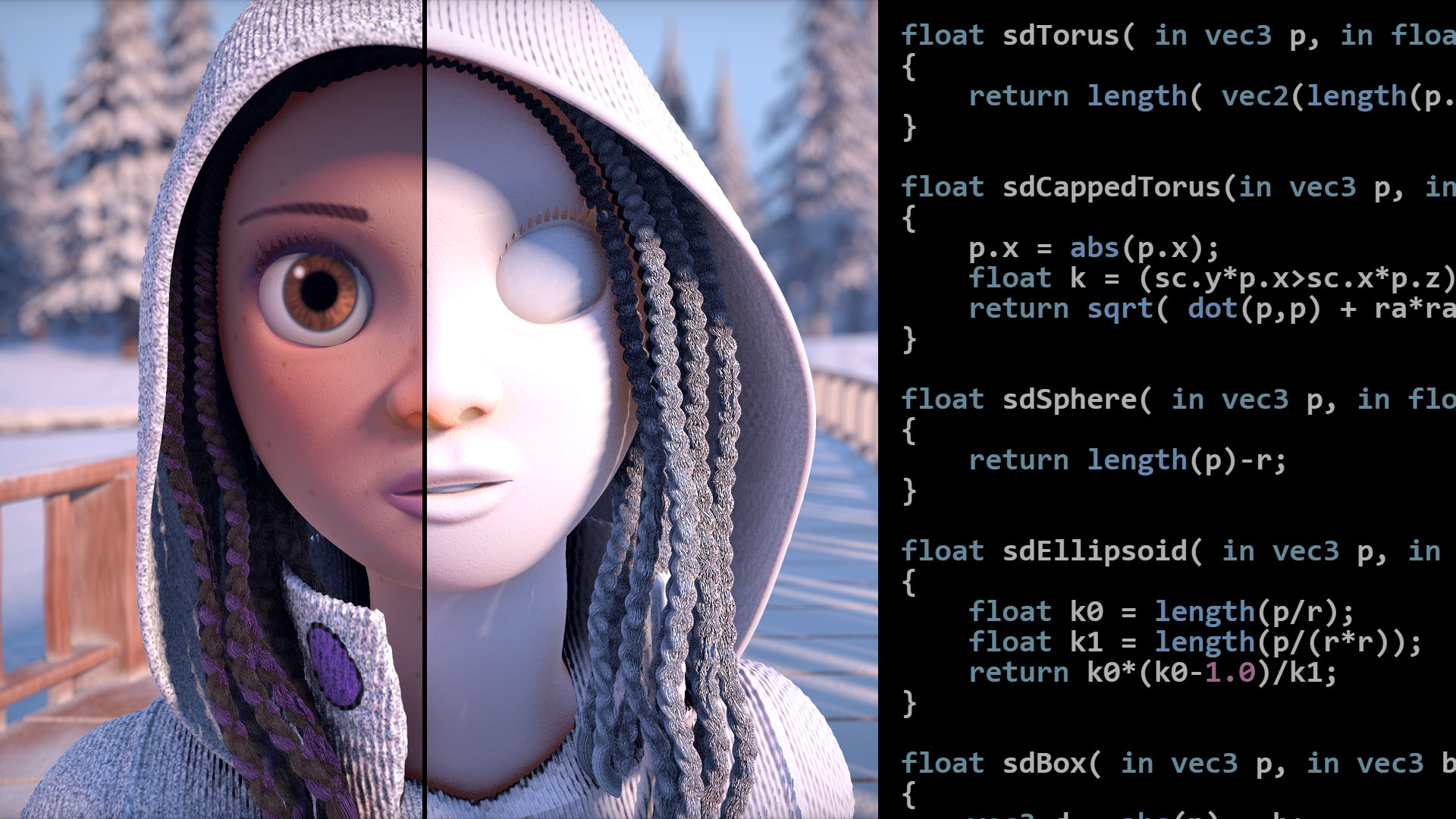
Articles on computer graphics, math and art
I'm sure we can do a simple fish in a shader :p
There was a paper I read once suggesting animator and graphics artist should do everything in code. But the idea never took off.
dark bay
I completely forgot vertices, texture coords, colours need to be in the one vertex buffer. My webgl is rust after all. :p
dark bay
Ohhh... you can do it with separate buffers too. I'm such a noob.
Oh well its one buffer now.
dark bay
Can just about demo the falling notes. Just need a tiny bit more code in the update sliding window function.
dark bay
Code is there... debugging time, I hit an infinite loop when the first note falls off the screen.
dark bay
Infinite loop is gone, but only showing first note. If I can get on a real pc rather Termux, I should be able to solve it quick.
dark bay
Works like a dream!!... I'll get the different colours in and upload a demo video
dark bay
Ahh... gets slow on a massive number of notes, will need to optimise a bit.
WebGL warning: drawArraysInstanced: Vertex fetch requires 12221808, but attribs only supply 4200000.
Either gotta boost my max notes, or there is a bug.
Most of the visual works until the notes get crazy.
I went slightly larger, then I got an error saying I am not allowed to use more than 2GB of vram 😆
Maybe I am not approaching it the right way
Maybe multiple renders to divide up the notes per render.
dark bay
Here's the 1st attempt anyway:
https://youtube.com/shorts/uy3bHr93t5U?si=RjeukrtbcwRGmn6n

 zenith void
dark bay
There was a paper I read once suggesting animator and graphics artist should do ...
zenith void
dark bay
There was a paper I read once suggesting animator and graphics artist should do ...
It's a bit what Graphite proposes ig
Only you are not locked into code either
Code = Node = UI = Code = ...
Code is most expressive... until it isn't 😁
dark bay
One thing I like about graphite is all edits are non-distructive.
zenith void
yes! the power of it being code
dark bay
I suppose next step is to compile full midi into a single audio worklet node.
Using an alternative code gen.
The instrument graph node editor can be used just for instruments. The delay nodes can allow for user defined envelopes.
Or... we can render the graph nodes with webgl too, too speed her up.
dark bay
One cool thing with have working with the waterfall right now is a streaming-vertex-buffer. It allows for unlimited notes on the screen at once without worrying about exceeding vram limits.
Like I have a fixed vertex buffer size limit for 10,000 notes, but it was still able to render the 2 million notes at once at the end.
Its probably a technique 3d libraries like three.js use already. I am only just releasing vertices can be streamed in chunks.
zenith void
you mean by doing multiple passes in a single frame?
dark bay
zenith void
you mean by doing multiple passes in a single frame?
Yeah. Nothing special :p
But it made a difference to performance.
Multiple small chunks seemed to outperform single large chunks.
zenith void
are you using instanced rendering for the webgl?
zenith void
dark bay
Multiple small chunks seemed to outperform single large chunks.
mm that is surprising
i could see it as a way to overcome a memory limitation
but the fact that it is a performance optimization surprises me
and mb indication you can do another optimization somewhere else
zenith void
dark bay
No instance rendering yet. Just 1 big triangle soup.
aa
ur generating meshes for each note?
no, i get it now
ur generating chunks of triangles as a single mesh
and then on each frame ur actually moving each vertex of this mesh?
that's pretty wild haha
i would look into instanced rendering if i was u
dark bay
zenith void
and then on each frame ur actually moving each vertex of this mesh?
Yeah... so can still be optimised further.
zenith void
ye it could be: just a single static square made of 2 triangles
and then all the notes do is position them, stretch them, etcetera
dark bay
Yeah a vertex shader could modify the length.
zenith void
then u'll be able to draw as much notes as u wanna
zenith void
dark bay
Yeah a vertex shader could modify the length.
u don't even have to
just have an array of a certain size
and then when drawing w instanced stuff u can pick how many elements u want to render
so u don't have to shorten/lenghten arrays
only when u exceed a certain range
or then do multiple passes as u mentioned now
dark bay
It visualised Rust E with a smooth frame rate on an old laptop.
https://clinuxrulz.github.io/kitty/#/music-editor
(Then go waterfall tab)
Then import, then run.
zenith void
dark bay
It visualised Rust E with a smooth frame rate on an old laptop.
https://clinuxr...
ye, pretty crazy it works hahaha
dark bay
Here's the code:
https://github.com/clinuxrulz/tool-kitty/blob/main/src/music-editor/Waterfall.tsx
Care was taken for no gc-pressure in the update loop.
dark bay
Best case scenario, still 1 gl call per loop. But instance rendering will be better. I'll do that after I can the sound going for the waterfall.
Much more data is sent in gl in that 1 call compared to instance rendering.
Its not really GC free in the update loop, there was one unavoidable line of code allocating objects:
gl.bufferSubData(gl.ARRAY_BUFFER, 0, state.notesVertices.subarray(0, noteCount * 8 * 6));
That subarray allocates a thin wrapper object around the array before it to lie about it's length.
But very small allocation per frame.
Without using that subarray it seemed to slow it down when using a larger buffer. I can probably eliminate it now that we're back to small buffers.
Would be nice if bufferSubData took a length as well as an offset.
dark bay
Will probably put these keys in a shader too:

Along the top, I can see the widths of the black and the white keys are the same. Which will be good for the falling notes.
Not sure if it is like that on a real piano too.
I see...the black keys are not all perfectly in the center of the white notes they are in-between. Even on a real piano.
The seem to maintain that constant width along the top edge between the black and the white keys.
Only the first and last key break that rule a little bit.
Tempted to raytrace those keys in the fragment shader.
Could have some fun and have a cat paw strike the notes.
dark bay
I'm a little rusty. Might have a go at constructing a distance field for the piano keys, then render them using ray marching.
I should be about to obtain the ray origin and direction from the inverse of the model view matrix:
uniform float uFocalLength;
uniform mat4 uInvMV;
uniform vec2 uRes;

void main(void) {
  vec3 ro = (uInvMV * vec4(0,0,0,1)).xyz;
  vec3 rd = ((uInvMV * vec4(gl_FragCoord.x - 0.5 * uRes.x, gl_FragCoord.y - 0.5 * uRes.y, uFocalLength, 1.0)).xyz - ro).normalize();
 . . .
The keys can be replicated by the modulo trick on their distance field.
So I am really just ray marching 1 black key and 1 white key effectively.
 dark bay
Here is a demo of the mod trick:

(p.x = mod(p.x,120.0);)
It allows you to effectively repeat objects while effectively adding near zero overhead to the distance field function.
Just needs a bit of tweaking and working out the positioning of the black keys.
I think I chopped the keys in ½ by not moving them over before applying mod. But u get idea.
dark bay
so all white are same width I assume, and black keys must be 1/2 the width of white keys.
and the top edge of the white and blacks keys must all be the same width.
dark bay
I also wonder if there is a mathematical way to assign midi numbers to keys in the shader so we can animate them moving.
dark bay
We may as well tilt the camera to show the keys in 3d:
 dark bay
I'm very confused trying to work out a modulo tricks for the black keys 😅
There must be like a skip note & shift pattern maybe.
dark bay
Almost:
Had trouble shifting it over with modulo on the outside.
Modulo does generate perfect distance field function and the math does not quite work out when you do a max(d1,d2) to union two distance field functions together.
Worse case... go back to 2D, or do the keys using triangles rather than ray tracing.
 zenith void
dark bay
The top edge needs equal gaps between the black and white.
zenith void
dark bay
The top edge needs equal gaps between the black and white.
what do you mean? looks good to me!
although the black keys should be a bit wider probably
dark bay
zenith void
what do you mean? looks good to me!
Zoom up on this reference one:

If you measure along the top edge, the width of white and black are equal.
That is what causes the black keys to not be in exact centre of the white keys.
Because the strings the piano keys strike are eventually spaced.
The width of the black keys seems it must be exactly ½ the width of the white keys for eventually spaced strings.
Equal gaps along the top will help with getting the falling notes hit the keys.
(The falling notes in the waterfall follow the strings)
I'm struggling a little bit with the modulo math for it.
Basically in the distance field function for rounded rectangular prism (key), the key is centred at the origin. And you have to use modulo and extra math to manipulate the input point before it is feed to the keys distance field function to repeat and move the keys.
... maybe the black notes do need to be thicker than ½ the white keys. Otherwise it doesn't seem possible for even gaps along the top edge.
Its like the total width of the 5 black keys per octave needs ½ the total width of the 7 white keys per octave.
5b = 0.5 × 7w
10b = 7w
b = 0.7w
I think I'm wrong still... 0.7 seems a bit thick 😅
There should be a proper math way to work it out.
Whoever made the piano is some sort of genius.
Let's work it out properly:
let q be the total width of an octave
let w be the width of a white note
let b be the width of a black note

q = 7w
q = 12b

12b = 7w
b = (7/12)w
Much better.
The next puzzle will be the centre x-coordinates. Because they will be offset from the centre of the white keys.
... or.... are the black keys in perfect centre and the white keys are off centre?
I think the black keys are in perfect centre, because they need to line up with the strings.
zenith void
True, never noticed how offcenter those black keys are when comparing to the white ones

Difficult to find a completely flat image that still displays that properly. It's mostly like

For pianorolls they often do

Gets really confusing otherwise

O with that one they actually do do the proper key sizes
Interesting to see the grid against the "proper" piano
dark bay
And have the notes run into the top edge of the keys instead of the bottom.
Makes it more clear
zenith void
zenith void
Interesting to see the grid against the "proper" piano
It can give a clue to how the ratios work
dark bay
Well the piano strings inside the piano are eventually spaced.
So the grid is the piano strings.
The string position in the white keys is in the centre of the top edge of the white keys, but not in the centre in the bottom edge.
dark bay
zenith void
Gets really confusing otherwise
Rotate those keys 180, and it becomes less confusing.
zenith void
Really unnerves me that the spacing between the E and the F are not equal

It's only at the root C that the white keys at the gap have equal width
dark bay
I think those black notes are out compared to a real piano
zenith void
dark bay
Rotate those keys 180, and it becomes less confusing.
True, almost perfect, except from that E/F gap not aligning perfectly with the grid
zenith void
dark bay
I think those black notes are out compared to a real piano
Wdym?
dark bay
zenith void
True, never noticed how offcenter those black keys are when comparing to the whi...
Look at e and f here
zenith void
Wdym with "out"?
dark bay
The amount of white in the top edge of e and f is identical in the real piano photo.
 dark bay
See along the top edge. The white and black steps are equal.
Perfect for a grid.
Because the piano strings are eventually spaced, that's why.
zenith void
I don't think they are equal at the top?
There is more white for the keys B/C and E/F
dark bay
Out of time gotta head to work... sorry... catch ya later.
zenith void
See ya random 👋
dark bay
zenith void
There is more white for the keys B/C and E/F
Maybe its the perspective of the photo. My eyes seem to see them close to the same.
I'm off camping for the new week.
No doubt I'll get some stuff in Termux while in the tent.
Hopefully we'll have an animating ray traced 3d piano getting struck by falling notes.
dark bay
Maybe we can raytrace some lighting effects as the keys get struck by the notes.
https://youtu.be/sdduPpnqre4?si=0EMvSawUUv8cRjJC

Tchaikovsky - Dance of the Sugar Plum Fairy (The Nutcracker Suite)
Click the 🔔bell to always be notified on new uploads!
♫ Listen on Apple Music Classical: http://apple.co/Rousseau
♫ Instagram: http://bit.ly/rousseauig
♫ Twitter: http://bit.ly/rousseautw
♫ Sheet music: https://patreon.com/rousseau
♫ MIDI: https://patreon.com/roussea...
I know those effects can be done in raster too. We can fallback to raster if the frame rate ends up tanking.
And gotta work out how to raytrace fur, so we can replace that hand with a cat paw. :p
Or a simple textured rectangle using an image of a cat paw might suffice.
zenith void
dark bay
Or a simple textured rectangle using an image of a cat paw might suffice.
The duality of man cat
dark bay
Fur is kinda like cones being raytraced in a 2d modulo. But they need to be distorted so they are not all pointing the same way.
No idea how well ray marching would handle that.
dark bay
All starts with a single piece of hair 😅

Now lets times it by 10,000 using modulo.
And maybe map it to polar coordinates to fit hairs on a rounded surface.
Yeah... don't know about the modulo technique for hair:

Need to randomised it a bit to break the pattern.
dark bay
The frame rate actually improves if you start adding even more hair. Probably because the more dense it is, the less iterations ray marching takes to hit an intersection.
Very pretty. Good frame rate. Bit doesn't look like fur... yet:

When its too perfect with alignments, it looks fake 😜
The star patterns are pretty though.
So if you cat had perfect aligned fur, you'll see stars.
The stars might be a rounding issue too.
dark bay
By warping the distance field a bit, you can make the hair wavy:

Its just a cone in a warped space, but kinda looks like wavy hair.
We can also animation the hair for wind, etc.
Wind, kinda:
zenith void
dark bay
Very pretty. Good frame rate. Bit doesn't look like fur... yet:
Very pretty moiré!
zenith void
dark bay
Wind, kinda:
Fuun!
dark bay
Long way off a cat paw, but seems pawlsible
zenith void
A field of pubes
dark bay
Will probably go back to the piano. Just thought I'd have a little play.
This is the shader app I'm using, if you feel like trying stuff out too. And ur stuck with a phone:
https://play.google.com/store/apps/details?id=de.markusfisch.android.shadereditor

Create GLSL shaders and use them as live wallpaper.
dark bay
CSG is a piece of cake with distance fields too:
- Union:
min(d1, d2) - Intersection:
max(d1, d2) - Difference:
max(d1, -d2)
Barely any code at all compared to the complex algorithms for CSG with meshes.
dark bay
Here is the theoretical correct key spacing to have the strings inside the piano eventually space:

That a 2d projection instead of a 3d projection so we can see the spacing more clearly.
It works by saying, the total width of 12 black nodes should be equal to the total width of 7 white notes.
I basically just array 12 black notes per octave and use an if-statement to skip certain indices.
zenith void
dark bay
Here is the theoretical correct key spacing to have the strings inside the piano...
that's the one
zenith void
dark bay
It works by saying, the total width of 12 black nodes should be equal to the tot...
interesting, kind of like a polyrythm
dark bay
What's interesting is the 2 and 3 grouping arrangement of that black notes that we see on pianos seemed like the only sensible solution.
Like the notes that sharps/flats exist for, for all of music, is completely derived from piano keys.
Any other arrangement, the black keys will not fall between the white keys neatly.
Making the piano, the most influential instrument of all time.
dark bay
....
Ohhh...
Populating an SVG not attached to the DOM is way faster than populating an SVG that is attached to the DOM.
Interesting.
Its like populate it first, then attached it to the DOM makes graph load pretty much instantly.
It must be rerendering the entire SVG as each node gets added.
Probably because of those sea of edges covering all the node. Some edges get added, and the SVG is forced to rerender all the node the edge covers ig.
If the SVG is not attached to the DOM, then there is nothing to rerender while it gets populated.
Here's the full source of the piano shader if you feel like a play too:
#ifdef GL_FRAGMENT_PRECISION_HIGH
precision highp float;
#else
precision mediump float;
#endif

uniform float time;
uniform vec2 resolution;

float sdRoundBox(vec3 p, vec3 b, float r){
  vec3 q = abs(p) - b + r;
  return length(max(q,0.0)) + min(max(q.x,max(q.y,q.z)),0.0) - r;
}

float map(vec3 p) {
  float b = 100.0*7.0/12.0;
  vec3 p2 = p;
  p.x = mod(p.x + 100.0, 200.0) - 100.0;
  float i = mod(floor((p2.x) / (2.0*b)) - 6.0,12.0);
  p2.x = mod(p2.x, b*2.0);
  bool skipB = false;
  if ( i == 0.0 || i == 2.0 ||
       i == 4.0 || i == 6.0 ||
       i == 7.0 || i == 9.0 || i == 11.0) {
    skipB = true;
  }
  float d1 = sdRoundBox(p, vec3(100,600,100), 30.0);
  if (skipB) {
    return d1;
  }
  return min(
    d1,
    sdRoundBox(p2 + vec3(-b,-180,-150), vec3(100*7/12,420,50), 20.0)
  );
}

bool march(vec3 ro, vec3 rd, out float t) {
  vec3 p = ro;
  t = 0.0;
  for (int i = 0; i < 20; ++i) {
    vec3 p = ro + rd*t;
    float d = map(p);
    if (abs(d) < 1.0) {
      return true;
    }
    t += d;
  }
  return false;
}

vec3 normal(vec3 p) {
  float d = 0.001;
  float mp = map(p);
  float dx = map(p + vec3(d,0,0)) - mp;
  float dy = map(p + vec3(0,d,0)) - mp;
  float dz = map(p + vec3(0,0,d)) - mp;
  return normalize(vec3(dx,dy,dz));
}

void main(void) {
  float fl = 1000.0;
  float mx = max(resolution.x, resolution.y);
  vec2 uv = gl_FragCoord.xy / mx;
  vec3 ro = vec3(0.0, -2000.0, 2000.0 + 1000.0*sin(time));
  vec3 w = normalize(ro);
  vec3 u = normalize(cross(vec3(0,1,0),w));
  vec3 v = cross(w,u);
  vec3 rd = normalize(
    (gl_FragCoord.x - 0.5 * resolution.x) * u +
    (gl_FragCoord.y - 0.5 * resolution.y) * v +
    -fl * w
  );
  float t = 0.0;
  bool hit = march(ro, rd, t);
  if (!hit) {
    gl_FragColor = vec4(0.0, 0.0, 0.0, 1.0);
    return;
  }
  vec3 p = ro + rd*t;
  vec3 n = normal(p);
  float s = dot(n,normalize(vec3(1,1,1))) + 0.2;
  if (p.z > 101.0) {
    s *= 0.5;
    }
  gl_FragColor = vec4(s,s,s,1.0);
}
Starting to make music now in the waterfall. Few bugs though, seems to be monophonic, but it should polyphonic:
Trying to spot the bug by eye:
https://github.com/clinuxrulz/tool-kitty/blob/main/src/music-editor/music-audio-worklet-processor.ts
Just saw the bug... all good 👍
Forgot to sort my note events
Very tight inner loop for the polyphonics:
    let output = outputs[0][0];
    for (let i = 0; i < output.length; ++i) {
      let out = 0.0;
      let meow = this.activeMeowsHead;
      while (meow != undefined) {
        let idx = Math.floor(meow.at);
        if (idx < meowData.length) {
          out += meowData[idx];
          meow.at += meow.step;
        }
        meow = meow.next;
      }
      output[i] = out;
    }
Doesn't get any more lean than that.
Cats singing the full Rust E did sound as good as I imagined it in my head. :p
Maybe I need to get sustain and velocity implemented properly. They are probably important for achieving the desired sound.
dark bay
Still another bug somewhere, it sounds different in the waterfall than it does in the instrument editor.
dark bay
Right... its the same note played 2 times in a row.
- Note 61, off, at time 50
- Note 61, on, at time 50
When I sort the events by time. The off and on can go around the wrong way, and play a note for 0 seconds instead of how long it is meant to play for.
If a midi has overlapping key down ranges, I'm not sure what to do, but we should handle that somehow.
dark bay
Waterfall has a sound:
https://youtube.com/shorts/vKpqTr6PCig?feature=share
 zenith void
 dark bay
zenith void
https://m.youtube.com/shorts/XGTmhyIyIGA
dark bay
zenith void
https://m.youtube.com/shorts/XGTmhyIyIGA
It's true
The instrument editor is able delay a single sample even if we need it for effects.
I still have a bug there where the music sounds better in the instrument editor than the waterfall.
The difference between the two i think is:
- the instrument editor uses a start time and a delay until stop.
- the waterfall uses events for start and stop for each note.
I think the waterfall can get tricked up if the same note is played on different tracks at slightly different times, because it is all mapped to one instrument in the audio worklet.
Easiest solution is probably just make the waterfall use a start time and delay until stop just like the instrument editor.
OR
Put unique ID numbers on all the key on/off, so an off-event can not switch off a same note from the wrong on-event.
dark bay
I saw some start-end looping data in the sound fonts. Gotta make use of those too. So the long notes do not end too soon.
dark bay
dark bay
Easiest solution is probably just make the waterfall use a start time and delay ...
That ID number trick seems to work.
Probably need more sound fonts, so its not always cats singing too. :p
Or get the instrument editor hooked into the waterfall for synthetic instruments.
dark bay
Next step must be getting the ray traced piano underneath the waterfall. And making sure the top of the keys align with the grid.
... ohh... some piano sound fonts are over 100Mb. Not really web friendly.
One of them was over 1 Gb.
dark bay
So to implement velocity, I just change the volume of the notes it seems. (For a basic implementation)
dark bay
dark bay
... ohh... some piano sound fonts are over 100Mb. Not really web friendly.
Found one at 5 Mb.
Just nice to have a piano sound like a piano as an option.
dark bay
dark bay
---
Next step must be getting the ray traced piano underneath the waterfall. And...
And let's animate those keys moving. (Rotation transform over distance field's input point trick.)
dark bay
Math time:

gotta work out the position of the camera so the keyboard sits neatly on the bottom and all keys can be seen.
also gotta workout the perspective such that the top of all the keys align with the falling notes grid.
not sure if that will be possible, might have to go for a top-view 2d keyboard, because of the perspective of the raised black notes.
would be nice to have a 3d keyboard with moving keys, but does not seem it will align with the falling notes.
May still go with the 3d piano since we already put the effort into making it.
dark bay
dark bay
----
Math time:
Maybe the perspective just needs to be a little less extreme or more tilt on the piano keys, so that tops of white keys are not completely hidden by the black keys surrounding them.
So we have:
projection_x = x * focal_length / z
We can use to figure out how to fit all the keys on the screen.
z = x * focal_length / projection_x
(Set projection_x to ½ your screen width, set x to ½ your piano width, then you can calculate how far the piano needs to be from the piano so that it fits on the screen`.
(z will be the distance to the closest bottom edge)
focal_length = 0.5 * screen_height / Math.tan(0.5 * fov_y * Math.PI / 180.0);
And fov_y is generally 50 degrees, but maybe it should be different for a mobile screen in portrait.
dark bay
52 white keys on a piano. Just like a deck of cards. That will be easy to remember.
dark bay
Must of miss-calculated the range:

Should be two uncut white keys at the first and last white key position.
But I count 52 white keys...
dark bay
dark bay
Will probably put these keys in a shader too:
Actually, just the last white key is uncut.
The lowest octave should have last 3 notes of that octave.
Other octaves should be complete.
Should be the right range now:
 dark bay
Ops... that's only 48 white keys.
Now we are right. Perfect fit width-wise. Exactly 52 white keys:

Will need to also calculate the physical projected height of the piano keys, so the notes know where to stop.
Its a shame the keys will be so tiny on a mobile screen the key movement animation will be hard to see.
dark bay
A graphic card is very much like a SIMD in its shader.
One interesting consequence of that are for if-statements. If parts of bulk data take one branch, and other parts take another branch. Both sides of the branch need to finish before the entire bulk data operation can proceed to the instructions after the if-statement.
I.E. Earily bailing if-statements will not always improve performance in a shader.
Some times it does help, sometimes it doesn't help. Just depending on what data points are being processed in the shader (SIMD-like) at one point in time.
Afaik, not every pixel is processed at the same time. But many pixels are processing at one time in large batches.
I believe discard; in the right places can help out. discard; discontinues the fragment shader for the data points they are called on. They can prevent the bulk options to wait for all sides of the if-statements to finished, because some data points will not need to proceed to after the if-statement because they already bailed, so they do not need to wait.
dark bay
and here she is in the program:

might have to put anti-atlasing in that ray-tracer/ray-marcher
(ray trace at double the resolution, and average the pixels)
dark bay
Actually that projected height calculation is incorrect. It just looks right.
The projected height depends on where it sits on the screen relative to the camera.
And where it sits on the screen relative to the camera depends on the projected height.
So I have a cyclic dependency there to solve.
A bit of algebra should be about to handle it.
(You'll see in the screen shot it is cutting off of the black keys at the top. Close, but not quite right.)
dark bay
So we have our:
- blue screen
- red rays
- purple piano

Goal: Calculate the height covered on the screen by the red rays. After shifting the piano down until the bottom red ray touches the bottom of the screen without changing the distance of the piano from the camera in the camera facing direction.
dark bay
That's solved. Now animating individual keys:
The modulo trick for duplicating keys is a bit of a hack, and I believe that is why we have a few ray tracing glitches. But the ray marcher should be able to be tweaked to work around the glitches.
dark bay
Rather than raytrace individual hairs for the cat paw. Maybe a procedural fur texture would be more suitable:

Using AI to help with procedural texture. Its a bit out of my league.
dark bay
To make the paw itself, we can probably do:
- a squished cone with the top cut of for the lower arm.
- a squashed sphere for the palm of the pawn.
- many egg shaped spheres to the ties.
And blend all the distance fields together so it feels like a continuous surface (eliminates seams). (Like a cross fade in audio processing, but with distance fields.)
Ahh... its called smooth-minimum:
https://iquilezles.org/articles/smin/
dark bay
dark bay
To make the paw itself, we can probably do:
- a squished cone with the top cut o...
actually squashing a cone is not as easy as I though, it will be tricky.
dark bay
cat paw attempt #1:
(Just a cone, a sphere, and a soft union)

Inigo also has a few tricks up his sleeve for fixing the damaged distance field when using modulo to repeat objects in a scene.
Should still be able to get a squashed cone and sphere by a soft intersection with themselves (with a slight offset to control the thickness)
dark bay
This distance field modelling is one area a graph/node based editor would be handy.
(Have a graph generate fragment shader code.)
zenith void
dark bay
Inigo also has a few tricks up his sleeve for fixing the damaged distance field ...
nice! https://iquilezles.org/ seems like a great resource
Tutorials and articles of Inigo Quilez on computer graphics, fractals, demoscene, shaders and more.
dark bay
zenith void
nice! https://iquilezles.org/ seems like a great resource
Inigo is a legend!
zenith void
dark bay
This distance field modelling is one area a graph/node based editor would be han...
absolutely, it translates well to primitives because they are already little self contained mathematical expressions
dark bay
There is also marching cubes algorithm to translating a distance field back to a mesh for rastering.
zenith void
dark bay
Inigo is a legend!
o cool, just looking at what he did. quill is fun, i played around with that and co-founder of shadertoy that's sick!
zenith void
dark bay
There is also marching cubes algorithm to translating a distance field back to a...
yes, classic!
i think a fun one to implement too
zenith void
zenith void
o cool, just looking at what he did. quill is fun, i played around with that and...
that's fun that quill came from his name, works too well as an app name
dark bay
Let's step away from the music and work on node based 3d modelling editor when free time comes around again.
Do a good cat paw, and come back. :p
Or we might get stuck there for a while and do some rigging/animation tools too.
dark bay
Who knows, maybe ToolKitty could be made a mixed 2d/3d game creator with a bit of work.
Want to explorer signed distance field modelling a bit more.
dark bay
dark bay
https://iquilezles.org/demoscene/
Looking back at this sdf artwork by Inigo... only 16 objects used being blended together. And the result is quite impressive.
We will hit a wall where the frame rate will tank eventually and rastering will be faster. But doesn't hurt to try.
dark bay
Imagine we show the node graph and the 3d view side by side.
And have kinda like unbounded sliders to positioningal and sizing objects so we don't have to manually key in value. As artwork is more about how it looks than the values that produce it.
dark bay
Doing a major refactor to make the node graph editor reusable for all kinds of stuff.
(Rather than copy paste and repurpose)
And breaking it down into separate real-packages to keep it modular.
(pnpm workspace packages, still mono repo)
I'll try to keep all package dependencies to form a DAG, but might get tricky.
dark bay
... gotta throw tool-kitty-... in front of all the package names. Hit a conflict :p .... util is already taken by node.
Probably good practice to do that. In case the packages all get released separately one day.
I'll do the tool-kitty-... renames on my next sweep after the first refactor.
Its good to have started with the instrument editor then refactor out, as it helps scope out the requirements of the exposed API.
Interesting... hit my first use case of a generic solid component (generic type parameters). Hope it works.
fingers cross that the JSX can handle it:
function RenderNode<TYPE_EXT,INST_EXT>(props: {
  node: NodesSystemNode<TYPE_EXT,INST_EXT>,
  isHighlighted: boolean,
  isSelected: boolean,
}): JSX.Element {
 . . .
Kicked off for now. But barely any compile errors. Looks promising.
So:
TYPE_EXT(node type extension) is the extra stuff thrown in aNodeTypefor the users use-case.INST_EXT(node instance extension) is the extra stuff thrown inNodefor the users use-case.
For the case of the instrument editor the code gen methods for the audio worklet node are the extensions.
Different use cases will have different extensions.
For the case of the distance field model editor... it will be code-gen again, but specialised for GLSL code.
For the use case of character AI.... code-gen again lol... I'm sure one of the use cases will not be code gen.
dark bay
Should be able to find a way to refactor out TYPE_EXT and INST_EXT later on somehow without any type casts, just not sure how yet. (To prevent generics everywhere.)
Actually it is possible with existential types, but TypeScript does not support those yet.
dark bay
OK... that's a bit awkward:
import * as _NodeEditorUI from "./NodeEditorUI";

export const NodeEditorUI = _NodeEditorUI.default;
ah... like this:
export { default as NodeEditorUI } from "./NodeEditorUI";
Kinda excited now. I have my own general purpose node editor. (Not just for audio worklets)
dark bay
Just massaging the instrument editor to use the new reusable node editor. After that I'll get started on the 3d signed distance field model node editor. (Reusing the same reusable node editor.)
dark bay
dark bay
Just massaging the instrument editor to use the new reusable node editor. After ...
This part is taking me longer than expected. But it's still straightforward. Just lots of little changes to adapt it to the new reusable node editor.
dark bay
Almost there... was up all night on Termux in bed. 😅
dark bay
... no type errors left. Untested though.
dark bay
and its working (reusing reusable node editor for instrument editor)
went smoother than expected.
Here is the reusable node editor:
https://github.com/clinuxrulz/tool-kitty/tree/main/packages/tool-kitty-node-editor/src
time to move onto the 3d editor
dark bay
only 30 lines of code to start using the reusable node editor. I think that's a win.
any improvements made to the node editor will benefit both the instrument editor and the 3d model editor.
plus built-in support for using the node editors with automerge
dark bay
Kicking some goals now. Will hopefully have a 3d demo by tomorrow.
dark bay
Will do a split screen with the nodes and the 3d, and throw in slicers to help position things.
dark bay
... here is how easy it will be to ray march a sphere:

and of course we will have all our boolean operations, repeats, scale and transforms as separate nodes that we can combined with any other nodes.
dark bay
This graph will definitely be easier to use than writing the shader code by hand.
And it can have multiple types of code gens.
- one for the distance field ray marching style.
- one for the mesh.
Export to ply and we can 3d print them too. (Garenteed manifold if using the nodes.)
dark bay
Just need a drop of computer time and she'll be done.
dark bay
Another thought... the node editors could even be combined to give one audio/visual editor... but the code gen would get rather confusing.
dark bay
Start of fragment shader code gen, will need a bit of tweaking though:
 zenith void
dark bay
Another thought... the node editors could even be combined to give one audio/vis...
zenith void
dark bay
Another thought... the node editors could even be combined to give one audio/vis...
🤔 oo that is kind of interesting
dark bay
zenith void
🤔 oo that is kind of interesting
And difficult to implement. :p
(Cross communication across different contexts.)
dark bay
First draft of code-gen for sphere node:
    this.ext.generateCode = ({ ctx, inputs, }) => {
      let radius = inputs.get("radius");
      if (radius?.type != "Atom") {
        return undefined;
      }
      let radius2 = radius.value;
      let sdfFn = ctx.allocVar();
      ctx.insertGlobalCode([
        `float ${sdfFn}(vec3 p) {`,
        `  return length(p) - ${radius2}`,
        "}",
      ]);
      let colourFn = ctx.allocVar();
      ctx.insertGlobalCode([
        `void ${colourFn}(vec3 p, out vec4 c) {`,
        `  c = vec4(0.7, 0.7, 0.7, 1.0);`,
        "}",
      ]);
      return new Map<string,PinValue>([
        [
          "out",
          {
            type: "Model",
            value: {
              sdfFuncName: sdfFn,
              colourFuncName: colourFn,
            },
          },
        ],
      ]);
    };
ohh... I should have a IntNode and a FloatNode instead of a NumberNode. Types are a bit more strict in glsl than javascript.
So basically the compile-time pin value type for models is a pair of function names, one for tha signed distance field, the other one for the colour if a ray collision occurs when ray marching.
Further nodes can manipulate the inputs to perform things like rotation, or manipulate the outputs to perform things like boolean operations.
I think its a very nice abstraction. As conceptually when placing the nodes, you can visualise it as transferring the physical model and operating on it.
dark bay
Basic code-gen is working... time to hook up a display
dark bay
Down the road we can do some IRs for this code gen stuff so we can run optimisation passes over the generated code.
dark bay
getting closer... just messed up some math somewhere:

... ahh... forgot to send the focal length into the shader for the camera
There we go:
 dark bay
Gotta do the cleanup code before I get carried away to avoid memory leaks. (Delete gl program and shaders when a new program comes along.)
dark bay
Translate:

 dark bay
 dark bay
Just added soft-union. Will do some more later.
dark bay
There is probably some more refactoring to do. It feels like a fair of boilerplate per node.
dark bay
One feature I think the node editor is lacking is comments.
If a graph gets really big and you come back to it after a week, it will be hard to know what is what in the graph.
Even if its just a coloured box that goes underneath all the nodes it relates too with some comment text up the top.
Or even the ability to make functions, and then use those as nodes to help break it up.
Here is something really amazing.
Inigo used a kd-tree to turn a mesh into a signed distance field function. And that allows him to do all his sdf tricks on top of it.
zenith void
dark bay
---
Here is something really amazing.
Inigo used a kd-tree to turn a mesh into ...
really sick!!
dark bay
Hello Infinity:
 dark bay
Maybe a render config to switch on shadows and reflections would be nice too. Only some objects will want to have reflections though. Need a like a material properties for the objects.
dark bay
Something off with the shading colours on mobile. Maybe I need to clamp the rgb(s) between 0 and 1.
 dark bay
Maybe a render config to switch on shadows and reflections would be nice too. On...
dark bay
dark bay
Maybe a render config to switch on shadows and reflections would be nice too. On...
And fog.
dark bay
Normals are playing up here for some reason. But we have soft-difference:
(k is like the radius to use to eliminate sharp edges from the boolean operation)

Crazy just how easy things are to do with signed distance functions compared to working with meshes.
Thousands of lines of code for a boolean operations on a mesh is like one line of code when using SDFs.
Probably need intersection, soft-intersection and then start working out how to do materials/textures.
Inigo has a long history with SDFs, even before shaders existed for opengl.
He used to do them using SIMD on the CPU. (Single instruction multi-data).
It's hard to believe this is just one be signed distance function:

The randomness is the scene for mountains and clouds comes from a perlin noise function.
Just looks photo real. Quite stunning.
Kinda make you wonder if meshes (triangle soups) are a limitation for graphics cards.
dark bay
Load & Save added to both instrument editor and model editor at the same time. (via adding Load/Save to the node editor being used.)
 dark bay
Weird, works on desktop and my phone, but not my daughters tablet :p
Same old... write one, debug everywhere...
This is fun.... now he has hair, kinda... just like modelling with clay:

Might be time to get materials working now, and maybe some sliders so we are not keying in numbers all the time.
dark bay
Tweaked the shader so the model editor works on my daughters tablet. Mimicked another geometry dash character, scaled it down and repeated it infinitely.
My daughter enjoys mucking around with it. She pulled the tablet straight out of my hands the moment I did it. :p
dark bay
Hmm... commenting idea... select all nodes to comment, then a comment box is created that automatically positions and sizes itself to include all the nodes it is commenting.
And some camera controls. The todo-list seems infinitely long. :p
zenith void
dark bay
Kinda make you wonder if meshes (triangle soups) are a limitation for graphics c...
i think it's the other way around actually: meshes are an optimization. there is a cut off point where doing SDFs becomes more expensive then rendering the meshes, especially with instancing and the like.
dark bay
zenith void
i think it's the other way around actually: meshes are an optimization. there is...
True i guess.
dark bay
Like you can use kd-trees on top of SDFs to optimise it. But its a lot of manual work.
zenith void
but same trade off: less memory (full fps in 64kb!) for more computation
zenith void
dark bay
Like you can use kd-trees on top of SDFs to optimise it. But its a lot of manual...
what are kd trees?
i can look it up if u don't wanna explain
oo i see
it's like a spatial hash grid
?

🛒 Recommended books (on Amazon): https://www.amazon.com/hz/wishlist/ls/1IMV0IR3QIZMQ?type=wishlist&tag=simondev01-20&sort=priority&viewType=grid
❤️ Support me on Patreon: https://www.patreon.com/simondevyt
🌍 My Gamedev Courses: https://simondev.teachable.com/
Disclaimer: Commission is earned from qualifying purchases on Amazon links.
...
dark bay
Yeah...
dark bay
You can group stuff together in a bounding box tree, and do a cheap ray box intersection to see if that part of the SDF should be skipped.
zenith void
zenith void
ooo i think i read about it w regards to doom
BSPs at least, don't know if they used kd trees specifically
zenith void
dark bay
You can group stuff together in a bounding box tree, and do a cheap ray box inte...
gotcha
dark bay
Few different techniques all with their own trade offs.
zenith void
dark bay
It's hard to believe this is just one be signed distance function:
it has this wolfram/fractal idea/feel to it
complexity arising out of simple operations
dark bay
zenith void
it has this wolfram/fractal idea/feel to it
And that particular scene would be slower with triangles unless you implement LOD.
zenith void
dark bay
And that particular scene would be slower with triangles unless you implement LO...
and instancing?
dark bay
zenith void
and instancing?
Yeah
SDF just feels so flexible. Especially if the model is animating.
zenith void
it is a hell lot of detail for sure
zenith void
dark bay
SDF just feels so flexible. Especially if the model is animating.
ye it's amazing!
it's cool for 2d stuff too
it's basically Substance Designer
what u made
dark bay
Like soft boolean operations on an animating model would be painfully slow on a triangle soup.
Could always be a mixed deal... mostly triangles, and then SDF shaders on destructible walls.
zenith void
i think as a modeller it's great!
u can always build to mesh
have u watched these shader showdowns from the revision demoparty 👉 https://www.youtube.com/watch?v=Rk9f4GUuXGk ?

Programmers face each other off, live on stage, coding GLSL shader effects from scratch with no outside assistance besides the DJ pumping some beats. The crowd gets to watch the code evolve on the big screen, enjoying the action and cheering on the participants.
The objective is simple: At the end of the 25 minutes, whoever gets more votes wins...
is a lot of fun and cool inspiration!
dark bay
zenith void
have u watched these `shader showdowns` from the revision demoparty 👉 https://...
I'll watch it tonight in bed.
zenith void
would be fun to make a shader showdown setup with ur node editor and automerge 🙂
dark bay
Most their stuff is likely SDF.
zenith void
dark bay
Most their stuff is likely SDF.
yuuup
a lot of raytracing SDFs
but people do wiiild stuff!
dark bay
Just too slow and hard to do things quickly with triangles. 🔺️
zenith void
(haven't watched the one i linked to btw)
zenith void
dark bay
Just too slow and hard to do things quickly with triangles. 🔺️
exactly
also
it's all in a single shader
so i don't think u even can generate meshes?
kinda has to be sdf-ish ig
dark bay
zenith void
so i don't think u even can generate meshes?
There is a SDF formula for individual triangles, but would get slow that way.
Unless an accelerated data structure is built on top of it... which Inigo did with that demo from a while back.
If in a competition, u'd need a text based DSL, dragging nodes will not be quick enough compared to the keyboard.
But the nodes make it noob friendly... who wants to learn a new programming language anyway?, there are way too many.
dark bay
dark bay
There is a SDF formula for individual triangles, but would get slow that way.
From Inigo... one triangle:
float udTriangle( vec3 p, vec3 a, vec3 b, vec3 c )
{
  vec3 ba = b - a; vec3 pa = p - a;
  vec3 cb = c - b; vec3 pb = p - b;
  vec3 ac = a - c; vec3 pc = p - c;
  vec3 nor = cross( ba, ac );

  return sqrt(
    (sign(dot(cross(ba,nor),pa)) +
     sign(dot(cross(cb,nor),pb)) +
     sign(dot(cross(ac,nor),pc))<2.0)
     ?
     min( min(
     dot2(ba*clamp(dot(ba,pa)/dot2(ba),0.0,1.0)-pa),
     dot2(cb*clamp(dot(cb,pb)/dot2(cb),0.0,1.0)-pb) ),
     dot2(ac*clamp(dot(ac,pc)/dot2(ac),0.0,1.0)-pc) )
     :
     dot(nor,pa)*dot(nor,pa)/dot2(nor) );
}
Its "ud" for unsigned distance. (It has a positive distance of both sides of the triangle.). a, b and c are the points on the triangle.
You'd need an accelerated data structure to dodge most the calls to udTriangle.
One thing though... ray marching gives you perfect occlusion culling. Really good for dense forests.
I know its incremental... but just about everything is really.
Like a square root is even computed incrementally on the hardware, if you have an exact formula for something that needed square roots.
Incremental is unavoidable.
Shadertoy has been down lately. Been wanting to look to it for inspiration.
zenith void
getting hit by ai crawlers apparently: https://bsky.app/profile/iquilezles.bsky.social/post/3m2uzkj2x3c2q

-# ↩ Joni Korpi (@jonikorpi.com)
Yeah, we only had 1 week of break between AI crawler attacks. This one is even hungrier than the last one.
 Bluesky
·
Bluesky
·
ugh
death of the internet
dark bay
AI loves it too. :p
 dark bay
I remember that movie.
zenith void
did not know there was a movie too!
only know it from https://en.wikipedia.org/wiki/Max_Headroom_signal_hijacking
wait lol nvm
i m confusing stuff
dark bay
I suppose... SDFs can generate multiple LOD meshes that can be used.
SDFs feel like an SVG for the 3d world.
dark bay
And can calculate vertex weights for animation of limbs too.
Instead of painting your vertex weights manually.
(The deformation that occurs between two connected body parts as they move.)
dark bay
dark bay
If in a competition, u'd need a text based DSL, dragging nodes will not be quick...
Could do both... have a text based DSL that is identical to the node graph in syntax and usage.
And then its up to the end user to use either the node graph or their keyboard.
The node graph then becomes an interactive documentation for the text based DSL.
dark bay
When I have colours/materials going. I'll have a shot a modelling up this character:

Seems it shouldn't be too hard.
Might be able to rig her up too.
zenith void
dark bay
----
Could do both... have a text based DSL that is identical to the node graph ...
It's kind of the graphite approach right?
dark bay
zenith void
It's kind of the graphite approach right?
Kinda... graphite is more advance.
If I had modes that also allowed me to directly manipulate the 3d model with the mouse, and it still constructed the node graph under the hood. Then it will be like graphite I think.
zenith void
dark bay
If I had modes that also allowed me to directly manipulate the 3d model with the...
I think it more adjusts parameters with ui right?
dark bay
I'm a bit of a fan of "The amazing digital circus"
dark bay
zenith void
I think it more adjusts parameters with ui right?
Yeah.
zenith void
dark bay
I'm a bit of a fan of "The amazing digital circus"
What's that?
dark bay
Its a animation series.
zenith void
dark bay
Yeah.
Ig is a bit of both actually: some actions will create nodes/others will change parameters.
dark bay
About people who get trapped in this digital world after putting on a headset.
And they can not escape.
zenith void
Oo neat
zenith void
dark bay
---
When I have colours/materials going. I'll have a shot a modelling up this ch...
Oo I see, that's where this character is from
dark bay
It's free to watch on YouTube.
zenith void
Nice gonna check it out
dark bay
Only 6 episodes so far.
Episode 7 comes December 12.
It has a lot of mystery, and hidden clues in the scenes.
And has the psychology of abuse and how people react / cope, etc.
I won't spoil it for ya, if your gonna watch it. :p
zenith void
Sounds amazing ngl. Gonna watch it asap
dark bay
Sneaked in a Rotate node:

I'll need it for animating the movement of limbs.
Got an infinite cylinder node. Just need a finite one too.
Some colours. Then I'd be pretty close to modelling Pomni (amazing digital circus character)
It should be possible to do a shader that has a white background, white faces and edge lines too, to make colouring page print outs too.
dark bay
Let there be colour:

code reuse FTW 😛
Well... almost... its just picking the last colour at the moment. I need to blend object colours together in proportion to their distances.
I'd probably want an Apply Colour node instead, and just have the Colour node separate just for constructing a colour value.
That way I can have a checkers node and supply it with two Colour values for the checker squares.
dark bay
Also when we have a smooth union of two different coloured objects we may either want smooth transition in colour or nearest neighbor.
dark bay
Multiple colours in working, but will need some tweaks:
 zenith void
aaaa so cool!! great work random!
dark bay
I messed up the checkers material, but still looks cool:

 dark bay
if you cut each of those squares into triangles... then it is what marching cubes for that sphere SDF would produce i believe.
dark bay
@zenith void If you feel like it, you're also welcome to throw in some nodes/primitives. (Inigo's site has tonnes of them.)
In the components and nodes folders in this folder https://github.com/clinuxrulz/tool-kitty/tree/main/packages/tool-kitty-model-editor/src
- you just copy-paste a node that is closest to the one you wanna make
- tweak the input/output pins to suit your node.
- tweak the code gen inside the node code.
- make sure the new ecs component is registered in
components/registry.ts - make sure the new node (interpretation of the ecs component) is registered in
nodes/node_registry.ts
and that's it... its fun to play with.
dark bay
we'll need to do up a 3d raytraced version of the solid.js mascot too 😉
dark bay
smooth colour blending:

notice how it gradually changes from blue to red in the middle
will probably want the option of both smooth and hard blending in the colours
dark bay
I'll admit there are a few bugs here and there... but it was mostly just smashed together quickly. Will fix all the bugs gradually.
zenith void
dark bay
will probably want the option of both smooth and hard blending in the colours
ye, would be cool if you could shape how you want the lerps to be
probably interesting for controlling the transitions of the SDFs too
dark bay
zenith void
ye, would be cool if you could shape how you want the lerps to be
Definitely possible. Its all just math.
Like a node with a line drawing in it for the shape of the lerp, and you just reshape the line.
There is also a formula for a SDF of a 2d shape being extruded along a b-spline curve.... (i think... having trouble finding the formula now)
Lots of flexibility.
SDF of a bezier curves from Inigo:

He has so much stuff on his site.
It looks like there is no way to do a squashed sphere. But then you can just do a 2d oval SDF and revolve it to get a 3d squashed sphere. Sometimes you need to be creative with how to form the shape.
(Was gonna do a cat paw out of squashed spheres, but didn't know how to squash a sphere at the time.)
dark bay
zenith void
probably interesting for controlling the transitions of the SDFs too
Absolutely... there is more than one way to blend the distances together.
It feels very much like cross fading in audio processing.
Its like there is a connection between SDFs and audio.
zenith void
i m looking at the code rn
for example in https://github.com/clinuxrulz/tool-kitty/blob/main/packages/tool-kitty-model-editor/src/nodes/SphereNode.ts#L43
GitHub
Just a muck-around project. Contribute to clinuxrulz/tool-kitty development by creating an account on GitHub.
dark bay
dark bay
Its like there is a connection between SDFs and audio.
Both are signals
zenith void
is radius.value an actual value?
that gets interpolated?
or is it a uniform?
or said differently: does the shader gets recompiled each time you change a parameter in the editor?
dark bay
Its a hard coded constant in the shader code 😆
zenith void
o i see
dark bay
zenith void
or said differently: does the shader gets recompiled each time you change a para...
Yeap... I'll fix that later.
zenith void
could be interesting to see if we can hook view.gl up to it
dark bay
Needs to use uniforms for those.
zenith void
ye... and probably control over if u want uniforms/attributes/instanced attributes/...
which we might be able to easily accomplish with view.gl
dark bay
Uniforms to start with... no triangles in the scene yet.
zenith void
dark bay
Uniforms to start with... no triangles in the scene yet.
true
it's all in a fragment shader
i mean, ig there are triangles: but it's just to make the single quad
to be pedantic 🤣
dark bay
Textures maybe too. A texture node where you upload an image.
zenith void
dark bay
Textures maybe too. A texture node where you upload an image.
yes exactly
the whole data story
i'll have a look
dark bay
Very noob friendly... users don't need to know GLSL.
zenith void
ye these sdf modellers are very intuitive for noobs
making holes/blending/build up from primitive shapes to make complex shapes/...
dark bay
view.gl might be tricky to hook up. Because we have a node editor rather than text code, but can still have a try.
zenith void
also no triangles
dark bay
Triangles can come later.
zenith void
dark bay
`view.gl` might be tricky to hook up. Because we have a node editor rather than ...
not sure tbh
think it might be easier then u think
u already have like this allocVar to create a random name in the shader
the same logic can be used to make a variable in a schema
this schema then gets accumulated over the nodes
and collected in the final node
zenith void
toolkitty is such a crazy bunch 😜
 dark bay
zenith void
toolkitty is such a crazy bunch 😜
dark bay
zenith void
toolkitty is such a crazy bunch 😜
To avoid name collisions with other packages on node 😉
I've seen Bevy do the same thing.
zenith void
o ye 🙂 i scope everything i do under @bigmistqke
serves as a warning for people that wanna use my libraries
zenith void
dark bay
a lot of your code I've read is actually of high quality imo
thanks random really appreciate ❤️
dark bay
U'll notice if the same SDF is used multiple times by other SDFs, it is just re-calling its function for now.
We can optimise that later.
But it will require no change to the Node code
Just changes in CodeGenCtx.ts (other trick up my sleeves)
Basically caching function call invocations in the code gen.
let d1 = sdf(p1)
map.set("sdf(p1)", "d1");
Needsdf(p1)again? Check map... ahhd1, used1directly.
That sort of idea.
dark bay
zenith void
for example in https://github.com/clinuxrulz/tool-kitty/blob/main/packages/tool-...
Ahh... also Atoms are a type marker for value level things. So the string contents of .value can be a uniform variable names too (as well as constants), once we have uniforms.
We can also add a .type later to make our own type safety for the node graph.
(Provide errors to the user when pins of different types get connected.)
zenith void
dark bay
Ahh... also `Atom`s are a type marker for value level things. So the string cont...
That's how I am doing the template tag stuff in view.gl!
can u show me smallest graph to get something in the model editor?
oo i see

the units were small, so i couldn't see it
1 is 1 pixel?
also ig we have to do some transformation so that the sdf doesn't get scaled according to the viewport's proportions
dark bay
zenith void
1 is 1 pixel?
Ahh... refresh the page...
I didn't update the model view matrix when the canvas size changes
Because I was lazy
dark bay
I mean the Orth2D projection thing
But yeah. Gotta hook up to ResizeObserver.
Rotate node if you want to see the cube from a different angle
No camera controls hooked up yet
zenith void
it would be nice if there were some sensible defaults for the inputs
dark bay
zenith void
on mobile it's less of an issue ig
On mobile the node window is very tiny to work with. Might do what "Shader Editor" does for Android and overlay them.
zenith void
dark bay
On mobile the node window is very tiny to work with. Might do what "Shader Edito...
definitely could be a fun mode
gets u immediately in a hacker mode 😎
there is also another famous node editor that does that stuff
what's the name again
dark bay
Could be released as an Android/iPhone just for that node editor itself.
For ppl who wanna do stuff quickly.
zenith void
zenith void
what's the name again
touchdesigner!
dark bay
zenith void
touchdesigner!
Will look it up. 👍
zenith void
dark bay
Will look it up. 👍
o ye if u don't know it yet u should definitely check it out
 zenith void
i would say probably most typical vj software for people dabbling with digital arts and code
i agree
zenith void
zenith void
i would say probably most typical vj software for people dabbling with digital a...
or better said no-code
dark bay
 zenith void
oof
zenith void
dark bay
A node graph really is code though (`no-code`)
100%
coding with extra steps
and no autoformat
dark bay
Making it scale will be the challenge with node based.
zenith void
also true
zenith void
zenith void
and no autoformat
prettier for graphs would be really cool
dark bay
(Maintainablity-wise)
zenith void
dark bay
(Maintainablity-wise)
a also
but subgraphs can solve a lot
being able to make nodes out of graphs
also solves the perf problem
dark bay
zenith void
but subgraphs can solve a lot
I'll have to put that on my todo list.
Want to be able to make a HUGE graph, and still understand what it does 2 months later.
zenith void
i think what u said before about comments is very true too
dark bay
I currently find reloading a graph, it takes me a while to figure it out.
dark bay
Didn't know tldraw had a node editor too.
zenith void
ooo.....
ye they are doing crazy stuff with it hahaha
lu wilson is a lot of fun to follow in regards to that 👉 https://bsky.app/profile/todepond.com
 dark bay
Stealing our ideas again are they? 😆
dark bay
I don't have a great relationship with AI at the moment. :p
zenith void

Google AI for Developers
Prototyping a new natural language computing experience on an infinite canvas with Gemini 2.0
really really cool
dark bay
That is cool though 😎
I thought Automerge were like small players... they are seeming quite big.
zenith void
dark bay
I thought Automerge were like small players... they are seeming quite big.
ye ink and switch is pretty influential!
lu is also research at ink and switch
so there is direct relation between those two projects
dark bay
I see...
zenith void
small world 🌐
dark bay
What a place to work...
zenith void
i knoooow hahaha
dark bay
Chee is very lucky.
zenith void
ye so happy for them!
really cool there is now someone in that mix that has deep love for signals.
world will be a better place bc of it
dark bay
I think it's inevitable... the signals thing
Too much human error to maintain complicated state with just vanilla.
Especially in team environments.
zenith void
for sure
dark bay
I used to think I was crazy for using signals all the time. But now I see it the other way.
zenith void
i like that tool-kitty has this single start script to start everything up
just a single demo page with everything listed in the repo is nice
dark bay
zenith void
i like that tool-kitty has this single `start` script to start everything up
My laziness 😆
zenith void
path of least resistance is a powerful guide 🙂
dark bay
There that "App" link in there where I was planning to tie it all together.
Sometimes its nice to have them separate too for quick access.
zenith void
i wonder for these places where you do interpolation of function names, if you can't instead simply pass them as arguments?
then you wouldn't need separate instances of the same function
and not have to do specific types like ```tsx
{
type: "Model",
value: {
sdfFuncName: string,
colourFuncName: string,
}
}
or doesn't glsl allow for passing functions as arguments?
dark bay
Ahh the reason for that is. I only want to compute the colour after a successful intersection of the marching ray against the surface.
So it's been forked into two functions.
colourFuncName is the name of the function to convert an x,y,z point to a colour.
sdfFuncName is name of the function for the upper bound on a distance from the current point in the ray march to the surface.
zenith void
zenith void
or doesn't glsl allow for passing functions as arguments?
apparently it doesn't
so i was wrong anywho
dark bay
zenith void
apparently it doesn't
Yeap... I wish glsl had high order functions though.
Yeah... just very few data types in glsl
We can mimicked our own larger types with a macro like approach.
zenith void
do u mb have some cool graphs u wanna share that i could have a look at?
would be fun if there were some examples in the editor for noobs like me
dark bay
My daughter has a nice one on her tablet. It's on the charger right now.
I have another one on the TV, but my wife will get up me 😆
Will check my phone
Got this one on my phone.
Only basic though:
The up arrow is the load button.
zenith void
awesome
dark bay
Here. Another one:
It's Melty from Geometry Dash
Snuck that one off my daughters tablet. :p
This one shows how to rotate near the display node.
You can see what I mean about the need for "comments" in the node editor.
Looks like spaghetti 🍝
Times infinity (repeat node)
zenith void
dark bay
You can see what I mean about the need for "comments" in the node editor.
it's what's so paradoxical about node editors: you would think intuitively that a graph would make it easy to understand the data-flow, but it becomes quickly too much information
and no autoformat, so each code session becomes a graphic design exercise too
dark bay
zenith void
it's what's so paradoxical about node editors: you would think intuitively that ...
I agree.
Its the DSL that is the helpful part.
Compared to doing all of that with GLSL code by hand.
The DSL provides an easier mental model.
But yeah... display that DSL as a node graph and working with the node graph... lacking features to scale maintenance-wise.
- Comments and subgraph should help.
- and a search feature
zenith void

something like this could also be nice
or maybe u can collapse/extend subgraphs
could be kinda cool
dark bay
Functions (reuse sub graphs)
zenith void
also
dark bay
The instrument editor is powered by the same node editor too.
Features added to the node editor arrive in both the instrument editor and model editor.
Time for bed for me.
I'll catch ya later.
zenith void
dark bay
---
Time for bed for me.
I'll catch ya later.
sleep well random!
zenith void
new view.gl feature:
const u_color_symbol = Symbol('a_color')

const fragment = glsl`
precision mediump float;

${uniform.vec3(u_color_symbol)}

void main() {
  gl_FragColor = vec4(${u_color_symbol}, 1.0);
}`

const { program, schema } = compile(gl, vertex, fragment)
const {
  uniforms: {
    [u_color_symbol]: u_color
  },
} = view(gl, program, schema)

gl.useProgram(program)

u_color.set(0, 255, 0)
the symbol gets swapped with a unique alias in the shader.
could also be used for creating a global that will not clash names:
const index_symbol = Symbol()

const increment = glsl`
precision mediump float;

float ${index_symbol};

float increment() {
  ${index_symbol}++;
  return ${index_symbol};
}`

const fragment = glsl`
${increment}

void main(){
  float f1 = increment();
  float f2 = increment();
}`
Looks like it can work. (For using view.gl)
dark bay
zenith void
and no autoformat, so each code session becomes a graphic design exercise too
Text based DSL (TypeScript based) using code mirror in a separate tab maybe. We can then compare the two approaches too.
let r = 500.0;
let s1 = sphere(r);
let offsetX = 800.0;
let s2 = sphere(r).translate(vec3(offsetX, 0, 0);
let m = s1.union(s2, 300.0);
display(m);
That's what the DSL for the first one I sent you would look like in text.
Node's become functions.
Would be interesting if we can go the other way too. (Type text then view graph.)
Would need an algorithm for positioning nodes on the screen in sensible positions. (Autoformat for graphs)
zenith void
dark bay
Would be interesting if we can go the other way too. (Type text then view graph....
ye... i guess it would only work if there is a good autoformat
because u don't want to lose work on layout by accidentally changing the ast too much or something
or mb the dsl should include a simple way of including the position too 🤔
if you leave it out -> it's placed somewhere according to a layout engine
but then once you place it manually it is appended to the signature
dark bay
zenith void
or mb the dsl should include a simple way of including the position too 🤔
That is a very good point.
zenith void
then the codemirror tab could have a mode to omit those positions
dark bay
That way you can use both together.
zenith void
exactly
dark bay
If the node coordinates are rounded to integers, maybe it won't be that scary visually.
100, 120 vs 100.78533477, 120.98765434
zenith void
true
zenith void
zenith void
then the codemirror tab could have a mode to omit those positions
but also if u can filter it away it's fine i think
or wait mb that would be more complicated then i initially thought
ye nvm that's kinda the same issue as before
just a dsl with metadata is probably a good start
dark bay
Maybe there is a 3rd party layout engine we can use.
It's one of those painful things to write.
The program Graphviz comes to mind. Whatever open source library they are using.
Or maybe there is a simple algorithm.
X-coordinates proportional to depth in graph.
Y-coordinates centralised with connected nodes.
I've had bad experiences with writing my own layout engine for a large number labels on drawings.
Bit hesitate.
zenith void
react flow has an example with autoformatting driven by dagre.js: https://reactflow.dev/examples/layout/dagre

GitHub
Directed graph layout for JavaScript. Contribute to dagrejs/dagre development by creating an account on GitHub.
circular graphs will be tricky tho seems to be able to handle it afaict
dark bay
Only the instrument editor has circular graphs at the moment.
zenith void
zenith void
react flow has an example with autoformatting driven by `dagre.js`: https://reac...
links to https://github.com/d3/d3-hierarchy and https://github.com/kieler/elkjs too
GitHub
2D layout algorithms for visualizing hierarchical data. - d3/d3-hierarchy
GitHub
ELK's layout algorithms for JavaScript. Contribute to kieler/elkjs development by creating an account on GitHub.
dark bay
Fancy:


Maybe dagre since react flow uses it.
The API looks nice and easy in dagre
Interesting dagre recommends graphviz if your doing your layout server side.
If graphviz is written in C, we can enscripten it.
dark bay
@zenith void thanks for the resources, I'll have another hack this weekend.
zenith void
dark bay
<@481382404498522143> thanks for the resources, I'll have another hack this week...
ur very welcome!!
dark bay
another demo 😛

thats like a basic plate you'd use in a shed
I'd probably use a CSG library with triangle soup for more precision for cad stuff though
dark bay
showed it to my boss to see what he thinks as an alternative way for customers to design parametric plates and things
he says it looks like their is "too much going on" for what it achieves in that display 😛
dark bay
Like its easy to work with step by step, but you go back to look at the graph again, then its hard to understand.
It like your eyes follow the edges, and where there is a fork, you mind splits it like a parallel operation, then more splits later. Like a maze.
dark bay
interestingly where there is a fork, represents lines of code you can swap around in a text based DSL without affecting the result.
dark bay
zenith void
could also be used for creating a global that will not clash names:
```tsx
cons...
... so we can chain multi glsl'...' blocks together I take it.
I research your library to wrap my head around it some more.
zenith void
dark bay
... so we can chain multi `glsl'...'` blocks together I take it.
Yes, exactly
Some type of modules
dark bay
Ah ... because they generate strings.
zenith void
dark bay
Ah ... because they generate strings.
Yes, string and a schema
dark bay
True
zenith void
Currently it is doing it eagerly
dark bay
Eagerly is fine.
zenith void
But I think if i can do it lazily i can dedupe the same imports
dark bay
const shader = glsl`
  precision mediump float;

  ${uniform.vec2('resolution')}

  void main() {
    vec2 uv = gl_FragCoord.xy / resolution;
    gl_FragColor = vec4(uv, 0.0, 1.0);
  }
`
So the string "resolution" must be tunnelling through as a type.
zenith void
dark bay
```
const shader = glsl`
precision mediump float;
${uniform.vec2('resolut...
Exactly
dark bay
OK... looks pretty good. I'll have a crack at hooking her up when I get PC time.
Very good actually.
zenith void
I don't have support for interpolation glsl-calls in other glsl-calls
But won't be too hard to implement
dark bay
We manual those on the side if/when we need them.
zenith void
Ye, it's definitely doable to hack it together without api
But will have a look later today
Together w the lazy evaluation
They are a bit the same story
dark bay
What would be the benefit of lazy evaluation?
zenith void
dark bay
What would be the benefit of lazy evaluation?
Deduping of interpolated glsl calls
dark bay
Ah right
I'll throw in that knob from the instrument editor as a temporary slider. With the min/max boundaries removed.
zenith void
Nice!
dark bay
It will just need a sensitivity parameter i think
Then we can rough position stuff without typing values.
I basically just need to through in an init function in the NodeExt type that passes the view.gl schema back to all the nodes after the program compiles.
Similar to how I got the piano keys to talk to an audio worklet.
This is the extra stuff type:
https://github.com/clinuxrulz/tool-kitty/blob/main/packages/tool-kitty-model-editor/src/NodeExt.ts
And this is the extra stuff type for the instrument editor:
https://github.com/clinuxrulz/tool-kitty/blob/main/packages/tool-kitty-instrument-editor/src/NodeExt.ts
We just do something like this using your schema instead of an audio worklet:
type NodeExt = {
  . . . other stuff is here . . .
  readonly init?: (workletNode: AudioWorkletNode) => Promise<void>;
}
May not be type safe everywhere, but it will work.
I'm not sure how to compose the schema type signature when composing two separate glsl'...' blocks together.
Its all good... each Node is kinda invisible to the program type-wise because they behave like plugins (open union). So type safety will not be available with uniforms, but should still work.
zenith void
dark bay
I basically just need to through in an `init` function in the `NodeExt` type tha...
exactly!
it's kind of nice
because it means it can be derived all the way through
♻️
zenith void
dark bay
I'm not sure how to compose the schema type signature when composing two separat...
so currently you will have to merge the schemas together and concatenate the different generated glsl strings
dark bay
The schema type will be any, but thats OK
zenith void
dark bay
The schema type will be `any`, but thats OK
why will it be any?
dark bay
Because the Nodes are registered like plugins.
Like foreign code to the rest of the program.
zenith void
ye but it doesn't necessarily need to know about the rest of the code right?
it's only really interested in the variables it adds itself
and from those you can infer the schema
dark bay
Yeap... that will work actually.
zenith void
oooo
i just realized
once we can interpolate glsl strings
we might be able to even get some type safety out of how they are composed
but nvm random side thought
dark bay
We'll get her working first. Then improve on it with further iterations.
zenith void
for sure 🙂
dark bay
Just planning a head until PC time.
Or Termux time, whatever comes first.
NodeExt is gonna have an existential type parameter 🤣
Because it is known to the node/plugin but not to the rest of program.
Its doable still... exists a. can be expressed in terms of forall. (An old Haskell trick)
Here is the trick:
https://github.com/microsoft/TypeScript/issues/14466#issuecomment-1287179795
And yes thats my comment I am referencing.
Will have a play soon. Depends how badly we want that extra type safety.
Actually... maybe I an extend NodeExt inside the nodes for a more specific type known to the Node but less specific known to the program. Maybe.
Depends how the variance and covariance plays out.
zenith void
idea for a lambda tag
function lambda(returnType: string, args: Array<[string, string]> implementation: string | ReturnType<typeof glsl>, name?: string){
  const symbol = Symbol(name)
  const snippet = glsl`${returnType} ${symbol} (${args.map(arg => arg.join(' ')).join(', ')}) ${implementation}`
  return { type: "lambda", snippet, key: symbol }
}

const sum = lambda('vec3', [['float', 'a'], ['float', 'b']], 'return a + b;')

const fragment = glsl`
  void main(){
    float result = ${sum}(1, 2);
  }
`
or maybe ```tsx
lambda('vec3', ['float', 'a'], ['float', 'b']) return a + b;
lambdas you would be able to directly interpolate into it, the implementation will then be concatenated at the end and the place of insertion will be swapped with the id related to the symbol
s a bit annoying w lambda api you cannot have easily local state
dark bay
zenith void
s a bit annoying w lambda api you cannot have easily local state
Yeah it is a bit annoying.
type Exists = <R>(k: <A>(a: TheThing<A>) => R) => R
TheThing<A> contains the schema type by using the existential type A to feed itself.
The existential type A is created by a forall type A limited to the scope of the lambda.
||and it looks like Cont||
Basically what ever is captured by that lambda can be any type A, and remains 100% type safe.
getting started is always the hardest 😛
Step 1) pnpm add @bigmistqke/view.gl
So basically like this:
export type NodeExt = <R>(k: <SCHEMA>(a: ExistsNodeExt<SCHEMA>) => R) => R;

type ExistsNodeExt<SCHEMA> = {
  init?: (schema: SCHEMA) => void,
  generateCode?: (params: { ctx: CodeGenCtx, inputs: Map<string,PinValue>, }) => {
    outputs: Map<string,PinValue> | undefined,
    schema: SCHEMA,
  },
};
that way the same SCHEMA being returned by generateCode, can be feed back into the init
dark bay
maybe the schema can be held in the node too as another option (in it's internal state)
zenith void
zenith void
♻️
snake eating itself
the schema could be driven by the inputs too
what are possible PinValues?
they are
- valid uniforms
- strings referring to these sdf/color functions
the valid uniform-types would need to become uniforms and bind to the program
the strings should be interpolated and create an instances of that glsl-snippet
dark bay
I think I have run out of time... but I can sort of see how to use it:
const { program, schema } = compile(gl, vertexShader, fragmentShader)
let uniforms = uniformView(gl, program, schema.uniforms);
uniforms.projection.set(...);
interface GlslNode<TInputs extends Map<string,PinValue>, TOutputs extends Map<string,PinValue>> {
  inputs: TInputs
  outputs: TOutputs
  generate(): ToGLSLTag<TInputs>>,
  update(ctx: { view: View<ToSchema<TInputs>> }): void
};
its like the compile-time type of a value, which could be anything really.
zenith void
dark bay
its like the compile-time type of a value, which could be anything really.
yes, that's the strings referring to these sdf/color functions i guess
just interpolate to a static new string
if we want to re-use modules that is something we will need to be conscious of
zenith void
dark bay
I think I have run out of time... but I can sort of see how to use it:
```
const...
and then the tag template literal is some additional DX for composing the glsl and the shader simultaneously
worked yesterday on the documentation 👉 https://github.com/bigmistqke/view.gl

GitHub
👀 utilities for managing WebGL resources. Contribute to bigmistqke/view.gl development by creating an account on GitHub.
and getting the examples running: https://bigmistqke.github.io/view.gl
dark bay
Its out bed time now... I'll have to review again tomorrow.
zenith void
dark bay
Its out bed time now... I'll have to review again tomorrow.
sleep well random!
dark bay
zenith void
```tsx
interface GlslNode<TInputs extends Map<string,PinValue>, TOutputs extends...
Good night... and I'll have to think about this one.
zenith void
dark bay
Good night... and I'll have to think about this one.
i can also see a place where the nodes do not handle the updates at all, but are only responsible for doing the declaration
dark bay
zenith void
```tsx
interface GlslNode<TInputs extends Map<string,PinValue>, TOutputs extends...
Another thing I want to do too is a dynamic number of pins.
Say for example you drag in a Union node, it will start of 2 pins for the two models you want to union. Once you connect up two models, it will grow another input pin which you can optionally use to union a 3rd model as well with the same node.
Kinda like a varargs for nodes.
That's why the input/output pins are a signal collection in Node.
dark bay
zenith void
i can also see a place where the nodes do not handle the updates at all, but are...
Yeah its more like a macro generation I guess.
Some nodes manipulate the input parameters of other nodes although they are connected to the outputs of those nodes.
For example:
If you want to make a new SDF that moves the object in another SDF in the x direction 500 units, then you need to alter the input point to that SDF by moving the point -500 units in the x-direction.
(Altering a model, by altering the surrounding space it lives in.)
Visually and conceptually in the node graph, it looks the other way around, like you are manipulating the coordinates of the model through the output end.
Also, some nodes manipulate the output of other SDFs (union, intersection, difference, ...). So it goes both ways.
I'll have another swing at hooking up view.gl sometime today, I'll let ya know how it goes.
dark bay
Actually something simple like this will be enough:
import { CodeGenCtx, PinValue } from "./CodeGenCtx";

export type NodeTypeExt = {};

export type NodeExt = {
  init?: (params: { gl: WebGLRenderingContext, program: WebGLProgram }) => void;
  generateCode?: (params: { ctx: CodeGenCtx, inputs: Map<string,PinValue>, }) => Map<string,PinValue> | undefined;
};
And just use the view(...) from view.gl inside the individual nodes should be enough.
we will see
dark bay
zenith void
new `view.gl` feature:
```tsx
const u_color_symbol = Symbol('a_color')
const f...
just replying to this so I can shortcut to it from down the bottom. (So I have something to click to read it again.)
Error report:
    const uValueSymbol = Symbol("u_value");
    let fragment = glsl`
      ${uniform.float(uValueSymbol)}
    `;
Yields:
Uncaught TypeError: WeakMap key Symbol("u_value") must be an object
    getOrInsert index.ts:287
    toID index.ts:44
    template tag.ts:123
    glsl tag.ts:108
    UnboundKnobNode UnboundKnobNode.tsx:53
    create UnboundKnobNode.tsx:14
that is in Firefox
ahh... it's a known Firefox bug reported 4 years ago:
https://bugzilla.mozilla.org/show_bug.cgi?id=1710433
NEW (nobody) in Core - JavaScript Engine. Last updated 2025-08-25.
bit sad that hasn't been fixed yet:
 dark bay
@zenith void , sorry man. Couldn't work it out yet.
I'll do uniforms this way for now and come back to the view.gl hookup a bit later:
knob/slider node:
    let valueIdent: string | undefined = undefined;
    this.ext.init = ({ gl, program, rerender, }) => {
      if (valueIdent == undefined) {
        return;
      }
      let valueLocation = gl.getUniformLocation(program, valueIdent);
      createEffect(on(
        () => state.value,
        (value) => {
          gl.uniform1f(valueLocation, value);
          rerender();
        }
      ));
    };
    this.ext.generateCode = ({ ctx, inputs }) => {
      valueIdent = ctx.allocVar();
      ctx.insertGlobalCode([
        `uniform float ${valueIdent};`
      ]);
      return new Map([
        [
          "out",
          {
            type: "Atom",
            value: valueIdent,
          }
        ]
      ]);
    };
I think it will need to be a bit of a larger refactor to use view.gl
dark bay
The slider is working with the uniforms. I'll do a demo video soon.
 dark bay
I'll have another swing at it later tonight (integrating view.gl). Looks like it shouldn't be hard.
In the CodeGenCtx.ts file I'd need to put in a insertGLSL(...) method that takes the result from your glsl'...' tag and returns the schema, that can be returned from the generateCode method in the node.
.
If the init method gets created/assigned from inside the generateCode method (like onInit(() => ...)), then I can pull across the type signature of the schema easily.
dark bay
.
And let's optimise the codegen future. (Eliminating repeat function calls with same parameters from down stream)
dark bay
Will write these before I forgot too:
- A node to load up a semitransparent image, that can be used as a reference when construction a 3d model. (Like tracing.)
- A media player node that also appears semitransparent, that we can step frame for frame, to replicate an animation using key frames.
Now what is the return type of glsl'...'? I might just have to go for a generic maybe.
zenith void
dark bay
---
Now what is the return type of `glsl'...'`? I might just have to go for a ge...
with the published version it is the schema and the template
but that's going to change moving forward
as i wanna evaluate it in compile(...) instead
dark bay
This feels kinda right (inside CodeGenCtx):
  insertGlobalCodeGLSL<A extends { template: string, }>(glsl: A): A {
    this.insertGlobalCode([glsl.template]);
    return glsl;
  }
it's going to be { template: TemplateStringArray, slots: Array<GLSLSlot> }
with slots being a generic, so you get the actual types of the interpolated stuff
zenith void
dark bay
This feels kinda right (inside `CodeGenCtx`):
```
insertGlobalCodeGLSL<A exten...
not sure about this.insertGlobalCode([glsl.template]);, feels very side-effecty
dark bay
Gotta work out how to compose multiple individual glsl'...' blocks.
zenith void
ye.. didn't get around to that yesterday in the end
went out instead 😅 now at work w a lil hangover
dark bay
So a single fragment shader can be written in multiple parts.
I might hold off the integration until it after it's up comming update.
dark bay
zenith void
went out instead 😅 now at work w a lil hangover
All good ... I love a few beers myself 🍻
Actually I am more of a fan of whiskey.
I'll focus on that semitransparent image node next, and try and get Pomni done 😉
zenith void
dark bay
I might hold off the integration until it after it's up comming update.
ye mb not a bad idea
dark bay
zenith void
ye mb not a bad idea
It should be easy, but I'll wait a bit.
Need something like:
compose(a: GLSL, b: GLSL): GLSL.
Or append probably a better name.
zenith void
you can already hack this together right now with
const shaderA = glsl`...`
const shaderB = glsl`${shaderA.template} ...`
const schema = {
  uniforms: {
    ...shaderA.uniforms,
    ...shaderB.uniforms,
  },
  attributes: {
    ...shaderA.attributes,
    ...shaderB.attributes,
  },
  interleavedAttributes: {
    ...shaderA.interleavedAttributes,
    ...shaderB.interleavedAttributes,
  },
}
return {
  template: shaderB.template,
  schema
}
but ergonomics will be better if it's just done for u
- deduping
zenith void
ye exactly
zenith void
[email protected] published 🥳
with support for
- lazy evaluation of the shader (but no deduping yet)
- nesting glsl-literals inside each other
- interpolating arrays
compile now also returns a view
i kind of wonder what would be the best approach for the deduping 🤔
just checking on the TemplateStringArray is not enough, as you can interpolate different stuff
dark bay
zenith void
`[email protected]` published 🥳
Cheer 🍻 ... I'll check her out.
So... many glsls can be used in a glsl as a way to compose.
zenith void
dark bay
So... many glsls can be used in a glsl as a way to compose.
yes, exactly!
zenith void
with it accepting arrays too you can really pass whatever
dark bay
Interesting... so it handles some boilerplate there too.
dark bay
zenith void
i kind of wonder what would be the best approach for the deduping 🤔
Probably just overwrite the 1st with the 2nd for the same key, and trust the user used the same type for same key maybe.
That's if I understand correctly.
zenith void
ye tbh, not sure if i understand it myself correctly
dark bay
Or throw an exception of dups
zenith void
mb it shouldn't be a responsibility of the library, the deduping
mb it should just be upto the user to use it safely and not cause duplications
dark bay
The global uniform line should only appear once per key anyway.
Also... you know Symbol doesn't work on Firefox?
dark bay
But I believe it works on Chrome
Yeap
Symbol can not be used as a WeakMap key on Firefox.
zenith void
dark bay
`Symbol` can not be used as a `WeakMap` key on Firefox.
o shit
that's good to know
bc i was doing that
mm bummer
zenith void
https://bugzilla.mozilla.org/show_bug.cgi?id=1966745 seems like they r gonna ship a fix?
RESOLVED (jcoppeard) in Core - JavaScript Engine. Last updated 2025-10-14.
dark bay
Hmm... that's 3 days ago.
zenith void
yup, fresh!
dark bay
Only took them 4 years 😆
Trust us to catch it.
Fancy hitting a bug thats been sitting around for years just a day before it gets fixed.
zenith void
https://bugzilla.mozilla.org/show_bug.cgi?id=1966745 and symbols will be usable as WeakRefs too!
RESOLVED (jcoppeard) in Core - JavaScript Engine. Last updated 2025-10-14.
a lol, it's the same link
dark bay
The Mozilla Developer Network docs says Symbols should work as keys. It was obviously a bug and not a design decision.
just sneaking in a few more primitives first:

The slider are gonna be handy to approximate the look of something easily.
When you backspace or type a number, the value changes by an order of magnitude each change with is not very intuitive.
Let's take the new view.gl for a spin.
Are any types exported from view.gl ?
zenith void
dark bay
just sneaking in a few more primitives first:
those knobs look so nice
zenith void
dark bay
Are any types exported from `view.gl` ?
aa probably not but good idea
i mean, there is a .d.ts
but i didn't export the types directly
dark bay
Just working out what to put in CodeGenCtx as a type for storing it.
zenith void
i'm gonna export the types, publish new version and going to bed 🙂
zenith void
exported all the types from the main entry and published it as 0.1.6
sleep well mesh 👋 curious to what u will cook up 😁
dark bay
zenith void
sleep well mesh 👋 curious to what u will cook up 😁
Sleep well mistqke
dark bay
@zenith void
I have a viewgl branch for the attempted hookup of view.gl:
https://github.com/clinuxrulz/tool-kitty/tree/viewgl/packages/tool-kitty-model-editor
type checks, but unfortunately unsuccessful so far.
the glsl inside glsl inside glsl inside, ... seems to go blank in the final code gen.
For the knob I was attempting to get the schema from code and use it inside onInit via uniformView, but I have not quite worked it out:
    this.ext.generateCode = ({ ctx, inputs, onInit }) => {
      let valueIdent = ctx.allocVar();
      let code = glsl`
        uniform float ${valueIdent};
      `;
      ctx.insertGlobalCode(code);
      onInit(({ gl, program, rerender, }) => {
        let valueLocation = gl.getUniformLocation(program, valueIdent);
        createEffect(on(
          () => state.value,
          (value) => {
            gl.uniform1f(valueLocation, value);
            rerender();
          }
        ));
      });
      return new Map([
        [
          "out",
          {
            type: "Atom",
            value: valueIdent,
          }
        ]
      ]);
    };
I might of did something wrong getting the string out for the code.
There's a code preview checkbox, and I keep the program and vertex shader from the start, and just keep unlink/relinking a new fragment shader each code change.
dark bay
I think I might need resolveGLSLTag in order to allow the show code checkbox to work for the generated code preview.
I'm guessing the problem is I am still using raw webgl to create the program, and I am meant to use compile from view.gl. But then I am unable to do a generated code preview.
dark bay
I'll keep going with primitives.
Rotational repetition... good for candles on a cake:

And good for gears ⚙️ and things
 zenith void
really cool!
zenith void
dark bay
I think I might need `resolveGLSLTag` in order to allow the `show code` checkbox...
that makes a lot of sense
dark bay
I don't really need "show code" I guess. Its just for debugging.
zenith void
it was kind of nice before i implemented the lazy evaluation that you got a schema directly from the glsl-call
zenith void
dark bay
I don't really need "show code" I guess. Its just for debugging.
no it's definitely handy, should expose it for sure
dark bay
To use your library properly, I should use your compile, and feed the result to each of the node's onInits
zenith void
oo i should also just return the raw string ofcourse from compile
i think both make sense: sometimes you might just want to resolve it to a string, sometimes you might just want to get the schema, sometimes you want to do it all and get the webglprogram too
i'll call them toString and toSchema
maybe i'll do it like compile.toString(glsl...) / compile.toSchema(glsl...) / compile(gl, fragment, vertex), that's clean!
dark bay
I had to do this too :p
type GLSLTagAny = ReturnType<typeof glsl<any,any>>;
To get a type for storing the results of the calls to glsl.