#ToolKitty
1 messages · Page 6 of 1
 dark bay
Or just not define the monster spawns in the map cells, but just as something separate in the level data.
Few options.
dark bay
Yeah, I don't think I planned the spawn system very well. I will need to do some more work in the map editor first.
Monster spawns should be separate thing from the map tiles i think.
dark bay
Next on the list.... SpawnComponent to use in level editor.
Can be used to defined both the player start point as well as the monsters in the level.
After that I should be able to revive the SpawnSystem.
dark bay
ahem ahem...

 zenith void
congrats random 🎂
i wonder how much of the solid discord is now toolkitty in terms of kilobytes
dark bay
Spamming Award
I got bare bones insert spawn mode going in the map editor.
It's just a copy paste of the insert tile mode with the side effect changed at the end.
Gotta remember to actually put some delete functionality in the editor, so you don't need to start again on an error/mistake :p
zenith void
lol
dark bay
For delete I needed to represent selection. Which I originally planed to use a set of entity IDs as a selection.
Except the whole map/level is one whole entity. (For performance reasons)
So instead I need a notion to select parts of entities.
So probably selection-paths.
Where each path is of shape string[].
Example: [levelId,"3","5"] for selection of cell at (3,5) of the entity levelId.
Example 2: [spawnId] for a selection of a spawn point with id spawnId.
dark bay
Or even path: ${levelId}/3/5 like a file system path.
I'll probably stick with string[] for path ig. (string[][] for selected paths)
dark bay
Bear bone spawn system starting too work:
$.createSpawnSystem({
  world: $.world,
  doSpawn: ({ spawn }) => {
    return $.world.createEntity([
      $.spriteComponentType.create({
        textureAtlasFilename: "ss.json",
        frameName: "goomba",
      }),
      $.transform2DComponentType.create({
        transform: $.Transform2D.create(
          $.Vec2.create(
            spawn.pos.x,
            spawn.pos.y,
          ),
          $.Complex.rot0,
        )
      }),
      $.scaleComponentType.create({
        scale: 3.0,
      }),
    ])
  },
});
Few placement bugs, i think i must of hard coded different scales for the map cells in the level editor vs the running of the game.
dark bay
Yep... one tile size was 50px, the other 48px.
dark bay
Hmm...
 dark bay
Solid vs React?
 dark bay
It might make a fun boss battle demo.
dark bay
 zenith void
Amazing 🤣🤣
dark bay
zenith void
Amazing 🤣🤣
Pretty cool hey?
I've hit a bit of a road block though. The HMR will need some adjustments.
At the moment all source files load and execute at the same time, but I think it's better to have a single entry point, and have the entry point load the other source files. Otherwise, it makes it difficult to have like a world map with level selection. (It forces me to write all the code in 1 files, instead of dividing it among many files.)
HMR can still work by hot-swapping imported modules. But I need to be careful with side effects from imports. I might need to look into how solidjs does it.
I might need some concealment of scope similar to solidjs's Component i think, in order to do what solid-refresh does for the swapping.
dark bay
Better yet. Maybe I can just use solid-refresh and save reinventing the wheel.
dark bay
Another side thought. It might be possible to implement one of those texture analyses algorithm to match imperfect tiles from other gaming videos on YouTube containing compression artificial (imperfect pixels).
zenith void
dark bay
Better yet. Maybe I can just use `solid-refresh` and save reinventing the wheel.
that would be cool 🙂
dark bay
Still having a think.
Might be a bit odd to use solid Component and always return undefined.
zenith void
are you already doing some custom hmr stuff, with those import.meta.hot hooks?
dark bay
zenith void
are you already doing some custom hmr stuff, with those `import.meta.hot` hooks?
Nah... just some dodgy ts-file reloading.
Main problem is launching all ts-files at same time was not a good idea.
Should of stuck to one entry point.
dark bay
Maybe something like:
function hot<A,B>(id: string, fn: (a: A) => B) => (a: A) => B
For dividing up reloadable chunks of code.
dark bay
Babel can traverse the code before and after a change to a ts file to detect where the changes happen ig.
 dark bay
zenith void
Why not use the vite `import.meta.hot` stuff?
dark bay
zenith void
Why not use the vite `import.meta.hot` stuff?
Because our compilation happens in the browser client side on users scripts. And vite runs from the command line.
So I think we need to implement our own. But not 100% sure.
If I understand correctly vite does prepossessing of the users code (by babel?) to swap import.meta.hot for something else.
dark bay
... although:
https://divriots.com/blog/vite-in-the-browser/
zenith void
dark bay
If I understand correctly vite does prepossessing of the users code (by babel?) ...
Ye I think they do something really simple. Like pre-fix the module source with import.meta.hot = ...
zenith void
dark bay
Because our compilation happens in the browser client side on users scripts. And...
Truuueeee 😅
dark bay
Wherever hot() comes from, we still need hot(). I'm sure we can roll our own.
I probably won't get a chance to touch it until next weekend. Just planning what's next.
We've done enough black magic already. Should be a piece of cake.
Another one on my radar is providing the option to also use python:
https://pyodide.org/en/stable/
As my brother likes to code in python. It's not my cup of tea, but might be nice to have as an extra.
dark bay
dark bay
Wherever `hot()` comes from, we still need `hot()`. I'm sure we can roll our own...
Just sets up a internal function swapper i think, via a wrapper and ID.
zenith void
dark bay
Just sets up a internal function swapper i think, via a wrapper and ID.
exactly
zenith void
dark bay
Another one on my radar is providing the option to also use python:
https://pyo...
wasm ftw
dark bay
This coming weekend might be time to purge (delete) all Nintendo assets and YouTube videos and start fresh with royalty free assets before I get into trouble.
I thought some of that material was abandon-ware (public domain), but does not seem to be the case yet.
Currently the lifespan of copyright is lifespan of artist + 70 years before it enters public domain.
Youtube videos wiped out.
dark bay
Maybe we can build a list of sites for royalty free game assets and pin it, so it is easy to find.
Then I can just keep re-editing the pin message to add more as we find them.
dark bay
I also read. Nintendo has no copyright on game mechanics. So we are still allowed to squash monster, pick up monsters, and kick monsters. Just the sprites and sounds need to be different.
dark bay
That solid duck mascot might have to be mario from now on. :p
dark bay
If we can pin those couple of links above, and I'll re-editing the same message to add more links as we find them.
dark bay
Would be nice if there was proper site with royalty free chiptunes music in a proper chiptunes format rather than mp3. Mp3 just doesn't feel the same.
I suppose if it's gotta be mp3, it's gotta be mp3.
zenith void
dark bay
Royalty free asset links:
- https://kenney.nl/assets/
- https://opengameart.org/...
zenith void
dark bay
If we can pin those couple of links above, and I'll re-editing the same message ...
done did it!
dark bay
Cheers
zenith void
https://brackeysgames.itch.io/brackeys-platformer-bundle looks like a fun one, from that game dev youtuber brackeys

itch.io
Make your first game using this small collection of pixel-art characters, tiles, sounds and music.
dark bay
zenith void
https://brackeysgames.itch.io/brackeys-platformer-bundle looks like a fun one, f...
That does look cool.
Thinking out loud.
I think we need multiple hit boxes per sprite to classify different types of collisions that can occur between entities.
E.g. a body hit box, and a sword hit box as well during the swinging motion.
It would minimise the amount of logic and math done in the user scripts.
I've never used a godot ot unity before. But I think they do the same.
The hit boxes could simply be child entities of the entity containing the sprite. So that we can add multiple hit boxes to anything.
dark bay
The task list always grows faster than I can knock it down :p
dark bay
All Nintendo assets deleted from tool kitty github repo... and some broken code that references the assets. :p
dark bay
Fresh start.
dark bay
It's actually possible to use signals to calculate the length of the vertical lines in a tree view (using 1 div per line) without breaking the vertical line divs up for each row:

For each sub tree you just need to track the first row height and the combined height:
https://github.com/clinuxrulz/tool-kitty/blob/0e9e69ab39c1efa621df24b280a2783ac3522e4c/src/level-builder/BundledAssetFilePicker.tsx#L61
Doing a custom tree here, because I want the children to be lazy. (Don't load zip contents unless zip is expanded)
The code above will also work for variable height entries in the tree. (E.g. for mixed pictures and text in the tree.) Good for thumbnails for certain file types ig.
dark bay
And with the other lines switched on:

Significantly fewer dom elements when rendering the tree this way (no indentation divs for each row). But yeah, probably not suitable for headless.
Trying to centre text for the + / - in those boxes is a nightmare. Idk why centering text vertically is still a difficult thing to do these days.
It's probably the line spacing for the text.
dark bay
Short demo of Lazy Tree:
https://youtube.com/shorts/04A9SJAcm0s?si=lao_KE0DEigRIjPI

It does not fetch the children until the parent node is expanded.
dark bay
Here's the shape:
type TreeNode = {
  type: "Folder",
  name: string,
  children: () => Accessor<AsyncResult<TreeNode[]>>,
} | {
  type: "File",
  name: string,
};
So children initiates a side effect to begin fetching children and returns an async signal for the state of the fetch.
dark bay
Another approach is to use a lazy reference counted memo, and when the reference count goes from 0 to 1 start performing the fetch.
dark bay
dark bay
Another approach is to use a lazy reference counted memo, and when the reference...
Then children would change from:
children: () => Accessor<AsyncResult<TreeNode[]>>
to:
children: Accessor<AsyncResult<TreeNode[]>>
Or to this in solidjs 2.0:
children: Accessor<TreeNode[]>
dark bay
Although I still like children: () => Accessor<AsyncResult<TreeNode[]>>, it feels more explicit about what is going on.
Ops.... not lazy, forgot to wait for expand before fetching children... :p ... a later job.
Next task, load the assets from the zip. We can make a protocol for urls for descending into zip files that are bundled.
Something like:
bundled:some_asset_bundle.zip/images/sprites.png.
dark bay
hope this is done right:
type BundledUrl = string & { __isBundledUrl: true, };

export function isBundleddUrl(url: string): url is BundledUrl {
  return url.startsWith("bundled:");
}

let test = (url: string) => {
  if (isBundleddUrl(url)) {
    let url2: BundledUrl = url;
  } else {
    let url2: string = url;
  }
};
Pretty cool that typescript can type narrow through a boolean function.
not sure if I am meant to mutate the string to add the __isBundledUrl: true field. I'm guessing not required, but still does not match the shape of the type. Just need the end user to never read that property and its all good.
dark bay
type BundledUrl = string & { __isBundledUrl: true, };

export function isBundledUrl(url: string): url is BundledUrl {
  return url.startsWith("bundled:");
}

const bundledAssetRegEx = /^bundled:(.*)$/;
const insideZipAssetRegEx = /^(.*?\.zip)\/(.*)$/;
export async function readBundledAsset(url: BundledUrl): Promise<Blob | undefined> {
  let assetUrl = bundledAssetRegEx.exec(url)![1];
  let match = insideZipAssetRegEx.exec(assetUrl);
  let assetFilename: string;
  let insideZipUrl: string | undefined;
  if (match != null) {
    assetFilename = match[1];
    insideZipUrl = match[2];
  } else {
    assetFilename = assetUrl;
    insideZipUrl = undefined;
  }
  let localUrl = bundledAssets[assetFilename];
  if (localUrl == undefined) {
    return undefined;
  }
  let blob = (await fetch(localUrl).then((r) => r.blob()));
  if (insideZipUrl == undefined) {
    return blob;
  } else {
    let zip = await JSZip.loadAsync(blob);
    let file = zip.file(insideZipUrl);
    if (file == undefined) {
      return undefined;
    }
    return file.async("blob");
  }
}
It has a slight flaw. It will keep reloading the same zip to for each loaded asset from the zip. It could use some caching.
A timer based cache maybe. If JSZip zip file object not accessed for 15 seconds, then free it. After the assets are all fetched, it does not need to remain in memory. Not that it would take up much memory.
dark bay
dark bay
A timer based cache maybe. If JSZip zip file object not accessed for 15 seconds,...
Or make a service worker, and use the cache API for caching stuff from the new protocol.
dark bay
dark bay
Or make a service worker, and use the cache API for caching stuff from the new p...
Although, the cache API can only cache what is directly returned by fetch. So the cache API may not do the trick.
However there is always indexed db for cache.
bundled asset in zip loading working:
 dark bay
I really like this tileset preview, struggling to find the tiles for the thompers though.

Just providing some royalty free assets prebundled with tool kitty to go with the example loader, and so the user has a few assets to try out without needing to hunt for some.
dark bay
I know super mario has thompers too, but they can not copyright game mechanics, and those thompers look different.
dark bay
I'm gonna miss chiptunes with the mp3 assets. Maybe we need a basic chiptunes editor.
dark bay
You know.... classical music is so old that all it's sheet music is royalty free. And chiptunes can play sheet music in a way.
I'll make a start and see how far I get.
dark bay
Feels like learning to code again 😆... I'm such a noob.
Gotta figure our how to compose the audio worklet nodes.
Just got a sine, a saw and a square playing one frequency.
With a bit of luck we can compose them like in that YouTube video.
dark bay
I wonder what the limit is on the number of audio worklet nodes.
dark bay
I.E. If I have 10 instruments each with 52 possible notes, do I create 520 audio worklet nodes with a on/off parameters to handle the case where all notes on all instruments gets mashed at the same time?
dark bay
dark bay
I.E. If I have 10 instruments each with 52 possible notes, do I create 520 audio...

It's E... ...but Russian.
▶ Rush E Sheet Music & MIDI: https://sheetmusicboss.com/2021/07/27/rush-e-sheet-music/
▶ Learn piano with flowkey! https://go.flowkey.com/sheetmusic
▶ Rush E 2 out NOW! https://www.youtube.com/watch?v=FuMWmnhjCEQ
▶ Check out our Spotify for the original Rush collection! https://tinyurl.com/smbspotify
▶ MIDI on...
Well, that's one instrument, not 10. :p
dark bay
Gemini made me a web audio worklet for playing piano notes. Down the road we might want a graph based editor for creating instruments ig.
It vaguely sounds like a piano. Its close enough :p
Grab some sheet music for some super old classic music, convert it to json, and voilà, royalty free music.
... music xml??
https://www.w3.org/2021/06/musicxml40/tutorial/hello-world/
dark bay
Super crude piano:
https://clinuxrulz.github.io/kitty/#/music-editor
it will only play sound on a 2nd key-press onwards, and only does 1 key at a time at the moment.
I may have to find and figure out how to use sound fonts for something that sounds more like a piano.
Ohh.... only worked in Firefox on my desktop 😆
Just the usual (kiwi for Android debugger):

So probably just a initialize button will do for now.
Or... it says "resumed", so I probably just call "resume" on audioContext when pressing a piano key.
OK working on phone now... definitely does not sound like a piano.
For multiple simultaneous keys. I'll go 1 audio worklet node per key ig.
dark bay
Gemini suggested adding and removing nodes dynamically, so that you only have as many nodes as simultaneous notes being played. But that just seems like extra GC pressure for no gain.
dark bay
Multi touch, and finger sliding working now.
dark bay
Time to research sound fonts ig.
dark bay
For anyone interested. I am starting on a node based instrument editor:

She has a bit of work to do.
I'm throwing in some basic wave form nodes, attack, release and a sound font node that can be linked with edges.
Maybe a midi node too, unsure. (To play midi music through the created instrument)
dark bay
Start of first mode, AddNodeMode:

I will need to get size information propergating from the RenderSystem do it can know what gaps to use in the node palette.
dark bay
Like so: (RenderSystem feeding back computed size accessor into NodesSystemNode):

Drag and drop will be a pest 😆... I'll need to make a floating SVG rendering the single node and sized to the single node, so I can drag from the node pallete SVG to the main scene SVG.
dark bay
A wild firewall use-case suddenly appeared:
    let nodeIdTToNodeMap = new ReactiveMap<string,NodesSystemNode>();
    let firewall = createMemo(() => {
      mapArray(
        nodes,
        (node) => {
          let nodeId = node.node.nodeParams.entity;
          nodeIdTToNodeMap.set(
            nodeId,
            node,
          );
          onCleanup(() => {
            nodeIdTToNodeMap.delete(nodeId)
          });
        },
      )();
      return undefined;
    });
    let lookupNodeById = (nodeId: string): NodesSystemNode | undefined => {
      firewall();
      return nodeIdTToNodeMap.get(nodeId);
    };
This pattern equal in expressive power to a createProjection i believe.
dark bay
AddNodeMode working now:
https://youtube.com/shorts/YPhVoMjWZ_s?si=LSnXw_bxH_3lNrpz
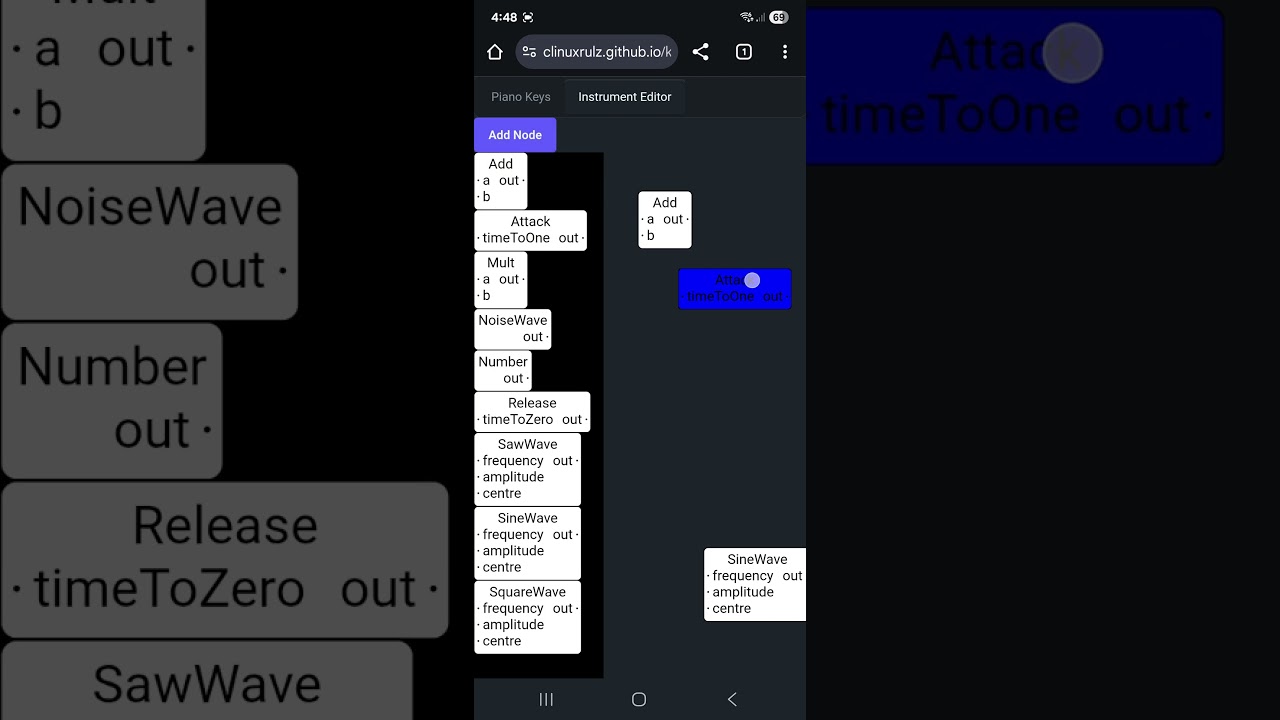
It has a SVG canvas for the palette, a SVG canvas for the scene, and it create SVG canvas for the drag and drop animation when moving from the palette to the scene.
dark bay
One weird thing. If the scene is zoomed out, and your dragging a node from the palette to the scene. The floating SVG should also get smaller to suit the visual size it will be when it lands in the scene for precise positioning. Will sort that out later.
Probably not too bad if you know it is position by the bottom left corner of the node box when dropping it.
dark bay
Next tasks:
- Drag and drop within main scene for repositioning.
- AddEdgeMode
The location of the pins for AddEdgeMode will need to be calculated by the RenderSystem as unpredictable things like text size move around the pins.
dark bay
OK... repositioning nodes in idle mode working
Must put in delete... it's a very important operation :p
OK... delete is in 🥳 🎉
dark bay
Pin under mouse detection now in PickingSystem
zenith void
dark bay
The location of the pins for `AddEdgeMode` will need to be calculated by the `Re...
in xyflow it is done once on mount and then with a resizeobserver
dark bay
zenith void
in xyflow it is done once on mount and then with a resizeobserver
Same
Minus the ResizeObserver, mine are all math.
zenith void
dark bay
Minus the ResizeObserver, mine are all math.
o ic you are calculating the layout yourself
dark bay
Yeap... because pure SVG has no layout stuff.
But I will need a <input> field will be needed for number node.
The rest will be pure SVG for now ig
But I can see the benefit of using regular html in a node via foreign object. I might add that support too.
And my pins are in just calculated positions. I don't have support for the user moving the pins.
But it does enough for my usecase.
dark bay
@zenith void
Got the AddEdgeMode done just before sleep time 😁:
https://youtube.com/shorts/XDAouMZM1Ng?si=Js7Wi8JytKLRgwHX

The graph to audio worklets compiler must be next on the list.
zenith void
dark bay
The graph to audio worklets compiler must be next on the list.
Let's gooooo
dark bay
I currently have a 0.2 second delay to distinguish a click/tap from a drag. (If you hold for more than 0.2 seconds or more, then it's a drag instead of a tap.)
I think that theory might be a bit off, because the scene's camera moves for that 0.2 seconds before it becomes a drag.
I might just have to disable the delay, and just disable pan (camera move) depending on what is user the mouse/finger.
It's a small detail, but affects the UX.
And maybe bigger pins for touch screens.
dark bay
... works perfectly when I disable that delay before drag... don't know why I put that in there 😜
dark bay
dark bay
The graph to audio worklets compiler must be next on the list.
Not there yet. Gotta put a <input> field in the number node.
A mixed html/svg node.
Time for an OffscreenDom
dark bay
That works:

Slight bug, you drag your mouse to select the text, and it moves the node instead :p
dark bay
dark bay
... works perfectly when I disable that delay before drag... don't know why I pu...
Nope... fixed for PC, but broken on mobile. The panning is preventing dragging (moving nodes and adding edges)
I guess the delay is gonna have to come back maybe.
dark bay
I put the setTimeout/delay back, but I set it to 0ms, and seems to be fine on mobile
Difference touch and mouse is you have a pointer position before the pointerdown event, that might have something to do with it.
dark bay
Feel free to have a play:
https://clinuxrulz.github.io/kitty/#/music-editor
Its in the "Instrument Editor" tab.
I think a bigger hit area for the pins will help for touch. I currently have a 10 pixel radius around the pins for their hit area.
AddEdgeMode only works from output pins to input pins at the moment, gotta adjust it to also allow the reverse direction when adding edges.
Its like a MVP
dark bay
Also if the node is green (selected) then it's a move node, currently you need to touch the pins while the node is white to make an edge.
For touch, it helps to zoom in when making edge. For mouse its easy, the pins glow when the pointer hovers over their hit area.
Also when in AddNodeMode you have to click End Mode before you can join pins with edges. But I might change that so you can add edges while adding nodes (while in AddNodeMode).
So a few UX tweaks to come.
Also need the ability to select edges for easy delete of edges.
dark bay
Looks like users are interested in node-based editors:

Usually I get <10% stayed to watch.
Agreed text-based code is more compact and quicker to create/maintain. But I suppose for non-programmers, node based is appealing, because you do not need to learn a programming language.
Youtube makes a good tool for researching users from their viewing behaviours.
dark bay
Let's do edge selection next.
One approach, make a second invisible edge over the top of the main edge with additional thickness to provide extra padding to the hit area.
Can practice that path-base approach to selection because edges do not have an entity ID, as edges are simply entity references contained in other entity nodes.
That's why edge selection does not come automatically.
Just need to make an ID to reference edges.
E.g. 124ABCD-1235-1345/input/frequency
The first part is the regular entity ID (UUID), then it uses / to define a path/part of that entity being referenced.
Its like a partial selection of an entity.
I'll need to do the same thing map editor later. As the entire map is actually one entity to make its storage more compact.
We could even use string[] for a path, but string is more Map-friendly until javascript gets a few more language features.
dark bay
dark bay
The first part is the regular entity ID (UUID), then it uses `/` to define a pat...
An alternative solution would be physically generating IDs for the edges. Which is OK too.
dark bay
dark bay
E.g. `124ABCD-1235-1345/input/frequency`
Although this is nice for debugging purposes.
... actually let's do the compiler 1st 😁
To keep the hype flowing
Forgot one... I need a speaker node with a single input pin for receiving the sound output.
OK SpeakerNode is in.
Maybe a piano input node to, so we can generate different frequencies to feed through it for testing.
It can be a node with the piano ui component inside.
dark bay
Looking pretty cool:
 dark bay
Let's do compile!
dark bay
Pretty straight forward I think, just gotta do one of these per NodeType:
declare const sampleRate: number;

class SineAudioWorkletProcessor extends AudioWorkletProcessor {
  private phase: number;

  constructor() {
    super();
    this.phase = 0;
  }

  process(inputs: Float32Array[][], outputs: Float32Array[][], parameters: Record<string, Float32Array>): boolean {
    const frequency = inputs[0][0];
    const amplitude = inputs[1][0];
    const centre = inputs[2][0];
    const out = outputs[0][0];
    for (let i = 0; i < out.length; ++i) {
      this.phase += (2 * Math.PI * frequency[i]) / sampleRate;
      out[i] = amplitude[i] * Math.sin(this.phase) + centre[i];
    }
    return true;
  }
}

registerProcessor('sine-audio-worklet-processor', SineAudioWorkletProcessor);
Then traverse the graph (in the ECS) to link the audio worklet node instances together.
Becomes a method on the NodeType:
import sineWaveAudioWorkletProcessorUrl from  "./worklets/sine-wave-audio-worklet-processor.ts?worker&url";

export class SineWaveNodeType implements NodeType<SineWaveState> {
  componentType = sineWaveComponentType;
  registerAudioWorkletModules = (audioCtx: AudioContext) => {
    audioCtx.audioWorklet.addModule(sineWaveAudioWorkletProcessorUrl);
  };

  create(nodeParams: NodeParams<SineWaveState>) {
    return new SineWaveNode(nodeParams);
  }
}
The current architecture is playing the game.
dark bay
3 worklets down, n to go
dark bay
I may have messed up. The piano keys node can play multiple notes at once, but I only have one output pin.
But I guess the compiler can fork out multiple trees for each note. So might be fine.
dark bay
Yeap that's what I need to do. A graph transformation step.
dark bay
For computations that fork outwards, but on the on the surface appear non-forking there is actually a monad (computation pattern) called the list-monad I can use.
The visual graph itself is like a do-notation and where we can reprogram the edges (¿semicolons?)
dark bay
Not too sure if my plan will work. Worst case scenario, I'll compile to a single audio worklet rather than trying to compose many of them.
Yeah... I think compiling to a single audio worklet will be the way.
Because when I use .connect it will just sum the values together when joining audio worklet nodes.
The piano keys can produce if-statements for each note and combined them in the result is think.
The remainder of the graph will need.to be compiled in each branch of the if statement.
dark bay
Now I feel like this will work, so first we have our code gen helper class:
export class CodeGenCtx {
  private nextFieldIdx = 0;
  private fieldDeclarations = "";
  private code_ = "";

  allocField(initValue: string): string {
    let fieldName = `x${this.nextFieldIdx++}`;
    this.fieldDeclarations += `${fieldName} = ${initValue};\r\n`;
    return fieldName;
  }

  insertCode(lines: string[]) {
    this.code_ += lines.join("\r\n") + "\r\n";
  }

  get code(): string {
    return this.code_;
  }
}
Its responsible for creating fields for different parts of code to communicate with each other.
And then in each Node<...> I've added this generateCode method:
export interface Node<A extends object> {
  readonly type: NodeType<A>;
  readonly nodeParams: NodeParams<A>;
  . . .
  generateCode(
    ctx: CodeGenCtx,
    next: {
      [outputName: string]: (variableName: string) => void,
    },
  ): void;
}
That method has continuations for each of the output pins, to generate code for each of the pins.
with that pattern I should be able to fork-out the piano keys with an if-statement and have it generate substain, release, etc. variables for each key.
With a code preview window we can verify the generated code.
The NumberNode has the simplist code-gen:
    this.generateCode = (ctx, next) => {
      let value = ctx.allocField(`${state.value}`);
      next["out"](value);
    };
as an example of how to use the code gen utility.
.. yeah, it's continuations again
Hmm... allocConst might be handy too. So the same field can be reused for constants.
The reason for continuations and not returning variable names is that piano keys node, it has a forking computation required to repeat the remainder of the graph for each possible key.
(next can be called multiple times for each piano key)
zenith void
dark bay
Looking pretty cool:
Siiiiick!!!
dark bay
Code generation will be tricky, not 100% sure I've got it fully figured out yet.
dark bay
dark bay
Looking pretty cool:
If we look back at this example.
SineWave should be repeated inside if-statements branchs for each key. But not the two number nodes.
Needs to be some glue code generation between the code generation callback chain stages i think.
And SpeakerIn will just sum the resulting output for each of the pathways that reach SpeakerIn.
zenith void
i think the different keys should not be handled inside the worklet
i think each worklet should be 1 active key
and you have a pool of worklets that you use for the active keys
that's i think how it's typically done with polyphonic synths
in ableton i can choose how many voices the synth uses p.ex
this would be the maximum amount of active keys
dark bay
I see... maybe an input frequency node. And make multiple audio worklet nodes for simultaneously keys.
dark bay
That makes code generation way easier :p
zenith void
exactly
dark bay
But I still wanna try the hard way 1st 😆
dark bay
Another tricky thing to consider, there is a addModule but no removeModule.
So maybe the AudioContext needs for be constructed in an iframe, so I can unload modules when the graph changes. (Unload by removing the iframe, and making a new iframe with a fresh AudioContext)
But there also needs to be a touch/click event inside that iframe to activate the audio.
Alternatively there could be one audio worklet processor and the code is sent via a postMessage then eval-ed inside the worklet.
Or maybe not 😆:
Direct use of eval() or Function constructors (which also involve dynamic code evaluation) is not allowed within an AudioWorkletProcessor in the Web Audio API.
So iframes it is then
Starting to type the main code generation function that traverses all the nodes. But it's almost bed time, so not expecting to get much done.
The trick I think is to find all the speaker nodes and work backwards.
zenith void
dark bay
Another tricky thing to consider, there is a `addModule` but no `removeModule`.
mmm 🤔 they are not even gc'd?
dark bay
zenith void
mmm 🤔 they are not even gc'd?
Maybe.
Like if a fresh AudioContext is created and the last one is GCed it might free up the old modules.
zenith void
dark bay
The trick I think is to find all the speaker nodes and work backwards.
treeshake em good
dark bay
I might need support for default values for unconnected pins, so that not all pins are required to be connected too.
E.G. shift can default to 0. amplitude can default to 1, etc.
zenith void
good idea
dark bay
I'll push polyphonic in single worklet a little bit. I think I have a sensible way to conceptualise it.
Instead of out been seen as one value. It is a vector of 12 values for the keys.
And if values are allowed to take on say number | undefined then undefined can be used to switch parts of the graph.
The vector-view prevents code-explosion in the code generation.
I was reading the worklet must complete its process callback (of 128 samples) in under 2.6ms for 48KHz sound. Will be interesting so see how big the graph can get before it hits that limit.
Also all audio worklets are run together in a single thread.
So theoretically many audio nodes has the same performance as a single audio node for the same sound.
dark bay
Let's do it the easy way first 😆
I wanted handle the case where two separate key pads manipulate different sound properties of each other.
But I can't think of a way to do it without a code generation explosion (n² branches for n keys)
I guess that means only one keypad node is allowed to be reachable from a speaker node. Will think about it for a bit.
Or... remove the keypad node and just have a single frequency node, and the keypad can appear separate detached from the graph.
Its really just for testing the instrument.
Looks cool attached. But doesn't seem to make sense functionality-wise 😅
dark bay
Something that comes to mind since we are code generating, why not generate a WAT file instead of js?
(Web assembly text format)
Ever ms counts.
zenith void
dark bay
Or... remove the keypad node and just have a single frequency node, and the keyp...
keypad can still work monophonic in the graph?
so it's only 1 value that it pushes out
multiple polyphonic keypads are indeed a bit a brain teaser
polyphony implies parallelism
it could be amount of voices === amount of outlets
that could be a way of approaching it?
maybe you need a way to do sub-graphs and then be able to instantiate multiple versions of that sub-graph to do multiple voices?
handy part of having multiple voices in multiple different pipelines is that you can easily do envelope filtering and other attenuation/modulation for each voice separately
also possible in 1 worklet ofcourse, but gets a mathy soup
dark bay
zenith void
keypad can still work monophonic in the graph?
Yeah that would still work for testing purposes.
dark bay
zenith void
that could be a way of approaching it?
Like 12 output nodes for each note of the keypad?
That would work, but the user would repeat their whole graph 12 times.
dark bay
zenith void
maybe you need a way to do sub-graphs and then be able to instantiate multiple v...
Yeap I agree with that.
dark bay
I'll have a swing at this before giving up polyphonic in a single worklet:
  generateCode?: (params: {
    ctx: CodeGenCtx,
    inputAtoms: Map<string,string>,
  }) => {
    outputAtoms: Map<string,string>,
  }[];
I think it might be the right shape.
dark bay
example code-gen for PianoKeysNode:
    this.generateCode = ({ ctx, }) => {
      return NOTES.map((note, idx) => {
        const frequency = MIDDLE_C_HZ * Math.pow(2.0, idx / 12.0);
        let out = ctx.allocField("0.0");
        let outputAtoms = new Map<string,string>();
        outputAtoms.set("out", out);
        ctx.insertCode([
          `if (noteDown["${nodeParams.entity}/${note}"]) {`,
          `  ${out} = ${frequency};`,
          "} else {",
          `  ${out} = 0.0;`,
          "}",
        ]);
        return { outputAtoms, };
      });
    };
its like its forking the node, returning 12 nodes for all the keys. But ofcouse it needs to fork the upstream and marry them up.
Most nodes nodes won't fork out. Just a hand full of them. Another one might be the foot peddles on a piano.
dark bay
dark bay
example code-gen for `PianoKeysNode`:
```
this.generateCode = ({ ctx, }) => ...
I still feel like we can do better than this. But it's making my head spin 😆
Currently to avoid code-gen explosion, the plan is just a warning popup for the user if their graph is wired in such a way.
SineWave code-gen seems sensible enough:
    this.generateCode = ({ ctx, inputAtoms }) => {
      let frequency = inputAtoms.get("frequency");
      if (frequency == undefined) {
        return [];
      }
      let amplitude = inputAtoms.get("amplitute") ?? "1.0";
      let centre = inputAtoms.get("centre") ?? "0.0";
      let outputAtoms = new Map<string,string>();
      let phase = ctx.allocField("0.0");
      let out = ctx.allocField("0.0");
      ctx.insertCode([
        `this.${phase} += (2 * Math.PI * ${frequency}) / sampleRate;`,
        `this.${out} = this.${amplitude} * Math.sin(this.${phase}) + ${centre};`
      ]);
      outputAtoms.set("out", out);
      return [{ outputAtoms, }];
    };
If I get enough of this done. I'll do a live code-gen preview in a split screen beside the node graph.
That should help us verify if it is producing sane code.
zenith void
dark bay
Like 12 output nodes for each note of the keypad?
That would work, but the user ...
more like a pool of voices
- you press 1 key 👉 voice 1
- you press another key 👉 voice 2
- i release key 1 👉 voice 1 is freed
- i press another key 👉 uses voice 1
that's how it's most commonly done
but the user would repeat their whole graph 12 times.
it would have multiple instances of the same worklet
so if you wanna have it in the graph you would need to figure out where to do the sub-graphs i guess
dark bay
zenith void
so if you wanna have it in the graph you would need to figure out where to do th...
I'm gonna have a crack at forking the code-gen out the back/outputs of the nodes.
Effectively duplicating the subgraphs for each key.
... my daughter is watching "A First Look at Alien Signals" by Ryan on YouTube. :p
Idk y... I said she can change the show if she wants.
zenith void
dark bay
... my daughter is watching "A First Look at Alien Signals" by Ryan on YouTube. ...
amazing ❤️ that's so cuuuute
dark bay
Maybe she missing watching me code.
zenith void
trying to connect with your interests ❤️
dark bay
Conceptually the code-gen will do something like this with its inputs/outputs:
(a -> b[]) >>> (b -> c[]) :: (a -> c[])
Its like flatmap on arrays.
For each of the set of b outputs, it will repeat the next node in the chain and join the resulting c[][] back to c[]. Then continue with next in chain.
The root nodes will need to evaluated first with the outputAtoms maps cached by their entity ID. Then keep moving upstream.
Can still do graph pruning by backtracking from the speaker nodes, but not required.
dark bay
I'll try to get it producing sound today. And upload a video.
dark bay
Would it count as a reactive to vanilla compiler?
Would be a bit cheeky because it's a static graph.
Depends upon the interpretation when viewing the graph.
I am curious how a dynamic graph can be visually represented? Would it be the same? As text code is static.
dark bay
E.g. an if-block can optimise out a part of a graph that is unobserved at a point in time, so you can still obtain fine graph even though the graph is visually static.
I think the graph/node editor needs to be refactored so it can be reused everywhere instead of just the instrument editor.
Maybe it is possible for dynamic reactivity to be compiled to vanilla that way.
dark bay
Thnk I am almost there with the polyphonic code-gen for single worklet: (incomplete method)
It's a tricky beast.
just gotta combine the many worlds output atoms with the input atoms of the next node, to make a new many worlds output atoms for the next in chain.
it kinda feels like the flush() method in a reactive library, but it is doing code-gen instead of flushing.
dark bay
TADA.... untested many worlds based code generation complete:
https://github.com/clinuxrulz/tool-kitty/blob/main/src/music-editor/code-gen.ts
dark bay
Let's get the code preview window hooked up a see what she is doing.
Few bugs to sort. But I am pretty sure the code generation algorithm has the right ideas in it.
 dark bay
yeah.. more debugging to do:

feels like I'm getting closer.
gotta check if nodes have already produced code to prevent double ups ig
Determined to crack it 😁
Let's throw all the code around it so it looks like a true-blue audio worklet processor.
dark bay
Like this 😁
 dark bay
let result = 0.0; should be inside the for loop there.
Taking a little break, should have it fully sorted soon.
There are compiler optimisation we can do too, like constant folding.
zenith void
dark bay
Like this 😁
that's kind of neat you can see the output!
dark bay
For debugging purposes 😉
There is actually one annoying bug I completely forgot about.
On desktop, scrolling the nodes in the AddNodeMode palette works fine, but on mobile it does not work at all. Gotta sort that out too.
I think I have to e.preventDefault in some touchDown events, as e.preventDefault does nothing in pointer events. Its rather annoying. (Gotta only prevent scrolling by touch when the finger is over a node in the palette)
dark bay
I should be about to go pointer-events: none on rendered nodes in the svg in theory.
dark bay
lets do it:
 dark bay
So here is the current plan, but I am not 100% sure how to ensure that it is leak free:
  createComputed(on(
    [
      () => state.makeSound,
      code,
    ],
    ([makeSound, code]) => {
      if (!makeSound) {
        return;
      }
      if (code == undefined) {
        return;
      }
      let url = URL.createObjectURL(new Blob([code], { type: "text/javascript", }));
      let audioCtx = new AudioContext();
      audioCtx.audioWorklet.addModule(url);
      // TODO
      onCleanup(() => {
        URL.revokeObjectURL(url);
      });
    },
  ));
And will a AudioContext really get GCed if it is making a sound?
If removeModule was supported, the puzzle will be easier to solve.
Ohh.... AudioContext.close():
https://developer.mozilla.org/en-US/docs/Web/API/AudioContext/close
dark bay
Now I'll need a mouse/touch events to enable the first AudioContext, but not sure if the next AudioContext after a graph change also needs a mouse/touch event too.
I suppose changing the graph requires mouse/touch events, so we should be fine.
dark bay
It Works!!! 🎉🎉🥳
(For the simple case anyway)
Not all the nodes have their code generation callbacks defined. But the ones that do are working.
Might have to do the code generation callbacks for the other nodes in termux tonight.
dark bay
Here's a small demo:
https://youtube.com/shorts/pjDh-4jDnD8?feature=share

Oh well... kept my word. It's making sounds today 😁
zenith void
dark bay
Here's a small demo:
https://youtube.com/shorts/pjDh-4jDnD8?feature=share
Siiiiiick
Congrats random!
dark bay
zenith void
Congrats random!
Cheers!
This one can use some extra if-statements to skip calls to Math.sin when the frequencies are 0:
 dark bay
Here is the code it generated for that image above:
Would be nice to pull those SineWaves into those existing if-statements of the PianoKeys to optimise the code.
Just gotta work out how to tweak the code generation for it.
Including future node code inside some node code currently being generated is kinda like a Continuation.
So I probably need to squeeze Continuations in the code generator. (Just at compile-time, not runtime)
It's still tricky (Continuations), because each node can have multiple input pins. So they have no sense of belonging in-something.
dark bay
dark bay
It's still tricky (Continuations), because each node can have multiple input pin...
Just maybe... laziness is the solution to that problem. A lightweight laziness that has no gc pressure.
Latches that are reset at the beginning of the loop to stale. And become calculated and marked clean as needed.
dark bay
Need to take a break netbeans rich client platform, it will be the death of me 😆... I'll probably do a bit more on this project this weekend.
Was thinking no everything needs to be lazy in the tree nodes.
For nodes referenced once by their output pins can be calculated in-line in the place they are needed.
Just nodes that can take on a temporary absence value (like when a key is not down) lazy becomes handy.
A latch for the laziness is just an extra boolean flag variable to flag if the node is dirty or clean.
And all nodes are dirty on next sample iteration (no stale, because everything changes for each sample.)
Was thing of defining function for node update in the generated code. But might be more faster to just repeatability inline the code. (Saves in function call cost)
dark bay
Here comes the police:
https://youtube.com/shorts/bQlLPE49sFo?si=fIla5PvCjTVwqhCs
 dark bay
Something is a little off.
I boosted the hit area around pins for making wires from 10px radius to 30px radius (in unscaled dimensions), but it is still really hard to make wires on touch screen.
There must be something else going on under the hood.
Figured it out, I was culling pins from the hit test for nodes that were under the mouse.
But the pins are close to the edges of the boxes. Easy for your finger to miss the box but still be in the hit radius of the pins.
I might just be lazy and not cull any pins from the hit test.
zenith void
dark bay
I might just be lazy and not cull any pins from the hit test.
U so frustum/viewport culling already?
dark bay
zenith void
U so frustum/viewport culling already?
Yeah, but undid it just now :p
Still tricky to use on touch. And very easy on mouse.
Not sure what's going on.
Obviously the mouse has a position before the mouse button is pressed, where as touch doesn't. It must be something to do with that still.
A little timing issue.
Maybe my fingers are just fat.
devicePixelRatio maybe when deciding hit area size for fingers.
dark bay
zenith void
U so frustum/viewport culling already?
Actually no. Just picking culling for pins, not rendering culling.
This one is a head scratcher:
Uncaught Error: Attempting to access a stale value from <Show> that could possibly be undefined. This may occur because you are reading the accessor returned from the component at a time where it has already been unmounted. We recommend cleaning up any stale timers or async, or reading from the initial condition.
tricky to find a way to debug it, the stack trace does not seem to give away anything about its location in the code.
dark bay
I think I know what I did wrong.
We're moving a node, no pins under mouse. But as the mouse moves, there is suddenly a pin under mouse, but then the node moves because of the drag operation and suddenly no pin under the mouse in the same flush/transaction.
... so what I did wrong was...
The node should move in createEffect, not createComputed.
So the pins can not be both under the mouse and not under the mouse in the same flush/transaction.
Tricky beast.
My obsession with createComputed over createEffect gets me into trouble sometimes. :p
zenith void
dark bay
This one is a head scratcher:
```
Uncaught Error: Attempting to access a stale v...
Interesting bug!
zenith void
Some timeout/request/microtask/... somewhere?
dark bay
I removed the delay/time out for starting drag.
No delays. Just silly me using createComputed instead of createEffect when mutating the position of a node.
zenith void
dark bay
No delays. Just silly me using `createComputed` instead of `createEffect` when m...
Aaa I think I get it
The same flush
dark bay
Basically during ONE transaction/flush you can not have a reactive-node take on two values at once. If it does, you should of used createEffect to delay it to the next frame.
zenith void
dark bay
Basically during ONE transaction/flush you can not have a reactive-node take on ...
Yes yes. The dangers of setting a signal in an effect
dark bay
createComputed to update a ReactiveSet for selection is fine. And a good usecase for createComputed.
dark bay
zenith void
Yes yes. The dangers of setting a signal in an effect
In a computed u mean
zenith void
dark bay
`createComputed` to update a `ReactiveSet` for selection is fine. And a good use...
Couldn't it also create the same bug?
dark bay
zenith void
Couldn't it also create the same bug?
Not if your careful with the reactive graph.
zenith void
dark bay
In a computed u mean
Yes, effect as the broader thing, not createEffect
zenith void
dark bay
Not if your careful with the reactive graph.
I mean, yes, but same counts for the other bugs too right?
dark bay
Lol yeap
dark bay
Like if you have concealed signals and your code knows only it can see it and those signals are not seen by other code. Then you can carefully use createComputed i think.
createEffect is always safest.
Ahh I think I can explain it better:
If you are setting an upstream signal, then it's OK to do in createComputed
If you are setting a downstream signal, then you must use createEffect
...
And I can't believe I've only realised that now. A very simple rule.
Don't forget effects as in createEffect effects all happen after the transaction/flush at the end. As in after the transaction.
Where as createComputed effects happen during the transaction/flush.
(Even solid 1.0 createEffects, not thinking 2.0)
Oh well touch working much better now. Will do a little bit more 2mrw night.
dark bay
dark bay
---
Ahh I think I can explain it better:
If you are setting an upstream signal,...
If the graph is complicated and you don't know if the signal your setting is upstream or downstream, then just use createEffect.
zenith void
dark bay
---
Ahh I think I can explain it better:
If you are setting an upstream signal,...
that does make a lot of sense
dark bay
Saw Wave and Square Wave code generation has been snuck in.
zenith void
Looks simple on first sight but kind of tricky when u think a bit about it
dark bay
I'm happy with the representation of side effects, but need to plan how the code generation will work for it.
zenith void
Order of execution is fuzzy in a graph
dark bay
Yeah
Well what is happening conceptually is next passing the universe around like discussed in the DMs
Treating the entire universe as a pure value.
Thus eliminating side effects.
Conceptually anyway.
A sort of plan of attack. You have a coin (pointer) sitting on the start node, and that coin moves as the side effects progress. Activating one side effect node at a time. (Unless there is forking)
In the code generation, the location of the coin can be a number, and a switch statement can be used to just activate that one side effect node.
Other input values into the side effect node are read/snapshoted the moment a side effect node is activated.
Other (non-next) wires for other non-activated side effect nodes can return undefined.
A finite state machine (or many when forking) seems perfect your storing that execution state.
Can even make the active side effect node glow blue (or some other colour) to provide visual feedback where the execution (IP/instruction-pointer) is sitting at.
For multiple active side effect nodes (multiple coins) a for-loop iterating through all the coins surrounding the switch statement can be used.
Its easy to write that code by hand. The hard part is writing the code that will write the code. :p
dark bay
Ahh look... I'm not crazy 😆
Cleanlang passes the world around to do side effects:
Start :: *World -> *World
Start world
    // 'firstWorld' holds the result of the first I/O operation
    # firstWorld = writeString world "What is your name?"
    // 'name' is the result of the 'readString' function, which also consumes 'firstWorld' and produces a new one.
    # (name, secondWorld) = readString firstWorld
    // 'finalWorld' is the result of the final 'writeString' operation, using 'secondWorld'.
    # finalWorld = writeString secondWorld ("Hello, " + name)
    = finalWorld
So it might be a viable way to do side effects with a node graph.
But it does feel a bit sketchy when forking and joining the world.
What makes clean different though is a linear type system. That would disallow cloning/forking the world, which would avoid a leaky abstraction.
dark bay
If a side effect node is entered twice by two different path, then each entry needs its own local state.
Not sure if that is possible with no gc pressure.
Unless the memory no longer needed can be recycled ♻️ instead of gc-ed.
(E.g. the same delay node entered via two different paths at the same time.)
dark bay
After a bit of thought. Simulating a multithreaded Turing machine seems like the cleanest way to execute side effect nodes in the graph in the generated code.
It work cleanly handle forking and joining execution in the graph. And be a way to cross link multiple keys nodes while avoiding code explosion (avoiding O(n^2) lines of code when crossing two sets of keys nodes)
Many virtual CPUs with their own stacks that get recycled via memory pools to avoid gc pressure in time sensitive code.
dark bay
dark bay
---
After a bit of thought. Simulating a multithreaded Turing machine seems like...
Each of those fork still requires duplicating the state of the non-side-effecting nodes. I'm a bit stuck.
I'll have to practice writing the code by hand that I would expect somes example graphs to generate to figure out how to automate it in code generation from the graph.
I may have to disable the ability to fork a execution path.
dark bay
maybe I am overthinking it :P, there might be an easier solution... lets get that meow data into the audio worklet. I can do this with the node types:
export class MeowNodeType implements NodeType<MeowState> {
  componentType = meowComponentType;
  generateInitOnceCode: (params: { ctx: CodeGenCtx; }) => void;

  constructor() {
    this.generateInitOnceCode = ({ ctx, }) => {
      ctx.insertGlobalCode([
        "let meowData = undefined;"
      ]);
      ctx.insertMessageHandlerCode(
        "meowData",
        [
          "meowData = params.meowData;",
        ]
      );
    };
  }

  create(nodeParams: NodeParams<MeowState>) {
    return new MeowNode(nodeParams);
  }
}
This is probably the best way to fork.
Basically the remainder of the graph connected to out will be duplicated for both a and b.
Bit counter-intuitive having a node that looks like a join, actually performing a fork.
dark bay
I'll upload a new demo video soon... just poker night 🃏
zenith void
dark bay
I'll upload a new demo video soon... just poker night 🃏
looking forward to it!
good luck w the poker 😁
dark bay
Not a great demo yet. Gotta do a sequencer. We have sound fonts:
https://youtube.com/shorts/Go5CSrSKvhQ?si=V7RgtpB4J6R8Tfa6
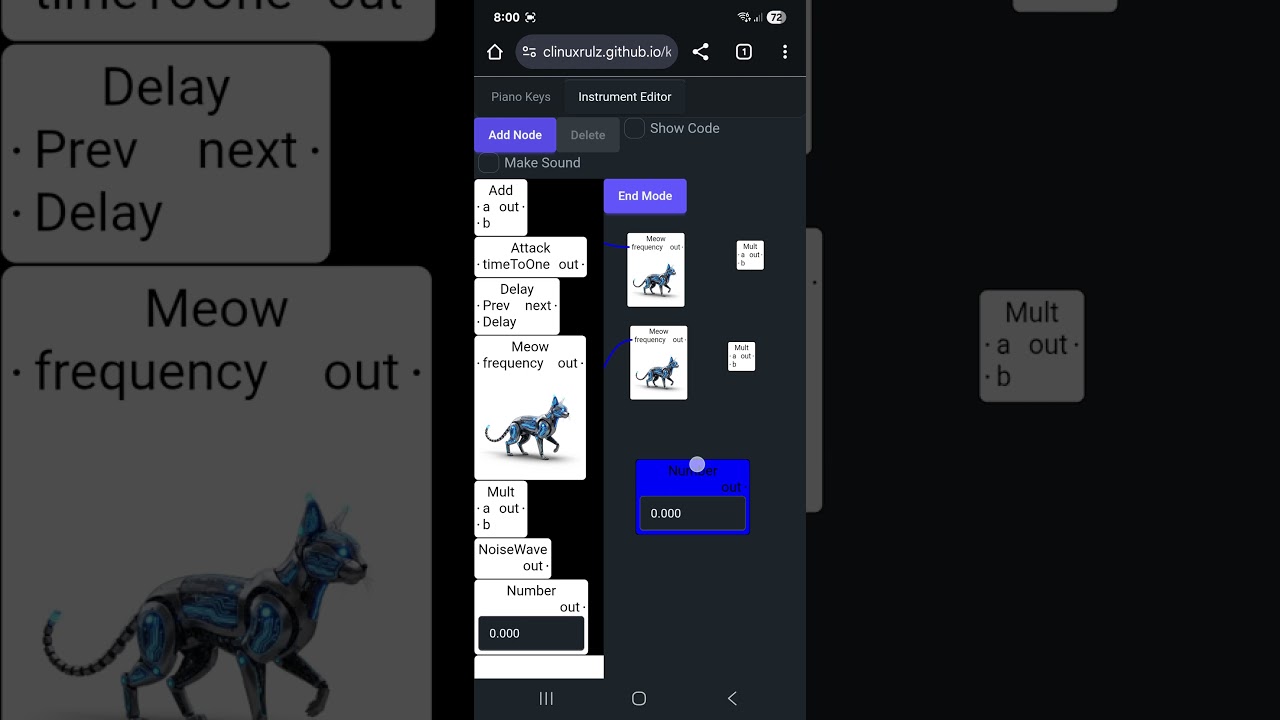
It supports polyphonic in the single audio worklet node it generates. But I forgot to demonstrate it.
dark bay
Code generation can be improved still.
I think what I really need is a lambda node. Where you draw an entire graph inside a node. The UI gets messy though.
I can do like this:
| Lambda |---
Like a lambda node and have all the definition visible at the same level as everything else.
Still tricky because the lambda should not reference nodes in other lambdas.
Maybe encapsulating an entire graph inside a node for a lambda is the only way.
If the node can be easily resized with the mouse, then it will not be a big issue.
We're gonna have real-time lambdas and real-time async with no GC pressure at all 😀... push the limits!
The make a DSL for the graph itself.... zero GC functional programming language.
dark bay
The problem with the current approach is it uses worst-case scenario amount of RAM which is ok for certain things, but not all things.
 viral plank
dark bay
Hmm...
viral plank
dark bay
Hmm...
Can I use this in a foss project 😁? (With a small change)
dark bay
viral plank
Can I use this in a foss project 😁? (With a small change)
Absolutely. It's @gray raven 's original design.
viral plank
dark bay
Absolutely. It's <@474283990598025226> 's original design.
Lets go 🤩, thank you 😊
dark bay
I mean... based on @gray raven.
No problem.
Here's the duck in action in a deleted video 😜
Took her down from youtube just incase Nintendo lawyer's come around :p
viral plank
🤣 Logo for my Datastar Solid mashup project

 vocal saffron
Love the duck! Yaaaaay
We need more Solid duck projects

GitHub
Solid.js reactivity patterns for classes, and class components. See https://github.com/lume/element for a Custom Element system built with classy-solid. - lume/classy-solid
viral plank
vocal saffron
We need more Solid duck projects
The ducks must prevail! 😂👍
dark bay
Here another duck project... but doesn't look like the solid logo... yet:
https://github.com/clinuxrulz/atomic-duck
dark bay
feeling guilty for spamming my own thread :P...
Did ya know we can make generators without using generator sugar?
class MyIterableClass {
  constructor(data) {
    this.data = data;
  }

  [Symbol.iterator]() {
    let index = 0;
    const data = this.data; // Capture 'this.data' for the generator scope

    return {
      next: () => {
        if (index < data.length) {
          return { value: data[index++], done: false };
        } else {
          return { value: undefined, done: true };
        }
      }
    };
  }
Something special about that...
It allows us to make our own special generators that are ..... Clonable!
perfect for a good game rollback system (simulations for things in multiplayer netcode)
clonable generators with syntactic sugar.... that is basically the power of Haskell Monads with proper do-notation.
dark bay
Actually nope... the moment I use any syntatic sugar for a generator, the generator will no longer be clonable unfortunately.
dark bay
This project is gonna have a little cat nap while I explorer R3.
And update a legacy app from Java 8 to Java 21.
dark bay
.... back.... 😅
heres a hacky way to generate the code for the delay node... it should work in theory:
    this.generateCode = ({ ctx, inputAtoms }) => {
      let prev = inputAtoms.get("prev");
      if (prev == undefined) {
        return [];
      }
      let delay = inputAtoms.get("delay");
      if (delay == undefined) {
        return [];
      }
      let next = ctx.allocField("false");
      let startTime = ctx.allocField("0");
      let running = ctx.allocField("false");
      ctx.insertCode([
        `if (${prev}) {`,
        `  ${running} = true;`,
        `  ${startTime} = performance.now();`,
        "}",
        `if (${running}) {`,
        `  let time = performance.now() - ${startTime};`,
        `  if (time >= ${delay}) {`,
        `    ${running} = false;`,
        `    ${next} = true;`,
        "  }",
        "}",
      ]);
      ctx.insertPostCode([
        `${next} = false;`,
      ]);
      let outputAtoms = new Map<string,string>();
      outputAtoms.set("next", next);
      return [{ outputAtoms, }];
    };
It does feel very hacky though.
Its the first step to making a sequencer/tune with the node editor.
dark bay
Next node to do is the SetVariableNode. After that we have a sequencer.
dark bay
...
Actually... maybe it would be more sensible to use an intrusive linked list for active/running side effect nodes without GC pressure.
Otherwise many variables that are already false could be set to false again at the end of the loop (wasted CPU cycles).
E.g. 50 side effect nodes -> 49 variables that are already false, set to false again at the end of the loop for 1 active side effect node.
zenith void
dark bay
.... back.... 😅
heres a hacky way to generate the code for the delay node... ...
i would look at ringbuffers
and how tapeloops work
dark bay
intrusive linked lists can also make good ringbuffers.... sort of... can get a CPU cache miss if the linked list nodes are far apart in the RAM.
linked list nodes in continous memory maybe?.... like the node's data is in an continuous arraybuffer
a plain array based ringbuffer would work too ig
dark bay
if I throw in a quick code-gen for SetVariableNode, we'll be able to make tunes already.
then I could cheat.... do a utility to import a midi and it generates the node-graph for it
a proper sequencier ui/tool would be better though
oh well... top of code-gen idea:
let runningSideEffectsHead = null;
let runningSideEffectsTail = null;
let sideEffectNode1 = { prev: null, next: null, iAmRunning: false, update: () => void, };
let sideEffectNode2 = { prev: null, next: null, iAmRunning: false, update: () => void, };
let sideEffectNode3 = { prev: null, next: null, iAmRunning: false, update: () => void, };
. . .
It would basically allow adding currently executing side effect nodes to a collection without allocating memory.
Just manipulating pointers and nothing else.
Just like our SuperSet idea.... iAmRunning is like isInSet
it would be nice if it was continuous memory though
maybe sideEffectNode1, sideEffectNode2, etc... can be represented by an integer array, with indices for prev and next.
dark bay
I know now.... prev / next for the side effects nodes can carry ID numbers that can be used for effect handlers in init-code.
If I get the effect nodes right in the beginning, everything well become easier.
dark bay
The new code gen for the delay node:
    this.generateCode = ({ ctx, inputAtoms }) => {
      let prev = inputAtoms.get("prev");
      if (prev == undefined) {
        return [];
      }
      let delay = inputAtoms.get("delay");
      if (delay == undefined) {
        return [];
      }
      let effect = ctx.allocField(
        "{\r\n" +
        "  id: effectId++,\r\n" +
        "  prev: null,\r\n" +
        "  next: null,\r\n" +
        "  update: null, /* () => boolean */\r\n" +
        "  onDone: [], /* (() => void)[] */" +
        "}"
      );
      let startTime = ctx.allocField("startTime");
      ctx.insertConstructorCode([
        `${prev}.onDone.push(() => {`,
        `  ${startTime} = performance.now();`,
        `  insertEffectIntoRunning(${effect});`,
        "});",
        `${effect}.update = () => {`,
        `  let time = performance.now() - ${startTime};`,
        "  // return true when done.",
        `  return time >= ${delay};`,
        `};`,
        `effects[${effect}.id] = ${effect};`,
      ]);
      let next = `${effect}`;
      let outputAtoms = new Map<string,string>();
      outputAtoms.set("next", next);
      return [{ outputAtoms, }];
    };
uses an intrusive linked list of running effects
just gotta apply the same pattern for all effect nodes, and make an effect evaluating engine in the main loop
I think I'll use termux for some more of it tonight. It will slow me down enough to properly think about what I am doing.
dark bay
zero-gc effect processor prelude code-gen is pretty straight forward:
      "",
      "  insertRunningEffect(effect) {",
      "    if (this.runningEffectsTail == null) {",
      "      this.runningEffectsHead = effect;",
      "      this.runningEffectsTail = effect;",
      "    } else {",
      "      this.runningEffectsTail.next = effect;",
      "      effect.prev = this.runningEffectsTail;",
      "      this.runningEffectsTail = effect;",
      "    }",
      "  }",
      "",
      "  removeRunningEffect(effect) {",
      "    if (effect.prev != null) {",
      "      effect.prev.next = effect.next;",
      "    }",
      "    if (effect.next != null) {",
      "      effect.next.prev = effect.prev;",
      "    }",
      "    if (this.runningEffectsHead == effect) {",
      "      this.runningEfectsHead = effect.next;",
      "    }",
      "    if (this.runningEffectsTail == effect) {",
      "      this.runningEffectsTail = effect.prev;",
      "    }",
      "    effect.prev = null;",
      "    effect.next = null;",
      "  }",
      "",
      "  process(inputs, outputs, parameters) {",
      "    let output = outputs[0][0];",
      "    for (let i = 0; i < output.length; ++i) {",
      "      let result = 0.0;",
      `${this.code_}${this.postCode}`,
      "      let effect = this.runningEffectsHead;",
      "      while (effect != null) {",
      "        let isDone = effect.update();",
      "        if (isDone) {",
      "          this.removeRunningEffect(effect);",
      "          for (let onDone of effect.onDone) {",
      "            onDone();",
      "          }",
      "        }",
      "        effect = effect.next;",
      "      }",
      "      output[i] = result;",
      "    }",
      "    return true;",
      "  }",
      "}",
      "",
      "registerProcessor(\"compiled-graph-audio-worklet-processor\", CompiledGraphAudioWorkletProcessor);"
all effects are held perminately in memory, and just their prev/next pointer handles get manipulated.
a collection without a collection
dark bay
small example code-gen:
This:

Generates This:
thats the multi-tap delay
with a goto-node we can have a loop too
and concurrency is supported already, which is pretty cool
Multi-green-threaded example:

the "Start" is being forked
performance.now() is probably not the best to use here for measuring a delay, as two simutanious nodes can return a different performance.now() value
need some sort of global tick
otherwise simutanious instruments can fall out of sync
dark bay
Got codegen for variable / setVariable nodes in there now...
Wanna try it out, but my wireless mouse batteries are dead.. such a pain.
Didn't feel like that long, since I last changed the batteries for it.
Will try/debug it on my phone ig
 dark bay
First attempt failed... should of implemented a save:
 dark bay
Ohh... forgot to add the "start" node to the effects queue. That's why.
dark bay
Ohh... so performance.now() is not available inside audio worklet node:

Really should of implemented save 🤣
dark bay
Multi-step Delay Working!
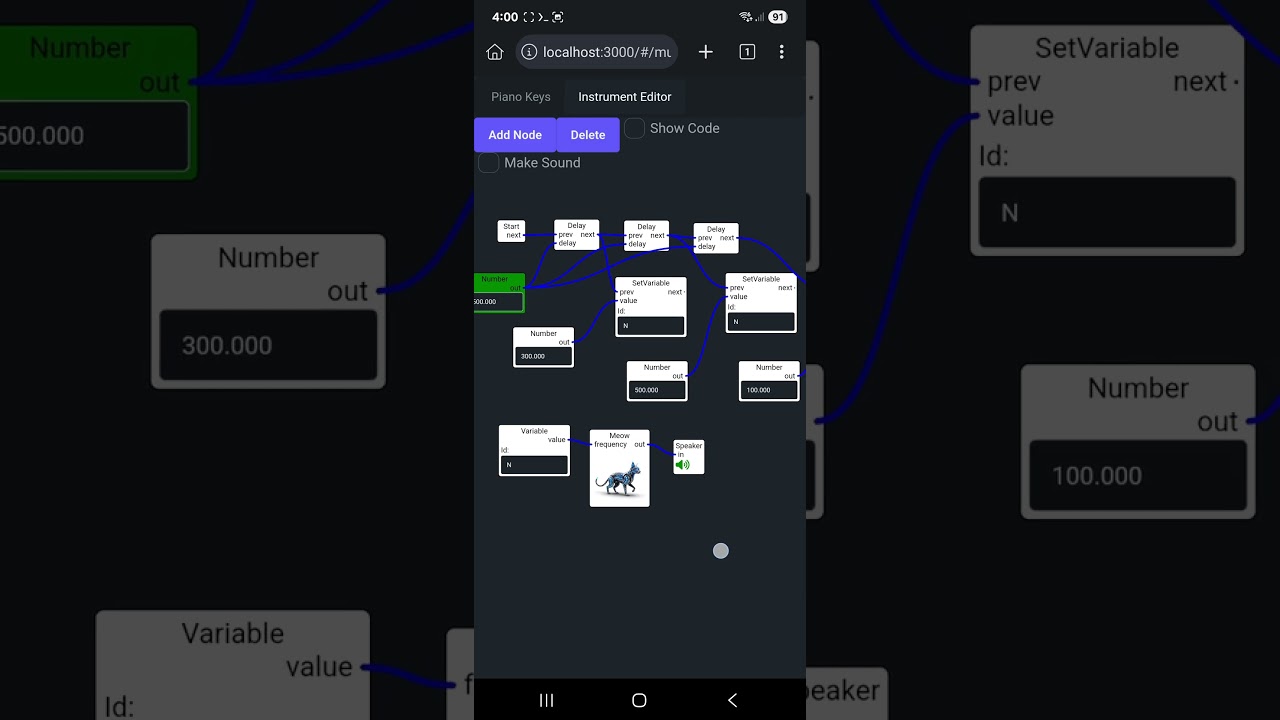 dark bay
... now let's throw in that blasted load and save button.
dark bay
Technically that cat should be a side effect node too. So I can play the same note in succession.
Oh... and make the active/running side effect now glow. That would be cool.
zenith void
dark bay
Multi-step Delay Working!
https://youtube.com/shorts/KpmkOuc-X8E?si=wN4Qk4bkJtU...
Really sick bro!
dark bay
step 1 for loops: Distinguish side-effect pins from pure pins:
(side effect pins are purple)

next step, insure side effect pins do not contribute to the height of the node in the graph
that way I should be able to form a cycle from side effect pins to do loops
Ahh... prev pin should be able to retrieve multiple inputs. Unlike the pure input pins should only retrieve 0 or 1 inputs each.
Theory already broken :p
I might do a Merge effect node as a work around for now.
dark bay
..and we have a loop:
 dark bay
Next might be functions for re-usable blocks of nodes.
dark bay
Then add if-statements, then that is pretty much a full programming language.
dark bay
Not quite their yet. My many worlds (for repeating graph) for each piano node key is complicating it a bit. The loop is not quite working.
Actually many-worlds code-gen might be unsound in a loop. Because if it branches many worlds out in a loop, then it needs infinite memory to store all the nodes.
dark bay
Maybe the best solution is to disable that many worlds stuff and keep it simple.
dark bay
Yeah... I'll need to write a new code-gen function.
I can still manage the many-worlds thing, just need a better plan of attack in the code-gen.
The code-gen ID of each visited node needs to be derived from the path taken in the graph to arrive at that node.
The same physical node, arrived at by different paths needs to be split with its own unique code-gen-node IDs.
Or maybe better, the code-gen ID of node should be derived by the nodes physical ID + the code-gen IDs of all the nodes wired up to the input pins.
Maybe a pre-sweep the generates another graph that uses only code-gen IDs, then another sweep to do the actual code-gen. (Like an immediate representation graph)
dark bay
So we have:
type CodeGenNode = {
  /* the code-gen ID,
   * made from node's
   * entity id, and the
   * code gen nodes IDs
   * for the input pins.
   */
  id: string;
  // input pin code gen IDs
  inputIds: { [name: string]: string };
  // original node
  node: Node<any>,
}

let codeGenNodes = new Map<string,CodeGenNode>();
And I think that's all I need. I should be able to derive a newer easier code-gen just from that alone.
It will basically expand all that multi-world stuff out like a macro, and then be left with a non-multi-world graph that will be easier to do loops on.
When the piano key node has multiple worlds (1 per piano key) along the output edge, an ID can be generated for that edge from the code's code gen ID, the edge name and the world index in the multi world interpretation.
Seems complicated... but transistions in solid 2 are much more so 😅
dark bay
I keep changing my mind.
Maybe get rid of multi-worlds and replace it with macros. It would achieve the same thing and be more flexible.
So I will have special graph nodes, that rearrange graph nodes.
It will make lambdas easy as pi.
So... keeping CodeGenNodes and the macro nodes will be passed these CodeGenNodes and perform its magic.
the lambda nodes will simply inline repeated code/nodes for each evaluation. Recursion will not be allowed, as the memory use will be unbounded. And all required memory is allocated up front, and never freed or reallocated after construction.
Kinda like GPU shaders... bounded memory. (GLSL no recursion support.)
Its like every node you see on the screen has a fixed memory. And there are additional hidden nodes from the macro expansions.
dark bay
New code-gen underway:
https://github.com/clinuxrulz/tool-kitty/blob/main/src/music-editor/code-gen-2.ts
- Step 1: Clone the entire graph into
CodeGenNodes - Step 2: Apply the macros to the
CodeGenNodes - Step 3: Perform actual code-gen like before, but without that confusing multi-world stuff. Each node being a single real physical node.
dark bay
Incomplete but on the way.
A new method will be added to nodes:
applyMacro?: (node: CodeGenNode) => void;
The macros will be applied in height order in the graph. Before the code-gen begins.
dark bay
....
Tricky... the infinite loop in the code gen is gone when I create an effect cycle.
But the code generation is not quite right yet.
Code A depends on Code B and Code B depends on Code A.
no real correct order for the code-gen
determined to solve it, just tricky.
its because of the variable name generation. Code A depends on variables from Code B and Code B depends on variables from Code A.
I need to generate those variables names in advance somehow before their code gen.
dark bay
got some luck... cyclic code generation appears to be working:

(that's an infinite loop [lock up] in an audio worklet) 🤣 ... but it generated the code for that lock-up, no problem.
the trick is, stable variable names known in advance.
1 minor bug tweak later.... loops are working!
dark bay
 dark bay
Lambdas and if-statements next I think. Then its a language.
Would be nice to add a basic type system too it with some type inference. So the user we get an error message if the wires are connected incorrectly.
dark bay
The source code of PureScript has a clever way of type inference in its unify function.
dark bay
If statement is probably the next most important.
It will get used for the macro expansion for the piano keys node (I haven't merged to main yet)
And it is also handy to loop a finite number of times, instead of infinite.
I wanted go make something visual too for the sequencer.
Maybe I can delay the sound, to have a visual chart show what note is about to come.
zenith void
Would be cool if you had a couple of ui primitives: toggles, buttons, sliders
And then you could make sequencers from bunch of toggles
That's a bit the approach in stuff like pure data/maxmsp
How are you actually managing the delay stuff right now? The scheduling of it?
Is it like: you check at the beginning of the processing if in the following sample block any of the pending delays will resolve?
dark bay
zenith void
How are you actually managing the delay stuff right now? The scheduling of it?
An effect queue via an intrusive linked list.
zenith void
I meant more the timing
dark bay
And reading the currentTime global
zenith void
The setTimeout of it all
dark bay
Audio worklet nodes have a currentTime global.
When the given time is finished, I call a onDone callback that adds the next effects to the effect queue.
Because its intrusive linked lists and all memory is allocated up front in the constructor, gc gets avoided.
zenith void
dark bay
When the given time is finished, I call a `onDone` callback that adds the next e...
Do you currently support delays that are in the same sample block?
Like 1 frame delays and the like?
dark bay
Yeap.
dark bay
Toggles, buttons, and sliders should be easy.
It uses solid for the extra UI inside the nodes.
Currently it uses text fields.
zenith void
In pure data they have this concept where you designate a specific zone of the graph as "public", and then when another patch imports that patch, that public zone becomes the visible part
That way you can compose your UI
And create complex applications
Maxmsp probably the same
dark bay
Kinda like classes maybe
zenith void
dark bay
Kinda like classes maybe
In a way, yes! Or components.
Of if u want to be all synthy about it: modules.
zenith void
dark bay
The only constraint I have is bounded memory.
What is the cap?
dark bay
No cap, but once it compiles the graph, it uses that fixed amount of memory for all nodes active at once.
And each node just uses constant fixed memory
So that the compiler can allocate all needed memory at the start to avoid gc
There is no dynamic runtime collections
zenith void
Gotcha
dark bay
It will still be plenty to make a lot of cool stuff i think
zenith void
Ye I think so too 😁
dark bay
No gc, no audio glitches.
zenith void
You could always compile to multiple audio worklet nodes and hook those together if you want to do lazy stuff
dark bay
True
Like a master/slave setup
A lambda, would be kinda like a module.
I read all audio worklets are executed all together in the 1 separate thread in chrome.
So two separate audio worklets running together has the same performance as one audio worklet doing the work of two.
One of these visual charts would be nice too:

In "Rust E" they make visual pictures/patterns in the notes.
I might need a delay-visual graph to do the same thing.
Notes go in 1 side of the visual node. The visual nodes does a waterfall effect. Then the notes come out the other side to make the sounds.
dark bay
zenith void
You could always compile to multiple audio worklet nodes and hook those together...
I think I tried that once. I had trouble making it compose, because if you feed two audio worklets outputs into one audio worklet input, it will automatically sum those values together into the input.
So its kinda like your nodes end up with only 1 input pin.
dark bay
You can for 5.1 surround sound for example. But if you take two audio worklet nodes and wire them up to one audio worklet node. All those input channels for the 5.1 surrounds sound get added together. So its still like 1 input just with many speakers.
Like... you can not take two audio worklet nodes A and B, and feed them to another audio worklet node C that multiples them together.
Because the outputs from A and B would get summed before entering C as inputs.
Its a restrictive API in that way.
The only solution I saw was to generate code for the entire graph and execute it in a single audio worklet node.
Unless I am mistaken... but I did have a long hard look at the API.
dark bay
dark bay
Like... you can not take two audio worklet nodes `A` and `B`, and feed them to a...
Well you actually can with a bit of care. But there is no garentee on how many channels you will get. It might only be 2 for stereo sound.
 dark bay
Maybe circles are in the pro version.
... I think I'll do my own... AI is frustrating sometimes.
dark bay
Just going for a circle with a soft radial shadow, with another small circle inside it with a indented soft radial shadow.
And a tiny black line on the perpendicular to the circle edge to show the position of the knob.
Maybe a circle with a black line is fine too.
This is sort of what is in my head:

However the shadow should be radial and in the bottom right side of the circles.
Even as the knob rotates. The smaller circle should keep its shadow in the bottom right.
Radial gradients can make a fake 3d rounded surface:

Wanna do that but less sphere looking, more like a slice off a sphere.
Looks pretty straightforward for the CSS.
dark bay
Macro expansion is working for keyboard keys node. Merging into main.
No more multi-world stuff... it's confusing.
Macro expansion is a good one to get out of the way (even though the code is hacky atm). Because it can be reused for modules.
zenith void
dark bay
This is sort of what is in my head:
just don't do it with knob ui that you actually have to turn the knob around with your cursor. better ux to just have it act like a slider but make it visually look like a knob
zenith void
dark bay
---
Macro expansion is working for keyboard keys node. Merging into main.
let's gooooooo
dark bay
zenith void
just don't do it with knob ui that you actually have to turn the knob around wit...
Was about to do it the bad UX way.
dark bay
zenith void
just don't do it with knob ui that you actually have to turn the knob around wit...
I'll do that... looks like a knob, used like a slider.
dark bay
Having a play in Termux.
Not a bad start:

Might get a number in there to show the current value as well as a soft min/max.
Might be handy to have an unbounded value range as an option. (Can do more than 2pi rotation for larger values)
At the very least... its a circle.
I think 0 is normal the up position, but some images of knob also show the left position as 0.
Ohh... maybe 0 is down.
zenith void
dark bay
I think 0 is normal the up position, but some images of knob also show the left ...

This is how ableton does it

Cubase
So left-right directionality
And not going 360 degrees
But leave a gap of a couple of degrees angle at the bottom
That way no knob rotation is ambiguous
Pure Data

I heard that ableton was originally a maxmsp patch, knobs do look alike
dark bay
zenith void
That way no knob rotation is ambiguous
Feel strange for a knob. But I am not a music/mixer person, just learning now.
zenith void
 dark bay
Does a volume control knob have multiple revolutions?
zenith void
They do knobs the same way on synths
zenith void
dark bay
Does a volume control knob have multiple revolutions?
No
All conventional ui knobs have single rotation
dark bay
zenith void
No
Interesting
zenith void
And not a 360 degree one
dark bay
zenith void
And not a 360 degree one
To remove ambiguity
zenith void
Modular synths are a good inspiration if ur looking for ui references
zenith void
dark bay
To remove ambiguity
Exactly
zenith void
zenith void
Modular synths are a good inspiration if ur looking for ui references
Stuff looks beautiful too
Modular synths === node based synthesis
The cables are the edges
zenith void
Enjoy the buzz!
dark bay
Card night... I lost this time 😆
dark bay
I'm not sold on the look of my knob. Might change it a bit.
Maybe can do one with that silver polished look via a conic gradient. (On a flat surface rather than curved. Swapping circular gradient for conic gradient.)
dark bay
Conic gradients can get that machined face look:

but might need some circle grains as well
and swap that little circular notch from a black line maybe
dark bay
This is probably not too bad:
 dark bay
maybe a recessed notch instead of a red dot... but will need to fix my math:

uses a box-shadow to give that ingraved effect
zenith void
This is the mini moog, a very classic synth
 dark bay
Might give that "oscillator-2" look a go.
I think svg has a path-thing to mask out that coglike grip.
dark bay
I asked Gemini pro for help. But it was useless 😆.
We're on our own on this one.
dark bay
Ohh... svg doesn't support conic gradient (for the machined metal finish), but css does. Css clip-path doesn't support bezier curves (for the cog grip), but svg does.
Tricky... gotta mix CSS and SVG together.
Can use foreignObject for the metal machined finish inside the svg.
SVG has been around for a long time. I really thought it would have conic gradient support by now. Such a shame.
So a svg containing a foreign object containing an svg containing a foreign object containing some html overall. :p
dark bay
Html/css on top svg experiment:

Looks pretty cool, but I might want angle the light source from the top-left instead of the top. But maybe I am too picky.
dark bay
That will do for now:

The shine shape doesn't feel right, but it's 2d graphics anyway. If we need to do better, we could load a three.js model in the node box.
I might of messed something up, I am missing that recessed ring around the middle metal bit.
dark bay
Fixed... that will do now:
 dark bay
getting a bit tall, but maybe that is OK
dark bay
dark bay
The frame rate is higher on the actual screen then that recording.
dark bay
Time to hook up pointer events for controlling the knob. That animation above is just requestAnimationFrame. I will try to do it in a sensible way.
Like speed of rotation can be based on the percentage of pointer movement compared the perimeter of a circle with radius of the distance you initially grab the knob from with the pointer. But still operate like a slider. Just trying to get it to feel like a natural movement speed for a drag.
dark bay
... first attempt failed... the panning prevented the dragging of the knob... I should of seen that comming.
dark bay
Ohh... and pointer coordinates for knob drag events are zoom sensitive.
dark bay
I think this is a natural speed. Kinda like your turning the knob, but your finger does not need to go in a circle. (Still like a slider)
dark bay
Next must be triggering postMessage when the knob value changes so the audio worklet nodes knows about it.
zenith void
dark bay
Html/css on top svg experiment:
Looks sick
dark bay
No need for sliders since the knobs behave like sliders? Or you'd still add them?
Ahh... we also have like a combo box knob (discrete values instead of continuous values.):

tooth, saw-tooth, saw, and 3 squares with different lengths for their 1-range in each isolation.
I'll got no idea what half those knobs do. :p
dark bay
zenith void
This is the mini moog, a very classic synth
That whole box is like a single node that takes an input frequency, and outputs audio data. Just with a lot of config.
I'm guessing a piano keyboard like thing plugs into it.
dark bay
dark bay
That whole box is like a single node that takes an input frequency, and outputs ...
That's what you meant by modules for a composible UI.
All UI nodes that are public in an exposed module can form a single user-node that reveals all those public UI elements and exposes public input/output pins.
zenith void
dark bay
No need for sliders since the knobs behave like sliders? Or you'd still add them...
For mimicking audio gear that can be practical:
- vertical sliders are mostly used for mixing/volumes of a single channel (e.g. mixing panels)
- horizontal sliders would refer to crossfading. It's often used in turntabling to fade between two channels. It has less practical value in digital audio.
Vertical sliders for levels are also often combined with a volume meter
An example in ableton
 zenith void
dark bay
I'll got no idea what half those knobs do. :p
zenith void
dark bay
I'll got no idea what half those knobs do. :p
Different waveforms! They describe how the speaker moves up and down according to time
A sine wave is just a single frequency, a pure tone. all the other forms add more frequencies (overtones/harmonics) to a base frequency, giving the sound additional character (timbre)
dark bay
I remember overtones are used to mimic real instruments iirc.
zenith void
It would be fun for u to make a frequency visualizer too. Then you can see the visual effect of your audio
dark bay
Sort of like winamp
zenith void
DAWs often have EQs (equalizers) that visualize the frequencies and allow you to manipulate them:

It's like a frequency visualizer + filters combined
You can move frequencies up or down
Make them louder or softer
Or completely cut frequencies out

This is sort of the same idea
But a bit more restricted
And more easy to implement maybe
With this type of UI you simply have all different frequencies and you can either boost or cut them
Filters
It's a whole field
In my own productions I use 99.99% for effects: delay, saturation and equalizers/filters
Sometimes a little bit reverb
But with delay and some filters you can already get really far
EQs are a bunch of filters combined, basically
The math might be a bit tricky to figure out
And since you are code generating it all you will not be able to make use of the built-ins I guess
At its core low pass filters are very simple: it's simple convolution
It's the same as blurring an image
You remove the high frequency information. In images that would be detail, but in audio it expresses as removing high pitched sound.
Which is fascinating to me
dark bay
I need to an FFT to identify those frequencies ig
dark bay
Will need to re-read that a few times for it to sink in.
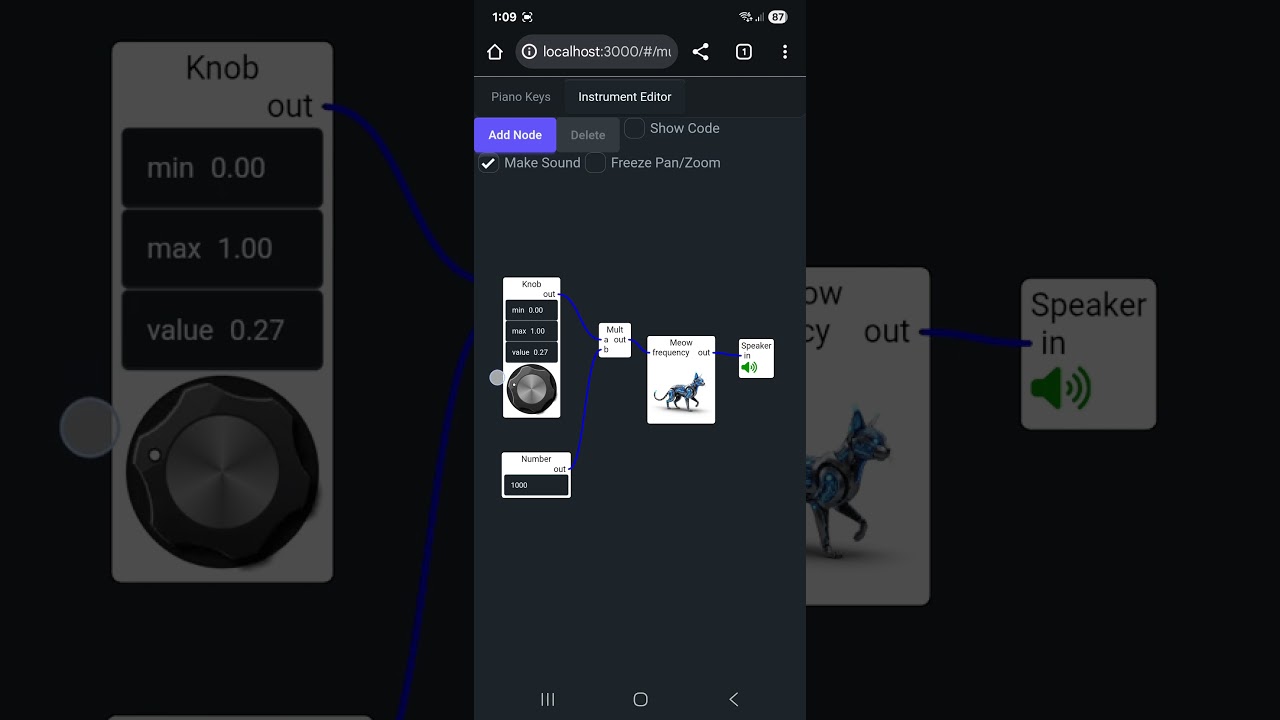 dark bay
Was just a test. Better get load/save going.
dark bay
We should have some fun and import a midi file into the graph. There is a lightweight midi parser, purely for parsing with no playback support:

GitHub
Convert MIDI into Tone.js-friendly JSON. Contribute to Tonejs/Midi development by creating an account on GitHub.
Then its just a matter of traversing over the produced json object to generate a node graph for that midi.
Or alternatively have a single node represent the whole midi file is another option too.
So 128 notes roughly per instrument i think.
128 cats :p
dark bay
So rush e has 12 tracks, and each track has roughly 5000 notes each.
Gotta make sense of that. Because there is only one instrument.
actually one of the tracks has over 20,000 notes

durationTicks must be how long the note is held down... and I am guessing ticks is the time the note is pressed.
and midi must be a number representing the note.
still no idea why there would be 12 tracks for 1 instrument.
if different tracks are for polyphonics, then we'd need 128 tracks not 12. Because there are moments in the Rust E piece were every note is pressed at the same time.
So polyphonics must be supported by a single track.
zenith void
Midi just says when a note is played and for how long.
So midi supports polyphony
The different tracks are most likely representing different instruments
dark bay
Rust E is definitely piano only. I think the 12 tracks are just an organisational thing.
I'm merging all tracks into one for the importer for the time being.
It will be a termux job later 2nyt... got kicked :p
Here's the file if your interested:
It fails to play on my phone or my computer when using the default media players. Probably too many simultaneous notes.
Will see if tool kitty can play it :p
I'll set up a long series of delay nodes, each wired upto 1 to 128 notes.
Just realised there is gonna be a huge number of SVG elements. Don't know how well the browser will handle that. :p
dark bay
Will probably have to cull rendering of nodes off the screen.
dark bay
Weird... <input type="file" accept="audio/midi"/> let's me import midi files on a pc, but not on my mobile.
Maybe Android does not know the mime type of midis.
Here comes the delay train:

Next to hook up all the polyphonic notes on/off state update at each delay step.
 dark bay
And all those frequencies for all those notes...:

Just testing a subset of Rust E to begin with.
Now I need 128 cats, wired to 128 speakers.
dark bay
Must be something off with this formula for midi note to frequency:
let freq = 261.63 * Math.pow(2, (i-64)/12.0);
Each octave is double the pitch last octave. 12 notes per octave. 261.63 is the frequency of middle C.
However the lower notes end up with a frequency of 2 or more. So I definitely messed something up.
Or maybe its not wrong... the midi number doesn't start at 0:
 dark bay
Ahh... middle C is midi # 60, not 64.
And we go from 21 to 108
Which is 88 keys.
So I get to cull some cats.
So a human can hear 20 Hz at lowest and A0 is just above that.
Weird though. I thought 27 Hz would be hard to hear, but it's quite clear.
dark bay
Might be pushing my luck, sounds a bit choppy. Will need to see if I can optimise it a bit more.
If I get choppiness fixed, I'll upload a video.
OK. Needs some optimisation.
 dark bay
Import seems slow. But I haven't batched the import yet.
Even with batch... takes a few minutes to make all those svg elements.
dark bay
Will need to do some profiling ig.
dark bay
...
Found why its slow to import....
getBoundingClientRect... 😅
It has a bunch of reflows it seems.
That's rather annoying.
And getBBox too from the svg renderer... I kinda need it though for my layout. I'm surprised that one is slow.
I ran a test and separated the scene from the renderer. It imports a midi into the scene instantly, but then gets bogged down when rendering the scene from re-flows from getBoundingClientRect and getBBox.
I can boost performance just by guess the size of stuff instead of computing it 😛
I suppose I don't need to physically show the node-graph for the imported midi, because there is so much going on it is not really human readable, but it would be nice to see it.
I wonder if there is a trick to prevent reflow... like a requestAnimationFrame on getClientBoundingRect and have size calculation delayed or something.
zenith void
dark bay
...
Found why its slow to import....
`getBoundingClientRect`... 😅
yuuup, welcome to graph hell
- queue all of them up with a
queueMicrotask - execute all of the getClientBoundingRects
- then do something with the values
if you happen to set some specific html property/attribute in between getClientBoundingRects it needs to do the whole reflow calculation again
dark bay
If only we had a True offscreen dom to measure stuff.
The crazy part is you know each graph node is independent, and they do not affect the layout of one another. But the browser doesn't know that.
The reflow happens for all the nodes on a call to getBoundingClientRect in one of the nodes.
dark bay
zenith void
- queue all of them up with a `queueMicrotask`
- execute all of the getClientBou...
I'll try out the approach you have listed.
zenith void
dark bay
The crazy part is you know each graph node is independent, and they do not affec...
there is css that can help the layout engine
but it's not a silver bullet
zenith void
Are u rendering everything in a single svg and using foreignObject for the html?
I wonder if it also does reflows when svg attributes are set
Bc everything is positioned absolutely in svg anyway
dark bay
zenith void
Are u rendering everything in a single svg and using foreignObject for the html?
yeap.
And yes, SVG getBBox reflows too.
it's quite painful. It does not look like a simple 2 minute change in the code.
I'll need to refactor.
another thing I can do too while its playing music... I can buffer more than 128 samples ahead and have a ring buffer.
so when 88 notes play at once I can avoid a buffer underflow
like have some silience at the begining to allow a larger sound buffer to fill up.
but will try and solve this reflow first.
zenith void
dark bay
it's quite painful. It does not look like a simple 2 minute change in the code.
Ye ig everything becomes async?
zenith void
Ye.......
Components are nice, but it's all so decentralized too. For this kind of stuff ECS would be handy
dark bay
the instrument scene graph is powered by ECS
zenith void
Instead of batching these effects, be able to do it in a single run
dark bay
ah yeah...
dark bay
dark bay
the instrument scene graph is powered by ECS
Not the standard-ECS, just my reactive version of it.
the same ECS used for the running of a user game. in the App v2 route
iti allows automerge to work instantly the moment I switch it on too
zenith void
zenith void
Instead of batching these effects, be able to do it in a single run
Does it allow for this?
Moving it away from dispersed derivations/effects to a single pass?
dark bay
zenith void
Does it allow for this?
yeah... because its just pure data... only the systems need to change.
Like when I switched off the render system, the import midi was instant. But had nothing on the screen to look at. :p
But it could still play the music. (Headless?)
zenith void
The graph is pretty crazy I guess?
dark bay
There was a webgl library that can render svg faster than the browser built-in svg though.
There are options.
zenith void
Ye, might be necessary
dark bay
Probably make our own getBoundingClientRectAsync wrapper that groups them all in a queueMicrotask to do them all at once. And just use it rather than the sync-one.
zenith void
That's how we are doing it in solid-flow to
iirc
requestBoundingClientRect type beat
dark bay
Good to know its a tested theory.
zenith void
Ye... I have been investigating it before
It definitely improves the performance
I think in your setup it might not be enough tho
Or, lemme rephrase that, it will still be slow and janky
Even panning with css-transforms will get sluggish over a certain amount of html
dark bay
:p.... I can reduce it to 1 Midi-node too as a last resort. But doesn't look as special.
zenith void
It's really cool you can do sequencing and DSP in a single graph
I personally don't know anything that can do that
dark bay
Yeah ya do... "Tool Kitty"
zenith void
So these enormous amount of nodes, it wouldn't be so common in other node based audio stuff
dark bay
It's not human friendly to edit an enormous amount of nodes. Probably an anti-pattern.
zenith void
It's not super realistic setup
dark bay
Your web app is more friendly for editing music.
zenith void
It's a very cool feature, this sequencing
But maybe you can just showcase a slice of the midi
And 2 tracks
For the demo
zenith void
dark bay
Your web app is more friendly for editing music.
Ye exactly
Having a piano roll node would be fun!
zenith void
zenith void
It's really cool you can do sequencing and DSP in a single graph
Pure data can do it too in a way, but it's a bit less intuitive as far as I can remember.
zenith void
dark bay
That's feasible. And an import midi button on that node maybe.
You can steal my pianissimo piano roll
It's made for mobile first
dark bay
zenith void
Pure data can do it too in a way, but it's a bit less intuitive as far as I can ...
You can fire a running boolean down the line to mimick sequencing.
zenith void
zenith void
You can steal my pianissimo piano roll
I was thinking of making it a standalone component, but never got around it
dark bay
Would like to do some sort of visual too. Like a waterfall of notes.
dark bay
Oh.... svg's getBBox doesn't seem to be causing reflows, it's just plain slow.
dark bay
getBBox is being called to measure the size of the exact same text between many different nodes.
I can cache that calculation.
dark bay
dark bay
Rust E is definitely piano only. I think the 12 tracks are just an organisationa...
The 12 tracks are used to represent different note colours in their waterfall animation.
(Visual effects)
zenith void
dark bay
The 12 tracks are used to represent different note colours in their waterfall an...
Waterfall is like a pianoroll, but then vertical?
https://m.youtube.com/watch?v=Vl5BA4g3QXM graphite looks so cool

Graphite is a procedural design tool and graphics editor that's free and open source. What's new in the September 2025 release, our biggest update ever? Find out the most exciting and noteworthy improvements from over 300 changes developed by our project community since May. Give it a try yourself at https://graphite.rs
dark bay
zenith void
Waterfall is like a pianoroll, but then vertical?
The Rust E youtube video waterfall
They have different colours for the notes.
zenith void
I have been getting a lot of strudel in my social media these days: https://m.youtube.com/shorts/5ScP_aPBEiQ
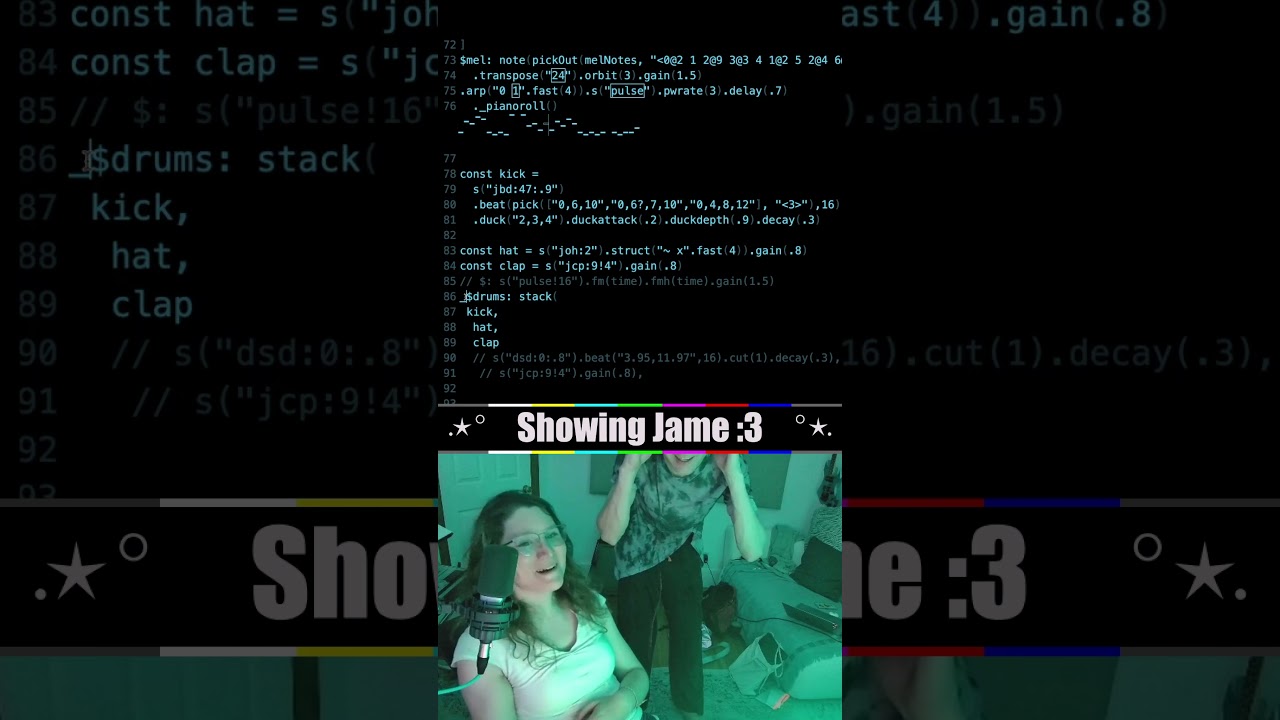 dark bay
There is actually a back-and-forth conversion between a fluent interface and a graph.
I've seen it before with arrows in Haskell.
dark bay
I found a couple of float point divisions laying around per cat, and turned them in 1 float point multiplication each. It's has allowed me to polyphonic more notes at once without choppiness.
dark bay
yeah..... graphs are not the best for sequencing:
 dark bay
Can not manage Rush E yet, but it's enough to do other tunes:
https://youtube.com/shorts/Srshf_esLKs?si=UeI_XXHzGBNjLTdQ
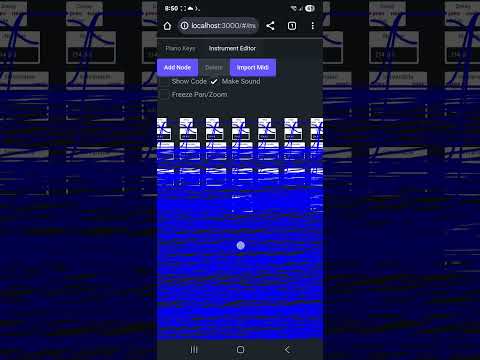 zenith void
let's goo
i think node based sequencing will be cool once you introduce some dynamism into it: think different branches that are called conditionally depending on some parameters so you can create dynamic pieces.
but pianoroll node will probably still be handy
or even a midi node
where you can just drop textual midi and it turns it into a sequence under the hood
dark bay
In the hall of the mountain King was a fun one. Was just listening to it, didn't save or record it though.
I think I'll do a proper piano roll like yours in the other tab.
One tabs for creating instruments. The other tab for using instruments in a piano roll.
zenith void
that's also possible
dark bay
Piano roll with if-statements?
zenith void
multiple pianoroll-nodes with a switch-node?
dark bay
Yeah that could work too.
And I probably should be using webgl, not svg :p
Or even canvas
zenith void
both very possible
dark bay
Pixi has some nice webgl abtractions for doing 2d stuff.
zenith void
never worked with it
for text and the like having some abstraction around webgl is nice
bezier curves
dark bay
I optimised out getBBox and getBoundingClientRect. But it was still painfully slow.
zenith void
ye...
dark bay
The flame graph, didn't seem to be hung on js either if I read it correctly.
Just stuck in render.
zenith void
there is also https://lightning-tv.github.io/solid/#/ but i m not sure if it has support for curves and the like
Get started with SolidJS and LightningJS 3 TV App Development
zenith void
dark bay
Ohh... it uses WebGL
yess
dark bay
I suppose the delay nodes can still be used for custom envelopes.
dark bay
Got the perfect test for our up comming piano roll...
https://youtu.be/kpuhj5S6YAI?si=jVSVCdeaY_I2Rzyz
What ya think?

WELP, THIS IS IT, YOU GUYS ASKED FOR THIS. THE MOST WILD COLLAB EVER SINCE 2025
RUSH E WITH 10,000,000,000 NOTES IS FINALLY HERE!!!!!!
And we can't believe that we changed our minds
Original RUSH by: @SheetMusicBoss
People who collab:
@EMB_69
@TheRealExthayan_3456 ...
Kinda spoil the sound having that many notes 🤣
dark bay
All it takes is to play 88 notes at once, and you can play any tune no matter the complexity.
zenith void
dark bay
Got the perfect test for our up comming piano roll...
https://youtu.be/kpuhj5S6...
Aa yes black midi!
Brings me back to my first production software: guitar pro, software for making tabs for the guitar.
All these horrible midi sounds 🤣 was a lot of fun. Recording it to audio and then mixing it in audacity 😁
Speaking about audacity: https://m.youtube.com/post/UgkxXXn6aujFMhy1EuNXXQQ5ZjOA806Zya-K very curious what tantacrul will cook up!!

YouTube
My new video is available early for Patrons - How We're Creating Audacity 4! https://www.patreon.com/posts/how-were-4-139727191?utm_medium=clipboard_copy&utm...
dark bay
Should we just go raw webgl for the piano roll and do the note visuals in glsl?
... SVGs have annoyed me enough 😅
No real need for a library to draw boxed shaped notes.
Instance rendering for particle effects as the notes hit the bottom.
Preallocated vertex buffers large enough to handle worse-case visual note count. Avoiding resizing arrays, keeping memory use constant to avoid gc.
We can code-gen again for playing all the notes in a single audio worklet node, it should be able to handle it.
Worst case - pre-render all the audio and play it back.
zenith void
dark bay
Should we just go raw webgl for the piano roll and do the note visuals in glsl?
...
yeee why not
if u need some help w webgl resource management: https://github.com/bigmistqke/view.gl
i m using it at work now, and i like it a lot
dark bay
I remember your tetris and game-of-life demos
dark bay
Ohh... you did a swap without a tmp variable. Never seen that before:
;[read, write] = [write, read]
That's some black magic there... :p
zenith void
i guess there is a temporary array being created, but at least you don't have to name it 🙂
dark bay
Haven't touch a computer yet for ToolKitty piano roll... Java has sucked the life out of me, and I needed a break 😅
Kinda wish that legacy app was in another language like C#. Anything but Java.
I compiled the same code twice with no changes to the code. And the 2nd time it compiled it had "unable to solve type inference" errors. It's like the compiler itself is non-deterministic. Then I had to fill in all the types to help the compiler out... Maybe the Java compiler gives itself a time limit to solve the types.
And that is Java 25... I thought their type inference should of improved by now.
I'll have to give Kotlin a go. Java seems like a joke.
The only thing that turns me away from C#, is all their functions and methods starting with a capital letter, just like their class names.
It didn't feel right, because it increases the chance of naming collisions.
On the plus side.... a clean build on Java 25 takes 2 minutes, and it used to take 1 hour to do a clean build on Java 8.
I think its just the verbosity of Java that has me annoyed.
Having a look through Kotlins features, its a very nice languages, has much better type inference, and feels a little bit like TypeScript syntactically.
That might e the direction I go with new code in the legacy app. (Kotlin and Java are able to mix together easily in the one code base)
Not to mention that Kotlin has named parameters, so I can eliminate 2000 step builder Java files.
dark bay
Been many years since I've touch raw webgl, I am a but rusty... all starts with a triangle:

Doesn't really need to use signals, but I am tempted to drive it with R3. The cool thing about R3 is no memory allocation when reactive node are added to the queue, because of that intrusive linked list stuff.
Then again, simple falling notes are easy enough in vanilla anyway.
Maybe the editing side can be R3 driven.