#How do i link my postgresql to my python server so i dont have to link it in the code?
131 messages · Page 1 of 1 (latest)
 zealous haloBOT
 kindred depot
Environment variables

freeCodeCamp.org
By Shittu Olumide Environment variables play a crucial role in Python programming. They provide a way to store and access configuration values, system-specific information, and sensitive data. In this article, we will explore various methods to retr...

PostgreSQL Documentation
32.15. Environment Variables # The following environment variables can be used to select default connection parameter values, which will be used …
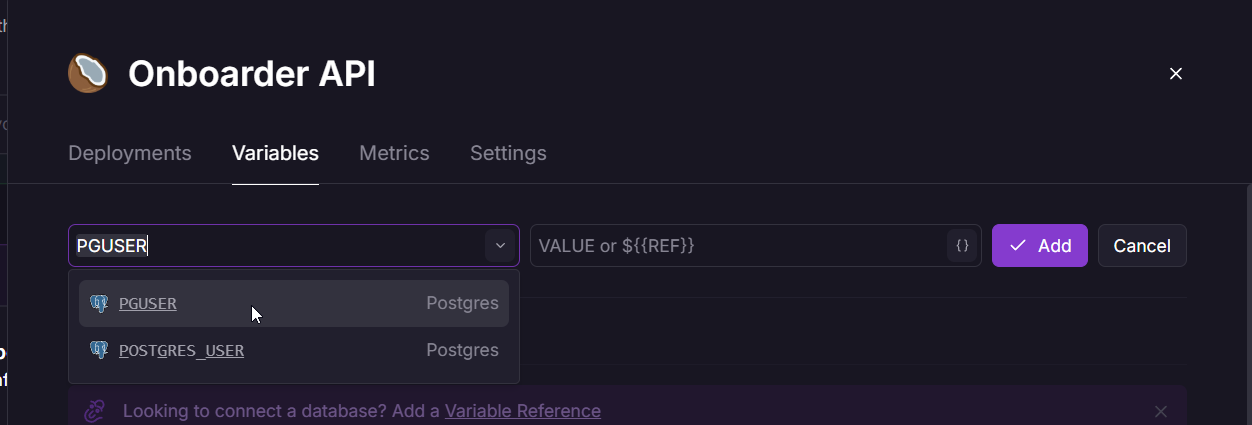
On railway:
 kindred depot
value = os.getenv("VAR_NAME")  # Replace VAR_NAME with the actual variable name
print(value)
 ornate rock
Okay so
kindred depot
don't actually print your secrets
ornate rock
DB_PARAMS = {
    'dbname': os.getenv('PGDATABASE'),
    'user': os.getenv('PGUSER'),
    'password': os.getenv('PGPASSWORD'),
    'host': os.getenv('PGHOST'),
    'port': os.getenv('PGPORT')
}
?
kindred depot
I'd assume so - port may throw type errors (unsure how python likes this)
my python knowledge is sketchy at best
ornate rock
Oh
Lemme try it rq
Hmph
I tried it
@kindred depot
I'm getting an error
Traceback (most recent call last):

  File "/app/server.py", line 218, in <module>

    create_user_table()

  File "/app/server.py", line 32, in create_user_table

    conn = get_db_connection()

           ^^^^^^^^^^^^^^^^^^^

  File "/app/server.py", line 27, in get_db_connection

    conn = psycopg2.connect(**DB_PARAMS)

           ^^^^^^^^^^^^^^^^^^^^^^^^^^^^^

  File "/opt/venv/lib/python3.12/site-packages/psycopg2/__init__.py", line 122, in connect

    conn = _connect(dsn, connection_factory=connection_factory, **kwasync)

           ^^^^^^^^^^^^^^^^^^^^^^^^^^^^^^^^^^^^^^^^^^^^^^^^^^^^^^^^^^^^^^^

psycopg2.OperationalError: connection to server at "postgres.railway.internal" (fd12:464e:84c::6a:9815:3211), port 5000 failed: Connection refused

    Is the server running on that host and accepting TCP/IP connections?
are you positive it's running on 5000?
normally runs on 5432 by default
- are you running this on railway or locally?
this won't work locally, you'll need to use the public domain
ornate rock
kindred depot
normally runs on 5432 by default
yes
the postgresql im running it on railway
ornate rock
python server too
on railway
the same project
two diff services
i dont know how to change the port, what i did was change the "pgport" to 5000 and also change the port in the settings to 5000
thats what i
usualyl do
in my python apis
kindred depot
can you change port back to 5432 on both
ornate rock
sure
kindred depot
I think you have to do a tad extra to change the port postgres runs on on the postgres side
once we figure out if that's the issue, then you can figure that part out if you want to change it for whatever reason
ornate rock
alrightyy
im redeploying the python api
Traceback (most recent call last):

  File "/app/server.py", line 218, in <module>

    create_user_table()

  File "/app/server.py", line 32, in create_user_table

    conn = get_db_connection()

           ^^^^^^^^^^^^^^^^^^^

  File "/app/server.py", line 27, in get_db_connection

    conn = psycopg2.connect(**DB_PARAMS)

           ^^^^^^^^^^^^^^^^^^^^^^^^^^^^^

  File "/opt/venv/lib/python3.12/site-packages/psycopg2/__init__.py", line 122, in connect

    conn = _connect(dsn, connection_factory=connection_factory, **kwasync)

           ^^^^^^^^^^^^^^^^^^^^^^^^^^^^^^^^^^^^^^^^^^^^^^^^^^^^^^^^^^^^^^^

psycopg2.OperationalError: connection to server at "postgres.railway.internal" (fd12:464e:84c::6a:9860:cc56), port 5432 failed: FATAL:  password authentication failed for user "postgres"

connection to server at "postgres.railway.internal" (fd12:464e:84c::6a:9860:cc56), port 5432 failed: FATAL:  password authentication failed for user "postgres"
progress!
ornate rock
I see that the password authentication failed
kindred depot
so, is the password correct
ornate rock
I linked the password
kindred depot
and you didn't change that, right?

 kindred depot
check PGPASSWORD is filled with a print
I've seen a couple cases on my dashboard where it goes missing randomly
ornate rock
what do you mean filled with a print?
kindred depot
check it's in your container runtime
ornate rock
oh
kindred depot
(null check is probably a better idea if this is a prod app)
ornate rock
wait
connection to server at "postgres.railway.internal" (fd12:464e:84c::6a:9860:cc56), port 5432 failed: FATAL: password authentication failed for user "postgres"
this means both the port and authentication failed?
kindred depot
nope, just auth
ornate rock
port 5432 failed: FATAL
kindred depot
In your code - check the environment variable has stuff in it
ornate rock
kindred depot
In your code - check the environment variable has stuff in it
it links the connection using this:
def get_db_connection():
    conn = psycopg2.connect(**DB_PARAMS)
    return conn
and this is the DB_PARAMS:
DB_PARAMS = {
    'dbname': os.getenv('PGDATABASE'),
    'user': os.getenv('PGUSER'),
    'password': os.getenv('PGPASSWORD'),
    'host': os.getenv('PGHOST'),
    'port': os.getenv('PGPORT')
}
environnement variable has no stuff in it, it just uses os to get the environnement variable
?
@kindred depot
any idea?
kindred depot
Check that your environment variables are all setup correctly
print(os.getenv('PGDATABASE'))
print(os.getenv('PGUSER'))
print(os.getenv('PGPASSWORD'))
print(os.getenv('PGHOST'))
print(os.getenv('PGPORT'))
Alrighty
 agile mulch
your postrgres password got changed, i've reverted that for you
ornate rock
agile mulch
your postrgres password got changed, i've reverted that for you
oh alright
agile mulch
looks like you are hardcoding the password in your code now, please use only environment variables
ornate rock
agile mulch
looks like you are hardcoding the password in your code now, please use only env...
oh
yeah
wait ill change it
that was earlier before u told me the postgres pass was changed
but now ive fixed it
im redeploying
great it worked!
thanks!
agile mulch
its online, now theres the new problem -
This is a development server. Do not use it in a production deployment. Use a production WSGI server instead.
you need to be using gunicorn
ornate rock
do i need to replace my flask application with gunicorn?
or just like setup gunicorn?
ive never used gunicorn
agile mulch
you need to run your flask app with gunicorn
ornate rock
alrighty
thanks for the help
u can close this nwo
now*
!close
uh
😭
is!close
what😭
agile mulch
are you using gunicorn now?
ornate rock
actually
ornate rock
agile mulch
are you using gunicorn now?
yes
but the app failed to load
[2025-02-04 19:43:31 +0000] [1] [ERROR] Worker (pid:4) exited with code 4
[2025-02-04 19:43:31 +0000] [1] [ERROR] Shutting down: Master
[2025-02-04 19:43:31 +0000] [1] [ERROR] Reason: App failed to load.
😭
god help me
agile mulch
what is your start command
ornate rock
web: gunicorn -w 4 -b 0.0.0.0:3540 wsgi:app
i js did a fix
lemme see if it works
works!
[2025-02-04 19:45:59 +0000] [1] [INFO] Starting gunicorn 23.0.0

[2025-02-04 19:45:59 +0000] [1] [INFO] Listening at: http://0.0.0.0:3540 (1)

[2025-02-04 19:45:59 +0000] [1] [INFO] Using worker: sync

[2025-02-04 19:45:59 +0000] [4] [INFO] Booting worker with pid: 4

[2025-02-04 19:45:59 +0000] [5] [INFO] Booting worker with pid: 5

[2025-02-04 19:45:59 +0000] [6] [INFO] Booting worker with pid: 6

[2025-02-04 19:45:59 +0000] [7] [INFO] Booting worker with pid: 7
dont know what this means but it means it works i guess
agile mulch
what was the fix
ornate rock
agile mulch
what was the fix
uhh the wsgi.py was empty💀
😭
i added soem code to it
that makes the db tables
and
runs the app
also when im using my server in a js environnement do i need to include the port? i usually dont do the port nnd it works
agile mulch
as long as you are listening on the PORT environment variable
ornate rock
agile mulch
as long as you are listening on the PORT environment variable
yeah
you can close this now
agile mulch
!s