#Sega Dreamcast
1 messages · Page 2 of 1
 polar goblet
 rain obsidian
Sprites are really just Quads.
So rendered using two triangles.
It's all polygons really, there is no separate thing for "2D" sprites, as such.
Sprites are just foward-facing Quads, with no tilt angle.
Just increased the number of fractional bits for the verts, and it brought back some of the road.

The Codebook Cache can be way smaller now, and it only drops about 1 FPS.
64KB or 128KB would be plenty.
Could probably be sped up even more, by using the actual texture base address for the cache look-up.
Right now, it's only using the cache kind of within each tile.
So it can't re-use the same cache entries across multiple tiles.
64KB for the CB cache seems a good sweet-spot atm.
32 entries, 256 words per entry, 8 bytes per word (64-bit) = 64KB.
I should mention that I'm not sure when the logo at the lower-right of Daytona disappeared. lol
As usual, it's two steps forward, one step back.
No transparencies now either, until I add the accumulation (ARGB pixel) buffer.
But this has been quite fun, seeing how high I can push the FPS, and learning about the cache thing.
Even just as a proof-of-concept.
I have a PCIe card with a Cyclone IV on it somewhere.
That has 77,000 LEs.
I replaced the DDR SODIMM with my own 64-bit wide SRAM module.
Which could be ideal for testing this stuff on, but I'd also need to add some logic to allow access from the PC.
Ok, 75,000 LEs.
I won't post the direct link on here, but it's this thing...

I probably can't even fit the core on that atm, even without the MiSTer framework. lol
 halcyon creek
Incredible stuff. Well done!
rain obsidian
Thanks. 😉
Tons of caveats to actually using this on any reasonable FPGA, but it might be usable.
Probably never a full core on MiSTer/DE10, without using an external SH4, or hybrid emulation.
polar goblet
Is it even feasible to use a hybrid solution with the DE-10 Nano?
rain obsidian
Not sure, but I would think the ARM cores would be able to run just the SH4 OK.
The Cyc V has a Dual core ARM, running at (I think) 800-900 MHz.
It doesn't use the most recent ARM tech, though.
I don't even think it's quite as powerful as a Rasp Pi 2.
It also has to share some DDR3 bandwidth with the FPGA side, assuming a core uses that.
And of course, there is no actual GPU for the ARM, only what people write on the FPGA side.
I think a few people had a stripped-down version of MAME running on the ARM before?
Wow, some interesting "blocked words" on this chat. lol
Or should I say, blocked user names.
If I was a bit better at C/C++, I'd try running a DC emu on MiSTer.
It would need the video stuff disabling, though.
Unless it renders to a buffer in RAM, and the FPGA (ASCAL) accesses it on that side.
Which is how ScummVM and others work.
IIRC, the ARM toolchain used for MiSTer, is very close to the Rasp Pi (2?).
So that at least makes it a bit easier to port stuff.
GitHub
ScummVM installer and 2.2 build for the MiSTer platform. - bbond007/MiSTer_ScummVM
 low widget
Back reading, that hurts… also GDrom studder
 mint spade
low widget
Back reading, that hurts… also GDrom studder
mint spade
low widget
Back reading, that hurts… also GDrom studder
Every single one of my Dreamcasts had bad audio caps. I did a full recap, but it suuuuucked. Just because the board is pretty cost reduced, so it's very fragile. Traces are glued in my experience so heat lifts them. I've recapped 3 successfully and one...well, we don't talk about Gordon.
It sucks the components were just cheap all around at that time. OG Xbox troubles are with me right now. Similar stuff. A lot of bad caps. Some really dodgy traces, especially on the power rail that runs along the edge of the board. My 16 bits? They'll run on fire, under water, while being viscously mocked by lookers on. But that 2000-20010 era is just rotting so fast.
low widget
Yeah, unless someone preserves the logic, the actual hardware is really not doing well.
rain obsidian
Back again.
Not doing much, as it's 4:20am, and I just woke up. lol

I just did a test, by not clearing the codebook cache before each new tile.
To see roughly how much faster it could be, if the codebook cache was more generic, and worked using the actual texture address as the "Tag".
This render was originally around 54 FPS.
Now it's 76 FPS, and that's about what I'd expect.
That's probably hitting close to the absolute max at 100 MHz, I would think.
79.5 FPS, if not clearing the Z-buffer either.
Erm, OK.

I'm stunned that actually worked. 😮
The prim_tag input on the codebook cache module is (currently) 9-bit.
Each codebook read from VRAM is 256 words.
So that would use the lower 8 bits of the texture address in the TCW.
I thought maybe textures do need to be aligned to each chunk of 256 words in VRAM.
So I just used the texture address bits [16:8] as the "Tag", and it worked. lol

Now it's 80 FPS, and textures look correct.
I'm now a firm believer in the power of cache.
Really great frame times now.
Almost all are above 40 FPS, quite a few over 60 FPS.
 rain obsidian
Fixed most of the texture glitches, by using the texture address direct from the TCW in the parameter cache.
Which gets updated one clock cycle earlier than tcw_word itself.
OK, I was wrong. I still has a few glitches in some renders.

(ignorring the giant weird texture on the missing road. That's a separate issue.)

Using texture (base) addr bits [15:7] as the "Tag" seems to help.
So maybe textures can be aligned on every 128-words?
rain obsidian
Trying to figure out how to get transparencies to work again.

It works for some stuff, but not others.
I also found a dumb typo in the RA module, which meant it was rendering "Opaque Volume Modifier" prim types as "Opaque".
DIdn't change much else, visually, but then I haven't implemented Volume Mod yet.
OK, so that's using the Opaque Mod type.

The Alpha blending thing works with that, but not for the logos on the back of the car on Daytona.
Opaque means that the polygons will always have an Alpha of 1.0.
Punch-Through means they can have an Alpha of either 0.0 or 1.0 (ie. no blending in-between).
Transparent is Alpha between 0.0 and 1.0, so actual blending with the existing colour in the tile Accumulation (ARGB) buffer.
And the Mod Volume for both Opaque and Transparent, are supposedly for doing effects like cheap shadows.
Or changing the texture for areas where the Volume intersects.
I'm also now realizing why each prim Type (blending type) needs to be renderered in order.
So not just "Process all prims into the Tag buffer, then render."
But "Process the first prim Type to the Tag buffer, render, process the next prim Type, render", etc.
This means that the FPS slows down again, though. 😦
Like a multipass rendering thing.

Transparency working here as well now.

ie. on the bullets/rounds, the rain, the bicycle tires, etc.
Just Daytona being weird.
But Zombies now renders with a frame time around 46 FPS, instead of 70. lol
This was 121 FPS, now 66, so basically half. But at least transparencies now mostly work (again).

Need to fix the Quads thing soon. It's a bit annoying.
Alpha blending on the fire effect is a bit poo.

And some of the missing road polygons have the texture of Blue Jean Shorts.
(Boots, with the Furrrr.)
OK, I know it's Apple-bottom Jeans, but give me a break. lol
rain obsidian
Looking a bit better, with transparency stuff over other textures on the trucks.
Just a shame he's wearing his Covid mask.


^ Transparencies around the HUD stuff are working again there.
But, yeah... frame rates pretty much what I started with. lol
So no real advantage, but it would save on VRAM bandwidth on the final core, so I dunno.
ie. once it is actually rendering to an internal tile buffer, then flushing the entire finished tile to VRAM after.
atm, it's still basically writing pixels direct to the buffer in C code.
And taking advantage of some Alpha blending in C as well.
This always looked a bit crappy, without Gouraud shading and other effects...
 rain obsidian
OK, I see now.
It only needs to render the transparent stuff within tiles that those polys actually exist in.
And the RA parser already handles that.

So it still renders most of the tiles in one pass.
But you can watch it render the guy and background, then render the windscreen (windshield) on the second pass.
It can hit 57 FPS on that render, so not too bad at all.
I also had it set to "render" the Modifier Volume stuff, which is wrong.
AFAIK, those don't actually get shown on-screen, they only modify the parameters for existing pixels / Tags.
rain obsidian
Tried adding Gouraud shading, for the first time.
Before...

After...

Before...

After...
 polar goblet
Poor Kasumi looks like her face got smashed in by a baseball bat.
rain obsidian
Yeah, the Yakuza can be quite harsh.
Offset colour added, which kinda gives specular highlights. Maybe a bit too bright.

Actually, possibly about right.
 dusk bolt
This is so cool! I'm loving following this progress. Thanks ElectronAsh!
rain obsidian
I should have tried this weeks ago.

ie. doing the UV interpolation in the C code, and feeding to the Verilog model.
That's how I was doing it originally, for a long time.
So I could start off with most of it in C, then implement more in Verilog.
But I couldn't get this working again recently. For some reason, the C code just wasn't updating the "registers" in the Verilog model directly.
I had to route those signals (sim_ui and sim_vi) through to the top level instead.

Once that was done, you can just drive those "signals" from the C code, like this...
    // Shove ui and vi into the core...
    top->sim_ui = sim_ui_flipped;
    top->sim_vi = sim_vi_flipped;
So anyway, that immediately proves that most of the issue with the missing chunk of road etc., is due to overflow in the inTri calc thing.
Because this is now completely bypassing the Verilog interpolation block(s), for texture U,V.
The sky texture now appears far more complete, but that's due to lack of fractional precision (bits) for the Z-interp in the core.
ie. the original float Z values can get so tiny, that once they are converted to fixed-point in the core, some of the values just end up as zero, or might even wrap past zero and go to max. lol
I guess I could have always tried this, too...

Which was just forcing all of the 32 inTri bits high.
(triangle visibility bits)
That now proves that it can draw the nearest chunk of road.
Or maybe not. Need another test...
hmm, not so sure now. lol

That's with the Verilog doing the texture UV interp again, but with the inTri bits forced High.
And obiously the Daytona logo hasn't appeared for a while.
All Verilog again, but ignorring the depth_allow (Z-compare) bits...

Now I'm really confused. lol
rain obsidian
OK, yep, it kinda has to be due to the inTri calcs.
When I'm using the UV stuff in C, it's completely bypassing the Verilog interp for U,V, and Z.
Then that chunk of road appears totally black, as the inTri bits are always off.
Would be great to finally get that working.
inTri checks the three verts of the triangle, with the x_ps and y_ps (current screen pixel) coords.

It now actually does it for 32 pixels (a tile row) in parallel, but I don't think that's the main issue.
OK, that's what it is...

MASSIVE values for the incoming verts, for the big chunk of road.
And those are the original float values, apparently.
Yep.

Quick sanity check. ^
So I might have to try limiting the max value somehow.
rain obsidian
Yep, the big road chunk is using those massive vert values.

That was forcing the inTri bits high, only for that polygon.

Even fairly huge numbers still fit within the 32 bits I'm using for fixed-point verts atm.
Except that value for vert_c_y, which causes the resulting fixed-point value to set the sign bit.
So that's probably all that's stopping it being rendered.
Not sure about the negative vert_c_x thing either, though.
Largest positive number I can fit into 32-bit (signed) fixed-point, with 14 fractional bits...

Shifted left by the 14 bits...

So 393,215, is the highest the integer part can get, before it kinda overflows, and messes with the Sign bit (MSB).
Well, the highest value, ignorring any fractional part.
Oh, ffs. Don't know how bit 32 got set. lol
OK, so only 17 bits of integer, when using 14 for the fraction.
Which is only this as a max value...

Highest integer value, with only 10 bits of fraction...

But it STILL won't draw the road. lol
 floral vale
dang it!
rain obsidian
I should really note down the min and max values for this stuff.
But I can tweak the fractional bits for both the verts, and for Z.
constexpr auto FRAC_BITS = 12;
constexpr auto Z_FRAC_BITS = 20;
I was using 14 FRAC_BITS most of this time.
And the highest positive integer would then be...

Which isn't really enough.
With 12 fractional bits, the max integer would be...

Which looks like enough for most renders.
So I still haven't quite found the root cause. lol
Getting a bit better, but cheating, by using the C interp for UVZ.

Highest Z interger, with 20 bits of fraction, is 2,047.
Some Z values are quite huge as well, but not quite as often
Don't know. Haven't quite got it.
Increasing max prim_tags to 10-bit stops it showing the wrong textures for the road thingy.

I should have remembered, lowering FRAC_BITS to below 14, gets more of Looney to display.

Basically, a lot of games have insanely high values for some of the verts, for triangles that are past the viewing frustum, towards the viewer/camera...

Almost certain the real PVR will be clamping those values at the FPU stage.
Sort of works, when using ui and vi from C...

Since it's using floats, and can handle the massive numbers.
I knew this part would always be a challenge, I just need to go through it properly soon, and figure out a way to handle those values.
At least the MiSTer version is mostly working.

And using "only" 59% of the FPGA now.
Man, that's rough. lol

Eww.


 rain obsidian
Nailed it.

 stone plaza
"speculative discussion". it's basically playable
crazy taxi is SUPPOSED to be crazy
rain obsidian
Let's just pretend it works for now.

Face fixed.

Background textures look a bit better...

(but ofc the colour blending calcs aren't right yet.)
 fresh badger
is this running on a mister?
polar goblet
rain obsidian
Oh good Kasumi got her face fixed.
floral vale
Can we just have it always say press the fart button?
rain obsidian
fresh badger
is this running on a mister?
Not in as much as running any actual games, no.
This is purely rendering a single frame at a time atm, from a VRAM dump from reicast.
So essentially a slideshow viewer. lol
Although I did manage to get the frame times very low. EDIT: (in the sim. Getting it rendering a frame that fast on the FPGA is another story).
So, in theory, if it could fit on a reasonably-sized FPGA, and use SRAM, and somehow hit 100 MHz, it could make for part of the GPU.
But this is only the final renderer. There is no SH4 CPU, no Tile Accelerator, no sound chip, no GD drive, no BIOS, etc.
The MiSTer "core" can also render single frames from VRAM dumps.
But it's been very hard to even get this to fit the FPGA, especially with how inefficiently I wrote the logic.
Maybe eventually, this might help towards a full core, but it could be a long way off.
stone plaza
the n64 turbo core hits 80mhz. only 20mhz up to 100. it's doable.
is this how it works?
low widget
What is happening here is amazing, not that I understand any of it, just getting in on the ground level and going... you rock.

Realistically though, isn't it like 30% or more logic than the Cyclone V can take? So we're not going to see it on Mister FPGA anytime soon (if ever) right?
 ivory gate
@low widget Probably most likely almost definitely not on MiSTer is my understanding, but Ash is still out here doing the Lord’s work 🙏
low widget
ivory gate
<@165711021149782016> Probably most likely almost definitely not on MiSTer is my...
 rain obsidian
stone plaza
the n64 turbo core hits 80mhz. only 20mhz up to 100. it's doable.
rain obsidian
stone plaza
the n64 turbo core hits 80mhz. only 20mhz up to 100. it's doable.
Robert's work on N64 (and PS1) inspired me to think it might be possible to run part of the Dreamcast core at 80-100 MHz on the DE10.
ie. Maybe just the GPU part, and some other bits, with the rest either emulated on the ARM, or using a real SH4.
But I don't think too many people would want to sacrifice analog RGB output and both SDRAM modules, just to run DC. lol
It's customary for me to show the hat board each time I mention it, so people know what I'm talking about.
Else it's quite hard to describe. lol

So that's the main CPU and main RAM, plugged into the DE10.
Obviously it uses both 40-pin GPIO headers, though, plus most of the "Arduino" IO signals.
So no SNAC either.
I've had it running a tiny chunk of Dreamcast BIOS code so far, but just watching the signals etc. in SignalTap.
The idea is, IF (and that's a big if) I/we can get the PowerVR2, TA, and other parts of HOLLY done enough for the CPU to boot further, the real SH4 can be used for the time being.
So that's then a "known good" CPU, obviously.
That takes a huge chunk out of the equation, while the rest of the core can be worked on, and improved as much as possible.
Then the SH4 implemented in Verilog.
There is an unfinished SH4 core by zephray.
I was talking to him for quite a while about it before, and he fixed a few more bugs.
But then he got very busy with work and life again, so the core still isn't quite finished.
Even if it was finished...
The SH4 on Dreamcast runs at 200 MHz (internally) that's never likely to happen on the Cyc V on the DE10.
It just can't really hit those freqs with complex logic.
(the DDR3 controller doesn't count, as that's "baked in" to the FPGA silicon as a separate block. DDR3 basically runs at 400 MHz on the DE10.)
EDIT: In the same way that the ARM core(s) are separate from the FPGA side of the chip, hence the ARM cores can run at 800MHz or so.
I do think some people would be happy with a fully custom board, which could run Dreamcast/NAOMI, and most existing MiSTer cores, though.
Again, maybe using the real SH4, and some SRAM or SDRAM as VRAM.
I am hopeful about getting the PVR2 running at decent frame rates on the DE10.
Now that I've seen it is possible to reduce the logic a lot, by using pipelining registers etc.
The next challenge, is figuring out how to use SDRAM bursts properly.
Else it will never be able to hit anywhere close to "decent frame rates".
Plus, the TA isn't finished yet, which is the next step to enable sending new polygon data to PVR2 quickly, to test some animations etc.
(ie. rather than loading an 8MB VRAM dump for every single frame, which would obviously be dog slow.)
I'm also hoping some code gurus might be able to help get a Dreamcast emulator running on the ARM/Linux side.
ie. with the video stuff mostly disabled, but a game running in the background.
It then might be possible to hook up the (software) emulator to the PVR core.
It all sounds very complicated, and it is (lol), but I have a fairly good idea now of what is feasible, and what definitely isn't.
Just don't expect any playable DC core on MiSTer any time soon, even with the SH4 hat.
Unless some uber devs like Srg320 and Robert get involved, it's going to take a very long time. lol
Right now, it would just be awesome to get the SDRAM stuff working, to see the fast "frame rates" (low frame times) on the FPGA.
The closest we have for now, is when I made a GIF, using the sim...

But that was back when I was cheating a lot more, doing most of the UVZ calcs in C code, not in Verilog.
Loading one 8MB VRAM dump (from reicast) at a time, rendering the frame, then saving to a BMP.
Then using an online thing to convert to an animated GIF.
That was also when the sim was taking about 15 seconds just to render ONE frame. lol
So definitely not realtime.
I will try doing some more GIFs soon, using the latest code.
If I could only get reicast to dump the 120 VRAM files without it crashing on this PC.
(worked fine on the Win 11 5900X, but not on this Win 10 3700X?)
I guess I could just... walk in the other room, hit the power button on the 5900X PC, and get some VRAM captures, but that's quite a lot of effort. lol
The problem is, as many of you know, you can't even post a pre-rendered GIF these days, without a handful of people saying "Holy crap! - Dreamcast core on MiSTer!" sigh.
From a while back...

 rain obsidian
To give an idea of how fast (or slow) the sim can render each frame atm...
I realize the colour blending is wrong, so it looks too dark, and some of the textures are missing, etc.
Keeping in mind, that the BIOS Menu is one of the fastest to render each frame.
Giving frame times that would give a theoretical max of around 97 FPS.
I just added some C code to automate rendering a frame from each of the 120 VRAM dump files, then saving to a BMP.
It's another thing I should have done a while ago.
'cos when I made those GIFs above, I had to Run the sim to render a frame, hit the button to save to a BMP, move the slider to the next frame, Run it again, etc. It took a long time. lol
I used the modified version of reicast to write the 120 VRAM dumps to files.

skmp added that code to the emulator for me.
It used to only dump one VRAM image at a time, I changed that to do 120.
(so two seconds worth of frames, assuming the game was hitting 60 FPS to being with.)
It also starts a new dump of 120 VRAM files whenever I go into the menu (Tab key), then Resume again.
The problem is, after transferring that reicast code over to this PC, it usually crashes when trying to save the VRAM dumps when an actual game is running
Boooo!

I think it's when it clashes with the moment the game / emulator is swapping the VRAM buffers, or something?

Yeah, probably something like that.
Like it hasn't had chance to swap the framebuffers yet, so I'm accessing VRAM at the wrong time.
Just not sure why it worked fine on the other PC.
OK, it is just failing to open the file, for some reason.
Probably some dumb security stuff on Win 10.

I added a check for the vram dump fopen, and yeah...

So then the PVR regs fopen fails.
Gonna try running MSVC as Administrator.

blobs

Also forgot that reicast has some graphical glitches.
Which could well be the reason I was having so many problems on the sim.
ie. It might be a small bug in the TA or something in reicast, which is generating incorrect vertex data in the VRAM dump(s).
Well, there's a surprise.
I ran reicast itself as Administrator, and now it works again.
So yeah, it's not a "too many open files" problem, it's a Windows 10 overbearing security problem.

Sure, the renders aren't great, but it depends on the game.
stone plaza
Halftona
 stone plaza
progress
rain obsidian
The actual calculated frame times for that were hitting 60 FPS most of the time.
ie. Taking about 5-6 seconds to render each frame in the sim.
But if I could get the SDRAM stuff working well enough, it could maybe possibly reach that speed on the FPGA.
(again, only the GPU part. Minus the TA, CPU, sound etc. I have to mention that every time, so nobody gets the wrong idea.)
rain obsidian
This one looks pretty bad, but I'm getting some good info from these renders.

Also reminds me of how twitchy some games are, when using keyboard controls.
Harder than you might think, to control it well, whilst trying to pick good places to trigger the VRAM captures. lol
rain obsidian
Cheating again, by doing the UV calcs in C...

Currently compiling on Quartus, to see how much logic reduction happens.
When changing the interp block(s) to use "clocked" registers instead of combo logic.
'cos it made a HUGE difference when trying that with the texture_address module.
It will produce super fugly renders like that, though.
To fix will happen later, when adding proper pipelining regs.
Or basically delaying when you write a pixel to the framebuffer, because the results of the texturing and interp stuff will be delayed by a certain number of clock cycles.

It was originally using about 86% of the FPGA.
Then I did the tweak to the texture_address block, which reduced it to 59%.
Let's see what happens for the interp block.
Takes over 25 mins to compile, IIRC.
The interp blocks are currently using around 3,000 ALMs each, which is roughly 8,000 LEs. lol
And there are only two of them.
Supposed to be three, to interpolate Z across each triangle.
And Gouraud shading adds about EIGHT more interp blocks.
(four for the Base colour, four for the Offset colour.)
Offset colour is used to add a kind of specular highlights effect.
rain obsidian
Or... perhaps it doesn't always make a difference.
A whopping 1 PERCENT saved. lol
 stone plaza
i'm confused... but i am paying attention
rain obsidian
I'm also confused.
Some of this stuff I've wondered about for years, but never learned it properly.

Just confirmed that the main issue with missing triangles is due to the overflow with the fixed-point Vert and Z values.
I just had to set FRAC_BITS and Z_FRAC_BITS low enough, to give some extra headroom for the integer part.
But that ofc causes other rendering issues, due to lack of fractional bits, like repeated textures etc.
I think the vert and Z values will have to be changed from 32-bit, to at least 36-bit.
Maybe even 40-48bit.

Doing another 120-frame render.
It's genuinely useful, to spot other issues, but also fun.
I quite like that one.
 polar goblet
Pretty looney.
stone plaza
you need to fine-tune it
rain obsidian

^ Another one where I'm cheating, by using UV calcs in C again.
But it was to rule out some of the interp stuff.
I think most of the flickering is Z-fighting. Not Kung-Fu fighting, nor Foo Fighters, but Z-fighting.
ie. not quite enough fractional bits for Z, so it's having trouble doing the Z-compare.
stone plaza
looks like early bleem ps1
rain obsidian
Yeah, I does actually. lol
I couldn't believe it, when I first booted up the Bleem CD on my PC at the time.

 stone plaza
still bleem
low widget
rain obsidian
Robert's work on N64 (and PS1) inspired me to think it *might* be possible to ru...
Heh, let’s increase the stack and strap another Raspberry on it… that’ll work right? 🤣
 frail raft
GPIO GPU/Math Coprocessor
low widget
frail raft
GPIO GPU/Math Coprocessor
Mmmm I remember getting them for 486
frail raft
low widget
Mmmm I remember getting them for 486<:elmorise:862320827687763989>
IDK if you've ever messed with the PC cores, but it's something they all lack. IDK if the GPIO is fast enough to pull it off, though
low widget
frail raft
IDK if you've ever messed with the PC cores, but it's something they all lack. ...
What I meant was PHYSICALLY slapping that thing into an “IBM compatible” mobo, but yeah I’m actually still waiting for my Mister Pi to arrive… it’s been stuck in a warehouse in China the last 10 days… 4PX annoys me lol… but yeah I’ve been following Mister development for the last 3-4 years, just never found a good time to jump into it until the cloners came out
Heh
So weird to be so familiar with something yet so completely noob
frail raft
low widget
What I meant was PHYSICALLY slapping that thing into an “IBM compatible” mobo, b...
One of the things your Mister Pi will have is a single stick of 128mb ram on one of the GPIO ports. A lot of the more advanced cores will make use of it. Processors require less latency than RAM so I have no idea if using the GPIO port for a coprocessor is practical.
low widget
frail raft
One of the things your Mister Pi will have is a single stick of 128mb ram on one...
Probably not, honestly… same reason why just try to stick multiple Cyclones together is probably a shit idea lol
frail raft
low widget
Probably not, honestly… same reason why just try to stick multiple Cyclones toge...
another cyclone isn't really going to help much. what you want is something the cyclone has trouble doing. Math.
low widget
frail raft
another cyclone isn't really going to help much. what you want is something the...
I was just being an ass hah… to be fair though, if we really are going past the limits of the chips, I’m sure someone will eventually try anything
rain obsidian
Using multiple small-ish FPGAs is definitely an option.
'cos some of the small to mid-range chips can cost less than one giant chip.
As some of the smaller chips are more popular / more widespread.
Also helps if you just need more IO pins, and don't need many for the "bridge" between the two chips.
Although in general, the chip packages with more pins (/ballz) tend to have more logic anyway.

Still trying to fix the missing polys.
It's not going well. lol
I don't quite get what's happening.
It can even really be the interp blocks, because I'm bypassing those, and using the C code for UV interp atm.
I tried using massively wide signals for the inTri calcs.
And also forcing inTri high for some of the missing polys, but that didn't work either.
At least this looks correct now.

Thing is, I forgot that in reicast (at least the version of code I'm using), it has graphical glitches due to missing polys as well.
If that's an issue in the TA code, it could explain everything.
I need to see if I can spot the same missing polys in reicast.
(ie. on the same frame.)
Having said that, there are lots of completely garbaged polys on the first screenshot above, so yeah.
reicast doesn't have glitches as bad as that, but some flickering / missing polys.
It seems like this is an issue that's quite hard to fix in general.
Especially when I'm converting the float values to fixed-point.
In other news - and this will be very random...
I've started sitting at the desk again, to use the PC. lol
I've been slouching in bed for about the past two years, and have serious issues with my neck again.
Along with severe tinnitus. Pretty much a slow-motion whip-lash injury.
I just couldn't seem to get out of it.
But today, I finally just moved some storage towers, so I could sit at the desk again.
I already put the monitor on a wall bracket the other week.
inTri_calc...

Triangle span visibility test.
On 32 pixels at once.
Using successive addition, with the help of Claude AI.
'cos multiplies (and divides) are VERY expensive to use on FPGA.
Especially if the inputs and result output have wide busses.
The input verts are now in 48-bit fixed-point.
So FX1,FY1 is for Vert "A" of the triangle, etc.
Every time you do a multiply of two fixed-point numbers, you have to shift the result back down, AFAIK.
Since you're multiplying not only the value itself, but the factor you used to shift the value up to the "virtual" decimal point.
That gives you a certain number of bits for the fraction part.
The >>> is a signed-shift.
Presumably it preserves the sign bit, rather than allowing it to be shifted as well.
It seems to need that in most of the calcs.
edge_eval0,1,2 are currently 96-bit wide.
'cos when you multiply two values, you need twice as many bits for the result.
Assuming the original values have really big integers, which some of these do.

That's about as good as it gets, for now.
Seems to be mostly an issue with verts that have coords with huge positive values.
ie. out of the right-hand side, and bottom edge of the screen / camera.
Interesting what happens to the texture on the first tree on the left, too. lol
The only other good news atm, is that the frame times could result in it hitting 45-55 FPS for most of those frames.
HAS to be some overflow thing.
I just increased FRAC_BITS from 4 to 7 (leaving fewer bits for massive integers).
And now the small poly on this is missing...

Yip. FRAC_BITS set to 0...
 stone plaza
daytooooooooooooooo o-oh.
rain obsidian
Back to using the UV interp in Verilog...

Which, believe it or not, looks better than it did last night. lol
Doesn't seem to affect all parts of all textures, which is strange
 cyan valley
rain obsidian
I need to see if I can spot the same missing polys in reicast.
cyan valley
rain obsidian
I need to see if I can spot the same missing polys in reicast.
Any particuar reason you are using Reicast instead of Flycast? I believe the latter is more accurate than the former
rain obsidian
I think mainly because skmp had been helping me a lot with it, and he is more familiar with the reicast-specific code.
low widget
rain obsidian
Already pretty amazing
rain obsidian
I'm planning on getting Medieval on this project soon.
Like, actually do some proper tests on the maths. lol
Too much guesswork / tweakage.
I need to just check through a wide range of numbers, and compare the C against the Verilog.
Determined to get it working, especially with the really decent frame times now.
And then, figure out how best to do the SDRAM burst transfers.
And find a way to maybe possibly fit it on the DE10, minus the TA and obviously everything else.
But it would still be neat to see running, because it would essentially be like a PowerVR 1.
Never likely to hook up to the ao486 core, because both won't fit at once.
But I'd be more than happy to design a custom PC, to use it as a 3D graphics card in my Pentium III.

GitHub
Original source code for the PowerVR Series 1 GPUs : Midas Arcade, PCX1 and PCX2 - GitHub - powervr-graphics/PowerVR-Series1: Original source code for the PowerVR Series 1 GPUs : Midas Arcade, PCX...
The basic register map for PCX shares a lot of similarities with the Dreamcast PVR2...
GitHub
Original source code for the PowerVR Series 1 GPUs : Midas Arcade, PCX1 and PCX2 - powervr-graphics/PowerVR-Series1
 fossil flameBOT
#define PCX_ID 0x000
You rule!
rain obsidian

Running mostly in Verilog again.
I know it's not great, but better than it was. lol
polar goblet
Rock textures are trippy
rain obsidian
I need to move on with the core, and start on some SDRAM stuff.
Else it will never get the speed necessary for decent frame times on the FPGA.
The big reason is, for and random transfers to/from SDRAM, it always needs about 6-7 clock cycles of setup time.
Then the data is read (or written) on the 8th cycle.
That's how the basic SDRAM controller works for most of the simpler cores on MiSTer.
ie. it just runs the SDRAM at say 128 MHz, then runs the core side at 1/8th that, so 16 MHz.
But it means the core can then read/write any Word, almost as if it's SRAM.
From the core's perspective (at 16 MHz), the SDRAM data arrives on the very next clock cycle.
But really, on the SDRAM side, it takes 8 clock cycles.
SDRAM supports burst transfers of say 2,4,8, or 1,024 (full page) words.
And supports Burst Terminate, so it is possible to access fewer than 1,024 Words in page mode.
A "page" is basically a whole SDRAM Row.
It takes the handful of clock cycles to access a new Row.
So you can see the problem, if you're not using Burst transfers, it massively limits the amount of data you can transfer at the full SDRAM freq.
The PVR thing currently assumes it's working with SRAM-style memory (zero wait-state), so assumes it can read/write ANY random 64-bit Word at the full 100 MHz.
(there is no real concept of clock "frequency" during simulation, of course. It just works on each clock tick. To do the FPS calcs, I assume it will eventually hit 100 MHz on the FPGA, which means a time of 10ns per simulator clock tick.)
So then I'll have to figure out how much data to Burst read from SDRAM for params and texture data.
Most triangle params are from say 32 to 48 Words (32-bit).
So those reads are fairly deterministic.
But for texture reads, you can't really tell exactly how many texels it will need to read for each triangle.
You just have to burst read a small chunk into texture cache, and tweak things until it runs well with various renders.
rain obsidian
Slightly less annoying render...

Not sure where to go with this next.
I don't even think the 32x interp stuff fits on the DE10 FPGA.
But I added a slight speed-up to the test "core", by not re-reading the same texture address if it hasn't changed.
I suppose I should try to finish the TA next.
Then I can test sending proper polygon commands to the sim.
Also easier to confirm the output of that vs the C code version of the TA.
A lot of the issues with the above renders, are due to lack of precision for the Z values.
I had that half working, before changing from 32-bit to 48-bit verts.
But now I can't seem to get it working again, without totally screwing up the textures.
It needs more fractional bits for Z, as the values are often very small, like 0.000001418 etc.
The vert values are often within the screen coords, so 0-639, and 0-479 etc.
But they can also go to HUGE integer values for stuff that's closer to the camera, or way beyond the plane of the screen.
Which is likely what causes most of the missing verts in the road etc.
Due to the vert integer values overflowing, and toggling the Sign bits, things like that.
With 48-bit (fixed-point, signed) vert values, it should really be enough.
But atm, I'm having to use the same value for FRAC_BITS and Z_FRAC_BITS, which are currently set to 13 for the above GIF render.
If it's set any lower, than the Z values don't have enough fractional bits for the tiny values.
If it's set any higher, the verts don't have enough integer bits, so you end up with even more triangles missing / glitching. lol
Also, even if I can fix all of that on the sim, it's not likely to fit in the FPGA again, due to the stupidly wide busses, multipliers, and dividers.
The real PVR2 apparently did use the float values quite far into the rendering process.
But there's NO way I'd be able to figure all of that out on my own.
rain obsidian

GitHub
Sega Saturn for MiSTer. Contribute to ElectronAsh/Saturn_MiSTer development by creating an account on GitHub.
I started an attempt to get ST-V carts to boot on the Saturn core.
I would have posted this in the Saturn channel, but apparently I don't have the permissions?
The Saturn channel appeared under mister-cores, only after I did a search for "STV".
No games are booting yet, but I added some basic IO chip stuff, so I can use the MiSTer controls for the Service menu etc.
It gets as far as reading a chunk of the Cart (presumably into RAM?), then shows the spinning logo/sprite screen.
It also shows the game name in the Service screen, as long as the BIOS region matches the game.
Some games need tweaks to the System Assignments setting, too.
So you can force it to 1P mode, and enable or disable Multi-Cart mode.
I have to byteswap the MAME ROMs first, then merge them into one BIN file, to load as one chonky cart.
(most of the MAME ROMs seem to be pre-byteswapped. The core currently needs them to have "cleartext" near the start.)
Then I just load an ST-V BIOS from the usual menu, and set the Cart Type to ST-V, then load the Cart binary.
I've only tried Critter Crusher so far, but that ends up being 36MB, which is likely causing some issues.
Since the ABUS mem space is usually only 32MB per Chip Select group.
I tried using ACS0_N as a kind of upper Address bit, so it would hopefully be able to read the upper 32MB as well.
So then I tried Whack-a-Poo Safari, or whatever it's called.
That's only 10MB once merged into one file.
ROM_START( wasafari )
    STV_BIOS

   ROM_REGION32_BE( 0x3000000, "cart", ROMREGION_ERASE00 ) /* SH2 code */
    ROM_LOAD16_WORD_SWAP( "ic22.bin",     0x0200000, 0x200000, CRC(d8bb2e2c)
    ROM_LOAD16_WORD_SWAP( "ic24.bin",     0x0400000, 0x200000, CRC(c1b0e173)
    ROM_LOAD16_WORD_SWAP( "ic26.bin",     0x0600000, 0x200000, CRC(a5c0577c)
    ROM_LOAD16_WORD_SWAP( "ic28.bin",     0x0800000, 0x200000, CRC(2a8cfa97)
    ROM_LOAD16_WORD_SWAP( "ic30.bin",     0x0a00000, 0x200000, CRC(9a4109e5)

    ROM_REGION16_BE( 0x80, "eeprom", 0 ) // preconfigured to 1 player
    ROM_LOAD( "wasafari.nv", 0x0000, 0x0080, CRC(50861c5a) SHA1(c431703d7b56185f20af1aec04cabb5f49e2d4ba) )
ROM_END
I haven't added loading for the actual EEPROM data yet, but that shouldn't be too hard.
I tested in MAME, to see what it did if the EEPROM was empty, and it still booted the games.
I'm thinking I might need to pad that file, so the ROMs end up at the correct addresses.
ic22.bin does seem to be the main SH2 code for that game.
map(0x02000000, 0x04ffffff).rom().mirror(0x20000000).region("abus", 0); // cartridge
The ABUS cart space starts at 0x2000000.
The ROMs need to get loaded with an offset to that addr.
I'll try padding that wasafari file, by adding 0x0200000 zeros to the start.

Padded the file, by just duplicating the SH2 ROM (ic22) twice.
Just in case the ST-V BIOS still expects the SH2 code to be at 0x2000000, although I'm not sure how that would work.
I had to disable the CD drive logic for now, by holding the SH1 and YGR in Reset.
So Quartus culls most of that logic.
The core was already using 95% of the FPGA before I even started. lol
After adding the tiny bit of logic for the IO chip, EEPROM, and SignalTap, it was using 99%, and sometimes failing to fit.
(and often crashing Quartus)
I also had to change how the 68K for the Sound gets reset.
On the Saturn, the 68K is reset via an SMPC command.
On the ST-V, it looks like they used one of the "spare" joyport bits instead.
The IO chip on ST-V gets mapped directly at 0x400000, and kind of bypasses most of the usual Saturn joyport stuff.
The Saturn joystick buttons A,B,C,Start, are mapped to ST-V B1,B2,B3,B4, basically.
With a few extra buttons added to the mapping...
"J1,A,B,C,Start,R,X,Y,Z,L,STV-S2,STV-Mcart,STV-Pause;",
Most of those tweaks only work if the Cartridge type in the menu is set to ST-V...
"OLN,Cartridge,None,ROM 2M,DRAM 1M,DRAM 4M,BACKUP,ST-V;",
Most ST-V BIOSes also have a hidden Factory Test menu, which can be triggered by holding the Test button during core Reset.
The reason it would normally show that Factory Test menu when people tried the BIOS before, is because the (missing) IO chip would likely have been read back as 0x00 by the SH2.
The button inputs to the IO chip are active-Low, so that's why the menu was being triggered.


When it does read the Cart name correctly, and you add a few Coins, it usually shows the spinning logo thing.
Which seems to suggest it read some of the cart ROM code OK?

OK, that's new. 😮

First time it ever got that far.
 lime mango
does the ST-V just read the entire cart into memory or does it access the cart in real time to load assets etc as the game needs them?
rain obsidian
Great, now I can't get into the setup menu. lol
I would guess a bit of both.
ie. whatever needs to be accessed faster, probably gets loaded into RAM in chunks.
Things like textures loaded from cart into VRAM, etc.
Annoying now, because I can't get into the Test menu. lol
And it doesn't currently save the EEP settings.
This wasafari game needs to be set to 1P mode in the Test menu.
Oh...


Key mapping changed slightly, for some reason.
Start button doesn't work, if it's set to Stand Alone mode, for this game. Weird.
I'm currently using the stv1061 "dev" BIOS atm.

Key mapping probably is the same, I just forgot which were Test and Service.
This is also the first time I've ever seen the game's own Test menu appear.
Which can be accessed via the BIOS Test menu.
Nope, still a black screen after that, but definitely progress.
Gonna try the correct BIOS version for the game, which can be gleaned from MAME.
(and the BIOS happens to be included in the wasafari.zip that I got.
Trying it as Multi again.

Originally, I thought the "Each Game Test" just ran the chosen game, in a Multi-Cart system.

But it actually runs the game's own Test / Config menu.
Boo!

I'll try that in MAME later.
It still complains that the game config is wrong.
Maybe it does need the correct EEPROM data, but then MAME doesn't appear to need that to boot?
Trying Critter Crusher again.
When the BIOS region doesn't match the game...

When Multi-Cart is set in the BIOS menu, but the game wants stand-alone mode...


lol

It used to at least get past that on this game before, and show the usual ST-V logo, but not the spinning logo.
Can't even use it in MAME, because MAME doesn't seem to map the Test button? sigh

F2
Service Mode

This is a momentary push-button on some machines, while it is a toggle switch or DIP switch on others.

9 (not numeric keypad)
Service 1

Service buttons are typically used to give free credits or to navigate the operator service menus.

0 (not numeric keypad)
Service 2

- (not numeric keypad)
Service 3

= (not numeric keypad)
Service 4
Well, that's annoying.
 karmic sorrel
 rain obsidian
I Tweet-X'd that earlier. Fantastic progress on DCA3.

This could be a problem with how the DDRAM cache thingy works.
And me using ACS0_N as the upper bit.
I might disable that for now.
Which will limit it to Cart ROMs less than 32MB (after merging).
I should probably also prevent it from writing to the Cart.
Which might happen with some bad ST-V game code, as the "Cart" memory was meant to support DRAM carts for Saturn.
        if (|cart_wr && !cart_wr_old && cart_type!=3'd5) begin
            if ({ACS0_N,cart_addr[24:4]} == cart_rcache_addr[25:4]) begin    // Does the new WRITE request addr match the previous READ address?
                cart_rcache_dirty <= 1;                                                    // If so, mark the data as dirty, which will force a new DDR3 read on the next READ request!
            end
            cart_write_addr <= {ACS0_N,cart_addr[24:1]};    // TESTING !!
You could always make the ST-V core independent from the SEGA Saturn core.
rain obsidian
Yep, that's doable.
Mainly just to comment out the CD logic, to give more space.
But I do think adding ST-V support would be minimal.
It might just about fit, if SignalTap isn't enabled, etc.
polar goblet
Yeah it's just a suggestion if you don't think there is enough space to put on the FPGA.
SEGA Saturn core is already pretty stuffed, so don't be afraid to go that route.
rain obsidian
I hadn't thought about ST-V in ages, until Video Game Eso's vid. lol
It just goes to show - until somebody asks the question, it might not have been thought about for a while.
This would probably be a lot easier if Srg320 or somebody could do it, though. lol
The Saturn core is stupidly complex, but it's neatly written.
For some reason, I thought Srg320 preferred to use VHDL, which would have been almost a deal-breaker for me attempting this.
But it's all been SystemVerilog so far.
Holy crap.
 polar goblet
You could try to contact him on GitHub and he might be able to help.
rain obsidian
I just left it running, now it's working. lol

For a split second, I thought that was the MAME screen.
So that was using the stv1061 dev BIOS thing.

And the properly padded Cart file...

So that was supposedly the last git commit that should "work".
Game seems to freeze up when I press a button, which doesn't surprise me at all.
This specific game uses a "light gun" hammer thing.
Or maybe a resistive touch screen?
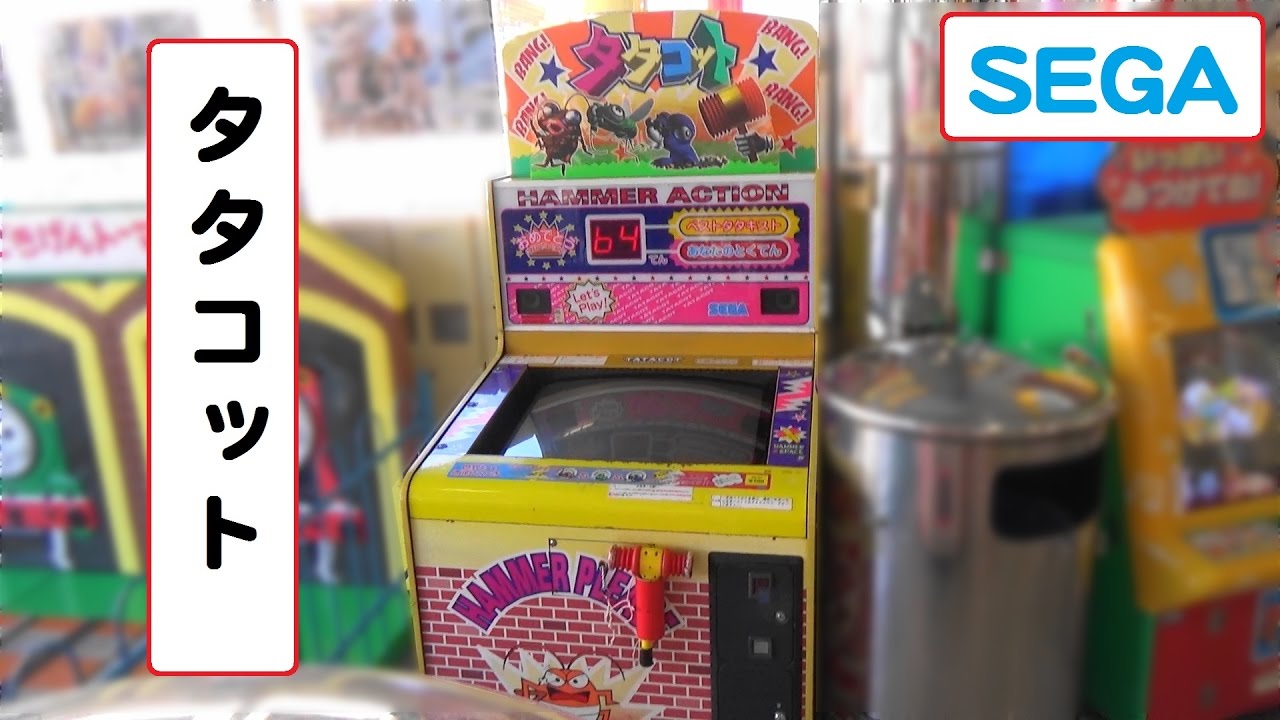
画面をハンマーで叩く、もぐら叩きゲームです。
3つのモード(ゴキブリ、ハエ、モグラ)があります。
最後に4段階(すごい、やるう~、まだまだ、がんばれ)の判定があります。
メーカー SEGA
製造 1995年11月
【おすすめ動画】 タコラッシュⅡ
https://youtu.be/wSF9Ll2Up0A
【おすすめ動画】 いっしょにあそぼう!アンパンマン
https://youtu.be/EMrJMosbcnU
【おすすめ動画】 バッドばつ丸に挑戦
https://youtu.be/lae6AYtaTZw
【おすすめ動画】 たたかえ!メカゴジラ
https://youtu.be/Ib8iLRQEiEo
【おすすめ動画】 ベースボール コマヤ
https://youtu.be...
Plus the "Winch" input isn't mapped yet.
VERY rough atm. Game might not boot for you...
Obv I can't post the actual game ROM on here.
But here's all I did, to make the Cart file...

Checking MAME, to see how the ROM files need to get mapped.
The get loaded, starting at 0x02000000 in memory, so need to be padded, to have the correct offsets when loaded as one chonky file.
fossil flameBOT
ROM_START( wasafari )
ROM_REGION32_BE( 0x3000000, "cart", ROMREGION_ERASE00 ) /* SH2 code */
ROM_LOAD16_WORD_SWAP( "ic22.bin",     0x0200000, 0x200000, CRC(d8bb2e2c)
ROM_LOAD16_WORD_SWAP( "ic24.bin",     0x0400000, 0x200000, CRC(c1b0e173)
ROM_LOAD16_WORD_SWAP( "ic26.bin",     0x0600000, 0x200000, CRC(a5c0577c)
ROM_LOAD16_WORD_SWAP( "ic28.bin",     0x0800000, 0x200000, CRC(2a8cfa97)
ROM_LOAD16_WORD_SWAP( "ic30.bin",     0x0a00000, 0x200000, CRC(9a4109e5)
I also had to Byteswap each ROM file first, using Hex Workshop (or similar).
Or, you can just Byteswap the whole ROM after merging.
Meaning, swapping each 16-bit pair of bytes, through all the ROM files.
Then I did the oldskool DOS way of joining multiple binary files...

But duplicating ic22.bin twice, so the second copy ends up at the offset it said in MAME.
 forest echo
Saturn is really up to the limit, so almost certainly no room for S-TV, but would be great if it were possible to get a sister core that rips out what is not needed and run S-TV games
rain obsidian
eg. the 0x0200000.
Kind of is room, as it's already starting to run. 😉
I think the logic to support most of the carts should be minimal.
forest echo
Saturn still has stability issues, and features aren't in yet that will take up space (presumably) because of stability that needs to be sorted
lime mango
also if it's eventually a separate core you can load roms via mras and let it do all the merging/swapping etc
rain obsidian
Yep, definitely needs MRAs.
Hoping MRAs can be loaded via the menu, once already in the core.
Rather than launching an MRA directly, which I often found weird.
 dense shard
rain obsidian
Rather than launching an MRA directly, which I often found weird.
dense shard
rain obsidian
Rather than launching an MRA directly, which I often found weird.
It’s weird but I’d argue for consistency with other arcade cores at this stage.
rain obsidian
True, it's not too bad.
Plus, the Service menu can still be called up, once a game is running.
polar goblet
Also would the separate core run into the same issues with the RAM currently affecting the SEGA Saturn core?
rain obsidian
BBL, Sister here.
They are going home to Portugal in a few days.
dense shard
nice
 surreal sluice
rain obsidian
https://www.youtube.com/watch?v=O9PyIKdSFnU
surreal sluice
rain obsidian
https://www.youtube.com/watch?v=O9PyIKdSFnU
Haha game looks great
dense shard
polar goblet
Also would the separate core run into the same issues with the RAM currently aff...
Probably not, that issue is specific to the VF2 engine on Saturn since it relies on ram for polygon loading. Or something along those lines. I forget what SRG said specifically.
surreal sluice
Hope this works out, STV would be awesome so I can just leave it on the shelf forever
STV has VF Kids and VF Remix, not sure if those have the slowdown
But I’d only want it for shooters and die hard anyway 😉
dense shard
VF Remix on the Saturn was fine
Yeah VF Kids too
Those two always played fine for me
Well VF Kids played “fine”
surreal sluice
I own the kids cart just to have all the VF arcade things but I hate that game 😅
dense shard
It’s literally just VF but with big heads, what the heeeeeeeck. I was hoping for Sonic the Fughters wacky shenanigans.
surreal sluice
 lime mango
ROBBY WHERE HE BELONGS
forest echo
Having it an arcade core will also mean that the ROMs are grabbed automatically by Mame getter which is a big time saver
How big is the STV pack?
If you can keep your S-Tav chat here Ash that would be appreciated, keep the Saturn chat focussed on srg320s progress.
lime mango
I guess one argument against mras is if you think you can actually support multiple carts? Although even then that's sorta of dubious utility
 late cargo
dense shard
It’s literally just VF but with big heads, what the heeeeeeeck. I was hoping for...
late cargo
dense shard
It’s literally just VF but with big heads, what the heeeeeeeck. I was hoping for...
VF, but with fat babies to be precise!
halcyon creek
You lot astound me. STV would be quite nice. EAs details in their posts....brilliant, if they're as good as coding as they are at posting, we should have ps5 by tomorrow. 🙂 Seriously, thanks for all the work you devs do. Great reads, great cores. Great to play/mess about with.
rain obsidian
Back now.
Gonna try some more small-ish games, to see if anything runs.
Would be even better, if this shiz didn't keep happening.

It also makes it seem it carries on compiling, but it really doesn't. lol
It's been stuck at 8% for the past three hours.
Never quite sure how to fix the crash, other than removing some signals from SnargleFlap.

Could maybe try a different seed value, but it might break the timings more.
I already tried closing Quartus, then deleting the db and incremental_db folders, then compiling again.

Sometimes I noticed it helps if I run the Saturn BIOS again, then change back to ST-V.
So probably something (like the sound stuff?) is getting initialized properly in Saturn, but not in ST-V atm.
And yep, that ran right away.

Using the stv1061 BIOS again.
Anywho, trying another game...
There's a whole Zip file of 102 games on archive, and it's only 1GB.
Still crashes on that Safari game, as soon as I try to Coin-up.
At least I think it's the Coin button. I can't always remember the mapping. lol
// PORTs A, B, E, F. (Player 1, 2, 3, 4)...
//
// b7 = Left
// b6 = Right
// b5 = Up
// b4 = Down
// b3 = Button 4 (P3/P4 use this for Start)
// b2 = Button 3
// b1 = Button 2
// b0 = Button 1
//
// Button inputs to core are Active-LOW !
//
wire [7:0] P1_CONT = ~{joy0[1],joy0[0],joy0[3],joy0[2], joy0[7:4]};
wire [7:0] P2_CONT = ~{joy1[1],joy1[0],joy1[3],joy1[2], joy1[7:4]};
wire [7:0] P3_CONT = ~{joy2[1],joy2[0],joy2[3],joy2[2], joy2[7:4]};
wire [7:0] P4_CONT = ~{joy3[1],joy3[0],joy3[3],joy3[2], joy3[7:4]};
// PORTC (System) inputs...
//
// b7 = Pause (if the game supports it)
// b6 = Multi-Cart Select.
// b5 = Start 2 ?
// b4 = Start 1 ?
// b3 = Service 1.
// b2 = Service - No toggle??
// b1 = Coin 2
// b0 = Coin 1
//
// Button inputs to core are Active-LOW !
//
wire [7:0] SYS_CONT = ~joy0[15:8];
"J1,A,B,C,Start,R,X,Y,Z,L,STV-S2,STV-Mcart,STV-Pause;",
On MiSTer, it generally maps the Directions (Right, Left, Down, Up) as the first bits of each "joystick" bus.
ie...
joystick_0[0] = Right
joystick_0[1] = Left
joystick_0[2] = Down
joystick_0[3] = Up
joystick_0[4] = Saturn A     -> ST-V B1.
joystick_0[5] = Saturn B     -> ST-V B2.
joystick_0[6] = Saturn C     -> ST-V B3.
joystick_0[7] = Saturn Start -> ST-V B4.
(and joystick_0, meaning Player 1.)
Then the upper bits of joystick_0...
joystick_0[8]  = Saturn R -> ST-V Coin 1.
joystick_0[9]  = Saturn X -> ST-V Coin 2.
joystick_0[10] = Saturn Y -> ST-V Service (no toggle?)
joystick_0[11] = Saturn Z -> ST-V Service 1.
joystick_0[12] = Saturn L -> ST-V Start P1.
joystick_0[13] = ST-V Start P2.
joystick_0[14] = ST-V Multi-Cart select?
joystick_0[15] = ST-V Pause.
Trying diehard next...
    ROM_REGION32_BE( 0x3000000, "cart", ROMREGION_ERASE00 ) /* SH2 code */
    ROM_LOAD16_BYTE( "fpr19119.13",               0x0000001, 0x0100000, CRC(de5c4f7c)
    ROM_RELOAD_PLAIN ( 0x0200000, 0x0100000 )
    ROM_RELOAD_PLAIN ( 0x0300000, 0x0100000 )
    ROM_LOAD16_WORD_SWAP( "mpr19115.2",    0x0400000, 0x0400000, CRC(6fe06a30)
    ROM_LOAD16_WORD_SWAP( "mpr19116.3",    0x0800000, 0x0400000, CRC(af9e627b)
    ROM_LOAD16_WORD_SWAP( "mpr19117.4",    0x0c00000, 0x0400000, CRC(74520ff1)
    ROM_LOAD16_WORD_SWAP( "mpr19118.5",    0x1000000, 0x0400000, CRC(2c9702f0)
I think the "Reload" part will kind of duplicate the first ROM a few times?
Yep, must do.
Since mpt19115.2 starts at offset 0x0400000.
I think on the real cart, the first ROM just gets mirrored, due to which Address bits they chose to hook up.
Great, these ROMs are already in "cleartext", too. lol
So have to watch out for that.

ie. When you can read the SEGA string OK - that's the format the core currently needs.

That ends up as a 19MB "Cart" binary, so might have a chance of running.
MAME doesn't exactly make it clear what the default BIOS is for the game, though.
Apparently that BIOS...


It has it's own fancy screen...

Aaaaaand... crashes. lol
Not surprised.
Black screen.
Trying different BIOSeseses.
But clearly there's something else holding up the games atm.
Game's test menu is a bit wonky.

Which could be a problem with it accessing the other ROMs.
(The data ROMs. The first one is usually the SH2 code ROM.)
Not even the Saturn BIOS wants to run now.
Core is probably a bit unstable, which never helps.
Oh, I should have read it properly...
    ROM_LOAD16_BYTE( "fpr19119.13",               0x0000001, 0x0100000, CRC(de5c4f7c)
    ROM_RELOAD_PLAIN ( 0x0200000, 0x0100000 )
    ROM_RELOAD_PLAIN ( 0x0300000, 0x0100000 )
    ROM_LOAD16_WORD_SWAP( "mpr19115.2",    0x0400000, 0x0400000, CRC(6fe06a30)
    ROM_LOAD16_WORD_SWAP( "mpr19116.3",    0x0800000, 0x0400000, CRC(af9e627b)
    ROM_LOAD16_WORD_SWAP( "mpr19117.4",    0x0c00000, 0x0400000, CRC(74520ff1)
    ROM_LOAD16_WORD_SWAP( "mpr19118.5",    0x1000000, 0x0400000, CRC(2c9702f0)
LOAD16_WORD_SWAP
So the SH2 code is fine, but the others need swapping.

Hex Workshop is old, and incredibly slow at doing this.
 faint oxide
I accept .01% of the credit here because I told @rain obsidian “STV” 🤣
rain obsidian
Yeah. lol
HxD is USELESS, as it can't do Byte Swapping.
Kind of a prerequisite for a Hex editor, tbh.
WinHex. sigh

I used to have a key for WinHex, but years ago. lol
I mean, I could just learn how to use dd in linux.
electronash@Ryzen7:/mnt/c/linux_temp/Saturn_MiSTer$ dd if=mpr19116.3 of=63 conv=swab
8192+0 records in
8192+0 records out
4194304 bytes (4.2 MB, 4.0 MiB) copied, 2.65497 s, 1.6 MB/s
Nope. lol
Still crashes.
Some of these games need custom IO stuff.
hmm

Trying Cotton 2...
    ROM_REGION32_BE( 0x3000000, "cart", ROMREGION_ERASE00 ) /* SH2 code */
    ROM_LOAD16_WORD_SWAP( "mpr20122.7",    0x0200000, 0x0200000, CRC(d616f78a)
    ROM_LOAD16_WORD_SWAP( "mpr20117.2",    0x0400000, 0x0400000, CRC(893656ea)
    ROM_LOAD16_WORD_SWAP( "mpr20118.3",    0x0800000, 0x0400000, CRC(1b6a1d4c)
    ROM_LOAD16_WORD_SWAP( "mpr20119.4",    0x0c00000, 0x0400000, CRC(5a76e72b)
    ROM_LOAD16_WORD_SWAP( "mpr20120.5",    0x1000000, 0x0400000, CRC(7113dd7b)
    ROM_LOAD16_WORD_SWAP( "mpr20121.6",    0x1400000, 0x0400000, CRC(8c8fd521)
    ROM_LOAD16_WORD_SWAP( "mpr20116.1",    0x1800000, 0x0400000, CRC(d30b0175)
    ROM_LOAD16_WORD_SWAP( "mpr20123.8",    0x1c00000, 0x0400000, CRC(35f1b89f)
waiting for someone to ask for print club support
 honest abyss
Surely it’s just easier to wait for the SuperSega to get released and simply port their core…
I’ll get my coat 😂
rain obsidian
Here goes nothing...

no bueno
Can't even get that one to load the game's test menu.
Nope. Trying to load the game, or the test menu, makes the core braindead.
SignalFap just flatlines.

Going back to trying WannaPoo Safari.
The winch is stuck on. lol

Even that could be stopping games from running.
    PORT_MODIFY("PORTG")
    PORT_BIT( 0x01, IP_ACTIVE_LOW, IPT_BUTTON3 ) PORT_NAME("Winch")
Bit 0 of PORTG.
I have PORTG always set up to be a set of Counters atm.
    // Spoofing counters for now. Trying to get a game (ANY game) to boot!
    PORTG_CTR[0] <= PORTG_CTR[0]+16'd1;
    PORTG_CTR[1] <= PORTG_CTR[1]+16'd2;
    PORTG_CTR[2] <= PORTG_CTR[2]+16'd3;
    PORTG_CTR[3] <= PORTG_CTR[3]+16'd4;
Incrementing on each clock cycle, which I know is dumb.
Not quite sure how the counters work yet.
So I'll just try spoofing PORTG reads to a value of 0xFF for now.
Another 30+ minute compile. Yes, it does suck.
Toggling the Coin Lock option also seems to crash it.

Coin Counters and Lockouts seem to be on PORTD (System outputs).
        case 0x07:
            m_system_output = data;
            machine().bookkeeping().coin_counter_w(0, data & 0x01);
            machine().bookkeeping().coin_counter_w(1, data & 0x02);
            machine().bookkeeping().coin_lockout_w(0, ~data & 0x04);
            machine().bookkeeping().coin_lockout_w(1, ~data & 0x08);
Which is also supposed to be able to read back...
case 0x07: res = m_system_output; break; // port D, read-backs value written
That's how I have it already, but still it crashes.
I think the Coin Lockouts are maybe supposed to give some feedback to it? Don't know.
Mem tests for Safari all pass fine on MAME...

Also, I found the "Test" button on MAME is just F2.
Even though it's normally labelled as Service, plus I'm sure I tried it before. lol
So "9" = Service.
F2 = Test.
Plus. MAME doesn't freeze when doing the Coin Lockout test, so I'll look into that next.
Could only get Safari that far (and into the game) using the old stv1061 dev BIOS.
The "correct" BIOS for the game is meant to be epr-23602.ic8.
But that won't even run the test menu without crashing.
rain obsidian
Safari no longer crashes on the Coin Lock thing.
But still hard to get it to boot into the game.
And only using the STV1061 BIOS.
The mem test thing still fails, too.
And the Winch input is showing as OFF.
So at least a few things fixed / kludged.
Die Hard properly crashes most of the time.

With the SH2 address four bytes below 0x6000000.

Possibly WorkRAM?
map(0x06000000, 0x060fffff).ram().mirror(0x21f00000).share("workram_h");
Maybe it was trying to write to the stack?
Another tweak to try...
map(0x00400000, 0x0040003f).rw(FUNC(stv_state::critcrsh_ioga_r), FUNC(stv_state::critcrsh_ioga_w)).umask32(0x00ff00ff);
The upper 8 bits of each 16-bit word should really be set to 0x00, for the IO reads.
Something inherently wrong atm. lol

This is with Critter Crusher, and it's matching BIOS.
epr-17954a.bin
It won't enter the game's built-in test menu either. It just freezes.
    ROM_REGION32_BE( 0x3000000, "cart", ROMREGION_ERASE00 ) /* SH2 code */
    ROM_LOAD16_BYTE( "epr-18821.ic13",  0x0000001, 0x0080000, CRC(9a6658e2)
    ROM_RELOAD ( 0x0100001, 0x0080000 )
    ROM_RELOAD_PLAIN( 0x0200000, 0x0080000)
    ROM_RELOAD_PLAIN( 0x0300000, 0x0080000)
//  ROM_LOAD16_WORD_SWAP( "mpr17946.2",    0x0400000, 0x0400000, CRC(4cb245f7)
//  ROM_LOAD16_WORD_SWAP( "mpr17947.3",    0x0800000, 0x0400000, CRC(fef4a9fb)
//  ROM_LOAD16_WORD_SWAP( "mpr17948.4",    0x0c00000, 0x0400000, CRC(3e2b251a)
//  ROM_LOAD16_WORD_SWAP( "mpr17949.5",    0x1000000, 0x0400000, CRC(b2ecea25)
//  ROM_LOAD16_WORD_SWAP( "mpr17950.6",    0x1400000, 0x0400000, CRC(5b1f981d)
//  ROM_LOAD16_WORD_SWAP( "mpr17945.1",    0x1800000, 0x0200000, CRC(03ede188)
    ROM_LOAD16_WORD_SWAP( "mpr-18789.ic8", 0x1c00000, 0x0400000, CRC(b388616f)
    ROM_LOAD16_WORD_SWAP( "mpr-18788.ic9", 0x2000000, 0x0400000, CRC(feae5867)
Not 100% sure about the MAME loading stuff.

GitHub
Unofficial full release history of MAME and MESS. Contribute to fesh0r/old-mame development by creating an account on GitHub.
fossil flameBOT
enum
/* ----- ROM_RELOAD related macros ----- */
#define ROM_RELOAD(offset,length)       { NULL, NULL, offset, length, ROMENTRYTYPE_RELOAD | ROM_INHERITFLAGS },
#define ROM_RELOAD_PLAIN(offset,length) { NULL, NULL, offset, length, ROMENTRYTYPE_RELOAD },
This time, I duplicated ic13 three times, oh.
Needs to be four times.
    ROM_LOAD16_BYTE( "epr-18821.ic13",  0x0000001, 0x0080000, CRC(9a6658e2)
    ROM_RELOAD ( 0x0100001, 0x0080000 )
    ROM_RELOAD_PLAIN( 0x0200000, 0x0080000)
    ROM_RELOAD_PLAIN( 0x0300000, 0x0080000)
No idea what the 0x0000001 and 0x0100001 load offsets are for.
You would normally expect that when each 16-bit word is split between two 8-bit ROM chips.
eg.
ROM_START( batmanfr )
    STV_BIOS

    ROM_REGION32_BE( 0x3000000, "cart", ROMREGION_ERASE00 ) /* SH2 code */
    /* Thanks to Runik to point this out*/
    ROM_LOAD16_BYTE( "350-mpa1.u19",    0x0000000, 0x0100000, CRC(2a5a8c3a)
    ROM_RELOAD(                         0x0200000, 0x0100000 )
    ROM_LOAD16_BYTE( "350-mpa1.u16",    0x0000001, 0x0100000, CRC(735e23ab)
    ROM_RELOAD(                         0x0200001, 0x0100000 )
Haven't seen Safari working in a while.
Seems to read a chunk of data, then crashes.
Re-configured the FPGA from SnargleFlap.
Which then runs the Saturn BIOS by default.
Then I ran the STV1061 BIOS, with Safari already in memory.
Then it got the rotating logo thing.

But crashes again after that.
Safari cart read, just before the crash...

Technically using ACS0_N as if it's the upper address bit.
Which needs to be "valid" before the cart_rd pulse.
Oh, that's actually reading from the MIRROR of the Cart (ABUS) space.
map(0x02000000, 0x04ffffff).rom().mirror(0x20000000).region("abus", 0); // cartridge
Maybe the logic isn't doing the mirroring correctly atm.
Which would totally explain why most games fail.
I don't think Saturn does the same mirroring of the ABUS space.
Nope, not the mirror.
It's still reading from 0x02000000 (six zeros).
Just confusing, because the SH2 Address bus only has 27 bits.
Now it's on the black screen of death, and apparently trying to access Sound RAM...

map(0x05a00000, 0x05afffff).rw(FUNC(stv_state::saturn_soundram_r), FUNC(stv_state::saturn_soundram_w));
Not doing much atm, but that compile seems a bit better...
Using the STV1061 BIOS, with wasafari, it gets to the spinning logo and game's test menu fairly reliably.
But crashes when you hit Start.
I'll leave it at the spinning logo, and see what happens.
Also, whenever you reload the BIOS, Safari shows this...

You have to invoke the game's own test menu...

Then...

Mess with some of these...

Then exit, and I think it updates the EEPROM contents.
Spinning logo mainly messes with the VDP2 regs.

map(0x05f80000, 0x05fbffff).rw(FUNC(sat_console_state::saturn_vdp2_regs_r), FUNC(sat_console_state::saturn_vdp2_regs_w));
Doesn't get past that, without hitting Start. And then it crashes anyway.
No Safari for me today. lol
I haven't had it running that game since one of the first git commits earlier.
Re-adding the Counter stuff. Hard to debug this.
late cargo
I need to see if I can find a list of ST-V games that didn't receive Saturn ports.
rain obsidian
Trying using ACS1_N (inverted) as the upper addr bit for Cart ROM reads.
cart_rcache_addr <= {!ACS1_N,cart_addr[24:1]};
Yeah, I have no idea which games were around, for either platform. lol
Probably quite a lot got Saturn ports.
Mainly the quirky stuff stayed on ST-V.
late cargo
I'm looking at the list of all games on the platform, and I'm seeing a lot of them that are on Saturn. I'm just not sure on some of the more obscures ones.
forest echo
System16 - The Arcade Museum. Detailed Hardware information on Arcade Hardware and Systems.
Looks like some games needed extra hardware, like extra sound chip on a daughter board
lime mango
I find the one that needs a cdrom amusing
forest echo
It might be worth putting the games in a sheet and listing out any extra parts needed, maybe ROM size if that is a factor, and then see what would potentially be able to run with what is currently in the core.
lime mango
you have to wait until he at least gets one game working before you start making spreadsheets
low widget
lime mango
I find the one that needs a cdrom amusing
Dreamcast is like a much better engineered Saturn with all the stupid patchwork removed lol… the biggest issue with a collector is that a lot of the GDRoms are going… and there’s no replacement because it’s a proprietary format.
So some sort of archiving is, actually sort of important
But I guess everyone who’s here already knows that <- prof obvious
surreal sluice
@dense shard is a Gorira #1315008851874938948 message
dense shard
surreal sluice
<@314946127487172609> is a Gorira https://discord.com/channels/64790939747719580...
What sounds do goriras make? GRUNF GRUNF?
surreal sluice
Or an UH UH grunt cough sound maybe
 golden cradle
 low widget
dense shard
What sounds do goriras make? GRUNF GRUNF?
low widget
dense shard
What sounds do goriras make? GRUNF GRUNF?
I keep thinking that it’s the child of gorilla and Godzilla
rain obsidian
Working again.

The Happy New Year edition.
I have to state every time: This is NOT fully working yet.

No idea if this is in the game or not. lol
Looks like it is.
Certain buttons trigger the car horn, and Lion's roar... something.
surreal sluice
Heh there’s Robby


 surreal sluice
Hahaha aww
rain obsidian
That was with this BIOS...

Which is the version MAME uses for Safari.
So, progress.
surreal sluice
Gorira
 rain obsidian
Lotoly Olgan
surreal sluice
Maybe the lion was really crying because the boy looks to be riding in a hollowed out lion
rain obsidian
lol
owwww

No other games booting so far.
Stuck with the Safari. sigh
No Die Hard, no Cotton 2.
And the core has some issues, where I often have to re-config the FPGA (from SnargleFlap).
Then it shows the Saturn BIOS by default, then I load the proper BIOS to match the ST-V game (already in mem).
Then it usually gets a bit further, showing the game name etc.

And if it already has some Credits, it will briefly show the "3D" logo, then this thing...

As soon as I hit Start P1, it crashes. I can see on SignalFlap that it flatlines.
Trying another game...
ROM_START( rsgun )
    STV_BIOS

    ROM_REGION32_BE( 0x3000000, "cart", ROMREGION_ERASE00 ) /* SH2 code */
    ROM_LOAD16_WORD_SWAP( "mpr20958.7",   0x0200000, 0x0200000, CRC(cbe5a449)
    ROM_LOAD16_WORD_SWAP( "mpr20959.2",   0x0400000, 0x0400000, CRC(a953330b)
    ROM_LOAD16_WORD_SWAP( "mpr20960.3",   0x0800000, 0x0400000, CRC(b5ab9053)
    ROM_LOAD16_WORD_SWAP( "mpr20961.4",   0x0c00000, 0x0400000, CRC(0e06295c)
    ROM_LOAD16_WORD_SWAP( "mpr20962.5",   0x1000000, 0x0400000, CRC(f1e6c7fc)
SH2 code does indeed need Byteswapping.


Boooo!
