#Atari Jaguar
1 messages · Page 15 of 1
 sterile moss
6e844759720226e58d55ecaf33608a13 boot0.rom
aa15fb558ed656209ba42235bb36967f boot0.rom.old
Same behaviour with those 2 BIOS
 warm oasis
The WIP DB has been updated with the newly named 3 BIOS files, if people using that want to check that things are working as expected
 tropic rock
Memtrack should be off and remain off. Enabling it currently can break things.
sterile moss
Enabling that is the only way I can get the red jaguar bios screen to load (at core launch and when loading a ROM)
without that enabled (after deleting the jaguar files in /config) its just a black screen, unless 'CD Enabled' is enabled, then I get the CD BIOS
was just going through all the settings to see if any made a difference
Doesnt matter if boot2.rom is present or not, enabling the setting lets the red BIOS screen show
warm oasis
Hmm, so using these 3 new BIOS files and the new dual ram (one versions back, not the count 0 one) I get a black screen on core launch and loading cart game also gives black screen
sterile moss
same for myself and Jesusfish
warm oasis
memory track is set to No
sterile moss
try enabling that and save settings, reboot core
warm oasis
Setting it to Yes and reset gives me the red jag bios logo
tropic rock
You have cd off?
sterile moss
if you enable CD enabled, CD inserted and set CD tracks to 2, then CD games load normally and you now get CD bios at core launch
correct
warm oasis
CD enabled is defaulted to No
sterile moss
reset settings, deleted all jaguar files in /config
behaviour above still the same with CD enabled off and Quick CD off
warm oasis
So is the issue that the default settings need updated?
sterile moss
i have the same behaviour as you moondandy, with both the K and M BIOS revisions as boot.rom or boot0.rom
warm oasis
Loading a cart game just boots the red BIOS again
sterile moss
yep, unless you disable 'memory track', then its always black screen unless 'CD enabled' is on
warm oasis
So is there no combination of settings that enables loading carts and CD games, currently?
sterile moss
CD games work well, I've not found a combination that lets the normal BIOS load fully / ROMS to load
tropic rock
Not sure why you are having problems. It works for me with both builds. I just reset my settings and did a cold boot.
sterile moss
ill play around with it some more, last did an update all a few days ago
misteraddons stack from 2022
tropic rock
What cd bios did you use?
sterile moss
6e844759720226e58d55ecaf33608a13 boot0.rom
aa15fb558ed656209ba42235bb36967f boot0.rom.old (sorry that's one of my modded ones, BCFE348C565D9DEDB173822EE6850DEA is the same)
tropic rock
boot1
sterile moss
my bad
77cd95c7ad06a39f4c59995094aa10f9 boot1.rom
CD games load OK with that under both of today's builds and Jaguar_ReworkDual_20250730.rbf
tropic rock
Yeah. Those are the two I am using. (I tried deleting boot2, didn't matter for me)
sterile moss
i tried having boot0.rom / boot.rom / both of them just in case, all the same here
warm oasis
GitHub
Database for Work In Progress MiSTer cores not yet in MiSTer Main - ajgowans/wip
sterile moss
most odd
warm oasis
That's the 3 added to WIP DB
tropic rock
What SDRAM? 2 128s?
sterile moss
yeah 2 128MB sticks from misteraddons
warm oasis
Yeah, dual 128 for me as well
tropic rock
Can try putting the BIOS back in BRAM...
What game are you loading? Tempest 2K works for me
sterile moss
AVP, air cars, atari karts, tried a fair few others
warm oasis
Just tried that and get the red BIOS again, I was trying AVP before
sterile moss
the red bios screen is still meant to launch when the core is loaded yeah?
Unless CD Enabled is on, then you get CD BIOS/CD player
tropic rock
yes
sterile moss
really odd that enabling 'memory track' brings that back
tropic rock
I get a red screen if I turn on memory track. It loads correctly if I leave it off.
sterile moss
black screen on core launch and after loading ROM here with memory track disabled
warm oasis
Yeah same here
tropic rock
Um...Whoops. I just realized I am not running 2 128s. I am using 1 32 and 1 128.
sterile moss
Im ignorant of how that'd impact it but it sounds like it would 🙂
tested jesusfish's single SDRAM build just in case, its the same
tropic rock
I thought I coded this to handle both anyway. Must have messed it up.
This finished building, but might not fix it.
tropic rock
Ok. I need to spend more time to figure out why it doesn't work in SDRAM on 128. But not right now.
sterile moss
Thanks for looking into it, appreciated
warm oasis
Nice one, thanks!
Have deleted the previous cores from WIP and added this new dual ram one
 mental briar
I’ll build a single ram core when I’m up and caffeinated
mental briar
i updated the sys and am building a single and dual ram core
once I confirm they work I will push them back to main and update the WIP database
 radiant cradle
 warm oasis
mental briar
i updated the sys and am building a single and dual ram core
warm oasis
mental briar
i updated the sys and am building a single and dual ram core
Nice one, thanks. Is GR's .sys not up to date?
 dreamy hinge
I will never not think the jaguar bootup sequence is some homebrew thing
mental briar
warm oasis
Nice one, thanks. Is GR's .sys not up to date?
4 months old. doesn’t have the subcarrier stuff
warm oasis
Ah, cool. Maybe worth doing a PR so GR can merge in the update for future builds
mental briar
yep, that’s my plan
 humble bluff
If you're really bored, you can try lightgun support. https://github.com/MiSTer-devel/Jaguar_MiSTer/pull/26
GitHub
Adds Lightgun emulation with mouse and joystick, tested with both known lightgun software, balloons, and bullets.
Move Input and Video settings to sub-pages.
Hide the turbo option
Removes the unuse...
warm oasis
That could be useful if Co-Jag arcade support is ever added, that has at least one lightgun game
Oh, lightgun support was actually added in branch? I misread and assumed that was a feature request issue. Any reason not to merge that in?
humble bluff
I added it shortly after cheats. It's probably not a priority since there is only two pieces of software that supports it and they are just demos.
warm oasis
Ah, nice. Maybe we can get a test build run off
 uncut atlas
if it works, ill merge it
humble bluff
"Works for me" 🙂
uncut atlas

mental briar
shit, I think the single core version has the 9.2 audio issue
can someone test and confirm
dual sounds fine
warm oasis
Are people OK with the other menu changes in the lightgun PR?
mental briar
@tropic rock apologies, I pushed everything back into the main branch rather than you cdlatest branch. let me know if you want me to do the PR over
tropic rock
No worries. I did not mean to create that branch there. I just wanted it checked in somewhere so I didn't lose it (failed hard drives last year made me more cautious). I will likely delete it and do it correctly at some point later.
tropic rock
warm oasis
Are people OK with the other menu changes in the lightgun PR?
I should have labeled those bogus menu masks better. I stick things in there I want to have access to in SignalTap so they don't get optimized out. Eventually they will get deleted, so new real ones can be added lower in the list.
It doesn't really matter though.
 ashen spoke
What’s the build I should pin?
Ok I found both the single and dual
I know how you feel but any progress is exciting, even if it’s lateral. We’re all here to help test but also to cheer you on dude. You’ve made countless people happy with your core work and turned a lot of people into new fans of the Jaguar, myself included.
Keep on kicking ass, we all appreciate what you’re doing no matter how minor you feel it is.
tropic rock
Anyone who had problems with sdram builds yesterday have time to try this? It would save me having to dig out a different MiSTer to test.
 gentle bobcat
I just started dinner but will give it a test in a bit. Thanks for the work.
 dim sundial
tropic rock
Anyone who had problems with sdram builds yesterday have time to try this? It wo...
dim sundial
tropic rock
Anyone who had problems with sdram builds yesterday have time to try this? It wo...
It's loading carts for me now
tropic rock
Great. Looks like I found it.
mental briar
let me know if it's in a place where I should build a single core build
 vernal arrow
Am super excited to see all the progress and collaboration!!! Keep up the amazing work.
Never thought Id see the day I actually enjoy the Jag and CDI but here we are, lol
Looking forward to the 3DO core at some point too
mental briar
SYS updated cores with the latest changes
sterile moss
Jaguar_Rework_dualram_sdrambios_20251118.rbf is loading reliably with M bios
K BIOS seems to need a reset after loading a ROM sometimes or it stays on red jaguar screen
 midnight robin
@tropic rock Is it a good time to ask for the "Vertical crop" option that all other console cores have?
It allows to have big screen area + good scanlines.
tropic rock
I am working on other things right now (I got the freed up BRAM to add a third cache for single RAM last night=3/8 of the the total DRAM space). Feel free to make an issue (or a PR) so it gets done eventually.
gentle bobcat
Finally got a chance to test out the new build this morning as my older son was hogging the TV playing a Wii U game after dinner last night. No loss of functionality noted.
ashen spoke
gentle bobcat
Finally got a chance to test out the new build this morning as my older son was ...
HOL up
What Wii U game
dim sundial
There were 2 on the Wii U, Wind Waker and Twilight Princess
dim sundial
Ah yea, I forget botw was on wii u too
 tranquil cape
I was betting on Funky Barn or TANK! TANK! TANK!
The most Jaguar of Wii U games
ashen spoke
tranquil cape
I was betting on Funky Barn or TANK! TANK! TANK!
The most Jaguar of Wii U games
I pitched Namco a sequel to TANK! TANK! TANK! for the Wii U and they politely declined. Then a year later announced TANK! TANK! TANK! For the Wii U.
 verbal grail
Do the latest rework cores posted do Jaguar CD too?
ashen spoke
Yeah it’s all Jaguar CD now
gentle bobcat
Carts, CDs and VLM
midnight robin
tropic rock
I am working on other things right now (I got the freed up BRAM to add a third c...
Thanks!! I opened a feature request:
https://github.com/MiSTer-devel/Jaguar_MiSTer/issues/28
 quasi hill
hi all. what do i nae the bios file to and do i put it in /games/jaguar?
is it boot.rom?
dim sundial
quasi hill
hi all. what do i nae the bios file to and do i put it in /games/jaguar?
yes, that is the directory
jaguar bios is boot.rom
jaguar cd bios is boot1.rom
quasi hill
ah ok so it not cd_bios for cd
ty much
hmm I get a red juagur screen on bootup
do you have the crc32 for the bios by any chance?
dim sundial
You will need the most recent core posted yesterday in this channel to autoload the cd bios.
A red jaguar screen on boot is normal I believe, it means you have no cart inserted. Try loading a game.
quasi hill
FB731AAA
tat looks correct for the crc32?
I see. I did grab the latest singlerework, ty
mental briar
boot1.rom for the cd bios
And you need to enable 2 cd sessions, enable cd, and cd loaded
warm oasis
If the files in the WIP DB are all the final ones for the core to run they could magically find there way into the BIOS DB
ashen spoke
Updated the Jaguar CD Setup pin - #1055574003810578503 message
I got lazy and edited my MGLs for the Jaguar CD games to use <setname same_dir="1"> so I have the CD options set automatically.
Example MGL:
<rbf>_Console/Jaguar</rbf>
<setname same_dir="1">Jaguar_CD</setname>
<file delay="0" type="s" index="1" path="/media/fat/games/Jaguar/Jaguar CD/Battle Morph/Battle Morph.cdi"/>
<reset delay="1"/>
</mistergamedescription>``` pseudo salmon
I have the correct CRC32 for the Jaguar CD bios, named correctly in the right place, and the latest core, but when I try to load the .cdi extension CD games, with the 2 CD sessions, CD enabled, CD Inserted, I get the CD with a question mark on it upon loading attempt. What ight I be doing wrong here?
mental briar
I had that issue too for a while. Is this on a fresh boot of the core?
pseudo salmon
Just turned on the MiSTer and launched it, yeah. I’ve never run this particular core either; just grabbed it. I had the previous build before though.
mental briar
This core, yeah? #1055574003810578503 message
also, single or dual ram?
I will try to boot it right now and see what I have to do
anything to avoid doing real work
mental briar
ok, lemme poke at it quick
pseudo salmon
Thank you.
mental briar
something to keep in mind: there are a couple of single ram builds from the 18th. so unless you're sure it's the one in that message, I would grab it again in case
with that said, let me see if cds boot
pseudo salmon
Let me try to verify.
mental briar
ok, here is what I did:
- booted core
- Changed CD sessions to 2
- changed CD enabled to YES
- changed CD inserted to YES
- selected a .cdi image
I did not select the bios (as long as it's named boot1.rom, you're fine)
This booted baldies without issue
pseudo salmon
Yeah, it’s that one for certain.
Trying your steps now.
You’re choosing “Load CD *.CDI, and not “Load Bin *.BIN,CDI right?
It loaded Baldies just fine. I didn’t try this game previously. Is there a compatibility list? I tried three others.
mental briar
all games should work
pseudo salmon
Well, it’s working this time around, which is nice. Thank you.
mental briar
wrong paste, this is what I wanted to paste https://docs.google.com/spreadsheets/d/1sQCMOA5qBsIpLPPkCMn3Z0FSxr4p4RhZB1TMZLeMF8Q/edit?gid=0#gid=0

Google Docs
pseudo salmon
Odd. Baldies loads each time, but I can’t load VidGrid.
Maybe it’s a bad dump, I’m not sure.
Vid Grid does one of three things:
1 - Loads the spinning wheels loading screen, then goes black
2 - Loads the square behind the logo that grows, then shows the CD controls screen
3 - Just loads a black screen
mental briar
there was something funky about vid grid
I think there was a specific dump that was needed
pseudo salmon
So far, all games load except Iron Soldier 2 which behaves like Vid Grid
Ah, makes sense.
Vid Grid is my favorite haha. I’ll have to figure it out.
mental briar
#1055574003810578503 message
pseudo salmon
Okay, final results: Primal Rage loads the ? CD, Vid Grid does the three different fail types, and Iron Soldier 2 fails. The rest seem to load most times, with occasional games I have to load 2-3x and it works. I love the core so far, as I enjoy this weird piece of gaming history, so thanks for making it.
mental briar
it may be that the single ram core can't play those games yet as well. it's not 1:1 with dual ram
grey is working on that
gentle bobcat
If I remember, I'll test both of those CD games tonight on a single-ram system.
mental briar
vid grid loads on dual ram (but it crashed while playing the game)
Iron Soldier 2 boots
I cannot get primal rage to boot, which seems like a regression
Maybe another dual ram person can confirm that
oh wait, on reset it booted
ok, all three boot. it's fussy but they all are playable
definitely feels a little more unstable than normal, though. seeing crashes in cd games
pseudo salmon
Odd, I actually managed to get Primal Rage to boot on single RAM.
mental briar
oh I was on dual ram. it was finicky
all the cd games were
maybe related to things being moved around
 frigid dock
My god how hilarious would it be if you followed this up hours later saying "....it's great!"
mental briar
i still haven't opened mine
dreamy hinge
good idea. keep that collector's item sealed
mental briar
My kids need something to retire on. God knows I will have nothing left
dreamy hinge
but they'll have all these misters and crts and controllers
mental briar
exactly. need to keep them boxed
dreamy hinge
surely they won't just give it away to a MiSTerDolch
mental briar
gonna get a super station founders edition graded and then return it if it doesn't come back a 10
dreamy hinge
they will extract full value from your collection
mental briar
 ashen spoke
@pseudo salmon I have a guide on playing Jaguar CD games pinned if you ever need to reference it in the future - #1055574003810578503 message
gentle bobcat
Ok, I tested both the Dual RAM and Single RAM cores (1118 built by TheJesusFish) and everything worked for me.
So, things others had reported problems with, for whatever reason, worked fine. Including Iron Soldier 2 CD, Vid Grid, and Primal Rage.
I think I have the lesser preferred BIOS as when I loaded carts, I often had to reset the core.
mental briar
I wonder if it’s because I’m loading over the network. Maybe some instability with that in the core
I may have time to test loading via sd card later today
I’m using the M bios
warm oasis
Do we know what the difference between the M and K bios actually is? Is one better than the other in some way? Is it just the two out there?
ashen spoke
I didn’t even know there were different bioses.
 shut night
Undoubtedly a silly question, but if I want to use MRA's for all the CD games (Robbie I think you posted yours previously), is it at all possible to have my cdi files live in an "Atari Jaguar CD" folder on my USB ssd? Ie, will the core be able to find them and the bios etc?
mental briar
shut night
Undoubtedly a silly question, but if I want to use MRA's for all the CD games (R...
not silly. I think you can do that. I don’t know how, but the cd32 stuff that amiga vision does has a separate folder for cd32, even though it’s using the amiga core. @ashen spoke likely knows how to set that up with MGLs
dim sundial
<setname>Atari Jaguar CD</setname> don't use same_dir="1", You'll have to copy bios files to that dir as well.
shut night
dim sundial
`<setname>Atari Jaguar CD</setname>` don't use `same_dir="1"`, You'll have to co...
Many thanks, I'll try this out in the morning. If I use Robbie's template he posted previously, this should configure the core to launch the game, set sessions to 2, CD active, and disc inserted correct? So like a one touch launch kinda thing
dim sundial
You would have to set those options up and save settings after launching the MGL core for the first time
shut night
dim sundial
You would have to set those options up and save settings after launching the MGL...
Ah, I get ya. Thanks again! Lastly, this should leave those settings untouched when using the regular way to launch the core for carts correct?
dim sundial
yes, the setname setting in the MGL file makes it use completely different configuration files
shut night
dim sundial
yes, the setname setting in the MGL file makes it use completely different confi...
Thanks so much 👌
 upper abyss
Super glad we have the core now https://youtu.be/9ZaYlVGxTZ4?si=gPyXyIRM1tzWuWiQ
➤ BECOME A VIP (and see early, AD-FREE videos): https://www.patreon.com/mattmcmuscles
➤ MY NEW GAMEPLAY CHANNEL: https://rb.gy/uau7y4
➤ SUBSCRIBE: https://www.youtube.com/mattmcmuscles
➤ TWITTER: https://twitter.com/MattMcMuscles
Check out Wrestling with Gaming's video on the Jaguar! -
https://www.youtube.com/watch?v=XsQY0YEqzYo
Edited...
 raw stream
I tried launching Tempest 2000, but I just see a blank screen?
mental briar
Sounds like a bios issue. Are you getting the red jaguar screen when you boot the core?
raw stream
Do I need a Jaguar bios? All I have is the tempest .jag file. I don't see anything when booting
dim sundial
raw stream
Do I need a Jaguar bios? All I have is the tempest .jag file. I don't see anythi...
You do, when starting the core you should see a splash screen for either the regular system or the CD. You can obtain these from the WIP Database or provide your own as boot.rom for the regular BIOS, and boot1.rom as the CD bios.
wait, does update_all get the bios files for the jaguar yet?
warm oasis
It doesn't, but if the files in WIP DB are fine then they could find their way into the BIOS DB
gentle bobcat
Wasn't there a bios in the pinned items?
Yes there is... the MiSTer-kun one.
Not the CD BIOS though.
ashen spoke
yeah, I dunno about the copyright on that. What will likely happen is we'll talk about it, @uncut atlas will come in and correct us that it's all been open sourced. Someone else will point to a news article reinforcing that and I'll add it to the pins. And then in about five months someone else will ask about some sort of bios, which will initiate the same song and dance for the fourth time.
raw stream
i have boot.rom from here https://github.com/ajgowans/wip/tree/main/games/Jaguar in /media/fat/games/Jaguar along with Tempest 2000 (1994).jag. still a blank screen. do i need a specific version?
GitHub
Database for Work In Progress MiSTer cores not yet in MiSTer Main - ajgowans/wip
dim sundial
mental briar
Are .jag roms compatible? I dunno if I have tried those
it supports loading them, yes
dim sundial
raw stream
i have boot.rom from here https://github.com/ajgowans/wip/tree/main/games/Jaguar...
Make sure you have one of these core builds, Dual is for a Dual RAM MiSTer only, otherwise use Single
#1055574003810578503 message
You should see a red jaguar splash screen when you load the core
mental briar
Oh good catch
raw stream
I have a qmtech mister. I'll try the single ram tomorrow
warm oasis
Is anyone able/willing to stake that the three BIOS files in the WIP DB are all working with the core as expected and it would be good if they magically moved to the BIOS DB so we're distributed to everyone via update all?
mental briar
I can tell you that they work for me. But I will delete them and test again in a bit
just to be sure
mental briar
warm oasis
Is anyone able/willing to stake that the three BIOS files in the WIP DB are all ...
I dont have a way to test boot2 rom because it's not been implemented yet, but boot.rom and boot1.rom work fine
I deleted and installed direct from the WIP database
warm oasis
Ah, what does 2 do again?
mental briar
memtrack (saving cd games)
it's the right file
but it hasn't been added to the core
tropic rock
I am currently trying to figure out why the memory track cart seems to be failing the copyright check in CD mode. You should be able to hold option and have it boot the save manager menu. You can load it like a normal cart and it does boot correctly to the menu. Or just turn on memory track without cd on and it should treat it like loading it from the OSD and go to the manager.
mental briar
So I have noticed that, since the last update, CD seems real unstable for me. Games will boot, but they will crash after a while. I cannot finish a match of Primal Rage, for example. I'm wondering if other folks are seeing this because, if so, it may be a matter of the images being stored on a nas
 nova portal
mental briar
So I have noticed that, since the last update, CD seems real unstable for me. Ga...
nova portal
mental briar
So I have noticed that, since the last update, CD seems real unstable for me. Ga...
Same behaviour for me (dual RAM) with certain games loaded from SD card (including primal rage). I have reverted back to 20250730 release which is much more stable.
mental briar
ok, so maybe not just a "me" problem. @gentle bobcat sorry for the ping, but can you also look at this when you get a chance? Absolutely no rush. Just looking for another point of confirmation 🙂
gentle bobcat
How long would I need to play any given game? On VidGrid, I cleared all but to of the videos on the first level. In Primal Rage, I just did one match.
mental briar
that's more than long enough. and that's using the latest build from [here](#1055574003810578503 message)? (dates aren't going to to be a good judge because there are two single ram cores with the same date)
gentle bobcat
I'm out of town and I don't have all my stuff with me but I can do some testing.
mental briar
you're single ram, yeah?
gentle bobcat
That's all I have with me at the moment. A MiSTer Multisystem 2.... and a MMS1 as well.
I have two dual RAM MiSTer Pis back at home.
mental briar
let me try single ram
gentle bobcat
I didn't bring my Jaguar controller. 🙁
I'm primarily focusing on testing out the MMS2 with the 4-port N64 SNAC cart so I brought 4 N64 controllers... and ran out of room.
 midnight robin
What I have noticed is that, at least with latest version of the core on dualRAM, loading a cart game and the loading a different one, the video stays black forever until chosing the RESET option on the core.
In other words, the auto-reset that the core does when loading a new cart causes black screen.
mental briar
Single Ram still going strong
played matches, let it go back to the attract loop
dual ram crashed after about 3 minutes of attract loop...
I'll try it on a different dual ram setup too
mental briar
Ok, I think the dual ram issue is my fault. I think the build I built has issues - might be a timing thing. The sdrambios core is in better shape. Gimme a second to fix things
I can't edit Robby's pin, so @ashen spoke, when you see this, can you update the pin
I'll get this in the WIP repo
warm oasis
I've chucked those in WIP now
mental briar
thanks buddy, got pulled into a meeting
it was just dual that was different. it's the core grey posted that I just renamed
Also, if you guys haven't played with Zakk's controller stuff, it's super cool. I played AVP on an M30 last night and it was glorious
I also played it on an NES controller....it was less glorious, but it worked
warm oasis
Do these cores have the lightgun PR in them?
mental briar
no
that's been sitting for a while
I got the impression that grey would look at it after the cd stuff was buttoned up (and the core was "done"). but I don't want to put words in his mouth
playing AVP for an hour last night reminded me how thankful I am for this core. terrible system, wonderful core
warm oasis
I think the guy who did it was quite keen for some testing, maybe worth a test build for it
The 3 BIOS files are now in the BIOD DB btw and removed from WIP DB
So anyone who needs them just needs to run update all with BIOS DB enabled
humble bluff
I have test builds in the PR.
midnight robin
@mental briar With these, using the DualRAM build, I still see that loading a second game without resetting hangs the console, causes black screens, etc
mental briar
midnight robin
<@225003633668915201> With these, using the DualRAM build, I still see that load...
yeah, the cd stuff is finicky still, but I think it's always been like that. the thing that the updated build should fix is allowing you to play primal rage and vidgrid
vidgrid doesn't like it when you open the menu, though
midnight robin
mental briar
yeah, the cd stuff is finicky still, but I think it's always been like that. the...
Ah! I mean the carts. I am not into the Jaguar CD stuff yet! 😄
mental briar
oh ok, lemme look
mental briar
midnight robin
Ah! I mean the carts. I am not into the Jaguar CD stuff yet! 😄
So things are working ok for me. I just did nba jam into pitfall. before that reboot I did AVP into club drive into cybermorph into fight for life
ashen spoke
mental briar
ok done
nova portal
mental briar
yeah, the cd stuff is finicky still, but I think it's always been like that. the...
Yeah works fine now on my DUAL RAM config 😉 . Thx !
mental briar
Sorry, my build was bad. These builds don't yet meet timing, and mine was probably further off than grey's (I updated the sys, that's why I built a different one)
gentle bobcat
So, what is the preferred most recent build?
mental briar
The ones I posted today. It’s the same single core build
gentle bobcat
Ok, thanks.
 hidden blade
The latest WIP single core causes a lot of trouble. still a build issue?
mental briar
The one I posted today should be fine. I was futzing with it
Primal rage ran on a loop for hours
hidden blade
Tried games like Flashback and others (Pinball Fantasies, Bubsy) and mostly got a black screen, screen flashing or when it worked without sound.
mental briar
I’ll take a look in a little bit. I didn’t test roms, so it’s possible those aren’t working. Do we know if they were working before?
hidden blade
Most roms work fine with an older test version. Iirc one from July with cheat support was the last one i tried some month before.
mental briar
All three of those are working here (insomuch as I loaded them, got into a gamed and then moved on)


 hidden blade
Strange. But it is what it is. Tried the one from yesterday.
For me the games are locked up, the core is frozen completely. Only a reset helps.
Tried the older core from July, and all games are fine. Maybe it try to delete the configs.
mental briar
swap your bios for the one in the bios DB if you haven't already
the old bios was...K? The new one is M. the core is built for M
hidden blade
Do you have it? I don't know which one, from no-intro?
mental briar
if you delete your bios and then enable the bios database in update all, it will grab it
hidden blade
The update_all.script doesn't redownload the Jaguar BIOS files for me. Will try it later.
midnight robin
mental briar
swap your bios for the one in the bios DB if you haven't already
I did this and my cart loading problems are gone! Thanks!
midnight robin
hidden blade
The update_all.script doesn't redownload the Jaguar BIOS files for me. Will try ...
Yes, it does, you have to activate the BIOS DB on the update_all options
warm oasis
hidden blade
The update_all.script doesn't redownload the Jaguar BIOS files for me. Will try ...
You need to press up when you run the script and turn on BIOS DB. Also if you have BIOS files in the folder already you need to delete them, it won't override what you have already.
hidden blade
Guys. It didn'T work. I'm not THAT stupid.
midnight robin
hidden blade
Guys. It didn'T work. I'm not THAT stupid.
We're trying to help, not saying you're stupid at all, I needed to be told to install the new BIOS too
hidden blade
That all was discussed with TheJesusFish above. I will try it later. The script got tons of updates lately. Maybe i delete it and try again later.
mental briar
I think jack is right. it didn't pull it down for me either. let me try unmounting and remounting cifs
yeah, it's not pulling them.
hidden blade
Thank god. I thought i'm getting old. Ran the script 20x times. No errors, no Bios downloads.
mental briar
i think we need to do a full check. I just have to remember how to do that
hidden blade
Ah, now it's grabbing something.
Now the games are working. Another x-file solved. Don't know why it took so many atempts, but the correct Bios is downloaded now.
warm oasis
It may be that you need to run update all to update its self and then run again to get the files, there was a bug that @wraith kiln fixed yesterday that meant the files weren't being grabbed. If in doubt run update all twice and see if that fixes it.
hidden blade
I ran it 20x times (latest script). And 3-4 a few minutes ago. LOL.
warm oasis
I don't know what was going on then. Is anyone else having issues with it not grabbing the 3 BIOS files now?
hidden blade
Well, just a few moments ago TheJesusFish couldn't grab it.
mental briar
warm oasis
I don't know what was going on then. Is anyone else having issues with it not g...
I am. but I'm doing a full file check
warm oasis
Something is up, I deleted them and reran script and they haven't come down
mental briar
I think what happened is that I ran update all before, and it hashed the bios files i had and was like "ok, these look good".
Update_all doesn't like to check again once it does that
 pliant yoke
Downloader was updated recently and changed the way it handles file checking. You might need to add this to your downloader.ini if it's not pulling certain files:
[MiSTer] file_checking = 'exhaustive'
mental briar
what's weird is that it worked fine in the arcade folder when I deleted a few MRAs this morning to test something
so it's something with the bios db (and maybe others)
warm oasis
I think @wraith kiln will need to have a look under the hood again when he has a few
 wraith kiln
The “balanced” option trigger an exhaustive check when it detects more tham 2mb that have been deleted
Which is lower than the size of any core
Mras are usually smaller tham 2mb, so deleting just a few of them won’t trigger an “exhaustive” update
If you are the kind of guy that deletes few mras often, just opt into file checking exhaustive
mental briar
well what was weird was that I deleted 3 MRAs, and it pulled them back down without issue. I deleted the 3 bios files, and I had to trigger an exhaustive check for those to come back down
(speaking of MRAs, I pinged you on a weird MRA github issue that relates to the 3 I deleted)
wraith kiln
mental briar
well what was weird was that I deleted 3 MRAs, and it pulled them back down with...
Maybe these 3 combined bios don’t amount to 2mb. Not sure if thats the issue you are referring to, Im not home to carefully read all the conv atm)
mental briar
wraith kiln
Maybe these 3 combined bios don’t amount to 2mb. Not sure if thats the issue you...
no worries dude. we shouldn't be bothering you while you're out anyway
mental briar

Atari®
The menacing Jaguar logo in gold and red on a jet black dad hat. Show your colors with this tribute to Atari's short-lived, but much loved console.
hidden blade
It lacks a pic with robbys muscle posing.
ashen spoke
I bought one of the Atari speaker hats when they were clearing them out and I made my wife really angry by waltzing into Costco blasting baby got back from my hat lmao. Worth it,
tranquil cape
should've been the Club Drive theme
ashen spoke
tranquil cape
should've been the Club Drive theme
AWWWWRIGHT!
 slender valley
It was supposed to pull down three BIOS files? I only saw it pull two, was surprised it pulled any at since the core is still not released as stable AFAIK
 glad dome
It pulled two files for me, I already had one bios file. But I deleted the 3 of them to get them all through update-all and now it won't download any.
mental briar
Do this and then run update all again #1055574003810578503 message
tropic rock
Finally. Still need to hook it up to save and load to sd card to make it persistent across power off and probably need to move it to different memory (DDRAM?) so it can be transferred without disabling the core.
 mental briar
Nice work grey!
midnight robin
I have noticed that Jaguar games on the core over HDMI are un-centered vertically (they display like 1cm too low), is that something that the system did originally? Is there any option to correct this?
tropic rock
At least one game functional.
 mental briar
tropic rock
At least one game functional.
mental briar
tropic rock
At least one game functional.
ship it
ashen spoke
tropic rock
Finally. Still need to hook it up to save and load to sd card to make it persist...
So this is the file save cart for cd games?
mental briar
well don't worry, update all won't pull it back down
gentle bobcat
Vanfanel: I haven't noticed any vertical placement issue... but I'll look again next time I'm using my MiSTer.
midnight robin
gentle bobcat
Vanfanel: I haven't noticed any vertical placement issue... but I'll look again ...
It only affects Jaguar core games. And only on HDMI, analog video is fine.
mental briar
Jaguar Bioses (and what they mean to you)
- boot.rom - The Cartridge bios (you need this play carts)
- boot1.rom - The CD bios (you need to play CDs)
- boot2.rom - This is the CD save cart (Memtrack - you need this to save your CD games)
warm oasis
I added the extra line to my download.ini and still not grabbing the files, something definitely is up
slender valley
Huh, why not just have a .sav file per game? Most cores do it that way
ashen spoke
I think it needs to read the hardware to save.
No internal memory at all, needs a cart.
But to your point that could still be saved on a per game basis, I assume
tropic rock
boot2 is the ROM on the Memory Track cart that contains common code for games to use when accessing the save eeprom on the cart. There are actually 3 different models: 2 different eeproms and the romulator which uses RAM instead of eeprom but is only a development device. The code for using all 3 is in the ROM and it autodetects which is being used. I implemented the romulator as it is easiest. The actual save data is in the ram or eeprom and will be a separate file when it is hooked it up to the sd card.
 serene widget
mental briar
## Jaguar Bioses (and what they mean to you)
- **boot.rom** - The Cartridge bios...
serene widget
mental briar
## Jaguar Bioses (and what they mean to you)
- **boot.rom** - The Cartridge bios...
This needs to be pinned.
mental briar
mental briar
## Jaguar Bioses (and what they mean to you)
- **boot.rom** - The Cartridge bios...
ashen spoke
Should also be in the readme if anyone is so inclined to add it. Not me!
glad dome
mental briar
Do this and then run update all again https://discord.com/channels/6479093974771...
Thanks! Hadn't realized update all had extra options now.
warm oasis
Let us know if it grabs the BIOS files for you OK, there seems to be issues
Since these are public domain, here are the three BIOS files that update all (should) grab if you use the BIOS DB (but is being temperamental currently).
slender valley
So I guess I can delete my CD bios I have been using since boot1.rom is going ot take it's place?
Their bios files are public domain? Neat, so then does update download these or still only update_all?
warm oasis
Only update all right now
slender valley
(Though I can't imagine anyone here not using update_all)
wraith kiln
mental briar
well what was weird was that I deleted 3 MRAs, and it pulled them back down with...
I've looked into this
These 3 roms are quite small, so deleting them won't trigger to redownload them with the current 'balanced' file checking logic
I think I'll have to add something for the files that have overwrite: false, like the bios ones, since the program asks you to remove them if you want to download the new version.
And that's not happening if the bios files are too small.
So for now, I'll lower the free space diff check, to just 512kb instead of 2mb
But later I'll add specific logic to check the overwrite: false files when the file checking is set to balanced.
That being said, I don't think that caused the problem to that user
Just to @warm oasis
I'm unsure he reported that correctly, would have to verify that with a log to be sure.
slender valley
Would they re-download I I temporarely set it to re-verify all files?
wraith kiln
In general, the tip when someone suspects exfat corruption should be now to try file_checking = verify_integrity in downloader.ini as it's described in the readme, that will check that all installed files have the correct signature
wraith kiln
slender valley
Would they re-download I I temporarely set it to re-verify all files?
This is how it looks in the readme, let me know if I should make it a bit clearer.
 slender valley
I read that before, seemed clear to me
 sudden pelican
having not a lot of experience with the real machine, the low framerate in games like Checkered Flag is expected and true to the original , right?
sudden pelican
Now I know again why I was never really interested in buying one 🙂
thanks!
great core btw. runs fine on crt on single ram
mental briar
yeah, it's wild that we finally get to enjoy these games
"enjoy"
"games"
(this is one of my favorite cores)
gentle bobcat
You have to remember that 3D gaming was new at that time and the PSX didn't come out for another year... nor was the N64 out either.
PCs were the only place for 3D at the time... until they came out with StarFox on the SNES... which basically had a graphics GPU in the cartridge.
(and the Saturn wasn't out yet either)
But Checkered Flag is a horribly flawed game and it should be considered a form of torture.
sudden pelican
dunno. when the jaguar was available in stores here I had already played NFS for over a year I think.
consoles were too expensive anyway
there was always a gap of a few years between 'release' and 'widely available in stores' in Europe
except for warez of course
around 2002 or so a store in my neighbourhood had a whole stack of new-in-box jaguars for cheap (50 euro or so), and I was kind of tempted to buy one. did not do it after all,
 uneven cobalt
gentle bobcat
But Checkered Flag is a horribly flawed game and it should be considered a form ...
uneven cobalt
gentle bobcat
But Checkered Flag is a horribly flawed game and it should be considered a form ...
It’s better than club drive at least.
ashen spoke
mental briar
and they expected you to pay real money for it
I paid real money for Star Fox! Well my parents did.
mental briar
Robby, middling games on the SNES are a different topic entirely
ashen spoke
It had low framerates!
 dusk slate
Low framerates in 1993 were high frame rates!
gentle bobcat
Hey, when it came out, I really enjoyed Club Drive. Again, being an Atari ST user at the time, I didn't have any 3D driving around finding stuff games. It definitely wasn't a racing game.
ashen spoke
gentle bobcat
Hey, when it came out, I really enjoyed Club Drive. Again, being an Atari ST us...
AWWWWRIGHT
uneven cobalt
gentle bobcat
Hey, when it came out, I really enjoyed Club Drive. Again, being an Atari ST us...
 ashen spoke
I unironically like Club Drive but in very short bursts.
slender valley
uneven cobalt
It’s better than club drive at least.
Were 3D racing games just bad back then? The SNES port of Hard Drivin' was also a total joke, worse than the Genesis or Gameboy ports. Though I remember playing Stunts on my PC a lot back then.
 cursive cape
You mean Race Drivin', the sequel. Hard Drivin' isn't on SNES or GB, but does have a Genesis port.
slender valley
I didn't know those were separate games, I thought it was the same game just with different names in different regions
cursive cape
Race Drivin' added two new tracks, but plays similar. I have seen both in arcades.
gentle bobcat
Atari wanted Virtua Racing with Checkered Flag... but their development tools and development teams just weren't enough resources... and Atari was broke... so they just released it before it was fully baked... because that is the best they could do at the time.
dusk slate
Was playing some Jaguar NBA Jam briefly tonight, and the CPU hit two full court buzzer shots against me—including one at the end of the game to win by 1 point. Womp womp. 
 rain sierra
The ol' rubberband-a-roo
sudden pelican
Vroom is from 1991 , and runs like a dream on ST and Amiga. 3d racing was great, but it required smart programmers
filled vector stuff has been done since early 1980s. there are even games on zx spectrum that do 3d stuff fast
midnight robin
sudden pelican
filled vector stuff has been done since early 1980s. there are even games on zx ...
Yes, like "I, of the Mask", which was IN CRE DI BLE back in the 80s.
That was achieved with a humble ZX Spectrum...
cursive cape
cursive cape
Race Drivin' added two new tracks, but plays similar. I have seen both in arcade...
Race Drivin' also got a physics overhaul compared to Hard Drivin'
glad dome
Just realized that after update all downloaded boot1.rom and boot2.rom they now both show in the load .jag option. I suppose those will be excluded in the list in the future as boot.rom does not show.
warm oasis
Is there an exception list that filters out boot.rom?
dim sundial
warm oasis
Is there an exception list that filters out boot.rom?
I think it's being caught by mister main as a default skip: https://github.com/MiSTer-devel/Main_MiSTer/blob/master/file_io.cpp#L1628
 lyric pelicanBOT
if (!strcasecmp(de->d_name, "boot.rom")) continue;
Oh, interesting, maybe we have the same issue on other cores with boot0.rom/boot1.rom/boot2.rom
dim sundial
which other cores have a load rom file option and have multiple bios files?
warm oasis
You can see here:
GitHub
Bios DB for the MiSTer Downloader . Contribute to ajgowans/BiosDB_MiSTer development by creating an account on GitHub.
Intelivision goes up to boot3
midnight robin
Atari800, which now uses up to boot3, too.
Recently, I had a hard time using the new core because of boot.rom shanenigans in MiSTer main:
https://misterfpga.org/viewtopic.php?t=294&start=750
 wary lance
Is the core on update_all? I thought I read that it was but it won't download on mine
mental briar
It isn’t yet.
wary lance
mental briar
It isn’t yet.
Whats the latest dualram core? 🙂 sorry, I am having issues searching on discord
mental briar
wary lance
Whats the latest dualram core? 🙂 sorry, I am having issues searching on discord
We try to keep them in the pins (but those can be a pain to find on mobile) #1055574003810578503 message
wary lance
mental briar
We try to keep them in the pins (but those can be a pain to find on mobile) http...
Thank you 🙂 much appreciated
slender valley
Curious since I only have a single ram setup, Attack of the Mutant Penguins used to work on very easly versions of the core for me but nowadays about 95% of the time just gives me a black screen when I try to start a level, does it work on the dual core?
Err, dual-ram core
tropic rock
slender valley
Curious since I only have a single ram setup, Attack of the Mutant Penguins used...
yes it does work on dual ram. You can try experimenting with the fastram settings. I recently added a third one which is based on the second setting

It should be defaulting to 0 7 and 1
nova portal
Latest binaries for dual and single RAM available here : https://misterfpga.org/viewtopic.php?t=342&start=360
mental briar
Those come from here: #1055574003810578503 message
nova portal
mental briar
Those come from here: https://discord.com/channels/647909397477195803/1055574003...
you sure ? Cause when i load the 20251215 core from that post i can play Attack from the mutant pinguins on my single RAM config without tweaking the FASTRAM settings anymore while when i load the 20251118 core from the discord i have to manually set fastram to 0 and 1 to be able to play the game 🤔
mental briar
nova portal
you sure ? Cause when i load the 20251215 core from that post i can play Attack ...
Unless someone else is building grey rogues work and posting it on the forum, which is possible. But the cores in that pin were built from the latest code. We can check the crcs
warm oasis
Might be worth posting the hash of your mutant penguin rom as well so everyone is definitely checking the same files
mental briar
Oh wait, I think @nova portal is correct. Looks like tdelage built new cores with the mouse/keyboard stuff
I didn't realize that got merged
hmm, hold on @nova portal does your version have the ability to load cds? I'm wondering if they built the core based on the main branch, rather than the CD branch
Either way, there is new stuff in the CD branch since nov 18th, but I usually wait for Grey to 👍 a new build
I got mouse speed stuff confused with lightgun stuff
I asked Tdelage what branch they used to build those cores
nova portal
mental briar
Either way, there is new stuff in the CD branch since nov 18th, but I usually wa...
Yes it loads CDs and i find that release much more efficient. I had a lot more rejections before with the binary from the discord and had to reset the core two or three times before some of the CDs managed to boot like Vid Grid for example.
mental briar
ahh, then yeah, I would use it for the time being. Grey has been moving stuff around (something about bram and sdram and ram ram ram ram ram ram) to make more room on the single core, so it could be that it's an older build before that, or if his latest changes smoothed that stuff out. Won't know until tdelage tells us which branch they used
warm oasis
I think GR needs to get his reworks finished off so Kit and people can get their merges and fixes in and hopefully it will be about ready for prime time
mental briar
confirmed it's the latest build. If grey is already with it being posted here, we can
gentle bobcat
Have any of the OSD options collapsed / been combined yet? For example, the load bios and cd bios options can go away since they (I believe) are auto loading now. It would be nice if the load bin images items were removed as they are likely not needed anymore... and lastly, it would be amazing if all of the options related to CD settings just became "Load Game .cdi file" and "Load Audio .cdi file".
humble bluff
There are alternative bios that you may want to load. OSD cleanup is planned.
warm oasis
How are we looking more widely with homebrew on the core now, does anyone know? Seems there are issues with mutant penguins in latest build, but are other things running OK?
slender valley
We don't need to manually load the CD bios anymore? What about setting cd sessions or cd to enabled and all of that? Or can we just load a disk image now?
dusk slate
slender valley
We don't need to manually load the CD bios anymore? What about setting cd sessio...
Don't need to load the bios, but do need to set the CD loaded options still.
slender valley
Thanks
dusk slate
It's like two options you need to set. I just forget exactly what they're called off the top of my head. CD inserted, and enabling the CD mode. Something along those lines without booting up my MiSTer to check.
slender valley
IIRC soemthing about setting session to 2
nova portal
I've noticed that with the new boot.rom bios we use now with latest versions of the core, the option in the OSD to patch cart index that allows Soccer Kid to boot is not working anymore. If i replace the current boot.rom with the previous version of the BIOS, then the option works again but loading carts with this old BIOS becomes very sketchy as it requires frequent reset (tested on single RAM core but i guess it's the same with DUAL) 🤔
mental briar
I think there is a lot of stuff in flux right now while grey reorganizes things in the core.
tropic rock
I am always fine with builds being posted. I am running out of things to implement so things are getting close.
slender valley
tropic rock
I am always fine with builds being posted. I am running out of things to impleme...
Implement dentist camera support!
 gentle bobcat
Cyber Akuma: I hope GreyRogue doesn't implement dental mode... because then I'd have to go out and get the dental oral camera attachment... and I'm guessing that'd be a bit pricey... since it is analog and all... and being hard to find.
gentle bobcat
But seriously, Video Game Esoterica would really like the arcade mode implemented (the CoJag) as there was an arcade machine made from the Jaguar but that thing had either a 68020 CPU (rather than the 68000) or a MIPS R3000. I don't think either of those CPUs are publicly available as free FPGA implementations. I think there were two games?
The Atari CoJag is an arcade board released in 1995 by Atari Games (a then-subsidiary of Time Warner Interactive that licensed the console hardware) before Atari Corporation's reverse merger with JT Storage. It was based on the Atari Jaguar chipset.
nova portal
gentle bobcat
But seriously, Video Game Esoterica would really like the arcade mode implemente...
FPGA TG68 CPU core does support 68020 as well as 68010 and 68000 but is not cycle accurate.
warm oasis
gentle bobcat
But seriously, Video Game Esoterica would really like the arcade mode implemente...
So yeah we have a 68020, and according to wiki maybe we have a MIPS R3000 in the PS1? This is a bit confusing:
Sony for their PlayStation and PlayStation 2 (SCPH-10000 to SCPH-700XX - clocked at 36.864 MHz for use as an I/O CPU and at 33.8688 MHz for compatibility with PlayStation games) video game consoles, and NEWS workstations, as well as the Bemani System 573 Analog arcade unit, which runs on the R3000A
 fallow salmon
yeah psx is a mips chip
it had two different jobs later on, when sony used it in the PS2, thats what you're reading about there
warm oasis
Ah OK, nice. So when it says Co-Jag used MIPS or 60820, does it mean that some games were only on boards with MIPS and others with 60820, so you would only need to support one of them in the core, or you would need both to support the entire library?
Also wondering if there are any other chips on the board not on the Jag
CC @thorny swift
 thorny swift
warm oasis
CC <@484201598218928128>
thorny swift
warm oasis
CC <@484201598218928128>
you rang?
warm oasis
Co Jag chat
thorny swift
warm oasis
Also wondering if there are any other chips on the board not on the Jag
Id have to check
warm oasis
Feel free to weigh in with your niche knowledge
thorny swift
but that wont happen til end of Jan as all my arcade shit is boxed up for the move
warm oasis
Did you ever get pics of the board you got? Which one was it again?
thorny swift
Area 51
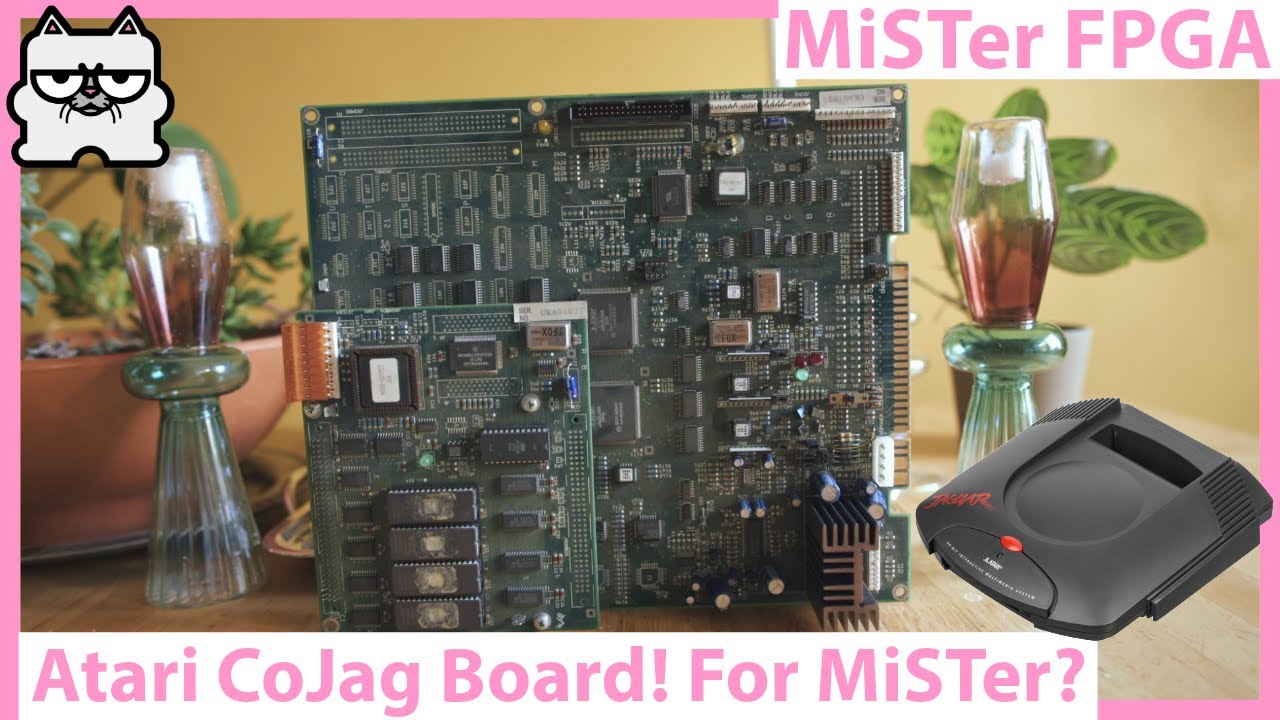
SUPPORT THE CHANNEL : http://www.patreon.com/VideoGameEsoterica
It’s MiSTer FPGA NEWS AND UPDATES time! N64 FPGA core news, MiSTer FPGA Sega Saturn core news, MiSTer FPGA arcade game news…and more! FPGA gaming and retro games all in one! with more Taki Udon MiSTer FPGA clone review and build! MiSTer FPGA alternatives are here! a Terasic DE-...
should have plenty of close ups in there
Area 51 is 68020. Rest are MIPS
warm oasis
Ah, got you, so would need to support both
thorny swift
and I believe an extra DSP for low level IO shit
warm oasis
One issue is if Robert fully implemented all the features in the MIPS for the PS1 core or just the ones he needed to run the PS1
thorny swift
if he was smart only what he needed would be my guess
but yeah CoJag is just 68020 vs 68000 and the pivot to MIPS. Plus a little bit of extra silicon to handle IO and HDD not cart as you aren't directly addressing the games via a cart slot but a HDD
warm oasis
Yeah I expect that is probably the case, maybe @warped basalt can tell us a little about his PS1 MIPS 3000 implementation
I expect it is likely that more CPU features would likely need to be added to use it elsewhere
thorny swift
I can take a deeper dive into the board next month when we are at the new house
warm oasis
That would be interesting
More documentation there is, then more chance someone might want to try implement it
thorny swift
but I have all the documentation in the world on the 3DO M2 and nobody is banging down my door for THAT 🤣
warm oasis
We have virtual lightgun support now, so assuming that can work on the co Jag games then that is one part done and ready
thorny swift
I am always surprised nobody has ever tried all the PSX arcade games
Especially the bone stock arcade boards that have exclusives
warm oasis
I expect that will be one thing we see on the next board, when there is room to breath for the PSX core. As it is, it doesn't sound like it would be easy to add anything to it or split it off and remove parts to make room for extra functionality.
dreamy hinge
it's not really a technical limitation, it's just no one with the capability is interested in those games
warm oasis
I would also be keen to see Aleck 64 natively emulated, which seems like it would be fairly straightforward compared with other things (although what do I know)
thorny swift
dreamy hinge
it's not really a technical limitation, it's just no one with the capability is ...
Konami GV/GQ wouldnt take much work as they are 1:1 / 1:1 with 1 extra MB of VRAM and just a diff bios
warm oasis
What games on that on?
thorny swift
GQ is legit JUST Crypt Killer
warm oasis
There dip switches and other nonsense on there?
thorny swift

UPPORT THE CHANNEL : http://www.patreon.com/VideoGameEsoterica
I grew up with the PlayStation 1 under my tv stand and it's one of my favorite retro gaming platforms of all time...so I wanted to do SOME SORT of series on it. But considering it's more fun to talk about the esoteric side of retrogaming I decided to do a ten part series on arcade g...
thats the GQ

SUPPORT THE CHANNEL : http://www.patreon.com/VideoGameEsoterica
I grew up with the PlayStation 1 under my tv stand and it's one of my favorite retro gaming platforms of all time...so I wanted to do SOME SORT of series on it. But considering it's more fun to talk about the esoteric side of retrogaming I decided to do a ten part series on arcade ...
thats GV
System 357 is very par'ish too
as is System 10
dreamy hinge
"1:1" -> 'scsi cdrom/hard drive' lol
thorny swift
ZN-1/ZN-2/System 11/System 12/ FX-1A/FZ-1B and G Net all vary in some manner
thorny swift
dreamy hinge
"1:1" -> 'scsi cdrom/hard drive' lol
well I mean its not like its adding in extra silicon on the gaming side / doubling the clocks / dropping in Q-Sound
its not like we don't have enough systems on MiSTer with HDD/CD protocols to slightly borrow from
in bits
glad dome
thorny swift
ZN-1/ZN-2/System 11/System 12/ FX-1A/FZ-1B and G Net all vary in some manner
I can't even think of 10 ps based arcade games that don't have PS1 ports. And most ports were nearly 1:1. So I can understand it could look like too much effort for a few games. But if cps3 is being developed basically for 3 games, I am hoping for namco system 12 next, Tekken Tag, Soul Calibur, and the golgo 13 games.
ashen spoke
The core dev isn’t interested so someone else will have to step up to the plate.
thorny swift
ashen spoke
The core dev isn’t interested so someone else will have to step up to the plate.
If only I knew what I was doing lol. I played a bit and furthest I got was the Konami GV bios yelling at me the hardware had errors. Yeah it had errors...it didnt exist
slender valley
But if the hardware dosen't exist, how can it give you an error? 🤔
 torpid maple
HardwareNotExistingError
thorny swift
slender valley
But if the hardware dosen't exist, how can it give you an error? 🤔
Haha that’s an arcade special…”shit didn’t answer bro. Maybe jiggle the handle”
Usually though they give you an obscure error code that explains NOTHING and if nobody else has ever written about it before than good news…reverse engineering with MAME debugger time
 midnight robin
 deep granite
Why are the Jaguar game borders weird
deep granite
Why are the Jaguar game borders weird
Over HDMI, image is displaced down instead of centered, too
ashen spoke
deep granite
Doesn’t format into proper 4:3
CRT televisions don’t really have a strict concept of resolution so whatever image you gave a CRT it would typically adjust it to 4:3.
Some consoles for example, the correct aspect 4:3 ratio results in wider pixels.
thorny swift
slender valley
Gotta love those error codes that explain nothing
Konami is the best; "error -11n"....took me a year to solve that
or sometimes their error codes ONLY display on two digit counters on the PCB itself...and it wont boot but just show....07. Are the error codes printed in the manuals? NOPE
gentle bobcat
@midnight robin: By a few pixels or what? If that is the case, I don't notice it unless someone points it out and I get real close to the display and look hard. Or something else?
deep granite
midnight robin
Over HDMI, image is displaced down instead of centered, too
Yes
That’s what I notice
mental briar
It's very weird
because it's not shifted down
I think it has to do with the scaler
testing some stuff
i think it may just be cropped differently than analog? Like, I see more information over hdmi vs analog
it is definitely 3-4 lines shorter in game than in the bios
 low dome
Tried this free game on the latest Jaguar core, it boots up to the jaguar (bios) intro then stayed black: https://forums.atariage.com/topic/352872-new-puzzle-game-blockem-sockem-for-the-atari-jaguar-free-download/ I'm assuming this type of rom is unsupported on this core? However other homebrew roms (hit or miss) seems to work.
ashen spoke
low dome
Tried this free game on the latest Jaguar core, it boots up to the jaguar (bios)...
Try renaming it to .j64?
mental briar
low dome
Tried this free game on the latest Jaguar core, it boots up to the jaguar (bios)...
IIRC there were some folks building homebrew based on BigPemu rather than real hardware. I wonder if this is something from that
low dome
mental briar
IIRC there were some folks building homebrew based on BigPemu rather than real h...
but a physical copy was released for this game to work on the real hardware:
 low dome
mental briar
oh interesting
low dome
mental briar
oh interesting
can you try it on your end, I haven't tried renaming it to .j64 since I'm away from my mister at the moment
mental briar
low dome
can you try it on your end, I haven't tried renaming it to .j64 since I'm away f...
yeah, one second 🙂
tropic rock
Did you try with max compatibility on?
humble bluff
I suggest always loading in JiFFI and converting to J64. The extension doesn't always match the format.
tropic rock
I just loaded the .rom as is. Worked for me with max compat on.
mental briar
Ahh, I didn’t try that. Nice
tropic rock
Complaints about inconsistent extensions can be read here https://forums.atariage.com/topic/38675-argh-abs-to-rom/
gentle bobcat
It does NOT work in BigPEmu... at least not for me.
tropic rock
mental briar
Ahh, I didn’t try that. Nice
Just FYI. Always try flipping that on for carts that don't work. As far as I know all carts should work with that setting. If anyone knows of any that don't please let me know.
tropic rock
gentle bobcat
It does NOT work in BigPEmu... at least not for me.
There is a note about making it work on BigPEmu in the post where the download is.
Today, with the help of many from the Jaguar community, we offer you a free game to download and play on your Game Drive or Skunkboard(Also works on BigPEmu with Force GD enabled).
gentle bobcat
In my menu (in the Linux x86 version anyway), it's "Force JGD" but that made it work.
tropic rock
Final note about the core and extensions. Currently all cart files are handled the same way and loaded into 0x800000 and assume the jump address is in the standard location for carts at 0x800404 regardless of extension.
I believe that matches the defined format for j64.
 mild karma
mental briar
super basic but it kept my attention for 20 minutes
mild karma
mental briar
super basic but it kept my attention for 20 minutes
Very high praise for a Jaguar game 
mental briar
i beat it on all difficulties 
low dome
Reason I wanted this game to work on the Jaguar core, so I don't have to obtain Evercade's Indie Heroes 4 Cart (which is part of it). I think it has the Mega Drive version of the game on it. So hopefully the Jaguar version is the better port.
ashen spoke
low dome
Reason I wanted this game to work on the Jaguar core, so I don't have to obtain ...
I own Indie Heroes 4!
 rotund wadi
what is the jaguar core named under games folder?>
having trouble finding it
i tried to manually install the latest single ram build and it didnt open
 stiff pebble
rotund wadi
i tried to manually install the latest single ram build and it didnt open
stiff pebble
rotund wadi
i tried to manually install the latest single ram build and it didnt open
Do you have the bios?
rotund wadi
no ... i forgot ... which ones do i need to find ... do you need to manually install the jaguar core? update.all didnt bring it down
i can find online
rotund wadi
stiff pebble
Do you have the bios?
no
mental briar
rotund wadi
what is the jaguar core named under games folder?>
it doesn't come down with update all yet
you either need to grab it from the pins
or add the unstable repo to downloader.ini (if you want to do that, I will give you the line to paste in)
rotund wadi
please provide line for downloader.ini
mental briar
add both of these to the bottom of downloader.ini
db_url = https://raw.githubusercontent.com/MiSTer-unstable-nightlies/Unstable_Folder_MiSTer/main/db_unstable_nightlies_folder.json

[ajgowans/wip]
db_url = https://raw.githubusercontent.com/ajgowans/wip/db/db.json.zip
then run update all
warm oasis
The BIOS DB grabs the BIOS files you need. When you run update all press up and enter the menu and enable it
gentle bobcat
SOMA: I think the pinned messages has good info too.
rotund wadi
gentle bobcat
SOMA: I think the pinned messages has good info too.
thanks, i didnt see that
rotund wadi
Jaguar core is running perfectly. Thanks again everyone
vernal arrow
mental briar
add both of these to the bottom of downloader.ini
```[unstable_nightlies_folder]...
is there a source that can be added for test builds???
or are those a manual process
mental briar
vernal arrow
is there a source that can be added for test builds???
The source will be the discord until grey decides it’s ready for update all. However, once it’s posted here, it usually gets added to the wip database. If you add those lines to downloader.ini, update_all will grab it from there
vernal arrow
ok cool. i already have those added, but wondered about the test builds folder
mental briar
Test builds folder? Oh you mean the channel here?
gentle bobcat
Is there a newer build that is provided if you add the download info to whatever .ini file... than what is pinned here?
mental briar
Looks like I need to PR the new cores to the WIP DB
These are the cores that were built for the forums
@ashen spoke ^^
I'll PR them into the WIP db
@warm oasis PR ready for you
gentle bobcat
Very big much thank you... and to GreyRogue obviously.
gentle bobcat
Just learned of a Tempest 2000 clone for Linux and Windows named Typhoon 2001. It was made in 2008 or so. Here's a video of it in action: Supposedly the playfield as seen in the video doesn't have to rotate like that and can be toggled.
1080p gameplay of Typhoon 2001 which pays homage to Tempest 2000 for the Atari Jaguar which was a remake of the Tempest arcade game by Atari. If you're wondering why the web rotates, it's a game option (press F5 or F6; also can edit the typhoon.cfg file). Dave Theurer mentioned that Tempest was originally designed to have the web rotate while ...
The Linux version doesn't work for me but that probably because I'm in Wayland rather than X11.
Looks pretty impressive.
dreamy hinge
it doesn't work on x11 either
midnight robin
gentle bobcat
Just learned of a Tempest 2000 clone for Linux and Windows named Typhoon 2001. ...
I used to play that back then! Good game indeed. Sadly, it wasn't opensource, so it went bit-rotten (it's not compatible with modern APIs).
dreamy hinge
it's just old, and confused by stuff like multi monitor etc
gentle bobcat
Well, it appears to be statically liked (aka it has baked in all of the libraries and dependencies it needs) so I'm not sure why it wouldn't continue to work.
dreamy hinge
it is statically linked, but X11 is inherently non-static linkable
it loads in plugins dynamically
midnight robin
No idea, but I wouldn't waste a second with closed-source stuff. Even if you make it work today, it will break again tomorrow.
That and the absurd dependency on 32bit libs 🙁
dreamy hinge
regardless, alot of the functionality of X11 is outside of the client binary
gentle bobcat
In 2008, 32-bit wasn't absurd. 🙂
gentle bobcat
Hmm, the Space Giraffe soundtrack is pretty good. Jeff Minter even did one song. I didn't know he was musical: http://minotaurproject.co.uk/SpaceGiraffe/soundtrack.php
deep granite
mental briar
These are the cores that were built for the forums
what’s the improvements
mental briar
Stability and mouse stuff
slender valley
gentle bobcat
Just learned of a Tempest 2000 clone for Linux and Windows named Typhoon 2001. ...
You just made me remember, I had a game on Xbox 360 called Space Giraffe that was also a Tempest clone: https://youtu.be/Gk3JADIXPEU?si=Ah0W-QUBOPOky-ar

Playlist of this and other Llamasoft games: https://www.youtube.com/playlist?list=PLLBDjkLcJ9ZZ7CCEtF1iNukfw-RFgFaQQ
gentle bobcat
I linked to the Space Giraffe soundtrack above but since it had a link, it might have gotten censored.
slender valley
Oh, I see it now
gentle bobcat
Hmm, Rich Whitehouse has a new component out today (BigMaster?) that is an online gaming service for BigPEmu and his Killer Instinct clone. Supposedly allows for multiplayer gaming with Aliens vs Predator. Not related to this core, so sorry for being a bit off-topic... but I know many of us Jaguar core users also use BigPEmu, especially for testing stuff. Anyhoo, I don't quite understand how a multiplayer AvP would work... so maybe he has or will provide a video of it?
Merry BigPMas! https://www.patreon.com/posts/146443958
 midnight robin
gentle bobcat
In 2008, 32-bit wasn't absurd. 🙂
midnight robin
gentle bobcat
In 2008, 32-bit wasn't absurd. 🙂
Making a free game and letting it bit-rot was absurd in 2008 and it was absurd in 1995
deep granite
does jaguar core work with direct video on dual ram?
latest core doesn't work when booting a game and idk why
ashen spoke
deep granite
does jaguar core work with direct video on dual ram?
have you tried without direct video to see if it works fine?
thorny swift
gentle bobcat
Hmm, Rich Whitehouse has a new component out today (BigMaster?) that is an onlin...
Yeah it’s not like the level structures are really set up for multiplayer
mental briar
Is there a multiplayer mode?
maybe they hacked in coop?
bring up to 4 friends to suffer through play with!
gentle bobcat
No matter what I do, I can't seem to get CD games to work in the 12-18 builds for single RAM. I haven't tried dual RAM yet.
VLM works as do carts.
mental briar
I can look in a little bit, dowdle
mental briar
gentle bobcat
No matter what I do, I can't seem to get CD games to work in the 12-18 builds fo...
Working ok here. These are 12-15 builds tho.


 keen zealot
Same options, working fine here too.
midnight robin
mental briar
Working ok here. These are 12-15 builds tho.
Aaaaww... image is perfectly centered on CRT... Have you tested the core over HDMI? Is it centered for you?
mental briar
midnight robin
Aaaaww... image is perfectly centered on CRT... Have you tested the core over HD...
I have and it isn't. But it's still in beta
midnight robin
mental briar
I have and it isn't. But it's still in beta
Ah, thanks for the confirmation
gentle bobcat
I'll try the 12-15 one then. Thanks.
mental briar
where is the 12-18 core from?
gentle bobcat
Maybe I had the date wrong... whatever that last build was that you provided.
Nevermind. It is the 12-15 one that isn't working for me.
CD games just don't start.
The CD BIOS comes up and then the screen just goes blank. Tried multiple titles.
Media files were previously working and work with older builds of the core.
ashen spoke
dual or single?
mental briar
single
but we confirmed it works. Just to confirm, the order is:
- Boot core
- Change CD Sessions to 2
- CD Enable: Yes
- CD Inserted: Yes
- Load CDI
I usually have to reset the core after doing that (otherwise I get the unknown disc error)
if that doesn't work, blow up your .cfg file in /config for the jaguar
deep granite
mental briar
Working ok here. These are 12-15 builds tho.
Nice PVM
 red jewel
How far is this core from an official release?
ashen spoke
red jewel
How far is this core from an official release?
I think @tropic rock is still working through a few things, like getting saves to work with CD games. But this core is in an incredible state thanks to his amazing work.
slender valley
I would say between 50 feet and 25 meters
red jewel
slender valley
I would say between 50 feet and 25 meters
Close then given where it was, 70 nautical miles not that long ago
gentle bobcat
Another thing it definitely needs is a simplification of the menu as it has a zillion options... and given all of the stuff he has working now, perhaps more than half of what's there could either be completely eliminated, or collapsed down. For example, you should not need so many options for CD stuff. Just have "Load game CD" which would just automatically set all of the settings one has to manually set now... and "Load audio CD", ditto... and "Load Game cart". Of course that is me talking... errr writing... and I know absolutely nothing about FPGA software development. But I can provide encouragement and thanks in abundance... and rewards if @GreyRogue accepted rewards of any kind.
slender valley
I assume the current CD options are just temporary since the core is still in development
Most of these options will probably either go away or we put under some kind of advanced or debug menu and you would just simply need to choose load CD like you said for the stable version
I assume the stable version would likely not be limited to CHD either and likely have BIN/CUE if not also CHD support
Just that clearly that kind of stuff is not a priority over getting the CD support itself ironed out first
gentle bobcat
slender valley
I assume the current CD options are just temporary since the core is still in de...
If I understood correctly, the Jaguar core won't be able to do any other CD formats than it is already using. bin/cue (but with a tuned set not easy to create) and cdi... and odd format not well documented. The reason is that the Jaguar uses tracks or something. I won't pretend I understood what the dev was talking about when explaining it... but you get the idea. So, no chd.
warm oasis
If I remember Zakk said it is possible to do CHD but it would be a sizable bit of work for such a small library and ultimately won't save much space
slender valley
gentle bobcat
If I understood correctly, the Jaguar core won't be able to do any other CD form...
IIRC Dreamcast was known for using CDI because the disks were multisession which bin cannot handle easily (IIRC technically you can do it by splitting the sessions across bin files though)
Were Jaguar disks multisession though?
DC was multisession mostly because the main data was in a proprietary format while still needing a part of the disk to appear as a standard cd
dreamy hinge
most jagcds are multi session
ashen spoke
The only benefit CHD would bring is consistency with other cores.
slender valley
It would save a little space, but yeah, the consistancy is a bigger thing personally. Just would be nice that all cores can have the same image format
Well, actually, now that I think abuot it it's still not consistant because you can't use CHD for games with indexes over 1
ashen spoke
It would be nice if the CHD devs fix that
So many retro game emulators and front ends utilize CHD that it’s kind of ridiculous to not solve a bug that breaks game behavior.
slender valley
Wasn't CHD originally just made to handle laserdisk games on MAME
But yeah, the format is kinda becoming a catch-all so it really should be updated to handle those cases
I remember the CUE file of one of my saturn games is a laughable mess, EACH track has like, 30 indexes
tropic rock
slender valley
Were Jaguar disks multisession though?
All JagCD games are 2 sessions. The first session is audio. The second is game data (in audio formatted data). The CD BIOS will not boot the game if it does not have sessions and it checks the second for copy protection with checksums.
slender valley
JaguarCD had copy protection?
tropic rock
If a single session cd is inserted it will bring up the audio player.
tropic rock
slender valley
JaguarCD had copy protection?
Yes. Games had to be submitted to Atari who would create the needed encryption. The method and keys are now known.
slender valley
Oh, so it's burnable?

 tropic rock
slender valley
Oh, so it's burnable?
tropic rock
slender valley
Oh, so it's burnable?
Burnable discs will work to my understanding but the disc format has reduced error correction so getting a working disc can be challenging.
gentle bobcat
BTW, MiSTer Add-Ons had a JagCD unit for sale. I think he wanted... will look again... $1200 for it?
MiSTer Addons
Complete in box (missing one piece of foam) Tested and working Jaguar console not included


I'd consider buying it for $250. 🙂 I already have a great box with inside casing... just no actual unit.
low dome
I sold mine (atari jaguar collection in pic) about two years ago for $2000 even, so price seems a little reasonable. One thing about the JagCD, it's very fragile. It works 70% of the time I had it. Kept it in a storage and it stopped working for some reason. And yes, you can play burn disc on it.

I'm just worried, if Mister Add-On shipped the JagCD it might not work out the box right away since it's very fragile, keep that in mind..
rain sierra
You insinuating that Atari cut corners with quality and durability or somethin’!?!?!?
low dome
just speaking from experience with the JagCD
low dome
the Jag console however works everytime, but feels cheap (shell, parts and buttons), lol.
rain sierra
Just seeing the Jag edge connector for analog video which is just a section of exposed motherboard is enough for most people to come to the same conclusion.
tropic rock
Some of what I read implies a lot of the "fragility" issues are really the reduced error correction. Any failure in the data can cause the encryption check to fail causing it to refuse to boot. It always checks the boot data and the encryption data needs to be error free. It then checks random segments. Any errors will prevent games from booting. Then any areas that randomly skipped the check can still cause crashes. Most CD formats have built-in error correction in data areas. JagCD stores game data in audio format. Audio data is allowed to have errors which would often be imperceptible to the ear. Hence the increased finding of "fragility".
Burnt CDs are more likely to be difficult for the laser to pick up and will have more issues.
gentle bobcat
Also, 30+ year old optical drives... aren't really known for their robustness..
I think I remember watching one or more videos on how to fix a non-functional JagCD... but it requires a lot of teardown of the hardware and adjustment of a potentiomiter(sp?) if I remember correctly and I'm probably not.
slender valley
So they used areas that are meant for error correction for their anti-piracy? And it ended up, surprise surprise, causing errors?
tropic rock
No. They used it to allow bigger discs. Error correction takes up space. The amount of space for the encryption is only a couple hundred KB. The format they chose allows 746MB on a disc

compared to about 650MB with error correction.
Note this decision was made during the early years of CDs so the importance of error correction may not have been very clear. Determining how quickly things degrade requires time to get statistical data.
I assume it also would have required at least slightly more expensive chips to process the error correction, but I do not know if that figured into their calculations.
slender valley
Wait, so Jaguar CDs are not standard CDs? They can't be read on a PC drive?
Seems pretty silly to do that in the early era of CDs too, most early CD games barely used half the disk even when they intentionally tried to cram it with music and FMV
tropic rock
They are standard CDs but they look like audio only. The data is just in audio tracks.
 normal loom
tropic rock
They are standard CDs but they look like audio only. The data is just in audio t...
normal loom
tropic rock
They are standard CDs but they look like audio only. The data is just in audio t...
Interesting I didn’t know
uneven cobalt
gentle bobcat
$1,250.00 - https://misteraddons.com/collections/yard-sale/products/atari-jaguar...
That’s a pretty good deal for it with the box. Units without the box regularly go for 1k+ now. Broken and untested ones for 700+. I got mine with the memory track and a few games for 750 earlier this year and it felt like a steal after searching for a decent price for about a year.
ashen spoke
@tropic rock I tried playing Club Drive on ReplayOS with the Jaguar core and not only was it a graphical mess but it straight shuts my Pi down lmao
Congrats on making a core that doesn't shut my hardware down!
normal loom
low dome
I'm just worried, if Mister Add-On shipped the JagCD it might not work out the b...
In the AVGM video on the Jaguar CD the protagonist had to acquire several units before he eventually got a working one. I already owned several 3DO units and have never experienced any issues so far.
 hidden siren
ashen spoke
<@498116541259186176> I tried playing Club Drive on ReplayOS with the Jaguar cor...
hidden siren
ashen spoke
<@498116541259186176> I tried playing Club Drive on ReplayOS with the Jaguar cor...
are you saying you cheated on us?
What couldn't you get here? Was the pi much younger? And leaner? Not '3 layers', but only 1?
sheesh.
And now you want to come back home, because the grass wasn't greener elsewhere?
The nerve.
ashen spoke
@hidden siren the worst part is that I never learn my lesson lol. Every year I go "ohhhh what's going on in other places" and I keep crawling back here!
slender valley
tropic rock
They are standard CDs but they look like audio only. The data is just in audio t...
So it would look like an audio cd but would play garbage if you tried to play the audio tracks that are seretely data?
tropic rock
Yes. All of the tracks in the second session will sound terrible if you try and play them.
dim sundial
You'd probably enjoy it if you had robot ears
slender valley
Reminds me of early CD games tending to have an audio track that warns you not to play the disk in a CD player
I remember one (I think it was a Saturn game) warning you that the other track contains computer data and should not be played in a cd player... then a deep evil sounding voice going "Or else kiss your tweeters goodbye"
nova portal
Jaguar core with cleaned up OSD menu 😉 . https://misterfpga.org/viewtopic.php?p=103410#p103410
tropic rock
My options! Look how they massacred my beautiful menu.
mental briar
Monsters.
slender valley
tropic rock
My options! Look how they massacred my beautiful menu.
At least you wasn't the guy who invented the Latin Alphabet

 shadow topaz
@tropic rock Any plans to add Game drive compatibility?
I've been testing the Mortal Kombat port for the Atari Jaguar.
Works fine on NTSC hardware but not on the Mister core yet.
warm oasis
What is Game Drive?
tropic rock
shadow topaz
<@498116541259186176> Any plans to add Game drive compatibility?
I've been test...
Have you tried turning on max compatibility?
shadow topaz

ZedLabz
Discover GameDrive for Atari Jagular at ZedLabz, click here to see our full range of Retro HQ products!
shadow topaz
tropic rock
Have you tried turning on max compatibility?
Yes I tried, it didn't work.
However it does work with BigPEmu that has initial support for GameDrive

AtariAge Store
Jaguar GameDrive by RetroHQ The RetroHQ Jaguar GameDrive cartridge allows you to play the full back catalogue of Atari Jaguar games and homebrew directly from a memory card. The Jaguar GameDrive has full support for all games and sizes of EEPROM (used to save game progress). The EEPROM contents are saved directly to th
tropic rock
How big is the game?
shadow topaz
The game is 6Mb
shadow topaz
tropic rock
How big is the game?
It's a homebrew game, no big deal I can test it on real hardware with the GameDrive cartridge
 tropic rock
Which BIOS are you using? I wonder if the patch for skipping CRC check is a different address for K/M.
shadow topaz
I believe it is jagboot.rom
It first wasn't playable with the Jaguar emulator BigPEmu, but after the Jaguar Gamedrive support it was playable

Mortal Kombat beta v ingame
Mortal Kombat Jaguar version by TruFunGames
https://www.patreon.com/c/TRUFUNGames
BigPEmu Version: 1.21
Release Notes
Version 1.21
- BigMaster integration. BigMaster provides various multiplayer services, including server lists and NAT traversal. Register here: https://www.richwhitehouse.com/bigmaster...
gentle bobcat
The developer of that MK game says he currently wants it only to work on real hardware with the Game Drive. It isn't that it can't work as a ROM file... but he said he wants real hardware owners to get first go at the game before emulators. What it is about the game code that stops it from working on MiSTer, I don't know, but it is supposedly by design.
warm oasis
This sounds more like an issue with running the ROM than "game drive" support, if Game Drive is just a flash cart then emulators shouldn't need to support anything. This is very odd.
gentle bobcat
I'm a subscriber to the dev's Patreon and I've heard him state that many times.
tropic rock
tropic rock
Which BIOS are you using? I wonder if the patch for skipping CRC check is a diff...
Turns out it is. I need to fix that for mbios. kbios is at 136e. Looks like mbios is at 19c6. The swap 67 to 60 needs to match for each.

GitHub
WIP Atari Jaguar core. Contribute to MiSTer-devel/Jaguar_MiSTer development by creating an account on GitHub.
lyric pelicanBOT
assign os_rom_q = (abus_out[16:0]==17'h0136E && status[2]) ? 8'h60 : bios_overwrote ? fastram2[8*(3-abus_out[1:0]) +:8] : cart_qsc[8*(3-abus_out[1:0]) +:8]; // Patch the BEQ instruction to a BRA, to skip the cart checksum fail.
On PAL Jaguar with GameDrive...
https://www.youtube.com/watch?v=SkQKLhSWu4E
Mortal Kombat ingame
Tested on PAL hardware with Gamedrive
https://www.patreon.com/TRUFUNGames/about?
Tested with PAL Jaguar hardware, bottom of the screen cut off.
Config:
Jaguar console
GameDrive
Firmware V1.15, ASIC V1.10, Menu V1.11, Stub V1.06
Elgato HD60X
RetroTink 4K CE input Scart
Device:
Source: https://www.giantbomb.com/
Atari Jag...
ashen spoke
Is Game Drive some sort of aftermarket flash cart?
If the game author wrote it specifically to work with the Game Drive then it shouldn’t be supported. Buy the Game Drive and enjoy their game that way.
warm oasis
Game Drive should just be a dumb flash cart, so if something isn't working on real hardware running from it then it would good to find out why, as it should in theory just run on the core if the core is accurate to real hardware.
ashen spoke
warm oasis
Game Drive should just be a dumb flash cart, so if something isn't working on re...
Yeah I’m not seeing it do anything inherently unique to it other than being able to display artwork in its menu, but that’s completely irrelevant to the handling of rom files.
It does support this - EEPROM support for 128, 512 and 2048 byte EEPROMs
slender valley
So is it an issue of max supported ROM size?
warm oasis
Apparently the game is only 6mb
slender valley
Were any retail Jaguar games that big?
gentle bobcat
I have a Jaguar with a GameDrive... and yes, it is a flash cart. The author of Mortal Kombat has said he wants the first users of the game to be on real hardware... so, without stating how, he supposedly has it checking for the GameDrive. Once he is done with the game and it gets a freely available public release, that restriction will be removed.
While I've had access to a few builds via his Patreon, I haven't tried it yet because I haven't bothered to setup my Jaguar system in a while.
I did try the most recent build on the MiSTer and after the Jaguar startup, I just get a black screen, so I assume his method, whatever it might be, is keeping it from running.
warm oasis
Ah, so basically he added some sort of DRM in there
gentle bobcat
That's my understanding.
warm oasis
So the solution is to wait, or for someone to try hack the ROM to remove it
That feels extra cheeky seeing as this isn't something he created, but is a port of Mortal Kombat, someone else's IP
gentle bobcat

As I mentioned, that restriction is only temporary and will be removed once he is done with development and releases the game. Basically his Patreon subscribers have been funding the development, but once it is done, it will be freely released... and yeah, that probably also has to do with the fact that it is a "fan" game of a non-licensed property.

Become a tester! https://www.patreon.com/trufungames
The beta release of Mortal Kombat for the Atari Jaguar is available now! This version includes the entire single player ladder (including endurance matches, Goro, and Shang Tsung), a 2-player mode, and an exclusive TEST YOUR MIGHT mini-game!
00:00:00 - Introduction
00:02:49 - Shang Tsung i...
@shadow topaz - I see you listed in the supporters list at the end of that video. I'm there too. 🙂
ashen spoke
warm oasis
That feels extra cheeky seeing as this isn't something he created, but is a port...
Yeah, i think that’s a great word to use; “cheeky”.
That sums up my own perspective perfectly.
I think it’s silly what he’s doing but I can’t criticize how he spends his own time working on something he plans on giving out for free when he’s done.
@gentle bobcat this is a genuine question but how come your such a big Jaguar fan?
I think that’s super cool, personally.
And we’re really lucky to have you here with us playing this core with such an expert eye on things.
gentle bobcat
@Robby - Because I bought one new when they were for sale... in 1994(?). Took me a while to get one because they were hard to come by. I was a big Atari fan prior to that and I saw the Jaguar as Atari's "last stand". I bought about 18 carts and rented the rest of them at least once. T2K is my favorite game of all time and I generally play it a few times a year... prior to the MiSTer WiP core... and I was very glad to see that come along. When I first got a MiSTer at the tail end of 2019, I was really hoping that someday there would be a Jaguar core. 🙂 I listened to the Jaguar Game by Game podcast episode on T2K and there are a handful of community contributions in the last section of that very long episode... and quite a few people mention that T2K is their favorite game of all time.
My first computer was a Timex Sinclair 1000 which I had for about a year before switching to an Atari 600XL. Then in 1985 when the ST came out, I pre-ordered that... and used that for close to 10 years... mainly on Bulletin board Sysems (BBS) and then GEnie and CompuServe... as there were big Atari communities on those pay services. Of course that was all BI... Before Internet. I remember reading the Atari Jaguar FAQ as it was being constructed before it came out... and the hardware seemed amazing. Of course, real life doesn't always pan out like the press releases say it will. 🙂
But the Jaguar is just my favorite console... as I really haven't put anywhere near as much energy into any other system since. Of course my sons are way more into gaming than I am, and I'm the "retro gamer" in the household. 🙂
slender valley
Damn... I started on the NES, Nintendo isn't doing too bad these days... XD
Don't think I've ever heard of a Atari fan that was this into it though, that's cool
gentle bobcat
There are a lot of hardcore Jaguar users... and by a lot, I mean I guess... a few hundred. Here's a link to that podcast I mentioned and if you listen to the later portion I mentioned, I think that's proof. 🙂 https://atarijaguargamebygame.libsyn.com/09-tempest-2000
The guy who does those, although he hasn't come out with an episode in over 2 years... is currently working on an episode covering the JagCD... and I'm guessing he may have some MiSTer coverage in there but not certain. I definitely have told him about the MiSTer WiP core.
Light up the webs in the critically-acclaimed abstract shooter Tempest 2000 by Llamasoft. This ox-sized episode features plentiful music, a detailed analysis, an overview of sequels and derivative games, several personal stories, and music. Did I mention the music? Also included is feedback from doctorclu, Trooper Galactus, Louis, Bill Kendrick,...
And then AI (After Internet, not Artificial Intelligence), when I needed to switch to an operating system that offered native TCP, I switched to Linux... in 1995. Linux has been my primary OS for desktops, laptops and servers (and virtual machines) for 31 years now.
I've been reading a little bit on that reel-to-reel tape of UNIX from the early 70s that was found at the University of Utah and recently turned over to the Silicon Valley's Computer History Museum. I happen to have a reel-to-reel tape from ~1988 with UNIX Sys V on it that someone gave me. Maybe someday we'll have a PDP-11 core where we can run the original UNIX. UNIX was originally named Unics (like Multics) but no one remembers when the name was changed nor why. That detail is lost to history.
uneven cobalt
gentle bobcat
There are a lot of hardcore Jaguar users... and by a lot, I mean I guess... a fe...
Nice. I listened to a couple of these on Audible last year and it was pretty good. I would definitely be interested in a JagCD episode.
gentle bobcat
The first couple of years, UNIX was written in assembly as C wasn't quite ready yet to take over the whole thing. I believe that transition from assembly to C was completed sometime in 1973. I never used the original UNIX. Just MiNT on the Atari ST. MiNT was an acronym for MiNT is Not TOS, and later, MiNT is Now TOS... after Atari hired a guy to work on it and it got integrated into TOS to become MultiTOS. Sorry to be off-topic but its Atari related.

I checked that a little before Xmas and he hadn't started it yet... even though he had told me via email he definitely was going to do it... just was having trouble finding the recording time. Glad to see he has made some progress.
Jaguar is still doing well enough for new games to periodically be created, the GameDrive flash cart has had a few production runs, blah, blah, blah. I'm not saying the games that have come out since its demise have been comparitively good, but beggars can't be choosers. And of course, they have been porting quite a few Atari ST games to the Jaguar as well. I have no idea how much development work is involved in that porting or if it is fairly automated?!?
Unfortunately the bulk of new stuff has been cartridge only but there are a few companies that sell digitial roms as well. Just not all of them.
I have been associated with quite a number of "lost causes" over the years and the one currently on my mind is the 9-hour documentary series made by Oscar winner Ezra Edelman entitled, "The Book of Prince." Netflix paid the Prince Estate ~$10 million for access to "the vault" and Ezra and his team worked on the film for close to 5 years... and then the Estate refused it because they wanted editorial changes made that the film maker wasn't willing to do (cut 3 hours from it). Now the Estate is supposedly having someone work on a sanitized happy, happy version. I'm hoping someone will leak "The Book of Prince" someday or that the Prince Estate will run out of stuff to sell and will reach back for that documentary in a desparate cash grab. 🙂
gentle bobcat
The Atari Jaguar Homebrew Scene Is A MESS:
www.youtube.com/watch?v=POz224rf-YM
gentle bobcat
Towers 2 Enhanced livestream - https://www.youtube.com/watch?v=YlYF2OeqKLg
So our Saturday night long stream was sort of ruined by an unfortunate crash, and after emailing with Songbird and playing behind the scenes, I'm confident its not going to be an issue again. I did progress things a little as I cleared the Elemental Planes, and trust me, you did not want to see it. The difficulty spike was huge, the gameplay w...
serene widget
gentle bobcat
The Atari Jaguar Homebrew Scene Is A MESS:
www.youtube.com/watch?v=POz224rf-YM
Fixed it: https://youtu.be/POz224rf-YM

Today I'm going to do my best to discuss the Atari Jaguar Homebrew Scene, and why its a mess. The quality of games are all over the place, and everything costs a fortune. And you never know if your going to get a cool port of an awesome game, a fantastic original, or some sort of weird tech demo joke thing. And the sellers, especially on eBay...
 stone vault
gentle bobcat
Towers 2 Enhanced livestream - https://www.youtube.com/watch?v=YlYF2OeqKLg
stone vault
gentle bobcat
Towers 2 Enhanced livestream - https://www.youtube.com/watch?v=YlYF2OeqKLg
I want to play this game SO bad. But I don't think it exists at all as a rom to be played in Mister 😭
slender valley
MESS? I thought that got integrated into MAME.
Not that I am trying to Raine in your parade that is.
gentle bobcat
By "mess" (and the all caps came form the video description) they were meaning that there is a whole lot of crap out there for sale just trying to take advantage of people's ignorance.
slender valley
It was a pun
uneven cobalt
stone vault
I want to play this game SO bad. But I don't think it exists at all as a rom to ...
I need to sit down and play it. I bought it in November and then my son got super into Zelda so we’ve been playing through some of the easier games in the series together.
stone vault
I wish they sold it as a downloadable rom.
 dense ravine
Jaguar friends, now that I will soon be joining the dual RAM club, I would like to explore your glorious platform
When I dump my copies of my games, what file format should I be using for the MiSTer core?
gentle bobcat
@dense ravine - .j64
dense ravine
Thank you
gentle bobcat
So, how does one dump Jaguar carts?
There is also a single-RAM version of the core although I don't think much side-by-side comparison has been done and it is generally perceived as the lesser of the two... but not a lot of folks have dual-RAM so the single-RAM core probably is more widely used.
dense ravine
Since I’m getting dual anyway for the Saturn core, I may as well try the dual ram core if it’s generally regarded as better
dense ravine
gentle bobcat
So, how does one dump Jaguar carts?
I’m sure there’s an archive that has that kind of information somewhere online
gentle bobcat
I see this (https://www.jagware.org/index.php?/topic/792-cartridge-dumping-tool/), but it says it needs a BJL modded Jaguar... and a computer with a parallel port. Now I have to find out what "BJL" means. 🙂
Jagware
Here's a cartridge dumping tool I wrote. It can be used to backup your Jaguar games for various uses : playing in emulators, preserving betas versions and prototypes, etc. It's pretty slow, but very reliable, as there are multiple checks done to be sure that the data isn't corrupted. As well as s...
dense ravine
ConsoleMods Wiki
Behind Jaggy Lines [BJL] is a method to load a debug BIOS, capable of receiving a single ROM sent over the second controller port via a special cable. It is generally used for homebrew development, but can be used as a method to load homebrew games. Original guide by Bastian Schick, pictures by Matthias...
slender valley
gentle bobcat
So, how does one dump Jaguar carts?
Sanni's Cart Reader can do it, though it's not one of it's default formats, there are adpters to make it read Jaguar games.
I have a (I think V3?) version, and I got the parts to build a V5.... once I get enough soldering expirence to do it
gentle bobcat
All interesting information. Thanks!
tropic rock
There is nothing special about commercial Jagur carts. They use standard ROM modules so any type of dumper that can attach to the pins can dump them.


Nothing prevents homebrew makers from developing carts with dumping protections at additional cost though.
 stone vault
Well I hope a few years from now when Tower II enhanced is no longer available a rom dump shows up somewhere. I'd happily give Songbird my money for a rom but I can understand also why they don't choose to sell the game digitally
slender valley
What about reading/writing saves?
 brittle zinc
slender valley
What about reading/writing saves?
brittle zinc
slender valley
What about reading/writing saves?
All jag cart pcbs I've seen have a space for an eeprom. If the game uses saves it's populated, if not it's not populated. There's nothing special about the carts. I've created several Tempest and AvP carts using EPROMs. The game needs to be byte swapped then split into high and low roms and then just burned to eprom.
slender valley
Was the eeprom connected to the pins too?

 wary lance
How is the Jaguar core now days (single and dual ram)? Considering buying a console but would prefer MiSTer
mental briar
Dual ram is basically identical to hardware. Get yourself a reflex adapt and you can even use jag controllers
single ram needs more work, but grey is working on it when they have time
wary lance
Yeah I was eyeing up a reflex adapt, need to pony up the cash and get one with the different adapters
Thanks 🙂
I bought a Jag controller ages ago to use with the core but snac won't be an option right?
gentle bobcat
The single-ram core has been usable... but I believe there are a few titles (nothing that popular) that don't work. I believe the list is documented in the testing spreadsheet that is linked in the pinned items.
It would be interesting if someone could have three setups side-by-side... original Jaguar with GameDrive, MiSTer single-ram and MiSTer dual-ram and do an actual comparison. I do have all three but I don't have the space to set them all up at the same time. If one of my kids would move out and I got a spare room... that would be awesome but I'm not holding my breath.
wary lance
gentle bobcat
It would be interesting if someone could have three setups side-by-side... origi...
Way things are going with housing, schedule in MiSTer 3 comparisons? 😁
gentle bobcat
And once I get that done, then the 3DO beta core might be released. 🙂
 ancient thistle
mental briar
Dual ram is basically identical to hardware. Get yourself a reflex adapt and you...
ancient thistle
mental briar
Dual ram is basically identical to hardware. Get yourself a reflex adapt and you...
How would you go about setting a Jag controller up with one of those? I've been wanting to start diving into Jag stuff on MiSTer but the controller is the one problem i'm really trying to figure my way around.
midnight robin
ancient thistle
How would you go about setting a Jag controller up with one of those? I've been ...
Most games are OK with a normal pad... For Rayman, Tempest 2k and AVP, you will be good.
mental briar
ancient thistle
How would you go about setting a Jag controller up with one of those? I've been ...
how deep do you want to go?
Your easiest (and cheapest) solution is to just use a keyboard. And, if I’m being honest with you, it’s probably the best solution.
If you want to dip your toe in, you can order this monstrosity (although the current price is about 9 dollars more than the MSRP)
If your desire is true madness, you can get a Reflex Adapt from Porkchop (when they are back in stock) and then see if you can find a New Old Stock jag controller on ebay
ancient thistle
I'm wanting to go fairly deep. I just got done playing through the full 32X library for the purpose of doing little write-ups and ranking them and the thought of doing the same for the Jag is now in my head. The main hurdles to that would be finding a good controller method and seeing where single RAM compatability is at. Reflex plus a real pad seems like a good option to me but that My Arcade pad looks interesting. Just wonder if it's got good latency.
 glossy iron
Cool idea and project! So many people talk about the jaguar an it's games, but hardly anyone finished them especially the whole library. Do you text write ups or have a YouTube channel?
mental briar
ancient thistle
I'm wanting to go fairly deep. I just got done playing through the full 32X libr...
reflex + real pad is the closest you’re going to get to console-level latency. It’s like…less than 1ms
and, listen, between you and me, that setup could have multiple frames of latency and you would have no idea
single ram is in good shape, but needs tweaking to run the whole library. dual ram is plug and play
ancient thistle
glossy iron
Cool idea and project! So many people talk about the jaguar an it's games, but h...
Text, on a letterboxd derrivative for games called Backloggd, but if I do the Jag I might set up a little wordpress site and do it in a way that's a little nicer.
ancient thistle
mental briar
reflex + real pad is the closest you’re going to get to console-level latency. I...
I'll keep looking into both options then, especially if the latency isn't that bad on the newer controller. Seems like it'd be less of a hassle, in any case, and I got a weird thing about using pre-owned controllers. My MiSTer uses an analogue board so I'm limited to just the one stick of RAM, unfortunately, but I imagine there's a compatability list in the pinned messages, just haven't had a second to start going through it all.
mental briar
ancient thistle
I'll keep looking into both options then, especially if the latency isn't that b...
I’ll be honest, I’m not sure when the last time a full run has been done on single ram
gentle bobcat
I use a Reflex Adapt with an adapter and a Jaguar controller and it works great. Of course you can only use one Jaguar controller. Supposedly if you have multiple Reflex Adapts and adapters you can use multiple Jaguar controllers... but I don't know anyone who has actually give it a try.
eBay had a few vendors that had an ample supply of new-old-stock Jaguar controllers but they dried up about a year ago.
I have 3 old stock ones and a reproduction Jaguar Pro controller.
mental briar
gentle bobcat
I use a Reflex Adapt with an adapter and a Jaguar controller and it works great....
You know one person with two reflex adapts and 2 jag controllers.
dreamy hinge
what a weirdo
mental briar
The rabbit hole with jag controllers is revisions.
mental briar
dreamy hinge
what a weirdo
Would you like to be my friend? I have an extra controller
gentle bobcat
@mental briar - You have two Jag controllers?

 gentle bobcat
I do see two Reflex Adapts in that picture.
So, can you use two Jaguar controllers, one each, with two Reflex Adapts?
mental briar
Yep. Works fine. That’s the only reason i have two on that tv
ancient thistle
Looking at OEM controllers and man, the cost of the adapter and controller is maybe pushing me to that other one that was linked haha.
Do many jaguar games actually use the number pad, though? I'm not super familiar with the system compared to others of the era.
mental briar
A frustrating amount. However, @dreamy hinge is working on something where you’ll be able to bind button combos to single buttons. I played a level of avp with an nes controller to test it
For instance, avp uses the keypad for weapon selection, strafing and the map
gentle bobcat
@ancient thistle - A good number of them do use the numpad. There is a link to scans of them all... and there are some that have been made after-the-fact. There is a company that makes reproductions.
@ancient thistle - Check the pinned items. There is a link listed there for a PDF with the overlays.
Although I realize you were asking about the number pad specifically, and not the overlays... but the overlays make using the numberpad a lot easier.
ancient thistle
Looking at that store now and it's making getting an original pad more tempting. Though that Gamestation one seems to be more within what I can afford, just not finding much info out there about compatibility with the MiSTer.
mental briar
If you can wait a few days, I can open mine and test it. I feel like @ashen spoke got it working with MiSTer ok, but I think he returned it afterwards
ashen spoke
Hell yeah I returned it
It just feels crappy to use
And its button mapping on the numerical keypad is setup like a keyboard with the * # buttons being reversed and being some weird key combo.
gentle bobcat
A new episode of the Atari Jaguar Game by Game podcast should be coming out fairly soon:
 ancient thistle
ashen spoke
It just feels crappy to use
ancient thistle
ashen spoke
It just feels crappy to use
Like, poor build quality? That numberpad thing sounds awful but I wonder if I could work around it in the bindings. Shame there's not much in the way of an aftermarket Jaguar pad, but I guess it's just too niche for an 8bitdo or something to put out a product for.
slender valley
Huh, was the boot rom just updated?
ashen spoke
ancient thistle
Like, poor build quality? That numberpad thing sounds awful but I wonder if I co...
Yes, if it were a cheaper price point then I wouldn’t mind but all of it just feels poor to use. It features the worst trackball and spinner I’ve ever used. Which I guess is a pretty interesting accomplishment.
gentle bobcat
@Robby - So what you are saing is that I'D probably love the controller... except for it not being an original Jaguar controller? 🙂
ashen spoke
gentle bobcat
@Robby - So what you are saing is that I'D probably love the controller... excep...
Controllers are subjective. What I don’t like you might be ok with or even prefer. Or maybe my controller was defective? Always order from a place you can do hassle free returns.
 signal bramble
The arcade stick version seems lost yet
signal bramble
It was supoused be Q4
ancient thistle
Sorry, coming in with a bit of a novice question: I know that the Jag CD BIOS and save cart need to be named boot1 and boot2 respectively. I have the CD BIOS, but I'm not sure what the name is for the save cart, so I'm struggling to figure out what I should be looking for there. I've noticed that several .cdi Jag CD games are also booting as black and white or failing to recognize. Are there specific settings I need to flip to correct that on certain games? Baldies, for example, is one that's launching in black and white. I'm on an NTSC-U CRT and it's not doing the usual image stutter I'd get from PAL games, so I don't think it's a regional issue (though the file doesn't seem to specify what region.)
warm oasis
The best thing you can do is just delete any BIOS files you added manually and when you run update all press up and enable the BIOS DB and it will take care of that for this core and virtually all the others
That is the easiest solution
ancient thistle
Thank you. I wasn't aware they could be grabbed from the update all, so I'll do just that.
ancient thistle
Gave that a shot but it looks like some CD games still load to a black screen or to the system's CD player. Thinking it might be whatever cdi files I got unless there's some options I need to toggle beyond setting the CD to 2 and yes on the options below that.
slender valley
I think you need to properly load the bios too? Or is that step animated now?
gentle bobcat
@Weatherby - I've seen a lot of people run across some bad .cdi files.
ancient thistle
slender valley
I think you need to properly load the bios too? Or is that step animated now?
I ran the update all and am loading the CD bios before loading any CD based games. A bit more than half this set works, but the others have issues booting. Interestingly, they do all seem to work in BigPemu, so I'm not sure. I guess worst case, I can play those few outliers on there.
ashen spoke
ancient thistle
I ran the update all and am loading the CD bios before loading any CD based game...
All the CD games I tried worked, what games are giving you trouble?
 silver vault
ashen spoke
All the CD games I tried worked, what games are giving you trouble?
silver vault
ashen spoke
All the CD games I tried worked, what games are giving you trouble?
Hi Robby, i'm on the single ram core, the only game on the CD that I can't run is World Tour Racing, does it work for you?
ashen spoke
silver vault
Hi Robby, i'm on the single ram core, the only game on the CD that I can't run i...
Yes works perfectly fine for me!
Cool game imo
mental briar
I believe all the cd games work on both cores. Make sure you have sessions set to 2 and the cd inserted set to yes. You may have to hit reset in the OSD if you get the “?”
silver vault
mental briar
I believe all the cd games work on both cores. Make sure you have sessions set t...
As soon as I get home this evening I'll try again with the settings you recommended, thanks
warm oasis
Are people using the specific set that has been tested against on the core and not random dumps found from other sets?
gentle bobcat
If I understood your question... since the specific information can't be publicly shared (where a specific set might be located), who knows?
tropic rock
World Tour Racing is one that some sets have bad dumps of.
 visual tiger
I got problems with Iron Soldier 2, CD version. It shows the music player instead of the game. Maybe a bad dump?
By the way, music is perfectly played.
tropic rock
If other CDs are recognized as games with the same settings and it goes to the cd player I am pretty sure it is the image having a problem (maybe a different version of cdi format? I only found limited documentation on the file format). If the format is recognized it would error, not default to vlm.
gentle bobcat
TruFun Games has released Mortal Kombat Beta v1.1 that only works on real hardware (not sure how he pulls it off but I can confirm it doesn't work on the MiSTer core). He reiterated that once the game is done (and it is very close now I think), he plans to open it up for everyone. This has been discussed here in the channel not too long ago... but there's your update. When it is released, I'll mention it if no one beats me to it.
tropic rock
The core does not implement everything the GD does. If there were a need I might look at adding them, but since the author is planning on releasing it without the specific blocks it probably is not worth the time.
gentle bobcat
I concur. 🙂
stone vault
I emailed Songbird productions about potentially selling just the rom of Towers II enhanced. Mentioning there are plenty of Mister FPGA owners who don't own a Jaguar that would love to play this game. I'm sure they won't be interested but figured worst they can do is tell me to piss off.
ancient thistle
mental briar
I believe all the cd games work on both cores. Make sure you have sessions set t...
The reset thing seemed to work for the few that were returning that error.
Looks like the issue was that the cdi files I had weren't the best rips. I was able to get a better set and everything is booting perfectly now.
Which means I get to start looking at repro overlays and jag controllers........ 👀
slender valley
tropic rock
The core does not implement everything the GD does. If there were a need I might...
Really, the only part of that I would consider making it worth the time is for accuracy, if a game that is designed to detect if it's not running on real hardware can't tell that it's not running on real hardare
I would still like to see that version running even after the public version is released
tropic rock
The GD has extra hardware. That is the part that it is detecting.
mental briar
ancient thistle
Which means I get to start looking at repro overlays and jag controllers...........
the overlays are a must 
tropic rock
GD=GameDrive. It runs on a GD on real hardware. I don't have a copy to verify, but the part that is failing is almost certainly part of the GD that I have not implemented.
ancient thistle
mental briar
the overlays are a _must_ <:derpweow:1325130664978157579>
I've purchased the full set for AVP and got one for Doom to test out. Unfortunately, I did not realize/forgot that the Reflex Adapt is out of stock lol
slender valley
Is GameDrive like an Everdrive for the Jaguar?
ashen spoke
ancient thistle
I've purchased the full set for AVP and got one for Doom to test out. Unfortunat...
I got a store linked in the pins that’s pretty good. I bought a few times from him.
Link was broken, just fixed it
slender valley
Poor Link
tropic rock
slender valley
Is GameDrive like an Everdrive for the Jaguar?
Yes. It is a flashcart. https://store.atariage.com/products/jaguar-gamedrive-1

AtariAge Store
Jaguar GameDrive by RetroHQ The RetroHQ Jaguar GameDrive cartridge allows you to play the full back catalogue of Atari Jaguar games and homebrew directly from a memory card. The Jaguar GameDrive has full support for all games and sizes of EEPROM (used to save game progress). The EEPROM contents are saved directly to th
It also simulates CD support
slender valley
I see, so this version wouldent work if you were to burn it to a rom chip then
tropic rock
nope
ancient thistle
ashen spoke
I got a store linked in the pins that’s pretty good. I bought a few times from h...
For the overlays? I was able to find them on that site even though the link didn't go directly to them. I was tempted to get the full set for $95 but that's a bit more than I should be spending right now, haha.
I'm just hoping I can get my hands on a reflex adapt sooner rather than later. Not sure how often MiSTer Addons refreshes their stock.
shadow topaz
gentle bobcat
TruFun Games has released Mortal Kombat Beta v1.1 that only works on real hardwa...
There are still lot's of gamebreaking bugs, now that the PAL screen cut off is fixed
the dev will focus on the other bugs.
I've done a test on my YT channel yesterday, PAL Jaguar + GD.
BigPEmu has GameDrive emulation support.
Once MK has a public release we can test it on the MiSTer core.
rain sierra
I think @fickle folio is manufacturing some high quality overlays for Jag. Not sure what the progress on that is or if it's just experiemental funsies.
gentle bobcat
Here is GuruEmulation's Mortal Kombat Beta v1.1 test video:
https://www.youtube.com/watch?v=X8MCjQ70UpA
You get to see it running on a real Jaguar via the GameDrive.

Mortal Kombat ingame
Tested on PAL hardware with Gamedrive
https://www.patreon.com/TRUFUNGames/about?
Tested with PAL Jaguar hardware, screen cut off fixed.
uppercut slowdowns
other bugs.
Config:
Jaguar console
GameDrive
Firmware V1.11, ASIC V1.08, Menu V1.08, Stub V1.04
Elgato HD60X
RetroTink 4K CE input Scart
Device:
Source: https://www.g...
gentle bobcat
@shadow topaz - So in the video, mostly in the last few stages, there were some video glitches where your player was facing the wrong direction but still able to pull off moves.... and some places where the rope-with-spike thing would catch Goro but you'd get stuck until you let go. Are those bugs only present in the Pal version? Or also when running on NTSC?
I can verify that it does indeed work with BigPEmu... but I have zero skills and likely couldn't get past the first level. 🙂
Or probably you don't also have an NTSC Jaguar to test with.
 eager vine
If I'm having issues loading carts with dual ram and retrotink 4k is it still recommended to disable direct_video?
Well... something not covered anywhere I noticed but just worked for me... Not only do you need to have CD Enabled set to No you also need CD Inserted set to No as well in order for direct_video to work.
It is still buggy but it worked to load two games and crashed on the third cart load.
mental briar
It works with direct video either way. Unless something has changed recently. I play jag cd hooked up to my tink
shadow topaz
gentle bobcat
<@1395541298047619323> - So in the video, mostly in the last few stages, there w...
I'm wondering about that, I didn't have those glitches in the previous version.
It might be because of the PAL screen fix.
I know the dev has an US console to test on, I only have a PAL console.
The wrong direction seem to happen during the endurance matches.
I can switch to NTSC with BigPEmu to test.
eager vine
mental briar
It works with direct video either way. Unless something has changed recently. I ...
I didn't try any cd games yet on dual ram. Still having some weird cart loading issues. The first cart load always works, second is a dice roll, third cart load never works. Could be the games I'm testing. Going back and forth between Bubsy and Cannon Fodder.
mental briar
Lemme look
mental briar
yeah, not sure. Not having any issue here swapping between those two. Are you on the 25.12.15 build?
direct video over the tink is also fine in both cart and CD games

 sacred blade
ashen spoke
I learned in education
sacred blade
ashen spoke
I learned in education
That should qualify you for US presidency.
 fickle folio
rain sierra
I think <@278335747109683200> is manufacturing some high quality overlays for Ja...
fickle folio
rain sierra
I think <@278335747109683200> is manufacturing some high quality overlays for Ja...
I got the overlay samples and they work well. But artwork becomes the hard part 🙂
mental briar
I will buy another set of overlays
eager vine
mental briar
yeah, not sure. Not having any issue here swapping between those two. Are you on...
Yeah, newest build. Even cleared my config a few times as a sanity check. Maybe tink needs to be in triple buffer and now i'm not sure if it was. But the mister felt fully locked up even blind trying to reset to menu.
mental briar
eager vine
Yeah, newest build. Even cleared my config a few times as a sanity check. Maybe ...
Nah, I have mine set to gen lock. Something else is up. I can’t troubleshoot right now, but I will be able to later onight
eager vine
Yeah same. Ping or dm me if you're bored and want to go through it
gentle bobcat
The new episode of the Atari Jaguar Game by Game Podcast is released:
https://atarijaguargamebygame.libsyn.com/33-jaguarcd-and-vlm

It's rare, it's controversial, and it completes the Jaguar picture. Atari's JaguarCD peripheral saw limited release after numerous delays, but was packed with a remarkable audio visualization feature called the Virtual Light Machine, and bundled with a non-trivial percentage of the Jaguar's total commercial CD library. In this episode, we...
ashen spoke
fickle folio
I got the overlay samples and they work well. But artwork becomes the hard part ...
Oh shit, you’re number one, I’d buy them!
gentle bobcat
Oh, I got named dropped about 01:22:00 in the new podcast.
ashen spoke
gentle bobcat
Oh, I got named dropped about 01:22:00 in the new podcast.
is it good or bad
gentle bobcat
A thank you.
ashen spoke
gentle bobcat
A thank you.
You’re welcome
gentle bobcat
Hmmm, I hadn't seen this before:
ATARI JAGUAR 1st Press Conference 1993-08-18
https://www.youtube.com/watch?v=VvnjN90XUe8

22 years ago (August 18th 1993) at Borregas Ave, Sunnyvale, CA. The rest is history...
mental briar
eager vine
Yeah same. Ping or dm me if you're bored and want to go through it
Post your mister.ini
mental briar
So what happens with direct video when you boot the jag core? Do you get anything? Does the Tink give you a "no input error" or is the whole screen black?
and what kind of screen are you plugged into
eager vine
I get the cd boot bios and menu every time. or if cd disabled the weird broken red bios and then menu
mister > rt4k > lg c1 oled
mental briar
the red bios is totally fine on first boot
eager vine
when the crash happens it's during boot and might get a flickering red screen then black or right into black
second memory chip is from taki. i have not mem tested it
mental briar
it's probably not that
eager vine
dual saturn core seemed to be behaving properly for a few hours of play
mental briar
where did you get your legal Jaguar backups?
eager vine
rhymes with ambient
mental briar
I mean, it kind of does
eager vine
lol it was a stretch 😂
mental briar
they have a couple of sets. did you grab the htgdb pack? it is on there
eager vine
uhhhh let me look
mental briar
might be good to grab that if you havent, just so we are using the same set
you also want to make sure the bios database is enabled in update all
as the latest core requires a different biost than we had been using
"requires"