#hard blocked wifi card
32 messages · Page 1 of 1 (latest)
 inner mulch
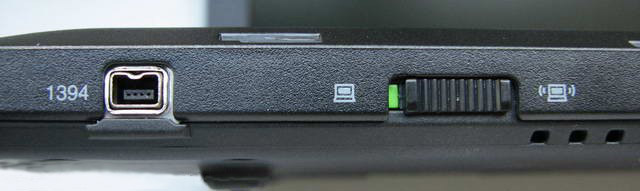

 hard tree
and the side switch is on green brother
 dense imp
Move the slider and run the command again
hard tree
same thing
i even changed the athereos wifi card today
the ethernet is working but wifi clearly not
dense imp
What model Atheros?
hard tree
AR9287
i tried switching the white and grey cables between them and all right now
should i try to put the wifi card in modem s place?
dense imp
The switch might be broken as that should control the hard block state
dense imp
You could try https://www.youtube.com/watch?v=yzAKcmlaH1M&t=137s it says Intel but the PCI(e) wifi all have the same pin mapping

A detailed video tutorial explaining how to fix Intel 5100 5300 Mini-PCIE WIFI radio on issue when upgrading an old laptop with a new WIFI card, also suitable for Intel WiFi Link 5000 vPro series and 4965 Series on laptop brands such as Toshiba, IBM, HP and Dell.
You will need:
- A laptop with a wifi radio on and off switch (Either a flip swit...
hard tree
and i dont even know how to switch the switch lol
dense imp
Did you tape the pin on the wifi card?
I wonder if the tape came off as that should block the signal for the hard block
hard tree
i dont really know really , i mean that should make it work no matter the side button work state right?
but i ll check maybe it came off
dense imp
With the tape on the right pin, the switch should be bypassed
hard tree
i ll take a look when i am back home and send a pic of how is it taped cause maybe it came off as i tried taping it late last night
thanks so much for the help
dense imp
Might also want to try on the original wifi card
I know Lenovo used to have a wifi whitelist in BIOS and they would only allow certain wifi devices to function. My Lenovo from 2014 wouldn't boot with a different card in, they may have just changed to blocking it
hard tree
yes but as mine is librebooted i dont know for sure how to check that
maybe just flash ordinary bios and then reflash libre?
or if you do know maybe how to check for the whitelist as i heard is posible but dont know how will be awesome
dense imp
Just try taping the original wifi card