#cth-history
1 messages · Page 38 of 1
 worldly sigil
 hidden jolt
Thanks, it'll be down the road after moving expenses (moving in ~2 weeks)
worldly sigil
But... the StreamDeck integration can be achieved with any capture card by plugging the capture card into OBS
The only thing you'll really gain in StreamDeck using an Elgato capture card is "Flashback recording"
 river cipher
@cosmic vine yes, i left a ticket on the support page and tried a different device
 cosmic vine
At this point, you can try to poke it along, maybe re respond to the email you received. Most of the staff here are from other parts of the company.
river cipher
will do. thank you!
 worldly junco
I run into the issue with my new camlink where it never finds my camera and when I open game capture it says "this is being used by another application" - I'm not however
This happened occasionally with the 4k60 as well
 viral lake
Ok I don't know if I made a mistake or what but I am currently on a single PC setup and I just purchased a mark 2 version of the 4k60 pro and I have it set up and everything and it is working fine but now I'm reading everywhere that there is no point in getting a capture card if you are on a single pc setup. I'm running it on OBS to stream and everything is working fine but I also wanted to use it to record gameplay on my monitor so I can edit videos and upload to YouTube. But the audio on the 4k capture utility is not working and I'm trying to get it to work. Is it not working because I'm using a single PC setup or is there another reason. Should I just return the card cause apparently is serves no purpose on single pc setups. Can anybody help me please??
 rare kraken
single pc, there is no purpose for a cap card
viral lake
So should I return it?
I don't get how that is possible though if i just saw a video of someone using an hd60 and they only have one pc and they're capturing what is on their monitor and any pc games they play with audio and everything
 pearl smelt
can i use a camlink and hd60 pro at the same time?
I've heard using multiple elgato devices causes issues
 hard frigate
Hey there i have a issue regarding my keyllight it is setup and connected to my wirless lan network but it wont show up in the control center on windows. I allready tried setting it up using a wlan stick on my pc but as soon as i desconnect the adapter its not showing up anymore.
 vestal wind
Anyone have a fix for the HD60 S requiring a USB 3.0 connection? I've tried plugging it in all 3 of my USB 3.0 ports. All my drivers are updated and all that stuff. It also works just fine on my old PC so I know it's not the cable. My PC will detect that it's using a 3.0 port, but will then change after a few seconds and say that it can perform faster when connected to 3.0.
 old gazelle
So I have a problem that hopefully you guys can help me with. I got my HD60 S+ yesterday and I have owned an HD60 for 5 years so I know the HDMI's are plugged in the same way. The 4k Capture Utility tool keeps saying that my device is being used by another software but I do not have any other software on this pc so what should I do?
 high ridge
I'm having some difficulties with my 4k60 pro MK.2 capture card. for some reason I can get the output on my monitor but it won't output to the 4k utility app. :/ anyone have any ideas? it was working fine until I updated the software. I've since uninstalled it reinstalled it. Uninstalled it again and did the older version and still having the same issue. I've also unplugged everything, including the card from my mobo, and plugged it all back in.
old gazelle
So are we all having problems with the 4K capture utility?
rare kraken
@old gazelle have you rebooted your computer?
old gazelle
I have. I even uninstalled and reinstalled the device
high ridge
I did an uninstall and reinstall of an older version and I still can't get it to work.
old gazelle
same
 worldly skiff
my elgato won't show anything on the recording software
i'm using a switch, the usb cord is plugged into a 3.0 port, and the switch is on
 frigid quartz
does anyone have any idea why when I launch certain games the gain on my microphone gets set to max?
this is for the wave 1 btw^
old gazelle
@worldly skiff I have the same problem as well!
 wraith jacinth
My elgato is showing an infinite number of windows of what im doing, how do I get it to only be one? Does anyone know what im talking about? Plz help
wraith jacinth
 worn flint
@wraith jacinth are trying to use the Elgato to capture a single screen on a single computer?
wraith jacinth
Yes, and to capture modern warfare gameplay. Just want it to show one sceen not one million lol
worn flint
If you don’t have a second display, you may want to look into OBS Studio or Streamlabs OBS. They will allow you to do game/window capture instead of display capture. No Elgato needed
The Elgato capture devices are more meant for consoles, systems with multiple displays, or separate PCs
old gazelle
IT sucks no one knows how to fix my issue, I have literally tried everything
wraith jacinth
Ahhhhhh
old gazelle
I figured out my issue, apparently my TV was the problem I guess
 eager edge
anyone know how to fix audio with an HD60s without having to have game capture open (AKA to use OBS w/ audio)
 past elk
@eager edge what kind of audio issue are you having? If you’re using OBS, you need to have a video capture source for your HD60s. Sometimes you need a separate audio source to capture your capture card audio.
old gazelle
@eager edge On obs go to the advanced audio where your levels are then switch it to monitor only mute output
 left badge
Yo anyone know how to export in 60 FPS? I have a set of clips all recorded in 1080i 60 FPS but when I export as an MP4 they're 30 FPS (or more specifically 29.97)
 brave fossil
I'm having flickering on the screen when the PS4 is hooked up thru el gato hd60s. It doesnt appear to be hdcp related (its turned off), all the cables have been checked. It does not flicker when hooked up directly to the monitor, nor does the Nintendo Switch flicker when hooked up thru el gato. So I guess its a setting somewhere? I made a quick video. https://youtu.be/t1U0gq4FMQ8 It does make a sound when it flickers.

Checked all cables, does not flicker when connected directly to monitor. Does not flicker when Nintendo Switch is hooked up thru El Gato. Must be a setting somewhere?
 south bronze
So I’m trying to set up the g keys on my k55 in elgato software. But every time I try to programme it, it says icue not running. I’ve tried everything to get it to work but nothing has worked. Can anyone help?
left badge
@brave fossil In the software, try hitting the settings button for your Elgato, and go to advanced and switch through the "TV Compatibility" options. Default is 2, but try any and see if it fixes it. If it doesnt' work then maybe it's a problem worth submitting a support ticket for. 
 signal skiff
Hello. Will my elgato hd60 pro capture card work for a mirrorless set up? 95 % of my streaming is pc games so in the odd case that I choose to stream console I can always revert back to my logitech usb webcam. But I would like to make the jump to a mirrorless set up and the money saved on not purchasing a cam link I could out towards a camera lense. (Afaik the cam link is just a capture card that is why I am asking if I can use my hd60 pro as a substitute). Thanks in advance.
 fast olive
I bought a 4k 60 pro and for some reason i cant get the source resolution on the app to change to 1440p ... i have xbox one x and monitor is a 3440x1440 120hz ultra wide ...can anyone help ?
 signal ice
My Elgato HD60Pro is only picking up consoles if I set them to 720. But if I switch to 1080 reosltuion on the console, it shows up as "no signal". Anyone have any advice on this?
 tardy cobaltBOT
Sorry to see you're experiencing issues. Have you tried this yet? https://help.elgato.com/hc/en-us/articles/360041857951-Troubleshooting-No-Signal
If you're still experiencing issues, please file a ticket at http://e.lga.to/help.

Elgato
This guide will walk you through steps to take if your capture card has a source plugged in but it not detecting the signal correctly and is displaying No Signal or there is no video on the pass-th...
signal ice
Update: Elgato is working fine with all microsoft consoles. Will not even recognize the PS4, PS4Pro, or either of my two switchs / docks are plugged in if I use those.
 meager barn
Hello! I just got my Elgato Wave 3 and am trying to get all of my inputs and outputs set up before I stream later tonight. I am having trouble finding WHERE discord voice chat is and how to add it. I have never had a mic before or a mixer so I am a bit unsure how to add everything. I would love some help since I know it is possible to add it as a source I just am unsure how to! (will remove from #wave-chat since this is a thing >.>)
I will be streaming in about 4 hours so if there is someone who can help me before then that would be great! 😄
signal skiff
You need to turn off hdcp on your ps4 @signal ice
It's under the settings on your ps4
To get a ps3 to work you need to use an hdmi splitter to scramble the hdcp signal
I think it's called hdcp. Or something among those lines lol

Welcome PS4 players. Let's get serious.
#4TheCreators.
It's finally here: with the version 1.70 of the Playstation 4 firmware,
Elgato Game Capture HD is your Playstation 4's new best friend.
Simply de-select "enable HDCP" in your system settings and seamlessly
capture ...
I'm just guessing this is your problem since cap card recognized x box but not ps4
signal ice
Not the issue sadly.
Same with all nintendo systems.
I think my card is genuinely just going out.
It stopped reading the xboxes now too.
signal skiff
Ah sorry to hear
 fast thorn
Does any record on Xbox with the elgato? And if so is there a way to capture game chat without the elgato chat link or no?
I can capture party chat without
Not came
*game
 sullen cosmos
hey is the twitch integration app on stream deck gonna be fixed, been unable to use any of the functions in twitch for a while now
meager barn
I still need help with figuring out how to get discord connected and heard on my stream? I can hear it just fine in my headphones but stream cant hear discord
 outer iris
im having a usb bus power problem. im plugging my hd60s+ into a usb 3.0 port on the back. but they stream gets choppy
i can plug it into the front usb 3.0 port but thats where the camlink is plugged in. when they are both plugged into the front, one will occasionally just cut out to black
south bronze
i have a dual pc setup and have it setup where i hear both pcs with sound capture but in game theirs a dalay in game audio
any fix??
 edgy fox
Hello all. Im new to the discord and i appreciate yall taking the time to help me. Im having a strange issues where my elgato HD60S capture card drops frames pretty bad (as low as 25fps). I have a Alienware A9 with upgraded specs which i will provided at the end of the post. nothing seems to work. all updates have been applied. i use Streamlabs OBS (althought the issue still persists even in Elgato HD capture software) any help would be very appreciated.
 last harness
I need some help with a multi action. 1 action OBS Record [start] 2 action OBS source [name] 3 action OBS Record [Stop] I thought by pressing the button that it would start recording play the source, then stop recording on its own. What am i doing wrong here
 sharp kelp
Hey there. Just wanting to know if I can use the Hd60s with a Macbook. My OBS and everything is set up through my mac as my PC is a potato with onboard graphics.
 tacit timber
Hi All, Just go the Wave 3 and updated my Streamdeck XL to the latest firmware and the Streamdeck software to 4.8 - But my streamdeck keeps crashing and resetting to the home page when I open a folder. Which is annoying because the folder contains all my twitch obs control - I'm on a Macbook Pro 15
last harness
@tacit timber I read the updates before updating the firmware, if it does not pertain to my SD then I opt out. I would call Elgato support and see if there is a way to back oout the firmware updates and start over.
tacit timber
@last harness I do the same tbh, I only updated after they started bugging out - I just figured the new WAVE software probably screwed with it and I need to update to get it to work... but no
meager barn
I had asked for help yesterday with setting up my Wave 3 mic, I have not had anyone address my issue and I need it fixed before stream tonight. I play with a group of friends on mondays and we are all in a voice chat together. I need my stream to be able to hear discord and I have not been able to get this set up. Is there someone who can help me today before I stream at 6pm EST?
worn flint
have you tried having discord output to the Voice Chat input in Wave Link?
meager barn
yes - this is currently what I have it set to and my stream could not hear anyone in discord.
 fickle crag
How do I properly setup the HD60S to work with the Wii? I have a Wii2HDMI converter and I connected everything up, but nothing gets detected in the Elgato software.
meager barn
i figured it out - you have to go into discord and change the settings in discord to go to the voice chat as well - i just wasnt doign that step on discords end
fickle crag
Am I missing something?
 sharp agate
@last harness Unfortunately what you want to do can't really be done dynamically and what's happening is that the multi-action is just starting a recording, showing an OBS source, and stopping the recording all in the span of a second or two. What I would recommend is just setting up a multi-action switch. You'll have the first two actions on the first switch position and the third action on the second switch position (with maybe another command to hide the source once it's done recording). You'll just have to press the button once to begin and once to stop.
@fickle crag The Wii only has standard definition output, so you'll want your settings to look something like this:
fickle crag
Still says Detecting Signal.
What am I missing?
I closed and reopened software, but the output looks like this:
 visual void
Hi guys, I've got an HD60S+ and there's a delay between game audio and game video (audio is behind) while streaming, recording using Stream Elements OBS? Can anyone help please?
 sharp agate
That's how I experienced the Wii when I was younger. 😛
Looking into the Wii2HDMI converter a little bit more, it appears to be an upscaler which will cause problems with the standard definition settings. You may want to switch the profile to HD 720p or HD 1080p depending on what the Wii2HDMI is set to.
@fickle crag ^
sharp agate
fickle crag
But how do you get Discord to recognize that you want to stream what is on the TV?
sharp agate
Video is easy as you can just tell Discord to capture a program that is displaying a preview of the capture from your capture card. With audio I'm not too sure, but if those programs are also playing back the captured audio so you can preview it on your desktop, it should work.
In Game Capture HD, you should be able to go into fullscreen and hide the sidebar to get a clean capture preview for Discord. You should also be able to get a fullscreen preview in most capture software like OBS.
fickle crag
Is there a way to get the audio to only come out of the TV and not through both the TV and headphones?
sharp agate
Not without muting it for your stream, unfortunately.
At least to my knowledge. I haven't experimented that much with streaming to Discord, especially when it comes to incorporating capture cards and consoles.
@visual void How long is the delay and does it get worse over time while you're streaming/recording?
 zenith totem
My Elgato stream deck is SOOO laggy, very slow and laggy when im pressing keys, i dont get it, do I have too much stuff on it??
visual void
@sharp agate no, it’s just a Second and stays that way. I fixed it by changing Audio Output to “audio only” but now my party chat on PlayStation can’t hear me speak.
 slender terrace
I am trying to setup my Wave 3 with different apps but the Wave Link Monitor and Wave Link Stream audio devices aren't putting out any actual sound.
Any tips?
 fiery ice
Hello, I just bought an HD60 S today and the audio constantly crackles and the framerate is extremely low, is it an issue with my computer or cables?
 river topaz
i unplugged my streamdeck and now it wont show any of my buttons what can i do
 wary axle
Does the HD60 S cap out at 9 hours or something? The timer has stopped but still streaming. Stream reset at the 9 hour mark.
 main grove
Hi!
So, I've been using Elgato HD 60 for a long time, everything works fine.
But, I'm planning to get a new PC and apparently the PC doesn't have any USB-3.0 Ports, it just has USB-2.0 and USB-C Ports. Will I not be able to use Elgato in it?
It's a custom CPU.
sharp agate
@main grove The Elgato HD60 used USB 2.0 and the HD60 S uses a USB 3.0 with a type C connector. You can use a USB-C to USB-C cable or a USB-A to USB-C adapter.
main grove
I have a HD 60 S, I think.
Because it asked for USB 3.0 when I first got it.
I plugged it into a random USB port.
And then I tried all and it worked on the left port.
Cuz the left one was 3.1.
And now that I'm getting a new PC.
I just wanna confirm if it's gonna work or not.
sharp agate
It should, but you'll need a new cable or adapter.
 vestal palm
i've been trying to get my audio working for about 2 months and just found a discord, i have an elgato hd60s+ and there is no audio coming through
visual void
Hey guys, I've got an HD60S+ and am trying to play with my squad on PlayStation using the Elgato Chatlink cable. I have my Blue snowball ball plugged into the PC running through OBS. Stream can hear everything me and my squad and the game. My squad can NOT hear me. Any Ideas please?
My headset is the PlayStation wireless platinum headset.
visual void
What are you passing the Elgato through? OBS? @vestal palm
 old imp
Hello, I keep having this message when I try to install streamdeck soft, any help ?
sharp agate
@visual void Is the USB dongle for the headset still connected to the PS4? If it is, it might help to disconnect it.
@fickle crag Going back to what was said about Discord streaming yesterday, I learned that Discord captures a program's audio in a way that isn't affected by Windows 10 audio mixer controls. If you right click the speaker icon in your taskbar and click "Open Volume Mixer," while your capture software is running, you should be able to mute (or at the very least lower the levels to a point where you can't hear it) the capture software. This would allow the audio to be captured for a Discord stream but allow you to only hear the game audio through your television.
 molten apex
so i wondered if someone has experienced that kinda the whole pc "dies" (doesnt really react and so on) when setting this settings to xrgb and full? using a 4k60
like cant restart, obs freezes, cant open chrome, cant open taskmanager. but as soon as i set it to "partial" everything is done
sharp agate
@molten apex To my knowledge the 4K60 Pro does not support true XRGB. The driver option is emulated and, in this case, is causing system instability for you. You're better off setting the video format to YV12 and leaving the color range option set to Limited.
molten apex
ah okay, saw a video saying it works, but okay then will stay with it :)
 swift dragon
I need help please
I’m trying to get my gameplay to show on my laptop but it says my usb 3 isn’t connected
I don’t get it and I’m new to this stuff
fast olive
How do i get my xbox one x to send a 3440x1440 signal through my 4k 60 pro to my 3440x1440 monitor???
 cedar portal
can anyone help me with my spotify and stream deck not connecting?
 broken mason
ok so I have a weird idk if its common or not issue. I recently got an hd60s and figured out I could stream with game audio for me for the first time but when I tried to set streamlabs up with the card it always gained a bit of latency with the gameplay and the audio and they wouldn't match up witch is an obvious issue for streaming. I tried it with regular obs too and I think its happening when another program uses the capture card output other than the default elgato one. I've been troubleshooting for a couple days (changing settings, looking up to see if anyone else has the problem) and I came up with nothing. I am hoping someone here can help me.
vestal palm
@visual void i'm not hearing audio at ALL, not in 4k capture utility and not in obs
 autumn pecan
I have a problem. For a few days now the elgato has been dropping the signal from my PS4 to OBS during my streams and off stream gameplay. I'd be playing then the picture would stop and I'd get either "one moment please" or "no signal" I tried refreshing the connections, checking the cords, disableing and enabling the device in device manager, but now I can't seem to keep a signal for very long. HOW DO I FIX THIS? I have to stream, it's my job! I need to fix this ASAP
tardy cobaltBOT
Sorry to see you're experiencing issues. Have you tried this yet? https://help.elgato.com/hc/en-us/articles/360041857951-Troubleshooting-No-Signal
If you're still experiencing issues, please file a ticket at http://e.lga.to/help.
Elgato
This guide will walk you through steps to take if your capture card has a source plugged in but it not detecting the signal correctly and is displaying No Signal or there is no video on the pass-th...
sharp agate
@autumn pecan What capture card do you have?
@swift dragon These troubleshooting steps may help you out: https://help.elgato.com/hc/en-us/articles/360042141431-Troubleshooting-USB-3-is-required-for-this-device-Windows-10-
Elgato
The following article covers some troubleshooting steps for when you receive an error message that says "USB 3 is required for this device".
Some Elgato Capture Devices that use USB 3.0 a...
vestal palm
i've been trying to get my audio working for about 2 months and just found a discord, i have an elgato hd60s+ and there is no audio coming through
sharp agate
@fast olive You just plug in the Xbox into the port labeled "In" on the 4K60 Pro via an HDMI cable and run an HDMI cable from the "Out" port into your monitor. If your monitor doesn't have an HDMI port and only uses DisplayPort, you can try a HDMI-to-DisplayPort converter between the output from the Capture Card and the Monitor. Just be sure to use one that can support at least a 1440p/60hz output.
@vestal palm Are you trying to capture a gaming PC with your HD60S+ or a console?
vestal palm
console
swift dragon
@sharp agate thanks I had ended getting it to work appreciate it tho
sharp agate
@vestal palm There are some troubleshooting steps here: https://help.elgato.com/hc/en-us/articles/360041852811-Troubleshooting-No-Game-Sound-Is-Being-Captured
Let me know if they're helpful for you.
Elgato
This guide will walk through steps to take when your Elgato Capture Device is not capturing sound from a source as expected.
All Elgato Capture Devices capture sound in the Stereo (2.0) format. Th...
vestal palm
seen this a bunch already, hasn't been helpful
sharp agate
It might be something more specific with how the software is interacting with your PC or the capture card itself. I would recommend putting in a support ticket if you haven't already as the support staff would be better suited to help you: http://e.lga.to/help
I'll try to keep my eye out for potential causes and solutions to your issue though.
 little imp
maybe i can get help here. I have a Dual Pc set up using a goxlr on my game pc and on my stream pc i have a elgato HD60 internal and a camlink. ever since i installed the cam link all audio in my obs on my stream pc is going throught the cam link its the only thing showing audio playing. i cant hear my mic, goxlr, nothing ive changed inputs and cant get the audio to play from the line in of my goxlr it only plays from my cam link
Before I installed the cam link all audio was working perfect with my dual PC set up I could see the individual audio levels via obs for every different device mic, cap card, music etc... Now that the cam link is installed only audio I see is coming from the cam link
past elk
@little imp have you tried disabling the audio monitoring on the Camlink from your OBS? sometimes with external mixers the audio inputs get weird and confuses the routing of the software.
 unreal haven
Is there a way to send a hotkey to a specific program?
I want to send the command CTRL+1 to a program called Snapcam, but if I have anything else in focus then the hotkey doesn't work.
Also, is there a way to start up the Stream Deck app on launch? It doesn't boot on its own. The app doesn't have a "Start When Windows Starts" option anywhere. Using Task Scheduler with "Highest Privileges" causes Stream Deck to prompt for a login to Twitch every single time it boots, despite not needing it and already being logged in. And using Task Scheduler without "Highest Privileges" doesn't launch the app on boot. It's a little frustrating having this issue.
Please @ me if you know how and thanks in advance!
little imp
Thanks everyone for the help. For some reason windows decided to change the audio levels of my other capture cards to zero. Now I know to check that next time!
 blissful hull
@unreal haven If you're on Windows, you can manually add the Stream Deck software to run on-boot by pressing your Windows Key and typing "Startup", and clicking "Startup Apps". This should open a page where you can manually toggle which applications run on-boot.
As for sending a command to an application, that one's a bit tougher. You can definitely do this, but it requires a bit of programming knowledge. On Windows, you can write a command line script to focus on the Snapcam application and press the CTRL+1 keys for you.
You'll need to use the sendkeys.bat code:
https://github.com/npocmaka/batch.scripts/blob/master/hybrids/jscript/sendKeys.bat
And integrate it into a windows batch script:
https://www.tutorialspoint.com/batch_script/index.htm
Then place that script somewhere on your computer, and have your stream deck run that script - just like a button on your stream deck can be used to run a software application.
I've found that some scripts need to be run in administrator mode. In which case, you'll need to actually schedule this script in the Windows scheduler, and use the stream deck to call this scheduled task:
https://www.digitalcitizen.life/how-create-task-basic-task-wizard
Like I said, not easy. But if you're tech savvy enough you should be able to figure it out.
worldly skiff
Does anyone know why nothing displays on my capture card at all when I plug it into the HDMI cord? I tried it with my switch Xbox One and PS4 but for some reason it just isn't working anymore, I honestly just want to be able to share play on discord with my girlfriend
 turbid ledge
I own the elgato hd60s and turned off HDCP and tried everything but still nothing displays on my tv only my laptop... could it be possible the tv is out of date? its from 2009
 blissful bridge
stuck on this screen even after restart
 exotic talon
Hi
I just plugged in XL streamdeck, and I had the 15 keys StreamDeck prior to that
When I look in the software, its not showing me the XL and it doesnt work.
Any advice would be greatly appreciated.
blissful bridge
ive uninstalled and reinstalled. and this is all i get currently,
 deft willow
hi, ive got a problem
need StreamDeck_4.7.0.12981.msi
where i can download it
blissful bridge
after another restart, im stuck on this screen again,
 astral steppe
where are profiles saved for elgato streamdeck again?
astral steppe
what if the app is frozen every time I open it due to the latest update haha?
 pulsar flume
That part I do not know how to fix. Maybe roll back the version?
astral steppe
this is what happens every time I open the app. I am unable to proceed with the update. the only way I can update is by uninstalling and reinstalling latest client from website.
:/
turbid ledge
I own the elgato hd60s and turned off HDCP and tried everything but still nothing displays on my tv only my laptop... could it be possible the tv is out of date? its from 2009
 smoky kelp
I reinstalled my stream deck multiple times now and I cant get it to work with obs studio?>
HALP
past elk
@turbid ledge it’s a possibility that the tv is either out of date or the tv could have a setting of its own preventing you from being able to use your capture card
 sand ember
https://help.elgato.com/hc/en-us/articles/360028234831-Troubleshooting-Elgato-Game-Capture-HD60-Pro-doesn-t-play-video-at-all
I'm asking here to see if anyone might know if there's any other steps I might be able to take to try to get this to work. My situation:
I have my PS4 connected to the Elgato and no TV, so I only use the output from the capture software. Before using it, I had connected it to a TV and made sure the HDCP was turned off, and it was working just fine. A few days ago I turned it on and started the PS4 and while the program showed it was getting a signal, it was showing no video. I could hear the usual sounds from the PS4 loading screen, so I know the PS4 was on. I pushed the button, and heard the same game I had suspended a week prior, however there was no visual through the software. Wondering if maybe HDCP had been turned on again, I unplugged my PS4 and took it to a TV but it was still off. I then tried the capture software with my Switch and got a visual with no apparent problems. I tried changing a bunch of different options such as the encoder on the software, and sometimes I got an intermittent visual with the PS4, but so far nothing seems to have solved the problem.
Elgato
If your Elgato Game Capture HD60 Pro video doesn't appear in the software or on the passthrough TV, then some aspect of your Settings or Setup are probably incorrect.Please try the following steps ...
 ionic stream
Hi there. Does anyone know how I route my HD60S Capture Card Audio through the Wavelink app, so I can control the audio there and not via obs?
autumn pecan
@sharp agate hd60. I've never had any problems with the USB port. I even switched ports and had the same problem
sharp agate
@autumn pecan I would put in a support ticket if you haven't already using this link: http://e.lga.to/help
It could be an issue with a Windows 10 power saving setting that causes certain powered USB devices to deactivate after an amount of time. You can follow this guide and see if it solves your issue, but if not I would just wait for support staff to answer your ticket: https://www.windowscentral.com/how-prevent-windows-10-turning-usb-devices
autumn pecan
@sharp agate I put in a ticket yesterday. The answer email said 2 days, so I figure I wont hear anything until next week. In the mean time I still have to stream so I'm going to have to try working through the problem. The problem is though that sometimes it causes my computer to crash if I try to fix anything
sharp agate
@autumn pecan What are your settings for the capture card source in your live streaming software?
autumn pecan
@sharp agate
sharp agate
Okay, I was thinking it could be something else but it's not applicable here. 😦
ionic stream
I figured out a fix for my issue
Basically I have OBS outputting to Wavelinks AUX for browsersource alert volume, and monitoring and muting the output of the HD60S, and setting the monitor to output to Wavelink Game. That works. Though it's a little hodgepodge and would be a lot easier to just link the capture card audio into wavelink natively.
 dusty magnet
Im having a strange issue, trying to use the stream deck to send a clip to twitter just like this, https://twitter.com/elgatogaming/status/1129431766006149120?lang=en . But it wont work for my clips. The issue after changing settings around for 5 hours seems that if i have both my mic and the desktop audio recording in obs the file wont work. I tried recording the replay in flv but it wont auto remux replays, i cant figure out a way to remux them using multiactions either. It works if i render them through resolve but i cant figure out how to multi action that, and would prefer not to have it up while streaming. If someone knows how i can record in mp4 let me know, ive messed with a lot of settings and can not figure anything out.


Clip it & ship it.
Use Stream Deck multi actions to record a clip from OBS/SLOBS replay buffer and tweet it out - all in 1 key press.
Likes
225
 Twitter
 bitter forum
Hello, I’m having an issue with my streamdeck XL the integration with the streamelements buttons is playing up, in particular the Kappagen buttons, I have also had issues with the accounts attached signing out however I believe I have fixed that issue
tardy cobaltBOT
Sorry to see you're experiencing issues. Have you tried this yet? https://help.elgato.com/hc/en-us/articles/360041857951-Troubleshooting-No-Signal
If you're still experiencing issues, please file a ticket at http://e.lga.to/help.
Elgato
This guide will walk you through steps to take if your capture card has a source plugged in but it not detecting the signal correctly and is displaying No Signal or there is no video on the pass-th...
bitter forum
Thank you bot, not the right issue though
turbid ledge
@past elk turns out the issue was the tv, i tried it on every other tv in my house and it worked smh. Time to but the monitor
 wise cradle
Hi, Can i use 2 camera's with 2 different camlinks in OBS?
worldly junco
any reason why I have to unplug and plug back in my camlink every time i turn my computer on for the camlink to be found?
 eager sand
for some reason my Stream Deck isn't working...its stuck on the Logo Screen. Anyone have any info as to why?
eager sand
got it sorted 🙂
past elk
@wise cradle you can use two different camlinks with two different cameras. To get them working in OBS you need separate sources for each camera.
@worldly junco have you tried using a different USB port? Sometimes if the port is bad or going bad whatever is plugged into it could have a hard time being detected
worldly junco
I can try
 surreal brook
Hey guys I'm running out of ideas here. I have a CamLink 4k that runs well on a 2nd pc but yet it freezes on my main high end PC (R9 3900X X570 Phantom Gaming). I think it may be the bandwidth but It's solely connected and to a USB 3.2.
things I've tried:
-disabling windows usb power management so that it won't turn off usb
-re-installed chipset/usb drives
-used different usb ports ( other usb 3,  usb 3.1, front ports) etc
-reinstalled Camlink 4k camera drivers in device managment
idk what else to try
 jade remnant
Hey guys, I keep running into a problem with my Elgato 60S+ and Streamlabs OBS. I get to the point where I get the capture on my OBS for a few seconds then it cuts to black and doesn't return. Happens with both Nintendo Switch and PS4. I've tried all configs like switching to Full RGB and making sure HDCP is disabled. Any help would be appreciated.
bitter forum
Hello, I’m having an issue with my streamdeck XL the integration with the streamelements buttons is playing up, in particular the Kappagen buttons, I have also had issues with the accounts attached signing out however I believe I have fixed that issue
@bitter forum
smoky kelp
My issue with stream deck saying that is is mising the elgato control plugin over and over every time i reinstall it. is still going..
bitter forum
because it needs to be in a USB 3.0 slot not a USB 2.0 as it doesnt have the power required to run otherwise
on your laptop the USB 3.0 slot should be blue
 fresh blaze
Hey guys, Anyone have information on this problem? My friend is trying to stream/record in 4k but keeps getting an issue like this (including just a full green coloured screen) He's tried changing the hdmi, and the nvidia fix too.
He also has the 4k60 pro, and a 4k monitor with the PS4 pro if that helps.
bitter forum
make sure that he is using HDMI 2.0 at a minimum he needs high speed hdmi cable to run the 4k passthrough, also make sure that he is using a 4k compatible Capture device
if you are using the HD60s it will not capture 4k or allow passthrough at 4K
the HD60S+ will allow for passthroguh but not 4k capture however it will still capture at 720-1080p
@fresh blaze ensure that he has also turned off HDCP on the play station settings as the capture will not work until this is done.
fresh blaze
Yeah he's done all that but the issue is still there
bitter forum
he has 4k compatible HDMI cabling
then you may find that it is an issue with the video settings on the playstation, easiest way to tell is just change it to auto
the playstation should be able to pickup that the device can display in 4K
is the view on the TV working?
fresh blaze
Yes that's fine
It's just when he changes it on the software, It bugs out and either shows him that screen or the green screen
bitter forum
ok check the settings of the capture card, unsure that it has the correct setting
if its still occuring after that i would be calling elgato support directly
fresh blaze
Okay, thanks for the help
south bronze
I will pay whoever can help me setup up dual pc streaming audio without mix amp hit me up ASAP
 mint flax
Yo guys I have nikon coolpix camera and I was wondering if I could use it as a webcam somehow because it isn't supported for cam link
unreal haven
@unreal haven If you're on Windows, you can manually add the Stream Deck software to run on-boot by pressing your Windows Key and typing "Startup", and clicking "Startup Apps". This should open a page where you can manually toggle which applications run on-boot.
@blissful hull I tried checking my "Startup Apps" and it was already ticked, but doesn't start at boot.
I also tried adding the Stream Deck app to my Startup Folder and that didn't work either.
I also had to remove the Task Scheduler startup command because it was breaking my Twitch integration on every single launch.
Do you have any idea what might be wrong?
Thanks for the help on everything btw, much appreciated!
 delicate cloak
Hey I could use some help I was testing out my stream and no sound was coming out from either my microphone from my laptop or my game from my ps4 can anyone help me set it up and fix it im still new to streaming
cosmic vine
is anyone else having issues getting games to output into Wave link? I've tried 3 games but unable to push it through
tardy cobaltBOT
PLEASE NOTE: Customer Service does not monitor this channel. If you are unable to solve your issue, please file a ticket at http://e.lga.to/help.
We also have staff available by phone 12hours a day. 8AM to 8PM Pacific every day of the year if you have quick questions and there isn't someone here to help you. http://e.lga.to/phone
Elgato
Telephone Numbers
Below are the telephone numbers for Elgato Support:
United States
☎ 1-888-726-8134
Toll Free Monday-Sunday – 8:00 AM to 8:00 PM PST (Pacific Standard Time, United States)...
 quick copper
so i just bought a chat link cable, i have astro a40s with TR mix amp, how do i set this up to get party chat with OBS
 cunning latch
@fresh blaze Try a reinstall of the driver: https://e.lga.to/drivers Make sure to reboot after reinstalling.
Elgato
Elgato Gaming Hardware Drivers - Windows 10
When you install Elgato Game Capture HD software for Windows 10, or Elgato 4K Capture Utility, the necessary drivers should automatically be instal...
@surreal brook On that PC, open 4K Capture Utility. Hold CTRL and click on Settings. Go to the Device tab. Make sure the Cam Link 4K is selected. Change the USB Transfer Mode from Automatic to Isochronous. Hit Apply and close 4K Capture Utility.
Then try it again.
@quick copper If it's the TR edition with a Stream Port, you may not actually need the Chat Link. That mixamp should have the ability to temporarily connect to a computer and using Astro Command Center you can make a separate custom mix to send out of the Stream Port.
Then all you would need is a 3.5mm to 3.5mm Aux cable to connect from the TR Mixamp to your HD60, HD60 S, HD60 S+ etc.
And you can also include your mic audio too I believe.
 sterile mesa
Not sure if this has been brought up, but trying to change my name on twitter through the Stream Deck (v 4.8.1.13027) fails if brackets are used.
[🔴 LIVE] Nikatine
This fails.
🔴 LIVE // Nikatine
This works.
Is there a fix planned for this? Additionally, is there any way to automate this so that it fires as soon as I go live without having to manually press the button?
 supple whale
is there any way to fix this? im trying to screenshare with my elgato on discord voice call but the image is flipped
surreal brook
@surreal brook On that PC, open 4K Capture Utility. Hold CTRL and click on Settings. Go to the Device tab. Make sure the Cam Link 4K is selected. Change the USB Transfer Mode from Automatic to Isochronous. Hit Apply and close 4K Capture Utility.
Then try it again.
@cunning latch Thanks im definitely giving this a try. Besides the fix can you share with me what could be the problem?
Example: Pc is too fast and messes up the feed
-so far it seems to be working fine!!. Ofc I need more time to see if problem reappears but i will mess with these.
sand ember
@supple whale Is that monitor's image flipped by Windows somewhere? The same thing happens to me when I share something from my art tablet since it's technically upside down.
supple whale
uhh i dont think so?
would there be any places i could check for that?
i dont recall ever flipping anything though
sand ember
Under Display settings, for instance my art tablet settings look like this
Orientation says "flipped"
If it's not that, I'm not sure what else to check though
supple whale
nah its on landscape
sharp agate
@supple whale If you're showing your Elgato capture as a camera in Discord, your preview will appear mirrored. To everyone else it will be displayed normally.
cunning latch
@surreal brook These days you can't have a PC too fast. I'm not sure exactly what may be happening but this specific change has worked for some.
 reef crescent
Can someone help with an audio issue I’m having?
I’m streaming from my PS4 and using my pc for the effects. I have the Elgato HD60S and the chat link cable with the cable plugged into my controller and hd60s. It also is configured for analog audio. My sound mixer on Stream Labs is showing audio but there is no game sound on stream.
reef crescent
Hello?
 sly hull
Wave Link Not launching I tried both of the reddit help still not working?
past elk
@reef crescent this channel isn’t actively monitored by staff. It’s mostly for community support. If your game audio isn’t showing up, sometimes you need to add a separate source for your capture card. Or in the mixer, make sure your computer is only monitoring the audio for your desktop/computer instead of monitoring both the capture card and computer. Sometimes that causes the computer to route your sound somewhere else and not to your stream
@sly hull have you tried uninstalling then reinstalling?
sly hull
@past elk Yeah
past elk
@sly hull I know there have been many people that have been having the same problem with it lately. The most I can say is reinstalling then rebooting your computer.
sly hull
@past elk I can try doing that again, Thanks May be App and not on my side but it new so I am sure will get fixed ^_^
Yeah tried again, Sill not launching must be app as I can use mic fine
 rapid lotus
any ideas how to solve this. cant even install stream deck, bought brand new today
 mortal kelp
past elk
mortal kelp
past elk
@rapid lotus you might need to uninstall then reinstall that. It could also be a memory space issue as well.
@mortal kelp not sure why you’re getting a delay if you have the 60S. Try restarting the Elgato system see if that fixes it. If that doesn’t work, you’ll have to set a delay on your camera and audios to match the delay on the capture card
rapid lotus
I'll try uninstalling stuff and try again. Never installed, just bought today and straight out of the box
no luck same problem
reef crescent
I do have the sources setup separately for my capture card and in the audio mixer it’s showing sound but not getting sound on stream
quick copper
@cunning latch interesting, but I already have an external microphone? Is it possible to still use the chat link cable to get party chat and be able to use my external microphone?
reef crescent
Well this problem still isn’t fixed after setting up a separate source
It’s set on analog audio
So if I move the Elgato source it overlaps my other sources like my overlay. Does where it shows up in my sources have anything to do with me not getting any game audio on stream?
reef crescent
I did but it randomly stopped doing it without me doing anything lol
 sonic lagoon
Could someone help me? 🙃
If you’re using the capture card with your laptop setup to the console, do you have to go live in stream labs OBS in order to see/use all of your overlays or can you click “broadcast” from Ps4 and maintain all of your neat overlays and stuff?
 lone bronze
Hey I know some people can take screenshots of points in a video and make it a thumbnail, how do I do that? Or am I asking the wrong place
fast olive
what it the best hdmi to display port adapter to use to connect my xbox one x to my 3440x1440 monitor and use the 120ghz refresh rate ?
sonic lagoon
We gets no help, feels bad
sharp agate
@sonic lagoon For all of your overlays to be viewed by the stream, you have to start the stream using the broadcast software where the overlays are set up. Going live from the PS4 will not maintain your overlays or any other settings from Streamlabs OBS.
sonic lagoon
@sharp agate what about my PS4 camera? How do I get my PS4 camera to turn on when I start streaming from Streamlabs?
sharp agate
@sonic lagoon You won't be able to. You'll need to use a camera connected to your PC in order to have it show up as a source in Streamlabs OBS and the PS4 camera is a proprietary accessory to the console and does not work as a PC webcam normally nor are there Windows drivers for it.
sharp agate
@fast olive I can't recommend a specific adapter, but I can tell you what to look out for and what to expect. You'll want an active adapter that is HDMI In to DisplayPort Out (they only work one way). It's safe to say that it's not possible to find a functional adapter that can handle 2K at 120 Hz. You'll most likely have to settle for either 1080p at 120 Hz or 2K at 60 Hz. Features like HDR and variable refresh rate will not be supported through these adapters either.
As a warning, these adapters are known to not be very reliable. Your mileage is going to vary.
 vocal path
Question! Will teh stream deck work with Wacom Tablets/displays, specifically the Wacom One Display? I cant find anywhere that will show me if its compatible.
cunning latch
@quick copper You can just not include that audio if you'd like when configuring your mix in the Astro Command Center.
If you want to use the Chat Link then you can connect it between the Headset and Mixamp. As if the Mixamp was the controller.
sharp agate
@vocal path There isn't a plugin in available that will allow you to directly use your Stream Deck with any specific Wacom software functionality, but you can bind traditional hotkeys to the Stream Deck and use them in tandem with a Wacom tablet/display. I use mine in tandem with my Cintiq.
vocal path
Oh okay! That is probably what I read.
supple whale
@supple whale If you're showing your Elgato capture as a camera in Discord, your preview will appear mirrored. To everyone else it will be displayed normally.
@sharp agate i should of asked this earlier but is there a reason the preview is mirrored?
sharp agate
@supple whale It was just something the Discord devs decided on. If I had to guess, it's because most people are used to looking into a mirror to make adjustments and the devs wanted to replicate that for people who used their preview to make adjustments.
supple whale
interesting
 clear ruin
Has anyone ever talked about audio levels dropping in between scene transitions when using a Stream Deck? I've heard it happen consistently on some streams I watch regularly. Every time the streamer does a scene transition in OBS using a Stream Deck button to do so, the audio momentarily drops in level during the transition and then goes back to normal once the transition has completed. What causes that?
sharp agate
It can depend on how one's audio sources are set up in OBS (both in general and per-scene) and the types of transitions they use. From my experience, it's not an issue with the Stream Deck itself.
Generally if you create different audio sources of the same audio device to have different audio levels for the same device per scene, you'll get the volume drops (as well as increases in some cases) like how you described.
tardy cobaltBOT
If you are having technical problems, please head over to #cth-history.
PLEASE NOTE: Customer Service does not monitor this channel. If you are unable to solve your issue, please file a ticket at http://e.lga.to/help.
We also have staff available by phone 12hours a day. 8AM to 8PM Pacific every day of the year if you have quick questions and there isn't someone here to help you. http://e.lga.to/phone
Elgato
Telephone Numbers
Below are the telephone numbers for Elgato Support:
United States
☎ 1-888-726-8134
Toll Free Monday-Sunday – 8:00 AM to 8:00 PM PST (Pacific Standard Time, United States)...
 subtle kayak
has anyone experienced the plugin for the goxlr locking up the software, not allowing it to used and having to have the program closed and re opened?
 torn wave
anyone know why i cant install the phillips hue plugin for stream deck
 coral kestrel
hi. i have a laptop with one hdmi port, a monitor, a nintendo switch and a hdmi splitter. i'm trying to show my switch on obs, which i can normally do, but at the same time i want to use the second monitor. my laptop is plugged into one side of the hdmi splitter, and my monitor and switch (in series with my capture card) are in the other side. i think the reason it isn't working is because i'm trying to use the hdmi port on my laptop for both input(for the capture card) and output(for the monitor). is there a way around this? some other way i can put the wires?
 thorn owl
Hey guys, i would like to record my phone through elgato, but the thing is that while i am playing a game on android phone and i turn on the mic, the headphone disconnects. what can i do to use the headphones and microphone in the game on mobile?
coral kestrel
alright i think i found a solution
 pallid oracle
When I try to use spotify integration, I create an app and then on the page that says to get the app approval code I get "INVALID_CLIENT: Invalid redirect URI"
Also, when I try to use the BarRaider Twitch Tools Live Streamers function it just brings me to a profile called FullScreenAlert which doesn't show any streamers =(
 jovial oak
Need Help! Having an issue where I use the streamdeck software on my Ipad. Everything works fine except twitch. I have to continually unlink twitch and relink it to get the chat commands, clips, markers etc to work. Has anyone else had this issue andhow did you resolve it? Pc is Win10. TY TY
jovial oak
NVM guess i just need to exit the software on win10 and ipad and restart before every stream or it disconnects it looks like, weird
 fluid hull
Can you upload videos to your phone from an elgato hd60
south bronze
Hello, i was wondering if anyone can help me, after the last 4k60pro mk2 update, everytime i clone my gaming monitor from my gaming PC to the elgato card from my streaming PC my FPS locks to 48fps no matter what i try to do.
 heavy pawn
I am struggling setting up the mulit-action keys on my stream deck, I am trying to put a video clip in the actions and it is not showing the video clip... I am using/inputting it as a source from OBS and when I click on it on OBS it runs the video fine. Any help or assistance would be fantastic...
fluid hull
Can you upload videos to your phone from an elgato hd60
sharp agate
@fluid hull You cannot.
A capture card like the HD60 just takes the HDMI output from a device (game consoles, cameras, PCs, and phones) and allows it to be used as a video capture source on a computer.
sharp agate
@heavy pawn Can you provide more info on how your starting scenes are constructed in OBS?
If your video clip is a source inside your main starting scene, then you'll want your fourth action to be a "source" action in OBS rather than a "scene" action.
Otherwise it should work as is if your starting video is in its own dedicated scene. I haven't been able to recreate the issue on my end if that's the case.
 hallow flax
Hello Elgato discord. I made sure to search first, and I see that my question was asked but I don't know if it ever got answered. I got myself a new HD60 S+. But I cannot seem to connect. If someone has a minute, i can run through what I've tried. I mainly keep getting the "Device's EDID was not valid, restart your computer" message
 last salmon
Hey Could me make a profile where only the macro F3 and N is saved. I don't know why, but why can't I save the F3 and N keys to a macro at the same time, such as be Ctrl + C.
sharp agate
@last salmon That's because F3 isn't a modifier key like shift, alt, and ctrl and pressing F3 and N at the same time registers as two different and separate key presses. If you want a command to press them in quick succession, you can make a multi-action that has two hotkey actions, one for F3 and one for N.
@hallow flax This support guide may help you out: https://help.elgato.com/hc/en-us/articles/360027963752-Elgato-4K-Capture-Utility-Software-Interface-1-4-1-#link07
I'd recommend setting the Input EDID Mode to "internal" a try, but the default setting is "Merged" and is generally recommended if there any further issues created by changing the settings.
Elgato
IntroductionSupported Devices InterfaceInterface - CaptureInterface - Library SettingsSettings - GeneralSettings - DeviceSettings - Device - EDID OptionsSettings - PictureSettings - RecordingSettin...
hallow flax
@sharp agate I appreciate the response, but unfortunately this does not help with my issue that I can see (it also doesn't appear to be updated to the S+). I've adjusted both the input modes to internal and merged, switched the EDID specifically to what the PS4 was putting out. Tried with and without stream link. Tried in the 4k utility and with OBS. swapped out HDMI cords for new 2.0's.
@sharp agate Sorry for the delayed response, but as I was writing that I stumbled on a bit of progress, but whole new problems. So when I plug it in with the HDMI's already in, i get the EDID errors. If I plug it in with just the USB, putting the HDMI will at least give me signal on my PC. Its streamable and a start. but when I plug the Out to the TV, i lose the sound, and still get no TV signal. I'm up a wall on this one.
sharp agate
@hallow flax I would submit a support ticket here if you haven't done so: http://e.lga.to/help
hallow flax
@sharp agate Hadn't yet. Will do so now.
south bronze
Hello, i was wondering if anyone can help me, after the last 4k60pro mk2 update, everytime i clone my gaming monitor from my gaming PC to the elgato card from my streaming PC my FPS locks to 48fps no matter what i try to do.
 sturdy wind
Ever since the latest update to the Stream Deck. I feel like it's not as responsive as it was before. Like most times I have to tap the buttons twice to invoke actions. Anyone else experiencing this?
sullen cosmos
Hey so I spent most of yesterday trying to figure out why my elgato hd60 pro isn't registering since installation of my new graphics card which is nvidia might I add. The drivers won't install no matter how I do it, they just won't install on the PC and they worked with my old graphics card anyone got anything to help. I've followed all solutions on website none of them are working
 lofty basin
Hi, So i setup my Sptify with the Spotify Integration (From BarRaider) Yesterday and today it is half broken it dosent respond to the commands i give it! and i am trying to "reinstall" it and now it wont redirect me to a website and give me a code any wounders on that? (excuse the spelling)
I also just deleted my old app and made a new one with this link: https://spotauth.github.io as redirect link or what it is in setting for app and yeah it still says Link Account: BAsed on the information you provided, you will now be redirected to authorize the plugin to communicate with your Spotify Accound
Please wait ... and a "searching/tugging thing" (excuse the spelling)
 tacit root
Hi folks I’m hoping I can get some help on here using the Elgato HD60 and the PS4
I’ve connected everything up and I can get the game capture on SLOBS but I’m hearing the PS4 audio at the same time it’s on SLOBS and not when the events are happening on PS4. For example shooting sounds etc are delayed
tardy cobaltBOT
If you are having technical problems, please head over to #cth-history.
PLEASE NOTE: Customer Service does not monitor this channel. If you are unable to solve your issue, please file a ticket at http://e.lga.to/help.
We also have staff available by phone 12hours a day. 8AM to 8PM Pacific every day of the year if you have quick questions and there isn't someone here to help you. http://e.lga.to/phone
Elgato
Telephone Numbers
Below are the telephone numbers for Elgato Support:
United States
☎ 1-888-726-8134
Toll Free Monday-Sunday – 8:00 AM to 8:00 PM PST (Pacific Standard Time, United States)...
 rocky cobalt
Hello, I've recently been having issues with stream deck software. Anyone here available to assist?
past elk
@rocky cobalt what kind of problems do you have?
rocky cobalt
@past elk I use stream deck, the software as of recent, everytime I go to make a change to one of the soft buttons in the software it crashes. I've reinstalled the software, rolled back software. I've disabled goxlr to see if it was interfering, but it continues to do it...
I've ran as admin, rolled back recent nvidia driver to see if that was the cause, but no success as of yet
past elk
@rocky cobalt try making a new profile and adding buttons to it to see if it crashes. Not an ideal solution to redo everything but that could be an option
rocky cobalt
@past elk I've tried that as well, appreciate the suggestion
south bronze
Hello, i was wondering if anyone can help me, after the last 4k60pro mk2 update, everytime i clone my gaming monitor from my gaming PC to the elgato card from my streaming PC my FPS locks to 48fps no matter what i try to do.
Or could anyone at least give me a link to an older 4k60pro mk2 driver?
south bronze
Nvm, i figured it out, thanks for all your help.
 solar bear
I'm having issues with getting my HD60S to show the video output from my xbox one s. NOTE: I just swapped my gaming monitor from a BenQ EW277HDR(which I had no issues with in terms of capturing output) to a DELL S2718HN/NX. If I activate the source in OBS I get a message on my Dell saying "The current input timing is not supported by the monitor display. Please change your input timing to 1920x1080@60Hz or any other monitor listed timing as per monitor specifications."
DSRGRD. Seems the HD60S itself needed to be reset.
 wraith crypt
Hi I currently have a HD 60S+ and I have a issue where the capture freezes but on my xbox monitor i can still play and see everything. but on my stream the game play is frozen. Anyone have a idea with whats going on? the Capture Card is brand new
quick copper
So I hooked up the chat link to my stream port (A40 TR) and it still didn’t work, then I plugged it in as if it were a controller and that made me hear a ringing sound...
 pale swallow
Hello All, I would like some help, whatever you download other than the default extentions for my Elgato stream deck it shuts down the streamdeck app. I am using the latest Streamdeck app and except from that any extention that i try to work with is provided from the streamdeck extention list. Any help ?
 rain trout
if I have the budget should I just got straight for hd60s+?
sullen cosmos
Honestly if you got a PC setup the hd60 pro is ur best option as the USB style ones I don't like as they use up USB slots that could be used for other things on ur setup
 vital timber
if i have a PC with a GTX 1660 Super for streaming console games will it work with the Elgato HD60
 vivid harbor
@vital timber I can't see why it wouldn't if your CPU and RAM also meet the system requirements
vital timber
ok
 regal mortar
So i have my wave link, streamlabs and wave 3 all setup together. On Streamlabs, i have audio set to wave link but when i have browser or music inputs playing and do a test record on streamlabs there is no sound... Even though you can clearly see the soundwaves... Help...
 onyx prism
Hello everybody ^^
I may have a little request ^^'
I have a HD60S
While Streaming on console (PS4/Switch) more than 1 hour, my record (and I believe the stream also) got a delay between the video and the sound...
And I have the delay in my ears also...
Any idea ? ^^
Thanks by advance !
worn flint
@onyx prism Make sure you have buffering disabled on you HD60S Source
@regal mortar are you using advanced or simple output settings?
regal mortar
@worn flint simple ...
worn flint
Are they all checked in the advanced audio preferences?
onyx prism
@worn flint
It was on Auto so I disabled it.
I will make a few test ^^
♥ on you !
 worthy wyvern
Hey, new 4k60 pro user here, can someone explain what is the new 'stream link' option on the 4K Capture Utility? it suppose to help 4KCU link with OBS? what is different between this and how people used to connect elgato capture cards with OBS in the past?
rare kraken
@worthy wyvern StreamLink creates an internal NDI signal that can be used in OBS. It's not really needed for the 4K60 Pro card, but was helpful for people with other cards like the older HD60 Pro. It let you be able to use multiple instances of the video capture without it being locked to a single application
For example, I could use it to record clean gameplay in the 4KCU app, but still send it to OBS to be used with streaming. This wouldn't work before, as if I had 4KCU open, it wouldn't allow me to also use the HD60 Pro in OBS.
regal mortar
Are they all checked in the advanced audio preferences?
@worn flint just to confirm as I am a bit slow with all these tech things.... the advanced audio preference is on the wave link?
worn flint
no that would be in Streamlabs. it is the gear icon above the audio mixer. screen shot of that would be helpful
regal mortar
Is it here?
regal mortar
@worn flint I do not see an option for Wave link "stream"
worn flint
ok, so the monitoring device is not what you are looking for. you need to add Wave Link Stream as an audio input source to get the audio from wave link into your stream/recording. this can be done from the sources or the audio settings.
for example:
clicking on the gear above the mixer with give you the advanced audio settings. from here you can set you capture card to monitor only.
regal mortar
ohh so it still have to be a source?
currently i have it like this
where the wave link stream in on the mixer but not in the sources...
worn flint
if you have it setup as a mic in the audio settings, that works too
regal mortar
so on the advanced setting, i do have everything checked..
worn flint
to get you capture card audio into the stream mix, you have to set the OBS64 app to output to one of your wave link channels
regal mortar
ohh
okay, i did that... but still no audio is produced from browser or music input
as you can see on the screen shot, I played a video on browser and music on spotify
and you can see it playing on the wave link software as well as on streamlabs mixer on the bottom right
but when recorded on streamlabs to see if audio all works, video playback of the recording has no sounds at all
worn flint
so you can hear everything in your wave link monitor mix? have you tried switching the monitoring to the stream mix (Ear Icon in wave link) to verify that your stream mix sounds right
if everything sounds right out of wave link, i'm not sure what the issue with the recording could be
regal mortar
yes i have a pair of earphones plugged into the wave 3 and i can hear browser and spotify playing
when i toggle to the stream mix ear icon
i hear everything
but how come it doesnt produce on a test record?
cosmic vine
Everything that is set to default you will still hear regardless of the monitor mix selected but it will not go to the stream audio unless it's selected
regal mortar
"but it will not go to the stream audio unless it's selected" could you explain this to me @cosmic vine im a bit of a scrub with audio stuff..
cosmic vine
In a few. Gotta get dressed
If you select the icon to the right of the gear https://gyazo.com/156f6bcf2b54bdb4c88ac2c9f4deae70

It will bring you to windows settings https://gyazo.com/cade8f428dc3835035f7d0c3f3a85255

If the output is set to default, you will hear it whether it is on your stream or not
 crude herald
elgato is useless when recording xbox one
cosmic vine
If you set it to say "browser" like I have chrome set to, then you can better control it
crude herald
there is a built in screen recorder on xbox one
cosmic vine
Once you have the audio set up to go to the specific channel, you can control it on stream mix and monitor mix. https://gyazo.com/a4e83daa129e70cf76724c8a2a3a0038
 worn flint
i've not had any problems recording my Xbox One X with my 4k60 Pro
crude herald
you wasted money on a capture card
there is a built in one in xbox one
and ps4
but the only issue is framerate and graphics
cosmic vine
@regal mortar You'll have to read just mine, but does that make sense?
worn flint
i didn't buy it to record, bought for stream
crude herald
oki
worn flint
but i've never had an issue with either
cosmic vine
I'm going to get something to eat before I start streaming, but i'll get back to you as soon as I can to help if you need it
 hybrid beacon
Hi guys, is it possible to use Reaper with my wave 3? I thought I had everything set up but it doesn't seem to work?
south bronze
i have a streaming pc and a gaming pc. i want my streaming pc to pick up the audio from my gaming pc and i want my headset to be connected to the gaming pc. when i have my audio output set as my headset my streaming pc does not pick up the audio from my gaming pc, but when i have my audio set as elgato on my gaming pc my streaming pc picks up the audio. if i have my audio set as elgato on gaming pc i wont be able to hear my game. is there a way i can have my headset connected to my gaming pc and my streaming pc still pick up my gaming pc? Im sure this is simple solution but I have been struggling and giving up on this for weeks.
(using streamlabs obs on streaming pc)
heavy pawn
@sharp agate I am not sure what you are asking for on how I set it up in OBS, What I want he multi-action to do is I click my start streaming key, it starts my stream in Twitch, then displays my stream is Starting Screen scene, (Delay 7secs) stinger transition plays, then play my intro video, stinger transition plays (Delay 2secs) then open up to my Gaming screen scene.
worn flint
@south bronze sounds like you need to hook your headset up to your streaming pc and use the monitoring function in SLOBS to get your game audio
heavy pawn
@sharp agate I have the starting screen and gaming screen both set as scenes, If I have the video set up as a scene or source neither one works and it is just a normal .mp4 video about 18 seconds long.
south bronze
@worn flint i plug my headset into my streaming pc and i cant get any type of gaming pc audio to it. when you say monitoring on SLOBS what do you mean by that by chancve?
 timid lava
I have a question maybe someone can help, I have recently purchased and elgato 4k60 pro MK2 and when I stream my OBS shows it is getting the Audio but the stream is not hearing it, it cuts in and out of the stream and it's only the audio that is going through the card into obs
worn flint
@south bronze Click the gear above the audio mixer and you should be able to set whatever you want to hear to monitor and output
south bronze
im getting no audio when i make the elgato "monitor and output" its picking up my gaming pc still i see the audio bars moving but i have nothin in my headset. do i need to go live for it to feed into my headset?
@worn flint
worn flint
No, what is the default audio output for windows? That device is what SLOBS uses for monitoring.
south bronze
my default output on streaming pc is now my headset my default audio on gaming pc is the elgato. thank you for trying to help ive had so many frustrating days
@worn flint
worn flint
Ok @south bronze if you just changed the stream PC to your headset, you need to restart SLOBS
worn flint
You’re welcome
 fresh geyser
can anyone help me figure out why the elgato plugins are registering in obs?
*aren't
 lime cipher
Anyone know if the stream deck app is down? I’ve been trying to open it on my pc for bout an hour now still not opening
wraith crypt
Hi I currently have a HD 60S+ and I have a issue where the capture freezes but on my xbox monitor i can still play and see everything. but on my stream the game play is frozen. Anyone have a idea with whats going on? the Capture Card is brand new.
 fossil hemlock
I'm still having the issue where my stream deck wouldn't able to communicate with twitch.
If I sign in again, it works for a little bit (maybe a few hours, and then it will not work again)
 fossil storm
having issue with the latest wave link update that my wave 3 audio will not be picked up by discord in chat
timid lava
anyone here that might be able to help me with a audio issue?
 noble cradle
anyone know how I can flip the elgato to a 90 degree angle
noble cradle
Anyone please
tardy cobaltBOT
If you are having technical problems, please head over to #cth-history.
PLEASE NOTE: Customer Service does not monitor this channel. If you are unable to solve your issue, please file a ticket at http://e.lga.to/help.
We also have staff available by phone 12hours a day. 8AM to 8PM Pacific every day of the year if you have quick questions and there isn't someone here to help you. http://e.lga.to/phone
Elgato
Telephone Numbers
Below are the telephone numbers for Elgato Support:
United States
☎ 1-888-726-8134
Toll Free Monday-Sunday – 8:00 AM to 8:00 PM PST (Pacific Standard Time, United States)...
 glass pine
Will this GTX 1650 (Max-Q) 4GB GPU allow me to run an Elgato HD60 S?
Sorry I think that was thr wrong one.
Nope it was the right one LOL
noble cradle
I don’t think this is a help chat
 spare wedge
Hey guys got a quick question I have 2 elgato key lights and I'm trying to use the control centre I can only manage to get one light connected does this mean that only 1 device can be connected
spare wedge
when i connect to my second light it flashes and does all the stuff the 1st one done then it says cannot connect to device
 quaint knot
my Elgato streamdeck (15 buttons) stopped working today, it's not recognized by the software and by unplugging it and plugging it back in it only shows the elgato logo briefly before completely going black. When I press a button on it, he logo reappears briefly and then goes black again, is this a known issue or is my streamdeck ready for the trashbin?
sharp kelp
Hey there, I'm having a real issue with my Elgato HD60s. I'm running it on a Macbook, through Streamlabs OBS, and it's not outputting game audio from my PS4.
quaint knot
nvm me it works again for no reason as i was afk all the time ...
 weary shadow
I’m having some issues myself I just bought acer nitro 5 with a GeForce gtx1650 gpu and I can’t seem to get my hd60 s plus to work
 west glade
i have a very interesting issue if someone has a second
 woeful latch
That might be better to contact customer support for ^
tardy cobaltBOT
If you are having technical problems, please head over to #cth-history.
PLEASE NOTE: Customer Service does not monitor this channel. If you are unable to solve your issue, please file a ticket at http://e.lga.to/help.
We also have staff available by phone 12hours a day. 8AM to 8PM Pacific every day of the year if you have quick questions and there isn't someone here to help you. http://e.lga.to/phone
Elgato
Telephone Numbers
Below are the telephone numbers for Elgato Support:
United States
☎ 1-888-726-8134
Toll Free Monday-Sunday – 8:00 AM to 8:00 PM PST (Pacific Standard Time, United States)...
 worldly aurora
really need help
so ive got the 4k captue card on my pc
just for my pc
doi have to conect a hdmi as im using display port
keeps saying no siganl
signal
 tawny bison
does 4k60s actually improves my gaming/streaming performance with dual PC setup? or should I just stream with 2080ti on one computer instead?
worldly aurora
im on hold to elgato gaming in the small hope of help
 rough raven
So I just started using an elgato hd60s+, testing things out before I go live at all and the fps is HORRID. I am not tech savvy ^^' trying to find out what I can do to fix this. I have it plugged into a USB 3.0, I thought maybe it was that I was using StreamLabs so now I'm using StreamElements OBS, but there is still not just low frames but also quite a lag (though I don't know if that's the frames being TRULY bad).
For what's worth if it helps, they audio works FINE. There's no static or skipping and it's at least synced with the low-frame video. The passthrough is also fine as I'm getting feed back to the screen practically as soon as I'm making inputs on the controller.
timid lava
I have a question maybe someone can help, I have recently purchased and elgato 4k60 pro MK2 and when I stream my OBS shows it is getting the Audio but the stream is not hearing it, it cuts in and out of the stream and it's only the audio that is going through the card into obs
south bronze
yesterday someone was kind enough to guide me on how to get audio from my gaming pc to my streaming pc (i had to move headset to stream pc). i noticed a significant amount of audio delay in streamlabs obs as well as lots of cracking in my ears. my stream sounds completely fine everything is good but my headset is delayed and the cracking hurts a lot. is there a ways to reduce this at all?
 tame mason
So on the tv I have a "Please change source resolution" on my TV, and I was wondering how do I get rid of that? It doesn't show up on my laptop
sharp agate
@worldly aurora A capture card ls used to take the video output of one device, like a console or dedicated gaming PC, so it can be used as a video capture source in streaming/recording software on a streaming PC. If you're only using it for a single PC setup, you won't be able to utilize the capture card.
If you are using it with another device, it does have to be connected via HDMI. If you're trying to capture a gaming PC that only has DisplayPort output available, you can use a DisplayPort to HDMI adapter but you will find limitations with what resolutions and refresh rates are supported and your mileage may vary.
outer iris
whenever i launch my computer. my streamdeck isnt responsive until i unplug/plug the usb back in. the icons show up but they do nothing. any ideas?
sharp agate
@tawny bison RTX NVENC is very capable and efficient and is more than good enough for a lot of people, but higher quality settings can have a noticeable impact on GPU usage which can effect performance in games. Also broadcast software utilizes the GPU to render frames before they're encoded, so if the GPU is being utilized completely by a graphically demanding title or by a poorly optimized game, your stream will start dropping frames due to rendering lag.
There's a performance benefit to staying with a dual PC setup even with RTX NVENC and even with a 2080 TI, but how tangible the benefits are depends on the games you're playing, what resolutions and framerates you're trying to achieve, how demanding the games are, and the quality settings you wish to stream/record at. There's also a stability benefit. If your streaming programs cause a system crash on your streaming PC in the middle of a ranked game or tournament, you won't be disconnected from your game. If your gaming PC crashes because you're playing a game with known issues or tweak a setting that causes a crash, your stream won't be taken offline.
@tame mason Does the TV error message appear when the system is plugged into the TV without a capture card?
tame mason
No
I'm running this through a ps2 with the composite cables plugged into the elgato, and the HDMI plugged into the elgato to the tv
sharp agate
@tame mason Has it always showed the error message when you've tried to use your capture card with an older console?
tame mason
This is the first time I've tried it with an older console. Last night I tried this with my ps4 and had no problems
south bronze
anyone able to help me?
sharp agate
@tame mason For now I would recommend not using HDMI passthrough with the PS2 and see if you can play the game through the capture preview. I think the TV doesn't support the resolutions that the PS2 is outputting over HDMI. You can buy an upscaler/deinterlacer to put between your PS2 and capture card to help with the problem, but your mileage will vary depending on what unit you buy.
tame mason
What unit do you recommend?
Also the error message doesn't show up when I'm recording the game footage, it's only on my tv
sharp agate
@tame mason The error only appears on your TV because it's not an issue with the PS2 or the capture card itself. It's just the TV having issues with outputting an unsupported resolution over HDMI. Unfortunately, I don't have a recommendation as there's just so many upscaling/deinterlacing options out there at so many price points. My preferred unit combo (The OSSC and Koryuu Transcoder) is about $240 total and I know it's not really appropriate for a lot of people.
But there are significantly cheaper options too.
@rough raven Do you happen to know your PC's specs? Also does the the low framerate only happen when you're broadcasting/recording or does it lag when you're just looking at the preview?
tame mason
Okay. thanks for the help
sharp agate
@south bronze Which streaming/recording program are you using?
@heavy pawn I wasn't able to recreate a video clip not playing via a multi-action on my own, but if you'd like you can DM me so we can schedule a call and screen share to see if we can fix it for you.
@timid lava I'd recommend putting in a support ticket or giving Elgato Support a call. You can find their support number and their support form here: http://e.lga.to/help
sharp agate
@south bronze I would recommend turning the audio monitoring off and changing the audio output mode to "Output desktop audio (WaveOut)" within your video capture device settings within SLOBS for your capture card.
 torpid osprey
So I'm currently trying to set up my playstation 4 slim to my elgato hd60 s, and it shows up as a black screen. I've turned off the hdcp setting on playstation, and I've plugged everything in correctly too. The funny thing is, the program works on my laptop which holds worse specs than my pc.
sharp agate
@torpid ospreyDo the resolution settings on your PS4 and Elgato HD60S match?
 tawny kite
how do you get audio from ipad thru your headphnes when you're streaming on it with hd60s ?
im about to lose my mind ngl
sharp agate
@tawny kite Are your headphones connected to your PC and what streaming program are you using?
tawny kite
headphones are connected to elgato hd60s+ connected to my ipad, 4k utility
I tried using airpods, which I did get audio but then I won't get any audio on stream/recording
sharp agate
@tawny kite You'll want to plug in your headphones into your PC and listen to the audio output through the capture software. Unfortunately there's not a way to split the audio in iOS between HDMI and another output. The analog chat link input also won't work in this case either.
tawny kite
but there will be a delay in ingame sound
I got apple usb-c digital AV multiport adapter that I connect my elgato with my ipad
and on that adapter there is a usb c port
what if I just get another 3,5mm jack to usb c adapter
and connect my regular apple earpods withthat '3,5mm jack to usb c adapter' to my av multiport adapter
would I get any sound through that?
or is it too complicated to understand
been trying to figure this thing out since the evening.. im so done lol.
torpid osprey
@sharp agate the resolution is the same and now its shared the screen. If it cuts I’ll be back, but thanks!
 tender lava
@torpid osprey In addition to checking to see if your resolution settings match your laptop, do you get audio when this happens? Does passthrough work? You could also try switching output resolution on your PS4 and then switch back. That's worked for some users.
sharp agate
@tawny kite That specific setup won't work as you can't split the audio signal in iOS like that. You can either have it output audio through HDMI or through your headphones, but not both at the same time. Having the audio play through your headphones in this way would just prevent it from being captured on the HD60S.
There are some other solutions that would require more hardware on your part. The next easiest step would be to use the HDMI passthrough on the card and to connect your HD60S to a TV or monitor with a headphone jack (most of them have one these days). That should be low latency and should still allow the capture card to get the sound.
 small bobcat
Friends-
I have a new HD60 Pro. I’m coming out of my GPU straight into the card. Duplicating display at 1080. “No Signal”.
Tried:
- Disable/enable in device manager
- Uninstall drivers/software
- Tried 3 different PCIe ports
- Tried to connect other devices
- Cold boot
- Using known good high speed HDMI cable
Got nothing. The PC and software see the device, just can’t get it to display any kind of video. Any ideas?
tardy cobaltBOT
Sorry to see you're experiencing issues. Have you tried this yet? https://help.elgato.com/hc/en-us/articles/360041857951-Troubleshooting-No-Signal
If you're still experiencing issues, please file a ticket at http://e.lga.to/help.
Elgato
This guide will walk you through steps to take if your capture card has a source plugged in but it not detecting the signal correctly and is displaying No Signal or there is no video on the pass-th...
small bobcat
Yes. Lol
torpid osprey
@tender lava no I don’t usually get audio, and I don’t know why.
Any way to fix it?
Also the video cut out again and its just a black screen
sharp agate
@small bobcat Just to be clear, is this for a dual streaming PC setup with your gaming PC using a high refresh rate monitor?
small bobcat
Yeah. Just getting it to show any signal from any source would be a win at this point though. Trying to see if I need to RMA at this point @sharp agate
tawny kite
@sharp agate Oh, I thought it was possible to split the audio like that. Thanks for explaining it to me. Made things more simple even though I still have no idea how to get it work someway. Thank you
sharp agate
@small bobcat You may have already followed this guide or something very similar to it, but just in case there was a missed step, here's a guide from LtRoyalShrimp: http://ltroyalshrimp.com/how-to-use-a-144hz-monitor-and-the-elgato-hd60-pro-at-the-same-time/
@tawny kite You might find that the audio latency isn't that bad when listening to it through the 4K capture software, but it does depend on the games you're playing. There are more advanced setups to get something like this to work, but you'll be dabbling into audio mixing hardware and everything around that to get that setup to work, which can get pretty expensive and complicated, but it may be something you'd be interested in too.
small bobcat
@sharp agate I’ll give that a shot, thanks. I’m a little dubious only because I also tried capturing a laptop at 1080-60 and still got nothing :/
I’ll follow that guide and report back.
tender lava
@torpid osprey If your passthrough is working, I would double-check to make sure HDCP is still disabled. If that doesn't help, you could also try switching output resolution on your PS4 and then switch back.
small bobcat
@sharp agate Followed guide, still no signal unfortunately :(
tardy cobaltBOT
Sorry to see you're experiencing issues. Have you tried this yet? https://help.elgato.com/hc/en-us/articles/360041857951-Troubleshooting-No-Signal
If you're still experiencing issues, please file a ticket at http://e.lga.to/help.
Elgato
This guide will walk you through steps to take if your capture card has a source plugged in but it not detecting the signal correctly and is displaying No Signal or there is no video on the pass-th...
tawny kite
@sharp agate well, the game I'm playing is codm on ipad. I wanted to stream while also being able to hear the ingame sound without any latency
I tried it few hours ago, but it doesn't work for me with that latency on the capture software
sharp agate
@small bobcat Given the other steps you've taken to try to troubleshoot I would put in a support ticket or try calling Elgato's support line. You can the info on how to contact them here: http://e.lga.to/help
small bobcat
@sharp agate Appreciate it!
tawny kite
@sharp agate I tried again, and honestly you're right. the latency isn't that bad at all I might just go for this
sharp agate
@tawny kite If it ends up being too much latency another option that would allow you to record using the 4K Capture Utility or stream using another broadcasting software so you can use custom overlays would be Elgato Screen Link: https://www.elgato.com/en/gaming/screen-link
There is noticeable latency in the capture itself, but it won't intrude with your ability to play the game and you can use your headphones directly with your iPad.
 tawny kite
@sharp agate I will give it a try. Thanks!
 barren osprey
I've been having some trouble getting my stream markers to work on my Streamdeck. Anyone able to help out?
sharp agate
@barren osprey When that happens with me I sign out of Twitch in the Stream Deck app and then sign back in. That usually fixes things.
barren osprey
@sharp agate thanks mate
tender lava
@R0BRT#4302 Please let me know what your source is? Also, does it happen for every game or console? You can also DM @spiral stagSupport on Twitter or reach Elgato Support here: http://e.lga.to/help
rough raven
@sharp agate So it lags on the stream as well ( example https://www.twitch.tv/videos/680143340). These are my PC's specs. I had my webcam recording my TV so it would show that I have no dropped frames on the TV, just stream.

Twitch
NukkaT went live on Twitch. Catch up on their The Legend of Zelda: Breath of the Wild VOD now.
 grave viper
Hello I need help with my Elgato HD60 S+
I’ve talked to a couple of people but still no help
rough raven
Same though
grave viper
I was wondering if anyone here knows that I get display on my Laptop but not on my TV... when I plug in my HDMI to the out port to the card it goes black on my laptop and “says one moment please...” but when I unplug it it’s fine but nothing on the TV
can anybody here know why it’s doing that?
sharp agate
@grave viper I've been hearing about a lot of people having this issue recently, or a similar one that gives a "USB 3 is required for this device" error, when utilizing the HDMI passthrough on the HD60S and HD60S+. Disconnecting the outgoing HDMI cable fixes it, but it's really not ideal if you don't want to rely on your capture preview to play the game. I'd put in a support ticket using this link: http://e.lga.to/help
@rough raven How is the capture card configured in your streaming software? Can you take a screenshot of video capture source settings?
rough raven
I don't know anything about in-depth settings so I haven't touched them. Not wanting to mess them up further.
sharp agate
@rough raven Try these settings and see if it makes a difference:
rough raven
I have I420, NV12, and YUY2 @sharp agate
sharp agate
@rough raven Try NV12 first. All of them should work. I was just mainly seeing if OBS was forcing XRGB for some reason.
But the Elgato Help article I was looking at doesn't appear to be up to date as it's recommending the video format to be set to default or YV12 for the HD60S+. 🤔
rough raven
It's still about the same
Went through and tried each of them. Unless I need to relaunch StreamElements or something each time
sharp agate
@rough raven You shouldn't need to restart the streaming software. I would just change that back to default then along with the "Resolution/FPS Type" setting. Have you tried testing it with the 4K Capture Utility software from Elgato? You can download it here toward the bottom of the page: https://www.elgato.com/en/gaming/downloads
 rough raven
I actually already have it. It comes through with choppy audio and no video.
sharp agate
@rough raven Okay. Aside from testing different USB ports I'd put in a support ticket or try giving a call to Elgato's support line. You can find out how to do so here: http://e.lga.to/help
I wish there was more I could recommend trying but I'm a loss. 😦
rough raven
It's fine, I have a ticket in and it's not like I'm at a COMPLETE inability to stream at all. I just can't stream my consoles yet.
Much appreciated nonetheless @sharp agate
south bronze
i asked yesterday and didn’t really get a response i got one for the cracking and popping in headset but my stream audio is perfect for viewers but for me it isn’t live it is delayed significantly. how do i reduce the delay in my headset while playing on streamlabs? the actual stream is fine the audio is in sync for them but for me it’s horribly delayed.
 barren harness
Hi Everyone, hopefully my issue can be resolved here as submitting a ticket and speaking to tech support has not resolved a fix. My issue is very simple... PS4 is connected to IN HDMI, USB-C 3.0 connected to PC USB 3.0, HDMI-Out connected to separate PC monitor. When I open the Game Capture HD, it will show the PS4 video for only5-10 seconds, then go blank...however the HDMI-out Monitor is still showing the PS4 video/gameplay. I've updated all the drivers, and reinstalled the software...I've also disconnected the cords from the elgato device and it still does the same thing... Has anyone encountered and successfully fixed this problem? I was going to return the device and get another, but i dont know what the actual issue is.
turbid ledge
@barren harness theres a couple videos about that
barren harness
Thanks @turbid ledge I've tried multiple videos and they do not seem to fix my issue.
barren harness
Yes, I forgot to mention, I also have HDCP turned off which is the main source of this problem. I also tried enabling and disabling the link option with the systems settings. I restarted both the PS4 and PC, unplugged the devices and its still going blank after a few seconds.
What's also disappointing is the tech support agent that assisted me (if any) said...it was near the end off her work day and well... she would get to it next week. That's how tech support works? I should be hired XD
wraith crypt
Hi I currently have a HD 60S+ and I have a issue where the capture freezes but on my xbox monitor i can still play and see everything. but on my stream the game play is frozen. Anyone have a idea with whats going on? the Capture Card is brand new.
barren harness
@wraith crypt I'm honestly having a very similar problem and my device is brand new. I dont have a fix im sorry, still waiting from their tech support as well as responses here for help. Otherwise Im returning, getting my money back and not recommending. As Ive searched online it seems there's A LOT of people having this same issue. Hopefully we can find a fix.
wraith crypt
same lol
 exotic tiger
is there a way to control the fader on an OBS audio source in streamdeck
some games seem to be quiet and i need to crank up the volume fader
some seem to be loud and i need to lower it down
 fossil canyon
There’s currently no way to do that, although seeing how they kinda did it with the Wave they might do it now
exotic tiger
it would be awfully nice to have a +1db volume fader button
and a -1db volume fader button
tender lava
@barren harness Have you tried lowering the PS4's output resolution to 720p on the passthrough monitor with Game Capture software launched? Then change it back to 1080p to see if that helps. I would also double check to make sure HDCP is still disabled. That's happened to me before.
tender lava
@sharp oasis Sorry to hear about your BSOD. Please install and run Elgato's Reporter Utility here: https://help.elgato.com/hc/en-us/articles/360027964592-How-do-I-use-the-Elgato-Windows-Reporter-utility Then rename the Zip file "Scout Fluor" and upload to: https://edge.elgato.com/support-upload.html
Elgato
The Elgato Windows Reporter is a free utility that collects selected information from users of Elgato products.It works with Windows 7, Windows 8 and Windows 10.Please Note: Elgato Windows Reporte...
 sharp oasis
@tender lava alright I'll do that tomorrow when I have some time
tender lava
@sharp oasis Great, please send me a message once you upload the Zip file
@torpid osprey Did you try changing your PS4's output resolution to 720p and back to 1080p on your TV? Also, I would double-check to make sure HDCP has been disabled.
barren harness
@tender lava no i have not tried that yet. let me see if that works.
@tender lava I tried what you recommended , it didn't switch over. it made a screen sound and i unplugged it LOL
tender lava
@barren harness Thanks for trying. Did you double-check to make sure HDCP is still disabled?
barren harness
Yes @tender lava I made sure it is disabled and its still doing the same thing.
west glade
anyone up for some troubleshooting i got a good one
 bright stone
depending if i/we have that product 😉
 bitter trellis
Good morning! I have what may be a simple question regarding wave link and connecting a subpac M2 through it so I can get bass rumbles on my chair when I stream. I can't set the monitor mix to go to 2 devices that I can tell, nor can I setup a virtual input for the subpac device so far. Anyone know how to do that? I tried googling and found nada.....any help would be greatly appreciated! 👍
 safe cedar
Just got my Wave 3 mic and Im having a bit of issues getting any sound through my headphones now. They work fine when plugged into the mic, but my setup requires my headphones to be plugged into my digital output on my motherboard. Any ideas why I get no audio now?
bitter trellis
did you setup the wave 3 system mix in windows to be your default output?
safe cedar
Yeah
bitter trellis
I selected the wrong one by mistake the first time which is why I asked
can you connect them the other way and set them to your monitor mix device?
I suppose you already did that lol
safe cedar
How so? As in change the monitor mix output device to REaltek Digital Output?
In wavelink thats what I did but no luck
bitter trellis
yes using the drop down and select your headset...
Mine is USB so I didn't run into that same issue
whats the digital output on your board? optical?
safe cedar
Yeah
bitter trellis
you can't connect your headset any other way?
safe cedar
Sadly no
bitter trellis
no usb option? That stinks IMO
safe cedar
Yeah its not really a headset, the optical cable is connected to a DAC which is connected to an amp which my headphones are connected to
bitter trellis
ahhhh I see
Ok, above my security clearance.....I wish I had a DAC so I could help more.
safe cedar
Its weird cause on Wavelink it kinda shows it to have audio but its not passing through for some reason
bitter trellis
try rebooting? lol sorry
safe cedar
already did sadly haha
bitter trellis
reseat connections perhaps? I know thats the basics haha
bitter trellis
damn
safe cedar
oh im dumb
so I left out an important part of my setup. I have an optical cable switch to switch between outputs and it just wasnt set to my pc yet
bitter trellis
ahhhh, something easy then! Excellent that you got it!
safe cedar
Lol
bitter trellis
I don't think I will be getting my Subpac to work via the wave link software unless it's my only monitor mix device, I cannot add it as an input nor connect it via the mic port
which means I get to go back to VM Banana if so....which sucks IMO
safe cedar
I just uninstalled that haha
It served its purpose, kinda. Love the simplicity of this though
bitter trellis
I am glad I didn't yet since it gives 3 devices to monitor from and wave link is only 1
safe cedar
true
bitter trellis
I hated it due to the way stuff would change on me and I didn't alter it, but it looks like wave link won't do what I want.😫
safe cedar
Im sure theyll add more features to make it more robust as time goes on
bitter trellis
hope so
safe cedar
More outputs would be great as you said
tawny kite
Why is it that when I record with hd60s on my ipad pro 2018 and upload it raw on youtube the quality is trash?
I uploaded it raw on youtube to test the quality and its bad
south bronze
Any reason why I can’t get my control center to plug in with the stream deck? It won’t let me install it back on it
 zinc lynx
Hello. I have a 15-button Elgato Stream Deck on Software 4.8.1.13027 with Firmware 1.0.191203.
It disconnects (unverifies?) from my Twitch stream daily, where I have to remove the Twitch account from it, re-add, and this occurs whether or not I select "Remember this device for 30 days."
The Twitch account is the only one that does it (not Stream Elements, Stream Labs, or Twitter).
Any help would be appreciated. Thank you.
 toxic thicket
Sup. Im having a issue where im getting a message stating my elgato is being used by another application. Ive checked on Elgato game capture and OBS (what i use) and its both saying the message. Is there anyway I can get my elgato to work?
 dire path
Hey, all. I've had issues for quite a while with my Camlink (not 4K) and my Sony a7iii. The camlink regularly freezes and needs to be reactivated in Streamlabs. Any idea what could be causing this? Mind you, though I'm not using the 4K Camlink, I'm also not outputting a 4K signal from my a7iii. Any help here is greatly appreciated!
tender lava
@zinc lynx Please reach out to Elgato Support to help you troubleshoot this: http://e.lga.to/help
zinc lynx
TY DiscoNinja
tender lava
@toxic thicket Does Task Manager show Elgato in use?
@zinc lynx If you haven't already, you could also a new Stream Deck profile to see if the problem happens there, too.
@dire path Even though the page mentions Cam Link 4K, here are some things to try: https://help.elgato.com/hc/en-us/articles/360041899471-Cam-Link-4K-Troubleshooting-Frozen-Video
Elgato
These steps can be tried when Elgato Cam Link 4K video freezes in Elgato 4K Capture Utility, OBS Studio or other software.
Double Check The Port
Ensure that the port the Elgato Cam Link 4K i...
@south bronze Are you getting an error message when you try to reinstall the Control Center? You could try exporting your Stream Deck profiles, uninstall Stream Deck software, reboot, reinstall Stream Deck, import your profiles, and then reinstall Control Center.
@tawny kite What are your recording settings? Could you please share a sample?
@safe cedar Glad to hear it was a simple fix.
tawny kite
@tender lava literally everything cranked up to the max and still bad quality. In game capture hd the quality is set on its highest and in obs im recording lossless with big file sizes
yet it doesnt make a single difference for me
im not supposed to provide pics/links in here right?
tender lava
@tawny kite Sorry to hear you get that even with the highest quality setting. You could open a ticket and share it there: http://e.lga.to/help
tawny kite
I'll look into it. Thank you
wraith crypt
Hi I currently have a HD 60S+ and I have a issue where the capture freezes but on my xbox monitor i can still play and see everything. but on my stream the game play is frozen. Anyone have a idea with whats going on? the Capture Card is brand new.
@tender lava
tender lava
@wraith crypt What are your system specs? If I understand correctly, your HD60 S+ video freeze during capture and streaming even though HDMI passthrough works. Is that correct?
wraith crypt
Yes correct. And i have xbox one x.
My PC has a ryzen 7 2700x with a 2080 TI
@tender lava
barren harness
Hey @tender lava , I'm still having the same issue 😦
tender lava
@barren harness Sorry to hear that. Please reach out to Elgato Support to narrow this down. You can mention what you've tried already: http://e.lga.to/help
 cunning glacier
Hello. I have a wave link question. I have it all setup with all channels coming through my speakers, but when I try and change it to go through headphones I get nothing.
I make sure its selected in the monitor mix and windows has all the correct channels selected for wave link. Its wireless Steel series headset. Any help would be appreciated! 😄
 umbral cloak
Hello everyone. I am having trouble with OBS, 4K-M2, and my Xbox 1. There seems to be some kind of graphical error. This green screen is taking up most of the screen, Would anyone know how to fix this? Please ignore the poorly dressed man in the screen.
 surreal reef
Can anyone explain why this would happen? I'm using the Elgato 4k60 PRO MKII. Cloning a 240hz monitor from a RTX 2070 SUPER, to the capture card using HDMI 2.0 and this happens occasionally. Is this fixable? Or should I just use passthrough instead?
This is in OBS btw.
south bronze
Hey, quick question
Just got an Elgato HD60S.
Is it bad to leave it plugged in for a while? It's got a bit hot after 30 minutes of being plugged in
vivid harbor
What is the recommended setup for using an HD60S with a Wave:3?
worn flint
if you want to control game audio through Wave Link, you have to set the audio to monitor only in your streaming software and then use the windows settings to redirect to the game channel
vivid harbor
Gotcha @worn flint
That would cause my chat to come through there as well right so I'd have to figure out a way to remove duplication or mute my mic right?
worn flint
not necessarily. remove you mic and voice chat as audio sources from your software, so the only thing you have is your game capture, and maybe stream alerts, then you can add the Wave Link Stream back in as an audio input source
vivid harbor
I guess I'll have to play with it
If I just lean on single player exclusives on PS4 it won't be as messy
worn flint
oh if you're using PS4 Party chat, then yeah you'd have to figure out a way to separate that
south bronze
@tender lava I tried that and it doesn’t work
south bronze
Hey I have a problem with my Elgato Stream Deck. I plugged it in but my Elgato just showes the Elgato Logo. Evendough I have set it up yesterday.
 summer umbra
My week is so bad but atleast i can just use the Wave 1 without the Software but my capture Card doesnt work at all because of my PC
cunning latch
@south bronze Is the Stream Deck software currently running? Does unplugging and reconnecting to another port make any change?
 keen crescent
how much would an alienware 15 r2 with a 256 gb ssd, 980m and a 4k screen be worth?
 plain silo
having a problem with Wave 1 mic and Wave Link if anyone can help me it would be appreciated
tender lava
@umbral cloak If you haven't already, please try updating your 4K60 Pro.MK2 driver to version 1.1.0.190.0 here: https://help.elgato.com/hc/en-us/articles/360027961152-Elgato-Gaming-Hardware-Drivers
Elgato
Elgato Gaming Hardware Drivers - Windows 10
When you install Elgato Game Capture HD software for Windows 10, or Elgato 4K Capture Utility, the necessary drivers should automatically be instal...
umbral cloak
Hey, thanks for the reply. It turns out i had them already so i reinstalled them.
I did actually get it fixed, I had to change my xbox's settings to 1080p 60hz
 steep tinsel
So, I have a bit of an odd issue with my HD60 Pro... I'm trying to use it withmy PS4, and it sometimes works, and sometimes doesn't. By that, I mean the following...
If I have the PS4 in rest mode and power it up, the HD60 says No Signal. If it's already on before I turn on the PC, same thing. If I have the PS4 completely off and turn it on, the HD60 can see it. Until I deactivate the source in OBS, or shutdown the Came Capture HD software, in which case, it loses the signal and can't seem to find it until I power cycle the PS4 again.
tardy cobaltBOT
Sorry to see you're experiencing issues. Have you tried this yet? https://help.elgato.com/hc/en-us/articles/360041857951-Troubleshooting-No-Signal
If you're still experiencing issues, please file a ticket at http://e.lga.to/help.
Elgato
This guide will walk you through steps to take if your capture card has a source plugged in but it not detecting the signal correctly and is displaying No Signal or there is no video on the pass-th...
steep tinsel
I've tried every troubleshooting tip I can find, both on Elgato's website, as well as random places on the deep, dark internet. 🙂
 old flint
I could use some help trying to get my Elgato to connect to my Switch so that I am able to stream to Twitch. I looked up the how to on the site and it tells me to just plug the second HDMI directly to my monitor which would require me to remove it from my GPU. I am new to capture cards so I feel a bit confused if anyone could provide me some guidance.
onyx prism
Hello !
I had Sound delay issues and you suggest it could be the buffering and actually it was so I don't have any issue anymore !^^
Thanks ! ♥
old flint
I got my set up to work, but how do I bring the audio from my switch to my pc with the Elgato?
 quiet swallow
Hello,
Maybe someone can help me with Stream Deck Mobile. After I open the application on my IPad I’m prompted with two different subscription options. Ive already subscribed to the monthly plan and don’t know how to access the app again. If I click the plan I’m sub too it tells me that I’m already subscribed an after I press OK it says “Subscription: No purchase can be made” and shows the two plans again. I’ve tried reinstalling the app an ensured my subscription is still active via my account in iOS Applications App.
Thanks For Your Help!
rain trout
I just bought and installed elgatohd60 pro how do I know if the drivers are installed properly?
 tender gorge
So, after years of pushing to get my life where it needs to be, I finally decided to purchase a new capture card and get back to recording... an elgato HD60 S...
I finally got everything functional, but for some reason, the audio is distorted, it seems to be slowed down and echoed onto itself... Not affecting anything other than the capture card and its footage...
Anyone possibly have the same problem, before?
torn wave
anyone know how to fix obs.live plugin in streamdeck its quite buggy for me the scene changes are working but the kappagen and media request shortcuts are not
 silk mica
Hi everyone, just got the HD60s+ to stream xbox one X gameplay.
Installed 4k cap software but it is saying "No signal". My monitor is also not recieving a picture from the xbox.
Does anyone have any ideas please.
tardy cobaltBOT
Sorry to see you're experiencing issues. Have you tried this yet? https://help.elgato.com/hc/en-us/articles/360041857951-Troubleshooting-No-Signal
If you're still experiencing issues, please file a ticket at http://e.lga.to/help.
Elgato
This guide will walk you through steps to take if your capture card has a source plugged in but it not detecting the signal correctly and is displaying No Signal or there is no video on the pass-th...
 elfin bough
Hello! I have some questions.
When delivering my StreamDeck, the delivery service violated the temperature rules and left my StreamDeck in a closed car for the entire day. On the street was + 40 C, in a closed car probably +80 C. At home I StreamDeck unpacked - it was all hot. Can this affect its performance?? I am very upset and do not know how this incident will affect my purchase
 novel notch
Has anyone had any luck of binding something like the F24 key into OBS via the Stream Deck?
plain silo
Is it ok to use a headphone amplifier with the wave 1 mic? The volume is low when all sliders are at 100%
 velvet light
Hey guys, hoping someone here has a solution for this. I am currently playing my ps4pro on my computer monitor via the hd60pro. I want to be able to hear the game through my pc speakers without having to open the game capture hd software or obs, but the Elgato HDMI In is not listed as a source in my voicemeeter. What are my options?
 fresh crypt
Hey guys out of curiosity I’m in the process of setting up a streaming rig with a backup PC.
The question I have is my stream is going to be designed with gameplay from both my wife and my POVs.
She has her own setup , and I have mine.
I have no experience with capture cards whatsoever.
I just purchased 2 PCI HD 60 Pros to help us with this.
Do those need to be installed on each of our rigs independently then fed into the streaming rig?
Or should both cards be installed in the streaming rig?
Thanks in advanced for the help
past elk
@fresh crypt the capture cards would need to be installed into the streaming rig because that’s what will be putting your stream out. Not sure how familiar you are with capture cards but basically one PC would need to have its own input for the streaming PC to be able to capture what your playing and display it onto the stream.
@south bronze I’m not 100% on if it is compatible. The newer capture cards seem to have been made focused around the newer gen consoles.
fresh crypt
@past elk so essentially I would need to install both hd60 pros into the dedicated streaming pc while both of the gameplay from my wife and I feed from our dedicated gaming PCs correct?
Thanks for the response btw
past elk
Yes that’s correct
south bronze
@south bronze Is the Stream Deck software currently running? Does unplugging and reconnecting to another port make any change?
@cunning latch Didnt help. And yes the Software is running.
 languid lark
Need help with elgato 4k60 pro showing black screen on streaming pc
Can anyone help me?
 lyric stump
hey
so i have an usb headset that i use
how to i get the audio from the ps4 in my elgato capture
@boreal acorn @cunning latch
@mint gazelle
 boreal acorn
cunning latch
boreal acorn
cunning latch
Reminder that our call center is open 8am to 8pm pacific every day: http://e.lga.to/phone
None of the staff here in discord work weekends.
Elgato
Telephone Numbers
Below are the telephone numbers for Elgato Support:
United States
☎ 1-888-726-8134
Toll Free Monday-Sunday – 8:00 AM to 8:00 PM PST (Pacific Standard Time, United States)...
 warped tide
I need assistance if anyone has dealt with this issue. I have the elgato 60hd and have it connected to my computers. There is audio being captured on my gaming PC via sound capture but the gaming PC is not picking it up.
plain silo
why does my mic level reset everytime i reboot... it resets my gain everytime...
 blazing spindle
4K60 S+ suffering from multiple reboots after a few minutes of gameplay. Playing in "Game Mode" forces my TV to "recover" and go blackscreen multiple times. Getting old..
 floral swan
My Elgato HD60S works fine for about 30 seconds then gives me a no signal problem or green screen if using OBS. Does anyone know why this is happening?
tardy cobaltBOT
Sorry to see you're experiencing issues. Have you tried this yet? https://help.elgato.com/hc/en-us/articles/360041857951-Troubleshooting-No-Signal
If you're still experiencing issues, please file a ticket at http://e.lga.to/help.
Elgato
This guide will walk you through steps to take if your capture card has a source plugged in but it not detecting the signal correctly and is displaying No Signal or there is no video on the pass-th...
floral swan
I've already tried resetting the console, the card, my desktop, and reinstalling the capture software and drivers. HDCP is off. I am assuming the HDMI cables and such are fine since they are both new and work fine again for a few seconds if I close and reopen Game Capture.
 mellow minnow
Hello,I just started streaming with my Game Capture HD using obs but i have 1 problem. Whenever I have my airpods connected my elgato sound stops streaming but when i take out my airpods my elgato starts using audio again. So how would i make 2 output audio devices for my elgato?
 clever minnow
Any mods online??
 floral jetty
Whats up?
clever minnow
So I have my elgato capture card hooked up like it should be but streamlabs obs isn’t displaying it
Do u know what could be the issue
floral jetty
Not off the top of my head or with out troubleshooting. Which card is it?
clever minnow
HD60 S
floral jetty
does device manager show it?
clever minnow
If it did would it say elgato or something else
floral jetty
normally yes. Do you have any devices with an !?
clever minnow
No
floral jetty
ok, im not sure what section it will be under but id start at usb, and see if its listed there?
Have you installed game capture or the 4k capture yet?
clever minnow
The game capture and sound are both installed. But I didn’t start having issues till I moved my computer to a new spot and forgot how to setup my capture card
floral jetty
was the device previously in streamlabs and working?
clever minnow
Yes
floral jetty
did you change the usb port when moving the pc?
clever minnow
I don’t think I did. Would that make a difference
floral jetty
try going to the properties of the device in streamlabs and on the drop down select some thing else than switch it back
clever minnow
Ok I’ll try more stuff in the morning. Thank u for all your help
floral jetty
np, if you still have issues you can always contact support at the below
tardy cobaltBOT
PLEASE NOTE: Customer Service does not monitor this channel. If you are unable to solve your issue, please file a ticket at http://e.lga.to/help.
We also have staff available by phone 12hours a day. 8AM to 8PM Pacific every day of the year if you have quick questions and there isn't someone here to help you. http://e.lga.to/phone
Elgato
Telephone Numbers
Below are the telephone numbers for Elgato Support:
United States
☎ 1-888-726-8134
Toll Free Monday-Sunday – 8:00 AM to 8:00 PM PST (Pacific Standard Time, United States)...
 unique fox
I'm trying to use the stream deck for twitch "chat messages" but it is not working, all I get is a yellow triangle with an exclamation mark on it .... the account is linked
 drowsy axle
Hey, I was wondering wether https://help.elgato.com/hc/en-us/articles/360035843491-Elgato-Game-Capture-HD60-S-OBS-Studio-Setup this only works with Windows. I tired to follow the tutorial in OBS on my mac and the HD60 S doesn't show up as a Video Capture Device
Elgato
- What is OBS Studio?
- Getting Started with OBS Studio
- Configuring your Game Capture HD60 S
- Chat Link Setup
- Adjusting The Scene
- Troubleshooting
In this guide we’ll show you how to ...
clever minnow
That phone number doesn’t allow u to talk to anyone it says no reps are available
I just can’t seem to figure out why my capture card isn’t working. Could not having it hooked up right cause it to malfunction????
floral jetty
@clever minnow it opens at 8am PST
rare kraken
@drowsy axle the HD60 S doesn't have native Mac os drivers. You'll need to use obs link which turns the signal into an internal ndi that can be used in OBS
drowsy axle
@rare kraken thanks, good to know. Then I will continue using OBS link
mellow minnow
Hello,I just started streaming with my Game Capture HD using obs but i have 1 problem. Whenever I have my airpods connected my elgato sound stops streaming but when i take out my airpods my elgato starts using audio again. So how would i make 2 output audio devices for my elgato?
past elk
@mellow minnow have you checked the sound sources on your computer and Elgato to see where the sound is being directed to? Usually when connecting an audio output your computer will switch to that sound source so you’ll have to manually switch them to direct the sound to be output to the right place
mellow minnow
i want to put it in both places
past elk
You’ll need to make sure your Elgato is directing the sound to your stream. You’ll automatically hear it on your airpods as long as your obs is open. If you put your AirPods in and there’s no sound on your stream that’s because it’s being directed to your AirPods so only you can hear it.
mellow minnow
yea but i cant find a way for it to direct to my stream AND my airpods
sharp oasis
I formatted my computer and now wavelink doesn't recognize my wave 1
I tried all the suggestions on the help page
changing USB cables, Changing ports, shutting computer down for 1+ minutes etc
windows recognizes it
why the heck doesn't the app?
I think windows is just generating generic drivers and not allowing the wave link app to do its thing
blazing spindle
4K60 S+ rebooting nearly every 10-15 minutes.
 fluid mortar
where do i find the "sleep" profile?
 sour wyvern
Hey. Need some quick help. For some reason, stream deck isn't showing OBS Studio as an option, just SLOBS. On my OBS, Tools is showing Elgato Remote Control. I've reinstalled stream deck probably 10 times, and still nothing. Any help?
fluid mortar
com.barraider.obstools.v1.6.streamDeckPlugin.zip obs tools
worn flint
You should check to make sure you didn’t hide obs studio. Click the button in the upper right above the actions list
blazing spindle
Dang 4K60 S+ just keeps frigging rebooting!!
 violet jackal
Hi, so every time I boot up my PC my 4k60 Pro does this, and I have to restart it in order for it to capture normally. I have to do this process literally every time I start up my PC
tender gorge
So, after years of pushing to get my life where it needs to be, I finally decided to purchase a new capture card and get back to recording... an elgato HD60 S...
I finally got everything functional, but for some reason, the audio is distorted, it seems to be slowed down and echoed onto itself... Not affecting anything other than the capture card and its footage...
Anyone possibly have the same problem, before?
 kind sluice
i have the same issue @violet jackal
 neat brook
hello i need some help 😒 i just bought an HD60 S+ 1st time i tied to use it worked fine with my Nintendo Switch, but output was not passing through. then i plugged it to my ps4 and on obs had a blackscreen, i downloaded 4K capture utility and "device used by another software" message appeared.i tried capturing my laptop with my brother's and worked excelent, but when i tried to capture with my own same message. no way i could find the software using my capture card so i formatted my laptop...... same issue with only obs installed on my pc 😦 any advice?
tardy cobaltBOT
If you are having technical problems, please head over to #cth-history.
PLEASE NOTE: Customer Service does not monitor this channel. If you are unable to solve your issue, please file a ticket at http://e.lga.to/help.
We also have staff available by phone 12hours a day. 8AM to 8PM Pacific every day of the year if you have quick questions and there isn't someone here to help you. http://e.lga.to/phone
Elgato
Telephone Numbers
Below are the telephone numbers for Elgato Support:
United States
☎ 1-888-726-8134
Toll Free Monday-Sunday – 8:00 AM to 8:00 PM PST (Pacific Standard Time, United States)...
 heavy bay
Hey, I have a HD60 and it worked on the switch back in the day and im trying to use it on an OSSC now and its not reading. I uninstalled all elgato things and reinstalled and its still not working. i updated the drivers and theres 1 warning sign but it wont update?
 ancient pollen
Hi team, I have a streamdeck mini and for some reason since the 4.8.1.13027 update I have this lag that happens when I try to do things such as hit my mute button for my mic through the Custom > Audio Mute button
any idea what could potentially be causing this? Let me know what other information you need to assist
sharp agate
@heavy bay Nearly all Elgato capture cards are only going to support line doubling of 240p to 480p and 480p passthrough on 6th gen consoles. The exception is the Cam Link which can support line quadrupling modes and line doubling of 6th gen consoles.
Edit: Some people report that they can get 5x to work with the cam link, but mileage may vary.
heavy bay
Right now im on line x2 480/576i and elgato only shows in 480i/p 720i/p and 1080i/p
But its not picking up anything
sharp agate
@heavy bay Given the driver situation, you can try installing the drivers from this website if you haven't already done so rather than through installing the Game Capture HD or 4K Capture Utility Software: https://help.elgato.com/hc/en-us/articles/360027961152-Elgato-Gaming-Hardware-Drivers
Elgato
Elgato Gaming Hardware Drivers - Windows 10
When you install Elgato Game Capture HD software for Windows 10, or Elgato 4K Capture Utility, the necessary drivers should automatically be instal...
heavy bay
Nice ill check that out in the morning
When i tried updating the driver before, it would send me to the windows 10 update thing but it wouldn't update. There was an error no matter what i did.
I spent like 8 hours looking into it and it just doesn't want to update
Do you have any knowledge of this bug and how to fix it?
sharp agate
@heavy bay You can deactivate your anti-virus (if you have any) and try updating with it off. Just be sure to turn it back on once you're done. You can also run the Windows Update Troubleshooter which you can find in the Windows 10 Settings app under Updates & Security and in the Troubleshoot section. If that doesn't work you can look up how to run an SFC scan and use DISM tools to repair any corrupted Windows files.
If none of those work, the following troubleshooting steps aren't something I'm comfortable guiding somebody through over Discord text chat and something that may be out of the scope for this channel.
 limber jewel
My microphone is detected by Windows, but its not picking up any sound. Anyone knows wtf is going on here?
limber jewel
wdym @misty sonnet
 wary coyote
Hey! any idea how i can stop the gain changing on its own on the wave 3? Ive checked your website, its not discord. I close every app and it still has a mind of its own?? Thanks
 misty sonnet
If you're on Windows, it should be in settings under "Manage sound devices"
@limber jewel Navigate to "Sound" and select the mic under "Input"
limber jewel
It is selected there
misty sonnet
Try device properties, and maybe troubleshoot
It could also be a bad input port or cable
 ancient zephyr
got no audio to OBS on the HD60S+
passthrough works fine
 past robin
Can someone please help me? My elgato freezes completely every hour it seems like. Nothing else freezes, just the elgato?
tardy cobaltBOT
If you are having technical problems, please head over to #cth-history.
PLEASE NOTE: Customer Service does not monitor this channel. If you are unable to solve your issue, please file a ticket at http://e.lga.to/help.
We also have staff available by phone 12hours a day. 8AM to 8PM Pacific every day of the year if you have quick questions and there isn't someone here to help you. http://e.lga.to/phone
Elgato
Telephone Numbers
Below are the telephone numbers for Elgato Support:
United States
☎ 1-888-726-8134
Toll Free Monday-Sunday – 8:00 AM to 8:00 PM PST (Pacific Standard Time, United States)...
 formal grail
Can someone help me with a logistical audio issue? I've set up my 4k60 pro capture card to capture a second pc fine.
What I'm currently trying to work out is how to capture the microphone from that computer. I'm playing in VR so ideally I want to capture that audio on one PC, and send it over the local network to the other. Where I can then capture it through OBS.
I could set it to hear myself as a quick solution, but playing like that would be awful for me. I understand that there might not be an ideal solution for this.
 sage agate
Hi everyone,
i might have a very special problem.
I've got a Cam Link 4k. I use OBS Studio to include the Camera Input from the Cam Link with some overlays, which works completely fine itself. But now i want to use something like an instant replay feature, but without having those overlays over the replay. I tried using flashback recording via my Stream Deck, but as soon as i start Game Capture and OBS Studio, only one program can use my Camera input. Is there any way to work around that? Thanks for the help!
 raw lodge
Hello! I have an Elgato 4K60 Pro. I can hear my team mates on the PS4 but they cannot hear me. I have a chat link cable. I must be connecting it wrong because when I connect one end to my PC, and then hook up my headphones and controller, I lose game audio in OBS. I am not sure what steps I should take so that I don't lose game audio for streaming while also enabling my party to hear my voice.
 burnt crater
I've been using my HD60S+ fine for 3 months since I got it but now the capture doesn't work right at all. My video looks super chopped and doesn't always actually run, and my audio is very crackly. I haven't changed any usb connections on the pc and it's been using the 3.0.
 devout basalt
Hey! I've had my Elgato Camlink for almost over a year now and randomly whenever I enable my camlink on OBS, Discord or any other app, my PC starts to stutter every few seconds, I'm running a Ryzen 7 3700X, 32gb's of ram, RTX 2070 & a GTX 970 for encoding
tender lava
@surreal reef If you're still having the problem, please try updating your 4K60 Pro.MK2 driver to version 1.1.0.190.0 here: https://help.elgato.com/hc/en-us/articles/360027961152-Elgato-Gaming-Hardware-Drivers
Elgato
Elgato Gaming Hardware Drivers - Windows 10
When you install Elgato Game Capture HD software for Windows 10, or Elgato 4K Capture Utility, the necessary drivers should automatically be instal...
@raw lodge This is how to connect Chat Link: https://help.elgato.com/hc/article_attachments/360028183051/909908
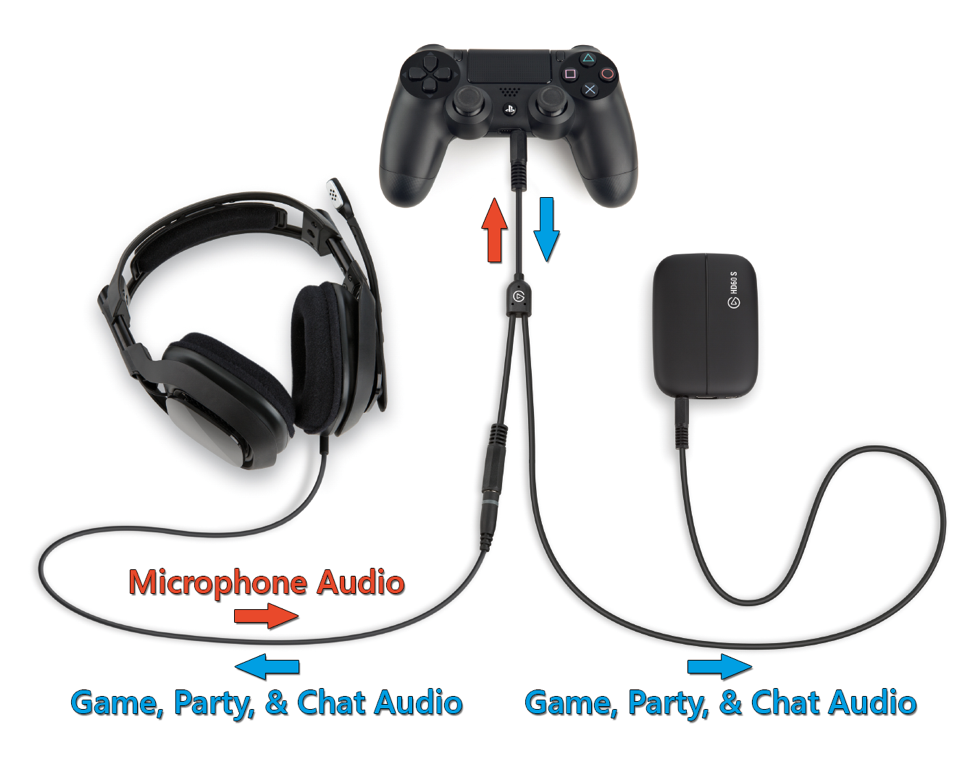
 wide roost
Hi, so I stream on a variety of consoles and I don’t have my settings on hand. But, I have an issue where my audio lags a second behind my video. I’ve tried a million things on game capture and OBS but I just can’t get it to line up. I stream on twitch btw. What specific settings should I look to fix that?
past elk
@wide roost what kind of capture card are you using? The older versions of the HD60 automatically have an audio and video delay. You might need to adjust your camera, alerts and mic audio to match up with your game delay.
wide roost
The Hd60s I believe the flat one @past elk
past elk
If it’s the HD60s, it shouldn’t have a delay. 🤨 have you tried restarting the software. I know that sometimes the capture card will hiccup and the audio and video can become delayed or more delayed than it’s supposed to. You might also want to check your video configurations. That might also lead to the delay
 lean chasm
The first picture are the system conditions for a elgato hd60s capture card, the second is my hp laptop. Are they compatible?? I’m new to all this stuff so I’m probably gunna have a lot of questions like this.
 blazing smelt
is there also support for capture cards?
tardy cobaltBOT
If you are having technical problems, please head over to #cth-history.
PLEASE NOTE: Customer Service does not monitor this channel. If you are unable to solve your issue, please file a ticket at http://e.lga.to/help.
We also have staff available by phone 12hours a day. 8AM to 8PM Pacific every day of the year if you have quick questions and there isn't someone here to help you. http://e.lga.to/phone
Elgato
Telephone Numbers
Below are the telephone numbers for Elgato Support:
United States
☎ 1-888-726-8134
Toll Free Monday-Sunday – 8:00 AM to 8:00 PM PST (Pacific Standard Time, United States)...
blazing smelt
The sound from my Elgato HD60S no longer works. Can somebody help me?
south bronze
With the k55 is there any ways to know if my g key is on or not? Like turn the rgb on or off?
woeful latch
I believe the streamdeck widget might indicate the button is switched on/off but I'm not 100% on that.
Might be best to call Elgato and confirm.
south bronze
Kk
 tight light
Is there any way to mirror audio without running game capture software
tender lava
@lean chasm Unfortunately, your CPU is an Intel Celeron N3060 which is a dual-core laptop CPU so this is not supported with the Game Capture HD60 S.
lean chasm
Ok thank you for the clarification
tender lava
@past robin Which capture card do you have and what is your source? Is the freezing happening while streaming, capturing, or both?
 stuck pumice
anyone have any ideas as to why a stream deck text only macro will not work in a specific game? it works outside of it, however ig it doesn't toggle the chatbox or even paste in the text if manually opened? the game doesn't seem to have any preventative measures against it as i've used a different program (similar to auto hotkey) that "records" your input and does it
past robin
Just while streaming @tender lava HD60S+
 dry estuary
Is there a way for me to set-up a multi-action with the Stream Deck which auto triggers whenever I get a New Follower/Sub/Cheer in Twitch? I have Twitch Integrated. Or do I have to press the button manually everytime?
woeful latch
I haven't found a way to do that, but there are twitch-bots for that.
 tribal fox
dumb question but is there a way to not include my own mic on ps4 party chat when using a Chat Link to help my PS4 party chat come through Elgato? I use a Blue Yeti Mic for my recordings and streams and have a double mic issue right now
south bronze
some help please
 oblique ledge
Hey all, sorry to be a bother! I'm having an issue with game sound coming through ElGato into OBS. Is anyone available for some troubleshooting? Many thanks!
 brave surge
Does anyone know why I can't get my stream to start through the stream deck? When I press the start/stop key it starts and then instantly ends the stream
I'm using streamlabs obs btw
 pseudo musk
@brave surge set that button to do something else and see if it does it twice
It's possible the key is sticking and executing that action multiple times, mine did that for a while
Anyone have experience with Camlink 4k not working all of a sudden after a few months of using it? I plug it in, it blinks, then shuts off.
brave surge
i can start the stream manually in the application but if i try to switch scenes or anything to do with the stream deck it instantly crashes the stream
south bronze
Can someone help me with my mobile streamdeck crashing a lot
 strong epoch
so i was streaming from my elgato yesterday and it was working fine but then today when i went to stream it isnt displaying any video or audio from it and i cant configure any options from the video
 marsh olive
Has anyone got the problem after recent upgrades that the link between the streamdeck and Wavelink does not fully work. The default profiles provided for the Streamdeck still work, but any I had setup before for setting input volume levels no longer work. I have updated them and re-added them but nothing works. I have also tried setting the fading time from off, which then does 'move' the input volume but never to as far as it should go (e.g. 0 or 100) - Has anyone else had this or got any ideas as I;m currently having to do it manually on streams between scenes
marsh olive
quick update on my problem described above - its when I try to set an input volume to 0 as part of a multistep - it then does not run the rest of the steps. I've set any that should be 0 to 1 and it works. Not ideal but a workaround. I suspect there's an issue somewhere in the latest releases of the software
 white parrot
Hey guys: So awhile ago my cam link just stopped working during stream, caused it to freeze and couldnt get it to work again, went and got another one and my software is just saying "no signal" is there any workaround or can anyone help me?
tardy cobaltBOT
Sorry to see you're experiencing issues. Have you tried this yet? https://help.elgato.com/hc/en-us/articles/360041857951-Troubleshooting-No-Signal
If you're still experiencing issues, please file a ticket at http://e.lga.to/help.
Elgato
This guide will walk you through steps to take if your capture card has a source plugged in but it not detecting the signal correctly and is displaying No Signal or there is no video on the pass-th...
white parrot
I have done all the trouble shooting and everything and still not working
 minor urchin
Is anyone else having issues with OBS Link audio cutting out randomly on Macs? I have the HD60 S and PS4. When I notice the audio cut out, I can toggle the Audio Input from HDMI back to Analog and it works again but that is not a sustainable solution
 untold trail
I have a question about setting up a button with multi action on stream deck, i need a gif and sound, anyone here that can help or dm me? thanks
tardy cobaltBOT
PLEASE NOTE: Customer Service does not monitor this channel. If you are unable to solve your issue, please file a ticket at http://e.lga.to/help.
We also have staff available by phone 12hours a day. 8AM to 8PM Pacific every day of the year if you have quick questions and there isn't someone here to help you. http://e.lga.to/phone
Elgato
Telephone Numbers
Below are the telephone numbers for Elgato Support:
United States
☎ 1-888-726-8134
Toll Free Monday-Sunday – 8:00 AM to 8:00 PM PST (Pacific Standard Time, United States)...
 elder crane
Hello, I am trying to get my dual pc streaming setup working with the Wave 3. I already have the wave 3 mic sound working correctly by connecting the 2 PCs via 3.5mm cord but how do I configure the wave link mixer to send audio from one PC to another?
As in game sound to be specific
untold trail
mine isnt a real support issue to be fair, its more a question
 willow bloom
Hi there, i am having the same problem as Major relating to using my streamdeck to start streams. I am also using SLOBS. I have tried remapping the button as suggested and it worked fine for the other action. Moving the stream action to another button did not seem to help either, nor did uninstalling and reinstalling both applications. I would be grateful as to any insight regarding this problem.
delicate cloak
Hey is anyone down to help me set up my stream im still new to streaming and honestly I have no idea what I'm doing and I could use some help
 sage garnet
Hi I have a set up question, I game on XB, PS4 and switch and wonder will the HD60s work with a HDMI splitter as i'm fed up with keep swapping cables about.
 tired stirrup
Stream deck mobile Android is insanely buggy.
Do not spend money on it
All the top reviews are accurate
Missing icons, connection issues
 fossil rain
Remember to keep this section for tech help, not just negativity!!
tired stirrup
Hi Phil, can you help me get my Android version of Stream Deck to stop disconnecting and to stop saying it's connected when the icons are all blank?
Not just me tho, all the people who are reporting the issue. Or at least a statements from devs?
fossil rain
I don’t personally have the Android edition, however I’m sure if you leave your question here, someone who can assist you will get to it. If it’s a widespread problem that’s commonly acknowledged, I’m sure they’re already working on a fix for it
You could also submit an official tech support ticket on the website
tired stirrup
Gonna need some proof of that there Phil, other than "I'm sure"
Is there a better channel to vent?
This one is already not monitored by customer support
fossil rain
https://help.elgato.com/hc/en-us/requests/new you could try this
tired stirrup
Phil, I know your job here is to keep the peace and whatnot, but if I was a company who launched a buggy paid product and that the userbase was beta testing for me and paying for the privilege of doing so, I would make it super easy to collect feedback and bug reports. Instead, they have an unmonitored discord channel, and they have poor you taking the brunt of unhappy customers venting.
Their support form is an email form.. what year is it, 2005? I am confident that if I emailed them with my issues, they would tell me to delete app storage, re-scan QR code, and they will submit my bug report to the appropriate team. But I don't care to go through that demoralizing experience. I would rather come to this channel where I'm confident a variety of people will see my frustration. I would also rather write a low score review in the app store, to add to the other low scores. The app is rated two stars FFS. It was broken since day one. Has there been any taking of responsibility by Corsair?
Again @fossil rain , I'm sorry that your role here is to moderate between frustrated customers and an ineffective app company's support system, but let's call the app what it is: shitty in its current state.
Yesterday, in the middle of a 300 person livestream, I am suddenly unable to do a whole segment because it relies on some buttons on the android stream deck. Because the app bugged out, and I couldn't logistically operate the main computer to re-set the connection. That is not a live-ready app. That is a beta app which people should not be paying for.
The last update was over two months ago in May.
There should be a big disclaimer on the app page that says "Do not use if you need over 50% reliability in a live-production setting."
Some of these are from June
So your claim of
If it’s a widespread problem that’s commonly acknowledged, I’m sure they’re already working on a fix for it
evokes doubt
woeful latch
Friendly reminder the @/phil role is not a moderator. Light & dark blue are mods/admins. If you need immediate assistance I would recommend contacting customer support.
tardy cobaltBOT
If you are having technical problems, please head over to #cth-history.
PLEASE NOTE: Customer Service does not monitor this channel. If you are unable to solve your issue, please file a ticket at http://e.lga.to/help.
We also have staff available by phone 12hours a day. 8AM to 8PM Pacific every day of the year if you have quick questions and there isn't someone here to help you. http://e.lga.to/phone
Elgato
Telephone Numbers
Below are the telephone numbers for Elgato Support:
United States
☎ 1-888-726-8134
Toll Free Monday-Sunday – 8:00 AM to 8:00 PM PST (Pacific Standard Time, United States)...
fossil rain
I’m just tryna help out🤷♂️
Oh there you go color change that’s probably more distinguishable
tired stirrup
@woeful latch I don't need immediate assistance. Just hoping that Corsair acknowledges officially how bugged the android app is
woeful latch
They will not know unless you contact support directly and open a ticket/report.
tired stirrup
@woeful latch are you a Corsair employee?
woeful latch
I'm an Elgato/corsair moderator. The discord staff is seperate from the customer support team.
tired stirrup
The support team is solely reachable via their ticketing form?
woeful latch
Or by phone and their support twitter.
fossil rain
woeful latch
Check out Elgato Support (@ElgatoSupport): https://twitter.com/ElgatoSupport?s=09
If you are looking for the twitter handle.

Support for @elgatogaming products, 10AM-7PM ET, Mon-Fri. Holiday response delays expected. For FAQs or email/phone support, visit http://help.elgato.com
Tweets
32445
Followers
9289
Twitter
It is best to call them for the quickest service. This channel is for unofficial support for community members to assist eachother.
sharp agate
Yeah, this isn't even really a place to vent.
tired stirrup
Do any Android StreamDeck users here have a way to ensure a solid connection to main app during livestreams?
What I mean is, does anyone know how to prevent the Android StreamDeck from having all completely blank icons, whilst still saying it's connected to the main SD computer?
 ember silo
so got an odd Problem with my new Wave 3, and my Arctis 7 headphones....
where.. once I installed my Wave 3, I cannot use the game side audio of my Arctis 7's at all.
If I disconnect the wave 3, then I can use that side like normal once more
 unique jungle
Hi @tired stirrup , thank you for your feedback, I'll pass this along to our dev team on ways we can improve the app experience. In the future, you're always welcome to provide app improvement ideas in #feature-request.
If you are currently experiencing issues, we would need you to fill out a ticket at http://e.lga.to/help so that we can not only assist you based on your individual logs, but also to track if this is a reoccurring issue among users.
south bronze
can anyone please help me
stream deck mobile disconnects so much
when im trying to do fun stuff with my chat it just dies
 worn geode
hi i need help
i have a corsair k55 with the button "g"
when i install the stream deck app it was working
and then i close and re open it
i doesnt work
(sorry for my english im french)
<@&581565551495741448>
 hot rune
Bonjour @worn geode
A cette heure ci les personnes de chez Elgato doivent dormir et ne peuvent pas t'offrir une aide immédiate. Si jamais tu as besoin, tu peux contacter le support (le lien est pinned ici)
worn geode
je l'ai deja fait mais ca fait 3 jour que j'attend donc je tente ici
hot rune
Avec la COVID, il y a du délai en effet.
 ancient saffron
hey! I have a fairly complicated question regarding the Elgato HD60 pro. would anyone be able to help me out? Also hello calu!
Is there a way to negate GPU strain with the Elgato HD60 pro by passing it through my integrated graphics card that's connected to the same monitor as my main GPU? Much appreciated if there are any solutions.
Please @ or DM me if you wish to respond. Thank you so much!
worn geode
@hot rune il sernot la a quel heure a peu pres ?
hot rune
@worn geode Cela dépend de leur charge de travail également. Je te conseille plutôt d’attendre une réponse du support.
worn geode
okay merci beaucoup ^^
 charred wren
hey there question about some audio troubles
im trying to send ps2 audio through a HD60s
- it only comes through on the pc
- it is garbled and very high pitched (in recordings also)
any help with this would be amazing its been driving me a little crazy
ancient saffron
Is there a way to negate GPU strain with the Elgato HD60 pro by passing it through my integrated graphics card that's connected to the same monitor as my main GPU? Much appreciated if there are any solutions.
@ancient saffron The solution is to ensure your GPU is above the HD60 pro. PCIe priority is a real thing apparently

 turbid arch
With my 4k60 Elgato, for some reason when I start to play a new game on my Xbox One X, my screen is much dimmer than normal and when I open the 4k Capture Utility, the screen appears very bright and oversaturated. I'm able to work around this by changing my input EDID mode from internal to merged, and then back to normal again, but its annoying to have to do this everytime, and I was wondering if there was a way to fix this
 distant nimbus
can someone help me im trying to stream a game through my hd60pro and obs is picking up the game and game audio but i cannot hear the game with my headphones
 reef walrus
Hi, streamdeck requires me to re-login to my chatbot’s Twitch everytime I restart my pc or else pressing buttons won’t trigger it. Funny thing is - it remain logged in but there’s no effect. Just gotta logout and login again to have streamdeck talk to the chatbot account once more. Anyone has any suggestion?
distant nimbus
Audio Popping and Crackling HOW do i fix this
 blazing gull
I plan on recording OG Xbox gameplay through the Game Capture HD, but it's very laggy on the Elgato compared to on the TV
I'm recording through cheap component cables, but plan on upgrading to the Chimeric Systems HDMI adaptor when more become available
unreal haven
Is there any way to bind joystick emulation?
I want to add a bind to slowly pan the camera to the right. A lot of games have a static screen for talking to characters and I find a slow pan can really up the level or drama / immersion.
 olive anvil
Hey guys, I have a nintendo switch, a xbox one x, and a pc I like to switch between recording on my elgato. I bought a hdmi splitter to change the inputs easier. I am having an issue where the software recognizes the switch and xbox through the splitter but not the PC. Any idea why this would occur? The hdmi for the PC works fine without the splitter.
 sly star
I have an Elgato HD60 and i also have a LG 4K TV. Now when i run the HDMI from my Xbox to the HD60 then into the TV the capture is fine on the PC but as it goes to the TV the Resolution isnt right it to big and out of the frame by like 2ins on all sides. How do i fix that i tryed the TV settings i tryed the Xbox setting but idk where to change ot on the Elgato if i can?
tender lava
@olive anvil Since all HDMI switches behave differently, you could try using a different HDMI port on the switch. Use an HDMI port that worked with your Nintendo Switch or Xbox One X and connect your PC's HDMI cable to it. Another option to try is to connect all three to your HDMI switch, select the PC before launching Game Capture software.
olive anvil
Hey disco thanks for the reply, I think I just needed a switch that supported hdmi 2.0, ordered one, ill be back tomorrow though if it doesn’t work, thanks for taking the time to reply
tender lava
@blazing gull Do you mean there's a delay on your preview screen vs your TV? If you're using the original Game Capture HD, that's expected behavior as it does not support the Instant Gameview feature.
@reef walrus Please make sure you have the latest version of Stream Deck software. Also, try removing your account from Stream Deck and then re-add it.
reef walrus
@reef walrus Please make sure you have the latest version of Stream Deck software. Also, try removing your account from Stream Deck and then re-add it.
@tender lava yup did those both but problem still persists :/
tender lava
@reef walrus What version of Stream Deck are you using?
reef walrus
I’ll have to check firmware ver when I get back. I recall updating it last week. Using 2x XLs and 1x normal size.
tender lava
Thanks. Also, please let me know the Stream Deck software version
reef walrus
Will do, @tender lava ! I’ll update you when I am back later. Thanks!
tender lava
@reef walrus You can message me with the info as I might have a beta for you to try.
tender lava
@olive anvil Sure thing. Good luck!
south bronze
how is the elgato hd60 pro better than the hd60 s
tender lava
@south bronze It's more about finding the right fit for your needs. Here is a capture card comparison chart you can check out for more of a side-by-side comparison: https://www.elgato.com/en/gaming/game-capture-hd60-pro

elgato.com
Stream, record and share your gameplay in 1080p60 - without compromise.
Just scroll down towards the bottom of the product page.
south bronze
ok well because my second pcs motherboard is blocked by the power supply. so its kinda hard for me to get a hd60 pro inside the pc
tender lava
That's a compelling reason to get an external capture card, but you can still check out the benefits of both cards in the chart.
south bronze
also do i need to have ethernet on my second pc ? or just on main pc fine ?
also what does multi app support mean ? haha sorry for asking alot
tender lava
You'll need an internet connection on the PC that has the capture card if you plan to stream. You don't need internet if you're just capturing your gameplay to your hard drive. Do you only have one available ethernet port?
Multi App Support is a feature on some Elgato capture cards that allows you to use the card in more than one program at the same time. For instance, you can use 4K Capture Utility to capture a clean recording at high bit rate, while also using the HD60 Pro to stream in OBS Studio at a lower resolution and low bit rate with overlays, while also being used in Skype for video chat. All at the same time.
south bronze
@tender lava yeah i only have one ethernet port but i have wifi on the other pc
 sweet brook
Hey so is it possible to game @ 240hz 1080p and stream/record 1080p60 with the hd60? I have it hooked up but my 240hz monitor gets locked to 60hz. It worked on my 144hz 1080p monitor just fine
olive anvil
@sweet brook 1 pc or 2?
 wary cosmos
Where can I get help
I submitted a request to refund and no one has responded to the email
Ever
It’s been a week
 desert nova
Capture Card Help - I get noticeable input lag when utilizing my HD60 Pro to stream NHL20 in 1080/60 on my xbox one x, as soon as I reroute directly to monitor, it's fine...will getting a 4k60 Pro help?
If so, I'd be willing to sell my current capture card, it's about 2 months old...
 snow creek
alright so bois
i have a elgato hd60+ capture card. anddddd i dont know what to do. i know how to hook it up. and i got the OBS stream labs.
BUTTTT i jave no idea how anything works. i got the picture going, so now i wanna hear the game and my friends in my party, also im hooking it from my xbox to my pc. also, i have the chat link.
soooo help me what do i do chiefs? should i download a differnt thing? a setting? is the elgato chat link a lie lol?
hidden jolt
I just factory resetted my PC, and the streamdeck software isn't picking up the backed up profiles I created just an hour ago? O_O
When I go to Import it shows nothing in downloads.
Software Version: 4.8.1.13027 (Streamdeck XL)
 exotic holly
Hello, I'm having so many problems with the capture card and it's driving me crazy
The only thing that I want is to play with 144hz having a two pc setup (one for gaming, one for streaming)
By some reason when i clone elgato display with the main screen (which im gonna play) the screen goes black, or if i get image from it i cannot pass from 60 hz (even the fps are 500)
I have elgato hd 60+ and the software also doesnt help at nothing
What can i do to fix it?
Also when I try to display the gpu scale or display scale it does what it wants, cant select differents hz because it comes back to the same hz of 5 seconds ago even applying settings
 fallow dagger
Did you verify that the cable you’re using is a premium HDMI? I had that same issue and found I needed to upgrade my hdmi cable
 slender fulcrum
can i get some help with something
 night beacon
So I can't get past this screen with the Wave:3. I have uninstalled and reinstalled the software and restarted with no dice
 livid summit
is it normal that theres a smal latency in obs when u record with elgato hd 60pro?
south bronze
Hi there quick question! I plan to buy the Elgato HD60 Pro which will go into a graphic card slot. I have two computers atm, one which is my main gaming computer and my old pc I want to make as my stream output computer. Am I supposed to buy the HD60 Pro and attach it into my stream output computer or is it possible to just plug it into my gaming computer and it can do the same job of giving out the stream input, or do I still need a stream output PC for this to work?
desert nova
I’m still getting minor input lag with my HD60 Pro - want to upgrade to the 4k60 Pro, so y’all think they’ll release a new one for next gen consoles soon?
ionic stream
Hi hi. Having some trouble getting Fall Guys to output to the Wave 3. Set the game up through App Volume and device preferences to output through Wave Link Game but it doesn't seem to be picking up. Instead it's going straight through to the headphones.
exotic holly
@fallow dagger i'm using the hdmi that provided elgato in the box
fallow dagger
Hey @exotic holly I don’t know then. I’d reach out to Elgar’s Support as well
 raw stratus
How can I stream Elgato in real time through a discord voice channel (I have a capture card and know how to actually set up the stream)? I have my TV that I play on very close to my laptop and as we all know, there is a 2-3 second delay from TV to laptop. I want my friends to hear and see my game (BOTW) at the same time so that they can understand the events without audio happening 2-3 seconds early but I don't want to hear the audio nor do I want them to hear my TV's audio. Is there a way I can have Elgato play noise through discord but not actually out of my laptop OR play BOTW on my laptop in real time without need of a TV (It's in a relatively uncomfortable spot, however not too bad)?
Please ping or DM me with answers
I have tried use Xbox Game Bar & I believe Elgato Sound Capture is my best hope but I don't really know how to use it
pls help
raw stratus
no help?
tardy cobaltBOT
PLEASE NOTE: Customer Service does not monitor this channel. If you are unable to solve your issue, please file a ticket at http://e.lga.to/help.
We also have staff available by phone 12hours a day. 8AM to 8PM Pacific every day of the year if you have quick questions and there isn't someone here to help you. http://e.lga.to/phone
Elgato
Telephone Numbers
Below are the telephone numbers for Elgato Support:
United States
☎ 1-888-726-8134
Toll Free Monday-Sunday – 8:00 AM to 8:00 PM PST (Pacific Standard Time, United States)...
floral jetty
It's not an official support channel
raw stratus
huh
 hybrid void
Hey there!
I'm having trouble connecting Spotify to stream deck...following all instructions I get all the way to the "validation" and it fails every time despite copy/pasting exactly everything in the window. I have a premium account and everything is perfectly in order...yet constant failing of the code. Any thoughts?
 wispy elm
Hi everyone, the audio for my elgato capture card keeps cutting out. Any resolution for this? (HD60s+)
rough raven
@sharp agate So I actually found out what was going on with my Elgato HD60s+ and why it was choppy like that (don't know if you remember). I did a stream with the gentle that built my computer in the chat, shared my OBS and what not as we went through the settings. Turns out, my computer wasn't built with an actual USB 3.0 port, so the Elgato wasn't receiving the power it needed, or the transmission speed it needed to function properly. Got a usb 3.0 PCIE, installed it, works fine now.
I know it's listed in the requirements of the hardware and what not, but who knows. Maybe the information of the solution will be useful in the future, so I figured to at least convey it here.
 waxen hill
Hello Everyone,
I need some help configuring my Stream Deck, who can help?
limber jewel
Does the Streamdeck have any known issue with USB hubs?
exotic holly
@limber jewel sometimes yes, try to change of usb port
limber jewel
I now bought new USB hubs
Which include external power adapters
That should fix it..
I hope.
smoky kelp
um
Are these capture cards able to be fixed?
I have a HD60S and it just shows green when it displays anything
south bronze
Some video input issues. Using camlink 4k with sony A6400. A6400 is set to 4k hdmi output, my OBS settings are set to 2160 in the properties for my VCD. but i am still getting just black in obs
woeful latch
What are your HDMI settings set to on the A6400? (I have the same setup)
sharp oasis
My HD60s+ is not showing as an audio source, any tips?
just noticed that when I added the capture card to OBS, it had no sound from the game
even the 4k capture utility doesn't get any sound for some reason...
(there's music playing in the background of that part of the game, just to be clear)
neat brook
hello i need some help when i plug my ipad pro to the HD60S+ i can hear audio but theres a black screen, any suggestions? 😒
south bronze
Can I have some help my pc won’t turn on it was plugged in where I normally keep it when this happened I have since moved my pc to get a better video of what’s happening I also noticed motherboard power led is not on either I have looked inside and everything looks fine all cables are plugged in it was working yesterday when I ran into this issue help would be much appreciated can you also ping me thanks
Specs
(i7 3700k, GTX 670, 32gb ddr3)