#cth-history
1 messages · Page 34 of 1
 ivory flint
 ivory flint
yessir
 rare kraken
that was the "original"
ivory flint
ah
yeah so
I want to install it in the pcie below my 2080ti, but when I did last time it didn't work? IDK why, but when it's in this lower slot it works but it's pressing real hard against my front panel pin header... giving me anxiety
@rare kraken
rare kraken
they had this one around for a bit, which is very similar in size/look to the new one, but the notch that locks the front end in to the mobo. https://help.elgato.com/hc/article_attachments/360040812392/4k60pro_old_redtext.jpg
 ivory flint
you think any of my pcies could be disabled for some reason?
rare kraken
then of course, this is the latest. https://help.elgato.com/hc/article_attachments/360036555211/4k60_pro_mk2_image.png
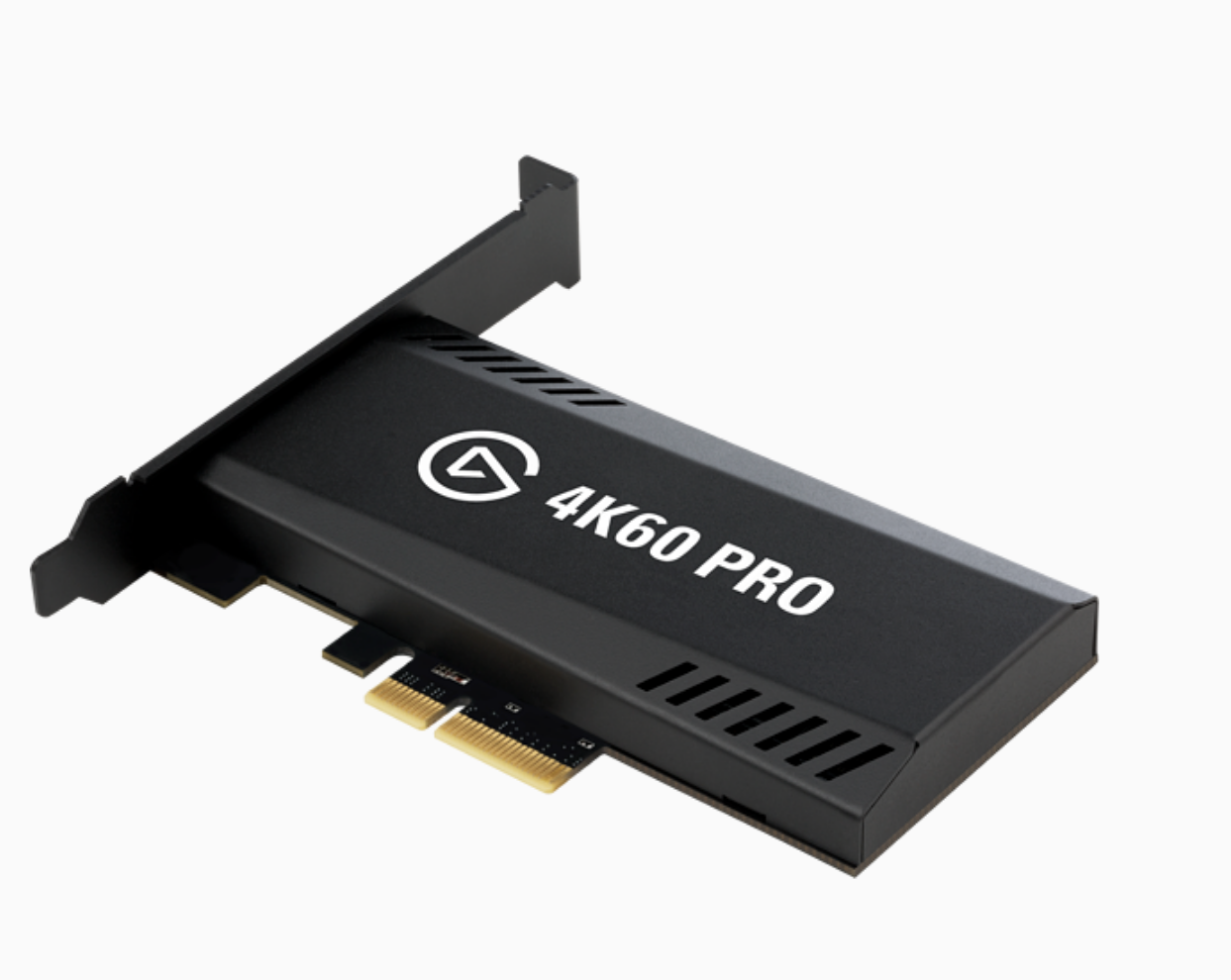 ivory flint
oh ok good
rare kraken
now the mk2 is I think $250?
ivory flint
I wasn't gonna pay $400 for a price gouged camlink rn so thats good
@rare kraken you think I can install this one back into my top pcie now?
I really dont want it at the bottom of my case pressing against the header
rare kraken
what's PCI-e slot type is it?
rare kraken
from the picture you posted above, it looks like a x1 slot
ivory flint
the top one says PCIEX16_2
rare kraken
oh, then that should be fine
ivory flint
hmm
rare kraken
it's a x16
ivory flint
should I try to reinstall?
rare kraken
if you're afraid of the pin header, sure. also just make sure you power down everything...
I made a mistake years ago with plugging in a HD while the PC was still on
rare kraken
this was back before they had those portable USB hard drives that you could hot swap, lol
think it was actually around the time we were still using Zip Drives by iOmega...
ivory flint
@rare kraken if this doesn't work I may need to vertically mount it lmao
 worldly tinsel
quick question actually. if i turn town the live comentary while I stream, does that turn town my volume in stream as well or does it just allow me to turn it down in my headphones?
rare kraken
you have a vertical PCIe slot??
@worldly tinsel you're streaming from the Game Capture HD program? I believe it's both the mic volume for the stream and your headphones (if your sound output is enabled as coming from the Game Capture HD program)
worldly tinsel
damn it! I can't get the console audio in SLOBS but in the game capture program, I have to put up with hearing myself speak PLUS nayone who joins in PLUS game audio
ivory flint
@rare kraken no but I have a vertical mounting bracket in my case and can buy a pcie bridge thingy
@rare kraken hmm, well it looks like it's detecting it but there's just a black output again
@rare kraken well I'm getting camera audio, but video is still black
rare kraken
maybe it's not seated all the way?
or the PCIe x16 slot is reduced to a lower config due to the 2080
ivory flint
well, idk. I can get the passthrough working still @rare kraken
like I see my camera on my other monitor
just OBS and stuff wont recognize it like last time
@rare kraken is there another driver for the non-mk.2 version of the 4k 60 pro?
rare kraken
uh, not sure
ivory flint
@rare kraken ok so little update, I found the driver for the original 4k60, now i got it working in the OTHER slot again 😆
I gotta try swapping slots again lmao
this is so annoying hehe
@rare kraken there seems to be some input delay with the new driver, idk if it was happening before the driver... normal?
like lag
 sonic hawk
So I am using an Elgato 4K60 pro and an Elgato HD60 S for recording my second pc (with the 4K60 Pro) and recording games (with the HD60 S) now I have the Problem that my audio gets more and more out of sync over time... any idea why? Searched the hole internet
 uneven mica
I am using the Elgato HD60 S and the HDMI that goes into the TV won't display what the switch is supposed to show
And if this helps
I got it today
 long tree
so i have an hd60 s and it says device requires usb 3.0 even though i have one and its plugged into the right port
its frustrating because i have plugged it into other 3.0 ports and it still gives me the same message
i also uninstalled the software and reinstalled it and it still does not work
uneven mica
My Elgato won't capture audio
 north surge
Hi, I have the Elgato game capture HD yes the old one. I have tried to hook it up to my pc, but everytime I plug it in and open either OBS or Game capture software. The program cant pick up my Elgato, it keeps disconnecting and connecting.
I have windows 10 desktop pc, ps4 works fine. I think that the usb is broken or something.
I have tried to install the new driver, deactivate and activate the elgato in the manager tab. Tried to use different usb sticks.
Please ping me once you can
I am so frustrated
obs not working either
north surge
@uneven mica Did you remember to download the audio capture with the game capture program?
uneven mica
uuuuhhhhhhhh
No
I couldn't download any of the softwares
I did but it was on 1.something
And that is outdated
north surge
What do you use to record
north surge
Hm
uneven mica
I dunno why it didn't work before
north surge
Idk I have my own problem so
uneven mica
Ok
north surge
Try to reinstall game capture software
uneven mica
Ok
uneven mica
Post ur problem again
What I think u are saying is that on ur tv to play
It keeps flashing on and off?
north surge
No
uneven mica
oh
north surge
When I connect it to the pc it keeps disconnecting and connecting
Thats why I am trying to but a new usb cable now
uneven mica
Ok
 lapis bane
I'm looking for a DP to HDMI to either send from my gaming pc to an el gato 4k60pro mk.2 or to send from the rift cv1 to my gaming PC. so to reiterate. Rift cv1 (HDMI) --> HDMI to DP adapter --> DP port on my GPU or gaming PC (DP) --> DP to HDMI 2.0 adpater or cable --> 4K60Pro mk.2 on stream pc.
sonic hawk
How to people setup 1080p 144hz with a 4k60 pro, when I plug a displayport cable in my monitor and then a hdmi to my capture card and duplicate the screen with the elgato one... then i have some screen tearing it just doesn't feel smooth as it normally would
lapis bane
yeah that's the resolution I was going for
north surge
does the old elgato game capture hd work with the new game capture software?
 hasty oyster
Hi, I just recently bought an Elgato HD60 S USB capture card and having issues with getting audio from the PS4. I'm using Streamlabs OBS and see that I'm getting audio from capture card, but not hearing audio anywhere (nothing from speakers, monitor, or headphones). I have confirmed that my Windows default audio output is my speakers.
My current set up:
PS4 ➡ HDMI splitter ➡️ capture card ➡️ monitor
➡️ TV
I tried:
- different HDMI cables in case one was faulty
- bypassed the HDMI splitter
- bypassed capture card (but still using HDMI splitter) and I was able to get audio from the monitor this way
I'm not sure if I set up something incorrectly or possibly got a faulty capture card. Any suggestions would be greatly appreciated! I'm anxious to get this working so I can finally stream console games!
uneven mica
My Elgato HD60 S won't capture audio, I can only hear audio from my TV
north surge
If my elgato keeps disconnecting and connecting to my pc, does that mean the usb is broken?
 hidden jolt
Is there a place I can download the icons for streamdeck by itself? Like the back button so I can overlay it on top of my custom background?
hidden jolt
Or . . . Does anyone know roughly the number of pixels between keys so I can make a PSD template?
 dreamy moat
so can i set up my discord call with elgato so while im streming my switch i can here my friends and so can the stream?
 pulsar geyser
Hey guys, hoping to get your help tech wise.
I have the Elgato Game Capture HD and have my xbox one hooked up to it. I get signal on the TV but the Elgato software and OBS Streamlabs isn't showing anything.
I've done a bunch of searching online and nothing has helped me so far including setting my xbox to energy saving, restarting pc/xbox. Hoping ya'll can help.
dreamy moat
wait you can connect stream labs?
pulsar geyser
Streamlabs detects the elgato but the xbox isn't showing up on either
dreamy moat
my discord hates elgato its so lagy once i plug in my switch so i cant een start a call
Can you set up streamlabs with switch?!?
 reef crescent
Hey guys I was wondering if there is any way to have the same functionality of the chat link cable but wirelessly? And if not if adding an extension to the existing cable for more length would work.
 narrow birch
hey everyone I could use some help if anyone is available? its for dual pc stream audio with the hd60s
narrow birch
oh really?
narrow birch
i cant currently because i dont have sound XD
dreamy moat
Oh ok so what’s your problem?!?
narrow birch
Im trying to dual pc stream but cant get sound from the gaming pc to the streaming pc
dreamy moat
Oh wait so you have two but that’s not possible you need the software for streaming on the pc your gaming on and do you know how to connect discord audio to a pc for streaming
narrow birch
well yeah i have the software and everything already I just cant figure out how to get the streaming pc to get the sound from the gaming pc and i have no clue about that tbh sorry
dreamy moat
Well dude Idk because I use one pc
Sorry
so can i set up my discord call with elgato so while im streming my switch i can here my friends and so can the stream?
 gaunt lion
can someone help me becausey i cant use multiple hotkeys on obs?
 south bronze
hey guys. i have an el gato capture card the 1080p one. i just got a 1440p monitor and cant seem to get everything working
can anyone help ?
 muted osprey
So I am having issues with my elgato hd60 s+ dual pc setup... my capture freezes every time I go from into or out of fullscreen
dreamy moat
Yep you’ll have to deal with that mine does the same what helps is turn off preview @muted osprey
 flat adder
Hey! So im a dj livestreaming my sets and I currently have the elgato hd60 S cap card, I've noticed that the cam link is the most popular for this but I found a great deal on the hd60 s. Should I just get the cam link, because I have run into some problems using the hd60 s
 plucky pivot
hi all, so any idea why some of my button command wont work? Using the twitch emote option so when pressed, i automaticcaly enter a twitch emote into chat. When i press it now i'm getting the yellow triangle but only for the emotes, my other buttons are working as intended
reef crescent
Hey guys I was wondering if there is any way to have the same functionality of the chat link cable but wirelessly? And if not if adding an extension to the existing cable for more length would work.
Or if I bought a longer version but not the Elgato brand with the same plugs would that work?
 copper prawn
Hi, I am having some audio issues with my Elgato HD60S, for some reason there is a slight crackle noise in my recording. I am unable to figure as to why it's happening, I have spent a few hours trying to work it out but nothing has seemed to help me yet.
 vital fable
Ever since updating my 4K capture utility firmware, I have been having AWFUL stuttering issues with my recordings at random times. It's not overheating and is using a GTX 1080 as the encoder. Also have an 8700k and 32gb 3200 ram. Not sure what the issue could be. Using the 4k60 pro to record 1440p60 gameplay.
And for some reason, I have to set the EDID (internal) to 1440p or it will auto set to 4K.
Only on a 1440p monitor.
 strange musk
so ive upgraded my old school elgato to a hd60s, ive never had any issues at all with the old one, the new one wont show anything in 1080 at all, i have to change my console to 720 to actually see the game on the capture screen, i also get hdcp in red next to the 720, i run a gtx1080, i7, 16gb and have no issues playing any AAA games on pc so why does this not work connected to the console?
 azure python
Hey people , i need help please
I have the elgato game capture hd
I connected the hdmi in from my ps4 to my elgato and the hdmi out from my tv to the elgato and of course the usb from the elgato to my pc
The problem is that i see the ps4 on the software but i can't see it in my tv so i will be able to play normally
 cerulean bane
Hey guys ! I have some issues connecting my android phone for Mobile stream deck ! I get the "Attempt to connect to host timed out" error but the troubleshooting page on the website is only for iPhone users... Does anyone know how to solve that?
south bronze
bro im losing my mind! my 4k60pro MK2 keeps losing signal in my streams and recording utility app, and i have done everything even drivers and new cables, and then it just stopped so i thought i fixed it and than 3 streams later, AGAIN it just starts!! what is the deal here?
My 4k60pro MK1 never had this issue, upgrading was a bad idea.
 tepid salmon
Have you checked how hot your card gets? It might be heat that is making your streams unreliable. Try getting your card really cold (freezer) then try again?
 low sand
Kind of a random question, but for HD60S, is there a way to reset the hardware? Like reformat it? It works on my mac but now doesn't work on my windows laptop, so just wondering if there's any sort of reformatting necessary
it's very bizarre, it keeps saying that it needs a 3.0 port when I do have a 3.0 port... have tried everything I could find from usb drivers to elgato drivers, to BIOS enabling... like everything I could find online. Have worked with Microsoft support as well and they couldn't find a fix
so it reads the elgato but just says it can do the video capture. Any help anyone has I'd appreciate it before I call elgato support. With current events would like to avoid being a burden to them if someone has run into this and has a fix. Windows 10, Intel corei7, Lenovo Thinkpad
tepid salmon
do you have a usb 3.0 hub that has external power? it might be a power issue, not enough amps from the laptop to feed into the box.
 rocky adder
Hey dudes i downloaded the obs link but its still not showing up in the obs software
How do i fix it
reef crescent
Hey guys I was wondering if there is any way to have the same functionality of the chat link cable but wirelessly? And if not if adding an extension to the existing cable for more length would work.
Or if I bought a longer version but not the Elgato brand with the same plugs would that work?
Third time trying to get advice if anyone knows...?
south bronze
Can you use a k55 macro key to do multiple tasks in obs? Like mute mic and mute audio capture device
south bronze
???
 fair bobcat
Hoping someone can help me. I have an 4k60pro MK.2. When I play COD in Windowed Borderless my FPS is capped around 60. If i go fullscreen, then my FPS is around 150-180. I am trying to understand why I am getting capped frames in Borderless Mode?
reef crescent
I know @south bronze I asked the same thing 3 times now and haven’t got a word back yet
south bronze
They should get discord people to answer people’s questions
reef crescent
@south bronze they really should
 tardy cobaltBOT
PLEASE NOTE: Customer Service does not monitor this channel. If you are unable to solve your issue, please file a ticket at http://e.lga.to/help.
We also have staff available by phone 12hours a day. 8AM to 8PM Pacific every day of the year if you have quick questions and there isn't someone here to help you. http://e.lga.to/phone

Elgato
Below are the telephone numbers for Elgato Support:
United States☎ 1-888-726-8134
Toll FreeMonday-Sunday – 8:00 AM to 8:00 PM PST (Pacific Standard Time, United States)United Kingdom☎ 0330 808 44 9...
 floral jetty
There is no support staff that monitors here. If you do need assistance please contact at the above number
@reef crescent a cable like that might work but i dont think it would be "supported"
reef crescent
So I’m still in the same position I was when I asked yesterday. Thanks
No one has tried or knows for sure?
floral jetty
not that i have seen sorry.
reef crescent
Ok
floral jetty
But i would think an extension cable of sorts would work
but again im not sure.
@south bronze the macro keys work the same as a key on the streamdeck.
reef crescent
Ok thanks
I haven’t received my chat link cable yet because of shipping taking so long so does anyone have a spare that they are willing to sell and have shipped or live near Philly?
I would much rather prefer a way of doing what the chat link cable does wirelessly but I don’t see that happening
 rapid fractal
Hello! I recently got a new PC, and whenever I try to plug-in my second monitor, the Elgato appears to be stopping display from happening after I plug it in.
Does anyone know a way to fix this?
floral jetty
@reef crescent where did you order it from?
reef crescent
Amazon
It was supposed to be here yesterday but now it’s saying it won’t be here for another month and I ordered it two months ago
floral jetty
ah not sure unfortunately. I see it says it wont be instock on amazon till next week.
floral jetty
I think amazon lets you pre-order things and ships when they come in
reef crescent
That’s bs
I needed it two months ago and they want to play these games
Amazon is a load of crap then
They will surely take my money for something they don’t have though
rapid fractal
Hello! I recently got a new PC, and whenever I try to plug-in my second monitor, the Elgato appears to be stopping display from happening after I plug it in.
Does anyone know a way to fix this?
floral jetty
where are you plugging your second monitor to? and what type of connector?
rapid fractal
Elgato is connected to monitor via HDMI, Computer plugged in via DP>HDMI
floral jetty
is this 2 pcs?
rapid fractal
No, only 1
south bronze
@floral jetty we can only do a action per button though.... right?
floral jetty
so 1 port of the pc goes to monitor, the other goes to elgato and from elgato to monitor?
rapid fractal
I will try my best to explain the exact cord setup if I can
floral jetty
@south bronze you can use multiaction.
south bronze
How?
floral jetty
do you see the streamdeck icon?
rapid fractal
HDMI From Switch to Elgato
HDMI From Elgato to Monitor 2
Audio Jack from Elgato to Nowhere
USB-C>USB from Elgato to PC
DP>HDMI from PC to Monitor 2
If that all makes sense
south bronze
 rapid fractal
For that setup I have stated above, I have also tried unplugging both, then plugging the DP>HMDI from PC first, then the HDMI from Elgato, and it works for about 3 second after I plug it in, to which it goes to a black screen.
I have tried switching plug in order and nothing happens.
floral jetty
ok does the second screen work when not using the elgato?
floral jetty
ok so when the switch is connected it doesnt?
rapid fractal
I actually haven't tested that yet, let me try it
Yes, HDMI Port 2 works it seems
HDMI Port 1 is PC for reference
rocky adder
Do anyone of you guys know why my Elgato is not showing up on obs even though I have the obs link
floral jetty
@south bronze try setting the permissions on c:\temp add authenticated users and give it full access
 rotund gust
Well. My Elgato was working amazing now audio disconnected again. I can’t get it working. Is anyone willing to help?
low sand
@tepid salmon interesting idea. I have a 3.0 hub but not thats external power. The laptop has two 3.0 ports but interesting idea that its a lack of power. Ill look into that. Thank you.
tepid salmon
@low sand Good luck. Another thing to try is to use high quality USB 3.0 cables. Scrolling up, customers have reported poor quality USB cable that came in the box https://discordapp.com/channels/581549424518365226/581551435074764810/701035433701802077
south bronze
@floral jetty What do you mean
 tropic tartan
Question for the elgato discord
Does a capture card assist streaming at all?
Would it take the stress off the GPU while using OBS?
 barren osprey
This might be a dumb question, can I used a HD60pro to capture my camera?
 drowsy flicker
Yes you can @barren osprey
barren osprey
alright cool, now to figure out why it isnt working then
I've got a Sony a7 (ILCE-7) and have it connected but its not showing up :/
nvm. I got it
 gilded talon
Hello, Control Center is unable to pair an Elgato Key Light to my wifi via Computer, but can via my android phone? Any tips to correct this?
Steps I've taken:
Restart Computer
Connect to wifi to be used
Reset Light (numerous times)
Connected to control Center phone (successfully)
Attempted on PC numerous times (unsuccessfully)
@tropic tartan a capture card mainly helps with streaming console games. If you are to be a PC streamer, only an OBS program is required.
 solar vessel
Is there a way for me to hear my pc audio through my headset and hear the game audio from my xbox?
low sand
Thanks @tepid salmon have tried a better cable and unfortunately didnt do it. Ordering the powered usb hub and will let you know if it works.
 mossy cosmos
hello i have problems whit sound capture it just crash when i start the app
anyone had the same problem?
cerulean bane
Hey guys ! I have some issues connecting my android phone for Mobile stream deck ! I get the "Attempt to connect to host timed out" error but the troubleshooting page on the website is only for iPhone users... Does anyone know how to solve that?
south bronze
How do I determine which is right and wrong for this?
Idk how it works because when I record, it cuts out and shows pixels.
 versed cloak
On my stream deck software, the voicemod plugin no longer shows up. Anyone know how to fix that?
 amber furnace
Hey Guys 😄 So I'm having a problem buying my streamdeck 🙂
south bronze
Is it normal for the 4k60pro MK2 to show artifacts when it’s reconnecting the signal? It shows for a few seconds and goes away but I do lose signal every 20 minutes or so. No matter how many cables I try.
Also i noticed early on my stream that my mic stoped working and caused a audio issue and it was fixed when I deactivated the capture card and reactivated.
 peak finch
Hey Guys is there a possibility to just record game and gameaudio while ur in discord with ur buddy and not record ur voice and his
south bronze
When I go on stream deck app It tells me to have the newest version of icue ON so I can have stream deck macros on my k55....
Its on and at the newest version and it dosent work
rare kraken
Pretty sure I can't do this (that it doesn't work this way), but anyone know if through the IFTTT integration, I can use something like my Google Home to start an action on my Stream Deck?
Just thinking it would be really interesting to integrate everything to start up via a Google Home voice command. ie, saying "Hey Google, It's game time" and it would turn on my xbox, turn on the LED lights, etc. or "It's Stream Time" and it'll tell Stream Deck to launch OBS, keylight to turn on, etc.
rare kraken
hrm, okay, ended up finding/using a program called Push2Run to launch OBS from my google home.
but still won't be able to do things like turn on my keylight air
I feel like there's gotta be a way though, since it's a device that's setup with it's own wifi connection
dreamy moat
When I plug my mic into my computer external microphone goes away
 sonic latch
ive been getting choppy audio for months now, im at my wits end, and recently, the video is falling behjind the audio as well... 😦
 sour wyvern
Hey guys. Quick question: I saw the multi app support update, but for some reason it's only working on my hd60 pro and not my hd60s. I did all the windows updates I could. Am I missing something?
 lyric stump
Hello
In my obs the ps4 line makes a weard background noise
And the sound itselfs is pretty bad
Like an old tv sound in the back
How do i fix it
 lean crag
So i got a HD60s, it's connected to a USB3 port but elgato says a USB3 port is required
lyric stump
Huh
lean crag
i only have one, and it worked before
lean crag
hdmi signal can mess with audio
lyric stump
I do it with the elgato chat link
Right?
I dont use it for that...
Huh
Wait
So all this time i didnt need a chatlink?
lean crag
uh no
lean crag
what are you using to captire
 cyan needle
What capture card are you using
lean crag
yeah use the captiure software
lean crag
i havent had a problem with that, when it wokrd
lyric stump
Huh in obs?
lean crag
and i use the built in streamer/recorder in the software
lyric stump
Plug PS4 to HD60S to a monitor
This one i did
Do i need to be in obs or in elgato software
Iknow thats why i delayed the mic
lean crag
and im running this on a lenovo llaptop
lyric stump
Are they good?
lean crag
No, the thing is it worked like a month ago
it wasnt working with my actual gaming desktop either
lyric stump
Yeah?
lean crag
silence
lyric stump
I sended pictures of my settings are they good like they are?
Because i still have that weard noise in the back
That noise when the headphone plug in half out that noise
Soo??
lean crag
even windows says it
lyric stump
Where?
lyric stump
Got only this
And that
But what can you do with that?
Brtw is 39% cpu bad
Oh it randomedly fixed hisself
 tropic raptor
Judging by this channel, there isnt any actual help is there?
lean crag
Apparently not
tardy cobaltBOT
PLEASE NOTE: Customer Service does not monitor this channel. If you are unable to solve your issue, please file a ticket at http://e.lga.to/help.
We also have staff available by phone 12hours a day. 8AM to 8PM Pacific every day of the year if you have quick questions and there isn't someone here to help you. http://e.lga.to/phone
Elgato
Below are the telephone numbers for Elgato Support:
United States☎ 1-888-726-8134
Toll FreeMonday-Sunday – 8:00 AM to 8:00 PM PST (Pacific Standard Time, United States)United Kingdom☎ 0330 808 44 9...
 next cave
@lean crag @sorrey there is it is just that the people that do help just cant always be on.
 hollow hornet
Is it possible to stream on multiple platforms at once?
 drifting lintel
I need some SERIOUS Help with my Elgato HD60 Pro. PCIe versionI have lost any and all signal to my capture card. I have done the following
Uninstalled and reinstalled Game Capture HD for the Elgato Capture Card Drive.
Swapped every cable possible.
Restarted my PC many times over.
Tried 4K Capture HD, but was useless for my use case.
Tried a different source, i.e. Laptop for testing.
Tried bypassing my HDMI Switcher.
Pulled my hair out. That last one is a joke.```
My system: ```
AMD Ryzen 2700
Asus ROG Strix x470-f GAMING motherboard. Bios Version 5007.
Corsair Vengeance PRO RGB
EVGA GTX 980 Ti FTW
750Watt PSU```
I am on Windows 10 Pro x64 1903.I am in need of help ASAP. Because I am not sure if my capture card is failing, or if I am having other issues.
At one point during a few restarts it was working, but now it has just stopped detecting a signal even though my Desktop DOES SEE the capture card.
So now I just rebooted my PC and it works HOWEVER, I think I am still having an issue with my HD60 Pro.
solar vessel
Is there a way for me to hear my pc audio through my headset and hear the game audio from my xbox?
tepid salmon
@drifting lintel I share your fustration. I have a 4k Camlink USB and its not reliable, sometimes it works 100% and when you really want it to work, it just shows blank screen. I did find a solution through, might not be too feasible for your PCI card, but my solution is to 1) put the dongle in a resealble bag. 2) put it in the freezer for 3-5 minutes 3) take it out and connect = works. So strange, but if you are desparate, you should try this method.
drifting lintel
@tepid salmon I'd rather like to wait for an official tech support from Elgato first before I do something extreme. And this is the PCIe version of the capture card.
 dawn oracle
@drifting lintel as far i know there no offical tech support that work actually on discord u need to fill in the forum in the description
floral jetty
@drifting lintel There is no official discord support, if it is an urgent matter I recommend calling support at the above number.
@hollow hornet yes there are ways to do that, but you should also take in to mind any contracts you have as well. As Twitch affiliates can't stream to multiple places at once and such.
solar vessel
@dawn oracle wassup man I recognized you from the Alpha Gaming Discord
dawn oracle
@solar vessel hey ahaha
dawn oracle
@solar vessel yeah whast up
solar vessel
Is there a way for me to hear my pc audio through my headset and hear the game audio from my xbox?
dawn oracle
@solar vessel depends
solar vessel
Because if I want to play a console game I want to be able to hear it and my pc audio
dawn oracle
while the answer is yes at the end of the day it comes down to how much latencu money u are willing to spend or have
solar vessel
None lol
solar vessel
I saw a video and the guy got a 3.5 jack and put it in the controller and then in the line in in the pc and was able to hear both
dawn oracle
that still requires money that would have latency and buzz issues
dawn oracle
casue u be routing into the pc then back to the outputing via now lisening
and buzz is usually a issue that would be cause if u dont have line in alos very common since lot of 3.5mm cables arent well groudned
especially on board ports
solar vessel
Oh dang
dawn oracle
yeah
solar vessel
I will try it and if it doesn’t work then I won’t stream Xbox games because I can’t hear them lol
dawn oracle
only 3,5mm cable soultion that work but wouldnt fix what u trying to do is the elgat chat link other wise looking at somthing like a mixamp but again u then spending money
solar vessel
I wish elgato didn’t have a delay
dawn oracle
witch u said u dont want to do
solar vessel
Yeah
dawn oracle
there no delay
solar vessel
Yeah like a 1 second delay
dawn oracle
delay and latency arent the same thing
solar vessel
Oh
dawn oracle
if elgato a delay then there a issue
solar vessel
There is like a .800 second delay
Or Latency
Because I ah e to make my webcam and mic .800 seconds behind so that I am synced up with the game
dawn oracle
yeah that a interesting issue
dawn oracle
i mainly isse that when a pcisnt strong enough or there a synce issue usually sample rate mix
solar vessel
In the auctual elgato software there is a delay
dawn oracle
if sampel rate mixed up its liek running 2 different fps value sources its going to be a bite off esepcialy if not talking about even differences
what recoridng or streraming software u using ?
aka elgat/obs etc
brb grabbing coffee
solar vessel
In the Audio Settings, check the "Delay" box under "System Sound" and "Microphone" and set the value for both to 650ms, which is the average delay of the Elgato Game Capture HD60.
This is how that said to fix the delay
dawn oracle
yeah but what software u using
obs or elgato
and witch elgato u using
aka camlink/hd60s/hd60 etc
solar vessel
The image in the Elgato Game Capture HD software on your Mac or PC will be delayed from live by almost a second due to the H.264 compression chip in the Elgato Game Capture HD60 hardware. Therefore, it will not be possible to play the game while viewing it in the Elgato Game Capture HD window.
Hd60s
Both OBS And Elgato have a delay
dawn oracle
@solar vessel elgato hd60 doesn actually enough of a compression cause a delay issue
solar vessel
?
dawn oracle
the actual elgato its self wont be apply h264 compression
very old ones did do this but we talking about one that agent by theses day and didnt do 60fps by any means
dawn oracle
...
its not doing anythig with h264 at all
only h264 comes into play is in the encoding phase of recording or streaming process
solar vessel
The image in the Elgato Game Capture HD software on your Mac or PC will be delayed from live by almost a second due to the H.264 compression chip in the Elgato Game Capture HD60 hardware
I am so confused
dawn oracle
stop reapting the same thing over and over
solar vessel
So I can’t get rid of the .650 sec delay
Sorry I’m not trying to
I am just trying to understand
dawn oracle
well i am also trying to understand but there thing i am still waiting to get a answer for
that way different software works is an other thing that can be in play as u have event mention what u using in that reagards
solar vessel
Mention what I am using?
dawn oracle
yes
solar vessel
What am I mentioning?
dawn oracle
for the streaming/recoridng software
solar vessel
Slobs
dawn oracle
ok so elgato software should even be affecting latency
solar vessel
Elgato does because in the playback it has a .650 sec delay
dawn oracle
when its going elgato cpatur car -> elgato capture -> slobs -> output
solar vessel
Not even recording
dawn oracle
thats when its normal to be having a delay
solar vessel
Not recording?
dawn oracle
correct regardles of recoridng or not
dawn oracle
it shoould be going stright into the slobs
dawn oracle
no
solar vessel
So there should not be a delay at all?
dawn oracle
if there delay should so low that u should not be able notice there even one
just 0 latency portion witch technically not 0ms
solar vessel
Elgato said there is a 0.650 second delay because of the “H.264 compression chip in the Elgato Game Capture HD60 hardware”
That’s why I’m confused
 proud vault
Re: Key Light - I just ordered one to replace one of my current umbrella lights. My concern is the clamp because my desk has a beveled edge. Is it possible to attach the unit, or portions of the pole, to a standard lighting pole? I'm concerned it won't attach properly to my desk because of the beveled edges.
dawn oracle
@solar vessel honest take thing grain of sault but just reaping one thing so many times isnt exactly helpfule
solar vessel
I want repeating I was trying to get you to understand that all elgato playback has a .650 second delay no matter recording or not. Elgato software or OBS
dawn oracle
@solar vessel well copy and pasting the same thing over and over and over doesnt anyone
i unstoody what u where saying perfectly fine
dawn oracle
u shouldnt have noticeable delauy
all devices will haver some latecny of some kind to a degree how much wil very , but if u have latency bwteen audio and video different story there
solar vessel
Audio and video have a .650 sec playback delay
dawn oracle
also if u have usb buss thats being over saturated that where u get some odd latencey issues
@solar vessel that cleaer issues
solar vessel
The HD60s uses a usb power
dawn oracle
ok
solar vessel
It uses a SB-C Type C USB Data Sync cable
dawn oracle
power doesnt affect the satureation as far i am aware the data passed through the usb port is what affects ot
solar vessel
Could that be the reason of the .650 sec delay
dawn oracle
and how many different devices are ont he saem poert
dawn oracle
i am talking how much latencu adding thats up to
solar vessel
The elgato has .650 sec delay
dawn oracle
no but u have usb controller and pc wont normally have more then 2 total
drifting lintel
@dawn oracle @floral jetty Then what is the point of staff being on this discord a tech help channel there isn't any official support. That's crazy!! And makes obsolete NO sense! Especially for this being their official discord server.
dawn oracle
if u running that controller shared buss to far on its limit witch means u have to many devices on the same bus
dawn oracle
@drifting lintel no one said there where saff but it doesnt make sense for them to have actual support staff her either
@solar vessel more then likly u only have 1 usb controller then
solar vessel
Controller????
dawn oracle
yes
solar vessel
I’m so lost dude
drifting lintel
Well there's a staff role for the administrators.
solar vessel
What is a bus and what’s a controller
dawn oracle
@drifting lintel yeah doesnt mean there support tho
solar vessel
@drifting lintel that means that they are on the staff team has nothing to do with support
drifting lintel
Well crap. Now I gotta go copy my message and start over and hope they'll be helpful to resolve my issue.
solar vessel
Staff help moderate the server
Not help people’s issues
They can help if they want
But are not obligated too
dawn oracle
@solar vessel put like this u have lets say 6 differen usb ports but all 6 may be attach tot he same cotnroller and bus , the bus is how much data at any one time can flow
dawn oracle
if its atatch by vai usb
solar vessel
I have to have everything I have plugged in
dawn oracle
it means got run on that bus
solar vessel
So no way around that
dawn oracle
witch measn if there not enough data avliable on the buss u can run into delay issues
solar vessel
It’s not a delay issue it’s completely normal
dawn oracle
U said there wasy a delay betweent he audio and video
solar vessel
The elgato software has a delay so that it can jump ahead to encode the video
No not between them
dawn oracle
if u running into elagto then slobs then yeha there definitly going more delay then needed on the device thats shown in slobs
solar vessel
The elgato software has the same delay as SLOBS
...
Elgato
Elgato Game Capture HD60 is designed to record video games on your computer using an USB 2.0 connection, while you play them live on your TV or other HDMI connected display.The image in the Elgato ...
This should explain a bit more
I just need to get a MixAmp
So that I can hear both audio sources in the same headset
floral jetty
@drifting lintel This is just a community tech help location, meant for any tech questions. The contact information pinned is the primary way to get support for Elgato products.
drifting lintel
Well looks like I'll be calling Elgato then.
proud vault
Sorry for asking again, but anyone actually have the Key Light?
I have questions about the mounting bracket
floral jetty
I have the air so not sure its the bracket. But whats the question
drowsy flicker
Yes I have key lights what do you need to know?
proud vault
Well, the air has a desk stand, but the original has a mounting bracket. I just ordered it, but now I'm concerned because my desk has beveled edges, not flat. I'm concerned it won't properly clamp.
drowsy flicker
It will be fine
It’s a huge clamp opens up to 3 inches and is deep enough for any desk I could think of
proud vault
yea but my desk only has a 1/2 inch and it's curved on top
drowsy flicker
Can you show me picture of the edge?
proud vault
drowsy flicker
Ohh ok well all you will need is like a coaster on the top and then clamp at the bottom and good to go
proud vault
What if I hung it upside down from this shelf above my desk?
drowsy flicker
Even better 👍
proud vault
floral jetty
That would work
proud vault
OK cool. Gotta love donations for upgrades! If this works I'll get a second one for each side.
drowsy flicker
The mounts have some play in them so you may find it will work on the desk also but the shelf idea will deff work
proud vault
Thanks so much for the assistance!
 dry canyon
had u a problem with elgato 4k60 pro mk.2 and lagging / dropping fps with 4k capture utility
???
drowsy flicker
No problem, they are great lights 👍
south bronze
Anyone had an issue with the Elgato stream deck XL, where a row of buttons won't work? I had this issue, which somehow corrected itself, but a few days ago the same 4 buttons now won't respond. Please help 😦
azure python
Yo guys i need help
i want to stream from my pc
and i dont find the window of the game in obs
Someone ?
 exotic tiger
try window capture as well as game capture
there are some restrictions around the types of things that can be captured with game capture
 cunning latch
@proud vault Shelf looks like it would work a lot better
@dry canyon What is the source you're capturing? What are your computer's specs?
dry canyon
Msi b350 tomahawk plus ryzen 7 2700 gtx 1070 +16gb ram 2933mhz. Doesnt matter am I capturing pc or ps4 it is lagging and dropping in app but in (what is weard) OBS no.
@cunning latch
cunning latch
So it's lagging in our 4K Capture Utility, but seems fine in OBS Studio?
 balmy ridge
Can someone tell me a way to have the elgato HD 4k provide passthrough to my PS4 and XBOX when the PC is powered off?? I keep having to turn on the PC anytime I want to use any system
cunning latch
A bit of latency is normal in the capture preview compared to the passthrough. But does it seem to be dropping frames? Or is it smooth?
dry canyon
IT is a very Big uncomfortable lag and dropping fps yes
In obs is no lag for my eyes but in utility itd to Big
You know maybe another app that i can play full screen using ps4 and elgato?
Its looks like not enoght pcie Express lines but if in obs it Goes smooth it shouldnt be the reason
cunning latch
Inside of 4K Capture Utility, go to settings, then Recording tab. Then uncheck Flashback recording. Then hit OK. 4K Capture Utility should then be running essentially idle. No processing, just video preview to see how the performance is.
 torn cosmos
Hello. I am having an issue with the HD60 S+ not recording sound from Gaming PC. I have the gaming pc to the input of the HD60 S+ and the HD60 S+ connected to my streaming pc. It is getting the video just fine, but no audio no matter what I do. It is not muted as well. It has me use the 4k Capture Utility on the streaming pc. So just to clarify, I am running to PCs. One is the gaming which is the source and the other is the streaming pc. What would you recommend i do. Thank you for any help.
dry canyon
I disabled it on the beggining of my jurney @cunning latch
south bronze
Hey guys I am having an issue with the HD60 and my galaxy s9. I had it working but then out of no where the display flashes on and off.
 west gazelle
Hey guys, is there a way to get the stream deck to goto a profile on OBS Stuidos? I've created different profiles for different overlays that i use. I've done a lot of searching online and no one has given an answer to it but the question has been asked a lot
dry canyon
@cunning latch if u want i can connect with u on discord and show my settings
 dusk arrow
Hey hey, my Elgato audio is not working. I had an update to my Nvidia and then the audio on the Elgato stopped working.
hollow hornet
I don't have any contracts. so how can I use the elgato capture service to stream on multiple platforms at once?
like on facebook and yt?
or do I need to use OBS instead of the elgato software?
west gazelle
@hollow hornet I stream to multiple places at once. i use www.restream.io for that. Its free and you can have up to 4 or 5 places to stream at one time for your free account.
@dusk arrow check your audio settings to make sure that its using the elgato
hollow hornet
@west gazelle apparently it is a paid service to use your FB page.
any alternative
west gazelle
@hollow hornet it shouldnt be a paid for service for FB if your using restream.io
hollow hornet
I am using a page I own not my profile
west gazelle
Ah ok. Then yes, that would make sence as its considered a business. What i did was created a new personal FB page that is just for gaming as you can look up mine. https://www.facebook.com/Redrum69x
Facebook
Log into Facebook to start sharing and connecting with your friends, family, and people you know.
hollow hornet
I am starting to get a following. Any alternative?
west gazelle
Alternative to streaming to multiple platforms?
west gazelle
Here is a list i found but i have not heard or used any of theses. Castr - Live Streaming. Castr.io allows streamers to stream to multiple streaming platforms simultaneously including your own player using Castr Live... ...
Prism Live Studio. ...
Splitstream. ...
YouStream. ...
Loola TV. ...
CameraFi Live. ...
Gostream.co. ...
Switchboard Live.
 unreal geyser
Hello everyone! I hope you can help me out!
I just got the Elgato HD60 S+ Straight away I was able to get beautiful video through the 4k capture utility and my streamlabs.
But all I was getting was a weird static for audio. After some research I changed the same rate to 48khz and I was able to listen to my game as expected!
However, there is still a weird issue, I am now getting audio for a minute or two, and then it goes away. Sometimes it comes back, but its always unstable. I'm thinking there is another setting I've got to change that I'm missing, I'd appreciate some help if you might know what issue I might be encountering.
Thanks for your help in advance!
 quiet swallow
Hello, anyone else using an ElgatoHD60s, IpadPro an macOS Catalina and know how to troubleshoot no signal or searching for signal issues?
 near mulch
Hello. My stream elements link just quit working after 2 months of it working. I’ve uninstalled, reinstalled, re entered the link, and made sure firewalls were off
floral jetty
@potent pilot please use english here
vital fable
@cunning latch after 40 minutes of having open my 4k capture utility on flashback recording, it has MAJOR GLITCHES. no clue how to fix that. uninstalled, reinstalled. Started after switching to 1440p and i pressed the big button that said update firmware on the 4k60pro mk2 same day.
sorry posted in partnership first
 noble viper
Can someone help me please. I just got the hd60 pro in yesterday and I'm recording in MP4 format but it says it's a invalid format when I want to review it.
I was recording in the game capture software. Should I be using obs
 random escarp
for lack of any other idea, I'll ask this here: has any one though of, or coded the function for a button that would kill the process that is currently locking up the main windows interface?
cunning latch
@vital fable This issue began when you updated the firmware? Do you see glitches in the preview or only in the final file?
@noble viper Make sure you're letting Game Capture HD export the video file completely. You may need to go to the Edit tab and click on 'Share to MP4' on the bottom right to initiate the process
@unreal geyser Does the audio do this as well when inside of our 4K Capture Utility?
Or does it seem to be specific to Streamlabs OBS?
 drifting pendant
All I have is this message. The Elgato is plugged in and my Switch very much is connected
My computer did the little noise to signify that it noticed it being plugged in
But this is the only message I get
\
Anyone willing to lend a hand with this?
It's been a while since I've used it but I dont remember this being an issue
Its an HD60 S
cunning latch
@dry canyon I'd try moving the 4K60 Pro MK.2 to another PCIe slot if the issue remains. Perhaps the second GPU slot in the middle.
unreal geyser
@cunning latch I see the same behabior on the 4k capture utiliyy as well
cunning latch
@drifting pendant You're using the wrong application. That program is only for the device in the image. For digitizing tapes. You'll want Game Capture HD or 4K Capture Utility
https://gc-updates.elgato.com/windows/egcw-update/3.70/final/download_x64.php
https://gc-updates.elgato.com/windows/spotlight-update/1.0.0/final/download-x64.php
unreal geyser
and thanks for your help! its much appreciated!!
drifting pendant
According to my downloads that is the same download as it has the (1) next to the file name
cunning latch
Well that application you posted an image of will not work with the HD60 S. So if you have one of those two downloaded, you maybe installed the wrong one from the download.
drifting pendant
Weird
Alright I'll download the one from the link and come back if another problem comes up
Thanks
Ok the page has changed a bit since I last used this
First lemme confirm this is right
I am pretty sure it is considering the game is showing
But
I cant seem to find the settings to like add my mic and stuff
And it seems to start recording automatically
cunning latch
You can do so in the settings on the last tab.
cunning latch
That's flashback recording. Same for Game Capture HD. You're probably used to Game Capture HD.
Which has the streaming functions
drifting pendant
Alright, how do I access that then?
cunning latch
It was the first link in my comment before.
 buoyant void
Having the same problem as @near mulch . Since yesterday (Monday) my stream elements overlays aren't appearing on the Elgato Game Capture software. Has anyone else experienced this or found a fix?
near mulch
@buoyant void well I’m not the only one then 🤔
unreal geyser
wow its busy in the tech help chat this morning, haha
cunning latch
@unreal geyser What is the HD60 S+ capturing? If a console, which model? Does audio go missing on the passthrough as well?
drifting pendant
Thanks!
unreal geyser
right now I am capturing my nintendo switch. and the audio on the TV itself seems to be doing ok, it only seems to get srewy on my PC
drifting pendant
Got my original set up again so I should be good from here
dry canyon
@cunning latch I am using the only possible slot for this card
I am going to upgrade my mobo so we will see
drifting pendant
I am getting a horrible crackling noise from my recording
I tried to youtube a solution and found one but the video doesnt show the same thing I have access to
cunning latch
@unreal geyser I'd try moving the HD60 S+ to a different USB 3.0 port. It's possible the port itself is causing some of this behavior due to the USB Controller or power. If the issue remains, not sure I'd need to check with someoen else on the team.
@drifting pendant The solution in the video is specific to the Pro with that menu. Did it have this crackling issue in 4KCU? Or just Game Capture HD
drifting pendant
Game Capture
Its not constant crackling
But its frequent enough to be noticed
Also my mic isnt turning on for some reason. I have confirmed that my mic still works
Like it wont register it via the recording
unreal geyser
Trying a new port, early tests seem to indicate its working, I'll touch bases back if its consistent across a few hours
drifting pendant
ok
cunning latch
@drifting pendant Try closing all the capture software and reopening GCHD. Or like with Spike, another USB 3.0 port could help.
This could be down to some performance issue depending on how consistent it is
unreal geyser
@cunning latch seems a different port solved the issue, how odd, never the fix I would have imagined, haha
thank you very much!
vital fable
@cunning latch Yes, I do. I've ordered a couple new HDMI cables as my current while they seem to have been rated for my current use may have bugged out. I'll send info when they arrive.
 peak remnant
hello, I would like to start stream and therefore take an elgato but I do not understand the difference between the HD60S / S + / pro? if someone can explain to me and which one is best for Mac (excuse me for the mistakes i am french)
 native ridge
i'm not sure there's an easy way to resolve this or it's it's been reported before but I have an issue on my computer with a K95 keyboard (with streamdeck support) where I think what's happening is the StreamDeck software is loading before the iCue software so whenever I open up the StreamDeck software after a reboot, it tells me I need to be running iCue (which I am) and I need to exit StreamDeck and then restart it before it works properly again.
 cunning wadi
Does anyone know, has there been a fix to where overlays are not loading on the Elgato softwre?
 shut crest
can someone help me
im trying to set me el gato up with my ps4 now all the videos i see when the configure the device have hdm1 and the analog check box next to it but mine isnt showing
buoyant void
@near mulch and myself have both asked about this issue already. Seems lots are having the problem but that no one (Elgato included) have an answer. Personally I've checked: here, with Elgato's twitter support (no answer), streamelements support (confirmed the issue isn't on their end).. I've troubleshooted to confirm that as well. Seems like it might have to do with an update that just launched for the software. Was working fine for me on Friday but has been down since Monday when I returned. @cunning wadi
south bronze
Hello ! my elgato hd60 S is working fine but every 1-2 minute randomly , it keep black screen and back to normal . anyone had this issue ? pls @ me
also i using OBS for streaming
and using ps4 for my elgato
hidden jolt
Friend of mine is having that same exact issue I was having for a while Crest. Where SD wasn't picking up OBS . . . How was that fixed again?
cunning latch
@hidden jolt oh no...
hidden jolt
I forget how it was finally fixed :/
cunning latch
I handle thousands of tickets a month, I think you're one of like 2 people that seem to have this.
hidden jolt
Yikes. She's tried force checking for updates on both ends, and reinstalling both
cunning latch
So looking at your old ticket, this is the last response from Andrea:
In some stream deck logs, there are "connection refused" for OBS. In OBS: If you click Tools is there the Elgato Plugin "Elgato Remote Control for OBS Studio" listed?
If Yes If selected does it show the same version like Stream Deck?

In the OBS plugin folder check that the following files are installed.
concrt140.dll
msvcp140.dll
ucrtbase.dll
vcruntime140.dll
vccorlib140.dll
https://support.microsoft.com/en-us/kb/2698555

https://dotnet.microsoft.com/download/dotnet-framework

I'm seeing a lot of crashes for the iCue Stream Deck plugin, see if uninstalling and reinstalling this software helps.

Are you able to launch the Stream Deck software and use your device after starting the PC in Safe Mode with Networking? ```Does this sound like something you tried?
hidden jolt
I honestly don't remember, it might've started working again on its own
but I'll share that as a screenshot for her
There, sent it to her. Let's see if that helps.
she's not in this discord, maybe I should send her an invite
cunning latch
If the issue comes back for yourself, please reply back to your ticket telling them that the suggestions didn't help. it's important to continue letting an agent know that something does not work so it can be moved up the chain progressively until developers get involved.
That's one of the probably most crucial things in tickets I see.
@woven hollow Could you open a ticket with us here: http://e.lga.to/help and then give me the ticket number.
hidden jolt
I hope it doesn't come back! lol
cunning latch
Me too.... Me too.
@cunning wadi @buoyant void @near mulch Could you open a ticket about this issue here: http://e.lga.to/help and then provide me the ticket number. We're looking into this.
I can collect all of them together to provide more information to o ur team
hidden jolt
She restarted her computer and it seems to work now.
Tho I tried that and it didn't help haha
 unique island
Perhaps a silly question: I have an HD60 Pro and want to setup Game Capture HD 3 to use the onboard hardware encoder, so what setting do I use? I only see an option for Software (built-in) and my GPU.
cunning latch
@unique island So if you're using the HD60 Pro, then it's already using the onboard encoder if you're recording. Those options in the advanced menu will take control if you're streaming, or if you applied overlays and it needs to add them to the recorded video during the export process.
near mulch
@cunning latch done
cunning latch
@near mulch You should have gotten an auto-response email with a 10digit number. Could you provide that for me?
unique island
@cunning latch Ah, so the settings under Advanced / Video Codec are only if you're streaming or using overlays? If I'm recording it's just going to use the onboard?
You don't set the quality anywhere?
cunning latch
For the HD60 Pro, yes. But in general you can think of it like those settings take over for when encoding needs to happen. For the 4K60 Pro MK.1 or HD60 S these don't have encoders and those selections control how the video is encoded and compressed.
The HD60 Pro, HD60, and HD all have onboard encoders. So during normal recording, the video is already processed and ready to be written to the system's drive. So the encoding settings aren't relevant here. Once you begin streaming where the video needs to be compressed even further for the smaller bitrates of what a streaming service needs, then those options take over.
You can still control quality via the bitrate options in the device settings panel.
So the HD60 Pro supports up to 60Mbps for its onboard encoder.
If you're doing any overlays, those overlays are applied after the video is recorded. So those encoding options kick in when you export the video. Since it needs to combine the overlays and other elements into the video stream.
unique island
Ah, I see. So, Best would be 60Mbps in the Device settings. I'm just doing a direct recording, no overlays or anything. The overlays are added before it gets to the HD60 Pro.
cunning latch
If you're not doing any overlays, then the HD60 Pro is providing a precompressed H.264 to Game Capture HD and that is essentially written to disk immediately.
So things will be all working normally.
unique island
Okay, I understand now. Thanks!
cunning latch
Worth making a flowchart for probably :p
cunning wadi
@cunning latch I have submitted the ticket
quiet swallow
My elgato came in the mail yesterday an is just sitting there because all i get is no signal
cunning wadi
@cunning latch I DMed you my ticket number. Thank you
cunning latch
Got the DM. submitted.
 torpid steppe
Having a strange issue with my brand new Elgato HD60 S+, I've submitted a ticket to Elgato, but no respons so far due to the high ticket load. Hoping someone here might have an idea.
The Problem: In the GameCaptureHD software, the card shows up and is selectable, but the preview window stays black with no sound and under the Device selection, it just displays "One moment please..."
Other Odd Behavior:
- The capture card is available and shows video in Discord and Zoom. The device does not show up in the Elgato OBS link. The device does show up in OBS but also has a black preview window and no sound.
- Trying to update the firmware, it just hangs at the initial prepping to upgrade.
System: MacBook Pro 15 2019 MacOS 10.15.4
Things I have tried:
- swapping cables, all the cables, i had started with some that weren't working, but have upgraded to a USB C 3.1 cable and the included HDMI cable. I have also tested these cables with a friends AverMedia card and it's totally working.
- Reinstalling everything, restarting everything, no overall change.
- Updating everything I possibly can.
- GameCaptureHD and OBS are both included and enabled in the Camera Privacy settings.
Sorry for the wall of text, wanted to be super specific. Thank you for any ideas anyone has, I'm totally out of ideas.
cunning latch
nvm, missed that in the message.
OBS Link is only for the HD60 S. No need for the S+. So it showing up in OBS is good. But if it's also black. double check your mac privacy options. https://help.elgato.com/hc/en-us/articles/360036388751-Capture-Device-not-working-with-macOS-Catalina
Elgato
It is possible that your Capture Card will not be recognized if you are using macOS Catalina, or recently updated your macOS to this version.
If you install any of the following devices you should ...
 fervent locust
I’m having the same issue where my streamelements overlay isn’t working on game capture Mac !
south bronze
my elgato hd60 S is working fine but every 1-2 minute randomly , it keep black screen and back to normal . anyone had this issue ? pls @ me
torpid steppe
Thanks for the response @cunning latch , I have checked and GameCaptureHD and OBS are both included and enabled in the Camera Privacy settings.
flat adder
Sometimes when I connect my elgato hd60 s with obs link, I get the message that says the capture card is being used by another program. Is there anyway to open he preferences or something so I can always have obs using it?
 pure fable
When opening up program device connected? 😫 @cunning latch
When re-connecting device while program open.. not going anywhere from here. 😩
I have the HD60 S in use.
pure fable
I've restarted the pc, with the capture card connected and not connected. The problem is still there. After the program thinking on it a minute or two it flashes the No Signal on red then it goes away with telling the device is allready in use. Then goes back to device is not connected.
Now it goes with this? It is in a USB 3.0
south bronze
now because of the game capture hd60S . the host controller usb 3.0 on device manager get a issue and if i scan for new hardware , it crash completly my pc ...
pure fable
@south bronze I'm having problems with the connectivity also. Hardware or usb problem not sure 😩 tried fixing it for hours now
south bronze
yeah same try it to fix it like around 6-7 hours . yesterday , game capture worked but it just pop out black screen every 1-2 minute and back to normal . did u had this issues before? @pure fable
pure fable
My capture card works fine when the software gets the connections and stays conencted. I've had to restart my pc and the software multiple times and pulled the HDMI and USB cables of the HD60 S countless times before it connects. Now it does not give in and does not even connect to the software... @south bronze
south bronze
dang :/ me right now , it just do black screen . i dont know why hd60s still had many problem xd
but it suck because if i dont find answer . im just gonna refund it ...
pure fable
@south bronze yeah, thats bad. Well you have the connection in the software. Have you tried changing resolutions or othet specs? The quality or something? I'm going on and looking up my usb ports at the moment. And I have tried the card on other USB 3.0 ports
I'm probably going to try the HD60 Pro PCI next if it goes better with the setup. Since its not usb.
south bronze
changed every resolution setting on the software and tried other usb 3.0 and still same issue
looks like the game capture cant handle the transfer with the pc .
i have 4 usb 3.0
pure fable
Have you updated the software @south bronze ? Just asking if its any of help 🙂
south bronze
yeah its the lastest version of the software
did try to re-install the driver , nothing happen too
pure fable
I'm amazed how difficult it is to get a simple HDMI signal to be directed to the pc..
pure fable
I'm uninstalling everything elgato related, re-downloading them and the drivers. Then if that doesn't help, I'll get a new cable. Then if that doesn't work I'll sswitch to the PCI. AND if at any moment the support could take my ticket and send an update on the thing, I'de be happy possibly
south bronze
i feel it would be a cable change or get the pci lol xd
pure fable
Hope one of us get the thing working! 😄 lol
south bronze

 civic violet
Hi is there a way to only view the gameplay on the elgato software in minimize mode cuz I dont like playing in full screen
mention me if you have an answer
buoyant void
@cunning latch Submitted a ticket and Dming you the ticket number
 minor field
hey can sb help me... i have a 144hz monitor with dvi cable connected to my 2060 gtx... and a 2nd monitor for twitchchat etc. with hdmi (also in my 2080) how do i set up pc recording and streaming from my main monitor? could sb help me with that...
 royal badger
Yo
floral jetty
What is your setup.
royal badger
I want to stream 1080p but its blurry i don't lag i have 2 pcs gaming pc to streaming pc
and it looks blurry when someone moves
floral jetty
sorry was asking vexah theirs. What are you trying to do schwitz?
minor field
i have a 144hz monitor with dvi cable connected to my 2060 gtx... and a 2nd monitor for twitchchat etc. with hdmi (also in my 2080) how do i set up pc recording and streaming from my main monitor?
setup is a hd60 S+
floral jetty
So two PCs?
minor field
nah sry not dvi cable..
no 1 pc.. with a display port cable
2 monitors (1 with display port, 144hz) another one with hdmi, both go into my 2060 geforce
and i now i wanna use hd 60 s+ to stream and record pc games
royal badger
I have 2 Pc and I have a Hd60 Pro ( In PC ) and it looks blurry when I stream my bitrate is 5k but when someone moves it goes all blurry 😦
floral jetty
@royal badger what are the specs of the stream PC, CPU and GPU?
@minor field what games are you tring to record/stream?
minor field
@floral jetty valorant, hearthstone, cs:go, fortnite
royal badger
I5 8400, 1070 16 3200 mhz
floral jetty
and what software? @royal badger
floral jetty
@minor field Ok, I dont think you really need to use the hd60, you could just do display capture on obs
minor field
but i thought with the hd60 s+ its better for my pc to record/stream
and i kind of won it anyways...
royal badger
streamlabs obs
floral jetty
@minor field I think the primary use case is for external sources, and if its a game that doesnt like display\game capture really.
@royal badger ok we will prob need to run through your settings in streamlabs.
royal badger
kk
floral jetty
I have a meeting coming up so I will be gone for the next 30 mins. @royal badger @minor field
royal badger
how do u want to do it should i just put screen shots in chat? Oh
floral jetty
Ill ping you when back, you can dm me the screen shots at that time.
minor field
@floral jetty thx
 wraith niche
hi, are these crazy washed out colours normal?
 lofty spoke
I don't think so
send me the smilie, I will test it
beside teamspeak @wraith niche
wraith niche
its the default "Titan" in the Voicemod plugin @lofty spoke
wraith niche
I'm trying to find it but no luck yet
wraith niche
for 240€ it really shouldn't be, thanks for your help i'll contact elgato support directly @lofty spoke
 gleaming frigate
Hey hey, my audio is really choppy while streaming about after an hour and I'm trying to fix this problem for a few weeks.
At first I thought it was a OBS. Then I figured out that I have the same problem while I'm streaming on discord so it must be my GOXLR.
I've reached out TC Helicon and they've helped me for more than 2 hours debugging and monitoring for the problem.It turns out that the capture card Elgato 4k60 pro mk.2 is interfering with the sound output and the only way to fix the stream is to
disable and enable the capture card. See the sample right here https://clips.twitch.tv/InventiveJoyousTroutKAPOW and the error message:
03:56:54.756: adding 896 milliseconds of audio buffering, total audio buffering is now 960 milliseconds (source: Elgato 4K60 pro MK2)
03:56:54.756: Max audio buffering reached!This doesn't make any sense to as I'm not using any audio from the capture card. I've basically disabled all audio output from the capture card.
It doesn't even make any sense to me that this also happens while I'm streaming on a discord channel while not even making any use of the capture card at all. Just a browser.
What I've done so far to search for this problem:

- reach out to OBS. No awnser.
- Bought a new computer (yes, I did this)
- Disable the intel audio from the bios
- Checked if everything is on 48 hz according to the internet
- Spend countless hours on Google for an solution.
- Disabled all the nvidia sound devices.
- Reached out the the TC Helicon support and spend more than 2 hours debugging
I was under the assumption that it had something to do with my audio but now believe that it has something to do with the Elgato 4k60 software.
The fine guys at TC Helicon did found out that user @tidal sand had the same problem and solved by installing a older version of the Elgato drivers but older
drivers don't come with the latest features. So I'm hoping that anyone can give me some advise on what to do or if there is a fix by now after 16 days
when it got first reported.
floral jetty
@gleaming frigate I would recommend contacting elgato support directly.
tardy cobaltBOT
PLEASE NOTE: Customer Service does not monitor this channel. If you are unable to solve your issue, please file a ticket at http://e.lga.to/help.
We also have staff available by phone 12hours a day. 8AM to 8PM Pacific every day of the year if you have quick questions and there isn't someone here to help you. http://e.lga.to/phone
Elgato
Below are the telephone numbers for Elgato Support:
United States☎ 1-888-726-8134
Toll FreeMonday-Sunday – 8:00 AM to 8:00 PM PST (Pacific Standard Time, United States)United Kingdom☎ 0330 808 44 9...
south bronze
Im trying to record with my Elgato HD60 I have my TV sound on but my console isnt giving any sound nor my Macbook isn't giving sound either
https://gyazo.com/83ffd112d8329e6e3ef350c8866bb803
The last time I used it the audio connected to my Nintendo Wii U and Switch. I reinstalled the app and its still giving me the same problem
 tidal sand
@gleaming frigate Hey man, how's it going I saw the mention and wanted to see if I could help.
south bronze
my elgato hd60 S is working fine but every 1-2 minute randomly , it keep black screen and back to normal . anyone had this issue ? pls @ me
now it just keep black screen even tho the hdcp is disable
and couple of time , the usb 3.0 on device manager had a issues and if i scan for hardware change my pc crash ...
south bronze

after getting cut image and audio . My AMD high definition audio device crash after that . it this could be the issue why my elgato keep black screen ?
south bronze

and now after 5 minutes keeping on the software , the usb 3.0 driver is now crashed
so it cant detect my capture card
rotund gust
Willing to pay someone to help me fix my audio with Elgato Hd60+ PC to PC, please PM me if your interested
 loud bolt
Hallo guys, i have issue with stream deck its only shows me the "play logo", i have unsinstalled and tried other things. It also deleted my profile
 tender lava
@peak remnant You can check out the capture card differences here: https://www.elgato.com/en/gaming/game-capture-hd60-s-plus
Scroll down and click on Comparison to expand the comparison chart

 indigo notch
I have the game capture hd, and I've been recording fine with it for a while, but tonight I tried streaming and it would lose signal so I would have to deactivate and activate it, but it would just lose signal again seconds later each time.
Does anyone know what I can do about this? Streaming with OBS.
 rocky ingot
Hi i am trying to install Streamelements OBS.Live plugin for Stream Deck it goes through with install animation but it doesn't install. Any ideas?
 terse lark
Hey! I bought an Elgato Key Light Air a few weeks ago and I have time and time again tried to connect it to the control senter .. It wont work. I've restarted my router, my pc, the light. I've plugged the internet cable into my laptop to get it to connect, no luck. I've tried it through my phone, no luck. Please help .. When I'm trying to connect it to the control center on my phone the control center will find my Wi-Fi for 2 seconds and then it's gone ...
tender lava
@terse lark Have you checked your router settings to make sure it has 2.4 GHz b/g/n with WPA/WPA-2 encryption enabled?
torn cosmos
I am having issues with iCue and my ram and other devices not showing up in iCue. I have uninstalled and cleaned up the registry and other files related to iCue and reinstalled it. I have made sure my drivers are updated on all my devices. What should I do next?
south bronze
If I go out of a folder on my Streamdeck the buttons in the place where in the folder which ones are replaced with those from the folder. I have already tried to reinstall the Streamdeck program did nothing
north surge
So do I need a 7 pin b&o cable for the A/V in input for my Elgato game capture HD? Or can I work with an 5 pin
terse lark
@tender lava How do I do that?
 neon laurel
My game capture hd60 pro PCIE capture card is always “detecting single” ive only been able to use it the first time I setup and never since :/
 smoky kelp
The stream deck saying The elgato control plugin is missing.... I have already uninstalled and reinstalled the stream deck software.... What do I do now
 fleet notch
I got an Elgato Game Capture HD -- it refuses to capture or transmit anything my Wii U can put out -- help?
I could get it as far as the PC saying it was connected, but no video.
fleet notch
note, I'm on Windows 8.1. I made sure to get the correct version of Game Capture HD for Windows 7 -- the other versions say Win10 only -- is this the issue?
north surge
@fleet notch I bought new wires and everything try to change the hdmi or usb cable, if not update your elgato driver via their website.
fleet notch
HDMI cable works fine. tried another USB cable, got the driver from their website in the first place
¯_(ツ)_/¯
ah well, tech support line opens in 7 mins
loud bolt
@smoky kelp I have same issue, anyone in here is expert around that area?
fleet notch
have you tried installing the plugin from teh website?
sigh, tech support line just says to call back later
cunning latch
@unreal geyser How are things with the HD60 S+ so far?
@agile scaffold Were you the user experiencing issues with audio delay on the MK.2?
If so, could you try installing this specific driver here: https://edge.elgato.com/egc/windows/drivers/4k60-pro-mk2/Game_Capture_4K60_Pro_MK2_1.1.0.189.6.exe and then rebooting.
lofty spoke
Hi i wanted to know how Random Action works
Is one action activated and the other actions get skipped?
 burnt dawn
hello looking for help am new to setting a stream deck up and when i have a button made i click it and get a yellow triangle anyone know how to fix this
 tribal fox
I know it's not Elgato related but I use Astro A40s with a Mixamp. For somee reason I cannot get the output to pick up in Discord. I do not have an in game mic for any games due to an issue. Troubleshooting today, I reran my Astros to my streaming PC. Discord picked up fine, game mic picked up fine. Same exact configuration and settings were done on my Gaming PC when i replugged everything in and it will not detect my mic .anyone else have this issue or know this fix?
tribal fox
@burnt dawn log out of your Stream Deck and re log in and it should fix it
burnt dawn
how i do that @tribal fox
cunning latch
Whats the function that's showing this icon?
rare kraken
@burnt dawn it's likely that your Mixer account isn't linked/got delinked. You'll want to go into the Account settings on the Stream Deck app, remove your Mixer account, then readd it.
(It happens frequently for my Stream Deck as well)
 deep elm
Hello I'm trying to use my Sony A5000 for streaming on twitch, I'm useing the old elgato game capture hd, I cant get the software to recognize my capture card or the camera, am I doing something wrong?
burnt dawn
still cant get this to work 😦
south bronze
can someone tell me why this happens?
 hollow saffron
I'm stuck! Previously I've had my PS4 hooked through a HD60 Pro, broadcasting through SLOBS with no real issues, and using Windows' native sound output manager. I swapped some things around and switched to using the Sound Capture program to manage my audio. But now when I use my PS4, the audio isn't directed to my default speaker output - it goes with the video and comes out of the crappy integrated monitor speakers. I played around and couldn't get it to switch. This happens if I use SLOBS or no capture software. However, when I use ElGato's GameCaptureHD software, the audio goes where I want it to, so it's some random setting somewhere. Anyone know? And no, I don't want to re-do all of my SLOBS scene setups in GameCaptureHD. It would take forever.
north surge
So I have the Elgato game capture HD, if I buy the audio cable etc. Can I also hear my ps4 and pc sound at the same time?
burnt dawn
someone tell me why am getting these
 coral badger
Hi there everyone, can anyone help me trouble shoot an audio issue with the elgato?
My post on the reddit:
"I don't have any game audio with my elgato set up.
It's pretty generic setup, I'm able to get video but no audio
Gaming pc, route hdmi from it to a splitter. the splitter will have one hdmi end go to my monitor so I can play the game, the other end goes to the elgato. I then just hook up the usb on the elgato to my computer and I have visuals on OBS on the laptop.
I'm playing lofi music on my gaming pc to see if the video capture source (the elgato) would pick up. Nothing. I have elgato capture software and that sound capture installed. I've been messing with settings to see if something would work but nothing changes. I then did a fresh reinstall of both OBS and elgato capture/sound. Still nothing."
I'd really like to get up and running again, and I can't figure the issue
*Found a possible solution, I was able to get audio by switching audio on main pc to my monitor output. But since I don't havespeaker set up there I need to run another test
ok so I routed my speaker which is normally connected to my pc to my monitor and that seems to have solved the issue, the problem now is cable management, is there a way to have it run through my pc out rather than my monitor out?
 sand quartz
hi so i am setting up a 2 pc stream and i got my elgato HD 60 to capture all audio and picture but will not capture my mic will send pics if needed.
south bronze
What softwares will I need to download on my laptop since I’ll be using the Elgato HD60S+ for my PS4
sand quartz
elgato game capture hd from their site
 pliant basin
Hey so I bought the HD60 I think a year or 2 ago. And now when I stream the sound just doesn’t broadcast out in OBS. My OBS mixer says it’s on but it doesn’t shoe on stream. Plz help me someone 😂
sand quartz
@pliant basin when im done streming want to vc and i can help>
burnt dawn
so when i have a link in the mixer chat it doesnt work but when i have no link ot works how to fix this
 burnt willow
that doesnt look good
burnt dawn
anyone know the reason for my issue am having
 frigid jolt
Good morning, sir,
I'm having a problem with my elgato 60 HD. I only want to play and stream my screen is in 144hz and if I plug in the Elgato as requested I'm stuck on 60hz. I have followed some procedures, but none of them work perfectly.
 trim juniper
tardy cobaltBOT
trim juniper
tardy cobaltBOT
PLEASE NOTE: Customer Service does not monitor this channel. If you are unable to solve your issue, please file a ticket at http://e.lga.to/help.
We also have staff available by phone 12hours a day. 8AM to 8PM Pacific every day of the year if you have quick questions and there isn't someone here to help you. http://e.lga.to/phone
Elgato
Below are the telephone numbers for Elgato Support:
United States☎ 1-888-726-8134
Toll FreeMonday-Sunday – 8:00 AM to 8:00 PM PST (Pacific Standard Time, United States)United Kingdom☎ 0330 808 44 9...
 frank knoll
Hello, everytime I connect my game capture hd60 s+ I get a really bad audio with constant audiocracks
Now it managed to fix itself automatically last time but it wont now, im using a nintendo switch and a macbook air
 quiet garden
hello i am trying to figure out how i can have my friends commentary (from discord) over the stream. i'm using a ps4 with elgato, I want them to be able to see the game with as much low latency as possible, but it seems i can't stream the game thru slobs and discord at the same time. is there anyway: that I can add their commentary, have them see and hear what i see in near real time and still stream
 gilded kelp
I am looking for some help in setting up my Nintendo Switch so I can stream it
So let me explain my setup, I have a HDMI cable from the switch to the Elgato Game Capture HD (old one) and from there to the PC, I also have a usb cable from the Elgato to the PC
I can get a picture and sound this way but there is a delay in the video/audio,
I have also tried connecting from switch to elgato to monitor and I can get a picture but no sound
there is no lag in the video
cunning wadi
@here does anyone know if the 3rd party overlays are fixed? Like the issue where I cant use StreamElements overlays or their alerts on Elgato?
has anyone heard anything?
tender lava
@terse lark It depends on your router’s setup guide, but you would need to make sure the router is broadcasting at 2.4GHz for the pairing process
terse lark
The control senter finds the key light @tender lava but it wont connect it .. And on my phone it wont even find my wi-fi ..
tender lava
@terse lark your phone would also need to be in the 2.4GHz network. Please give that a try
terse lark
I have no idea how to find out if it is broadcasting the way you're saying @tender lava
tender lava
You could check your router’s manual and create a 2.4GHz network. Make a custom SSID and then connect to that SSID on your phone. Both your phone and Key Light Air need to be on that same 2.4GHz network to properly pair
south bronze
Hi there, im currently using stream elements and in order to transition between scenes perfectly, I need OBS in studio mode and to preloaded the scene, but I need to physically click the transition button. Is there a way to get the streak deck to select the scene I want to preloaded and then another button to execute the transition?
 signal musk
@wet lion please file a ticket at http://e.lga.to/help if you haven't already
 wise bobcat
Hi everyone! I'm having an issue where my game audio and game video start getting out of sync over time when I'm streaming. It will be fine for the first hour, but eventually it's out of sync. My webcam video and audio is unaffected. I'm running my Elgato to OBS using OBS Link with the OBS NDI Plugin on Mac OSX. It seems like the issue is likely with the OBS Link / NDI Plugin. Anyone have any ideas?
(I already submitted a ticket but this problem seems like a bit of a deep cut so I thought I'd ask here too)
 solid flax
Hi there. I'm having an Elgato Game Capture problem where the screen will go black randomly during recording or when I'm not recording. What's wrong? I know it isn't the Elgato or my PS4. I can share the specs of my laptop if need be. I'm recording at 640x480 30fps by the way.
cunning latch
@wet lion That's needs an RMA. If the device is brand new, exchange with the store you bought from. Otherwise, you'll need to email us like Helveticat mentioned.
 wet lion
@cunning latch I sent in a ticket earlier today
cunning latch
@burnt dawn If the issue is remaining after re-logging into your Mixer account, I'd probably suggest backing up your profiles. Uninstall Stream Deck. Reboot, and then reinstall the latest version from our downloads page here: http://e.lga.to/download
 burnt dawn
its all good i got it to work @cunning latch
solid flax
@cunning latch What is an RMA? I got it from Amazon. I can return it from there?
cunning latch
@solid flax When this happens does the software lose signal? Or does the image literally go black?
solid flax
The video image goes black but, yes, the software does lose signal too.
gilded kelp
My issue has been fixed, turns out I need sound on my monitor/TV
cunning latch
@solid flax So the video on your TV is also going blank then?
Whats the model of Elgato you're using? And yea, the specs of the laptop would be helpful to look over.
solid flax
No the video on my TV doesn't go blank. Just the video on my Laptop when I'm using Game Capture HD. The model of Elgato I am using is the 60S.
Here are my specs.
cunning latch
Did this happen since you began using it?
solid flax
After recording my first part of the game, the problem started to happen.
I know my laptop isn't strong enough to use the full abilities of Elgato 60S, but it should be able to record 640x480 30fps without issue.
signal musk
@cunning wadi We are looking into this issue with StreamElements. Have you filed a ticket at http://e.lga.to/help ?
 late moat
Is there a OBS Plugin or do I need to set a Hotkey for this particular command on my Stream Deck?
https://i.imgur.com/OW7BYGG.png

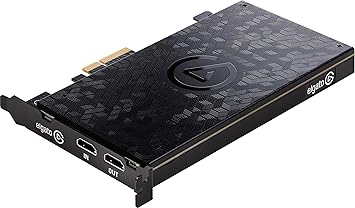
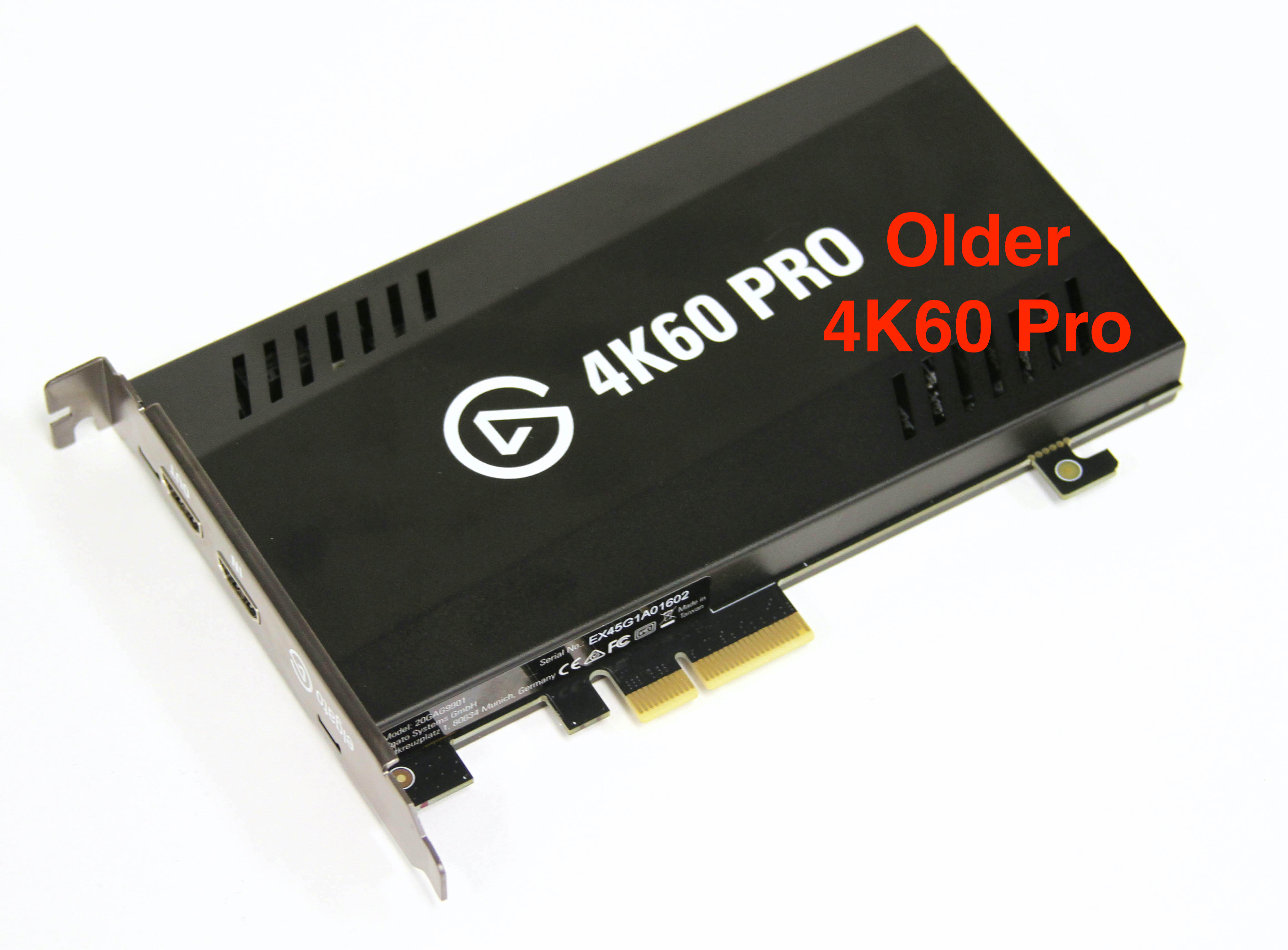
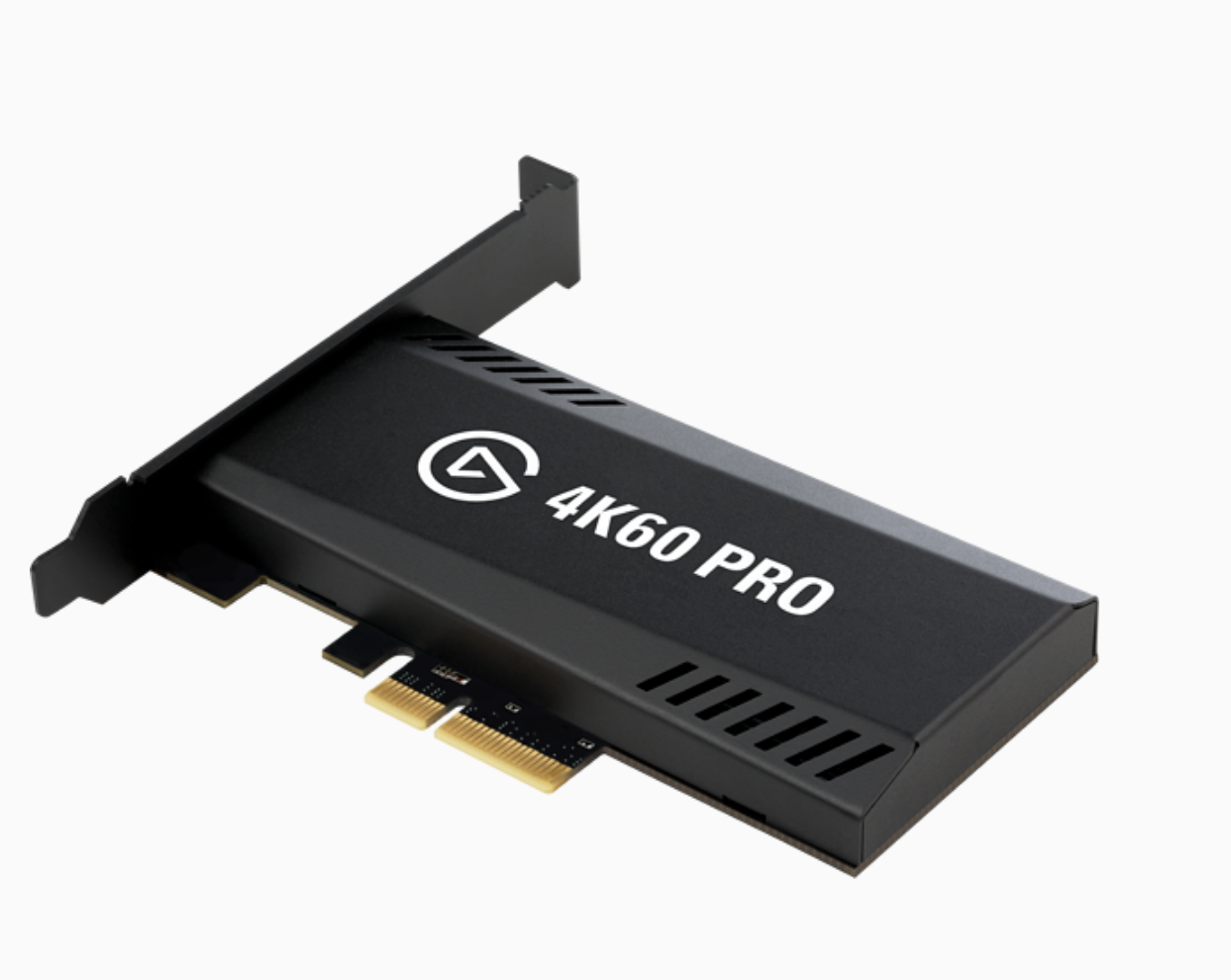
 solid flax
I'm still here Crest. I don't wanan rush you. I just hope I don't need to exchange this Elgato 60S. I really don't think ti is the issue as my computer says it is working.
cunning wadi
@signal musk i am good, thank you. I have talked to someone already
 silent lynx
What’s the easiest/cheapest way to have the party audio recorded while streaming PS4? The ChatLink cable? I’m wanting to stream as a hobby, not as a full time job.
solid flax
Have you tried Sound Capture Nats?
silent lynx
Not yet, I’m still waiting for my HD60S to get here and I’m doing a little bit of research to have an idea of what to do when I get it finally
solid flax
Why do I get this when I try to submit a support ticket?
 barren storm
Hello all - my audio sync KEEPS changing. I have async settings on my mic audio, I’ll spend ages trying to setup correctly but after a day or so I have to adjust the async delay to a new time. Yesterday the delay was ok with a delay of 1021ms. But then I watched back my last stream and my audio was out. I had to work on it again and the new delay time was 1122ms.
Why does this keep happening??
 coarse sable
hey there, I am not getting any audio from my gaming PC on my streaming pc
I will pay the person that finds the solution
i need this fixed asap. within the hour would be incredible
barren storm
@coarse sable can you elaborate a little?
coarse sable
yes,, I'll link the video that I followed to setup my audio that was working before and is not working now
this is exactly what I was doing and it was working fine until yesterday https://www.youtube.com/watch?v=jg_5Wf9Ll1E&t=342s now I get no audio on my streaming computers OBS

This is a simple way to get your sounds from your gaming pc directly to your streaming pc using a capture card with a 2 pc setup.
Download elgato game capture software and audio capture software to your gaming pc
Download Game capture software only to your Streaming PC
On...
barren storm
I’m guessing you have restarted both PCs? I get audio problems like this and it’s sometimes to do with something silly like, my displaying being switched on after on boot my pc.
coarse sable
Yes, I've restarted both several times. I've also uninstalled and reinstalled OBS on both.
I had to install a PCIe slot when I got the elgato to make my computer compatible, so I'm going to unplug that and plug it back in. The video is coming in clear as day, but the audio isn't coming through. Perhaps it's an issue with my streaming PC, or maybe something's wrong with the elgato itself?
barren storm
What did you use before this particular Elgato card?
coarse sable
I was streaming on one PC
solid flax
@barren storm Any advice on what to do with my issue regarding Game Capture HD? I'm open to anything.
cunning latch
@barren storm Which Elgato device is this?
@solid flax Sorry I had some other stuff to take care of. Yea, definitely quite underspec, but if only 640x360 30fps. hmmm
Is the HD60 S going directly into the PC or into any sort of USB hub?
solid flax
@cunning latch Directly into the PC.
low sand
@tepid salmon just letting you know the power adaptor for the usb hub did not work 😩
It remains a mystery
Guess i just cant use my elgato on this laptop
Been troubleshooting for almost a month now
Not really blaming elgato, just think its my laptop
coarse sable
Any ideas on why my streaming PC wouldn't receive Audio in OBS from my gaming PC?
Seemed to work the first three days I had the elgato
 urban cedar
What OBS do you use and is it to do with the audio tracking?
coarse sable
Streamelements
And I'm not sure. I run my elgato as a game capture on my gaming PC and as a video capture on the streaming PC with the audio set to waveout
That was sending the audio out of the desktop in OBS and it was working great until last night it just doesn't come through anymore and ive uninstalled sound capture and obs on both computers
urban cedar
Ah i'm not sure mate I'm using streamlabs OBS atm
barren storm
I would give Elgato a call, mate. They’re really good at helping where they can, even if it’s not with their own software.
Are you in the state’s? +18887268134
That’s their number
coarse sable
Awesome I appreciate it. I am in the United States.
barren storm
Call them and see what they say. I use the same capture card here, happy to let you know my setup if you still have issues.
coarse sable
I got a message saying it could be up to a week or more due to the current situation
coarse sable
That was an email. I just called and they said no one was available however I'm sure they'll be in tomorrow if you called today that's awesome thank you!
coarse sable
Could you do a video call?
barren storm
Possibly in about 10/20min.
coarse sable
Ok cool 👍
solid flax
I tried calling and got nothing.
Just be waiting for passs the esitmate.
One time it was two hours and still nothing.
barren storm
I called, said wait time was 18mins, so I went and sat on the toilet .....they answered straight away lol. Had to hang up and call back.
@cunning latch hey it’s the Elgato Game Capture HD
cunning latch
Phone support is officially 8AM to 8PM Pacific. So it's nearly 9 there.
Also all of us on Support are working from home, so that makes things also a bit weirder
@solid flax If you were waiting that long, you probably were outside of operating hours unfortunately.
Longest I've ever heard of was perhaps 25minutes.
barren storm
Have to commend the Elgato support staff, always been very easy to deal with.
coarse sable
That's good news. @cunning latch did you happen to see the issues I've been having?
solid flax
This was in the morning the first time I called about this. @cunning latch
barren storm
Dunno if you're any able to help with the Async issues I'm having @cunning latch? Posted up a couple of hours ago.
cunning latch
What time and timezone were you in? @solid flax
@coarse sable Does it seem to be specifically in OBS that you're losing audio? Does our software like GCHD or 4K Capture Utility work with audio?
solid flax
Central
coarse sable
On my gaming PC sound capture is picking up the audio, however on my streaming PC it doesn't seem like any audio is coming from my elgato
There is audio from the PC itself but not from the elgato
barren storm
@coarse sable what changes to the system have you been since this issue arose?
south bronze
Does anyone know how to fix this? My game capture says “connect your capture device to get started!” And “no capture devices found” but I plugged everything in my laptop and PS4
barren storm
@south bronze how are you connected to the capture card? have you had it work before now? Have you restarted?
cunning latch
@barren storm Original GCHD, eh? Hmm. Capturing an HDMI source or retro/analog?
Sounds like you're using it inside of OBS. Does audio from the GCHD fall out of sync compared to video. Or does the game video and audio stay together?
@south bronze Which model of card is it?
south bronze
@cunning latch HD60S+
cunning latch
Are you on Windows or Mac?
cunning latch
Try 4K Capture Utility: https://gc-updates.elgato.com/windows/spotlight-update/1.0.0/final/download-x64.php
cunning latch
HD60 S+ isn't supported in Game Capture HD on Windows, but should tell you it's not supported.
south bronze
Yeah it’s telling but which app do I open?
cunning latch
The HD60 S+ isn't supported in Game Capture HD on Windows. So... you can uninstall that, honestly.
south bronze
So it only works for Mac?
cunning latch
Use 4K Capture Utility.
solid flax
Good telling me that Crest.
barren storm
@cunning latch HDMI on PC, I Have game audio and mic going into an audio interface then into the PC. Basically have to change the value of the delay to different lengths of time every week or so.
solid flax
I was thinking of upgrading to HD60S+ when I get a job.
cunning latch
@solid flax HD60 S+ is still super useful though since it supports 4K 60hz sources, HDR, UVC so it works in tons of apps. But to avoid issues with 4K/HDR we pushed it to use 4K Capture Utility since it was built from the start to support that stuff.
It works in GCHD on Mac, but that's also an entirely different program essentially.
solid flax
Wow.
cunning latch
@south bronze What specifically were you unsure of? 4K Capture Utility is pretty simple since it's just for capturing. If you want lots of control and looking to Stream then OBS Studio is my suggestion.
solid flax
So about my problem....got any answers for me? I'm going to start recording again in a second. I have to say when it works, it works very well. I like it and don't want 201.54 to go down the drain.
south bronze
@cunning latch Im trying to do a test stream but i can’t find the Elgato device
I downloaded streamlabs, shall I delete?
cunning latch
@solid flax Oh, right sorry. At this time I don't really. The system is quite underpowered which could lead to any number of weird issues.
I'd go into Game Capture Preferences, Advanced, try to see if you can set encode and decode using your AMD graphics card.
Next try reinstalling the HD60 S driver: https://gc-updates.elgato.com/windows/drivers/hd60-s/download.php and reboot your system.
Make sure your laptop is in High Performance windows power profile.
Try it in other USB 3.0 ports.
Swap out the HDMI cables with ones you know for sure are good.
solid flax
I know the other two at the bottom aren't the issue but okay. I will try your first two suggestions.
Thank you anyway @cunning latch Worst case scenario, I just need to upgrade my laptop.
cunning latch
@south bronze Streamlabs OBS is fine. Same for OBS Studio. The HD60 S+ isn't listed in the device list? Make sure 4K Capture Utility is also closed since the HD60 S+ can only be accessed by one app at a time.
solid flax
OH Crest where can I find the Game Capture Preferences, Advanced?
barren storm
Cog wheel in top right, @solid flax
solid flax
okay.
 hasty crest
hi is stream deck mobile for android supported in here
solid flax
What is High perfomance windows power profile?
cunning latch
@barren storm But I'm trying to make sure I understand a bit more. You're adjusting delay/sync on devices other than the capture card?
You're not noticing that audio coming from the capture card is going out of sync from the video from the capture card, right? Do all devices need to be sync-adjusted?
@solid flax This sort of place:
You can usually search for it in the start menu
solid flax
You are god man. Thanks for answering all of my questions.
hasty crest
✋
cunning latch
You can ask Stream Deck Mobile questions in here, yes.
barren storm
@cunning latch game audio and mic go into an external interface. That comes through on the mic/aux channel in SLOBS. That audio has to be delayed, sometimes it's set to 1000ms, other times I have to set it to 1200ms. I'm trying to figure out why this value has to keep being altered.
hasty crest
i have just started a sub for stream deck mobile on android , have connected it ok but i only see 12 buttons instead of 15, my tablet is a samsung tabs 2 with android 7
south bronze
@cunning latch there’s just isn’t videos on how to set up the s+ to your PS4
All are hd60s
solid flax
Guessing software built in refers to the stuff in my computer or within Elgato.
cunning latch
@solid flax Actually it refers to using your CPU. If your device has an encoder, then it will be automatically used when recording.
Or if you're streaming, that selection will use it. "Software encoding" generally means CPU/Processor.
@south bronze Setup between an HD60 S+ and HD60 S are essentially identical in terms of the physical setup with PS4.
HD60 S+ supports higher resolutions and HDR, but that's not something you need to really worry about.
solid flax
All right thanks. Going to reboot since I reinstall Game Capture HD a few hours ago.
barren storm
@cunning latch dont forget me mate
solid flax
I am gonna look up the specs to run an Elgato 60s.
cunning latch
@barren storm I'm not sure what would be causing it. I'd try moving the Game capture HD to another USB port, front and back. And also reinstall the driver for it: https://gc-updates.elgato.com/windows/drivers/hd/download.php and reboot.
But also it's nearly 1Am for me and I'm not even on the clock anymore. So I'ma make some tea and play overwatch with people.
barren storm
@cunning latch understood, appreciate your time mate.
@cunning latch Tea? Which country you in? NZ here
hasty crest
i have just started a sub for stream deck mobile on android , have connected it ok but i only see 12 buttons on device instead of 15 but on the pc there is 15, my tablet is a samsung tab s2 with android 7, i have tried swiping and there is no settings for how many buttons can be displayed