#cth-history
1 messages · Page 31 of 1
 halcyon nacelle
 limpid adder
Hello,
I am trying to do a HDMI passthrough from the 4k60pro mk2 capture card to my gaming monitor. It is a 2560x1440p 144hz monitor with HDMI 2.0 and all my cables are 2.0 with 18gb speed capabilities. However, I can see my screen on the 4k capture utility on my second PC, but the image just wont show on the main monitor that I want. It's basically a black screen. What can I do to get it to work
limpid adder
So I just tested, and the Elgato 4k60pro was able to pick up my PS4 and show it on the monitor that I have the problem with. So the output of the elgato is working, but somehow it doesn't want to work when I'm trying to get my Main PC to work on the monitor.
 minor ice
@ /Crest Version: 1909, capture card: HD60Pro. When I used the CTRL method of logging in, it won't log in, even though I'm 100% sure that the username and password is correct.
 tropic shuttle
@tropic shuttle Only thing I could personally think of is that if the software is open, then by default Flashback recording is running which means your computer is actively encoding and recording in the background. This would significantly raise the power requirements of the computer.
Try going into Game Capture settings and disabling flashback. This would just be to see if we can prove it's the laptop pulling more power.
@cunning latch will try! Thanks
 bright lotus
my elgato HD60 S just stopped working yesterday, hdmi works just not usb, but kinda works. If anyone can help let me know, thank you
It just mid steam yesterday went into ‘One moment please’ and didn’t move
Then it didn’t register it for a while, then said it’s not a usb 3.0 port, then said it’s being used by another software, then said one moment please, then didn’t register.
I tried to change the port and now it just says one moment please 24/7
 versed abyss
my elgato keeps stuttering it's and hd60s and I turned off stuttering and still nothing
I mean I turned off buffering
 hidden jolt
Is there no way to install streamdeck software 'as admin'? I'm not getting the option to "Run as Admin" even if I'm logged in with my admin account.
Support here seems almost non-existant. I had an issue with streamdeck about a week ago and never got an answer. :/
OBS Studio is on 25.0.1, 64 bit. It does not pick up OBS on the 'Deck software even after completely uninstalling it with revo uninstaller, and reinstalling. (OBS closed whole process)
Only one that seems to work is SLOBS, but I prefer Studio.
 elfin pecan
I'm having the exact same problem as @bright lotus. If you find a solution I'd love to hear from you
I just switched over to a new PC. Worked absolutely fine on my old one. But now whenever I try to plug it in I get "no capture device found" and the usb port has a device descriptor request failed error. Or it says the port isnt a USB 3.0 when it is and has the latest drivers installed. I've had absolutely no luck with any other ports on my computer. I have a ASRock X570 Taichi motherboard,AMD Radeon RX 5700 GPU, AMD Ryzen 9 3900X CPU.
I reinstalled the Game Capture app with no luck. I also tried installing the drivers directly from https://gc-updates.elgato.com/windows/drivers/hd60-s/download.php. Nothing.
bright lotus
@elfin pecan I will. Message me too if you find one
Hey friend, just found one. No idea wtf I did tbh
I changed one thing, I’ll show you
Might not work for you tho so apologies
elfin pecan
Anything is worth a shot, Im getting very frustrated lol
bright lotus
Same tbh
Oof my video is too powerful
Ok, on elgato video capture if your elgato is on the ‘one moment please’ stage, click the cog next to the elgato, select input device and make sure it’s correct
elfin pecan
yeah its on my Switch but still no signal
But I dont think its going to work regardless. My computer still isnt reading the usb
elfin pecan
Im getting seriously fed up with this... Shouldn't be having these problems to begin with.
 mint dune
Hey! I have an issue. So I just bought a Elgato HD60 s+ capture card. I stream on a ps4 and have a VIZIO smart TV and a laptop. I’ve downloaded the required software onto my laptop and followed the instructions that came with the Elgato. But on both my TV and the Elgato software it shows no signal. I’ve also disabled the HDCP on my ps4
 cunning latch
@elfin pecan Could you give us a call or email us: http://e.lga.to/help You've tried all the basics I'd think of right now.
elfin pecan
Just sent out an email
 leaden kraken
hello yall i have a question about the chatlink
when i plug in the chat link into my ps4 remote and plug in my headset in the receiver it sounds funky and i dont hear party chat
 wet geode
Can someone please verify the current firmware version for the 4k60 pro mk2?
 wet cave
Hey all, just wanted to share some (imho) strange behaviour. I dealt with some issues regarding the Elgato HD60 S+ for the last days. On first time use everything was just fine. I started recording and streaming and had no issues. Due to issues regarding CoD Modern Warfare and NVIDIA setups I needed to make adjustments to my graphics settings. While I did those adjustments to prevent CoD from crashing I somehow messed up my capture card experience. Every time I started the game it freezed. This happened in OBS, Streamlabs OBS and even 4k capture utility. It took some time to figure out how I could prevent the capture from freezing. I needed to set the HDMI output, Elgato is connected to, to 59Hz instead of 60Hz and everything is fine. Even after rebooting the system all is up and running. I'm running a Dual PC setup with HDMI connected to my Elgato and DisplayPort connected to my display. At the moment the display is at 60Hz as I don't have a G-Sync Monitor, but still want to be able to exchange it in the future. I don't understand why this happens if I set display output to 60Hz. Maybe anyone of you is able to explain it to me. I would be very pleased.
 wooden remnant
Not explicitly Elgato related, but does anyone know if I can output ethernet signal over USB to my iPhone? I'm thinking especially if the thunderbolt dock pro somehow does this, but anything else helps as well!
 real shoal
https://discordapp.com/channels/581549424518365226/581551435074764810/692366380154224720
So i tried my El Gato HD 60 on my gf's laptop and everything worked fine. any idea why this is? My pc is definitely more powerful than her laptop.
OK i've finally figured it out. For whatever reason the Xbox One Wireless PC Adapter i have has been screwing it up.
wooden remnant
Was the adapter right next to the capture card?
Might be some interference there?
real shoal
I had the adapter in the back of the pc and the el gato in front. and vice versa to test it out and it still messes with it.
cunning latch
@leaden kraken Do you hear audio properly in the headset? Or is it sounding wrong there too?
@wet geode Whats on yours right now? you can just take a screenshot from the Device tab in 4KCU.
Are you experiencing issues with your device?
 sterile jay
I recently submitted a ticket but this is probably more convenient. My question is I have the Nano Leaf Rythm, is it possible to swap colors ect from my stream deck?
leaden kraken
@cunning latch it doesnt sound properly in the headset too
 south palm
Hey guys when I used my camlink it stretches the aspect ratio of my camera so that it distorts everything width wise... Is there software to have the aspect ratio squished back? In OBS I simply transform the video and turn it back but for Skype or Zoom or any other service it's problematic
 south bronze
recently my stream deck hasn't been showing the time on the barraider world clock widget
as well as making me have to press the button twice that lets me switch between two profiles
before I only needed to press it once to switch, but now I need to press it twice
the clock widget is working again though
I've updates both software and firmware to latest updates
any idea what's going on with the profile switching
 subtle peak
I just got an HD 60 S and I have my switch and everything plugged in but it says no signal
Ive restarted my computer 3 times and even uninstalled the software
I first tried Elgato customer support via phone but I was on hold for 10 Minutes so I hung up
cunning latch
@leaden kraken Is this the normal dual shock or are you using a custom controller?
sterile jay
i got my stuff working thank you.
cunning latch
@subtle peak It's normally quite short (often 1-2minutes), but right now there's a huge influx of new users who picked up items now that they're staying at home so lots of new calls coming in. We apologize for the wait with that.
As for your setup. Try disconnecting everything from the dock. Shut off the switch completely. Connect the Nintendo USB C cable to the dock first, then HDMI. Then dock the Switch. Then hold the power button to power it on.
Do you see video on your TV?
@south palm What camera are you using?
Cam Link doesn't itself provide any scaling in the hardware so something else may be going on.
@south bronze Are you using any sort of automatic profile switching right now?
leaden kraken
@cunning latch its a normal dual shock
south bronze
I don't think so, how do I check
cunning latch
@hidden jolt Support here is mostly going to be me from the team. Anything besides the basics is where I'd always say email us. You can always keep replying back with a ticket if you're experiencing problems still.
As for Admin, have you tried going to C:\Program Files\Elgato\Stream Deck. Then go go the properties of the StreamDeck.exe and then compatibility and choose Run this program as Administrator?
@south bronze If you head into Stream Deck's settings, then go to the profiles tab. Select each of your profiles. If automatic switching isn't being used then each profile should be set to None for the application.
hidden jolt
I couldn't pick 'run as admin' via installer, not even with shift or ctrl right clicking (or properties)
cunning latch
@versed abyss You're using the HD60 S inside of OBS? Do you notice stuttering in Game Capture HD or 4K Capture Utility?
@hidden jolt why are you specifically looking at installing as admin? Was that suggested somewhere?
south bronze
@cunning latch they are both set to none
hidden jolt
One of the help pages said to reinstall the software to get the .dll installed
Should I set it to always run as admin, or just once?
cunning latch
@south bronze Ok. How many profiles are you using? I'm guessing you're using just our Profile Switching button? Are the buttons on each profile pointing to the next profile or a specific one?
Or you could also upload your profile and I can give it a try on my software to see if the same thing occurrs.
@hidden jolt I don't think running the installer specifically as admin was mentioned in any of my meetings. I can ask though.
But that toggle I mentioned in the properties is a one time thing. Any time the software is now executed, it's now as admin.
Is OBS and Stream Deck on the C drive?
hidden jolt
ya, slobs, studio, and deck are
the issue I see with 'run as admin' is it will always pop up the uac prompt on each reboot
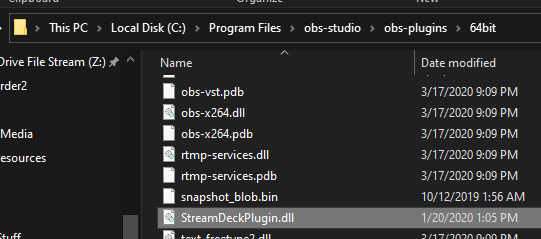
okay, ran it as admin, then opened Studio, streamdeck still says 'the elgato remote control plugin is missing'
even tho the streamdeckplugin.dll file is in the plugins dir:
https://i.imgur.com/z0bONsH.png
 karmic latch
Hi there im having a problem with my game capture card
south bronze
@cunning latch
two profiles, I have the profile switch in a multi action switch, as I have it set to enable and disable other parts.. or maybe I don't need that? I think I tried and ended up having to add the sources as well... I switch between a regular stream and late nite, and it enables/disables different overlays for both
but it never use to do this, just the past few days
cunning latch
Did you update when this began perhaps?
south bronze
windows and elgato
karmic latch
Dang it
leaden kraken
when i plug in the chat link i dont hear party chat, the ps4 sound is low and my friends hear an echo when they talk
cunning latch
@karmic latch What issue are you experiencing.
south palm
@cunning latch using a Panasonic GH2
karmic latch
So when i stream on twitch with stream labs obs with my game capture card to stream nintendo switch games it freezes mid stream
On streamlabs obs
I have been having this issue for 5 days
cunning latch
@leaden kraken Just to be super sure, you're connecting the short end into the controller, correct? The long connection goes to the capture card.
@karmic latch what capture card model?
leaden kraken
@cunning latch the short end goes into the controller but the long end into the back of my pc since i have the hd60 pro
cunning latch
@south bronze Ok, try backing up your profiles in the settings. Then perform a reinstall/repair of the install. Grab the latest installer here: http://e.lga.to/download to do that.

@leaden kraken Ok, well if it's not sounding right even just directly connected in the headset, then the cable might be faulty just based on what you described. But I'd probably email us: http://e.lga.to/help and there can be some other checks to see what the issue is.
Sounds like you have everything connected right.
leaden kraken
awesome thanks
cunning latch
And of course we can replace it if the team determines it's the problem
south palm
@cunning latch and if there isn't a way to do it within some elgato software, is there a 3rd party you can recommend? there's gotta be a way to scale it before it's recognized as the "webcam" no?
karmic latch
I unpluged everything and pluged it back in
cunning latch
@south palm You can actually use OBS here. There is a plugin called OBS Virtual Webcam. it's super handy. You can build a scene and OBS can output a virtualized webcam that other software can use. So you can do transforms or even greenscreen keying in it for video calls if needed.
That said, Can you post an image of how it's skewed?
Is this the original Cam Link or 4K?
@karmic latch Do you have other USB 3.0 ports to try connecting it to?
karmic latch
Yes
cunning latch
Most systems have different underlying USB controllers which can behave differently
karmic latch
I have it pluged in to a usb 3.0
south palm
@cunning latch original camlink, and I don't have a screenshot at the moment but it makes the aspect 3:56 if I remember correctly. I look super wide 

cunning latch
@karmic latch Try connecting to each of the ports to see how it behaves. You could probably just leave OBS running idle with an input going into the card.
Aha!
Is your GH2 set to interlaced?
south palm
I've tried both interlaced and 720p but being that the gh2 just sits idle in live view.... theoretically it shouldn't matter... no?
karmic latch
And see how it goes
cunning latch
Original Cam Link had half functioning interlacing support. So when a 1080i signal comes in it separates the fields so you end up with 1920x540 which matches your aspect
So it's 1920x540 at 60fps
hidden jolt
So I'm at a loss. Ran both obs and streamdeck as admin, reinstalled both a few days ago, none of that seems to have worked.
south palm
that actually sounds exactly like what's happening.... does that mean I should get a new camlink? or do you guys do RMA? half functioning sounds like it's not working properly...?
1920x540 is the res it wants to take screenshots at
cunning latch
If you can run the GH2 at 1080p or 720p HDMI output then this will solve the issue. Don't know if it supports that.
Do you have Game Capture HD installed?
hidden jolt
IMO, Studio is superior to SLOBS, since it's less bloated (no need for app store for me), and not 5 versions out of date. Wish it was working properly, lol.
south palm
I have game capture HD installed but what happens is it connects/disconnects over and over. this does not happen when using OBS
cunning latch
Well try opening Game Capture HD. Select the Cam Link in your device list. Then hold CTRL then click on the Gear/Cog icon to go into device settings.
Go to the Advanced tab and uncheck 'Enable Interlaced Support'.
south palm
I'll give it a shot and report back thx!
cunning latch
@karmic latch I'm sorry that that didn't help. I would suggest contacting our full team here: http://e.lga.to/help
Also run this utility: http://e.lga.to/reporter It will generate a SupportInfo Zip file on your desktop. It contains logs and diagnostics to help find the problem. Please attach this to the email form. Providing it now will jumpstart the process.

Elgato
The Elgato Windows Reporter is a free utility that collects selected information from users of Elgato products.It works with Windows 7, Windows 8 and Windows 10.Please Note: Elgato Windows Reporte...
@south palm According to Atomos, the GH2 is only 1080i on the HDMI output unfortunately. Common for the era it came out.
My hope is that if you can disable interlace support, the GH2 should detect it and atleast switch down to 720p automatically.
 tired stirrup
Anyone else finding Stream Deck Mobile for Android extremely buggy?!
My stream deck mobile for iPhone works fine, but on Android, the buttons don't work, folders don't open sometimes, i can accidentally press buttons that aren't even on the screen.
I resent being a beta tester for Corsair
on a subscription based app, so even just some kind of update from the devs would be appreciated
hidden jolt
Since I've tried running both obs and streamdeck as admin, reinstalling both, is there anything else I can even do to get it to work with Studio?
south bronze
Stream Deck is still having me press twice to switch profiles
karmic latch
@cunning latch i have unpluged every cord and tryed all the cords and none of them worked
So i just putted it back where it was
Because its a usb 3.0
south palm
@cunning latch it was actually unchecked by default. do you have a link to that OBS virtual camera thing?
cunning latch
OBS Forums
This plugin provides a directshow Output as a virtual webcam .
How to use:
Output:
- Selecting Tools -> VirtualCam
- Press start button and close diailog
- Open your 3rd party program and choose "OBS-Camera" as a Video input
Filter:
1.Add a...
 barren oxide
Hello! I’m new here so my apologies if this I had been answered, but is there a way to setup an action on the streamdeck where it automatically takes a screen capture? I hate opening up snipping tool, thanks in adv, and sorry if this is not in right section
wet geode
@cunning latch yes I’m having issues. It’s hard to explain via text I guess I’ll call in tomorrow
 gleaming vapor
Is there currently any way to cancel an on-going macro? For example if you misspress something, but it has a long delay in it.
 gritty patio
Hello, so I am currently using the Elgato HD60S+ and I managed to figure out how to stream switch via OBS and also figured out how to stream it with audio but there is always a tiny delay in audio. Anyone that knows what to do here?
wooden remnant
Make a delay to the video so it matches
There's really nothing else to be done unfortunately
gritty patio
Hmm the delay is also on my ears since since I am listening to the audio via the computer as well!
But thanks! its very tiny so should be fine 🙂
 red marsh
hey guys i need your help.
I supose the subject is as usual.
I need your help, i cant transmit sound from PC gaming to PC Streaming.
Can Someone help me? Thank you guys.
wooden remnant
You're not providing enough information to help, so let me ask: How are you trying to send the video and audio?
south bronze
@red marsh i think i may can i have dm you
 smoky kelp
Need stream deck training. Also is there a plugin for davinci resolve?
 fickle parrot
I need some setup help with elgato hd60 pro with my pc
anyone there?
pls ping me if any one there
 rare kraken
@red marsh how are you connecting your gaming pc to streaming pc? hdmi into the elgato? are you also sending your sound via HDMI?
@fickle parrot what's your question?
@fickle parrot what's your question?
 loud ice
when i have my elgato HD60 plugged in, the output to the monitor is a little bit darker and blurry/pixelated. Top is normal, bottom is when its plugged in
rare kraken
@fickle parrot sorry, not able to right now (working), but if you try to explain what you need help with
fickle parrot
i am actually looking for streaming setup with elgato hd60 pro on pc
wooden remnant
what do you mean?
Plug the add in card into your computer, plug whatever you need to record into the card and you should be good
fickle parrot
i did
rare kraken
like what someone else is using for their stream PC with a HD60 Pro?
wooden remnant
Oh!
fickle parrot
i am having setup single pc with dual monitor with capture card
rare kraken
nononono... why
if you're gaming and streaming from the same PC, you don't use a capture card
fickle parrot
i want to stream it by using capute card bt game frame drops
wooden remnant
The card won't help dropped frames
It does no heavy lifting to the best of my knowlegde
fickle parrot

I hope you guys enjoyed the video!
➤Social Media:
• Instagram: https://www.instagram.com/aaron.mcguirk/
• Twitter: https://twitter.com/aaron_mcguirk
• Twitch: https://www.twitch.tv/realaaronmcguirk
• YouTube: http://bit.ly/2xvAsmT
➤Donate:
• PayPal: https://paypal.me/McGuirk...
i followed this video
i have i7 9700k, 2070 super
rare kraken
Still so confused by what you're asking. You're saying that you want less dropped frames when streaming, but unfortunately, even if you're using a capture card to "capture" your game, when you stream, the encoding isn't done via the capture card.
Capture cards do encoding for recording, but not for streaming.
For stream encoding, it gets done by either your CPU (x264) or a GPU (Intel, Nvidia VNENC, or AMD for OBS)
Lastly, the video above is just a how-to guide for how to still get 144hz via display port while recording via HDMI.
rare kraken
COD:MW is very CPU and GPU intensive. A beast of a machine (GTX 2080) will get around 120fps. If you try to add streaming from the same PC, that'll definitely go down (though you could try using NVENC as an encoder, since Nvidia cards have a separate chip for encoding for streams).
fickle parrot
ok ty sir
rare kraken
@red marsh please just use this channel for support (and not DMing me directly). That way, if I'm not here, someone else can help.
red marsh
@rare kraken ok sorry


i install elgato software in 2 pcs
but dont have sound on streaming pc
wooden remnant
What's the output sound on your computer?
red marsh
gaming pc?
wooden remnant
yeah
wooden remnant
That sounds like the preffered way to do it
What about your OBS settings, which inputs does it have?
rare kraken
on your streaming PC, do you have the sound input setup for HDMI?
(on the elgato config)
rare kraken
@red marsh no, within the game capture hd software (or obs, clicking on the elgato capture card properties/settings)
red marsh
@rare kraken on streaming pc ?
rare kraken
yes, on the streaming pc
 rare kraken
yeah, looks like that's set up correctly.
red marsh
but dont have sound XD
 balmy ridge
Hello
Hoping someone can help me out I’m setting up a dual pc config I have an elgato 4K 60 m2 in streaming pc
Fiber internet but I can’t get a clean image on stream
Trying for 1080p/60 the streaming pc is over powered and should easily do this but it’s pixelated using 8000 bits and yes am partnered
Is there a image with streamlabs settings for clean 1080p 60 I should be using
rare kraken
what's the stats on your streaming PC?
and what are you encoding/streaming settings?
balmy ridge
Risen 7 2700x 2070 nvidia and 16gb ram
Elgato 4K 60 m2
Encoder nvidia Minecraft
Nvec
CBR 8000
Key frame 0
rare kraken
stream pc should be fine for 1080p60
loud ice
when i use my elgato the output is darker and pixelated/blurry, but its all fine when im not using the Elgato and just have the HDMI going from the GPU to my Monitor. Anyone know why this is happening
 stoic pelican
i need help with my elgato i am using streamlabs and i have the hd60s with the chat link cable but when i go live no in game audio is working
hidden jolt
Since I've tried running both obs and streamdeck as admin, reinstalling both, is there anything else I can even do to get it to work with Studio?
(Since yesterday, and a few days before)
So I've tried literally everything I can think of.
Reinstalling both software, running both as admin, manually copying the streamdeckplugin.dll file from SLOBS to OBS Studio. None of those fixed the issue where Streamdeck's software isn't picking up my OBS Studio install. Would anyone have yet a different method that's not the ones I already tried?
 novel shard
Hey guys! I’m tryna stream using game capture hd, and whenever I try to stream it says thjs
 white crest
help, my grabber doesn't detect signal, it just says "detecting signal", and when I go to another program to select the grabber, it restarts my PC
south bronze
would i be able to plug in a dslr to the hd60 pro ?
rare kraken
@south bronze yep. I use my HD60 S instead of a camlink
south bronze
wait wait
@rare kraken is it possible to use as webcam
without any third party software like many cam, sparkocam etc
for like calls aswell?
rare kraken
doesn't appear as a webcam for me, but I can use it in OBS as a video capture device
rare kraken
if you have obs open, there's a plugin that can have your OBS output as a webcam
south bronze
waitt rlly
rare kraken
OBS Forums
This plugin provides a directshow Output as a virtual webcam .
How to use:
Output:
- Selecting Tools -> VirtualCam
- Press start button and close diailog
- Open your 3rd party program and choose "OBS-Camera" as a Video input
Filter:
1.Add a...
novel shard
can anyone help me with that 'backend error' that keeps showing on my game capture hd
south bronze
so this will appear in other programs as a webcam? @rare kraken
rare kraken
@south bronze yes
 south bronze
ur a life saver thanks man
rare kraken
👍
south bronze
have u tried reddit?
south bronze
or searching the server for that error
rare kraken
@novel shard dunno unfortunately. have you tried reaching out to elgato support?
rare kraken
okay. well hopefully you hear back from them. I'm just a fellow community member here. 😛
novel shard
thank you man!
 tardy cobaltBOT
PLEASE NOTE: Customer Service does not monitor this channel. If you are unable to solve your issue, please file a ticket at http://e.lga.to/help.
We also have staff available by phone 12hours a day. 8AM to 8PM Pacific every day of the year if you have quick questions and there isn't someone here to help you. http://e.lga.to/phone
Elgato
Below are the telephone numbers for Elgato Support:
United States☎ 1-888-726-8134
Toll FreeMonday-Sunday – 8:00 AM to 8:00 PM PST (Pacific Standard Time, United States)United Kingdom☎ 0330 808 44 9...
 upper veldt
Hey, I've set up all my profiles and sources correctly and this is just for YouTube profile I have created only. I can't create a Multi-Action as it doesn't respond when I press the button. Stream Deck is up to the full update version so can someone explain why its not working. Thank you
 hushed dock
May i have some help please
 twilit ether
How to backup profiles with soundboard effects and keep the links? Backup instead of export?
I am currently exporting profiles and keeping the files in the exact same structure via Dropbox but on the different computer all the soundboard links are broken? ⚠️
hushed dock
I cant get my audio to go through my gaming pc to my streaming pc. i have set everything up the way i had it before and idk what im forgetting.
 stark elk
 elfin jetty
Heyo. I have a weird issue in that before I open OBS to stream, for some reason I have to boot Game Capture and load both my camlink and Capture card in there first before I can open OBS - if I don't, when I open OBS it completely freezes
cunning latch
@stark elk Which device model is this?
And are you just capturing audio over HDMI or using a Chat Link or something?
stark elk
nvm i got it
cunning latch
@elfin jetty That's definitely odd. What is the capture card model that you're using. Does the capture card also freeze?
elfin jetty
Happens both with my regular HD60 Pro, and Camlink.
Nothing comes through on my OBS at all.
It get essentially prevents the program from responding, so I have to force OBS closed then open Game capture, click through the captures, close that, THEN open OBS back up
This was a fresh reboot, no game capture opened before obs, camlink is meant to be in the porthole.
Now this whole PC will lag until I close OBS
 rustic nymph
For some reason, I can't stream on Twitch from elgato hd software, I've connected and reconnected my account many times
 worldly goblet
@rustic nymph try to stream from OBS ( if you can)
 rain bluff
is there any sort of repair guide available for the Elgato Green Screen? my lid unhooked itself from the latch hinges and now I can't get it back together
cunning latch
@rain bluff I don't believe so, but I think Customer Service may know more: http://e.lga.to/help
 fleet tiger
Any one know if its possible to capture the in game chat for Modern Warfare? I have an elgato HD60 S capture card that I run to my pc from my Xbox. Party chat works fine and I can hear everyone on stream, but if im playing with pc or ps4 it wont capture the Game chat on stream, any tips???
 hoary goblet
Hello, folks. Does mk.ii capture card have any delay to set on OBS on streaming pc? Sound is from goxlr, so no delay there. Want to have all optimized
wooden remnant
@hoary goblet do you have the mk.ii capture card?
You can test this out, and if there is delay on anything, you'll have to delay the rest until it matches
hoary goblet
@wooden remnant thx!
btw is it okay having 2560x1440 165hz monitor with this card? no issues gonna happen? is 144hz max?
 stuck perch
elfin jetty
stuck perch
elfin jetty
Any idea @cunning latch
hushed dock
I can't get my audio to go through from my gaming PC to my streaming PC. I did audio wave out and all I'm getting is white noise.
 lone bronze
Hey I need help, I’m trying to see if I can’t stream breathe if the wild
At first it said that it couldn’t render 60 FPS so I tried 30, it couldn’t render that either
I checked my internet speed and it’s 11.48
Do I need to change my mbps meter or something else?
balmy ridge
Anyone here with a dual pc setup
Twitch is pixelating
Stream pc powerfully enough for this but it’s looking like ass
I need to know proper settings for a smooth 60fps
I have 1 gig fiber
2700x 2070 nvidia
 scenic star
fairly simple question. my monitor only has one hdmi port, and it's already connected to my PC's graphics card. Is there any way to go around that to record my console with an HD60S
scenic star
Ahhh I misread the box’s diagram, I thought the HD60S’s hdmi out had to connect to the PC, its just the console’s TV it looks like
 lost wharf
so I have an HD60s, and I used this for my ps2 but while the picture was fine, no delay, audio was buggy and chipmunky https://images-na.ssl-images-amazon.com/images/I/61H4xVIJTtL._AC_SL1200_.jpg any advice?
 cunning latch
@loud ice cards like the HD60 have something called Chromasubsampling on the passthrough port. Colors are at a lower resolution. This is normal behavior. Though it being darker isn't normal, that's worth emailing us about.
loud ice
would the HD60 Pro do the same thing as i am planning on purchasing it and would be nice to know?
cunning latch
@elfin jetty Try reinstalling the HD60 Pro drivers: https://gc-updates.elgato.com/windows/drivers/hd60-pro/download.php and then reboot your system. But besides that I think we'd need tracelogs to find out what is happening.
 brittle current
i cant connect my elgato to my nintendo switch and have it work, i used the exact same setup on my ps4 and that worked fine and i had an image outcome on both my tv and pc but when i plug my elgato into my switch i get no image on my tv and no signal on my pc, and apparently im not the only one who has had this issue, is there a fix?
all my elgato software is on the latest update and i am using a HD60
the thing is is that streaming USED to work on my switch, and ive streamed for hours on end with it, but lately it has stopped working and i dont know why
cunning latch
@loud ice 4K60 Pro, 4K60 Pro MK.2, and HD60 S+ have untouched passthrough. So HD60 S+ would be the closest in price which has an RGB/444 passthrough.
loud ice
Okay, thank you
 sullen crown
Is it possible to use my elgato streamdeck to make gif+ sound pop out on my stream ?
cunning latch
@scenic star Yep, the port is a passthrough. The capture card since in between the console and TV.
@balmy ridge What settings are you using now? What software are you using?
@lone bronze That error sounds like performance. Try lowering the streaming resolution to 720p or set the device settings to 720p.
What are your computers specs?
 dense peak
Is there anyway I can use my internal el gato HD to capture my PC gameplay? I want to use that 15 minute constant recording it does on game capture HD but on my PC. is this possible?
 daring salmon
Hey, got directed here from another streaming server so I'll just paste my question in
Hey everyone, not sure if this is the right place to ask for advice, and it's maybe a bit of a different stream type, but here goes. So with the lockdown due to coronavirus my parents church wanted to start livestreaming their services, and I offered to help them setup. I have a bunch of Scenes made up in OBS, and a streamdeck to control it. Is there a way of changing scenes with the streamdeck that also mutes/unmutes it?
I've tried the multi-action buttons, but my issue is that whereas with the scene button, when you go to another scene, the button updates with its 'inactive' icon, the multi-action/switch either only has one state, or you have to press it twice to activate and deactivate
Essentially I want to have the streamdeck displaying which scene is active through the icons, but also able to have certain scenes on mute
My issue is that even though I would be fine operating it without the icons updating, the average person that will be operating it won't be as used to the technology, so i'm trying to make it as simple as possible
So this is what I have atm
So scene b is active, and sound is muted, but they are separate actions
But if I use a multi action button I can't have those active/inactive icons for the scenes
rare kraken
@daring salmon not an easy way, but I think you can do this with using VoiceMeeter and a plug in for it by BarRaider. The multi-action would be made to set up and mute a channel in VoiceMeeter, and the separate button can detect when the state of the audio channel changes.
(I also started helping out with my church's livestream. Week 2 for us starts in 3 hours, hah)
rare kraken
Just tested it, and it does work. Using the "VoiceMeeter Advanced Toggle" button from BarRaider's VoiceMeeter plugin, I actually set it to toggle the channel output on/off (this is so I can still hear the music via my headphones), while it turns it off for the stream (as OBS is using a different channel sound output). I put the same button into a multi-action, and it toggles the icon/sound output of A1 on-off
hmm... you just got me thinking of how I can use stream deck mobile as well when I'm handling the church livestream and need to switch the outputs, hah
and it would be wild if I could also control ProPresenter via a plugin...
 maiden island
So I JUST found out there was an Elgato Discord server.. smh, I am so slow at things. Anyways. I've been trying to figure something out and for the life of me I CANNOT! I am wanting to stream from my Xbox to my PC. I have the HD60 PRO and I have everything set up right, except, I can not capture the game audio and my pc audio at the same time. HELP!!!!! I need to be able to hear my streamlabs notifications as well as the game audio I am playing. WHAT DO I DO?
brittle current
im having really annoying issues with elgato, my pre order of persona 5 royal came in today and i wanted to stream on my PS4 and it took me about an hour to get video on both my TV and the elgato software, and now that i have it barely works and elgato freezes a lot, causing me to have to restart it every time. It was working fine yesterday, but now I can only get video on my screen, no audio. How do I get my audio?
daring salmon
@rare kraken thanks for this! I'll give it a go later today. I have a workable solution right now but want to set it up to be easy to use for the long run by people who aren't as familiar with it
rare kraken
@daring salmon You got me thinking about bringing my stream deck today, since I'm not sure my phone/stream deck mobile will work, since my laptop is hard wired and not sure if I can get on the same network with my phone. 😛 Set up a bunch of commands already (hiding the church logo on both scenes, scene swaps (message, worship, fullscreen slides). Trying to figure out what else I need. 😛
daring salmon
I managed to convince the church that a stream deck is a good investment if they're going to stream the services long term anyway, so get to play around with a new toy haha
Gl to you for yours today!
rare kraken
thanks. heading out in a few. 🙂
brittle current
ive decided to buy a hd60 s i hope that will solve my issue
 zenith holly
do you guys know how to fix I'm using the hd60 s and streaming on twitch with my switch on obs. everything looks great but when i start streaming there is no gameplay just my mic audio and the gameplay volume. would really appreciate some help thanks.
south bronze
Is there a way to allow Streamdeck to switch between Scene Collections in OBS using Multi Action Switch
or a simpler way to do it
wooden remnant
@south bronze does this action suit your needs?
south bronze
I don't have that option to do untitled, xcode only
how do I do that
I use Streamelements OBS Live if that makes a difference
wooden remnant
Xcode only is my scene
Try the OBS Studio: Scene, it may help as Streamlabs is an OBS fork
Though I don't promise anything
south bronze
ok maybe I need to rephrase...
I want to be able to switch between scene collections, and automatically load all the scenes
does that make more sense?
wooden remnant
Oh!
Does the multiaction work?
Also thanks @south bronze for telling me about multiaction 😄
From a glance it looks to be the best way to do this
south bronze
yes that works, thank you
 noble condor
hi
I was wondering if someone could help me with an issue that I'm having with my elgato HD60
I have a double pc setup for streaming and my elgato is connected to both of them in order to capture the video from my gaming pc and to stream it from the other pc
everything worked fine until 2 days ago
I opened streamlabs obs and my elgato started doing a lot of crackling noise and I don't know how to fix it
south bronze
old cam link
new problems
huzzah
it shows up on my pc as just straight up black
recognizes that its there and everything, nothing like my problem before that was never fixed as it just happened to start working one day
can I expect the same or is there a fix for this?
it stopped working when I started using my 4k60 capture card again
 bright stone
anyone here ever see the sound capture app just crash because of .net issues?
wooden remnant
that sounds like .net being .net
 warm wasp
Hi guys, I'm thinking about buying the hd60s+. I don't plan on streaming in the near future. Mainly using my PC, might occasionally switch to PS4. Main purpose would be capturing fun gameplay with a hotkey that saves the last X seconds. Would like to have a simple editing tool (trimming) and being able to upload to YouTube directly. Would the hd60s+ be sufficient? Overkill maybe?
 vocal wasp
Is there a such thing as overkill? 😏
wooden remnant
I think the Elgato streaming app has some save the last X minutes
warm wasp
I'd need the product for the software to work, right?
 quasi sonnet
Hi guys, i have big issues since 2 Days with 4K 60 Pro MK2 ...
When i alt tab from Fullscreen game the viewers signal no more sounds on stream. I solve this (sometimes) by changing scenes. And when it does'nt work i restart the stream. The other sounds (Not from the 4K 60 Pro) still work.
The image sometime is cut / Mirrored / Halfed / not in the good order or Mozaïc ...
Never had any problems before.
Can anyone help me with this issue ?
 flint lion
Trying to set up my HD60s for the first time. It's showing up as an unknown device. If I try to automatically update the driver from device manager, it shows Microsoft Streaming Clock Proxy can't be installed to this INF.
The elgato game capture software then just says it's searching for signal w/ my switch hooked up. Switch is displaying on my tv now, despite elgato saying it's searching for signal
I'm on Windows 10 1607 which says that driver doesn't even exist:http://batcmd.com/windows/10/services/mspclock/
 spiral cypress
my stream elements obs.live plugin isnt working any fix?
 mellow grotto
uh I need help since my nintendo switch/elgato hd60s has been making this cracking/popping sound and i cant hear anything from my switch except for the popping sound and its on obs so i want to know if i can do anything to remove the popping noise and get my switch audio back. btw this is the first time that this happened to me, last time i used it was like 3 months ago and nothing like this happened to me before. im using windows 10
ping me if you can help me out
 jovial lagoon
I've been having a real hard time with my HD60 S, in the Game Capture app all I get is a black screen, no sound. It was working fine yesterday but no matter what I do it seems not to work now. I've tried changing the RGB range, resolution, encoder, quality, to no avail. This is with my switch and it's really annoying since one day it works and the next all I get is a black screen. I've tried reinstalling drivers for my USB ports and the Elgato HD60 S and nothing seems to work. I've even tried switching HDMI cables. I really don't understand why I'm having so much trouble getting it to work all of a sudden while it was working fine before.
 alpine sparrow
Since a couple days the audio from my gaming pc does not output on OBS on my streaming pc trough my Elgato HD60Pro anymore and i cannot figure out why.
noble condor
@mellow grotto I'm having the same issue
and I contacted customer support
I'll let you know once they answer me
mellow grotto
@noble condor woah what a coincidence. thx
basically what im experiencing
in obs
its so annoying and i cant hear anything from my switch besides that
and its MUCH louder than what the video is giving you
i didnt bother to install a driver is that a problem since i switched computers?
i didnt get the elgato hd60s software either since obs is way better for me
 grave ledge
This shows up very often. Why's that?
 spare owl
can someone help me with a stream deck problem
vocal wasp
@grave ledge here's devs update on the Spotify throttling:
"In the latest version of the Spotify plugin, we are showing when rate limit/throttling is being imposed by Spotify. The Spotify plugin is using the APIs available from Spotify. Just like other API providers, they have a rate limit to ensure their APIs are not getting abused. However, UNLIKE OTHER API PROVIDERS Spotify is putting the limit on the APP (i.e. the Plugin) and NOT on the User. This basically means that as more people join/use the plugin the more EVERYONE gets throttled (even if you did nothing wrong). There are very large threads of other developers complaining on this with no solution coming from Spotify. BarRaider has specifically reached out to Spotify to ask that they increase the limits or provide some sort of solution. Unfortunately Spotify is unresponsive to these requests (which aligns with complaints from other developers using their APIs). We don't have a solution outside of asking for anyone who has contacts within Spotify to let us know."
cunning latch
@warm wasp Our software generally yes, will require a physical product from us. But if you are just doing single PC streaming or something. OBS Studio can do a type of flashback.
But for PS4, yes you'll need a capture card. HD60 S+ is currently our newest card which can take in 4K60 HDR and let you stream at 1080p60.
Any of the flashback functions though are software related so any of our cards can do it with the accompanying software.
@spare owl What issue are you having?
spare owl
I'm trying to have a message on a key for my stream on mixer. When I press the button it just gives me a yellow triangle.
cunning latch
@alpine sparrow What sort of software solution were you using to send audio from your Game PC to the Stream PC?
alpine sparrow
Elgato sound capture @cunning latch
rare kraken
@spare owl you probably need to re-auth the Mixer account for the Stream Deck App. You can remove the account and re-add it (re-authorize) without losing any keys/commands.
cunning latch
@flint lion If you reinstall the driver directly here: https://gc-updates.elgato.com/windows/drivers/hd60-s/download.php and reboot does this change at all?
Also 1607? Are you holding off updates?
spare owl
@rare kraken I'll give it a shot and let ya know..I left my computer already so it wont be right away
rare kraken
@spare owl unfortunately it seems like this happens often for Mixer.
cunning latch
@alpine sparrow You may want to try uninstalling Sound Capture completely on the gaming PC and reinstall it: https://gc-updates.elgato.com/windows/egcw-update/3.70/final/download_x64.php
This will reinstall Sound Capture as well.
spare owl
@rare kraken does the re authorization fix it then?
cunning latch
It's usually worth doing first.
rare kraken
yep, fixes it every time for me
alpine sparrow
@cunning latch i have already tried that
rare kraken
before I usually stream, I just press one of my "message" buttons to see if I'm still logged in/authorized
spare owl
Ok
rare kraken
if not, then I just do the remove, re-auth, and am good to go
(the only issue is when I'm logged in on Chrome with my bot account, lol. Then I have to log out, login with my streamer account, etc. So takes just a bit longer)
 bold arrow
Good Evening. I'm having problems with my HD60S. After an hour stream it appears to be sending sound about a full second later than it should. I see a ton of OBS fixes for this but I'm using Streamlabs OBS and do not see any place i can adjust this at. I appreciate any and all assistance
 agile frigate
Looking to get my CamLink working with Hangouts in macOS to use my Sony a7iii as a webcam. Is there any way to do this? (I don't have a dedicated GPU on this 2015 MBP)
hidden jolt
So I'm still having the problem peeps. I'm about to give up on OBS Studio permanently and deal with SLOBS' bloat.
I've tried reinstalling both SD software & Studio, I've tried running both as admin, I've tried copying SLOBS .dll file over, everything short of a system reinstall essentially.
I don't like SLOBS since it doesn't perform as well on my rig, and xsplit is paid which is out of my budget.
SD never picks up obs.
south bronze
Hi there I was wondering like there is a XL streamdeck could you use a tablet to mimic an XL stream deck or would it just be the normal size?
 autumn vortex
Hi guys, I run a dual PC setup for streaming with an elgato 4k60 pro mk.2. Problem is that after streaming around 30 minutes via obs my gameplay audio starts to desync and the only way I can fix is it by clicking deactivate/activate the capture card on OBS which isn't an ideal solution. Does anyone know a fix for this? I'd appreciate any help on this issue.
 lean finch
my obs says that my elgato is being used by another application, but my obs is the only application open. what do i do?
rare kraken
@lean finch that happens to me sometimes. I typically try to Reboot and see what happens.
(ie, if OBS hangs, and never closes, but I try opening it up again, there could still be some weird obs.exe clients found in Task Manager that never closed and is keeping the elgato in use)
tardy cobaltBOT
PLEASE NOTE: Customer Service does not monitor this channel. If you are unable to solve your issue, please file a ticket at http://e.lga.to/help.
We also have staff available by phone 12hours a day. 8AM to 8PM Pacific every day of the year if you have quick questions and there isn't someone here to help you. http://e.lga.to/phone
Elgato
Below are the telephone numbers for Elgato Support:
United States☎ 1-888-726-8134
Toll FreeMonday-Sunday – 8:00 AM to 8:00 PM PST (Pacific Standard Time, United States)United Kingdom☎ 0330 808 44 9...
 prime pulsar
I need help fixing my game capture the screen and audio seem to be lagging but nothing is on my xbox i dont know how to fix it

 minor lichen
Has anyone figured out what's going on with HD60s's not sending audio since the latest software update? .. Looks like a lot of people are having issues, myself included.
smoky kelp
So obs.live should just work with the obs plugin correct?
I pressed on the start button on the stream deck and it does not set me to go live?
cunning latch
@minor lichen Which software update? 4KCU or Game Capture?
@agile frigate So right now is it just not showing up as a possible device? Does the Cam Link show in other software?
smoky kelp
I am getting a exclamation point inside of a yellow triangle?
cunning latch
@prime pulsar Try moving the HD60 to another USB port on your system and rebooting.
If the issue remains I'd try uninstalling Game Capture HD and then installing a fresh copy: http://e.lga.to/download
 modern wolf
it doesnt want to reconize my mic tht i have connected someone help
@cunning latch ^^
minor lichen
@cunning latch - Game Capture
modern wolf
@cunning latch ^^^^^^^^
noble condor
hi everyone
I-m wondering if you guys have my same issue with the elgato support via phone
I've tried to call them earlier this morning but the support answered me by saying that there wasn't anyone from the support team on line at the moment
eventhough the time was correct
sorry for my bad english
cunning latch
@modern wolf What software are you using to capture your microphone? And is this a microphone connected to your console or PC?
@noble condor What time did you call?
modern wolf
its connected to my pc and im not using a software i just connected
@cunning latch
look at the vid
noble condor
@cunning latch 9 am GMT (I was calling the international support)
cunning latch
@modern wolf Sorry, thought Zack had posted that. Double check to make sure that Windows 10 is allowing microphone usage as privacy settings may be blocking Game Capture from using it: https://help.elgato.com/hc/en-us/articles/360027958672
Elgato
The Windows 10 April 2018 Update (1803) introduced new privacy settings that may interfere with certain capture cards.Affected products:Cam LinkGame Capture HD60 SGame Capture HD60 ProGame Capture ...
minor lichen
@cunning latch Mines on MacOS
modern wolf
I did the solution but still the settings were like this still not taking
@cunning latch
noble condor
I was wondering if someone could help me with this issue that I'm having with my elgato HD60
my audio is like this all the time and I don't know how to fix it
cunning latch
@noble condor If my conversion is right, 9AM GMT is 2AM where the agents are working. You'd need to call around maybe after 3PM/15:00 your time I believe. But I'm asking our team that page needs to be fixed. May be a formatting issue.
@minor lichen Ok so you're referring to 2.11.10's update. We didn't make any specific changes to audio in that version, but first thing I'd suggest is uninstalling and then reinstalling the software if it happened after an update.
@modern wolf Hmm... And closing Game Capture HD and Sound Capture, then applying this setting does nothing? Do you get any audio from the card?
@noble condor Go into Device settings on the top right, then make sure it's on HDMI Audio.
Do you have a passthrough monitor connected to the output of the capture card?
cunning latch
So this is a single PC capture setup. Is your PC configured to send audio to the HD60 over HDMI?
noble condor
I have a double pc setup
I record everithing from the gaming pc to the streaming pc
cunning latch
Then can you go over your wiring setup? Since the capture window is appearing in the capture itself, it maybe a HDMI wiring issue.
noble condor
for the recording I just plugged in my elgato usb to the gaming pc usb in order to record the audio problem without having to bring the video over a usb stick to my gaming pc
because I don't have discord on my streaming pc
cunning latch
Oh, so the issue remains in the normal setup.
noble condor
I already changed all my cables once but nothing changed
modern wolf
IT NOT DOING ANYTHING @cunning latch
noble condor
I tryied to change streaming pc but the issue wasn't the pc apparently
@cunning latch the audio comes out well from my gaming pc by using sound capture, then it reaches the elgato and on my streaming pc the audio comes out like that
modern wolf
im trying to stream and it not working
cunning latch
@modern wolf Well based on what you posted so far, I'm not sure what the issue may be. Our phone agents are available for the next 90minutes: http://e.lga.to/phone I'd give us a call and they can work through some other steps.
Elgato
Below are the telephone numbers for Elgato Support:
United States☎ 1-888-726-8134
Toll FreeMonday-Sunday – 8:00 AM to 8:00 PM PST (Pacific Standard Time, United States)United Kingdom☎ 0330 808 44 9...
smoky kelp
Either I am dumb or none of these plug ins work
I tried using Icue got exclamation point. I tried to go live with obs.live got exclamation point. Nothing seems to be working
cunning latch
@noble condor Do you happen to have any HDMI consoles to connect up to the HD60? Just to rule that out?
Have you tried reinstalling the HD60 drivers: https://gc-updates.elgato.com/windows/drivers/hd60/download.php
noble condor
@cunning latch btw thank you for thaking your time trying to help me with my problem
I'm going to try by connecting my ps4
I'll let you know
cunning latch
@smoky kelp What version of Stream Deck do you have installed right now? You can go to Settings > General to get that info.
@noble condor If the issue stays, double check the PS4 is outputting PCM/Uncompressed/Stereo. If still nothing the issue may be the card. In which case I'd probably email us about it so we can gather logs from the card.
@bold arrow be sure that Streamlabs OBS is set to 48Khz in the audio settings, and the Buffering setting on the HD60 S's properties is set to disabled.
@hidden jolt Whats your ticket # again? I honestly don't know whats happening with your OBS Plugin problem. Has the ticket been escalated to a developer?
agile frigate
@cunning latch thanks for the reply. The device is listed, however the video when selected only displays a black screen, despite the camera being on and lens uncovered.
cunning latch
@agile frigate Just to check the Cam Link is sending something, does video show up in software like our Game Capture HD, OBS Studio, etc?
noble condor
@cunning latch ok... I just tried connecting my ps4 and the audio works perfectly
that means that the problem is my gaming pc right?
what do you think I sould do?
cunning latch
Well it could very well just be a software setting.
cunning latch
Maybe double check the audio settings inside of Windows. Go to Windows Sound Settings, then click on Sound Control Panel. Right click on your HDMI output to the HD60, and then make sure the settings are on 48Khz 16bit.
@hidden jolt Could you post the ticket number? I'll note it to check later. Due to all the WFH and people gaming/streaming to stay busy ticket volume has exploded lately.
hidden jolt
Not at pc, after movie I'll mention you with it
cunning latch
Ok that's fine
 snow rose
I just purchased a HD60 Game Capture card. When I plugged my switch to my monitor to hdmi it worked but of course I can't stream it (reason why I got this) but when I plug my switch to the capture card then to my hdmi port to my monitor nothing picks up at all.
noble condor
@cunning latch everything seems fine on my hdmi output settings
bold arrow
Thank you @cunning latch will try that out tomorrow.
noble condor
@cunning latch but it still doesnt work
smoky kelp
@cunning latch 4.6.1.12887
minor lichen
@cunning latch - What's the best way to fully uninstall on MacOS?
hidden jolt
@cunning latch Here's my helpdesk ticket # 2001094071
 steel crow
Hey guys I've got a new elgato HD60 S+. I am not getting any sound from the elgato but I get sound to the tv. I get no sound in the 4k utility app, no sound in obs, and it seems no sound coming to the driver.
I have swapped everything, reinstalled, including drivers etc, swapped the HD60 S+ for a new one at the store, and I am still not getting any sound. Im running on Windows 10, does anyone have any ideas at all I could try?
 drifting lintel
I want to get the Elgato Multi-mount, but I also need the Flex Multi use kit, Does this include both? Or just the multi Kit only?
https://www.amazon.com/Elgato-Multi-Joints-Compatible-Accessories/dp/B07X49967Y/ref=sr_1_1?crid=Y2PJTZODOCOV&dchild=1&keywords=elgato%2Bmulti%2Bmount%2Bflex%2Barm%2Bkit&qid=1585720142&sprefix=elgato%2Bmulti%2Bmount%2B%2Caps%2C193&sr=8-1&th=1
cunning latch
That's just the Flex Arm Kit addon.
steel crow
@cunning latch not sure if you saw my message but is there anything you can suggest? I'm at a loss and on my second hd60 s+ so it must be something in doing wrong?
 toxic vault
hello, having an issue where stream elements will not install on the stream deck. progress bar goes to full but nothing happens. heres a video of my issue. any ideas or clues on how to fix this?
steel crow
Ok so I have tested it on a laptop and it works fine on that. 🤔
Uninstalled everything, reinstalled, deleted device, started from scratch and copied the same process I used on the laptop > download 4k utility > install > plug in HD60 s+ > windows installs device > restart computer > load 4k Utility and sure enough no sound when there was sound on the laptop :/ I'm at a loss
south bronze
Hey yall, I have tried fixing this problem on my own but the solutions I have found are not working, and I was hoping yall could help.
When I attempt to install the stream elements plugin for my stream deck it will install like usual, but when it finishes nothing happens, and it just says install again
Thanks
hoary goblet
hey! Any guide of how to properly config the 4k pro mk.ii ?
modern wolf
@dapper scroll
 prisma egret
I'm trying to make it so that when I press a button it does multiple things (So with the multi action plugin) but I want the image to change like this - https://gyazo.com/15c438813eefeb5e995c96c3ce9acb94 Is this possible? I tried multi switch but I want the image to change when I press a different button not toggle the same one if that makes sense
 tardy cobaltBOT
PLEASE NOTE: Customer Service does not monitor this channel. If you are unable to solve your issue, please file a ticket at http://e.lga.to/help.
We also have staff available by phone 12hours a day. 8AM to 8PM Pacific every day of the year if you have quick questions and there isn't someone here to help you. http://e.lga.to/phone
Elgato
Below are the telephone numbers for Elgato Support:
United States☎ 1-888-726-8134
Toll FreeMonday-Sunday – 8:00 AM to 8:00 PM PST (Pacific Standard Time, United States)United Kingdom☎ 0330 808 44 9...
 reef crescent
Hi can someone help me please?
I have an Elgato hd60s and I plugged my usb in and I’m getting the message that I need usb 3.0 to function properly
If I change to a different usb the screen flickers saying no signal
rare kraken
@reef crescent is the USB that you plugged into a USB 3.0 port? Are you using the original USB cable that came with the HD60 S?
reef crescent
It’s good now but thanks @rare kraken
rare kraken
👍
 warm haven
Did anyone else's HDR colors when recording become overly saturated after installing the latest 4K Capture Utility update?
cunning latch
@warm haven Is this HDR files, or HDR to SDR tonemapped?
warm haven
HDR specifically. The SDR recordings are perfectly fine.
hidden jolt
Did you see my ticket number response Crest? Not sure if it got lost overnight.
cunning latch
Oh, yea I see it. I got tagged like 9 times in a row and went offline to focus on other things 
I also added it as a note to your discord profile so I can reference it later
 pearl eagle

 cobalt sphinx
smoky kelp
Does the multi mount hold more than one thing at a time?
south bronze
Just a heads up I bought a card capture hd60 s today from a store and it was a returned product (I didn't know until my bf pointed it out,) and spent 3 hours trying to get it to work including a call to the company themselves before going in and trying to exchange it and the replacement I got had a completely different cable for the USB 3.0 to C, so if you're having issues with the 3.0 not reading and its a returned product somebody may have switched the cable out on it like what had happened to me. Just make sure the USB 3.0 to C cable has blue in the usb portion and has the weird rubbery texture the hdmi cord does to rule out that being the issue. ;;
 worthy trail
hello, I have a question with the streamdeck. When I go to the more actions tab to download something nothing will download
cunning latch
@worthy trail Does any error occur?
Have you tried backing up your profiles, uninstalling streamdeck, then reinstalling the latest?
worthy trail
Thanks it workes
 little jackal
So I have an hd60 pro in my streaming computer but I can’t capture and play on my gaming computer without capping my frames at 60. Anybody know how to fix this?
hidden jolt
Been almost 3 days since I made my ticket, and like 2 weeks before I made this ticket. I am so about to give up on OBS Studio and move to xsplit or something that works more reliably with streamdeck software . . .
 proper umbra
My sims don't propherly detect combined inputs:
- DCS and IL-2 don't work (in DCS the (first) modifier is the only key that gets through, in IL-2 only the key that is combined with modifier(s)).
Problem is the same in Stable and Open Beta (both installed on different drives). - Elite works but with only one modifier, if 2 modifiers are used at the same time, only the modifiers show up, not the actual key that go with it (same as in DCS but there it's cut-off at the first modifier).
- X-Plane_11 works as it should (except for the Pause key which is recognized as KEY1).
Things tried (that i found along my search route): - Installing StreamDeck in default directory (C:/Program Files....)
- Installing StreamDeck in anything else then default directory.
- Running as Admin
- Running sims as Admin
- Clearing Saved Games Input and remake them.
- Uninstalling, rebooting, clearing out everything i could find, including registry
- Removing VoiceAttack (and clearing it out totally)
Any idea's to get to a solution are welcome.
 sweet oasis
hey I need help, so I've been sending emails back and forth with your support and even twitter dms about my HD60 S+ is not getting game audio
steel crow
@sweet oasis I have the exact same issue. Interestingly I plug it into my gf's laptop and it works fine.
I have been chatting with support too and sent through the pc data.
sweet oasis
its strange same i've been chatting for two weeks with no solution
steel crow
what are you trying to capture?
I made a work around for my switch luckily, I plugged the heaphone jack into the mic input on my pc
sweet oasis
xbox one x and switch
steel crow
so for switch you can run the setup I did, its not great but it gets you going for now
as for xbox im not sure if there is a headphone jack
im sure there is
sweet oasis
yeah so how am i doing this run me through it haha
sweet oasis
wait where is the jack going ?
steel crow
then the important step is to go right click on sound icon down near the clock > open sound settings > sound control panel > recording > (find the microphone in port) double click it > click listen > tick "listen to this device and set the speakers to whatever your desktop speakers are
you might need a longer cable then lol
its just a double ended aux cable they are cheap as
I will keep you info here aswell and if I find a fix I will let you know
sweet oasis
so mic in right ?
steel crow
yes
you are using the switch as a microphone
so sending the sound from the headphones of the switch to the mic in for pc
you may get a little buzzing but I just turned the volume down a bit and it was ok for now
sweet oasis
hmm i wonder if i could do the same with xbox i doubt it
sweet oasis
hmmm brb
steel crow
If you use the 3.5mm headphone jack, you'll need to buy a 3.5mm mini-to-RCA adapter cable. The Xbox One Stereo Headset and several other gaming headsets use a single 3.5mm audio cable for both chat and gaming. These headsets plug directly into the stereo headset adapter.
just got that online
looks like you need the little adapter for the controller
maybe idk
maybe someone with an xbox here can confirm
sweet oasis
i have a wireless headset since i use a yeti mic and i play xbox and use SLOBS as my stream source
just getting a screech sound when i try for xbox
so it gets the audio but now i have this high screech in my recording ?
steel crow
I'm not too sure. You can try adjusting the volume and lowering it a bit
south bronze
does anyone know how to fix crackling audio within the elgato capture softwire im using the HD60
fleet tiger
I use the hd60s capture card from my Xbox to my computer. I use slobs and cant seem to get in game voice chat to come through on my stream. I have a wireless headset that I use. I can hear the people on stream if I am in party chat. But not game chatter. Tips? I just want my stream to be able to hear the people I play with without having to be in an Xbox party.
cunning latch
@hidden jolt Did you switch emails when opening a ticket? I don't see anything else on your customer profile.
 lime knot
having a strange problem with the obs.live plug-in. everytime i restart my computer the elgato has got rid of the plug in however still being in plug-in folder.. i cannot re-install the plug-i while its still sat in folder. if i delete it from %appdata% i can then reinstall and all back to normal. however if i restart its back to square one... anyone had this issue or ca help please?
 tender wadi
Hi there so I’ve got a Dreamcast with a Pound HDMI cable but when I plug it into my HD 60 S it says it doesn’t support 480p @ 59.94Hz... any help?
cunning latch
Our devices can support 720x480, but not 640x480.
If I remember, the dreamcast is unique in that it outputted 640x480, which isn't really a standard TV signal, mostly just old PC stuff. You'd need some sort of device which could scale the signal to 720x480 or something larger.
tender wadi
alright sweet thank you
hidden jolt
@cunning latch maybe? I couldn't get my other emails to log me in so I had to create a new Corsair login.
cunning latch
If you have an old case number I can merge your profiles so the agents can check your previous cases.
If you'd like of course, up to you. Just so they know you actually have been having this issue previously.
hidden jolt
I wouldn't be able to remember the others unfortunately and it seems one of my friends was having similar issues so its not isolated to my rig.
 mystic summit
can any mods dm me please
can any mods dm me please
can any mods dm me please
can any mods dm me please
 stoic locust
Hey everyone, I have just bought cam link 4k for streaming. I read how to check if your camera is compatible.. although my camera is not listed in elgato website, it does have clean HDMI output, it works fine on TV screen. when I opened the game capture software, the cam link says "no signal" I've tried different cables.. still it doesn't work at all. Please help me
mystic summit
can any mods dm me please
can any mods dm me please
can any mods dm me please
can any mods dm me please
can any mods dm me please
cobalt sphinx
Ummmm @pearl eagle
pearl eagle
@mystic summit No spam.
And what do you need.
 celest zinc
My friend was wondering and I don't know much about streaming on a mac
mystic summit
@pearl eagle Can we talk in dm's
mystic summit
involving use of 2 streamdecks
pearl eagle
If you need help, then ask the question in here. Someone will come to help if they choose so.
No need for a mod to DM you.
mystic summit
https://twitter.com/elgatogaming/status/1194350750173814784 On this tweet, it says you can use a stream deck to change profiles on another stream deck, howdo i set this up?


Stream Deck 4.4 is here, and we've got a ton of new features to share! Click the thread to see them all, and download 4.4 today:
⏬ https://t.co/f3kyxYiJ7H
- Profile control: Now you use one Stream Deck to change profiles on another Stream Deck! https://t.co/Z7eIFer26h
Likes
478
 Twitter
hello?
rare kraken
@mystic summit you use the "Switch Profile" button. It lets you choose which Device to change the profile.
And ya gotta learn to chill. Like Isaac said, you just post your question, and if someone is able to answer it, someone will reply.
We're all just fellow elgato users and not Customer Support.
cunning latch
If you tried to setup profile switching, you'd see the device selection.
cunning latch
@stoic locust What camera model is it?
stoic locust
its canon 1200D @cunning latch
cunning latch
@stoic locust If you're on Windows 10, be sure that the privacy settings allow for webcam use: https://help.elgato.com/hc/en-us/articles/360027958672
If you have anything else HDMI, I'd try connecting it into the Cam Link to see if video comes through
Elgato
The Windows 10 April 2018 Update (1803) introduced new privacy settings that may interfere with certain capture cards.Affected products:Cam LinkGame Capture HD60 SGame Capture HD60 ProGame Capture ...
rare kraken
Did I read it here that the OBS Link program for mac OS only works to send the HD60 S signal into OBS? it won't send the signal over a network?
cunning latch
It essentially generates a local NDI stream which is then imported to OBS using the NDI Plugin.
 lavish heath
Hi There, I am trying to stream my switch through SLOBS using an HD60 S+ - The game capture software does not detect my switch...but displays it on screen. It also isn't capturing sound....I'm streaming to an iMac
hidden jolt
@cunning latch - Didn't get a response from my most recent message, I don't know my old elgato login, since it like forced me to use a corsair login which I didn't have one.
stoic locust
@cunning latch I have set that on, still cam link says no signal :(( i dont have the budget to buy a new camera.
cunning latch
Doesn't need to be another camera. But do you have a game console you could plug into it?
Try also another HDMI cable as well.
Does the LED on it light up when connecting the camera?
stoic locust
@cunning latch the LED does light up when I plug the camlink and in the software it says detecting.... then "no signal". I tried 2 different cables and they work fine on TV but not on pc.
@cunning latch I have a small adapter to make an HDMI to mini HDMI... can this be a problem? should I have a regular mini to hdmi cable?
@cunning latch even tho i used the adapter on TV and it works fine
cunning latch
Possssibly... Sometimes a cable may work on one device but not another. But not sure what could be going on if multiple cables didn't work. Do you not have a Game Console with an HDMI port? That would help narrow it down.
@hidden jolt Right now there is a few hundred tickets infront of you in the queue. Support is having an immense amount of requests due to all the new users coming in. I will continue to keep an eye on the ticket. Yes you should have received a response in 48hours, but right now it's a very special situation where we're getting more traffic than Christmas and Black Friday.
hidden jolt
Understandable, I hope its able to be fixed as SLOBS bloat is not fun xD
prevents me from streaming MHW half the time.
other half the time it randomly decides to work haha
cunning latch
I was actually searching out discord for where you might have posted another case number.
Just to put it on the case for context for them.
hidden jolt
Yea, I can't remember what the others are, nor a way to search my emails for it
cunning latch
I thought you gave me something earlier in the year. Unless I'm misremembering
hidden jolt
yea I searched for messages by me in this channel, couldn't find me mentioning another ticket #
in all 6 search pages
cunning latch
Wait I think I found your old cases by searching Kenson in our system. I see lots of Stream Deck questions, and a fair number of Mixer tickets too
hidden jolt
yea I am on Twitch now, gave up on Mixer's unreliability on streamdeck, and the fact they're spending their funding 'incorrectly' on acquiring streamers over fixing big issues.
cunning latch
I just remember you posting here about Mixer integration problems so I think this is the right profile.
Also you got like four different customer profiles in here lol
hidden jolt
O_o how?
cunning latch
I won't merge, but I'll copy over the case numbers so they know you actually have been having problems
hidden jolt
can you merge em? lol
ah ok
Yea the most recent one is the only one I plan on saving in my password manager haha
cunning latch
I'll let the agent decide. Some of them are quite old, I don't wanna mess up your current email communication.
You actually used a bunch of different email addresses I guess
hidden jolt
alrighty, I wish xsplit had an import from slobs/obs studio option, that seems to work well for me.
Yea, anything that's not @jurassickingdoms.net I don't use at all anymore.
 weak dune
hello please may i have some help
I just get an el gato and set it up and i can see my game
how would i stream it , all my overlays and alerts are on streamelements
?
Is it display capture
weak dune
hello ?
i have checked el gato website and their advice has not workwed
Also no spotify and youtube sound is working
Can I PLEASE HAVE SOME HELP
@anyone
?
?
?
/giphy /
?
HELLO]
 tranquil basin
So I have had a lot of headaches with this and hopefully someone can help me.
I put back windows to factory settings the other day and noticed that there is no more sound coming in from my gaming pc to my streaming pc (using the elgato HDMI ofc), it used to work perfectly fine and after many tutorials on youtube it still did not work. I decided to swap the elgato to my gaming pc to see if the audio I would sent from my streaming PC would arrive into my gaming PC (so the other way around).. and it worked! I swapped it back around again and of course still no sound coming in on the streaming pc. So far I have tried:
- The video works fine, it's purely the audio
- I have reinstalled windows and audio drivers
- I tried different HDMI cables
- I tried using voicemeeter
vocal wasp
?help
tardy cobaltBOT
PLEASE NOTE: Customer Service does not monitor this channel. If you are unable to solve your issue, please file a ticket at http://e.lga.to/help.
We also have staff available by phone 12hours a day. 8AM to 8PM Pacific every day of the year if you have quick questions and there isn't someone here to help you. http://e.lga.to/phone
Elgato
Below are the telephone numbers for Elgato Support:
United States☎ 1-888-726-8134
Toll FreeMonday-Sunday – 8:00 AM to 8:00 PM PST (Pacific Standard Time, United States)United Kingdom☎ 0330 808 44 9...
tranquil basin
Yo I found out the HDMI port of my gaming PC was faulty, thats why there was no sound coming out... does anyone know if I buy a cable with 1 end displayport and 1 end HDMI cable if the elgato would work the same way since I only have 1 HDMI slot in my pc available?
vocal wasp
It should carry sound over even with the adaptor @tranquil basin
tranquil basin
@vocal wasp i wont experience worse quality or lag right
vocal wasp
Nah it shouldnt effect on quality, either you get the signal or don't
 ebon kindle
Hey guys, was looking for some advice. I want to get a PCIe capture card for streaming switch and maybe ps4. I don't need anything more than 1080p60.
Was looking at the HD60 Pro and the 4K60 Pro, two questions I have are:
- Is there any input lag created by using the pass through in these cards? Is one particularly better than the other?
- Is either of them properly plug and play with OBS? Or will I need to install elgato software?
rare kraken
@ebon kindle I only own the HD60 Pro, not the 4K60 Pro, but from what I know, both cards offer the super low latency view for streaming/capture. With the regular HDMI output, it's a straight passthrough with absolutely no noticeable delay.
For the HD60 Pro, I think you do need the elgato drivers/game capture app installed, at least just for getting the card to work with your system. After that, it can be used straight away in OBS without having to load up the Game Capture software.
ebon kindle
@rare kraken Cool. Good to hear there is no delay on the pass through. I mainly play smash and fighting games so even like 2+ frames of input lag would be a deal breaker.
Kinda a shame I have to install the elgato software to get it to work. But that aligns with what I've read googling, It seems the 4k60 might be driverless but idk if I can justify spending an extra $100 just for that. Thanks!
 primal basin
Hello I use the elgato hd60s for my ps4 on my pc when I start to record audio the audio I hear in my headset starts to get all choppy and is unbearable anybody know the problem??
cunning latch
@hidden jolt Actually when you get a chance, could you run this tool for me: http://e.lga.to/reporter I'm sure you've run it before, but just incase they ask for it we can prevent that delay.
You can upload it in a DM or here and I'll add it to the case so they have it without needing to ask.
Elgato
The Elgato Windows Reporter is a free utility that collects selected information from users of Elgato products.It works with Windows 7, Windows 8 and Windows 10.Please Note: Elgato Windows Reporte...
 limber peak
hello! im trying to use the elgato to stream from my switch. my monitor is a dvi only so i purchased a dvi to hdmi adapter. i plugged the dvi hdmi cable into the OUTport of the capture card and plugged the usb and other hdmi cable into my switch and laptop. The switch feed shows up on my laptop (i use streamlabs obs as my streaming software) but my monitor is showing up as input not supported, what do i need to do? thanks for the help
hidden jolt
@cunning latch Do you want crash or memory dumps, or leave those unchecked?
(Tho I just turned my pc on a few mins ago)
hidden jolt
It saying the elgato reporter file is too large to upload even with Nitro
cunning latch
I don't think those are too important.
Uhhh, try here: https://edge.elgato.com/support-upload.html
And put the case number in the description and let me know when it's up.
Nitro is 50MB, right? Yours may be full of logs
 short bridge
hey guys, i am trying to get the screen link app to work properly but it can't for the life of me get it to work. i had working for a bit before i updated the 4k utility and now nothing was hoping some can give me some insight. maybe im doing something wrong? i followed the steps from the website and the app. Thanks in advance!
hidden jolt
It was nearly 130 Mb, even the second nitro tier limits it to 100
@cunning latch it says it's been uploaded, put ticket id in. 🙂
cunning latch
Sounds like it collected a ton of big log files since it's compressed. Thanks
hidden jolt
Yea, hope something in there fixes it for myself and potentially anyone else that might have similar issues
cunning latch
What other Elgato software do you have installed right now? 4K Capture Utility, Control Center, etc
cunning latch
I don't think we collect anything there.
But if the file is that big, it's collecting some massive data. if it's just Stream Deck, then there may be a log of info in there 
But I put a note on the case with information for them to check for your file in our server when they get to it.
 green timber
How come when I plug my Elgato HD60 S into a 3.0 USB port it's not working?
cunning latch
That's not our USB cable. Do you have the original USB cable?
 thorn raven
Hello need help. I have an elgato and a switch but when I use it there is no desktop audo that comes out of the application nor does it output to the monitor that I plugged it in on. The only thing it is displaying on is the application. Can I get some help?
If you know a solution please @ me !
ebon kindle
@cunning latch Sorry for the ping. Do you mind commenting if there is any difference in input-lag between the passthrough on the HD60 Pro and the 4K60 Pro? (PCIe cards)
cunning latch
All of the passthroughs are designed to be zero-lag.
Only difference is 4K60 Pro has an untouched/unprocessed passthrough so it retains all color resolution. HD60 Pro has a passthrough with 4:2:0 chroma
ebon kindle
Whoops, sorry late reply. Thanks for that. Only other question I had is, is it true the 4K60 Pro can be used with OBS without drivers/software? But HD60 Pro requires elgato software.
cunning latch
Only the Cam Link, Cam Link 4K, or HD60 S+ can really have no drivers. Even then that's not strictly true. They're UVC devices. Universal Video Class. They use a standard driver that the OS provides.
Everything else needs drivers. But you don't necessarily need Game Capture HD or 4K Capture Utility to use the HD60 Pro or 4K60 Pro. You can get the drivers for anything we have here https://e.lga.to/drivers
Elgato
Elgato Gaming Hardware Drivers - Windows 10
When you install Elgato Game Capture HD software for Windows 10, or Elgato 4K Capture Utility, the necessary drivers should automatically be instal...
ebon kindle
Ah, so it would be possible to install the drivers directly without the Game Capture HD software when using the HD60 Pro
cunning latch
So for most products it's 5-10MB download to get them running in OBS Studio, Streamlabs OBS, Xsplit, etc
yep
ebon kindle
I only ask because on the elgato website there is the implication of the 4K60 Pro being 'plug and play' while the HD60 Pro isn't
cunning latch
That wasn't always the case, but our current drivers allow for it
ebon kindle
ahhh that would make sense then
cunning latch
Probably old language, are you seeing it on the product page?
HD60 Pro came out many years ago
cunning latch
Much of the material though is written with users using Game Capture HD or 4K Capture Utility in mind.
ebon kindle
Makes sense
cunning latch
But over time we know more and more people are just using OBS Studio or something
ebon kindle
Awesome I really apprecaite the info!
I have no need for the higher resoulation of the 4K60 Pro so those two things i asked about (drivers and input lag) were basically all that I was tossing up between the two. Seems like HD60 Pro will service me fine.
cunning latch
To put it in perspective, OBS Classic was still the 'main' form of OBS when the HD60 Pro launched.
But yea if you don't need 144hz/240hz or >1080p, HD60 Pro should serve you just fine.
And it's uncompressed outside of Game Capture HD.
ebon kindle
Kinda surprises me there hasn't been an update to the HD60 Pro in so long. But I guess there isn't much needed.
And yeah I'll mainly be using it for capturing Switch, and maybe some fighting games on PS4
so 1080p60 will be all I need for at least a good while
lavish heath
Hi There, I am trying to stream my switch through SLOBS using an HD60 S+ - The game capture software does not detect my switch...but displays it on screen. It also isn't capturing sound....I'm streaming to an iMac
reef crescent
Hey guys
Can someone explain something
What do I need to do to use my yeti mic for talking in stream, how do I get game sound in my stream along with it and having a headset on for my party chat as well?
I’m using obs stream elements if that helps
cunning latch
@lavish heath Double check your MacOS privacy settings. Be sure that Streamlabs has permission to use cameras.
reef crescent
Does anyone know how to set all of that up the way I’m trying to use it all?
 green elk
Hi there do you know how to run the elgato 60s on a Mac book air (2019). Every time I run obs and change the ndi name it crashes. Sorry I’m new to discord
fleet tiger
So Idk if im doing something wrong. But I run an hd60s and for whatever reason it is trying to play my desktop audio through my capture card instead of my speakers on my pc. But when I try and change the sound to come out of the speakers it doesnt seem to work and just autos to the elgato. I cant change the default to the speakers either.
vocal wasp
@fleet tiger The way i managed to solve this was close the elgato sound capture from the system tray
 delicate sun
Is there any reason why my game audio from the Elgato source is so low? I'm running the HD60 S through OBS. Elgato Sound Capture is outputting at 100% volume. I've added gain filters and got my source audio really high. So high that OBS is reporting constant red lining for volume. But the audio is still soft. Can anyone help?
 gilded grotto
I'm having issues with bad audio popping/cracking when using Elgato HD 60 Pro as a source in OBS. Has anybody else run into this issue?
wooden remnant
How do I choose one? (For streaming btw)
fleet tiger
@wooden remnant hardware
So I have a wireless headset, can I run an Aux cord from my controller to my hd60s to pick up game chat?
 tall torrent
Yep I have found that issue too @gilded grotto not sure if this might be related to a recent Nvidia graphics driver update somehow? It used to be setting the audio output mode to Desktop WaveOut mode (in Windows 10 at least) helped but on my new setup I’m trying to get it where I have the headphone jack on my Rode NT-USB as an OBS Monitor output, so don’t really want to use this workaround any longer
gilded grotto
@tall torrent Thanks for the response. I've tried the WaveOut mode in OBS, but yeah, that didn't work.
As a last resort, I'm exploring how to route the audio only from my PS4 to my PC and just capture the video with my capture card. Do you have any ideas about how I can accomplish this?
tall torrent
Not something I have tried myself, I would imagine that would involve taking the optical audio from the back of the PS4 and capturing that somehow
If anyone can assist with this issue I’m currently experiencing with the first version of the 4K60 Pro as well it would be much appreciated (no signal displayed but audio being captured): https://twitter.com/_cjzone/status/1246369529309155328

@ElgatoSupport I'm currently getting the 'No signal' issue on the 4K60Pro (mk1) in OBS and 4K Capture Utility, have tried all the usual fixes such as swapping cables, disabling and reactivating both in OBS and Windows device manager etc. Audio is being captured 🤔
 Twitter
Just to add to the above, the pass through is displayed fine on my monitor
lavish heath
@cunning latch - I will check but everything else on my stream works, except the switch. I’ve used the capture for a mobile device too and that worked fine.
That’s why I’m stumped.
green elk
Does anyone have the same problem with me about the Mac book ?
I seen people comment it on yt vids but I haven’t seen the answer.
wooden remnant
What happens with HDCP in a capture card?
tall torrent
You get a message about copy protected content. I know this isn’t causing my issue as I have the HDCP option turned off on my PS4
wooden remnant
TY!
 fallen kelp
Hey there! So i've been making great use of the HD60S capture card for my twitch streams. It works great, however, i've been noticing a slight delay in audio. The audio is synced up perfectly at the start, but it gradually becomes a half a second delayed in about an hour. Also i'm using OBS and the way to fix the problem is that i go to my advanced audio settings on the UI and toggle off and on the monitor audio option, but i have to do this each time. Has anyone had this problem that would have a permanent solution?
stoic locust
@cunning latch remember when I told you about 'no signal' issue on the cam link? turns out the battery is the problem. when plugging dummy battery, it gives me no signal. but with original battery it works very well. what went wrong here? is the cheap dummy batter isn't compatible or what?
 fossil folio
How well does an HD60 (not S) work for streaming? Looking to return a cam linl for one of these since I'm using a cam link for capturing my Switch and there's no Passthrough so i'm having laag
 lofty spoke
?
Your question is wierd.
Before HD60S came out everyone was using HD60
So there is no problem with lag or something else
I still using HD60 without any problems
 bold ember
@tall torrent Try cold booting your PC as described here - https://help.elgato.com/hc/en-us/articles/360041857951-Troubleshooting-No-Signal
Elgato
This guide will walk you through steps to take if your capture card has a source plugged in but it not detecting the signal correctly and is displaying No Signal or there is no video on the pass-th...
cunning latch
@tall torrent I see it shows it as being a third 4K60 Pro. Is it just a single card?
Oh hi Phil
@stoic locust Which camera again is it? And what voltage specs do the power adapter say on it?
lavish heath
@cunning latch it isn’t a camera...it’s a Nintendo Switch.
It doesn’t show connected in the Game Capture software, but SLOBS and my monitor pick up the image. But it is not picking up any sound.
cunning latch
..... I mixed up the mention sorry.
lavish heath
At this point if someone could just provide instructions on how to properly connect the Switch with and HD60 S+ to an iMAC that would be a good starting point. The instructions online reference connecting the output HDMI to an HDMI port on your computer.iMacs do not have an hdmi port. I tried using a mini display connector and it still didn’t work.
stoic locust
@cunning latch the camera is canon 1200D, the adapter output: 7.4V. the adapter makes the cam work but if its plugged cam link doesnt get signal.. weird...
tall torrent
@cunning latch yeah it is a single card, it just did that each time I disabled and then re-enabled the card in Windows Device Manager
cunning latch
@lavish heath What instructions is this? For recording a switch, the only think you connect is the USB cable to the computer.
I'd try disconnecting everything with the switch and work step by step. Connect power to dock, then HDMI from HD60 S+ to dock, then connect switch into the dock. Then power on the switch
tall torrent
@bold ember I wasn't aware of that 'Cold Boot' process, so I will give that a go 
lavish heath
@cunning latch - they are these instructions...
https://www.youtube.com/watch?v=T_N4AmYKzV8

How to set up the Nintendo Switch with Elgato Game Capture HD, HD60, HD60 Pro, and HD60 S.
▼ Follow Elgato Gaming:
Twitter: http://www.twitter.com/elgatogaming
Instagram: http://www.instagram.com/elgatogaming
Facebook: http://www.facebook.com/elgatogaming
YouTube: http://www...
It mentions I need to connect items via the HDMI input, but nothing has worked. I tried diconnecting everything even the docks power and it just isn't picking it up.
It says the HD60 S+ is connected, but not the switch.
cunning latch
@stoic locust Ok that sounds fine them 7.4v is two lithium cells in series. So the battery being installed works 100%?
I remember reading something about some cameras experiencing issues with dummy batteries with their signal, but this was years ago so unfortunately I don't know much more about it.
@lavish heath They're showing you connecting it to our internal HD60 Pro. It's just showing our external cards on the left and internal on the right. Nothing to do with connecting the HDMI cable into your computer, just into the capture card which is inside the computer.
lavish heath
Yeah, I have it connected like that, but nothing is working....? Sound doesn't work? Screen is blank?
I had it all connected the way it should without connecting it into my mac (minus the usb to usb c) and still nothing.
I'm still receiving the Switch not connected error on the Game Capture software. Nothing from the game is showing in any system. Both OBS Studio and Streamlabs.
I've tried both, I've tried DCing everything and rehooking it all up. I reset my USB ports, tried connecting the game capture prior to reconnecting anything else, still nothing.
 grave nebula
Do you guys ever have all the power in your pc with the parts you have but dont really feel like its much of a difference?
hidden jolt
@cunning latch I just decided to try my classic streamdeck . . . it works with Studio
My XL doesn't.
and both are plugged in
And I figured out why it didn't work . . . Apparently "Check For Updates" doesn't check both streamdecks at same time.
hidden jolt
and now it picks UP Studio, but it freezes the streamdeck . . . geez.
 cyan coyote
Would upgrading to the Elgato Game Capture 4K60 Pro MK.2 be worth it? I only plan to record mostly PS4 games, and even then, I plan to stream them through Discord.
I currently have this: https://www.amazon.com/Elgato-Game-Capture-PlayStation-Definition/dp/B00840353W
Is upgrading worth it? I've realized that the model I'm using has a bit of delay when presenting on the preview, which is what people watch. I want to try and get that as slim as possible.
Sorry if this is the wrong chat.
tall torrent
The 4K60 Pro is worth it if you plan on getting the next gen consoles some point next year, if you plan to remain on PS4 for a couple of years it might be better to upgrade to the HD60 Pro instead imo @cyan coyote
cyan coyote
How's the preview delay on the 4K60 Pro?
tall torrent
Almost instant, which is the same as the HD60 Pro
It’s really only the older USB devices like that and the original HD60 that have a noticeable preview delay, anything Internal or USB3 is near instant preview
cyan coyote
Awesome! For now, I'm getting this to stream FFVIIR on my PS4 to Discord and maybe Twitch, it looks like the 4K60 Pro is the only one that can get here but the time the game comes out (April 10th) so I might just go with that. I do plan on getting a PS5 when it comes around.
Actually, I think my local Best Buy has an HD60 Pro in stock.
weak dune
Hello please may i have some help. I have just bought an El Gato HD60 S and i am trying to get my sound settings working in the software however whenever i turn El gato sound capture on i cant hear anything [ music , in game , discord ] but when i turn it off everything is fine but i cant hear party chat for my playstation
Also is there anyway to stream using streamelements obs live and capture my gameplay with el gato
because i cannot see a game capture option
south bronze
iut seems not matter how many time i uninstall, reinstall obs and elgato and the control cennter the stream deck is constantly losing connection with these apps. If i do get them working, the next day they stop working again. any solutions? everything is up to date
hidden jolt
Okay the 'check for firmware update' button in my streamdeck settings is missing, and my XL has a different firmware version than the Classic.
 magic oak
I just picked up an HD60 Pro. when i clone my main monitor to the capture card (connected to my streaming PC) it is capping my monitor at 60hz when it is a 144 hz monitor. I tried doing all of the tips through the nvidia control panel but no luck.
tall torrent
The HD60 can only do 60fps max, it's the 4K60 Pros that have the ability to capture 1080p and I think 1440p at higher than that
A point to consider though - most people will only view your videos at 60fps anyway as that's all Twitch and YouTube currently support
So for a nice conversion your probably better limiting your monitor output to 120Hz anyway so your getting a steady 2:1 frame capture ratio
hidden jolt
Is there a way to manually update the firmware on my streamdecks? My XL and Classic are on two different versions, and the StreamDeck software is missing the 'Check Firmware update' button
hidden jolt
Guess I'm factory resetting my PC today, since this issue has been happening for 2 weeks or so now. Was hoping to not have to do that. :/
 quaint monolith
Is there any reason why discord go live has heavy connection issues when trying to stream the elgato software?
I was hoping to stream jackbox on my switch with go live but it has terrible connection issues, while twitch works flawlessly
 languid raft
Hi, I'm having trouble with audio capture on the Elgato 4k60 pro mk.2
Im using a dual pc setup and following this guide: https://help.elgato.com/hc/en-us/articles/360027960872-PC-Game-Recording-with-Elgato-Game-Capture-4K60-Pro-Setup
however whenever I try to forward sound from the "4k60 Pro MK.2 (2- NVIDIA High Definition Audio)" output on the gaming PC, nothing shows up in OBS on the streaming PC.
It captures the screen perfectly fine, just no audio. Any ideas on what I should try to fix this?
Elgato
There are a few things that need be mentioned up front when it comes to PC Game Recording with Elgato Gaming products.Please note that Elgato Gaming products are designed to capture from Gaming Con...
languid raft
nvm i got it to work, I just needed to install the 4k capture utility on the streaming PC and adjust the settings accordingly
lavish heath
Maybe it will help if I take photos to explain the issue:
Cord 1 - Nintendo Power Cord
Cord 2 - Elgato HDMI connected to the Nintendo and the Elgato HD60 S+ IN port
Cord 3 - Elgato USB to USB C connected to my iMacs USB port (I just reset all of these and have nothing else connected.)
Cord 4 - Nintendo HDMI Connected to a Monitor
Still no connection.
 tidal sand
Is anyone else using a 4k60pro mk2 getting 'max audio buffering' and losing audio in OBS Studio while streaming? I've just randomly started getting this error about 7 days ago. I've been streaming 30 hours a week for 3 months and this just started happening out of nowhere. The OBS discord is no help, nor are their forums.
 molten rampart
my elgato wont work and this is the error im getting in device manager any ideas on how to fix this @cunning latch
cunning latch
@tidal sand try rolling back to this driver: https://edge.elgato.com/egc/windows/drivers/4k60-pro-mk2/Game_Capture_4K60_Pro_MK2_1.1.0.187.2.exe and then rebooting.
@lavish heath Last thing I'd try is just disconnecting the output monitor. Leave nothing connected to the HDMI output. Still nothing comes through?
I forget if I asked but do you have a support ticket open for this?
@hidden jolt What are your firmware versions for each device? The firmware versions aren't supposed to match as they have different hardware. If the button is missing, then it likely is already up to date.
But the OBS problem you're having is unlikely to be something related for the deck itself.
hidden jolt
I fixed it by:
Uninstalling the stable build of OBS Studio and updating the v25 RC6 build to stable haha.
tidal sand
@cunning latch Thanks, I'll try it.
How old is that driver?
@cunning latch have you had this issue before?
cunning latch
Was the previous one from roughly November
tidal sand
@cunning latch Okay, that's the one that the issue started happening on.
It's weird, everything was fine and then one day BAM. Nothing changed software side, hardware side, or within obs. Can OBS update without ones knowledge?
cunning latch
Well we released a new driver. 1.1.0.189.0 with the new 4KCU update. You can confirm your driver by going to Configure Video on the 4K60 Pro Properties in OBS
But we don't force any updates on our end, and neither does OBS. Just automatically checks if there is a new version.
And then asks you
south bronze
Hello! I have a question concerning the elgato game capture software. So I am having this problem where after approximately an hour my nintendo switch disconects and the no signal screen pops up. After waiting for a while I can put my Switch back into the dock and play for another hour. I have no idea what causes this problem. I first thought that the hdmi cable that connects my switch with the elgato hd60 pro capture card is causing the problem but replacing it didn't do anything. This isn't a major problem but it does get pretty annyoing over time so I would appreciate any help that I could get!
 daring nymph
Been having problems being able to use my Stream Deck for Twitch-related activities. I'm unable to now clip or mark points of the stream (yellow triangle appears). Haven't used it since Thursday, but let me know if this problem is common or has been resolved. If not, please advise what I can do. Thanks.
weak dune
Hello please may i have some help. I have just bought an El Gato HD60 S and i am trying to get my sound settings working in the software however whenever i turn El gato sound capture on i cant hear anything [ music , in game , discord ] but when i turn it off everything is fine but i cant hear party chat for my playstation
DeankdYesterday at 09:54
Also is there anyway to stream using streamelements obs live and capture my gameplay with el gato
because i cannot see a game capture option
@hidden jolt
hidden jolt
???
 broken musk
Hi, I just bought a new 4k60 pro and am trying to set up the audio, however it is showing as not plugged in. After much deliberation, I haven't been able to find a way to fix the issue. Any ideas? In nvidia control panel the source is now called Elgato1080HDR
gilded grotto
Hoping to hit this channel again for anybody that can help. I'm getting audio popping/cracking with my HD60 Pro. Has anyone experienced this and has found a reliable fix?
south bronze
Hello! I have a question concerning the elgato game capture software. So I am having this problem where after approximately an hour my nintendo switch disconects and the no signal screen pops up. After waiting for a while I can put my Switch back into the dock and play for another hour. I have no idea what causes this problem. I first thought that the hdmi cable that connects my switch with the elgato hd60 pro capture card is causing the problem but replacing it didn't do anything. This isn't a major problem but it does get pretty annyoing over time so I would appreciate any help that I could get!
it seems not matter how many time i uninstall, reinstall obs and elgato and the control centre the stream deck is constantly losing connection with these apps. If i do get them working, the next day they stop working again. any solutions? everything is up to date
wooden remnant
So the elgato streaming software, how do I monitor the sound?
Do I need something like VoiceMeter?
 pulsar flume
If using OBS this is what I do
https://obsproject.com/forum/threads/audio-monitoring-device.75993/
rare kraken
@wooden remnant the sound for the game? or mic? there should be little white icons on the bottom right of the screen (or just below) which turn on/off the sound of both to your PC speakers.
cunning latch
@weak dune you don't need Sound Capture for your PS4.
 heavy hawk
Hi guys! For some reason the app for Stream Deck Keeps disconnecting and reconnecting evert 15 seconds or so. Is there something I can do to fix that?
tall torrent
I have tried the “Cold Boot” procedure to try and clear the no signal / black screen in 4K Capture Utility I have been experiencing with my mk1 4K60 Pro but the issue persists, is there any other way to force an update to the firmware or other possible resolution? (Already tried uninstalling / reinstalling 4K Capture Utility, changing HDMI cables etc)
molten rampart
@cunning latch I have 2 elgatos on my computer and I think the drivers are interfering with eachother because now my 4k60 pro mk2 wont work and Im getting this error code
cunning latch
Whats the other Elgato device model? Two 4K60 Pros?
 ruby summit
Just got a CamLink 4k that I'm trying to use to make my Zooms look sick. Trying to get it to work with my Macbook Pro and it's not giving a signal. GameCapture software complains that I'm not using a USB 3 cord, but I've got it plugged into a USB 3.0 Anker splitter, along with trying an Apple USB 3.0 to USB C converter. Any thoughts?
tidal sand
@cunning latch Hey, I spoke with you yesterday, the problem is still persisting. OBS Discord is no help.
So, after 8 days and 40+ hours of troubleshooting I found out there is a ctrl+left click admin menu in the 4k capture utility. Is there anything I can change in there that might mitigate this 'max audio buffering' issue in OBS?
There seem to be ZERO audio options for the 4k60pro mk2 in the software... Which is odd because 'most' people are going to be sending an audio signal to it via HDMI.
cunning latch
@tidal sand that advanced settings launcher is mostly for updating firmware and changing some basic encoding parameters, but it generally isn't needed.
Can you confirm what driver the system is reporting? I think you mentioned you were also using OBS. OBS will tell the driver if you go into the properties window of the 4K60 Pro layer, then click on Configure Video.
tidal sand
@cunning latch
This problem started on the driver previous to this one. I started streaming Dec 19', I installed whichever driver was available then. I streamed with ZERO issues 30+ hours per week with these exact settings. 8 days ago I lost audio randomly to my stream, restarted OBS, had audio back... It then happened a second time. I read some log files and now I'm here.
No hardware or software changes were made, nor were any changes made in OBS.
The only change that was made was the GPU driver on the gaming PC (PC sending the signal to the capture card) was updated, as this was mandated by a program. All settings in the GPU driver are identical to their settings when I started streaming. Could the GPU driver of the PC providing the signal cause this problem?
The audio visual is fine in OBS preview and other recording softwares (4k capture utility included).
cunning latch
The 1.1.0.187.2 driver is from around November. But I believe the last public version was from earlier in August. So if you had no issues after using your card from December you were using at the latest, the 1.1.0.187.2 driver
8 days ago I lost audio randomly to my stream, restarted OBS, had audio back... It then happened a second time. I read some log files and now I'm here.
The 1.1.0.189.0 driver came out about a week ago along with the new 4KCU update. So that timeline makes sense. If you opened 4KCU and you saw a notice to update the software, it included new drivers and firmware. According to the image here, the driver did not properly roll back to the older one since it's showing the current latest.
Try going into Device Manager, then 'Sound, Video, & Game Controllers'. Right click on the 4K60 Pro and go to Uninstall. Then re-run the 1.1.0.187.2 driver installer: https://edge.elgato.com/egc/windows/drivers/4k60-pro-mk2/Game_Capture_4K60_Pro_MK2_1.1.0.187.2.exe and then reboot.
If that fails, let me know.
ruby summit
@cunning latch While you're plugged in, any thoughts on the Macbook Pro USB 3 complaining?
cunning latch
@ruby summit Is the adapter rated for USB 3.0? Is it USB-C to USB A 3.0 or more of a thunderbolt 3 to USB 3.0?
ruby summit
@cunning latch Yep. Both the OEM Apple one and an Anker one that says USB 3.0 on the back, with blue ports
cunning latch
Oh sorry, I think I misread your original post.
tidal sand
@cunning latch I didn't update the 4KCU software until the issue began, thinking that doing so may remedy the issue.
ruby summit
@cunning latch No worries 😉 Always a good thing to doublecheck. Went into system information and confirmed the power draw was adequate.
cunning latch
@ruby summit Shows 480Mb/s there, hmmm. So the OS does think it's running 2.0
ruby summit
Interesting
cunning latch
I'm not a really knowledgeable Mac person, but could you link to the specific adapters you're using? I'll ask the team.
ruby summit
Says here 3.1 Bus... Not sure if that ignores the adaptor
cunning latch
@tidal sand You are certainly free to try updating 4KCU and then running a firmware update if one is available. I believe your 4KCU should show 1.7.0 as the latest or specifically 1.7.0.4587.
tidal sand
I updated firmware a couple day ago, no dice.
ruby summit
Here's one of them: https://www.anker.com/products/variant/aluminum-3port-usb-30-and-ethernet-hub/A7514041
 cunning latch
But we don't update software or drivers automatically, unless perhaps Windows did it. I'll ask if it's in Windows Update.
ruby summit
Ah wait that's the 3 to 3 one

Anker
For USB Type-C Devices Including the new MacBook, ChromeBook Pixel and More
There we go, but it's a 3 port version that it doesn't look like they make anymore
tidal sand
@cunning latch No, when the issue happened 8 days ago, I personally updated the 4KCU driver in hopes that it might fix the max buffering issue. It did not. I have since uninstalled and reinstalled the most recent driver (just like you insisted that I do through task manager. I even deleted the elgato folders in program files and app data). I then updated firmware and the issue still persists.
Could the GPU driver of the device sending the signal to the 4k60 cause a problem? It's showing picture and getting clear audio, no crackles, nothing.
The issue started after I updated the GPU drivers on the gaming PC (the one sending the signal to the capture card) although that could've been coincidence, but I have since updated to an even newer driver (using DDU on top of uninstalling the old one) and the problem still persists.
cunning latch
@ruby summit And you also have a Apple one, right?
@tidal sand GPU drivers causing it on the device side seems unlikely, to me at least. Thanks for clarifying the timeline. I was confused how you got the new driver without updating the software.
Are you capturing any console, or just in a two PC setup right now
tidal sand
@cunning latch seemed unlikely to me as well, just thought I'd throw that in there. No, just one PC going to the 4k60
ruby summit
@cunning latch Yep, that's correct. The first screenshot I sent you was from when it was plugged into the Apple one. I just put a Seagate 2TB HD into the Apple one and I'm getting 5Gb/s speeds, so the adaptor knows it's USB3 on non-CamLink hardware
tidal sand
@cunning latch I'm beginning to think the card is defective.
@cunning latch I used the elgato windows reporter tool, would the zip file it produced be any help to you?
@cunning latch
@cunning latch I've gotten really good at reading OBS log files in the past 100 or so hours, but I'm not sure how to read elgato files yet.
cunning latch
Looks like you're ahead of me. Thanks. I'll ask someone from Tier 3 to look through it.
Of course if it's faulty, we'll swap it.
tidal sand
@cunning latch I've been at this hard dude, like up until 4am hard. My stream has pretty much died at this point and I'm close to tears.
@cunning latch It just doesn't make sense that one day it's fine, and the next day it's doing this with nothing being changed.... I've literally done everything imaginable besides reinstall Windows. But I don't see that fixing it either.
@cunning latch Thank you for your patience and assistance. I apologize if I've come off as rude, I'm just... realllllly over this issue, I just want it to work like ti was working. I've only had it since Dec, it should be under warranty, right? I don't think Newegg would take it back, but I'd happily RMA it if they find that it is defective.
cunning latch
We cover it two years from purchase. We have some info here: https://help.elgato.com/hc/en-us/articles/360027964252-Warranty-info-for-CORSAIR-and-Elgato-Gaming
Elgato
For detailed warranty information about your Elgato products, please see this page at CORSAIR:https://www.corsair.com/us/en/warrantyElgato has partnered with CORSAIR since July of 2018, and we now ...
tidal sand
@cunning latch Thank you.
Also, how long do you think it'll take someone at T3 to review the files?
cunning latch
Well we're currently experiencing more support traffic than Black Friday or Christmas since everyone is home trying to stream... so more than usual.
tidal sand
@cunning latch That makes sense. How long you think?
cunning latch
But as a starting point maybe by tomorrow 
Just a once over.
But if nothing shows up in the tracelogs then, that's when it can take longer to find where the issue is actually coming from.
tidal sand
@cunning latch Okay, how will I be notified when someone has taken a look?
cunning latch
I can message you directly.
tidal sand
@cunning latch That's perfect.
Quick question, what's the difference between Internal and Merged input EDID modes?
@cunning latch I've been using internal 1440p, is that correct?
@cunning latch nvm, figured it out.
cunning latch
Internal means the 4K60 Pro will control how it 'appears' to the GPU/Console. You can upload custom EDIDs to the card to change the resolutions and refresh rates presented.
Display means it will copy the EDID from the monitor/tv and sort of... make it look like the TV. It's why if you choose Display the 4K60 Pro "disappears" as some users say and looks like you just connected your LG, Samsung, Acer, etc monitor.
Merged is the default which will attempt to create a middle ground between both.
Generally Merged is fine, but using Internal will let you force the GPU to behave if it's wanting to send the wrong resolution.
tidal sand
@cunning latch Thank you, good reading.
cunning latch
Internal 1440p is perfectly fine if you're only ever playing at 1440p or 144hz.
As it forces the max supported res to be 2560x1440 144hz. GPU can't mess it up.
tidal sand
Yep, that's all it ever receives.
I'll tell you one thing, in 20+ years of PC building\troubleshooting I've NEVER had an issue this hard to crack. Nor one that has taken this long.
And I've had some WHOPPERS
@cunning latch I'll brb, going to try a couple of things.
ruby summit
@cunning latch What's the best way to get in touch with the Mac folks? DM me back or just hang out in this channel?
tidal sand
@cunning latch Do you think running a registry cleaner might help? Perhaps there are old entries that are causing issues?
@cunning latch So, I ran CCleaner and it did find quite a lot of registry errrors. This system is only a few months old (built in Dec 19 with the capture card) so it shouldn't be too messy. One thing I noticed immediately after running the cleaner, fixing the errors and restarting is that now in OBS, the capture card is visible in the preview before the webcam. It used to be the other way around. When starting OBS in the preview window the webcam would pop up, then the 4k60 would take it's sweet time to show up. Since running the registry cleaner and fixing the issues it found, the capture card shows up before the webcam, and both devices pop up much faster. I recently installed Witcher 3 : Wild Hunt on the PC which contains the capture card, it installed some direct x or .netframework stuff... Could that have had an impact on my other devices? Such as any devices that use direct x?
@cunning latch I'm currently streaming, and upon viewing the logfile I don't see that OBS has added any audio buffer to the card. That's how it usually goes though. It'll sit there and stream FINE for an hour and then all the sudden BAM 'adding 950ms to audio buffer on elgato 4k60pro' 'max audio buffering reached' then I lose audio, or it's literally out of sync by about 1000ms.
@cunning latch I'm not even doing anything on the gaming PC, the streaming PC is just recording my webcam and my desktop idle.
ruby summit
@cunning latch As an update: after unplugging and re-plugging it in maybe 15 times it worked. Got on a Zoom call, everything was solid. Then my computer hard locked, re-started, and now I'm back to having it not work. Fun mysteries.
 drifting cypress
So i gotta update for the 4K utility application and idk how to actually run the update. A message pops up showing the patch notes but i don’t see an option to update
 last moat
Hi I can’t get my PS4 to work with my HD60 S+ capture card, is there any videos
south bronze
Hello I am having an issue
I am streaming off of a single monitor, therefore I use an hdmi switch to toggle between my ps4 and my PC, but my elgato is capturing whatever source I am on and not bringing my PS4 to my PC.
Pretend “>” are HDMI cords
Monitor > Elgato
Elgato > HDMI Switcher
HDMI Switcher >PS4/PC
Where am i going wrong?
Hello I am having an issue
 zenith kindle
can anyone help me im trying to pre setup my 32 key software before i buy it but in the software i cant find where to change it to the 32 key one ?
 earnest crest
@zenith kindle you cant.


 cunning latch
It switches to the XL layout when you connect it 🙂
You can setup 15 out of the 32buttons. When you connect the XL, you can convert the 15key to 32key profile
So you don't need to redo the work
zenith kindle
aka no point till i get it
lets hope i get all £630 then so i can get the deck too
earnest crest
Let's hope you have the disposable income in such a uncertain time.
cunning latch
CloudLifter got pricey, oof
zenith kindle
yep
and @cunning latch you need the cloud lifter to boost to db so you dont have to have the gain up soo much
earnest crest
You'd be fine with that mic.
zenith kindle
with what mic ?
cunning latch
Yea I have a cloudlifter still from when I owned a SM7B. Even with conversion I must have gotten a deal many years ago I guess.
earnest crest
no need for the lifter. unless the goxlr has crap pre amp
i have the same mic and it's fine
zenith kindle
its not mandatory but highly recommended https://youtu.be/G-nhx2eHZ4A?t=176
Full demo and review of the CL-2 Cloudlifter from Cloud Microphones.
The Cloudlifter adds 20-25db of clean gain, which is perfect for your low-output dynamic or ribbon microphones.
Many audio interfaces don't have the minimum 60db of gain that microphones like the Shure SM7b...
you can see the diffrence in the vid
why how much did you pay @cunning latch
cunning latch
It was back in 2015. But I definitely paid under 150 USD.
zenith kindle
well thats just not fair
cunning latch
Sorry, didn't mean to derail it. I hadn't looked at it for a long time
zenith kindle
ive got to shell almost 200
 rancid magnet
Hey all, I have a problem I have a dual PC streaming setup connect via the Elgato hd60 pro and on the streaming PC the output is very blurry just in the desktop not streaming or anything, any suggestions. My main monitor is running at 240hz 1080p.
 tidal rover
can anyone help, it doesnt let me drag and drop the folders path on the "open" app from the system
even though i have done it for different folders
 acoustic talon
hey guys, is there a way to "remember" which scene I'm at, change to a different scene, then come back to that previous scene?
earnest crest
BarRaiders obs tool plugin can do that @acoustic talon
acoustic talon
@earnest crest thanks! will check it out.
also, is there a way to show the buttons as turned off when the stream deck program is closed?
south bronze
Hello! I have a question concerning the elgato game capture software. So I am having this problem where after approximately an hour my nintendo switch disconects and the no signal screen pops up. After waiting for a while I can put my Switch back into the dock and play for another hour. I have no idea what causes this problem. I first thought that the hdmi cable that connects my switch with the elgato hd60 pro capture card is causing the problem but replacing it didn't do anything. This isn't a major problem but it does get pretty annyoing over time so I would appreciate any help that I could get!
lofty spoke
?
try to turn off screensaver
@south bronze
and take a look if this still happens
south bronze
Erm on the switch or the elgato software?
lofty spoke
switch
south bronze
K I'll see if the problem still occurs
south bronze
Nah it still happens
lofty spoke
hmmm
south bronze
It also glitches out a bit before the no signal screen comes up