#cth-history
1 messages · Page 15 of 1
 ionic anvil
 hardy kraken
I use the stream deck app for my iphone, but it frequently loses connection when I have it on - any solutions?
 stray pelican
@sharp agate thanks for your response! limited functionallity does not really bother me... as long as i can switch between scenes. but i didnt find any software for it publicly. and i'm not much of a programmer myself 😦
 viscid owl
This doesn't apply to me in any sort of immediate nature, but I'm curious if the Stream Deck has the capacity to recognize when a button is held down/released rather than simply pressed. This could make for some cool functionality in terms of future features or plugins
 upbeat pelican
Tech help seems like the right place to ask this question but is anybody using an Elgato 4K60 Pro with an i7-4790K? I'm planning on getting a newer CPU this summer but I'll be picking up the 4K60 Pro during Prime Day deals next week. I've got a second PCI-E x16 slot in my PC for the card to go into and I'm intending on doing a GPU encode on my 1660 Ti so I assume having a CPU below the listed requirements will be fine?
 wet pawn
So sometimes when i turn my pc on, my streamdeck doesn't load my default profile and is stuck on this (http://prntscr.com/ocp0m2) screen. To fix it i have to unplug and replug the usb to get it to work, anyone know how to fix this?
 drowsy flicker
I have had that and it in my case was nothing to do with the stream deck but it was the actual USB port I was using. Changed to another port and never had the issue since
wet pawn
ah ok, i'll try switching the usb port
 vapid thistle
I know this might be kinda biased posting it here but how much do you guys recommend the stream deck mini? I might pick one up for prime day but I dont know if I should :|
 floral jetty
It's a must have imo.
I have the OG and so many buttttons
But couldn't live with out it.
vapid thistle
What are some things you personally do with it?
floral jetty
It controls my hue lights, obs, discord mute/deafen. Game launching.
Pretty sure a few others but I forgot all the addins I have lol
Mini is probably the perfect size for most people
Just wasn't an option when I grabbed mine
vapid thistle
Interesting, thanks for the input :)
 signal musk
Plus you can use folders to store more actions - so while small, it still can do a lot.
vapid thistle
Yeah thats true
floral jetty
Other things I have on it, temp and twitch viewer count
The addins give a ton of options
 south bronze
tbh i honestly can't decide between either getting the sentry 2.0 case or the skyreach 4 mini case for my LAN PC build
i'm also thinking if the node 202 would be a good alternative
 rare kraken
I like the OG Stream Deck. 15 buttons seems perfect.
 dapper scroll
i like the mini at home where im mostly gaming or doing simple stuff and want the cleaner open desk. i only need 6 keys and i have smart profiles and folders when i need to switch
at work i use a 15 key for adobe as well as memes. im working on moving to an XL soon ❤
its more of how many buttons you need at one moment and space
the mini is perfect for laptops and traveling since its just one piece
hope that helps @vapid thistle
vapid thistle
Thanks @dapper scroll, I think I might get the mini just because I remember now that I can create subfolders and that really helps
dapper scroll
folders in folders forever
and smart profiles which you set an app. when you alt tab to that app or open it, the profile switches
great for tabbing through adobe software
or if yhou have game specific binds
 humble jolt
Hello everyone ! I have some issues with my streamdeck... i cant send twitch message anymore frome streamdeck. Someone know why. Have a nice day!
floral jetty
Maybe be remove account and readd
 sick panther
Good day all ! Question regarding setup with elgato/chat link.
When I’m streaming via PC, using PS4 pro with an Elgato HDs 60 connect I to PC, using streamlabs to stream, everything is good. But as soon I open (or join) a PSN party chat, all sounds goes for.... I got the chat link cable, I try multiple way but I can’t seem to find the right setup to have my voice being stream at same time talking to my PSN party chat... no clue what I’m doing wrong (or what I’m not doing)
Any help would be appreciated Thx a lot 👍
 faint musk
Anyone have the hd pro installed and stream from multiple consoles? Do you use an HDMI splitter and if so any recommendations? I’m kinda tired of switching HDMI cords and moving so much stuff around. Thank you in advance!
floral jetty
I used a HDMI switch in to a splitter
New elgato product idea.... hdmi switch with dual hdmi out 🤔
faint musk
Ah I guess the switch makes more sense
I basically use my pc -> obs -> view full source to whatever console I stream. I use my mac to keep an eye on the chat/stream/etc.
floral jetty
ahhhh.. no second screen?
i do console -> switch -> splitter side 1 -> elgato | side2 -> monitor
and than just use the switch to change the console and stuff
faint musk
Nope my Mac acts as my second screen. Lol
I’ve been fine just doing my setup but I just get tired of unplugging the hdmi connected to the Pro to whatever system I feel like streaming from that day
Thank god for the stream deck it’s made it easier for streaming
floral jetty
yea if you just use the full screen view the switch would work wonders for you
faint musk
Awesome, good thing I didn’t order the splitter LOl. But at one point I do want to get a tv for my setup but that’s in the very far future.
Any recommendations for a switch then @floral jetty ? Thanks again!
floral jetty
how many devices do you swap
faint musk
My 360, ps4 and Nintendo Switch @floral jetty
vapid thistle
Yesterday my Elgato HD60 Pro was not capturing any audio from my Gaming PC like it has been doing before, but it still captures the screen perfectly fine. I dont know what the problem is but I have tried a couple things to fix it. I've restarted OBS, I've tried to check for driver updates using Windows, and I've tried taking it out of the PCIe slot and putting it back in (with the computer off of course). Does Elgato have drivers for the HD60 Pro online that I could possibly try? Anyone have any ideas?
dapper scroll
have you tried installing our 4K Capture Utility?
and make sure your gaming pc is sending audio over the hdmi
vapid thistle
Im doing something similar, as im typing im currently installing the game capture software to see if its an OBS problem or a whole PC problem
dapper scroll
i would try with 4KCU
vapid thistle
4KCU with a HD60 Pro?
vapid thistle
Alright ill check it out
dapper scroll
you can see the audio levels from the camera
vapid thistle
Fixed it! Turns out it was a problem with my Gaming PC having my playback device being set to my headset instead of my mixer, because of that only audio was being transferred to my headset instead of both the elgato and headset. Weird how it changed though because I dont remember changing the setting (must have been a windows update). Thanks for the help @dapper scroll
floral jetty
Thanks windows lol
vapid thistle
ikr
that explains it because I did have a windows update yesterday before streaming
😩
dapper scroll
np! glad to help
floral jetty
o yea that will bork it
i remember couple months ago they changed the security settings and all the mics and cameras broke
humble jolt
@floral jetty hey it works thx!
floral jetty
Glad to hear 👌
 midnight steeple
My pc went in csgo form 300 to 20 FPS (not used that pc 2 weeks)
Any solutions?
 tidal vapor
Is there anyone here who streams on a mac?
 wind bobcat
How come I cant post images
I’m wondering if my laptop is good enough to handle a Hd60s, The requirements are an i-5 4000 + and a geforce gtx 600 or better, my pc has a i-5 4900 but idk about the graphics card and I still havent found out
Userbenchmark.com said that 75 out of 89 of my pc model has something called a UHD 620
floral jetty
Images only work in PC setups I think
floral jetty
Uhd is the Intel built in graphics I believe.
wind bobcat
Sorry im a complete pc noob im a console god lmao
floral jetty
Lol no worries
Yea so that's a graphics that's built on chip it's not a dedicated item
wind bobcat
gotcha gotcha
floral jetty
Is it an i5 or i7?
wind bobcat
I-5 4900
I’m jist still trying to find out my gpu
But i’m postive that it’s beefy enough
I’m only streaming and using it for chat
floral jetty
If you go to device manager it should list it under display
wind bobcat
HP Laptop 15-da0xxx
i’m using userbenchmark . com to try and figure this out
honestly im sure I got it narrowed down i’m just trying to be SURE
wind bobcat
Ye
floral jetty
Bottom left corner right click the seat menu
Go to device manager
In device manager look at display adapter
wind bobcat
I alrrady did but it doesnt list me gpu
Trust me bro I went balls deep into the settings
floral jetty
What does it say in display adapters?
wind bobcat
Hol up
I still don’t know what u mean
Sorry fam 😂
im lookin thru my settings
In the about section
wind bobcat
ight
wind bobcat
No bullshit bro I cant find that shi
Like im a pc noob but im not THAT big of a pc noob
floral jetty
Ok
wind bobcat
i semi know what im doin 🤷♂️
floral jetty
Yea so that's on the chip not really good
wind bobcat
oof
floral jetty
If you go to processor what does it say
floral jetty
That's not horrible
floral jetty
You can probably swing 720/60 with it
wind bobcat
decent enough
And I got good down/ up speeds
Well hey thanks man. You’re the shit
❤
floral jetty
Np
 lavish stag
can anyone help me whether or not I should get a capture card, thanks
 rustic eagle
what you wanna use it for?
midnight steeple
If for streaming yes, if for better performances then, no @lavish stag
lavish stag
yeah i am a streamer and i generally lag a bit when streaming but my pc specs should be able to handle it so im not sure if its worth getting
@midnight steeple @rustic eagle
lavish stag
ok thanks
 karmic umbra
Am changing my Setup what would you recommend for theme?
Does it have to work on and play some games every now and then?
 summer crest
anyone have a good way to add F13 and above to stream deck hotkeys?
signal musk
Updated permissions to allow for images if it relates to your tech question.
floral jetty
MVP
 regal tusk
I use the elgato HD60S to connect my ps4 to my streaming pc (laptop) and streamlabs obs for streaming software. I have a mic plugged into the laptop for the stream and earbuds to hear the game through the laptop. My problem is, if I plug a headset into the ps4 for in game comms, I lose game audio completely to the stream. How do I fix this so I can stream and play with viewers at the same time?
 hushed kindle
you cant, PS4 cant send audio both 3.5mm jack and HDMI at the same time Elgato have videos in their channel about it
floral jetty
you would need a splitter from controller jack to headset and elgato. if you have the ps4 pro it can do hdmi and optical audio at the same time
hushed kindle
buy the Astros A40 with MixAmp Pro is what I use
or play fortnite on pc and use the controller
regal tusk
Lol ya not fortnite, but ok, so basically I need to just go through discord VC instead. I dont have the pro. Thank you both for the insight. I appreciate the info
hushed kindle
sorry to assume its fortnite but its the most common game I help with LOL
regal tusk
I know everyone is on fortnite. At least it feels that way. I get it
floral jetty
same...i just point people to how to uninstall Kappaaaa
regal tusk
LUL
hushed kindle
I took the time to made this if its any helpfullbut its a little bit messy
sorry I chant share it
sorry I cant share it
regal tusk
It's all good. Try and dm me maybe
hushed kindle
nice
signal musk
If its messy in person, I couldnt tell - that's a clean graphic
hushed kindle
thanks and yes, it is messy a lot of cable managment its necessary
Btw im from México so, some of my words can be wrong
regal tusk
It's cool I'm able to follow it. Looks good 👌
 warped talon
I tried asking the Reddit about a problem to no avail, so I suppose I may get a quicker response here
My HD60 S won't capture audio/video on my main PC anymore
Some background: I got the unit just the other day and was expecting it to work out of the box. I hook it all up and it doesn't seem to capture any audio/video. What happened next loses me at this point however, at one point, it was working, and working very well, however, after unplugging it and having a restart, it didn't work again.
~ Ironically I tried the unit on an old Alienware laptop that stutters and isn't optimal at all to record/stream, and lo and behold it works, no driver updates needed. ~
I have tried the following:
- Unplugging and plugging back into all the USB 3 ports. (duh)
- Restarted (many times)
- Uninstalled and reinstalled the Game Capture software as well as the HD60 S from device manager.
- Uninstalled and reinstalled the USB 3 drivers for my MB (at least I believe I did correctly)
- Tried different devices with the HD60 S
The screen is black in instant gameview and the same in OBS. Please Help! I appreciate it.
Specs: (from DxDiag)
Machine name: DESKTOP-7R4AODK
Machine Id: {F7ED71C3-7B4F-463C-84E4-D73B7A00CDD3}
Operating System: Windows 10 Pro 64-bit (10.0, Build 18362) (18362.19h1_release.190318-1202)
Language: English (Regional Setting: English)
System Manufacturer: Gigabyte Technology Co., Ltd.
System Model: GA-78LMT-USB3 R2
BIOS: Award Modular BIOS v6.00PG (type: BIOS)
Processor: AMD FX(tm)-8350 Eight-Core Processor (8 CPUs), ~4.0GHz
Memory: 16384MB RAM
Available OS Memory: 16366MB RAM
(Edit) Oh, yeah, GPU is a Geforce GTX 960 4GB
Also I should mention that the HDMI passthrough works fine as well, and I'm assuming this isn't a problem with the HD60 S itself.
 pearl eagle
@warped talon I have limited knowledge at the moment, as I am still learning the software.
I know this may sound repetitive but, ya know how these helping things go xP
- Tried Un-installing HD60?
- Tried Removing drivers completely?
- Restarted PC after removing drivers?
- Any other ELGATO drivers lingering around?
- Completely cleared out any ELGATO folders in AppData?
warped talon
Ooh, I didn't think about clearing the elgato appdata folders, I'll give it a shot. Thanks @pearl eagle !
pearl eagle
Yee yee!
I still suggest going through the whole un-installation steps again
Then Clear the folders
Then restart PC
signal musk
If none of that works, I'd recommend opening a ticket just so our devs can have a closer look at your logs to see whats going on. http:/e.lga.to/help
warped talon
Ok, I appreciate the help. Thanks guys!
Gonna try in a bit, can't wait to stream some Mario Maker 2
 static helm
So I asked this question via email support but got a response with a link from support that I am not authorized to access, so I'll ask here.
Can you install 2 hd60 pro devices and it work to allow streaming from 2 different consoles? And not at the same time. Just don't want to be switching cables and in the past I've not had great luck with spliiters/switches for hdmi

 hushed kindle
@signal musk I can do it again using the chat link picture but is basically the same.
warped talon
So I've tried reinstalling everything and doing the drivers and such, but I'm still getting no audio/video in Game Cap HD and OBS. To specify, however, the programs do recognize when there is a signal coming through, there just appears to be no sound and a black screen
Holy crap, scratch that, it seems to be working fine now with a manual reinstall of the drivers from the website
 rose jacinth
Hello everyone. I got a streaming pc with an hd60 pro... and a 144hz monitor on my main gaming pc.... i cant seem to find a way (i have looked everywhere, followed every tut) to get my games to show 144... anyones found a solution?
pearl eagle
What are you trying to plug in to your HD60 Pro?
Consoles games are locked at 60fps (some at 30fps)
rose jacinth
gaming pc
pearl eagle
From what I can remember, the HD60 Pro can only capture up to 60fps.
Same with the 4K60 Pro.
rose jacinth
everything points out that my frames are at 144hz... but when i open the ufotest refresh rate test, it shows 60...
yeah thats fine, i dont mind the capture being at 60... but i still would like to play at 144
pearl eagle
Seems this is the most common way to get it to play at 144. Possibly could try this.
https://medium.com/@LtRoyalShrimp_31451/how-to-use-a-144hz-monitor-with-an-elgato-gaming-capture-card-method-1-f432da4a1e8d
rose jacinth
Yeah, if you go to the comments however, no one seems to have had any success with it... i saw a bunch of youtube tutorials on it, and it all looks like it works... but while in theory it works and i followed every step... my test still shows 60
summer crest
is it an obs or stream deck issue that obs won't register f13-24 hotkeys from stream deck?
dapper scroll
@karmic umbra this is an example where I drag the icon from the desktop
dapper scroll
from wallpaper mode, you click "save keys"
that gives you a download of the individual key icons
karmic umbra
ye i do!
 heavy stream
Anyone know of a program that can locate the X and Y position of where an application is on Windows 10?
signal musk
https://twitter.com/elgatogaming/status/1149463726627540992 its part of the Stream Deck software

To get this plugin, simply click "More Actions" at the bottom right of the Stream Deck App, navigate to "Windows Mover & Resizer", and click install!
Likes
185
 Twitter
just go to the right side of the program and you can download it there
If it's not listed, make sure your program is the latest update
heavy stream
I have it installed there is a drop down in the menus for the X and Y position and was trying to find an application that can find the position of applications
signal musk
Ah I see what you're asking. Let me find out and get back to you
So unfortunately it's going to be some trial and error right now, but BarRaider is currently working on a solution to make it easier - I'll update the discord when that update drops.
@heavy stream
 barren osprey
@heavy stream It might be a bit of a long work around and a bit manual but if you use streamlabs obs you could move things around on there to essentially see their positions at the time that might be an option?
heavy stream
Okay im gonna try AutoHotkey and see if that works
south bronze
Hello, im trying to set up BarRaider for Windows Mover to allow me to press one button to open all my apps for streaming but for some reason its not showing the apps i need anymore, when it did it didnt work, any help would be great
 haughty sundial
hello
 vague charm
theres an open software feature in systems, i think the window mover only moves applications right?
haughty sundial
just got the video capture in mail today. tried on two computers, the card wont connect. suggestions?
hushed kindle
wich card do you have @haughty sundial
haughty sundial
video capture..i got it to record vhs
haughty sundial
2vc309901000
hushed kindle
did you install the software?
haughty sundial
yes
hushed kindle
PC or mac?
haughty sundial
funny enough, itll kind of connect with the vhs that doesnt even turn on
pc
windows 10 and ive tried on 7
this situation
wont do anything
haughty sundial
got it working on my windows 7. driver needed updated. just got my first recording test done and looks good. maybe there's the same solution for my newer computer? idk. just a thought for anyone else with a similar problem
hushed kindle
Good!
 wooden fog
Anyone know how to get audio from gaming PC to stream/record PC through an elgato hd60? I got the video but cant figure out audio whatsoever. I'd be using a USB headset on gaming PC if that helps any.
hushed kindle
@wooden fog are you using OBS?
vapid thistle
I use a program called “VoiceMeeter Banana” to move audio to my streaming PC and hear it at the same time. There is a guy on YouTube who made an awesome video on it, his name is “FrugalStreamer”
wooden fog
Slobs
vapid thistle
https://youtu.be/sXcfUh2bbnQ that’s the video I use and it works really well
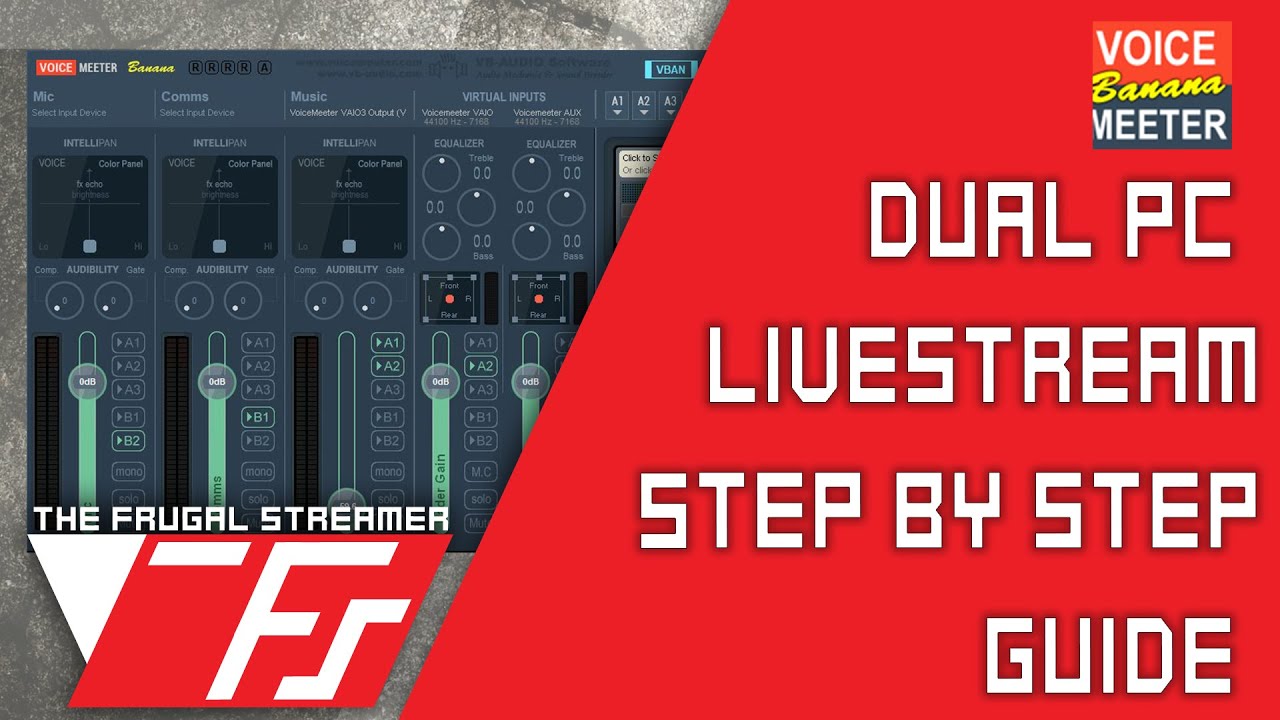
Learn how to setup a dual pc streaming setup with Voicemeeter Banana. This tutorial gives you a brief overview of the program and walks you step by step in s...
wooden fog
Okay I actually know about vmb so I'll check out this video and see if this helps, used to use it for mic purposes but never thought about doing it this way, thanks!
vapid thistle
Np :), it has a feature called VBAN which is why it can be used across multiple PC’s
 cunning latch
@wooden fog Sound Capture can also do this if you install it on the Gaming system. Set it to PC Gaming mode and select the appropriate options.
But Voicemeeter has some more powerful controls, definitely.
static helm
Wish there was a good tutorial such as the video about that gives real good examples of how to set vmb up using a PC, Xbox, PS4 and all that. I've been messing with it for months with a little luck, but I get 1 part working, and it break something else. I've purchased the extra audio cables offered as well. Trust me, I have googled, youtubed and all that trying to find something that is descriptive enough to explain the various settings. I might take a look at this video and maybe act as if 1 of the PC's is a console? Might work in some form or fashion
hushed kindle
Screen Link start a Twitch broadcast for no reason, I was trying to set it up to record my phone and I got the alert on my twitch app.
I had to log out
midnight steeple
haveing a BIG issue or I am idot
I have 2 GPU (Inter(R) HD Graphings 630 and Nvidia GeForce GTX 1060 6GB
how do I switch to the nvidia if my pc is running on that potatoish HD thing?
hushed kindle
You can do it on Nvidia dashboard
floral jetty
Your PC should default to what ever its plugged in to.
 boreal night
Hello. I bought the Elgato HD60 today. I want to set up my game stream broadcasts using 2 PCs. Cant seem to get it working
My Gaming PC - GTX 980ti --->Asus 144hz 2160 1440 monitor.
Connection: GTX 980ti --> Elgato HD 60. Elgato HD 60 type C cord is plugged into my Stream Laptop
Using Stream Labs
What am I doing wrong?
floral jetty
Did you mirror your displays
floral jetty
You should mirror them. You want what is on your game PC showing to the elgsto
cunning latch
Mirroring is one of the more straight forward methods.
But with Mirroring you're going to hit limits where Windows will either only let you have 1440p or 144hz. But trying to force both will cause issues.
boreal night
Figured it out
Downloaded update to elgato firmware via win update
Thanks for the advice 😃
floral jetty
Sorry fell asleep 😂 glad to see you got it fixed
vapid thistle
Cloning the desktop always was an issue for me, It would cause the stream to have screen tearing issues since im using a 75hz monitor but extending the displays fixed the issue
It really just depends on what you have in your setup
 stray ingot
I’m new to streaming on your Elgato. When I was streaming on Elgato the screen froze. Plus when I wasn’t streaming it would freeze a little bit. Is there a way to fix it where it won’t freeze?
stray ingot
@floral jetty can you help me
floral jetty
Sure... What's the setup. Single PC and console dual PC?
stray ingot
@floral jetty I have one computer to monitors. Here is my issue.
I’m new to streaming on your Elgato. When I was streaming on Elgato the screen froze. Plus when I wasn’t streaming it would freeze a little bit. Is there a way to fix it where it won’t freeze?
floral jetty
What are you capturing?
Are you outputting you PC to a capture card connected to the same machine @stray ingot
stray ingot
Yes
floral jetty
O.o eh I'd just do screen/game cap
stray ingot
How do I do that?
vapid thistle
Are you using OBS?
If you are using OBS on main PC right click on sources and click Display Capture / Game Capture. But if you are trying to do it to a console I think its Video Capture Device
floral jetty
@stray ingot this ^ add a source and if using multiple screens select the one you game on. If doing game capture you launch your game and select it from the source.
stray ingot
I have nothing to select. I just click the green streaming button then I start streaming @floral jetty
floral jetty
Are you using obs? Slobs? Game capture?
 charred chasm
hello i need help with my elgato
barren osprey
which part?
barren osprey
as in the capture card?
barren osprey
what was the fix?
charred chasm
i just unplugged both hdmi and plugged the usb back in my pc
but now how do i fix the mic
barren osprey
unplug and replug your mic? haha that one I, not too sure about. What mic are you using?
charred chasm
the xbox one that goes in my controller
im using the elgato that doesnt have the audio jack thing
my mic is disconnected and when i press "live commentary" it starts with three little taps and then it sounds like a monster
how can i make it detect my mic
@barren osprey
barren osprey
I'm not sure. This isnt really something that I have too much knowledge about
charred chasm
just making something sure, is it normal that my elgato does not have an audio jack ?
hushed kindle
What capture card you have HD 60, HD60 S?
charred chasm
hushed kindle
That model doesn’t have the 3.5mm jack
charred chasm
it still can record my voice right?
stray ingot
@floral jetty I’m using game capture
cunning latch
@charred chasm your voice is captured through a microphone connected to your computer. In the Game Capture software. The function is called Live Commentary.
charred chasm
So, it will be it's recording my xbox, while it will record my voice through the computer and it will be synced without delays?
@cunning latch
cunning latch
That's how it's designed, yes. If you were looking to capture your voice from the console's headset, that's not directly possible. You will need a separate microphone connected to your computer for this.
charred chasm
So i pretty much need a microphone for my computer anyway
I'm looking for the easiest way, i'm not very good with that type of stuff.à
south bronze
using Screen Link with OBS, it says its outputting in 1080p but there's letterboxing which would indicate that it's not a 16:9 aspect ratio
is there a way to fix this?
also, do you guys know any way to remove the home bar while in the app without jail breaking the phone?
 fair pewter
karmic umbra
fair pewter
karmic umbra
No
cunning latch
@south bronze taking a guess here, but is the screen from the phone actually 16:9? it might be wider/shorter.
charred chasm
@cunning latch so i need a mic for my computer anyway right?
 quasi tinsel
Elgato when are you going to fix the text editor in Game Capture software. This is ridiculous. Its been over a year. You charge 200 bucks for a light but cant fix your software?
 limber oak
You might have more luck with a different tone there, Monkey
 bright mango
Hello. Whenever I set my Switch to 1080p, this happens. When I switch it to 720p, it starts working perfectly. I have tested the HDMI cables, and they work fine. What’s going on? Any help is appreciated.
hushed kindle
Anyone with a Vertical GPU and Elgato HD60 Pro? What Case do you have??
upbeat pelican
What's the difference between the 4K Capture Utility and the Game Capture Utility?
upbeat pelican
Planning on using SLOBS anyway but it seems like I need one of these pieces of software installed to ensure I've got the latest drivers?
karmic umbra
It's like you have a regular pc screen and buy a 4k pc screen it gives softly better resolution
Tex! @upbeat pelican
upbeat pelican
I've already got 4K displays, just wanted to know what the difference was but it seems it's just 1080p60 or 2160p60 as the output. I'm using SLOBS anyway but wanted to make sure I had the right drivers installed.
 last moat
Was wondering if the Video Capture just digitized video or if you could use it to game capture things like GameCube? (Yes, I'm a complete noob)
rustic eagle
Capture card, captures things like a nintendo switch, Xbox, Playstation or pc
 cunning latch
To record your voice you need a microphone connected to your PC. It can't use the one from your console. That goes for every model.
@last moat You can use it with other analog sources like GameCube. Do you have any other Game Capture cards already? Might be worth just getting an analog to HDMI upscaled box and connecting your GameCube through that to your existing card.
last moat
I don't have any other capture cards -- I just got the HD60 S from Prime Day
cunning latch
@upbeat pelican 4KCU is needed as a utility to configure the 4K60 Pro, but otherwise is just more simple recording software. It does not stream, so you'd need to use Game Capture or OBS, etc.
Game Capture is much older software and has a cap of 1080p60 internally.
last moat
I just checked some out and I might do that, thank you!
bright mango
Does 1080p work on Switch on Elgato for anyone? It’s not working for me
hushed kindle
@bright mango
stray ingot
@floral jetty I’m using game capture
south bronze
can anyone help me with an issue
I just want to use Elgato to record gameplay from my switch, not stream and have it all set up. The timer at the bottom is constantly going like it's recording is that normal?
It's taking up space too just idling, I see my GB going down
do i not want game capture for windows?

like why is that going up and taking space when im not recording anything
rare kraken
the recording buffer?
When you have it active and loaded up within game capture software, it will auto-record so you can do the "flashback" recording
south bronze
ah I see, should I disable that?
thanks for helping
@rare kraken
is flashback recording useful
rare kraken
@south bronze I find it helpful for when you want to go back and record something
just set the buffer/hd space to what you want
it only takes up the space while you have the app open and receiving a hdmi signal
once you close the app, the HD space is recovered.
south bronze
oh I see so it really isn't taking up unnecessary space
thanks a lot man I was very confused
 tame thicket
I’ve been trying to figure out what to do but I figured I’d ask anyway.. I installed game capture software for HD 60 pro along with the software and my main monitor just says there’s no signal.. I’m not sure if it’s a wire problem because this was just working the other day. I double checked where the output and inputs go in and they’re in the right place. The second monitor I can see it’s just the main one that’s black screen. Does anyone know how to fix this?
floral jetty
@tame thicket whats going in to the elgato?
tame thicket
Not sure.. everytime I try to connect the elgato to my computer with hdmi first screen is just black screen
floral jetty
What cable are you using for the main screen?
tame thicket
I'm using HDMI for both
floral jetty
HDMI for both screens?
tame thicket
Yep
floral jetty
And are both HDMI cables plugged in to graphics card?
tame thicket
Like everything worked fine before I downloaded game capture HD
Everything's not new
Yes
floral jetty
And if you uninstall game capture does it go back to working
Also what's plugged in to the In on elgato, and what's plugged in to the out
tame thicket
Nope it's stayed the same since
floral jetty
Also what's plugged in to the In on elgato, and what's plugged in to the out
tame thicket
computer > in then out > monitor
floral jetty
O.o
I wouldn't export the PC and capture on the same pc
But you probably have to go to graphics setting and set to expand displays
tame thicket
outport of my pc to in of eglato
floral jetty
It's the same pc?
tame thicket
Ya
floral jetty
I wouldn't do that
Not really a good use
I'd just use both screens and do a screen cap or game cap
floral jetty
Ok, it's probably the screens need to be extended in graphics settings
tame thicket
I'll try that later on
On the other note I tried switching PCIe's and it didn't work
floral jetty
Yea it's most likely the display settings
 empty cypress
My Streamdeck cant remote obs
 prisma egret
I sent my friend my profile I made but where does he put it
cunning latch
He needs to go into Settings, Profiles, go to the Down arrow at the bottom and Import it.
prisma egret
It was a bit fiddly but we got it but thank you
 rare tide
Hey, so im thinking of starting some streaming and considering adding a camera to it. Im very interested in the cam link but im also thinking of possibly doing a multicam setup. Does this product work with a splitter connected to multiple cameras?
 short peak
just a quick question , i need to remove the voice-mod link in my stream deck every time i restart it as the stream decks dont link to it, and yes its on the update software version, its not to much of a issue , its just a small glitch that i think i need to post encase there are others with it?
 neat gulch
just checked and every single aspect of my laptop is well compatible with an elgatohd60s but not sure about gpu.
would the intel HD make up for the nvidia not reaching standard?
hushed kindle
How many RAM do you have?
 coral ferry
anyone know for the stream deck what is "On/Off" Its in control center?
 minor cradle
i got a stream deck coming in a couple days. does it have the ability to make the button icons change after i press them? for example when my mic is unmuted have the mute button show a crossed out mic symbol to indicate that it will mute the mic. then have it change to a mic symbol without the X to show that pressing it will unmute the mic?
hushed kindle
@coral ferry it’s for Elgato Key Lihgts
coral ferry
Oh thats cool
hushed kindle
@minor cradle yes you can change the buttons
coral ferry
all this stuff is new tyty
hushed kindle
I got it since the release
coral ferry
I just bought mine 15mins ago lolol
hushed kindle
It’s worth !
hushed kindle
Yes
hushed kindle
You can add windows commands and use multitask and have several actions
You can Add
Window + D
Alt+F4
Enter
coral ferry
Oh so I got to combine keys for it?
hushed kindle
Yes
coral ferry
Lol damn it
barren osprey
if you can create a hotkey for any of them then why not
hushed kindle
But there’s a new scrip
cunning latch
@rare tide HDMI Switchers could work, but there will be a sizable delay during the switching period. Won't be instantaneous. The Cam Link is intended to be used with one source.
I know it's not cheap, but a Cam Link for each camera is probably going to produce the best results. If you have some other capture card you can use one camera for that as well. Doesn't have to be a Cam Link.
neat gulch
@hushed kindle I've got 16gb ram
hushed kindle
I think it would works maybe just have to sacrifice some quality
cunning latch
@neat gulch What is the CPU model in the laptop
neat gulch
@cunning latch Intel(R) Core(TM) i7-4700HQ CPU @ 2.40 GHz
cunning latch
@neat gulch then that should be fine. 860M does seem to have NVENC so you should be good for GPU encoding as well if needed.
tidal vapor
can you add multiple browser sources in the game capture software
like 2 urls per scene
neat gulch
@cunning latch thanks dude appreciate it
 quick goblet
Hi there, got a new Elgato HD60 (not HD60 S), for recording and streaming my pc gameplay what drivers do i need? And, how can I set it up on OBS?
coral ferry
Is there a glitch with the stream deck in terms of adding songs to a playlist? Like everytime I set a new macro for it, the playlist will sometimes show a list.
south bronze
anyone know why my mic audio is recording on the studio but when i put my video into videopad it loses my commentary?
rest of the sound and video works great
 dense peak
howdy. I seem to have lost the signal on my el gato HD 60 Pro pci card. it no longer plays my games. i tried checking if wires were unplugged and used working hdmi cables to connect to and it's just not giving me a signal anymore
cunning latch
@dense peak Do you see anything on your TV?
@south bronze So Live Commentary was coming through when recording, but in the final video it's not there?
Are you on Windows or Mac?
@coral ferry Are you referring to a plugin like Spotify or Google Play Music? Or it sounds like this is Multi-Action maybe
coral ferry
Spotify, the “Save song to playlist”, sometimes shows the playlist and sometimes it doesn’t
cunning latch
This might be something @snow sluice can join in on as the developer of the plugin.
coral ferry
Here's a visual: When you drop the "Save song to playlist" it should show a list of playlist, but sometimes I get nothing. The only way for me to get that said lists is to reset my Elgato Stream Deck.
bright mango
@hushed kindle Sorry for the late response, that screenshot that you sent, my card is set to 1080p, and this is what happens when my switch is also at 1080p
empty cypress
Hello, my Streamdeck can´t control obs
karmic umbra
you ad obs to the software
empty cypress
Yes, i found the fail... I had to update obs. xd
karmic umbra
xD
south bronze
stream deck running very slow since moving from streamlabsobs to obs studio, switching scenes is very very laggy
empty cypress
Now i have to reinstall the Software, cuz the elgato remote control plugin is not available.
But it workt before
karmic umbra
Uppdate the stearm deck softwere?
karmic umbra
Restart the softwere
karmic umbra
Restart!
karmic umbra
Do you have the right buttons?
empty cypress
Yes
"OBS Studio", "Record".
Now i habe reinstalled, but there is the same failure.
floral jetty
is obs open when you are doing the install?
empty cypress
Yes
karmic umbra
Have you fixed command in note that says you should start recording
in obs?
empty cypress
OBS is at the latest version
floral jetty
close obs while doing the reinstall
hushed kindle
@bright mango I’ll check later what settings I have on my Nintendo Switch and let you know
karmic umbra
@empty cypress ??
karmic umbra
Have you fixed command in note that says you should start recording
in obs?
empty cypress
Where is the note
karmic umbra
fore what?
empty cypress
Why it says i have to update OBS?!
karmic umbra
do it?
floral jetty
@empty cypress did you close OBS between uninstalling streamdeck and reinstalling?
empty cypress
Yes
floral jetty
ok, now go ahead and open obs
on the stream deck software you may have to reassign the button. and see if it works
cunning latch
What is the actual version of OBS installed?
empty cypress
So i have reinstalled OBS also, and it works finally.
karmic umbra
now? @cunning latch
floral jetty
@empty cypress 👌
coral ferry
Is there a way to make each one of the Elgato Stream Deck Icons to make one big picture? Like a puzzle piece. Trying to make a huge clock.
floral jetty
yea @coral ferry https://www.elgato.com/en/gaming/keycreator and do wallpaper mode

elgato.com
Welcome to Key Creator, the only tool you'll ever need to customize Stream Deck keys.
coral ferry
Damn thought I recognized you lol
Oh I can make a live clock using that mode. Didnt know that
Ik there's a analog clock icon made but its too small for me lol
bright mango
@hushed kindle ok, you might want to dm it to me just so I can respond quicker
hushed kindle
Ok
quasi tinsel
Does anyone from elgato check this section?
hushed kindle
yes, some times
coral ferry
Aletz is probably a spy for them
 exotic ginkgo
so I double clicked a folder in the streamdeck application and it like reset every change I made? o.O
hushed kindle
i wish Kappa
 mild oak
hi my elgato is bass boosting evry sound no matter if its in obs or the program its self
hushed kindle
which one do you have @mild oak ?
exotic ginkgo
I'm setting up all my stream settings in a folder on my streamdeck, I click out and it just resets everything every time.
mild oak
@hushed kindle
hushed kindle
even the game capture software has the same problem?
mild oak
yes
hushed kindle
do you have another thing you chan plug like a console?
mild oak
no
it has to be in my streaming pc though because once i go back to the audio on my gamong its fine
gaming
hushed kindle
Mmm ok, let me see
mild oak
👍
floral jetty
@exotic ginkgo whats up
exotic ginkgo
Pretty much everytime I set up my streamlabs obs settings in a folder on my streamdeck, and back out of the folder everything just resets
so the folder is deleted all the icons change and I have to redo it everytime
I've redone it like 4 times now
floral jetty
so you create a folder and put like your scene swaps, and other obs controls and when you go back to the home page its gone?
exotic ginkgo
yeah I go to the homepage and the folder deletes, so all the obs stuff is in the homepage, and all their icons are reset
floral jetty
hm thats strange... are you hitting home on the program or on the stream deck?
have you reinstalled the program?
exotic ginkgo
Not yet, I just got it
and I'm clicking back on the stream deck
also did it once on the program and it reset everything as well
floral jetty
thats a strange one. maybe run the app as admin first?
exotic ginkgo
I'll try
hushed kindle
@mild oak where do u have your capture card? I have it Here cuz my GPU
exotic ginkgo
seems like it might be fixed just randomly.
I'm hoping so since if I have to set it up again I'll go insane lol.
cunning latch
Can you post a sample of what it sounds like?
floral jetty
or if you have an EQ could be set wrong
quasi tinsel
When is there going to be a fix for the text editor in game capture software. Its been well over a year
hushed kindle
why not change to OBS @quasi tinsel ?
quasi tinsel
I like game capture because im use to it and have been ysing it for over 2 years
floral jetty
whats the issue?
quasi tinsel
It just boggles me they still havent fixed the text editor. You cant change fonts
hushed kindle
Change its always better, dont fight it embrace it
cunning latch
OBS will open up many more options in general however.
quasi tinsel
Yes but theres other functions of game capture i use as well that i prefer
floral jetty
id post it in #feature-request that doesnt have as much traffic so easier for them to see and respond
You should be able to go to c:\users\What ever your username is\appdata\roaming\elgato\game capture\overlays
in side there should be overlay 0 and so on. you can open in a notpad and edit the font used
quasi tinsel
Could but i shouldnt have to. Its been broke for over a year
floral jetty
I get that. The staff is active in here.
I don't personally use game cap so wasnt aware of that issue.
quasi tinsel
They know about it as well. It has been reported massively
floral jetty
oh ok. well hopefully you get a response.
hushed kindle
I coulnt be able to wait that long (a year)
quasi tinsel
Well over a year
I mean i can make the stuff in photoshop but thats not ideal for simple animatrd text like you use to be able to do
coral ferry
Dang ok much appreciated. Cool Japanese speaker.
hushed kindle
what Japanese speaker?
coral ferry
The language is in Japanese
hushed kindle
That's spanish, Im from Mexico
coral ferry
Oh my bad lol
 lime violet
Hey guys. So I'm having issues with my HD60 Pro. I have tried literally every possible solution on the internet and nothing has worked. I opened a ticket with Customer Service and they were unable to fix it, they then offered me a warranty replacement but then rejected that anyways.
Basically, the issue is that the driver seems to not install correctly. I install the GameCapture software, then install the driver from Elgato's downloads page.
When I open the GameCapture software, I am asked to reboot over and over again no matter how many times I do so.
I have tried many, many things. Here's a list of a quite a few:
- Uninstall GameCapture Software + Driver (then Reinstall)
- Update Windows to 1903
- Flash motherboard BIOS to latest revision
- Swap PCI ports on the motherboard (from 4x slot to 16x slot)
- Wipe the Driver Packages from the Driver Store using DriverStoreExplorer.
- Reset Windows using Reset this PC (keep documents and files option)
As you can see, I have tried EVERYTHING that could possibly be done. The only other thing I can do is format my SSD and reinstall Windows. But I can't because I have no where to backup my files properly.
I'm praying someone here has a solution that will work. I have lost all hope for this capture card to work.
Thanks.
Picture of the Elgato software asking me to reboot:
Picture of driver details in Device Manager (it also reports the device is working correctly)
dense peak
@cunning latch I see picture on my tv yes but only because I have an hdmi switcher & another Out signal goes there
floral jetty
@lime violet have you ran the program as admin
cunning latch
@lime violet Did they give a reason for rejecting the warranty for you?
And does 4K Capture Utility show a similar problem for you.
lime violet
@floral jetty No I haven't. I guess I can give that a try. I haven't thought if that would change anything.
@cunning latch They rejected the warranty because it was a few months outside of the warranty. However, I feel this is unfair because the card hasn't worked for around a year and a half now and I have contacted support multiple times and it was only this time I was offered a warranty replacement.
Also I didn't know the 4K Capture Utility was a thing, mind providing a link?
Just ran the GameCapture as Admin, still got a reboot message
floral jetty
Hmm try uninstalling game cap and the drivers and run the installer as an admin
That's a strange issue tbh
lime violet
Run both installers as Admin @floral jetty ?
I'm pretty sure they both run as admin already...
floral jetty
Yea
Eh some times windows acts different when you actually run as the elevated command
lime violet
I can't run the GameCaptureSetup as an Admin. I don't get an option to as it's an MSI file
cunning latch
@dense peak Try reinstalling the drivers: https://help.elgato.com/hc/en-us/articles/360027961152-Elgato-Gaming-Hardware-Drivers
And then doing a cold boot. Shut down the computer fully, unplug the power cable, press the power button a few times to drain any charge. Reconnect cable and power it back on.

Elgato Gaming
Elgato Gaming Hardware Drivers - Windows 10
When you install Elgato Game Capture HD software for Windows 10, or Elgato 4K Capture Utility, the necessary drivers should automatically be instal...
lime violet
@floral jetty I have also tried removing the card physically and uninstalling drivers then reinstalling
It did nothing
cunning latch
@lime violet Did you mention this to the team? What happened with your other tickets?
lime violet
Everything I've mentioned here I've mentioned to the team beforehand. The other tickets basically went the same way as this one, except a warranty replacement was never offered until the last one
signal musk
Hey @lime violet can you dm me your ticket numbers? I can forward them to our support team to look further into this as well
exotic ginkgo
Where do I go to turn on the confirm to delete for streamdeck icons, folders etc?
since I disabled it by mistake
 barren quail
Hi I’m new to this discord. I’ve had a elgato hd60pro for about a year give or take. I’m having a hard time with the audio popping while playing any console through hdmi. I’ve gone on to the net and have searched and tried many things. But I’m lost I cannot seem to get it to work. It’s gotten to the point where I cannot even stream through streamlabs obs. Is there anything I’ve missed because I’d really love to use it and stream with it. Thanks for any and all help.
dense peak
@cunning latch re-installing drivers worked. thanks.
south bronze
anyone know why my mic audio is recording on the studio but when i put my video into videopad it loses my commentary?
rest of the sound and video works great @cunning latch any idea? windows, comes through on software but not when it's recorded
dense peak
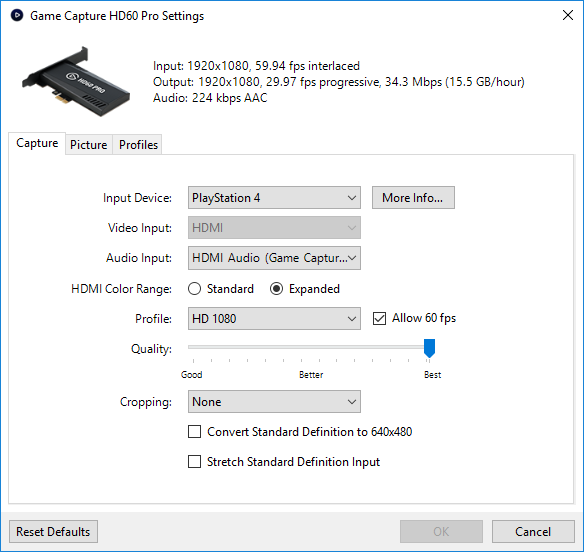
I'm not sure why I can't record my gameplay in 1080p anymore. Everything is 720p 60fps
 floral jetty
that looks to be on the switch dock side.. shows your input as 720
also seems to be a common prob with the switch doc @dense peak
 floral jetty
its because the input is interlaced
so 1080I/60 is same as 1080p/30
youll have to go to ps4 settings and switch to 1080p @dense peak
dense peak
miracle worker. thank you @floral jetty
floral jetty
NP
 atomic heart
Hey Everyone! I've searched far and wide for a solution to this issue and can't seem to find it. The issue is audio desync. I currently have use OBS Studio and am using an Elgato HD60 (not S or Pro).
Now, when I am streaming a game the Elgato and the stream slowly go out of sync with the audio. My camera and Mic stay synced but the game audio and the stream go out of sync. (IE. When moving through a menu, when you move from one selection to the next it makes a ping sound? well that ping sound comes a second (or longer if I leave it) after the movement has completed) As I've said, it gets gradually worse as the stream goes on.
This only started being an issue recently, I haven't changed anything. It started while playing Zelda Twilight Princess HD, so I thought it might be an issue with either my wii u or the game itself. Turns out, these past two days when trying to stream Fatal Frame 2 from my PS3 I ran into the same issue of the audio eventually desyncs and the rift grows larger.
So TLDR; Stream starts out perfectly synced and after an hour the audio between game and stream desyncs and grows larger. Resetting the Elgato fixes it temporarily but it occurs again within 5-10 minutes now.
Lastly, If I stream from PC or with my 3ds capture card system, this desync doesn't happen. It's exclusive to Elgato. I've messed with HDMI cords... and am toying with the possibility it might just be my card dying... I've used it a lot over the past 3 years and owe the old thing some effort before replacing 😃 Thanks for reading! sorry for the long post!
floral jetty
are you seeing the delay on stream as well or just for your hearing
atomic heart
I see the delay and check it when people tell me the audio is desyncing by using the menu pings as described above
hushed kindle
with the Elgato HD60 you have to set a delay about 600-800 ms
i had it
Also i have the 3DS with capture card
atomic heart
Yes, I know about the delay. It is synced perfectly at the start and isn't an issue. It hasn't been an issue for 3 years, just in the past month the delay/desync occurs after about an hour and grows larger and larger
floral jetty
what is the sample rate for audio in OBS?
hushed kindle
I See maybe its time for an upgrade to HD60 Pro or S
atomic heart
48hz, that's what Elgato is natively, right? I -think- that's what I read so i set it there. You might be right Aletz, but I'd like to avoid spending the money if I can xD
floral jetty
yea 48 is the better option.
also make sure software are all up to date. and maybe try a diff USB port?
atomic heart
I've tried swapping between usb 2.0 and 3.0 to see if there is a difference but there doesn't appear to be... does front vs. back usb matter?
floral jetty
not really
atomic heart
Didn't think so but just thought i'd cover that base haha. This issue is so frustrating because all of the stuff I found online is about the initial desync and this issue is separate!
hushed kindle
i used the back usb ports for my capture card, its directly into the mobo instead of the front cuz you have the Case cables involve that shoulnt matter but.. who knows
cunning latch
@south bronze Videopad is a video editing tool? If you go to the Edit tab in Game Capture HD, does the commentary play there?
floral jetty
OBS Forums
Thanks to the hard work of volunteers on OBS Studio, it now includes the powerful functionality of scripting. More on that here.
This has enabled a very cool feature: Instant Replays.
This guide will go over how to setup an instant replays It...
@exotic ginkgo
south bronze
@cunning latch yes it's an editing tool, commentary is in the edit file
but not when i put it onto videopad
really weird
cunning latch
Head into Game Capture Preferences, Sharing. Then make sure either Mix is enabled for Live Commentary, or Export is enabled.
It might simply be ignoring the Live Commentary, when exporting to an MP4.
south bronze
Can someone help me with streamlabs obs? I have video working fine but there's no audio
hushed kindle
also make sure you have the mic activated
@south bronze your you audience can hear the audio?
south bronze
I was just doing a test recording since my internet isn't good enough for streaming currently but there was no audio in the video
hushed kindle
ok i think i know what it is
choose the elgato source and go to the last option
its in spanish so for me its monitor and output i guess
just use the mic as an example
south bronze
That fixed the issue but I don't hear the audio when recording
floral jetty
you will have to set monitor on the source. should be a monitor and export or something like that
hushed kindle
its a PS4?
south bronze
It's a switch
The game capture software works fine but I've been told it's not good for streaming
hushed kindle
youll have more options in OBS /SL OBS
which Capture card do you have @south bronze ?
south bronze
the HD60S
hushed kindle
go to the settings on your capture card source then select this
@south bronze let me know if it works
south bronze
It works until I change to my other mic
hushed kindle
which mic do u use?
south bronze
One on my headset. I only got it recently
changing it to the headset mic actually makes all sound stop
south bronze
bluetooth
floral jetty
Did you set your desktop audio out to it?
hushed kindle
go to settings on SL OBS / Audio and set up your headset in deskop audio
south bronze
I have the headset for desktop audio but still when I go change the mic to the headset one, all audio stops
I found out it's not OBS causing it, if I change the mic on discord to the one on my headset, that will also disable the sound for everything
exotic ginkgo
anyone know why my hotkeys for obs don't work when I'm doing it through streamdeck?
 languid cobalt
I am unable to get a clean video feed from my gaming pc rtx 2070 to the hd60 pro in my stream pc. Even when just previewing, there is intense screen tearing, low fps, and blurriness. I am not even streaming or recording, just simply previewing it in the el gato game capture software it is a very low video quality. I have no idea what to do
 hidden jolt
Anyone else having issues with streamdeck and Mixer? It seems like at least once a week I have to reauth Mixer or the "Mixer Chat" function stops working.
floral jetty
@languid cobalt what it's the refresh rate on your monitor?
floral jetty
Ok, and that's what you are duplicating to the stream PC?
languid cobalt
Yes. I am doing the windows "duplicate display" setting, monitor at 165 hz, ElGato device at 60 hz
Does that cause issues??
floral jetty
As long as the elgato device is set to 60hz should be good. I would verify in Nvidia/radeon software
exotic ginkgo
Hey Shady I have a question do you happen to know why my hotkeys for obs work fine but when I do it through streamdeck it doesn't detect it?
Nvm from what I can see OBS & Streamdeck have to be running as admin so it works
coral ferry
@hushed kindle and @floral jetty thanks for being such a helpful person, honestly see you a lot helping people it’s truly amazing!
exotic ginkgo
Yeah just sucks since when I run as admin I can't drag new icons I have to open them manually
hidden jolt
(Seems nobody saw my first time lol)
Anyone else having issues with streamdeck and Mixer? I've had this issue since before v3 of the streamdeck software, like 6 months or so ago. It seems like at least once a week I have to reauth Mixer or the "Mixer Chat" function stops working.
hushed kindle
Glad to help man
floral jetty
@hidden jolt not sure sorry I haven't streamed to mixer as of late.
hidden jolt
I only stream to Mixer. Don't like the idea of multistreaming really
floral jetty
I agree on picking one. I stream as a hobby so just around at times
cunning latch
@hidden jolt have you opened a ticket about this yet? If it's been happening that long maybe some logs could help in a ticket.
hidden jolt
I have, months ago but they seemed to temporarily fix it around v3 time, but it happened again lol
just had to reinstall the Elgato SD software earlier today just cause it wouldn't pick up OBS
cunning latch
Reply back to the email ticket and mention the issue. They'll likely ask for updated logs. If the issue came back, there may have been a regression.
hidden jolt
I'd have to find the email haha. Don't remember ticket number
cunning latch
Should be a six digit code.
Or you could open a new ticket and just reference that you had a previous ticket, if you're using the same email they should be able to look it up.
 lilac cedar
Hello, I just got my new elgato HD60 S and I’m trying to record but it’s not showing any gameplay
It’s only recording the audio
It’s just a black screen
lilac cedar
Nvm I got it working
 weary lion
Hello I require aid
Why is it that when I open elgato that it seems to begin counting as if it were recording, while the '58.9GB free' goes down but is reset when I reopen elgato
weary lion
what is flashback recording?
hushed kindle
It “record” automatically and in case you miss something
@weary lion

How to use Elgato Flashback Recording Flashback Recording records your footage in the background so you don't have to worry about starting and stopping your ...
weary lion
thank u
hushed kindle
No problem
exotic ginkgo
what does the green triangle mean when you click a button on streamdeck and it doesn't work
exotic ginkgo
Since it's to send out a tweet o.O
exotic ginkgo
I did change it lol which is the weird part
exotic ginkgo
meh it ain't that serious I'll figure it out another day lol
hushed kindle
Ok
 placid spire
is there a place where i can download the driver for the hd60s
also will the game capture for windows thats available for download off the website work for windows 8.1 even though it says requires windows 10 or later
hushed kindle
@placid spire its seems that Elgato remove the website
placid spire
yeah i can't find anywhere on the website for a place to download the driver
and i dont want to go on a third party website in case of viruses or something
placid spire
wait does the hd60s only work on windows 10
hushed kindle
Idk didn’t check the requirements before you buy it?
hushed kindle
Also you need a 3.0 USB
hushed kindle
I guess you’ll need to upgrade to Win 10
placid spire
sigh guess so
 cosmic vine
yes 😃
hushed kindle
But I dont recomend Mac for streaming
cosmic vine
it actually doesn't do that bad
especially since it's not playing the game.
My entire first year streaming was soley on a mac
hushed kindle
i had a Macbook pro 15" and had to sell it
cosmic vine
I have an MSI laptop now. my wife has a macbook for her writing and I built her a sleeper gaming desktop
cosmic vine
but any way. I would recomend upgrading to windows 10 from 8.1 regardless
right now I'm full PC
hushed kindle
yeah you should upgrade
hushed kindle
I preferDesktop cause you can upgrade parts instead of having to change all the computer
 weak gyro
test
weak gyro
does @burnt phoenix number go up?
cosmic vine
huh?
cosmic vine
I'm confused
hushed kindle
mee 2
 mighty meadow
Hey anyone knows about the HDCP problem with the Nintendo Switch? I can't record my Nintendo Switch... I tried a HDMI Spliter but it does not work. what can i do?
On My Xbox it works
 hard crest
Can you preview? You have to change the input settings in the little gear in the top right for each device you hook up
 sturdy citrus
I haven't had any issues with Switch outside of it sometimes not properly starting up. Try pulling it and starting it up then dropping it back in the dock
mighty meadow
@hard crest I hear gamesound but i don't see anything...
@sturdy citrus I put everything off for 5 minuts and put everything in but still it does not work...
hard crest
try messing with your settings and google be your friend, each platform requires different settings
mighty meadow
okay
quasi tinsel
so with game capture software everytime i want to stream to mixer i have to delete and readd my account in game capture. Don't have to do this with twitch or youtube so whats the deal with mixer?
floral jetty
@mighty meadow have you pulled the HDMI cord? Video apps like Netflix and Hulu will trigger hdcp
hushed kindle
I haven’t had any issues with Switch and hd60 pro
 vestal mango
Hey guys! I have a unique situation I think... I have an HD60 Pro, I Dual PC Stream, I have 3 monitors. Oh did I mention I have an AMD r9 390x. There doesn't seem to be a very nice way to "merge" the elgato and my monitor 1 without killing the other 2 monitors. Am I missing something?
floral jetty
the 390x only supports 3 screens. you cant do 3 screens and the elgato as that counts as a screen
vestal mango
I have 4 ports on the card
floral jetty
The card will only support 3 at a time.
vestal mango
Dammit limited by my gpu of course. Any recommendations for a gpu that supports 4 that I can get this to work properly
floral jetty
here is newegg sorted to show all 4 monitor supported cards
your budget would be the biggest factor in cards
vestal mango
thanks for the help
floral jetty
np
vestal mango
ok, so question, if you know the answer to this... I can have 3 active displays... the hd60 pro and main display count as 2. How can I still have my left side display active? That's the display that I read chat and alerts from. My right side display displays my stream pc so while streaming I wouldn't miss that display.
does that make sense?
floral jetty
could just swap the right screen to be plugged in to the stream pc?
vestal mango
it is
I think AMD's software is severely limited when it comes to making displays active and stuff.
floral jetty
so you only have 2 screens plugged in to the 390x? plus elgato?
vestal mango
no, I have 3 displays plugged into the 390x
and I have my stream pc set to hdmi 2 on the right display
floral jetty
ok so that screen is plugged in to both machines?
hard crest
^ unless you have some BA monitor that can display more than one input
floral jetty
if you go to display settings on your pc it will show monitors that it sees
vestal mango
brb work meeting
hard crest
I think LTT had a monitor they were showing off for 6 editors 1 PC that could do 4 1080p inputs but that montior costs more than most computers.
floral jetty
👌
languid cobalt
I've done something severely wrong with my setup and I cant figure it out, im just gonna return the hd60 pro, it doesnt work for me
😦
hard crest
you don't return products because you can't follow instructions..
languid cobalt
i will disregard that smartass statement 😃
floral jetty
whats the issue Kerry?
languid cobalt
same as yesterday. the video feed is extremely low quality. i dont think the card works with my setup
hard crest
http://ltroyalshrimp.com/guides/how-to-use-a-144hz-monitor-and-the-elgato-hd60-pro-at-the-same-time/

Welcome to the first guide on my website! In this guide, I will show you how you can use a 144Hz, 120Hz or Nvidia G-sync monitor together with an Elgato Game Capture HD60 Pro, to play games at the …
floral jetty
ok your issue is more on the windows settings. youll need to go to display settings on the PC
hard crest
https://i.imgur.com/rxaL42D.png That's what i was thinking Shady.
The settings you'll want toxic are here, you can right click on the desktop and hit display settings to bring up the menu
from there you should be able to configure your screens however you want them
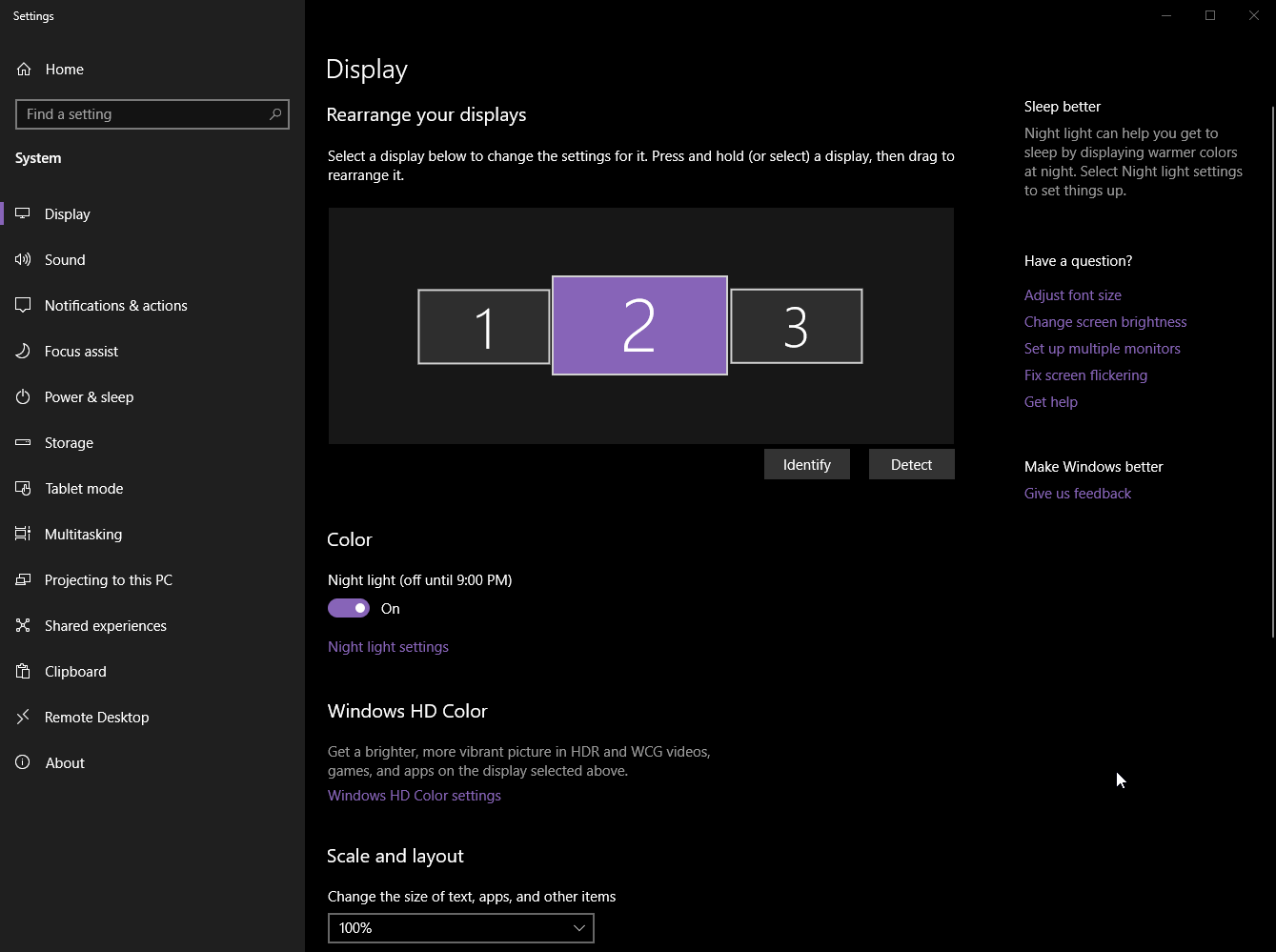


If you're not sure how your displays are numbered you'll want to hit identify, you'll want your left monitor on the left of your main, and you main duplciated between the display and the HD60
floral jetty
yea and youll want to select your right display and change the extend to this to do not extend. that should stop sending a signal to it
vestal mango
I got that far yesterday, but to merge them with the hd60 didn't seem to exist. I finally found clone on the ADM settings but then I lost the other displays and it wouldn't let me move them around. It was really frustrating LOL
I'll keep messing with it and hopefully will find the right solution and report back. I shouldn't have done it 15 minutes before I was supposed to stream either
hard crest
I've been there and done that toxic, ha
but yeah i can't talk to AMD's settings, but i stay out of Nvidia's when i'm messing with displays
floral jetty
you should see the elgato as an additional screen on there. after not extending the right screen you should mirror the elgato to screen 2. if still having an issue try removing the cable from the right monitor to the game pc
languid cobalt
I have 2 PC's
floral jetty
whats the specs on the second PC?
languid cobalt
I7-4790k
Gtx 970
16 gb ram
Its not the PC's, the PREVIEW in ElGato game capture is low quality
I'm not even streaming or recording, simply the preview is broken
The feed from my rtx 2070 in my gaming PC to the ElGato in my game PC comes through very poorly
And I'm using the box provided HDMI to connect
floral jetty
@languid cobalt in game capture if you hit the gear next to the elgato device what are all the settings set to
languid cobalt
floral jetty
ok that looks good, do you have a console just to test and see if preview still looks like 💩 or maybe try in obs?
languid cobalt
Yeah some low quality in OBS and SLOBS
The issue is between my graphics card and the ElGato I believe and I have no idea where the solution is
floral jetty
ok, so that narrows it down atleast. when you set it up you went in the the geforce software?
languid cobalt
No I didn't do anything in the GeForce software
floral jetty
ok, so you probably have to do this stuff: http://ltroyalshrimp.com/guides/how-to-use-a-144hz-monitor-and-the-elgato-hd60-pro-at-the-same-time/
Welcome to the first guide on my website! In this guide, I will show you how you can use a 144Hz, 120Hz or Nvidia G-sync monitor together with an Elgato Game Capture HD60 Pro, to play games at the …
basically your pc is prob sending more than 60hz to the elgato and it doesnt like it
languid cobalt
I will try that right after lunch!
 low river
It looks like my HD60 Pro is being recognised as a generic Multimediacontroller instead of what it is. I have installed the drivers. Anyone know how to go from here?
 storm relic
Hey. Dealing with some scratchy/low quality audio with the instant gameview. What would I need to do, to fix this issue?
coral ferry
Is there a reason when I use stream deck, and I click on a button it automatically swiches interfaces?
hushed kindle
what is the action for that button?
coral ferry
My steam is linked to a app launcher
So I got 2 profiles a games and a main. I click on steam which is in my game profile. It launches steam but then on the deck it takes me to my main profile
nvm it aint doing weird stuff anymore
coral ferry
Yeah once I started getting help, it started to behave
languid cobalt
Yeah changing those settings doesnt change the video quality at all
could i possibly be using an imporoper PCIe slot somehow?
floral jetty
eh it should work on all slots. but you could try swapping to a different one. I had mine on the very top slot
languid cobalt
man, im upset
ive tried so many things to get this to work properly, and im just failing
floral jetty
also in game cap settings that you sent before, put the slider all the way over to best to see if preview looks better
languid cobalt
ok
i got went both directions fully and its still overall poor quality
im just starting to think that my graphics card will not give a clean feed to the elgato
floral jetty
maybe the hdmi cable? The 2070 shouldnt cause an issue
languid cobalt
ill try a different cable
hushed kindle
ther's a way you can send your signal throu ethernet using OBS but you need a Super Router
just need the obs-ndi
floral jetty
my experience with ndi has been meh.
 elder heron
this has nothing to do with elgato but i wanna upgrade my setup for cod and my birthday is coming up. currently im using a 3ms 75hz asus monitor and a default xbox controller. should i ask for a scuf (if so which one) or a ben q 120hz 1ms monitor
 summer thicket
hi, just got an HD60S today with gradual audio delay in the preview
is there a way around this?
not even streaming or anything, just trying to make sure everything's all good before I start that
hushed kindle
@elder heron you play on xbox or PC using xbox controller?
 balmy terrace
going 120hz is a huge improvement in high speed tracking and smoothing out visuals... sure the scud is great but the xbox one default controller is also a pretty damn nice controller, just not a lot of bells and whistles 😉
personally, I'd go monitor upgrade first
languid cobalt
i give up, i took the capture card out. thank you very much @floral jetty for your input and help, i appreciate it. I came here specifically looking for help and you showed up
i cant spend anymore time never figuring out the problem, i wish i was smarter, idk
floral jetty
Np sorry wasn't able to get it fix
languid cobalt
its ok, i know how computers are. i just wasnt expecting it to be this difficult. and its genuinely not, i have everything set up properly to much knowledge EXCEPT for the fact that the video feed quality is poor
i dont know what else or what i need to know to fix it
but thanks very much for trying
elder heron
@hushed kindle i play xbox
one x
and sometimes ill play csgo on pc
and another option was for me to buy an elgato
floral jetty
If your PC can't drive a 120hz screen no point to get that as the Xbox won't either.
sturdy citrus
Yeah the Xbox “supports” 120hz output but nothing other than the menus actually runs that framerate.
You’re best off getting a solid 1080p panel with freesync that ranges 20-60 and has a quick response time, since it’ll smooth out the framerate in some less than 60fps locked titles- or the controller since you’ll feel that more in game.
If you’re playing on PC the high refresh makes sense especially since most PCs will run CS:GO at that framerate
upbeat pelican
I have a question regarding OBS and the 4K60 Pro. I want to output the audio from the capture card to both the stream/recording an my headphones but there's two options, WaveOut and DirectSound, which one should I use?
 vast palm
Usually on OBS you can output the sources to the sound card
First you can output certain audio inputs to monitoring and out
Then you just get in the OBS settings and set monitoring on whichever sound output you'd like
You'll have a slight delay depending on your audio source but you should be rather fine
upbeat pelican
I’m using Streamlabs OBS but the settings should be the same
hidden jolt
As of last few days, when I try to press my streamdeck button to open all my software, it opens then crashes OBS. If I open it manually it doesn't crash.
(live now, so I won't check till 4 hrs roughly)
south bronze
Hi all! Joined the discord in hopes of getting some assistance. I’ve had the elgato hd60s for awhile and I feel like it’s always been super hit or miss for me on whether it works or not. Sometimes lights show up corresponding to an error code, sometimes it doesn’t. This happens on multiple consoles and I’m trying to figure it out. OBS is my software and my PC is kinda a beast. I’ve tried googling around and this is one of my last hopes
Editing to add: the main issue is that nothing shows up in OBS 50% of the time. 25% of the time I see “No Signal” and the last 25% I see actual gameplay from my consoles. I can’t figure out why it’s such an issue on mine 😦
 chrome creek
@south bronze does it work in the elgato game capture software?
south bronze
I haven’t tried it in awhile, last time I did I got about the same results
chrome creek
it could be hardware then if you eliminate software issues, but i would double check connections, inputs etc
I was actually hoping to get some help with the gamecapture software I am unable to check "Capture music" when using the sound capture software has anyone seen this or know of a resolution?
south bronze
I try unplugging and replugging stuff quite a bit :/ this happened with my last hd60s too so I feel like I either have bad luck or I’m doing something wrong.
Also sorry I’ve never tried to use the sound capture 😦
vapid thistle
Anyone here have a GPU with one HDMI port but have to share a monitor input and elgato input? If so what is your solution, just curious?
vapid thistle
I guess that works, though I’m using a dual pc setup not a console. Right now im using an HDMI to display port adapter for the HD60 pro but it seems like it might be losing a bit of quality on my streams.
Still testing though 🤷♂️
coral ferry
Damn Aletz is so smart wtf
 versed star
Good morning everyone
Is there anyone free I can ask for help with my hd60
floral jetty
@vapid thistle can you explain setup a bit more.
@versed star post your issue well help as we can
versed star
Thank you @floral jetty
I use the hd60 elgato with obs and before yesterday it was setup ready. Then I switched it on and the screen has moved to the top left and I can’t configure it to fit to size and it’s not as clear either. Any suggestions?
floral jetty
If you go to properties of the elgato what's it show as it's input and output resolutions
If you have game capture installed and open it I believe the gear on the device will show it rather easy
versed star
Sorry I will have to check when I’m home. Stuck at work at mo. Was pulling my hair out over it last night. So frustrating
floral jetty
Np
south bronze
Morning all if anyone had any advice on my issue I posted last night I’d be super appreciative. Just wondering if others have seen the issue. I’m also willing to go to DMs to reduce the chatter here if you prefer.
vapid thistle
@floral jetty so my setup is a dual pc setup. My gaming PC has a GPU that only has 3 DisplayPort ports and 1 HDMI port, but I have 1 monitor and 1 elgato HDMI cable to plug in. So to do this, I’m plugging in my monitor to the actual HDMI port in the GPU and I’m using a hdmi to DisplayPort adapter on the Elgato HDMI cable to plug it into a DisplayPort port. This seemed to cause the video on the elgato hd60 pro to look a little worse than it should. I’m still testing though, so I just wanted to hear what other people were doing :)
floral jetty
If you are using one screen and need the same feed on screen and elgato you can get an HDMI splitter instead of a switch. This will duplicate the feeds. It's what I used for PS4.
vapid thistle
A splitter would work, but the question is will I lose quality use one? I’m trying to find a solution with the least possible quality loss
floral jetty
A good splitter won't have quality loss
vapid thistle
That’s good, I look into it then. Do you have any recommendations?
floral jetty
Gotta look don't remember the name was a small black box with blue on it
vapid thistle
Aright, thanks for your help :)
floral jetty
Np
floral jetty
@south bronze so pc randomly works with elgato and randomly doesnt?
south bronze
Yeah pretty much. I can’t get a consistent way to find when it works or doesn’t, or how to get it to work. In OBS I’ll activate / deactivate it, unplug the cable from the pc, unplug the power / hdmi from the elgato. All kinda at random until it eventually works
Sometimes it works immediately after plugging in, sometimes not even after an hour
floral jetty
in device manager does your PC see it all the time?
south bronze
Good question? I guess I haven’t checked that....I know that OBS sees it whether anything is captured or not. So I can remove the device from a OBS and re add it
And it’ll pop up “Elgato” under video capture device
south bronze
The hd60 s
vestal mango
So quick update, I unplugged my 3rd display (right hand monitor) and just used my stream PC on it, was able to clone the main display to the elgato and use my left hand monitor as usual. Thanks for all the help yesterday @floral jetty
floral jetty
glad that worked!!
vestal mango
Next... audio... my audio is ALLLLL effed up now thanks to audio capture. I have a mixer, and for some reason, not sure if it's the newest windows update or what, but I am having the hardest time setting my defaults back to what they were, not use the elgato software for audio, and separating everything out. UGH
floral jetty
Audio...the bane of life lol
vestal mango
I'll deal with all that more on my own time, not looking for tech support on it yet, but, it's really frustrating.
floral jetty
@south bronze in game capture, check the settings on your card see if there is a firmware update
vestal mango
I might have to download a soft mixer for both pc's and funnel everything through that then out to my mixer
vestal mango
that's probably what I'll end up with
south bronze
Mk, I’m gonna laugh so hard if a firmware update is all it is lol. I’ll have to check when I get home, but thanks for the advice and talking through it with me!
vestal mango
do you have an actual mixer as well?
vestal mango
it's crazy how my setup has grown in the short time I've been streaming... I just want to play video games and have people watch haha
oh niiiice, I want the goxlr so bad, but $$
floral jetty
i posted to them to release a base model with out all the sound effects and sampler since just the software and mic amps are value town. they gave me 👀 🤐
sooooo maybe a cheaper model soon
floral jetty
nice yea i had all of that stuff and now its in a drawer lol
vestal mango
lol
 elfin sorrel
so im having some problems getting my cam link 4k thingie to work... now i know im not feeding a camera into it but it should work if i plug it into my gpu and my computer think that ive plugged in another monitor and the cam link 4k captures that monitor. which it does...
problem is when it duplicate my primary monitor to the virtual one it poops on me :v
any ideas?
hidden jolt
As of last few days, when I try to press my streamdeck button to open all my software, it opens then crashes OBS. If I open it manually it doesn't crash.
(Not at home till this afternoon/evening)
elfin sorrel
When I have all the monitors extended everything is fine...
when i duplicate it ... y it do dis
floral jetty
camlink 4k only does 4k/30fps