#capture-cards
1 messages · Page 7 of 1
 steady sorrel
 @vale loom
how you expect it to pick up a source when the source is off?!
power on your console lets see if we get anything from it then
or were you just referring to HDCP?

 vale loom
nope
steady sorrel
okay, I'm not under the impression that you havent checked these things fyi, I just know its probably something simple that we cant seem to pinpoint. well at this rate I'd consider re-installing 4k utility, see if it works thereafter and if it didnt consider either an official ticket with elgato (which I think you've already done), or return it for another unit with the assumption this one is defective by some means.
 steady sorrel
That’s not typical so I’m sorry that keeps happening. Elgato may have some better troubleshooting steps you can work through. Id recommend calling as they take a while to respond to tickets sometimes. But yeah if you need to return it that’s fine too!
vale loom
steady sorrel
That’s not typical so I’m sorry that keeps happening. Elgato may have some bette...
should i buy another one?
steady sorrel
vale loom
should i buy another one?
Couldn’t hurt imo to just ask if they’d swap it out for another unit unless you get answers from Elgato first.
vale loom
Ye
Well thank you and Vic a huge help for the past 2 days
I will come back later when I do get the hd60x or something else not sure yet tbh
And I swear if it doesn’t work I’m gonna be so pissed off
 prime otter
So I have a question. Is the HD60X the best card to stream from my gaming pc to a laptop ?
 neon pivot
Quick question, does anyone here use the HD60 S+ with their pc? I’m having issues with getting the audio
 granite hill
steady sorrel
Couldn’t hurt imo to just ask if they’d swap it out for another unit unless you ...
granite hill
steady sorrel
Couldn’t hurt imo to just ask if they’d swap it out for another unit unless you ...
after everything yesterday i powered down pc and unplugged the 4k60 from my motherboard and put it back in same slot. and flickering in 4k cap utilty was gone and screen aligned correctly. maybe this can help someone else with same issue
 warped ledge
prime otter
So I have a question. Is the HD60X the best card to stream from my gaming pc to ...
warped ledge
prime otter
So I have a question. Is the HD60X the best card to stream from my gaming pc to ...
for an external card yes
warped ledge
neon pivot
Quick question, does anyone here use the HD60 S+ with their pc? I’m having issue...
I use to have this card, gave it to my baby sis. I can probably help. can you please fill out the template.
 smoky mantleBOT
Looking for help? Please copy, paste, and fill out this template in order for our community to better help you:
**Device**:
**Software & Version**:
**Windows/Mac Version**:
**Console/Dual PC**: "this line is only for troubles with capture, camera, and lighting"
**Question/Issue**:```
- Note: This is a community tech help channel and **Official Elgato Support does not monitor this channel**. Posting your questions here does not guarantee that you'll receive help. We recommend filing a support ticket at <http://e.lga.to/help>.
- To contact Elgato Support via phone visit <http://help.elgato.com/hc/articles/360028242811-How-do-I-contact-Elgato-support-via-phone>.
- You can browse through our help articles here:
<https://help.elgato.com/>
Please remember that our members who are helping you troubleshoot are taking time out of their day to help and they are not staff. **Any disrespect to them will end up in a warning/ban.** Created by calucifer#0 (218276721516871693)
steady sorrel
granite hill
after everything yesterday i powered down pc and unplugged the 4k60 from my moth...
Created by calucifer#0 (218276721516871693)
steady sorrel
granite hill
after everything yesterday i powered down pc and unplugged the 4k60 from my moth...
awesome, so maybe it wasnt quite seated correctly? Good to know that sort of connection can be kind of finicky. Thanks for sharing your experience!
prime otter
warped ledge
for an external card yes
Thanks
neon pivot
warped ledge
I use to have this card, gave it to my baby sis. I can probably help. can you pl...
Thanks! Do I fill out and paste in this chat?
warped ledge
neon pivot
Thanks! Do I fill out and paste in this chat?
yes
neon pivot
warped ledge
yes
HD60S+
Windows 10
PC
Is there a way to still hear audio through headphones while capture card is connected? I was able to with my Xbox X series but it seems on the PC it’s either or.
warped ledge
neon pivot
HD60S+
Windows 10
PC
Is there a way to still hear audio through headphones while...
are you using obs?
neon pivot
warped ledge
are you using obs?
Yes streamlabs
warped ledge
neon pivot
Yes streamlabs
did you monitor and output the audio, for the source?
neon pivot
warped ledge
did you monitor and output the audio, for the source?
For output it has options: speakers, headphones, hd60s+. When I chose hd60s+ the audio comes through on OBS but not wireless headset and vice versa when selecting headphones
 modern mica
How do I make it where I can use hb60x where I can hear the game audio and talk in a mic? (For streaming)
warped ledge
neon pivot
For output it has options: speakers, headphones, hd60s+. When I chose hd60s+ the...
I meant in your audio mixer
warped ledge
modern mica
How do I make it where I can use hb60x where I can hear the game audio and talk ...
are you using obs?
modern mica
Yeah
warped ledge
modern mica
Yeah
did you monitor and output the capture card’s audio in the audio mixer’s advanced audio properties?
modern mica
I haven't tired that yet
a lot of stuff I'm seeing is saying I have to use chat link but I wanna try to find a way to around it
without having to get it
cause I wanna make it where my stream can hear game audio and I can also talk to my stream with my headset
and to where I can hear the game audio aswell
neon pivot
warped ledge
did you monitor and output the capture card’s audio in the audio mixer’s advance...
Ok I’ll check my sound mixer advanced properties and let you know
modern mica
modern mica
and to where I can hear the game audio aswell
also I got it where I can see gameplay, where I can hear the audio of the game if I plug in my headset into the controller
I'm just having the problem where I can talk to my stream
I was thinking I might have to get a microphone but idk
warped ledge
modern mica
I was thinking I might have to get a microphone but idk
are you using chatlink pro, or do you have a mic for your pc?
modern mica
I don't have a mic for my pc I've been using my headset and I don't have chatlink pro
neon pivot
warped ledge
did you monitor and output the capture card’s audio in the audio mixer’s advance...
In my mixer I have master then app witch same options. When I put either to the capture card it goes through but headphones are not picking up sound.
warped ledge
neon pivot
In my mixer I have master then app witch same options. When I put either to the ...
not sure about master app witch
neon pivot
warped ledge
not sure about master app witch
I think it’s just the main volume
*which has the same options
warped ledge
neon pivot
*which has the same options
No, the capture card should have it’s own
 harsh whale
I wonder if I'm doing something wrong 😦
I have the HD60 X with a Macbook Pro and PS5. The captured video is showing in OBS but when I plug in my monitor into out it doesn't recognize any signal. This is after using the provided HDMI cable and trying to switch the software/hardware on and off. The monitor is Dell UltraSharp 24 InfinityEdge Monitor | U2417H. I have no idea if it's because of the monitor - is there anything I can find in the specs?
I think it was manufactured in 2017
neon pivot
warped ledge
No, the capture card should have it’s own
Oh on the pc it’s connected to? It’s a Mac. I’ll check.
steady sorrel
harsh whale
I wonder if I'm doing something wrong 😦
I have the HD60 X with a Macbook Pro a...
do you have HDCP turned off on you PS5?

Elgato
High-bandwidth Digital Content Protection (HDCP) is a digital copy protection system commonly associated with DisplayPort, DVI or HDMI connections. HDCP prevents the recording and piracy of commerc...
neon pivot
warped ledge
No, the capture card should have it’s own
On my Mac the capture card shows connected through usb input
warped ledge
neon pivot
On my Mac the capture card shows connected through usb input
so it’s working?
neon pivot
It captures the audio from the pc if the pc settings are to the capture card. I’m trying to figure out how I can still hear the game in my headset
harsh whale
steady sorrel
do you have HDCP turned off on you PS5?
Yes it's turned off.
steady sorrel
harsh whale
Yes it's turned off.

may need to check that you're outputting at 1080p60

do you have another monitor you might be able to try it with, or even tv?
harsh whale
You mean the PS5 output? How do I change that? And I was hoping that I can maintain its current settings to capture and just do something so the card's out still works
steady sorrel
Scratch that Frankie, I had it mixed up. Are you seeing anything but a blue indicator on your HD60x?
harsh whale
steady sorrel
Scratch that Frankie, I had it mixed up. Are you seeing anything but a blue indi...
Indicator is blue.
steady sorrel
I'd suggest swapping out the hdmi cable from the output on your hd60x to your gaming monitor see if that helps, might need to adjust something in your monitor settings too (make sure youre on the correct input, etc) Looks like you just have the one hdmi port on there so just make sure its set to hdmi.
harsh whale
steady sorrel
Scratch that Frankie, I had it mixed up. Are you seeing anything but a blue indi...
I did try it now with my TV and can confirm that it works so it must be the monitor.
But this is strange since the monitor does work when I plug in the PS5 to it directly.
steady sorrel
as far as I know the passthrough on the hd60x should do just that - pass through.
oh yea? okay well thats good to know... did you use the same hdmi cable to connect to the tv that your using to connect to the monitor (cables are finicky)
harsh whale
steady sorrel
oh yea? okay well thats good to know... did you use the same hdmi cable to conne...
Super annoying - even when using the exact same cables and just replacing the TV with the monitor - it doesn't work when plugged into the passthrough. Maybe I need some official support query.
The monitor doesn't seem to offer any menus when it doesn't recognize a signal so I can't even reach any settings to switch things up.
steady sorrel
Thats quite strange indeed, you can definitely fill out a support ticket in #official-tech-support but I cant think of any reason it wouldnt just pass the signal through your hd60x and onto your monitor all the same, maybe its a matter of VRR (Variable Refresh Rate)?
Elgato
This guide will go over variable refresh rate support for HD60 X.
Variable Refresh Rate (VRR) is a technology that enables a display such as a TV or Monitor and a source such as a console or PC t...
I dont believe that monitor supports it but maybe thats whats bottlenecking at the hd60x
modern mica
@warped ledge I bought a mic and it fixed the issues I was having
warped ledge
neon pivot
It captures the audio from the pc if the pc settings are to the capture card. I’...
chatlink pro, unless you wanna hear it directly on pc.
warped ledge
modern mica
<@476160810457235466> I bought a mic and it fixed the issues I was having
glad to hear!
modern mica
was trying to avoid having to but I just decided it's whatever
steady sorrel
modern mica
<@476160810457235466> I bought a mic and it fixed the issues I was having
was it a wave: 1 or a wave: 3 

harsh whale
steady sorrel
I dont believe that monitor supports it but maybe thats whats bottlenecking at t...
I think my TV (XF900 Sony) also doesn't support VRR but this is still a good idea to check what happens if there's a way to turn it off on PS5. The article does seem to suggest it only turns on when supported but next time I will try to plug it in (just did 4 rewirings so I'm beat) I will try that as well.
I opened a Reddit post because the Elgato support page suggested they also support from there, if nobody replies I will open some ticket or other.
https://www.reddit.com/r/elgato/comments/15ib4mx/hd60_x_passtrhough_not_working_with_dell_u2417h/
reddit
0 votes and 0 comments so far on Reddit
Thank you so much for your help as well!
steady sorrel
cool, sorry we havent quite solved it yet but we'll keep trying when you're ready
neon pivot
warped ledge
chatlink pro, unless you wanna hear it directly on pc.
Ok thanks. That’s what I was thinking.
warped ledge
modern mica
was trying to avoid having to but I just decided it's whatever
Yeah, I mainly use my pc mic, and use discord for all my party stuff. I avoid any in game chat.
modern mica
yeah I'm not worried about getting gamechat
neon pivot
warped ledge
chatlink pro, unless you wanna hear it directly on pc.
Is chat link pro compatible with pc? I’ve been looking for info on how to set it up but all I see is connecting to PlayStation and Xbox
warped ledge
neon pivot
Is chat link pro compatible with pc? I’ve been looking for info on how to set it...
it's mainly for consoles to pc. are you doing a dual pc?
neon pivot
warped ledge
it's mainly for consoles to pc. are you doing a dual pc?
One gaming PC and using MacBook for OBS
 dim vector
I'm looking to capture a specific windows on my PC, not the whole display, I have the Elgato Capture Card HD60-X. Is that possible?
warped ledge
neon pivot
One gaming PC and using MacBook for OBS
idk if mac let's you duplicate, or clone your pc.
warped ledge
dim vector
I'm looking to capture a specific windows on my PC, not the whole display, I hav...
do you have an nvidia control panel on your gaming pc? see if you can do that.
dim vector
neon pivot
One gaming PC and using MacBook for OBS
i have that exact setup, what's your question, actually streaming now for it
dim vector
warped ledge
do you have an nvidia control panel on your gaming pc? see if you can do that.
I can try, but wouldn't the capture card dictate what is being captured not that?
warped ledge
dim vector
I'm looking to capture a specific windows on my PC, not the whole display, I hav...
possibly.
warped ledge
dim vector
I can try, but wouldn't the capture card dictate what is being captured not that...
is should clone your windows, or duplicate it. let me know what happens.
dim vector
ok, in middle of stream. I'll let you know this week when I have some time to test it out.
 hazy kernel
Hi guys, I tried to connect my elgato hd60x on my pc..there is a purple pinkish light on the device but when I open my game capture. They asked me to connect any capture device.. anyone able to assist me on this? I tried restarting and but nothing is kinda working out
Any help would be so good ❤️
 slim plume
Im trying to setup my Elgato Capture Card HD60-X and i can see my pc screen from my gaming computer on my streaming computers elgato 4k capture utility but i cant seem to get it shown on my streamlabs. Anyone else have this problem?
hazy kernel
hazy kernel
Any help would be so good ❤️
Anyone:(
warped ledge
hazy kernel
Hi guys, I tried to connect my elgato hd60x on my pc..there is a purple pinkish ...
make sure you’re connected to a usb 3.0 port.
warped ledge
slim plume
Im trying to setup my Elgato Capture Card HD60-X and i can see my pc screen from...
make sure you’re connected to a usb 3.0 port.
hazy kernel
warped ledge
make sure you’re connected to a usb 3.0 port.
I believe it is thou. Its the coloured usb port right
warped ledge
hazy kernel
I believe it is thou. Its the coloured usb port right
should be blue
hazy kernel
warped ledge
should be blue
Yes its correct..could it be my input output is wrong?
warped ledge
hazy kernel
Yes its correct..could it be my input output is wrong?
maybe, IN should be connected to your console, OUT to your TV/Gaming Monitor.
hazy kernel
warped ledge
maybe, IN should be connected to your console, OUT to your TV/Gaming Monitor.
But I am trying to capture PC game play
warped ledge
hazy kernel
But I am trying to capture PC game play
Dual Pc?
hazy kernel
Single pc
But I do have 2 monitor thou
But I just have to connect the OUT to the one I want to record?
warped ledge
hazy kernel
But I just have to connect the OUT to the one I want to record?
actually if it’s single pc, no need to use the card. Use game capture in obs to get pc gameplay.
the capture is for dual pc/console capturing.
hazy kernel
I just connected to my iphone
Its not showing anything as well:(
@warped ledgeI tried it on OBS it works but not on Game capture HD
warped ledge
hazy kernel
<@476160810457235466>I tried it on OBS it works but not on Game capture HD
it wont because it’s pc gameplay.
hazy kernel
Ohh but it does not show for Iphone screen as well
warped ledge
that’s what OBS is for
warped ledge
hazy kernel
Ohh but it does not show for Iphone screen as well
game capture are you using it for your iPhone?
hazy kernel
warped ledge
game capture are you using it for your iPhone?
Yeap
warped ledge
hazy kernel
Yeap
do you have the proper adapters for it?
hazy kernel
Yes I do
 neat trench
is there a way to get the hd60 s to do de-interlacing?
 orchid turret
does hd60s work with mac m1 chips
warped ledge
orchid turret
does hd60s work with mac m1 chips
No. 😦
orchid turret
damn :/
warped ledge
orchid turret
damn :/
HD60X does, time to upgrade!!!

 neon kettle
Hey guys. I just bought the 4k60 but I’ve run into a problem. My 4080 damn near covers the pcie slot that I need for the 4K60. Has anyone done/found a work around for this. My motherboard is the aorus X570 elite wifi and I have a Asus 4080 Tuf if those specs give any help.
steady sorrel
Aside from moving the GPU I can’t imagine there’s much else you can do tbh
warped ledge
neon kettle
Hey guys. I just bought the 4k60 but I’ve run into a problem. My 4080 damn near ...
this one?

 pseudo skiff
So I am trying to get my gamecube to stream properly on my Elgato HD60 Pro. Right now it only wants to run 1080 which as you can imagine is somewhat blurry. I am using this converter to plug it into my capture card. The 720 switch does not work, when I do get it to work briefly, it trips and does not make the video better. I have it set to other.
https://www.amazon.ca/dp/B07RX69KR8?ref=ppx_yo2ov_dt_b_product_details&th=1
Do I need to use a different converter type, or perhaps a wii with a component cable?

ABLEWE RCA to HDMI,AV to HDMI Converter, 1080P Mini RCA Composite CVBS Video Audio Converter Adapter Supporting PAL/NTSC for TV/PC/ PS3/ STB/Xbox VHS/VCR/Blue-Ray DVD Players
Please ping me if you have a response
warped ledge
pseudo skiff
So I am trying to get my gamecube to stream properly on my Elgato HD60 Pro. Righ...
sometimes the adapters don’t play nicely with the capture cards. There might be one out there that might work with it.
pseudo skiff

Mcbazel HDTV HDMI Adapter for GC/N64/SNES HDMI Link Cable Converter Supports 4 : 3 and 16 : 9 HDMI Output for GC N64 to HDMI, SNES to HDMI Cable
Maybe this one will work better?
neon kettle
warped ledge
this one?
Yes
warped ledge
pseudo skiff
https://www.amazon.ca/Mcbazel-Adapter-Cable-Converter-Supports/dp/B0BPC88DBB/ref...
I would say research before buying. I personally wouldn’t know, but I do know there are a ton of reviews out there.
neon kettle
steady sorrel
Aside from moving the GPU I can’t imagine there’s much else you can do tbh
Cries
warped ledge
neon kettle
Yes
which slot is your gpu in?
neon kettle
Top slot
warped ledge
neon kettle
Top slot
where is the capture card?
steady sorrel
That’s the downside of big ASS cards I suppose
I imagine they’re trying to throw it in the bottom slot but have little to no room
warped ledge
steady sorrel
That’s the downside of big ASS cards I suppose
most gpu’s are taking up 2. so if anything, the slot under it.
steady sorrel
I was gonna say the black one at the bottom available? 
warped ledge
steady sorrel
I was gonna say the black one at the bottom available? <:larrs5WHUT:741417750949...
exactly!!!
that’s what I did!
 steady sorrel
I didn’t even see that the first time around
pseudo skiff
warped ledge
I would say research before buying. I personally wouldn’t know, but I do know th...
I will probably order and just return if it doesn't work but thank you yee
warped ledge
pseudo skiff
I will probably order and just return if it doesn't work but thank you yee
I hope it works!
neon kettle
warped ledge
where is the capture card?
Can’t fit it on the second slot. And the two slots below that are not the same size for the card
warped ledge
neon kettle
Can’t fit it on the second slot. And the two slots below that are not the same s...
the slot at the very bottom should.
 pseudo skiff
warped ledge
I hope it works!
pseudo skiff
warped ledge
I hope it works!
Thank you! Ill let you know if it does in case someone else has this problem.
neon kettle
warped ledge
Oh shoot I’m sorry no. That’s the pro. I don’t have that version 😭
warped ledge
neon kettle
Oh shoot I’m sorry no. That’s the pro. I don’t have that version 😭
oh man! Sorry to hear.
steady sorrel
Not sure where the pcie sits on your card but may be able to swap positions and get the Elgato above it
Nvm you stated it won’t fit there 
Just go run over you gpu to make it thinner 
warped ledge
steady sorrel
Just go run over you gpu to make it thinner <:p9kGOTEM:551193869103005716>
I wish they were working on making GPU's as a single slot vs double.
neon kettle
Lol! Dang. Idk if I just bite the bullet and upgrade the mobo or return the card and wait for the external hdmi 2.1 cards
Appreciate the help!
warped ledge
neon kettle
Appreciate the help!
HD60X has hdmi 2.1
 craggy relic
my hd60s keeps randomly disconnecting and reconnecting from my monitor which is annoying cause i keep losing because of it but the actual preview part stays unchanged its only the output to my monitor thats flickering
warped ledge
craggy relic
my hd60s keeps randomly disconnecting and reconnecting from my monitor which is...
could be a bad HDMI cable. try a new one.
craggy relic
ok
hold on
ive put in a new one I will tell you if it turns off
that seems to have resolved it
thank you
🙏
nevermind it did it again
warped ledge
craggy relic
nevermind it did it again
make sure you're connected to a usb 3.0 port on your streaming pc's mobo
craggy relic
yeah
i am
it has been way more tolerable though
so i think its just the quality of the hdmi cable
warped ledge
craggy relic
so i think its just the quality of the hdmi cable
are you using the elgato supplied usb-c to usb-a 3.0 cable?
craggy relic
yes
warped ledge
craggy relic
yes
try this, reboot, and see if any improvement. https://streamdecklabs.com/🧯-how-to-disable-windows-10-11s-usb-selective-suspend-setting/

Once you complete these steps, Windows will no longer power off USB devices connected to your computer, which will fix any problem are experiencing as a result of this Windows feature. Windows 10+ includes the USB selective suspend feature that lets you automatically put USB devices in a very low-power state when they’re not actively… Continue r...
craggy relic
Okay I'm rebooting right now
I'll tell you if I notice any improvement
yeah i think its fully stopped now
havent seen any black screens
tysm
 molten sigil
Hey guys quick question last year I bought the elgato hd60s+ because I am trying do some streaming on my ps5 but i was wondering if its also compatible with pc because I am make some content on YouTube
 loud bridge
does anyone know how i can make the stream have audio at the same time i plug in my headset for gamechat
slim plume
warped ledge
make sure you’re connected to a usb 3.0 port.
i can see the screen fully on my 4k capture but not in streamlabs
and its connected to a 3.0 port
 eager goblet
Hello
because my concern and just that it gives me a black screen and tells me that my élgato is not plugged into usb3.0 when I know
Help me
warped ledge
slim plume
and its connected to a 3.0 port
I can help out in a bit, will a vc be ok?
warped ledge
slim plume
just have to delete the source and add it again everytime
that's not normal.
slim plume
i know....
warped ledge
slim plume
i know....
did you update your drivers and bios?
craggy relic
vic its doing it again
slim plume
warped ledge
did you update your drivers and bios?
yea
warped ledge
slim plume
yea
maybe try a different usb 3.0 port
warped ledge
craggy relic
vic its doing it again
check and see if your bios/drivers has an update
slim plume
warped ledge
maybe try a different usb 3.0 port
i did i did T_T
warped ledge
slim plume
i did i did T_T
are you using the official elgato cables?
slim plume
Yuh
craggy relic
warped ledge
check and see if your bios/drivers has an update
I updated
still doin git
warped ledge
craggy relic
still doin git
open a ticket with #official-tech-support
hazy kernel
Isit normal if my iphone lags alittle when I am streaming using capture card?
 lofty mica
#official-tech-support I'm using the HD60X on a dual PC setup. I have a mic on my gaming headset connected to my gaming PC through the Astro mixamp. I don't want the mic to be captured on the HD60X, how can i transmit all the gaming audio, but not the mic. I've tried sound capture settings, all the settings in the control pannel, everything seems to be all or nothing for audio and mic
 ripe temple
The Mixamp sends it through HD60X so you have to find a way to exclude it from the Mixamp, and manually add it to the program you want to use it in. @lofty mica
lofty mica
@ripe temple Any ideas on how one would go about doing that?
ripe temple
Is it possible to mute your mic in the mixamp?
lofty mica
I can turn the USB mic level off, but it still transmits.
ripe temple
I'm personally not really vetted with the Mixamp, but if I understand correctly your HD60 is listening to the Astro Mixamp right? @lofty mica
does it route your game sound/discord/whatever else through it too?
lofty mica
Yes. May have figured it out.. hold please
ripe temple
Yesssirr
lofty mica
Got it.. muted it in the wrong section of astro command.. needed to be in the stream port tab. Thank you sir
ripe temple
Did you make it work?
lofty mica
yes
ripe temple
Then just re-add your device in obs or wherever
and you'll have 2 mixes, one game + mix going through HD60x
neat trench
@pseudo skiffif i were you I'd just save up for a retrotink so there's no problems
neat trench
neat trench
is there a way to get the hd60 s to do de-interlacing?
could anyone answer this?
pseudo skiff
I am confident so far in the solution I am looking into, I just haven't recieved the item yet.
neat trench
what is it?
craggy relic
i tried to reinstall the drivers and now its not being detected by game capture hd

my hd60 s
neat trench
nvm can anyone tell me why my capture cards audio goes high pitched when i use an interlaced signal?
ripe temple
What exactly are you trying to do @neat trench
Device:
Software & Version:
Windows/Mac Version:
Console/Dual PC:
Question/Issue:```
If you could provide these
We can try and help you better!
craggy relic
someone pelase help its so annoying how it keeps disconnecting
i cant even play
its unplayable
neat trench
ripe temple
What exactly are you trying to do <@717480889918947400>
Record my gamecube with my hd60 s on windows but for some reason when i put the raw interlaced signal the audio gets all weird
 pure axle
is it possible to record desktop gameplay to a laptop using the hd60 x?
 teal timber
well my Elgato HD60x crashed again after working for a full week. Same issue as before, streaming through OBS and the video/audio just freezes. Stil get signal to my gaming monitor.
When I open the 4k Utility software I have audio, but no video. Light on the capture card is blinking red
Not sure if this is considered slow or rapid
device even kept blinking with the ps5 completely turned off
steady sorrel
teal timber
device even kept blinking with the ps5 completely turned off
looks slow imo, would indicate its actively recording 
teal timber
yea, that's what I was thinking as well
the fact that it kept blinking with even the ps5 turned off makes me think it's the capture card itself
steady sorrel
that is pretty weird and not typical. have you submitted an #official-tech-support ticket?
teal timber
yea I had one a couple of weeks ago which was closed because last week everything seemed to be fine. I already responded by email again though today so i'm hoping i can get a quick response. unsure if I should make another ticket
steady sorrel
I think following up on the same ticket would probably be the best method of not having to explain everything thats occurred up to this point
neon kettle
@warped ledge me again with another capture card question lol. Does the MK2 support capture/recording in 1440 120? Was getting conflicting messages on reviews I watched stating it only passes through that. But will record 4K60 1440 60 and 1080 60. Any knowledge on this?
teal timber
steady sorrel
I think following up on the same ticket would probably be the best method of not...
will do, have to sent in another supportinfo file, don't think that's gonna do anything sadly
warped ledge
neon kettle
<@476160810457235466> me again with another capture card question lol. Does the ...
I’m at work, but I’ll check during my lunch.
neon kettle
warped ledge
I’m at work, but I’ll check during my lunch.
Appreciate you!
steady sorrel
@uncut plank check that you followed this to a T first: https://www.youtube.com/watch?v=kfP0qbT5fAw

How to set up PlayStation 4 with the Elgato Game Capture HD60 S
▼ HD60 S Highlights:
- Stream and record your Xbox, PlayStation, or Wii U gameplay
- Stunning 1080p quality with 60 fps
- Built-in live streaming to Twitch, YouTube & more
- Instant Gameview: stream with superior low latency technology
- Stream Command: add webcam, overlays, and m...
 uncut plank
steady sorrel
<@624248504050647061> check that you followed this to a T first: https://www.you...
uncut plank
steady sorrel
<@624248504050647061> check that you followed this to a T first: https://www.you...
I did everything but I don't have the game capture program from elgagot I just have the 4k one cuz apperantly the other one isn't compatible with hd60s just hd60
steady sorrel
uncut plank
I did everything but I don't have the game capture program from elgagot I just h...
are you using obs?
warped ledge
neon kettle
Appreciate you!
Elgato
Elgato Game Capture 4K60 Pro MK.2 supports many different resolutions and frame rates between 1080p and 2160p (4K). We have tested the common resolutions, but not every possible resolution and fra...
Elgato
This guide will go over variable refresh rate support for Elgato 4K60 Pro MK.2
Variable Refresh Rate (VRR) is a technology that enables a display such as a TV or Monitor and a source such as a co...
 lucid yoke
just came home to this error on my elgato... any suggestions? tried rebooting, updating firmware, and its still not working.
i have a 4k60 pro mk.2
 warped ledge
lucid yoke
just came home to this error on my elgato... any suggestions? tried rebooting, u...
warped ledge
lucid yoke
just came home to this error on my elgato... any suggestions? tried rebooting, u...
ctrl+click the cogwheel for settings and reset to default, or change your edid.
lucid yoke
warped ledge
ctrl+click the cogwheel for settings and reset to default, or change your edid.
do i need to try resetting and also rebooting?
@warped ledge ok that got me video but now i have terrible static for my audio and ideas?
welp just turned off my xbox and tried to turn it back on. no video again :/
warped ledge
lucid yoke
welp just turned off my xbox and tried to turn it back on. no video again :/
put your xbox into power saving mode.
lucid yoke
warped ledge
put your xbox into power saving mode.
should be already but i can't see anything because the elgato isn't picking up the signal.
have also tried all three input edid modes with reboots between still nothing
warped ledge
lucid yoke
have also tried all three input edid modes with reboots between still nothing
and default?
lucid yoke
warped ledge
and default?
yeah.
just took the tower down and reinstalled the card we'll see if that fixes it
still nothing

tower was shut down and unplugged for 10 minutes or so while i did it too
when i plug directly into my monitor via the xbox i get picture
lucid yoke
warped ledge
put your xbox into power saving mode.
also already in shutdown (power saving mode)
 rotund gust
Hello! I just bought a 4k60 mk 2 to use with my new camera. I've installed it and have the 4k software, but its showing no signal when connected to my sony a6700
Was wondering if anyone knew something about this
oops lmao i figured it out, i had the hdmi cables the wrong way round >w<
neon kettle
warped ledge
hopefully this will help https://help.elgato.com/hc/eneus/articles/360051938572-...
You’re the best. Thank you so much for all the help
 rain niche
I run a CamLink 4K on my Streaming PC to capture the video from an DP output in my Gaming PC and I duplicate my Gaming Monitor Screen to the CamLink 4K. It works fine as long as I'm not gaming. As soon as the game starts I get really weird artifacts and like 30hz on the Gaming Monitor, but if I unplug the CamLink 4K it stop immediately. Anybody know what could be the issue?
warped ledge
rain niche
I run a CamLink 4K on my Streaming PC to capture the video from an DP output in ...
best to ask in #camera-prompter
 spring wing
Hello! I'm very eager to start streaming and creating content. I am almost ready to go live. I had things working just fine in terms of setting up my elgato hd60x through obs on my computer and gaming on my xbox. But I must've screwed something up because now when i run a game, i can't see it on my tv. i can see it through my elgato on obs but my hdmi loses the signal on my tv. I don't know what to do. is this an elgato thing or an obs thing or an xbox settings thing or a tv thing
warped ledge
spring wing
Hello! I'm very eager to start streaming and creating content. I am almost ready...
make sure your hdmi cables are secure, if not, try a new cable
 sturdy pine
hey! was thinking about getting a HD 60 X to switch out my 60 S+, is there anything I should be made aware of before doing so?
warped ledge
sturdy pine
hey! was thinking about getting a HD 60 X to switch out my 60 S+, is there anyth...
it's such an awesome upgrade!
sturdy pine
What’s all different about it if you know? I’m assuming it’s still 4k capture utility in terms of elgato software right?
warped ledge
sturdy pine
What’s all different about it if you know? I’m assuming it’s still 4k capture ut...
yes, but it is hdmi 2.1 and output 1080p, but can passthrough VRR
sturdy pine
So I don’t have to turn it off on my PS5 anymore? (Is that the option that was on PS5?)
warped ledge
sturdy pine
So I don’t have to turn it off on my PS5 anymore? (Is that the option that was o...
yeah PS5 has VRR.
warped ledge
sturdy pine
What was the 60s+ ? HDMI 2.0 and 1080 or something else?
I think it was just standard HDMI before VRR was ever a thing.
sturdy pine
Oh wow that’s a massive difference then
Will definitely get it and at leas try it out
craggy relic
Hello,
I constantly have an issue with my Elgato 4K60, I'v got it plugged into my PCIe 3.0 x16 Slot on my Strix 6550-F Gaming MOBO, but 3 quaters of my screen is continiously green, I've had Elgato HDMI Cables arrive today to see if that'd fix it but still hasn't apparently its a PCI Connection Gen 2 x 1 when my MOBO doesn't even have a Gen 2 slot.
steady sorrel
craggy relic
Hello,
I constantly have an issue with my Elgato 4K60, I'v got it plugged into ...
I would check and ensure your card is seated correctly in the slot (some users have removed their card and placed it back in and resolved this type of issue in the past) also make sure all system requirements are met:
 craggy relic
steady sorrel
I would check and ensure your card is seated correctly in the slot (some users h...
craggy relic
steady sorrel
I would check and ensure your card is seated correctly in the slot (some users h...
I recently unplugged my Elgato from the Mother Board, still didn't fix the issue, I have a 3070Ti in my work horse with AMD Ryzen 7 5800X. It's weird as sometimes, I'll unplug the HDMI cables and it'll work, but I have enough of having to mess around, when I want to stream consistently.
steady sorrel
Okay, and you mentioned your new hdmi cables didnt resolve the issue?
craggy relic
steady sorrel
Okay, and you mentioned your new hdmi cables didnt resolve the issue?
Correct, I had official HDMI Cables arrive today and still hasn't worked.
This is how my screen looks on OBS, the display on my monitor for my second PC is fine.
 steady sorrel
drivers on your card (capture and gpu) updated?
also, any chance you have another PCIE slot you could attempt to install it on?
heres an official page of drivers: https://help.elgato.com/hc/en-us/articles/360027961152-Elgato-Gaming-Hardware-Drivers
Elgato
Elgato Gaming Hardware Drivers - Windows 10/11
When you install Elgato Game Capture HD software for Windows 10/11 or Elgato 4K Capture Utility, the necessary drivers should automatically be i...
craggy relic
This is my MOBO, the 2 long PCIe Slots Top Ones for my GPU and bottom one is what my Elgato's plugged into.

Sadly all the smaller PCIE ports are way to small
 steady sorrel
yep, I'm realizing that sorry...
Well it definitely needs to work with that lower x16 slot... did you update all drivers, software? looks like some type of connection issue imo but hard to say for sure.
craggy relic
I've updated all my software, Geforce, Elgato so annoying🤦🏾♂️
steady sorrel
I think you posted up a screenshot of your source in obs, is it appearing that way in 4k Utility as well?
craggy relic
in 4K Utility it says No Signal.
steady sorrel
you may need to close obs if its running
craggy relic
I've closed OBS, now 4K Utility is just all black like this. https://gyazo.com/05c2a7aca18e7d570ca43a0823a99ede

I really appreciateyou trying to help Six.
steady sorrel
Yeah, unfortunately I dont have this cap card, but we'll see what I can help with, this hasnt worked since you've had it correct?
craggy relic
I've only had this issue since I upgraded to a dual PC set up. When I had my old HDMI Cables, I could unplug and plug in multiple times and it'd eventually work, but I've had enough of having to constantly unplug and plug in HDMI cables.
That's why I got the Elgato specific HDMI cables hoping it'd fix the issue.
steady sorrel
right, I get that... I think your cables are good and elgatos cables are designed for this type of setup so I think theyre a good way to go
Again I dont have this setup so I may not be much help, I'm not exactly sure how your setup is done but this guy has a really nice video about dual pc setup with the 4k60 Pro MK2: https://youtu.be/ysbv3ilWsK8?t=135

In this video, I'll be showing you how I capture video footage from my gaming pc and send it over to my streaming pc with the Elgato 4K60 Pro MK.2 and then record or broadcast that footage with OBS. I will take you through the process step by step so it should be fairly simple to set up.
My full dual PC setup Video - https://www.youtube.com/wat...
craggy relic
Thank you, going to give it a quick watch, see if there's anything I need to change my end.
steady sorrel
Awesome, follow back up after and hopefully we can get you straightened out!
craggy relic
Hey Six, just watched that all that's different is I don't use a display port on my gaming pc gpu for monitor display, I use hdmi out on my Elgato as it's a much smoother pass through. I'm probably going to have to wait for my pc builder to come back of holiday.
steady sorrel
ah okay! cool, its hard to tell exactly how people have their setups done, it could also just be an issue with the card if its been a problem in the past as you mentioned, you could always consider an #official-tech-support ticket too.
craggy relic
It might me the NVMe 2.0 Storage, so I'm probably going to have to wait for my tech guy to be home to sort it. Thank you for trying to help Six ❤️
 plucky sphinx
I’m wondering if anyone could help me out, I’ve had everything working fine before but I’ve just upgraded my system and I can’t seem to get me hd60 pro working anymore this is all I get
 steady sorrel
doesnt seem like its recognizing your card is even present, I'd make sure its seated correctly in the pcie and restart your pc
plucky sphinx
ive tried swaping the pcie slots twice, ive unistalled drives then reinstalled aswell ive tried everything ive seen online and just cant seem to get any luck
i had this issue at first in my old setup but got it working by swapping pcie slots around but this time it hasnt worked
steady sorrel
and I assume you have a source plugged into the input hdmi of the cap card right?
plucky sphinx
Just gunna double check the cables are in correctly
yeh so everything is plugged in correctly
 green garden
Hello I am using Elgato HD 60 X Capture card whenever I am changing a game to play on stream it is showing me no signal for few seconds and then it goes back to the selected game I do not know what the issue here is I removed and replugged all of the wires but to no avail it has not stopped, Is this a 4k utility issue or is this a product defect, cause when I plugged my PS5 It automatically turns on the PS5 as well even before I can grab the dualsense controller
 thorn crest
Hello, new to streaming using an HD60 X and cannot get it to capture audio could anyone please help me watching videos on youtube and im still having difficulties
 subtle peak
Trying to record my switch on my HD60 X using 4k Elgato capture utility, and it passes through nicely, but recording it is extremely choppy. What can I do?
 grizzled sorrel
Hey, i have a hd 60 pro, it worked fine, but yesterday when opening the software there were no video from my console, just sound, but the cables arent faulty cause I can use the source just fine
 worldly hull
Hey all, bit of a strange one here - using an HD60 X to capture some retro games (via a composite to hdmi converter, but this also happened on the original HD with included cables) and for whatever reason, when the screen is completely black, it fails to detect a signal for a few seconds before popping back on. Everything else in my setup seems absolutely fine and I'm even using new composite and HDMI cables, but I'm at a loss. See attached for a short example. Is there any settings that can be adjusted to change the minimum signal threshold?
 shrewd dagger
Hello, is it possible to stream/capture via a capture card that is connected to an AV Receiver HDMI Output? I got an Onkyo TX-NR7100 and a Elgato 4k60 s+ but when i connect it to the AV Receiver i only get a purple screen.
 gaunt wyvern
shrewd dagger
Hello, is it possible to stream/capture via a capture card that is connected to ...
gaunt wyvern
shrewd dagger
Hello, is it possible to stream/capture via a capture card that is connected to ...
Those outputs are HDCP encrypted, and our devices are HDCP compliant. Unless there is a way to disable HDCP on the device, this won't work. Sorry. :(
shrewd dagger
gaunt wyvern
Those outputs are HDCP encrypted, and our devices are HDCP compliant. Unless the...
Really? I got the hdcp issue with the ps5 already out of the way but the av receiver just does it anyway ?
gaunt wyvern
shrewd dagger
Really? I got the hdcp issue with the ps5 already out of the way but the av rece...
From what I can see, the outports on the back of the device are even labeled HDCP, so it appears so. https://avgadgets.com/onkyo-tx-nr7100-hands-on-review/
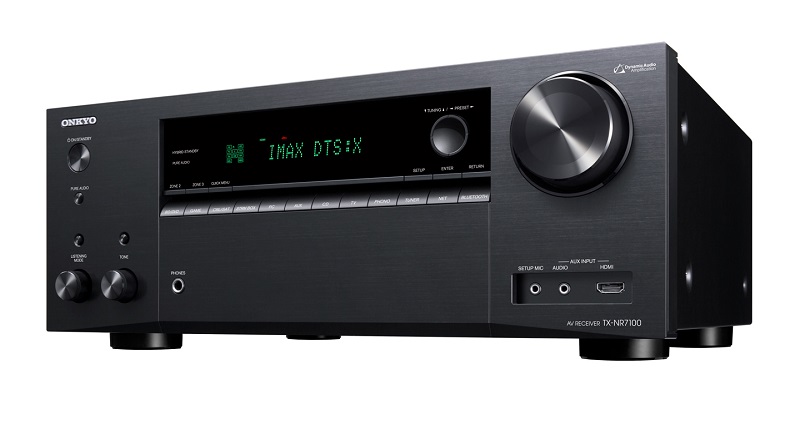
When my receiver died unexpectedly, I had no choice but to pick up an Onkyo TX-NR7100. Here is my unbiased review.
 polar bison
Hello, could someone help me plz? I've been having this problem with my Camlink 4k where after some time i get this "hue-shift" / "black/white" thingy (picture below) Does anyone know how to fix this?
Extra Info:
- The Camlink is new
- The Camera is a ZV-E10 running at 4k30fps
- The Camlink is plugged in an USB 3 port
(edit) - It also keeps flashing a green screen
- As far as I know it only happens on Ome.tv Update: It happens everywhere
(edit 2) - I tried using the Bulk and Isochronous mode in the Camera Hub -> didn't work
(edit 3) - I just found out this can be triggered when switching my input device from "2- Cam Link 4k" to "Yeti Classic"

 grim kelp
Does anyone have insight on the 4k60 pro capture with console and being in Australia? (Last i heard we dont have true 4k). Just curious if its worth investing in the 4k or just look at the HD60
craggy relic
My HD60S isn’t working on OBS, and the software
It’s just a black screen
It’s connects to my switch
I checked the wires to and stuff and nothing worked
grim kelp
craggy relic
It’s just a black screen
I had that issue with my hd60 (legacy). Was just a software issue. Check windows updates
craggy relic
grim kelp
I had that issue with my hd60 (legacy). Was just a software issue. Check windows...
Sorry how do I do that?
grim kelp
craggy relic
Sorry how do I do that?
Open the pc system settings and look for windows updates
 grim kelp
craggy relic
grim kelp
craggy relic
Double check the internet connection and/or refresh the page. Not sure why that would happen
craggy relic
my internet is good and i refreshed same issue still
grim kelp
Strange. If you get the page to work, check for optional updates
craggy relic
grim kelp
Strange. If you get the page to work, check for optional updates
Okay
@grim kelp system restore point time
 nova flicker
i have a 4k pro mk2 i setup obs and i see my audio meter go up hen i talk or play music or what ever but when i hit record to test and stop i dont hear no audio from the recording
green garden
green garden
Hello I am using Elgato HD 60 X Capture card whenever I am changing a game to pl...
@worldly hull I am also facing the same issue with HD 60 X Capture Card
green garden
grim kelp
Does anyone have insight on the 4k60 pro capture with console and being in Austr...
Get the 4k 60 Pro Mk 2 You need to have a Gaming/streaming PC and in Your Mother Board you need to have a PCie slot
grim kelp
green garden
Get the 4k 60 Pro Mk 2 You need to have a Gaming/streaming PC and in Your Mother...
Thanks. The rig i have atm is built around streaming so i want to look at the internal version and give away my legacy to help someone else get started.
green garden
grim kelp
Thanks. The rig i have atm is built around streaming so i want to look at the in...
You're Most Welcome, Also Mostly People who have a streaming rig use the 4k 60 Capture card to connect it with their Console
grim kelp
green garden
You're Most Welcome, Also Mostly People who have a streaming rig use the 4k 60 C...
I just wasnt sure due to the whole 4k side of things.
green garden
grim kelp
I just wasnt sure due to the whole 4k side of things.
No worries I have seen People who have the 4k 60 Capture Card plug thei PS5 Or Xbox Series X input cable to the 4k 60 In slot and the other end to the Monitor or TV
grim kelp
Do you recommend a certain HDMI cable or will any do. I currently run card to switcher and switcher to monitor as i switch between 2nd monitor and console
green garden
You basically can get the Ultra hi speed HDMi from Elgato themselves

In this video we show you how to set up your Playstation 5 with Elgato 4K60 Pro MK.2.
▼ Click "Show More" for details and features.
►Plug and Play: Works out of the box with all streaming software including OBS Studio, Streamlabs OBS and XSplit
►Multi Feed: Simultaneously capture your video in multiple apps
►Multi Device: Slot several 4K60 Pr...
 sonic dune
Hey I just ordered an HD60 X, and it's not a breaking point for me, but:
1.) Can I listen to the audio on my PC (I'm currently using an HDMI extractor to get the PS5 to my amp)
2.) If so, how is the audio delay? It's pretty important in this case
(I do not have it yet, just asking ahead of time)
 severe osprey
For whatever reason, my HD60 S+ will have a sample rate of 44.1khz in OBS, and I'm not sure how to change it to 48khz.
polar bison
polar bison
Hello, could someone help me plz? I've been having this problem with my Camlink ...
can anyone help me with this?
 obsidian rose
Do I record my PS5 at 59.94fps or 60fps? I'm using a HD60x for context.
 snow pasture
sonic dune
Hey I just ordered an HD60 X, and it's not a breaking point for me, but:
1.) Can...
snow pasture
sonic dune
Hey I just ordered an HD60 X, and it's not a breaking point for me, but:
1.) Can...
There’s barely any delay for me
Am I supposed to hear myself on obs while using my elgato?
 azure hemlock
I suggest filling out the template so people can more easily help you.
Device:
Software & Version:
Windows/Mac Version:
Console/Dual PC:
Question/Issue:
snow pasture
Nvm, I recorded for 5 seconds and I heard my voice 🙂
 celest quail
Device: HD60X
Software & Version: 4K CAPTURE UTILITY/ 1.7.10
Windows/Mac Version: WINDOWS
Console/Dual PC: CONSOLE
Question/Issue: so i just got the hd60x in today and planning on using it with my ps5. downloaded the software and everytime i go use it i get the invalid output resolution error. im not seeing anything in the 4k utility software to change the output. thanks
warped ledge
celest quail
Device: HD60X
Software & Version: 4K CAPTURE UTILITY/ 1.7.10
Windows/Mac Version...
screen shot please
 granite prawn
Hey Team, sorry I am new here, I have raised a ticket on the website but was curious if someone knew why I only get a black screen trying to use the HD60S, even in the elgato Capture Utility its black (Same as streamlabs, but assume its not streamlabs as the utility has the same issue? thoughts at all?
 dusky flame
My HD 60S+ is lagging A LOT when I connected it to my Switch, I used high speed HDMI cables and connected everything properly
steady sorrel
dusky flame
My HD 60S+ is lagging A LOT when I connected it to my Switch, I used high speed ...
I’d make sure all the system requirements are met first. Are you plugged in via usb 3.0 or better at your PCs motherboard?
Elgato
Here are the general Elgato Game Capture HD60 S+ System Requirements.
In this article you will find
Game Capture HD60 S+ System Requirements
CPU Type and Speed
Supported Graphics Cards - PC
Su...
snow pasture
Device: HD60X
Software & Version: 4K CAPTURE UTILITY
Windows/Mac Version: Mac
Console/Dual PC: Xbox
Question/Issue: I bought a new headset and the elgato so that I can make higher quality videos and streams, but when I want to hear my own voice in my streams or videos, I can’t. But I can hear my friends, game/party audio perfectly fine. What can I do to fix this?
steady sorrel
@snow pasture it would be awesome to post more about what you want your setup to do but no you don’t require a separate headset and mic for the capture card. It’ll still process the sound your game is making and pass it through via your audio routing. However if you want to capture your voice or your party chat you’ll need a mic (either headset or external) and a chat link pro to capture that additional audio input.
snow pasture
Hello, does this work for Xbox? Because I only see PlayStation and Nintendo switch listed.

I appreciate your help too 🙂
hazy kernel
Is it normal if I were to use HD60x and connect to my iphone but somehow it lags my iphone alittle while streaming and playing game
 vernal obsidian
Is it possible to use my existing El gato PCIe capture card on a laptop using some sort of adapter ?
dusky flame
steady sorrel
I’d make sure all the system requirements are met first. Are you plugged in via ...
I connected it all the same way I did before, but this time, it lags a lot. I used USB 3.0 for the capture card, too. My PC is high-end, so I'm not sure what happened.
 mossy widget
So for some reason I have a bit of game echo when streaming with the ps5 on my hd60s, anyone got a reason for this?
warped ledge
mossy widget
So for some reason I have a bit of game echo when streaming with the ps5 on my h...
what are you using for audio?
warped ledge
snow pasture
Hello, does this work for Xbox? Because I only see PlayStation and Nintendo swit...
it should
warped ledge
dusky flame
I connected it all the same way I did before, but this time, it lags a lot. I us...
try this and reboot. https://streamdecklabs.com/🧯-how-to-disable-windows-10-11s-usb-selective-suspend-setting/
Once you complete these steps, Windows will no longer power off USB devices connected to your computer, which will fix any problem are experiencing as a result of this Windows feature. Windows 10+ includes the USB selective suspend feature that lets you automatically put USB devices in a very low-power state when they’re not actively… Continue r...
warped ledge
vernal obsidian
Is it possible to use my existing El gato PCIe capture card on a laptop using so...
what kind of laptop?
vernal obsidian
warped ledge
what kind of laptop?
It’s an Alienware laptop. Specs are pretty good.
warped ledge
vernal obsidian
It’s an Alienware laptop. Specs are pretty good.
check this out from the Legend Steggy himself from Elgato! https://www.youtube.com/watch?v=1ChBo65TMz0
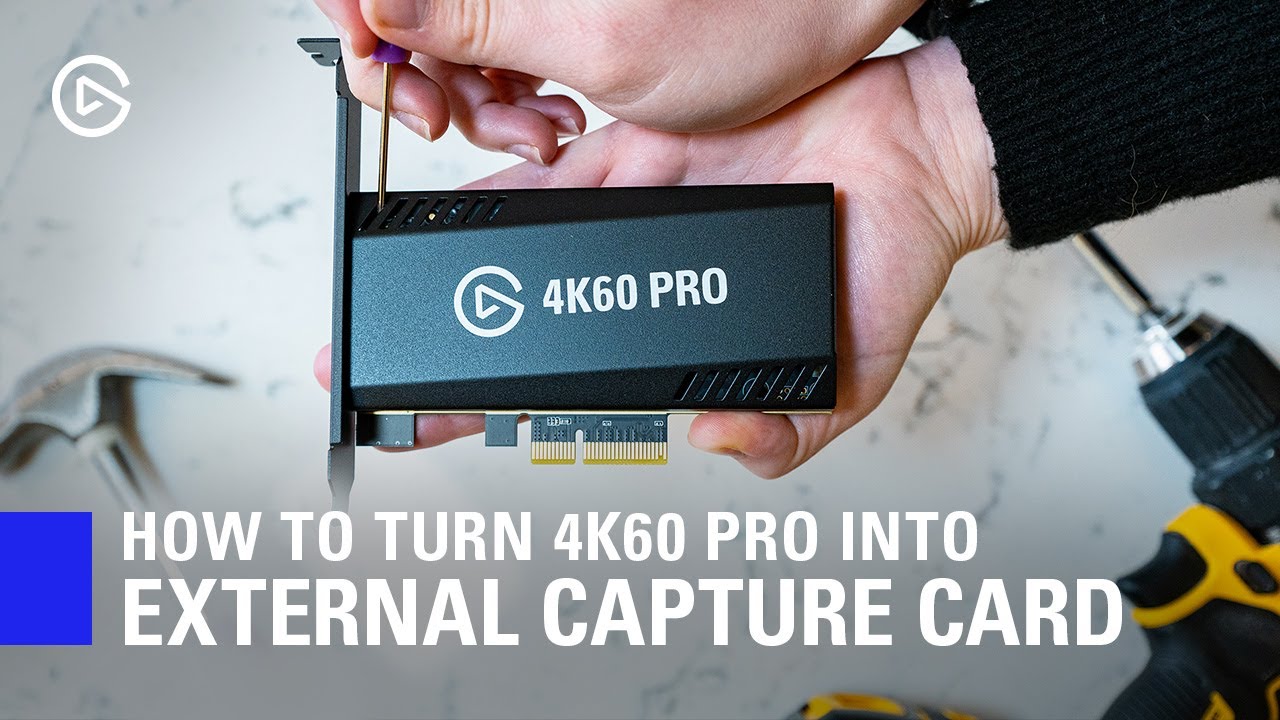
In this video, we show you how you can easily turn your 4K60 Pro MK.2 into an external Thunderbolt 3 capture device.
Note: This is not an officially supported 4K60 Pro setup, meaning you should proceed with caution - as in - if you run into compatibility questions or issues with this setup, our support team will be unable to assist.
This is ...
warped ledge
hazy kernel
Is it normal if I were to use HD60x and connect to my iphone but somehow it lags...
it could be your adapter, and cables.
warped ledge
dusky flame
My HD 60S+ is lagging A LOT when I connected it to my Switch, I used high speed ...
are you connected to a usb 3.0 port on your streaming pc's mobo vs a usb hub?
warped ledge
granite prawn
Hey Team, sorry I am new here, I have raised a ticket on the website but was cur...
did you ever get this resolved?
vernal obsidian
warped ledge
check this out from the Legend Steggy himself from Elgato! https://www.youtube.c...
This is interesting. Could this device work using an el gato pcie Cam Link device too ?
warped ledge
vernal obsidian
This is interesting. Could this device work using an el gato pcie Cam Link devic...
I don't see why not. If you test it out, let me know! @waxen eagle think you can nudge Steggy on this, as it's an awesome question! 

granite prawn
warped ledge
did you ever get this resolved?
Hey Vic, after watching alot of YouTube videos it seems the issue was the HD60s does not like the new usb ports so had to try them all till I found an old type. Now it's trying to get the headset mic working, using the wrbcam mic for now but it's not great. Thanks for replying though, appreciated.
warped ledge
granite prawn
Hey Vic, after watching alot of YouTube videos it seems the issue was the HD60s ...
glad to hear you have a solution.
warped ledge
polar bison
Hello, could someone help me plz? I've been having this problem with my Camlink ...
this is best to ask in #camera-prompter
mossy widget
warped ledge
what are you using for audio?
I have my hd60s, my elgato and my steelseries headset but I noticed here: https://www.twitch.tv/videos/1885275993?t=3h54m9s there was an echo during the cutscene and not sure what caused it

Twitch
omnicomms went live on Twitch. Catch up on their FINAL FANTASY XIV ONLINE VOD now.
warped ledge
mossy widget
I have my hd60s, my elgato and my steelseries headset but I noticed here: https:...
what software are you using?
mossy widget
warped ledge
what software are you using?
OBS
mossy widget
no speakers, headphones seems fine
dusky flame
warped ledge
are you connected to a usb 3.0 port on your streaming pc's mobo vs a usb hub?
I am connected to a 3.0 port on my PC, not on a hub
It might be my hdmi port, as it is sensitive
warped ledge
dusky flame
It might be my hdmi port, as it is sensitive
try a nee hdmi cable!
warped ledge
mossy widget
no speakers, headphones seems fine
are they loud in volume? it could cUse an echo if they are too close to the mic.
dusky flame
warped ledge
try a nee hdmi cable!
I tried a newer, high-speed one, and it still had major lag
I think it's an issue with the card
warped ledge
dusky flame
I think it's an issue with the card
what about a different usb-c to usb-a 3.0 cable that meets the specs for it?
hazy kernel
warped ledge
it could be your adapter, and cables.
I am using 2 HDMI cables and the original iphone adapter. Could it be the HDMI because one of them is the one nintendo switch gives😂
warped ledge
hazy kernel
I am using 2 HDMI cables and the original iphone adapter. Could it be the HDMI b...
possibly
hazy kernel
Okay thank u! I will change both hdmi cable to better ones and see how it goes
 nocturne dune
Device: Elgato HD 60 X, PS5
Software & Version: Obs Studio 27.1.3, 4K Capture Utility
Windows/Mac Version: Windows
Console/Dual PC: using ps5 to stream to computer
Question/Issue:
So, having zero issues when streaming my ps5 game to my computer, I have no problem bringing both audio and video to the 4K Capture Utility, but when I try to bring the video up in OBS, I get a black screen instead (the audio is fine). What should I do to fix this?
dusky flame
warped ledge
what about a different usb-c to usb-a 3.0 cable that meets the specs for it?
I've also been using the same USB cable in a 3.0 port as before
This is what I'm getting with the capture software
And this is with OBS
When I slightly fiddle with the cables, it seems to disconnect or have further issues
warped ledge
dusky flame
When I slightly fiddle with the cables, it seems to disconnect or have further i...
maybe it’s a bad cable
warped ledge
nocturne dune
**Device**: Elgato HD 60 X, PS5
**Software & Version**: Obs Studio 27.1.3, 4K ...
You’re not using both softwares at the same time are you? Also HDCP is off?
dusky flame
warped ledge
maybe it’s a bad cable
I've tried multiple cables and the issue has been prevalent for all of them
warped ledge
dusky flame
I've tried multiple cables and the issue has been prevalent for all of them
try a different port
 granite pier
Where did the game cards from the entire S series go? And that 4K60S+ (or so).... Is no longer on the website
Oh and... Need the 4K60 Pro MK.2 PCIE x1 or PCIE x16?
The website only says PCIE
dusky flame
warped ledge
try a different port
It is still having the issue
warped ledge
granite pier
The website only says PCIE
some things have EOL already.
(End of Life)
 limber coral
Sup ladies n gents n everything in between! I am struggling to get my 4k60 pro mk.2 to work properly with the PS5. When I am using the software from the website, the video works perfectly. However OBS is not picking up the stream of video from the elgato software. Anyone have this issue and/or find a fix for it?
Also not for nothing but it is not picking up the audio from my wireless ps5 headset, so the stream can't hear the party comms during gameplay?
gaunt wyvern
granite pier
How End of Life?
Elgato
Below is a list of legacy products that are no longer being updated or manufactured. These products will continue functioning as expected in their specified software and hardware configuration. Fut...
gaunt wyvern
limber coral
Sup ladies n gents n everything in between! I am struggling to get my 4k60 pro m...
You don't need to capture from the Elgato software, add the capture card as a video source in OBS. As for the chat, you likely need a chat link. https://help.elgato.com/hc/en-us/articles/4409900035981-Elgato-Chat-Link-Pro-Setup-with-PS4-PS5
Elgato
In this article, we’ll go over how to properly connect and set up your Elgato Chat Link Pro with PS4 and PS5.
Video
Requirements
Chat Link Pro
PlayStation 4 or PlayStation 5 con...
granite pier
gaunt wyvern
https://help.elgato.com/hc/en-us/articles/4642544014733-Elgato-Legacy-Products
Dude, Elgato Game Capture 4K60 S+ only came out 1-2 years ago? Why directly discontinue again?
gaunt wyvern
granite pier
Dude, Elgato Game Capture 4K60 S+ only came out 1-2 years ago? Why directly disc...
I don't make such decisions
limber coral
gaunt wyvern
You don't need to capture from the Elgato software, add the capture card as a vi...
i cant even get the software to reconize my ps5 is even on now lol. hold on let me get that to work first XD
gaunt wyvern
limber coral
i cant even get the software to reconize my ps5 is even on now lol. hold on let ...
Make sure HDCP is disabled on the PS5
limber coral
gaunt wyvern
Make sure HDCP is disabled on the PS5
interseting, i didnt know that was a thing, i restarted my computer and now its picking up the ps just fine haha
looking into the chat link you linked, thank you
 subtle crescent
hello, i have a problem with my ELGATO HD60 PRO, i connected it and checked if both cables are working and if the capture card is well connected in the PC motherboard, and when i open OBS or 4K Capture Utility Software both are recording only this
i get no video, only the sound that get s interrupted by no signal screen as shown in the video
i am trying to connect my PC with a PS4
limber coral
subtle crescent
hello, i have a problem with my ELGATO HD60 PRO, i connected it and checked if b...
try restarting the copmputer, it literally just fixed my issue haha
subtle crescent
i just did, it did not work
subtle crescent
subtle crescent
it's still like this
granite pier
gaunt wyvern
You don't need to capture from the Elgato software, add the capture card as a vi...
Oh and... Need the 4K60 Pro MK.2 PCIE x1 or PCIE x16?
Any idee?
gaunt wyvern
granite pier
> Oh and... Need the 4K60 Pro MK.2 PCIE x1 or PCIE x16?
x4,x8, or x16 https://help.elgato.com/hc/en-us/articles/360033795031-Elgato-Game-Capture-4K60-Pro-MK-2-Technical-Specifications#:~:text=System Requirements%3A&text=6th generation Intel Core i7,)%20x4%2Fx8%2Fx16%20slot
Elgato
These are the technical specifications for Elgato Game Capture 4K60 Pro MK.2Interface:
PCIe 2.0 x4
HDMI 2.0 Input (Unencrypted)
HDMI 2.0 Output (Lag-free passthrough)
Learn how to check if your P...
 young surge
PS5 streamers🔴🔴🔴
Has anyone tried this method? I have a A40 MIX AMP TR and Elgato 4k60Pro Mk.2 so was wondering if this causes lag in gameplay. Post is from Reddit :
-
On your PC, navigate into advanced Sound Settings (where you see Playback, Recording, Sounds, and Communications tabs)
-
Select the Recording tab
-
You will see something like "Game Capture 4K60 Pro MK.2 Audio" (or whatever your capture card is).
-
Right click this and select Properties
-
In the Properties window, select the Listen tab
-
Checkmark "Listen to this device"
-
Click OK twice to save the settings
Now your PS5 audio can be heard within OBS (out to your stream) AND it will be heard from your PC (to you via headset) with little (if Capture card is external)-to-no (if Capture card is internal) delay.
** Special note: If you output your audio via OBS advanced audio properties by turning "Monitor On" in your game's audio, then you WILL have a noticeable delay.**
nocturne dune
warped ledge
You’re not using both softwares at the same time are you? Also HDCP is off?
Nope, wasn't using both. I'll check HDCP when I'm next using it
snow pasture
warped ledge
it should
Just set it up and I still can’t hear myself 🙃
 muted gulch
Hey Guys... Quick Question to see if this is possible
2 PC Streaming Setup
Gaming computer has a 3090 and 4 monitors connected
Can I install a 4k60 m2 capture card on my gaming PC and a 4k60 m2 capture card on my streaming PC, and use the OUT from my gaming to the IN of the Streaming? Would that work?
Or should i daisy chain 2 of the monitors and leave the HDMI on my gaming GPU for the out to the IN of the streaming pc?
 digital fern
similar question actually but im not tech savvy (i dont know what to install if im missing it, i got the elgato a while ago and am not sure if i need to install things on my gaming pc but i have on my streaming one)
sorry that this is a copy paste of my reddit post i just really need some help if possible...
"Trying to run a dual PC stream setup in OBS using Elgato HD60 S+. The first PC is an AMD Ryzen 7 3700X, Radeon RX 580 GPU and the second is actually just my gaming laptop, AMD Ryzen 9 5900HS with AMD Radeon GPU. I know the Elgato works... I've used it before to capture and successfully stream games from my Nintendo Switch. I also see it as an option in OBS. However, all of these videos show that the Elgato is supposed to show up as another display screen in settings, which I could then easily add as a source in OBS etc. My issue is that the Elgato is not showing up as a display, and it isn't doing the blue light thing it does when you've got everything working. It only flashes white for a second when I put the USB-C into my laptop (for streaming), no reaction when doing HDMI in the PC (for gaming). I thought HDMI might be the issue, so I switched to the wire I use on my Switch and it's still nothing. Now I'm worried it might be my PC or I'm doing something wrong."
actually i just realized maybe all those videos only use hd60s and theres a difference with the s+...
when i view the hd60s+ in obs or nvidia broadcast, it's just a black screen
warped ledge
snow pasture
Just set it up and I still can’t hear myself 🙃
I’ll help after work
 dim prairie
Hello, I will need help as well. I got everything set up with the blue light on. But I don’t see my video capture device picking up sound! Is there something wrong that I did that I need to fix?
Basically I got my capture card device chat link pro plugged in to the correct outlits. Everything else is set up, just the audio coming from my switch is not picking up from my mic.
pure axle
how do i setup audio with the hd60x, in a dual pc setup
if i change the desktop audio to hd60x on the pc with the game on it, it removes the audio that my audio interface can pickup
snow pasture
warped ledge
I’ll help after work
So I hear everything now, especially my voice. The problem is that it’s not like, stuttering? Idk how to explain it
 lapis crater
I just saw the MK2 got a VRR passthrough update, i am not seeing anywhere what resolution it supports... will it pass 4k VRR over 60FPS to the monitor if kmy monitor is 120HZ?
gaunt wyvern
lapis crater
I just saw the MK2 got a VRR passthrough update, i am not seeing anywhere what r...
4K60 Pro MK.2 supports the standard VRR range between 48 fps to 120 Hz.
lapis crater
so it can pass through 4k 120fps vrr?
i tihnk that would be a no according to this?
 gaunt wyvern
lapis crater
i tihnk that would be a no according to this?
gaunt wyvern
lapis crater
i tihnk that would be a no according to this?
Correct, you won't get 4K120. This covers the compatible resolutions https://help.elgato.com/hc/en-us/articles/360033795231-Elgato-Game-Capture-4K60-Pro-MK-2-Supported-Resolutions-and-Frame-Rates
Elgato
Elgato Game Capture 4K60 Pro MK.2 supports many different resolutions and frame rates between 1080p and 2160p (4K). We have tested the common resolutions, but not every possible resolution and fra...
lapis crater
thanks!!!!
muted gulch
Anyone able to give me their opinon on this?
#capture-cards message
snow pasture
warped ledge
I’ll help after work
warped ledge
snow pasture
I’ll be free in just a bit!
warped ledge
snow pasture
Thanks though
Ok, I can help.
warped ledge
snow pasture
Thanks though
did you monitor and output the audio in the OBS audio Mixer's advance audio properties?
snow pasture
warped ledge
did you monitor and output the audio in the OBS audio Mixer's advance audio prop...
Like this?
 grim kelp
How do i deal with game audio? If the audio goes through the monitor i capture audio but if i use my headset connected to ps5, no aidio is captured
grim kelp
I think i found a workaround. Just testing now
 daring chasm
I need some help installing a 4kcapture card
I have the correct pcei slots but my motherboard is so close I can't fit it in the slot


The black square before the pins is preventing it from fitting
daring chasm
Maybe they aren't pcei slots?
harsh whale
steady sorrel
cool, sorry we havent quite solved it yet but we'll keep trying when you're read...
Thanks for helping! I asked on Reddit and got an answer that worked for me!
Changed EDID to Display and it works.
nocturne dune
nocturne dune
Nope, wasn't using both. I'll check HDCP when I'm next using it
Still having this problem, even with HDCP off.
nocturne dune
Well I fixed it. Frankly I'm embarrased by what I did.
But a better question I have is if there is a way to stream directly form the Elgato Capture Card to Discord rather than using 4K Capture Utility or OBS as a work around? Understandable if not, but was wondering
granite pier
gaunt wyvern
x4,x8, or x16 https://help.elgato.com/hc/en-us/articles/360033795031-Elgato-Game...
You say x4, x8 or x16


???
 half yacht
Greetings. I'm trying to switch my capture card's audio from HDMI to analog using the 4K Capture Utility and the option isn't available for me

may someone help?
 left hollow
Hello so I need help with trying to figure out how to stop the crackling sound whenever gameplay is being shown off the capture card
is there anyway to resolve this issue
and I have an HD60X
gaunt wyvern
left hollow
and I have an HD60X
this can help https://help.elgato.com/hc/en-us/articles/5406375649933-Elgato-Game-Capture-HD60-X-Firmware-Update
Elgato
This guide will walk through how to update the firmware of HD60 X.
ℹ️ When performing a firmware update, it is critical that the update is not interrupted. While updating, please ensure the foll...
granite pier
gaunt wyvern
x4,x8, or x16 https://help.elgato.com/hc/en-us/articles/360033795031-Elgato-Game...
Have now installed my card, but no signal comes from the card
azure hemlock
Please don't tag staff.
azure hemlock
I recommend filling this out so one of our amazing communitymembers can help you 
Device:
Software & Version:
Windows/Mac Version:
Console/Dual PC:
Question/Issue:
granite pier
azure hemlock
I recommend filling this out so one of our amazing communitymembers can help you...
Device? Console?
azure hemlock
Device means which capturecard, so for you that would be HD60X, if and what console you're using or single or dual PC setup
Right?
left hollow
gaunt wyvern
this can help https://help.elgato.com/hc/en-us/articles/5406375649933-Elgato-Gam...
i updated it and its the same result too
The audio is chipping and now it’s still lagging
like the footage is laggin
granite pier
azure hemlock
I recommend filling this out so one of our amazing communitymembers can help you...
Device: https://www.elgato.com/de/de/p/game-capture-4k60-pro
Software & Version: 4K Capture Utility 1.7.10 (4971)
Windows/Mac Version: Microsoft Windows 11 Pro
Console/Dual PC: PC
Question/Issue: Capture card will not registered!

Elgato
Aufnahme und Passthrough in 4K60 HDR. Bildwiederholraten von bis zu 240 Hz. Mit Elgato 4K60 Pro erstellst du atemberaubenden Content. Garantiert. Booste deinen Workflow dank Ultra-Low-Latency-Technologie. Streame live, während du in 4K HDR10 aufnimmst.
So?
Installed the card in a PCI x16 Slot
granite pier
Ah, I think I got it
In the device manager
Not enough resources are available for this device. (Code 12)
If you want to use this device, you must disable another device connected to the computer.
You must restart the computer for the changes made to the device to take effect.
But, like mine?
craggy relic
I have the HD60x. Just bought it and hooked it up. It’s locking my switch into 480p. I don’t have any other option. My monitor when hooked directly to my switch is 1080p. Any help is much appreciated.
snow pasture
I have the hd60x and for some reason party chat audio is normal, but Spotify, YouTube, and etc. are really loud
Idek how to fix it since I’m on xbox
And using my Mac Pro for obs
That should not be red 😭
 warped ledge
snow pasture
That should not be red 😭
warped ledge
snow pasture
That should not be red 😭
you can move the slider
snow pasture
I’ve tried that
But everything will still be the same
Music, game, or anything else besides party chat will be louder
It wasn’t like this when I streamed and recorded last night
craggy relic
craggy relic
I have the HD60x. Just bought it and hooked it up. It’s locking my switch into 4...
we can't really figure out what the problem is. we think it has to be something with the elgato capture card itself. we've tried plugging my switch into my tv, which is what i usually play on, going into tv settings on the switch, and switching it to 1080, undocking it, exiting settings, and redocking it up to the elgato to no avail. it'll just switch back to 480p. we've tried multiple different HDMIs, all have 4k capabilities. we've tried different brands and everything. i've tried all 3 different monitors. i've tried different usb ports on my computer for the elgato. we made sure it wasn't my switch by plugging in the switch straight to my monitors, and it'll go to 1080p without the elgato.
snow pasture
warped ledge
you can move the slider
Wait nvm, I fixed it.
I saw that I always have to keep it on “Analog Audio”
warped ledge
snow pasture
I saw that I always have to keep it on “Analog Audio”
yes
craggy relic
how do I fix my hdmi out going in and out
i've pin pointed it to being a software issue
I've tried a new set of hdmi cables and its still doing the same thing
but i remember a solution with the software worked for a day before it stopped for no reason
dim vector
new issue, I've deleted the source, added again and this is what's going on, the video is "split"

Going from PC to Mac, no issues last night or other nights. nothing has changed, also, unplugged all
steady sorrel
Thats typically associated with a bad connection issue. Make sure your connections are good. Use the cables your cap card came with or try a different cable than you’re currently using and restart
 scenic terrace
Hello, I keep having game audio problem. I've tried every troubleshoot videos and even got help from obs discord server and they redirected me here for capture card audio problem. I've been trying to record my nintendo switch game, I can hear the sound on my heaphone but when I press record there is no game audio. I'm using elgato HD60X and Chatlink pro
grim kelp
how different is 4k60 to hd60 (legacy) for audio capture? the legacy has audio jack but 4k doesnt.
 drifting scarab
heyy so likee idk what to do my hd60s+ is running less than 60 fps and I mean its not bad but I do want it to get to 60fps
 grand slate
i cant find an answer anywhere online cuz i feel like my situation is niche:
I got a hyperx cloud wireless headset ive had for like 2 years, doesnt really matter but it is a wireless USB headset. anyways, I got a hd60x recently and wanted to record my ps5, but i notice that I cannot record the audio of my ps5 when i plug my headset in, it only gets audio when i dont plug in my headphones and let my speakers that are connected to my monitor take over.
grim kelp
grand slate
i cant find an answer anywhere online cuz i feel like my situation is niche:
I g...
part of the issues im trying to understand. the card only captures hdmi audio when the audio goes through it. once a headset is plugged in, all audio goes to that instead. you have to send audio to the capture card and plug headset to pc but theres a delay in audio
grim kelp
yeah and annoying. i was trying to stream earlier and the audio would cut out if i changed scenes or bumped the usb cable
and im really confused on how these newer cards work without the audio jack
grand slate
wonder why theres no good tutorials on youtube? alternatives
only solution so far is get that chat link cable but that doesnt apply to wireless headsets lol
grand slate
grim kelp
and im really confused on how these newer cards work without the audio jack
seriously
its weird
grim kelp
it still can work with wireless. you can plug aux cable in to headset or the tv/montior
grand slate
i have a scarlett for my mic lol
thats the only audio based thing i have
i dont wanna crowd my desk with more accessories
wish the card was more jack of all trades typa deal
never thought my only issue would be the headphone situation
grim kelp
im upgrading my desk for more space when new desk arrives
grim kelp
where ya from
grand slate
US WEST
grim kelp
figures. other side the world here 😄
drifting scarab
sooo like I just got frame rate fixed etcc, bit When I try using the output of the hd60s+ on my monitor it doesnt show my console it just switches to my pc any fix to this?
grim kelp
drifting scarab
sooo like I just got frame rate fixed etcc, bit When I try using the output of t...
double check your input cable. i accidentally used the wrong cable when i was connecting my card to this pc
drifting scarab
im using right cable I do believe
grim kelp
grand slate
wish the card was more jack of all trades typa deal
just found a comparison vid of hd60 x, 4k60 s+ and 4k60 pro. for console it seems hd60 x is the better option. just gotta work out the audio side
grim kelp
if not the cable, double check the source settings
drifting scarab
is the outpout supposed to be connect to the console?
grim kelp
input is console
drifting scarab
okok
grim kelp
output is tv/monitor
drifting scarab
grim kelp
if not the cable, double check the source settings
'on the app?
cuz if so
there aint nthn there that can help me with my issue
grim kelp
your source is video capture and set to the card?
drifting scarab
wdym
grim kelp
you got the console feed or still no visual
drifting scarab
oh
uhhh
idk what that means
basically
im tryna get my console to show up on my monitor hdmi
so I dont gotta play my games through obs
but its not connecting
grim kelp
connect the cards output to the monitor
drifting scarab
i did
the ps5 is running into the cards in port
and the out port is running into the monitor
grim kelp
the card is plugged in for power
grim kelp
then you should get the display. if running multiple inputs, check the source on monitor
grim kelp
strange. you should see the console screen regardless of having obs open as long as card has power
grim kelp
it sounds like its just the output
drifting scarab
it is
well now its not giving out a signal regardless
all I did was unplug smth n replug it in
grim kelp
deactivate and reactivate source
drifting scarab
yeaaa its not working
oh nvm
im stupid
the back of playstation cord came out
grim kelp
rip
drifting scarab
could the output be bc I aint using a hdmi 2.0 cord?
grim kelp
nah
grim kelp
might be worth unplugging all and replugging to double check everything
drifting scarab
drifting scarab
the bad thing about this specific capture card is that no one uses it
so there is nothng for help
i can play it through the app its fine
tyy thoo
I appreciate the help
nvm its the cord
grim kelp
drifting scarab
nvm its the cord
its always something stupid XD
grim kelp
feels
 fiery breach
Hello I have a HD60 S+ but every time I put it into the source on OBS it freezes my computer
drifting scarab
what are you specs
ripe temple
@warped ledge Do you have any videos explaining the capture card settings? Device / Picture etc
warped ledge
ripe temple
<@476160810457235466> Do you have any videos explaining the capture card setting...
I think I might, if not I can make one. I have one for the 4K60Pro MK.2 for Xbox Series X & PS5
ripe temple
Maybe the settings are the same, are you free at any point for some questions?
ripe temple
I got it figured out, sorry!
warped ledge
ripe temple
I got it figured out, sorry!
no worries! Sorry, was installing a new SSD on my PC. for PS5 https://www.youtube.com/watch?v=xm_uTgN_cms
I made a video after stumbling on this setup while helping someone with a duel PC setup on Windows 11. I couldn't resist making this video to help those who wanted to do 1440p 120Hz passthrough with the elgato 4K60Pro MK.2 capture card on Windows 11. One thing I forgot to mention in the video was the resolution on your PS5 must be set to 1440p, ...
Ok, I decided to make a video on the refresh rates and how easy it is to change them using an elgato 4K60Pro MK.2 capture card that pass-through the input, but per using OBS, via streaming, I can output 1080p 60fps per my setup. Sadly I didn't have a PS5 game to show Y'all, as currently, it's only FPS games that take advantage of the 1080p 120hz...
 lethal vector
Hey, I do have a 4k60 mk2 capture card and was wondering what I am missing when putting it into a PCIe x1 instead of x4 slot. So far it does seem to be working just fine even though it only has a fourth of lanes.
My Mainboard has a weird Layout so I have to use the x1 slot for now
 stoic canyon
Here
drifting scarab
oki
warped ledge
drifting scarab
oki
then I would say make sure the bios/drivers are updated sna see if the pc does have a usb 3.0 port
stoic canyon
warped ledge
then I would say make sure the bios/drivers are updated sna see if the pc does h...
Ill check
warped ledge
stoic canyon
Ill check
also make sure you have the correct cable for it too.
drifting scarab
Why do you need a 3.0
stoic canyon
*pc
stoic canyon
drifting scarab
Why do you need a 3.0
no idea
drifting scarab
the blue is a 3.0
warped ledge
stoic canyon
only blue ports on my pc's
blue is usually 3.0
stoic canyon
i dont its just being difficult
drifting scarab
The blue port is a usb 3.0
warped ledge
drifting scarab
Why do you need a 3.0
for the capture card it requires it
stoic canyon
on the capture card
drifting scarab
I thought they meant in the nintendo
warped ledge
stoic canyon
there is no place for it
the cable is usb-c to usb-a the usb-a end is to connect to your pc's 3.0 port
drifting scarab
the very right port
 stoic canyon
On my phone
drifting scarab
is the one you plug the other end of the cord into
stoic canyon
drifting scarab
the very right port
I have that plugged in
drifting scarab
yeah
warped ledge
drifting scarab
the very right port
yes the usb-c end connects there
drifting scarab
plug the other end
stoic canyon
And that’s a 2.0
drifting scarab
into the pc
drifting scarab
stoic canyon
And that’s a 2.0
thats not-
stoic canyon
added you both as friends
drifting scarab
Thats the charging port-
stoic canyon
i’m going to call you guys so i can show you
drifting scarab
camt call
warped ledge
drifting scarab
Thats the charging port-
i don't accept friends requests, just here to help.
stoic canyon
I need to call you guys to show you the issue
drifting scarab
too many weirdos added me
stoic canyon
Ill unfriend afterwards if you’d like
warped ledge
drifting scarab
too many weirdos added me
same
drifting scarab
I cant call om sorry
warped ledge
stoic canyon
Ill unfriend afterwards if you’d like
we can walk you through it
stoic canyon
warped ledge
stoic canyon
that is not the correct cable
drifting scarab
whyd you gran the blue one-?
stoic canyon
Huh?
drifting scarab
whyd you grab the blue cord
drifting scarab
stoic canyon
thats not a 3.0
or it can be
but its not what you need
the elgato cord
plug it into the pc
straight connect
elgato->cord->pc
stoic canyon
the computer
drifting scarab
yes
the out port
connects to your monitor
that you use for gaming
no hdmi from the elgato should be plugged into ur pc

lil diagram
stoic canyon
Oh
drifting scarab
the in n out represent the sides
stoic canyon
I’m a f word in’ idiot
drifting scarab
lmaoo
stoic canyon
server bans the f word
drifting scarab
yeah
stoic canyon
mildly irritating
 stoic canyon
Still not working
stoic canyon
I’ll check it later i gotta eat dinner
drifting scarab
okie
 dense tundra
Lmao yeah I just got the HD60X and I've tried everything to set this thing up and I keep getting invalid output resolution. I don't know if my S is just low on the resolution because I pumped it up to 1080p option(it said the resolution was too high and doesn't support input signal upscaling). I was thinking to hop on my brother's 4K TV that he had and adjust the settings that he has on his Xbox X so that it can work because that's the only issue I'm having right now from what I can see 😭 I thought I could get away with it by adjusting the settings on my Xbox but do you think that might be the problem 👀 I've went through so many YT videos
I'm aware of the 120 Hrts too but I'm also unsure if It could be the 36 bits and maybe I have to tone that down too
steady sorrel
Alright, so let me make sure I understand were running a Series S through the HD60X to a PC (or mac)?
dense tundra
steady sorrel
Alright, so let me make sure I understand were running a Series S through the HD...
Yeah I'm running a series s through the hd60x to the pc
I already have everything plugged in apparently it's just a resolution issue
But that could be so many things
So idk if I should just get on his X and the 4k TV and copy paste the settings to that Xbox and see if that would fix it
steady sorrel
Hmmm... take a look at this and see if it walks you through it: https://help.elgato.com/hc/en-us/articles/17017045597837-Incompatible-Output-Resolution
Elgato
If your Elgato capture device shows a message that the output resolution is incompatible, these are the steps to resolve it.
General Information
Specific Elgato Game capture devices cannot ...
are you using OBS?
if its set to 1440p that could be causing the issue
dense tundra
steady sorrel
are you using OBS?
I do use obs I'm new to pcs but I do wanna start recording gameplay
I was also told to install the 4k elgato app too from the pages that came from the box and other YT videos
steady sorrel
all good, is your output setting in obs set to anything above 1080?
dense tundra
That I don't know- I never really messed with the settings when I installed it
I assume I just click on settings then check output?
Wait I found it I think in the video options the output scaled resolution is 1920x1080
The base canvas resolution are the same numbers do I just lower the output or both?
steady sorrel
those sound like theyre set correctly
so you'll need to look at the source you've added for your cap card
and check the properties of it:

 dense tundra
Let me take a looksie
steady sorrel
cool, thats what the window should look like
dense tundra
I am so glad I looked around this app yesterday I know where a few things are
Found it
steady sorrel
it can be quite confusing at first
dense tundra
The resolution is 1280x720
dense tundra
steady sorrel
it can be quite confusing at first
Agreed
steady sorrel
thats interesting, shouldnt have any issue there then...
steady sorrel
I know this sounds dumb, but just want to clarify you've got your series S running into the input of your HD60X and running an output hdmi to your gaming monitor?
dense tundra
Yup the Xbox itself is plugged into the input portion while the other hdmi was plugged into output(Then I used the blue one and plugged it into my pc so my pc recognizes the device) I looked up all the tutorials on how to set it up so it has to be set right
Wait actually-
steady sorrel
yeah, this should be the only video you need to watch: https://www.youtube.com/watch?v=mYgcoUG-MvE
In this video we show you how to set up your Game Capture HD60 X with Microsoft Xbox Series X|S.
▼ Click "Show More" for details and features.
▼ HD60 X Highlights:
► 4K60 HDR10, 1440p120, 1080p120, 1080p240, VRR passthrough.
► High resolution 4K30 or 1080p60 HDR10 capture.
► No watermarks, no time limits, no subscriptions.
► Play in HDR whil...
dense tundra
There was one problem
One of my USD's didn't have anything to plug into- so it could be that
steady sorrel
USBs* maybe?
dense tundra
Usb I mean yeah
steady sorrel
these requirements must also be met, youre using a blue usb 3.0 port correct?
 dense tundra
steady sorrel
these requirements must also be met, youre using a blue usb 3.0 port correct?
dense tundra
steady sorrel
these requirements must also be met, youre using a blue usb 3.0 port correct?
That might be it I used my regular USB that I've been using for my Xbox
It's definitely a 2.0 that I know for sure
steady sorrel
okay, yeah check if you've got a blue usb port available or can make one available and use that instead see if we get some results 
steady sorrel
hold on wait
dense tundra
?
steady sorrel
you dont need to buy anything, your hd60x comes with a 3.0 cable, and that just needs to plug into the blue usb port on the motherboard of your pc

 dense tundra
Wait so I should plug out the 3.0 USB they gave me and switch it to the back of my pc?
Mind if I show you the set up so you can get a more clear picture?
steady sorrel
I think youre confusing usb c with usb 3.0
steady sorrel
correct, should be plugged into your hd60x
steady sorrel
other end plugged into a blue usb port on your motherboard
dense tundra
Oh 👀
Lemme try that
Before I do anything though
Do you want me to send you a video of the set up?
Just so you know I've got some stuff properly placed
steady sorrel
no youre good
steady sorrel
I'd also recommend following elgatos video I posted to ensure its setup the way they expect it to be too :D
dense tundra
steady sorrel
I'd also recommend following elgatos video I posted to ensure its setup the way ...
I'll check that out before posting rq
I've detected the problem
So you remember the other end of the USB c cable you told me other end needed to be plugged into my computer
steady sorrel
I do...
dense tundra
I have 2 blue ports inside but the cable is too big to fit 💀
steady sorrel
maybe send a photo of what that looks like
dense tundra
Sure


For comparison the one on the right fits inside one one of the blue compartments
Different models
steady sorrel
this is where the other end of your usb cable from your hd60x should be input into your pc, but from the looks of it I'm not sure that PC has the required graphics capability needed...

the other photo you posted is an hdmi cable and a usb cable... the hdmi should not be going into your pc
dense tundra
I have one hdmi plugged into my Xbox because I thought it was going to need to connect to the capture card and then send the signal to the pc
The other two hdmi cords(input and output) are already in the card
dense tundra
steady sorrel
this is where the other end of your usb cable from your hd60x should be input in...
I think this is where I should check my computer settings to see if it would operate at all
dense tundra
steady sorrel
this is where the other end of your usb cable from your hd60x should be input in...
I've tried putting it there and it doesn't fit
 steady sorrel
Okay, is that not the USB cable supplied with your HD60x? if thats the end of your middle cable currently connected it appears its a UBS C type connection (not the same as the cable supplied with the HD60X to my knowledge
 dense tundra
I've only used the cables that were in the boxes
dense tundra
steady sorrel
Okay, is that not the USB cable supplied with your HD60x? if thats the end of yo...
Yeah the type c is already plugged into the middle
steady sorrel
does the other end match the type on the right (blue)
dense tundra
Wait hold on
steady sorrel
its hard to tell if this is the other end sorry
 dense tundra
steady sorrel
Okay, is that not the USB cable supplied with your HD60x? if thats the end of yo...
dense tundra
steady sorrel
Okay, is that not the USB cable supplied with your HD60x? if thats the end of yo...
The blue picture you posted here fits in the back I realized that the(blue one) I had plugged in the front of my pc should have been in the back
dense tundra
steady sorrel
its hard to tell if this is the other end sorry
This is the other end of the USB c cable
steady sorrel
Right, okay, and its a blue usb 3.0 type (not usb c) correct?
that should fit into either of the two blue usb ports on your pc, that all being said, you'll have to see if it runs on that box because a dedicated GPU appears to be required for the HD60X
couldnt hurt to try it though
dense tundra
steady sorrel
Right, okay, and its a blue usb 3.0 type (not usb c) correct?
It's not blue- but it's on the other side of the USB c cable so it should work
The cable that came with the box
 steady sorrel
okay good, interesting it isnt blue inside but ok
dense tundra
Brand new
steady sorrel
cool, plug it into the blue port, boot up your pc and see if you get anything out of it. Just to recap we're setup like this:

 dense tundra
 steady sorrel
that looks like xbox stuff
dense tundra
IT WORKS
steady sorrel
awesome, okay well now youre setup, if youre seeing any kind of lag/stutter/screen tearing its likely because of the GPU stuff I mentioned, your PC may struggle to keep up, (I dont know the specs on it, could be perfectly fine too)
dense tundra
How do I check the specs?
I'm pleased with the results so far seems to be doing okay
steady sorrel
nice, well I can tell from the photo you posted there isnt a dedicated graphics card installed, its just the on-board graphics with your motherboard so nothing much to check honestly, but if you run into hic-cups thats likely the first thing that needs to be considered, upgrading the PC
dense tundra
steady sorrel
nice, well I can tell from the photo you posted there isnt a dedicated graphics ...
The Xbox screen goes off if you don't move it
It darkens the screen if you don't play basically
It'll be a good start though for sure thanks!
Once I get some cash though I'll definitely upgrade but for now this'll do for me
steady sorrel
yup! hopefully you can manage to record a bit or stream if thats what youre trying to do, best of luck!
dense tundra
Thanks a lot man!
dense tundra
steady sorrel
yup! hopefully you can manage to record a bit or stream if thats what youre tryi...
Does it matter which 3.0 usb I buy?
I share this usb with someone else so I'm just gonna get the 3.0
steady sorrel
What do you mean? You shouldnt need to buy anything or are you asking about getting a second cable?

You can get additional official Elgato cables here if you want
@dense tundra
warped ledge
dense tundra
I share this usb with someone else so I'm just gonna get the 3.0
it does matter, you want to make sure it meets the specs require to have the capture card work.
drifting scarab
Im here again tryna fix my issue
My card is a HD60 S+
Basically my first issue which is that when I try capturing 1080p the frames drop like crazy
My second issue is that when I use the output cord, it kinda just stops capturing and wont send the signal through
If you know a fix pls ping me
dense tundra
steady sorrel
What do you mean? You shouldnt need to buy anything or are you asking about gett...
Wait nvm 👀
dense tundra
warped ledge
it does matter, you want to make sure it meets the specs require to have the cap...
I do have the 3.0 I just meant hdmi
 rapid gyro
Ok So I have a question about the capture cards can this elgato HD60 Pro fit in My new motherboard


Or do I need to get a newer one ?
Because it doesn't have the ports of original one that my current motherboard have. n not the new one
grim kelp
rapid gyro
Ok So I have a question about the capture cards can this elgato HD60 Pro fit in ...
try looking up your motherboard specs. id assume any motherboards made in the last few years will have the slot
warped ledge
dense tundra
I do have the 3.0 I just meant hdmi
hdmi standard is usually 2.0 or with vrr 2.1 depending on your capture card those cables would be fine.
warped ledge
rapid gyro
Because it doesn't have the ports of original one that my current motherboard h...
I have the Z790 with a 4K60MK.2 works fine as for the HD60 Pro I think it has EOL already. Might want to wait a bit longer and see what Gamescon reveals. I’m still hoping for a PCIE 4K120 HDMI 2.1 card. 🤷🏻♀️
dense tundra
warped ledge
hdmi standard is usually 2.0 or with vrr 2.1 depending on your capture card thos...
Got you thanks
rapid gyro
it only has these 3
 warped ledge
rapid gyro
it only has these 3
warped ledge
rapid gyro
it only has these 3
try the lowest one. see if it works
That’s where I have mine
rapid gyro
I see What you mean I was really thinking the same thing too. Cause I'm gonna build this computer in a few weeks. I would hate to find out that I will have to get a new capture card if. it doesn't work, so hopefully that lower part works.
warped ledge
rapid gyro
I see What you mean I was really thinking the same thing too. Cause I'm gonna b...
it should
rapid gyro
It should be fine, cause I'm using Full tower case.
So there should be. breathing space
warped ledge
just make sure you check the product pcie format for both
warped ledge
rapid gyro
So there should be. breathing space
did the same with my berserker case, granted if corsair made a similar case I’d swap.
rapid gyro
This is the full tower case

 stoic canyon
so uh
turns out my elgato is just broken
so thats fun
ill buy a 20 dollar amazon capture card next time
seems like a better investment
steady sorrel
@stoic canyon let me catch up on whats happening in your case real fast
From your videos I just watched you had that thing setup incorrectly from the get-go...
I'd highly recommend watching this video here and ensure youre setup correctly first: https://youtu.be/T_N4AmYKzV8?t=15

How to set up the Nintendo Switch with Elgato Game Capture HD, HD60, HD60 Pro, and HD60 S.
▼ Follow Elgato:
Twitter: http://www.twitter.com/elgato
Instagram: http://www.instagram.com/elgato
Facebook: http://www.facebook.com/elgato
YouTube: http://www.youtube.com/elgato
Discord: http://www.discord.gg/elgato
Also make sure all these system requirement are met:

your setup should look like this:

youre right this is a 3.0 cable but its not the one included with your cap card and its a different type of connection altogether on one end (dont use this type of cable):
 stoic canyon
It was an issue with the capture card
I tried everything
I even found the original cord to the capture card
drifting scarab
Im here again tryna fix my issue
My card is a HD60 S+
Basically my first issue which is that when I try capturing 1080p the frames drop like crazy
My second issue is that when I use the output cord, it kinda just stops capturing and wont send the signal through
Extra info: Im running a ryzen 3 n a nvidia geforce 1660 with 16 gb of ram
If you know a fix pls ping me
drifting scarab
soo another issue
my 4k capture utility doesnt have the edid settings
full updated

 naive copper
Device: El Gato HD60X, PS5, PC
Software & Version: Obs Studio 29.1.3, 4K Capture Utility 1.7.10
Windows Version: Windows 10
Console/Dual PC: PS5 streaming to console
Question/Issue:
I have 2 questions that I think are fairly simple but I can't figure them out. My Elgato source on OBS will not display my game and I can only hear console audio if I have 4K Capture Utility open but before I updated my PC I could hear both console and PC audio at the same time without OBS or 4k Capture Utility open. So basically how can I display my console screen on OBS and how do I fix my audio how it used to be?
 serene loom
Anyone know why no matter what I do it's a black screen and it says channel is open
I have dual pc. Setup
With internal capture card
 hazy raptor
Hey umm, idk how to fix this. Just had my HD60 X today, think I've set it all up and this happens


 gaunt wyvern
hazy raptor
Hey umm, idk how to fix this. Just had my HD60 X today, think I've set it all up...
gaunt wyvern
hazy raptor
Hey umm, idk how to fix this. Just had my HD60 X today, think I've set it all up...
set game to windows full screen to see if it makes a difference
steady sorrel
In this video we show you how to set up your Game Capture HD60 X with Microsoft Xbox Series X|S.
▼ Click "Show More" for details and features.
▼ HD60 X Highlights:
► 4K60 HDR10, 1440p120, 1080p120, 1080p240, VRR passthrough.
► High resolution 4K30 or 1080p60 HDR10 capture.
► No watermarks, no time limits, no subscriptions.
► Play in HDR whil...
Make sure that’s all good to go first.
Looks like a bad connection from the HD60X to your monitor cause your source in obs seems fine
 stray drum
so from my capture card to my tv randomly my screen will turn black and come back. ive tried changing hdmi cables to my tv from the card but still having issues, in my capture software though it doesnt seem to have any diconnects, any ideas how to fix this or is my card going bad?
 deft lantern
Hey legends! I’m having some issues with my series S and X consoles. When I connect them to the HD X I don’t have the option appear on the Xbox consoles for 2K output which is the native output of my monitor. Is there a way to fix this that is known?
 vague nymph
Hello! I'm not sure if I should be asking this question here, or in #wave-audio
In any case, I'm trying to do some research before I buy any equipment, and I have a question.
Can the Wave3 be used to add my voice to the video a HD60x is capturing?
Ideally, I'd like to be able to hear my game through my headphones, record my commentary into the mic, and have the HD60X be able to record both. Possibly while using WaveLink to help balance it all out.
Is this possible? If so, do I plug my headset and Wave3 into the chat link, then the HD60X, or is there some other configuration I need?
Or should I forgo the Wave3 completely and just use the chat link cable with a different mic?
 versed pulsar
I have a problem where my streaming pc freezes only while recording with the HD60 X is there any weird fixes to this? I have tried so many things including the simple plugging it back in, updating drivers, ect... HELP
 lost anvil
does anyone have the chat link pro and is it worth getting?
warped ledge
lost anvil
does anyone have the chat link pro and is it worth getting?
yes, it great for console gaming with analog audio to hear your game party, and capture their audio. you will need a separate mic for your live stream though.
warped ledge
versed pulsar
I have a problem where my streaming pc freezes only while recording with the HD6...
can you give more details please?
warped ledge
deft lantern
Hey legends! I’m having some issues with my series S and X consoles. When I conn...
this should help you https://youtu.be/mYgcoUG-MvE?si=mhSoPS13Z6Hxpye3
In this video we show you how to set up your Game Capture HD60 X with Microsoft Xbox Series X|S.
▼ Click "Show More" for details and features.
▼ HD60 X Highlights:
► 4K60 HDR10, 1440p120, 1080p120, 1080p240, VRR passthrough.
► High resolution 4K30 or 1080p60 HDR10 capture.
► No watermarks, no time limits, no subscriptions.
► Play in HDR whil...
deft lantern
warped ledge
this should help you https://youtu.be/mYgcoUG-MvE?si=mhSoPS13Z6Hxpye3
That was the 1st thing I checked as I saw it on a previous response
lost anvil
warped ledge
yes, it great for console gaming with analog audio to hear your game party, and ...
alright I just ordered one I had the old chat link and the buzzing noise is kinda annoying I know it due to the controller being pluged into the console but I have dualsense edge and the battery is really bad
versed pulsar
@warped ledge So i just got the HD60 X and it seems to work fine, but midway through recordings (usually 10-20 min in) it freezes my streaming pc. My pc is a NVIDIA GeForce GTX 1650. Is that not strong enough for the hd60 x?
grim kelp
warped ledge
yes, it great for console gaming with analog audio to hear your game party, and ...
This is what im looking into atm. I use a wireless headset that doesnt have an aux port on headset and one draw back to sending audio to pc is no game chat or party chat on the ps5 if i connect to pc. I want to hear the twitch alerts/sounds on top of the game stuff but not having much luck researching.
 exotic canopy
Can the elgato chat link cable work with EVGA xlr1pro capture card?
warped ledge
exotic canopy
Can the elgato chat link cable work with EVGA xlr1pro capture card?
not sure
warped ledge
versed pulsar
<@476160810457235466> So i just got the HD60 X and it seems to work fine, but mi...
did you check to see if it met your pc specs as a requirement?
dense tundra
steady sorrel
What do you mean? You shouldnt need to buy anything or are you asking about gett...
Happy to said there is no delay in my recordings
Audio works just fine
steady sorrel
Yay!
dense tundra
Gonna use shortcut to edit my videos just gotta learn em
versed pulsar
@warped ledge I honestly have no clue how to tell if I meet the requirements im not gonna lie lol
warped ledge
versed pulsar
<@476160810457235466> I honestly have no clue how to tell if I meet the requirem...
the site will tell you the requirements.
deft lantern
warped ledge
this should help you https://youtu.be/mYgcoUG-MvE?si=mhSoPS13Z6Hxpye3
Got any other suggestions??
warped ledge
deft lantern
Got any other suggestions??
possibly. let me check a few things
deft lantern
warped ledge
possibly. let me check a few things
Thank you
 sick bison
Hey guys, so I installed my 4k mk 2 into my pc and my motherboard refuses to turn on

 steady sorrel
Did you discharge the static in your body before messing around with it all?!
sick bison
Yes, we were just testing it to see if it would work
But we haven’t done any tinkering while it was on
steady sorrel
Does it boot up when you remove it?
sick bison
We haven’t tried that yet