twin sapphire
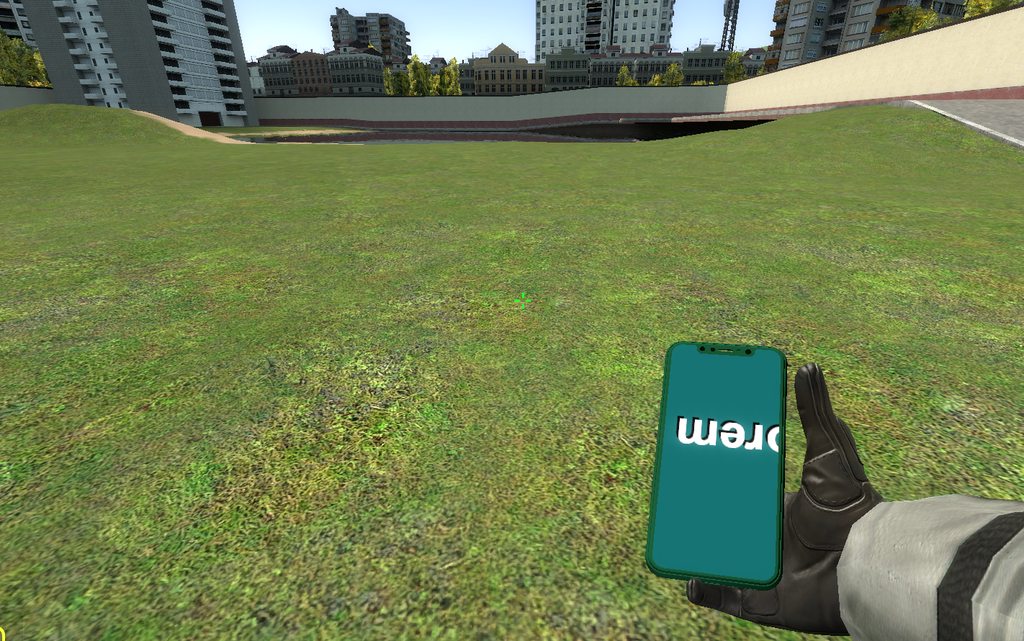
Hello, im trying to create a phone SWEP and project a screen to it using cam2d.
https://imgur.com/a/JO4HZZ1
i just copied stool's code to see if it works, this is the code:
if CLIENT then
    local TEX_SIZE = 512
    local matScreen = Material("weapons/emekhacker/phone_screen")
    local RTTexture = GetRenderTarget( "EmekHackerPhoneScreen", TEX_SIZE, TEX_SIZE )
    print(RTTexture)

    local function DrawScrollingText( text, y, texwide )

        local w, h = surface.GetTextSize( text )
        w = w + 64

        y = y - h / 2 -- Center text to y position

        local x = RealTime() * 250 % w * -1

        while ( x < texwide ) do

            surface.SetTextColor( 0, 0, 0, 255 )
            surface.SetTextPos( x + 3, y + 3 )
            surface.DrawText( text )

            surface.SetTextColor( 255, 255, 255, 255 )
            surface.SetTextPos( x, y )
            surface.DrawText( text )

            x = x + w

        end

    end

    function SWEP:RenderScreen()
    -- Set the material of the screen to our render target
    matScreen:SetTexture( "$basetexture", RTTexture )

    -- Set up our view for drawing to the texture
    render.PushRenderTarget( RTTexture )
    cam.Start2D()

        -- Background
        surface.SetDrawColor( 25, 100, 100, 255 )
        surface.DrawTexturedRect( 0, 0, TEX_SIZE, TEX_SIZE )


            surface.SetFont( "GModToolScreen" )
            DrawScrollingText( "Lorem Ipsum Lorem Ipsum Lorem Ipsum Lorem Ipsum Lorem Ipsum", 400, TEX_SIZE )

    cam.End2D()
    render.PopRenderTarget()
    end

end
the phone model screen has a simple 1024x1024 white color vtf file with and UnlitGeneric shader inside the vmt.
the text is upside down and the x,y 0,0 point is in the bottom right corner outside the screen area.
any ideas of why this would happen?