
#Blocks General
1 messages · Page 9 of 1
 vestal marsh
If it says Upcoming 1.21.30 then yes
 nova wolf
are block tags still done "tag": "<tag>"?
nova wolf
 shrewd storm
err "tag:taghere"
shrewd storm
err "tag:taghere"
ah ok, thank you
 mint frost
anyone have the dirt mining speed and explode resistance handy?
 wind hedge
nova wolf
I'm guessing those are in the preview then?
wind hedge
nova wolf
I'm guessing those are in the preview then?
Yes, upcoming means it's in Preview and planned means not yet.
nova wolf
wind hedge
Yes, upcoming means it's in Preview and planned means not yet.
Oh, you do the French version of the wiki?
wind hedge
nova wolf
Oh, you do the French version of the wiki?
I'm admin of the French wiki and Director of English 🙃
nova wolf
wind hedge
I'm admin of the French wiki and Director of English 🙃
oh wow
 real hawk
A general question about block restrictions, the wiki states one can't override vanilla block assets, to what degree? Can we still access all the blocks behaviour or e.g. geometry? In my case I wanted to create a woodsaw that mimics the behaviour of a stonesaw.
And what tool is typically used to access e.g. all block files? (the samples lack the /blocks folder)
And last question the format_version for the wiki example block introduction is 1.21.20 < when I checked the wikis page about format versions it didn't list that. When is the eng version the format version?
vestal marsh
real hawk
A general question about block restrictions, the wiki states one can't override ...
Cannot access vanilla bp or geo model
real hawk
sadly, thanks though for the quick answer
Sorry if that's a dumb question but that means we also can't access/modify/override the loottable of vanilla blocks?
vestal marsh
real hawk
Sorry if that's a dumb question but that means we also can't access/modify/overr...
Correct. Those are hardcoded
 somber wraith
can we do the pipeline "arms" by using bone_visibility? it doesnt seem to work from what i tried
vestal marsh
somber wraith
can we do the pipeline "arms" by using bone_visibility? it doesnt seem to work f...
What are "pipeline arms"
somber wraith
the extensions? idk how this is called
 vestal marsh
somber wraith
the extensions? idk how this is called
vestal marsh
somber wraith
the extensions? idk how this is called
Yeah you can use bone visibility
somber wraith
But i want to do it based on the connections
vestal marsh
somber wraith
But i want to do it based on the connections
You can. You just need to have tons of permutations
 summer roost
somber wraith
But i want to do it based on the connections
summer roost
somber wraith
But i want to do it based on the connections
Did something similar my bone visibility looks like that
 real hawk
What's the proof of concept for fake custom tile entities (fake chests), since there is no component for that?
 true rover
i have added those tags to my custom block but ut doesn't seem that they do anything
 vestal marsh
true rover
i have added those tags to my custom block but ut doesn't seem that they do anyt...
vestal marsh
true rover
i have added those tags to my custom block but ut doesn't seem that they do anyt...
Did you have UCF toggle?
How are you testing it?
true rover
vestal marsh
Did you have UCF toggle?
no
true rover
vestal marsh
How are you testing it?
i added it to a block and tried to mine it with hand and with a wooden pickaxe, it took the same mining time and dropped loot either way.
vestal marsh
true rover
i added it to a block and tried to mine it with hand and with a wooden pickaxe, ...
Try setting it to 10 seconds youll notice the diff
true rover
do you mean the seconds to destroy? there is no difference
vestal marsh
true rover
do you mean the seconds to destroy? there is no difference
Bc you didnt turn on UCF
true rover
i did
here is the full block
{
  "format_version": "1.21.30",
  "minecraft:block": {
    "description": {
      "identifier": "yasser444:coal_ore",
      "menu_category": {
        "category": "nature",
        "group": "itemGroup.name.ore"
      }
    },
    "components": {
      "minecraft:display_name": "tile.coal_ore.name",
      "minecraft:loot": "loot_tables/blocks/coal.json",
      "tag:minecraft:wood_tier_destructible": {},
      "tag:minecraft:minecraft:is_pickaxe_item_destructible": {},
        "minecraft:map_color": [112, 112, 112],
      "minecraft:destructible_by_mining": { "seconds_to_destroy": 10 },
        "minecraft:destructible_by_explosion": { "explosion_resistance": 12 }
    }
  }
}
Ah
What is tag:minecraft:minecraft:is_pickaxe_item_destructible?
true rover
wait what! how did that happen lol
yay it works now
does minecraft:(material)_tier_destructible do anything tho?
 misty scarab
So are tags in the stable version now or still in preview?
true rover
misty scarab
So are tags in the stable version now or still in preview?
stable
it requires UCF experiment tho
true rover
true rover
does minecraft:(material)_tier_destructible do anything tho?
i expected it to make the block not drop loot if mined with a tool that's a lower tier than it, but the block drops loot regardless?
vestal marsh
Can you do /give?
 plain stone
Tried it but it gives some syntax error. | SOLVED, received a help, works now.
 bitter oracle


 jagged phoenix
Are vanilla blocks tagged with the new tags? Do we still need to list out 500 IDs to make a pickaxe work?
vestal marsh
jagged phoenix
Are vanilla blocks tagged with the new tags? Do we still need to list out 500 ID...
Only in 1.21.40
 brave geyser
{
  "format_version": "1.21.40",
  "minecraft:block": {
    "description": {
      "identifier": "gvpa:brick_road",
      "menu_category": {
        "category": "construction",
        "group": "itemGroup.name.stoneBrick"
      }
    },
    "components": {
      "tag:stone": {},
      "tag:minecraft:wood_tier_destructible": {},
      "tag:minecraft:minecraft:is_pickaxe_item_destructible": {},
      "minecraft:friction": 0.6,
      "minecraft:map_color": "#b1624d",
      "minecraft:light_emission": 0,
      "minecraft:destructible_by_explosion": {
        "explosion_resistance": 30
    },
      "minecraft:destructible_by_mining": {
        "seconds_to_destroy": 5
      }
    }
  }
}
Haven't noticed any difference. Im on preview and i have UCF on. What am i doing wrong?
vestal marsh
brave geyser
```js
{
"format_version": "1.21.40",
"minecraft:block": {
"description":...
People keep making the same mistake haha. you have minecraft:minecraft when it's supposed to be just minecraft
brave geyser
lmao, went full on monkey see monkey do mode. Thank you very much hahaha
im an actual smooth brain
 lost vine
sup,
does anyone have the piston placement rotation?
like placing the block while looking up will make the block facing down
vestal marsh
lost vine
sup,
does anyone have the piston placement rotation?
like placing the block whil...

Just change the rotation values
 crimson ingot
Im having some issues with my block. It appears correctly in blockbench, and all pivot points are set to 0, however the texture appears askew
Ive attached two images, both what appears ingame and Blockbench


 white bobcat
Close blockbench and re-open it to see if the model still looks the same
I've had an issue in which the model looks good in BB but after reloading the app it appears as it looks in game
shrewd storm
Sometimes snapping to pixels fixes that. I've had that with my stairs too
nova wolf
I'm using "tag:metal": {}" in my block, but vanilla pickaxes won't mine it faster?
vestal marsh
nova wolf
I'm using `"tag:metal": {}"` in my block, but vanilla pickaxes won't mine it fas...
Wrong tag
Use the new block tags introduced in 1.21.30 locked behind the UCF toggle
nova wolf
iron_pick_diggable?
oh
did the old tags like iron_pick_diggable, metal, etc, get deprecated?
vestal marsh
nova wolf
did the old tags like iron_pick_diggable, metal, etc, get deprecated?
They never worked
nova wolf
oh
wait, there's redstone_conductivity now?
wow
I've been waiting a while for that. So glad it's in UCF now. Won't need to make a script
vestal marsh
nova wolf
I've been waiting a while for that. So glad it's in UCF now. Won't need to make ...
You still need ScriptAPI
nova wolf
Is "tag:minecraft:stone_tier_destructible": {} working properly?
vestal marsh
No
nova wolf
My block has the tag, but a wooden pick can still mine it and drop it
vestal marsh
Only the tools one work
nova wolf
vestal marsh
No
ah
oof
I guess I can just make a script checking if the block has the minecraft:stone_tier_destructible tag, and if the pickaxe also has a correct tag
so it doesn't drop otherwise
vestal marsh
Or just use the loot table match tools
nova wolf
ye, but I have a few custom tools, so might be better to use scripts, especially since I want to expand the amount of tools
more dynamic
crimson ingot
white bobcat
Close blockbench and re-open it to see if the model still looks the same
I've tried that, still appears the same in blockbench.
shrewd storm
so whats everyone setting their custom woods to for mining speeds with custom tools to get as close to vanilla ? im trying to set a hardness scale for my wood sets and am having difficulty. my custom tool is breaking vanilla blocks faster than custom lol
vestal marsh
shrewd storm
so whats everyone setting their custom woods to for mining speeds with custom to...
Check the mc wiki
shrewd storm
i have but it still doesnt seem to match very well
using item specific speeds for custom tools doesnt work or im doing it wrong
im trying to do this with my custom axe and no matter what i set the speeds to its still slower than vanilla blocks being broken
vestal marsh
shrewd storm
im trying to do this with my custom axe and no matter what i set the speeds to i...
Item specific tools doesnt apply the correct tool tag hence it will be 2.5x slower that the time you set
shrewd storm
yeah i know that part but the tags are buggy af. i cant get hatchet item destructable to work for my wood sets but digger item destructable does. ive been testing all the tags for like 2 hours now and i cant seem to understand what is overriding what
vestal marsh
We love experimental stuff whoo
shrewd storm
the digger one works but its glitchy and plays half the break animation 2 times . but my custom axe works just fine on everything
well hopefully by the next stable update the tag system is atleast hashed out -_- but thats asking for alot
vestal marsh
shrewd storm
well hopefully by the next stable update the tag system is atleast hashed out -_...
Nowadays, experimental stays experimental for 1 or 2 cycles
shrewd storm
yeah its gonna be buggy for a while then
 dreamy hull
how do i make a custom recipe im using blockbench
shrewd storm
dreamy hull
how do i make a custom recipe im using blockbench
blockbench is for blocks and entities not recipes id recommend bridge for the basics if your starting pack making it has auto completes and templates to use including making recipes but some of it requires prior knowledge on how to make some things
dreamy hull
shrewd storm
blockbench is for blocks and entities not recipes id recommend bridge for the ba...
thank you, i'll try that
 gilded mortar
Is it possible to make a stonecutter like block?
I remember it was possible to do with HCF but now I can't find any information about it
 primal roost
mean u, block with animation like stone cutter?
 hexed zinc
im trying to make a block with a 2 block long geometry, but its giving me an error saying my block has one box outside the error bounds of (-0.875 on x, y, z,) to (1.875 on x, y, z)
vestal marsh
hexed zinc
im trying to make a block with a 2 block long geometry, but its giving me an err...
Blocks can only have a 30 pixel max geo
hexed zinc
I made a block thats identical to a piston just so i could have access to its states in my script. i was trying to make a second geometry which currently looks exactly like an extended piston. is there any way to do that without having the error?
vestal marsh
hexed zinc
I made a block thats identical to a piston just so i could have access to its st...
No, you'll have to make two separate blocks. Also I'm confused on what your situation is. Why do you need a custom piston just to access its states?
hexed zinc
I didn't think you could set piston states to extended or retracted in bedrock
vestal marsh
hexed zinc
I didn't think you could set piston states to extended or retracted in bedrock
Ah no, you cannot. You'll need to power it. Pistons in Vanill are comprised of two blocks: piston and piston arm
vestal marsh
Yeah, unfortunately, you'll need to use two separate blocks
hexed zinc
I honestly don't know a lot about blocks. Is that something straightforward or is that not really an easy thing to do?
hexed zinc
painfully close without

 spice stone
hexed zinc
I made a block thats identical to a piston just so i could have access to its st...
spice stone
hexed zinc
I made a block thats identical to a piston just so i could have access to its st...
Pistons are 2 blocks
But their selection boxes are merged or one of extends (don't remember which one)
hexed zinc
isnt the arm an entity?
spice stone
It's a block entity
gilded mortar
primal roost
mean u, block with animation like stone cutter?
Like a crafting table, I remember this was possible with hcf
primal roost
gilded mortar
Like a crafting table, I remember this was possible with hcf
ah, with an ui?
gilded mortar
primal roost
ah, with an ui?
yeah
 unkempt creek
gilded mortar
Like a crafting table, I remember this was possible with hcf
unkempt creek
gilded mortar
Like a crafting table, I remember this was possible with hcf
Custom stonecutter never been possible, only crafting table. And it's not affected by removal of HCF.
primal roost
gilded mortar
yeah
use the "crafting_table" component
"minecraft:crafting_table": {
    "table_name": "Wiki Workbench",
    "crafting_tags": [
        "crafting_table",
        "wiki_workbench"
    ]
}
the tags are used in your recipes
gilded mortar
primal roost
use the "crafting_table" component
```json
"minecraft:crafting_table": {
"t...
ik, but is there anyway to edit the gid size?
primal roost
👆
jagged phoenix
How do I set permutation when block is placed (like lantern)?
Ex:
If placed on ceiling, use permutation 1
Otherwise use permutation 0
spice stone
is there a way to disable pick block on custom blocks?
 gaunt steeple
is there another way to define a range of values for this?
 gilded mortar
Is there anyway to fix ambient occlusion issues and add rotation to that block?
unkempt creek
gaunt steeple
is there another way to define a range of values for this?
"mh:break_counter": {
    "values": { "min": 0, "max": 15 }
}
are you trying a custom breaking animation?
shrewd storm
jagged phoenix
How do I set permutation when block is placed (like lantern)?
Ex:
If placed on...
you can do it with one model if you make 2 textures. one being the one attached to the ceiling with whatever hanging texture you have and one being the normal and have the permutation for the ceiling display the ceiling texture and the other display the normal one .
or you can do it with 2 geos and 2 textures and just have the ceiling permutation use the ceiling geo and the other use the normal geo

 ebon laurel
You can't with blocks
For entities, it's using entity_emissive or entity_emissive_alpha as the material and setting the opacity to a low value. But those aren't valid block materials
 tawdry dirge
ebon laurel
You can't with blocks
tawdry dirge
ebon laurel
You can't with blocks
oh, sad
tawdry dirge
ebon laurel
You can't with blocks
Then how does the beacon glow so much
 ebon laurel
Well, first of all it is hardcoded
but emission level does make it glow as well
but you mentioned you don't want that
white bobcat
You want your block to emit light?
If so, you'll use "minecraft:light_emission" block component in your behavior block file.
tawdry dirge
ebon laurel
but you mentioned you don't want that
the block already emits light, but i want the textures to glow as well
tawdry dirge
white bobcat
If so, you'll use `"minecraft:light_emission"` block component in your behavior ...
i already am, but i dont want the light to be too bright
white bobcat
You can only make your block glow with deffered
spice stone
is there a component or something to make a custom block considered as not a solid block
snow layers keep building up on top of my custom crops
and i can place torches on the sides of them...
white bobcat
You’ll need scripting to prevent these problems
spice stone
but then i have to account for every non solid block then
 trail scroll
I forgot how to do this. How do you make parts of a model invisible?

 desert vector
trail scroll
I forgot how to do this. How do you make parts of a model invisible?
desert vector
trail scroll
I forgot how to do this. How do you make parts of a model invisible?
based on block permutation?
"minecraft:geometry": {
  "identifier": "geometry.my_model",
  "bone_visibility": {
    "my_bone": "q.block_state('example:state') == 'red'"
  }
}
 dull pewter
Do we have access to proper break speeds using vanilla tools yet?
white bobcat
almost
dreamy hull
How do i make a block that acts like a slab by going on the top and bottom of blocks?
white bobcat
Using block traits!

GitHub
Contribute to Kaioga5/Kaioga-s-Block-Templates development by creating an account on GitHub.
dreamy hull
THANK YOU SO MUCH!! IVE BEEN TRYING TO DO THIS FOR DAYS!
white bobcat
Happy to help!
dreamy hull
wth you have like literally everything ive been needing in making mods just there
white bobcat
😊
All of the scripts are slightly outdated but don’t need of that many changes to be fixed. When I get enough time to update everything I will, among with adding lots of new templates
jagged phoenix
Is it possible to have vanilla pickaxes take durability when mining custom blocks with tags? Or does that require scripts/custom components?
vestal marsh
jagged phoenix
Is it possible to have vanilla pickaxes take durability when mining custom block...
Doesnt it do it automatically?
jagged phoenix
vestal marsh
Doesnt it do it automatically?
Nope
I'm using the pickaxe tag and it does mine the blocks faster with upcoming features enabled, but vanilla tools don't lose any durability
 olive flume
Is it bug that blocks with custom component of onPlayerInteract, triggers even when ur trying to place a block on top of it?
It prevents that block from being placed, it eventually does get placed but after 4-5 tries
Seems to happen in both current (1.21.31) and the latest preview
vestal marsh
olive flume
Is it bug that blocks with custom component of `onPlayerInteract`, triggers even...
Crouching?
olive flume
vestal marsh
Crouching?
Nope, normally placing blocks
vestal marsh
olive flume
Nope, normally placing blocks
As far as I know ifs WAI just like vanilla blocks
desert vector
there aren't interaction conditions for blocks with custom components so you'll always be able to interact with them, like with buttons
olive flume
vestal marsh
As far as I know ifs WAI just like vanilla blocks
this is what I mean
I also noticed the speed at which you can place blocks on top of each other (custom blocks with custom components) is drastically reduced, it does still let me place but far slower than vanilla ones
regardless of what's inside that custom component
Like this
It just has a custom component with this code:
onPlace: (e) => {
      const { block } = e;
      console.warn("onPlace")
    }
 tall zenithBOT

Reported by
QuazChick
Votes
6
Project
Created
<t:1726420615:R>
Updated
<t:1727620993:R>
Status
To Do (Open)
Since version
1.21.22 Hotfix
Resolution
Unresolved
Fix version
Unset
 plain light
Could someone explain to me what I'm doing wrong?
[blocks][warning]-Warning: The blocks.json "format_version" field was not given. "format_version" 1.1.0 will be used
[Texture][warning]-The block named stop_light used in a "blocks.json" file does not exist in the registry

I'm using the block wizard plug in with blockbench
plain light
I figured this out.
Anyone familiar with block wizard plugin in here?
I got my texture in but it only places facing one direction. I'd like to have it face towards player when placed
 tawny falcon
Is it possible to create a custom block destruction texture for blocks with custom geometry?
vestal marsh
tawny falcon
Is it possible to create a custom block destruction texture for blocks with cust...
No
plain light
vestal marsh
No
so can the blocks never be demolished?
Can I create a hit box for a custom block? Right now it doesn't seem to have one.
primal roost
plain light
so can the blocks never be demolished?
"minecraft:destructible_by_mining": false
custom hitbox
"minecraft:collision_box": {
    "origin": [-8, 0, -8],
    "size": [16, 16, 16]
}
https://wiki.bedrock.dev/blocks/block-components.html#collision-box
Bedrock Wiki
Block components are used to change how your block appears and functions in the world.
 ruby ridge
what component for block breaks? such as specific items
misty scarab
what is the tag for mining blocks with axe? I can't find it in the list on the vanilla blocks tags documentation
 full pagoda
For custom block is there a limit of texture size?
lost vine
guys, if anyone is alive, i need some help
i want a file or a website or anything that i can see the destroy speed of minecraft blocks using it
vestal marsh
lost vine
i want a file or a website or anything that i can see the destroy speed of minec...
The mc wiki
lost vine
vestal marsh
The mc wiki
ah, thanks
at least i will get the specific time unlike the new chatgpt
bruh ai keep telling me that deepslate took 82.5s to break using ur hand
 floral pasture
Is it possible for a block to have 2 textures at the same time
 neon dome
floral pasture
Is it possible for a block to have 2 textures at the same time
neon dome
floral pasture
Is it possible for a block to have 2 textures at the same time
You talking about a animated block?
true rover
is there a fortune function for loot tables?
can we make custom blocks drop more items if broken with fortune?
vestal marsh
true rover
can we make custom blocks drop more items if broken with fortune?
Use match_tool
true rover
oh yeah, i forgot it had an enchantments check
floral pasture
neon dome
You talking about a animated block?
Yes an animated and not
 distant fjord
Why is there a shadow in the corner of the block?
{
  "format_version": "1.19.60",
  "minecraft:block": {
    "description": {
      "identifier": "n:block.1",
      "menu_category": {
        "category": "construction"
      }
    },
    "components": {
      "minecraft:loot": "loot_tables/empty.json",
      "minecraft:map_color": "#ffffff",
      "minecraft:material_instances": {
        "*": {
          "texture": "block.1",
          "render_method": "opaque",
          "ambient_occlusion": false
        }
      },
      "minecraft:light_dampening": 15,
      "minecraft:light_emission": 0,
      "minecraft:destructible_by_mining": false,
      "minecraft:destructible_by_explosion": false,
      "minecraft:friction": 0.4,
      "minecraft:flammable": false,
      "minecraft:collision_box": true,
      "minecraft:selection_box": true
    }
  }
}
 misty scarab
distant fjord
Why is there a shadow in the corner of the block?
```js
{
"format_version": "...
misty scarab
distant fjord
Why is there a shadow in the corner of the block?
```js
{
"format_version": "...
Change your render method
 magic pivot
Hello! Trying to use onTick custom block component. but getting this error.
And cannot find any docs for "tick" component https://learn.microsoft.com/en-us/minecraft/creator/reference/content/blockreference/examples/blockcomponents/blockcomponentslist?view=minecraft-bedrock-stable


A reference document listing all currently available block components
vestal marsh
magic pivot
Hello! Trying to use onTick custom block component. but getting this error.
And...
Bedrock Wiki
Block components are used to change how your block appears and functions in the world.
 magic pivot
vestal marsh
https://wiki.bedrock.dev/blocks/block-components.html#tick
magic pivot
vestal marsh
https://wiki.bedrock.dev/blocks/block-components.html#tick
tyyyy....are the docs i linked out of date?
vestal marsh
Likely
distant fjord
misty scarab
Change your render method
Change to which?
 keen nimbus
What Format Version do Blocks use in the latest version?
vestal marsh
keen nimbus
What Format Version do Blocks use in the latest version?
1.21.30
 sage mesa
Why doesn't this work ??
I made it using a program on Play Store called Addon Maker
Can anyone help me fix it please ??
And help me remove unnecessary stuff (if any)
If you can help me then pls ping me
 tardy surge
sage mesa
Why doesn't this work ??
I made it using a program on Play Store called Addon Ma...
tardy surge
sage mesa
Why doesn't this work ??
I made it using a program on Play Store called Addon Ma...
Hate to say it but that entire thing needs a significant re write. All of the block events need to move to scripts and general naming is incorrect, not sure why blocks are using entity_collision for instance. If you take a look at my wood set template you’ll see some examples of custom slabs and fences for instance. The rest will need to be filled in but there are example templates for all of it. Wish I could help more but hopefully the guidance will get ya somewhere at least 🤞
sage mesa
tardy surge
Hate to say it but that entire thing needs a significant re write. All of the bl...
imma try 🫡
thanks tho
tardy surge
Feel free to ping me if ya got any questions, I’m happy to guide ya to resources and answer questions at least! Best of luck!
sage mesa
tardy surge
Feel free to ping me if ya got any questions, I’m happy to guide ya to resources...
say if i wanna start from scratch 🙂
tardy surge
sage mesa
say if i wanna start from scratch 🙂
honestly to start from scratch head on over to the dev resources and search up templates and just start playing about, just in the last few weeks there have been a lot of updated templates released
sage mesa
tardy surge
honestly to start from scratch head on over to the dev resources and search up t...
alright
 simple carbon
Hey where can I learn the new custom components.. component?
Idk it's been a while since I've done anything Minecraft
 turbid veldtBOT
HCF Removal and Custom Components
The Holiday Creator Features experimental toggle has been removed. Along with it includes JSON block and item events. This functionality has been replaced with custom components.
Please take a look at the following links to learn more about custom components:
Bedrock Wiki
- Block Events
- Block Events Migration to Custom Components
- Item Events
- Item Events Migration to Custom Components
MS Docs
vestal marsh
turbid veldt
@simple carbon
ruby ridge
my block drops it self on destroy how do I make it not drop?
{
    "format_version": "1.21.0",
    "minecraft:block": {
        "description": {
            "identifier": "si:corpse",
            "menu_category": {
                "category": "items",
                "group": "itemGroup.name.chest"
            },
            "traits": {
                "minecraft:placement_direction": {
                    "enabled_states": [
                        "minecraft:cardinal_direction"
                    ],
                    "y_rotation_offset": 180
                }
            }
        },
        "components": {
            "tag:corpse": {},
            "tag:custom_chest": {},
            "tag:chest": {},
            "tag:wood": {},
            "minecraft:geometry": "geometry.custom_chest",
            "minecraft:material_instances": {
                "*": {
                    "texture": "custom_chest",
                    "ambient_occlusion": true,
                    "face_dimming": true,
                    "render_method": "alpha_test"
                }
            },
            "minecraft:flammable": false,
            "minecraft:destructible_by_mining": {
                "seconds_to_destroy": 1
            },
            "minecraft:destructible_by_explosion": {
                "explosion_resistance": 0.8
            },
            "minecraft:light_dampening": 0,
            "minecraft:selection_box": {
                "origin": [
                    -6.5,
                    0,
                    -6.5
                ],
                "size": [
                    13,
                    14,
                    13
                ]
            },
            "minecraft:collision_box": {
                "origin": [
                    -7,
                    0,
                    -7
                ],
                "size": [
                    14,
                    14,
                    14
                ]
            }
        }
    }
}
I don't know what component it is
spice stone
ruby ridge
```js
{
"format_version": "1.21.0",
"minecraft:block": {
"descri...
minecraft:loot
ruby ridge
spice stone
minecraft:loot
but I don't want it to drop any loot though
 copper mauve
How do i make a block mine faster with a specific tool?
vestal marsh
copper mauve
How do i make a block mine faster with a specific tool?
Use the new item specific speed
 fervent pelican
how to fix the weird black shadow under the slab
 bronze vector
@magic pivot i know this is pretty late, but alternatively you could try using a function that runs an execute if block air relative to the coordinate of your custom block with a negative y axis of ~-1 and then run either a setblock or a fill command that breaks your custom block. That's probably much less tedious than just coding in every possible block, but you'll need to find the correct event to implement the function in.
Or perhaps instead of events, you could use onTick
bronze vector
fervent pelican
how to fix the weird black shadow under the slab
I was about to say "check the light dampening component" but that looks like a texture issue. Make sure that the confines of your block don't clip with others, so maybe try raising the sides.
bronze vector
ruby ridge
my block drops it self on destroy how do I make it not drop?
Try creating a loottable with nothing in it, and assign it to the custom block.
bronze vector
spice stone
you give it an empty loot table
This.
unkempt creek
bronze vector
<@295100362485137408> i know this is pretty late, but alternatively you could tr...
That's exactly what we're suggesting, to use onTick. The reason I say those things because he's trying to prevent to use onTick as much as possible.
bronze vector
fervent pelican
how to fix the weird black shadow under the slab
Also- just wanted to say that the concept of that custom block is amazing. I don't know if you manually implemented slabs for each possible block that can be placed or if you somehow automated every possible outcome, but that's neat nonetheless.
bronze vector
unkempt creek
That's exactly what we're suggesting, to use `onTick`. The reason I say those th...
I see. Well, it's not really possible to implement such a thing without the usage of ticks in someway
I was just suggesting to use commands instead for a much simpler and efficient system, so that you can check for air instead of excluding every possible block in the entire game
unkempt creek
bronze vector
I see. Well, it's not really possible to implement such a thing without the usag...
I know, if you read what I say. I explain it, and he understand it well. So this problem is already solve 100 years ago.
unkempt creek
bronze vector
I was just suggesting to use commands instead for a much simpler and efficient s...
Yeah, that's what the custom components will do anyway.
bronze vector
Yes, and i'm adding on it even if it was already solved.
unkempt creek
Which is the same solution.
bronze vector
Well- no not really, you guys were telling him to check for every possible block in an instance of maximum 64 variables. I wasn't really talking about that, unless i've missed some texts somewhere.
Also, it's just a week old text. The issue wasn't that old lol
unkempt creek
bronze vector
Well- no not really, you guys were telling him to check for every possible block...
We were talking about that if he want to use placement_filter, so we suggesting to use onTick instead to easily check if the block is not attached to any block (basically to test if place on air)
neon dome
fervent pelican
how to fix the weird black shadow under the slab
Changing the render would help
sage mesa
How do I make the lamps emit light when i right click them and stop doing so when i right click again
Can anyone help ?
If anyone can then pls ping me 🙏🏻
unkempt creek
sage mesa
How do I make the lamps emit light when i right click them and stop doing so whe...
Create a 2 different states for your block. And with permutation, you can set that the off state don't emit lights and on state emit lights. Then with custom components, you can change its state to switch to on and off state.
sage mesa
unkempt creek
Create a 2 different states for your block. And with permutation, you can set th...
a bit more detail will be appreciated 🥲
its my first time with custom components and permutations
unkempt creek
sage mesa
a bit more detail will be appreciated 🥲
Bedrock Wiki
Block states allow your blocks to have variants, each with its own functionality and appearance through use of permutations.
sage mesa
unkempt creek
https://wiki.bedrock.dev/blocks/block-states.html
thanks 🙂
 mellow carbon
unkempt creek
Create a 2 different states for your block. And with permutation, you can set th...
mellow carbon
unkempt creek
Create a 2 different states for your block. And with permutation, you can set th...
and for glowing effect you could use a lighter version of your texture
@sage mesa
sage mesa
can't i use light_emission ?
unkempt creek
The texture variant is optional
mellow carbon
you have to but to make it look like redstone lamp you can use 2 different textures
unkempt creek
Just like redstone lamp, have different texture for on and off state.
sage mesa
@unkempt creek @mellow carbon
{
    "format_version": "1.20.80",
    "minecraft:block": {
        "description": {
            "identifier": "gwim:lamp"
        },
        "states": {
            "lit": [0, 1]
        },
        "components": {
           "minecraft:has_collision": true,
 "minecraft:light_emission": 15,
            "minecraft:geometry": "geometry.lamp",
            "minecraft:material_instances": {
                "*": {
                    "texture": "gwim_lamp",
                    "render_method": "alpha_test"
                }
            }
        },
        "events": {
            "minecraft:on_interact": {
                "sequence": [
                    {
                        "condition": "query.block_property('lit') == 0",
                        "set_block_property": {
                            "lit": 1
                        },
                        "set_block_light_emission": 15
                    },
                    {
                        "condition": "query.block_property('lit') == 1",
                        "set_block_property": {
                            "lit": 0
                        },
                        "set_block_light_emission": 0
                    }
                ]
            }
        }
    }
}
not working :(
unkempt creek
sage mesa
<@659099523871932438> <@799990463863717970>
```json
{
"format_version": "1....
Events has been removed, that's why I said earlier to use custom components.
turbid veldtBOT
HCF Removal and Custom Components
The Holiday Creator Features experimental toggle has been removed. Along with it includes JSON block and item events. This functionality has been replaced with custom components.
Please take a look at the following links to learn more about custom components:
Bedrock Wiki
- Block Events
- Block Events Migration to Custom Components
- Item Events
- Item Events Migration to Custom Components
MS Docs
unkempt creek
sage mesa
<@659099523871932438> <@799990463863717970>
```json
{
"format_version": "1....
Also this doesn't have permutation. Only states.
sage mesa
unkempt creek
Also this doesn't have permutation. Only states.
ohhh
how do i fix it ??
unkempt creek
sage mesa
ohhh
how do i fix it ??
Bedrock Wiki
Block permutations represent all state configurations that blocks can possibly be in.
sage mesa
unkempt creek
https://wiki.bedrock.dev/blocks/block-permutations.html
yes sir 🫡
unkempt creek
turbid veldt
To switch the block between states, look at this.
sage mesa
{
    "format_version": "1.20.80",
    "minecraft:block": {
        "description": {
            "identifier": "gwim:lamp",
            "states": {
                "gwim:lit": [false, true]
            }
        },
        "components": {
            "minecraft:geometry": "geometry.lamp",
            "minecraft:material_instances": {
                "*": {
                    "texture": "gwim_lamp",
                    "render_method": "alpha_test"
                }
            }
        },
        "permutations": [
            {
                "condition": "q.block_state('gwim:lit') == true",
                "components": {
                    "minecraft:light_emission": 15
                }
            },
            {
                "condition": "q.block_state('gwim:lit') == false",
                "components": {
                    "minecraft:light_emission": 0
                }
            }
        ],
        "events": {
            "minecraft:block_interacted_with": {
                "sequence": [
                    {
                        "set_block_property": {
                            "property": "gwim:lit",
                            "value": true
                        },
                        "condition": "q.block_state('gwim:lit') == false"
                    },
                    {
                        "set_block_property": {
                            "property": "gwim:lit",
                            "value": false
                        },
                        "condition": "q.block_state('gwim:lit') == true"
                    }
                ]
            }
        }
    }
}
@unkempt creek
got this much
took help from bridge and chat gpt
what next ?
unkempt creek
unkempt creek
Events has been removed, that's why I said earlier to use custom components.
@sage mesa
unkempt creek
turbid veldt
This
sage mesa
unkempt creek
<@818081383343194112>
oh ma bad 🫡
sage mesa
unkempt creek
This
this requires scripts tho :<
unkempt creek
sage mesa
this requires scripts tho :<
Yes, you need to use custom components to make your block clickable using onPlayerInteract so that you can switch between on and off states.
sage mesa
unkempt creek
Yes, you need to use custom components to make your block clickable using `onPla...
ah ok ok
 twin coral
Is there a list of which blocks can be broken by which tools somewhere?
https://minecraft.wiki/w/Breaking this is close
but I want to know which tier tools break which blocks
wood tools break redstone blocks with drops, but not diamond blocks for example
fervent pelican
bronze vector
Also- just wanted to say that the concept of that custom block is amazing. I don...
Thank you. this is my first mc mod and im surprised at the reception its been getting
fervent pelican
bronze vector
I was about to say "check the light dampening component" but that looks like a t...
how would i do this?
desert vector
you could hide the black bits by using the alpha_test_single_sided render method
 rapid imp
How can i make a block that executes a command overtime like summoning mobs
vestal marsh
rapid imp
How can i make a block that executes a command overtime like summoning mobs
Use ticking then scriptapi
white bobcat
We may need more context. If you give a block an 8x8 texture then it will look like so. If you are giving your block a 16x16 texture and it looks like 8x8, then that’s because of your geometry
Please avoid asking your question in multiple places to avoid cross-posting, which is against our rules. If you created a post, keep it there, don’t ask in the general channel too, and viceversa
 muted quail
how do i make the block able to get interacted with? "minecraft:on_interact": {},
vestal marsh
muted quail
how do i make the block able to get interacted with? "minecraft:on_interact": {}...
Use custom components
turbid veldtBOT
HCF Removal and Custom Components
The Holiday Creator Features experimental toggle has been removed. Along with it includes JSON block and item events. This functionality has been replaced with custom components.
Please take a look at the following links to learn more about custom components:
Bedrock Wiki
- Block Events
- Block Events Migration to Custom Components
- Item Events
- Item Events Migration to Custom Components
MS Docs
muted quail
vestal marsh
Use custom components
i mean im using script api but after events doesnt catch when i interact with the block
vestal marsh
muted quail
i mean im using script api but after events doesnt catch when i interact with th...
Use custom components not after events.
muted quail
vestal marsh
Use custom components not after events.
what im making a big script and i need something to make the item swing and click on the block
olive flume
muted quail
what im making a big script and i need something to make the item swing and clic...
yea, custom components can do that
muted quail
olive flume
yea, custom components can do that
yeah but they re weird
olive flume
how?
muted quail
import { world } from "@minecraft/server";

world.beforeEvents.worldInitialize.subscribe((scb) => {
    scb.itemComponentRegistry.registerCustomComponent("scb:components", {
        onUseOn() { }
    });
});
^ this is the component of the block
world.afterEvents.itemUseOn.subscribe(({ source: player, itemStack, block }) => {
    console.warn("click")
})
^ this is main.js it doesnt work somehow, but using before events fixed it
this makes no sense why before works and after no??!
olive flume
world.beforeEvents.worldInitialize.subscribe((eventData) => {
  eventData.blockComponentRegistry.registerCustomComponent("my:custom_comp", {
    onPlayerInteract: (e) => {
      const player = e.player;
      const block = e.block;

      console.warn(`${player.name} interacted with ${block.typeId}`);
    }
  });
})
add my:custom_comp in ur block json
muted quail
olive flume
```js
world.beforeEvents.worldInitialize.subscribe((eventData) => {
eventData....
no i need it to be a part of main js
muted quail
im doing a custom campfire script that makes a fire plugh start a fire in the campfire and after 60 seconds it unlits
olive flume
you need to use onPlayerInteract instead of onUseOn because that event only triggers if your block can actually support item use on (for example crafting table, anvil etc), tho it will work on any block if used with before event
but you don't really need onUseOn, just use a block custom component and not an item custom component
that block can have on player interact
just check for the item that player is holding and do ur stuff
It will also automatically handle item swing animation too
muted quail
olive flume
but you don't really need `onUseOn`, just use a *block* custom component and not...
thats what im doing
olive flume
muted quail
thats what im doing
your code is for an item custom component
olive flume
muted quail
```js
import { world } from "@minecraft/server";
world.beforeEvents.worldInitia...
this
muted quail
olive flume
your code is for an item custom component
its a block custom component
i know what im doing
olive flume
itemComponentRegistry.registerCustomComponent..
onUseOn()
desert vector
sounds like they want to interact with the vanilla campfire block
in that case you'd have to use a custom item component with on use on
vestal marsh
desert vector
sounds like they want to interact with the vanilla campfire block
in that case y...
#1067876948858118185 message
At the same time...
It can be interpreted both ways
@muted quail Please just restart and tell us exactly what you're trying to achieve
muted quail
vestal marsh
<@985593016867778590> Please just restart and tell us *exactly* what you're tryi...
i alredy fixed it, i was trying to make a custom campfire behavior and i needed to make the campfire right clickable
and i needed the campfire behvior script to be in main.js and not in a custom component
vestal marsh
muted quail
and i needed the campfire behvior script to be in main.js and not in a custom co...
Why?
What difference does it make?
 cerulean prairie
How can I make a block that could be breaked faster with certain tools?
 woven jungle
Is there a way to mine fast with different pickaxes? I think item_specific_speeds is not working well for me
vestal marsh
cerulean prairie
How can I make a block that could be breaked faster with certain tools?
Use the item specific field in destructible by mining
Requires the Upcoming. Reatir features toggle
woven jungle
woven jungle
Is there a way to mine fast with different pickaxes? I think item_specific_speed...
Or I don't know if there is something wrong
"minecraft:destructible_by_mining": {
                "seconds_to_destroy": 2,
                "item_specific_speeds": [
                    {
                        "item": "stone_pickaxe",
                        "destroy_speed": 1
                    }
                ]
            },
I already activated the experimental mode that I required.
 spark pendant
Is there any kind of registering limit of custom blocks ?
I know it's not the expertise of lot of people here but i'm having trouble, i'm registering custom blocks under pmmp using Customies, and it seems that when I add one more (whatever its name nor id nor type etc) it breaks another lib called Invmenu that manages "fake" chests to send gui to players
 rotund badge
 warped lynx
And how to remade a custom Mob Spawner?
desert vector
warped lynx
And how to remade a custom Mob Spawner?
for the appearance of a mob spawner you would define textures in RP/blocks.json, remove the geometry component if the block has it, and add the following component:
"minecraft:material_instances": {
  "*": {
    "render_method": "alpha_test"
  }
}
But if I can't use minecraft:block_culling_rules how can I remade this correctly?
desert vector
you don't need them for a spawner block, the rendering blocks.json uses will automatically cull faces that are next to the same block
true rover
can we make custom blocks break py pistons, and can we make them replaceable just like grass?
dull pewter
What's the purpose of the new redstone_conductivity component? I've messed around with it and haven't managed to get it working or understand what it does.
Also, how do I stop things like torches or redstone dust from being placed on non-full blocks
vestal marsh
dull pewter
What's the purpose of the new `redstone_conductivity` component? I've messed aro...
It allows redstone to go through the block.
dull pewter
vestal marsh
It allows redstone to go through the block.
Doesn't it do that anyway when a repeater is pointing into it
dull pewter
So if i have redstone going into the block, the block gets powered (surrounding blocks also powered?)
true rover
dull pewter
So if i have redstone going into the block, the block gets powered (surrounding ...
yes
dull pewter
true rover
yes
Doesn't seem to do anything for me. I'm using scripts to check the redstone signal level of my block and it's returning as 0. The step down component doesn't do anything either
true rover
dull pewter
Doesn't seem to do anything for me. I'm using scripts to check the redstone sign...
that's because the block itself doesn't receive a redstone signal, it just propagates it to other blocks.
tawdry dirge
Can anyone help me with this, im trying to add permutations and idk what im doing
im not even sure if the permutations are correct
 desert vector
tawdry dirge
Can anyone help me with this, im trying to add permutations and idk what im doin...
desert vector
tawdry dirge
Can anyone help me with this, im trying to add permutations and idk what im doin...
you only need one state since if open is false, you know the box is closed
what do you want to change about your block when it's open/closed?
tawdry dirge
desert vector
you only need one state since if `open` is false, you know the box is closed
wha...
im not sure yet, for now i just set the geometry, and it works with /setblock
 desert vector
it would be best to remove the gift_block_closed state and change your second condition to this
q.block_state('jh:gift_box_open') == false
(which can also be written like this)
!q.block_state('jh:gift_box_open')
                "condition": "q.block_state('jh:gift_box_open') == true",
                "components":{
                   "minecraft:geometry": "geometry.giftbox_open"
                }
            },
            {
                "condition": "q.block_state('jh:gift_box_open') == false",
                "components":{
                   "minecraft:geometry": "geometry.giftbox"
                }
            }```
i did, but now when i place the block, i dont see anythingthats for the true state
 stark tree
How do i make custom leaves?
desert vector
tawdry dirge
``` {
"condition": "q.block_state('jh:gift_box_open') ...
do you get any content log errors?
tawdry dirge
desert vector
do you get any content log errors?
nvm, it was a wrongly stated geo file
tawdry dirge
desert vector
do you get any content log errors?
can i use custom components in those little permutation components
desert vector
yes
tawdry dirge
desert vector
yes
is there a way to make the block hidden from inventory
desert vector
category should be "none"
dull pewter
true rover
that's because the block itself doesn't receive a redstone signal, it just propa...
I'm confused... So the custom block acts like redstone dust but isn't itself powered?
true rover
dull pewter
I'm confused... So the custom block acts like redstone dust but isn't itself pow...
no it acts like a stone block
 drowsy socket
true rover
no it acts like a stone block
drowsy socket
true rover
no it acts like a stone block
are you arabian
true rover
true rover
no it acts like a stone block
if you set it to false it will act like a glass blocks
drowsy socket
???
tawdry dirge
desert vector
category should be "none"
Is there a way to get the block to face sideways in the player direction, instead of always facing north
stark tree
stark tree
tawdry dirge
Is there a way to get the block to face sideways in the player direction, instea...
 tawdry dirge
stark tree
tawdry dirge
stark tree
thankes
tawdry dirge
stark tree
https://wiki.bedrock.dev/blocks/rotatable-blocks.html#app
            {
                "condition": "q.block_state('jh:gift_box_open') == false",
                "components":{
                   "minecraft:geometry": "geometry.gift_box"
                }
            },
            {
                "condition": "q.block_state('jh:gift_box_open') == true",
                "components":{
                   "minecraft:geometry": "geometry.giftbox_open"
                }
            },
            {
                "condition":"q.block_state('minecraft:facing_direction') == 'north'",
                "components":{
                    "minecraft:transformation": { "rotation": [0, 0, 0] }
                }
            },
            {
                "condition":"q.block_state('minecraft:facing_direction') == 'west'",
                "components":{
                    "minecraft:transformation": { "rotation": [0, 90, 0] }
                }
            },
            {
                "condition":"q.block_state('minecraft:facing_direction') == 'south'",
                "components":{
                    "minecraft:transformation": { "rotation": [0, 180, 0] }
                }
            },
            {
                "condition":"q.block_state('minecraft:facing_direction') == 'east'",
                "components":{
                    "minecraft:transformation": { "rotation": [0, -90, 0] }
                }
            }
]```it doesnt work
desert vector
for that block you would probably want to use cardinal direction
make sure you've also added the trait to your block's description
"description": {
  "identifier": "wiki:cardinal_direction_example",
  // Block traits are defined here
  "traits": {
    "minecraft:placement_direction": {
      "enabled_states": ["minecraft:cardinal_direction"],
      "y_rotation_offset": 180 // Face towards player
    }
  }
}
Oh, so if it's set to false, directing a powered repeater into it will not power it?
desert vector
I assume this is a bug, but setting redstone_conductor to true and allows_wire_to_step_down to false prevents the block from conducting redstone
true rover
is there a allows_wire_to_step_down component?
desert vector
it's part of redstone_conductivity
"minecraft:redstone_conductivity": {
    "redstone_conductor": true,
    "allows_wire_to_step_down": true
}
You cannot.
dull pewter
vestal marsh
You cannot.
is it not possible at all through scripting at least
vestal marsh
dull pewter
is it not possible at all through scripting at least
Nope.
 zinc wyvern
How was this donehttps://www.youtube.com/watch?v=t-ev8JAKCR0
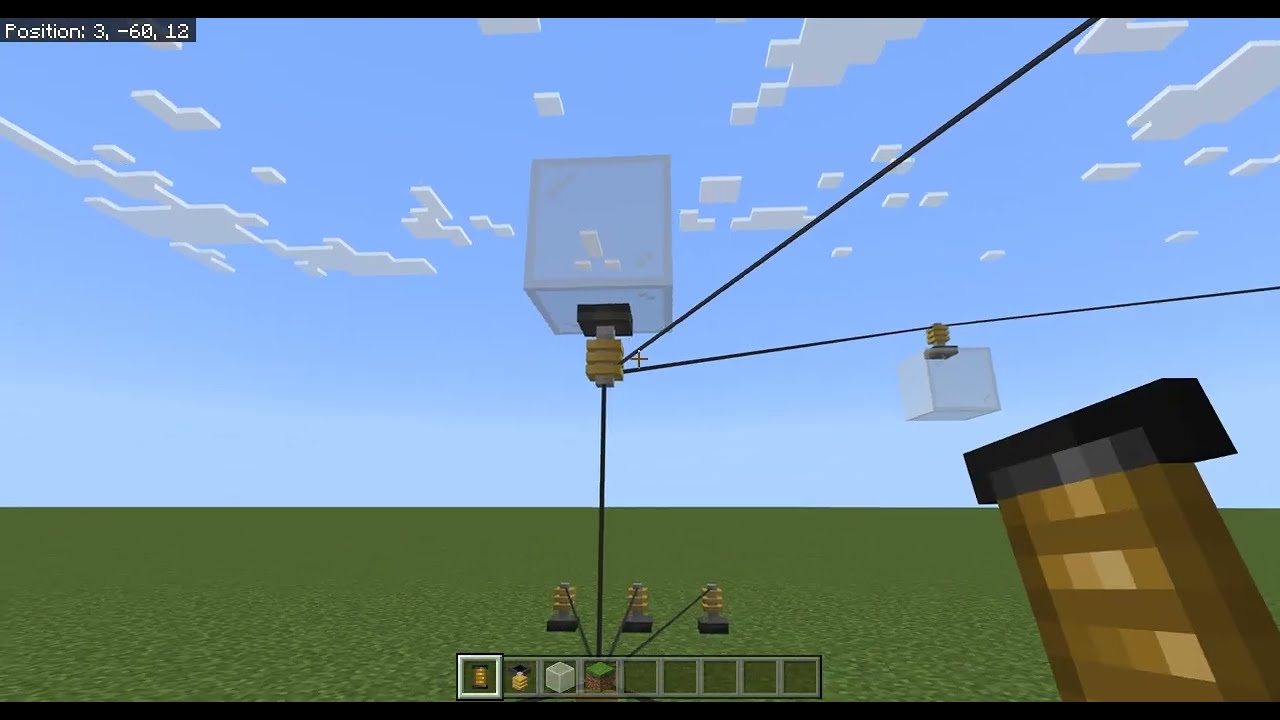
Showcase of the new power cables.
When holding the cable shift+use it on the start connector, then use (without shift) to set the end location. Will be used as an alternative to link power machines.
Let me know what you think in the comments.
EDIT: this addon isn't being worked on anymore and will not be released since it kept breaking due to ...
 minor arrow
is it possible to stop fences from connecting to a custom geometry block?
 odd dagger
minor arrow
is it possible to stop fences from connecting to a custom geometry block?
odd dagger
minor arrow
is it possible to stop fences from connecting to a custom geometry block?
no
 wise belfry
Does anyone know how to rotate a block manually?
white bobcat
Manually? With /setblock or /fill
somber wraith
zinc wyvern
How was this donehttps://www.youtube.com/watch?v=t-ev8JAKCR0
Probably invisible entity & retextured leads
zinc wyvern
somber wraith
Probably invisible entity & retextured leads
No, this was done before script api, I dont mean the wire shape but how they conduct electricity
Ik how to do them now but this
This is cursed
 past vessel
How to make TNT in the new version
lost vine
"minecraft:breathability": "solid" is a thing?
desert vector
no
 vestal marsh
lost vine
is there any way to calculate the blocks destroy time?
vestal marsh
lost vine
is there any way to calculate the blocks destroy time?
Thats just the destructible by mining.
lost vine
note: my block is a new ore, i need to get the destroy time for the wrong tiers,
explanation;
diamond ore required at least an iron pick to be mined, if u try mining it using the wrong tool it will not be mined and the destroy speed will be different, its faster than mining it using nothing but it will not drop the ore
i have to do the same for my custom blocks, note!: my hardest block needs at least a netherite pickaxe to be mined, so i have to calculate the destroy time somehow.
vestal marsh
lost vine
i have to do the same for my custom blocks, note!: my hardest block needs at lea...
Check the wiki?
Not sure what you're asking for.
The destroy time of a block is just the destructible by mining component.
lost vine
vestal marsh
The destroy time of a block is just the destructible by mining component.
i know that, but i want to get the time of it, like:
mining coal using a wooden pick is 2.25, but mining iron ore using the wooden pick it will take longer time
vestal marsh
lost vine
i know that, but i want to get the time of it, like:
mining coal using a wooden ...

Minecraft Wiki
Breaking, digging, punching, or mining is a common activity in Minecraft, performed (by default) by holding the left mouse button or right trigger while the cursor is pointing at a block, or by long-pressing on the block on touch screens. Breaking is the primary way to remove unwanted blocks and acquire blocks for future placement or crafting.
 wanton horizon
is the "minecraft:interact": { scripts only now?
vestal marsh
wanton horizon
is the ` "minecraft:interact": {` scripts only now?
Yep.
vestal marsh
Correct.
wanton horizon
great 😭 any reason for that?
vestal marsh
Scripting more powerful.
odd dagger
and fun
wanton horizon
I feel like keeping it in the json would be fun too
vestal marsh
Limited.
wanton horizon
Some people aren't trying to have unlimited options with it though
odd dagger
gotta adapt
wanton horizon
yeah u have a point prob all gonna be scripting basically soon
lost vine
vestal marsh
https://minecraft.wiki/w/Breaking#Speed
i want to see the red of this coal line
i mean: green colour is mining it using the correct tool, but the red is mining it using the wrong tool, i want to know how much it will slow the destroy speed for each tool
hope u guys will understand what i need
 vestal marsh
lost vine
i want to see the red of this coal line
i mean: green colour is mining it using ...
vestal marsh
lost vine
i want to see the red of this coal line
i mean: green colour is mining it using ...
The page...tells you each tier's multiplier.
lost vine
vestal marsh
The page...tells you each tier's multiplier.
i just want to see the multiplier of the wrong tools, cuz i cant find it anywhere there
vestal marsh
lost vine
i just want to see the multiplier of the wrong tools, cuz i cant find it anywher...
lost vine
X 3.33

coal:
 --- 15 / 3
wooden: 2.25 / 7.5
stone: 1.15 / 3.75
iron: 0.75 / 2.5
gold: 0.4 / 1.25
diamond: 0.6 / 2
netherite: 0.5 / 1.5

d-coal:
 --- 22.5 / 4.5
wooden: 3.4 / 11.25
stone: 1.7 / 5.65
iron: 1.15 / 3.5
gold: 0.6 / 1.9
diamond: 0.85 / 2.75
netherite: 0.75 / 2.5```i got my needed information
correct-tier / wrong-tieruh?

"exe:tin_ore": {"sound": "stone", "textures": "exe:tin_ore"},
have i done something wrong?
fixed ig
 simple shard
Does anyone know what the minecraft:item_visual does and what's possible with it?
vestal marsh
simple shard
Does anyone know what the minecraft:item_visual does and what's possible with it...
#1301216627185942571
Check the pins.
simple shard
Ok thanks
 pearl kraken
Hmm... I have something like a carpet and I want to know when entities stepon the block. I was using it as a solid block, placing it below the floor and the onStepOn event was captured but now its geometry is like a carpet (above the floor) its not working. Any ideas?
vestal marsh
pearl kraken
Hmm... I have something like a carpet and I want to know when entities stepon t...
The y value for the collision must be 4 or above.
pearl kraken
oh seriously? Awww
pearl kraken
vestal marsh
The y value for the collision must be 4 or above.
Ahh yes its working with that but.. Can I then offset it by -2 to make it look like carpet?
apparently not
awwww
How do I make it so they'll sink in it like the hoppers?
vestal marsh
pearl kraken
How do I make it so they'll sink in it like the hoppers?
Or like the cauldron? If so not possible.
pearl kraken
oh you can't have a list of collision areas
vestal marsh
Nope.
pearl kraken
And you can't make it trip like a pressure plate and have the entity "sink"?
vestal marsh
pearl kraken
And you can't make it trip like a pressure plate and have the entity "sink"?
I mean:
OnStepOn -> change block state -> change y value collision.
pearl kraken
hmm... Okay and use permutations
Something to consider
I guess I can change the geometry component with the permutation and state change, too
vestal marsh
Yep.
pearl kraken
Thanks
pearl kraken
While we're talking about it, how does farmland and soulsand give a collision box with an origin below the surface?
vestal marsh
pearl kraken
While we're talking about it, how does farmland and soulsand give a collision bo...
Theyre collision is actually 14px (or maybr 15) but the selection box and the mode is a full block.
pearl kraken
oh I see... its less from the top
 still ore
I'm trying to convert a mineral block created with Oraxen, I've tried several ways but none of them work, could someone explain it to me
The noteblock is still visible and not the texture that it should be
 white bobcat
still ore
I'm trying to convert a mineral block created with Oraxen, I've tried several wa...
white bobcat
still ore
I'm trying to convert a mineral block created with Oraxen, I've tried several wa...
The components minecraft:unit_cube and minecraft:on_step_on do not longer exists.
In the minecraft:material_instances component, you define the texture name, not the path.
 spiral hedge
Is there a way to make a block not fill up the entire slot in the Item Display Transforms of their geometry?
vestal marsh
spiral hedge
Is there a way to make a block not fill up the entire slot in the Item Display T...
What do you mean?
OH nvm.
Add fit_to_frame in GUI.
spiral hedge
vestal marsh
Add `fit_to_frame` in GUI.
Thanks!
 kind finch
Is the diamond ore loottable hardcoded, or is there a path I can use to use it?
vestal marsh
kind finch
Is the diamond ore loottable hardcoded, or is there a path I can use to use it?
Blocks loot table are hardcoded.
kind finch
So I'm going to have to code it myself.. dang
pearl kraken
How can I make it such that a block requires that it be placed within a certain distance (close) to a body of water?
 vocal rune
[Blocks][error]-Block name = 'myname:sign_1' | Total length of parts for schematic 'geometry.sign_1' on axis x is greater than 1 + 14/16ths.
[Blocks][error]-Block name = 'myname:sign_1' | Error with geometry component: cannot find geometry.sign_1 geometry JSON.
how to fix this?
pearl kraken
@vocal rune It seems you have invalid geometry. What did you make it with? Looks like you need to change it so its not so wide/deep?
pearl kraken
Hey ppls! I'm wondering how to have persistent block state/permutations... How do I use an item on a block, change its state and then, if the player breaks the block, remember that it happened and return to that state when placed again?
I think since I want to consume the item when they use it, I can probably just drop the item when breaking right? They are then free to reuse the item...
pearl kraken
Hmm a bit quiet. How about another question, is it possible to cancel a block placement using the OnPlace event or do I need to put the block in a state such that it will break itself somehow if its unhappy about placement?
On no.. I can't even determine the player that's placing the block in the block component event??
And there is no playerPlaceBlock before event?
pearl kraken
Argh there is in beta API but the player doesn't have permission for a UI at that point. Dang!
Is there a way for a block to break itself in an ontick or something if its in a specific state?
tardy surge
You can use custom component for that:
beforeOnPlayerPlace(event) {
    event.block // Block impacted by this event. This is the block that will be replaced.
    event.cancel // If set to true, cancels the block place event.
    event.dimension // Dimension that contains the block.
    event.face // The block face that was placed onto.
    event.permutationToPlace // The block permutation that will be placed. Can be changed to place a different permutation instead.
    event.player // The player that is placing this block. May be undefined.
}
How do I make custom TNTs be ignited with the Fire Aspect enchantment??
pearl kraken
You can get a tick event from a block, correct? Is that only fired when the block is in a loaded chunk - within the simulation distance?
Is the spawn point chunk always loaded, too?
pearl kraken
Oh no... There is a BlockComponentTickEvent class but no component for the json to use it??
 desert sorrel
pearl kraken
Oh no... There is a BlockComponentTickEvent class but no component for the json ...
desert sorrel
pearl kraken
Oh no... There is a BlockComponentTickEvent class but no component for the json ...
To use that you need to add 2 things in the blocks json... And it only works obviously on custom blocks
pearl kraken
Can anyone tell me how the lectern works in holding you in place when you use it?
Ahh inputPermissions I should think
But... How can I detect that they are trying to move? Is the getVelocity method still going to return information about it perhaps?
 white bobcat
Is most likely because you are using a custom geometry. Use blocks.json instead
 severe python
white bobcat
Is most likely because you are using a custom geometry. Use `blocks.json` instea...
severe python
white bobcat
Is most likely because you are using a custom geometry. Use `blocks.json` instea...
Oh boy I have been trying and all i did was fail
can you help me
i tried to recopy one of my blocks that somehow not use custom geometry (still using the block wizard) and works fine but it kept being the dirt question mark block
white bobcat
severe python
Oh boy I have been trying and all i did was fail
can you help me
Check out my planks template to understand it, is something really simple https://github.com/Kaioga5/Kaioga-s-Block-Templates/blob/main/templates/1.20.80/planks/resource_pack/blocks.json
GitHub
Contribute to Kaioga5/Kaioga-s-Block-Templates development by creating an account on GitHub.
Basically you’ll create a block without material instances nor the geometry component, and define the texture at the RP through blocks.json
severe python
it broke agin idk it SOMEHOW did not save for some reason despite it being impossible to just go back to idk and now the block is gone
but its just due to the code being weird
white bobcat
Let’s see the code then!
severe python
okay i was able to put it back in
i was too tired to see my mistakes
tomorrow i gotta learn how to make crafting recipes and custom sounds
severe python
uh my friend does not see my custom block when he joins my world and downloaded the packs
he sees the question mark block
white bobcat
Make sure your friend deletes cache data of your pack in their game setting
pearl kraken
Hey.. I'm wondering if block stepon events are still triggered when the player has only visitor privileges?
pearl kraken
Anyway... Can anyone tell me how to make crop style blocks, no real geometry just a texture?
white bobcat
random ticking custom component > change a "growth" block state > have a texture change on your permutations based on the growth block state value
white bobcat
pearl kraken
Hey.. I'm wondering if block stepon events are still triggered when the player ...
I don't see why not
pearl kraken
white bobcat
random ticking custom component > change a "growth" block state > have a texture...
I don't mean the growth, I understand state and permutations. What I don't understand it making it look like it is just two textures.
white bobcat
What do you mean
pearl kraken
ugh I'll do it how I think you do which is probably not at all
neon dome
Um
 tame grotto
How would I go about making a new wood type? Is this possible?
vestal marsh
tame grotto
How would I go about making a new wood type? Is this possible?
Just make blocks?
vestal marsh
Yes and no. Things like stairs not feasible.
tame grotto
Really? Couldn’t you do something with a custom geometry?
vestal marsh
tame grotto
Really? Couldn’t you do something with a custom geometry?
The main concern is hitbox.
tame grotto
Ah.
pearl kraken
you can't chnage the hit box with permutations??
 oak totem
a block can ignore the lighting?
tardy surge
pearl kraken
you can't chnage the hit box with permutations??
You can but that doesn’t help with the stair hit box
primal roost
Hi guys, I was doing some leaves, but they look ugly, I used alpha_test material, is blend better than alpha_test in this case? or any other material that can be better.
primal roost
primal roost
Hi guys, I was doing some leaves, but they look ugly, I used alpha_test material...
looks like this
 stark tree
Blend
zinc wyvern
Hi guys, i was making custom wood using block.json to make it a solid block. But when im trying to make it rotable like vanilla log using trait and permutation but it not work. Do you guys have any idea to fix this. Thanks

Here is the block code btw:
{
"format_version": "1.20.81",
"minecraft:block": {
"description": {
"identifier": "hollow:sap_tree_log",
"menu_category": {
"category": "nature"
},
"traits": {
"minecraft:placement_position": {
"enabled_states": ["minecraft:block_face"]
}
}
},
"components": {
"tag:wood": {},
"minecraft:collision_box":true,
"minecraft:display_name": "Sap Tree Log",
"minecraft:destructible_by_explosion":true,
"minecraft:destructible_by_mining":{
"seconds_to_destroy": 3
},
"minecraft:map_color":[
153,
76,
0
],
"minecraft:flammable":false,
"minecraft:friction": 0.4,
"minecraft:light_emission": 0,
"minecraft:light_dampening": 15,
"minecraft:selection_box": true
},
"permutations": [
{
"condition": "q.block_state('minecraft:block_face') == 'west' || q.block_state('minecraft:block_face') == 'east'",
"components": {
"minecraft:transformation": { "rotation": [0, 0, 90] }
}
},
{
"condition": "q.block_state('minecraft:block_face') == 'down' || q.block_state('minecraft:block_face') == 'up'",
"components": {
"minecraft:transformation": { "rotation": [0, 0, 0] }
}
},
{
"condition": "q.block_state('minecraft:block_face') == 'north' || q.block_state('minecraft:block_face') == 'south'",
"components": {
"minecraft:transformation": { "rotation": [90, 0, 0] }
}
}
]
}
}
vestal marsh
zinc wyvern
Here is the block code btw:
{
"format_version": "1.20.81",
"minecraft:b...
You need the geometry component.
zinc wyvern
i did use it but it not work
vestal marsh
zinc wyvern
i did use it but it not work
You need both geometry and material instances. You cannot rotate blocks if you're using blocks.json.
Additionally
turbid veldtBOT
Formatting Your JSON Or JS Code
Please format your code as code-blocks! This makes the text monospaced, and has support for syntax highlighting.
JSON
```json
{
"example": 123
}
```
JavaScript
```js
console.log("Hello World");
```
The character used here is the backtick. This symbol is usually at the top left of your keyboard, occupying the tilde key (~). On mobile, it will be on the second or third page of symbols.
zinc wyvern
vestal marsh
You need both geometry and material instances. You cannot rotate blocks if you'r...
oh
@vestal marsh i have one more question is that the texture variation tutorial in the wiki can work with custom geometry or not.
vestal marsh
No.
zinc wyvern
ok thanks
severe python
Wouldnt using custom geometry makes ur block have no shadows
 loud charm
Is there anyway to make trial vaults have a custom loot table?
zinc wyvern
/** @type {import("@minecraft/server").BlockCustomComponent} */
const LeavesDecayComponent = {
onTick(event) {
const { block } = event;
if (block.typeId !== "hollow:sap_tree_leaves") return;
    const blockPos = block.location;
    const dimension = block.dimension;

    // Offsets to check for nearby blocks (six directions: x, y, z)
    const offsets = [
        { x: 1, y: 0, z: 0 },
        { x: -1, y: 0, z: 0 },
        { x: 0, y: 1, z: 0 },
        { x: 0, y: -1, z: 0 },
        { x: 0, y: 0, z: 1 },
        { x: 0, y: 0, z: -1 },
    ];

    let isNearSapLog = false;
    let isDanger = false;
// Check if this leaf is near a log or if it is already in danger state
for (const offset of offsets) {
const nearbyBlockPos = {
x: blockPos.x + offset.x,
y: blockPos.y + offset.y,
z: blockPos.z + offset.z,
};
const nearbyBlock = dimension.getBlock(nearbyBlockPos);
        if (!nearbyBlock) continue;

        const typeId = nearbyBlock.typeId;
        const blockState = nearbyBlock.permutation.getState("stage:leaves");

        // Check if there is a nearby sap log
        if (typeId === "hollow:sap_tree_log") {
            isNearSapLog = true;
            break; // Exit early if we find a sap log
        }

        // If it's another leaf block, check if it is in danger state
        if (typeId === "hollow:sap_tree_leaves" && blockState === "danger") {
            isDanger = true;  // Found a "danger" leaf next to this one
        }
    }

    // If no log is nearby, mark this leaf as dangerous
    if (!isNearSapLog) {
        block.setPermutation(block.permutation.withState("stage:leaves", "danger"));
    }

    // If this leaf or an adjacent leaf is in danger, decay the leaf
    if (isDanger && block.typeId !== "minecraft:air") {
        block.setType("minecraft:air"); // Simulate decay by breaking the block
        dimension.runCommand("say A leaf decayed due to being in danger!");
    }
},
};
do you guys know how to make a leaves block that can decay like the vanilla leaves
my script is not working
vestal marsh
zinc wyvern
// Check if this leaf is near a log or if it is already in danger state
...
#1067535382285135923
tardy surge
zinc wyvern
// Check if this leaf is near a log or if it is already in danger state
...
There’s a custom wood set in dev resources I made, it’s probably not well structured but I do have it working on the custom trees in there
stark tree
wher
zinc wyvern
I have a question. Does the onPlace medthod work with feature placement of block guys
i'm trying to make feature_rule that place block that have variation but it not work like when i use fill command or place by hand.
 vestal marsh
zinc wyvern
I have a question. Does the onPlace medthod work with feature placement of block...
vestal marsh
zinc wyvern
I have a question. Does the onPlace medthod work with feature placement of block...
No.
desert vector
zinc wyvern
I have a question. Does the onPlace medthod work with feature placement of block...
no, try a block with a tick component that doesn't loop
i think ticking now works with features?
vestal marsh
desert vector
i think ticking now works with features?
90% works of the time.
zinc wyvern
i did use it but it just looping all over even when i put the looping to false
const RandomizeBlockStateOnPlace = {
onTick(event) {
const { block} = event;
const randomValue = Math.floor(Math.random() * 8) + 1;
const randomTexValue = Math.floor(Math.random() * 8) + 1;
const randomRotValue = Math.floor(Math.random() * 4) + 1;
    try {
        // Set the block's state based on the random number
        const newPermutation = block.permutation.withState("state:variants", randomValue);
        block.setPermutation(newPermutation);
        const newTexPermutation = block.permutation.withState("state:tex_variants", randomTexValue);
        block.setPermutation(newTexPermutation);
        const newRotPermutation = block.permutation.withState("state:rot_variants", randomRotValue);
        block.setPermutation(newRotPermutation);
    } catch (error) {
        console.error("Error setting block state:", error);
    }
},
};
here is the script ii use
it just keep looping bruh
white bobcat
fungi dance!
zinc wyvern
:))
desert vector
you could add a state like "my:randomised": [false, true], apply the tick component when the state is false and set the state to true in the script
or if you only want to randomise during world gen, you could use a random feature
zinc wyvern
how can i do it. I'm still learn to use scripting api
desert vector
{
  "minecraft:block": {
    "description": {
      "states": {
        "state:randomised": [false, true]
      }
    },
    "permutations": [
      {
        "condition": "!q.block_state('state:randomised')", // Block hasn't been randomised
        "components": {
          "minecraft:tick": {} // Move the tick component here
        }
      }
    ]
  }
}
somewhere in the onTick in your script you would add this
const newRandomisedPermutation = block.permutation.withState("state:randomised", true);
block.setPermutation(newRandomisedPermutation);
Funky mushrooms, wondering if I can eat it
Hey so i am seeing sounds
stark tree
zinc wyvern
but it will cause hunger effect
Now i'm hearing sunlight
primal roost
How can I apply block culling to a translucent block? I'm using full_block geometry and I saw an example of block culling in the wiki for full_block, and i'm still having the problem

 vestal marsh
primal roost
How can I apply block culling to a translucent block? I'm using full_block geome...
vestal marsh
primal roost
How can I apply block culling to a translucent block? I'm using full_block geome...
You cant.
primal roost
lol
desert vector
primal roost
How can I apply block culling to a translucent block? I'm using full_block geome...
you have to use RP/blocks.json
Bedrock Wiki
This page will show you how to use material instances to allow texture translucency on full blocks.
primal roost
desert vector
https://wiki.bedrock.dev/blocks/custom-glass-blocks.html
the only problem is that the block has multiple textures
so I just used a script
but thx
 formal light
When overwriting block assets, are textures the only things changable or can their models be changed too? How would this be done?
vestal marsh
formal light
When overwriting block assets, are textures the only things changable or can the...
Models cannot be changed.
formal light
vestal marsh
Models cannot be changed.
Thank you!
 whole thorn
Forgive me if this is a basic question. Is script the only way to add certain effects to new or existing blocks?
Ive become pretty familiar with json files. But I cannot find references material on block interactions. Like standing on it and taking damage. Sleeping and saving coords, teleportation, ect.
vestal marsh
whole thorn
Forgive me if this is a basic question. Is script the only way to add certain ef...
Correct.
turbid veldtBOT
HCF Removal and Custom Components
The Holiday Creator Features experimental toggle has been removed. Along with it includes JSON block and item events. This functionality has been replaced with custom components.
Please take a look at the following links to learn more about custom components:
Bedrock Wiki
- Block Events
- Block Events Migration to Custom Components
- Item Events
- Item Events Migration to Custom Components
MS Docs
whole thorn
turbid veldt
Thank you. It genuinely blows my mind how I can read essentially the same material over and over, and take away different things each time.
I suppose this means I need to learn script syntax now beyond functions. 💀
tardy surge
whole thorn
Thank you. It genuinely blows my mind how I can read essentially the same materi...

 lost trellis
is there a way to prevent snow layers from building up on top of my custom plants?
vestal marsh
lost trellis
is there a way to prevent snow layers from building up on top of my custom plant...
No.
desert sorrel
lost trellis
is there a way to prevent snow layers from building up on top of my custom plant...
/fill ~~1~ ~~1~ air replace snow_layer
-# this is a joke
desert sorrel
Guys is the Redstone Conductivityreally makes the block possible to act like Redstone Block
Bedrock Wiki
Block components are used to change how your block appears and functions in the world.
desert vector
no
that would be something like "redstone emission"
 split kayak
I want to add a new stone to the game. Is there any way for me to make it so that vanilla pickaxes mine the block as if it were stone, and other tools are unable to break the block "properly"?
split kayak
edit: i am very dumb
 cunning kiln
how do i change block break sound?
 worldly wyvern
Block.json
cunning kiln
worldly wyvern
Block.json
what about custom sound?
worldly wyvern
cunning kiln
what about custom sound?
Not possible at the moment unfortunately for blocks
 pseudo ether
hi, does anyone know if light_blocks cause lag?
white bobcat
They are just blocks that emit light
 random sonnet
Is there a way that the player gets a specific item and not a tile block item when the player picks the item?
vestal marsh
random sonnet
Is there a way that the player gets a specific item and not a tile block item wh...
No.
random sonnet
is it possible to make the tile block item 2d?
vestal marsh
random sonnet
is it possible to make the tile block item 2d?
Yes.
random sonnet
how?
vestal marsh
random sonnet
how?
In 1.21.50 you can override a block's itemstack.
random sonnet
and how?
vestal marsh
random sonnet
and how?
Using block placer. Its a process. You can read the ms docs or changelogs.
random sonnet
the docs also creates a new item
oak totem
item_display_transforms is not in stable yet?
vestal marsh
oak totem
item_display_transforms is not in stable yet?
It should be.
oak totem
vestal marsh
It should be.
In the docs it says this, but I remember reading in some changelog that it was in stable, I'm not sure
 vestal marsh
oak totem
In the docs it says this, but I remember reading in some changelog that it was i...
vestal marsh
oak totem
In the docs it says this, but I remember reading in some changelog that it was i...
Docs must be outdated.
zinc wyvern
"minecraft:placement_filter": {
"conditions": [
{
"allowed_faces": [
"up"
],
"block_filter": [
{
"tags": "q.relative_block_has_any_tag('water')"
},
"hollow:swamp_grass",
"hollow:forest_grass",
"hollow:swamp_dirt",
"hollow:mud",
"hollow:silt"
]
}
]
}
guys why the wiki said that this query can be use to checks tag but when i use it said unrecornized token
vestal marsh
zinc wyvern
"minecraft:placement_filter": {
"conditions": [
...
Wrong query.
query.any_tag
 desert vector
"q.relative_block..." can be used by entities
not sure of any places "q.block_neighbor..." can be used
zinc wyvern
q.block_neighbor... still have that unrecornized token error
desert vector
"tags" can only use query.any_tag and query.all_tags
simple shard
Dose anyone know how to make custom liquid, I saw it once in the bedrock Wiki but now it's gone. Could someone help me please.
vestal marsh
simple shard
Dose anyone know how to make custom liquid, I saw it once in the bedrock Wiki bu...
Not possible.
desert vector
it has never been possible to make an actual liquid
that tutorial was for a block that flows similarly to a vanilla liquid, it's possible port the functionality to scripting
simple shard
ok
spiral hedge
Is there a way to make a block render transparently with the minecraft:map_color component on the map
As in with no color, by default it's just brown
Oh wait, neverming, I just found out what was wrong 😅
 hexed frost
how can one make a crafting table that has crafting time like a furnace
ive been looking at farmers delight for how they do it but ive searched the pack up and down and i cant seem to find anything that relates to it
also the pack isnt working rn so I cant really verify that it actually works in the first place 😭
either way, im essentially trying to create a custom furnace
or rather furnace like block
im just trying to figure out how to make recipes with the typical furnace like function
its not that urgent and i dont really have a specific ask so i thought it would be better here
random sonnet
Does someone have the Pink Petals Geometry for me?
vestal marsh
random sonnet
Does someone have the Pink Petals Geometry for me?
That seems simple enough to recreate in blockbench.
random sonnet
But then I could save time
white bobcat
random sonnet
Does someone have the Pink Petals Geometry for me?
GitHub
Contribute to Kaioga5/Kaioga-s-Block-Templates development by creating an account on GitHub.
 gaunt ocean
How do I add different textures to a 3d model?
Like, one texture for the flowers and one for the stem.
How do I add names to material instances in the model?
random sonnet
white bobcat
https://github.com/Kaioga5/Kaioga-s-Block-Templates/tree/main/templates/1.20.80/...
Thank you very much
zinc wyvern
Is there any way to make emissive/glowing block textures?
desert sorrel
zinc wyvern
Is there any way to make emissive/glowing block textures?
No.
 winter granite
Anyone has a tutorial on how to make a glass pane? I want it to connect like the normal ones, i'm new to scripting lol
zinc wyvern
desert sorrel
No.
I saw other people doing it using shaders
desert sorrel
zinc wyvern
I saw other people doing it using shaders
Shader yes but in vanilla only? No
zinc wyvern
desert sorrel
Shader yes but in vanilla only? No
I saw an x-ray texture pack that I used on my Xbox that made specific parts of the ores glow
That's what I'm tryna go for
But for a light block
desert sorrel
zinc wyvern
I saw an x-ray texture pack that I used on my Xbox that made specific parts of t...
Then get that and use that... Because rn blocks don't have a glowing materials unlike entities
 primal roost
gaunt ocean
Why is it dark?
primal roost
gaunt ocean
Why is it dark?
face dimming or ambient oclusion to "false", i don't remember which one
desert vector
vanilla blocks set both to false afaik
random sonnet
How can I set 4 as default?
            "states": {
                "test:decay_tier": [
                    4,
                    3,
                    2,
                    1,
                    0
                ]
}```it should already be the default since it's first


 tulip aurora
I swear there used to be a vanilla component for this, but is there a way without scripts to make a block get destroyed if the block beneath it is broken?
kind of like a sapling
desert sorrel
tulip aurora
I swear there used to be a vanilla component for this, but is there a way withou...
Bedrock Wiki
Block components are used to change how your block appears and functions in the world.
shrewd storm
is there a bug with custom trapdoors uv rotating when opening and closing them? cuz im super confused as to why mine is
floral pasture
tulip aurora
I swear there used to be a vanilla component for this, but is there a way withou...
There is
vestal marsh
shrewd storm
is there a bug with custom trapdoors uv rotating when opening and closing them? ...
Thats a problem with your geometry.
shrewd storm
That's weird cuz it's only one side that flips the texture lol
true rover
is it possible to make a custom redstone block, aka a block that powers redstone dust around it
stark tree
Is it possible to make custom TNTs ignitable with redstone torches, levers, buttons and pressure plates
vestal marsh
stark tree
Is it possible to make custom TNTs ignitable with redstone torches, levers, butt...
Yes.
vestal marsh
true rover
is it possible to make a custom redstone block, aka a block that powers redstone...
No.
stark tree
vestal marsh
Yes.
Can you tell me how to do it pretty please? 🥺
true rover
vestal marsh
No.
so the closest thing i can do is make it replace redstone dust around it with powered redstone dust.
true rover
stark tree
Can you tell me how to do it pretty please? 🥺
you can do it with custom components i believe, check if a block around it is powered and ignite it.
desert sorrel
true rover
so the closest thing i can do is make it replace redstone dust around it with po...
No, changing states of the redstone doesn't emit redstone, only visuals, put a redstone with powered state and place a redstone lamp in the side, it doesn't lit up
true rover
so my only option is repeaters and comparetors
because those stay active for 2 game ticks
 solid matrix
anyone else getting this after update?
 desert vector
it's a bug
solid matrix
aight
spiral hedge
How do we use the minecraft:liquid_detection component?
vestal marsh
spiral hedge
How do we use the minecraft:liquid_detection component?
Check #1301216627185942571 message
true rover
solid matrix
anyone else getting this after update?
is there a way to fix this right now?
desert vector
no
true rover
desert vector
no
i have another addon with blocks that don't use geometries or material instances and it isn't erroring
i am trying to investigate why
true rover
desert vector
no
i have found the reason
it's upcoming creator features
can somebody please explain what does this mean?
 vestal marsh
true rover
can somebody please explain what does this mean?
vestal marsh
true rover
can somebody please explain what does this mean?
Using block placer and not defining the icon component will adopt the block as its icon.
vestal marsh
Yes...that's what I said.
true rover
you said Render the item as the block
Adopt Block as its Icon
Ahhhhhhh now i understand
English is hard 🥲
true rover
what does replace_block_item parameter of block_placer do?
i have disabled it and my block item is still functioning the same
when i break the block i get the item.
and when i use the give command, the block doesn't show up
vestal marsh
true rover
what does replace_block_item parameter of block_placer do?
Use the block in crafting recipes with tags.
true rover
so if i don't use the tags on the block for any crafting recipes, it doesn't do anything?
desert vector
it can be used to apply any item components to the block e.g. wearable, max stack size, durability
true rover
desert vector
it can be used to apply any item components to the block e.g. wearable, max stac...
annnnd pick block.
desert vector
no
true rover
yes, that's what it is used for
desert vector
pick block gives the block item
this modifies the block item
true rover
i am getting the block when it pick block it
without using it
i think the game is just bugged because both the block and the item share the same id, when i beak it, it spawns the item
 proper nexus
why does the color change?
 proper nexus
why does the color change?
proper nexus
proper nexus
why does the color change?
 spiral hedge
So there's the new item specific speeds field in blocks, and I know that stone blocks, although they have a hardness of 2, take much longer to mine with your fist. Can the item specific speeds be used to make custom blocks take longer to mine than their hardness value states?
shrewd storm
Only with those items yes
desert sorrel
proper nexus
Biome change I guess? If you don't have other textures used
 austere fossil
desert vector
it's a bug
austere fossil
desert vector
it's a bug
yeah all my textures that have transparent pixels are just opaque now and I cannot change it
is there any temp fix, or is it just waiting for them to update and fix it?
true rover
Is there a block tag that that allows a custom block to drop loot only of broken with an iron tier pickaxe?
desert vector
austere fossil
is there any temp fix, or is it just waiting for them to update and fix it?
It's a feature called mipmapping, so it'll probably never change
you could try changing num_mip_levels in terrain_texture.json but i haven't tried it myself
 remote island
how do i make custom farmland?
i want a custom one which cant be turned into dirt when someonme jumps on it
kind finch
God I'm at 1000 lines deep into permutations..

 finite void
How do you make it so that fences don't connect to specific blocks?
 unkempt phoenix
Is there a way to copy the behaviour of scaffolding, so that when the block underneath my custom block breaks, it breaks too?
 slow citrus
[Blocks][error]-lg:bauxite: trying to override the Geometry component with blocks.json settings for a custom block. This isn't supported
What does this error mean?
desert vector
slow citrus
`[Blocks][error]-lg:bauxite: trying to override the Geometry component with bloc...
It currently shows when it isn't supposed to
It's meant to appear when your custom block has textures defined in RP/blocks.json as well as having the minecraft:geometry component applied
slow citrus
desert vector
It currently shows when it isn't supposed to
It's meant to appear when your cust...
ohk so its unavoidable.
desert vector
Someone said it only appears when Upcoming Creator Features are enabled
haven't checked though
slow citrus
desert vector
Someone said it only appears when Upcoming Creator Features are enabled
haven't ...
Just checked.. Yes, without it, it does not appear.
shrewd storm
is there any way to sort the terrain or item texture.json texture names alphabeticly without doing it manually?
vestal marsh
shrewd storm
is there any way to sort the terrain or item texture.json texture names alphabe...
Vscode has an extension.
shrewd storm
vestal marsh
Vscode has an extension.
awesome got it thank you ::D
accumulated alot of junk in my addon i didnt even realize i had lol
wanton horizon
is it stil possible to run a event off of a block being broken
or do i need scripts for that
vestal marsh
wanton horizon
is it stil possible to run a event off of a block being broken
Json events no longer exists.
turbid veldtBOT
HCF Removal and Custom Components
The Holiday Creator Features experimental toggle has been removed. Along with it includes JSON block and item events. This functionality has been replaced with custom components.
Please take a look at the following links to learn more about custom components:
Bedrock Wiki
- Block Events
- Block Events Migration to Custom Components
- Item Events
- Item Events Migration to Custom Components
MS Docs
wanton horizon
vestal marsh
Json events no longer exists.
thats so stupid
so scripts are required for that
wanton horizon
import { world, GameMode } from "@minecraft/server";

/** @type {import("@minecraft/server").BlockCustomComponent} */
const CreativeModeOnlyBlockComponent = {
    onPlayerDestroy(event) {
        event.block (block.typeId === "jay:coal_ore")
        event.player (entity.typeId === "minecraft:player")
          entity.runCommandAsync("execute @s ~~~ say broke coal ore");
    }
}```
whats wrong with this?Try #1067535382285135923 and please show content log and elaborate.
turbid veldtBOT
How To Ask Good Questions
Be specific and include relevant details about the question upfront.
- What are you trying to accomplish?
- If you have code, which part is not working? Any content logs?
- What have you already tried?
- Have you searched the Bedrock Wiki?
wanton horizon
vestal marsh
Try <#1067535382285135923> and please show content log and elaborate.
igu sorry about that
zinc wyvern
I used block.json to make solid block that can make mob spawn on them but when i update to the newest version of the game it have this error. And mob no longer spawn on these block. Can you guys help.
 wanton horizon
i keep getting this error but my lootttables arent working ive tried moving it around but it switches between no error/no loot tables to error/ no loot tables
    {
        "format_version": "1.21.40",
        "minecraft:block": {
            "description": {
                "identifier": "jay:coal_ore",
                "menu_category": {
                    "category": "construction"
                }
            },
            "components": {
                "minecraft:destructible_by_mining": {
                    "seconds_to_destroy": 1
                },
                "minecraft:loot": "loot_tables/blocks/coal_ore.json"
                },
                "minecraft:custom_components": [
                    "jay:coal_ore_component"
                    ]
            }
}``` vestal marsh
split kayak
How do I make a block unbreakable?
vestal marsh
split kayak
How do I make a block unbreakable?
Set the destructible by mining speed really high.
 burnt gate
Is it possible to add more than 16 states in a block?
desert vector
no, at minimum each state would need 2 values
2¹⁶ = 65536 permutations, which is the block permutation limit
burnt gate
desert vector
no, at minimum each state would need 2 values
2¹⁶ = 65536 permutations, which is...
Ok
split kayak
i saw a page on the wiki about block loot tables and specific items. it requires you to list each item individually though, which irks that programmer instinct (and breaks compatibility with other addons that add pickaxes). is there a workaround? i only want my ore to drop if i use a pickaxe
vestal marsh
split kayak
i saw a page on the wiki about block loot tables and specific items. it requires...
In 1.21.60 match_tool will support item tags.
split kayak
vestal marsh
In 1.21.60 match_tool will support item tags.
awesome ^^ thank you
winter granite
Can someone help me pls? Idk why the model breaks when i place it in dif directions (this is a custom block)

As u can see some parts just go inside the model for some reason
desert sorrel
winter granite
Can someone help me pls? Idk why the model breaks when i place it in dif directi...
I feel like that's a Z-fighting
Elevate that cube at least 0.01 pixels
 winter granite
desert sorrel
I feel like that's a Z-fighting
winter granite
desert sorrel
I feel like that's a Z-fighting
Idk if it's a z-fighting cuz the model it's okay in one side, but if i place it in another direction the z thing starts bc for some reason the blocks are moving back inside the model
I'm gonna try moving it tho
desert sorrel
winter granite
Can someone help me pls? Idk why the model breaks when i place it in dif directi...

I said Z-fighting because of this part.
winter granite
desert sorrel
Ya i know, but as i said the model is moving it's part backwards
split kayak
Is there a page on the wiki for top and bottom faces having a distinct texture? I wanna do something like a pillar
vestal marsh
split kayak
Is there a page on the wiki for top and bottom faces having a distinct texture? ...
Material instances component.
desert vector
split kayak
Is there a page on the wiki for top and bottom faces having a distinct texture? ...
split kayak
desert vector
https://wiki.bedrock.dev/blocks/blocks-intro.html#per-face-textures
awesome! thank you. i got the faces working. now i'm trying to get the block to rotate depending on which way you face
i got the trait for facingdirection applied, just need to figure out how to make permutations do their thing here
found a guide
https://wiki.bedrock.dev/blocks/rotatable-blocks.html#log-rotation I'm trying to apply log rotation but I'm not getting a change in appearance. Do I need to use material instances?
About to try it
yup, it worked! the kaioga examples were great here
 prime smelt
Off the top of your head, what kind of items would you think these were? I want to give them a better name than we I call them.

 junior flame
Grate
stark tree
HL
 digital crystal
havent played in a few updates, got this error on all my blocks
"trying to override the Geometry component with blocks.json settings for a custom block. This isn't supported"
how do i fix
vestal marsh
digital crystal
havent played in a few updates, got this error on all my blocks
"trying to over...
Fixed in 1.21.60. You can safely ignore.
stark tree
digital crystal
havent played in a few updates, got this error on all my blocks
"trying to over...
UCF moment
prime smelt
junior flame
Grate
Ah thanks.... it is for my Auto Sifter, so it sets atop a composter... and because you have to make it and put it together, it can be used alone in decoration. Grate works... cause net, just did not feel right.
junior flame
prime smelt
Ah thanks.... it is for my Auto Sifter, so it sets atop a composter... and beca...
Oh awesome!
Got a video of the auto sifters in action? They seem cool
prime smelt
junior flame
Got a video of the auto sifters in action? They seem cool
Yes, in show case, the 1st WIP is there. I have a 2nd vid to make of the progress. I have the loot from sifting working and concrete slabs, cause you can sift those and because someone was probably gonna have water go over while it was sifting, then it did not make sense for it to not make concrete slabs... it is kinda cool. I am just working on the fine details and the kinks of playerPlacing vs playerInteraction.
shrewd storm
what do i use to make custom woods used as fuel?
desert sorrel
shrewd storm
what do i use to make custom woods used as fuel?
make your item be fuel in furnace?
shrewd storm
yeah like logs planks ect
desert sorrel
shrewd storm
yeah like logs planks ect
Bedrock Wiki
Item components are used to change how your item appears and functions in the world.
shrewd storm
oh its gotta be an item not just a block
vestal marsh
shrewd storm
oh its gotta be an item not just a block
Correct. You have to have an item proxy.
vestal marsh
shrewd storm
that needs to be a tag lmao
Ok...how do you control its burn time?
It's just how Minecraft works, even in Java.
shrewd storm
i mean if youd wanna use the generic wood burn time just tag its as wood_fuel, log_fuel ect and have those tags correspond to burn times
vestal marsh
shrewd storm
i mean if youd wanna use the generic wood burn time just tag its as wood_fuel, l...
Terrible.
shrewd storm
itd save alot of space
or even just add the fuel component to the block itself and use it that way
vestal marsh
shrewd storm
or even just add the fuel component to the block itself and use it that way
That's just not how Minecraft works.
shrewd storm
yeah i know
vestal marsh
Items and blocks are completely different.
shrewd storm
its all over the place
vestal marsh
The block in yiur inventory is an item.
vestal marsh
shrewd storm
itd save alot of space
It's 1 extra file per block. And space is the least worrying thing.
vestal marsh
shrewd storm
so why not able to be used like the item if its in the inventory
What?
desert sorrel
shrewd storm
i mean if youd wanna use the generic wood burn time just tag its as wood_fuel, l...
Bad idea.
vestal marsh
I told you, it's two separate things.
shrewd storm
well not just space but the ammount of files being added is alot
desert sorrel
shrewd storm
well not just space but the ammount of files being added is alot
Format it into 1 line?
vestal marsh
Minecraft will automatically make the item version of your block if you don't make your own.
But the block components are for the physical block, not the item.
Hence why block tags will not work in recipes but block tags for other things will work when it is physically in the world.
shrewd storm
ugh. i have to add over 100 items -_-
vestal marsh
If you need that much...best to learn another programming lang to auto gen them.
desert sorrel
Python? 🥺
shrewd storm
yeah i dont think were able to do it and it not be a flat texture
shrewd storm
i honeslty dont know how to make it. i have yet to see an addon use a custom log as a fuel
vestal marsh
shrewd storm
i honeslty dont know how to make it. i have yet to see an addon use a custom log...
Just make an item with the same id?
Tbf, this functionality was only introduced in 1.21.50.
shrewd storm
oh so its new
i though it was a thing already
i guess i didnt see that in the changelog
vestal marsh
shrewd storm
i though it was a thing already
well technically it is now
shrewd storm
awesome it worked
zinc wyvern
Does anyone have wood set example pack for the newest version. Pls help me if someone have it.
 frozen dust
Is it possible to have tool based mining speed without expiremental features
vestal marsh
frozen dust
Is it possible to have tool based mining speed without expiremental features
Yes.
shrewd storm
is item specific speeds broken cuz its buggy af at best
vestal marsh
shrewd storm
is item specific speeds broken cuz its buggy af at best
Not broken. It's technically working as intended since it still applies the 2.5x muktiplier since it isnt detected as the correct tool.
shrewd storm
well im not sure what mines doing then cuz itl go non solid and take forever to break
its only doing it for vanilla tools too which i had that issue the first time when they added it
frozen dust
vestal marsh
Yes.
Through scripting right? Any public scripts out there already you know of?
I think i can get it to check what type of pickaxe but when efficieny comes in thats alot of checking
vestal marsh
frozen dust
Through scripting right? Any public scripts out there already you know of?
No.
frozen dust
vestal marsh
No.
what else is there?
vestal marsh
frozen dust
what else is there?
The destructible by mining speed item specific speed object.
frozen dust
item specific speeds is not experimental?
vestal marsh
frozen dust
item specific speeds is not experimental?
It should not be.
frozen dust
thank god
thank you aswell
maybe even thank mojang but that might be going too far
digital crystal
just making sure, cant have multicollision right?
cant make a custom collision work with this?
 ebon laurel
Nope, sadly not
digital crystal
🥲
 unborn wave
is it possible to make a custom block have the ability to have flowers on top similar to how dirt or grass blocks work?
desert sorrel
Guys what block does have the tag netherite_tier_destructible, diamond_tier_destructible etc...
frozen dust
How can I make it so silktouch only works on my custom block if the tool is a certain type
Is scripting required?
zinc wyvern
How can i make it so only pickaxes break my custom block?
frozen dust
zinc wyvern
How can i make it so only pickaxes break my custom block?
As in only pickaxes get the item from the block or only pickaxes efficiently mine it?
You can use loot tables to make it so only using pickaxes will drop any items
zinc wyvern
only they drop, in fact both of them so I already achieved efficiency, how could I do it with loot tables?
zinc wyvern
frozen dust
How can I make it so silktouch only works on my custom block if the tool is a ce...
I think you can configure the block itself so that only a pickaxe can make it drop, just like in my case, but with silk touch I don't know
frozen dust
zinc wyvern
only they drop, in fact both of them so I already achieved efficiency, how could...
I'm not sure if this is what you're looking for but as an example in this loot table the block should only drop if a certain tool in this case an iron pickaxe is used
    "pools": [
        {
            "rolls": 1,
            "conditions": [
                {
                    "condition": "match_tool",
                    "item": "minecraft:iron_pickaxe",
                    "count": 1
                }
            ],
            "entries": [
                {
                    "type": "item",
                    "name": "mod:item"
                }
            ]
        }
    ]
}
the only issue i have with this is that with silk touch even on a pickaxe or tool that shouldn't drop the block, the block still drops
zinc wyvern
that, but how should I put it in the block code? make its loot tables be like this?
frozen dust
that you would just put in a folder like loot_tables/blocks/custom_loot then in the block json you'd add "minecraft:loot": "loot_tables/blocks/custom_loot.json", into the components
zinc wyvern
try to make the block not drop anything, and cry a loot table with the pickaxe like the code that you envy me but the condition is a silk touch, and make the block itself drop
I understand, and how can I combine 2 or more components?
zinc wyvern
frozen dust
that you would just put in a folder like ```loot_tables/blocks/custom_loot``` th...
{
"rolls": 1,
"conditions": [
{
"condition": "match_tool",
"item": "ken:lumerium_pickaxe"
"count": 1,
"enchantments":[
{
"enchantement": "fortune",
"levels":{
"max_range" : 3
}
}
]
}
],
"entries": [
{
"type": "item",
"name": "minecraft:coal",
"count": {
"min": 1,
"max": 3
}
}
]
},
I think this should work @frozen dust
for silk touch
zinc wyvern
import { world, EquipmentSlot } from "@minecraft/server";
/**
- @param {number} min The minimum integer
- @param {number} max The maximum integer
- @returns {number} A random integer between the
minandmaxparameters (inclusive) - */
const randomInt = (min, max) => Math.floor(Math.random() * (max - min + 1)) + min;
// Register a custom component before the world is loaded
world.beforeEvents.worldInitialize.subscribe(({ blockComponentRegistry }) => {
blockComponentRegistry.registerCustomComponent("wiki:silver_ore_xp_reward", {
onPlayerDestroy({ block, dimension, player }) {
// Check the tool in the player's hand
const equippable = player?.getComponent("minecraft:equippable");
if (!equippable) return; // Exit if the player or its equipment are undefined
        const itemStack = equippable.getEquipment(EquipmentSlot.Mainhand);
        if (itemStack?.typeId !== "minecraft:iron_pickaxe") return; // Exit if the player isn't holding an iron pickaxe

        // Specify enchantments
        const enchantable = itemStack.getComponent("minecraft:enchantable");
        const silkTouch = enchantable?.getEnchantment("silk_touch");
        if (silkTouch) return; // Exit if the iron pickaxe has the Silk Touch enchantment

        // Spawn the XP orbs
        const xpAmount = randomInt(0, 3); // Number of XP orbs to spawn

        for (let i = 0; i < xpAmount; i++) {
            dimension.spawnEntity("minecraft:xp_orb", block.location);
        }
    },
});
});
frozen dust
zinc wyvern
{
"rolls": 1,
"conditions": [
{
"condition": "match_...
this looks like it should work to me
zinc wyvern
How can I make it so that only vanilla pickaxes break my block, but I can edit which pickaxes will break and the hand doesn't drop anything?
without speeds you just drop or not
zinc wyvern
frozen dust
I'm not sure if this is what you're looking for but as an example in this loot t...
that method only works for a pickaxe
frozen dust
You can separately check every vanilla pickaxe
for example this is iron, diamond, and netherrite
you can just go on for every pickaxe you want
frozen dust
zinc wyvern
that method only works for a pickaxe
you want it to work for all vanilla pickaxes?
zinc wyvern
I want them to break the custom block, and without them nothing will drop
frozen dust
with the loot table above nothing would drop unless they use an iron pickaxe or better
you can add the wooden and stone pickaxes onto that
I can test it in a bit if it doesnt work
zinc wyvern
but is it made of iron or better yet, just iron?
frozen dust
zinc wyvern
but is it made of iron or better yet, just iron?
I don't understand
zinc wyvern
in that loot tables is it an iron pickaxe or better?
frozen dust
In that specific loot table example, iron, diamond, and netherite pickaxes can mine the block and it will drop
you can add gold, stone, and wooden pickaxes aswell if you want
zinc wyvern
how can i do this
frozen dust
you have to add an additional roll per pickaxe unless anyone else knows a better way
as far as i'm aware match tool does not support arrays
zinc wyvern
I understand, thank you very much
frozen dust
it should make it so the blocks only drop an item, in this case a stick if mined with a pickaxe
I'm not positive if there is a better way
zinc wyvern
Will it work if I add the min and max?
frozen dust
I don't see why not
zinc wyvern
{
"format_version": "1.21.40",
"minecraft:block": {
"description": {
"identifier": "compactores:compact_coal_ore",
"menu_category": {
"category": "nature",
"group": "itemGroup.name.ore"
}
},
"components": {
"minecraft:destructible_by_mining": {
"seconds_to_destroy": 7.5,
"item_specific_speeds": [
{
"item": "minecraft:wooden_pickaxe",
"destroy_speed": 1.15
},
{
"item": "minecraft:stone_pickaxe",
"destroy_speed": 0.6
},
{
"item": "minecraft:iron_pickaxe",
"destroy_speed": 0.4
},
{
"item": "minecraft:diamond_pickaxe",
"destroy_speed": 0.3
},
{
"item": "minecraft:netherite_pickaxe",
"destroy_speed": 0.25
},
{
"item": "minecraft:golden_pickaxe",
"destroy_speed": 0.2
}
]
},
"minecraft:loot": "loot_tables/ironcoal.json",
"run_command": {
"command": [
"summon xp_orb ~~~"
]
}
}
}
}
why dont work?
@frozen dust
zinc wyvern
what??
what now? I don't know how to make scripts
I already know! I saw it on bedrock.dev about custom components
but I don't know how to apply it
frozen dust
desert vector
JSON block events have been removed
so events like minecraft:on_player_destroyed are deprecated?
desert vector
frozen dust
what a strange decision
wanton horizon
    {
        "format_version": "1.21.40",
        "minecraft:block": {
            "description": {
                "identifier": "jay:coal_ore",
                "menu_category": {
                    "category": "construction"
                }
            },
            "components": {
            "minecraft:custom_components": [
                "jay:ore_component"
                ],
                "minecraft:destructible_by_mining": {
                    "seconds_to_destroy": 1
                },
                "minecraft:loot": "loot_tables/coal_ore.json"
            }
        }
    }```
why am i getting this error?
i dont have any custom blocks geos 😭
desert vector
it's a bug
fixed in preview
desert sorrel
desert sorrel
Guys what block does have the tag *netherite_tier_destructible*, *diamond_tier_d...
-# bump
wanton horizon
desert vector
it's a bug
fixed in preview
thank you
prime smelt
desert sorrel
Guys what block does have the tag *netherite_tier_destructible*, *diamond_tier_d...
You may need to write code to cycle threw all the blocks (vanilla-data list) and create Block, then pull tags
desert sorrel
prime smelt
You may need to write code to cycle threw all the blocks (vanilla-data list) and...
That's not what I'm asking
What I'm asking is, what block does have that tag
vestal marsh
desert sorrel
Guys what block does have the tag *netherite_tier_destructible*, *diamond_tier_d...
#1254281007650312312 message
desert sorrel
Nvm,
 terse talon
Guys
desert sorrel
I'm fuckin stupid
terse talon
Whats the block atlas limit for bedrock
desert sorrel
prime smelt
You may need to write code to cycle threw all the blocks (vanilla-data list) and...
Really sorry dude
prime smelt
desert sorrel
What I'm asking is, what block does have that tag
That will tell you. If no one knows, then check yourself
desert sorrel
prime smelt
That will tell you. If no one knows, then check yourself
I read it wrong 😭 sorry mb
terse talon
If there is a block atlas limit is it bypassable by splitting the pack in multiple parts (multiple packs rather than 1 and sending those 2-3 packs to the player)
prime smelt
I have one with 4k... but back in 1.19 last time updated.. Is your block simple or lotsa permutations?
terse talon
Well it’s not really a block
To have correct hand positions and stuff
Since I’m converting from java to bedrock
prime smelt
so you have 2000 items and 2000 blocks?
terse talon
Its 2000 items
Without having to do hand positions manually on blockbench
So the terrain texture file has like over 10k lines
prime smelt
Read this article to see if it has help for you. Maybe you do not need all of those, something about materials.
https://learn.microsoft.com/en-us/minecraft/creator/documents/practices/guidelinesforbuildingcooperativeaddons?view=minecraft-bedrock-stable
But if they are not blocks, what does one of the BP files look like?
A set of guidelines for building add-ons that can safely share worlds with other add-ons
terse talon
There is no BP pack
we map it through geyser
This is how items with blocks looks like
prime smelt
okay, then this is over my head...
terse talon
All good thanks for helping
 green anvil
I don't understand why my custom block has a different texture than a vanilla block.
 vestal marsh
green anvil
I don't understand why my custom block has a different texture than a vanilla bl...
vestal marsh
green anvil
I don't understand why my custom block has a different texture than a vanilla bl...
Did you set it to the right texture?