#Script API General
1 messages · Page 22 of 1
 scarlet sable
 amber granite
- if u gonna dive into programming
amber granite
scarlet sable
I use vscode
Yeah it was just a tip
 distant tulip
30% is a lot
also you can't tell that
js have a lot of stuff
amber granite
Yeah
scarlet sable
30% of the course
amber granite
But ☠️ if u learn it
scarlet sable
They have a progress bar
amber granite
I can told u that u can learn any other programming language in less than month
distant tulip
alr
amber granite
Or month
scarlet sable
Nah js is my year goal
amber granite
It doesn't take year to learn it tho
scarlet sable
I want to be a decent coder in js by next year
scarlet sable
Ik
amber granite
☠️ i mean if u give a good time
Not just one hour a day or idk
But yeah it still worth it
scarlet sable
No programing language takes more than 6 month except that one that like directly programs the CPUs circuit
Not binary
Idk what it's called
scarlet sable
What was your best project so far?
amber granite
scarlet sable
What was your best project so far?
Ah ، i can't tell but
I have decent knowledge in js
scarlet sable
I need to sleep lol
amber granite
☠️
 shut citrus
how to make invisible model?
 sudden nest
let _topBlock = firstBlock.above();
            while(true) {
                if (!_topBlock?.isValid() || !isLogIncluded(_topBlock?.typeId)) break;
                if (_topBlock?.typeId !== blockTypeId) break;
                yOffsets.set(_topBlock.location.y, false);
                _topBlock = _topBlock.above();
            }
are there better way to do this? i tried getBlockFromRaycast but it doesn't really get to the top of the oak log, it just stops to the first one, and getTopMostBlock can be tricked if the above block is solid block.
 shy leaf
sudden nest
```js
let _topBlock = firstBlock.above();
while(true) {
...
shy leaf
sudden nest
```js
let _topBlock = firstBlock.above();
while(true) {
...
dont do while (true)
can you tell what youre trying first
sudden nest
i still don't know how to proper way to use getBlockFromRaycast i think. I just think of this as a raycast from the name itself that can be used with vector maths for directions
sudden nest
shy leaf
can you tell what youre trying first
i'm interacting (onUseOn) with a log block like from the bottom, and i want to get the height of a tree starting from bottom. I mean this works fine, but i think there's proper way to do it, instead of manually getting the block above from one another.
shy leaf
https://jaylydev.github.io/scriptapi-docs/latest/classes/_minecraft_server_1_13_0.Block.html#above
well you could try for loop

Documentation for Script API - v1.21.23
Block.above() returns Block, and you can specify the steps too
like Block.above(3) returns the block thats 3 blocks above
sudden nest
hmmm, i think its the same as the current one😅 or i'm wrong
shy leaf
well
while(true) can be a bit painful to manage in the future
one wrong oopsie and youll face Out of Memory crash
sudden nest
i thought getBlockFromRaycast stops when it detects there's a block that is not included in its options or excluded
shy leaf
let me check
sudden nest
shy leaf
one wrong oopsie and youll face Out of Memory crash
true
shy leaf
i just checked and block raycast returns when the filter is passed
not sure if the raycast excludes the caster
but considering its from dimension class, its highly likely that it doesnt exclude the caster
sudden nest
const topMostBlockRay = player.dimension.getBlockFromRay(blockInteracted.location, {x: 0, y: 1, z: 0}, {
                    excludeTypes: [
                        MinecraftBlockTypes.JungleLog.id,
                    ]
                }) ?? undefined;
                if(!topMostBlockRay) return;
                const topMostBlock = topMostBlockRay.block;
                console.warn("Height: ", (topMostBlock.location.y - blockInteracted.location.y) + 1, "\nID: ", topMostBlock.typeId);
i mean this works, but it still including the air block to not stop the raycast
shy leaf
shy leaf
Block.above() returns Block, and you can specify the steps too
well this does the same anyway
sudden nest
but isn't getBlockFromRay more efficient to call instead of just calling getBlock or above(), and traverse to whatever direction you want?
shy leaf
honestly i cant tell
but Block.above() is called directly from the block
while raycast is called from dimension
sudden nest
hmm true, i think i'll just stick with Block.above(). As long as it gets the job done 
 idle dagger
someone help #1284420155870416926
distant tulip
sudden nest
but isn't `getBlockFromRay` more efficient to call instead of just calling `getB...
rays is the most inefficient way of doing it
scarlet sable
When a player places an armor stand does it count as a player spawn?
Mb
Entity
Entity spawn
 subtle cove
yeah...
scarlet sable
Ok
 untold magnet
nvm,
amber granite
U didn't even talk
 ashen plume
yo guys, sliders (modal form) support decimal values? like 0.1, 0.5 etc
subtle cove
yuh...
ashen plume
alr ty
subtle cove
mhm lmao
ashen plume
ty anyways
subtle cove
it does, but it doesnt show the decimals in the form
untold magnet
system.runInterval(() => {
  const dimension = ['overworld', 'nether', 'the_end'].mab(dim => {
    for (const entity of world.getDimension(dim).getEntities()) {
      const inv = entity.getComponent('inventory')
      const item = inv.container.getItem
      if (!item(0)) entity.setDynamicProperty('0', false)
      if (item(0)) {
        const itemType = entity.setDynamicProperty('lastItemType', item(0).typeId)
        if (item(0).typeId === 'minecraft:stick') {
          entity.setDynamicProperty('0', true)
          if (item(0).typeId != itemType) entity.setDynamicProperty('0', false)
        }
      }
    }
  })
})```this should save the last item typeId, if the item has been changed it will be detected and set the dynamic property false, hmmwait.
 remote oyster
[0] not (0) when wanting to grab the first element of an array, but your use case here is not correct either way.
getItem is a method not a property and it returns a single Itemstack and not an array. It also expects a slot value to know which ItemStack to return if the slot is defined.
untold magnet
i had to make the script set the dynamic property value to false when the item is changed,
 untold magnet
i had to make the script set the dynamic property value to false when the item i...
untold magnet
untold magnet
i had to make the script set the dynamic property value to false when the item i...
like u put a stick in that slot, then u change the stick into a cobblestone, the script will detect the item has been changed and turn off that value
remote oyster
untold magnet
i had to make the script set the dynamic property value to false when the item i...
Your code is wrong.
untold magnet
remote oyster
Your code is wrong.
i know
ashen plume
subtle cove
alr tysm
remote oyster
untold magnet
i know
 ashen plume
so the problem is another one in my code lol, ill try to solve it
untold magnet
remote oyster
the entity has 3 slots, 0 and 1 and 2,
should i use getSlot(0)?
remote oyster
untold magnet
the entity has 3 slots, 0 and 1 and 2,
should i use getSlot(0)?
Are you wanting to check a specific slot or all of them?
amber granite
untold magnet
```js
system.runInterval(() => {
const dimension = ['overworld', 'nether', 'th...
Map
untold magnet
remote oyster
Are you wanting to check a specific slot or all of them?
specific slot,
remote oyster
Which one?
untold magnet
remote oyster
Which one?
0, 1 and 2
each one will have its own system
amber granite
Because u are going to use standalone function
If u didn't bind it to its object"this"
untold magnet
like if (item(0)) {,,,} // if (item(1)) {,,,} ,,,
remote oyster
untold magnet
0, 1 and 2
each one will have its own system
getItem(0) or getItem(1) or getItem(2)
untold magnet
all of these 3 slots have their own section
0 will work differently than 1 and 2, ext
if (item(0)) { entity.setDynamicProperty('0', true); codes/// }
if (item(1)) { entity.setDynamicProperty('1', true); codes/// }
if (item(2)) { entity.setDynamicProperty('2', true); codes/// }
shy leaf
☠️
remote oyster
untold magnet
all of these 3 slots have their own section
Here, just use this and modify it to handle whatever condition you need it to handle:
system.runInterval(() => {
  const dimensions = ['overworld', 'nether', 'the_end'];

  dimensions.forEach(dimName => {
    const dimension = world.getDimension(dimName);
    for (const entity of dimension.getEntities()) {
      const inv = entity.getComponent('inventory');

      if (inv) {
        const container = inv.container;
        const slot0 = container.getItem(0);
        const slot1 = container.getItem(1);
        const slot2 = container.getItem(2);

        // Handle slot 0
        if (!slot0) {
          entity.setDynamicProperty('slot0', false);
        } else {
          const itemTypeSlot0 = slot0.typeId;
          entity.setDynamicProperty('lastItemTypeSlot0', itemTypeSlot0);
          if (itemTypeSlot0 === 'minecraft:stick') {
            entity.setDynamicProperty('slot0', true);
          } else {
            entity.setDynamicProperty('slot0', false);
          }
        }

        // Handle slot 1
        if (slot1) {
          // Logic for slot 1
          const itemTypeSlot1 = slot1.typeId;
          entity.setDynamicProperty('lastItemTypeSlot1', itemTypeSlot1);
          if (itemTypeSlot1 === 'minecraft:stone') {
            entity.setDynamicProperty('slot1', true); // Example condition for slot 1
          } else {
            entity.setDynamicProperty('slot1', false);
          }
        }

        // Handle slot 2
        if (slot2) {
          // Logic for slot 2
          const itemTypeSlot2 = slot2.typeId;
          entity.setDynamicProperty('lastItemTypeSlot2', itemTypeSlot2);
          if (itemTypeSlot2 === 'minecraft:diamond') {
            entity.setDynamicProperty('slot2', true); // Example condition for slot 2
          } else {
            entity.setDynamicProperty('slot2', false);
          }
        }
      }
    }
  });
});
That s extra code ☠️
remote oyster
amber granite
That s extra code ☠️
They said they wanted to handle each slot (0, 1, and 2) differently. That is a baseline to do that.
amber granite
I just see it s a simple code dosen't need all that complications
amber granite
remote oyster
They said they wanted to handle each slot (0, 1, and 2) differently. That is a b...
Bro the problem with him , is that even if u wrote him 1000 lines of code he won't use them
shy leaf
use switch
remote oyster
amber granite
Bro the problem with him , is that even if u wrote him 1000 lines of code he won...
Don't want him to use it. I want him to understand the logic because the code isn't written for him to actually use out of the box. They will be required to make changes to it. It's to help them learn.
untold magnet
remote oyster
Here, just use this and modify it to handle whatever condition you need it to ha...
hm,
if the item doesn't stick, it will turn off that dynamic property slot, but the second item ( cobblestone ) will turn that on
stick will turn it off bec the slot doesn't have a stick, the cobblestone will turn it on bec it has a cobblestone
am i wrong?
untold magnet
shy leaf
**use switch**
how
amber granite
remote oyster
Don't want him to use it. I want him to understand the logic because the code is...
He didn't
remote oyster
amber granite
He didn't
Imagine expecting someone to learn in 5 minutes.
amber granite
No i mean ._. i wrote him simple code yesterday
He didn't understand it s purpose
It was simple and direct
remote oyster
untold magnet
hm,
if the item doesn't stick, it will turn off that dynamic property slot, but ...
The logic for what each slot does will be up to you. The code I shared simply shows one way of handling conditions per slot.
untold magnet
how about using switch just like that dude saying? does anyone know how switch actually work?
amber granite
🗿
remote oyster
untold magnet
how about using switch just like that dude saying? does anyone know how switch a...
A switch statement is nothing more than an if/else statement.
distant tulip
untold magnet
how about using switch just like that dude saying? does anyone know how switch a...
take a value and compare it to multiple cases
subtle cove
allow em to be curious of other methods
amber granite
switch (x ) {
case 6 /* as example u can put strings too and other things /*  : console.log("6");
break ;
}
switch(defined_variable) {
  case value1:
    // Code to execute if expression matches value1
    break;
  case value2:
    // Code to execute if expression matches value2
    break;
  // You can add more cases as needed
  default:
    // Code to execute if none of the cases match
}
once they realize the code gets too wordy, they start to get stressed and find other way to shorten it, then ask/try
distant tulip
expression?
no
amber granite
Chat gpt..
remote oyster
untold magnet
how about using switch just like that dude saying? does anyone know how switch a...
system.runInterval(() => {
  const dimensions = ['overworld', 'nether', 'the_end'];

  dimensions.forEach(dimName => {
    const dimension = world.getDimension(dimName);
    for (const entity of dimension.getEntities()) {
      const inv = entity.getComponent('inventory');

      if (!inv) continue; // Skip if no inventory component

      const container = inv.container;
      for (let i = 0; i < 3; i++) { // Check slots 0, 1, and 2
        const itemStack = container.getItem(i);
        const itemType = itemStack ? itemStack.typeId : null;

        entity.setDynamicProperty(`lastItemTypeSlot${i}`, itemType);

        switch (i) {
          case 0:
            entity.setDynamicProperty('slot0', itemType === 'minecraft:stick');
            break;
          case 1:
            entity.setDynamicProperty('slot1', itemType === 'minecraft:stone'); // Example logic for slot 1
            break;
          case 2:
            entity.setDynamicProperty('slot2', itemType === 'minecraft:diamond'); // Example logic for slot 2
            break;
        }
      }
    }
  });
});
switch (key) {
    case value:

        break;

    default:
        break;
}
it take a value
not particularly a expression
dose using switch check the type? (like ===)
remote oyster
distant tulip
dose using switch check the type? (like ===)
It uses loose equality (==).
subtle cove
 distant tulip
make sense
untold magnet
remote oyster
```js
system.runInterval(() => {
const dimensions = ['overworld', 'nether', 't...
@distant tulip what did u say?
distant tulip
huh?
remote oyster
?
distant tulip
subtle cove
why the error?
untold magnet
should i use that system? i mean u know scripts more than me so,
subtle cove
distant tulip
why the error?
 remote oyster
untold magnet
should i use that system? i mean u know scripts more than me so,
remote oyster
untold magnet
should i use that system? i mean u know scripts more than me so,
Up to you. You just need to add the logic for how you want to handle each slot.
untold magnet
remote oyster
Up to you. You just need to add the logic for how you want to handle each slot.
actually, all slots will work the same but, each one will have its own property
amber granite
☠️
 subtle cove
u forgor break
untold magnet
all 3 slots work the same
slot0 has s0 property
slot1 has s1 property
//
subtle cove
its like a leak in cases
once it went through the line, it tries to continue the following lines
distant tulip
i did it on purpose to test for multiple cases
subtle cove
uh,  with
with tsconfig.json
remote oyster
untold magnet
actually, all slots will work the same but, each one will have its own property
That's not what you said earlier.....
Still, the switch statement will be fine.
untold magnet
remote oyster
That's not what you said earlier.....
yah im dumbas²
remote oyster
distant tulip
dose using switch check the type? (like ===)
It uses strict equality. I was mistaken.
distant tulip
distant tulip
it is not @remote oyster lol
subtle cove
it does ===
remote oyster
My tests messed me up
untold magnet
remote oyster
Still, the switch statement will be fine.
the only difference between them is
if slot0 has an item, the item will start smelting, but when u add another item to the second slot, it will start smelting from 0 not with the first slot
lets say first slot almost smelted, and u put another item inside the second slot, it will start smelting the second item from 0 not instantly smelted with the first slot u know what i mean
remote oyster
subtle cove
it does ===
Not based on that screenshot from Minato. If that were the case 1 and "1" would not return "1 as a string", and so forth. So it's attempting to change the type from a number to a string where the types match.
remote oyster
It still has to match types
subtle cove
if there's no break
remote oyster
Yes, but the cases still have to match or it can't execute the code.
1 does not equal "1" unless you change the type.
distant tulip
subtle cove
if there's no `break`
that because you stooped the code
it depend of the order
subtle cove
case is just like a door, and all cases are connected, regardless of the case, cuse one of it was entered already
untold magnet
untold magnet
the only difference between them is
if slot0 has an item, the item will start sm...
that's the reason why I'm making different properties for each slot,
 subtle cove
thats the downside of switch/case
distant tulip
it is useful
subtle cove
true
remote oyster
That seems like a flaw in my brain.
distant tulip
you can test for multiple cases (none strict ==) and unique ones (strict ===)
remote oyster
switch (1) {
    case "1":
        console.log("hello from string '1'");
    case 1:
        console.log("hello from number 1");
}
This just returns the second case for me. Same results when I add breaks.
So now I'm wondering if this is something specific to the js engine.
Which is why I'm thinking it's a flaw lol.
 remote oyster
I'm so confused now 😭
distant tulip
wtf did i do the first time
remote oyster
LOL
distant tulip
🤨
 remote oyster
Is it the variable causing the symptom?
 remote oyster
 subtle cove
(e => {
    switch (["bleed", "speed"].map(s => e.hasTag(s)).toString()) {
        case 'true,false':
            break
        case 'true,true':
            break
        case 'false,false':
            break
    }
})
 subtle cove
brrk
distant tulip
 remote oyster
But why does it execute each case in that switch statement but the other switch statement only executes the exact type match.
subtle cove
its le switch leak
remote oyster
The behavior should be identical
Lol
I think the switch statement has a serious bug.
distant tulip
is it the order or something
 remote oyster
Swap the order in the other one and see.
subtle cove
me when case (()=> false )():
sudden nest
subtle cove
```js
(e => {
switch (["bleed", "speed"].map(s => e.hasTag(s)).toString()) {...
That's cool :v. Cool version of if/else
distant tulip
it is
i am never using switch without break lol
this is confusing
 remote oyster
Yea bro I'm convinced that's a bug and not intended behavior.
subtle cove
well, the break is allowed there, so thats it's purpose... idk anymo
remote oyster
 subtle cove
i once used that 'bug' when constructing a string
remote oyster
subtle cove
i once used that 'bug' when constructing a string
Living dangerously I see. A man of culture.
subtle cove
well, it sure is interesting
remote oyster
 quick shoal
Anyone know about rng?
quick shoal
Anyone know about rng?
Random Number Generator.
remote oyster
subtle cove
well, it sure is interesting
I'm definitely convinced it's a bug lol. I wonder if it's one of those situations where they shipped it as a "feature" 🤪😂🤣
sudden nest
distant tulip
it is
i am never using switch without break lol
this is confusing
Try creating variable with the same name in each cases without break
quick shoal
remote oyster
Random Number Generator.
Did u know how to make it?
remote oyster
quick shoal
Did u know how to make it?
I've done it before. It's pretty simple. Just need to create a list of messages that you want to randomly select from.
quick shoal
No , u go to check this #1284086788989648928 message
I want do it at world sender
I don't understand this thing
Bc I'm just a beginners
remote oyster
distant tulip
it is
i am never using switch without break lol
this is confusing
I did some research.
The behavior you're observing has to do with how switch statements handle break statements. Without a break, the switch statement exhibits fall-through behavior—meaning that once a matching case is found, the code will continue to execute all the subsequent cases, regardless of whether they match or not, until a break is encountered or the switch block ends.
So it does use strict equality unless you experience fall-through behavior. Then equality goes right out the window unless you use breaks lol.
 remote oyster
EntityQueryOptions
scarlet sable
oh ye
subtle cove
i miss this brain cell burning
remote oyster
subtle cove
i miss this brain cell burning
RPG vibes
distant tulip
remote oyster
I did some research.
> The behavior you're observing has to do with how switch ...
when you don't use breaks, switch behavior breaks
got it. lol
good to know
subtle cove
unless it's intentional behaviour
switch (typeof _subject) {
    case 'boolean': case 'number': case 'undefined': return _subject;
    case 'string': return _subject; case 'bigint': return _subject?.toString?.();
    case 'symbol': return Symbol.keyFor(_subject) ? `Symbol.for(${_subject.description})` : _subject.toString();
    case 'function': return _subject.toString()
};
//object type gets cooked here
 tawny reef
how to create a border in 10k 10k and in -10k and -10k please help me
subtle cove
if (inborder) saveLocDim(player)
else player.teleport(...getLocDim(player))
in runInterval
distant tulip
for the visual
high:10000px;
width:10000px;
border: 2px dotted red;
🤡
 pale terrace
 tawny reef
how to create a border in 10k 10k and in -10k and -10k please help me
 chilly fractal
distant tulip
for the visual
```css
high:10000px;
width:10000px;
border: 2px dotted red;
```
...
chilly fractal
distant tulip
for the visual
```css
high:10000px;
width:10000px;
border: 2px dotted red;
```
...
And for the sound:
<audio src='err404.m4a'>
I believe 🤡
pale terrace
tawny reef
how to create a border in 10k 10k and in -10k and -10k please help me
already answered
 pale terrace
subtle cove
https://tenor.com/view/nuh-uh-gif-6873726998111817089
pale terrace
subtle cove
https://tenor.com/view/nuh-uh-gif-6873726998111817089
xD
 fiery solar
remote oyster
I did some research.
> The behavior you're observing has to do with how switch ...
fiery solar
remote oyster
I did some research.
> The behavior you're observing has to do with how switch ...
If you're comparing exact values it's generally more intuitive and performant to use a Map or plain JavaScript Object. Switch statements fall into the same category as == does of "I'm definitely going to cause a very hard to troubleshoot bug if I use this" lol
subtle cove
replies 'nuh uh'
remote oyster
Yea it wasn't for me. It was for someone else, but when I do use switch statements I typically isolate each case under its own functions for maintainability. Keeping the lines between the breaks and cases at a minimum. Makes it manageable and you don't have that issue you mentioned.
pale terrace
Im making a freeze effect and I want to set a freeze texture to any entity, any idea to do this? idk if this is possible with scripting
subtle cove
playerpermission movement
pale terrace
subtle cove
playerpermission movement
texture, texture
not the movement xd
I want to set a freeze texture to any entity
subtle cove
meanwhile

 wary edge
pale terrace
Im making a freeze effect and I want to set a freeze texture to any entity, any ...
wary edge
pale terrace
Im making a freeze effect and I want to set a freeze texture to any entity, any ...
You cant dynamically change a texture via scripting
I recommend #1067869022273667152 or #1067869590400544869 if you wanna learn about texture variations
pale terrace
k
 oak lynx
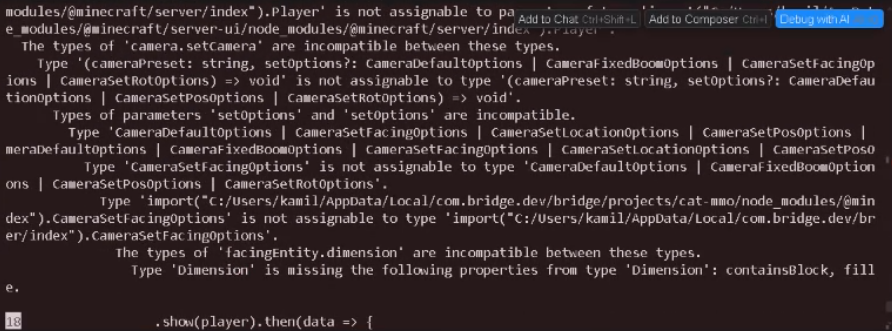
is there a way to fix the mismatch between server-ui and server for all files cuz i dont feel like adding @ts-ignore everywhere https://i.imgur.com/TVdDEji.png
 wary edge
oak lynx
is there a way to fix the mismatch between server-ui and server for all files cu...
wary edge
oak lynx
is there a way to fix the mismatch between server-ui and server for all files cu...
#1279063742994317404 message
Replace the version with your actual version
oak lynx
thanks
 nocturne berry
How do you fix this error?
[Scripting][error]-Plugin [Witchery Expansion - 1.0.0] - [main.js] ran with error: [SyntaxError: expecting ':' at blocks.js:5
]
[Scripting][warning]-Script reload did not re-register 'fm:block_interact' custom block component
world.beforeEvents.worldInitialize.subscribe(initEvent => {
initEvent.blockComponentRegistry.registerCustomComponent("fm:block_interact", {
const player = itemEvent.source;
const block = eventData.block;
if (block.typeId === "fm:mana_generator") {
if (itemEvent.itemStack.typeId === 'fm:evil_amulet') {
system.run(() => {
player.dimension.runCommandAsync('summon zombie');
}
}
}
});
});``` abstract cave
is there a way to get the direction the player is moving
for instance; if the player is facing north and moving south, is there a way to get it
 gaunt salmonBOT
Debug Result
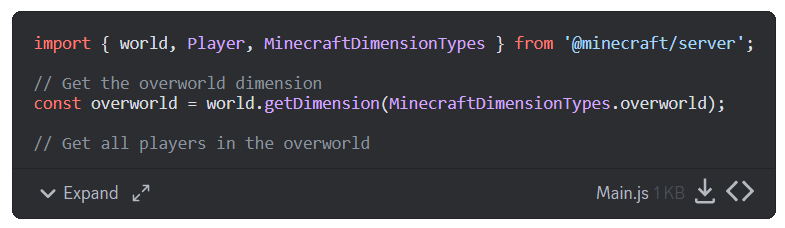
JavaScript/TypeScript code blocks not detected in [message](#1067535608660107284 message).
You can either send the script in code block highlighted in JS format:
```js
world.sendMessage("Hello World");
```
Or Send an attachment end in .js to debug the file.
 granite elbow
is there a way to create a block placing system where a block can be stackable? first it would start off as a vine tip then when another vine tip is placed under the original vine tip it would change to a vine base and so on
my script dont work help plz
 cold grove
granite elbow
my script dont work help plz
cold grove
granite elbow
my script dont work help plz
your script doesnt work because is made with chatgpt hehhe
 sturdy ermine
cold grove
your script doesnt work because is made with chatgpt hehhe
sturdy ermine
cold grove
your script doesnt work because is made with chatgpt hehhe
chatgpt is never that good prolly a specilized ai
 glacial widget
how do i use the addItem for potions
granite elbow
cold grove
that is not trained well btw, its easier learn
no do u think it looks good bru
cuz it dont work
cold grove
glacial widget
how do i use the addItem for potions
get potion item component
glacial widget
cold grove
get potion item component
const item = new ItemStack("minecraft:potion{Potion:swiftness}", 1)
      item.getComponent("minecraft:potion").typeId
      inventory.addItem(item)
idk how to asign the effects
 granite badger
glacial widget
idk how to asign the effects
granite badger
glacial widget
idk how to asign the effects
https://jaylydev.github.io/scriptapi-docs/latest/classes/_minecraft_server_1_14_0_beta.ItemStack.html#createPotion code examples attached there
Documentation for Script API - v1.21.23
glacial widget
granite badger
https://jaylydev.github.io/scriptapi-docs/latest/classes/_minecraft_server_1_14_...
import {
    MinecraftPotionEffectTypes,
    MinecraftPotionLiquidTypes,
    MinecraftPotionModifierTypes,
} from "@minecraft/vanilla-data";
is not working anymore or do i have to import it into my manifest
glacial widget
cold grove
just ts types
ohh
granite badger
Well technically you can use it via a single file or bundle it... https://jaylydev.github.io/scriptapi-docs/latest/modules/_minecraft_vanilla_data.html#md:external-minecraft-library
Documentation for Script API - v1.21.23
glacial widget
what is the javascript type?
 open urchin
glacial widget
```js
import {
MinecraftPotionEffectTypes,
MinecraftPotionLiquidTypes,
...
open urchin
glacial widget
```js
import {
MinecraftPotionEffectTypes,
MinecraftPotionLiquidTypes,
...
it's not a native module, but it is a module
since it isn't built into Minecraft you have to include it in your scripts folder manually and either import it by file path or use a bundler
glacial widget
open urchin
it's not a *native* module, but it is a module
since it isn't built into Minecra...
ohh alright
untold magnet
hmm, how about making it simpler,
each item will have it own dynamic property so when u put a stick, the dynamic property of it will be saved, when u replace it with something else like cobblestone, it will start a new dynamic property, when u put back the stick it will complete the srick dynamic property
yah that looks stupid, but i like it its so much simpler than making switch or saving last item id
 meager pulsar
how do you create an explosion with scripts?
 fallen cape
meager pulsar
how do you create an explosion with scripts?
fallen cape
meager pulsar
how do you create an explosion with scripts?

Contents of the @minecraft/server.Dimension class.
untold magnet
system.runInterval(() => {
  const dimension = ['overworld', 'nether', 'the_end'].map(dim => {
    for (const entity of world.getDimension(dim).getEntities()) {
      if (entity.typeId === 'exe:grinder') {
        const inv = entity.getComponent('inventory').container;
        const item0 = inv.getItem(0);
        const stick = entity.getDynamicProperty('stick')
        const slot0 = entity.getDynamicProperty('slot0')
        entity.setDynamicProperty('stick', 0)
        entity.setDynamicProperty('cobblestone', 0)

        if (!item0) entity.setDynamicProperty('slot0', false)
        if (item0) {
          entity.setDynamicProperty('slot0', true)
          if (item0.typeId === 'minecraft:stick') {
            entity.setDynamicProperty('stick', 1)
            console.log('slot0HasStick')
          } else entity.setDynamicProperty('stick', 0)
          if (item0.typeId === 'minecraft:cobblestone') {
            entity.setDynamicProperty('cobblestone', 1)
            console.log('slot0HasCobblestone')
          }
          if (stick === 1) world.sendMessage('Stick')
          if (slot0 === true) world.sendMessage('Item!')
        }
      }
    }
  })
})```so messy, ikbut it should work like how i want
console.log isn't sending a log for some reason, i think its console.warn right?
YESS
abstract cave
is there a way to get the direction the player is moving
for instance; if the player is facing north and moving south, is there a way to get it
 sharp elbow
Facing direction can be acquired through the player's y-rotation (use getRotation). Movement direction is a matter of plugging the player's velocity into an atan2 function, then multiplying by 180/π if you want degrees. I can never recall the correct order of arguments though.
untold magnet
@scarlet sable ?
scarlet sable
just wanted to dm
abstract cave
sharp elbow
Facing direction can be acquired through the player's y-rotation (use getRotatio...
 sharp elbow
If you're unsure what atan2 is, I recommend looking it up! Fascinating function that is
For more context: You would pass in the player's z-velocity and x-velocity into it, acquired from the getVelocity method (I neglected to mention this earlier, whoops)
JavaScript has a native atan2 through Math.atan2(), though it does return an angle in radians IIRC
amber granite
subtle cove
```js
switch (typeof _subject) {
case 'boolean': case 'number': case 'undefi...
U know that default case exist right ?
 valid ice
sharp elbow
JavaScript has a native atan2 through `Math.atan2()`, though it does return an a...
valid ice
sharp elbow
JavaScript has a native atan2 through `Math.atan2()`, though it does return an a...
Well, radians are superior, so it only makes sense 
 winter plaza
export function projetil(entity) {
  const
    family = entity.getComponent("type_family").hasTypeFamily("projetil"),
    family_range = entity.getComponent("type_family").id.split("range:")[1];
  switch (family_range) {
    case "1"
      entity.runCommand("say range1");
    break
  }
}
help me
I don't know how to do it in const family_range
 lyric kestrel
winter plaza
```js
export function projetil(entity) {
const
family = entity.getComponen...
lyric kestrel
winter plaza
```js
export function projetil(entity) {
const
family = entity.getComponen...
Is const and family = on different lines?
winter plaza
yes, but there is no problem
abstract cave
is there a way to summon fireballs via script
winter plaza
export function projetil(entity) {
  const
    family = entity.getComponent("type_family"),
    family_range = entity.getComponent("type_family").id.split("range:")[1];
  if (!family?.hasTypeFamily("projectile")) return;
  switch (family_range) {
    case "1":
      entity.runCommand("say range1");
    break
  }
guys
how can i use lockMode or ItemLockMode to lockup a specific item?
item id:
exe:place_holder
anyone just show me an example how to lock that item, after the item is locked, it cannot be moved or dropped and kept on death
and the most important thing is,
putting that locked item inside of entity inventory
meager pulsar
Does this returns info about addon of items loaded in the world ort just vanilla stuff?

 random flint
meager pulsar
Does this returns info about addon of items loaded in the world ort just vanilla...
random flint
meager pulsar
Does this returns info about addon of items loaded in the world ort just vanilla...
It includes custom items and blocks
 worn sphinx
Does anyone know how to do this, when you mine any block (like stone), it will create a small explosion, like breaking the surrounding blocks
subtle cove
amber granite
U know that default case exist right ?
I was too focused on details xD, thx btw
 golden condor
worn sphinx
Does anyone know how to do this, when you mine any block (like stone), it will c...
golden condor
worn sphinx
Does anyone know how to do this, when you mine any block (like stone), it will c...
you can use the player break block event, filtering for stone blocks, i.e.
world.afterEvents.playerBreakBlock.subscribe((e) => {
    // code
}, { blockTypes: ["minecraft:stone"] });
 dense skiff
Does anyone have a way to have a player break a block through the api and not physically ingame?
 crude bridge
#1284806985426014239
 pliant kite
help #1284802627153956904
untold magnet
#1284815845889015869 ^
distant tulip
cross posting 📈
 honest spear
sorry my bad
crude bridge
distant tulip
cross posting 📈
minato
i need you
if (player.typeId !== 'minecraft:player' || !player.hasTag('vip')) return;
how can i make that if a player don't have the tag vip
it return
shy leaf
crude bridge
```js
if (player.typeId !== 'minecraft:player' || !player.hasTag('vip')) ret...
why not just do if statement for hasTag only
crude bridge
shy leaf
why not just do if statement for hasTag only
uh
crude bridge
crude bridge
how can i make that if a player don't have the tag vip
i want make a script that active keep inventory for only the tag "vip"
crude bridge
shy leaf
you prob dont need the typeId check
world.afterEvents.entityDie.subscribe(({ damageSource: killa, deadEntity: player }) => {
    if (player.typeId !== 'minecraft:player' || !player.hasTag('vip')) return;

    const inv = player.getComponent('inventory').container;
    const location = player.location;

    for (let i = 0; i < inv.size; i++) {
        const item = inv.getItem(i);
        if (item) player.dimension.spawnItem(item, location);
    }

    const equippable = player.getComponent("minecraft:equippable");
    ["Head", "Chest", "Legs", "Feet", "Offhand"].forEach((e) => {
        const item = equippable.getEquipment(e);
        if (item) player.dimension.spawnItem(item, location);
    });

    player.runCommandAsync('clear @s')
})
though idk the issue of this if statement
is it not working

pliant kite
shy leaf
though idk the issue of this if statement
Can you help me
pliant kite
shy leaf
though idk the issue of this if statement
import { world, EquipmentSlot, EffectTypes } from "@minecraft/server";

world.afterEvents.entityHitEntity.subscribe((data) => {
    const hitEntity = data.hitEntity;
    const damager = data.damagingEntity;

    if (damager && damager.typeId === "minecraft:player") {
        if (damager.hasTag("user")) {
            const inventory = damager.getComponent("minecraft:inventory");
            const mainHandItem = inventory.container.getItem(EquipmentSlot.mainhand);

            if (mainHandItem && mainHandItem.typeId === "minecraft:netherite_sword") {
                applyEffectToEntity(hitEntity);
            }
        }
    }
});

function applyEffectToEntity(entity) {
    if (entity && entity.hasComponent("minecraft:effect")) {
        const slownessEffect = EffectTypes.get("minecraft:slowness");
        entity.addEffect(slownessEffect, 100, 1, false);
}```

What is the error why effect is not applying to entity on hit?turn content logs on
shy leaf
pliant kite
```js
import { world, EquipmentSlot, EffectTypes } from "@minecraft/server";
wo...
theres no such thing as effect component
untold magnet
umm, d u know how to lock a specific item?
shy leaf
did you really ghost ping me
untold magnet
ItemLockMode or itemStack.lockMode
subtle cove
container.getSlot(0).lockMode = 'inventory'
help me
shy leaf
crude bridge
help me<:bao_ext_toldyouso:1016392386433257553>
is that typescript
crude bridge
shy leaf
is that typescript
no js
subtle cove
How is that line not working tho...
shy leaf
yeah it should work??
crude bridge
IT WORKS
shy leaf
moyai
crude bridge
BUT
 alpine ibex
shy leaf
moyai
alpine ibex
shy leaf
moyai
UwU
shy leaf
🗿
crude bridge
crude bridge
BUT
I want to take those who don't have that tag, not those who have it
ghost ping
eheheheheheh
if (player.typeId !== 'minecraft:player' || !player.hasTag('vip')) return;
 pls
pls
crude bridge
crude bridge
```js
if (player.typeId !== 'minecraft:player' || !player.hasTag('vip')) ret...
I redo the script
    if (player.typeId !== 'minecraft:player') return;
    if (player.hasTag('vip')) return
resolved
untold magnet
slot0.setItem('minecraft:stick'); returns undefined
slot0.setItem(new ItemStack('minecraft:stick'))?
crude bridge
import { ItemStack, system, world } from "@minecraft/server";

world.afterEvents.playerSpawn.subscribe((data) => {
    let player = data.player
    let inventory = player.getComponent("inventory");
    let slot = 8;

    let item = new ItemStack("minecraft:stick", 1);
    item.lockMode = "slot";

    inventory.container.setItem(slot, item);


});
@untold magnet use this, tell me if it works
untold magnet
crude bridge
<@917785883959263293> use this, tell me if it works
the item is locked but, u still able to take them out using hoppers
i should make it not shipped by hoppers
crude bridge
untold magnet
i should make it not shipped by hoppers
idk
distant tulip
untold magnet
the item is locked but, u still able to take them out using hoppers
is that an entity?
use lock to inventory and stop he hopper thing
untold magnet
distant tulip
use lock to inventory and stop he hopper thing
i better use another way, making a custom UI with 3 slots only
pliant kite
Is there a module to import from
For the ```js
world.events.blockPlace.subscribe(handleBlockPlacement);
world.events.blockBreak.subscribe(handleBlockDestruction);
world.events.explosion.subscribe(handleExplosion);```
untold magnet
i have an idea,
i dont have to put every single script inside of one huge script and get infinite input lag,
glacial widget
pliant kite
Is there a module to import from
For the ```js
world.events.blockPlace.subscribe...
block and break are already in the @minecraft/server module?
explosion you can do aswell
glacial widget
pliant kite
wym
world.afterEvents.playerInteractWithBlock

world.afterEvents.playerBreakBlock
oh
glacial widget
yep
pliant kite
glacial widget
```js
world.afterEvents.playerInteractWithBlock
world.afterEvents.playerBreakBl...
Does it need .subscribe?
glacial widget
pliant kite
Does it need .subscribe?
yh it does. I just did a example for you
pliant kite
glacial widget
yh it does. I just did a example for you
is explosion changing to afterEvents?
nvm
ty anyway
glacial widget
pliant kite
is explosion changing to afterEvents?
Documentation for Script API - v1.21.23
pliant kite
glacial widget
https://jaylydev.github.io/scriptapi-docs/latest/classes/_minecraft_server_1_14_...
Thx
pliant kite
glacial widget
https://jaylydev.github.io/scriptapi-docs/latest/classes/_minecraft_server_1_14_...
Where can i see modules of “@minecraft/server”?
pliant kite
Is there a replacement for
‘BlockLocation’ module ? Cuz it outdated
shy leaf
 fallow rivet
Why
fallow rivet
Why
cant use it in minecraft scripting api
many javascript functions are locked out
fallow rivet
This is bad
shy leaf
though you can use Date.now()
shy leaf
shy leaf
though you can use `Date.now()`
its one of the stuff that minecraft didnt lock out afaik
there could be other stuff though
you can use millisecond precise timing with that instead of using ticks (as long as youre not running it in tick-based runs)
 fallow rivet
<#1284469263800995950>
fallow rivet
fallow rivet
<#1284469263800995950>
Btw Write here @distant gulch
glacial widget
fallow rivet
oh yh i remember that happending to me lol
glacial widget
shy leaf
what did you even do
he used a unsafe system.runIntervel
with a while loop inside am guessing
 steady canopy
 rain viper
If it is a realms I think you can only use it once
and if it is a normal world, verify that the cheats are activated
distant tulip
are you op?
 ivory bough
Yo guys to get the amount of damage that was applied to my entity is it
world.afterEvents.entityHurtEntity.subscribe((event) => {
const getvalue = event.damage.valueOf
});
or
world.afterEvents.entityHurtEntity.subscribe((event) => {
const getvalue = event.damage
});
alpine ibex
how to make particles? Using JS?
Not like how I mean by having this tag makes this particle show up or summons this particle
dimension.spawnParticle("kimetsunoyaiba:test")
Like that?
 deep plank
crude bridge
How can take the Healy of a player
deep plank
crude bridge
How can take the Healy of a player
player.getComponent("health");
Contents of the @minecraft/server.EntityHealthComponent class.
crude bridge
deep plank
```js
player.getComponent("health");
```
https://learn.microsoft.com/en-us/minec...
Thx
 steep hamlet
bra why does mc have to crash for every minor error like unknown variable or syntax
granite badger
the entire mc app crash or js crash
 buoyant canopy
i hate it when i make an error, and all of my custom components stop working
i get like 10 error messages for a single comma i missed
granite badger
try typescript / @gaunt salmon
 naive tinsel
how do i set item durability
glacial widget
How do i set a item in a players main hand
steep hamlet
granite badger
the entire mc app crash or js crash
mc app
buoyant canopy
glacial widget
How do i set a item in a players main hand
player.getComponant("equippable").setEquipment("Mainhand", item)
glacial widget
buoyant canopy
player.getComponant("equippable").setEquipment("Mainhand", item)
            const inventory = player.getComponent("inventory").container;
            const heldItem = player.getComponent('equippable').getEquipmentSlot("Mainhand")
            const itemInHand = inventory.getItem(heldItem);


            inventory.setItem(heldItem, itemInHand);
inventory.getItem takes a slot number
glacial widget
glacial widget
```js
const inventory = player.getComponent("inventory").container;
...
for some reason i get a error for this
glacial widget
buoyant canopy
inventory.getItem takes a slot number
ohh
buoyant canopy
the same with inventory.setItem the first parameter is a slot number
glacial widget
does getSlot do the same thing?
glacial widget
buoyant canopy
the same with inventory.setItem the first parameter is a slot number
it has to be?
buoyant canopy
yes
glacial widget
then how can i set a item that am holding in my main hand?
glacial widget
buoyant canopy
.
am guessing this is "item"
player.getComponent('equippable').getEquipmentSlot("Mainhand")
Do you guys know how I can enchant both main hand and offhand items? at the same time?
buoyant canopy
what do you mean you're holding? isn't it already in your main hand?
alpine ibex
Using command or via script
glacial widget
buoyant canopy
what do you mean you're holding? isn't it already in your main hand?
im tryna rename the item that is in your mainhand
buoyant canopy
alpine ibex
Do you guys know how I can enchant both main hand and offhand items? at the same...
Documentation for ScriptAPI - v1.21.0
alpine ibex
buoyant canopy
https://darkgameryt.github.io/ScriptAPI-Docs/versions/1.21.0/classes/_minecraft_...
okay but is it possible via command as well?
buoyant canopy
alpine ibex
okay but is it possible via command as well?
only the main hand with commands
alpine ibex
buoyant canopy
only the main hand with commands
Bummer 😕
buoyant canopy
const equipment = player.getComponant("equippable")
const item = equipment.getItem("Mainhand")
item.nameTag = "whatever"
equipment.setItem("Mainhand", item)
.
glacial widget
buoyant canopy
.
yeah it works, thank you
 oblique heath
entity custom components when...
 empty quail
Real
 unique dragon
oblique heath
entity custom components when...
unique dragon
oblique heath
entity custom components when...
I don't think it's necessary
oblique heath
having a onTick and onRandomTick for entitys just like blocks would be nice
instead of doing hacky shit'
wary edge
oblique heath
having a onTick and onRandomTick for entitys just like blocks would be nice
Entity on tick? Thats just a timer
oblique heath
yeah im using that right now
wary edge
oblique heath
yeah im using that right now
Im not seeing the "hacky"
 wanton ocean

 cold grove
sudden nest
cold grove
sudden nest
file too long maybe?
 prisma shard
fallow rivet
prisma shard
fallow rivet
import { system } from "@minecraft/server";

system.beforeEvents.watchdogTerminate.subscribe((event) => {
    event.cancel = true;
    console.warn(`[Watchdog] canceled server crash`);
});```world.afterEvents.entityHurtEntity.subscribe((event) => {
const getDamageValue = event.damage;
world.sendMessage(`the amount of damage applied to the entity is ${getDamageValue}`);
});```Nah, I just shared it for cursed stuffs, i think it's just a not-big-of-a-deal responsiveness for minecraft window's screen size
 solar dagger
Has anyone done a lock on target system? Like the player's third person camera locks on a entity within a certain range of the player? If you're familiar with elden ring or dark souls type of locking
shy leaf
what is the most efficient way to get the entire player's inventory and set lore for each items
sudden nest
I just learned that itemStack doesn't have ID or even hash for each itemStack... How do I compare if one another is the same? I mean i have an idea, but i think someone could have made it simpler
shy leaf
sudden nest
I just learned that itemStack doesn't have ID or even hash for each itemStack.....
iirc theres a "compare itemstack" in #1067535712372654091
sudden nest
Oh that's a bunch of checking
sudden nest
shy leaf
https://discord.com/channels/523663022053392405/1258081588189728778
Thanks anyways!! I'll try to create one that is short, if my brein go boom, I'll just stick with that
buoyant canopy
where does the structure manager class store the structures
 ruby haven
Is it possible to add paramaters to the vibration:listener component of the Warden because I want to add distance to it vibration detection range it seems the default is 16 blocks radius
Through scripting API of course
fiery solar
buoyant canopy
where does the structure manager class store the structures
If you use the world StructureSaveMode then In the world's leveldb database along with all the other world data. Just like the /structure command
fiery solar
prisma shard
i never messed w/ structures
Structures are very useful. There's the world building of course, but it also allows you to actually store ItemStacks and Entities, with all their data, as dynamic properties
shut citrus
how to test how far above the ground player is?
 edgy nimbus
shut citrus
how to test how far above the ground player is?
edgy nimbus
shut citrus
how to test how far above the ground player is?
you can use the getBlockBelow() function and get the differences between the location of the block the function returns with the current block location the player is on
buoyant canopy
fiery solar
Structures are very useful. There's the world building of course, but it also al...
once we can read and write nbt, structures will become obsolete
fiery solar
buoyant canopy
once we can read and write nbt, structures will become obsolete
Well we're never going to get raw NBT access, but as the API develops I'm sure we'll get most capabilities eventually.
They'll still be plenty useful, we just won't need to use them as a workaround for so many things.
ruby haven
Can you disable a spawnrule through scripting API
I want to prevent an entity from spawning ones a condition is fullfilled
 chrome flint
ruby haven
I want to prevent an entity from spawning ones a condition is fullfilled
chrome flint
ruby haven
I want to prevent an entity from spawning ones a condition is fullfilled
maybe just detect entitySpawn then kill it afterwards
lyric kestrel
buoyant canopy
once we can read and write nbt, structures will become obsolete
NBT data in Java for their add-on equivalent stuff is gone now
lyric kestrel
ruby haven
Can you disable a spawnrule through scripting API
You could use runCommandAsync and run /gamerule domobspawning false
chrome flint
lyric kestrel
You could use `runCommandAsync` and run /gamerule domobspawning false
that's not what he meant
ruby haven
But I want a specific mob
shy leaf
ruby haven
I want to prevent an entity from spawning ones a condition is fullfilled
you can use entitySpawn event and Entity.remove()
its not perfect but it will work
ruby haven
Thanks again
 warm arch
@glacial widget Hello mate check your dm
 drifting ravenBOT
DMs Are Not Ideal
When you ask a question via DM, you are restricting the total number of people who can help you from all potential server members to just one. Asking in the public channels is the best way to get a good, community-sourced answer to your question, allowing other observers to give their input.
While you are certainly welcome to DM with each other, please be aware it is against our rules to send unsolicited DMs requesting help.
glacial widget
warm arch
<@780160170273407027> Hello mate check your dm
i was out my bad
buoyant canopy
lyric kestrel
NBT data in Java for their add-on equivalent stuff is gone now
it's gone for just items, but got replaced with a much more powerful components system
crude bridge
there is a oninteract for mobs?
 unreal cove
crude bridge
there is a oninteract for mobs?
unreal cove
crude bridge
there is a oninteract for mobs?
We have events for player interact with entity, if that's what you mean
but afaik it's still in beta api
crude bridge
unreal cove
We have events for player interact with entity, if that's what you mean
I meant this
like a normal npc
@unreal cove can you make me an example
pls

 summer walrus
crude bridge
I meant this
summer walrus
crude bridge
I meant this
bc.world.afterEvents.playerInteractWithEntity.subscribe(e => {
    const { itemStack, player, target } = e;
    // your code here
})

bc.world.beforeEvents.playerInteractWithEntity.subscribe(e => {
    const { itemStack, player, target } = e;
    // your code here,

    // PS: you can cancel this event
})
thx musashi
winter plaza
help
import * as mc from '@minecraft/server';

mc.system.runInterval(() => {
  for (const entity of mc.world.getDimension("overworld").getEntities()) {
    projetil(entity);
  }
});

export function projetil(entity) {
  const family = entity.getComponent("type_family");
  if (family.hasTypeFamily("projectile") && family.hasTypeFamily("attack")) {
    switch (family.hasTypeFamily()) {
      case "ball":
        console.warn("ball");
      break
    }
  }
}
[Scripting][error]-TypeError: cannot read property 'hasTypeFamily' of undefined at projetil (wg/commands.js:11)
at <anonymous> (main.js:43)
abstract cave
player.runCommand(`/tellraw @s {"rawtext":[{"text":"Not enough mana"}]}`)```
hmm, i dont know why the command inside wont run, am i missing something or.... lone thistle
abstract cave
```js
player.runCommand(`/tellraw @s {"rawtext":[{"text":"Not enough mana"}]}`)`...
lone thistle
abstract cave
```js
player.runCommand(`/tellraw @s {"rawtext":[{"text":"Not enough mana"}]}`)`...
The syntax is correct. If it's not running then it's most likely not getting called.
PS: Instead of the tellraw command, use player.sendMessage. It's a native method for sending messages.
player.sendMessage("Not enough mana");
 proud sapphire
winter plaza
```js
import * as mc from '@minecraft/server';
mc.system.runInterval(() => {
...
proud sapphire
winter plaza
```js
import * as mc from '@minecraft/server';
mc.system.runInterval(() => {
...
try const family = entity.getComponent("minecraft:type_family");, sometimes it doesn't work without the minecraft:
abstract cave
lone thistle
The syntax is correct. If it's not running then it's most likely not getting cal...
k thanks
 spring axle
lone thistle
The syntax is correct. If it's not running then it's most likely not getting cal...
spring axle
lone thistle
The syntax is correct. If it's not running then it's most likely not getting cal...
For those using ES Lint we publish some rules that can help catch these things 🙂
GitHub
Sets of typescript scripting libraries for use with the minecraft scripting modules. - Mojang/minecraft-scripting-libraries
 keen thorn
abstract cave
```js
player.runCommand(`/tellraw @s {"rawtext":[{"text":"Not enough mana"}]}`)`...
keen thorn
abstract cave
```js
player.runCommand(`/tellraw @s {"rawtext":[{"text":"Not enough mana"}]}`)`...
i think it could be the slash
buoyant canopy
i have a crazy theory, if we can replicate the method used by the game to place biomes with JavaScript, then we can create a dimension.getBiome(location) function
distant tulip
yeah
it is possible
same as how it was done with slime chunk
oblique heath
Same can be done with structures as well
buoyant canopy
oh, is there already a slime chunks behavior pack out there? i tried to make one but couldn't get the Mersenne Twister to work
i know it's possible, because chunk base does it, but is it possible with the script API?
distant tulip
buoyant canopy
oh, is there already a slime chunks behavior pack out there? i tried to make one...
there is
buoyant canopy
oblique heath
Same can be done with structures as well
it would be interesting to make an addon that highlights the spawning spots of a fortress
it would require some serious code digging tho
distant tulip
buoyant canopy
i know it's possible, because chunk base does it, but is it possible with the sc...

GitHub
In-game slime chunk finder for Minecraft Bedrock . Contribute to obscraft23/SlimeChunkFinderAddonBE development by creating an account on GitHub.
buoyant canopy
distant tulip
https://github.com/obscraft23/SlimeChunkFinderAddonBE/blob/main/BP/scripts/utils...
i wonder if i can use that in my map?
distant tulip
buoyant canopy
i wonder if i can use that in my map?
not mine
buoyant canopy
yeah i know, i was reading the readme file, and it seems complicated
distant tulip
not really
i thinks the wiki have some infos

GitHub
Web app to visualize slime chunks in MCPE. Contribute to depressed-pho/slime-finder-pe development by creating an account on GitHub.
buoyant canopy
distant tulip
not really
i thinks the wiki have some infos
yeah i read that page, it's what led me to attempt making my own slime chunk finder
distant tulip
the part that got me confused is the random number part
why do we need it i the chunks are constant across seeds
buoyant canopy
distant tulip
the part that got me confused is the random number part
why do we need it i the ...
bedrock edition uses the mersenne twister which is a random number generator, it takes a seed which is a weird number to determine if a chunk should spawn slimes or not
distant tulip
i know but that should make it random across seeds. no?
i should look into MersenneTwister
buoyant canopy
the different between java and bedrock is that in java the twister seed depends on the world seed while im bedrock it's constant
distant tulip
the slime have its own seed?
buoyant canopy
distant tulip
the slime have its own seed?
this line explains everything

there is that weird function called mul32_lo which generates the seed for the twister and then it converts it into a true or false
but of course because the density of slime chunks is 10% of the world there this little modification
 distant tulip
buoyant canopy
there is that weird function called mul32_lo which generates the seed for the tw...
distant tulip
buoyant canopy
there is that weird function called mul32_lo which generates the seed for the tw...
that seem to multiplies the two 32bit integers and returns the lower 16 bits of the result
buoyant canopy
i black boxed the the mul32_lo function and the mersenne twister to make it easier for me to understand
buoyant canopy
distant tulip
that seem to multiplies the two 32bit integers and returns the lower 16 bits of ...
that explains the name lol
distant tulip
yeah
lo for lower (probably)
distant tulip
buoyant canopy
i black boxed the the mul32_lo function and the mersenne twister to make it easi...
the general idea is clear but the details is what need to be looked at
buoyant canopy
the mersenne twister is the real boss here, there is no way i understand what it does
distant tulip
i read that nonsense twister
It was developed in 1997 by Makoto Matsumoto
us 27 years later
buoyant canopy
i did not know that there is a do statement in js ._.
maybe it's just a fancy way of writing a while statement
wary edge
buoyant canopy
i did not know that there is a `do` statement in js ._.
Do while?
wary edge
buoyant canopy
do {} while ()
Every language has that
buoyant canopy
i never use while, so it makes sense why i never encountered that
sharp elbow
do..while is similar to while except that it always executes its loop body at least once. And is also harder to make sense of
For the condition being below the loop body hides it, you would need to reach the end of that block to understand when it should loop
 copper lake
So I've kinda been away from minecraft since early June (Busy building the house) but they went and updated Education Edition on me and now my Homeschool remote pack isn't working properly so I need to fix it. Educaiton is now in v1.21.05 so I assume I'm stuck working with 1.21.0 for everything. Previously I was using education edition v1.20.10 and I had enabled experiments for it (though in the update that has gotten trickier since that RP now seems to mess with other sections of the UI if I leave it enabled.) Anyway, v1.20.10 beta and I was using server 1.4.0 beta and server-ui 1.2.0 beta.
Now I need to figure out what I need to change for 1.21.05. So does that mean I should just try updating the manifest to server 1.11.0-beta? Looks like server-ui is still the same.
distant tulip
copper lake
So I've kinda been away from minecraft since early June (Busy building the house...
gaunt salmonBOT
Installation for @minecraft/server
Latest API module install:
npm i @minecraft/[email protected]
Beta API module install:
npm i @minecraft/[email protected]
Preview API module install:
npm i @minecraft/[email protected]
Preview Beta API module install:
npm i @minecraft/[email protected]
WOW! Who is responsible for this, at a glance my jaw dropped Thank you for this.. Thank You for the link!
remote oyster
 copper lake
shy leaf
does education edition use different api
copper lake
shy leaf
does education edition use different api
Education is just behind and they try to make it impossible to use experiments.
wary edge
copper lake
Education is just behind and they try to make it impossible to use experiments.
Which makes sense
shy leaf
rip
copper lake
wary edge
Which makes sense
They have been getting better at keeping up lately though. Not like when we were still in 1.14 and everyone else was about to get 1.18
buoyant canopy
distant tulip
us 27 years later
so i have broken it down, these are the bits needed for sime chunks
 distant tulip
buoyant canopy
so i have broken it down, these are the bits needed for sime chunks
distant tulip
buoyant canopy
so i have broken it down, these are the bits needed for sime chunks
nice
buoyant canopy
time to test it and see if it works
distant tulip
you can test outside the game
buoyant canopy
dude! it works perfectly!
i used madHatter's technical resource pack to see where the slime chunks are
but those chat messages use the script that i modified
shy leaf
buoyant canopy
dude! it works perfectly!
now this is some black magic shit
random flint
Bedrock's slime chunk positioning is the same for every world according to the wiki
wary edge
It is correct
shut citrus
Camera command should be added rotation parameter

 umbral dune
subtle cove
umbral dune
subtle cove
 random flint
shut citrus
Camera command should be added rotation parameter
random flint
shut citrus
Camera command should be added rotation parameter
And FOV too for dolly zoom 🤪
 hardy tusk
shut citrus
Camera command should be added rotation parameter
hardy tusk
shut citrus
Camera command should be added rotation parameter
is this java or bedrock?
 true isle
look at the top left corner of discord lmao
shy leaf
hardy tusk
is this java or bedrock?
java
hardy tusk
shy leaf
java
was almost about to say, as if mojang would not add some pointless, creativity limiting, stupid limit to the rotation parameter so you can not go above a certain value
shy leaf
i mean you can already make stuff that breaks the limit
p sure this one is cuz of technical limit
hardy tusk
shy leaf
p sure this one is cuz of technical limit
no
its not
it was that way before, and it worked fine mojank decides to fuck it up just because they can an update later
sorry for my language. Im just expressing my frustration
shy leaf
the creativity limits are for vanilla stuff (vertical slabs for example) while the camera is for commands & scripting API
iirc the rotation value existed when it was beta but it got removed on release, correct me if im wrong
why would they limit creativity for commands and scripting api?
random flint
Probably to avoid unexpected behavior for other devices?
But yeah, some were unnecessarily restricted.
alpine ibex
Does anybody know how to get the player block above the player all the way to height limit?
deep plank
alpine ibex
Does anybody know how to get the player block above the player all the way to he...
dimension.getTopmostBlock
alpine ibex
import { world, system, Entity } from "@minecraft/server";

system.runInterval(() => {
  for (const dimension of dimensions) {
    const block= player.dimension.getTopmostBlock(player.location, player.location.y);
    for (const block of dim.getEntities()) {
      if (!block && player.hasTag("oni")) {
        entity.runCommand("function burn_to_ash")
      }
    }
  }
}, 1);
It doesn't work help
 knotty plaza
alpine ibex
```js
import { world, system, Entity } from "@minecraft/server";
system.runInte...
knotty plaza
alpine ibex
```js
import { world, system, Entity } from "@minecraft/server";
system.runInte...
player is not defined
Either is dimensions
alpine ibex
knotty plaza
`player` is not defined
import { world, system, Entity } from "@minecraft/server";
const dimensions = ["overworld", "nether", "the end"];
system.runInterval(() => {
  for (const dimension of dimensions) {
    const dim = world.getDimension(dimension);
    const block= entity.dimension.getTopmostBlock(entity.location, entity.location.y);
    for (const block of dim.getEntities()) {
      if (!block && entity.hasTag("oni")) {
        entity.runCommand("function burn_to_ash")
      }
    }
  }
}, 1);
How about now?
knotty plaza
alpine ibex
```js
import { world, system, Entity } from "@minecraft/server";
const dimension...
Now where are you defining entity?
alpine ibex
knotty plaza
Now where are you defining `entity`?
Dimensions
knotty plaza
?
alpine ibex
I'm lagging
alpine ibex
knotty plaza
?
I'm not that advance yet Idk
knotty plaza
Try with this ```js
import { system, world } from "@minecraft/server";
const dimensions = ["overworld", "nether", "the_end"].map(d => world.getDimension(d));
system.runInterval(() => {
for (const dimension of dimensions) {
for (const entity of dimension.getEntities({ tags: ['oni'] })) {
const top = dimension.getTopmostBlock(entity.location, entity.location.y);
if (!top) entity.runCommand('function burn_to_ash');
}
}
});
Ight but later I got important things to attend to
amber granite
What s new with script api ?
 wheat condor
structure.delete(structureName);
structure.createFromWorld(
    structureName,
    dimension,
    { x: entityX, y: 318, z: world.getDynamicProperty("storagelocation").z },
    { x: entityX, y: 319, z: world.getDynamicProperty("storagelocation").z },
    { saveMode: "World", includeEntities: true }
);
do someone know a better way to overwrite a structure?
unique dragon
that's already great for me
random flint
amber granite
What s new with script api ?
Custom components ig
UIManager, and some beta to stable
 cold shoal
found any solution for this?
subtle cove
getEntitiesFromRay?
subtle cove
mhm
fiery solar
wheat condor
```js
structure.delete(structureName);
structure.createFromWorld(
structureN...
That's the way. You can try to get it first if you're not sure if it exists
knotty plaza
cold shoal
found any solution for this?
If its a custom entity, you can try using minecraft:on_target_acquired, then trigger an event that uses queue_command with "target": "other" to run a scriptevent command
I just thought of this
Like this
 knotty plaza
Like this
knotty plaza
knotty plaza
Like this
This is the event
cold shoal
ohh, yeah! I've also thought of that. But do i have to create an event to the target entity's bp or the "target":"other" is enough to run the command as a target? sry, I'm not expert in entity jsons
subtle cove
no
knotty plaza
cold shoal
ohh, yeah! I've also thought of that. But do i have to create an event to the ta...
If you try to trigger the event directly on the target, then yes. But queue_command doesn't required that
cold shoal
alr, thanks! appreciate the help
knotty plaza
I used it to run a command as the player when interacting with an entity
wheat condor
fiery solar
That's the way. You can try to `get` it first if you're not sure if it exists
thats for my item db, users will need to do it not me
remote oyster
 runic crypt
Is it possible to make proximity chat using scripts ??
runic crypt
Is it possible to make proximity chat using scripts ??
#1285580941963825234 message
 keen folio
runic crypt
Is it possible to make proximity chat using scripts ??
keen folio
runic crypt
Is it possible to make proximity chat using scripts ??
bro does not know it💀
remote oyster
keen folio
bro does not know it💀
I wrote him a script in the link above. It has a bug. Please debug it.
keen folio
remote oyster
I wrote him a script in the link above. It has a bug. Please debug it.
no?
remote oyster
keen folio
no?
Bro does not know it 💀
keen folio
world.beforeEvents.chatSend.subscribe((data) => {
    const { sender: player, message } = data;
    data.cancel = true;
    if (!coooldowns[player.name]) coooldowns[player.name] = 0;
    if (coooldowns[player.name] > Date.now()) return player.sendMessage("§cНе флудите!");
    coooldowns[player.name] = Date.now() + 1000 * config.cooldown;
    if (message.startsWith(config.prefix)) {
        world.sendMessage(`[§gG§f] ${getRank(player)} ${player.name} » ${message.replace(config.prefix, "")}`);
    } else {
        const { x, y, z } = player.location;
        for (const target of world.getAllPlayers()) {
            const { x: x1, y: y1, z: z1 } = target.location;
            if (Math.sqrt(Math.pow(x1 - x, 2) + Math.pow(y1 - y, 2) + Math.pow(z1 - z, 2)) > config.distance) continue;
            target.sendMessage(`[§bL§f] ${getRank(player)} ${player.name}§r » ${message}`);
local & global chat
💀
remote oyster
player.id for cooldown would be more efficient than the name of a player. I only say that because I know names can be manipulated by hackers.
remote oyster
keen folio
```js
world.beforeEvents.chatSend.subscribe((data) => {
const { sender: pla...
I thought you said chat ranks were useless and interfered with other add-ons? A change of heart?
keen folio
remote oyster
I thought you said chat ranks were useless and interfered with other add-ons? A ...
wym
where do you see change of heart
remote oyster
Some months ago you mentioned it.
keen folio
yes?
remote oyster
You made a complaint about using chat ranks and that they were useless and interfered with other add-ons.
I see you use it in the code above.
keen folio
remote oyster
You made a complaint about using chat ranks and that they were useless and inter...
send me an ss
of it
remote oyster
 keen folio
remote oyster
Some months ago.
keen folio
remote oyster
Some months ago.
Its in paradox server
remote oyster
Yes
keen folio
well i changed my mind long time ago
alpine ibex
knotty plaza
Try with this ```js
import { system, world } from "@minecraft/server";
const di...
Doesn't work :v
runic crypt
keen folio
```js
world.beforeEvents.chatSend.subscribe((data) => {
const { sender: pla...
is this for me ?
if yes then can u explain this a bit ?
keen folio
runic crypt
is this for me ?
if yes then can u explain this a bit ?
so you wanted a local chat or smt? local chat is in radius of 100 blocks, global is to everyone, you can setup local chat in config
runic crypt
keen folio
so you wanted a local chat or smt? local chat is in radius of 100 blocks, global...
ohh ok
can u explain how ?
keen folio
runic crypt
ohh ok
wait im busy rn
runic crypt
i just want proximity chat
cold grove
runic crypt
i just want proximity chat
Voice chat?
 flat dove
why arent my scripts working now, is there a new version I need to use? Ive been using v1.14.0 I tried switching it to 1.14.0-beta and 1.15.0-beta and even 1.13.0 yet my scripts continue to not work
cold grove
flat dove
why arent my scripts working now, is there a new version I need to use? Ive been...
Send your content log
flat dove
1 sec
flat dove
cold grove
Send your content log
Theres a ton of like non important errors btw
So ur gona have to use the find/search thing
distant tulip
2 MB of errors 💀
honest spear
💀
distant tulip
clear your log and perform what yo have problems with
cold grove
Just take a picture
flat dove
idrk what im looking for
dont think its a script issue its gota be the version or wouldnt it show the script 'index' in the logs

but ive tried every version
subtle cove
do u have BP/scripts/index.js?
flat dove
yeah
distant tulip
17:34:25[Scripting][inform]-Plugin Discovered [§l§cJujutsu Awakening | Survival Update | Addon BP] PackId [c7ee8989-14cc-44aa-9fdd-1c039b64b3f6_0.1.0] ModuleId [52992277-36e3-4ac6-a329-b3cfc84a34ce]
17:34:25[Scripting][error]-Plugin [§l§cJujutsu Awakening | Survival Update | Addon BP - 0.1.0] - failed to create context.
17:34:25[Scripting][error]-Plugin [§l§cJujutsu Awakening | Survival Update | Addon BP] - module [§l§cJujutsu Awakening | Survival Update | Addon BP - 0.1.0] requesting invalid module version [@minecraft/server-ui - 1.3.0-beta].
Available versions:
@minecraft/server-ui - 0.1.0
@minecraft/server-ui - 1.0.0
@minecraft/server-ui - 1.1.0
@minecraft/server-ui - 1.2.0
@minecraft/server-ui - 1.3.0
@minecraft/server-ui - 1.4.0-beta
@minecraft/server-ui - 2.0.0-alpha
17:34:25[Scripting][error]-Plugin [§l§cJujutsu Awakening | Survival Update | Addon BP - 0.1.0] - run failed, no runtime or context available.
subtle cove
or whatever file entry thats in manifest
flat dove
distant tulip
> 17:34:25[Scripting][inform]-Plugin Discovered [§l§cJujutsu Awakening | Surviva...
I saw that im not having issues with my UI script though
Its my other script I didnt think that was an issue
il try fixing that tho rq
distant tulip
those are all the script related errors
cold grove
- The error already tells you what version you need to use
- fix your manifest entry file
flat dove
ok nvm
im stupid af
that was the issue 😭
I was gona leave that for later cuz i wanted to focus on my main scripts before I fixed any ui based ones but I didnt think that was actually an issue
cold grove
Sad
distant tulip
😭
distant tulip
ur wlc
gaunt salmonBOT
Installation for @minecraft/server
Latest API module install:
npm i @minecraft/[email protected]
Beta API module install:
npm i @minecraft/[email protected]
Preview API module install:
npm i @minecraft/[email protected]
Preview Beta API module install:
npm i @minecraft/[email protected]
 twilit crag
oops wrong channel
copper lake
Ok, I have a pack that summons an owned entity (currently does it all without scripts since this is for education edition and from a few version back.) However, I would really like if there were some way to automatically give the entity a nametag. I currently give the students the materials to be able to apply a name tag to their entity manually, however, this doesn't make them do it, nor does it let me know what the entity gets named or who it belongs to.
Is there some way, perhaps with scripts, that I could handle this name tagging? Perhaps I need to remove the whole operation into script but I'm not even sure where to start. I would also like to somehow apply a sign or nametag to other things when the scrip automatically does something for one of the students (for instance, I would love to have name tags on the barrels for the inventory control room.) Is this something scripting can do? Perhaps I need a special "nametag" entity that gets summoned at the inventory control locations. I'm not sure that would work for the Original issue I want to fix since that entity gets moved/teleported when the students move their "home" location. If it is possible, let me know and I'll open a thread to explore how.
knotty plaza
alpine ibex
Doesn't work :v
Any error?
alpine ibex
knotty plaza
Any error?
I can't really find the error since I have a whole addon to work with it but I'd say I don't have a clue
But it just does not work
I have to many errors to fix and it's being overshadowed
 distant gulch
distant tulip
> 17:34:25[Scripting][inform]-Plugin Discovered [§l§cJujutsu Awakening | Surviva...
distant gulch
distant tulip
> 17:34:25[Scripting][inform]-Plugin Discovered [§l§cJujutsu Awakening | Surviva...
im so confused
{
    "format_version": 2,
    "metadata": {
        "authors": [
            "HiveLanky"
        ]
    },
    "header": {
        "name": "Bedrock Plus Practice 1.21.3x2",
        "description": "",
        "min_engine_version": [
            1,
            20,
            80
        ],
        "uuid": "19eb4bb0-43fd-445b-9f23-ff267b730e70",
        "version": [
            1,
            0,
            0
        ]
    },
    "modules": [
        {
            "type": "data",
            "uuid": "f7ed625e-1236-470d-8bc8-b05faaf90241",
            "version": [
                1,
                0,
                0
            ]
        },
        {
            "type": "script",
            "language": "javascript",
            "uuid": "7465518a-22c8-4f93-89ab-90fa3fc8c569",
            "entry": "scripts/main.js",
            "version": [
                1,
                0,
                0
            ]
        }
    ],
    "dependencies": [
        {
            "uuid": "73f2a58c-d909-4bd7-8e8f-6636711cdb1d",
            "version": [
                1,
                0,
                0
            ]
        },
        {
            "module_name": "@minecraft/server",
            "version": "1.15.0-beta"
        },
        {
            "module_name": "@minecraft/server-gametest",
            "version": "1.0.0-beta"
        },
        {
            "module_name": "@minecraft/server-ui",
            "version": "1.4.0-beta"
        }
    ]
}```this for some reason isnt working
umbral dune
"minecraft:inventory" in blocks
unique dragon
umbral dune
"minecraft:inventory" in blocks
?
gaunt salmonBOT
Installation for @minecraft/server-net
Beta API module install:
npm i @minecraft/[email protected]
Preview Beta API module install:
npm i @minecraft/[email protected]
Module '@minecraft/server-net' not found in stable.
gaunt salmonBOT
Installation for @minecraft/server
Latest API module install:
npm i @minecraft/[email protected]
Beta API module install:
npm i @minecraft/[email protected]
Preview API module install:
npm i @minecraft/[email protected]
Preview Beta API module install:
npm i @minecraft/[email protected]
Description
This script checks whether a player has the hack "Nuker" enabled through the use of block break event.
Credits
These scripts were written by iBlqzed
Branch: stable
·
subtle cove
#debug-playground
gaunt salmonBOT
Installation for @minecraft/server-ui
Latest API module install:
npm i @minecraft/[email protected]
Beta API module install:
npm i @minecraft/[email protected]
Preview API module install:
npm i @minecraft/[email protected]
Preview Beta API module install:
npm i @minecraft/[email protected]
 restive folio
"type": "script",
"language": "javascript",
"uuid": "50aba025-a867-4be0-b40c-b4235c314f60",
"entry": "scripts/main.js",
"version": [1,0,8]
}
],
"dependencies": [
{
"module_name": "@minecraft/server",
"version": "1.14.0"
},
{
"module_name": "@minecraft/server-ui",
"version": "1.2.0"
},
{
"uuid": "df89e8c6-1e59-4344-85ea-6721c50e9c74",
"version": [0, 2, 0]
}
]
}
What's the latest version of Minecraft/server and the script
remote oyster
restive folio
What's the latest version of Minecraft/server and the script
Script is [0, 0, 1] to my knowledge. Not aware of any specific versioning beyond that. Would definitely like some links/resources that shows otherwise if I am mistaken.
You can follow up on the latest version for the server module here:
https://www.npmjs.com/package/@minecraft/server/

npm
Contains many types related to manipulating a Minecraft world, including entities, blocks, dimensions, and more.. Latest version: 1.14.0, last published: 8 hours ago. Start using @minecraft/server in your project by running npm i @minecraft/server. There are 52 other projects in the npm registry using @minecraft/server.
empty quail
What was beforeEvents.playerPlaceBlock replaced by?
import { world, system } from '@minecraft/server';

world.beforeEvents.playerPlaceBlock.subscribe((event) => {
const player = event.source;
if (event.permutationBeingPlaced.type.id === 'minecraft:diamond_block') {
const min = 1200;
const max = 1300;
const randDelay = Math.floor(Math.random() * (max - min + 1)) + min;

system.runTimeout(() => {
player.runCommandAsync('say detected diamond block placed after ' + randDelay + ' ticks');
});
};
})
Wiki says it's fine but compiler doesn't like it
 remote oyster
empty quail
What was `beforeEvents.playerPlaceBlock` replaced by?
```js
import { world, syst...
remote oyster
empty quail
What was `beforeEvents.playerPlaceBlock` replaced by?
```js
import { world, syst...
It's still the same.
empty quail
remote oyster
It's still the same.
Alr, does @gaunt salmon need to be updated?
Or does it just gather info from GitHub/Microsoft
remote oyster
empty quail
Alr, does <@948686094986264716> need to be updated?
Most likely needs to be updated. 1.20.30 just released today so I'm not sure if Jayly got around to it yet.
empty quail
remote oyster
Most likely needs to be updated. 1.20.30 just released today so I'm not sure if ...
Alr
oak lynx
Documentation for Script API - v1.21.30
So like is there any info on how to set up the particle to use this?
Do i just use start variables or something else
 shy leaf
oak lynx
Do i just use start variables or something else
shy leaf
oak lynx
Do i just use start variables or something else
you set variables without defining it in variables & curves
if you set variables and then click on # icon, youll see "unused variables" that you can manually adjust
those variables are what you can set with molangvariablemap
ruby haven
Hello I need help on running a function or command in this script you see ones the queen dies I want a certain type of entity to stop spawning and I don't know how to use the entity.remove
Here is my script
import { world, system, EntitySpawnAfterEvent, Player } from '@minecraft/server';
let queenAlive = true;
world.afterEvents.entityDie.subscribe((event) => {
if (event.deadEntity.typeId == 'cm:death_angel_queen') {
let queenAlive = false;
world.sendMessage('hello');
}
});
world.afterEvents.entitySpawn.subscribe((event) => {
if (event.entity.typeId == 'cm:death_angel' && queenAlive == false) {
// function or command here plsss
}
});
 serene lava
i have a trouble with this script. it works but only teleports me, and i need that it teleport entities with specific family types and that the entities do not get stuck inside the walls when teleporting


 untold copper
Is a custom cooldown on pearls possible?
keen folio
untold copper
Is a custom cooldown on pearls possible?
yes
distant gulch
Can i show different scoreboards for each individual?
untold copper
keen folio
yes
Oh crap I’ve been trying for a while and my noggin isn’t working I didn’t think it was possible
keen folio
untold copper
Oh crap I’ve been trying for a while and my noggin isn’t working I didn’t think ...
you tried to do with item json?
untold copper
keen folio
you tried to do with item json?
So my brain doesn’t work tn no I didn’t :(.
keen folio
how you tried to do then
untold copper
keen folio
how you tried to do then
I haven’t really I wanted to see if it was possible in the first place and item json didn’t come to mind
keen folio
untold copper
I haven’t really I wanted to see if it was possible in the first place and item ...
You cant change items typed “minecraft:” even through the item json
you can do cooldowns with script api
keen folio
keen folio
You cant change items typed “minecraft:” even through the item json
You can make it to the custom items through item json
Here’s an example how to make it
Config.js:
export default {
    items: [
        {
            typeId: "minecraft:ender_pearl", // Item ID
            time: 30, // Cooldown (Seconds)
            instantUse: true // Item Instant using yes/no?
        },
        {
            typeId: "minecraft:enchanted_golden_apple",
            time: 120
        },
        {
            typeId: "minecraft:golden_apple",
            time: 30
        },
        {
            typeId: "minecraft:chorus_fruit",
            time: 30
        }
    ],
    combat: { // Cooldown only on pvp mode?
        enable: false,
        object: "combat" // Scoreboard objective
    }
}```An example of importing from config.js and applying cooldowns.
let cooldowns = {};
world.beforeEvents.itemUse.subscribe((data) => {
    const { source: player, itemStack } = data;
    if (player.typeId !== "minecraft:player") return;
    if (config.combat.enabled && getScore(player, config.combat.object) < 1) return;
    for (const item of config.items) {
        if (item.typeId == itemStack.typeId) {
            if (!cooldowns[player.name]) cooldowns[player.name] = {};
            if (!cooldowns[player.name][item.typeId]) cooldowns[player.name][item.typeId] = 0;
            if (cooldowns[player.name][item.typeId] > Date.now()) {
                player.runCommandAsync("title @s actionbar Wait §e" + ((cooldowns[player.name][item.typeId] - Date.now()) / 1000).toFixed(1) + " seconds.");
                data.cancel = true;
            } else {
                if (!item.instantUse) return;
                cooldowns[player.name][item.typeId] = Date.now() + item.time * 1000;
            }
            return;
        }
    }
});```like this
@untold copper
you should use js world.afterEvents.itemCompleteUse.subscribe
To apply cooldown to the food
untold copper
keen folio
Here’s an example how to make it
ohhh oky
i had this at the moment
world.beforeEvents.itemUse.subscribe(data => {
let player = data.source
if (data.itemStack.typeId == "minecraft:ender_pearl") system.run(() => {
spawnConfetti(player);
const container = player.getComponent('inventory')?.container;
const itemselect = container.getItem(player.selectedSlot);
if (!itemselect) return
const coold = itemselect.getComponent("minecraft:cooldown")
const d = coold.startItemCooldown(itemselect,10)
})
});
 cinder shadow
else if (heldItem?.typeId == 'minecraft:shears') {
            player.sendMessage(`§7%farming.trim`)
            block.setPermutation(blockPermutation.withState("runecraft:is_diseased", false));
            block.setPermutation(blockPermutation.withState("runecraft:growth_stage", 0));
            return;
}``` So confused. I'm unable to set the block state "runecraft:is_diseased" to falseI'm able to set it to true
random flint
cinder shadow
```js
else if (heldItem?.typeId == 'minecraft:shears') {
player.send...
Cus it immediately gets overwritten by the old permutation where you set the growth stage
is_diseased is still true in your blockPermutation, so when it does .withState("growth_stage"), it creates a new permutation where is_diseased is still true
 sage sparrow
hi there, what have changed to the interaction scripts? all my npcs stopped working
cinder shadow
random flint
`is_diseased` is still `true` in your `blockPermutation`, so when it does `.with...
Is there no easy way to set multiple states at once?
sage sparrow
random flint
EntityInteract is beta iirc
yea I m on beta, but I think they changed something on the way it trigger now
random flint
cinder shadow
Is there no easy way to set multiple states at once?
.withState().withState()
cinder shadow
ah I was trying to remember how to od that, thanks
random flint
entityRemove beforeEvent fires before an entity is removed. But surprisingly, a hopper can suck an item entity first before the event runs, so it's not valid anymore (I can't get the itemStack). 💀
granite badger
For those who don't know, you can now see inform (messages from console.log) in content log gui by setting log level to info
 distant tulip
granite badger
For those who don't know, you can now see inform (messages from `console.log`) i...
distant tulip
granite badger
For those who don't know, you can now see inform (messages from `console.log`) i...
sense it is not a toggle
dose that disable other console functions?
 slow walrus
distant tulip
sense it is not a toggle
dose that disable other console functions?
slow walrus
distant tulip
sense it is not a toggle
dose that disable other console functions?
I think it's the minimum level, so on warn, it'll display warn & error, error is only errors, and info is info, warn & error
I might be completely wrong though
distant tulip
yeah
seem logical
distant gulch
Cant give different scoreboard sidebar to each players?

 small cloak
Yeah, that's been known for a bit. I don't know what they plan on changing, but they do want to rework things.
honest spear
 tiny tartan
Ya, you can use it if you are beta player
honest spear
tiny tartan
i mean its easier to use than beta bc it doesn't changes the version numbers so it will propably work better if you are doing some personal addons
tiny tartan
i thought its just server ui that got 2.0 alpha, by the reboot they are just gonna change syntax like before they did world.events to world.afterEvents/beforeEvents? or we will see new cool stuff
honest spear
tiny tartan
i thought its just server ui that got 2.0 alpha, by the reboot they are just gon...
both, syntax is still same as its JS, but API design like methods and properties may change as well but we can expect new features as well
sudden nest
hello, is it possible to get the display name of a block?
Block.getItemStack().nameTag just returns undefined.
honest spear
sudden nest
hello, is it possible to get the display name of a block?
`Block.getItemStack(...
name tag is not traslation key for that identifier, but its custoable string
honest spear
sudden nest
hello, is it possible to get the display name of a block?
`Block.getItemStack(...
there is no way at the moment
sudden nest
honest spear
there is no way at the moment
oh okay, sadge
honest spear
sudden nest
oh okay, sadge
is that for vanilla blocks?
sudden nest
nope, it's for everything (custom and vanilla)
honest spear
hmmm
well then no there is no proper way
but you can try using tile.identifier.name
distant gulch
Can i give each player a different scoreboard sidebar? personal scoreboard sidebar
sudden nest
honest spear
but you can try using tile.identifier.name
custom translations from other devs and vanilla isn't really consistent.
like for example:
tile.log.big_oak.name=Dark Oak Log for vanilla, and for custom ones it's just tile.identifier.name
honest spear
distant gulch
Can i give each player a different scoreboard sidebar? personal scoreboard sideb...
this could be done only by title and modifier UI
honest spear
sudden nest
custom translations from other devs and vanilla isn't really consistent.
like f...
Well other devs is problem bc vanilla is being falttered
honest spear
sudden nest
custom translations from other devs and vanilla isn't really consistent.
like f...
this is not current anymore
sudden nest
honest spear
Well other devs is problem bc vanilla is being falttered
true (like me xp)
sudden nest
honest spear
well then no there is no proper way
i'll just use this, and hardcode the vanila ones xp, thank you!
steep hamlet

oh wait
that might actually work
thank!
how do i get the head slot item of an entity?
equippable.getEquipmentSlot(EquipmentSlot.Head).typeId only works for players from my testing
distant tulip
steep hamlet
`equippable.getEquipmentSlot(EquipmentSlot.Head).typeId` only works for players ...
equippable component don't work on entities
use testfor command with hasitem property
crude bridge
const entity = world.getDimension('overworld').spawnEntity("floating:text",{
x: Math.floor(block.x),
y: Math.floor(block.y) + 1,
z: Math.floor(block.z)
});
uh
why it dosent work
distant tulip
crude bridge
const entity = world.getDimension('overworld').spawnEntity("floating:text",{
...
block.location.x
crude bridge
distant tulip
block.location.x
okay
distant tulip
assuming block is a block
crude bridge
so Math.floor(block.location.x),
crude bridge
crude bridge
so Math.floor(block.location.x),
?
 shy leaf
crude bridge
<@704346785811923016>
shy leaf
crude bridge
<@704346785811923016>
is it about breaking block to get items
distant tulip
crude bridge
so Math.floor(block.location.x),
yes
same for y and z
crude bridge
shy leaf
is it about breaking block to get items
nop
shy leaf
odd
crude bridge
shy leaf
odd
???
shy leaf
i mean weird
crude bridge
sorry i dont speak english
crude bridge
shy leaf
i mean weird
oh okay
shy leaf
odd = weird
crude bridge
you want the file?
shy leaf
nah
crude bridge
the script is not mine i only want to fix it
distant tulip
i am lost what part of that is related to breaking a block
shy leaf
but can you show the code that handles spawnEntity
crude bridge
shy leaf
but can you show the code that handles spawnEntity
const entity = world.getDimension('overworld').spawnEntity("floating:text", {
x: Math.floor(block.location.x),
y: Math.floor(block.location.y) + 1,
z: Math.floor(block.location.z)
});
crude bridge
distant tulip
i am lost what part of that is related to breaking a block
there is no part of breaking block?
world.afterEvents.playerInteractWithBlock.subscribe(data => {
    const block = data.block;
    const player = data.player;
    if (player.hasTag('cratesAdd') && block.typeId === 'minecraft:chest') {
        let tags = player.getTags();
        let Crates = [];
        for (const tag of tags) {
            if (tag.startsWith('Crates:')) {
                Crates.push(tag.replace('Crates:', ''));
            }
        }
        const entity = world.getDimension('overworld').spawnEntity("floating:text", {
            x: Math.floor(block.location.x),
            y: Math.floor(block.location.y) + 1,
            z: Math.floor(block.location.z)
        });
        const particles = [
            "minecraft:basic_flame_particle",
            "minecraft:falling_dust_dragon_egg_particle",
            "minecraft:falling_dust_red_sand_particle"
        ];
        const randomParticle = particles[Math.floor(Math.random() * particles.length)];
        entity.addTag("system")
        entity.addTag("Crates");
        entity.addTag(`Crates:${Crates}`);
        entity.addTag(`cratesLocation:${block.x} ${block.y + 1} ${block.z}`);
        player.runCommand(`summon bat ${Crates} ~~~`)
        player.runCommand(`tag @e[r=2,type=bat] add Particle:${randomParticle}`);
        player.runCommand(`tag @e[r=2,type=bat] add system`);
        player.runCommand(`tag @e[r=2,type=bat] add Crates:${Crates}`);
        player.runCommand(`tag @e[r=2,type=bat] add "cratesLocation:${block.x} ${block.y + 101} ${block.z}"`);
        player.runCommand(`tag @e[r=2,type=bat] add Crates`);
        player.sendMessage(`[Crates] §aSuccessfully created §e${Crates}.\n\nhold/right click item to add item`);
        CratesDB.set(Crates, `position: ${block.x} ${block.y} ${block.z}`);
        KeyDB.set(Crates, `Crates:${Crates}|position: ${block.x} ${block.y} ${block.z}`)
        player.runCommand(`tag @s remove cratesAdd`);
        player.runCommand(`tag @s add cratesAddItem`);
    }
});```bruh
shy leaf
NOOOOOO
distant tulip
addTag function and commands in the same time 😅
shy leaf

crude bridge
it's not my script
crude bridge
yo @hazy nebula
shy leaf

crude bridge
/*
- addon by long9boy (long9tpmcr), please dont modify code!!!
- Discord: @hazy nebula
- youtube: @long9tpmcr
- Copyright by long9boy©
*/
crude bridge
crude bridge
```js
world.afterEvents.playerInteractWithBlock.subscribe(data => {
const bl...
so? how this spawnEntity dosent work
shy leaf
- the player might not be in the overworld
in that case you can use player.dimension.spawnEntity
crude bridge
distant tulip
> please dont modify code!!!
I'm just fixing it
distant tulip
shy leaf
1. the player might not be in the overworld
that throw another type of errors
 distant tulip
also playerInteractWithBlock
crude bridge
idk?
distant tulip
your entity is not summonable
edit the json
crude bridge
okay
shy leaf
that could be the reason
crude bridge
{
"format_version": "1.8.0",
"minecraft:client_entity": {
"description": {
"identifier": "pao:floating_text",
"materials": {
"default": "entity"
},
"textures": {
"default": "empty"
},
"geometry": {
"default": "geometry.armor_stand"
},
"render_controllers": [
"controller.render.floating_text"
]
}
}
}
mh
distant tulip
behavior one
crude bridge
okay
{
"format_version": "1.8.0",
"minecraft:entity": {
"description": {
"identifier": "pao:floating_text",
"is_spawnable": false,
"is_summonable": true,
"is_experimental": false
},
"component_groups": {
"despawn": {
"minecraft:instant_despawn": {},
"minecraft:explode": {}
}
},
"components": {
"minecraft:damage_sensor": {
"triggers": {
"cause": "all",
"deals_damage": false
}
},
"minecraft:nameable": {
"alwaysShow": true,
"allowNameTagRenaming": false
},
"minecraft:health": {
"value": 1,
"max": 1,
"min": 1
},
"minecraft:collision_box": {
"width": 1.0,
"height": 1.0
},
"minecraft:push_through": {
"value": 1
},
"minecraft:scale": {
"value": 0.0
},
"minecraft:knockback_resistance": {
"value": 100,
"max": 100
},
"minecraft:physics": {
"has_gravity": false
}
},
"events": {
"minecraft:despawn": {
"add": {
"component_groups": ["despawn"]
}
}
}
}
}
"is_summonable": true,
shy leaf
yeah it should be pao:floating_text
distant tulip
try use a vanilla mob
shy leaf
not floating:text
crude bridge
oh
 distant tulip
lol
crude bridge
crude bridge
{
"format_version": "1.8.0",
"minecraft:entity": {
"description"...
I thought in the json I wasn't understanding
distant tulip
yeah
 distant tulip
https://cdn.discordapp.com/attachments/1271961611237720126/1285944646404673577/avc_Minecraft_2024-09-18_13-39-46.mp4
is there a way to know when player stop breaking block
even if using animation controller
shy leaf
distant tulip
https://cdn.discordapp.com/attachments/1271961611237720126/1285944646404673577/a...
i heard you can use gametest
crude bridge
dosent work
distant tulip
shy leaf
or you can do a big brain move and change the entity identifier to floating:text
and break everything depend on it lol
distant tulip
shy leaf
i heard you can use gametest
gametest is for testing
shy leaf
by making a simulated player to start breaking on the block and check if the player has broken the block before the simulated player
but this sounds horribly hacky
shy leaf
i think theres basicslly no way to check this at all
distant tulip
probably animation controller
or making the breaking depend on an item an check if it is released


 crude bridge
shy leaf
and failed miserably
crude bridge
shy leaf
and failed miserably
sea I fixed the floating text by redoing it now could you help me with applyKnockback
pls
crude bridge
I want to do that pushes you to the opposite side that you are looking, but I don't know how
crude bridge
shy leaf
what do you need
or like that the center from which it repels me is the position of a block
shy leaf
crude bridge
I want to do that pushes you to the opposite side that you are looking, but I do...
uhhhh
hmm
function applyKnockback(center,target,vector2 = { x: 0, y: 0 }) {
    const { x, y } = vector2;
    const dir = {
        x: target.location.x-center.location.x,
        z: target.location.z-center.location.z
    }
    try {
        target.applyKnockback(dir.x,dir.z,x,y);
    } catch {}
}```

```js
applyKnockback(player, entity, { x: -1, y: 0 })```

i have this chunk of codeim quite busy rn so i cant make it dependent on view direction rn
crude bridge
shy leaf
im quite busy rn so i cant make it dependent on view direction rn
this is enough
crude bridge
shy leaf
```js
function applyKnockback(center,target,vector2 = { x: 0, y: 0 }) {
cons...
I mean this
 broken dagger
Does anyone know how I can save items from the hotbar and then reload the items?
distant tulip
random flint
entityRemove beforeEvent fires before an entity is removed. But surprisingly, a ...
hmm?
 keen folio
broken dagger
Does anyone know how I can save items from the hotbar and then reload the items?
keen folio
broken dagger
Does anyone know how I can save items from the hotbar and then reload the items?
import { world } from "@minecraft/server";

function saveHotbar(player) {
    let savedHotbar = [];

    for (let i = 0; i < 9; i++) {
        const item = player.getComponent("minecraft:inventory").container.getItem(i);
        if (item) {
            savedHotbar.push({
                id: item.typeId,   // Save the item type (e.g., "minecraft:diamond_sword")
                amount: item.amount,
                data: item.data
            });
        } else {
            savedHotbar.push(null);
        }
    }

    return savedHotbar;
}

function reloadHotbar(player, savedHotbar) {
    for (let i = 0; i < savedHotbar.length; i++) {
        const itemData = savedHotbar[i];
        if (itemData) {
            const itemStack = new ItemStack(itemData.id, itemData.amount);
            player.getComponent("minecraft:inventory").container.setItem(i, itemStack);
        } else {
            player.getComponent("minecraft:inventory").container.setItem(i, null);
        }
    }
}

world.afterEvents.playerBreakBlock.subscribe((event) => {
    const player = event.source;
    const savedHotbar = saveHotbar(player);

    // Simulate reloading items after 10 seconds (200 ticks)
    system.runTimeout(() => {
        reloadHotbar(player, savedHotbar);
    }, 200);
});```not related it seem
 somber echo
distant tulip
https://cdn.discordapp.com/attachments/1271961611237720126/1285944646404673577/a...
somber echo
distant tulip
https://cdn.discordapp.com/attachments/1271961611237720126/1285944646404673577/a...
Can't you check if the player stopped hitting the block and the block is the same as it was when he first hit it?
HitBlock
distant tulip
somber echo
Can't you check if the player stopped hitting the block and the block is the sam...
we can't
there is no event for that
weirdly animation control also can't do that directly
you will need to combine it with script api to get some kinda of work around
somber echo
entityHitBlock or playerHitBlock
distant tulip
entityHitBlock only trigger on the start
somber echo
Really?
distant tulip
yep
random flint
distant tulip
hmm?
yipee
shy leaf
where did you get the script from
 neat hazel
Why is this happening?
Error:
[Scripting][error]-ReferenceError: Native function [Entity::setProperty] does not have required privileges. at <anonymous> (attributes.js:10)
Code:
mc.world.beforeEvents.chatSend.subscribe((eventData) => {
  const player = eventData.sender;
  switch (eventData.message) {
    case '!test':
      eventData.cancel = true;
LINE 10 ->      player.setProperty("hash:skin", 1)
      player.sendMessage(`Skin: ${player.getProperty("hash:skin")}\nHair: ${player.getProperty("hash:hair")}\nHair Color: ${player.getProperty("hash:hair_color")}`)
      break;
    default: break;
  }
});
(why is the error log not in english??)
shy leaf
neat hazel
Why is this happening?
Error:
```js
[Scripting][error]-ReferenceError: Native f...
many stuff cant be used in read-only mode
beforeEvents put the code into read-only mode since it cannot directly modify the stuff that didnt fully happen
neat hazel
shy leaf
(why is the error log not in english??)
Sorry, I corrected it
shy leaf
youd need to wrap setProperty and sendMessage with system.run()
neat hazel
shy leaf
youd need to wrap setProperty and sendMessage with `system.run()`
Okay, I'll test it.
neat hazel
shy leaf
youd need to wrap setProperty and sendMessage with `system.run()`
It worked, thnk
shut citrus
Why sometimes scripts got slowdown?
shy leaf
shut citrus
Why sometimes scripts got slowdown?
mostly because of excessive amount of stuff
worn sphinx
How are player.addEffect(), player.removeEffect() used?
shy leaf
worn sphinx
How are player.addEffect(), player.removeEffect() used?
player.addEffect(effectType, duration(ticks), { amplifier: number, showParticles: boolean})``` returns `Effect`
```js
player.removeEffect(effectType)``` returns boolean whether the effect has been removedplayerInteractWithEntity isn't working?
deep plank
It's working, why?
unique dragon
deep plank
It's working, why?
my game is just ignoring this event for a reason
 deep plank
It's still beta, do you use beta module?
unique dragon
deep plank
It's still beta, do you use beta module?
yes, 1.15.0-beta