#site-support
1 messages · Page 183 of 1
 gloomy lichen
you tried the last command i sent?
and if that doesnt work, i can only give this to help
Using the THM troubleshooting Script:
 rapid rover
sudo openvpn filename.ovpn
My room machine says it's active but I can't connect
Updating openvpn
 eager fulcrum
My room machine says it's active but I can't connect
@rapid rover What machine? How are you trying to connect?
rapid rover
Trying to deploy a machine from a hacktivities room
eager fulcrum
The VPN doesn't connect you to that machine, it connects you to the TryHackMe network which contains your machine.
Hacktivities is a collection of all public rooms
Which room?
kali stopped making its users a sudoer
@gloomy lichen No, it stopped using root as default
rapid rover
Authenticate/Decrypt packet error: packet HMAC authentication failed
eager fulcrum
That's a warning rather than an error
If you're seeing that, you're probably connected to the VPN
To check, you can try opening http://10.10.10.10/ in your browser
rapid rover
It's aannoying for it not to work on Kali
I am using my virtual box and so It's not a wifi connection
eager fulcrum
It's aannoying for it not to work on Kali
@rapid rover again, if you're seeing that warning then you are connected
rapid rover
Unfortunately the access page says otherwise
eager fulcrum
Please ignore the access page
To check, you can try opening http://10.10.10.10/ in your browser
This is a more reliable method of checking
 humble prawn
FYI I'm getting 'expired machine' in the learn linux room despite there being an hour left on the timer (after extending it). I saw earlier this was affecting the windows rooms
But I'm still connected to the machine
 bronze vale
Already known just refresh your page and your actual time will appear :)
humble prawn
Ahh perfect, thanks!
 naive dust
Hello there,
I can't log into my machines either through SSH or OpenVPn.
For OpenVpn, I uninstalled and reinstalled the app, redownloaded my config file and even changed server. I can connect to the network and access the machine but I can not submit my solution to the exercises unless I disconnect myself from the VPN, submit the response, turn the VPN back on and continue.
For Browser, started my machine and clicked on extend as I did yesterday and it still not working.
This is not really ideal
Please advise.
Thank you
bronze vale
Which room is this?
Also @eager fulcrum help would be appreciated. This all sounds bizarre to me
naive dust
Common Linux Privesc
eager fulcrum
Are you connecting from Kali?
naive dust
When I tried using Kali, it say authentication failure
With OpenVPN, I can access the internal network but can't connect to the internet
eager fulcrum
With OpenVPN, I can access the internal network but can't connect to the internet
@naive dust How did you connect? Using the command line program or Kali's VPN manager?
bronze vale
Does the authentication failure look similar to “HMAC Packet authentication failure”
naive dust
Authentication failure
bronze vale
Oh
naive dust
I used the username and password assigned to my machine when I started it
bronze vale
Sorry my bad I thought you were talking about OpenVPN
bronze vale
What’s exactly the issue with OpenVPN?
naive dust
@bronze vale . With Open VPN, I have access to THM network but can access anything else
bronze vale
That is strange it shouldn’t be affecting your connection at all.
naive dust
When I click on connect, I can access the machine I launched. But if I can't submit the answer until I disconnect
It was working jsut fine yesterday
I connect to the network, solve the exercise, disconnect from the network, submit the answer, wait for it to be graded, reconnect and continue
bronze vale
And this is on the In-Browser machine, correct?
bronze vale
Have you logged out or in since the last time you used the machine?
bronze vale
Okay I’m going to ping one of the admins as this is way out of my area. @vapid dawn
This user is having some issues with submission of tasks and using the THM In-Browser Machine.
On top of that OpenVPN seems to be suffering some issues. I’m unable to provide any further help. Would you be able to take over?
 vapid dawn
would you know what OpenVPN server is down?
and what exactly the issues are r.e. tasks & browser machine?
bronze vale
Hello there,
I can't log into my machines either through SSH or OpenVPn.
For OpenVpn, I uninstalled and reinstalled the app, redownloaded my config file and even changed server. I can connect to the network and access the machine but I can not submit my solution to the exercises unless I disconnect myself from the VPN, submit the response, turn the VPN back on and continue.
For Browser, started my machine and clicked on extend as I did yesterday and it still not working.
This is not really ideal
Please advise.
Thank you
When I click on connect, I can access the machine I launched. But if I can't submit the answer until I disconnect
I connect to the network, solve the exercise, disconnect from the network, submit the answer, wait for it to be graded, reconnect and continue
naive dust
I changed server too
bronze vale
I’m not sure if the OpenVPN issue is server side but I very much doubt it.
vapid dawn
the servers look ok on my end
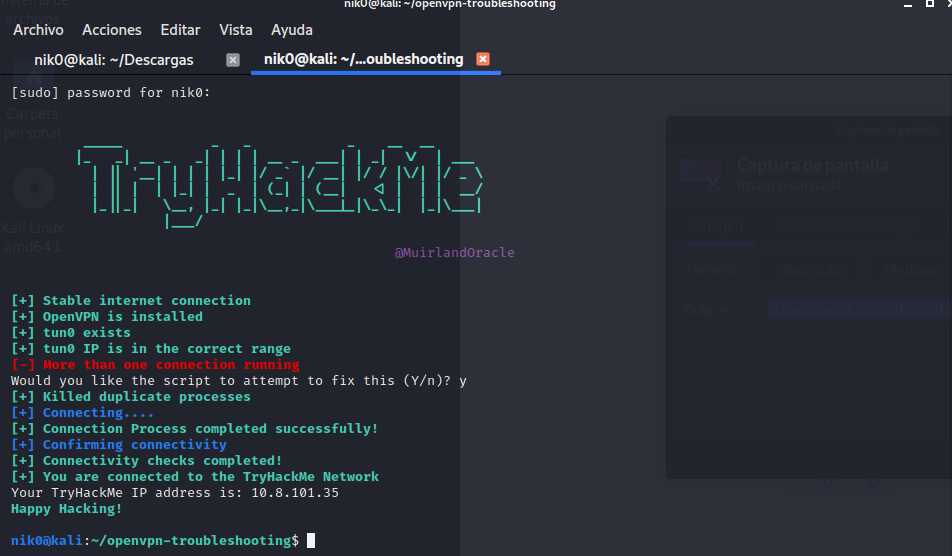
Using the THM troubleshooting Script:
use our documentation to troubleshoot your issue
bronze vale
Thanks Ashu
 heavy nymph
Can anyone confirm if we should get points for the 'Introductory Networking' room? I've completed the room but dont think I've gotten any ponts (to overall score) is that correct?
bronze vale
Walkthrough rooms give 8 points per question with an answer.
All questions without answers don’t give points
heavy nymph
that what I thought... I completed the room, but no points?
eager fulcrum
@heavy nymph The creator may have set it to not give points
For large rooms, that's an option. I think muir set that room not to give points
eager fulcrum
Night Jabba
heavy nymph
Ok cool.. still new.. so just curious.. thx for prompt answer! loving site btw.
 sharp plaza
Hey why am i not able to load the website of the MrRobot room it take forever to reload but no response
 glossy igloo
I can't cat the root.txt file in Peak Hill lab??
i tried cat * but didn't work
 toxic python
eager fulcrum
toxic python
eager fulcrum
That's a part of the challenge
toxic python
Or #subs-room-help if you’re feeling special
glossy igloo
ok
eager fulcrum
This is a part of the challenge of the room
 trim timber
Just joined tryhackme... any newbie challenge suggestions that i should do first ??
eager fulcrum
That's probably a question for #general but after you've worked through the welcome room then there are suggestions on your dashboard, work top to bottom. @trim timber
trim timber
ok thx
 undone berry
Hey, is it possible to get the student discount without having a student email address? I am accepted at university and will start in a month but over that time i already want to use TryHackMe.
 vernal ruin
Email support@tryhackme.com and if you can prove you are a student, you can get the discount @undone berry
undone berry
Thanks 🙂
 shy holly
I started Learn Linux, But when i completed the tasks, it's showing 0% completed and In the tasks, some flags are incompletely explained
 zealous yoke
Leave and rejoin the room. There was a bit a of a bug with it yesterday shall we say (:
shy holly
Thank you, It worked 🙂
 sick valley
Hi everyone, my streak doesn't match the yearly activity on my profile page. Was hoping somebody could sort it out?
 fading eagle
Hey guys
I’m going to be switching my discord account soon cause I’ve had this one for years
Problem is that this one is verified with Tryhackme
And the other is not
Is there some way I can revoke my discord token on this account and use it on my other?
vernal ruin
@barren birch 🙂
 barren birch
!tokenremove @fading eagle
 sharp bisonBOT
Done, no more entry with UID "709843357517742221".
barren birch
Done @fading eagle
 idle marlin
Hello everyone, I don't know if it's a right place to ask this question but I got a new LAPTOP and I try to instal Kali on it , the problem is my ethernet card is not recognized 😦 Maybe someone can help me 🙂
idle marlin
ok thx
 oblique breach
Hello I've an issue on Kali attacking machine, when I launch hashcat, I've this error: clGetPlatformIDs(): CL_PLATFORM_NOT_FOUND_KHR
ATTENTION! No OpenCL-compatible or CUDA-compatible platform found.
idle marlin
you are in a VM ?
oblique breach
Yes, with the provided VM on site
bronze vale
Hashcat can’t run in a VM
I’m presuming that applies to the machines provided by the site
oblique breach
Ok
vernal ruin
I’m presuming that applies to the machines provided by the site
Yup those machines and the attackbox/kali doesn't have an allocated gpu
 crystal osprey
you can use --force
 sudden adder
hi everyone,
about wordpress wpscan and plugins.
I was scanning a box for plugins and with aggressive mode - which found the required info to move forward, but took 3 and a half hours.
Now running the same test with mixed mode and it's estimated almost 2 hours (still 15%) but i am not sure if the vulnerable plugin will be found.
Passive mode did not pick it up at all (even though it was pretty fast).
I also noticed the box was extremely slow when doing linPeas.
my network is ok and I never experienced such long scan times.
is this because the target VM is not strong enough? or am I doing something wrong?
bronze vale
What machine are you using
sudden adder
Jack
bronze vale
No, what you using to use the tools
sudden adder
Kali
bronze vale
Your own Kali VM?
bronze vale
I mean there’s a chance it could be your own VM, your connection or something else. Do write ups take just as long?
sudden adder
what do you mean write up?
i noticed the stdout output was also slow, like linpeas
pspy was also slightly slower
interacting with the WP management website is also slow
so my guess the VM is slowing everything down
 sly yoke
Hello :D
For this room : https://tryhackme.com/room/crackthehash for the 1st task, question 4 (||bcrypt||)
I was wondering if I should use a website or an app like hashcat ?
 crystal osprey
Hashcat or John is recommended for cracking hashes
sudden adder
@bronze vale do you think I should contact THM directly on this performance issue?
sly yoke
okay, I was wondering because in the second part it says "All of the answers will be in the classic rock you password list." but it's not said for the first part
bronze vale
@bronze vale do you think I should contact THM directly on this performance issue?
@sudden adder I don’t think it’s their issue but if you want to enquire about it go ahead I guess?
sly yoke
And hashcat is very slow on my computer :/ like 70H/s (while 9 000H/s with benchmark mode)
sudden adder
so what do you think is the issue?
crystal osprey
@sly yoke Are you cracking on CPU or GPU?
crystal osprey
What GPU are you using if I may ask?
crystal osprey
It should be faster than 70
sly yoke
yes definitely
What I don't understand is why 70 in real mode and 9.000 in benchmark :/
crystal osprey
What command are you using out of interest
sly yoke
I tried multiple ones like :
hashcat -m 3200 <hash> >wordlist>
hashcat -m 3200 <hash> >wordlist> -O
hashcat -m 3200 <hash> >wordlist> -w 3
hashcat -m 3200 <hash> >wordlist> -w 3 -O
crystal osprey
It might help if you put the hash in a .txt file
it should be just hashcat -m 3200 hash.txt rockyou.txt
crystal osprey
does it give an error?
sly yoke
* Device #1: CUDA SDK Toolkit installation NOT detected.
             CUDA SDK Toolkit installation required for proper device support and utilization
             Falling back to OpenCL Runtime
* Device #1: WARNING! Kernel exec timeout is not disabled.
             This may cause "CL_OUT_OF_RESOURCES" or related errors.
             To disable the timeout, see: https://hashcat.net/q/timeoutpatch
but it says the same with benchmark
crystal osprey
Are you running on Windows or Linux?
sly yoke
Linux
 golden crag
is that bcrypt?
golden crag
its made to be slow to crack
sly yoke
I know
golden crag
if i recall correctly
vernal ruin
Linux
@sly yoke Is that a virtual machine by any chance
vernal ruin
You mean a bare metal install
sly yoke
What do you mean by bare metal ? ^^
vernal ruin
How are you running Linux
sly yoke
On my computer
Like on my real disk
no VM
A possibility is that benchmark uses bcrypt with a cost of 5 (32 iterations) while the bcrypt the room gives, uses a cost of 12 which is 4096 iterations
sly yoke
maybe my drivers
and / or the dual screen + VM in background 🤷
But Is that strange that an easy room ask for a bcrypt with a cost of 12 ? x)
it says 900 H/s with 8 GTX Titan X
 coarse hawk
I need help with verification D:
vernal ruin
!docs verify
sharp bisonBOT

 TryHackMe
Verify your TryHackMe Profile!
From TryHackMe with ❤!
coarse hawk
tried and it says that it cannot be verified
"I'm sorry but I couldn't find the specified token!"
vernal ruin
Where did you get the token from
 coarse hawk
yup yup
vernal ruin
are you copying it currectly
vernal ruin
We need some more experienced with the bot then
vernal ruin
Boy do I see muir online @barren birch
barren birch
I can wait some time no worries
@coarse hawk Did you leave the brackets around it by any mischance?..
!verify asdsgsdfsdsdasdaf
Not !verify <asfdgsdfsdfsdasda>
barren birch
Np 🙂
sly yoke
With the Cuda drivers I've earn like 10H/s i'm now arround 85H/s
naive dust
uhm
hell
Can anyone help with my OpenVPN connection?
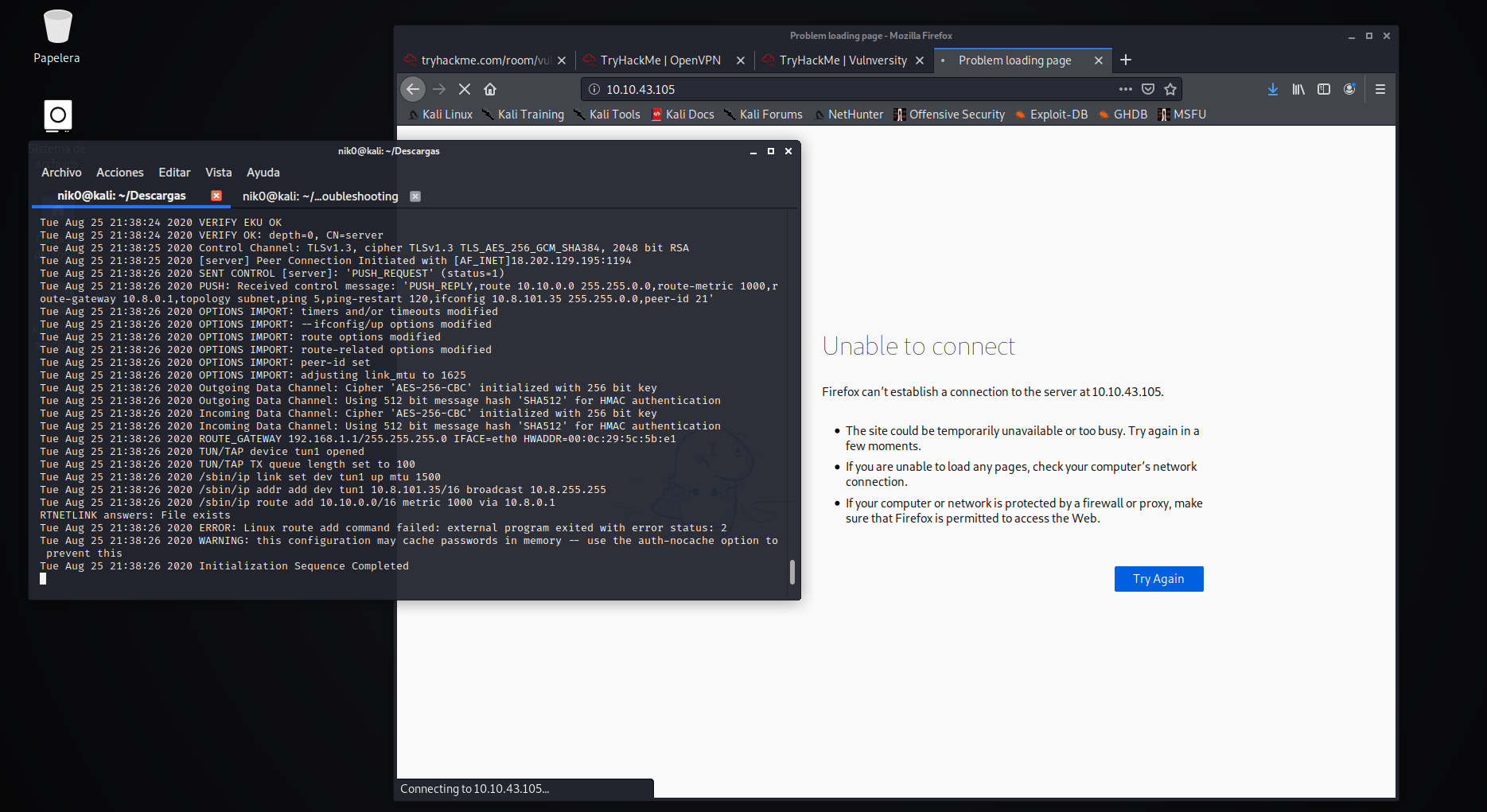
Tue Aug 25 08:55:09 2020 Authenticate/Decrypt packet error: packet HMAC authentication failed```I got this error lately.
And I tried to access my machine's IP using Firefox, but it did not work.
Here's a screenshot of my full output
 grave leaf
I'm not sure what the problem is. You're connected.
vernal ruin
He still can't access webpages
vernal ruin
Can you try killing this connection and connecting again
naive dust
And THM's access page says I am not connected.
multi vpns?
I will.
One second.
px aux | grep openvpn
vernal ruin
!multivpn
sharp bisonBOT
 TryHackMe
Learn how to look for duplicate instance of your OpenVPN connection.
• Step 1
Make sure you have setup your VPN connection correctly https://tryhackme.com/room/openvpn
• Step 2
Type ps aux | grep openvpn into your terminal and press enter
• Step 3
If there's more than one line (that don't start with "grep" or sudo), do the following steps
• Step 4
Type sudo killall openvpn into your terminal and press enter
• Step 5
Start the VPN with sudo openvpn <path-to-config>
From TryHackMe with ❤!
grave leaf
Can you visit 10.10.10.10 ?
vernal ruin
So is this the new permanent website that's up @grave leaf ?
naive dust
Thank you guys, I appreciate it a lot. ^-^
vernal ruin
What about http://10.10.75.202/
naive dust
probably your box wasn't up yet
grave leaf
I don't know anything about that site. 10.10.10.10 is the site we use to check if VPN's are connected.
naive dust
it takes sometime for some boxes
grave leaf
Maybe there used to be another one.
naive dust
Should I tell you my VPN IP?
grave leaf
No need.
grave leaf
If you're able to connect to that site, you are connected to the network.
naive dust
Thank you. Although the access page is a bit lying lol.
grave leaf
The access page isn't to be necessarily trusted.
naive dust
Alright.
 meager oyster
Alright.
@naive dust is it solved?
naive dust
Yes.
naive dust
Hi, i am unable to complete "Learn Linux" room: https://tryhackme.com/room/zthlinux
I see no questions, every task is already marked in green, but progress is 0%
 toxic python
Leave the room and rejoin
naive dust
works, thank you
toxic python
No problem
 timid tiger
how long should an nmap -A -p- scan typically take?
bronze vale
A while
toxic python
depends on the box
timid tiger
normal for it to be like 20+ minutes or does it scale for the environment
bronze vale
I believe it will run faster if you do them separately
timid tiger
is that why I see the -T4 used in conjuction a lot with it (ie they do T4 first while the -A is running?)
bronze vale
-T4 changes the intensity. More noise but quicker
timid tiger
ah gotcha, thanks
eager fulcrum
What about http://10.10.75.202/
@vernal ruin the IP changed to 10.10.10.10
 lunar widget
im trying to download openvpn, but when i run the command sudo openvpn path/name.opvn it sends me an error
 wind wedge
screenshot please
lunar widget
@wind wedge
wind wedge
Try /home/user/Downloads/openvpnfile
lunar widget
same issue
eager fulcrum
Where did you download the config file to?
lunar widget
direct to downloads folder
eager fulcrum
/root/Downloads/file
lunar widget
same issue
eager fulcrum
Start typing it, press tab
wind wedge
please don't use that word
eager fulcrum
We don't use that word here. It's a slur.
 icy prairie
I started the metaspolit room.. So I am in the tasks and there is a task for me to discover open ports using Nmap. But when I do the Nmap scan, the particular port that is asked in the question is not showing up.. Why is that? 😬🧐
wind wedge
what command are you using?
wind wedge
do it outside of msf you'll get better results
icy prairie
Ok
btw
if I am using a VM running kali,
do I have to use the VPN on Kali or the host?
wind wedge
kali
wind wedge
yes
 terse kelp
my in browser machine keeps closing the connection as soon as it is established
any ideas?
is anyone going to respond?
wind wedge
someone will help you please be patient some may busy I would help but I don't use the in-browser machine so unfortunately I can't help you
coarse hawk
Hi, im having some issues with the vpn connection
Im on virtualBox with kali
I got my config file and I installed openvpn
wind wedge
What issues are you having?
coarse hawk
I'm stuck on: hold a sec 😄
 cursive oar
Does anyone have any tips on speeding up scans? Mostly the nmap -p- scan.. I've yet to finish one at all, after running for 4 hours one
coarse hawk
++ Certificate has EKU (str) TLS Web Server Authentication, expects TLS Web Server Authentication
and its on a loop
wind wedge
What server are you using?
coarse hawk
EU Regular 1
wind wedge
Try and regenerate your download file and see if that works
cursive oar
I've had it start working after rebooting my VM, the first time I set up
wind wedge
EU1 is working fine as I was using it earlier close your terminal and see if it works and try run the command again
terse kelp
"vnc.tryhackme.tech unexpectedly closed the connection."
cursive oar
@wind wedge I always forget to set that 😩
eager fulcrum
@deep trellis in browser do weird things, any chance you can take a look when you're free?
 deep trellis
Yeah, I just deployed the AttackBox a few minutes ago and had no issues
"vnc.tryhackme.tech unexpectedly closed the connection."
@terse kelp Whats the internal IP of the browser-based machine you're having issues with?
terse kelp
10.10.150.10
cursive oar
@wind wedge that's good to know.. Thanks
terse kelp
I've never been able to use the browser based Kali machine since the day I subscribed
and therefore.....i've made absolutely no progress whatsoever
Do you all refund fees?
 cedar cape
eager fulcrum
cedar cape
eager fulcrum
I'm having a hard time at CTF 100
@cedar cape one of the stages has an OVA to download to deal with that
deep trellis
10.10.150.10
@terse kelp Okay, 1 moment, please don't terminate the machine.
I've never been able to use the browser based Kali machine since the day I subscribed
@terse kelp It works fine for me?
Hasn't closed the connection for me at all
Try using another browser (or going incognito)?
terse kelp
Don't know what to tell you.....it never even opens for me
deep trellis
Copy/paste the URL and try another browser?
terse kelp
That's why I am here asking for tech assistance
 feral dock
🧐
cursive oar
@Norseman the browser based one is crazy slow for me, I couldn't use it... The VPN and VM is great
terse kelp
It won't open in any browser I try
deep trellis
@Norseman the browser based one is crazy slow for me, I couldn't use it... The VPN and VM is great
@cursive oar Really? It should be fast - where country are you from?
It won't open in any browser I try
@terse kelp What browser are you using?
terse kelp
I'm spooling up my server to open my Ubuntu VM.....I'll try it on that
Chrome.....IE......Edge....
Tried them all
deep trellis
It might be something on your network that is blocking access to it?
Could you try using 4G to see if its a network error on your end?
terse kelp
it loads just fine on my phone.....hmmm....now to figure out the blockadge
blockage
more interesting....it works just fine on Firefox on my Ubuntu VM
Must be a Windows issue
eager fulcrum
Antivirus perhaps?
terse kelp
the only anti virus i run is the built in windows security
eager fulcrum
Ok now I'm extra weirded out
terse kelp
why?
eager fulcrum
Because it doesn't happen here, same setup
And if it works on the same network on Linux, it sounds like a windows problem
 digital apex
digital apex
digital apex
oh ok
eager fulcrum
If you want to check your connection, there's a webserver up 24/7 on http://10.10.10.10
It will give you your VPN IP too
cursive oar
@cursive oar Really? It should be fast - where country are you from?
@deep trellis
Its most likely due my internet connection... I have satellite internet with 25Mbps
eager fulcrum
Oh, satellite will do it
cursive oar
Yeah, it sucks that its the only internet I can get where I'm at
golden crag
any mod I can dm? I know its vague but its an issue I would rather ask in dm
golden crag
dmed
 dull spear
Anyone experiencing issues with the box going kaput once it hits 59 minutes?
Everytime i deploy the box it gives me 2 hours. Once it hits 59:59, the box goes offline and I have to revert. It "appears" if I attempt to extend before the 1 hour 1 min mark, it goes offline as well.
eager fulcrum
A windows box?
dull spear
ive been through multiple boxes. appears be the same thing
eager fulcrum
Windows boxes?
dull spear
Im going through my notes and yea i believe that is the case
sorry I was thinking I may have had a linux box, but that was HTB
i was working on relevant and hackpark
eager fulcrum
It's a known bug with Windows boxes, that the admins are investigating it
 gloomy matrix
alright
That's more suited to #general as it's not directly THM related
@eager fulcrum so should i ask in general or just somewhere else all together?
 proud wigeon
is there a way to filter cves for an specific term?
gloomy matrix
thanks @eager fulcrum
 fleet stump
Are there any issues with the subsciption process on the website? During the submission process, the sign up button appears to not work. Any information appreciated!
 civic dragon
i think I found a bug in a the 10owasp room, I have a typeError of Undefined in the XSS reflected challenge 🤔
eager fulcrum
Go to / then follow the link @civic dragon
 jaunty mortar
@deep trellis no answer yet on the supoort email. Please have a look :)
eager fulcrum
Well that's the fix so 🤷♂️
 modern rune
my deployed machine ends before the timer reaches anywhere near 0
proud wigeon
crashing?
modern rune
Dont know, it just gives me the machine has been terminated popup and I cant see the bar after that
 void skiff
refresh?
modern rune
that did the trick
void skiff
yeah it happens often
naive dust
Hey what's up
I just deploy the machine vulnversity and it sucessfully connected
but when i try to put the ip in my web browser it says that it can't connect
(sorry for my english)
I can ping the machine and it's alright
eager fulcrum
Not all machines run a webserver on port 80
Therefore you can't always put an IP into your browser and get a webpage
Vulnversity does not run a webserver on port 80
naive dust
Ok but i tried with another rooms
eager fulcrum
I would recommend following through the room
It will work with some other rooms
Rooms where the VMs run a webserver on port 80
naive dust
Oh ok, but why it doesn't show up for me but for someone it does
naive dust
@eager fulcrum https://www.youtube.com/watch?v=4kAN7zNE7jo

Servidor de Discord CYBEX: https://discordapp.com/invite/WeS2Epy
min 7:22
it shows up the web
but for me it doesn't
eager fulcrum
It's not on port 80
Please follow the room and find out what port it's listening on
naive dust
@eager fulcrum it's on 3333
eager fulcrum
I know
naive dust
But it doesn't show up
naive dust
I regenerated my openvpn keys but nothing happens
@eager fulcrum The room doesn't work for me
eager fulcrum
Please can you try to be less vague?
What exactly are you doing, what do you expect to happen?
naive dust
Okay
I'm just trying to make the room work
When i connect with openvpn (sudo openvpn mivpn.ovpn)
it says it correctly worked
but when i do an nmap or ping it doesn't work
and it doesn't "show up" on the web
eager fulcrum
!vpnscript
sharp bisonBOT
TryHackMe
Use our VPN troubleshooting script to diagnose common issues!
From TryHackMe with ❤!
naive dust
@eager fulcrum it says that it works fine
eager fulcrum
Ok, can I ask for some screenshots of what you're doing?
naive dust
Ok wait
 simple needle
i downloaded nmap on mac and only zenmap is in my applications folder
naive dust
https://imgur.com/dRtDkIB.png @eager fulcrum
 eager fulcrum
You're still trying to connect on port 80
i downloaded nmap on mac and only zenmap is in my applications folder
@simple needle nmap is a command line program, open a terminal.
simple needle
oh okay sorry
 eager fulcrum
Maybe because you changed the port to the correct port?
naive dust
thanks dude!
eager fulcrum
Happy Hacking
naive dust
No i was in the port 3333
eager fulcrum
The first screenshot wasn't, but ok
 azure swift
I can't seem to get hashcat to work with the web based Kali machine. something I am missing?
eager fulcrum
it doesn't work, because the machine doesn't have a GPU
Don't use --force, it won't work properly
azure swift
so... what do I do? what's the point of the web box if all the tools won't work
also, john doesn't appear to be installed on it
 stone mountain
hello i want to use winpeas in windows metepreter but it only says process created. I cant see winpeas execute how can i fix this?
[11:08 AM]
it ony shows this meterpreter > execute -f winPEASany.exe
Process 3084 created.
naive dust
can anyone tell me how can I share these badges to linkedin or any other social media ?
eager fulcrum
Which badges?
naive dust
tryhackme badges
 wraith dragon
Hi,
I am a Subscriber. When I join rooms, I do not see any questions to answer. It does not display. I am able to deploy VMs but it still shows that I have not joined any rooms. However, I do have many rooms in 'My Rooms'.
Any help.
Thanks
This is what it looks like.
 last robin
Hello, how do I change my username on the site? I mistakenly set my name as the username and I don't want to share my personal information. Can anyone help me with that?
eager fulcrum
Email support@tryhackme.com and explain and I'm sure they'll help you out.
last robin
Okay, thanks
 vernal token
hello, i can't download my openvpn config file can anyone help me?
vernal token
it says error 404
eager fulcrum
Try a different VPN server. Which server was 404ing?
vernal token
EU-Regular-2
eager fulcrum
If you want to stick with that VPN server then click regenerate and wait about 30s and see if that helps?
vernal token
oke
eager fulcrum
There's always EU 1 which is in the same geographical location
vernal token
oke
eager fulcrum
There are 3 groups of people that can reset your progress in a room
The room creator, and admin, or MuirlandOracle.
 rough plover
is there a way to delet account so i can reset progress
rough plover
ok
naive dust
can anyone tell me how can I share these badges to linkedin or any other social media ?
@naive dust
anyone ?
eager fulcrum
You can't.
stone mountain
CVE-2019-1388 help please
eager fulcrum
It's not a command line application
The exploit requires a gui
#room-help was the correct place
stone mountain
seriously oh sorry my bad
icy prairie
I exploited using the instructions given yet I am not getting in. why is that??
 leaden hare
Hey can anyone help me
I am facing a error in Kali Linux
Resuming from hibernation
 vestal beacon
Run Alt+F3 to drop into a shell, check for obvious issues like disk space being full etc...
leaden hare
I did
vestal beacon
And was the disk space full?
vestal beacon
Are you running inside of a virtualmachine?
vestal beacon
can you just try run sudo apt clean && sudo apt autoremove && sync && sudo reboot
vestal beacon
The only other solution I could think of for this specific issue would be to edit grub from cli and add the noresume option
leaden hare
The only other solution I could think of for this specific issue would be to edit grub from cli and add the
noresumeoption
@vestal beacon how do i do that
?
vestal beacon
add GRUB_CMDLINE_LINUX_DEFAULT="noresume" to /etc/default/grub and run sudo update-grub
vestal beacon
Wait, did you remove quiet splash
And can you send a screenshot of the whole screen
vestal beacon
Does your system have a graphical display manager?
Can you check that the package gdm is installed?
leaden hare
How
vestal beacon
Login to the TTY and run dpkg -l | grep gdm
leaden hare
Yes
It's gdm3
GNOME Display Manager
@vestal beacon what was u saying about did i remove quiet splash ?
vestal beacon
Okay this is going to sound a weird suggestion but do the following:
Add
blacklist nouveau
options nouveau modeset=0
to
/etc/modprobe.d/blacklist-nouveau.conf
then run sudo update-initramfs -u && reboot
leaden hare
I don't have nouveau.conf
vestal beacon
Create it
leaden hare
I have libnfc.conf
vestal beacon
Don't do anything with that file
Create /etc/modprobe.d/blacklist-nouveau.conf
And add the above
leaden hare
Ok
vestal beacon
blacklist nouveau
options nouveau modeset=0
If you do this and reboot and are met with the same IPV6 error, drop into shell and temporarily disable it with nmcli radio wifi off just to get through the boot sequence
vestal beacon
nmcli radio wifi off
vestal beacon
Any changes to the boot sequence?
leaden hare
Should i reboot ?
vestal beacon
Yes
leaden hare
Ok
vestal beacon
If it doesn't work, I'm pretty much out of suggestions outside of backing up important files and reinstalling Kali
leaden hare
@vestal beacon but what were u talk about did i remove quiet splash ?
vestal beacon
On the boot options
vestal beacon
quiet splash noresume
leaden hare
Where should i write it
vestal beacon
It's a command
leaden hare
Ok
vestal beacon
Did it work?
@leaden hare
I guess when the problem is solved, you're not needed anymore 
 toxic cedar
Im having issues with the site.
Whenever I try to download my configurations to the VPN it leads me to a 404 page
vestal beacon
systemd-analyze blame ?
toxic cedar
Whenever I try to download my configurations to the VPN it leads me to a 404 page
@toxic cedar .
Someone know how to fix that?
leaden hare
@toxic cedar restart your wifi and computer
leaden hare
@vestal beacon maybe I'll sleep now and cry for a bit and then install Kali again 
vestal beacon
It's the only options, I've gone through all known solutions, and discord support can only do so much.
leaden hare
Thanks for helping me
toxic cedar
Source map error: request failed with status 403
Resource URL: https://assets.tryhackme.com/css/boostrap431.min.css
Source Map URL: bootstrap.min.css.map
toxic cedar
Yeah same
Its not actually 404
Its 403
If you try to request the download via the console it will return that error
 sharp anvil
Oh I see
toxic cedar
Maybe because theyre doing an update or something? Not sure
sharp anvil
How can you request the download via console?
sly yoke
wget
sharp anvil
well the onclick event triggers a js method. there is no url.
i mean ofcourse there is.
sly yoke
you may try to find it ?
sharp anvil
Yeah. I think I'll try that. But just incase, help me out later
sly yoke
try this : https://tryhackme.com/vpn/get-config

TryHackMe
An online platform for learning and teaching cyber security, all through your browser.
you'll certainly need your cookies
sharp anvil
EU-Regular-2
try this : https://tryhackme.com/vpn/get-config
@sly yoke Dudeeeeee I feel like a total retard. I got that from the page source but was too lazy to read xD
TryHackMe
An online platform for learning and teaching cyber security, all through your browser.
sharp anvil
@deep trellis Thank you so much
deep trellis
You'll need to regenerate your config first.
toxic cedar
Im not being able to execute any command after accessing the Host with SSH command
Anyone knows why?
naive dust
Hello friends. I have a problem with Alfred room when building jenkins project and i get the following errors. I downloaded the powershell script from the room's description and i didnt modity it. Can anyone please help me? I already google it but i found nothing.
bronze vale
What’s the issue exactly
bronze vale
Are there any write ups on the room
naive dust
Yes. But all worked and i did the same steps.
naive dust
And nc - lnvp
bronze vale
nc -lvnp Port
naive dust
Thats how i saw in the walkthroughs and they all worked
So you say that if i just build the proiect and run nc it will work?
bronze vale
Well you need multiple things running at the same time, Python for it to download the file and netcat to catch the listener
naive dust
I did all this stuff but nothing.
bronze vale
On the python window does it output anything
bronze vale
Screenshot the python window please
naive dust
bronze vale
Are you putting your tun0 IP in the command you’re running on the website?
naive dust
Yes
bronze vale
The error is probably because it’s not getting the file you need for the reverse shell
But on top of that it’s not even connecting to your machine as it should be at least trying to grab something but it can’t
So there’s something that’s stopping it from executing but I’m not sure what exactly
naive dust
I searched in history and this seem to be the problem with this situation
But i dont find any other script for this room. All sites have this script
bronze vale
If you terminate and redeploy the room it should reset it back to the original state and thus no files should be downloaded.
naive dust
In conversation s history *
I did and re run the commands but it didnt work
Hey, it seems it works. I dont know how cause i didnt do anything different
😅
 broken halo
Atleast you havent been hacked
naive dust
Thank you very much for your help. Have a nice day
naive dust
U2. Cheers
I know i shouldnt expose the IP but i count on you guys😅
I was in a hurry.
bronze vale
THM VPN iP is perfectly fine
leaden hare
@vestal beacon
leaden hare
It's ok
bronze vale
@barren birch
bronze vale
VPN and other technical questions related to TryHackMe
You could’ve just posted it in general :/
barren birch
I have people pinging me
leaden hare
Aree it was that kind of problem
vestal beacon
Fingers crossed it works pal
leaden hare
Btw suitguy thnx for helping me out
vestal beacon
All good dude
leaden hare
Ya
azure swift
ok, trying again. Hashcat won't run on the subscriber VM. it also doesn't seem to have John on it. is that correct? I ran find... no john. since the boxes are not permanent, I don't see a reason to install john for cracking. what's the prevailing advice in this situation?
I'll move this to general
vernal ruin
Those boxes are not meant for hash cracking
azure swift
so I've discovered 🙂 so how would someone get through the 'crack the hash' room then?
bronze vale
Using their own computer
Hashcat and John are on all Linux versions and Windows. I think they’re on Mac too
 primal fossil
I have a subscription question is this the right room
toxic python
I have a subscription question is this the right room
@primal fossil you can ask here or #general
primal fossil
Ok thanks. I noticed that it says if you pay for 6 months or a year there is a discount. How exactly do you do that? I only saw month to month on the website
primal fossil
lol
I really dont mind paying the 10 a month, it is more than fair but if I can pay for the year its better
toxic python
Nope understandable!
We’re just waiting for someone who may know that, cuz I don’t
@rigid oxide May know if he’s paying attention
golden crag
im not sure, but I think when you use paypal you can select for up to a year and then it has a discount compared to paying for three months.
primal fossil
I appreciate it!
 pine mist
hello
when i run the ovpn file, i get the message,Initialization Sequence Completed,and status is online on the access website,the box is running too
now what am i supposed to do?
sorry this is my first time
is something broken? am i supposed to get a shell?
wind wedge
I would recommend doing the welcome room so you get a better understanding of how to do the basics
 turbid dock
Hello in Jeff CTF room I found the user.txt flag but it saying that it's incorrect but I'm sure that it's the right one because it's located in /home/Jeff folder
wind wedge
That belongs in #room-help
But anyway it can't be the right answer
otherwise it would have accepted it
toxic python
@turbid dock like blackout said #room-hints or #room-help. But you have to decode it to get the flag
pine mist
@wind wedge i tried doing the welcome room
it went fine
but when i did the metasploit room,i got this error
wind wedge
What OS are you using?
pine mist
Mac OS catalina
wind wedge
I would recommend making a kali Linux VM which it will have all the software you need preinstalled
wind wedge
Search up how to make a kali VM and it's very straightforward
pine mist
is port forwarding required for rooms/ the VPN?
wind wedge
I don't think so
wind wedge
sudo openvpn /home/user/Downloads/ovpnfile
toxic python
How did you download your ovpn file?
It looks like it’s an html doc, did you wget the webpage?
toxic python

pine mist
im sorry
toxic python
No sorry necessary
pine mist
i thought it would work aaa
toxic python
You gotta either wget the right link or just manually download it
Manual easier for this one 🙂
Haha no worries, mistakes are how we learn!
feral dock
👀
pine mist
the problem with my VM is that bidirectional clipboard doesnt really work
idk why the settings say bidirectional,but i cant copy and paste stuff
toxic python
Go to the site in the vm and download it there
sly yoke
you should be able to
pine mist
pine mist
you can try 10.10.10.10
@sly yoke works
sly yoke
it means you're connected
pine mist
oh great
 tribal tartan
Hey people
tribal tartan
Are there any recommended sources to add to my /etc/apt/sources.list so I don't have annoying messages like this
vernal ruin
What does your sources.list look like atm
coarse hawk
I have a question, why do my linux based OSs like Ubuntu and Kali internet stop working after I've been some time using the OpenVPN?
Keep in mind, they are on virtual machines
tribal tartan
Only has:
deb http://http.kali.org/kali kali-rolling main non-free contrib
vernal ruin
That's right
tribal tartan
but if it cant even locate openvpn
like
do I need any other sources?
or am I trying to install it incorrectly
 placid mango
Do apt update first. Also wrong channel.
modern rune
Trying to connect to the machine for Nmap but I cant get it to let me in
bronze vale
Are you trying to ssh
modern rune
putty defaults to ssh so I just left it there
bronze vale
You can’t. The room doesn’t tell you to either :)
It’s a room for nmap
You’re meant to scan the room
Download nmap and use the room to guide you to using it
tribal tartan
Do apt update first. Also wrong channel.
@placid mango what channel should I use in the future?
 analog bough
Hey, I'm trying to look at Madness, I've restarted the machine 3 times now, waited about 10-15 minutes and im getting no responce on nmap (with -Pn) pings, etc. checking writeups shows this shouldnt be happening, any solutions to this?
I am connected to the vpn*
eager fulcrum
!vpnscript
sharp bisonBOT
TryHackMe
Use our VPN troubleshooting script to diagnose common issues!
From TryHackMe with ❤!
eager fulcrum
Reboot your machine
analog bough
that worked, probs should have tried that first, thanks
eager fulcrum
Happy Hacking
modern rune
on nmap I cant get a version number to show up for the ports needed on the NMap room
-sV
bronze vale
Screenshot @modern rune
modern rune
sharp plaza
Hey why websites on every room are loading and nthg happens i can check the source but the page doesn't load
 summer gate
hi - are password cracking tools (john, hashcat etc) deliberately not available in the virtual access machines?
keep seeing this:
Command 'john' is available in '/usr/sbin/john'
The command could not be located because '/usr/sbin' is not included in the PATH environment variable.
This is most likely caused by the lack of administrative privileges associated with your user account.
john: command not found
summer gate
Also tried to run the windows cracker in MSF but it said:
] Auxiliary failed: Metasploit::Framework::PasswordCracker::PasswordCrackerNotFoundError No suitable john/hashcat binary was found on the system
[-] Call stack:
[-] /opt/metasploit-framework/embedded/framework/lib/metasploit/framework/password_crackers/cracker.rb:294:in binary_path' [-] /opt/metasploit-framework/embedded/framework/lib/metasploit/framework/password_crackers/cracker.rb:321:in cracker_version'
[-] /opt/metasploit-framework/embedded/framework/modules/auxiliary/analyze/crack_windows.rb:171:in `run'
Ahh right, I thought i was OK running from root
I'll try that
Thank you
eager fulcrum
You can add that directory to PATH
coarse hawk
This might be an administrative question, but:
Where do I find whether my UNI is in the tryhackme list for discounts? 
sharp bisonBOT
TryHackMe
Redeem your student discount!
From TryHackMe with ❤!
eager fulcrum
That should tell you everything @coarse hawk
tribal tartan
Hey guys. I have this issue where, on my local Kali VM, I always get the error message "Exploit completed, but no session was created". My bandaid solution for now is to just deploy a TryHackMe Kali VM, ssh into it and follow the exact same steps. The exploit always works this way. This has happened on 3 boxes now and its driving me mad. Has anyone else encountered this issue before? Does anyone have any idea as to what could be preventing reverse shells from connecting? I've already created another fresh Kali VM to no avail. I've also run the VPN check scripts and everything seems fine.
bronze vale
Show me your options pls
tribal tartan
in metasploit?
bronze vale
Yes
tribal tartan
Let me deploy Steel again, not currently connected to anything
eager fulcrum
Is your VPN running directly in your kali VM?
eager fulcrum
What happens when you run it?
bronze vale
It works on the THM kali?
tribal tartan
(The LHOST IPs are the only difference, obviously because the THM machine has its own IP)
yeah
bronze vale
Oh you want to fix it on your own kali
tribal tartan
all 3 boxes ive done so far work on THM Kali not my own
eager fulcrum
Update MSF?
tribal tartan
sorry if I wasn't clear at first, bit sleep deprived hahaha
Update MSF?
@eager fulcrum I tried that one my other Kali VM and it didn't fix it
eager fulcrum
Check firewalls like ufw or IP tables?
Have you had any reverse shells of any kind working on your VM?
tribal tartan
Check firewalls like ufw or IP tables?
@eager fulcrum Inside Kali or on Windows
eager fulcrum
Kali. Because it goes over the VPN so Windows can't see the traffic at all.
tribal tartan
Have you had any reverse shells of any kind working on your VM?
@eager fulcrum Nope, tried to manually use an exploit and have netcat listen for reverse shell. Didn't work
what should I check for in regards to ufw?
like, if im listening on port X, I should check that ufw is allowing traffic on it?
Just checked, dont have ufw installed
eager fulcrum
ip a s tun0 in the VM works?
tribal tartan
ip a s tun0in the VM works?
@eager fulcrum
ip a s tun0in the VM works?
@eager fulcrum
seems to
eager fulcrum
!vpnscript
sharp bisonBOT
TryHackMe
Use our VPN troubleshooting script to diagnose common issues!
From TryHackMe with ❤!
eager fulcrum
Can you open a listener on 4242 please?
Gonna give something a go, lmk when it's listening
tribal tartan
Can you open a listener on 4242 please?
@eager fulcrum This enough?
tribal tartan
yup
eager fulcrum
Ok well that's super weird
tribal tartan
Does tryhackme have an iso or VM image that they use as a default image of their machines?
Kinda curious to see as to whether I could DL it and see if it works on my PC
eager fulcrum
For some of Dark's machines, you can download an OVA
tribal tartan
I mean the personalised VMs subs can spin up to work within their browser
eager fulcrum
Those aren't available
tribal tartan
feelsbad
eager fulcrum
And you'd still need the VPN
If you've used different installs of kali, you've removed that as a variable
tribal tartan
Thats true
Although both were 2020 kali versions. One was 2020.1 and the other was 2020.3
tribal tartan
Do you work from within a VM?
tribal tartan
VirtualBox?
eager fulcrum
I switched to VMWare as I have free licenses and it's faster on my hardware but I've used both
tribal tartan
VMWare is free for using just a single VM anyways right?
I might give it a try and see how it goes
eager fulcrum
You can use Player and run multiple VMs, but there are people here who use vbox happily
I think @bronze vale ?
bronze vale
I use both interchangeably
tribal tartan
hmmmmm
If anything pops to mind that you want me to try feel free to shoot me a message, I'd appreciate it. And thanks for all the help so far. I'll let you know if using VMWare makes a difference
 obsidian anchor


 eager fulcrum
Not much at the moment
 humble root
I'm unable to download the Throwback Network VPN config. gives me 404 error
anyone else?
eager fulcrum
Maybe click regenerate, wait 30s and try again?
humble root
yup, tried that
eager fulcrum
@deep trellis
deep trellis
yup, tried that
@humble root Which OpenVPN server are you on?
humble root
Trying to press "Download my configuration file"
deep trellis
Sorry about that, let me take a look. What's your TryHackMe usrname?
Sorry about that, let me take a look. What's your TryHackMe usrname?
deep trellis
I just moved you servers, like 1 second ago.
Please can you regenerate your config file, wait 10 seconds and download it again:)
humble root
sure thing
deep trellis
You'll be on the 10.200.6.0/24 network now.
humble root
Can confirm it works now. Thanks, that was fast
deep trellis
No worries, thanks James for the ping too.
eager fulcrum
if it's a directly tryhackme related issue then ask away, otherwise #general is the place to ask
 violet yarrow
When I paste ip of the machine I get this message ERR_CONNECTION_REFUSED I have connected to a second server( and changed profile) but nothing also tried to wait 1 hour .
violet yarrow
learn linux
eager fulcrum
If you work through the room, it explains how to connect
violet yarrow
ok but i managed to get to first machine
vernal ruin
There is only one machine in the room
You are supposed to ssh into it as the room says
eager fulcrum
ok but i managed to get to first machine
@violet yarrow Yes, because that machine ran a webserver
Please continue working through the room?
violet yarrow
ok, tnx
modern rune
cant get version to show up in nmap
modern rune
NMap room
eager fulcrum
Please show your command
modern rune
I thiink task 3 Q4
eager fulcrum
It looks like you're scanning the wrong thing
modern rune
nmap -sV
eager fulcrum
Full command please.
modern rune
just an ip after that
eager fulcrum
Ok I'm giving up here. I asked for the full command and I'm not being given it. Someone else can help.
naive dust
For nmap how do i access my machine when its deployed to use the help menu? its being run through openvpn
bronze vale
@modern rune Screenshot your terminal with the command used
For nmap how do i access my machine when its deployed to use the help menu? its being run through openvpn
@naive dust Could you explain your issue?
modern rune
it worked this time? Im good I guess
naive dust
im confused as to how im meant to access the help menu, the help option above doesnt contain any of this
modern rune
google works for those
bronze vale
Are you on windows @naive dust
naive dust
yeah im on windows i should probably be running this through a VM huh
bronze vale
You don't have to but in my opinion it is easier, here is the online manual, you may be able to view it better
https://linux.die.net/man/1/nmap
https://nmap.org/book/man-briefoptions.html
naive dust
okay thank you, i am planning on subscribing but im not sure yet so ill probably run a vm till then
 flint hawk
Running a VM is great for students (and professionals) and I highly recommend it
The only downside is you can't use Hashcat as efficiently in a VM so you need to run a Windows install of it
But at least there's John
naive dust
yeah, if i subscribed and used the kali in browser i wouldnt need to be running in a VM correct?
bronze vale
You wouldn't need to but if you've already got a VM that's running fine, might as well keep running the VM
naive dust
alright, much appreciated help im gonna mess around with a VM later then
How to remove account ?
eager fulcrum
email support@tryhackme.com
naive dust
ok thx
coarse hawk
hi, I have some issues with VirtualBox, when I connect using the VPN to the virtual machine of the room, my whole ubuntu just loses internet connection after like 5 mins
I did some research and I fixed the network adapter
to bridged
bronze vale
Are there any errors from the VPN?
coarse hawk
Nope
bronze vale
So it’s an issue with VBox itself?
coarse hawk
I am gonna look at it, to see if an error pops up
But I am 70% sure it's from VBox, yeah
bronze vale
Sorry we don’t deal with those issues here but you’re happy to ask in #general
If VBox continues I’d recommend trying the free version of VMware for a few days to see if that loses connection, if not we know 100% it’s VBox.
My DMs are always open for some troubleshooting though if you’re stuck :)
coarse hawk
Alright, thanks man ❤️
naive dust
Question, whats the best free VM software out there?
toxic python
VMware or virtualbox would be your best bet to start
naive dust
okay thanks
 hollow moon
Hey guys, so I'm currently looking to subscribe as a student. Sadly my email is not recognized as a student mail. Is it possible to flag my account as a student?