#site-support
1 messages · Page 182 of 1
 bronze vale
 coarse cobalt
BananaJr and kr15ty
 spring compass
mrexample
 vapid dawn
are you guys currently in the rooms
or have you left them?
would you mind leaving them please? 🙂
 agile steeple
Just left the room.
spring compass
me too.
coarse cobalt
ok my people are out
 deep trellis
you should have been added to your rooms?
@vapid dawn it's the inserting of the questions
spring compass
tell me if you want that i leave the room again
deep trellis
No, I think I know the issue, but I'm not home atm.
agile steeple
It looks like Ashu joined me back into the room, but the problem still exists for me.
spring compass
No worries if you know what the problem is. Nothing urgent
vapid dawn
can you check again @agile steeple ?
coarse cobalt
we are checking
vapid dawn
yeah this is just specific for @spring compass and @agile steeple
let me know if the questions have appeared
coarse cobalt
oh ok
agile steeple
Still an issue after a refresh. I have left the room and trying to rejoin. It's taking awhile.
Got an Error 504
vapid dawn
when trying to enter the room?
just go to the room directly?
tryhackme.com/room/zthlinux
agile steeple
Okay
vapid dawn
let me know when you've left the room
agile steeple
I've left the room.
agile steeple
Checking...
Looks like it's resolved. Should I try to refresh or leave the room to double check?
vapid dawn
just refresh - don't leave the room
@spring compass can you join the room
and let me know when you have and i'll fix it
coarse cobalt
Thanks @vapid dawn for helping us with this!
vapid dawn
no worries at all - are you having issues as well @coarse cobalt ?
coarse cobalt
No, I'm good
spring compass
i'm in the room @vapid dawn
spring compass
yes, it work ! thanks a lot.
vapid dawn
amazing
agile steeple
Thanks @vapid dawn !
 tribal quarry
Hey,! I need a little help. So i was doing the tor for beginners room my tor was turned on and after i finished the room. i turnes off my tor. But now im not able to acces tryhackme ??i tried restarting my laptop. i only cas access tryhackme if im using tor??wtf
 hazy compass
is it normal that CTF100 takes so long to start?
it has been 16 mins now and it's not pinging yet
tribal quarry
Are you connected with openvpn?
tribal quarry
. im not even able to access the site xdd
tribal quarry
@celest sapphire And So fkin annoying
Idk i was playing around with tor and this happened.... under that time when my tor was turned on i also visitted whatismyip.org and now i also cant visit it ;C
 celest sapphire
you messed up your internet then i guess
 eager fulcrum
Please don't joke about that here.
tribal quarry
Yea everything is working fine, except vpns, THM, and whatismyip.org
 grave leaf
Have you restarted your machine?
tribal quarry
Yeah 2 times
grave leaf
Have you tried regenerating your ovpn file?
tribal quarry
regenerating??
grave leaf
Through the website.
tribal quarry
I cant ACCESS the website
tribal quarry
I will try rn
eager fulcrum
Honestly sounds like you broke your networking config. Not a THM specific issue IMO.
tribal quarry
Yea, but i thought its clear that i broke something with my networking, and not with firefox
But idk why, but i think the problem is somewhere with ip tables ;C
eager fulcrum
I'd like to remind you that this channel is for THM specific tech support
Don't use that word here
tribal quarry
My bad sry
I'd like to remind you that this channel is for THM specific tech support
@eager fulcrum and in which room could i get help with this ?
tribal quarry
I just cleared my full browser, still nothing
 mint flint
At what position i can see myself after studying computer networking and Linux
eager fulcrum
#cyber-and-careers is probably more appropriate, seeing as that's not a tech support question
mint flint
@eager fulcrum ok
 weary panther
Getting an error Authenticate/Decrypt packet error: packet HMAC authentication failed with the thm vpn. This started happening mid way through a box 😦
Anyone had this issue before?
bronze vale
It's just a warning*, if it is disconnecting your connection, switch servers.
eager fulcrum
And it doesn't actually affect anything
weary panther
Sure, but I lost connection to my box
 sharp bisonBOT
 TryHackMe
Use our VPN troubleshooting script to diagnose common issues!

From TryHackMe with ❤!
weary panther
Cool thank you
lol that script doesnt really solve much
just checks if you are connected lol
im just gonna download a new file or suttin
grave leaf
It provides the tech support team with information about your connection.
It isn't meant to fix it for you.
eager fulcrum
It does attempt some automatic fixes
weary panther
Ah okay cool
this is odd, I'm def connected on the network but can't communicate with the box itself
Changed servers, still nothing
eager fulcrum
this is odd, I'm def connected on the network but can't communicate with the box itself
@weary panther What are you trying to do with the box? What box?
weary panther
ah lol icmp seems to be turned off lmao
weird because I pinged it earlier
oh well, stupid me
eager fulcrum
Windows machines don't tend to respond to pings
 rare knoll
I'm trying to set up OpenVPN connectivity for TryHackMe on my REMnux VM
OS: REMnux v7 (Ubuntu based)
My .ovpn is installed correctly, and the room is responding to pings
Output when I ran the OpenVPN trouble shoot script as root:
Please enter the path to your config: ~/Downloads/aHaquer.ovpn
[+] Config Located successfully
[+] Stable internet connection
[+] OpenVPN is installed
[+] tun0 exists
[+] tun0 IP is in the correct range
[+] Only one instance of OpenVPN is running
[+] Confirming connectivity
[-] Something went wrong -- please ask for further assistance in the TryHackMe Discord server, subreddit, or forum
Try a reboot?
 timid tiger
having a bit of trouble with Juice Shop, Burp proxy is breaking site. Intercept is on and I'm hitting forward but seems to be erratic on whether or not it does anything. Should intercept be off for this one (or better question, do you only turn intercept on in certain instances)? If I'm understanding right, the proxy feeds to Burp (when intercept is on), which then should forward back to the site?
Or am I misunderstanding how Burp functions?
rare knoll
James are you talking to me or fedai
eager fulcrum
James are you talking to me or fedai
@rare knoll You.
rare knoll
So restart the VM fresh?
eager fulcrum
having a bit of trouble with Juice Shop, Burp proxy is breaking site. Intercept is on and I'm hitting forward but seems to be erratic on whether or not it does anything. Should intercept be off for this one (or better question, do you only turn intercept on in certain instances)? If I'm understanding right, the proxy feeds to Burp (when intercept is on), which then should forward back to the site?
@timid tiger Requests will always go to the history if you have the proxy on. Intercept is only really needed if you want to change the data before it reaches client or server
So restart the VM fresh?
@rare knoll reboot.
timid tiger
@eager fulcrum thanks, that helps!
rare knoll
Is still don't know if you mean shut it off and turn it on or start a fresh vm
I assume the first
eager fulcrum
Reboot means turn it off and back on
rare knoll
I have, I'm logging back in at the moment
It's working now
I should've tried a reboot earlier
Thanks
eager fulcrum
Sweet, happy hacking!
 naive dust
Hey tech support, when uploading files do you need to wait for the file to be converted before uploading another?
 odd sequoia
Hey there, sorry to bother but is there any problem with tryhackme openvpn right now ? I got a "TLS Key negotiation failed to occur within 60 seconds" error when trying to connect
 sinful narwhal
same problem!
 plain loom
I'm getting the same problem here
eager fulcrum
Are you in Egypt?
plain loom
US here
odd sequoia
seems changing region solved for me (europe regular 2 not working, europe regular 1 works fine)
eager fulcrum
What VPN server?
plain loom
oh mine was also EU regular 2
sinful narwhal
me too!
plain loom
swapping to US west regular 1 worked for me
eager fulcrum
@vapid dawn if you're around can you check on EU Regular 2?
 rain star
i try reconect to openvpn (sudo killall openvpn) and try to connect back but it's tanking so long idk why
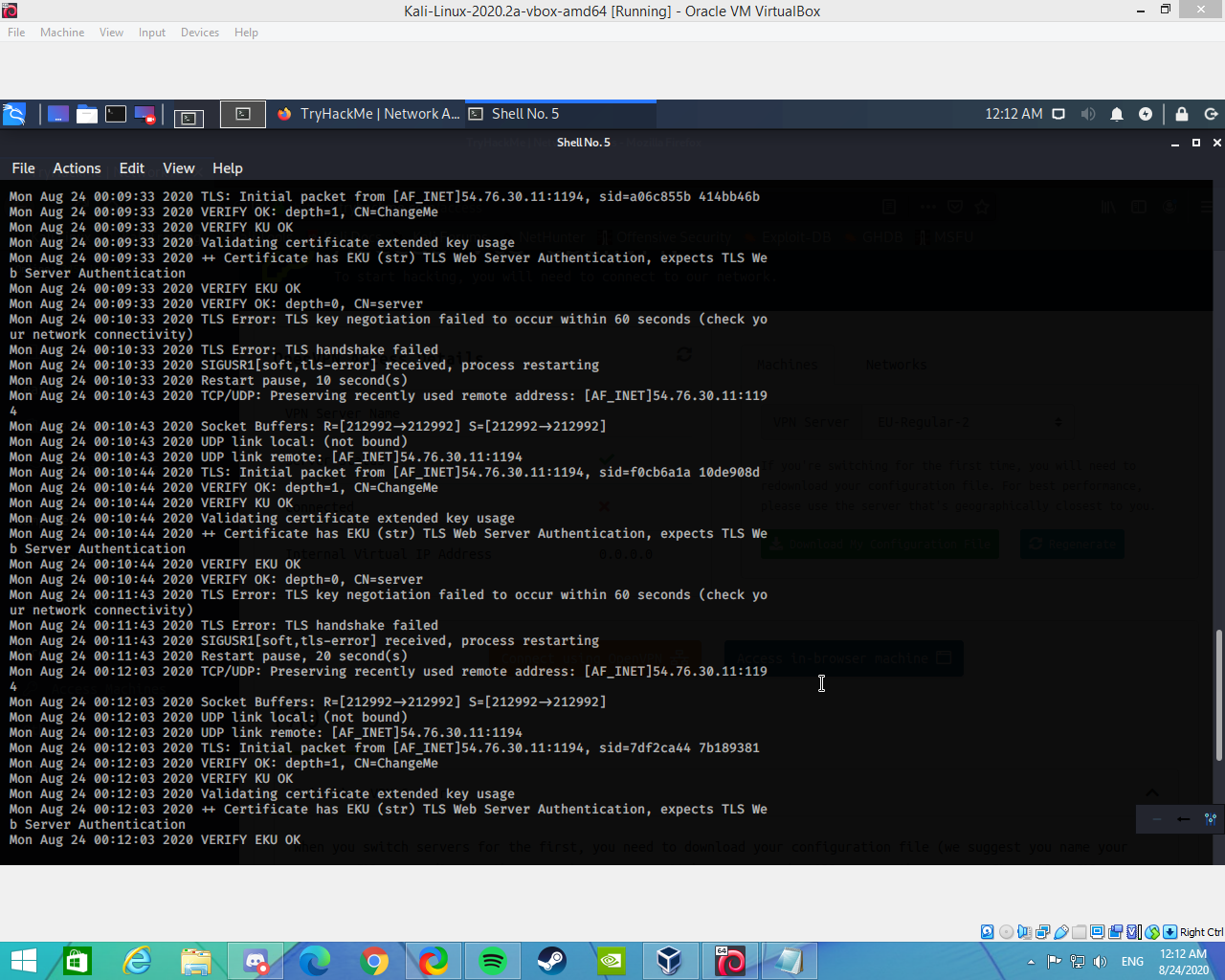

part of screen (there is alot more happening lmao)
 nimble comet
Having issues with openvpn too 🙂
nimble comet
same log problems as in @rain star 's screenshot
plain loom
Check which VPN server your config file is set to on the Access page
a few of us had issues on EU-Regular-2
plain loom
I changed mine to US-West-Regular-1, downloaded a new config file and it worked
 wind wedge
EU 2 seems to be down as I had to change my server earlier
rain star
i change it 2 but still nope
 sharp bear

GitHub
Troubleshooting bash script for the TryHackMe OpenVPN connection pack - tryhackme/openvpn-troubleshooting
Can we give that a pin in here
 flat blade
need help with my vpn pls :
wind wedge
what server are you using?
flat blade
EU-VIP 1
wind wedge
oh ok just making sure as EU2 seems to be down, make sure you're not running multiple vpns
wind wedge
check your proxy settings
flat blade
in my browser ?
wind wedge
yea that's why
you should use foxyproxy for burp
turn that proxy off and I recommened getting the firefox extension foxyproxy
that way you don't have to keep switching to settings
wind wedge
change the firefox settings proxy to auto
 primal tangle
Hey guys... How can I share a file from my box to victims box?
trying to do some priv esc on a box...but cant share linpeas from my kali box to victim box.. it always hangs at 25% download..
eager fulcrum
Scp, http, ftp. There's a billion different ways
primal tangle
im doing python -m http.server 8000 on my box.. then hitting my ip from victim's box
but i cant get it to download anything
 shrewd ferry
Is anybody else having issues running nmap scans in the Telnet enumeration section of network services room? I have to scan with -Pn because the IP saids it's down, and even when I do I don't get any ports back
eager fulcrum
Sounds like you need to fix your VPN.
spring compass
In "Learn Linux" Task 13 they ask me to create "test" directory and a file called "test1234" for run the binary "Shiba4" but they was already in Shiba3. I don't think it was planned like that?
eager fulcrum
It's a known bug
spring compass
Ok, I just want to report it.
eager fulcrum
It's been reported. But in future, #site-bugs once you're sure it's a bug
spring compass
Ho, you've true i'm sorry!
 trail flicker
Hello everyone! Quick question - I was having trouble working the OpenVPN while on the Kali Linux VM, but it seemed to work fine when using my local windows OS. Any ideas?
 golden crag
what problem do you have exactly
also make sure you dont run them both at the same time. only have the openvpn running onm your vm
trail flicker
I attempt to connect to the URL (IP Address) but the page never loads. (whilst on the Kali vm)
golden crag
and you have the openvpn running on your vm?
eager fulcrum
I attempt to connect to the URL (IP Address) but the page never loads. (whilst on the Kali vm)
@trail flicker Not all machines run a web server. You also cannot connect from multiple devices at once
trail flicker
Sorry, I am now to this 🙂 ill explain my issue a bit better...
I has installed my own version on Kali Linux several months back and been working on it since. When following the guide to connect to OpenVPN, I was able to apt install the software fine. However, when attempting to run the software i was getting a error message relating to (--dev) and that i need to select a configuration option of some sort?
The actual server that I am connecting to - is this a Kali linux OS ill be using, and therefore that why I cant connect - 2 version of Kali running (my own, and then the servers version)?
Sorry in advance if this isnt clear 🙂
eager fulcrum
!vpn
sharp bisonBOT
TryHackMe
Learn how to use OpenVPN to connect to our network!
From TryHackMe with ❤!
eager fulcrum
Follow the guide
eager fulcrum
"doesn't work" is very vague
trail flicker
I will run my vm now a find the exaxt error message, bare with me 🙂
eager fulcrum
Screenshots are very helpful
 proud swan
Is anybody else having issues running nmap scans in the Telnet enumeration section of network services room? I have to scan with -Pn because the IP saids it's down, and even when I do I don't get any ports back
@shrewd ferry
Im just doing that room as well.
I´m on webbrowser Kali but my nmap is at 0.00% done.
I´ve tried to terminate the machine and turn it back on but still doesn´t work.
shrewd ferry
Just give it time
eager fulcrum
!vpnscript
sharp bisonBOT
TryHackMe
Use our VPN troubleshooting script to diagnose common issues!
From TryHackMe with ❤!
eager fulcrum
Reinstall OpenVPN
eager fulcrum
That's not reinstall
trail flicker
Is the the correct reinstall process? Thanks for the support 🙂
Ive read though the doc on OpenVPN and cant see this error message anywhere
eager fulcrum
Yeah it looks like you have the server rather than the client
trail flicker
If I would to pay the subscription, I'm assuming I would bypass all this stuff?
The subscription seems to just be access to Kali Linux right?
eager fulcrum
More than just that
trail flicker
I will make the purchase 🙂
 keen stone
Hello i have a problem with openvpn (i have reinstall openvpn key + regenerate +r reinstall openvpn but i have the same problem) (i use EU-Regular-2 server)
(and sorry for my english)
keen stone
i have same problem
eager fulcrum
Change server. What server are you currently on?
keen stone
EU-Regular-2
eager fulcrum
Try a different server
keen stone
same problem with EU-Regular-1
eager fulcrum
Did you redownload the file?
keen stone
yes i redownload the file
eager fulcrum
And you're using the new version?
keen stone
yes
eager fulcrum
Welp, try a different server then
keen stone
Yes US server it's work
keen stone
Thank you
 midnight veldt
is there anyway to exploit win7 with ms03_026_dcom?
trail flicker
Hello Ninja, back again.
So, i have the in browser kali machine running.
When trying to do a CTF run though - we are provided a URL e.g. https://darkstar7471.com/resources.html
How do I actually access this?
eager fulcrum
Dark broke his DNS
But you don't have to download the VMs
The whole point is you can deploy them on THM
eager fulcrum
TryHackMe
trail flicker
As in, whilst on im my built in kali machine - type in the URL (into firefox in that window)?
eager fulcrum
No
Go to the room on tryhackme
Click "Deploy"
Now you have an instance of that VM to attack
eager fulcrum
VMs are attached to tasks but typically it's one VM for a whole room
You can also have downloadable material attached to a task
But you can only have 1 item attached to a task at most
trail flicker
Okay great 🙂
 ember anchor
what is included in paid version?
eager fulcrum

TryHackMe
An online platform for learning and teaching cyber security, all through your browser.
 normal eagle
I am going through one of the rooms, and i realized I do not have the VM to spin up that I would be attaacking. I got my kali box up, but I cant seem to find the machine to attack
naive dust
helppppp, the access details on tryhackme is saying that i aint connected to the openvpn but my terminal ip addr says i am
naive dust
Oh okay thankssss 🙂
 leaden prairie
Sorry but how do you get the 20% off if student?
eager fulcrum
!docs student
sharp bisonBOT
 TryHackMe
Redeem your student discount!
From TryHackMe with ❤!
leaden prairie
Thank you 🙏🏻
 coral depot
Hi, i tried to complete zthlinux but every step is in color green and no questions are on my profile
can someone help me?
 maiden ledge
Hi team, I finished the Learn Linux room. However, I can’t see box to submit flags and progress bar is stuck on 0%. I have tried several browsers but no success.
 vernal ruin
Hi, i tried to complete zthlinux but every step is in color green and no questions are on my profile
@coral depot Sorry can you explain your issue a bit more
Hi team, I finished the Learn Linux room. However, I can’t see box to submit flags and progress bar is stuck on 0%. I have tried several browsers but no success.
@maiden ledge You need to join the room and submit answers are you go. Couple starting tasks doesn't take answers
maiden ledge
I have joined the room and completed all challenges including bonus one but I can see the answer dialog box for any tasks within the room. My username is frontfoot73.
naive dust
Mhm
 eternal thistle
☝️ I have the same problem
bronze vale
This bug is known
Ashu can fix it although
@maiden ledge I have let Skidy know of your issue, someone will be in contact with you :)
 serene epoch
So is the linux room a per-individual issue or is it someting that's getting fixed and i can go back to later
bronze vale
I’m not sure, if mass people are affected I think Skidy/Ashu would look to fixing it on their end. I believe Skidy knows how to fix it but I’m not sure if that’s client or server side. But then again I’m only a mentor I don’t really know anything :)
 stone roost
also guys, please use screenshots, not a shot of your screen.
 shrewd sluice
hey i paid 10$ and didnt get my sub
naive dust
sup
I was just in #room-help and was suggested to check if my vpn connection was correct with a troubleshooting script
It says im not connected to the internet with no other error message
so now what lol
stone roost
hey i paid 10$ and didnt get my sub
@shrewd sluice send an email to support@tryhackme.com providing your username and details as much as you can
shrewd sluice
okay thanks
stone roost
sup
I was just in #room-help and was suggested to check if my vpn connection was correct with a troubleshooting script
It says im not connected to the internet with no other error message
so now what lol
@naive dust any screenshot of what exactly happens? that will be helpful
 lofty shuttle
On the My Rooms page all the joined and uncompleted rooms have their progress bars set to 20% instead of the actual value 🤔
vernal ruin
That's difficulty I believe 🤔
lofty shuttle
the CSS classes of the element are "progress room-progress" and it switches to a ✅ upon completion
naive dust
@stone roost
lofty shuttle
I'm talking about this
vernal ruin
Yes
stone roost
that is difficulty
vernal ruin
That's difficulty
lofty shuttle
so you don't keep the difficulty displayed after it was done? 🤔
stone roost
@naive dust when you try sudo openvpn config.ovpn
so you don't keep the difficulty displayed after it was done? 🤔
@lofty shuttle it just marks the room as completed with a tick box
vernal ruin
so you don't keep the difficulty displayed after it was done? 🤔
@lofty shuttle after it's done, you get a ✅
lofty shuttle
yes
stone roost
that's intended, difficulty is present in the room
naive dust
@stone roost oh lol
lofty shuttle
I often get this message but it doesn't seem to affect the experience
stone roost
hmm, try to regenerate your config file @naive dust
also, you are not in egypt by any chance are you?
naive dust
Scandinavia
stone roost
alrighty
yeah, try regenerating the config file for now
see if that will work for you
serene epoch
still havnt learnt how to crop screenshots lol
@naive dust PrtSc – Save a screenshot of the entire screen to the “Pictures” directory.
Shift + PrtSc – Save a screenshot of a specific region to Pictures.
Alt + PrtSc – Save a screenshot of the current window to Pictures.
Ctrl + PrtSc – Copy the screenshot of the entire screen to the clipboard.
Shift + Ctrl + PrtSc – Copy the screenshot of a specific region to the clipboard.
Ctrl + Alt + PrtSc – Copy the screenshot of the current window to the clipboard.
ref: https://itsfoss.com/take-screenshot-linux/

It's FOSS
Here are several ways you can take screenshots and edit the screenshots by adding text, arrows etc. Instructions and mentioned screenshot tools are valid for Ubuntu and other major Linux distributions.
naive dust
@serene epoch yeah thanks I got it now lol
serene epoch
Shift + Ctrl + PrtSc is your friend
serene epoch
oh that's right, they don't have it
stone roost
have you tried redownloading the cofig file @naive dust
naive dust
@stone roost yes, trying the room again but seems like same issue still
nothing really changed
stone roost
hmm, i'm curious why you get that error at the end
naive dust
troubleshoot still says im not connected to the internet, and Authenticate/Decrypt packet error: packet HMAC authentication failed in openvpn
fuckin
what the symbols for posting code
stone roost
`
naive dust
ty
naive dust
okay
bronze vale
If you switch server and continue to get the issues, we can rule out THM as the issue.
serene epoch
I actually get that a lot but usually after a connections was established:
bronze vale
Mhm it’s just a warning. It shouldn’t be affecting your connection.
serene epoch
yea but does it not mean that frog already has a connection?
bronze vale
Frog?
naive dust
hi
bronze vale
Oh
serene epoch
@naive dust
naive dust
switching server did not help it seems
bronze vale
Yes but do you have a stable connection
naive dust
fiber optics so yeah pretty much
bronze vale
No through the VPN
 feral dock
!vpnscript
bronze vale
If the connection isn’t dropping to THM it’s all fine
sharp bisonBOT
TryHackMe
Use our VPN troubleshooting script to diagnose common issues!
From TryHackMe with ❤!
bronze vale
Malware the VPN script tells them they have no WiFi
feral dock
!vpn
sharp bisonBOT
TryHackMe
Learn how to use OpenVPN to connect to our network!
From TryHackMe with ❤!
naive dust
this is all just a far fetched solution to one of the rooms
bronze vale
I mean just pinging a box and seeing if it’s stable would be fine
feral dock
The vpn room exists for a reason
bronze vale
I haven’t done the checklists but:
Are you running a VM, if so is OpenVPN running in the VM or on your Host Computer?
Are you using WSL, if so, don’t. OpenVPN doesn’t like WSL.
bronze vale
Type ps aux | grep OpenVPN and tell me how many processes have OpenVPN
naive dust
one
bronze vale
One being OpenVPN and another being the grep processes grabbing OpenVPN correct?
bronze vale
Have you had OpenVPN running at all 👀
naive dust
okay so
I just open a terminal and run the openvpn and leave it in the background
is that wrong lmao
bronze vale
As long as you keep the terminal open
feral dock
@bronze vale Your grep is case sensitive
naive dust
in that case i get 3
naive dust
so thers two running lol
sharp bisonBOT
TryHackMe
Learn how to look for duplicate instance of your OpenVPN connection.
• Step 1
Make sure you have setup your VPN connection correctly https://tryhackme.com/room/openvpn
• Step 2
Type ps aux | grep openvpn into your terminal and press enter
• Step 3
If there's more than one line (that don't start with "grep" or sudo), do the following steps
• Step 4
Type sudo killall openvpn into your terminal and press enter
• Step 5
Start the VPN with sudo openvpn <path-to-config>
From TryHackMe with ❤!
feral dock
That should be fine it you're not running as root, one should be the grep line and the other two vpn sessions
bronze vale
Malware do you want to take over I think I’m in over my head
bronze vale
Yeah that’s normal
feral dock
That looks fine
Let me deploy a machine and I'll give you the ip, try browsing to that ip using your web browser
feral dock
I'm sure James got that 10.10.10.10 IP, we were talking about that earlier
@naive dust But here try browsing to: 10.10.14.131
Yep, you're vpn is working
Now delete that please
What box are you trying to do by the way?
bronze vale
Blue
naive dust
Blue
feral dock
It's a windows box
bronze vale
He gets the session not created error
feral dock
Well since it's not a vpn error, let's head over to #room-help
maiden ledge
also guys, please use screenshots, not a shot of your screen.
@stone roost Apologies. I couldn’t due to technical issues. I will keep that in mind for any future posts.
shrewd sluice
hey i sent an email too about this 1 hour ago i bought a subscription and i didnt get it i used the Credit\Debit section
vernal ruin
You need to wait for a reply 🙂 There are only 2 people managing support emails currently @shrewd sluice
shrewd sluice
ksry
bronze vale
1 person* Skidy is away
vapid dawn
@coral depot @eternal thistle @maiden ledge can you send over your usernames please 🙂
normal eagle
morning. question on meterpreter.. when i try to background the session it always seems to kick me out of meterpreter. I get the question "background session?" then i hit Y and it says "y command not found" and drops me back to the linux shell
bronze vale
You're probably backgrounding metasploit rather than the session. Have you tried just typing "background" with the session open
normal eagle
have not let me try that
that worked. thx! any idea why the cntrl-z would not work?
bronze vale
It's probably the window interpreting it as backgrounding the current process rather than a metasploit keybind idk
normal eagle
makes sense. thx! i am using putty into the machine
 ionic turtle
hi, i'm not sure if this is the right channel for this but does anyone know why openvpn access page might be saying i'm not connected even though i obviously am since i am scanning the machine and getting what i'm supposed to get?
bronze vale
Access page lies
ionic turtle
yeah, but i kinda need to know what ip i have 😫
bronze vale
ifconfig tun0
or
ip a s tun0
ionic turtle
ok, got it, thanks a bunch
keen stone
European servers are down ?
grave leaf
@vapid dawn sorry to bug you. ^^^
 dim pumice
@vapid dawn Hi my tryhackme name is: PrathmeshRewale and I'm having the task bug on the learn linux room.
vapid dawn
@dim pumice DM me your tryhackme username and I'll take a look when I get back home!
 digital elm
hello, i am constantly running into issues with the Blue box, specifically the metasploit part
they are probably caused by me just messing around with the settings
but this is the output i get when i run exploit
i've been googling and trying to fix it but no luck so far
also reseting box, uninstalling/reinstalling metasploit
grave leaf
This isn't an issue with the room. This is an issue with your settings.
digital elm
i figured that yep
grave leaf
Can you take a screenshot of your settings please? Exploit and payload settings. Thanks.
grave leaf
So your LHOST needs to be set to your tun0 address, which is your TryHackMe IP.
Also, you had an error that said "Set ForceExploit to override." You need to set ForceExploit to true.
grave leaf
If the connection is timing out you may need to reset the machine.
trail flicker
Do anyone know how to copy and paste from the kali in-broswer vm outside (e.g., to copy and paste a flag into the answer box in a room)?
grave leaf
Are you using the new THM attack machine?
trail flicker
No, should I be? 🙂
grave leaf
Which room are you on Ells?
digital elm
my lhost was wrong
grave leaf
That'll do it.
digital elm
also restarted the machine
trail flicker
''Linux challanges'
digital elm
i am not in the shell yet, but no errors so far
grave leaf
Best bet is to SSH into that room as the instructions say you can do. Otherwise you'll have to type everything in.
That's for Ells^
Once you're SSH'd, you can use your native copy/paste functionality.
trail flicker
Yeah, I have SSH'd into the machine - though when ctrl-c it doesnt save it on the clipboard outside the vm
 still cedar
Hi guys I have a problem with kali-tryhackme, I connected OpenVPN it shows I'm connected and I connected to a room but I can`t browse the ip, can't nmap the ip. Do you have any idea why this is happening? (Room: Lian_Yu)
trail flicker
Ive seen somwhere (cant remember where i saw it), it is different - use 3 keys instead of the standard ctrl-c
still cedar
Room ip 10.10.157.173
sharp bisonBOT
TryHackMe
Use our VPN troubleshooting script to diagnose common issues!
From TryHackMe with ❤!
grave leaf
Ells, Shift-Ctrl-C
We've reached beyond #site-support however. Any further questions on using your Kali machine need to be in #general.
bronze vale
That is not your tun0?
As well as that I'm not sure what you're trying to do. A session will not be created as you're using a scanner not an exploit.
Unless I'm wrong.
still cedar
Problem solved for me, thanks for help!
bronze vale
Your tun0 is wrong, Homur.
bronze vale
!multivpn
sharp bisonBOT
TryHackMe
Learn how to look for duplicate instance of your OpenVPN connection.
• Step 1
Make sure you have setup your VPN connection correctly https://tryhackme.com/room/openvpn
• Step 2
Type ps aux | grep openvpn into your terminal and press enter
• Step 3
If there's more than one line (that don't start with "grep" or sudo), do the following steps
• Step 4
Type sudo killall openvpn into your terminal and press enter
• Step 5
Start the VPN with sudo openvpn <path-to-config>
From TryHackMe with ❤!
maiden ledge
@coral depot @eternal thistle @maiden ledge can you send over your usernames please 🙂
@vapid dawn username: frontfoot73
trail flicker
THM Official Mayor, thanks for the support. I am still having the issue - I will continue in the General chat. Cheers.
 restive plover
Can someone link a website where I can download gobuster? I’m using gobuster because I have watched many videos on gobuster and ik how to use it
bronze vale
VPN and other technical questions related to TryHackMe
 gilded burrow
@vapid dawn Hi my tryhackme name is: Deernode and I'm having the task bug on the learn linux room.
 sudden mica
Hi!. When I join the Learn Linux room, it fully bugs and the whole room appears like I can't submit any flag. Also some times I have 504 error. Someone else has the same problem?
bronze vale
Do you mean there are no tasks?
sudden mica
It looks like I have fully completed it, but the submit flag doesn't appear
bronze vale
Screenshot what you mean please
sudden mica
bronze vale
@tardy citrus and @sudden mica Type this here Hi my tryhackme name is: [Insert THM NAME] and I'm having the task bug on the learn linux room. Ashu* will help you when he is back :)
sudden mica
Hi my tryhackme name is: sc0rp10n and I'm having the task bug on the learn linux room
 tardy citrus
ok thanks !
Hi my tryhackme name is:guilderoy and I'm having the task bug on the learn linux room.
serene epoch
Hi my tryhackme username is: queery and I'm having the task bug on the learn linux room.
naive dust
Hi my tryhackme name is: [faery] and I'm having the task bug on the learn linux room.
 tall thorn
Hi my tryhackme name is: [furt1maggr3d10r] and I'm having the task bug on the learn linux room.
naive dust
"https://tryhackme.com/room/zthlinux" (to be specific)
TryHackMe
An online platform for learning and teaching cyber security, all through your browser.
bronze vale
No need to ping, dw Ashu knows
 sharp bear
hi i have recently installed wsl2 am new to how it works and cant seem to access the browser challenges from my host machine browser.i have tried researching solutions to the problem but i can seem to get a solution if anyone can help i would highly appreciate it THANK YOU
 fathom schooner
@sharp bear did you connect to the vpn in your wsl2 environment or in your Windows environment?
sharp bear
@fathom schooner yes i did and it works fine the only problem i seem to have is when i try to access the machine through my host browser
sharp bear
yes in wsl2
fathom schooner
Then your Windows machine has no concept of that interface/network...
eager fulcrum
WSL2 is a VM
sharp bear
@eager fulcrum i understand that
but is there a way i can be able to access the tryhackme machine from my host machine?
keen stone
Hello, yesterday I said I had a problem with my openvpn EU file (any EU server) which was showing this error ```Sun Aug 23 20:07:21 2020 OpenVPN 2.4.9 x86_64-pc-linux-gnu [SSL (OpenSSL)] [LZO] [LZ4] [EPOLL] [PKCS11] [MH/PKTINFO] [AEAD] built on Apr 21 2020
Sun Aug 23 20:07:21 2020 library versions: OpenSSL 1.1.1g 21 Apr 2020, LZO 2.10
Sun Aug 23 20:07:21 2020 OpenSSL: error:0909006C:PEM routines:get_name:no start line
Sun Aug 23 20:07:21 2020 OpenSSL: error:140AD009:SSL routines:SSL_CTX_use_certificate_file:PEM lib
Sun Aug 23 20:07:21 2020 Cannot load inline certificate file
Sun Aug 23 20:07:21 2020 Exiting due to fatal error
I compared the openvpn file which works (the US version) and the EU version and I could see that the certificate is missing in the <cert> tagAnd how can I fix this? I have to wait and use another server for the VPN?
eager fulcrum
You have to wait for Ashu to fix the server
 lucid ether
Hi my tryhackme name is: [hackeronni] and I'm having the task bug on the learn linux room.
restive plover
i cant get gobuster to install? anyone know how?
fathom schooner
@restive plover sudo apt update; sudo apt install gobuster :p
bronze vale
Please don't give help in the wrong channel........ they're also on windows................
fathom schooner
What kind of tech-support is suitable to ask for in #site-support, for future reference?
coral depot
@vapid dawn
i forget to send my screenshoot, you can see everything in green and 0% completed
there are no questions, i'm using chrome
same problem in firefox
same in safari, i've checked too!
if that can help!
 south river
I am having the same issue as above ^^^ On the learn linux room
coral depot
yes, we're some with the same problem
naive dust
Oh okay I was about to ask the same question.
eager fulcrum
Please post your THM username. A fix is coming.
south river
invisiblebyte is my name, banging my head against my keyboard is my game
naive dust
ozgurcakmak
 late dove
For some reason I can't connect with my vpn, ive tried the troubleshooter and it says tun0 interface does not exist. How do I fix this problem?
eager fulcrum
Attempt to connect to the VPN, and show the output of your openvpn command please
late dove
Sun Aug 23 16:43:50 2020 disabling NCP mode (--ncp-disable) because not in P2MP client or server mode Options error: You must define TUN/TAP device (--dev) Use --help for more information.
i tried redownloading it and it worked
eager fulcrum
Redownloading what, out of interest? @late dove
late dove
the ovpn file
eager fulcrum
Thanks, will remember that
coral depot
Thank you so much, now I can do the linux room without problems
 humble prawn
My friend is also having the same problem with the linux room - his THM username is Kaboodleschmitt
bronze vale
@vapid dawn
vapid dawn
should be fixed now 🙂
humble prawn
Awesome, checked with him and it's working now, thanks @vapid dawn!
 river ember
why does the machine die after 1 hour when there is one left
eager fulcrum
Because Windows is broken
river ember
its so frustrating have to keep redoing stuff pff
river ember
im too noob for that]
 toxic python
Just write down your steps to get back to where you were
It’s a feature so you really have to ingrain the steps
 spring saddle
We can't see inoculation,spring and revelant room with newest order functionality
eager fulcrum
Innoculation is not new
spring saddle
true my bad but both are
eager fulcrum
It's a known issue
The dates weren't reset before they were released
It will be fixed
spring saddle
okay
 elder meteor
Is there any way to add to more than 4 to a team? We're not competing or anything
celest sapphire
not yet
the teams on tryhackme are a bit useless right now, afaik they'll have a revamp soon™
elder meteor
Damn, thanks man - hope they change that up soon
 hallow jolt
Hi, not sure if this is the right channel or not. I completed the Learn Linux room + Bonus Challenge but don't know what I need to do to actually mark the room as complete. It still shows 0% progress for me. Thanks.
eager fulcrum
You have to answer the questions
hallow jolt
None of the tasks have any fields for me to type in. Are they supposed to?
eager fulcrum
It's a bug rn
hallow jolt
ah, ok, thanks, thought I was missing something
naive dust
Does anybody use hashcat in THM's webbrowser images? Im having OpenCL error.
eager fulcrum
You can't use hashcat as they don't have a graphics card @naive dust
naive dust
dayum
eager fulcrum
@naive dust DO NOT use --force
Whatever you do
It might look like it's working but it can skip over the correct password or give you incorrect passwords
naive dust
yeah i had too many false positives/negatives
 sinful coral
Hey I just started tryHackMe and I am a noob as well. I joined room learn linux from my dashboard. I got the flag hidden in /root/root.txt. Where to submit the flag and get the award for completion
vernal ruin
Can you not see the answer column ?
It's currently being worked on, some kind of bug for many people
feral dock
It should have been fixed 🧐
sinful coral
@vernal ruin no nothing submit column. I am a free user though. I completed previous rooms with submit column. But in this section no lesson contains submit options
@feral dock I think it's not.
vernal ruin
Can you send a screenshot
sinful coral
@vernal ruin yep wait
here are ...with first and last lesson section
@vernal ruin screenshots
sinful coral
@vernal ruin I mistakenly did that
feral dock
@vapid dawn The fix for learn linux broke!
vernal ruin
ah he fixed it once ?
sinful coral
While tagging you
I opened it from many different browsers but it's same
@feral dock opsss!!! Thank you for informing me
vapid dawn
DM me your username @sinful coral
sinful coral
Ok
bronze vale
@feral dock the current fix is Ashu manually doing it, Skidy is releasing a patch when he gets back iirc
eager fulcrum
!docs student
sharp bisonBOT
TryHackMe
Redeem your student discount!
From TryHackMe with ❤!
eager fulcrum
@civic rose
eager fulcrum
@pulsar pier muir is dealing with them
 pulsar pier
okie
 idle mirage
im a student without having a a student email  can i get a discount?
eager fulcrum
Follow the guide
 pseudo sierra
Hi, beginner here.
I just finished the "Learn Linux" room. Now I want to try the "Nmap" room. When I deploy the machine and start OpenVPN, I learned that I can connect via Putty but what username and password do I use?
bronze vale
It says in the room
pseudo sierra
But where
pseudo sierra
I already finished the Learn Linux Room.. I mean the Nmap room. I cant find it there
bronze vale
Oh there are no credentials
eager fulcrum
You're not meant to log in
pseudo sierra
But how should I answer the questions without a linux system? D:
bronze vale
Sorry I was confused with the cross reference of rooms
eager fulcrum
Get a Linux system or install nmap for windows. I recommend the first one.
pseudo sierra
Does this work with a virtual machine too or would a dual-boot system be the better option?
eager fulcrum
Yes it works with a VM. Run the VPN directly in the VM and not on the host OS.
pseudo sierra
Yeah ik but what software to run the VM?
 meager oyster
Hi every one i am using Kali inside virtual box and trying to connect to openvpn but the status is not connected and the error is packet HMAC authentication failed.? its my first time to connect.
bronze vale
That’s just a warning it shouldn’t be affecting your connection
meager oyster
but my ip is not changed let me send screen shot
eager fulcrum
but my ip is not changed let me send screen shot
@meager oyster your IP should not change
The tryhackme VPN does not route your internet traffic
That would be a privacy concern, and expensive due to bandwidth.
eager fulcrum
http://10.10.10.10 @meager oyster
meager oyster
its not connecting .
bronze vale
You’re connected to the VPN, correct?
eager fulcrum
If you're seeing Packet HMAC failed then you kind of have to he cinnected
Ignore that page
Use the one that I linked on 10.10.10.10
meager oyster
If you're seeing Packet HMAC failed then you kind of have to he cinnected
@eager fulcrum yea i did it is not connecting
sharp bisonBOT
TryHackMe
Use our VPN troubleshooting script to diagnose common issues!
From TryHackMe with ❤!
meager oyster
my VM network settings are NAT
eager fulcrum
That doesn't matter
meager oyster
sudo openvpn ~/Downloads/mysettings.ovpn
let me check out the above link then i will come back
bronze vale
Thanks James
bronze vale
This has occurred before.
meager oyster
Do not use Kali's VPN manager
@eager fulcrum i am using terminal
can i screen share or stream
sharp bisonBOT
TryHackMe
Learn how to look for duplicate instance of your OpenVPN connection.
• Step 1
Make sure you have setup your VPN connection correctly https://tryhackme.com/room/openvpn
• Step 2
Type ps aux | grep openvpn into your terminal and press enter
• Step 3
If there's more than one line (that don't start with "grep" or sudo), do the following steps
• Step 4
Type sudo killall openvpn into your terminal and press enter
• Step 5
Start the VPN with sudo openvpn <path-to-config>
From TryHackMe with ❤!
meager oyster
this is what i see when i run the command in terminal
!multivpn
@bronze vale ok will be back after doing this
vernal ruin
this is what i see when i run the command in terminal
@meager oyster That means it's connected
Don't close the terminal window
meager oyster
@meager oyster That means it's connected
@vernal ruin then why i am unable to connect
vernal ruin
Did you do what jaaba suggested ?
vernal ruin
http://10.10.75.202/ if you can access this, you are connected
 compact wave
Good morning. What the subnet used for VPN ? When I have the tryhackme VPN on , I cannot RDP to my Kali server 😦
meager oyster
http://10.10.75.202/ if you can access this, you are connected
@vernal ruin not connecting and i have tried the jabba suggesed also still same not connected
Good morning. What the subnet used for VPN ? When I have the tryhackme VPN on , I cannot RDP to my Kali server 😦
@compact wave NAT in virtual box
vernal ruin
connect open vpn inside the vm
compact wave
I't s not a VM it's a physical server. and yes I open OpenVPN from there.. but then , I cannot RDP to my server anymore
meager oyster
connect open vpn inside the vm
@vernal ruin already inside using
vernal ruin
!vpnscript
sharp bisonBOT
TryHackMe
Use our VPN troubleshooting script to diagnose common issues!
From TryHackMe with ❤!
meager oyster
it says not conneced to the internet
i already tried vpnscript
i already tried vpnscript
@meager oyster
vernal ruin
what's the result of ifconfig
meager oyster
what's the result of ifconfig
@vernal ruin it have 3 interface eth,lo, andtune0
vernal ruin
Are you closing the terminal window after connecting ?
meager oyster
no it runns in the background
minimized it
i am new and i dont know what i am doing wrong
i can use youtube and internet inside virtual box
but the debugging script of openvpn prompt that not connected to the internet
 oblique comet
Q: How can I complete the "Learning Linux" room? All tasks are read/guided only, there are no checkmarks and Im done.
bronze vale
@oblique comet THM username?
oblique comet
cdthurman
bronze vale
Okay I’ll get an admin to fix that for you. Should be fixed within 30 minutes to an hour
oblique comet
cool.. thanks
 untold vector
i would like to change my username on Tryhackme which email address should I mail at ?
untold vector
ok thank you @bronze vale
vernal ruin
Try restarting everything involved @meager oyster
meager oyster
Try restarting everything involved @meager oyster
@vernal ruin ok also router and modem
vernal ruin
Yeah do that if you say it shows not connected
bronze vale
No that’s unnecessary
vernal ruin
it says not conneced to the internet
toxic python
i can use youtube and internet inside virtual box
He’s on the Internet. He doesn’t need to reset his internet
It’s a networking issue not an internet issue
vernal ruin
Seems like I missed that part
meager oyster
it is still the same i think i have to change the VPN server
@vernal ruin @bronze vale It is solved by changing the VPN server form EU 2 to EU 1. And thank you every one who helped.
bronze vale
Oh nobody told you to do that? aha
meager oyster
Oh nobody told you to do that? aha
@bronze vale yea no 1 🙂
bronze vale
Before coming here:
Check Multivpn,
Regen vpn file (and redownload),
Switch VPN server
Run VPN script,
This should hopefully cover all areas :D
meager oyster
thank you now i can have a cup of tea X)
 haughty crest
got this issue
naive dust
Kali Linux 2020.3 allows to replace Bash with ZSH, but commands like "service tor status" don't work since "service" command is not found.
I googled but they don't give specific locations.
Has anyone any knowledge on how to move the Bash paths into the ZSH path file?
naive dust
Ohh sorry my bad, thought tech-support was the one >_<
Well I guess I just give up on it, the answer I will get on general is probably "Google Harder" 
bronze vale
They shouldn't. If you feel you have googled as hard as you can let them know.
 serene surge
Hi, owasptop10 day 7, web page error:
TypeError: Cannot read property 'includes' of undefined
at /home/ubuntu/XSSPlayground/server.js:1:3127
at Layer.handle [as handle_request] (/home/ubuntu/XSSPlayground/node_modules/express/lib/router/layer.js:95:5)
at next (/home/ubuntu/XSSPlayground/node_modules/express/lib/router/route.js:137:13)
at Route.dispatch (/home/ubuntu/XSSPlayground/node_modules/express/lib/router/route.js:112:3)
at Layer.handle [as handle_request] (/home/ubuntu/XSSPlayground/node_modules/express/lib/router/layer.js:95:5)
at /home/ubuntu/XSSPlayground/node_modules/express/lib/router/index.js:281:22
at Function.process_params (/home/ubuntu/XSSPlayground/node_modules/express/lib/router/index.js:335:12)
at next (/home/ubuntu/XSSPlayground/node_modules/express/lib/router/index.js:275:10)
at SendStream.error (/home/ubuntu/XSSPlayground/node_modules/serve-static/index.js:121:7)
at emitOne (events.js:116:13)
 brittle otter
Having issues sshing to my machine. using Kali and SSH <USER>@<IP PROVIED> . connection is timing out. Any advice? (Yes user and ip removed intentionally. I see the server is up with time remaining.
wind wedge
Are you connected to the vpn?
brittle otter
welp. nope. lol
bronze vale
!vpn
sharp bisonBOT
TryHackMe
Learn how to use OpenVPN to connect to our network!
From TryHackMe with ❤!
 sacred matrix
Q: HOw to complete "Learning Linux" room... I tried earlier but there is not checkpoint to mark my progress... Everything is read only or something like that
bronze vale
@sacred matrix THM username?
sacred matrix
.kunal.
bronze vale
Alright someone will fix it for you.
sacred matrix
Thanks for your response!
 wild hearth
I'm stuck at linux task 21 , can someone help. I'm not able to find shiba3 pass.
 sly yoke
In EU it seems that servers are almost down, any information ?
 fleet sluice
I'm stuck at linux task 21 , can someone help. I'm not able to find shiba3 pass.
@wild hearth You need to export the variable to user environment variable
wild hearth
export test1234=$USER
./shiba2
This one gave me error after ./shiba2
I'm new to linux :(
fleet sluice
can you "cat" shiba2?
wild hearth
Yea says hi
fleet sluice
can you send Screenshot of "nano shiba2"?
bronze vale
If it's a binary
they can't
do any of that
You shouldn't be creating the binaries they should already be there btw
If they haven't loaded correctly loaded restart the box
bronze vale
Terminate and redeploy
fleet sluice
Anyone facing issues in deploying THM Attackbox and kali?
bronze vale
Define issues?
fleet sluice
its showing "connecting" for a prolonged time
bronze vale
uhh
toxic python
it stays connected
you need to open a new terminal
and leave the one running openvpn running in the background
toxic python
oopsie doopsie
bronze vale
This is out of my area
fleet sluice
okay
bronze vale
@zealous yoke Are you able to help this gentleman
toxic python
can you reboot them?
fleet sluice
can you reboot them?
@toxic python yes tried a lot of times
 zealous yoke
Hello friends
toxic python
gotcha yea, ill leave ya to cmn then, cuz im not sure
bronze vale
CMN: Attackbox stuck on connecting
zealous yoke
Lemme scroll up see if I can get the gist (:
Oh that's interesting
is it stuck on "Your box is initalizing"? A screenshot would be useful if you wouldn't mind! @fleet sluice
fleet sluice
is it stuck on "Your box is initalizing"? A screenshot would be useful if you wouldn't mind! @fleet sluice
@zealous yoke okay...will send
wild hearth
Terminate and redeploy
@bronze vale worked :D thanks
bronze vale
Awesome sauce
 rough cradle
hi I need help, I'm doing the nmap machine (https://tryhackme.com/room/rpnmap) but at task 3 question4, they ask for the service version detection scan in port 22 so i use " nmap -p22 -sV ip" but it doen't give me the service version, i found a video of a man doing this same room but when he use this same command with this flags he can see the version, do you know why it doesn't work?
TryHackMe
An online platform for learning and teaching cyber security, all through your browser.
sly yoke
@rough cradle What do you have when you do the command ?
fleet sluice
is it stuck on "Your box is initalizing"? A screenshot would be useful if you wouldn't mind! @fleet sluice
@zealous yoke
zealous yoke
It will disconnect / fail to load if you try to view it into another browser at the same time
fleet sluice
its working in microsoft rdp client but not in browser
You're RDP'd into your instance
@zealous yoke
bronze vale
@rough cradle Machine IP?
rough cradle
10.10.191.8
fleet sluice
It will disconnect / fail to load if you try to view it into another browser at the same time
@zealous yoke i just tried now whether it is working with microsoft remote desktop client
zealous yoke
If you close the RDP client and then try to access your machine in the browser it should be okay
fleet sluice
If you close the RDP client and then try to access your machine in the browser it should be okay
@zealous yoke not working
bronze vale
@rough cradle
zealous yoke
You can only have one connection at a time
I mean you can only have one RDP/VNC (browser) session but you can have any amount of ssh sessions alongside that
Could you show me please? @fleet sluice
rough cradle
@bronze vale i rly don't uderstend i tryied it with kali vm and then with parrot to try diferent machines and twice bad
bronze vale
Can you show me the whole screenshot, including command and output
rough cradle
bronze vale
It says state filtered which it shouldn't
Uhh at an educated standpoint I'd say it's something wrong with your connection
rough cradle
oh true, you have open
sly yoke
Latency seems really short, no ?
fleet sluice
Could you show me please? @fleet sluice
@zealous yoke
bronze vale
@rough cradle Can you type ps aux | grep openvpn and screenshot the output please
rough cradle
@bronze vale
sharp bisonBOT
TryHackMe
Learn how to use OpenVPN to connect to our network!
From TryHackMe with ❤!
fleet sluice
@zealous yoke
@fleet sluice now there is not any other vnc sessions ongoing
rough cradle
@bronze vale oh i have to be allways conected to a vpn?
zealous yoke
Ah yeah that is interesting
zealous yoke
Can you look at your developer tools / console in your browser? Let's see if any extensions are being blocked or nothing isn't loading correct @fleet sluice
rough cradle
@bronze vale okay, rly ty will try it
bronze vale
Yw
zealous yoke
For example, this is what my devtools/console on chrome looks like for "https://tryhackme.com/my-machine" and it displays okay
fleet sluice
For example, this is what my devtools/console on chrome looks like for "https://tryhackme.com/my-machine" and it displays okay
@zealous yoke
Can you look at your developer tools / console in your browser? Let's see if any extensions are being blocked or nothing isn't loading correct @fleet sluice
@zealous yoke worked in other browsers
issue with my chrome
zealous yoke
Mhm yea that doesn't look funky. Especially the vnc.tryhackme.tech error
sly yoke
About VPN, I can connect to it it says Initialized but when I try to connect to the machine I can't (often timeout)
if I try to ping it, it loses all the packets, and sometimes during like 10 seconds every 5minutes the connection works
Do you know if Eu servers / VPN are okay ?
zealous yoke
Give pressing "Full Screen" a go, if that doesn't work, I'd recommend using a different browser and/or disabling extensions at the very least
vernal ruin
About VPN, I can connect to it it says Initialized but when I try to connect to the machine I can't (often timeout)
if I try to ping it, it loses all the packets, and sometimes during like 10 seconds every 5minutes the connection works
Do you know if Eu servers / VPN are okay ?
@sly yoke !multivpn
!multivpn
sharp bisonBOT
TryHackMe
Learn how to look for duplicate instance of your OpenVPN connection.
• Step 1
Make sure you have setup your VPN connection correctly https://tryhackme.com/room/openvpn
• Step 2
Type ps aux | grep openvpn into your terminal and press enter
• Step 3
If there's more than one line (that don't start with "grep" or sudo), do the following steps
• Step 4
Type sudo killall openvpn into your terminal and press enter
• Step 5
Start the VPN with sudo openvpn <path-to-config>
From TryHackMe with ❤!
fleet sluice
Give pressing "Full Screen" a go, if that doesn't work, I'd recommend using a different browser and/or disabling extensions etc
@zealous yoke full screen didn't work...but in other browsers its working
thanks for help
☺️
zealous yoke
Okies no worries!
You seem to have a lot of extensions as well which could be interefing, so a try with incognito might be fruitful
glad you got a workaround however 👍
vernal ruin
CMN is just the coolest person on this server 
sly yoke
Thanks for your tips Quantum, it seems I had multiple openvpn opened ^^ I'll try later if it was really that :D
vernal ruin
No Worries 🙂
zealous yoke
Haha bless you @vernal ruin
toxic python
🤧
naive dust
https://medium.com/@ali.bawazeeer/hashcat-in-virtualization-environment-a17ba187ff58
Has somebody tried running hashcat in their VirtualBox Kali Linux with this setup?
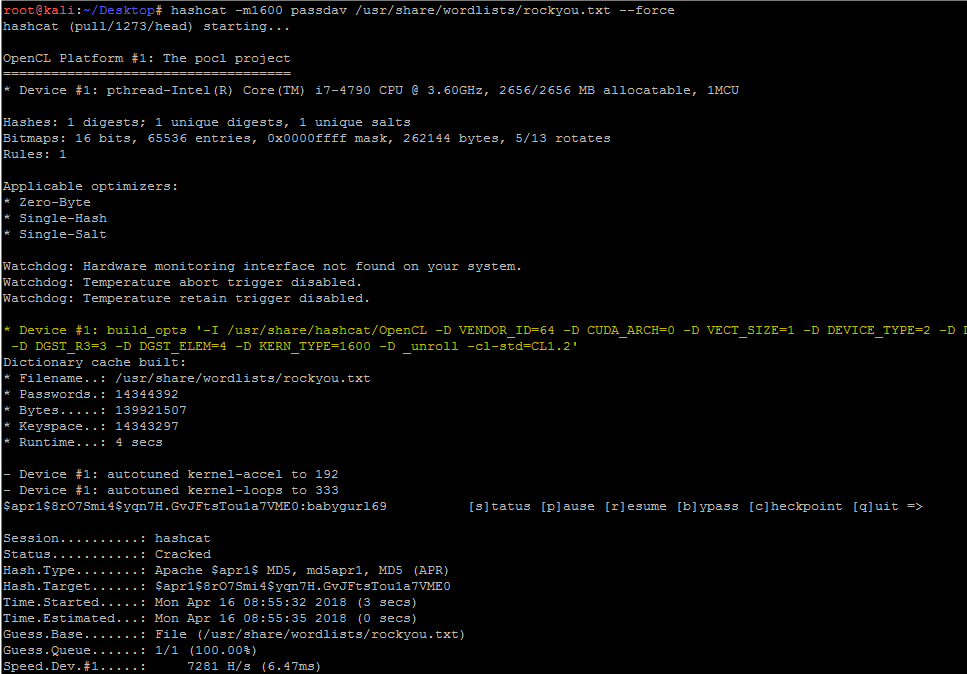
Medium
we all know hashcat utilize gpu and to work with cpu in virtualbox or vmware
you will need to install the following
bronze vale
@naive dust hashcat won’t work in vm
naive dust
@bronze vale rip me
bronze vale
You can get it to work but it is considerably slow so there’s no point
There’s windows versions of hashcat
naive dust
okay ill give it a try, thanks for fast answer Jabba
bronze vale
:)
sly yoke
@vernal ruin I've tried, seems to work :D Thanks a lot ! :D
vernal ruin
Awesome
wild hearth
linux task 33, to find pass for shiba4 , can someone help me proceed?
bronze vale
What are you stuck on
wild hearth
bronze vale
What are you stuck on
@bronze vale
wild hearth
idk how to proceed what command to give , ik to create a dir and create a file. But idk what exactly im supposed to do in this?
bronze vale
Have you created the directory called test
bronze vale
okay
wild hearth
Have you created the directory called test
@bronze vale yep
bronze vale
Now have you run the binary
bronze vale
Have you tried that
wild hearth
yes
bronze vale
and what happens
wild hearth
says no such file or dir shiba3
bronze vale
You're in the wrong directory then
It's like in the windows file system
You can run the file
If you're unable to see it
If you type ls there should be no file named "shiba3"
So try looking for it :D
wild hearth
okayy 🙂
 desert bear
Does anyone have an idea why my terminal keeps freezing ? I have two terminals open with tmux, one is whatever i'm doing and the other is openvpn. I thought it was a memory issue but I checked and I have enough on my machine. Anybody have any ideas what it could be ? I noticed it just froze after the openvpn terminal was doing some stuff.
kali linux btw
bronze vale
Are you running a VM
desert bear
yes
I am trying to do a tryhackme room but it keeps freezing my terminal. The openvpn terminal still seems to be working though.
bronze vale
Technically this isn't related to the tech support channel but if it's Virtual Box you're not the first one to experience it.
desert bear
ah ok, sorry I thought this was the right channel.
 hoary pier
Hey, I am doing the "Learn Linux" room should I be able to submit some tasks there or is there just nothing to submit there?
bronze vale
What is your THM username?
hoary pier
Same as here Kibov
bronze vale
Okay someone will sort it soon
hoary pier
Thank you!
sly yoke
Hello, I have a problem on this box :
https://tryhackme.com/room/windows10privesc
I can find the password with : reg query "HKLM\Software\Microsoft\Windows NT\CurrentVersion\winlogon"

TryHackMe
Practice your Windows Privilege Escalation skills on an intentionally misconfigured Windows VM with multiple ways to get admin/SYSTEM! RDP is available. Credentials: user:password321
 dire cloud
Hi, im quite new to linux. When i try to connect to openvpn at first it says Initialization Sequence Complete but then it says uthenticate/Decrypt packet error: packet HMAC authentication failed. what am i doing wrong?
naive dust
Are you still able to connect to a machine on TryHackMe?
dire cloud
It says im not connected
eager fulcrum
It says im not connected
@dire cloud Please don't trust the /access page on tryhackme, it's not accurate a lot of the time
the Authenticate/Decrypt is just a warning and doesn't affect your connectivity
dire cloud
oh ok thank you
 rapid rover
Hi there 🙂
 gloomy lichen
@rapid rover try 'sudo openvpn {your vpn file name}
rapid rover
that's what I started
gloomy lichen
make sure you are in the same directory as the file
meaning on the terminal you are on desktop
file has to be on desktop too
rapid rover
Mon Aug 24 21:18:40 2020 TLS Error: TLS handshake failed
Mon Aug 24 21:18:40 2020 SIGUSR1[soft,tls-error] received, process restarting
Mon Aug 24 21:18:40 2020 Restart pause, 5 second(s)
gloomy lichen
and try again
and if you tried all that i mentioned, download a new file from a different server
but thats the last option tbh
rapid rover
Okay thanks 🙂 Will give it a shot
eager fulcrum
okay, then try 'sudo service openvpn restart'
@gloomy lichen You should not be using the OpenVPN service
@rapid rover Please don't use the OpenVPN service
are you connecting from Egypt by any chance?
eager fulcrum
Trying to THM setting up access page
@rapid rover Here, I mean the systemd service that Japfu suggested you restart
Have you tried a different VPN server?
gloomy lichen
why not use openvpn? thm suggested it?
rapid rover
no I haven't pretty new to kali myself
eager fulcrum
why not use openvpn? thm suggested it?
@gloomy lichen You use OpenVPN. You do not use the SystemD service for it.
gloomy lichen
oh
rapid rover
It works on windows but on kali it's a problem rn
eager fulcrum
no I haven't pretty new to kali myself
@rapid rover Try switching to a different VPN server on TryHackMe and downloading your config again
It works on windows but on kali it's a problem rn
You can't connect from both at the same time btw
gloomy lichen
||sudo apt install openvpn|| ??
eager fulcrum
Try a different server then, that's my recommendation
||sudo apt install openvpn|| ??
@gloomy lichen It's installed by default in Kali.
rapid rover
I do have openvpn
gloomy lichen
*okay
is it running as root? do you have 1 or more connections? (if so, 'ps aux | grep openvpn' <-- from thm page),
rapid rover
not running as root
gloomy lichen
kali stopped making its users a sudoer
rapid rover
should probably escalate
rapid rover
I am using sudo 😛