#site-support
1 messages · Page 169 of 1
 deep trellis
 eager fulcrum
A lot of the JS stuff is taking a while, the hackpark thumbnail is too
Cookie.js took nearly 6 seconds and failed
deep trellis
That's behind our AWS's CDN - Weird.
eager fulcrum
Skidy, why
 sharp bear
oh damn it was fine on mobile but I just got on my desktop and its bad
sharp bear
I have this which I shouldnt
deep trellis
I didn't code this one, Ashu did - so maybe if he has time he can update it to stop showing to existing users?
eager fulcrum
A lot of the content failed
sharp bear
it also looks like the UI of the dashboard changed? did you push new code?
eager fulcrum
all localhost:1337
deep trellis
Please refresh your page.
Thank you very much for reporting that, looks like I need to write a unit test to stop that happening again
deep trellis
Which one is that? (It might be on a branch we've not merged yet?)
eager fulcrum
featured rooms is 28kb
 vapid dawn
was this resolved or do I still need to take a look at it?
eager fulcrum
@vapid dawn Fixed the localhost issue, not sure about the Let's Get Started thing
vapid dawn
just checked on chrome, and it looks ok 🙂
just @ me if anyone has an issue 🙂
i'll keep checking ofc
 ornate venture
@eager fulcrum can you help me here or should i just ask again
 sharp bisonBOT
 TryHackMe
Learn how to use OpenVPN to connect to our network!

From TryHackMe with ❤!
eager fulcrum
Only connect from one device at a time
@ornate venture Try the VM at the end of that room
ornate venture
i got it working thank you
eager fulcrum
Great
 shadow raven
Hello there, I am having an issue with using the web kali machine from the kali room
eager fulcrum
Show us the issue.
eager fulcrum
That was easy
 feral dock
If only all issues were like this
eager fulcrum
Next time, give things 5mins before asking for help?
shadow raven
Idk why but it kept showing e the error red message
red*
it kept showing for 3 mins lmao
eager fulcrum
When you get error messages and you want help, you need to show people the error messages
We can't fix things if we don't know what's going on.
eager fulcrum
Screenshots. From the beginning
shadow raven
Oki, sry
eager fulcrum
Make it easy for people to help you.
shadow raven
Yessir
 deep cedar
Hi. Im new and having constant issues deploying VMS and their ports are all filtered. Cannot ping them. OpenVPN is running as admin. I disable my windows 10 firewall and my AVG antivirus. Is it just the luck of the draw? Ie some VMS cant be scanned? Otherwise there's something missing. As scans of other ip address eg Google work fine. Im going batty wasting hours.
deep cedar
How can i check that?
 wet shard
Does ipconfig tells you you have a virtual interface with a 10.X.X.X IP address?
feral dock
ipconfig is for windows.
wet shard
Yup
deep cedar
Yes but its not my private ip on OpenVPN. Is that ok?
feral dock
Oh, they are using Windows 🤢
wet shard
Ooh that's interesting
deep cedar
Its for Ethernet adaptor 3 my OpenVPN address
wet shard
Which OpenVPN client are you using? I suspect it didn't/couldn't for some reason create/assign your IP your virtual interface
Networking on Win$ sometimes is a pain in the *ss to be honest
deep cedar
Version 3.1.3 (713)
 radiant token
I noticed that my Getting Started thing says I haven't completed a room yet, but I've completed multiple
 tender grail
I noticed that my Getting Started thing says I haven't completed a room yet, but I've completed multiple
@radiant token I have the same problem, I believe the error is that is not flagging as completed the first point which is weird because I used Kali in browser and I also used the VPN.
radiant token
I can't get nmap to output any of it's findings. It scans, tells me it did a scan, mentions a host is up, and that's it. I've ran the -vv tag, and it does show me it's making progress, but I can't get it to output anything it finds through it's scans, even by having it outpout to a file. I have no clue what I'm doing wrong here
 pulsar crater
try nmaping 127.0.0.1
 golden crag
I can't get nmap to output any of it's findings. It scans, tells me it did a scan, mentions a host is up, and that's it. I've ran the -vv tag, and it does show me it's making progress, but I can't get it to output anything it finds through it's scans, even by having it outpout to a file. I have no clue what I'm doing wrong here
@radiant token what kind of information do you want to see?
radiant token
anything it finds. Directories, open ports. Anything and/or everything
golden crag
I would start by maybe going tough the manual page of nmap to see what flags give which kind of output
radiant token
@pulsar crater that one showed me an open port... weird
pulsar crater
try to restart the box
golden crag
And make sure u are connected to the openvpn server
radiant token
I am. I even have a little script set up to make it convenient to run openvpn
all I have to do is ./ovpn
 copper mist
all I have to do is ./ovpn
@radiant token sudo openvpn <path to .ovpn file>
golden crag
Thats nice! But make sure u dont spawn multiple connections
radiant token
I know. I'm saying I made it more convenient
copper mist
I am. I even have a little script set up to make it convenient to run openvpn
@radiant token why make an extra script when aliases are a thing
radiant token
because I wanted to
copper mist
alias thm='sudo openvpn ~/ovpns/file.ovpn'
don't have to type ./
radiant token
don't care. Feels cooler
copper mist
what feels cooler is having an organised profile and an entire .alias and .function file that links to zshrc
One liner (simple) scripts are a waste of time, effort and memory
radiant token
to each their own
copper mist
if you want to keep your script, you could link it as a binary and type ovpn as a command
 naive dust
Hi i have small bug in kali can somebody help? Can i dm you
naive dust
So when i write for example apt-get install terminator it outouts a error: E: unnable to locate package <name> so i searched on internet and i found that i need to ad repositories in sources list but when i apt-get update it dose not work btw i have kali 2017 downloaded on VM from index of/ kali-images/kali-2017.3
 leaden token
have you done sudo apt update ?
leaden token
also don't use apt-get use just apt
naive dust
Ok i will try
leaden token
additionally, run sudo apt full-upgrade to update everything
naive dust
But its wierd that it dose not work at start
naive dust
@pulsar crater i know but i added repos
And still nothing
Did you have same issue or not?
I feel like i am only one with this issue
pulsar crater
what program are you trying to install?
naive dust
Terminator
pulsar crater
it might not be in the repo's
apt search terminator
you can install other software?
naive dust
I will try it but on last time i got kali it worked but i delete it cuz you know how is it with kali and download again but i hot this error
@pulsar crater nooe
Nope
pulsar crater
then it is def a sources issue
naive dust
Yea. What kali version do you use?
pulsar crater
2020.2
naive dust
Ah i use 2017 cause i learned on it. Maybie that is problem? Culd it be?
naive dust
Tnx for help
golden crag
also don't use
apt-getuse justapt
@leaden token may i ask why ? 😁
pulsar crater
old vs new
leaden token
because apt-get is deprecated (outdated)
naive dust
Yea me to😂
radiant token
still no nmap output. I've tried many varients of the command, and nothing. I'm tempted to throw in the towel
golden crag
Can u show the command u run and rhe output?
radiant token
golden crag
Also with sudo apt?
 vernal ruin
I did everything but nothing is changed
@naive dustcat /etc/apt/sources.listwhat's the output ?
 lucid vine
hey i have a problem
today 2 hours ago i did the welcome room
and i was able to acces the machine
to see the flag
but now i try to connect to a machine in another room
and it doenst seem to work
i have tried waiting for a long time
tried to regenerate the ovpn file
also terminated the machine and make a new one
golden crag
Make sure u are connected to the open vpn network and only have one instance running
lucid vine
i have
i use linux so i use openvpn name.vpn
in terminal
and it is working
so 🤔
golden crag
Have u checked for multiple instanced?
golden crag
And u ran the ovpn file as sudo?
lucid vine
ofcourse
golden crag
What error are u getting?
lucid vine
i dont have any error
golden crag
When trying to connect to the machine
 quick topaz
maybe u didnt download the correct openvpn
golden crag
And u are sure the machine u are running has a webservice on it?
lucid vine
@quick topaz i did
golden crag
On the default port
lucid vine
@golden crag what do you mean with that?
golden crag
I would run a nmap scan to see what the machine has running
Not evrry box has a web service
lucid vine
ill try the welcome machine
that one
has 1 for sure
i also pinged the machine and it worked so 😐
 zealous yoke
I would do as @golden crag suggests. Not every room will have a web server running on the default port
It's often apart of the challenge to enumerate if there is one, and if so, what port it is running on
zealous yoke
Yes
lucid vine
because they didnt mention it
zealous yoke
the welcome machine has a web server running on port 80 so you can connect with only the IP in your browser
Check out https://tryhackme.com/room/rpnmap
 golden crag
so where can i find the port then
@lucid vine this is where nnap comes into play
zealous yoke
Very useful tool
zealous yoke
Not necessarily
golden crag
Different rooms will have different challanges or boxes with different services on them. Basicly you want to check what services run on it, enumerate the machine.
zealous yoke
Especially if it's a challenge like Vulnversity is
lucid vine
well it isnt i was trying out learn linux because its a easy room
but i had to acces the machine for the bin file
but thanks guys
ill have a look if it is the port that i am missing
zealous yoke
Learn Linux will only have a port for SSH open (:
You have to connect via it as per the room for the tasks
 vagrant leaf
Hello im sorry to bother you but i have a probleme concerning openvpn I can't connect to it. i search every solution but can't find an answer
 cunning vector
Anyone knows whatsup with anti virus blocking some submit requests and saying that TryHackMe is trying to execute RCE on me....
golden crag
Hello im sorry to bother you but i have a probleme concerning openvpn I can't connect to it. i search every solution but can't find an answer
@vagrant leaf what error you getting?
lucid vine
but i dont think you can connect to that
zealous yoke
the 22 port?
@lucid vine yup (:
golden crag
but i dont think you can connect to that
@lucid vine you tried with ssh?
lucid vine
golden crag
Ok so let me explain
golden crag
Your browser is used to connect to websites and webservices
But their is a big world beyond just web sites
The service running on port 22 is ssh
vagrant leaf
@golden crag it says that my configuration file can't be open
golden crag
Basically it is used to connect to a certain machine
You cant conndct to it with your browser
You have to use ssh
lucid vine
makes sense
zealous yoke
Check the path as to where you're saying that your config file is where you're telling openvpn it is @vagrant leaf
vagrant leaf
@zealous yoke i did all verification and at one moment it said : Unrecognized option or missing or extra parameter in [CMD:LINE]:1: config (2.4.7)
zealous yoke
The credentials are given in one of the first few tasks
golden crag
If i may, i would advice to read what a room is about and depending on that, it might be a clue as to what you sre suppose to do
Somethimes you get the credentials, sometimes you have to bruteforce them
zealous yoke
Ah okies, that's an issue with the config file itself. I'd recommend switching vpn server, waiting ~10-15 seconds and regenerating @vagrant leaf
 vagrant leaf
@zealous yoke I've got the same error : In [CMD-LINE]:1: Error opening configuration file: /Téléchargements/alexpau07.ovpn
deep trellis
I've got the same error : In [CMD-LINE]:1: Error opening configuration file: /Téléchargements/alexpau07.ovpn
@vagrant leaf Which OpenVPN server is this on?
 winter isle
does adventure time room has a problem ??
the website is not open
@vagrant leaf have you tried to opening it with sudo ?
vagrant leaf
@winter isle Yes that's what im doing from the start
I can't find a solution tried different vpn too, tried to re-generate one thousand times i doesn't seem to work for me :/
@deep trellis Did you happen to find what's wrong with my thing ?
Do i have to go on windows to make it work ?
 untold vector
i cant access a room name Alfred
my openvpn is initiated
and also The TryHackMe page shows me connected in the Access page
but when i ping the Machine and Also try to nmap with TCP ping scan
it shows the host seems down
golden crag
i think
its because of this
Please note that this machine does not respond to ping (ICMP)
not sure
untold vector
yes thats y i tried TCP ping scan using nmap then too its displaying the same error
golden crag
mmm
untold vector
ok nvm i think so my net is slow but it worked out with nmap TCP scan
sorry for wasting your time
golden crag
No problem man ! Happy it got resolved!
naive dust
I dont know what problem was but i downloaded version 2020 from offical website and now its all good but i will need time to be used uding newer version. I more like 2016 or 17 cause i learned on it for few years. But i hope that i will be used to 20 version
golden crag
I understand that using older versions might feel more comfortable , but working with the most recent software and versions is always a good idea, especially in this field / environment 😁
Happy to hear it works now
naive dust
Yea i wish that on their site you can download version that you wont nit yust nowest one😖
Do you know any website witch has older version but with no bugs like this
?
golden crag
Thing is , i have no idea what caused the bug to be honest 😅 i do know that kali and other pen test distros are always pushing newest versions, and asking users to use most recent. For security purposes
You can prob find an older version, but to be honest, do you really feel like you need it?
naive dust
Yea i know but this verson is too clicky and idk its not feeling like penetration testing distro ut feels like windows. And with other versions of linux like parrot i had same issue
golden crag
really? I dont have that feeling at all, i do almost everything in the terminal
but im still relativly new / beginner level here. I guess someone more senior can give a better perspective?
naive dust
Yea and i dont like being loged an non prevelege user i like be logged as admin becaise i use vm so i am not afraid of anithyng hapoend but i always must enter password witch is frustrating for me
eager fulcrum
Give yourself passwordless sudo.
You can just skip installing a GUI if you really want.
You can also set a root password and log in as root.
naive dust
Thanks!
eager fulcrum
@deep trellis 500
 vague basalt
Hi can anyone help me with deploying machines? I am using OpenVPN and when I connect to the server using the config file it shows on the OVPN app connected, however on the website it does not show me connected and when i try to deploy machines I get an error (pictures provided)
 hasty shale
Ok, just throw up a Python webserver (
sudo python3 -m http.server 80), then on your own computer, go to the Kali IP address in your web browser
@barren birch Just want to thank you for this wonderful little nugget that will really come in helpful in the future!
eager fulcrum
@vague basalt VMs do not always run webservers, so you can't open them in your web browser like that
The access page does not reliably show if you're connected.
vague basalt
so i should try remote desktop?
vague basalt
the "Welcome" tutorial room deployed for me in the browser no problem, then when i went to any other VM to deploy them I get that message
eager fulcrum
Yes
Because you can't just open the IP address in your browser
Unless it's running a web server on port 80.
vague basalt
Ah i was just following the instructions, so how should i be launching the VMs?
https://tryhackme.com/room/zthlinux currently trying this one
 eager fulcrum
You launch the VMs by clicking deploy
I recommend you work through the rest of the room, as it tells you how to connect to that VM.
vague basalt
Ah i see, okay thanks a lot!
 slate terrace
I'm having an issue with the room Authenticate - Task4. Is this the proper room for support on it?
eager fulcrum
Probably #room-help is better suited
 bold fractal
So i read a number of writeups, everyone is saying check google chrome history on this machine but there is no chrome in my case :(
 exotic comet
Verification link is not displayed in my student mail. Can you help me?
bold fractal
@eager fulcrumthis is advent of cyber, day 13, rest is stated above
bold fractal
Ohh ok thanks
eager fulcrum
It's basically the same box but the privesc is made easier
exotic comet
@eager fulcrum Yes i check spam and resend.
eager fulcrum
email support
exotic comet
what is your support email address
eager fulcrum
I don't have one. Tryhackme has support@tryhackme.com
exotic comet
@eager fulcrum thnks
 upbeat palm
Hi, i am facing issues with the VPN connectivity. Can someone help. Below is the output I am getting:
Tue Jun 23 22:41:17 2020 /sbin/ip route add 10.10.0.0/16 metric 1000 via 10.11.0.1
RTNETLINK answers: File exists
Tue Jun 23 22:41:17 2020 ERROR: Linux route add command failed: external program exited with error status: 2
Tue Jun 23 22:41:17 2020 WARNING: this configuration may cache passwords in memory -- use the auth-nocache option to prevent this
Tue Jun 23 22:41:17 2020 Initialization Sequence Completed
eager fulcrum
!multivpn
sharp bisonBOT
TryHackMe
Learn how to look for duplicate instance of your OpenVPN connection.
• Step 1
Make sure you have setup your VPN connection correctly https://tryhackme.com/room/openvpn
• Step 2
Type ps aux | grep openvpn into your terminal and press enter
• Step 3
If there's more than one line (and the second doesn't have "grep" in it), do the following steps
• Step 4
Type killall openvpn into your terminal and press enter
• Step 5
Start the VPN with sudo openvpn <path-to-config>
From TryHackMe with ❤!
eager fulcrum
You're running multiple VPN connections
 charred bone
Hey i have problem with installing stegoveritas please help
sharp bear
#room-help @charred bone
 icy yew
How to stop receiving emails when earned a badge??
It's an simple delete (of email not account), but askin' to check if it's possible.
 languid hazel
hi guys have some issue with kali wifi is running ultra slow I can't even open a web page
eager fulcrum
VPN and other technical questions related to TryHackMe
languid hazel
🙂 thanks
 lyric dagger
Hi, im looking for any reccomendations for dual band Wi-fi adapters supporting monitor mode please? I’m looking on amazon but it’s not something that is advertised and rarely answered about. Thanks in advance. (I know of the panda PAU07 and 9, and I know of the Alfa dual band one, but looking for something a little cheaper maybe).
lyric dagger
Ok thansk. I figured it may go in here as it is support related - it is tough sometimes to know the right channel
eager fulcrum
VPN and other technical questions related to TryHackMe @lyric dagger Along the top, there's channel topics
naive dust
Working on PS Empire box using my own Kali image and i keep on getting a fail using the eternalblue exploit any reason?
eager fulcrum
@naive dust #room-help
 ancient oak
Dear Tech Support i am not able to access my machine when i am trying to login by putty its give this error
 toxic python
Are you supposed to login or just visit the webpage? @ancient oak
eager fulcrum
@ancient oak You are not supposed to SSH into that machine
ancient oak
i am trying to login @toxic python
eager fulcrum
@ancient oak You are not meant to.
It is not your machine
It's not a machine you are meant to SSH into.
toxic python
Damn james you respond so quickly I can’t even type out a response 😱
eager fulcrum
Different rooms have different virtual machines
@toxic python Buy a better keyboard
Type angrily at 80WPM all day
toxic python
My current keyboard is an iPhone lol
I can definitely usually feel the anger hahaha
eager fulcrum
Only at people who don't listen or ask questions in a really bad way
ancient oak
Ha ha ha @toxic python
eager fulcrum
@ancient oak Terminate that VM
ancient oak
okey @eager fulcrum
eager fulcrum
Now whatever room you were doing that required you to SSH in, deploy the VM in that room
Do NOT use your THM creds to try to log in to any box
 abstract stag
I'm having an issue with Ice. Running the exploit results in:
[] Started HTTPS reverse handler on https://192.168.0.2:8443
[] Exploit completed, but no session was created.
I've restarted the machine and msfconsole. Tried to run many times but no luck. On Kali VM.
Any ideas?
 lilac ocean
@abstract stag give your tun0 ip instead of 192.168.0.2
use ip addr show or sudo ifconfig to see your ip
also ask in #room-help next time if its regarding any of the rooms.
abstract stag
@abstract stag give your tun0 ip instead of
192.168.0.2
@lilac ocean Still doesn't work 😦
naive dust
I searched on internet but nithing
lilac ocean
I searched on internet but nithing
@naive dust i think it may help you:
https://opensource.com/article/20/4/install-python-linux
@lilac ocean Still doesn't work 😦
@abstract stag Can you ask in #room-help and please describe what is the issue you are facing now? if you can share a screenshot as well it will be more helpful to help you. 🙂
abstract stag
@abstract stag Can you ask in #room-help and please describe what is the issue you are facing now? if you can share a screenshot as well it will be more helpful to help you. 🙂
@lilac ocean I was about to 🙂
naive dust
@lilac ocean hank you very much but i dont know if that is oroblem i tried installing other packages but same error comes out. But i will try this for python
naive dust
any help on this?
 red locust
hey quick question
did all this, but i remember before this section was changed i couldn't do the linux room to complete the whole thing to a 100 because it wasn't free, now i'm subscribed and i finished it and it's still at 67%
vapid dawn
it's a known bugnthay we're looking into
But shouldn't affect your ability to do anything else
 high forge
Does anyone know how I could snapshot (with ram state) a vagrant-libvirt box and upload it to THM?
 civic sinew
hi everyone
I can not see some images in tryhackme lab
is it general issue?
i tried to clean caches
feral dock
Your ISP or an extension in your browser might be blocking the image
 drowsy spruce
Hey I am a student and I want to buy the try hack me pro
So the try hack me costs 8 dollars right so how do I claim it
sharp bear
If you pay for the subscription it is automatically applied to your account
drowsy spruce
No I mean how does it decide that I am a student ?
sharp bear
based on your account email
sharp bear
you need a student email or you need to send proof of being a student
send any kind of proof that your a student to support@tryhackme.com
drowsy spruce
Oh ok
Due to covid
I left my id at hostel
lol
Ill get it later thanks for the support 👍
sharp bear
it can literally be anything they’re chill about it
 candid pagoda
Is there a way to delete your account?
 barren birch
@candid pagoda email support@tryhackme.com 🙂
candid pagoda
Ok
 tribal nimbus
I had uploaded one of the windows vm and port 3389 is open! It's showing port is open during nmap scan! I had also tested rdp in local network but it's not working after uploading to tryhackme! Any suggestions?
eager fulcrum
Work out what that error code means for your RDP client
Then we might be able to help
tribal nimbus
Cool! Let me check again!
 low ocean
hello i have some trouble regarding the room joining can someone helpme?
sharp bear
what do you mean by trouble joining a room what room are you trying to join and what error is it giving you?
low ocean
its actually room joining situation i have asked for help earlier too but no on replied
the linux changellenges room i joined was turned to subscribed only and now it is showing in myroom section and getting counted as incomplete
so i got into another room name kenobi it was i guess subscribe able but now i can join so if same thing is going to happen then i won't be able to complete the current rooms i have added fully anytime
sharp bear
both kenobi and linux challenges are subscriber only the linux challenges is a known bug and you shouldnt be able to access it for right now they will just have to chill in your rooms until their is a patch out
you wont be able to complete them
low ocean
but kenobi is showing just now i can join right so that means i shouldn't join right?
low ocean
so if its going to happen like this how im suppose to know which room to join so that in coming days i can solve that
 civic hedge
hey guys. just curious, has anyone been able to get msfconsole working properly in a WSL Kali instance?
sharp bear
thats new
eager fulcrum
You can join it and complete it
sharp bear
hmm so it is free
low ocean
okay but it won't be like the problem im facing with linux challenges right?
the linux changellenges room i joined was turned to subscribed only and now it is showing in myroom section and getting counted as incomplete
@low ocean
sharp bear
linux challenges you shouldnt be able to join and its a known bug
low ocean
okay thank you so much for clearing my doubts
 delicate ridge
Hello, I'm having slight problems connecting to machines I deploy. Started only today. When I ping machines after deploying they do not respond. I also run the thm-troubleshoot and it says I should ask for help on the platform
deep trellis
@deep trellis Kenobi is free now?
@eager fulcrum yeah for a week:)
eager fulcrum
Announce it then lol
 celest sapphire
@delicate ridge uhm try to move the ovpn to a path that doesn't contain chars like this{}?
barren birch
@delicate ridge Would you be in a country that blocks VPN connections by any mischance?
Egypt, China, North Korea, for example?
delicate ridge
Noo I'm in Ghana and I have been using the platform for over a month now.
it always worked.
barren birch
Ok, can you do sudo killall openvpn && sudo openvpn ~/CTF{me}/TryHackMe/config/themeihide.ovpn then screenshot the results please?
That error happens when it's failing to ping the server, despite all checks being successful
eager fulcrum
(My VPN is ded too, which is weird)
barren birch
Huh
And that guy in Koth...
Suddenly losing connection to the machine
Maybe the VPN is dead full stop?
feral dock
Mine's working(I think so) 🤔
eager fulcrum
@delicate ridge What VPN server?
barren birch
@vapid dawn are the VPN servers all active and Ok?
eager fulcrum
@reef agate what VPN server?
delicate ridge
@eager fulcrum openvpn
feral dock
https://tryhackme.com/access -- you can check here

TryHackMe
An online platform for learning and teaching cyber security, all through your browser.
 reef agate
checking @eager fulcrum
eager fulcrum
Or give us the first 2 octets of your VPN IP
vapid dawn
oops
eager fulcrum
Ok I'm on EU 1
vapid dawn
should be all better now
celest sapphire
EU-Regular-1 and EU-VIP-1 works for me 🤔
eager fulcrum
Oof
reef agate
@eager fulcrum Don't know what was going on but now after votes to reset, it works fine
barren birch
Run the script again
reef agate
oh, sorry. I thought you were talking to be but you were talking to someone else hehe
or maybe not, I'm confused
eager fulcrum
The VPN server died
reef agate
ouch!
delicate ridge
@barren birch
The troubleshoot shows I'm connected to the tryhackme network but I'm still getting a 100% packet loss when I ping the deployed machine.😩
delicate ridge
@eager fulcrum
I'm doing an nmap scan as required by the room. When it is successful it's connected then.
I always thought the machine had to reply to the ping.
eager fulcrum
Machines don't have to reply to pings
If you have -Pn in your nmap command, it won't ping
delicate ridge
I don't have -Pn in the command
eager fulcrum
Then it's responding to pings now
sharp bear
!multivpn
sharp bisonBOT
TryHackMe
Learn how to look for duplicate instance of your OpenVPN connection.
• Step 1
Make sure you have setup your VPN connection correctly https://tryhackme.com/room/openvpn
• Step 2
Type ps aux | grep openvpn into your terminal and press enter
• Step 3
If there's more than one line (and the second doesn't have "grep" in it), do the following steps
• Step 4
Type killall openvpn into your terminal and press enter
• Step 5
Start the VPN with sudo openvpn <path-to-config>
From TryHackMe with ❤!
eager fulcrum
@sharp bear No
eager fulcrum

 mystic mist
Hey, can someone help me I wanted to dual boot my Kali with Windows 10. I installed Kali on a secondary hard drive. Ofcourse Kali is not showing up, so I can't boot into it. Do I have to install it on the same harddrive or can I somehow make it choose from what to boot?
eager fulcrum
@mystic mist VPN and other technical questions related to TryHackMe
mystic mist
oh well ok
naive dust
@eager fulcrum can you help me olese ive been searching for awnser 1m on forums and all websites?
eager fulcrum
Please don't just ping me when you need help
I answer questions when I can, and when I want to
I don't get paid to.
naive dust
Yes i know thats why i asked you
When i wont install package i get this pkg problem
I wuld be wery thankfull if somebody can help me
eager fulcrum
@naive dust VPN and other technical questions related to TryHackMe
naive dust
Where i can get help
eager fulcrum
Read the channel topics.
naive dust
So i canot get help on this discord. Nice
eager fulcrum
You can. If you are asking for help in the correct channels
And not demanding help from me.
naive dust
@barren birch thank you very much🙂
naive dust
@naive dust you need to use apt-get remove libgcc -8-dev happened to me because I am using Kali 2019.4
But doing so removes certain tools like hashcat I had to reinstall
@naive dust so if i do that i wuld have to apt-get install hascat or completly reinstall?
@naive dust thanks alot man🙂
@naive dust correct
But becareful because the update really messes things up
Thanks alot@naive dust
 sturdy umbra
hey people, i could use some help in installing opencl
so that way i can use hashcat ^
i run kali on bare metal, so OpenCL doesn't come with the drivers like they do on windows
 unreal sundial
Is there any way to optimize the connection? Even a normal nmap scan is showing 7 minutes ETA
eager fulcrum
Change to a VPN server closer to you, get better internet, things like that
 analog mesa
I cannot log in to vpn, not sure what to do
eager fulcrum
@analog mesa You have multiple VPN connections running
You are not logging in to anything though
sudo killall openvpn and reconnect
analog mesa
eager fulcrum
Ignore that
eager fulcrum
The access page is incredibly unreliable
analog mesa
thank you!!
eager fulcrum
The only reliable test for the VPN is accessing resources using it
Like the VM in the Welcome or OpenVPN rooms
 dense marsh
hello, some help, we are trying to apply sequencer in burp suite using kali linux
the issue is that I can't find in the http proxy history, some one to apply this tools
and when I tried to apply random to some one using start live capture, Pops this error: invalid custom location configurationhello, some help, we are trying to apply sequencer in burp suite using kali linux
the issue is that I can't find in the http proxy history, some one to apply this tools
and when I tried to apply random to some one using start live capture, Pops this error: invalid custom location configuration
toxic python
bold fractal
I think day18 advent or cyber isnt working properly, it says admin will be visiting regularly, so my xss payload is all set for about 10minutes now, no response
Payload works perfectly
I m trying to steal admin cookies
 warm holly
vapid dawn
warm holly
vapid dawn
just bumped it up - if you re-deploy, the instance will be faster 🙂
 dusky scarab
Any admins or mods that I can DM for adding a few roles. I can DM my acclaim URL to validate OSCP and GPEN. Thanks
dusky scarab
Sounds good, thank you.
feral dock
@zealous yoke ^^
dusky scarab
Thank you, both.
leaden token
what room is causing an issue, @olive axle ?
and what's the issue too
alright, go ahead
 proud turret
Someone else have problems with Post-Exploitation Basics? Looks like powershell isnt working like should be
sharp bear
no you just haven’t throughly read the instructions
proud turret
It dont reconice the Get-NetComputer or any command mainciionated in the room
Already tryit with ssh and rdp login
sharp bear
reread the instructions to load power view
proud turret
and already put powershell -ep bypass command
sharp bear
reread the instructions and look at the command closely
proud turret
😦
sharp bear
youre using one "." instead of two ". ." like the rooms instructs
sharp bear
its dot space dot
proud turret
Ok
I know what is going on
Cause i already try with just with dot
If i try again with 2 dots
It send a error
I should exit and try again with 2 dots
Thanks
proud turret
No, no
I mean if you first try .\PowerView.ps1
And then try . .
It send a message error
sharp bear
yes because you never loaded powerview
ok here ill send you the command you literally just have to copy and paste it into your terminal
. .\PowerView.ps1
proud turret
I mean, when you try to start pawerview
Already solution it
Thanks to you (before you send the command)
sharp bear
oh ok
 shy shore
Now WHAT??
lilac ocean
@shy shore wat?? you got your reverse shell.
now you can upgrade it to a more stable one
lilac ocean
I should say Google it but Check which python and then:
export TERM=xterm
ctrl + Z
stty raw -echo
fg
Also next time ask in #room-help
 cosmic reef
Guys, I'm simply unable to open the Burp Suite room as it keeps redirecting me to the Subscribe page. How do I get around? I tried to manually add the URL, tried different browser, logout/login, but it keeps redirecting me to the "Why Subscribe" page. Any advise? Thanks!
shy shore
Guys, I'm simply unable to open the Burp Suite room as it keeps redirecting me to the Subscribe page. How do I get around? I tried to manually add the URL, tried different browser, logout/login, but it keeps redirecting me to the "Why Subscribe" page. Any advise? Thanks!
@cosmic reef its a subscriber only room
lilac ocean
Guys, I'm simply unable to open the Burp Suite room as it keeps redirecting me to the Subscribe page. How do I get around? I tried to manually add the URL, tried different browser, logout/login, but it keeps redirecting me to the "Why Subscribe" page. Any advise? Thanks!
@cosmic reef Thats a subscriber only room, you need to subscribe to access it
There's no way around it..
Unless someone finds one
cosmic reef
Oh damn, I assumed all of them were... free.. sorry, how can I identify such rooms?
such paid rooms?
lilac ocean
in Hacktivites there is a filter option to show subscription only and Free rooms.
shy shore
for EXAMPLE
cosmic reef
@shy shore thanks, but that appears only if I am actually able to click on the room 😄
lilac ocean
@shy shore free users cant open subscription only rooms to see that
cosmic reef
Thanks @lilac ocean 🙂
lilac ocean
shy shore
@shy shore free users cant open subscription only rooms to see that
@lilac ocean ohk then i might be a subscriber from day one LOL XD
cosmic reef
Gotcha, thanks 😄 +1 subscriber for THM incoming 🙂
lilac ocean
@shy shore if you face any problem regarding upgrading your shell just ping me in #room-help
shy shore
@shy shore if you face any problem regarding upgrading your shell just ping me in #room-help
@lilac ocean sure
 upbeat remnant
Hey guys i got some java malware on my pc, ive found the jar files directory by using jcmd, however when i try to go to it through file explorer the folder does not exist. I've also turned on hidden files and folders and havent had any luck. I didnt know where else to ask so if someone could help me id appreciate it thanks.
 rigid oxide
Hey! Sorry to hear that, we don't really provide support outside of items related directly to TryHackMe. I highly recommend getting antivirus setup as that should take care of a lot of it
upbeat remnant
I did use an antivirus nothing came up im sorry for interrupting, but thanks anyways. Do you know where else i could ask
rigid oxide
If you're in the states GeekSquad isn't terrible for things like that
lilac ocean
Not in this discord. (But Malwarebytes is also a good software to use)
upbeat remnant
Malware bytes is what i used, and im not from the US so i dont know what that is.
naive dust
@upbeat remnant are you running quick scans? Or deep scans?
upbeat remnant
deep. I found and got rid of the virus my self
 white mirage
hello. just a little question. trying to setup kali so i can save my progress. but for some reason my @ key is not working. all other keys are working as they should. and keyboard is set to same as here
eager fulcrum
VPN and other technical questions related to TryHackMe
 formal kraken
Hello...i have a problem with vpn .. every day i should try to connect for hours with vpn and after alot of time it connected..
I loste time and days just to connect to solve machine ... I tried every possible solution without result ..
I need help to save time and connect fastly ..
Thanks
 fading sigil
I appear to be having an issue within the Post-Exploitation box. The PowerView script doesn't seem to load, as when I run Get-NetUser it tells me the cmdlet could not be found. Does anyone know how to remediate this issue?
eager fulcrum
@fading sigil #room-help was the right place. The most likely issue is you didn't load it correctly.
fading sigil
Hmm. I would like to believe I loaded it correctly, but I am human..so maybe not. I will keep it in community-help. Thanks.
formal kraken
Hello...i have a problem with vpn .. every day i should try to connect for hours with vpn and after alot of time it connected..
I loste time and days just to connect to solve machine ... I tried every possible solution without result ..
I need help to save time and connect fastly ..
Thanks
@formal kraken any help ???
eager fulcrum
Make sure your system time is correct
If you are in a country that blocks OpenVPN like Egypt, China, North Korea etc, don't be.
And check your network connectivity like it says
eager fulcrum
Your government blocks OpenVPN, there is nothing we can do to fix that
formal kraken
ok thanks
sharp bear
I would say the probability of that happening is about 0.0003%
eager fulcrum
There is no server for the THM VM
 old fiber
it worked now
sharp bear
why do you think it is down?
eager fulcrum
So it's actually 0 percent
sharp bear
the only way it’s down is if tryhackme is down
old fiber
idk it said 'unable to connect to the server, try contacting your sys admin'
for past 10 mins or so
it's working now
sharp bear
great
 tiny finch
I'm on the Advent of Cyber room, on task 23 (XSS) - is there a known problem where connections from a machine's 10.10/16 address to your 10.2/17 address are RST? I see:
10.10/16 -> 10.2/17 = SYN
10.2/17 -> 10.10/16 = SYN ACK
10.10/16 -> 10.2/17 = RST
OS is Debian 10, kernel 4.19.0-8-amd64
naive dust
Just a quick question, why does the VIP VPN server never work?
I've been trying to log onto it for a long while now and all I get is this, every time:
😦
eager fulcrum
Regenerate your config.
eager fulcrum
Something probably broke
Talk to Ashu at a sensible UK time. I suggest 4-5hours from now if you can
naive dust
Ok, cool, will do, thanks 🙂
 wary scaffold
i'm in Egypt already ..
@formal kraken run an unblocked vpn on your host machine, run a vm and then connect openvpn in the vm, or buy a subscription
 hazy compass
hi guys, i'm trying to use burpsuite while being connected to a squid proxy.
The scenario is: kali machine at home, i'm at work rn, kali connected to tryhackme vpn and me connected to the kali via squid
my problem is that i wanna intercept the traffic using burpsuite. I've tryied configuring the Upstream proxy but it isn't working..
naive dust
@vapid dawn Hey, someone told me to ask you about my problem I'm having with my VIP VPN server, it's been over a week now I haven't been able to connect to it and it's getting on my nerves 😩
Here is what I get when I try to connect:
vapid dawn
If you regenerate your cert it should work :))
Let me know if you're still having issues
naive dust
Haha, that was the first thing I tried @vapid dawn
vapid dawn
I have to step out but will take a look when I'm back :))
what's your username on Tryhackme?
naive dust
raisedfist
And thanks for the assist 🙂
Here is what it looks like when I regenerate
 eager yew
Excuse me, i need some help here please.
Can someone help me?
toxic python
Just ask your question @eager yew
eager yew
@toxic python My hacking streak is stuck at 12 and won't go up anymore, i'm afraid that i might lose it.
nvm fixed
 sullen salmon
Hey there, can anyone point me to the support room for payment-related issues?
Having some issues with payment on the platform. Thanks in advance.
 ember anchor
Hey
toxic python
@ember anchor if it's a THM tech issue related question, go ahead and ask, if its a question about a room #room-help , otherwise #general
ember anchor
Just to check of any videos to refer how to connect to rooms and perform CTF
 ember anchor
Perfect!!! thanks!!!
sullen salmon
@toxic python Can you direct me to someone or any chatroom?
toxic python
Having some issues with payment on the platform. Thanks in advance.
@sullen salmon
^
 supple sonnet
that'll be a @deep trellis or @vapid dawn question
toxic python
dont actually know what advice to give
noted for next time awoooooooooo

@sullen salmon apologies for my lack of support on this, hopefully skidy or ashu can get you sorted
sullen salmon
Hey, that's okay.
I've mailed to the support email in the meantime.
Thanks a lot.
vapid dawn
@naive dust if you re-generate/download from an EU-Regular-2 server, it should work
 surreal lily
Hello, I cannot log in to the site. I am being told that my user/password is incorrect when I know that is not the case. Any attempts to reset password have also failed.
toxic python
screenshots of what happens when you try to reset the password?
@sullen salmon any luck?
surreal lily
I can't really show screenshots as the issue I am having is that an email is never sent to me
I have previous emails including the one confirming my subscription but when I try to reset my password the reset link is never emailed to me
toxic python
i would email support@tryhackme.com then
@vapid dawn @deep trellis any help for @sullen salmon and @surreal lily ?
surreal lily
Ahh ok. I didn't see a support email so I wasn't sure. I will email them
 gentle loom
Is anyone tell me how i verify
toxic python
On your profile on THM click other, copy the token and then in your DMs message the tryhackme bot “!verify {token}”
toxic python
in your DMs message the tryhackme bot “!verify {token}”
@toxic python
gentle loom
Okay thanks
 safe briar
If I'm a subscriber and I see this list of servers does this mean that there is only one VIP server and it's EU-based?
I think that is what it means. I just want to verify. I might try it out anyway.
deep trellis
Yes, but next week there is a VIP server coming in the US ( @vapid dawn at least I am pretty sure?)
safe briar
@deep trellis Oh, awesome. Hopefully it's in New Orleans, haha.
vapid dawn
they're all ready :))
Just need to be added to the drop down page
safe briar
Want to give me the address? 🙂
vapid dawn
Not yet haha
safe briar
😄
toxic python
Skidy how does it feel to be 0x1?
deep trellis
Pretty good:)
deep trellis
Exactly - many rooms left to complete aha
safe briar
@solar geyser Yeah, it's not called that anymore though. I think it's Offensive Pentesting.
I'm not sure if the two are related, but I got banned from the Discord earlier today and now I can't connect to the VPN. It's real weird. I've regenerated multiple configs with different servers and I've tried both CLI OpenVPN and GUI OpenVPN.
barren birch
It shouldn't be related 🙂
What error is it giving you?
safe briar
Just the red X for connected and I can't access anything.
barren birch
Try doing it with the CLI instead?
 solar geyser
oh ok yes I saw the offensive pentesting one
safe briar
Weird, for some reason only US-West-Regular works.
Yeah, I can only connect with US-West-Regular for some reason.
 bold dirge
I am having issues with my in browser machine. Does anyone know what's going on?
toxic python
Need to be a bit more specific
toxic python
👍🏿
sturdy umbra
F.
It would seem as if that is a school admin problem. I would advise that you contact suport soon.
 quick root
Hello, I have a problem on verification, I sent the verify <token> thing, but nothing has happened , someone knows why?
oh , I forgot , I need the discord server verification
lilac ocean
@quick root the syntax is !verify DiscordToken
You can find that discord token in your THM profile >> others tab
if you are using <> then dont
quick root
lol Thanks man , I am dumb, I was using the wrong syntax
sorry to bother , but now the bot does says that he cannot find the token: "I'm sorry but I couldn't find the specified token!"
icy yew
Double checked?
quick root
and I am literally copypasting the THM profile >> other tab where it says your discord token is : ************************
triple checked
shy shore
is Burp CA cert already installed in browser Kali machine..??
barren birch
@shy shore no, but it will be on the rebuild (which is almost done)
quick root
hello , and I have another prolem, first one the discord bot is not working because it does not recognize my discord token and the second one is Putty , because I doesn't accept my authentication Hostname ( It does say that my permission is denied (public key) "if this make any sense"
and I am trying the private key and the public key moreover
so any advice is welcomed
lilac ocean
@quick root can you share the exact syntax you are using for discord bot?
!verify abcdefgh
quick root
you are great guys however
so the command I typed in is :
done
Perfect
you already helped me great work
safe briar
@barren birch Do you have any idea why I would only be able to connect to US West?
barren birch
Not a scooby -- that would be a question for Ashu 🙂
safe briar
lol ok
 delicate sapphire
opevn error in kali linux "cannot load inline certificate file"
any solutions?
*openvpn error
delicate sapphire
tried many times even tried switching the servers but same issue
 rapid dagger
why i need some help
i trying to make a ctf and im stuck in a flag.txt.gpg what i can do ?
lilac ocean
@rapid dagger in #room-help
rapid dagger
ok srry
 true wharf
is tryhackme down?
celest sapphire
no
true wharf
from one hour it was not loading
celest sapphire
probably something with your connection, i've been using it for the past 30 minutes
true wharf
@celest sapphire I don't understand if i am able to open YouTube, and other websites and also ping Tryhackme then why is the page not loading
celest sapphire
no idea, didn't see anyone else complaining so it must've been a individual issue
celest sapphire
incognito, clearing the cache, restarting your network
true wharf
network restarting has been done several times
trying other 2 options
okay it loaded
but i lost my streak though on my public profile it shows i have been consistent for past 15days but the streak shows just 1 right now
celest sapphire
the 24h from the last question might've passed in the mean time
vernal ruin
Everytime I connect with the vpn, this happens. I have already tried changing the server , killing the process and such
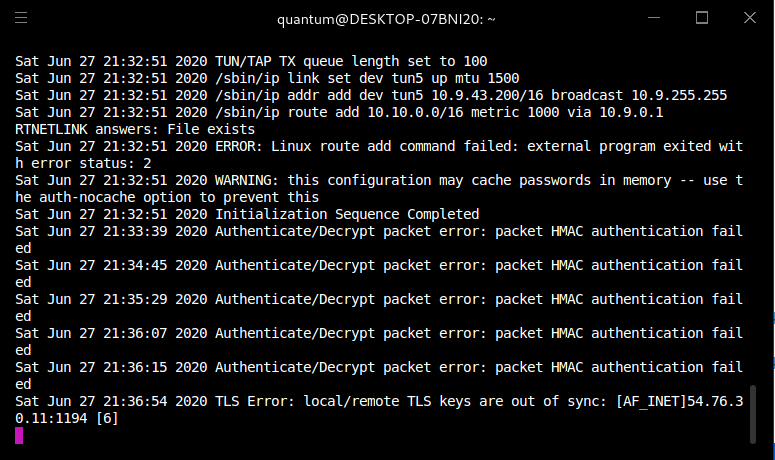
 vernal ruin
make sure you are connection the vpn inside the vm, not on the host @rose zinc
 rose zinc
noted, thankyou.@vernal ruin
sharp bisonBOT
TryHackMe
Learn how to look for duplicate instance of your OpenVPN connection.
• Step 1
Make sure you have setup your VPN connection correctly https://tryhackme.com/room/openvpn
• Step 2
Type ps aux | grep openvpn into your terminal and press enter
• Step 3
If there's more than one line (that don't start with "grep" or sudo), do the following steps
• Step 4
Type sudo killall openvpn into your terminal and press enter
• Step 5
Start the VPN with sudo openvpn <path-to-config>
From TryHackMe with ❤!
 sand sundial
So, openvpn is giving me a 10.2.x.x with a 255.255.128.0 subnet mask, and the server deployed by the room I'm in is in 10.10.x.x
So my machine isn't connecting to the same network (from my understanding).
vernal ruin
No they wont be same. Rooms dont use the same internal IP for security reasons @sand sundial
everything is allright if you are not facing some actual errors
sand sundial
Well, I can't scan the test IP with nmap or even ping it.
And I guess I don't remember what my VPN IPs were yesterday to notice that.
celest sapphire
if you look in openvpn logs it says that it adds a route to 10.10.x.x subnet
/usr/bin/ip route add 10.10.0.0/16 metric 1000 via 10.X.0.1
but /access shows I'm connected just fine
celest sapphire
not every machine responds to pings
try scanning it with the ping check disabled
sand sundial
right, and nmap -nP brings back nothing
vernal ruin
IP doesn't change unless you change the config
celest sapphire
-Pn, not -nP afaik
feral dock
right, and nmap -nP brings back nothing
@sand sundial The correct flag is -Pn.
sand sundial
....whoops
toxic python
Access is unreliable FYI
celest sapphire
iirc it got fixed recently it wasn't
@vapid dawn connection status on /access was fixed right?
sand sundial
Working just fine now lol
vapid dawn
no it's something we're still looking into @celest sapphire 🙂
celest sapphire
oh ok
toxic python
Taking those celebratory emojis off your earlier reply 😤
celest sapphire
understandable
 royal cedar
Good afternoon all!!! So, I'm new to try hackme, and ran into some issues with "Blue" and "Ice". Long story short, run the exploit get a "but no session was created" error.
royal cedar
using windows/http/icecast_header for Ice in stream right now. Still not working right.
abstract stag
It was replaced with Blaster.
@eager fulcrum This was for Advent of Cyber. Is Day 13 still completable as ||Chrome|| is removed?
eager fulcrum
Hi, yep. It was replaced with blaster so the exploitation is much more simple. Retro was complicated with the addition of ||chrome|| leading to intentional weirdness from dark
If you're looking at a writeup, use the ones on Blaster
sturdy umbra
@royal cedar is your issue fixed?
abstract stag
@eager fulcrum Cheers mate. Before looking at a writeup, can I have a couple hints? Can post if community-hints if more appropriate.
eager fulcrum
I can't give you them, but yeah if you ask there you can get a hint most likely
abstract stag
👍
royal cedar
@sturdy umbra sort of, I reached to someone on the #room-help line. They said I should change the payload, based off what they had seen on my stream. Then suggested I go through the Metasploit room to get used to using the tool. So, I'm going to circle back to Ice and blue after going through that room.
sturdy umbra
Very nice. Good luck!
naive dust
Hey I got OpenVPN to run on Kali Linux but the Access keeps showing up with the X. Initialization is successful, just not able to connect to the boxes.
toxic python
@naive dust access page notoriously unreliable.
naive dust
I heard
toxic python
Try redownloading the config pack
toxic python
Which room?
naive dust
Now TLS handshake failed
toxic python
Yea then redownload
naive dust
The Basic Pentesting room
ok
Redownloaded it. Initialization Sequence Successful but the red X is still there.
toxic python
Red x on the access page?
Ignore that
If sequence successful you’re good to go
Try to spin up a machine and ping it
Or do the openvpn room to ensure you’re connected
naive dust
I opened the machine and put in the ip in the search bar. Takes forever to load
Like 3 of them
However, I was on the web browser and one of the machines did actually load.
naive dust
I did the browser thing this afternoon and it spun up instantly
toxic python
Are you a subscriber? It will be slower if not. Shouldn’t be as bad as you’re describing though
If you do the openvpn room does that machine work relatively quickly for you?
naive dust
I am
ah shoot I just closed my VM
Firefox can't establish a connection
The ping works
And yes I am connected
naive dust
I mean connected to the VPN but I still can't access the machines
Firefox can't establish a connection to the server at 10.10.83.128
I searched "my ip" on the firefox browser and it's saying my home ip. Initialization sequence success but my ip is still the same and the machines are unavailable.
toxic python
Are you connected to the vpn on your host OS or your VM?
toxic python
Can I see both a screenshot of the openvpn running and then you running ip a in a separate terminal
naive dust
Yes, holdon.
I guess it might've worked since it's in maintenance?
Usually it's unresponsive
toxic python
Yea looks like you’re connected. The site might be pushing changes not sure
sharp bear
nah if you ever see an undergoing maintenance page in a room it’s intended and is part of the challenge
naive dust
Alright it works now. Thanks! I spent like 3 days figuring this out
toxic python
Awesome!
 ripe lintel
Hi I'm trying to connect to the vpn on my mac, and I've gone through all the trouble shooting options and still cant get it to work. When i run sudo openvpn <config file> I get a successful output but I'm still not conncted on the site and when I check my ip with curl ifconfig.me It has not changed. Any help would be appreciated
 tulip jacinth
Hiii for the LearnLinux room I can not access to host shiba1
it said that "port 22: Connection timed out" when I tried to ssh
here's a screenshot!
 cloud dirge
Can you ping the server?
sturdy umbra
@tulip jacinth Hey! I don't think you're connected to the VPN.
Do you know how to connect?
@tulip jacinth :)
white mirage
https://tryhackme.com/room/linuxctf down for anyone else? the machine starts and are pingable but cant SSH and inbrowser botx cant connect
EDIT: try for 10min and ask for help. then it starts working :p
TryHackMe
An online platform for learning and teaching cyber security, all through your browser.
tulip jacinth
hey I'm sorry I didn't reply soon! It's 11 here already! Thank you for the help I'll check it first thing in the morning ! @sturdy umbra
sturdy umbra
Sure thing, I assume it will fix your problems. If not, feel free to ask again or ping me! 😄
 hot spruce
I'm unable to login into my kali machine, it's saying credentials are invalid can someone help? I used
username- root
password- Tryh4ckm3
Though i can ssh into my machine
celest sapphire
Please don't spam the same message in every channel.
Where does it say that your credentials are invalid?
leaden token
just re-deploy the machine
cloud dirge
Make sure caps lock isnt on? Try typing the password out on your main machine and copy and paste it into the login box?
 tacit comet
hi guys, i am having some trouble connecting to the vpn
i cant access the machine on the web browser nor ping it
wait i am stupid
i can't ping the machin on this room
all good
sturdy umbra
@deep trellis Hello, I see you're online and wanted to ask you if it was possible for you to change my username? I was told it could be done by you.
leaden token
it can be also done by emailing support@tryhackme.com
(and it's better to do that way)
sturdy umbra
Ah, I can do that if this is a hassle.
Righto, I will do that.
Also, if someone replies to your feedback, are you just supposed to reply to the email as usual?
leaden token
not sure about that
 fickle charm
Is anybody not able to access the in browser machine?
naive dust
hello guys when did the tcp come to the vpn ...? we can't connect it over udp at egypt
leaden token
i think they are just blocking UDP connections
sturdy umbra
Weird.
leaden token
on the government level
 candid abyss
hello guys, im trying to google but i cant find some proper explanation on following instruction from github tmux plugin manager:
Add new plugin to ~/.tmux.conf with set -g @plugin '...'
Press prefix + I (capital i, as in Install) to fetch the plugin.
I added plugin to needful file, but i dont understand what it wants from me in second step
how do I press "prefix" + I ?
sturdy umbra
I beleive the prefix it refers to is (Control + B)
I dont use tmux, but funny enough I just did the RP room today.
naive dust
@leaden token how can i bypass the block
sturdy umbra
I dont have enough expperience with tmux, very sorry!
I'm sure someone will help you soon.
candid abyss
i just found some video, skipped it to where the guy tries it, you are correct!, it just doesnt work for me so Maybe its not installed correctly
thank you mate
celest sapphire
This channel is for tryhackme related tech support, please ask in #general as it's not related
 dark whale
I'm hoping someone can help me. I have subscribed however am having extreme trouble deploying a Kali machine in a browser. It keeps asking for my username and password however all the username and passwords I know dont work.
Is there anyone that can suggest what I can do?
Okay thank you
toxic python
Try root:Tryh4ckm3 @dark whale
 cursive drift
Is the 'Get Reciept' feature on the website working? I was a subscriber (now cancelled) and am trying to generate a receipt for my subscribed months however the page is telling me I have 'no transation history' I have the emails saying I am subbed but I need the invoices
cursive drift
I was a monthly sub via recurring bank transfer for April-May but selecting those months doesn't give me anything
cursive drift
Is there a way I can contact support for these invoices?
deep trellis
Is there a way I can contact support for these invoices?
@cursive drift Hi there, yes email support@tryhackme.com and we can have them generated for you
cursive drift
@cursive drift Hi there, yes email support@tryhackme.com and we can have them generated for you
@deep trellis Many thanks, I'll shoot an email over now 🙂
 normal garden
Having trouble accessing the kali machine in browser, I've restarted and cleared cookies, logged out and logged back in
deep trellis
Having trouble accessing the kali machine in browser
@normal garden wait 30 seconds and then click "Reconnect"
normal garden
@deep trellis It automatically tries to reconnect every 15 seconds, but fails to each time
deep trellis
How long has it been up?
normal garden
I just started it. But if finally connected. For some reason, if I waited through 3 15 second reconnect rounds, then hit reconnect myself, as you suggested it launched.
ripe lintel
Hi I'm trying to connect to the vpn on my mac, and I've gone through all the trouble shooting options and still cant get it to work. When i run sudo openvpn <config file> I get a successful output but I'm still not conncted on the site and when I check my ip with curl ifconfig.me It has not changed. Any help would be appreciated
safe briar
Is there a way to leave all rooms?
I joined like 45 rooms that I wanted to do, but I want to leave them and follow the paths.
feral dock
You don't have to leave rooms to follow a path, but you could write a simple script that uses the api to leave all the rooms for you.
safe briar
oh I didnt even think of that. That's a good idea.
Thanks
Yeah I know I dont have to leave them. Im just OCD and want to.
Honestly I can probably do it manually in the time it would take to set up an api script.
@feral dock Do you know why I am unable to leave any of the RP rooms?
feral dock
Does it return any errors?
feral dock
Hmm, yeah that's interesting 🤔
safe briar
I have Writeups where Leave should be.
And its not that Ive left them and it hasnt refreshed. I have only the RP rooms left.
Ill try logging out and back in
feral dock
Yeah, please wait, I've informed an admin, and they'll look into it.