#site-support
1 messages · Page 139 of 1
 zenith obsidian
 deep trellis
Awesome, PickleRick once deployed works for sure
I've just tried and have had no problems with webappsec
zenith obsidian
ok just updated it ill try connecting to rick
samething
ill try a new config file
deep trellis
Try disconnecting and reconnecting
zenith obsidian
i did
deep trellis
Yeah regenerate your OpenVPN file too
zenith obsidian
i did that too
still nothing
is it because my normal home ip is on a 10...* address?
10.0.0.*
deep trellis
Ohhh, our routing table routes all 10. traffic
zenith obsidian
yea i read that
zenith obsidian
while connected to openvpn?
deep trellis
Yeah
zenith obsidian
ok
deep trellis
Im just about to pop out to the shops
zenith obsidian
whats route -a
 timid tangle
hey @zenith obsidian, what's the issue? You can't connect to your machine?
timid tangle
Cool
deep trellis
Oh, PickleRick works for you??
zenith obsidian
yes
deep trellis
Eyyy :)
zenith obsidian
im lost tho for the last one
im probably overthinking
nvrmind webappsec works now
 wet shard
I'm working on a VM :D, I might bother you about configurations soon 😃
 copper mist
I have, what Reverse Shell are you using?
Use:
http://pentestmonkey.net/tools/web-shells/php-reverse-shell with nc -v -n -l -p {port}
Works vv nicely
copper mist
The host and port number
 naive dust
~ nc -lnvp 4444,
If the machine ip (box) is 192.168.1.3 then
$ip = ‘192.168.1.3’
$port = ‘4444’ ?
copper mist
Try a different port
naive dust
1234 ?
copper mist
1234 or 3344 I think
naive dust
it isn’t working :(( @copper mist
copper mist
Will try to help more when I'm at my laptop
naive dust
alright
copper mist
Not working for Sudo
naive dust
I’m trying to get a reverse shell
copper mist
That method should work
 thorn badger
@naive dust you have to put your local machine ip address here
Today i completed this room
naive dust
My local machine ip is 192.168.1.1
The Box ip is 192.168.1.3
thorn badger
Put the 192.168.1.1 in the php shell
thorn badger
Your ip will be in 10...*
naive dust
I’m running the Vulnhub machine locally because my wifi is down @deep trellis
deep trellis
Ah ok
naive dust
Because of some construction work going on
naive dust
$ip = ‘192.168.1.1’
$port = 4444
nc -v -n -l -p 4444
When i visit /wp-content/themes/twentytwelve/404.php it isn’t working
thorn badger
@naive dust listen try
Ip-address/wp-admin/theme-editor.php?file=404.php
Try this bcoz it's worked for me
Nd try
nc -l your-local-machine-ip 4444
May be it will work
Try nd let me know
thorn badger
@naive dust 🤘
naive dust
now just Privesc is left
 livid aurora
For Linux CTF there doesn't seem to be a command called flag11
deep trellis
Look at your alias'
livid aurora
alice@ip-10-0-0-207:~$ alias
alias alert='notify-send --urgency=low -i "$([ $? = 0 ] && echo terminal || echo error)" "$(history|tail -n1|sed -e '''s/^\s*[0-9]+\s*//;s/[;&|]\s*alert$//''')"'
alias egrep='egrep --color=auto'
alias fgrep='fgrep --color=auto'
alias grep='grep --color=auto'
alias l='ls -CF'
alias la='ls -A'
alias ll='ls -alF'
alias ls='ls --color=auto'
deep trellis
Try switching accounts
deep trellis
You need to look around the file system
See what you can get
Clues
Or if you're stuck move on
and come back to it
wet shard
Hello! Is it possible to re-upload a VM if I want to update it? Also I was wondering if I could try my own questions without getting the points, on the room? Thanks!
deep trellis
Hey, you can re-upload but you will have to delete your question (one with the material attached) and recreate it
I can update it manually if need be
So yes, if you want to re-upload it, let me know and I will change it for you 😃
Oh and you can't do your own room without scoring any points.
And its awesome you're making a room!
wet shard
Oh thanks, I will let you know when it's uploaded 😄
deep trellis
No problem man 😃
naive dust
Privesc is a pain!!!
wet shard
Hi 😄
naive dust
hi
naive dust
trying to get familiar with privilege escalation techniques but failing
 rigid oxide
If you haven't already seen them, I suggest watching some of the video on IppSec's channel
He does HackTheBox walkthroughs and they have really good content going from entry to priv esc
thorn badger
Why is it failed?
 dense ivy
@thorn badger "Connection Timed Out" would lead me to believe either the IP you entered is incorrect (typo?), the system you're targeting is blocking access to port 445 or there is no service on your target running on 445
Port 445 is ‘SMB over IP’. SMB stands for ‘Server Message Blocks’. Server Message Block in modern language is also known as Common Internet File System. The system operates as an application-layer network protocol primarily used for offering shared access to files, printers, serial ports, and other sorts of communications between nodes on a network.
Maybe it's not a Windows box, or maybe SMB is disabled?
thorn badger
@dense ivy it's the blue challenge on tryhackme . It have open smb service and it is windows system
thorn badger
Now what's the issue with metasploit?
rigid oxide
Also, if you want to play with that smbv1 issue there is a nice write up on blue ;D
wet shard
Oh I just noticed this announcement "If you make a room for others to use on the site, you will get a TryHackMe site award, t-shirt and sticker." - does this mean I'm eligible for a t-shirt and a sticker :D?
deep trellis
@wet shard yes
wet shard
Yaay! I love goodies! How does it works, do I need to send you my address or something? (I don't remember if I gave it on the site or not)
rigid oxide
You can send that, your credit card number, and those wacky three numbers on that back to me for that shirt ;D
@wet shard
rigid oxide
Wait, how'd you find that picture of me online?
 woeful stone
The power of OSINT
rigid oxide
OOOF
@woeful stone was there a particular linux enumeration script that you liked for bookface? I'm trying to make sure the write-up I'm doing is beginner friendly and LinEnum didn't grab what the versioning information that is necessary for escalation in this case
Also making sure I don't have any non-sequiturs within the write up lol
woeful stone
Nope, I follow a priv esc checklist :) check sudo, check SUIDs, check world writeable files and then finally check the kernel version
After a while you start to spot SUID binaries which are out of place and remember kernel/program versions which are vulnerable
rigid oxide
Makes sense, I think I need to personally get better at following a good priv esc checklist and that'll probably help out. I'll add a blurb in the write up regarding checking for those items prior to the online check regarding the item that has the vulnerability. Thanks much!! 😄
woeful stone
https://failingsilently.wordpress.com/2017/08/07/privesc/ can't really go wrong with this one :)

Useful Privilege Escalation techniques for CTF Wargames
rigid oxide
brb pinning that in my browser lol
rigid oxide
@woeful stone ran that binary check and it worked like a charm! Thanks again!
 neat ether
I wonder if anyone would point out the right direction for solving level 2 hash #3 of this room https://tryhackme.com/room/crackthehash. I am not quite sure how to work out the format of this hash.
Hash: $6$aReallyHardSalt$6WKUTqzq.UQQmrm0p/T7MPpMbGNnzXPMAXi4bJMl9be.cfi3/qxIf.hsGpS41BqMhSrHVXgMpdjS6xeKZAs02.
Salt: aReallyHardSalt
Rounds: 5
TryHackMe is a platform for learning and teaching cyber security.
woeful stone
@neat ether $6$ signifies sha512crypt 😃
 pallid remnant
 timber yacht
Hey, noob question, I am attempting the basic pentesting room and i have connected my openvpn and deployed my vm, but it would seem that my vpn is connected on a 10.8.0.0/16 interface, but my vm is on 10.0.0.4? Shouldn't I be on the same network as it or am I misunderstanding something?
rigid oxide
You are actually! The entire 10.0.0.0/8 subnet is the network
Good question though!
try pinging your box
timber yacht
No response
rigid oxide
Is the VPN connecting properly? This can take a few minutes sometimes
Also, try running an nmap with the -Pn flag set, see if it maps
that box in particular might not allow pinging
Also, Skidy will likely be up in few hours and can help too
He'll be able to check it from the admin end
timber yacht
The VPN seems to be properly connected, but to a different network segment from the vm. I'm not sure if that's how it's supposed to be? Should I change the net mask of my tunnel adapter
rigid oxide
No, don't change any of the VPN settings from the defaults. This is a split tunnel and the config file does all the work for you on that end
The netmask will be inherited on the tun0 interface right after connecting
Try a different room, I know blue will respond to pings. I'll ping Skidy too and he can have a look from his end
@deep trellis
One way or another we'll get ya all sorted out
timber yacht
hey thanks!
rigid oxide
No problem at all! VPNs can be finicky beasts sometimes
timber yacht
do i need to download a vpn config file for the other room?
rigid oxide
nah, it'll just be your master one for the site
timber yacht
okay
rigid oxide
It may be worthwhile attempting a redownload of that file to replace the old one
Are you running it on Windows or Linux?
rigid oxide
Gotcha gotcha, are you connecting via the cli one-liner?
timber yacht
yep just openvpn ./maibes.ovpn &
rigid oxide
Try just this in a terminal: openvpn --config /path/to/config
and leave that running
timber yacht
okay
rigid oxide
bg'ing it can be problematic sometimes and doesn't always work with the 30 minute time out on the vpn for inactivity
I suggest running that in a tmux pane, I usually remote into my box and just pull it up in a tab and kill the vpn when I'm done
timber yacht
my tun1 ip is 10.8.1.130 - 255.255.0.0 and my vm ip is 10.0.0.102, does that seem right?
rigid oxide
yup yup
timber yacht
okay\
rigid oxide
that's fairly standard, just keep in mind you can also only have one device connected at a time for the vpn
timber yacht
just to be clear, the challenge is on the deployed vm right?
rigid oxide
shouldn't matter with only having the parrot box connected in this context but good to note
yessir
timber yacht
so i have to go through a default gateway to reach the vm?
rigid oxide
yeah, the vpn should configure the split tunnel aspect of it automatically
if that is misbehaving, spin up a live boot of kali and try that for now
rigid oxide
that way you'll at least be able to have some fun and work on the parrot box on the side
timber yacht
ill give it a shot thanks
rigid oxide
yup yup, ping me if that doesn't work
timber yacht
kay!
oh yay
i changed the default adapter settings from the parrot os vm image defaults, rebooted, and now it works
(im running it in vmware workstation) - thanks for your help!
rigid oxide
No problem at all! I'm glad it working!!
 onyx merlin
$2y$12$Dwt1BZj6pcyc3Dy1FWZ5ieeUznr71EeNkJkUlypTsgbX1H68wsRom Anyone got any tips for solving this one. All i know is bcrypt. I don't know if im using hashcat wrong.
rigid oxide
I'll give you the hint that it isn't bcrypt
(The hint is somewhat misleading on that for how to actually crack it)
onyx merlin
I also keep getting this. Will this affect my chances I can use --force but I feel like that just aimlessly does stuff and then closes without any result.
onyx merlin
Anyone know how to make my VM use my GPU because 26days to go through the whole of rockyou.txt would take me a bit.
rigid oxide
Remind of this later and I can try to find the doc on setting up the gpu drivers for that. If you increase the gpu memory of the vm it might help in the mean time
wet shard
Good evening! I think this is more of a question for @deep trellis , I'm writing content for an offensive security training session for devs and offsec enthusiasts, do you think TryHackMe could be used in this context ? Is there a way to create some kind of room "directory" with only the rooms for a specific session for instance ?
deep trellis
Yes, that's actually coming very soon :)
Like "Web" or "Forensics" etc .
And we will have "Paths"
Paths are a chronological rooms to complete
wet shard
Oh I see https://tryhackme.com/paths/ ! Cool!
TryHackMe is a platform for learning and teaching cyber security.
deep trellis
TryHackMe is a platform for learning and teaching cyber security.
You found that quick 😃
Its still in development
wet shard
Haha yep I noticed, I didn't touch anything on the page, don't want to break the site 😄
onyx merlin
When doing the fowsniff room I'm using the pop3 login msf module. I understand that the user im looking for would be siena but I wanted to try going through them all but after the 3rd attempt it stops giving me error messages which I'm assuming means the server blocks the attempts anyone know how to get around this?
I understand I could do it manually but I thought for future uses I would ask.
deep trellis
@onyx merlin I will answer this tomorrow :)
deep trellis
@inland vessel Talk about your OpenVPN issue here
 inland vessel
First I watched your video, then I ran this sudo apt install openvpn
deep trellis
Okay yeah
inland vessel
I always seem to take something this is so simple and over complicate it lol
inland vessel
command not found... LOL.... Let me try it over from the start.
deep trellis
Ah yeah, its probably not installed properly
Or installed as root
sudo apt-get install openvpn
Run that
inland vessel
Shoot... Now its worse. I think when I installed brew I messed something up
deep trellis
sudo brew install openvpn
inland vessel
Error: Running Homebrew as root is extremely dangerous and no longer supported.
As Homebrew does not drop privileges on installation you would be giving all
build scripts full access to your system.
deep trellis
run is as a normal user
inland vessel
IT seems to be installed "Warning: openvpn 2.4.6 is already installed and up-to-date
To reinstall 2.4.6, run brew reinstall openvpn"
deep trellis
Hmmm
Okay, so if you;'re running the openvpn command and its not finding it, its probably not in your path
@inland vessel

Ask Different
I installed openvpn with brew. The installation went fine, no errors or missing dependencies. But now when I try to run it:
users-MBP:~ user$ brew install openvpn
Warning: openvpn-2.3.7 already
Follow that, it should add your openvpn client to your systems path (basically, it will tell your system/terminal where to look for that program name)
inland vessel
Thank you!!!! I will give it a shot once I get back. I have to go run some errands.
deep trellis
No problemo!
inland vessel
After following the steps on the page you shared, I was still not able to get it to work. I went with another recommendation on that page. https://tunnelblick.net/index.html
Tunnelblick | Free open source OpenVPN VPN client server software for macOS
It seems like its just a GUI for OpenVPN.
You have an experience with Tunnelblick
It shows I am connected now. It seems to be working using Tunnelblick... Thank you for sending me to that page.
deep trellis
Oh nice, its awesome you got it working 😃
inland vessel
👍🏻
 dusky plinth
I have completed all the questions for Basic Pen-testing but I’m still at 91% completed @deep trellis
onyx merlin
...
deep trellis
My DB says you have not completed this question
dusky plinth
🤦🏽♂️
deep trellis
Thats a really weird bug
Rod, I have just tested it and it works. This is really weird. Mind logging out of the site, then back in?
dusky plinth
Ok the issue was on my end. I didnt know that I had to physically "click" on the completed tab for it to register. All good now
deep trellis
Ah, yeah, Ill make that more clear in the future.
dusky plinth
no worries
deep trellis
@dusky plinth Does it take a long time to register for you?
Like when you click it, it lags 2-3 seconds before telling you
dusky plinth
im using Firefox on Kali vm
deep trellis
Ah okay, thanks 😃
naive dust
@rigid oxide teach me to setup the drivers :)
https://i.imgur.com/ciEa6Xj.png
 rigid oxide
Thank you for the reminder xD I'll see if I can find that article quick
Btw you can force hashcat to run anyways by adding the --force switch
naive dust
Yup
However it's very slow I am not sure if it's due to having old graphics card or the drivers
Like it took it 10mins to get 2040 combinations
GTX 960M
rigid oxide
So the trick is getting linux compatible drivers for the gpu and making sure to pass it through correctly, it's a little iffy
that's not too bad for a gpu, shouldn't be uber slow
naive dust
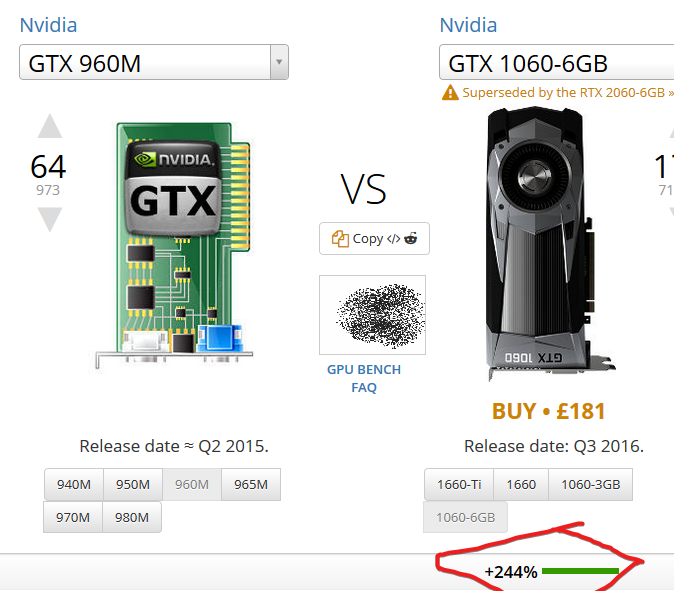 rigid oxide
yeaaaaah, desktop cards are a lot better than m cards

Secjuice Infosec Writers Guild
In this article security researcher Sebastian Bicchi teaches us how to build a low-cost, but high quality cracking rig by repurposing a hardware crypto mining rig.
This isn't what I was looking for but it's a nice start, I'll see what I can do on more details
naive dust
Thank you kindly 😃
rigid oxide
yup yup!
naive dust
https://tryhackme.com/room/rpnmap
How about if I want to scan every port?
#12
Can someone tell me the answer I would just do -p 0-65535
TryHackMe is a platform for learning and teaching cyber security.
woeful stone
-p- is shorthand 😃
naive dust
🤦 couldn't find it anywhere thank you 😃
 agile bobcat
@deep trellis Hello, I was wondering if there was a way I could change my username on the site. Thanks
deep trellis
At this moment in time, it's not possible to change your username.
zenith obsidian
ok im trying ultratech
cant believe im stuck on task3
i must be overthinking
can i get some help or some guidance 😂
idk if anyone remembers me i was quix
zenith obsidian
do i need to get a shell for the last part of ultratech?
or am i really overthinking
rigid oxide
I haven't completed it quite yet but @wet shard might be able to help since he made it
zenith obsidian
what part are you on
and i might be on the right track but i feel like its overcomplicating it
i could be of assistance to you 😄
rigid oxide
I don't want to give spoilers, I'm at the point where I'm examining part of the api
just haven't bothered yet lol
rigid oxide
yup yup xD
rigid oxide
If you do any of the rooms I made I can definitely help with that lol
zenith obsidian
what rooms did you make
rigid oxide
Blue, VulnOS, RP Nmap, RP Nessus, and Car Hacking. At least those are the released ones
I highly suggest doing blue if you haven't yet, I've geared it heavily to being well guided
rigid oxide
Keep in mind with that one there's an official write up linked on that room that should help out
rigid oxide
yup, the write up is more to give a 'nudge' (blue that is)
rigid oxide
Nah, Ultratech is medium
 rigid oxide
oh yeah lol, that one is beginner xD

 rigid oxide
He's probably asleep at the moment, I'm sure he'll get back to you in the morning since you know, he's been pinged four times and probably doesn't need to be pinged more lol
deep trellis
@zenith obsidian @wet shard Can you help brute?
zenith obsidian
@deep trellis i just got home from school
im stuck on the final part of Ultratech
deep trellis
Hmm, when @wet shard comes on, he should be able to help you
wet shard
Hey ! @zenith obsidian
Sorry, I'm not at home atm 😄
I'll dm you
There's no bruteforce needed though 😄
I'll add more questions to make it more user friendly as soon as I'm back home (in 5 days)
zenith obsidian
Oh the bruteforcing was for a different machine
wet shard
Ooh okay :D!
onyx merlin
Does anyone know if VMware Workstation allows for USB devices I'm trying to connect a WiFi Adapter to my Kali Machine and whenever I do ifconfig the wlan0 won't show up any one have any guidance. I know that VirtualBox has an easy method so I might migrate over to that.
deep trellis
Hmm
onyx merlin
I just think I'm being dumb. But honestly this UI to me isn't intuitive
deep trellis
If VirtualBox has the option, VMWare will
onyx merlin
Well I added a network adapter that set to bridge to my adapter but in ifconfig it gets displayed as another eth instead of wlan and doing netdiscover finds nothing leading me to believe that it hasn't worked
onyx merlin
Why is it so hard to find decent understandble documentation for these issues its either complete tech jargon. Google just brings me to a terrible online forum that says just go into the settings and click it well what if its not there oh no further support yipee. All the youtube videos seem to want me to download this thing called compat wireless. All the links I click seem to be dead however so I can't download it.
deep trellis
I would say is it a driver issue, but if you cant find anything about the device even on the VM, seems like its something deeper
onyx merlin
Might be in business found a video that uses my exact wifi adapter
onyx merlin
Hours later and I broke everything 🤣
rigid oxide
^that's about how my experiences with drivers goes with wifi on vms
onyx merlin
My kali no longer displays the desktop picture or any icons 👍
rigid oxide
rip
onyx merlin
Its a blessing in disguise because now I can switch to VBox instead of VMware because honestly the USB option seems great
rigid oxide
I'm a vmware shop guy but VBox is what I prefer for doing THM work
onyx merlin
Probably could do the same in VMWare but I'm too dumb and VBox seems to have more online resources and guides
rigid oxide
since it's supported well on this site and it's easier to just use what everyone else is using for that
yeah
VMware is nice with the server setting, that's what I prefer on that end but VBox is nice on client side
onyx merlin
Yeah I tried doing an ethical hacking course while using VMWare while the instructor used VBox my experience was horrific.
rigid oxide
^that's one trick I've always found, always match what your instructor is using
and if it's on windows, use windows
onyx merlin
but I wanted to be a cool linux man....
rigid oxide
I remote into my box and just use pure linux that way, but I'm also fully willing to suffer my consequences of shit breaking and having to resort to my windows based backup
onyx merlin
All I want is to see my glorious wifi adapter in action monitoring and packet injecting my sweet home network.
I don't want to turn this channel into my own personal tech support but anyone know why I can't sign into youtube it redirects me to /oops without any info even though I'm signed into my gmail.
Now that was certainly weird I clicked sign in got redirected clicked sign in and then after like 10 iterations boom it worked
rigid oxide
hmm
onyx merlin
I don't know either if I have 2FA do I need a password for youtube because I know there is an option??
onyx merlin
Yeah probably just some weird bug would be cool if I could replicate it still persisted after I cleared cookies. Just weird that it worked after clicking it so many times.
zenith obsidian
am i just using the wrong wordlist for Basic Pentesting
cause i cant seem to get the ssh pass
wet shard
Hi again :D, the password is in ||rockyou||
zenith obsidian
lol i was using it earlier but i didnt think it would have to take aslong 😄
onyx merlin
Anyone know of any tools that can be used for Weebly sites like WPScan for wordpress?
 slender breach
ultratech really slow for me
wet shard
@slender breach Hi! Which operation(s) are/is slow on UltraTech?
 patent arrow
If i need Support for CTF im right Here?
rigid oxide
@patent arrow whatcha need help with?
patent arrow
With the CapterTheFlag Task 2
I extract the File an in there is a File with a hash, i tried to decrypt with base64 Decoder
rigid oxide
lemme ping @little yarrow
 little yarrow
@patent arrow try not to discuss sensitive things in public 😁
Also you can DM me whatever issue you are having
patent arrow
Ok, sorry about that 😅
slender breach
Car hacking 101 scoreboard gone
rigid oxide
That's intentional, it's a simple room since it's only one question
onyx merlin
For the learning Burp room I followed step 1 and added the certificate but now I get this error on every site I try to load
All good got it apparently you can't use Java 11 so had to downgrade
 half quartz
Can I ask an hint on one challenge of crackthehash?
wet shard
@half quartz yup! I'll DM you
 night tendon
hi, someone can help me with ultratech room?
rigid oxide
That'd be @wet shard 's room
night tendon
Ok, I'll talk him
 acoustic inlet

sxcu.net free ShareX uploader
I cannot crack this for some reason.
Any help?
Nvm, got it.
deep trellis
Awesome, what was the issue?
acoustic inlet
@deep trellis
 gaunt vessel
Hi all, I am trying https://tryhackme.com/room/crackthehash one of the challenges is to decrypt this: `
Hash: $6$aReallyHardSalt$6WKUTqzq.UQQmrm0p/T7MPpMbGNnzXPMAXi4bJMl9be.cfi3/qxIf.hsGpS41BqMhSrHVXgMpdjS6xeKZAs02.
Salt: aReallyHardSalt
Rounds: 5 So far I have found out its using sha512crypt and I am using the RockYou list and using hashcat with the command./hashcat64.bin -O -m 1800 -a 0 hash ../rockyou.txtthe hash I am decrypting is$6$rounds=5$aReallyHardSalt$6WKUTqzq.UQQmrm0p/T7MPpMbGNnzXPMAXi4bJMl9be.cfi3/qxIf.hsGpS41BqMhSrHVXgMpdjS6xeKZAs02.`. Any hints would be apprecated !
TryHackMe is a platform for learning and teaching cyber security.
deep trellis
@rigid oxide might be the best person to answer this one
gaunt vessel
@deep trellis figured it out with help from @opaque cape
deep trellis
Ah awesome
 late kayak
Hey guys! Trying my first Tryhackme machine - the 'basic pentesting'. I can ping, scan the machine etc, but I can't open up the link (by typing in th eip) in my browser.. any ideas on to why? Its just loading, and ive tried resetting the machine and even buying vip 😃
late kayak
Yes i'm connected and have successfully scanned the services of the target machine (with nmap). It says port 80 is open, but I cant access it on port 80 from the browser
deep trellis
What does the website say when you open it in your browser?
late kayak
nothing - its just loading forever
deep trellis
Can you try another browser?
late kayak
2sec
deep trellis
Work?
late kayak
yeah. I had burpsuite on with intercept - which is why it wasnt loading... thank you!
late kayak
Will do! Thanks 😃
 golden flare
hi i wnt to knw how do i knw that my room is in competition ? and its current position?
deep trellis
Hey Whiteheart,
We will make all final decisions on the competition on Wednesday.
You room has been entered though.
golden flare
ty
golden flare
Hi @deep trellis when the results will be announced ?
golden flare
??
rigid oxide
I'm sure he'll announce it later, I believe it was 6 in the morning at the time of that first message for him haha
little yarrow
Yeah timezones sucks
rigid oxide
I'll take third for making a sadistic room lmao, JoyStick was a very fun one to design overall
@deep trellis thanks much!!
(I'll release a write-up and author's notes this weekend since it's been rooted)
 pulsar sundial
The "CaptureTheFlag" room, task 1, is confusing me. The hint mentions a command for finding strings but i've no clue what it means, is it refering to a commonly used program?
pulsar sundial
in what program?
little yarrow
You are provided a file and you have to look for the flag in that file
strings is a command on Linux system which print out all the human readable strings from any given file
So you have to use that command to print out string from a given file in the task
@pulsar sundial
pulsar sundial
cheers x
pulsar sundial
yeah okay, once I knew about the 'strings' command was very straight forward, cheers
little yarrow
Yeah
pulsar sundial
is there a writeup for crackthehash yet? Stuck on Level 2 Q3
deep trellis
Private message me and I will see if you;re getting it right
Oh wait, message @vapid dawn - Just seen he is online
pulsar sundial
I'm having the same password problem - am I the issue or am I missing something?
deep trellis
@vapid dawn can you fix?
pulsar sundial
Thanks :D
naive dust
Thank you!
 vapid dawn
@pulsar sundial @naive dust it should work now
try with the user tryhackme instead of ubuntu
vapid dawn
drop a message if anything else 😃
pulsar sundial
I still can't get in, doing tryhackme@IP with password 'reismyfavl33t'
vapid dawn
try terminate your machine
pulsar sundial
actually wait
vapid dawn
and deploy it again
 split junco
redeploy your server
vapid dawn
yeah we updated the image it used so you need to redeploy
naive dust
can I ask a question for crackme2
vapid dawn
yeah sure
 forest karma
For the tryhack me classess, what do you do if you are a complete begginner and there are exersises that you do not know how to do?
Sometimes there are writeups
but no one answer the chat
forest karma
yes
naive dust
I think he means rooms
forest karma
yes
deep trellis
Oh right, you just join the room to get going
forest karma
Room=Class 🤔
naive dust
If you have any questions about what to do you should ask them here @forest karma
pulsar sundial
Can anyone recommend me the best VM for osx??
acoustic inlet
What do you mean?
 acoustic hinge

 pulsar sundial
yeah thought so, cheers lads
naive dust
i have tied
so hard
but i guess there is a connection isssue
it has been 8 + hours
can someone save me
naive dust
idk
i downloaded
the config file and all
fired up the basic pentest box
and enum4linux or smbclient not working
worked for everyone to who i asked for help
pulsar sundial
what do you mean by 'not working'
naive dust
it is just showing a weird error
pulsar sundial
can we see it?
pulsar sundial
where did you get that IP?
naive dust
from the site only
pulsar sundial
the ones I get from the room usually look like 10.0.0.X
naive dust
when i deploy the machine
guys who got such ips also didnot have problem
it worked fine for them
pulsar sundial
does it respond to pings?
pulsar sundial
are you running a VM?
naive dust
yes
pulsar sundial
not sure mate, wish I could do more to help, I'll check out the room myself just now
naive dust
hi
it worked
i changed my network
to a mobile 4g network
and it worked like a charm
it was my IP vendor's firewall
naive dust
fucking vendors
pulsar sundial
well glad you got it sorted bro :D
pulsar sundial
omgosh I think im getting the same error as you LOL
let me switch to my 4g
worked for me too lol, glad you suffered through it so I didnt have to xx
rigid oxide
I'm glad you were able to get that figured out at least!
naive dust
Haha
So finally we got the fix xD
It's okay, we are here to share.
I am just glad the suffering has ended after 9 hours.
Now can sleep like a little puppy
And not give a damn
🐶
And you are glad, I suffered. Lol, what world is it now lmao ? XD
pulsar sundial
you suffered so i didnt have to, a cyber security Jesus
naive dust
Lmao xD
deep trellis
Glad to see you fixed it @naive dust
pulsar sundial
the "rank" on my profile, out of how many people is that out of?
deep trellis
Its the rank you get when you get points on the site
naive dust
It says I get privileges but I notice no differences
deep trellis
What level are you?
naive dust
8
deep trellis
I will be releasing an email about levels this weekend
If you have not already noticed, there are a few extra things you can do...
You just have to find them
deep trellis
Yeah, Ill make it more obvious this weekend when I send an email to everyone about it
rigid oxide
Use this instead: https://www.vmware.com/products/workstation-player.html

VMware
VMware Workstation Player allows you to run a second, isolated operating system on a single PC.
I'm a VMware shop guy myself anyhow, this is a free single VM (at a time) program that'll be easy to work with
@novel rivet
naive dust
@deep trellis Thank you sir 😃
 novel rivet
ok thank you im going to bed now will work on this when i get up. thank you @rigid oxide
rigid oxide
No problem! Let me know tomorrow if you need more help!
novel rivet
ok just to clarify use that link provided to download virtual box?
novel rivet
ok thnx wioo message latwe
rigid oxide
sounds good (I think) haha
novel rivet
sorry will message later so tired lol
rigid oxide
sounds good xD
pulsar sundial
for the "joystick" room, how hard should i be reading into the title?
novel rivet
Hi @rigid oxide I've tried downloading VMware player but it said couldn't find an application to open it. Very frustrating at the moment just wanting to get on some hactivities 😭
naive dust
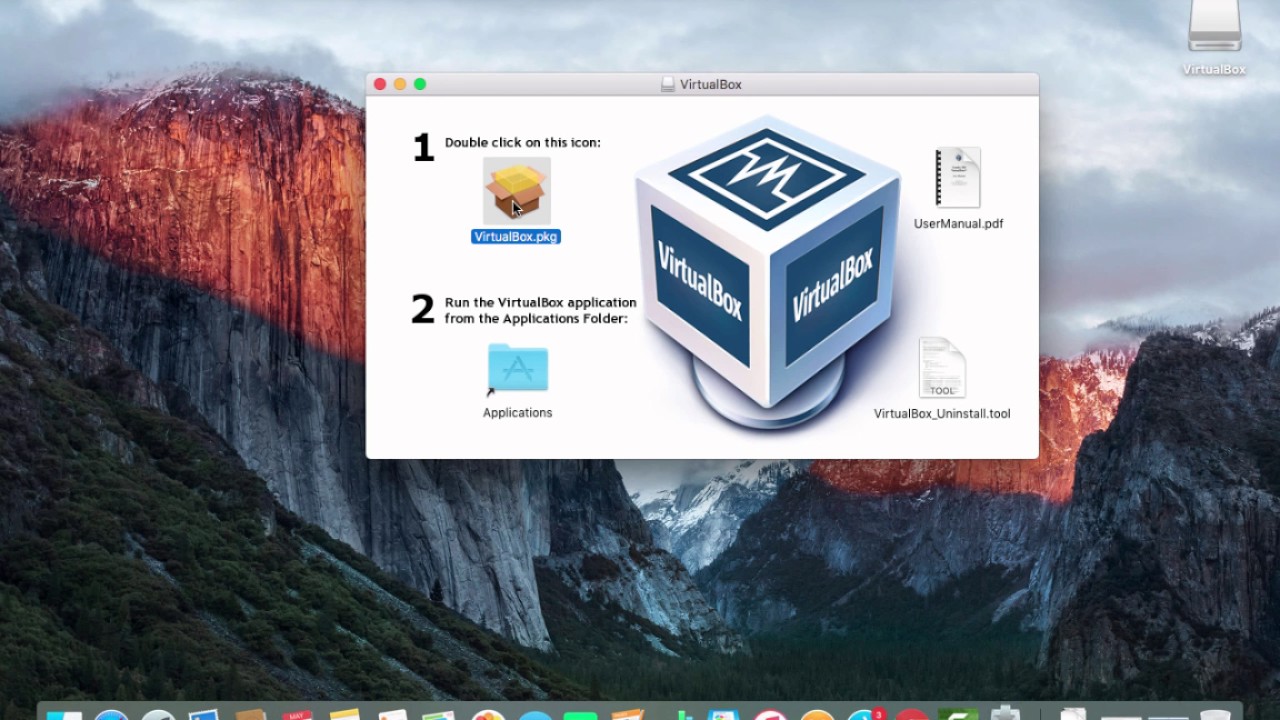
For Mac OS X hosts, Oracle VirtualBox ships in a disk image ( dmg ) file. Perform the following steps: Double-click on that file to have its contents mounted...
Use this to install Virtual Box my friend
Don't be scared to use Google ;)
@novel rivet Good luck !
novel rivet
Hi thats what I did and it still came up as not finding an application to support it 😦
ill try again
naive dust
Follow the video. You are on Mac OS X right ?
naive dust
Yes. I think, not harm in trying. I don't have much experience with Mac OS Mojave
But still.
Let me check.
novel rivet
ok thank you ill try again quickly here
naive dust
:)
novel rivet
okay found out why it didn't download i found out from this link: http://osxdaily.com/2018/12/31/install-run-virtualbox-macos-install-kernel-fails/

If you have attempted to install VirtualBox in macOS Mojave you may have noticed the installation sometimes fails with a generic “The installation failed” error message. Then, when tryi…
next question if any help. what should i really do now since the guide on tryhackme says download OpenVPN. what would be my next step? sorry if that sounds like a dumb question I'm quite new to all of this so just trying to learn
do i need to do something with my config file(like download)?
 last olive
$sudo apt install openvpn
$openvpn your_config.ovpn
--snip--
Initialization Complete
Then click on deploy, you'll see the IP of the room and you're good to go.
novel rivet
put that into terminal?
last olive
Yup
novel rivet
okay thank you
last olive
There's a good YouTube video on config setup, have a look.
little yarrow
Isn't that supposed to be for Linux machine?
Or does those commands workon mac OS also ?
novel rivet
not sure. I'm still having trouble with terminal not accepting my account or apple ID password. Not really sure what to do from here.
last olive
You already booted Kali on Vbox, right?
novel rivet
no i have not. don't know how to do that tbh.
pulsar sundial
On mac, pretty sure you can use brew to install openvpn
novel rivet
@pulsar sundial would that be the reason terminal won't accept my password? I have downloaded VirtualBox
Tbh an HP brand laptop tomorrow with windows 10 on it. Its cheap and just use it for all my projects and will be probably easier to download everything I need.
pulsar sundial
Can anyone give me a pointer for 'crackthehash' level 2 question 3?
vapid dawn
DMed you @pulsar sundial 😃
 steel bobcat
Hello there, it appear that the given is not in 10.x.x.x. (my tun0 showing 10.x.x.x).
Challenge: https://tryhackme.com/room/basicpentesting
TryHackMe is a platform for learning and teaching cyber security.
with 34.x.x.x, the SMB (port 445 or 139) are filtered. Is this a bug?
little yarrow
The tun0 will be your VPN ip
And the 34 one is you machine ip the one you deployed
They will be different
Also maybe try to first ping the machine
And then run nmap just on those ports
steel bobcat
Hi @little yarrow thanks for the reply. The ping on 34.x.x.x is successful. However, the SMB ports (required by the challenge) are filtered.
funny thing is i thought both ports are suppose to be unavailable and i try exploiting the port 8080 using struts2_rest_xstream but end up empty session.
Yup, i confirmed that the deployed 34.x.x.x machine is public ip. Can be access without VPN.
The IP details
little yarrow
Have you tried to terminate and re deploy it ?
steel bobcat
yes, a couple of time. Still getting a public IP
naive dust
Mk im stumped
I don't know the answer to lord of the root task 2 question 2
I rooted the box but I cannot figure out what the answer to this question is
 restive spear
I did too @steel bobcat but the port did not appear to be filtered
have you tried nmap -sC -sV -oA ?
deep trellis
Ah, I have contact @vapid dawn to update that room to be private ips 😃
Should be fixed soon
😃
Thanks for reporting
steel bobcat
@restive spear Now i realized that I'm using my VM for the task but my VPN is activated on my host computer instead. Yup, the SMB port are open, my bad 😦
@deep trellis you are welcome 😃
rigid oxide
!leaderboard
 sharp bisonBOT
LeaderBoard Of TryHackMe!
Username: lp1
Rank: 1
Username: DarkStar7471
Rank: 2
Username: captain_say_w00t
Rank: 3
Username: SuitGuy
Rank: 4
Username: captainjazzz
Rank: 5
 From TryHackMe Official API!
rigid oxide
From TryHackMe Official API!
rigid oxide
@last olive fantastic work!!
last olive
This reminds me that I have to complete some rooms, lol.
rigid oxide
same haha
deep trellis
!leaderboard
sharp bisonBOT
LeaderBoard Of TryHackMe!
Username: lp1
Rank: 1
Username: DarkStar7471
Rank: 2
Username: captain_say_w00t
Rank: 3
Username: SuitGuy
Rank: 4
Username: captainjazzz
Rank: 5
From TryHackMe Official API!
deep trellis
Thats awesome
rigid oxide
@last olive did a fantastic job on it!
deep trellis
Can we make Box Bot's Avatar TryHackMe's?
rigid oxide
yup yup if you want
Just send me the asset you want me to use
If you wanna make a site mascot, I can always change the asset to that as well
last olive
It couldn't be possible if @naive dust and @rigid oxide didn't helped me.
golden flare
ok so here is a target !leaderboard
just few days to go ....and my hibernation will end
😈
rigid oxide
o.o
slender breach
!leaderboard
sharp bisonBOT
LeaderBoard Of TryHackMe!
Username: lp1
Rank: 1
Username: DarkStar7471
Rank: 2
Username: captain_say_w00t
Rank: 3
Username: SuitGuy
Rank: 4
Username: captainjazzz
Rank: 5
From TryHackMe Official API!
sharp bisonBOT
LeaderBoard Of TryHackMe!
Username: lp1
Rank: 1
Username: DarkStar7471
Rank: 2
Username: captain_say_w00t
Rank: 3
Username: SuitGuy
Rank: 4
Username: captainjazzz
Rank: 5
From TryHackMe Official API!
slender breach
3 seconds
sharp bisonBOT

Learn Cyber Security Easily, without downloading anything, from the cloud. Discord: https://discord.gg/zGdzUad
Tweets
273
Followers
756
 Twitter
rigid oxide
Twitter
rigid oxide
I believe that one is also partially due to the api response time
naive dust
!leaderboard
sharp bisonBOT
LeaderBoard Of TryHackMe!
Username: lp1
Rank: 1
Username: DarkStar7471
Rank: 2
Username: captain_say_w00t
Rank: 3
Username: SuitGuy
Rank: 4
Username: captainjazzz
Rank: 5
From TryHackMe Official API!
naive dust
!leaderboard
sharp bisonBOT
LeaderBoard Of TryHackMe!
Username: lp1
Rank: 1
Username: DarkStar7471
Rank: 2
Username: captain_say_w00t
Rank: 3
Username: SuitGuy
Rank: 4
Username: captainjazzz
Rank: 5
From TryHackMe Official API!
naive dust
Seems fine to me
slender breach
!leaderboard
sharp bisonBOT
LeaderBoard Of TryHackMe!
Username: lp1
Rank: 1
Username: DarkStar7471
Rank: 2
Username: captain_say_w00t
Rank: 3
Username: SuitGuy
Rank: 4
Username: captainjazzz
Rank: 5
From TryHackMe Official API!
slender breach
3 seconds
naive dust
Its not that big a deal?
deep trellis
!leaderboard
sharp bisonBOT
LeaderBoard Of TryHackMe!
Username: lp1
Rank: 1
Username: DarkStar7471
Rank: 2
Username: captain_say_w00t
Rank: 3
Username: SuitGuy
Rank: 4
Username: captainjazzz
Rank: 5
From TryHackMe Official API!
naive dust
Thats not done yet
deep trellis
O right
naive dust
Am I doing rank or is robin? @rigid oxide
rigid oxide
Take a look at the test server, he got it all done
It's actually done, Robin finished it pretty quickly
naive dust
Oh ok then
naive dust
Ok lord of the root is infuriating me
I cant figure out how it wants me to answer "how do you discover hidden ports"
I know how to discover hidden ports i did discover hidden ports I solved the bloody box
But every answer I give it rejects
@rigid oxide I'll take that hint pls
rigid oxide
task 2 question 2?
naive dust
Yep
rigid oxide
1 sec
naive dust
The only thing thats preventing me from getting all green
rigid oxide
"port kn******"
naive dust
Oh
rigid oxide
nice and yup!
 unborn shard
hi im trying to kali linux into virtualbox at the beginning when i select type do i select linux or other?
naive dust
Did you?
Is there a folder with the extracted files
If you didnt
And you dont have 7zip installed
Download and install 7zip
Then right click the .7z file
Hover over the 7-zip
And click extract files
unborn shard
ok ill do that
ok thats done
should i still select linux on type then 32bit under version?
unborn shard
ive extracted it but dont see a .ova file
unborn shard
did i download and install the right one there was a Download 7-Zip 19.00 (2019-02-21) for Windows: or
Download 7-Zip 16.04 (2016-10-04) for Windows:
i did the first
naive dust
You clicked install now?
unborn shard
yes
naive dust
Ok
Go back to your downloads
And extract the Kali 7z file
You should just be able to right click
Hover over 7z
And click extract files
Tis the simplest way
unborn shard
yes
unborn shard
ok thanks its trying to start importing now
so i should be able to open vb andeverything just be done right? i can start using termininal?
naive dust
Mhm
unborn shard
perfect thank you
unborn shard
ill have to check just a second
novel rivet
I'm on my mac now but im in BIOS and don't have the visualisation support option
virtualisation*
i think i read that windows 7 doesn't support it and maybe i need to download hyper-v?
novel rivet
should i try to download or what do you think next?
sorry the hyper v?
shoot i just read hyper v isn't supported on windows 7.
unborn shard
actually not sure now lol, sorry
naive dust
You can research your cpu and find out if it supports virtualization @unborn shard
novel rivet
i just checked it doesn't support it smh
novel rivet
any suggestions?
 white python
any1 i can ask for the wirshark challenge by Ben
rigid oxide
That'd be Skidy question I believe
white python
thanks man
unborn shard
@naive dust Ive used that link you provided and I have access now should i just use terminal from my windows button?
unborn shard
nevermind im not that far yet. But since ive im tryhackme's kali machine i can just open terminial on my computer and start on bandit now correct?
naive dust
If you've got a terminal then go nuts
unborn shard
ok perfect so since im usingt the kali machine does my temrinial just assume im running on kali linux? just a typical question here
only reason i ask is because opn bandit it said to bring up a list of commands i need to type man<comman> and my terminal didnt recognize it
so it made me wonder if im doing it right before i dive deep into this bandit stuff
naive dust
What
No
That's the windows command prompt
Not the linux terminal
You have to ssh or rdp into the kali machine
@unborn shard
 little dragon
🤔
naive dust
Yes
unborn shard
lol @little dragon im a beginner lol
little dragon
I can see that.
little dragon
One must understand basic linux usage .
naive dust
Yea @little dragon
little dragon
Ssh is your friend
naive dust
Ok
So it gors
<username>@host in the hostname box
So they give you credentials
And once you hit ok
They ask for a password
Enter it then ur good
unborn shard
ugh that didnt work and now im getting this when i try to open it
got it back up
gonna try again
naive dust
Why are you running the installer again?
steel bobcat
is working
naive dust
What did you put in hostname?
unborn shard
<username>@host
naive dust
No
little dragon
bandit0
unborn shard
you mean my tryhackme username?
naive dust
Overthewire is not affiliated with try hack me
If you want to directly connect to bandit
unborn shard
so how do i find my username?
steel bobcat
Oops, my bad
naive dust
If you want to connect to your kali machine first
Then use the creds tryhackme gives you
In this case user: root pass: toor
unborn shard
okay ill just go with bandit first but how do i find my username bandit has given me the host which is bandit.labs.overthewire.org and a port number
so it would be <username>@bandit.labs.overthewire.org
unborn shard
ah ok ill try that quickly.
naive dust
^
steel bobcat
user: bandit0
pass: bandit0
naive dust
And then you're good to go
steel bobcat
and find the flag
unborn shard
access denied on password
little dragon
Change your port
steel bobcat
Great
little dragon
Woohoo
unborn shard
lol finally thanks for being patient
unborn shard
okay perfect quick question.
for tryhackme since i have a kali machine would i just put in the ip address theyve given me? and what port number would i put? and for username and password should i use my tryhackme usernme and password? just so when i done with bandit i know how to login without bugging you guys
 somber lotus
huh?
steel bobcat
I can't confirm with you since the room only available for subscriber.
unborn shard
ok thank you
 sleek eagle
guys I connect to the VPN successfully but can't connect to any machine, please help
rigid oxide
Try a different room. If it's basic pentesting, that one has had a public ip for a bit and is misbehaving
sleek eagle
Alright let me check
sleek eagle
other machines don't work either
I also tried an open source (older) version of openvpn
that doesn't have an effect
wet shard
Any openvpn error when logging ?
 scenic iron
Try sudo openvpn
sleek eagle
@wet shard not anymore and still not working
@scenic iron I did this in all my tries obviously
also tried different openvpn versions
little dragon
Did you verify your Vpn IP?
sleek eagle
how would I do that
sleek eagle
it says running under tun0
sleek eagle
10.8.3.101
little dragon
What is the box IP from the room?
little dragon
Just try to ping it first. Deploy the box and give it about a min to boot up.
sleek eagle
alright 60 seconds
little dragon
Just see if you get a ping response
Or run a quick nmap scan ping or try a scan without ping.
sleek eagle
ping doesn't work
little dragon
What distro are you using as the attack machine?
sleek eagle
Ubuntu
0 hosts up no ping scan
maybe I'll try this on windows to see if it connects
so I could at least pinpoint the cause
Huh, works on windows
must be something with openvpn
where did you get yours from?
little dragon
I run kali linux on a raspberry pi
sleek eagle
oh
well my openvpn is acting weird on ubuntu then
downloaded from package manager
I also built a different version from source
neither work
little dragon
TryHackMe is a platform for learning and teaching cyber security.
You could go that route.
sleek eagle
first of all I need to subscribe and secondly if I could get the VPN working I wouldn't need that would I
maybe I'll install kali though
little dragon
Okay, no need to be rude. Just trying to give you options.
Installing kali would be better.
sleek eagle
yeah I think I'll install Kali since the whole point of me using linux is for pentesting and stfuff
sorry if I came out rude, it's just my culture, very straightforward
little dragon
Also ParrotOS is a great pentesting distribution.
sleek eagle
Isn't Kali like industry standard?
little dragon
But kali has tons of support
sleek eagle
yeah that's what I expected
deep trellis
@little dragon Thanks for giving support 😃