#electronics
1 messages · Page 16 of 1
 tired plover
 pine comet
lol, that's ISPs for you
tired plover
oh tell me
pine comet
I imagine it can't really help much with downlink, could it?
tired plover
the priceing all over the place
i had two spot i own that have same isp right
one is 80$ one is 40 witch one fster
pine comet
Let me guess... the 40
pine comet
That's crazy
pine comet
Is one urban and the other rural or somthing?
tired plover
urban one was 80
rual was 500Mbs
house hunting suck when they lie about what you can get
pine comet
The heck
 nova osprey
Anyone got an idea why I'm only getting 500mbps when I just upgraded to 1 gig
 unkempt kettle
Anyone got an idea why I'm only getting 500mbps when I just upgraded to 1 gig
@nova osprey If you open up Task Manager and attempt to download something relatively large, are you using 100% of your internet capabilities while at 500 Mbps?
nova osprey
Well here's the thing. I can't check that on my pc rn because my i don't have a wifi adapter on it yet. I get 500mbps on my s20 in the same room as the router
 old vapor
So you need an Ethernet connection
nova osprey
Yes, I'm getting one this week
nova osprey
Ik, but not what I'm paying for lol
old vapor
I'd be legit surprised if someone got 1gb over wireless
nova osprey
I've seen it
old vapor
Well damn color me surprised
nova osprey
Lol
old vapor
Yeah
nova osprey
My network also tends to just spike with poor performance. Everything will be fine and then suddenly, a discord message won't send, or if I'm gaming, my ping will randomly go to 500 or something
Any idea on what's causing that?
old vapor
My first instinct tells me interference
unkempt kettle
Any idea on what's causing that?
@nova osprey Wi-Fi
nova osprey
Wdym?
unkempt kettle
Extremely inconsistent
nova osprey
It happened back when I had an ethernet connection too tho
unkempt kettle
Could be your provider then
old vapor
Did you already try turning it off and on again
 sturdy jolt
I was having network ping spikes and then I remembered my antennas weren't made for 5g, switched to 2.4g, and no more spikes
old vapor
Disconnecting and reconnecting your connections
nova osprey
They were just here 2 days ago to check things out, he determined that I had a bad line and they replaced it
No difference from what I can tell tho
Yes I've done that @old vapor
unkempt kettle
Replaced a bad line with a bad line? Sick!
old vapor
Rebooting your devices and stuff lol
sturdy jolt
No I had to buy 3rd party antennas bc I think accidentally threw them away first time around
And they were made for 2.4ghz
nova osprey
Its a stupid xfinity router too, might consider getting a better one even tho this is the best one xfinity makes
sturdy jolt
So try using the other band from what you're using now
old vapor
Lol do what Linus did
nova osprey
How do I change bands tho?
sturdy jolt
(2.4 instead of 5, or 5 instead of 2.4)
nova osprey
Idk what that means
sturdy jolt
Router settings prob, mine displays 2 wifis
old vapor
One should have a 5g at the end of one of the names
sturdy jolt
nova osprey
I've been in the router settings before and I see the two different connections but only one of them is broadcasted
Maybe I need to turn it on somehow
old vapor
Yeah do that
 fringe gale
anyone else has experienced ipv4 websites not working anymore?
intermittently on and off but ipv6 websites always work
 kind parcel
👍
 wide vault
limus
sturdy jolt
what
 eager bison
DDR scaling for DDR4 is a lie
sturdy jolt
??
eager bison
blue indicates proper scaling, thats the definition of DDR with the number, because DDR2 is twice the speed of DDR
etc
the red underline shows there is no such speed increase
eager bison
they just used better hardware to increase clocks
sturdy jolt
I thought you were pointing out something with pre fetch and clock rate
sturdy jolt
ddr5 should be ddr4
eager bison
no wonder the DDR5 - 8400 JEDEC spec seems so insane
sturdy jolt
lol
eager bison
it should only be 2x
pine comet
Usually ddr generations are 2x speed increases, but who knows
eager bison
unless DDR5 isnt true DDR5
sturdy jolt
lol
nova osprey
Is ddr5 gonna have a different socket?
eager bison
yeah, DDR4 isnt a speed increase from DDR3 at all
pine comet
Probably
eager bison
they all do
nova osprey
Figures
eager bison
its to prevent mixing dimms
nova osprey
And to increase profits
eager bison
you cant run ddr4 in any other non ddr4 board anyway
sturdy jolt
ddr4 is just higher max right
eager bison
yeah
pine comet
ram is one of those things where backwards compatibility is virtually impossible
eager bison
ddr4 is just DDR3 but with much better clocking capabiilties
eager bison
so the dimm slot changes are good, not bad
all they really do is move the key around anyways lol
pine comet
voltage changes too, so it uses less power
eager bison
yep
 wraith steppe
DDR4 already barely uses any power
wraith steppe
Blade from an IBM bladeserver
wraith steppe
yes
sturdy jolt
is that a graphics card? ATI
wraith steppe
It's an ATI ES1000 gpu built into the mobo ya
wraith steppe
Yes
sturdy jolt
only saw the pcb after I zoomed in lol
thought they were clips used to close it up
150$
wraith steppe
I mean, it uses 2900 watts with a full loadout of blades lol
And only 4 are installed, more of an antique toy vs useful
sturdy jolt
ooo nice a bios display code thing
sturdy jolt
lol
nova osprey
Wow lol
sturdy jolt
you gonna buy it?
sturdy jolt
oof
wide vault
watts
wide vault
smh why not 5 volt
pine comet
Where did you get the blade?
nova osprey
If I take one ethernet line and put it into a splitter to connect two computers into does that lower my speeds for each pc because they're both going through the same first cable ultimately
eager bison
wdym splitter
is it a switch or a hub?
a switch will run both systems at the same speed of the ethernet line, but bandwidth will be shared
a hub will do the same but slower
well, it also depends on the type of switch or hub.
basically, your network will run at the speed of the lowest common denominator
@nova osprey
sturdy jolt
same with ram
eager bison
yep
nova osprey
Ya ig its called a switch. Its one of these
I dont want to share the bandwidth so I think I'll have to get another ethernet cable in here
pine comet
That's a 100mbit switch. No like
nova osprey
Mine is a gigabit switch its not that particular one. It just looks like it
I think at least lol
nova osprey
1 gig...
eager bison
also, what are the speeds of your two computers?
nova osprey
Wdym?
eager bison
whats the max rated speed of your computers ethernet interfaces
are they gigabit as well?
eager bison
so if we assume gigabit, that leaves each computer with .5 gigabits to utilize
nova osprey
Yes
eager bison
thats plenty
nova osprey
Ya,but not enough lol
eager bison
thats 64MB bidirectional
nova osprey
Ill probably just run 2 cables there
nova osprey
Me, mostly gaming and light workstation tasks. My dad, literally everything fathomable besides gaming lmao
eager bison
like, when i download a steam game, it uses like 23MB/s max
trust me, your first bottleneck will be the servers out on the internet sending you data
nova osprey
Most likely
eager bison
very few servers on the internet will send data to you at 100mb
nova osprey
Good point
eager bison
let alone gigabit
nova osprey
Ya lol
eager bison
unless you have your own server you or your dad are connecting to and maintaining, i wouldnt worry about it
wraith steppe
A switch will let each connected device send full bandwidth at any one time
nova osprey
Unfortunately, we're using both at the same time usually
nova osprey
Ya
wraith steppe
I mean, each port has a hard limit of 1 Gbps
Depends on the switch's backplane regarding total throughput
wraith steppe
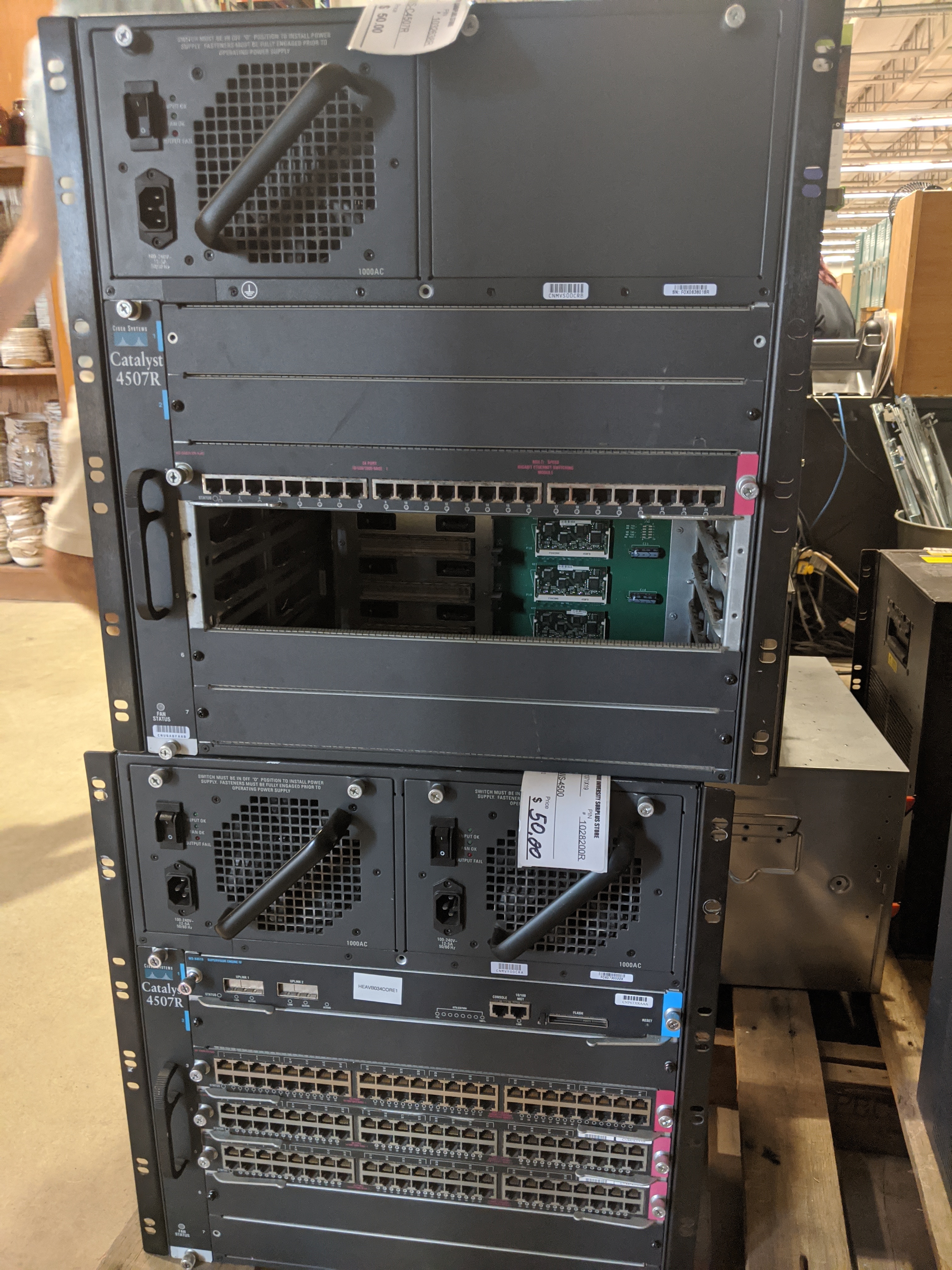
Cisco hardware goes obsolete quickly, something that was $2k new can be found $100 on ebay only a few years later.
Great for hobbyist/homelab folks
1u ya
 rancid crystal
nice
 warped yew
why are switches so big?
pine comet
They can pass a lot of data

 green stream
I am looking for a audio interface to be used with my mic, budget is around $100, i have a few ideas but i want others opinions. Preferably from bestbuy cuz i have store credit, if not that's fine too
 merry goblet
what mic
green stream
blue ember and will be swapped ocassionally with shure sm58 i believe it is
merry goblet
using XLR input?
green stream
yup
merry goblet
ok so idk if best buy has it, but i got this https://www.amazon.com/gp/product/B008O517IC/ref=ppx_yo_dt_b_search_asin_title?ie=UTF8&psc=1
but i bought it from guitar center for 80 i believe
its a mixer with a built in interface and it works pretty well
green stream
k ill keep in mind, im also looking at one of the focusrite's
merry goblet
that was what i originally wanted to get but they pricey lol
green stream
they are
merry goblet
my cousin talked me into getting the mixer cause more control over things
what are you going to use it for
green stream
replacing my interface and using it for a teacher to help with my sisters recordings
merry goblet
what interface do you have now?
green stream
a cheapo one, behringer um2 i think
green stream
it's ok, but it has a bit of a high noise floor and not quite enough gain for some dynamic mics ive used in the past
green stream
there is a lot of white noise that comes in from the interface
merry goblet
thats something i had an issue with too on mine but i had to play around with it to get it to stop
green stream
i can correct some of it post for recording but i just don't want it being an issue
merry goblet
but also if you're not live its easy to cut out, but also also you can try using the RTX audio encoding thingy
green stream
i used it for a bit until it started bugging on me
merry goblet
i will say ive noticed a huge volume and quality difference between XLR and 1/4 in inputs
green stream
also i might sell this one for cheap to my sis
merry goblet
xlr is better
green stream
yeah 1/4" i've not had good experiences with
merry goblet
same
green stream
except 1/4" headphones are good
merry goblet
i tried running 3 mics, one using 1/4 and i cannot get the sound quality to match ;-;
green stream
rip
merry goblet
it seems to be fine for instruments tho
green stream
yeah i think it is mostly meant for instruments and headphones
wraith steppe
If you're using an sm58 or similar dynamic mic, get something like a focusrite 2i2 3rd gen
If you're going with a condenser mic, you can go cheaper, something like a behringer UMC202HD
 bold forum
i use a focusrite 2i2 for actual guitar stuff, and it's great. can't speak to using one with a mic though
 naive sorrel
there should be a channel for audiophiles
green stream
yeah i might go with the 2i2, i just looked at it rn and it seems good
 inner elm
Good choice with the sm58
old vapor
2i2 is pretty good
green stream
actually tho, the motu m2 looks really nice too
old vapor
Lol could also consider Schiit audio gear
I hear their stuff is good
Contrary to their name, yes
green stream
do they sell interfaces?
old vapor
Oh right they don't
green stream
lol
 vapid meadow
Anyone know if this is any decent? Or something similar... https://www.newegg.com/vantrue-n2-black-1-5/p/0PD-0072-00023
 hexed wind
here? @pine comet
pine comet
Sure, why not. They don't really have a channel for this, and people don't really use this one that much
hexed wind
oh ok
 dusk wyvern
@pine comet rip roles or new guy?
pine comet
rip roles
dusk wyvern
did you accidentally leave the server?
pine comet
Nah, theo
dusk wyvern
rip
 warped estuary
How does this, TP-Link Archer AX10 Wi-Fi 6 Dual-Band Router, compare to a, ASUS RT-AC68R Wireless-AC1900 ?
I assume any AX router is going to be better than my AC router. I just want to make sure it is an upgrade before I place my order. This is not the Wi-fi 6 AX router I would prefer to have, but I want to jump on the AX band wagon as soon as possible and I could get this cheaper model now, while I save for a better AX Wi-fi 6 router to buy later.
 cyan spindle
id stick with the asus for now. AX is definetly better. but would it be appreciable between those two models? at further ranges probably. but sitting on the couch with a laptop and full signal i dont think youll see any throughput improvement.
 harsh palm
who here likes the PS5 design-if not, the controllers?
pine comet
 harsh palm
Supernatural? @pine comet
pine comet
Yup
harsh palm
Really it comes down to the better games for me. Both consoles will be able to run 120fps.
old vapor
Sony should really expand to PC just like Xbox is
cyan spindle
All i know is the current gen of consoles (which i totally skipped) is super old. Lord I cant imagine anyone still using a OG Xbox One
nova osprey
I do...
cyan spindle
🙏
cyan spindle
think about how far back 2012 is. what is that geforce 400 series era. Lord that seems like a friggin abacus
cyan spindle
ooph, the 360 scratched so many discs insert reference about it being a hip hop group
 cold ginkgo
simp
nova osprey

 hazy linden
can someone help me find a good hdmi switch?
 opaque stratus
i bought the GIGABYTE B450M DS3H and im not sure if could use it with my 3700x out the box, does anybody knmow if it comes with a most recent bios because if it doesnt then im screwed
inner elm
Check to see if it has a no-cpu bios flash system
 toxic river
 sterile flame
ios or android
sterile flame
lol
warped yew
Windows phone
 echo parrot
ios if u want simple no hassle and android for more customization/experimental stuff
ios also has better protection from viruses while android can get a virus from downloading something off google play store
warped yew
lmfao imagine
echo parrot
google may have made the store better now but I am not sure
warped yew
haha lemme download this virus that Google allowed on their own store for their own operating system
same thing can happen on iOS though
echo parrot
yea it can but it is very unlikely
warped yew
Apple usually takes apps off the App Store almost instantly if they don't like it
warped yew
yeah, you can get viruses by jailbreaking
or at least it's more likely
not because jailbreaking is dangerous, but it's really just another method for malware exploits
(that's at least how I see it)
warped yew
I'll probably jailbreak my iPhone 8 if I get a new phone soon
wanna be able to run a lot of cool things lol
echo parrot
yea
green stream
viwus
 minor crypt
i like the jailbreak
allows me to run a rlly good android emulator for all the other stuff iOS doesn't allow\3\
warped yew
that's why I kinda want two phones lol (one Android one iOS)
Android for gaming and iOS if I'm doing any sort of media work (as well as a work phone lol)
green stream
dew it
warped yew
what's a good and cheap Android phone lol
wait could I put my iPhone's sim card in the Android phone and have it just work?
cyan spindle
the only potential issue with switching back and forth between apple and android is the iMessage feature that sends the sms messages to the cloud first. Allegedly its a bit of work to revert it back. that may have been improved recently though
i like the motorola phones the Z phones are pretty cool. But im using a Motorola g6 that i dont hate. will be updating to the 8 though when my warranty runs out
 glad echo
this probably isnt the place to ask but do yall lads know stuff regarding audio devices?
my headphones arent being detected in any program except device manager
says its plugged in in device manager
but not plugged in for control panel sound settings
green stream
what headphones are they and did you look to see if there are any drivers required for them
glad echo
hyperx could 2
no drivers are needed for them
and ive tried uninstalling and reinstalling just about all of my audio devices
and anytime i try to trouble shoot just says theyre not plugged in
and ive tried multiple usb ports
shows in contrl panel theyre not plugged in
but device manager shows that they are
 thorn flame
i'm a gamer
warped yew
k
 gritty badge
Whats the best not expensive gaming laptop that's thin?
sturdy jolt
Depends on budget
Like we could point you to a 100$ laptop that can barely load YouTube because it's cheapest
Or 2000$ laptop because it's best
Just set a limit somewhere in your budget then we'll find things
 true patrol
My PC is just stuck in bios screen, help
merry goblet
was it working before?
nova osprey
Clear the cmos
nova osprey
Anyone know if there's a way to increase the bandwidth of your wifi? I can't even play a game if my dad is working on his computer or someone is streaming something
I pay for a gig btw
green stream
idk much bout that stuff but some routers you can manage bandwitdh for devices
gigabit?
nova osprey
Ya
green stream
weird
sturdy jolt
Better router? More APs?
nova osprey
Unfortunately my router doesn't have that setting because its supplied by xfinity
APs?
wide vault
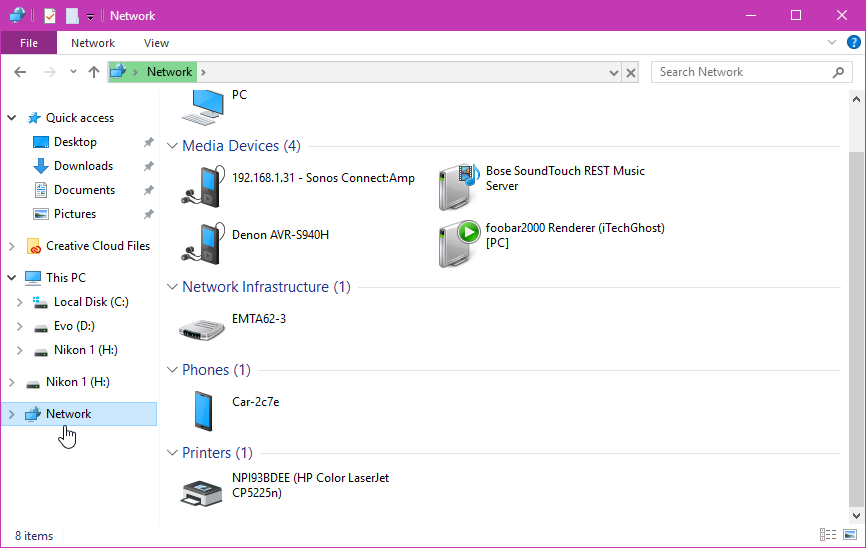
go into Network on the explorer and right click on the router
nova osprey
I have a lot of devices connected at once but according to the management app only like 2 of them use more than 1% of my daily usage
Wdym?
wide vault
nova osprey
Ok gimme a sec
wide vault
should be able to access settings on that
nova osprey
I can't find that page your on. What section of the control panel is it under
nova osprey
Oh
wide vault
nova osprey
I see it
wide vault
yeemt
green stream
 nova osprey
Ok I'm on the router settings webpage
wide vault
go ahead and look around just to see what all the settings are
nova osprey
I've been in here before and am fairly familiar with it
wide vault
my router is kinda old so some of the things on it don't work, like speed test, it's a flash program and it doesn't let me do anything
ah ok
I just discovered my router settings like yesterday 
I couldn't figure out where to find it until then
wide vault
I could access my modem just fine tho
hmm
I guess something like "Media Prioritization"
green stream
you can also get to it if you type in the default gateway into a web browser
nova osprey
ya, ive looked into that before. Since it is a router provided by xfinity, it doesn't provide QOS/ media prioritization settings
wide vault
oof
wide vault
my Linksys has it, but I don't want to touch it because it wouldn't make too much difference, and would sorta just make other devices have poopier internet
6Mbps plan
nova osprey
oof
wide vault
we could get a plan with Xfinity that is the exact same monthly fee of 55 USD, but it's 100Mbps plan instead of 6
thanks ATT
but for some reason nobody in this house is willing to do that
nova osprey
neither one of them are that great. They'll both give you a good deal for the first year and then everything goes to crap after
wide vault
yeah ig
but the price after first year vs speed is a huge leap from ATT to Xfinity
my internet is like my GPU, weak af
nova osprey
sad
wide vault
neither would be satisfactory for even a decade ago
true patrol
is a newer wifi adapter for a pc compatible with and older model router?
wide vault
I don't see why not
eager bison
🙏
echo parrot
lol
echo parrot
its ever expanding so eventually ill get more memes
 calm mural
Yeeee
echo parrot
ah yes
minor crypt
ah, yess
cyan spindle
Anyone have an opinion on ruckus unleashed APs being used in gateway mode vs being used as AP with an ubiquiti edgerouter x?
i see no networking channel
wraith steppe
An Unleashed AP must have at least two Ethernet ports to support Gateway mode.
cyan spindle
i appreciate the link.
i have a couple r610s that i got stupidly cheap on ebay to replace my r500, which didnt support switches on its secondary ethernet port. Well it did but the switches werent on the same lan as any wireless client. So i couldnt wire in my NAS and play stuff on my fire tv
wraith steppe
r610, nice
A man of taste
cyan spindle
2 of them for 140 dollars after shipping. like i said a ridiculous price
im thinking i can just get rid of the edgerouter x entirely now. Im curious if anyones got any comparitive experience between the two, unleashed gateway vs edgerouters.
minor crypt
o
wraith steppe
I think those serve different purposes. I used an ER-X for a bit, decent unit for the price, but not powerful enough for 1000/1000.
cyan spindle
right, i dont even have that. 350/20 cable. no fios in my area. At this point its probably bringing the property values down. lol
wide vault

nova osprey
Anyone have a good gigabit router suggestion?
 tawny scroll
Does anyone know of any cheap servers I can buy? I’m trying to build a homelab and build a few applications for said servers.
eager bison
older dell poweredges are cheap
shipping on ebay is bad, so dont buy there
and you would be suprised what you can find on craigslist
bold forum
definitely craigslist, pretty common for IT depts to dump old hardware there
eager bison

craigslist
I have a Dell R710 server for sale Dual 2.4GHz E5530 Xeon 32GB RAM (4 x 8GB) Dual PSUs 4 3.5"...
heres a good example lol
eager bison

eBay
Find many great new & used options and get the best deals for Intel Xeon W5590 3.33GHz Quad-Core (AT80602000753AA) Processor at the best online prices at eBay! Free shipping for many products!
bold forum
figure out what to do with it later
eager bison
and then you would get 2 of these
slap em in there
and youre off to the races
well, actually, the W xeons are workstation versions
sooooooooo
you would get the X5570
for just as cheap
bold forum
i 've really wanted to build a whole rackmount system for my house, but i don't have a solid enough use case
tawny scroll
Sounds like a plan.
bold forum
cause some of that hardware is so tempting at the prices
tawny scroll
Welp, there are server chassis on Amazon for the prices of normal cases.
At least 1U chassis.
old vapor
what would you use a server for at home?
nova osprey
Lol
cyan spindle
Ruckus r610 unleashed doesnt appear to support ipv6 in gateway mode even on the newest 200.8 firmware. If someone knows better for goodness sakes tag/DM me. Looks like im back to the er-x for now. May just pick up the er-4. But im not impressed with the whole passive 24v "POE" thing
tawny scroll
@old vapor, I’m building it for a homelab and application development
old vapor
oh, cool!
nova osprey
Ok so, I just got a new router today, and I have a ethernet connection from my pc straight into the router. I pay for 1gig and am only getting 10-20mbps, even tho my dad gets 900 on his imac. I have updated windows, installed the latest lan drivers, and tried multiple different wires. I also did a bunch of settings changes that google said to do but it was not helpful
anyone got any ideas?
eager bison
MBps or Mbps
eager bison
737Mb looks good to me
nova osprey
Mbps
eager bison
Oh, that's on your phone lol
nova osprey
Ya that looks amazing, but thats my phone on wifi. My pc on ethernet gets 20
eager bison
Does your PC support gigabit?
eager bison
Is your dad's iMac on the same router?
nova osprey
yes
eager bison
So you both have a gigabit lan connection, so it's either a configuration issue, or a physical issue with your hardware from the Ethernet cable onwards. You said you tried a different cable?
nova osprey
yes, i tried multiple different cables
nova osprey
ya ik but i don't really care about upload tbh
eager bison
Well, your getting a connection at the least, so either your router and Ethernet interface are autonegotiating 100mb, or something is hogging your bandwidth at the same time you try to run a test
I would check your NICs driver, and check to see if the connection shows up as gigabit under the interface settings
nova osprey
I doubt its bandwidth, because as i said, this router is brand new and we don't have many things connected to it yet, plus it supports up to 2.5 gigabits max
how do i check my NICs drivers
eager bison
Device manager
And open your list of network devices in control panel
Right click the Ethernet interface
Click properties, maybe... I'm on my phone rn so I can't tell you exactly how to get there
nova osprey
aight, np. what am i looking for in the properties
eager bison
There's a tab that shows you total packets sent and received
As well as the connection speed of the interface
nova osprey
I ran the troubleshooter and it said this
eager bison
So from a hardware standpoint, it looks good
nova osprey
im assuming thats the problem
eager bison
DNS server connection isn't really what would cause slow speeds
nova osprey
crap
eager bison
Altho, if your using discord rn, your DNS server connection must be fine lol
eager bison
Hecc
nova osprey
but i just updated valorant yesterday and the speed was like 1mbps
it was only a 1 gig update but it took forever
eager bison
We need to get data from a source that can supply it at faster than 100Mb
I can only think of steam
eager bison
Oh, yeah
nova osprey
ya i do
eager bison
Download fortnite lol
nova osprey
aight gimme a minute i don't know my credentials
eager bison
Ok, i actually gtg, so I might be back in like 20 mins idk
nova osprey
aight
np
uhhh frick
fortnite is installed
lmao
forgot i did that
what if i install a creative cloud software? @eager bison
green stream
fotnite is slow
 thorn gulch
@nova osprey I'd connect PC directly to modem to remove the issue of the router
then if issue is still there find a laptop or smth with RJ45 port and connect the laptop instead of the desktop, to check cable
nova osprey
Its a 2 in 1 modem router
Also I did check the cable with a laptop and it was 800mbps
However, I have good news lol. I switched the port that the ethernet was plugged into and am now getting 200mbps
I don't have a single idea why that worked but it did so thanks for all the help
I do pay for a gig so I might still trouble shoot this passively to get more speed but for now im content because i can actually play games lol
green stream
answer: buy a mac like your dad 
inner elm
Oof, please no
nova osprey
Id rather have 200mbps and have a good computer than have 900mbps and have a bad computer
sturdy jolt
Yes
nova osprey
Sad
warped yew
@nova osprey yes. single-player gang
nova osprey
Wut
nova osprey
What color should the lights on my ethernet jack be. Bottom is solid green and top is blinking yellow
pine comet
I think those are just speed indicators or something
eager bison
It varies, but typically, green off means 10mb, solid green means 100mb, and blinking green means 1000mb
And the Amber light is just the activity light
wide vault
Is the cable Cat5 then?
 proud current
So I have an internet switch coming in soon and I am wondering - can I use the Ethernet ports on both the router and the switch at the same time? Or can I only use the ports on the switch and the router’s ports don’t work?
Because if I can use both the switch’s ports and the router’s ports I’m planning to connect the switch to inbetween two rooms and still use the router’s ports for things that are already connected
I drew this up on my phone lmao
R = router
S = switch
Each unlabeled box is a device connected to the internet
Is that possible?
wide vault
I don't see why not
green stream
yeah I'm doing a similar setup even with maybe 15-20ish devices connected to the switch
wraith steppe
You can use both sets of ports
 tender jetty
Ethernet cable ftw
 red shell
Anyone here ever use a elgato gaming capture hd60 card?
nova osprey
357 upload dang
 sharp fossil
Who’s good with networking? On one of my PCs I top out ~630 down. On my other machine I’m getting ~945 down. Both are on same router with cat5e cable. Tried switching their cables no change. Tried changing some of the device settings and it goes slower....
eager bison
what cpus do these systems have
sharp fossil
The one going slow is a TR 3970x the fast is a ryzen 2700x and can turn on a 2700k that also gets the same speed down.
pine comet
Nice ping
sharp fossil
Yeah fiber is nice, I just want this pc to take full advantage like the others are
@pine comet waiting on https://www.amazon.com/dp/B07L56SN8M?tag=georiot-us-default-20&th=1&psc=1&ascsubtag=tomsguide-3942918231543308300-20 to arrive to upgrade the wifi in the house. The wifi in the CenturyLink router is a joke and all my wifi routers are several years old now
The wired ports will be used to replace an aging dlink gigabit router that runs all the ports in the house (4 bedrooms, office, living room, kitchen, and entertainment area). And all those rooms have some kind of device plugged in
 lethal gorge
I'd suspect some sort of inbound filtering (browser extensions, antivirus, something) that's actually throttling the one computer. Anything different between the two in that regard?
sharp fossil
Nope both are running same av and only have some developer extensions installed in chrome
wraith steppe
Probably just a speedtest issue. Try fast.com, if that doesn't max it out, just queue up a ton of linux torrents, centos 8 is a solid 8GB
If you want to test local speeds, use iperf
 coarse whale
@red shell i use an internal one
red shell
I have a external one
red shell
I have a Xbox one not a computer so yeah
 remote harbor
So I found this in a box on the dumpster behind an at&TV does anyone know how to get rid of that wallpaper thing so I can use the phone or am I out of luck?
From the outside it seems fine so I was hoping to make it my daily driver
The buttons on the sides do not push in, just found out
pine comet
You could try rooting it
remote harbor
Meaning what exactly?
Also incase I didn't say so the phone isn't on
Its a display model
merry goblet
display model as in the screen is always looking like that and isnt actually a screen?
if so its probably a dummy phone
remote harbor
Ah, well that's sad then, it doesn't seem to be empty cuz it has its weight
merry goblet
if you got the tools, open it up
remote harbor
I do not lmao
merry goblet
lol usually those phones are just to show what the phone looks like and dont actually have any function
remote harbor
Ah well that's why it was in a box of similar ones on the trash
merry goblet
sorry man
 merry goblet
well i mean theyre expensive and the display models that work can be sold so they wouldnt just throw em away
pine comet
Try rooting it. You might be able to get something out of it
It might have been thrown away because o the buttons
merry goblet
bob there is no screen
it has a fake wallpaper thing
im pretty sure its just a fake phone
nova osprey
S8 isn't that expensive anymore on ebay
Should be able to get one for under 100 bucks iirc
wraith steppe

В этом видео мы собираем из магнетрона с микроволновки направленную антенну. Получилось мощная СВЧ пушка! Ни какая техника не устояла перед этим "оружием", с нескольких метров давала серьёзные сбои, а если поднести ближе, то выходила из строя и даже ВЗРЫВАЛАСЬ !!!
У нас ещё м...
How to overclock your microwave
wraith steppe
Careful with that lol, that prink ring makes some really toxic dust if it ever breaks.
Cool desk ornament though.
 digital niche
any one happen to know the american power adapter i would need for this, https://www.newegg.com/p/00I-033H-00536?Item=9SIAGHB7U48433
eager bison
i would avoid buying from third party sellers on newegg
especially one with a 46% rating
but, if you must know, each base is rated for 12v @ 1600mA
you can find a universal power adapter for that
 green reef
Took me a literal month to get a power supply to repair friends computer 😩
 mighty whale
@green reef it was suppost to come 11th i got today 2 days LMAO
green reef
Nice!
warped yew
suppost
mighty whale
in did suppost
 thin nimbus
I need to know if the Crucial 64GB Kit (32GBx2) DDR4 2666 MT/s CL19 SODIMM 260-Pin Memory - CT2K32G4SFD8266 is compatible with the 2019 27' iMac
cyan spindle
best people to ask would be Crucial customer support.
 old moss
Or Apple
thorn gulch
Feel like Apple wouldn't know what they're doing and probs just say that either you can only buy from them or that anything is compatible
 livid wolf
Yes
minor crypt
actually no
apple is rlly helpful when it comes to upgrades
they say that whatever you buy from them is going to work, but they also give lots of suggs about other products that also work
sharp fossil
Time for a network upgrade
wraith steppe
😦
sturdy jolt
dayum
pine comet
Is that the PS6?
sharp fossil
Wired, now to find where I put my wifi antena to see what the wireless gets
 late token
i get 8 
 tawdry nymph
hi losers
thorn gulch
hi winners
sharp fossil
Yeah the Wi-Fi on it seems to not be fast at all. Am not happy. Ax mode tops out at 300mbps on 5ghz from 2ft away
wraith steppe
Is your device wifi -ax capable?
sharp fossil
Yes have multiple ax compatible devices. Wife and I both have iPhone 11 Pro Max and my TR pc has it built in and my wife’s pc has a wifi6 add in card (needed Bluetooth but got both). All devices won’t go over 300. Older ac devices are getting 190mbps.
sharp fossil
First thought it was because I put it in the basement where the fiber comes in and set it up as an access point and it just didn't like going through the floor but when down there same issue. Also moved it up to the office to troubleshoot and same thing, right next to a receiver it won't go over 300
Have tried putting it in just b/g/n mode, just ax mode and b/g/n/ax mode nothing changes the speeds
I changed the channels manually and set the width and still no improvements
wraith steppe
Channel width would've been my first guess, weird.
 last jewel
How does one have enough money for a Threadripper
 violet oxide

warped yew
@last jewel job
sharp fossil
Being a developer or graphics artist at the top of your game you typically get paid well.
old moss
Theft
sharp fossil
Eh freelance can backfire as well make too much $ and then you owe Uncle Sam way too much and like now so many people on the market have to battle it out for the jobs.
warped yew
Ah, didn’t know that
 verbal valve
man this sucks, i leave my home for four days and make sure my laptop is powered down so that nothing happens to it, lo and behold i come home and one of the usb ports isn't working
you guys know what i could do other than send it in for a new one?
it's a 3.1 type A
it was working before and all of a sudden now it's not working
warped yew
Did you turn it off and back on?
It shouldn’t just stop working because you left it on all day
verbal valve
i left it OFF for 4 days unmonitored
i don't know how it could just stop working like that
i went into device manager to see maybe it's driver was broken, the software seems to think it's fine
warped yew
Try turning it off and back on
inner elm
Are you sure it was untouched? You can open it up to see if it is physically damaged
verbal valve
i'm quite sure it was untouched unless someone someone who came into my house and was careful of it
i'll open it up and see but i can't right now
 cunning crest
 gusty plover
hello everyone. I have a question about hdmi matrix switchers and video walls. i have 4 55" 4k tvs and would like to be able to have a video wall setup but also be able to display 4 separate outputs. i cant seem to find a product the does this. specs im looking for: 4 inputs, 4 outputs, 4k @60-120hz, 2x2 video wall. any suggestions? thanks!
pine comet
Each monitor is 4k, or the overall wall is 4k?
gusty plover
each monitor is 4k
pine comet
What will you be displaying that you need 120hz?
pine comet
So this will be for videos and movies?
gusty plover
video movies and possibly gaming
pine comet
What GPU will you be running?
gusty plover
console gaming
pine comet
You're not gonna hit 120 on that with a console. You'll be lucky if you can get 60
gusty plover
nevertheless i dont think there is a 120hz video wall, switcher out there on the market
pine comet
There probably are, they're just not gonna be cheap
gusty plover
i have been searching and searching and havent found one. i willing to settle for 60hz if the product can produce output from 4 inputs and also capable of video wall output
pine comet
Do you need all four of the separate inputs to be displaying simultaneously
gusty plover
no not simultaneously. 2 main configurations im looking for is video wall and 4 source 4 tvs/monitors
pine comet
Do all of the devices you'll use have at least two video outputs?
gusty plover
no sir
gusty plover
weird what happened to the link
4K/UHD HDR 4X4 18Gbps Matrix Switcher with Auto Downscaling and RS-232/IP/Cloud Control
pine comet
You can post links until you've talked for long enough
pine comet
If you take the http part of the beginning, you can get the link through the filter
gusty plover
pine comet
This seems decent
gusty plover
im looking for those specs but with video wall cap but cant seem to find it anywhere
i found an 8x8 but the price jumped to $4k
pine comet
video walls are hard to run
gusty plover
processing is definitely much more difficult than just a switch and split since just signal routing
pine comet
The swicth will have to do some processing of it's own
The video comes in as one monitor. The swicth needs to decode that signal, break it up into four parts, and then re-encode each of those parts before sending it to each of the individual displays
pine comet
I use seven dollar amazon headset. You don't want my advice
verbal valve
i'm confused, why isn't my laptops gpu running any displays??
that looks like dp but my laptop doesn't have a displayport
it mentions something about a usb-c driver, should i be connecting a display to the usb-c?
eager bison
thats just how its configured
the 1660ti will sit dormant until you use a program that will use it
so right now, the display is running off the amd iGPU
to save power
pine comet
Laptop graphics are really weird
eager bison
your external display connects to the HDMI port, which runs off the iGPU as well, but that might not switch over when you launch a game or program that will use it
yes, very confusing
thorn gulch
also I find usually the protocol for the GPU to internal monitor is usually DP
pine comet
One of the reasons you don't use Linux on nvidia laptops
verbal valve
Using windows
Also trying to use GeForce experience bluescreened me
I forgot to read the error because of the distant I felt
Distain*
 craggy flintBOT
 Hax™#5840 has been warned
Reason: Bad word usage
verbal valve
I ko’d my computer and factory reset it
Screw it
The error says “THREAD_EXCEPTION_NOT_HANDLED”
It bluescreened, I tried opening GeForce experience again and there was an error with the program so I was fed up and reset my laptop, it’s erasing all the files right now
I got the laptop less than a week ago btw
And one of the usb type a’s doesn’t work
What a piece of trash
eager bison
return it
verbal valve
I’m thinking of doing it but then I’ll 100% be out of a computer for 1 week at least
It took 3 weeks for to even come
old vapor
But it's already so broken
verbal valve
Yeah
I’ll make some calls tomorrow
I wanted to build my own pc but things turned out that I couldn’t and I needed something quick, I go for this laptop for it’s battery and it takes 3 weeks to come in and breaks in a week
Great times
Forgot to mention that for no given reason my external monitor goes blank for 3-5 seconds at random intervals
calm mural
Download the windows recovery from there website and install it onto a flash drive, then boot to usb. This literally happened to me less than a week ago
@verbal valve
It was also a brand new computer
There was a specific driver crashing everything, had to just put it on the block list
verbal valve
Ok.. what driver was it? @calm mural
verbal valve
please don't tell me that this was the issue?
i'm using a latop and i downloaded the 16 series non notebook
warped yew
Possibly
green stream
don't laptops have the drivers downloaded automatically?
also most laptops use optimus to switch between integrated and discrete graphics depending on the situation
verbal valve
they do download it automatically but the one i got was outdated
i'm still wondering what that one drive is that was breaking everything. Bc one of my usb ports isn't working and i'm not sure why. i don't know if doing a fresh install of windows will fix that
 mystic hawk
What model artistander?
 indigo flare
Hey guys, Dumb question, Ik, But I need to get a new laptop charger, I dont want to lug around my cord from work to home each day. I bought one on Newegg, but it didn't even fit, so obviously it's not where my skills lie.
Oh, let me transcribe that
MSI GF65
the charger reads:
mystic hawk

Buy iTEKIRO 180W AC Adapter for MSI GF65 Thin 9SD-008, GF65 Thin 9SE-013, GF72VR, GF72VR 7RF-650, GF72VR 7RF-651, GL62MVR, GL62MVR 7RFX-1044, GL62MVR 7RFX-1048, GL62VR with fast shipping and top-rated customer service.Once you know, you Newegg!
indigo flare
Chicony, a15-180P1A REV 05 UP/N A180A005L AC input 100-240 V 2.5 A 50-60 Hz DC OUTPUT
indigo flare
Yeah, The only part that scares me is the non brand name charger, it's a $1,250 laptop, I'd hate to go offbrand and fry something.
mystic hawk
I would suggest contacting MSI
indigo flare
ahh, Good idea there.
mystic hawk
They can probably direct you to a verified after market vendor or give you another route.
indigo flare
thats brilliant. never would have thought of that actually. Thank you.
mystic hawk
I will say I've been using third party chargers for a long time on laptops and have not had issues, but my laptops are cheap.
Good luck!
cyan spindle
i wouldnt buy a 3rd party charger off any kind of "market place". email MSI customer support,like was mentioned, or find a used one off ebay from a private seller. Bootleg chargers are real and they are super duper dangerous
calm mural
@verbal valve 1 sec ill find it for you
@verbal valve AMD GPIO Controller version 2.2.0.115
^^^^^evil
calm mural
not sure. it was on my update list, i had to block it from trying to update
nova osprey
Wow xfinity is just the worse
I was fiber or starlink but neither are available for me
pine comet
What the heck is that
sturdy jolt
sped test
 sacred shard
Why is your upload speed so high and your download speed practically nothing?
nova osprey
I would like to know the answer to that aswell
sacred shard
nova osprey
What makes matters worse is, I pay for a gig
Please react with that face palm emoji forks 
sacred shard
Have you tried contacting your ISP?
nova osprey
Yes
wraith steppe

nova osprey
Theyre sending someone sat. I've had so many issues lately and it was the best it had been but then they had a 6 hour outage today and its been like this ever since
Ty
wraith steppe
What modem/router?
nova osprey
Its one supplied from xfinity, the xr7 I believe
Its a 2 in 1 modem and router
Coax cable goes right into it
verbal valve
@nova osprey jesus...
nova osprey
Yep
verbal valve
if you're paying for a gig you might want to invest 50-100 dollars into your own router
nova osprey
Believe me, I'm considering it. The only reason I haven't is because I just got the newest one from xfinity
I had higher expectations but I was disappointed
verbal valve
that's what my family did and it improved range extremely far and boosted our speed by an average of about 5-15 mbps
thing is when you get the routers from them you pay a monthly fee
like $14 a month
verbal valve
it's not worth it
nova osprey
But it still sucks
verbal valve
mine was 14
rip
sometimes i end up having to beg ppl to change a router to their own bc they loose so much money and potential
shouldn't even be a second thought tbh
anyway, good luck with your technician
wraith steppe
You'll need a ~$120 docsis 3.1 modem for gigabit, but a $20 router will do.
(I'd still recommend something a bit nicer)
Arris SB8200 or Motorola MB8600 are both very popular on /r/homelab, /r/homenetworking, /r/networking
sharp fossil
I still can't get that tplink ax6000 to give me the speeds its advertising. I've used network scanners to check which channels everyone around me is on, have tried playing with the width to no avail, its getting ~320 so it went up from the 300 it seemed capped at but I want all my speed. Recommend a wifi 6 router that actually delivers the speeds it says?
nova osprey
Thanks @wraith steppe I'll check those out
Would you have a router suggestion to go with those modems?
eager bison
if its just for home use, a modem/router should be fine
also, DOCSIS 3.0 supports gigabit
but only 200Mb up
nova osprey
Also, do you think the problem could possibly be that the xfinity service is just spotty, because I just did another speed test and got this
Its so spastic in its performance
And I don't want to drop 350 bucks for new equipment if the problem could just be my provider
nova osprey
Looks decent
Unfortunately, my dad pays for the wifi in the house so ill have to run it by him before I do anything but it looks good
thorn gulch
modem+router makes it hard to troubleshoot sometimes which is why I dislike them
nova osprey
I'm more concerned with the stability of the connection than the speed tbh
eager bison
either it works, or it dont, you dont troubleshoot a modem, it shouldnt even be a seperate piece of equipment tbh
thorn gulch
but you can troubleshoot routers
eager bison
it only is because not everyone uses cable
eager bison
yes, but how does the modem inhibit troubleshooting
nova osprey
Ya, so if I buy this one, and it still sucks, then its the isp lol
eager bison
ive never had that problem
thorn gulch
seperate modem means allowing you to direct connect to the modem without even considering the router
eager bison
well, your paying 11 per month for it anyway
nova osprey
Ik
thorn gulch
could be faulty router
eager bison
most people dont have much in terms of config
nova osprey
Thing is, my last xfinity router sucked too. I had their xr6 model for the longest time and just got the xr7 and its just as bad
So idk if that means they stink at making routers, or their service
eager bison
yeah, its probably just your isp screwing you over, they all do, its not the routers fault
but
playing 11 per month is stupid regardless
eager bison
so get a good one now, so you dont have to think about it later
nova osprey
One year almost buys that router
thorn gulch
which to go on with upgrading, I assume buying one modem and replacing your router every 6 years is more ideal then modem+router replacement (for like WiFi upgrade or smth)
or replace modem when switching ISP and keep router
eager bison
modem router cheaper for what you get tho
replace both every 6 years
no problem
you would pay more in electricity by running two separate devices probably lmao
nova osprey
I think that hei is right in that ideally you would want a good modem and router and i agree, but for this particular situation I think a combo will be better
thorn gulch
two small power sources vs one big power source, so idk about that
eager bison
modem does nothing, its literally a converter box
coax one way, ethernet the other, there is no configuring, either it works or it dont
so theres no reason not to just toss it in the same box as the router
simplifies things and is cheaper
especially when the device i linked is 30 dollars off
thorn gulch
there is, because if the router is malfunctioning you cant determine if it's the router or ISP
eager bison
so what if the modem is malfunctioning
nova osprey
I think that if I get a combo tho, and its still bad, chances are its the isp
thorn gulch
it is possible, but much less likely
eager bison
plus, you know if its not the isp, because you can ask the isp
hey
whats with my internet
nova osprey
Lol
thorn gulch
you can ask the isp and maybe they'll do nothing or maybe they will. We all know not all ISPs are that good
nova osprey
Ya, I've had a couple people to my house and it made no difference so... I dont have much faith in their troubleshooting abilities
eager bison
you know if the router is the problem if you have reset it, and its still not working the next day
thorn gulch
which is why you want to be able to 100% blame them if it is them
eager bison
problem solved
ISPs dont go down for very long
and if its longer than a day they will tell you
or you can look it up
trust me, its not that hard
thorn gulch
and what about Egg's issue? That can easily be a router issue. Direct connect to modem for two days and check if drop outs happen
unlikely to be router, but still easily possible
eager bison
i think thats just bad service tho
plus
hes getting a new router anyways
because paying 11 a month is bad money move
thorn gulch
and that's exactly the thing. You think it is the ISP but can't say much as to whether it is Egg's hardware or the ISP
eager bison
i think a malfunctioning modem is just as plausible, ive never seen a dead router or modem tbh
ive retired like 15 year old routers that still are working
chugging along on 802.11g
wraith steppe
Linksys WRT 54G's are like the nokia brick phone of routers
eager bison
if the router is the issue, its pretty easy to tell
nova osprey
Also, this may sound like a poor reason, but i don't really have room for a router and modem. House is pretty small and my router is on top of my TV furniture so having too much stuff up there is kinda a eye sore
wraith steppe
Modems can definitely malfunction / not work 100%
nova osprey
Noted
wraith steppe
Lot of docsis 3.1 modems with broadcom chips like to drop out all the time
thorn gulch
but now you are comparing something where you cant split out the issues. Router+modem means that if either fails, now you can blame the ISP, modem, or router. By going seperate you can easily remove the router and only be able to blame ISP or modem
nova osprey
Ya, I read that
nova osprey
In the current situation I'm in, I agree with sassy
I'm not saying its the best situation, but it works better for me atm
wraith steppe
router modem combos are the pre-builts of networking hardware
eager bison
but, do they not work for typical home use?
eager bison
yay
nova osprey
Lol
thorn gulch
As a techie who does troubleshooting for others, I advocate towards easier troubleshooting
nova osprey
Understandable
thorn gulch
my laziness is important
wraith steppe
You can build a router from an old dell + a $30 network card
You can run a core 2 duo cpu honestly
Both of my routers use $20 cpu's
eager bison
but how is latency
wraith steppe
non-issue
eager bison
nice
nova osprey
Nice
thorn gulch
what price range does it compare to standard routers? The simple $80 ones, or more in the $150 ones, somewhere else?
wraith steppe



 thorn gulch
curious about price to perf of it
wraith steppe
@thorn gulch me?