#electronics
1 messages · Page 14 of 1
 wooden dew
 steady geyser
 warped yew
I mean if they keep upgrading them
Like, putting an SSD inside that John with a side of RAM and then you’re smacking

 opal swift
My school PCs have a lock on it so you never open a pc lol
 balmy fractal
lmao
 wide vault
iTs NoT a Pc iF ItS nOt PeRsOnAL
 nova osprey
Lol
 calm mural
So I figured out something extremely odd when it comes to my Rift S. I checked event viewer to look for something completely different and while searching I found on Rift S USB Hub there was 4 errors all with the windows error code 411. Both Rift S and Rift S1 have no error codes at all. Anyone have an idea on what this could mean?
 shrewd cairn
My laptop recent shat on me and I do a lot of gfx what laptop would you guys recommend for that type of work?
 wraith timber
I stole a NSA computer but it wont turn on
 thorn gulch
maybe it's already on, spying on you. It is a NSA computer after all
 brittle stirrup
😮
nova osprey
Hei is one step ahead
 kind locust
Macs get the pickaxe

 weary pasture
you can put windows on a mac...
 topaz path
Looking for the right SATA 2 or 3 internal 2.5" or 3.5" HDD
 strange perch
just make certain you get the 256mb cache variant
topaz path
I'm looking for one to go in my xbox x drve case
but Im seeing it will be cheeper to just go exturnal
wide vault
Ew
External
I say as I own an external drive
But like use internal drives for external purposes
That way you can buy the drive you like, instead of getting whatever cheap mystery drive is in some store bought crayon box external drive
warped yew
@green stream lol your system just can’t handle Windows for some reason
 green stream
Windows just doesn’t like me
 sacred isle
Can a mixer power 250ohm headphones?
green stream
check the specs on the mixer but usually you use a headphone amp to drive it best
also some headphones don't need the power but is recommended because they sound better
green stream

 thin talon
Can someone tell me if a ps2 steering wheel whit an adaptor to USB would work on an Xbox one s?
 ionic gull
guys, did u hear that apple is selling the covid 20 pro for $999
 sturdy jolt
ok
 coarse whale
ok
 sleek gust
Does anyone know more about the Acer NITRO 50 N50-600-UR1I Tower?
warped yew
@sleek gust https://google.com iGotchu
Search the world's information, including webpages, images, videos and more. Google has many special features to help you find exactly what you're looking for.
sleek gust
@warped yew lmfao
 rugged estuary
I have a question I need a way to connect 2 monitors with HDMI cables to a pc laptop, is a splitter with 2 ports what I need?
warped yew
Possibly(?) Does anybody else have an answer?
 merry goblet
I believe it is possible but not easy. If you have DP you should be able to buy a DP splitter hub, but for HDMI you might be able to get something like this to work: https://www.amazon.com/USB-Dual-HDMI-Adapter-External/dp/B0725K1MHH/ref=sr_1_1?dchild=1&keywords=StarTech.com+USB+3.0+to+Dual+HDMI+Adapter+-+4K+30Hz+-+External+Video+%26+Graphics+Card+-+Dual+Monitor+Display+Adapter+-+Supports+Windows+(USB32HD2)\&qid=1585451162&sr=8-1 but i am not 100% sure as I have never tried myself.
 inland umbra
Honestly, you will be better off spending the little bit to get a USB attachment for an additional monitor. I was looking into splitters for work before, and the startech adapter that "That One Deaf Kid" just linked is would I would highly recommend instead.
I haven't tested the dual-HDMI USB attachment like that (I didn't actually open the link until after I typed my reply). I have good faith in StarTech with the other USB monitor adapters though, so that should work well...might need to get one of those...
thorn gulch
USB has absurdly low bandwidth tho compared to any video data port. There should be an adapter that takes a output, say 3840x1080 (2x1920 x 1080) and converts each side to 1920x1080. That or just converts the HDMI to two ports
Like one 3.2 gen1 USB has only half of the bandwidth to supply for 2x HDMI 1.0
HDMI 1.0 is for 1080p @ 60Hz btw
Then you got overhead to worry about. So at max and if left no choice what so ever on a 1080p panel. Keep to one USB per HDMI
inland umbra
Fair points. From experience I will say though that the USB to add one HDMI has worked beautifully for me. I would use it on a daily basis for work without issues and did so for a year or two. I have not tried the dual HDMI with a single USB though.
green stream
through usb it would be a lower res and likely will have some latency
 wraith steppe
Thoughts on this as a pc monitor? https://www.amazon.com/TCL-43S425-Inch-Ultra-Smart/dp/B07JJZPZNS?th=1
strange perch
going to live and die by the panel quality
also, do you know if it is actually 120hz at 4k?
because the product page is quite unclear on what exactly is supported
wraith steppe
nah, it's true 60hz, CMI is some type of blur reduction tech.
I'd want to use it like linus uses this monitor https://www.youtube.com/watch?v=M3bezYerYxQ

Enter Soundcore's giveaway for a chance to win 1 of 300 speakers here: http://geni.us/wI9RL1
Customize your own Backplate for your GPU or SSD with CableMod: http://geni.us/kw6D1V
Activate Windows. A surprisingly frequent appearance on Linus Tech Tips. But why would we pirat...
strange perch
then comes the question of: Do you want that big a surface, at 60hz that close?
wraith steppe
My main concern would be vertical viewing angle
strange perch
you mean, the wall mount?
wraith steppe
Ya, not sure if the 43, 49, or 55 would be best. Not much of a price difference
Ya, I'd definitely be wall mounting it - behind my "work area" etc - very similar setup to that in the vid
Currently I just clamp monitors on arms to the sides of the desk
strange perch
without having "up close" look at how the panel actually is
it could be a "unstable" still image
if that makes sense?
wraith steppe
Ya, I remember reading about how some LCD panels use an unfavorable subpixel layout for use as a monitor
strange perch
aye, that is part of it
wraith steppe
I just skimmed this - but I figured rtings would've complained about it if so

RTINGS.com
The TCL 4 Series 2019 Roku Smart TV is a decent TV overall. It delivers decent picture quality and displays deep blacks in a dark room thanks to its high native ...
Or at least wouldn't have recommended it as the best in class budget tv-as-a-monitor
strange perch
as long as you dont expect it to compete with a oled panel
it should, in theory, be okay-ish
wraith steppe
Lol - that's a solid order of magnitude higher in price
strange perch
oh yes :)
wraith steppe
But nah, it'd be for discord + youtube while I work
strange perch
personally, i have a 2*2 monitor mount that i just hook things up to if needed
and yes, that doesnt work as "one" display
end of desk or behind the current monitor?
wraith steppe
Rather - my "work area" - I have my main desktop out of frame to the right
That current monitor is only there because I needed a vga input lol
I usually have that sitting on top my routers
wraith steppe
hmm, maybe - the wall mount I have can extend out a bit and angle side-to-side
strange perch
diagonal would help a fair deal with usable angles you can use/see the content from
and would negate a fair deal of your worry about viewing angles
brittle stirrup
those tcl tv's really aren't horrible for the price
don't expect 4:4:4 to work, but for a basic setup you should be good for discord and background youtube going
strange perch
do keep us informed about how it goes @wraith steppe
wraith steppe
Ya, I recommend the r617 to people all the time
If I watched tv I'd probably get one for the bedroom lol
brittle stirrup
When I bought my TV about 2 years ago I was really close to getting a TCL, but I found an open box vizio 55 inch that was missing the stand for $300 and convinced them to throw in an extended warranty
I would have bought a nicer tv, but it was an unexpected purchase after my kids cracked our tv we had in the living room
wraith steppe
Seen the LTT kick-proof tv?
brittle stirrup
I saw the segment they put on twitter, but not the full thing
My kids were playing beyblades and a piece of pointy metal went flying across the room and hit the tv. not sure it would have survived either way. They are not allowed to play with those, or pretty much any toys in the living room now.
nova osprey
Oof
brittle stirrup
it hit one tiny spot in the bottom left corner and the whole screen went black
brittle stirrup
it stuck to the launcher and he was maybe 6 or 7 at the time and was trying out this new "move" so when it stuck he was in the middle of doing this crazy jumping spin motion and it somehow came apart and the metal ring smacked the tv. I was like 10 feet away and saw it happen.
took a minute for me to remember if the tv was on before or not. If they still made plasmas I probably would have bought one of those to put in there until they get older
I have 2 other plasmas and both of them still work after being smacked and kicked and dropped
wraith steppe
Plasma tv's were cool, barely any input lag
brittle stirrup
The one thats in the kids playroom upstairs was my first flatscreen and it doesnt have the pixel density of modern tv's but it still looks amazing color wise and black levels are unbeatable
However certain colors are starting to have issues, but the tv is probably close to 14 years old so I think its served its purpose
Reds in particular look a little funny.
 eager bison
no
 plucky nest
no
green stream
no?
 old vapor
no
nova osprey
nah
wide vault
Yes
old vapor
Maybe
 wind wind
 thorn gulch
Just the same as any other standard AMD CPU. Know that the lower end suffers from lower PCIe lanes tho
So shouldnt affect the 1660. Even if it was capped to gen3 x8, you lose literally 0.1% of perf, or less
calm mural
Homie using WikiChip <3
 last bay
@wind wind wdym
yes i know the 3200g is kinda bottlenecking
but i got it for 85 dollars not complaining
shoulda got the r5 1600 tho 😦
nova osprey
My wifi is so ridiculously slow lately. Like it takes 10-15 seconds to load a single web page and i got as low as 15mbps on a speed test. Any suggestions as to why this is happening or how to fix it?
sturdy jolt
@nova osprey what is it usually?
nova osprey
300mbps @sturdy jolt
 ashen wedge
Idk anything about that kinda thing but I would guess it's something to do with how many people are sitting at home playing online video games cuz covid
nova osprey
Seems likely
But nobody else I know is having this problem
I can't even get on my zoom meetings half the time
ashen wedge
My internet's worse than usual, nothing that bad but that may be because I live in a pretty rural area
nova osprey
It was on my phone @warped yew
warped yew
Check your PC?
nova osprey
My pc is on ethernet which gets to about 90mbps
Still not what I'm supposed to be getting tho
nova osprey
¯_(ツ)_/¯
 elfin robin
if you have an android phone you can see if the wifi channels are seeing a lot of activity, but i would reset the wifi and reconnect all the devices, like factory reset the router and such
nova osprey
Ok thanks
 earnest grotto
i am looking for an outdoor audio system with outdoor speakers (I have 6 wires run). Looking for a receiver to be able to broadcast TV, Audio, radio, etc. What do you recommend in a reasonable price point
nova osprey
..... ya ok those speeds look normal...
green stream
totally
nova osprey
Imagine having upload speeds over 1mbps. You gotta be crazy
ashen wedge
not too bad for wireless
nova osprey
Wanna trade?
ashen wedge
Sure
But fr I don't know what the point of anything over like 50 down is cuz I've never been able to download anything faster than 30
nova osprey
Bragging rights
ashen wedge
Oh that makes sense
nova osprey
Of course it does 
 topaz adder
my wifi 😦
weary pasture
ping bad, other than that its fine lol
topaz adder
40 ping is fine
ashen wedge
i have good ping but up and down are both way slower than box's 😦
weary pasture
faster speed > faster ping for everything except gaming lol
imo
but like, within reason
wouldnt want 100+ ping obviously
ashen wedge
My school has like 200 ping
nova osprey
But I primarily do gaming @weary pasture 
ashen wedge
I only do gaming
 junior thorn
do yall have recommendation on laptops under $1450
thorn gulch
whatever that new 4900h laptop was
junior thorn
aight
 sterile rock
my wifi
 keen falcon
guys
my internet
its not bad
even though I live in the basement of someone's house so im using their internet
its wireless too
nova osprey
Do they know you live in their basement 
green stream

 rapid herald
 craggy flintBOT
 Tanjiro Kamado#3452 has been warned
Reason: Bad word usage
topaz adder
that's a busted phone, is what that is.
green stream
Broken screen maybe
craggy flintBOT
 MikeyThanos#7474 has been warned
Reason: Bad word usage
ashen wedge
ಠ_ʖಠ
 unkempt kettle
@rapid herald That phenomenon has happened to me before. Transfer your files as soon as possible, before the screen becomes completely blacked out, because you won't be able to give whatever storage device permissions if you can't see your screen
balmy fractal
pog
 hard wyvern
smh my dad wants to spend 2.5k on a macbook with a vega pro 20 and an 8950kh when the asus a15 with a 2060 exists and would outperform it in every way
4800h and a 2060 vs 8950hk and a vega pro 20
isn't hard to see which is better
And the a15 is 1.3k less

him rn
 rocky flower

 haughty vector
My dad's work bought him a macbook and he loves it
I got mad at him lol
So he stuck the apple sticker on my pc
nova osprey
My dad has bought like 4 imacs and 7 Mac book pros over the years
Its very depressing
wide vault
Oof
I've only had three computers, one early 2000s Athlon, the Compaq CQ2024, and my H50-50
The rest aren't really mine
But I still mess with them anyway 
nova osprey
green stream
macs can be nice
wide vault
honestly I wouldn't mind using a mac...
the only way I could do so is by buying a really old one, being employed and having to use macs, or going to school and using macs
they're so damn expensive
there's plenty of expensive Windows computers too, like my prebuilt is still listed on Amazon for 1k USD while it only has an i7-4790, OEM GT 730, 12GB RAM, 1TB HDD
the only reason I have it is because my grandpa gave it to me lol
I would be compelled to try installing Windows on a mac
green stream
the only thing that bugs me about macs is having no games
wide vault
install Windows on it 👀
green stream
still not great unfortunately
wide vault
install WiiOS on it? 👀
green stream

ashen wedge
I hate MacIntosh
weary pasture
macos pretty cool
ashen wedge
I just find it confusing cuz I don't own one so only is it ever once and a while
weary pasture
its cool when u dont have to pay a kidney to use it
ashen wedge
Yeah idk still don't like it
Mostly because you have to actually have accuracy to close out of things
And the top bar thing
But wiiOS...
green stream
but honestly it is so nice being able to easily text, facetime, and even call people on your computer instead of having your phone always close to you
ashen wedge
But who doesn't always have their phone close to them?
wide vault
I think both Windows and Mac have some capacity of that function
I do
I ain't taking it into the bathroom
ashen wedge
Ain't taking your computer in there either
ashen wedge
I want a Japan toilet that like talks and stuff
wide vault
and spits water at your butt
wide vault
cursed
ashen wedge
Just not strong enough
green stream
I never have my phone with me that’s why it’s nice
I don’t like carrying my phone everywhere
nova osprey
Is there a way to prioritize a certain device's connection on a wifi network
wide vault
somewhere in your modem's settings you might find traffic type priority settings or something
wraith steppe
Ya, you can set up QoS options in your router. Also, if you need a managed switch - https://www.reddit.com/r/buildapcsales/comments/g0oaz0/networking_netgear_8port_gigabit_ethernet_smart/
reddit
83 votes and 47 comments so far on Reddit
 manic lily
Hello, I was hoping for some direction... I need to order a new graphics card for my Apple tower. Right now I have an ATI Radeon HD 5770 -1024MB. I have an Intel Xeon processor. 3.46 GHz 6-core. What graphics cards can I use with this processor and operating system?
balmy fractal
@manic lily i assume you have an iMac Pro?
green stream
I don’t think an iMac Pro has the gpu in a default config
 dim acorn
So, I need to know something that may or may not be dangerous for me. I have my laptop (mac) plugged into my charger and I have my headphones plugged in as well. My mom came over with her laptop (mac) to show me something, I scrolled up and I hit the part where the track pad ends and the metal part of the laptop begins. When I did that, I felt an electric shock. I touched that area again, twice, with both times feeling an electric shock. I unplugged my headphones, touched it again and I got one shock. I touched it again (still with the headphones unplugged) and nothing happened the second time. Its like I had electricity in me and that first touch let it out... My charger was plugged in both times, so the only explanation is that my headphones are creating that charger, which begs the question: Is electricity running through my head/brain and how dangerous is that?
wide vault
Lmao
ashen wedge
Get a wireless power button too so you never have to touch your mac ever again!
wide vault
That same thing happens with the PS4 at my grandparents' house
Touching the disk eject sensor, the USB cables, etc.
Confuses me as to why consoles only have two poles, no ground on their power cable
Though I'm sure that's not the root of the issue, as my PS3 doesn't do that
balmy fractal
well don't touch the sensor
wide vault
Lol
manic lily
@balmy fractal it's a Mac Pro tower.
balmy fractal
hmm
judging by the GPU, it seems like your system might be a bit old to do much with
manic lily
@balmy fractal I could get the same one, but I was wondering if there was another type I could use. I'm not looking to upgrade.
balmy fractal
if you're just looking for a replacement, then just pick up another Radeon HD 5770
 crimson sun
Better yet for the shocky issue.....
Just put the mac in the trash and never touch it again
Where apple belongs anyways, man.
balmy fractal
lmao
nova osprey
Sigh... it continues
nova osprey
ik but doesn't really matter when ping is that
i could have 700mbps down and games would still be unplayable
 dark basin
huh
 wise vector
its not hard to solder through hole stuff right
nova osprey
ive been trying to fix it for weeks
 paper adder
I don't think this is harmful, its just very annoying
All of my pictures are just blank icons
If this has happened to anyone else and they've resolved this please dm me
wise vector
so this would be pretty easy to solder on the top
cause ive soldered like 1 thing lol
eager bison
your just lucky those IC's arent SMD
well, i guess it makes sense if they actually want people so buy the board lmao
if they did surface mount crap, you would need flux and experience
wise vector
yea kinda wanna pick one up because it looks nice
eager bison
it is a lot of soldering tho
wise vector
and fun to do
eager bison
yeah
eager bison
after the first 10 or so switches you will basically know how to solder
soldering really isnt that hard
well, usually
wise vector
yea ive soldered a board just not through hole
eager bison
wdym
wise vector
oh yeah im pretty stupid
wise vector
yeah im gonna millmax a board so that should be fun
 meager stump
Anyone know of a good keyboard?
rapid herald
Has anyone here used the xiaomi mi and xiaomi redmi airdots?
I kinda wanna switch to true wireless earbuds and i dont see any sound quality comparison between those 2 or my current earbuds the skullcandy jib wireless
 molten ore
Im also looking for a good mini gaming keyboard. Need more space on my desk for a bigger mouse pad.
strange perch
@molten ore look for a tenkey-less board
sturdy jolt
TKL, or 60%.
molten ore
Oh okay.
sturdy jolt
60% is even smaller
molten ore
Anyone recommend any good brands? Like I know hyperx is good
green stream
logitech is nice
sturdy jolt
also this is nice
https://www.pcgamingrace.com/products/gmmk-tkl-tenkeyless-brown-switch

Glorious PC Gaming Race
Tenkeyless (87 keys) Comes preinstalled with Gateron brown switches & black keycaps. Ready to go - requires no setup.
DESCRIPTION
GLORIOUS MODULAR MECHANICAL GAMING KEYBOARD
TKL PRE-BUILT WITH GATERON BROWN SWITCHES & BLACK KEYCAPS
Trying out different switches, replacing old ...
wide vault
How do chipset PCIe lanes work?
thorn gulch
afaik it just takes lanes from CPU (Intel generally has 20 lanes, x16 for whatever and x4 for chipset)
 old warren
Hey @hazy shale do you know if Newegg has Team T-FORCE VULCAN TUF Gaming Allian 16 GB (2 x 8 GB) DDR4-3200 Memory in stock?
nova osprey
I can figure that one out
old warren
Awwww
nova osprey
@old warren does this help lol
old warren
Yes,. Yes it does... It clearly says available
nova osprey
I didnt figure it was necessary to ping Mike for a Google search lol
old warren
Your right,. Despite I like pinging him :(
nova osprey
¯\_(ツ)_/¯
old warren
But appreciated the help
wide vault
Wouldn't the chipset take four lanes from the CPU, leaving 12 to the CPU?
thorn gulch
@wide vault pretty sure it has x20 lanes, afaik that has been what Intel has been doing for a while
thorn gulch
the general "whatever" lanes I think
sturdy jolt
might be some 4x slots
thorn gulch
the extra x1 slots are usually one PCIe gen behind from main. As you have x4 gen3 for chipset, you then get like 3 * x1 gen2 and then whatever else goes to network chip, USB, SATA, etc
strange perch
@wide vault remember, physical slot size does not mean that is the electrically wired speed
you can easily have a x16 slot that can only run x8
wide vault
Yeah
I can't be sure what the 16x slot actually is, since my GPU is an 8x
And it's a Lenovo board
strange perch
what brought up this line of questions?
wide vault
I'm trying to understand how chipsets work when it comes to lanes
https://en.m.wikipedia.org/wiki/LGA_1150 in my board is the H81 chipset

LGA 1150, also known as Socket H3, is a microprocessor socket used by Intel's central processing units (CPUs) built on the Haswell microarchitecture. This socket is also used by the Haswell's successor, Broadwell microarchitecture.It is the successor of LGA 1155 and was itself...
There's CPU attached PCIe, and there's chipset attached PCIe
The CPU has 16 lanes of PCIe 2, and the chipset has 6 lanes of PCIe 2
strange perch
ah
wide vault
I don't understand how the chipset lanes come into play...are they used just to communicate with the CPU? Or do they get used in PCIe slots, or SATA slots?
I'm a fish out of water here, don't know how to wrap my head around it lol
strange perch
depends on the board really
wide vault
Interesting
old warren
Hey guys, I have this https://www.amazon.com/dp/B00SAYCXWG/ref=cm_sw_r_apa_i_SXCNEbE5AKBW1. But the mic peice is missing,. Can anyone help me find a mic for this?
sturdy jolt
... mic piece?
old warren
Yes
green stream
the mic itself or the wind shield
old warren
Yes I know
sturdy jolt
old warren
It's sold out
old warren
I tried looking at Newegg but all I see we're ram parts
sturdy jolt
I just wanted to find where to buy
old warren
Yes
old warren
And your amazing, ty
These headsets are omg so comfortable
Better than turtle beach
 wintry badge
hyperx cloud alpha ll's are so nice
calm mural
does anyone know if there s anyway to fix a cpu if it had soda spilled on it i already dried it off but its not working
calm mural
or graphics card im not big on computer partys dont really know the names
sturdy jolt
A laptop or desktop
calm mural
desktop
sturdy jolt
What did the thing you spilled it on look like
calm mural
circut board looking thing so i have doubt that its fix able just wanna know
sturdy jolt
So did you spill it on the motherboard?
calm mural
no just the graphics card
sturdy jolt
Like on the backplate?
calm mural
yes
sturdy jolt
did it all stay on the backplate or did some leak in
calm mural
some leaked in
sturdy jolt
oof
calm mural
yeah
sturdy jolt
not too sure if you can fix that
calm mural
damn ok i was just wondering thanks for the help
strange perch
@calm mural considering that it currently doesnt work
you could try disassembling it and cleaning the part
calm mural
ok
strange perch
but, before you do anything rash, send a picture of the part please :)
@wraith steppe could you fix the permissions for him?
wraith steppe
done
strange perch
thank you :)
calm mural
ok give me one minute
strange perch
no rush :)
calm mural
Should I take off the cover so you can see the parts better?
strange perch
reason for picture is context and making certain we are talking about the same actual part :)
calm mural
Ok
strange perch
and yes, i can see the residue on that card
calm mural
Yeah luckily the spill only got of the graphics card
strange perch
could you explain where the card was when you spilled soda on it?
calm mural
It was inside the computer and soda tipped over and spilled onto it
strange perch
mesh top case?
calm mural
Yeah
strange perch
when did this happen?
calm mural
About a week ago
strange perch
hm
sturdy jolt
Was the PC on when it happened?
strange perch
got a q-tip?
calm mural
Yes
strange perch
to which question?
sturdy jolt
the spill
calm mural
Both I turned off the computer right after though
calm mural
K
strange perch
and, when looking at the picture above, you can see there are a number of components between the backplate and the PCI-e connector?
they are close to the gap in the connector
calm mural
Ok
calm mural
I think so
 strange perch
keep in mind, they are not super delicate, so dont worry too much about the following action
calm mural
Ok
calm mural
One sec
strange perch
is it "sticky"?
calm mural
No
strange perch
that is potentially good news
calm mural
Ok
strange perch
repeat the process along the blue PCB part
and the top part of the connector (the first 1-2 mm of the connector that runs along the blue part)
i hope that makes sense :)
strange perch
okay
that hopefully means that none of the soda has found its way into the actual port on the mainboard
because that is close to impossible for a average joe to get clean
calm mural
Ok
strange perch
what is your current cpu?
calm mural
Umm hold up
I’m not entirely sure what the cpu is but I know what the graphics card is if that helps
strange perch
nah
reason i ask for the cpu is this: If you have a intel cpu, with a integrated GPU, you could check if the machine still works or not
calm mural
I do
strange perch
reason for all of these question is that it would be silly to do a lot of work on the gpu, if the rest of the system doesnt work
calm mural
Oh ok the rest of the system does work it was only the graphics card that got damaged luckily
strange perch
okay, then it is simple really, google the specific GPU model and then add teardown to the search
calm mural
Ok
strange perch
link what looks like a decent guide, and i will have a look and tell if you it makes sense or not
strange perch
exact gpu model please?
calm mural
GIGABYTE GeForce GTX 1060 DirectX 12 GV-N1060WF2OC-6GD 6GB 192-Bit GDDR5 PCI Express 3.0 x16 ATX Video Card
strange perch
hmm, give me a bit of time @calm mural
calm mural
Ok
strange perch
https://www.youtube.com/watch?v=F6J7Gu03pCU <- @calm mural
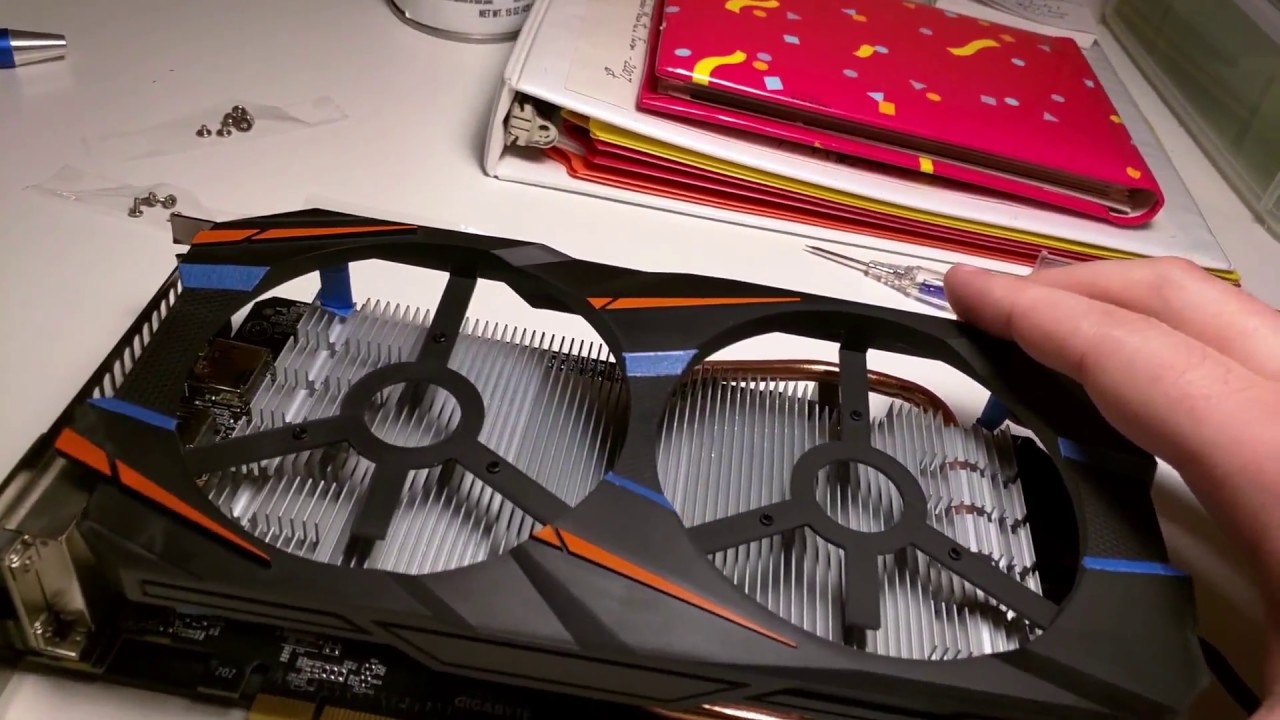
A basic video detailing how to disassemble/tear down the card for a custom paint job or other purposes.
have a look at that
and then after looking, decide if you are willing to do that
also, keep in mind, you are going to need rubbing alcohol or similar to clean everything with
(except for the die/core)
calm mural
Ok thanks for your help
sturdy jolt
Wait, wouldn't they need thermal paste to repaste the GPU afterwards?
strange perch
its going to be "good" enough to test if it actually works or not
no need to invest in something like that if the card is dead anyways
sturdy jolt
Oh wait the video doesn't remove the heatsink. Don't mind me.
strange perch
:)
 pulsar lynx
Does anyone happen to have or know where I can get pictures of the power board for a BenQ zowie xl2540 one of the smd resistors contacted the rear of the panel and fried the markings off and I can’t locate a schematic anywhere or pictures
Btw sorry if this isn’t the correct place to ask
 glacial rain
Could anyone help me with a problem with raspberry 3b+?
 cedar nexus
Good evening. What do you think about this buy?
 hidden pumice
which one?
cedar nexus
Should i buy?
HP OMEN 15 Notebook, 15.6" FHD Display, Intel Core i7-9750H Upto 4.5GHz, 32GB RAM, 2TB SSD, GeForce GTX 1660 Ti, HDMI, Mini DisplayPort, OMEN Mouse + Headset, Wi-Fi, BT, Windows 10 Home
cedar nexus
$1719.99
calm mural
What is it for?
cedar nexus
Where?
cedar nexus
Yeah. One I wanted originally out of stock
sturdy jolt
Can't find 1tb ssd, but I did find 512ssd + 1tb hdd
https://www.newegg.com/black-msi-gl-series-gl65-10sek-022-gaming-entertainment/p/N82E16834155402?&quicklink=true
cedar nexus
So here’s the thing. I don’t really need a gaming laptop. Something to get me through online classes while still a power house
sturdy jolt
Yea, that's what I've shown you can do
Your first choice was 1700$
I wanted to save you some money and get you better performance
cedar nexus
Kool
sturdy jolt
@cedar nexus please tell me if there are other requirements I should know
sturdy jolt
That's very very hard for laptops
You don't need to upgrade memory in that
It has 16gb memory
cedar nexus
Yeah I know. But MSI look like it
sturdy jolt
Please explain in detail what you don't like about the MSI laptop
cedar nexus
Is the battery life really what it’s advertised
cedar nexus
15 hours
Kool.
So pretty much would buy one or another desktop?
I’m pretty much looking for a desktop replacement
strange perch
question: is your next "i am looking for" sentence going to be: i am looking for a thin and light?
cedar nexus
Lmao
strange perch
because so far, you have listed two quite different "segments"
cedar nexus
Yeah I’m just so confused.
strange perch
start by figuring out what is most important to you
cedar nexus
But I pretty much want a desktop replacement. Portable. Also like say if I’m going to have meetings.
cedar nexus
So I’m taking up CIS. Online classes. Starting back fall. So something to run all the latest stuff smoothly at the same time able to watch movies and stream YouTube
strange perch
CIS = ?
cedar nexus
Computer Info systems
strange perch
ah
depending on what tools you need for that in the states
just about any machine will do the trick
strange perch
what will the AX give you that a non-AX wifi machine cant?
sturdy jolt
(AC can handle 1.2gbps or more depending on the model)
strange perch
and what will gigabit internet actually matter to you? you will most likely be on a machine with 1-2 tb max storage
so, lets say you download at "max" realistic speed (which is about 100megs/sec) on a 1 gigabit connection
thats 10000 seconds per TB
aka, roughly 3 hours
internet speed beyond 50mbit is vastly vastly overrated
cedar nexus
Ok. True Have you ever tested it out though
strange perch
only about a couple of hundred times over the years
cedar nexus
And an all in one Desktop wouldn’t make sense right?
strange perch
depends on use case
1: would not be portable
2: there is very likely not any upgradeability as such
strange perch
it makes sense for any usecase that can actually use it for something
sturdy jolt
(There are many other uses other than just gaming, but it depends on if you have need for any of those things)
cedar nexus
ASUS ZenBook 13 Ultra-Slim Durable Laptop 13.3" FHD WideView, Intel Core i7-10510U, 16 GB RAM, 512 GB PCIe SSD, NumberPad, Windows 10 Pro - UX333FAC-XS77, Royal Blue
 shut flame
Different model, same lineup, screen on battery test.
@sturdy jolt lol, my pc has literaly 30 minutes of battery
warped yew
Intel six-core laptops are basically for rendering if there’s no dGPU
 shell spade
hi i looking for 600-700 USD laptop for gaming
 cunning kite
@shell spade acres nitro series is as close as possible to your price point but for 900 you can get a solid mai gaming laptop with a 9th gen i5 instead of a 7th with a gtx 1050ti but that’s probably the best you can do
Personally I would recommend a pc for a price to performance but everyone is entitled to their own system so look around for sales on Newegg micro center amazon and see what you can find
strange perch
@cunning kite thank you for stepping up and trying to correct your earlier statements :)
cunning kite
Acer *
strange perch
(arrow key up = edit last post)
strange perch
ah :)
cunning kite
Also as stated in the other chat 144hz will not be possible to reach with this budget which 60hz is fine which is what I’m running due to a stupid beginners mistake a couple years ago but assuming go with a laptop make sure to buy an extra mouse and keyboard from personal experience
warped yew
Tap and hold on your message, select “Edit message”
shell spade
g
cunning kite
g?
 fringe gale
g.
i have a dell precision t3600 with an e5 1602
gt 520 🙂
im thinking if i put in a better gpu and replace the cpu with an e4 2640 v2
will it be able to game?
it has a 600+ psu and 32gb of ram
wraith steppe
The first cpu is probably best for gaming
topaz adder
intel best for gaming.
 proven seal
They are both Intel processors. 😛
topaz adder
it's an inside joke 😛
proven seal
😹
wraith steppe

proven seal
Do you have to be a specific rank to be able to post pics or something?
green stream
@proven seal yes lvl 3
 proven seal
😛
 fathom elbow
why are raidmax power supplies a bad idea?
 still viper
Laptop or a portable system that can fit in your backpack and that also takes the place of a few college books in thickness
weary pasture
what about it?
nova osprey
Lol
weary pasture
i have the void elite wireless, i love it
rgb is useless so i turn that off to save battery
but the headset is comfortable, it sounds pretty good, the mic is decent, and the build quality is nice. i love that its wireless
 river heath
i was leaning more towards that as well, its a bit cheaper and im currently having issues with my g933.
plus im looking to make a new build and have it be more of a white styled color than black this time
have you noticed any connect ability issues with it ? @weary pasture
weary pasture
nope
 prisma gazelle
Yo can you guys tell me ur thoughts on this for a first gaming pc for Fortnite
Idk how to send a ss 😭
 faint herald
G935 has probably some of the best audio for a wireless headset in that pricerange
wide vault
@prisma gazelle Mee6 doesn't let people with a grey name send pictures or links, but you can DM someone with a blue name and they can post the image/link on your behalf
 boreal mural
Yeah but good quality though
 toxic river
@river heath I'd check out these too if you're looking for a wireless headset:

SteelSeries
Arctis 7 brings DTS Headphone:X 7.1 v2.0 Surround Sound, the best mic in gaming, and lag-free wireless with 24 hour+ battery life.
 inner elm
I don't really see the point in "gaming headsets." I'd just get an all-use pair of headphones from a reputable company. I have a pair of Bose 700's and I love them. I'd rather go for great sound then the gaming aesthetic
haughty vector
Well I think the gaming part is just mainly the mic
Bose 700s are pretty dang expensive but yeah I would deff rather have those than my hs50 headset
inner elm
They do have a decent mic tho the headband isn't the most comfortable
thorn gulch
Cheap-ish actual headphones + seperate mic combo is better then a gaming headset
nova osprey
^
 glass nebula
I honestly don't know why I would need a gaming head set vs a normal one, its not like much is gained from one or the other, at least I can't hear the difference (though I am also partly tone deaf to a degree.....)
I just use my tv, works well enough for gaming
wraith steppe
Preference.
wide vault
audiophile headphones + no microphone
green stream
yes
nova osprey

calm mural
guys what should i buy to improve my wifi connection
sturdy jolt
@calm mural what wifi plan are you paying for, and what speeds do you get on your device?
Like if you pay for 10 mb/s monthly, you can't magically get 1gb/s on your PC with a better router
 charred summit
lol amazon screenshot in newegg discord
 glacial ingot
@strange perch are u around atm
glacial ingot
yes but I got back up!
strange perch
good
glacial ingot
first
strange perch
carpet is too comfortable for you :P
strange perch
re: first : good to hear
glacial ingot
second: is there anything else I need to do
strange perch
did you ever look into the XMP setting in bios?
glacial ingot
what kinds of things will XMP make a difference for
glacial ingot
and for the headset, I have a headset with 1 audio jack on it and 1 usb connector
strange perch
model?
glacial ingot
errr
one sec
kotion each g2000 which I bought a little while back mainly for xbo
xbox
strange perch
no rush, got hot food here, so i can wait for a good long while :)
glacial ingot
go eat ur food
strange perch
i am :)
glacial ingot
ah
strange perch
always eat here :)
glacial ingot
haha ok
can I make this headset work for sound/mic input
or do i need one with 2 jacks
strange perch
i have never ever seen that headset before
let me just try and see if can find their homepage
strange perch
close enough
and sorry for the language, but holy heck that looks jank as all heck
strange perch
aye aye
strange perch
you are most likely just missing the drivers on your new one
strange perch
lets take it from the top :)
what do you currently have plugged in of the connectors on it?
glacial ingot
headset usb --> usb 3.0 on front of case and the audio connector in the jack with the little headphone icon
strange perch
lets try a couple of things
start by unplugging the mini-jack from the back
just leave the usb in
(just trust me)
glacial ingot
the mini jack being the thing connected to headphone? its in the front audio jack but ok
unplugged
glacial ingot
got it
strange perch
and in the window that opens, on the top right
there is a blue link to "sound control panel"
click that
glacial ingot
k
strange perch
the following is just a "general" thing
glacial ingot
👍
strange perch
in the window that opens (which is called "Sound")
click the communications tab
you have 4 bullet points
select the "do nothing" one
glacial ingot
if i dont say anthing just assume im following along
strange perch
i do :)
glacial ingot
teehee
glacial ingot
strange perch
hm
click the "playback" tab
is there more than one screen of things there?
as in, is there a scroll bar on the side?
glacial ingot
there are 6 items listed
yes
3 nvidia output, 1 labeled speakers, 1 labeled headphones, and 1 labeled digital audio
strange perch
try and click on the headphones and then "set default"
glacial ingot
it wont let me click set default
strange perch
headphones already have a green checkmark?
glacial ingot
nope
strange perch
or are they (the headphone listing) just greyed out?
glacial ingot
greyed out with a red down arrow
strange perch
oki
glacial ingot
strange perch
that means its one of the integrated ones/something-that-doesnt-have-a-connector
aye
drivers are just missing for the onboard it seems
on your headphones
there are 2 minijacks right?
glacial ingot
no sir just 1
glacial ingot
Do I need a splitter
strange perch
you know how your phones headset one has one minijack?
but has both a mic and a headphone?
glacial ingot
yea they both go thru 1 jack
strange perch
thats the effect of the combo plug
glacial ingot
the stripes on the minijack separata the mic/audio output right
strange perch
aye
glacial ingot
at the end
green stream
not all pcs have combo jacks on them
strange perch
just about no desktop ones do
green stream
yup
strange perch
because it is not "expected"
glacial ingot
the one I was on before did for some weird reason
green stream
if that is case you need splitter
strange perch
@glacial ingot old one was a laptop?
glacial ingot
no sir
glacial ingot
not scientifically
I might have a splitter somewhere but if Not should I order one?
strange perch
its something i have never tried, because its so "logical" that it "should not" work
but i honestly dont know IF it works
glacial ingot
the mic in line in or line out
strange perch
green plug for now
glacial ingot
i had to move it but doesnt matter
strange perch
it should not matter, that is correct
strange perch
mic should "not" work
but yes, sound output should
could you show me which output is the "default" in the "Sound" window from earlier?
strange perch
picture please
glacial ingot
strange perch
so, it is using the default drivers it would seem
last night, did the others guide you through the install process of the drivers from the mainboard maker?
strange perch
yeah... about that ... :P
glacial ingot
lay it on me
strange perch
you know what device manager is?
glacial ingot
kind of
glacial ingot
k
strange perch
are there any yellow question marks in there?
glacial ingot
idts
strange perch
?
glacial ingot
i dont see any
strange perch
picture please
glacial ingot
strange perch
okay, that is the chipset drivers missing
2sec

open that
if it gives you a dropdown, selelct windows 10 x64/64-bit
scroll down, and download the "Chipset" driver
the one that is 464.51 MBytes
with me so far @glacial ingot ?
glacial ingot
yep
strange perch
you can just close all the windows i have had you open, EXCEPT the device manager
(well, you can close it, but i will ask you to open it again later)
glacial ingot
its downloaded
strange perch
right click and run as admin
glacial ingot
its a zipped file
strange perch
unzip
glacial ingot
how do I do that
strange perch
right click and unpack
glacial ingot
im in the folder
glacial ingot
express or custom install
strange perch
express is fine
glacial ingot
looks like it!
glacial ingot
Restarted
strange perch
so, that was some house keeping
strange perch
its basically all the bits of bobs on your mainboard being given the actual software drivers they need
strange perch
Audio
again, same procedure
just grab the Audio one
this should be the last thing you need from there
glacial ingot
same deal?
strange perch
aye
glacial ingot
did that
strange perch
restarted?
glacial ingot
yea
glacial ingot
im there
strange perch
double click on whatever is the "default" device
and show a picture of that please
glacial ingot
Looks the same
strange perch
hm
glacial ingot
glacial ingot
realtek
glacial ingot
something else!
strange perch
very much so
all of this is also "just" house keeping
and that gets us around to the state of this:
Congratulations, you system is now actually setup
now, for your actual headphone problem
strange perch
that is basically "it" @glacial ingot :)
glacial ingot
thanks again for all the help with everything!
strange perch
you are very welcome @glacial ingot
and do give a shout if you have any other questions about things :)
oh also, you might have some use from ninite
The easiest, fastest way to update or install software. Ninite downloads and installs programs automatically in the background.
nova osprey
Ninite is awesome
Naed introduced me to it last time he helped me and it saved a good bit of time and was easier. I recommend 👌
thorn gulch
I like Ninite. Their site supports 21:9.... Albeit only one part. But still
 sturdy minnow


 civic island
When playing a game (such as R6) on pc, is it better to have Stereo Sound or Dolby Sound (Surround Sound) This is on the Corsair Void Pro's
please @ me
weary pasture
i would imagine surround sound would be better for positional audio
sturdy jolt
I've been told Stereo is better because surround sound usually sucks, but idrk
I'm the kind of guy to just play on default settings
green stream
Stereo is best
civic island
Alright thank you
green stream
Dolby atmos works pretty decent on stereo headphones, but I usually prefer stereo
weary pasture
sindows sonic or bust
civic island
Thanks worser
sturdy jolt
@weary pasture so bad
green stream
Sonic bad, bad Zack
weary pasture
i dont even know what it does lmao
sturdy jolt
Made things kinda echoey
weary pasture

sturdy jolt
And like screwed up the sounds
green stream
It changes the sound a bit too much, too processed
green stream
Doesn’t sound natural
green stream
weary pasture
its actually horrible
sturdy jolt
Yea
green stream
Do you have tin cans as headphones
weary pasture
its so much better with windows sonic on
green stream
Also it is only active when it says it is
weary pasture
so much clearer
green stream
Is says near the volume control
weary pasture
im listening to music on youtube, i turned it off and it sounded like trash, it sounded like it couldnt process the audio. switched it back on, and it sounds a lot more clear now.
green stream
Try listening a little longer
 bronze wolf
depends a lot on what headphones you use and whether you're used to it.
green stream
Or take off headphones and come back later
weary pasture
its legitamentally terrible
bronze wolf
also, for some games, notably overwatch, if you want to use atmos, you need it on in the game's settings, and all the windows surround stuff off
green stream
It’s like if you use headphones with overwhelming bass and then go to more natural headphones
Atmos is decent
Works well in overwatch
weary pasture
lmfao with windows sonic off it sounds like the youtube video is in 140p resolution
i didnt think id notice so much of a difference
OHMYGOD
bronze wolf
what headphones do you use?
weary pasture
i found a way to check the battery without opening icue
just hover over
😩
where has this been
corsair void elite wireless stephanie
i looooooooooooooooooooooooove them
sturdy jolt
Wtf