#windows-ios
1 messages · Page 18 of 1
 hollow lichen
 livid bluff
Hmm @vivid temple Would It be The SATA Emulation section. Its been so Long Since I messed with a HP
livid bluff
Hmm Try Boot Order
hollow lichen
 vivid temple
heck knows, thats one of the old custom hp bios (it looks like at least) so ... just about all bets are off :)
vivid temple
start from one end and go through it all
livid bluff
Sum ##### Ok What the Model Number of the Computer So I can see if I can find where the heck its at
vivid temple
Viper / do you have the time to jump on a video call with him?
might make it easier to dig through
livid bluff
Not Really Im Updating my RP server Sheriff Roster
vivid temple
i dont have the time for a call either :)
hollow lichen
sku number???
livid bluff
Nah I got the Info I needed from a Screenshot you sent
hollow lichen
Oh kk
vivid temple
@hollow lichen so, the conclusion is this: Keep googling, and hopefully, at some point, someone has the time to maybe jump on a call with you, incase the relevant info aint available online
livid bluff
Im Got Youtube Video
hollow lichen
So if it’s not on my bios Is there a way I can instal a new bios
livid bluff
Darnnit It was just how to change the Boot ORder. No Its IN The BIOS its just buried in the menus somewhere
hollow lichen
Okie
livid bluff
Nope That MotherBoard Does Not Support a UEFI BIOS at all.
So there is no Option for it.
hollow lichen
Hmm
livid bluff
@vivid temple Does HP Compaq dc7900 have UEFI BIOS? no its an older 775 setup no uefi motherboard bios. Found this answer in Steam Forums
And It amkes sense as that system was only desinged to handle Up to Windows 7 Possibly 8.1
livid bluff
It would have been Upgraded From 7 then from within the Windows Environment then
hollow lichen
Hm
livid bluff
Thats The Only Way I can feasibly think of that it would have had 10 on it
@vivid temple Would I be correct on that?
hollow lichen
Does it need to have that if I just upgrade using media creation tool??
vivid temple
if the bios is stubborn enough
going windows 7, then upgrading
can be the simple way
problem is custom bios on boards like that
heck knows what is actually "cooking" under the hood of them
livid bluff
Right
So The Windows 7 install To Windows 10 Might be the best option just because the BIOS is being Stupid and Stubborn at this point. Thats just my opinion. Yes its a longer Process but at the same time might resolve quite a few headaches as Win 10 will configure itself to the hardware
 cinder mauve
windows 10 does not require uefi btw
livid bluff
Newer Versions For Some reason Do need a UEFI. At least in my experience with Building Systems anyway
cinder mauve
also what the hell is going on with your capitalization
i feel like i'm having a stroke
vivid temple
@cinder mauve no, it doesnt (technically). But as mentioned, welcome to custom bios'
@cinder mauve if you have a problem with the way he types, please take it up in a PM with him :)
livid bluff
Sorry. Im in college and when having to write 600+word papers ever week it becomes habit when you have to make a statement or type in a quote from a Cited Source
But yeah It seems His system requires a UEFI setup for Win 10 to install from the USB thumbdrive
cinder mauve
so one other thing to consider: how did you prep the thumbdrive?
livid bluff
From what we know he used MEdia Creation Tool
cinder mauve
ah
could you try having him use Rufus?
in it you can specify that it's for legacy BIOS
which should solve your issue
livid bluff
I havent heard of that software before
Then again Ive never had to create a Thumbdrive for a Legacy BIOS since I have a Win10 install disc
cinder mauve
Rufus is excellent for making bootable flash drives for just about anything.
If you supply it with the Win 10 ISO you'll be good to go
livid bluff
@hollow lichen You Get All That
hollow lichen
Yess
livid bluff
ok
vivid temple
@cinder mauve please use the official links instead of direct file drops
(in other words, please delete that file upload)
 smoky pagoda
Rufus is a small application that creates bootable USB drives, which can then be used to install or run Microsoft Windows, Linux or DOS. In just a few minutes, and with very few clicks, Rufus can help you run a new Operating System on your computer...
 ivory sky
hey guys, my windows 10 keeps doing this thing where it aoutomaticall scolls down or points down with my mouse if im in a game and its only with games or windows 10 stuff, not chrome or discrod, and i cant go through my settings as it keeps scrolling down and selecting the wrong stuff, has anyone got any ideas on a fix
its not hardware based btw
 lost prairie
Hi guys I have a gl504 and i can not find where to change my ram speed. Bios has no forms of overclocking at all is there something I'm missing?
smoky pagoda
scar 2
?
Hi,
This laptop doesn't seem to have any settings for XMP in BIOS, so is XMP supported at all?
Also what is the maximum speed of RAM the laptop supports?
read that, you'll have an answer.
 hot shell
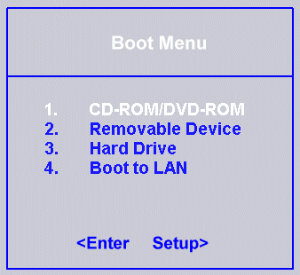
@livid bluff The Manual shows 2 methods for changing the boot order 1. in the bios 2 pressing F10 during post will bring up a boot drive menu
livid bluff
@hot shell The System Naed and I were helping with is a older Intel 775 or 755 type board wich does not have a UEFI option in the BIOS whatsoever
Its Just Not Supported
Hence why the Option at that point became Installing Win 7 and Doing a Inplace Upgrade at that point since he was unsecsesful in Installing from the USB drive at that point
He already had the Boot ORder Set properly for booting from the USB to Install Windows
hot shell
IC I posted that info from the manual yes there is no UEFI but there still should be a bios assessable on post maybe delete or f2 if he lost the hard drive he's going to need a key for windows 7 Don't think windows 10 will install on anything lower than win 7 sp1 manf date of 2008 its possible it was upgraded to windows 7
livid bluff
From what we know it had 7 on it preinstalled from HP, It was Updated to 10 from bt the previous owner and then the Hard Drive Failed
hot shell
the pc was manf. 2008 so it more than likely came with Vista Preinstalled as Windows 7 didn't happen till mid 2009 he's probably going to need to find a super cheap laptop or pc off of craigslist or the goodwill and clone the hard drive if he just wants a pc for general purpose maybe installing a Linux derivative would be simpler like Mint
 sand bronze
can someone help me with updating driver or checking connectivity? i just put in a new video card and i'm udpating the software and the 400 meg driver took a long time to complete. and right now i have a windows update just sitting at "installing - 0%"
 slender rose
If I build a completely new system and carry over my old drive as the boot drive would I need to reinstall Windows?
sand bronze
the os should boot up from the drive i'd think
slender rose
Oh ok
sand bronze
@slender rose you can update all the drivers and stuff once you boot up. but if you have abootable drive from one computer and move it to another its as if you moved the computer to a new hardware set
I cant figure out why my install is stuck and i updated drive from power color site and it looks like i just reinstalled software again... meh
and theres 100% of my disk in use fo rsome reason... now i'm confused lol
slender rose
What if down the road I buy an SSD and install Windows on it, is there anything I have to do with the old drove
Drive
 last gorge
i would backup the data you need and just wipe it, if you install windows while another drive in pc already has windows it will make a boot loader thing on startup where you select which windows to use, i find it annoying. Some people also like to clone their drive and use that
slender rose
Oh I see
I just wanted to avoid the pain of having to redownload my larger games because my internet is extremely slow
sand bronze
Now my windows icon won't work to restart lol...
Anyway to figure out why my HD is at one hundred percent? I can't see anything actually using it
hot shell
Task manager isn't showing what's utilizing the cpu? unless you also cant bring up task master is it trying to update and also install the new drivers?
 sly heath
I'm trying to boot through a USB stick while on the UEFI, but it's only popping up with "USB: Sandisk" and not "UEFI: Sandisk." Any ideas?
hot shell
@sly heath see if any of this can help https://neosmart.net/wiki/boot-usb-drive/#Shortcut_keys
NeoSmart Knowledgebase
This guide explains how to boot from a USB flash drive and what configurations you need to have. If you have a new computer model (usually with Windows 8 or Windows 10) that has UEFI/EFI, make sure…
sly heath
Would I need to format my USB?
I'm not seeing any sort of "secure boot option" to disable
hot shell
Is yours a newer or older PC
It would be in the uefi or bios or you may not have have it if its an older pc
sly heath
It's new. It might be under an entirely different name
hot shell
It sounds like you have to format it as a UEFI boot device so it will show up as a UEFI USB
sly heath
Alright. I'll see how to go about that
hot shell
Many in here recommend you use Rufus its and open source tool for creating a UEFI bootable flash drive
sly heath
Apparently you can have Microsoft automatically change your USB to UEFI when installing Windows onto it
hot shell
Thats what I read also
sly heath
Everything worked perfectly!
last gorge
Some mobos when it doesn’t say UEFI just means it is booting in legacy
Not sure if that is the case here
 wraith timber
wopw forx ytou jhave a lot of cpus
last gorge
too many cpu
cinder mauve
Now that's a super computer
 grim sigil
Hey can anyone help me? Every time I set the date and time, in bios, windows just overwrites it to 10/03/2098, the instant I boot, I've tried cmos clear....
last gorge
did you try setting time in windows
sometime it help to turn off and back on set time automatically
 obsidian cloak
I have a quick question. I just built my first pc like 2 weeks ago. I’m going to add an m.2 drive. I’m currently only using a 2.5 ssd. Can I clone it to my new m.2 or is it easier to just reinstall windows?
livid bluff
You can Clone But I think it Would be easier to reinstall Windows so that there is no Driver Issues with the new M.2 drive
obsidian cloak
Thank you that is what I will do
livid bluff
Yeah No Problem. I want a M.2 drive for my system but would only wind up using it to store games on since my OS is already on a SSD
And that SSD is connected to a 6gbs SATA port on my motherboard so there wouldnt really be much of a difference
obsidian cloak
My os is already on an ssd too but i thought if I was adding a m.2 I should probably go ahead and switch it over the os
So I install the m.2, put in my usb installation drive and boot. Should I unplug my current ssd? I want to wipe it clean.
livid bluff
Yeah Unplug the SATA cable from it so the system doesnt read it when You do the Fresh Install of Windows
obsidian cloak
👍🏼 sweet thanks again
livid bluff
Yeah No Problem
obsidian cloak
I know just enough to be dangerous
livid bluff
Same
Although I built my system. Just had to Fix Google Chrome thanks to a Microsoft Update breaking it. Had to change a User Data file in the App data for Chrome. Just had to rename is User Data.BAK and walla Chrome Works again
Otherwise Chrome would open and just crash with no error code
obsidian cloak
Yea I would have tried redownloading chrome until it worked lol
obsidian cloak
Or assumed my ram usage was maxing our lol
livid bluff
I know thats not my case. I have 32gb of DDR4 3000mhz RAM
obsidian cloak
Nice
livid bluff
Yeah. Im a Graphic Desinger and alot of those programs are RAM instensive. Stupid Adobe Creative Cloud
obsidian cloak
I only have 16gb. 3600mhz speed tho
livid bluff
Yeah 3000mhz is my XMP profile. I can make it run faster but my Motherboard Only Supports 3200mhz so not really worth overclocking it anyway. Besides Ive had OS issues when Running the RAM at the Max my MOBO allows
obsidian cloak
Yea I’d go for stability
livid bluff
Yep Thats Why I leave it at the XMP setting. No Issues with OS and Games or even Adobe Creative Cloud
obsidian cloak
So after I get windows installed I’ll plug in the ssd and I’ll have to get it to read it. Will it wipe it clean then?
livid bluff
No You will have to format it. Windows May go into a Dual Boot State where it shows Both Installs of Windows on a Blue Screen. You then Have to figure out which one is on what drive
Once You Boot into the One of the M.2 youll be able to wipe the Drive clean
You Could Always Leave It connected and USe the Windows Installer to format it then close out the Installer shut down the system and Disconnect it. Thats just alot more work
obsidian cloak
Gotcha I think that’s what I was thinking. So how do I format the ssd do I need to boot to bios first and make m.2 boot priority
obsidian cloak
And then boot up and then plug in ssd to format
livid bluff
Yeah
You could hot swap it that way but Windows may or may not read the Drive when Hot swapped in
obsidian cloak
I understood installing the windows on the m.2 but I wasn’t sure how to format the ssd and when I could do it. I know there’s a part at installation where you can pick which drive to install and I thought I could wipe it clean then
livid bluff
You Can
You can Wipe the Drive Fromt he Windows Installer. But you have to make sure you know the Drive Sizes if your going to do it that way so you install the OS to the M.2 and not the SSD. Now if they are the same size you will be having a CRAP shoot essentially on what drive is what.
obsidian cloak
Yea lol they’re both 1tb
livid bluff
Yeah Best bet would be use the Windows Installer to format the SSD then exit out the installation and then Disconnect the SSD
If you were going to do it that way
obsidian cloak
Gotcha but the easiest thing to do is just get up and running on the m.2 and then plug in the ssd and format it
livid bluff
Yep
obsidian cloak
I considered not even switching it
livid bluff
@vivid temple Wann ahelp Him I have to go
vivid temple
@livid bluff aye, have a safe one :)
@obsidian cloak give me a bit to read up
@obsidian cloak okay
any questions ?
obsidian cloak
I can get everything up and running on my m.2 when it comes in. When it comes to formatting the SSD after I plug it in where do I go
obsidian cloak
Yes I just type it in the search bar
vivid temple
or, right click your start button and select it from the list that shows up :)
obsidian cloak
Yea I didn’t know that
And my m.2 will be a c drive so i format the ssd to a d drive
vivid temple
basically yes
let me just verify something
you only have the 2.5 drive right now?
obsidian cloak
Yes
vivid temple
then there should not be anything preventing you from trying to do a clone onto the m.2
its your call what you want to do
obsidian cloak
How do I clone it? And does that wipe clean the ssd also
I assume I need to download something
wraith timber
Drive cloning doesn't wipe the original drive
obsidian cloak
So I’d have to clone and then format it
vivid temple
basically yes
wraith timber
There are quite a few cloning softwares available, I personally used Macrium Reflect, free edition
vivid temple
https://www.macrium.com/reflectfree <- this one
reflect an image of your pc
wraith timber
^^
vivid temple
@obsidian cloak the upside to trying a clone is the following:
IF it works, you will be up and running as fast as your drive can clone itself
if it doesnt, you will most likely have used 1 hour on it
wraith timber
I watched a video and read a few things to understand how to clone
What does "used one hour on it" mean?
vivid temple
imo, Reflect is quite user friendly
re: used one hour on it: IF the clone doesnt work, he will have spent 1 hour on something that didnt work out
wraith timber
Ah, I see
obsidian cloak
Instead of reinstalling all drivers and games which will take awhile
wraith timber
It is pretty easy to use. I ran into an issue where it didn't shrink the Windows partition enough to allow for the remaining partitions to also fit on it, so I had to manually input the Windows partition size. It was trial and error to get it just right to where the drive wasn't left with much unformatted space, so I had to reset the prompt a few times before I figured out the right value to shrink my Windows partition to
It was otherwise smooth sailing in my case, though
obsidian cloak
If I clone will I have to go to bios and set boot priority too and probably unplug the sata ssd to after its cloned
vivid temple
hm, i had someone else with the same problem the other day @wraith timber , still waiting for him to get back to me, so i can have a look next time he does it. Because reflect is normally good about doing that correctly
wraith timber
Interesting 
vivid temple
@obsidian cloak bios boot order should be enough
wraith timber
It only took a little math and guessing, so they should be good
obsidian cloak
I fresh installed windows on the ssd like 2 weeks ago so wasn’t too worried about doing it again I just didn’t know what was the best way to get the current ssd wiped clean
vivid temple
disk management :)
because there will be hidden partitions you cannot "see" from file explorer @obsidian cloak
obsidian cloak
Ok well that is helpful I didn’t know too much about disk management because I only had one drive lol
vivid temple
@obsidian cloak when the time comes, just ask :)
obsidian cloak
Sweet thanks for the assistance
vivid temple
you are very welcome :)
 shadow jay
@vivid temple can assist you :).. very well
vivid temple
@shadow jay what have you dropped on me this time?
shadow jay
hmm zaky have some troubles
vivid temple
ah yes, i see your questions in #general-chat
why would you reset?
what is slow?
also, please remember the following: i cannot read your mind :)
and there are no stupid questions, only silly answers
your OS is installed on the SSD?
 azure sandal
@cinder mauve Are you running on a hard drive?
vivid temple
got a parts list?
cheers
how long have you had the system ?
you running discord client or browser?
okay
azure sandal
Do you have drivers installed?
I know it's kinda cliche to ask but that could definitely be the problem
Did you install drivers for your motherboard/gpu etc?
vivid temple

the "system & chipset drivers" tab
okay
as a test: do the following:
shutdown your chrome
then give me a rough count of seconds for it to start up
nah
"then give me a rough count of seconds for it to start up" <- that
yes
by you clicking on it
okay, something got lost in translation
your current task is the following:
shutdown/close chrome
then start it up
and count how long it takes
that is normal
that is not "slow"
that is what you said :)
as i said earlier, i cannot read your mind :)
smoky pagoda

vivid temple
reset <- is not what you want
i am trying to understand what your problem/desire actually is
smoky pagoda
sometimes loads slow?
vivid temple
so that you dont do something that ends up leaving you in a bind.
smoky pagoda
even if you do 'reset' ... you'll get back to that point
cache fills up, things slow down.
vivid temple
from what you have said so far, it sounds like a user related problem
meaning: have a serious look at what software is actually running/active
because the system you listed, should not have a problem like what you are describing.
IF you really want
you can press start, type reset
smoky pagoda
did you download a buncha crap?
vivid temple
and work around with that
smoky pagoda
have you ever ran a virus scan?
with windows? thirdparty app?
ran defrag/trim ??
🙂
so you have files scattered everywhere.
clean yo room!
 finite glen
I wanna copy my os to a SSD through ufei as a backup for if things break what part should I copy to the ssd
finite glen
That's what I'm using I gotta know if its the first one I'm supposed to clone
Or whatever sequence
azure sandal
Looks like do 3 and 4. Except don’t do it yet wait for someone else to confirm what I just said.
Or look up a video on YouTube saying “how to clone OS with macrium reflect” or something along those lines
vivid temple
@finite glen the idea/concept is good
but it is very in-efficient to do
it is much more practical to have systems setup for backup of the data that actually matters
and then "just" have a usb stick with the windows installer on a shelf somewhere
finite glen
Oh
vivid temple
because IF you think about it, the OS install itself takes about 20 minutes
finite glen
The main reason I wanted to do this is for IF something happens when I try to have both the hdd and SSD plugged in and I get an error but I see your point
@vivid temple do you think it's a good idea for me to try and plug both of my storage devices in because I haven't had any error or problems with the os on the SSD?
vivid temple
@finite glen you had some kind of problem earlier right? (sorry, but i cannot remember each and every single case)
finite glen
It wouldn't accept the SSD as a boot drive but it started to work the day after and its been working fine for a week
vivid temple
plugging in the hdd will most likely just get the bios to try and boot from that drive first
but that can be changed in the bios
finite glen
I know
vivid temple
plugging in the hdd will not cause your ssd to not work (with the hdd unplugged)
finite glen
You know it helps if I have the windows boot manager set as priority and not the storage
livid bluff
@vivid temple Thanks For Helping Him
 kind cliff
trying to install windows, it keeps giving me an error code
@smoky pagoda my boy naed told me you could help?
livid bluff
What Error Is It Giving You @kind cliff
kind cliff
0x80070570
livid bluff
Give me a sec
livid bluff
Do Yo uhave 2 Different Brands or Speeds of RAM installed in your system?
kind cliff
no both are ddr4 3200
livid bluff
Ok. so what are you using for install Media
Cause Basically What I am reading is the Install files are Corrupt
livid bluff
Yeah. So Whoever made the Flash Drive didnt know that the Install was corrupt or became corrupt during shipping
Error 0x80070570: the file or directory is corrupted and unreadable"""" Is that What You are seeing come up on your screen?
kind cliff
yep that it
ok well luckily amazon takes all returns haha do you recommend a link to purchase windows 10 online?
its crazy cause this is an actual product from microsoft
billy be trifling
livid bluff
No More than likely what happened is the Thumbdrive got jostled around to much in shipping and wasnt packaged properly and something came loose on the mainboard of the thumbdrive and a sector of the data is no longer readable. Worst Case is the Hard Drive itself that your trying to install to has bad sectors
kind cliff
should try to install a free version of windows to see if the m.2 drive works fine?
kind cliff
kk
 void vapor
how do i clear out old drivers?
hot shell
Which Drivers?
 fading wraith
In need of advice. PC won’t boot; always result bsod. Should I get new driver?
smoky pagoda
what error is the bsod
 feral scaffold
Looking for some advice or help. I will be upgrading my motherboard and cpu for the first time soon. My OS is currently on an SSD that I will be reusing with the new hardware. I will have everything backed up on an external hard drive, and my Windows 10 product key is linked to my Microsoft account. Is there anything else I need to do or worry about when I boot up for the first time, or will windows 10 recognize the new hardware and take over from there? Or am I just better off doing a clean install of Windows?
 signal flax
boot able usb cloneing tool for m.2
 rocky cedar
@feral scaffold I believe win10 should be fine and take over. But you can always prepare for the worst, and have a bootable USB drive with win10 installation tool.
 heady heart
anyone has a good free gaming software? 😄
 frail abyss
What kind of software
rocky cedar
yea.....
rocky cedar
If you're using Nvidia, Geforce experience is great
heady heart
sadly geforce experience doesn't support an old game of mine
last gorge
OBS
heady heart
is there a way I can add the game to be compatible with it?
last gorge
Click alt + z
rocky cedar
obs also good
last gorge
Lol
rocky cedar
but geforce experience good nuff for me
last gorge
Ye I just use OBS, and set keybinds to make it easier to switch screens
heady heart
ill check that out
last gorge
I will say nvidia is more convenient in some cases because you don’t need extra app open
heady heart
is it possible to make nvidia experience just to record a game display frame?
without recording the whole desktop
 rose birch
So my brother recently sent me this link, luckily I turn off everything so it wasn't affecting me, but, maybe if anyone is having issues this might be something to look into. https://www.pcgamer.com/try-turning-off-windows-10s-game-mode-if-your-games-are-stuttering-or-freezing/?utm_content=bufferfb286&utm_medium=social&utm_source=facebook&utm_campaign=buffer_pcgamerfb

pcgamer
A growing number of users say Game Mode is causing performance issues in games.
 vast summit
What was that @rocky cedar
rocky cedar
Naed
vast summit
K nvm
 half venture
If windows 10 is free why do people use Linux
wraith timber
That's not really a reason to use an operating system
last gorge
cuz windows sucks
smoky pagoda
it doesn't though..
azure sandal
Windows gang
azure sandal
Close MSI afterburner?
wraith timber
nah just turn it off
azure sandal
Hm closing the MSI afterburner application is what works for me 🤷♀️
azure sandal
nice
wraith timber
I never figured out how to put up 1% lows and .1% lows
azure sandal
You have to start a benchmark
Look in the "benchmark tab" in MSI afterburner setting to set up a start and end benchmark key
rocky cedar
also checkmark the 1% lows and stuff
wraith timber
yee yee they show

 vapid granite
help
smoky pagoda
nice edit yo.
last gorge
that mean windows chan is crying
 peak notch
it crashed while crashing?
obsidian cloak
@vivid temple so idk if you remember me switching my os over to my new m.2. I think I got it. I reinstalled windows on my m.2 and then formatted my ssd to wipe if clean. Is that all I need to do?
 hoary moon
How can i set solver in Excel to change my cells only in 0.5 increments?
@obsidian cloak i just went through this process with @vivid temple .
Correct me if i am Wrong, but you formatted it through windows it wont wipe your drive clean since windows blocks the formatting of Boot Partitions. If you did it outside of windows, depends how you did it.
You should be able to see in Disk manager, if the Drive has an allocated boot section.
I did the exact same stuff. Installed Windows 10 on my added m.2 Rocket Sabre 4.0 1TB and just formatted the other drive, but i couldn't delete the Boot Partition of my old SSD. Took 8 hours till we got all the Bios settings figured out and the Gpart working
How can i set solver in Excel to change my cells only in 0.5 increments?
obsidian cloak
@hoary moon I have it booting and functioning. The old ssd did have two partitions still from what I could see
hoary moon
@obsidian cloak It should be complete "unlocated space" . Does your old hard Drive have any of this words in it?
hoary moon
@obsidian cloak If you maximize this window you will see that on your old SSD there is the 99MB partition saying EFI System
When i booted up my PC before i did the 8 hour session with @vivid temple i had a blue screen everytime before the log in screen for windows comes up asking me which harddrive i want to boot from
obsidian cloak
I set boot priority in bios
How do you remove that partition
I haven’t had that problem yet @hoary moon
last gorge
are those 2 boot drives?
if you are trying to delete, from my experience some partitions like the efi can't be deleted through interface, i did through elevated powershell or command promt
obsidian cloak
Only nvme should be the boot drive the ssd was my old boot drive. I installed windows on my new drive then formatted the ssd and it deleted everything but it left the two partitions
last gorge
idk if there is another easier way but i did that through powershell with diskpart
I open powershell as admin, then run DISKPART
then run list disk to view the connected devices
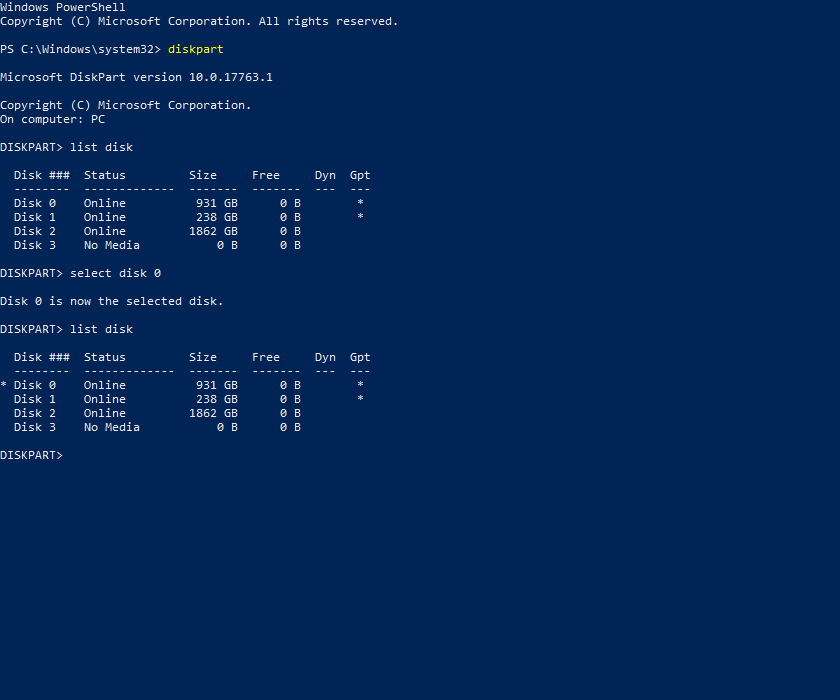 obsidian cloak
Yea I’ve never messed with that before lol
hoary moon
If you dont have the problem and are not looking to sit on your pc for a while dont do anything. If it works it works, but here is the quick solution.
You download rufus
get a fresh usb or a formatted one.
Pull gparted on it
shut down your pc
disconnect all other harddrives besides the old ssd boot drive
You boot up and it should automatically bring you to a wierd GUI
you run the script from gparted and your drive is super clean!
shutdown
connect the nvme and then boot up normally
The drive should then say Unlocated space
last gorge
basically that way you select disk, once proper one is selected you run clean and it will completely wipe the drive and then can reformat in disk management
hoary moon
I actually tried the command prompt way....didnt work for me
obsidian cloak
Command prompt seems easier if it will work
last gorge
it didn't work for me until i found that the clean command was to be used to completely wipe
make sure it is right disk selected tho
hoary moon
thats what i did. Didnt clean it.
yeah would be a pain if you deleted your nvme 😄
@last gorge you have knowledge about the excel solver?
last gorge
whatever works for you really, my issue was the drive i couldn't delete was making the gparted thing unbootable for be, basically any bootable drive didn't work, i was only partiallly able to access windows lol
but whatever works really
there are always different situations
no i don't use excel sorry
obsidian cloak
This is my new build pc just decided to add m.2 a few weeks after so I’ll be keeping this pc for awhile
hoary moon
that sounds like the first time i installed windows on my nvme and the setup said cant use it. Then i had to go in the setup to the command prompt and to all the disk part stuff. didnt work
Same for me. Builded this pc 3 weeks ago
and one week later said f it
last gorge
yeah what happened was i tried to install ubuntu on a dual boot and it went corrupt, and my windows drive decided to disappear for a few hours
hoary moon
@last gorge thats the important part
obsidian cloak
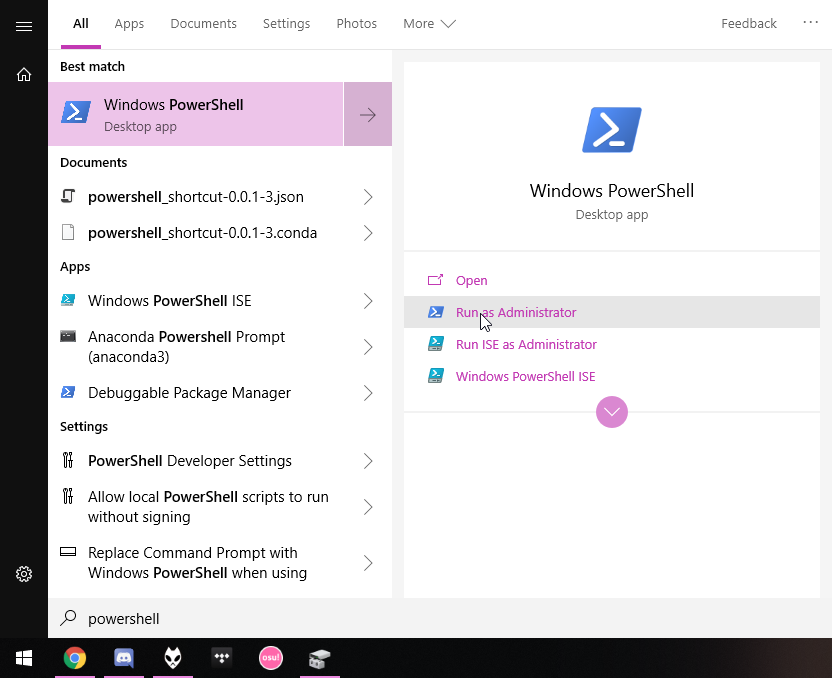
How do I get to powershell
hoary moon
search bar type in powershell
 obsidian cloak
Ok then diskpart?
last gorge
yes type in diskpart then press enter
hoary moon
share screenshots if you can
obsidian cloak
List disk?
hoary moon
better ask 3 times
last gorge
rip
hoary moon
of 5 years
obsidian cloak
Well I installed windows yesterday so i don’t have much data lol
hoary moon
like i said, better share a screen shot if not sure
last gorge
ya
obsidian cloak
last gorge
in settings there is option to make prt sc screenshot button
obsidian cloak
Lol
last gorge
do you know which one it was in disk management
hoary moon
make certain thats the one
last gorge
it should
hoary moon
share a screenshot of the disk management window
obsidian cloak
Oh nope it’s 0 lol
obsidian cloak
hoary moon
disk 0
obsidian cloak
Yea ok so do I those 0 in powershell?
obsidian cloak
Get-disk 0?
hoary moon
yeah
last gorge
if it's disk 0 then type select disk 0
hoary moon
do what he says
last gorge
you can type in list disk to verify the one you selected
there will be star next to it
obsidian cloak
obsidian cloak
It says it’s selected
last gorge
then you type in clean
obsidian cloak
Says it succeeded
hoary moon
okay exit
obsidian cloak
Computer caught fire
last gorge
now check or reload disk management
hoary moon
and look into disk partition
last gorge
it should be unallocated, you just need to format it
hoary moon
just open disk management
last gorge
yeah do that
obsidian cloak
Gpt?
last gorge
ya
hoary moon
yep
obsidian cloak
Ok yea now it’s unallocated
hoary moon
most used standard for normal people
last gorge
now you format it
most used standard for normal people
@hoary moon but what if we not normal o_0
obsidian cloak
Uhh new simple volume?
hoary moon
and once it is formated you create a simple volumne with the max availb volumne
last gorge
ya
obsidian cloak
Where do I format it
hoary moon
I am not normal, but i think in a good way
Click on the disk part
in the front
Right click
last gorge
its new simple volume
last gorge
right click on it ya
hoary moon
there is nothing to format
hoary moon
right next to it
last gorge
right click on black bar thing
last gorge
I am very descripttive haha
obsidian cloak
No problem
hoary moon
thats what pictures are for
obsidian cloak
hoary moon
telling more than a thous......where to formast it
last gorge
label it whatever you want
obsidian cloak
You don’t like ssd and nvme lol
last gorge
lol
hoary moon
Mine is called 500gb ssd
obsidian cloak
Gamez
last gorge
I just named my label as evo
hoary moon
and my other one is called games
last gorge
i very creative
hoary moon
and my nvme is called System C
And i partitioned my 4tb into school and work
So i was just joking
last gorge
lmao
last gorge
ya you can do that
obsidian cloak
I don’t need to enable file and folder compression
obsidian cloak
Yea that was pretty easy
last gorge
ya just quick format
obsidian cloak
Sweeet
last gorge
you should be able to see in file explorer when done
when i install big games i usually change file location to a folder in that extra drive
obsidian cloak
last gorge
tada
obsidian cloak

last gorge
👏
 obsidian cloak
I’m pretty much a pro now
Except for some drivers or something that I’m missing but I’m sure it’s fine lol
last gorge
lol what
hoary moon
lol you basically just need 2
and Naed shoowed me something cool. one sec
The easiest, fastest way to update or install software. Ninite downloads and installs programs automatically in the background.
Use that to install software
its a preety sweet thing
I will use it for all my new installs
obsidian cloak
Oh that’s dope
hoary moon
and depending on your built you only need to download 3 drivers tops
cpu gpu and chipset
audio is most likely in windows update included same with ethernet
obsidian cloak
Yea I did that by some pci encryption thing is popping up under device manager
hoary moon
Explain yourself
last gorge
if you have like a dedicated soundcard to something, you would need to find drivers for that
but does work with just windows drivers
obsidian cloak
Yea that’s why I was confused I don’t have any expansion slot stuff
Give me a sec I’ll get a picture
hoary moon
Just curious, whats your setup?
obsidian cloak
hoary moon
@obsidian cloak please tell me you didnt pay 114$ for windows 😄
obsidian cloak
lol prices may vary on all those parts
hoary moon
okay. How much for the GPU?
obsidian cloak
It was like 370 I think
hoary moon
I have the RX5700 and i am very happy with it honestly
oh okay so right the sweet spot
obsidian cloak
last gorge
gpu maybe?
hoary moon
right click and select update device driver
last gorge
did you install gpu driver?
smoky pagoda
nah right click and delete, reboot.
last gorge
lol
smoky pagoda
see what windows picks up after restart
smoky pagoda
what cpu ?
obsidian cloak
I tried right clicking updating driver and nothing was found and I updated windows when I first installed it
smoky pagoda
amd?
obsidian cloak
Yea
last gorge
3600x
obsidian cloak
5700xt
hoary moon
rx 5700 shouold be nvidia
obsidian cloak
Adrenaline
hoary moon
shouldnt
smoky pagoda


 rocky cedar
Mystic lights
smoky pagoda
actually dont download that
hoary moon
well, if he wants Corsair iCUE SP120 RGB Pro 52 CFM 120 mm Fan the party going YES!
last gorge
boxxy smh
hoary moon
i hate mystic light. sucks bananas
smoky pagoda
smoky pagoda
obsidian cloak
Yea I downloaded that yesterday
obsidian cloak
first thing I did idk
smoky pagoda
delete those missing (!) drivers
hoary moon
well if your pc still saw both drives as system drives.... we just formatted one
obsidian cloak
So right click delete the missing ones then reinstall chipset driver?
smoky pagoda
that's what I would try yeah.
obsidian cloak
👍🏼
 icy oak
I'm just staying out of the whole kerfluffle about AMD right now. I want to build an AMD based system because it's a better value, and I was planning on getting one of the newest gen boards as well.
last gorge

hoary moon
@icy oak Well, i had to figure out that the x570 from msi has a stupid BIOS
@icy oak BUt it would be ready for Ryzen 4000 series
rocky cedar
wdym
hoary moon
Just in case i want to spent more than 500 in cpus this year
rocky cedar
I love MSI bios
obsidian cloak
B550 is coming out soonish I think
rocky cedar
It's nice and easy
icy oak
I mean, from what I can tell AMD went above and beyond in supporting newer CPUs on old boards. It may literally have reached a point that the oldest boards couldn't handle the next gen chips anymore, even with an update.
hoary moon
Easy is the problem there. SOme settings are just misplaced
rocky cedar
wdym
hoary moon
me and Naed had to find some stupid setting that was under CPu when it should have been under security
dont even remeber what it was
i tried to forget the painful but educational experience
rocky cedar
MSI bios works for me, in Asus bios it took a while to find docp(xmp) lmao
obsidian cloak
Yea chipset drivers first thing.. right after I installed iCue and played with rgb  @last gorge lol
obsidian cloak
Rgb = greater performance
last gorge
obsidian cloak
Lol I didn’t see that but glad newegg and I are on the same page
Rgb > pci drivers i don’t know anything about
hoary moon
Still having them showing up?
obsidian cloak
Yea idk if they are a problem or not I may just see how things run before messing with them anymor
 weary pagoda
any of yall know how to update windows vista to windows 10 im having problems with it
 grave hemlock
Yo I’m having trouble booting it loads out of bios and gives me the option to install the 64 bit and then it starts loading and then freezes
vivid temple
@grave hemlock you found a fix or?
grave hemlock
I’ve been working so I haven’t been able to do anything yet I get home in like an hour
grave hemlock
Yea it works now @vivid temple
vivid temple
good to hear @grave hemlock
 jagged tangle
Guys my windows wont load can someonw help
Even repair windows wont load and command prompt wont load
Windows 8 i believe
vast summit
Pretty sure thats windows 7 but you might need to make a bootable media device and so a fresh reinstall (you will lose your data)
 tall lichen
hi, any way to prevent RTX voice from launching at boot?
it doesn't show up in task manager startup
since it uses considerable gpu power even while not in use i would like it to only run when i want to use it
hot shell
@jagged tangle can you get into safe mode if so you might be able to access recovery
jagged tangle
Managed to get into recovery but it failed to recover lol no hope i guess
hot shell
Can youlook up Windows 7 restore using command prompt you should be able to access the on disc restore using command prompt
hot shell
Ive had some luck using Lazesoft recovery suite its free
jagged tangle
Im ganna need restore usb or something?
hot shell
Shouldn't need it the restore is on the hidden partition you might need to look up your Model brand to find the steps to doing a factory reset using the command prompt if your going to try the lazesoft then you can burn it to a CD or install it on a USB
 tidal pecan
If you have access to windows 10 home or pro with no extra cost to either, is there any reason t oget home?
rocky cedar
no
tidal pecan
As far as I can tell, pro is just home with extra management stuff
(Which isn't really useful outside of business but it's there)
Ok thanks
last gorge
main benefit to pro is being able to install more ram
tidal pecan
At first I thought that was a download more ram joke then I realized it's true huh
last gorge
lol
tidal pecan
I doubt I'll hit 128GB any time soon but that's good to know
last gorge
there are also some other features for business purposes but meh
tidal pecan
Yeah and built in VM/Remote desktop stuff
Not sure if it's any better than VirtualBox and Chrome RD or similar
last gorge
yeah there are other solutions if anyone really needed that stuff
tidal pecan
So same price there's no reason to get it but it's not really worth extra money if you don't need the encryption, built in stuff, or ram ability
I mean hell I'm getting a laptop so it's not even like I'm about to try to install 256GB on a whim
 fleet basalt
Anybody know an easy way to find my PPPoE Username and password?
I need it for new router but dont wanna contact the ISP because it will take forever, if theres a simpler was thatd be nice
 karmic nymph
anyone know how to use proxmox? I have been having a hard time trying to install it from a flash drive to flash drive. (I only have one hard drive) and I want to use it for something else in the system along with it's not that stable.
I have tried doing it normally, different installer drive and now I am trying with a raid 0 of flash drives and the installer drive.
 tepid silo
Why install it to a flash drive?
karmic nymph
because I have nothing else
tepid silo
Even on smaller ssd's, proxmox writes enough data for drive life to be a concern
I'd look into getting a budget nvme/sata ssd if you can
tepid silo
Have you tried ESXi?
karmic nymph
what's that?
tepid silo
Try esxi
tepid silo
It's a hypervisor, like proxmox, (except it's a type 1, vs type 2) , but it's one that's usually booted off a usb drive. Did you google it?
karmic nymph
no but I should be able to use proxmox I have heard i t can be ran on a usb
karmic nymph
I know it might be a bad idea but I kinda just asking how to do it.
 thorny oracle

 tawny comet
Question.. for the ryzen 9 3900x, I am at 1.43v. I'm not trying to OC, but should I change the voltage to 1.3
livid bluff
I would just to play it safe
 wraith lynx
Is windows 10 pro worth it for a gaming pc I heard it encrypts it’s data
livid bluff
It does to a point but it does give some more freedoms in the settings from What I understand. I still Use Home
tepid silo
Never heard of that issue. 10 pro brings some useful features like group policy editor. If you don't use that, or other features, this is a non-issue.
 pale canopy
Hey, is anyone here well-versed in working with OBS? I've has a problem where my desktop audio hasn't been captured for a few months, and it's been pretty frustrating. I can provide plenty more details if I find someone who might be able to help.
Just ping me
 torn relic
hey, is there any one ubuntu user?
Is windows 10 pro worth it for a gaming pc I heard it encrypts it’s data
@wraith lynx No, it doesn't
last gorge
I believe tomie uses ubuntu
azure sandal
I used Ubuntu once
 mild torrent
Running Win 10 on my PC, what is it with the computer turning on spontaneously after being put to sleep? When it's shut down it's fine.
My uneducated guess would be some peripheral input while it's being put to sleep or after it is.
last gorge
check task manager to see what's running
livid bluff
I've had that happen when Microsoft does an update
vast summit
Ok so random obs question, is it possible to record game and desktop audio but not record discord audio?
 cold flare
So I have the blue screen of death and I was wondering if I could get some help
pale canopy
@vast summit I'm no expert, but a simple workaround would be to make Discord play through speakers through Discord settings, and recording your headphones with OBS.
Just setting discord to a different output device than the one you're recording.
vast summit
Only problem with that is i want to hear discord on my headphones, and then my mic would pick it up lol
pale canopy
yeah you might want to try virtual audio cables
I've had trouble with them in the past but I've gotten more fluent in technology since then\
vast summit
Hey @vivid temple if your around, I have a question for you
 left temple
any windows 10 expert around? I am trying to open log files with notepad++ but says can't be found. I have no issue using regular notepad. Why?
hot shell
@left temple net says that a windows 10 update over wrote it you can try some of these things at the bottom of this thread https://community.notepad-plus-plus.org/topic/19177/can-t-set-notepad-as-default-program-in-windows-10/5

Community
@Tony-Wang-0 , If you have a 64-bit Notepad++ installed in C:\Program Files\Notepad++, search your registry for C:\Program Files (x86)\Notepad++ and replace any such instance with C:\Program Files\Notepad++ – it may be that something wrote the wrong value...
left temple
@hot shell ya i redownload official installer and reinstalled. issue fixed, ty
 warm osprey
On my windows install, trying to open Notepad.exe redirects to Notepad++.
I think I used:cpp reg add "HKLM\Software\Microsoft\Windows NT\CurrentVersion\Image File Execution Options\notepad.exe" /v "Debugger" /t REG_SZ /d "\"%ProgramFiles%\Notepad++\notepad++.exe\" -notepadStyleCmdline -z" /f
vast summit
Ok, so i was trying to download the latest amd chipset drivers on my pc, however when i run the installer i get this message. Any idea on what i can do now? thanks
livid bluff
That's weird. Did you run the install package as admin?
smoky pagoda
do you have an amd system.... 😐
livid bluff
I would assume @vast summit does if they are downloading the drivers.
livid bluff
Huh that's weird then.
vast summit
ik
livid bluff
I know Windows installs AMD system driver updates when Windows Updates
vast summit
This system used to be an intel system tho, but i did a motherbaord and cpu swap. idk if anything can be left over from the old system
 peak moss
did you do a fresh install of windows
vast summit
no
livid bluff
Yeah. I did that once and had alot of problems getting drivers to install properly
peak moss
thats probably your problem
vast summit
yay...
peak moss
theres drivers and such left over
vast summit
i was hoping that wouldn't bite me in the butt but i guess i was wrong
peak moss
i feel that.
livid bluff
It bit me as well
vast summit
So how am i supposed to save all my data
peak moss
do you have a second hard drive
livid bluff
Create a backup
vast summit
yes
peak moss
move anything you want to keep to the second hard drive, reinstall windows on the first
peak moss
np good luck
vast summit

So i can move all my files over but i will need to reinstall my programs correct? @peak moss
peak moss
yeah. if you have your steam games on the second hard drive, wen you reinstall steam, just target the same location for game installs and every time you install a game it will take a min, recognize its there, and be done
vast summit
I only have 2 games on this pc rn and theyre both on my boot drive 
It's my adobe and office programs that worry me
peak moss
ah yeah idk about those 🤷♂️
last gorge
yeah you can't really move those
vast summit
ya... my creative cloud stuff should be fine but i always have issues with office
last gorge
some apps when installing give an option for a portable install that just puts everything in a folder so i can simply move the folder without losing anything. not many apps give that option tho 😦
vast summit
I might actually put this project off for a little because i was planning on buying a nvme drive anyway and i would have to do this again then.
ya thats unfortunate ghost
peak moss
thats smart but i just cloned my ssd to nvme lol
vast summit
lol
peak moss
idk if its perfect yet but it worked
vast summit
maybe i'll buy a 32gb optane drive for os only that way if i need to reinstall again it isn't a headache
peak moss
i wouldnt go less than 120gb
peak moss
ima be honest Idk what an optane drive is lol
peak moss
ah ok
peak moss
im just saying that like, sometimes you need space. like a lot of programs still wanna be installed on C: and sometimes thats easier 😛
vast summit
i don't have pcie 4.0
I'll just get an a80 or something lol
don't tell hei or mr1111, but my ssd rn doesn't have a dram cache 
peak moss
from what i understand its not terrible to have one without it, it can jsut cause problems. but i dont really understand it lol
vast summit
ya, still better than a hdd or my use. Besides, when i bought it, not many drives did have a dram so
¯_(ツ)_/¯
rocky cedar
@vast summit you will regret
vast summit

rocky cedar
... like what kind of problems
@subtle radish oh yea if you have valorant installed, that's the issue
 subtle radish
someones it wont launch after a while and i have to install again
i dont own valorant
rocky cedar
Weird
 jaunty basin
anybody here tryna help me out with a bios issue
vast summit
anyone know why office's one note open up every time I turn on my pc. I have it disabled in my startup apps but it still does it.
last gorge
Delete ez
 magic plaza
Hey was wondering I want to change what drive windows is on with a fresh install too as this installation seems to be having issues. The new ssd is in and everything but I don't know what to do now.
wraith timber
Do you have an 8GB flash drive handy?
magic plaza
Si with windows installer media on it
wraith timber
Ok, you should be good to go theb
Go into the BIOS, make sure boot priority for USB devices is first, and save, then boot into the flash drive
magic plaza
Thnx man
I can just completely format the other drive then after I finish setting windows in this one?
 long quail
Can I take a hard drive out of a old pc with like windows 7 on it and put it into a newer computer and use that computer with windows 7
wraith timber
I've never tried it myself but
I don't see why not
Maybe not though
I've got myself a tiny Linux stick that I can boot up on any system
livid bluff
@wraith timber @long quail Yes You can take a drive from a older system and put it in a newer one. I speak from experience as I have done this myself. Now Only issue there is Win 7 isnt setup to reconfigure itself as readily as Win 10 is to new Hardware
wraith timber
nice
 proud lance
Hey guys so I built my first PC a few months ago
And I had some extra money and I was just curious, is there any antivirus you guys would recommended me?
I don't usually do much on chrome Or anything appart from gaming but just to be able to feel at ease, I'd like to have an antivirus sw I just don't know which
rocky cedar
Malwarebytes :p
Also, common sense is the best antivirus, if it looks sketchy, don't open it.
proud lance
Jajajaja thanks
last gorge
I don’t like antivirus but you could look into vpns
smoky pagoda
malwarebytes premium is great
@proud lance
ghost vpn doesn't block virus lol...
malwarebytes just added a vpn actually
proud lance
Thank you
last gorge
i know it don't block virus, you don't really need to worry about it if you are careful
vast summit
I used to like the avg free version but its got too many pop ups now so I recommend malawarebytes
fading wraith
Is it possible to recover lost files from usb drive? After installing windows to usb, all old files gone.
nevermind lol
unpossible
wraith timber
if it was hard drive, then maybe
last gorge
If windows install was on it then if it was there it would have been overwritten so no not really
warm osprey
hm I need some Windows help
So I moved my Downloads folder through right click -> properties -> location. Everything went fine. My Downloads folder is now in my D drive. However, if I go to its old location, I see this folder:
I can't open it, delete it, or do pretty much anything with it:
(clicked Continue)
I have also tried this:
smoky pagoda
why would you try to move it using properties
warm osprey
Because it was taking up lots of space in my SSD.
It was moved perfectly fine, it just left that residue folder I can't delete at C:\Users\SunCat\Downloads.
smoky pagoda
probably cause it can't be deleted.
 tranquil ermine
Why is adobe premiere outputting and it looks like trash?
warm osprey
What causes my Ethernet connection to be called Network 5?
My network's SSID is -_-, I see it when I connect thru WiFi.
 copper mesa
If i can get windows 10 education edition free through my university, do I need to install the education edition to use the product key? or can i install the regular version and use the key? also what are the differences between the versions?
last gorge
probably best to install the education edition, putting in a key for a different version of windows usually causes a windows update to fix it
fading wraith
Help?
 humble escarp
@fading wraith hello, what windows are you trying to install?
cinder mauve
Need desperate help
My laptop, an HP Pavilion with an AMD A10-9600p will not take any of the driver's I've tried to update it with.
Before asking, I have went onto their website and found my specific APU driver installer. I did not use the minimal, I used the full build.
I have disconnected the wifi, used DDU, and restarted likely over fourty times.
Every time I load back up with the new drivers I get an error code 43 or 34 on both of them, and I cannot access almost any games due to them not being working.
I have tried every method available to me on the internet, or what's able to be openly sourced and I have no idea how to fix it. I feel like I'm at the end of the rope, and I truly don't want to do a factory reset to fix the problem.
fading wraith
@humble escarp windows 10
 storm girder
Hey i have a question
hot shell
@cinder mauve did you try the auto detect download from the AMD website it should tell you the recommended drivers
cinder mauve
Yeah, I did. I ended up going back to 5/24
 warm bane
Hello, I've got an issue with my computer. I put it in safe mode so I could uninstall some anti-virus software and now every time it boots up the monitor goes into an endless cycle of switching ports until it finally shuts off. I can't even get the computer to go into BIOS. Computer has Windows 10 (1909) and I have a Windows 7 DVD. I have removed the CMOS battery to reset everything and plan to buy a new one as the computer is 7 years old and probably about time for a new battery. I have also disconnected the boot drive, but still won't get into BIOS. Please @ me so I can see any responses. Thanks.
 strange wave
So I followed this guide on how to activate windows without paying because I selected Windows 10 Pro when I initially setup Windows 10, cause im a pro and the cost to activate is $200. (I honestly didn't know which one to choose and pro sounded more attractive than home) Then I realized that the Windows 10 activation watermark is more annoying than I expected so I followed this guide on msguides.com on how to activate for free. It was the one where I changed the KMS server. All I want to know is, did I just install something bad like a virus on my computer, and is this legal? If so, then how do I reverse the changes, i.e. changing back the KMS server to all the defaults?
strange wave
Oh...
vast summit
I would honestly reinstall windows and buy a ebay key
rocky cedar
I can vouch for eBay keys, many others can too
strange wave
Ok I guess ill do that then. Do you have any reputable sellers that you'd suggest?
vast summit
Reputable is a strong word because they're 5 dollar keys lol. But if you doesn't work on eBay the next one will lol
rocky cedar
Eh sellers come and go
vast summit
Still way cheaper than buying it in full
strange wave
True
rocky cedar
I bought 2 from 2 different sellers and both keys worked
strange wave
Well. Thank you for your advice, both Mr1111 and JustEgg.
vast summit
 spare isle
anyone know of a good program i can use to monitor CPU temps and fan speeds. i need to to alert me if my pump speed drops to low in speed and if my CPU gets to hot.
 robust orbit
i think msi afterburner? i recently just started monitoring my cpu temps
and thats what i use @spare isle
spare isle
@robust orbit dose it have the ability to do the alerts? how noticeable are they?
robust orbit
so i play cod pretty much only, and i have it in my top left corner in red what my temp is, and bright green for what my fps is. and i just pay attention to it once in a while
and im not sure on the ability to do alerts. someone here probably knows alot more than i do and can help you
spare isle
@robust orbit i just got it. looking into it now it looks like it dose. thanks for the tip
robust orbit
no problem
humble escarp
@humble escarp windows 10
@fading wraith did you fixed already?
fading wraith
@humble escarp no
humble escarp
can you tell me what you try sor far?
fading wraith
@humble escarp I found the problem. Have to pull out one of the ram stick
I don’t if it’s the memory or the dual stick. Using 32 16x2
Pulled out one and it worked
warm osprey
So I've installed Kali alongside Windows, but booting my PC just puts me in Windows. I'm not sure how to access Kali.
partition 5 is where Kali is and partition 6 is the swap for Kali
I followed these to the T: https://www.kali.org/docs/installation/kali-linux-dual-boot-kali-with-windows/
Here is bcedit:
oh wait, it seems I can get into GRUB if I force my way in through the BIOS.
tepid silo
Why would you install kali for dual boot, just run it off a flash drive
You want windows bootloader to call grub
warm osprey
I have to select my SSD (named KINGSTON) rather than Windows Boot Manager.
Because USB loading is super slow.
Anyways this BIOS option is alright.
Eh seems to work for now.
With the BIOS workaround.
 copper crypt
anything important I should be aware of when installing windows 10?
 dense mirage
Make sure you uncheck all the "It's okay to track me" boxes
 patent fable
Is there a reason iCue keeps crashing my whole PC? whenever I uninstall icue it doesn't happen.
 frigid night
@patent fable do you have any other rgb control software? (logitech, asus, razor)
livid bluff
So I have a Gigabyte B450 and every couple months My BIOS fails to boot and It defaults back to Bios Version F41 when Im running BIOS Version F50. I currently resorted it back to F41 and it does the same thing periodically. Anyone have any idea whats going on?
humble escarp
@humble escarp I found the problem. Have to pull out one of the ram stick
@fading wraith that nice to hear! glad you fixed your problem. what version of windows are you installing?
fading wraith
@humble escarp 2004
livid bluff
@white moat You have any Idea about what I said Earlier?
 white moat
have you tried f49 or any other ones?
livid bluff
Not yet to be honest
white moat
i'd try a slightly older one to see if the new bios isnt working right
livid bluff
Even the Stock BIOS that came on my board is giving me issues
white moat
huh
livid bluff
and it goes from F42g to F50 in the list I pull up on the Gigabyte Website

GIGABYTE
AMD B450 AORUS Motherboard with Hybrid Digital PWM, M.2 with Thermal Guard, GIGABYTE Gaming LAN with 25KV ESD Protection, Anti-sulfur Design, CEC 2019 ready...
So Im Kinda Lost on what to really Do here
I mean with the Stock F41 BIOS I at least get PCIe 4.0 capability which does seem to help with my GPU since its a PCIe 4.0 even though I have a Ryzen 2000 series CPU that only supports 3.0 I want to get a Ryzen 3000 series but am waiting till the 4000 series comes out so the 3000's drop in price
I guess I will try the F42g and see what happens. I had to take my overclocks off just to keep the system stable for now
patent fable
@frigid night yes I have this other software that controls my graphics card and mother board rgb called "armoury crate"
frigid night
That may be the issue, there was a problem with logitech and icue for a long time. Try un-installing the other RGB control programs to see if that solves it.
humble escarp
@humble escarp 2004
@fading wraith sorry I mean what edition. my bad.
fading wraith
@humble escarp Windows 10 home
 abstract lintel
Anyone know a good free video editing software?
last gorge
hitfilm express or da vinci resolve @abstract lintel
 gloomy badge
What OS?
last gorge
wdym
gloomy badge
Windows/Mac/Linux
last gorge
are you asking what os to use or what those 2 programs i mentioned use?
gloomy badge
No, I was asking @abstract lintel
last gorge
oh
gloomy badge
I was just going to add a few if Linux
last gorge
ok 👍
abstract lintel
Oh im on Windows
dense mirage
😢
humble escarp
Anyone know a good free video editing software?
@abstract lintel you can try kdenlive!