#windows-ios
1 messages · Page 17 of 1
 vivid temple
 livid bluff
Exactly
vivid temple
i am just curious about IF his previous boot was pure luck, or if the usb stick just had "perfect" timing to crap its pants
livid bluff
Yeah USB sticks are known to crap out at the least desirable moment
 unreal zenith
I messaged u a pic naed
vivid temple
Viper, just a misunderstanding, he is testing the Boot now
livid bluff
ok
vivid temple
that is bad news
unreal zenith
Why?
vivid temple
because that means we dont have a quick suggestion for the p55 machine
unreal zenith
Well crap
vivid temple
correct
unreal zenith
I have a feeling, just a feeling, that I do need to update the bios
livid bluff
It may help.
I aslo think setting the SATA controller to IDE would help to. But thats just my experience with Motherboards in the past
Each One is different
vivid temple
there is no toggle for that in the bios, that i can see @livid bluff
livid bluff
That is Odd. Every PC ive dealt with that has both SATA and IDE has that Option in the BIOS for the SATA Controller
livid bluff
Ah. So maybe a BIOS update is needed then if it was added
vivid temple
because it is an optional "feature"
livid bluff
Yeah Cause they can program it to automatically switch the Controller if no IDE is detected
vivid temple
again, IF he hadnt booted once, i would agree
unreal zenith
So how do I update the bios then
vivid temple
and yes, i know, i am resistant to the bios update idea.
and that is entirely based on the "he booted once" experience
unreal zenith
What if that was dumb luck?
livid bluff
I did have a friends Computer that I built that One of the peripherals the Keybaord for some unknown reason when the system was booting up after Install it would actually black screen. Had to unplug the keybaord till after The Windows Logo came on the screen otherwise it would fail to boot. It was on a ASUS motherboard
unreal zenith
I have a msi motherboard
vivid temple
because it is "that" old a board, i prefer ticking all the boxes before i go with something as potentially fatal as a bios update
vivid temple
his point still stands @unreal zenith. And the lesson is this: things can be very weird, for no logical reason
unreal zenith
I'm glad you are here
vivid temple
@livid bluff you going to be around for a while?
unreal zenith
I am not that good with computers since this is my very first
livid bluff
Yeah
vivid temple
because it has just crept past 06:30 in the morning here in denmark
and i must admit, i would like a bit of sleep
livid bluff
11:33PM for me
unreal zenith
Its 9:33 pm for me
livid bluff
Ah Your West Coast. Im Central Time
unreal zenith
Ah epic
vivid temple
the manual on the site has the bios update procedure, just check that there isnt a "dont use bios update" version in between his and the newest
because yes, i honestly cannot think of anything else to try (that will logically make a difference)
so might as well throw the hail mary and update the bios
livid bluff
He should do the Update in Steps though for max efficiancy so that the BIOS gets all the updates that were put into previous versions though.
unreal zenith
So I want to make sure
vivid temple
your call on how you want to do that Viper
livid bluff
Not go straight from 1.2 to 1.B
vivid temple
because i will be snoring, loudly, very soon
unreal zenith
Is the bios 1.2 blue and yellow?
livid bluff
I dont know what the colors they have set for the screen are
vivid temple
So, i am sorry to run. @unreal zenith, but Viper does have a working brain, so you are in safe hands :)
they should all be the "usual" colours
livid bluff
LOL Thanks Naed
vivid temple
best of luck, i will check in when i am awake again :)
unreal zenith
So u can sleep
livid bluff
Im good actually
unreal zenith
Alright
livid bluff
I have INsomnia til like 2 or 3 am my time
Then I sleep for like 3 maybe 4 hours and Im good again
And Im in my Mid 30s so Go figure
unreal zenith
Ah I'm in my 16s
livid bluff
Ok
 cinder mauve
Is there a difference between recording and streaming when it comes to a performance hit on your fps?
 azure sandal
I believe recording isn’t as demanding as streaming
 last gorge
I'd say about the same performance hit
azure sandal
All I know is on my i3 laptop I can record minecraft but I sure can't stream it
last gorge
but record at what fps
azure sandal
Pfft 30
My laptop was not built for recording and gaming at the same time, but I can comfortably play and record minecraft at 30 fps
 rocky cedar
I don't think recording takes that much power
I notice no decrease in performance when recording
azure sandal
Yeah if you have a decent CPU that won't happen
My desktop with a Ryzen 1600 AF can record and there is practically no difference
in fps
 vast summit
Anyone know anything about dolby atmos?
last gorge
ye
vast summit
watchu got on it
 crisp ether
I have an old microATX build with 16 GB RAM. The 500 GB HDD crapped out so a 2 TB replacement is coming in. I'm going to set up a Fedora Workstation, I'd like to start hosting some microservices to run some automated processes for me. Any blog or YouTube recommendations on tips & tricks, please feel free to send them my way
last gorge
it is for digital surround sound, you can find it in the windows store, it is meant for stereo headphones and for positioning it is actually not that bad. Although I do just prefer normal stereo especially for music
last gorge
I thought it wasn't bad, it surprised me for a number of reasons
vast summit
why'd it surprise you
last gorge
overwatch actually has a setting to use dolby atmos for free
vast summit
oh rly thats cool
last gorge
in some games it just felt so atmospheric like in battlefield V I tried it in
vast summit
ok
Im not much of an audiophile but first impression is that it sounds a little bassier
it has a bunch of different configs tho evidently
last gorge
in the dashboard there are some eq settings
last gorge
that's fine, you can stick to the presets
vast summit
sounds good
 languid lodge
My pc didn’t start correctly so I chose startup recovery and now it says preparing automatic repairs and then my screen goes blank I can see the screen is on by a faint dark blue light but I sit here for hours and it doesn’t do anything please help me
rocky cedar
@vivid temple Correct me as needed, but isn't this a case of "just turn it off and back on again"?
vast summit
Lol
 pale night
Stuck on windows getting ready for 40 minutes, currently missing online classes because of it. I tried restarting my pc after restoring corrupted windows files through cmd with the sfc /scannow command, and it’s been stuck on that now
 low lichen
rip
livid bluff
@pale night Sounds Like a Possibly Corrupted Install disc or USB
 astral canyon
Anybody know why my pc starts up into bios everytime I turn my pc on
astral canyon
Is there any way to fix this?
 tranquil ermine
My network driver after finishing installing on windows 7 and then I restart it still doesn’t connect to wifi I have rosewill n300
 tepid silo
Have you tried windows 10?
tranquil ermine
It should work on windows 7
tranquil ermine
If I install windows 10 does it keep my key (not an upgrade)
livid bluff
@tranquil ermine Yes It Does.
The Last I checked anyway but Im sure it will still work since I have done this a few times with older systems I have gotten my hands on that had Win 7 on them
tranquil ermine
it worked thanks
 dark siren
does anyone know why my pc keeps going into automatic repair after i installed a new ssd
win10 btw
azure sandal
Corrupt install?
vivid temple
most likely yes
but he has been around the block on that issue a couple of times already iirc
azure sandal
Oh hmm
vivid temple
as in, he has resisted actually doing what he needs to fix it
azure sandal
Oh
vivid temple
but, i can easily be wrong, there are soooo many semi-troll questions on this server that it kinda blurs together at times
azure sandal
Huh
livid bluff
@tranquil ermine Your welcome
azure sandal
Anybody familiar with OBS studio?
last gorge
depends
azure sandal
On some more demanding games I play when I record them the frame rate in the recording is really choppy
Is there any way I can lock the frame rate to 30 or 60 FPS for the recordings
last gorge
if you look in the settings for game capture there is a checkbox that says "Limit capture framerate" https://i.imgur.com/5d5NPKd.png
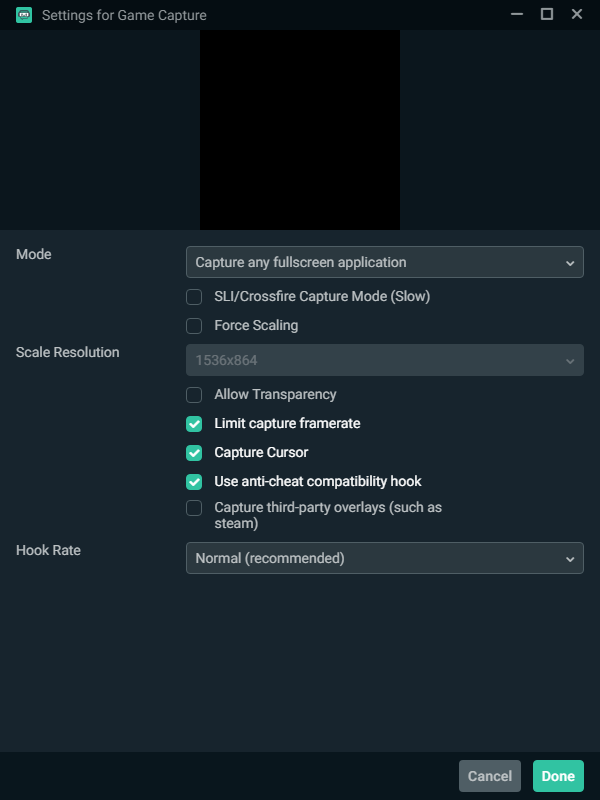

it limits the capture framerate to what fps you have set
azure sandal
Okay cool thanks
last gorge
np
 blazing folio
how do you update windows drivers
vivid temple
elaborate on what you think it is you need @blazing folio
vivid temple
when you say "driver ez" do you mean "driver easy"?
vivid temple
you do DEFINITLY NOT need that for updating
vivid temple
most of them run/fix via windows update
vivid temple
(sorry for the typo)
vivid temple
start by running windows update
blazing folio
okay
vivid temple
if you dont know how to find that. Do the following:
press your windows key, type update
it will suggest, "check for updates" as something to run
run that :)
blazing folio
okay
vivid temple

 blazing folio
okay
so i just updated
and it looks like my pci drivers still need to be updated
vivid temple
ah, completely new build?
blazing folio
well yea
ig
i built it in november
and i got my mobo and gpu repaired
so what do i do now
vivid temple
you start by doing what is done after any "new" build
go to the mainboard manufacturers site and grab the actual drivers for your board :)
vivid temple
the picture up above makes me question that :)
blazing folio
i updated them like 3 days ago doe
vivid temple
well, something is either getting lost in translation, or there are details you havnt told about yet
blazing folio
what else do you need to know?
vivid temple
do you have a full list of parts?
blazing folio
ill dm you
vivid temple
fair enough
@blazing folio there is some driver on the manufacturers page that you are missing
vivid temple
i prefer talking here, because it might help others :)
vivid temple
let me just have a look on Asus' page
normally, the picture you posted above, is an indicator that the chipset driver is not installed
@blazing folio what timezone are you in?
blazing folio
est
vivid temple
so, roughly 8 in the morning for you?
blazing folio
yea
vivid temple
okay, can you wait for a bit, because i need to attend a meeting, and then i can help you again
(everyone just got back from their lunch breaks here)
i should be done with work in 2-3 hours
blazing folio
okay
tepid silo
driverez is the cauliflower pizza of windows utilities
vivid temple
so what you are saying Forks, there are ... people ... that like it?
last gorge

 main path
What do you do with a Smart Hard disk error 301
vivid temple
generally that means you need to get a new drive @main path
main path
So I have to replace it?
vivid temple
aye
and IF it still works, pull anything important from it
because that error is NOT a good sign
main path
Ok
I think my mom put everything on her flash drive so it’s just fortnite stuff
Is there a specific hard drive for a hp laptop
And thanks btw
vivid temple
just about any laptop drive will fit
but if you have a specific HP laptop model number, that would help in making a recommendation/suggestion for you
and you are very welcome:)
main path
Ok thank you so much
 lyric scroll
anyone know how to build a github project?
 quasi anvil
I’m hoping so one can help me understand this.
Accidentally bought OEM Windows 10 home dvd 🤦🏻♂️ without realizing the differences.
I’m willing to use it, as long as I know this: if I put it in an optical drive of a brand new, home built computer, will it run like the normal USB would?
At the moment it’s to my understanding that
- you need another computer to facilitate the new computer OS download
- computer meant for sale and comes with NO Microsoft support??
- cant transfer key to multiple computers like “ retail usb version”
Some sites say it’s normal, others show it being a process. Please help!
last gorge
a key cannot be used on multiple computers. If the dvd that you bought comes with a key written somewhere you can download windows on a usb from another pc if you have one and use the key
From my experience a dvd is the same as a usb installation
quasi anvil
Awesome. So when the dvd starts running (assuming everything else is working correctly) I should get the normal startup screens everyone shows online? I do have an optical drive since I still make occasional cds for music. Running the dvd would not be an issue (printed in Feb. 2020 on envelope, so I’m assuming it’s relatively updated as well)
vivid temple
yes @quasi anvil
as for the key itself, i would recommend that, when you have everything installed, you migrate your account into a microsoft account.
because that basically makes your OEM key into a normal key
quasi anvil
Thank you @vivid temple @last gorge
Naed, appreciate it! I was mostly worried about running into an issue downloading the OS. This will be my only computer, so lesson learned but luckily not the biggest issue since I don’t have multiple. Thanks again for your time guys
vivid temple
its a solid worry/question to have.
But you really should be home free
main difference between dvd and usb is time of install
usb is way faster normally :)
quasi anvil
Perfect!
Yeaaaa I would assume that :p
Luckily, the current state of things, I have some time to kill 😂
As a first time builder, you may hear from me again! 😅😂Thanks a bunch 👌
vivid temple
you are very welcome and best of luck :)
vivid temple
basically, we have to go through the list of drivers (again)
and install all of them
as in, 1 from each of the groups
@blazing folio
vivid temple
yes, because based on your previous picture, something is not installed somewhere
and since i dont know exactly what you have done , and havnt done. That is the logical suggestion
vivid temple
not the bios one
blazing folio
will it affect anything if i download them all again?
vivid temple
and skip the "utility" one too
blazing folio
okay
vivid temple
and if your audio works, skip that too
blazing folio
yea it works
vivid temple
you connected by wire or wireless for internet?
blazing folio
okay
vivid temple
after each install process, do check the device manager if those ? have gone away or not
vivid temple
:)
vivid temple
hopefully you learned something :)
blazing folio
YEA
vivid temple
you are very welcome :)
blazing folio
thanks
 finite glen
What type of antivirus program should I get ?
vivid temple
@finite glen stick with the one in windows 10
finite glen
Ok
My audio is not working
Like no sound
@vivid temple
I cannot see the TV as a output for audio
vivid temple
hdmi
finite glen
I am using one yes
vivid temple
connected from where to where?
finite glen
Graphics card to tv HDMI port
vivid temple
then it should work by just making the hdmi output the default sound output
finite glen
That's all I see
finite glen
Says that the device is not plugged in
vivid temple
got picture via the hdmi on the tv?
finite glen
 noble escarp
What mfg, looks like you don’t have drivers installed
vivid temple
@finite glen showing me a picture of the cable plugged, does not answer the question
vivid temple
okay
then drivers becomes the next thing to check
also, can you show a screencap/picture of the "sound control panel"
blazing folio
bruh how do you know everything
vivid temple
@blazing folio me?
blazing folio
yea
vivid temple
been doing this for too many years :)
vivid temple
as in, 2+ decades
blazing folio
o
 jaunty aurora
Anyone know where i can find some help about bottlenecking?
vivid temple
about understanding it or?
jaunty aurora
PCPP?
vivid temple
(bot will eat the link, new user anti-spam prevention)
pcpp = pcpartpicker <- site we use for comparing builds
jaunty aurora
Ah
vivid temple
but it is not needed
you know what cpu, ram, gpu and storage system you got?
together with what resolution/refresh your monitor is?
vivid temple
well, you are weak on the GPU side
jaunty aurora
Alright
tepid silo
It's oddly addictive problem solving computer stuff for strangers on the internet.
finite glen
jaunty aurora
Also im getting my new PC tomorrow just wondering to fix this for my brother who I am giving this to
RTX 2060, Ryzen 5 3600
vivid temple
@finite glen you got a pcpp link right?
@jaunty aurora what ram/storage does the 9400f machine have?
vivid temple
and what GPU is that?
finite glen
A 730 nividea
vivid temple
thats old enough that i wouldnt worry about it not working right now
iirc that one has moved out of normal driver services, so heck knows how exactly it behaves nowadays
finite glen
So it's most likely the old conflicting with the new
vivid temple
all bets are basically off with that card
it might just be having a giggle
it might be defective
it might just not support it
heck knows
finite glen
So I should probably come back when I have the right card
vivid temple
aye, hopefully it sorts itself out when you have the right card
@finite glen example of how it looks on this specific machine i am on: https://puu.sh/FDMj5/7268ff94ac.png


thats the hdmi outs on the GPU
you can "see" them
there is nothing like that on yours
what it looks like can be seen on your picture is the mainboards outputs
not the GPU's
tepid silo
oh, sound lol
vivid temple
on a old 730
and its a temp gpu
so imo, dont worry about it, just like i said earlier :)
finite glen
Also do I need a separate piece for connecting to a wireless network?
I won't worry ill figure it out later
vivid temple
re: wireless network: considering your mainboard doesnt come with WIFI? yes, you are going to need either a dongle or a add-in card
finite glen
Okay that's what I was figurin
tepid silo
Or a very long cat5e cable 🙂
finite glen
I do got that but my internet is baaaaaaad poopy
I've been sitting here for an hour and a 186 megabyte download is only a bit over half done
last gorge
on the subject of internet, do you guys know why someone would get very high ping to the point that the game is unplayable even when plugged in with ethernet directly to the router
vast summit
I want to know the opinions on that too
tepid silo
Ping, tracert, iperf
blazing folio
@vivid temple
um
when i play games
it always flickers
it says
DP IN
DP OUT
all the time
then i have to turn off and on my monitor
vivid temple
@blazing folio remind me of what GPU you have again?
blazing folio
2070super
vivid temple
you are using a display port cable?
blazing folio
yaeh
vivid temple
got a hdmi cable in the house?
blazing folio
yeah i do
blazing folio
yea
blazing folio
the dp cable came with my monitor
vivid temple
and using the hdmi cable at least gives you a working monitor while you try and fix it
and?
that does not mean it will work without flaw with your specific GPU
blame nvidia for that one or the monitor manufacturer
blazing folio
oh okay
vivid temple
@blazing folio the following is JUST a theory, because that is all i can give you
but here are 2 things to try
 mental kayak
How can I remove someone’s windows 10 account. Just build a brand new pc. But his account and windows is on the ssd
What can I do about that
Like I wanna get my own windows
vivid temple
with the dp cable plugged in (and the hdmi NOT plugged in at all) remove the power cable from the monitor, leave it unplugged for a good 30 seconds
plug the power cable back in.
(yes, this sounds silly that it might fix it, but try. You have nothing to loose by trying)
blazing folio
oh okay
vivid temple
after you have tried that.
IF that doesnt work
cross everything you own when you try it, and hope
but IF it doesnt work
get a certified VESA displayport cable
blazing folio
wait so i keep my dp cable connected on both ends
vivid temple
yes
blazing folio
okay
vivid temple
@mental kayak install windows fresh is the simple way
vivid temple
aye, and i know what is, and you are going to need to read the manual, because you are in way over your head currently
mental kayak
I bought the ssd from someone and he didn’t delete everything on it
Like idk what to do
I’m lost
vivid temple
as i said, install windows fresh
mental kayak
How..
Like
I got my usb with windows
I plugged it in
Showed up to the previous owner
vivid temple
which you can figure out HOW to, by reading your mainboard manual
last gorge
sometimes it's best to go by manuals. youtubers most of the time don't have the same hardware as you
vivid temple
you might think i am not being helpful @mental kayak
but you have all the info you need in what i have said so far
mental kayak
Even tho it’s the ssd?
vivid temple
everything you need to know, is in what i said
mental kayak
What’s a Q flash
vivid temple
motherboard manual
 stiff mountain
@mental kayak Just go here, https://www.microsoft.com/en-us/software-download/windows10
Make a USB drive installation media. Follow the steps for "Using the tool to create installation media to install Windows 10 on a different PC"
Then shut off the PC after you make it, plug the USB drive in and boot into BIOS. Find boot options and boot directly to the USB drive. Go through to prompts to install Windows. Use the tool to delete the partitions his Windows install was on. There's usually like 3 or 4. C: - Recovery partition, something like that.
Delete all partitions for that particular drive and then choose it to install Windows on. That's it. FYI depending on the situation you may need to purchase Windows 10 yourself which is like 100$.
Also, @vivid temple You were not really being helpful. You just kept saying the same thing over and over when he said he wasn't getting it and didn't understand what you meant. No need to be elitist dude.
If you run into trouble with the installation media tool failing, when you download it do so directly to the USB drive instead of your normal downloads folder then moving it. Download it straight to the USB and run it from there @mental kayak
stiff mountain
No problem
rocky cedar
Ask and only then you will receive
 hollow lichen
Why does it not finish after restart
mental kayak
Can someone help me?
livid bluff
Thats Odd that Its not Finishing after Restart. Whats happening after the system restarts? Also Is the Install Media still in the system( IE Disc or Thumbdrive)
@mental kayak ^^^^^ If the Install Media is still Present it wont finish
mental kayak
I’m already passed that thanks. Downloading stuff now
livid bluff
Ah Ok. I just seen the post.
mental kayak
You’re good
livid bluff
Ive done that before by forgetting to remove the Install Media thats how I know that one
main path
Hello
 compact sail
I still run windows 7 lol
azure sandal
yuck
azure sandal
why dont you upgrade?
compact sail
In the process
azure sandal
cool
compact sail
Still working on figuring out how much SSD storage I need to get so I can replace all my hard drives. Then I'll install my windows 10 on one of the SSD's
i have to go through all my files and sort out what I need and what I can get rid of.
azure sandal
Get a small ssd for windows and store everything else on hard drives. Saves money and still is fast 🤷
vivid temple
with prices what they are now, you dont have to go that small
compact sail
That's why I want to do a full PC upgrade, everything but a graphics.
first on my list is windows 10 and SSD's
azure sandal
You can use your old windows 7 key for windows 10
compact sail
sweet
 zenith pendant
Newegg is offering Windows 10 pro for $129 (after discount). Jump on it or are there deals like this fairly often.
 peak notch
ebay
last gorge
ebay has 95% off discount
zenith pendant
Thanks!
tepid silo
This guy is a VIM god
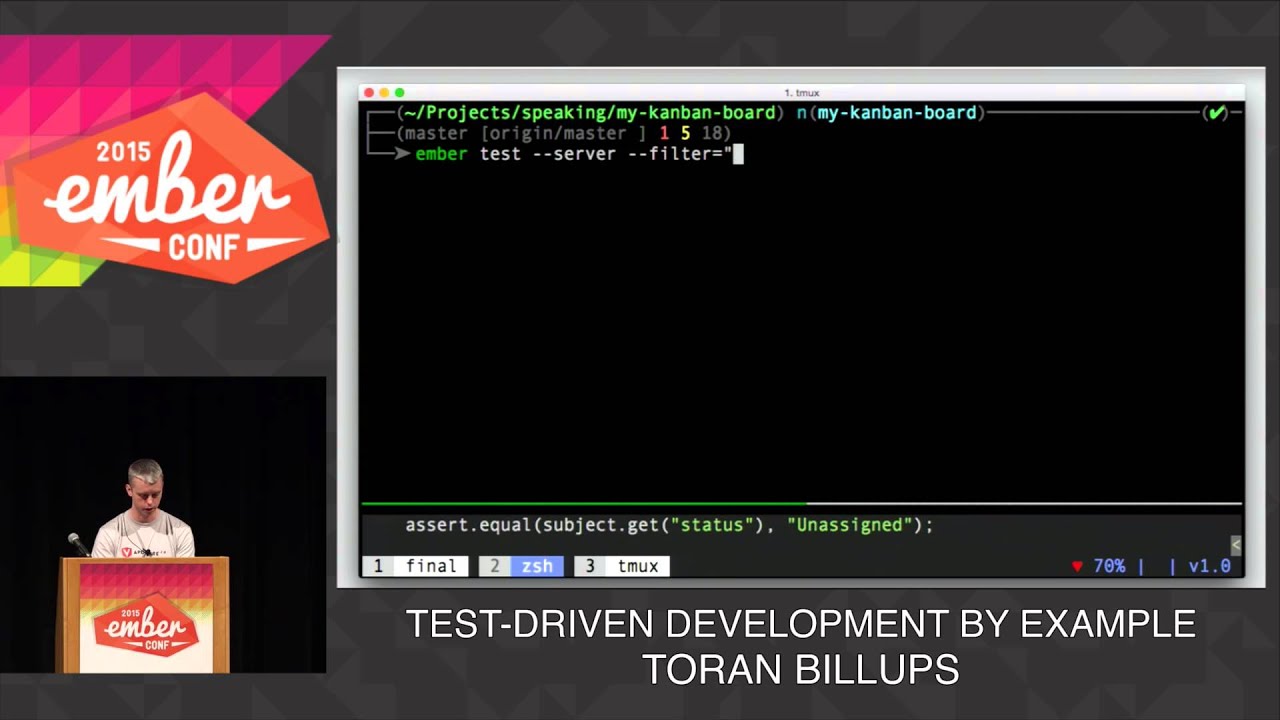
BY: TORAN BILLUPS
Are you writing software that can survive a rigorous refactor? Would a well written suite of tests make you feel more confident as you iterate? How do you get feedback as you add new features or fix a bug?
Join me for an intense 25 minute live coding sessi...
 prisma kindle
:o
vivid temple
post your situation/problem, and if someone feels they can help, or have the time to figure it out with you. they will say so
 frail umbra
so i built a new pc and im trying to install windows 10 onto it but it keeps crashing and getting error messages
frail umbra
im not sure what the issue is cause ive switched out the motherboard twice, switched the ssd, switched the gpu, switched out 3 sets of ram, switched out the psu, switched the usb for installing windows 10, and i still dont know whats up. and the motherboard also has led debug and none of them flash when windows keeps crashing
 smoky pagoda
when was the last time you made a fresh boot install
Id try another thumb drive, fresh boot install.
frail umbra
A fresh boot install? Like get windows 10 media creation tool on a new device?
smoky pagoda
yeah, on a new thumbdrive
if you changed out all those parts, and its still not installing correctly.
I'd lean towards a bad install media
 hot shell
might try installing it on a blank DVd maybe your system isnt likeling the thumbdrives just yet
Trying to read the stop error Kernel auto boost invalid Lock ?
frail umbra
?
hot shell
I couldn't read the last part but looking up what I could make out it said software , hardware drivers, reseat components
cinder mauve
if i want to copy os from one drive to another drive, what folder should i look for?
cinder mauve
Windows 10 btw
smoky pagoda
you need software to clone the drive.
 fading crest
EaseUS Todo Backup is what i have used for 3 diff drives @cinder mauve
cinder mauve
Cost?
fading crest
there's a free version, worked fine for me
cinder mauve
K thanks
fading crest
no prob
cinder mauve
@fading crest having a few issues
I'm going from SSD to HDD
NVM, got it
Had to do file clone, not system clone
cinder mauve
 shadow jay
nano ftw
@tepid silo thats vim? why theres syntax highlighting ? thats hella cool
but i recommend him using the web version of vscode u can install inside your server..
but terminal coding still cool x100
xD

GitHub
Run VS Code on a remote server. Contribute to cdr/code-server development by creating an account on GitHub.
even marketplace works xD
and it auto updates ...
also terminal works.. and its very good.
 hoary moon
Hey Everyone,
I had my win10 on a crucial ssd sata 500gb. I recently switched to the xSabrent rocket nvme 4.0 1 tb. I reinstalled win10 on that SSD. I deleted it from my crucial and it is working. Well SOmewhat working.
When i boot up after the start (Bios) screen i get a one second screen, blue screen, that wants an input of either using that disk to boot or go into the setup. It is such a short screen, that i can not even choose. It automatically boots up windows at this point. It works but it doesnt feel right.
In my Bios it is booting from Hard Disk: Sabrent Rocket and not From the UEFI OS: Sabrent Rocket. If i set last as booting priority it goes into the windows setup.
What am i doing wrong? What kind of pictures do you yguys need to give me a more accurate answer?
Thank you by the way
shadow jay
they will answer later on.. they all asleep
 hushed perch
There's at least a few emacs users I work with. They scare me. 😛
livid bluff
@hoary moon Is the Install Media still on that other drive where it tries to load the setup?
hoary moon
@livid bluff I have one folder named "efi" and it contains a boot and a microsoft folder. Is it that one? The other partition only has a game on it and nothing more.
livid bluff
Yes the one Labeled EFI would be the One that is causing the Setup to initiate
hoary moon
@livid bluff Can i just delete that?
hoary moon
Well my OS is on that drive.
livid bluff
Oh If your OS is on a Different Partition then you will be fine
hoary moon
It is also on the same partition.
AMD
Efi
MSI
OneDriveTemp
PerfLogs
Program Files
Program Files(x86)
Program Data
Sources
Support
Users
Windows
Those are on my C partition
efi is only 21 MB
livid bluff
Yeah It has to be a seperate partition where the Install media is at as far as I know
vivid temple
aye
vivid temple
@hoary moon the simple way of fixing it is this: have your windows usb stick ready, unplug all but the single drive you want to use for the OS itself.
livid bluff
Then again Im running a AMD processor
vivid temple
then boot from that usb, then delete the partitions on the intended OS drive. Then install windows there.
hoary moon
Okay two questions.
Do i have to change the partition style?
GPT or MBT(R?)
and do i have to select the booting option uefi or harddsik?
hoary moon
When i tried installing windows it told me in the setup, that i cant use the nvme since the partition style is MBR then i changed it and had to go through several painful Command prompts to change and format the drive
vivid temple
that should have been your warning
a OS is generally NEVER installed on a partition/drive that is already in use
hoary moon
it wasnt at this time.
vivid temple
the trouble you are having counters that
but
lets take it from the top
the Sabrent drive, do you have anything on it that you need to save?
hoary moon
nope
vivid temple
got your windows usb install stick?
hoary moon
have to download the windows creation tool real quick
hoary moon
i do have the discord app so i will be available during the process to
hoary moon
yeah.
I also had a problem rn with the creation tool
hoary moon
well, it is dowmloading
vivid temple
yes .....?
vivid temple
you are very welcome
are you talking about the actual tool for creation of the usb boot or?
because that is only 18megs
vivid temple
okay, so it was the creation process
hoary moon
yes and i am at 35%
vivid temple
oki doki :)
livid bluff
Takes awhile to Download WIN10 to a USB drive
hoary moon
it is done!
livid bluff
Ok
hoary moon
So now, i turn everything off and use the strong industrial magnet to delet everything, right?.... 😄 jk
hoary moon
So just that i have a clear perspective. I will Shut off the pc, disconnect all other drives besides the one i want to install windows on, and then i start the booting process from the usb?
livid bluff
Yes
hoary moon
awesome!
livid bluff
Do You Have Discord on Your Phone?
hoary moon
I will lead the discord chat with my actions, so you guys can intervene any stupidity from my side.
yes
already open infront of my keyboard
vivid temple
@hoary moon please do so :)
livid bluff
ok Just making sure in case anything comes up either Naed or I can help ya through it
vivid temple
aye
hoary moon
So, i am in the Bios, and have following options.
Sabrent Rocket 4.0
UEFI: SanDisk, partition 1
UEFI OS (Sabrent rocket 4.0)
SanDisk
Enter Setup
vivid temple
Sandisk
vivid temple
aye
hoary moon
Install now or repair?
hoary moon
Okay. "Windows 10 home N" or " windows 10 home"?
vivid temple
Where exactly are you located?
vivid temple
because the "N" versions only normally come up here in EU :)
you can just take the home version
hoary moon
Oki doki
vivid temple
as in "windows 10 home"
hoary moon
Let me just read through the licen.....done
Upgrade or custom install? I guess custome, since we want to kill the old version?
vivid temple
custom
hoary moon
Okay.
It gives me to drive 0s partition one is 199gb type=system
Partition 2 732gb partition primary
vivid temple
sometimes, it might be easier for you to just throw a picture in here :)
(now is a good time)
vivid temple
post link? yes you could, the moment you got a Blue name (aka, lvl 3)
please remind me of what drive you are using again?
vivid temple
okay, the following is VERY important
that drive has 2 partitions on it
meaning
it appears like 2 drives in windows
are you 100% certain that there is nothing you need to save on BOTH of those drives?
hoary moon
Yes!
vivid temple
i ask again
you are certain?
because there is NO going back from this
i am personally not in a rush
so if you want to boot back into windows and check
please do so
hoary moon
I did check. The only annoying thing will be to redownload cod warfare with its 200gb...
But i will get passed that
vivid temple
(i would much rather ask twice, vs having you go "¤=%(/#)¤(/&%#)! !!!!! " later on)
fair
livid bluff
ooof MW so many updates and so much HDD space used for it
vivid temple
start by marking partition 2
and deleting that then
then send a picture after that
hoary moon
vivid temple
(not that i dont trust you, just well ... i dont trust any user)
delete partition 1 please :)
hoary moon
hoary moon
One 4tb HDD
One 1 tb ssd
One 500gb ssd and
The one we are working on right now
vivid temple
okay
hoary moon
Windows is restarting
vivid temple
aye aye, just let it do its thing
it will ask you about a bunch of things
those are all choices that are for you to decide on
(you are welcome to ask ofc)
reason i asked about your drives is this:
hoary moon
I do have two other drives but i will put them into two new small desktop builds for a friend
vivid temple
when windows is installed. and running as it should (not all the games etc, just the os)
you will add in 1 drive at a time and do a couple of "cold boot cycles"
after you have installed each drive
i want to make certain there isnt some left over partition on one of the other drives doing something silly
hoary moon
You will have to explain to me what cold boot cycle stands for.
vivid temple
shutdown vs restart really
hoary moon
Oh okay. So completely shutdown wait 30 seconds and then restart?
vivid temple
basically yes
livid bluff
You have to fully shutdown the system after connecting a new drive otherwise the BIOS wont read it and neither will windows
vivid temple
(and yes @livid bluff, its overkill, but it potentially saves US some headache later)
livid bluff
Sorry Meant Before Connecting a new drive
Yeah That I know. My Case has a Hotswap bay on it. Its not connected as I need a SATA controller card on one of the PCI bus lanes to be able to use it
Not needed a this time but would be nice to have once I can afford one just for the sake of backing up all my Client Data for my Graphic Design Business that I run
hoary moon
For privacy settings. Is there any i have to agree on or can i decline all of them?
livid bluff
No Its Actually Built Into My PCs case
vivid temple
when you end up on the desktop
@livid bluff i meant: usd dual disc dock = very very very good investment
livid bluff
It has its own SATA cable and Power Connector
vivid temple
cloning etc
hoary moon
livid bluff
Its a External Accesable Dock on my case
vivid temple
aye aye Viper :)
@hoary moon pull the stick out
and yes, now you could start doing drivers etc
but we dont really care about that right this seoncd
start trying the drives as we talked about :)
hoary moon
Okay so now i pull the stick right?
livid bluff
Yeah. Its no longer needed
hoary moon
So i turn it off. Connect one drive. Boot it up. Several times and then turn it off. Add a new one. And do this till all my drives are connected again?
How many times should i cold boot for each drive?
vivid temple
2 times please
hoary moon
And in any specific order?
hoary moon
Does it matter which sata connection on the mother board?
Or just the same ones i unplugged them from?
livid bluff
Same Ones cause of Drive Lettering
hoary moon
Okay.
So i tried to make a video of it.
I added one drive. The old system drive. It has been formated since then.
vivid temple
yes?
hoary moon
When i boot up i het the msi logo, with the chance to go to the bios. Then i have a small white underscrore on the left upper corner side of the monitor. Then the windows10 logo appears for 2 seconds. The screen turns blue for 1 second. Turns dark for two seconds and shows me the log in screen
Last bios time is 12.5 seconds
vivid temple
do the following please
right click start "disk management"
maximize the window that opens
send a picture
vivid temple
here is a bit of a lesson for you
hoary moon
vivid temple
see all the partitions on disk 0?
vivid temple
that too
vivid temple
but notice how there is only 1 that has a drive name
that is the only "part" of that drive that you will "hit/impact" with a "format"
hoary moon
You mean( D:)?
vivid temple
aye
hoary moon
Okay. So even thou i formated the drive i did not delete the boot up section of the drive?
In the old drive?
vivid temple
meaning, you could keep on formatting that drive ( D: ) until you are blue in the face. The other partitions on the disk will stay there
yes
hoary moon
So, best option to get my toolbelt and hammer it to death?
Well i heard that wont delete all data either.
Much to learn i have.
vivid temple
:)
hoary moon
I am also pretty certain that this was an option in my bios to boot from....
vivid temple
aye, because the "boot" section is still intact on the old drive
hoary moon
So how am i able to clean that drive?
It is also empty
vivid temple
from disk management
hoary moon
No data i need on there. Just the office applications
vivid temple
just right click and delete the partitions
on disk 0 that is
this is the specific reason you unplugged all drives earlier
we KNOW that the system works with JUST the Sabrent
vivid temple
aye aye
hoary moon
Where do i delete it?
vivid temple
different path we go then :)
vivid temple
nah, we use a different tool
hoary moon
Okay
vivid temple
this is the "you have a user interface and can see what is actually going on" way of doing it
Rufus is a small application that creates bootable USB drives, which can then be used to install or run Microsoft Windows, Linux or DOS. In just a few minutes, and with very few clicks, Rufus can help you run a new Operating System on your computer...
download that
its a small program
now, download the i686 version from this link
slightly bigger
vivid temple
yes
hoary moon
I have an amd system.... since the second one says that.
vivid temple
dont worry about it
vivid temple
yes
hoary moon
Got both
vivid temple
see the "select" button?
hoary moon
I do
vivid temple
click that and then find the gparted file you just downloaded
select that, and then click "open"
hoary moon
vivid temple
press start
hoary moon
With Fat32?
hoary moon
vivid temple
click yes
hoary moon
vivid temple
"ok"
vivid temple
indeed
hoary moon
hoary moon
It is done
vivid temple
sandisk again
hoary moon
vivid temple
aye, top option
livid bluff
Ah The Pre OS mode
livid bluff
yeah. At least that one has a GUI setup instead of AEOMI DOS style
vivid temple
aye
hoary moon
vivid temple
hence why i like using this for others
livid bluff
right
vivid temple
give it a bit @hoary moon
hoary moon
Yeah something is happening
livid bluff
GUI for those that dont know much and DOS style for those that know what they are doing
hoary moon
Watchdog hatdware is disabled
Kvm: disabled by bios
hoary moon
Oki
vivid temple
picture of your screen @hoary moon ?
hoary moon
vivid temple
okay, thats wee bit weird
livid bluff
Yeah. What CPU do you have @hoary moon
hoary moon
Ryzen 7 3700x
livid bluff
ok That should be able to take care of things. Hmm Are there any NVMe M.2 drives?
vivid temple
there is
livid bluff
ok
vivid temple
there is a currently a sabrent m.2 and a sata drive
livid bluff
Im wondering if maybe it crapped its pants on him
livid bluff
right
vivid temple
@hoary moon try and restart the machine please
hoary moon
Hold down the power button?
vivid temple
same procedure again really
livid bluff
Is it possible he does need the AMD version?
vivid temple
he shouldnt
but it might be board specific and i have just never run into it
and yes @hoary moon
just hold power button for 4 seconds
livid bluff
Cause I know with a AMD processor there are certain lockouts when it comes to Intel based software and coding
More so with Ryzen CPUs than in the past
vivid temple
the startup process for the usb should be about 2 minutes max @hoary moon
so, if on the next boot, it stops the same place
reboot again, and just go into windows like normal
and grab the AMD iso file from gparted instead
hoary moon
Okay so same process as right now and if that doesnt work redownload the gparted file amd version
livid bluff
yep
hoary moon
Oh something is happening
livid bluff
Screenshot
hoary moon
vivid temple
what the ?
livid bluff
Yeah The Intel Lockouts more than Likely
hoary moon
Shutdown and download different version?
hoary moon
Hah. I get it. Because of rufus.....good boiii.....good one!

So just close everything and boot from isb?
Usb
vivid temple
aye
you DID tell rufus to do its thing right?
(because i cannot tell from that pic)
hoary moon
I did. Selected the new version and clicked on start
vivid temple
good good :)
hoary moon
It finished and this is what i get
vivid temple
restart we go :)
hoary moon
Yes. On my phone :)
vivid temple
because we are going to do a rush through your bios
give me 5-6 minutes
need to finish this other call first :)
hoary moon
Okay. I did a bios flash a couple days ago
Worked really well. Actually
Okay.
Should i turn it off?
vivid temple
just reboot and get into the bios itself please
hoary moon
Done
vivid temple
mainboard model?
 frigid wharf
I have an issue with windows and I was wondering if anyone could help. So I’m helping restore this older pc and I upgraded windows 10 from windows 7 and every time I attempt to connect to WiFi it crashed for “paged fault in nonpaged area” anyone know a fix?
cinder mauve
Does keeping all your scenes visible while unused in programs like obs or streamlabs take up any performance?
livid bluff
Yes It uses RAM to hold those open
hollow lichen
Guys I need help
It stops halfway through
I’m booting from a flash drive with the windows stuff on it
last gorge
might be a bad install disk
hollow lichen
Wdym
last gorge
you might have to redownload windows and put on usb
livid bluff
Different USB would be preferable just in case its the USB drive that is bad
hollow lichen
Yeah but I’ve did that like 6 times. I looked it up the other day and I need to enable uefi
Hmm
livid bluff
That Is Done in the BIOS
hollow lichen
Can you tell me how
livid bluff
I dont know how with a MSI Board
livid bluff
Only Gigabyte and ASUS boards I am familiar with the BIOS
vivid temple
normally
livid bluff
Thank You Naed
hollow lichen
Ok I don’t got a MSU board
livid bluff
What Brand MOBO do you have? But like Naed Said it will be in the boot section of the BIOS
vivid temple
post all the system specifications you have
we are mainly interested in the mainboard model (if you have it)
livid bluff
Should Be Under the Advanced Tab If I remember the HP BIOS Setup correctly
hollow lichen
livid bluff
Check Managment Operations. Its been awhile Since I messed with a HP PC.
livid bluff
Device Configuration. Let me see that one
hollow lichen
livid bluff
Ok Nope not there
hollow lichen
Do I need plug in the flash drive for that menu
hollow lichen
Kk