#windows-ios
1 messages · Page 16 of 1
 vivid temple
and yes, it is the OS, specifically the OS that is installed on your current machine (or wherever it is you linked from)
 vast summit
I was going through the setup and I got to the step that says choose what to keep
vivid temple
lets just confirm what it is you are trying to actually do
vast summit
Reinstall windows lol
vivid temple
and you are running the media creation tool directly on the machine you want to do that on?
vast summit
Ok am i
vivid temple
as for your question about the "keep nothing" option: it will result in nothing being kept, no private files, not anything.
vast summit
I'm fine with that
vivid temple
so if you have files you want to keep on that machine, too bad
vivid temple
aye
vast summit
Thx
vivid temple
np
vast summit
@vivid temple so finished the install and its already snappier. Quick question tho. The original hard drive I had in this laptop before I put the ssd on still has some windows system files on it. Is it fine to just format it?
Its the E: drive
Additionally can I delete the folder in my boot drive called windows.old and windows10upgrade?
vivid temple
re: windows.old and other related things: run Disc clean-up, and then run it as admin and then tick the option for removing old windows versions and other things you want to get rid of
re: i would strongly suggest that you try and disable the E: drive first @vast summit
just in case there is some cross use files
vast summit
How do I do that
vivid temple
was the E: drive active in the machine when you did the windows install?
vast summit
What do you mean by active
vivid temple
was it installed in the machine?
vast summit
Yes
vivid temple
and you do have a 8gig usb stick right?
vast summit
Yes
vivid temple
then just delete what is on the E: drive
if things dont work out, you can always make a new install
vast summit
By right clicking it and hitting format?
vivid temple
aye
vivid temple
i just prefer asking before saying yes
vast summit
I did
vivid temple
and then run it as admin (its an option that you get when it is running)
vast summit
Yes I did that also
vivid temple
its the "Clean up system files" button
vivid temple
its a bit of an odd tool thou
there is no "everything is done" pop-up
it just disappears when it is done
vivid temple
its where you have the tools for the command line restore functionality
vast summit
Ok so nothing I need to touch then :)
vivid temple
dont mess with it
vast summit
Ok sounds good
Ok problem lol
I tried to format my e drive and it says this drive is in use
vivid temple
open your disk management
vivid temple
what drive does it show E: as belonging to?
vivid temple
and C is drive 1?
vast summit
vivid temple
thats a mess
vast summit
Uh oh
vivid temple
the easiest might just be to wipe it all and reinstall
vivid temple
the simplest, for you to do, is make a bootable usb stick 2 times
vast summit
So two separate sticks?
vast summit
Is there a way to do it on 1
vast summit
I would prefer that
vast summit
Ok ill need a minute to log on discord on my laptop
vivid temple
you are on windows 10 right?
vast summit
Yes
vivid temple
plug in the usb stick that you are going to be using
vast summit
Ok
vivid temple
and remember, it will be formatted
vast summit
It still has the creation media on it
vivid temple
thats fine
vast summit
Ok
vivid temple
under "select device" select the usb stick
vast summit
Is that in the rescue media area
vivid temple
aye
vast summit
Yes. And just to clarify. When this is done I can format the USB and still use it later right?
vivid temple
aye aye
vivid temple
this is just like media creation tool
vast summit
Ok
vivid temple
now just click "build"
vivid temple
aye aye
vast summit
I'll let you know when its done
vivid temple
kk
vast summit
Ok its done
vast summit
Uh how lol
vivid temple
well, just like you would IF you did a windows install
vast summit
So go into bios and boot from the USB drive
vivid temple
just leave it in, restart the machine, and most likely f5 or f8 will bring up the boot menu
vast summit
Ok
vast summit
Yes
vivid temple
or whatever that machine is :)
vast summit
I'll try f2 and esc
vivid temple
its normally one of the F keys
vast summit
Shoot i can't get it lol
vivid temple
go into bios and change the boot order
vast summit
Bios?
I can't get in the bios
I can do advanced startup from within windows
Will that work?
vivid temple
no
vast summit
So keep trying with the f keys then?
vivid temple
why cant you get into the bios?
vast summit
None of the function keys are doing anything
vivid temple
because the F keys should not be related to that
the F keys are for a direct link to the boot menu
not the bios
vast summit
Ok so how do I get into the bios in the first place
vivid temple
DEL
vast summit
Ok
This is the exact model
Find support and troubleshooting info including software, drivers, and manuals for your HP ENVY x360 - 15m-bq021dx
vivid temple
the answer is there
i see the answer in the file i downloaded
now you just have to find it yourself.
vivid temple
change the boot order
vast summit
The usb drive is not in the list
vivid temple
gah
vivid temple
the bottom is the HDD
vast summit
Thought so
vivid temple
yes
vivid temple
up top, enable legacy boot
vast summit
Legacy support?
vivid temple
yes
vivid temple
that should enable you to manipulate the bottom list
vivid temple
okay, this will have to wait until i have slept @vast summit
vast summit
I got it
vivid temple
you got it?
vivid temple
you should be able to change the order of that list
vast summit
I'll try
vivid temple
f5/f6 most likely
vivid temple
save and exit
vast summit
Ok
vivid temple
see if that allows the USB stick to boot
vast summit
It says I need to put in a pass code to continue one sec
vivid temple
you got that code or?
vivid temple
from the USB stick?
vast summit
I belive so
It put me into windows...
Ok so that didn't work
You can sleep lol
I dont want to stop you from that
vivid temple
i have been awake for close to a day now, so i am overdue
vast summit
Completely understand
vivid temple
try and have a serious read of the User Guide on the HP link you posted earlier
there might be some hints about how to enable booting from something that is NOT the HP service tools
vast summit
Ok will do
vivid temple
best of luck :)
vast summit
Thx have a good rest 😴
vivid temple
likewise when you get there.
vast summit
Thx
 tidal lintelBOT
 PuraCuh#3505 has been warned
Reason: Bad word usage
 peak notch
lmao
vast summit
So I was thinking about our discussion yesterday naed and I have an idea. While it would be a massive pain in the rear to open it, I could get my hdd and ssd out of the laptop. Could I then plug said drives into my main pc and completely wipe them from there and then stick them back in the laptop fresh? Idk if that will work but its just an idea
vivid temple
you could
but, as you said, that is a massive pain
our current problem/challenge is really just a software config problem
vast summit
Ok so that'll be the last resort then
vivid temple
my internet is like a yoyo today, so i am a fair bit behind on work
so i have not been able to spend much, if any, time really on your problem
@vast summit you got discord on your phone right?
vast summit
Yes I've been chatting with you for the last few days via phone
And I don't have time to deal with it today either so its no problem
vast summit
Sorry no
vivid temple
something for you to try on your own (just to test IF the macrium usb stick works), try and boot from it on your desktop machine
it wont harm or change anything
vivid temple
if you select it to boot from, it will boot into its own interface
vast summit
Ok 👌
vast summit
Ok lol
vivid temple
well, it kinda looks like it, but it wont be your normal desktop :)
doing that test, would rule out the usb stick as being the cause etc
and the more we can narrow it down, the easier the HP gets to deal with
 jade gorge
hello, I've been doing some research and can't really find an answer to this weird issue I've been having. When playing games that utilize the mouse cursor, when the mouse isn't moving, it disappears entirely, and when I do move it, it flickers rapidly, and doesn't always accept inputs. I've checked video card drivers, unplugged all peripherals except mkb and not really sure what else to try
made sure I'm on the latest version of win10 as well
vast summit
Make sure the game is in full screen mode
jade gorge
yep, checked that
this happens among many games, it's not isolated to a specific title
 livid bluff
@vast summit DO you have the option in the BIOS to Boot from USB enabled? I used to have a HP Desktop and had to have that option enabled to reinstall Windows. Also another way to get it to boot from a USB drive is to hit the F10 key while the BIOS Splashscreen AKA HP logo screen to get the Boot Menu Options to popup. They may have changed things since I last had a HP computer. Just a suggestion.
vast summit
I do believe that I have the boot from USB enabled. I'm going to mess with it more later today and I'll try your other suggestion. Thanks
livid bluff
Not a Problem
You may Have to change the boot order in the BIOS to get it to read the USB drive @vast summit
vast summit
I did change the boot order
I had to turn legacy boot options on first and then it allowed me
vast summit
You should be 😂
livid bluff
@vast summit I have a system I built myself
vast summit
So do I but this one with the problems is my laptop lol
vast summit
Lol ya
livid bluff
be nice but no Motherboard Manufacturer makes motherboards like that and No Case company makes cases for Custom Laptops. Probably due to the cost of all the components
I still think it would be a new thing with PC modding if they made stuff like that. Just think of the endless possabilities with that type of setup. Granted the CPUs would have to be APUs but still Some of the systems that could be created would be rediculous
vivid temple
@livid bluff there have been prototypes built for modular laptops
but it has never really gone as planned
main problem is the amount of options that people would want
look into the MxM standard if you are curious
livid bluff
And That Part Doesnt Surprise me
I mean Most people would want touchscreen. I dont think that would be hard. The hardest part would be the RAM capacity and CPU integration
vivid temple
the only company around, that could feasible actually make it work, would be apple
livid bluff
And Thats a problem
vivid temple
not really
livid bluff
They would make it where its only iOS capbale and not everyone wants taht
vivid temple
for something like this, you need a certain level of stubborness
well, one (of many) problems is this: lets say you make a modular system that can accept a range of cpus
livid bluff
Right
vivid temple
as the cpu landscape and semi-conductor is at this moment (and going forward) we are power limited
meaning
its always a question of "what can you cool"
livid bluff
The Power Supply would have to handle everything
vivid temple
thats the easy part
livid bluff
And Not to mention like you said the cooling solutions that would be needed to keep everything fromc ooking itself
vivid temple
some knobhead however, would pair up a 100w part with a chassis that can only handle 20watt
and do you want to take a bet on who would get blamed for their horrible performance?
livid bluff
The Manufacturere
vivid temple
because it sure as heck aint the knobhead
and that is, in a nutshell, why we dont have modular laptops
livid bluff
Even Semi Modular would be better than nothing
vivid temple
we have had that
livid bluff
Then Again thats where companies Like Alienware come in'
vivid temple
but again, keep in mind, current landscape etc
nah, thats is where DTR companies like Clevo etc come in
livid bluff
Never Heard of Clevo
vivid temple
ever seen a laptop with dual GPU's?
livid bluff
I know Alienware on the website you can customize the laptop specs that you want
vivid temple
its most likely a clevo rebrand
livid bluff
Nope Never Seen a Laptop with Dual GPU but I can imagine it would be a gaming Powerhouse
vivid temple
laptop with 4 discs in raid?
clevo rebrand
etc etc
it will also weigh about 4-6 kg
livid bluff
Alienware uses Dell products
vivid temple
and have a dual powerbrick solution
livid bluff
That I have seen
vivid temple
but, as mentioned earlier, because of the power "problem/challenge" most of that has fallen by the wayside
because the actual market for it is so very small
livid bluff
Easier to make a desktop modular than a laptop
Then again the custom BIOS and the Software to run everything in a laptop shell as it would run in a desktop would take some time to develop as well
vivid temple
the next gen consoles are a good sign of what is possible, IF you are willing to go (close to) all out
livid bluff
True
vivid temple
i am very much looking forward to the first teardowns of both consoles
livid bluff
I seen on youtube that someone did a desktop version of each system to test them
vivid temple
because from a (performance context) power perspective, they are fairly bonkers
it is going to be "fun" when the majority of current gamers figure out that the systems they have built, and paid twice the price of a console for, are slower than the consoles
livid bluff
Yeah. I dont think I have that problem with my system but then again I could be wrong
vivid temple
3700x, 2070s -ish, 16 gig, 4.0 ssd.
that is what you would have to be above
because that is basically the consoles in a nutshell
livid bluff
Ive got a 2600X, Looking at getting a newer GPU like a RX-5700 series GPU but currently a RX-470 clocked at RX-570 specs, 32gb RAM and 3 SSD. I dont have PCIe 4.0 yet as my cpu doesnt support it
vivid temple
IF (and this is very much just numbers, not actual performance here) we go by the numbers that have been thrown around by both sony and ms.
livid bluff
My Motherboard does but it goes based on the CPU with the AMD architecture from what I understand
vivid temple
a 5700xt is a bit below 10 Tflops
livid bluff
YEah Performance Specs arent finalized yet since the actual consoles havent launched yet
vivid temple
re: ssd: yes, it is based on the cpu.
not quite what i mean
we have their numbers
we just dont know the nitty gritty of "how" they got to those numbers
livid bluff
The new Xbox is a Windows Based OS that they use for it
They did the same thing with the Xbox One
vivid temple
just like the current consoles
there is nothing "magical" as such about the OS on either side
livid bluff
Yeah From What I heard there isnt.
The Sony one is just a better coded version of the Current OS that they use
vivid temple
and i remembered wrong when i said 2070s earlier
its somewhere between a 2080 and a 2080ti
again, this is just based on numbers
livid bluff
That Doesnt surprise me. Now what happens when the RTX 3000 series gets launched
vivid temple
NOT actual performance, because we dont know yet on that front.
livid bluff
Will they then upgrade the GPU to that and update the OS and specs to accomodate that
livid bluff
Ah Ok
I thought Maybe just maybe the Console builders where trying to go with a Non APU style but hardwire the GPU into the system board
vivid temple
no, that is way too expensive
livid bluff
Granted it would work
vivid temple
its way easier to have a singular heatspot
livid bluff
Probably help thermals if they did
vivid temple
yes/no
livid bluff
Yeah That is true one heatspot is better than 2
vivid temple
its half the failure points
from what we know, the cpu cores are based on the same ones being used in the current 3600-3950x products
livid bluff
Ok
vivid temple
paired with the successor to the GPU tech that is in the 5xxx cards
livid bluff
I heard some mention of a AIO being used on one of the systems. I would assume the Xbox Based on design. It could be a rumor but how would they integrate that into the software structure if they did
vivid temple
all moshed down into an APU
AIO would not make sense
both are going air cooling iirc
why add extra failure points if you dont have to?
livid bluff
I wouldnt be surprised if some yahoo decides to mod a Xbox With a 240mm AIO
livid bluff
Very True
I thought abou tit with my original Xbox by putting a 120mm AIO into it
Like the Old Green Behemoth one
I still have it and it works
vivid temple
:)
livid bluff
It does have a mod chip but thats cause the disc drivew doesnt always work properly. It takes like an hour to get it to read a single disc. So Once It reads I copy the disc to the system
 cinder mauve
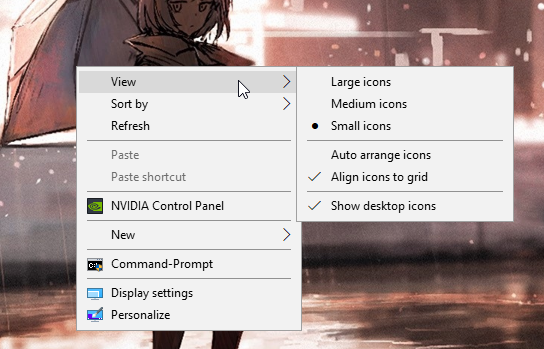
What’s with my desktop? Why does it look like this?
 last gorge
wdym
cinder mauve
All of my icons are gone and it has that weird grey bar
last gorge
make sure you have show desktop icons on https://i.imgur.com/y9Oj8YD.png
 last gorge
kk
vast summit
Hey @vivid temple you busy?
I was able to boot into macrium reflect
Idk what to do now lol
Oh so apparently your 6 hours ahead of me not being me lol. So your probably sleeping
Sry for the ping
peak notch
ive had chats with naed at like 3am
huh, so he would have just woken up
that makes more sense lmao
vast summit
Lol
vivid temple
@vast summit try and see if you can delete the partitions
as for "when are you awake", dont worry about it, i work fairly weird hours
vast summit
Ok ill try that today
Thanks for the clarification
vast summit
@vivid temple ik you said try to delete the partitions but I'm in it right now and I can't find them
cinder mauve
mmmm i love ubuntu
vast summit
I found the drive partitions but I don't know how to delete them
Do you have any ideas @livid bluff
This is what it looks like
vast summit
Ya thats the problem
As naed said I need to delete them but I don't know how
I'm trying to start from a blank slate
The one on the bottom is the usb im booting from
So you got any ideas? @livid bluff
livid bluff
Ok Basically What you can do is Reformat each drive from the Windows Install and It will delete everything on the drives
 peak moss
i use the free version of EaseUS for partitions. its just right click and delete partition, then right click and initialize.
or you right click the disk you wanna delete, click delete all, then right click it again, click initialize, then click the play button at the top
vast summit
I dont really understand what viper said lol
Also I'm using macrium reflect from a booted USB
peak moss
hes saying when you use a windows boot drive from usb, when you go to install, when you get to the partition selection part, you can select each partition and erase the entire partition and then choose which partition you want windows on. that's if you're doing a fresh install
vast summit
Ah ok thx for the clarification
livid bluff
Yeah Sorry. I should have been a little more specific on that one. I also use Aomei Disk Partition Wizard. Its software that came recommended to me by Microsoft Techs when working with partitions on Hard Drives
vivid temple
@vast summit you got it solved?
vast summit
No lol I've not had a good chunk of time yet. @vivid temple
In macrium reflect when I boot from the usb could you please state the steps to delete the partitions?
vivid temple
In theory, just right click the partitions
IF it doesnt allow you to do that, we can just make a different usb stick and do it from that.
The reason for macrium was the ease of making the usb stick
Which is just about the only thing that has gone as it should in this process☺
@vast summit also, currently on mobile, so I am slow on the responses, but I will be back at the apartment in about 1 hours time at the max
vast summit
@vivid temple I'm on mobile too as I usually am. But yes it did not allow me to right click on the drives. So I guess we'll have to get another stick.
livid bluff
No. @vast summit Just Download THe Windows Media Creation Tool and Create a Bootable USB drive with that. Its a Install Disc but has the full capabilites of Installing Windows. It will allow you to do a Fresh Install Of Windows. Youll Have to go to the HP support Site for the Drivers for your specific PC. This is only if the Macrium Reflect Option doesnt work at all
It will also allow you to Delete any and all partitions on the Drives in the system
vast summit
@livid bluff your referring to the iso file correct?
livid bluff
Yes
There is a Media Creation Tool that you can get from Microsofts Website that Downloads the ISO and Puts it ona Bootable USB for you
vast summit
Ok thanks
livid bluff
Yeah No Problem
It is the Most Up to date ISO that they have available as well. So Version 1909 with most of the updates that have been released up till now If I remember correctly. I do know it will be version 1909 for sure though
vivid temple
@livid bluff the problem is the protected partions that he ran into earlier
which the media creation doesnt allow removal of
livid bluff
I beleive The WMCT can overwrite those
vivid temple
because you are thinking of the "custom" install option for the deletion right?
livid bluff
Correct
vivid temple
aye, 99% it isnt going to work
livid bluff
Then Aomie would be the tool he needs then to delete those protected partitions
vivid temple
aye, or Macrium (in the past)
livid bluff
As alternative to partition magic software, AOMEI Partition Assistant is an easy partition manager and complete hard disk management tool for Windows 10/8.1/8/7/Vista/XP and Server 2003/2008/2012.
vivid temple
because the tool has had the capability to do that, (i should know, i have done it numerous times in the past)
and just like any other technician, i am prone to sticking to the software tools i know and use :)
livid bluff
Same
Im not a technician. I just know how to do stuff from doing it with my own PCs that I have had
vivid temple
is the usb creation simple in Aomei?
vivid temple
because that can(and in this case IS) be a part of the choice of tool
livid bluff
But can be run Pre OS mode
livid bluff
Yeah. I spelt it wrong at first
vivid temple
(its a silly name to remember right)
livid bluff
It is
I was spelling it how it sounded
But it is a Very Powerful Software. It was recommended to me by a Microsoft Technician when I was having Hard Drive Issues with a Install of Windows when I was trying to run a Dual Boot Config with Win 7
livid bluff
Yeah No Kidding. It can do so much to a drive its not funny
vivid temple
where the free version of reflect is much more narrow, but it is THE tool for cloning of drives
livid bluff
You can even change the serial number of the drive and a bunch of other stuff with the paid version of the software
vivid temple
(if you dont want to confuse a new user)
livid bluff
Aomei has another software just for cloning drives
vivid temple
:)
livid bluff
I had to do it when I transfered my OS to a SSD froma standard mechanical
Also making a clone of a mechanical drive that was failing and I didnt want to lose the data that was on it. The Aomei clonning software came in handy for that
Their paid versions have a few extra options but the freeware versions have just about everything that a everyday user would need.
Windows 10, Windows 8.1/8, Windows 7 disk cloning free software can rescue your computer from system disk in low space or replace HDD with SSD to gain better performance by clone everything to the new disk including operating system and applications.
vivid temple
aye aye
i will have a more serious look at it tomorrow (if work doesnt get all bonkers again)
livid bluff
Yeah. I had to take the day away from doordash just cause I need to catch up on my college coursework and get a few Client Images done
vivid temple
@vast summit so, you get what you have to try next?
vast summit
I'm going to put the iso file on another drive and boot from it and delete the partitions from there
vivid temple
you are going to give the Aomei tool a try
https://www.diskpart.com/
As alternative to partition magic software, AOMEI Partition Assistant is an easy partition manager and complete hard disk management tool for Windows 10/8.1/8/7/Vista/XP and Server 2003/2008/2012.
since it seems that Macrium has changed what Reflect can be used for, that is the easier solution for now
when, when that has hopefully allowed you to delete the partions on both drives.
(you just leave them with nothing, just unallocated space on both drives)
you can make windows install usb, with the media creation tool from Microsoft.
vast summit
Ok thanks for the steps. I should be able to get it over with already tomorrow 👌
vivid temple
you, as always, are very welcome :)
vast summit
Ik lol
 past arrow
Why the heck is activate widows keeps popping up when I already bought a key?
vast summit
Bad key maybe. Try putting it in again. You could also call Microsoft and they might be able to activate it for you
vast summit
@vivid temple I messed up. It was completely my fault. I installed aomei on the external USB drive. I then tried to boot from said drive and when it didn't work (obviously) I figured it installed wrong so I formatted the drive again. But apparently I'm just stupid because now It is still technically "installed" on my pc because it shows up when I search for it in the start bar but I can't run it or Uninstall it because I deleted all its info that was on my USB. I also can't reinstall it now. Is there anyway to like permanently wipe it from my pc without going through an uninstaller? My bad. Thanks
livid bluff
@past arrow Usually Microsoft will Just go in and change the key from their system once they verify that the key you bought is authentic.
past arrow
I just bought another key. its all good
livid bluff
Ive had this happen to me before on a older system I had. They would remote session and have control of the PC and they would do it from their end
Ok
last gorge
you bought a key, but did you put it in
If it was an ebay key, it could've been deactivated
livid bluff
Yeah. Best bet is to go to sites like CDkeys.com or kinguin
 rocky cedar
@wraith timber eBay win keys best keys
vivid temple
@vast summit so... what is the current situation?
vast summit
As of now. The drive partitions are still the same I just negated myself from using aomei on that pc. However I did think of an idea last night. Can I install aomei on my desktop and create a bootable USB from there?
vivid temple
Aomei should just have been installed ON your actual machine in the first place
not ON the usb
@vast summit what are you doing right now?
vivid temple
lazy git :P
vivid temple
that you get on a call with me, and we fix this up
vivid temple
in 2 hours? yes i will.
vast summit
Ok sounds good. I'll shoot for then
vivid temple
deal
vast summit
I'm just about ready @vivid temple if you are
vivid temple
just need to grab a headset @vast summit
vast summit
@vivid temple ok everything's running swimmingly but I have noticed one thing. The 1tb hdd is not showing up in my file explorer. I have no use for it now but if I did develop a use for it what would be the process of initializing it?
vast summit
ok i thought so
vivid temple
that will enable you to make a partition on that drive
vast summit
sounds good 👍
vivid temple
no restart or anything required
vast summit
awesome
vivid temple
it takes all of 20 seconds to do :)
vast summit
just what i like to hear 🙂
vivid temple
indeed
vast summit
definately beats the the 2 hours we spent today
vast summit
lol ya thats for sure
 bitter meadow
where do you buy sketchy windows keys that have a 90% chance of being deactivated?
 smoky pagoda
good luck.. lol
bitter meadow
im off
vast summit

 real skiff
Anyone know if there's a way around paying the $80 for Sublime Text editor? That is an insane amount for a text editor I think.
Or can anyone suggest a good one that's cheaper but similar to it?
 hoary nacelle
i thought sublime was free?
real skiff
When I tried it, after several minutes of use, I was prompted to purchase it and I couldn't use it anymore
It really is awesome but I can't see paying that much for just a text editor.
If it were like $40 I might actually consider
real skiff
Man I forgot how long it takes to install games from DVD's. Installing Microsoft Flight Sim X rn at whopping 15 mbps
 wraith timber
FSX ma boii
real skiff
Yep still lots of fun even all these years later 🙂
I have the gold edition which comes with acceleration pack
I really need to copy these disks soon. The originals are getting pretty scratchy
wraith timber
I think I have the standard edition, I can't fly the stock Goose 😔
real skiff
Oh I love that plane. One of my favs
wraith timber
I downloaded an FS2004 Ford Trimotor
It's pretty neat to fly
Big chonky and slow
real skiff
Yeah I love all those vintage planes in FS2004.
Heck yeah it is. I also like the DC3

Fly Away Simulation
Part of what makes virtual flight joyful is the reality and authenticity of the scenery and surroundings. Whether it is the hustle and bustle of the busy metropolis-type cities below, or the wide-open plains of the countryside or mountain regions, after the flight and authenti...
Never tried any of these expanions before so I wanted to give some a try
See how much it improves the game
real skiff
I'm just impressed there's still people working on this all these years later
wraith timber
Some games are just great to mod :)
real skiff
Haha
Do you remember where you downloaded the Trimotor from @wraith timber? I want it.
real skiff
Sweet! Thank you
I almost thought of buying FS2004 from eBay just to get those vintage planes again
wraith timber
Fly Away Simulation seems to have it in their library
I remember downloading a full livery pack of them, but it looks like they're separately listed
real skiff
Oh cool. Just found this site 20 minutes ago so I haven't fully checked it out yet
That's ok. Thanks for checking
wraith timber
I think I got most planes I have from there
real skiff
Yeah looks like they have a pretty awesome library
Do you know when the new MSFS is coming out? Soon ain't it?
real skiff
Probably going to be expensive as heck
wraith timber
Yeah that too
real skiff
Yeah I can just imagine the requirements to run the graphics on high
wraith timber
4 2080Tis Nvlink and two 64 core CPUs
real skiff
Omg lmao!
real skiff
I'm sure you're probably closer than you thingk
I really want to get a yoke and rudder pedals some day
real skiff
Maybe even some insturments
wraith timber
I have a gamepad that works well enough for just playing around
Dualshock 3 using SCPToolkit
real skiff
I'm using an old Saitek Joystick that's probably almost as old as FSX
wraith timber
Makes a world of a difference to have a controller, coming from keyboard or mouse yoke FSX lol
real skiff
Works great though
Yeah it does. You should really think of investing in a decent Joysick. Makes it much more realistic.
wraith timber
real skiff
Lol! Sounds about right
My facial hair isn't that grey yet though
And I still have hair
wraith timber
Xd
real skiff
Looks like it might be a while. Looks like it's still in Alpha from the updates they're talking about
 wraith timber
It looks beautiful
I would just jump into an STOL spec Cub and hop from meadow to meadow
real skiff
Heck yeah. Just putter around and take in the sights
real skiff
Haha!
 fiery tundra
Flight simulator is also taking advantage of the cloud so most of it shouldn't be dependent on your pc tbh. And as it's supposed to also run on the base Xbox one. I don't think you need a beefy PC to run it
Unless of course you want to run it natively, which would require you to download an area of the map.
 strong gazelle
could anyone possibly help me with some os questions
livid bluff
What Ya need helps with
strong gazelle
rn my only drive is a hdd, i wanna get an ssd and put windows on it for a boot drive. can i just transfer windows from my hdd to an ssd or do i need to wipe my hdd?
livid bluff
You can transfer the OS from a HDD to a SSD
livid bluff
I did it using software from AOMIE
AOMEI Partition Assistant Standard as the best FREE partition manager software that can resize, merge ,copy and migrate partitions on Windows 10/ 8.1/ 8/ 7/Vista/XP.
rocky cedar
You can clone the drive or you can do a clean install.
livid bluff
That Gives you the option to transfer OS to a SSD
livid bluff
@rocky cedar Cloning Doesnt work for the OS. I tried that. IT only works to make a temporary backup of the OS drive
Its pretty Simple to use.
rocky cedar
I'm pretty sure cloning the OS partition would work
livid bluff
I just clicked around the menus to find what I needed at first till I got really comfortable using the software. I use it for managing my Drives still since I sometime leave unallocated space on them just for future use If I need it
@rocky cedar No Because not everything in the registry for the OS reads properly when ITs a Clone
I found out the hard way
rocky cedar
I did a clean install, but I had many people tell me to just clone the OS partition
Why would that be?
livid bluff
Win 10 does not like being cloned
smoky pagoda
i'd rather do a clean install
rocky cedar
Yea
Clean install is pretty nice
But I'm gonna try cloning the OS partition off my SSD to my crappy one
livid bluff
Like Graphics card drivers and some software like games will know its a clone and not function properly and cause intermittent crashes or load. Also cloning doesnt give the drive the appropriate Drive letter for the system to read from
Dont get me wrong as long as its connected to the correct SATA port it will boot from it but it wont have the Default C drive that is programed into Windows 10. It will have the drive letter that was assigned to it in the cloning process
I still have a full system backup on a 250gb HDD. I should probably update it just in case my SSD ever fails I have a Failsafe backup till I can get a new SSD
strong gazelle
i just watched a tutorial where the guy chose migrate os (on aomei), should i just do that.
livid bluff
Yes
strong gazelle
ok
livid bluff
That will keep the entier OS file structure in tact and make it bootable without any problems with driver and programs not working properly
vivid temple
@livid bluff cloning works just fine
livid bluff
I had problems with it. Maybe it was just the motherboard I was using at the time
vivid temple
IF you clone and keep the source around, sometimes things get weird [tm]
livid bluff
That makes sense. I pulled the source drive cause it was failing. Thats why I only keep that drive as a backup drive now. It only gets connected to make a full OS backup
vivid temple
also, remember the talk we had about Aomei the other day @livid bluff ?
livid bluff
Yeah
vivid temple
in the Partition assistant software that you talked about. The "make bootable media" resulted in a "on the surface" fairly unhelpful end result
livid bluff
What You mean by "on the surface"
vivid temple
i didnt dig into it, because i was dealing with Eggs partition trouble
it basically gave a disk that seemed to be convoluted for no reason
livid bluff
Ah yeah. That issue. His best bet was to use the Windows Media Creation Tool to make the USB Install Drive
vivid temple
no
as mentioned, he would be fairly likely to not be allowed to fix the partitions there
livid bluff
Dam
vivid temple
because it "sees" windows
gparted was the solution.
i mentioned Partition assistant, because so far, i am not impressed
mind, still havnt had time to boot it up here locally (the usb stick that is)
livid bluff
Yeah. That I understand. I never had any problems with Partition Assistant
But thats just me
 stiff gale
Hey do you know how I can get Netflix on my Nintendo switch
stiff gale
No
stiff gale
Is there a way I can buy SD card with all the software
A how does this app work that’s crazy right cuz my phone went all black all of and on
cinder mauve
very no
 storm ocean
I mean you could but like I doubt anyone would be selling it when it’s so easy to do
cinder mauve
also unless there's been some recent development, it's n ot an SD card based thing
isn't it still right joycon shorting based?
storm ocean
Well yes you short two pins on the right joycon rail to put it into rcm but the actual CFW and android is on the SD card
Also requires you to have a hackable console
 summer bough
This is about a week late, but the best free cloning software I have used recently is one called minitool partition wizard if you are still looking to clone. Its worked everytime I tried without issue. @rocky cedar
rocky cedar
fair enough
cinder mauve
I have a question pertaining to playing audio through auxilary and built in speakers. Would this be the place to ask?
vast summit
You might get more luck in #electronics or #peripherals-and-displays
cinder mauve
😄 Thank you!
vast summit
Np lol
 lone path
Anybody in this chat can point me in the right direction for Windows debugging error codes
livid bluff
I honestly Dont Know. I just google search them
last gorge
if you are looking for a chat, this is the place and yes best way is to start by looking up error codes you are getting and looking through forums
 serene mango
Stupid question. How do I get windows onto a custom build?
hoary nacelle
On a different computer, plug in a USB flash drive, download the thing i just linked above, use it to create a Windows Install USB
After thats done, plug the USB into the back of the computer, boot it up
it should boot to the installer
if it doesnt, check your BIOS and make sure "boot from USB" is enabled and make sure the boot order prioritizes USB devices
hoary nacelle
Yep
im sure theres numerous youtube videos on how to do it too, but if you need any more help im sure someone here will be able to help
it shouldnt be too hard
 sonic ingot
If i am building a new pc, and plan on just adding my old hard drive to it. Is it possible to use the windows 10 on the old one? Or do i need to back up and do a bunch of things?
last gorge
if you are building a new pc I'd highly recommend getting at least a 256gb ssd
Hard drives are very slow nowadays and are starting to be phased out
@sonic ingot
sonic ingot
OI just bit the bullet and bought windows. ive built like 2 pcs but pre installed with windows. easy way out for me. But ya ill have an ssd with this machine. the hard drive will just be for all the family things i have! Thanks for the answer though 😄
last gorge
if it is an ssd then you should be able to just plug it in to the new pc and boot it, you will probably have to install drivers for some of the hardware tho
livid bluff
Windows 10 will automatically reconfigure itself to the new harware but yes drivers will have to be reinstalled. I did that with my Install on my SSD when I upgraded from DDR3 build to a DDR4 build.
Yeah
Made my life easier. Except when the annoying Windows Isnt Activated Watermark pops up.
last gorge
all the cpus...
livid bluff
That has been known to happen in the past but seems to be something that Microsoft Fixed in newer builds.
vast summit
It happened to me
 icy oak
I'll have to buy a new Windows key for my new build. (Because I do want to keep my laptop around as a "surf the Internet from bed"/backup PC)
last gorge
anyone know a good app for recording audio on pc, would be nice if lossless was an option
vivid temple
audacity works fine
 rocky cedar
bruh
rocky cedar
wtf is with that temp
rocky cedar
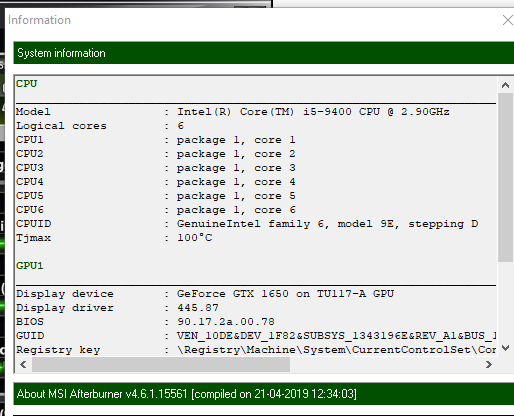
thats a 1650
shouldn't be that hot
laptop?
hell that doesnt matter
it just shouldn't be that hot period
rocky cedar
Heavy load should not be that hot
 weak shore
Let me run another test and check MSI afterburner to see if the temp was accurate
rocky cedar
I'm running furmark and it's 67c max
rocky cedar
either kombuster is broken or your card is broken
 rocky cedar
yea
rocky cedar
why are you using fahrenheit ...
rocky cedar
It prob assumes celsius as default, and then converts whatever telemetry it gets into fahrenheit
celsius is nicer to work with on computers
rocky cedar
fair
weak shore
Yeah I had a slight issue with the upgrade at first
I was getting no video
So I reseated ram, same issue, reseated GPU, same issue, I slapped it a few times, then video came on.
Now whenever I restart it, video still comes on fine.
rocky cedar
okay
 last gorge
Standard temp measurement for computers is Celsius
cinder mauve
Linux is 10/10
No igpu so no pass-through so I can’t make Linux my main os but it is still good
 unreal zenith
So no matter what, my computer (its old) doesnt want to install windows 10, I used the media creation tool, to use a usb. It shows a windows logo, loads, and just turns black after that. My computer doesn't turn off in any way, but I cant seem to find the root of the problem. If anyone has any suggestions i would be very grateful.
 warm oar
what OS is your computer running? just to make sure.
unreal zenith
None yet
warm oar
oh i misunderstood
have you left it on the black screen for a while?
do you have power running to your storage*
unreal zenith
Yes to both of those
warm oar
sata?
unreal zenith
Yup
warm oar
thonks
unreal zenith
hmmm
warm oar
i mean maybe its not formatted but im pretty sure the usb does that
unreal zenith
Well I do it off the windows media creation tool, which is on my laptop
warm oar
if you want, you can try the installation again and see if your storage activity LED blinks when it goes black screen
but this is beyond me, sorry i couldnt help
unreal zenith
Dont worry about it! Thank you for trying
warm oar
np!
 spiral pollen
Hey guys so I installed windows 10 on my freshly built PC but the bar at the bottom looks different
Like it's not the traditional black with the good font. It just looks like it's been on safe mode or something like that
spiral pollen
No I get that but it straight up looks like I booted it up into a safe mode type of way
But I fixed it so disregard that
unreal zenith
Does anyone know how to fix error code 0x8007025D when installing windows 10 onto a computer with no os?
vivid temple
by what media?
unreal zenith
Usb
vivid temple
what mainboard?
vivid temple
which specific usb port are you using?
one in the case?
one on the back?
if on the back, which one?
unreal zenith
Back down 3 right hand
vivid temple
hm, that should be the native ports
just to make certain, could you try either of the ports nearest the PS/2 ports?
unreal zenith
So
□□
□□
□()
□□
□□
unreal zenith
Kk
vivid temple
i "hope" that is the cause, because its a bit annoying to deal with if it isnt
unreal zenith
It did the windows logo, did the loading, and then the screen turned black
I wish I could send the vid, but it is too much
vivid temple
nah, just wanted to know :)
unreal zenith
-_-
vivid temple
remember, i cannot read your mind, so i have to ask instead
unreal zenith
True
livid bluff
Thats a weird one that It went to black screen. What kind of port are you using for connection to the monitor cause Ive had that happen to me and when I hooked upa VGA cable I was able to install everything and able to use the HDMI after Video card drivers were installed
unreal zenith
It's an hdmi to hdmi mini
The screen is working
The computer hasn't restarted at all
It just isn't doing anything else
vivid temple
side question: your harddrive, what port is it connected to?
nah, it is stuck (for some reason)
unreal zenith
Sata?
livid bluff
The Computer Might Not be putting out signal to the HDMI if it has a Native Onboard Video through the GPU
CPU sorry

 livid bluff
Ok Figured I would ask. Ive had that happen to me with older Motherboard
vivid temple
power off the system and move the sata cable to one of the black ones
unreal zenith
Alright
vivid temple
the blue are the extra controller enabled ports
so that might actually be the cause for the earlier error. Might!
unreal zenith
I hope so!
vivid temple
before you power on again, move the usb stick back to the earlier port
and power on again
livid bluff
Are those Blue ones Kinda Like the grey 6gbs Ones on my motherboard then?
vivid temple
@livid bluff if you look in the specs i linked, you will see a jmicron controller that handles the IDE port and the sata ports
thats those 2 ports
vivid temple
and its known that "sometimes" those sata ports are just wonky as all heck on OS install
unreal zenith
Ya it's an old board
livid bluff
@vivid temple Doesnt He have to set the SATA to respond Like IDE on that Board in the BIOS
livid bluff
I think that may be the problem is the Motherboard is kicking over to IDE when Trying to find a Primary HDD
unreal zenith
Well crap
vivid temple
thats the "annoying" part i mentioned earlier
unreal zenith
Its doing the same black screen thing
vivid temple
hm
livid bluff
Yeah It is annoying when a Motherboard does that
unreal zenith
Hmm
vivid temple
nah, not what i meant Viper, more the whole navigating bios via text :)
unreal zenith
Welp
livid bluff
Ah Yeah The Old BIOS setups where annoying
unreal zenith
Yup
vivid temple
not quite what i meant either.
livid bluff
Love UEFI BIOS
unreal zenith
Same
vivid temple
its the navigating, by proxy, via discord, a bios on a old machine :)
livid bluff
ah
vivid temple
i dont mind the old bios, not one bit
unreal zenith
Naed i do really appreciate your help though
vivid temple
you are very welcome :)
unreal zenith
So should I get to the bios?
vivid temple
do try
unreal zenith
Alright
vivid temple
i am curious if it will allow you to
because it going black on the other port is a bit odd
livid bluff
Naed thats what makes me think he has to set the SATA Controller to IDE
vivid temple
here is the "fun" thing Viper, he has been booted once
livid bluff
Oh
vivid temple
and in the process of installing the OS
livid bluff
Yeah THat is a odd one that it would do that
unreal zenith
I have a bios password...for some reason(I know the password)
unreal zenith
Alright I'm in the bios
livid bluff
I think I rmemeber Reading that part but forgot to be honest
vivid temple
2sec, let me just grab the manual
vivid temple
you know your way around the bios, or do you need step by step guidance?
unreal zenith
I know alittle bit around the bios
vivid temple
okay
unreal zenith
So where do I go?
livid bluff
Naed is it possible maybe even a slim chance its just cause he is running a outdated BIOS that he is having this issue
vivid temple
standard cmos features, check if the hdd actually shows up
@livid bluff i would agree, IF he hadnt been booted up once
livid bluff
Ok
Cause The BIOS he is running is form 2009 and On the Website The most recent is 2011
vivid temple
nah, that is just the license for the original AMI bios
livid bluff
BIOS 1.2 of that board was released on 9-9-2009
vivid temple
did you see the question about the hdd?
livid bluff
What size is the HDD your trying to install to
livid bluff
Ok Thats not a issue then. Cause They added 2.2tb HDD capability with BIOS version 1.A
livid bluff
That Can Lead to issues sometimes from what I understand but dont think that would be a issue unless the PC is connected to the internet
unreal zenith
Alright
vivid temple
nah, that shouldnt be a problem, but correct it anyway
livid bluff
That wouldnt cause the black screen though
unreal zenith
Kk
vivid temple
and i have just read through the manual.
livid bluff
What Processor are you running
vivid temple
i dont see anything that would limit/prevent you from doing what you are.
livid bluff
Yeah. I was just wondering cause it may have been a CPU micro code issue but that CPU is older than the BIOS date
livid bluff
Right
unreal zenith
So, then what should I do?
vivid temple
so nothing exotic going on there either
got another system you could test that usb stick on?
livid bluff
Thats why I asked cause with almost every BIOS update for that board they released a CPU microcode update with it
vivid temple
just to make certain that its not the stick that is being annoying
unreal zenith
Well my laptop already has windows 10 on it
vivid temple
Viper / Dont know how much CPU history you know/remember, but those are the "lets tweak HT just for the hell of it" years
livid bluff
Yeah I remember that
vivid temple
so that explains "some" of the microcode stuff
livid bluff
Dam Hyper Threading
vivid temple
could you please test IF you can actually boot from that USB stick on your laptop?
unreal zenith
So...that's the only other device I have
vivid temple
it wont automatically install, so nothing to worry about there
unreal zenith
Kk
vivid temple
however, before you do anything
livid bluff
I was gonna say the same thing
vivid temple
Please explain what tool you used to make the usb stick with?
unreal zenith
I used windows media creation tool
vivid temple
okay, then yes, there is nothing to worry about
unreal zenith
Alright
livid bluff
Umm Did you select create media for another computer when you made the USB?
unreal zenith
Yes
vivid temple
what we are curious about is the following: Can it actually boot and show you the windows install process
(he wouldnt have had the error code to post earlier, if he didnt Viper)
unreal zenith
Let's find out
livid bluff
Ok. I was just checking cause I didnt check it once and couldnt get the USB to boot into the install process