#overclocking
1 messages · Page 51 of 1
 sterile flame
 flint quiver
so this is with the multiplier on 43 and the voltage on auto while running prime95. Seems its determined it should run 1.3
flint quiver
eventually bluescreened, anyways was fun back to auto pbo auto oc off. did tighten up tRFC, tRFC2, tRFC4
flint quiver
They weren't in mine 😦
flint quiver
so they are 271, 201, 124
when I set just tRFC to 271 it was 489 and 224 for the others
with them on auto that is
flint quiver
So much time to kill so messing with the memory to help. 16-13-13-32@3733 on mem test atm.
 latent wolf
I dont know how much higher than 3600mhz OC I can go on my motherboard or how much more the RAM itself can handle
sterile flame
So, I tried to use XMP on my Trident Z Neo 3600 32gb and everytime I would run Aida64 it would say hardware failure within like 4 seconds. Talked to numerous people, tried different methods, nothing worked. So I did some research and found out that my board Gigabye x570 Auros Elite was known to have issues with XMP and trying to reach the 3600mhz. So, I upgraded to an MSI MEG x570 ACE motherboard, because the reviews said that the support for XMP and 3600 was amazing. Bought the board, got it all installed, ran my Aida64 and it said Hardware Failure again... is my RAM bad?
 dull ginkgo
try memtest64 or smth similar
 manic helm
could be. Most am4 boards don't correctly set the tRC timing. You may have to enable xmp and then manually set the tRC timing. Most ram it would be something like 56, but you could find that easily enough.
 past sable
The max tune I'm able to get at CL16 3800mts 1:1:1 with uclk and fclk 1900 @ 1.5v
Had to get a whole new mobo to reach 1900fclk stable
passed 6h of memtest pro 600% passed 2h of ramtest 4000%
Could not get CL 14 to pass tests at all. That's my next endeavor once im able to catch up on much needed sleep after achieving this
sterile flame
I think I finally found the ceiling to my overclock!
 dark linden
Autocascade parts are starting to arrive
sterile flame
Ryzen 9 3900x, trying to get it to 4.6ghz on all cores. I am on water. Voltage now is 1.100v What should I take the voltage up to? It's not stable atm.
flint quiver
go up small try 1.125
 proven canopy
That's a tall order.
Your best bet for hitting 4.6 all core avx load is a chiller or maybe phase change cooler.
 neon rapids
also correct me if im wrong but 1.1v is kinda low for 4.6 all cores
dull ginkgo
Yea... On AMD that's not gonna happen unless you won the lottery with like the best chip in the world
1.1v on say comet lake might be able to get you 4.6ghz
But on Zen 2... Ehm yea no
@proven canopy am I going crazy here or did this man get 4.6ghz with .9v all core?
https://hwbot.org/submission/4462296_asmodee_cpu_frequency_ryzen_9_3900x_4648_mhz

HWBOT
The Ryzen 9 3900X @ 4648MHzscores getScoreFormatted in the CPU Frequency benchmark. asmodeeranks #null worldwide and #22 in the hardware class. Find out more at HWBOT.
That's supposed to be the 12x CPU rankings where I found it
Hard to tell things on mobile tho
I'd believe it if it was single core, but all core is wack
proven canopy
bruh, thats just vid, even then, not under load
neon rapids
a lot of people need like 1.3-1.4v to get 4.6 under load so yeah 1.1 is pretty low :v
latent wolf
Yeah. His Base CLK for the CPU is showing 99 which is what mine does even though in the BIOS it reads 100 on my system. I set it to 102 and No Joy
manic helm
a slight variation in bclk is normal.
latent wolf
Wish I could set mine higher but my system wont boot when I do that
proven canopy
Don't mess with bclk overclock if you have nvme drives or care about your data
latent wolf
I dont have NVMe Just SSD, Hybrid HDD and a Mechanical HDD
 faint torrent
can i overclock my pc case
latent wolf
No
sterile flame
can i overclock a little with the fan that comes with ryzen 7 3700x?
ping me if the answer
 twilit hedge
@sterile flame You can try, but ryzen more or less overclocks itself, so you can actually lose prformance with a manual overclock unless you really work at it
sterile flame
ok thanks
latent wolf
Looks Like it might have Turbod super High
proven canopy
Lol. what does cpu-z say?
I wonder why base speed reads as 4.5
That's the weird part imo
Looks Like it might have Turbod super High
no
latent wolf
4.5 could be the OC setting if its OCed at all
proven canopy
no
latent wolf
Huh
 robust cipher
i did overclock it to 4.5
and when i tried downloading geforce experience it did that
temps were under 65
 dark ferry
So I've spent all this time trying to manually overclock my 9700k to 5ghz. Found out it requires 1.38v fixed with turbo llc to stay stable and will still spike as high as 1.416v. 4.9ghz all cores seems to require the exact same thing. 4.8ghz on the other hand I can dial in manually and leave everything on auto and here's what I get...
4.8ghz all cores, perfectly stable. Auto voltage.
minimum voltage 0.636v, maximum voltage spike 1.368v
Average voltage under load roughly 1.25v
idle temp 35c
max temp during prime 88c
max temp during realbench 85c
max temp during cinebench 80c
It blows my mind that a 100mhz different can cause such a jump in voltage requirements, but I guess this is where my chip is going to run at its best.
difference*
 short otter
2250 mhz on a 1650ti
Stable
Jesus Christ
I have a +350 core clock RN and it's not dying
+550 on memory
I'm trying to get the 100th percentile in userbenchmark, I'm at 99th
I'm still at 99th, how
How are they past 2250mhz on a laptop only gpu
I'mma get this up to 2300 if I have to, might need to plop my laptop in the fridge for a few
100th percentile on gpu, +400 on core clock slider
+550 memory
proven canopy
lol, nice
dark ferry
Heaven Benchmark doesn't show the actual core clock. Check GPU Z or something like HWMonitor.
proven canopy
It doesn't? Superposition does IME, and it looks like heaven is in that screenshot.
proven canopy
You'll get decent hardware points
manic helm
I have the screenshots but trying to get a cpuz validation is hard. trying to catch the variation in bclk at 103 is almost impossible
proven canopy
I heard benching maxmemm is easy team points
manic helm
This poor pentium wont boot with the ram at 4000. It gets close, but wont make it. Its booting higher than it did in my itx board though.
proven canopy
What vccio/vccsa
manic helm
I think its the tRC timing. The highest setting the board allows is 68. xmp for this kit is something like 74
i went as high as ddr voltage at 1.6v and vccio and vccsa at 1.35
proven canopy
b-die?
proven canopy
samsung e-die? or micron rev.e?
manic helm
samsung
its an old 8gb kit I bought probably 3 years ago during the mining boom. It was actually cheaper than most of the 3200 kits on the market at the time and I was putting it in my itx htpc build and thought it would be fun to play with from time to time.
Only chip I have managed to get 4000 with is my 6600k
and that was unstable. Might need to flash to a newer bios and see if it improves anything. This bios is kind of bugged and old. There are a few betas after this one. It also wont boot at cl22 or 23 but works at 24.
@proven canopy on this part does the imc clock mean the north bridge clock speed or the memory clock
or do I even need to worry
finally caught the cpuz validation
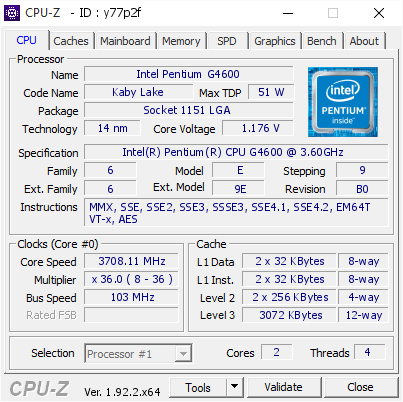
[y77p2f] Validated Dump by intender (2020-07-21 03:36:12) - MB: Gigabyte Z170X-Gaming 7 - RAM: 8192 MB
proven canopy
The 103.00?
proven canopy
ya, that's just bclk
(I think) - My guess is each is for different platforms?
@dark linden Thoughts?
dark linden
On?
dark ferry
@proven canopy Heaven shows my GPU overclock as 2250 when the actual speed ranges more between 2000-2100.
proven canopy
The pic intender posted about what to enter for IMC/QPI
manic helm
got a few points
dark linden
Don't need to enter it
proven canopy
Gotcha, thanks
dark linden
I'm down for that
proven canopy
If you don't mind people pinging/dm'ing you for mostly mundane tech help, I'm sure mike would give it to you if intender and I vouch.
manic helm
I'm not sure I deserve it anymore. Im sitting over here surrounded by monitors and keyboards and cant remember which one am using for what.
proven canopy
I just picked up two of those 1440p 60hz IPS acers for non gaming use
dark linden
I already get pms about people trying to blow a finger off with phase stuff "can I use acetylene as a refrigerant?" WTF man no you can not stop trying to kill yourself
proven canopy
lowkey wanna order two more lol
Lol - I got a lot of hate for asking about using propane in an ln2 pot (outdoors) in ROC
dark linden
Use Mapp like a real man
proven canopy
Real mapp is gone for good I thought
proven canopy
Nice, how'd you cnc it?
dark linden
Bartx made me the prototype
proven canopy
I created a "wegg" hwbot and folding@home teams, I figured I could get people into overclocking/benching/folding by incentivizing it with free xp on the newegg minecraft server lol
manic helm
Who needs incentives to kill hardware
 mild moat
Lol
manic helm
hmm, Never really tried overclocking this ram with low timings before. its at something like 3568mhz at cl14 so far. Might have to start tweaking.
manic helm
Its been too long since I tweaked ram. I forgot how time consuming it is.
latent wolf
@manic helm You arent kidding
Thankfully the pins on this channel help alot for those that dont know where to look for the Timing Settings
manic helm
I have it down to cl12 3289mhz but I have hit a point where any changes either are resulting in no boot or the changes are just ignored.
latent wolf
Ouch
Im at 3600mhz OC but want to try higher. Not sure if my MOBO would handle it since its rated at 3600mhz. RAM is rated at 3000mhz
 signal sun
What mobo
latent wolf
Gigabyte B450 AORUS M. Its rated at 3600mhz OC
signal sun
Might be able to try a little higher, but probably not much
latent wolf
I was thinking of 3800mhz woul dbe the highest I would go
Timings are set at AUTO in the BIOS but Not sure where to find the timings to set it in Ryzen Master for the Brand Of RAM I ahve
signal sun
Since you are pushing the OC rating you might have to tinker with the timings
latent wolf
Yeah I just looked up the Speed and brand and found that the Timings are Higher than what Im using for 3600mhz. Im at CL14 for 3600mhz and stock IM at CL15 so why would 3800mhz be CL19
Have to test it in Ryzen Master
signal sun
For sure
latent wolf
Ok Set the CL19 timings and Apply and tested it in Ryzen Master and well Here I am booted and apparently stable
Im not gonna Push 4000mhz. 3800 OC is where I am stopping at. Cant afford new RAM Modules yet
Also Upped my OC ont he CPU from 4.1 to 4.2ghz
proven canopy
For cl11/cl12, probably have to set maxmem in windows.
https://community.hwbot.org/topic/160419-maxmem-in-windows-7-8-10/
HWBOT Community Forums
I recently had some trouble getting maxmem to work in my Windows 10. If I set maxmem in msconfig to e.g. 4000 it always resulted in 1.5 GB after reboot. I tried several things and in the end I found that this is working: Run CMD as admin and use this command line: bcdedit /set...
latent wolf
@proven canopy Windows Reads All 32gb I have
dark linden
@proven canopy do you do any 775 overclocking?
proven canopy
Never, I want to get into it though
latent wolf
Ah ok
proven canopy
I think I'll get more into benching when I have a working chiller. Still planning on building an SS... eventually lol.
signal sun
@latent wolf good stuff glad it worked out for ya
latent wolf
@signal sun Thanks. Yeah Its at least stable. Thats the main thing with any kind of OC is stability and thankfully thats what Ryzen Master tests for
manic helm
Me to people asking about Overclocking:
stay within safe voltage limits
Me when overclocking
throw all the volts at it. whats the worst that could happen.
 sand fulcrum
i'm at 1.38-1.4v for an i5 9600k and using Auto voltage on board so lol
manic helm
I know better than to do some of what I do, but I also don't push hardware that I am not willing to kill.
I tried pushing my old 6600k to 5ghz on air because I was too lazy to swap my old AIO over. At somewhere around 1.6v it started to beg for mercy.
sand fulcrum
i have mine on a 360mm aio and seems fine
flint quiver
Yeah if im not willing to replace it I'm not going to push it
Never oc'ed my 2700k until I built a new pc, now its at 5.0ghz and hasn't had an issue
manic helm
Thats why most of my overclocking these days is done on either an athlon or I have been playing with this pentium the last couple of nights
5.0?
flint quiver
yeah threw a kraken x62 I had laying around on it and it couldn't be happier lol
manic helm
sorry, I read 2700x, insteak of 2700k
flint quiver
lol :p
manic helm
big impressed for a second with the magical chip
flint quiver
lol I do have a 2700x laying around that was in my wifes pc, no mb for it (upgraded her to a 3700x not too long ago)
manic helm
Those old sandy bridge cpus loved to overclock
I managed to get my 6600k to 4.95ghz, but it wasn't exactly what you would call stable
flint quiver
Yeah I read about people getting good oc's back in the day but I was too nervous to lose it so never tried but now could care less. Heh thats not bad. My only issue with the pc is the sata ssd is slowly dying after so many years of use that sometimes it doesn't want to boot, but it ran Prim95 for 18 hours straight before I stopped it without crashing
proven canopy
I can't believe how long sandy chips last at 1.5v bios for 5.0
I ran my 2500k at 4.0 on some junk-tier low profile cooler to fit in this plexiglass case
For about 6 years
dark ferry
1.38v for 5ghz on 9700k can I get an F in chat.
flint quiver
I have some other pcs in the basement I should mess with that I never did, an i7 920 and a core 2 quad q660
the 920 has dual 9800gtx's when sli was king back in the day lol
sand fulcrum
i tried 5 on my 9600k, no stability lol
manic helm
I even went down to trying to run a single core on my 6600k to get 5ghz working but still couldnt get it on air.
flint quiver
Wasn't that gen still 45nm? Couldn't imagine air handling 5ghz for it
manic helm
I dont have any other pics, but I remember getting a few runs in at 4950
Here was a single core attempt at 4.9ghz to get R15
There the cooler
flint quiver
Oh that thing is puny for an i7 cooler, you need a full tower lol
manic helm
its a TT big Typhoon that I used on a single AMD athlon 64 many years ago. I modded the mounting hardware to fit the 1151 socket
flint quiver
I will have to blow the dust out of the pcs in the basement and try to oc them and get some pics of the stupid giant coolers on them lol
flint quiver
The one on the 920 barley fit in the case I had
manic helm
I enjoy benching crappy hardware like this pentium. it all comes down to tweaking and getting every last drop out of every part. Not a lot of people doing it, but when you are all limited to roughly the same clock speeds it takes some effort or some really good ram to improve benchmarks
I don't have the really good ram
flint quiver
Yeah its quite fun, I'm not playing as much as you or Forks but I like to mess around with older stuff I have or can get cheap or free. I can't remember what ram I have in the systems downstairs but it wasn't cheap stuff.
manic helm
I have habit of grabbing stuff from the Landfill
probably shouldnt
Last time I was there I grabbed an old p3, and a 775 celeron
I should overclock the celery
proven canopy
Honestly I haven't benched in a long time, I want to get back into it though now that I have more space / hardware
Been looking into exotic cooling, and or a water chiller for preliminary testing
flint quiver
I haven't done that but I did get some monitors from an estate sale right before covid for free that turned out to be pretty good for 2nd screens
dark linden
Honestly I haven't benched in a long time, I want to get back into it though now that I have more space / hardware
@proven canopy
Single stage! Get on it. Or do I need to build you one
proven canopy
haha I have most of the hardware, been looking around on craigslist a lot
dark linden
I am planning on making my dual 15000 btu rotery in September
Compressors got delayed
Currently doing a 13k single stage and an 8k chiller
flint quiver
30k btu's? Thats enough to cool a 1500 sq ft house....
dark linden
Or one really hot gpu /cpu
Btu does not really mean much unless temp is known. A danfoss 3/8 hp r404a compressor is only rated for like 580 btu but has the same displacement as a 13500 btu r22 compressor
Cubic centimeters of displacement is more important
I was also debating on going with 3x 13k roterys for my single stage
And under charging it a lot to get about -75c with r13b1
proven canopy
I need to browse around extremesystems more lol
dark linden
Got ethylene coming in December
flint quiver
Ah well idk about for pc cooling but for a general ac was taught the rule of thumb is sq footage * 20 btu
dark linden
Then I just need to find 99.99% methane for my triple stage
 left bladeBOT
 farpetrad#9121 has been warned
Reason: Bad word usage
flint quiver
lol whops, I was taught that for the south idk if its right bc no clue if my dad was right
dark linden
Are bad words not aloud?
latent wolf
Nope Not allowed mythical
flint quiver
Well I imagine its setup with a word filter and not an ai that can determine context and see that it was pg-13
sand fulcrum
so w/ this new MSI MPG z390 Gaming Edge AC mobo, if I set all core to 50 w/ uncore 47, and voltage to Override and Auto, it bumps to 1.536v lol
 vestal orbit
dark linden
vestal orbit
dark linden
@proven canopy
proven canopy
Binning NB?
 rich gust
Woah are those like copper pipe heat sinks on the mobo?
dark linden
@proven canopy yeah
Got about 20 high end x48 asus boards to bin
6 more p5e3 premiums. A few deluxes and a few rampage extremes
flint quiver
Crazy. Do you get these free or what do you do to support your habit lol
dark linden
I sell my body for parts
flint quiver
Lol
dark linden
I actually resell them for a profit
flint quiver
Ah nice
If your a woman you could sell eggs for crazy money lol. My wife did that to pay for her college.
dark linden
I'll probably make 400 from this lot and get to keep the best binned board
flint quiver
Very nice. Binning CPUs as well or just the boards?
dark linden
Thousands of 775 cpus
flint quiver
And what does binning a motherboard involve?
Most stable voltages and lowest vrm temps?
dark linden
It is a northbridge so maximum fsb and maximum memory overclocking is limited by the motherboard so you bin for max fsb and maximum memory frequency at given timings
775 was really the last platform that needed motherboard binning
It is actually really the only one that needed heavy motherboard binning
flint quiver
Hmm interesting never thought of motherboards needing binning but makes complete sense.
manic helm
the best overclocking 775 board for fsb I have was a msi p6ngm I think it was. It was only single channel ram and had very little voltage options but the fsb overclocked really well. Someone gave it to me for free and it sat in my closet for years before one of my asus boards died and I put a dore 2 duo in it.
I only had 4 775 boards, but the best overall board I had was one of the p5n asus boards. Can't remember the exact model number. p5n-vm maybe. it was a micro atx. My p5nt deluxe was the most expensive and it was nothing but trouble
I still have all of them around here, but only the crappy msi still works.
dark linden
@manic helm best fsb I have done is 702 on 775
manic helm
was that going cold
sterile flame
can someone explain to me what over clocking is used for? 🤔 i searched online, but tbh idk when you use it.
sterile flame
doesnt that hurt the computer?
 devout nimbus
You can increase clock speed of RAM, CPU, GPU
It can if you do it wrong
neon rapids
as long as you know what ur doing mostly its harmful
modern software makes it harder to kill ur computer overclocking
manic helm
I keep thinking I want to get some old hardware and go nuts but its hard to justify the cost of some of the old motherboards. 775 cpus are a dime a dozen though which is nice.
dark linden
I get 300 for 40$
sterile flame
You can increase clock speed of RAM, CPU, GPU
It can if you do it wrong
@devout nimbus where can i learn how to do it right? And how do i know if my pc has overclocking?
devout nimbus

If your CPU is Intel, it needs to be a K or X series. If it is Ryzen, you can just do it. Ram is most commonly OCed with xmp.
GPU, idk what models have OC and which don't, Google it
manic helm
I get 300 for 40$
@dark linden
must be nice. I was looking through ebay a few weeks ago and decent 775 boards were $100+
and then they want $20 for shipping
manic helm
or did you mean 300 cpu's. I read it as motherboards.
manic helm
Makes me wonder if I should try and sell off my dead boards. Maybe someone would pay me like $50 for them.
manic helm
the p5nt constantly bricked itself when overclocking. I had spare bios chips I would swap but it wouldnt boot one day and I was fed up with it. The other one I had it running and dropped a screwdriver on it and that was the end of that.
all of mine were ddr2 boards
Probably just going to mount them on my wall someday along with all the other dead hardware I have laying around
dark linden
Yeah those probably aren't worth anything dead
flint quiver
got the 920 cleaned out and dang was it nasty still need to find a better case to put it in bc there is 0 cable management available but its raid array was dead rest its soul, one of the velociraptor drives went to the the big hdd graveyard in the sky
Didn’t put 2nd 560ti back in after cleaning will after I get it booting
Will a 920oc good? Lol
flint quiver
how do I join?
and wow this bios has some crazy options I haven't seen in ages lol
and brr the 200mm fan on the case moves some air making me cold lol
for not turning this on for years its only running 27c idle
lets see what happens in windows
is there a team # like fah?
nevermind :p
oh wow theres a lot of rules to read through, any quick summary of how to submit?
 carmine canopy
farp, what block do you have on your TR?
flint quiver
I joined the team
I have the Optimus TR 3 block, started with the Heatkiller IV TR Pro
Optimus block is well worth the wait
carmine canopy
Very nice, I have a thermaltake block
flint quiver
this was after 3 hours of prime95 small fft with pbo set to enabled and auto
pbo and +200 auto oc
flint quiver
This is a mxi x58 platinum sli
 thorn ore
nice
dark linden
@proven canopy I challenge you to get at least 1000 points by the end of the year
 tight plinth
Ah yes, finally my lazy OC of my 6700k showed it's unstableness after like a year in GTA. Just put down ring ratio OC a bit
Good old BSOD
proven canopy
Hei, you should join the hwbot team 🙂
flint quiver
baby steps lol
What benchmarks should I even run on this thing lol, going to shutdown to install the 2nd 560ti
flint quiver
Bumped the memory speed up but its not seeing the 2nd 560, its fans spinning so its getting power going to try a clean install of drivers
I forgot how painfully slow hdd's are
dark linden
@flint quiver run 32m
flint quiver
wPrime or superPI?
proven canopy
That pcb needs a dishwasher-ing
flint quiver
well downloaded wPrime and it wont even start superpi running
proven canopy
UnityOC live LN2 ram https://www.twitch.tv/unityoc
 flint quiver
oh well since im on win 10 this wont be allowed to be submitted oh well
dark linden
Use benchmate
proven canopy

BenchMate is a unified solution that defines a common standard for all benchmarks. A well-considered minimum of security and timer reliability applicable to all benchmarks, though much more advanced than everything currently available in this industry.
flint quiver
yeah thats where I went was just expecting something more flashy lol
flint quiver
ok well running 3ghz 😄 lol
doesn't seem stable lol
hmm got benchmate instaled on the system but it wont launch any of the apps
Could not find file version info size of file: C:\Program Files (x86)\BenchMate 0.10.5\apps\SuperPiMod\SuperPiMod.exe (Error: #1813)
Yeah no clue wtf that means and the file is there
 eternal wyvern
CPU: Ryzen 5 2600
GPU: RX 580 2.0 8G
PSU: EVGA 600 BR
RAM: G.SKILL Ripjaws 16GB 3200
Mobo: B450 DS3H
is it worth to overclock it?
 normal ether
If it works fine for you now, no reason to
And I wouldn’t overclock the CPU on the mobo anyways
And I wouldn’t overclock on the stock AMD cooler either
So CPU OC is a no no
mild moat

neon rapids
o nice how big?
 plush smelt
any laughing gas?
proven canopy
@flint quiver hmm, weird, is it an hpet / timer issue?
dark linden
any laughing gas?
@plush smelt
Yeah but that stuff will kill you in one of these systems
I tried it and it did not work well
flint quiver
No I didn't have that enabled on first boot and it told me it wouldn't run so had to find it in this horrible bios and enabled it but nothing will run
well it looks like this hdd is failing so that might be the problem ugh
 true thunder
Oof
dark linden
@proven canopy yes and yes
My 35$ single stage will use a pipe cap for the evaporator
flint quiver
How long were you guys into overclocking before you went all crazy and went past water to phase change cooling and ln2?
flint quiver
And yeah drive died while installing windows 1909 so will grab a sata ssd for it tomorrow while taking care of some things
dark linden
@flint quiver about 6 months
 modest quarry
Is it worth it to overclock a Ryzen 5 3600 on an Asus Rog Strix B550-E?
sterile flame
nope
neon rapids
just turn on pbo
 whole zinc
I EAT P
neon rapids
cool
whole zinc
no its not
robust cipher
?
neon rapids
idk either
sterile flame
lol no oc
sterile flame
why are u meep
proven canopy
@storm pike
 storm pike
Hello
manic helm
I still need to buy some more fittings and maybe some more tube.
my wife is gonna banish me if I keep spending money
latent wolf
Holy RAD. I wish I had one like that and enough fans to keep it cooled down. Might as well use a CAR rad with a crap ton of 120 or larger Fans
@manic helm Your wife will Banish you to the Computer room and make ya sleep with your computer. lol
manic helm
Fans I am still thinking about. Computer room has a couch so I am good there
latent wolf
LOL. Yeah I mean evean a couple 140mm would keep it cooled down
manic helm
New pump is coming tomorrow so I will do dual loop
latent wolf
nice
I just went from a 120mm to a 240mm and Noticed a 15 degree temp drop overall on my OC profile
manic helm
My system is probably going to be down for at least a week maybe 2 or 3. gonna be rocking the Athlon and a 1050ti for a while
latent wolf
Im at 4.1ghz ona R5 2600X that stock is 3.6ghz. I tried 4.2 but the system crashed while playing a intense round of NFS Heat. I was in a level 5 pursuit after another and the system crashed and didnt reboot. I had to manually reboot
manic helm
I might just pull off the rear panel on my case and use it as a way to get measurements for the stuff I need to fab
that will probably be smarter
latent wolf
That sounds like fun
manic helm
My 2600 will do 4.1 with a lot of volts but its not completely stable.
That build has become my kids and runs stock clocks
neon rapids
square rad
manic helm
at this point I am just prepping this setup for ryzen 4000. I still run my 2700x in my rig and it just runs with pbo and xfr enabled. This cpu is a poor overclocker and not worth the trouble.
thats my kids pc
neon rapids
can i be ur kid
manic helm
I have 2 so not right now. I am all dadded out
Most of what happens on that computer is either minecraft or terreria, so I figure the 2600 and rx480 will last for quite a while.
manic helm
Maybe by the time I decide to upgrade my gpu I will custom loop their system and add my 2080.
manic helm
Ya some of the 2600x were really good. Mine takes around 1.4ish volts for 4.1ghz. 4.2 was unsafe for the air cooler.
latent wolf
4.2 on mine is unstable for long periods of time so I dialed it back to 4.1. My RAM on the otherhand is overclocked by like 800mhz over its rating and 200mhz abone what my motherboard is rated for
manic helm
I think the actual voltage was something like 1.385v. 4ghz was really good at something like 1.29v or 1.3v. dont really remember. Voltage walls are a real thing. on that cpu its anything above 4ghz.
latent wolf
4.1 ona 3.6 stock is a decent overclock
manic helm
My old 6600k the voltage wall was above 4.7ghz. 4.7 was stable at around 1.35v. 4.85 was pushing 1.45v 4.9 was around 1.6.
latent wolf
dam
Intel can handle more voltage than AMD. Where AMD wins is RAM clock speeds with the Ryzen. the Higher the RAM clock the better ryzen runs
manic helm
ya but even that varies alot from cpu to cpu
latent wolf
True
manic helm
my 2600 wont go over 3200 ram without a lot of tweaking and voltage
my 2700x will do 3400 without much trouble with my 2x8 of b die but with 4 sticks of hynix cjr I run daily it wont go over 3200.
those are safe daily settings. I havent gone too crazy with my current 2700x.
latent wolf
my RAM us Samsunf B die on 2 sticks and D die of Hynix on the other 2 and at 1.35v on them all I can get 3800mhz
flint quiver
Ok just got the system back up and running with a cheap inland sata ssd (microcenter brand) and fully updated time to install benchmate and see if it works.
 twin tiger
Does enabling xmp void the warrenty on ram, corsair vengance to be exact.
flint quiver
Nope benchmate still won’t launch things
Thinking this system should run win 7 and not 10
proven canopy
x58 board, right?
flint quiver
Yeah msi x58 sli
 wild hemlock
can I overclock a ryzen 5 3600 with this board ASRock B450M-HDV R4.0 AM4 AMD Promontory B450 SATA 6Gb/s Micro ATX AMD Motherboard ?
or should I get a different mobo
proven canopy
It's fine
wild hemlock
sick
proven canopy
Check out the pinned post about zen2 overclocking voltages/settings.
 green locust
Is the asus gtx 1650 super overclocked good
 unreal jay
sterile flame
unreal jay
sterile flame
Is it true that intel processors has a higher voltage tolerance than AMD processors?
dull ginkgo
yes
sterile flame
Well dang.
neon rapids
intel has been on the same platform for a while so they can keep refining it
dark linden
I do say my brazing looks almost as good as the machine brazed joints
flint quiver
Will have to mess with the 920 more but getting timer issues with no oc... got some points up with the 3970x for the team.
 hard hatch
can someone help me overclock my laptop? It is a asus tuf gaming. I want to overclock the cpu the cpu is amd ryzen 3750h
latent wolf
Have you tried Ryzen Master @hard hatch
latent wolf
You might not be able to OC unles you can do it in the BIOS
latent wolf
I dont have the time right this minute as Im about to log into work. But Check your BIOS and see if you can change the Voltage and Multiplier for the CPU
hard hatch
ok i am laptop btw is it possible to change voltage and multiplier on laptop? srry for bothering u @latent wolf
latent wolf
Usually not but some laptops are overclockable such as Alienware laptops.
hard hatch
hmm ok thanks
latent wolf
No Problem. But if your able to change those settings in the BIOS you will be able to overclock but I wouldnt go very high above the Base Speed as the laptop will get very hoy very fast
hard hatch
ok thanks!
latent wolf
yep
proven canopy
can someone help me overclock my laptop? It is a asus tuf gaming. I want to overclock the cpu the cpu is amd ryzen 3750h
Why?
For benchmarking - sure, bench in a room that's as cold as possible.
For practical every day use, don't worry about it.
The chip is already running at its best.
flint quiver
Getting some runs in on the 2700k@5ghz
latent wolf
@proven canopy Thats Why I told him if he does dont go very high cause everyday that would just drain the crap out the battery and reduce efficiency
manic helm
For benchmarking - sure, bench in a room that's as cold as possible.
@proven canopy
So your saying my 82F room isnt currently ideal for my overclocking session.
proven canopy
Overclock your air conditioner
manic helm
If I was 3 feet away its 72. This room is too small and not enough airflow
flint quiver
Intender, for your 2700x@4296 what are you running it at in bios? My wife said I can go crazy with hers while im grieving for my mom and am ready to destroy it since we have a 3700x on the way.
dark linden
Let the brazing begin
manic helm
@flint quiver I just have pbo and xfr enabled
its my daily and I have never really bothered with all core overclock on it
latent wolf
I have all core OC set to 4.1ghz but thats cause I do alot of Graphic Design and need the CPU power to Render stuff
flint quiver
@manic helm ah well I’ll see what hers can do. Just got back to the house after waking around microcenter to browse for open box deals (weren’t any good ones).
flint quiver
Hmm her system crashes with xmp on. Messed with some voltages and timings but don’t feel like getting it right lol.
 zenith meadow
hello guys, anyone knows how to overclock xeon x3440
latent wolf
@zenith meadow Is it a K or extreme series?
latent wolf
Intel Xeon x3440K ???
zenith meadow
jumpfree config:
latent wolf
Or Intel Xeon x3440 Extreme ???
latent wolf
It cant be as it has a Locked Multiplier
zenith meadow
cpu config menu:
latent wolf
Only way you can get any kind of a OC is to OC the RAM
zenith meadow
no sir, found a video they reach 4ghz but i cant follow the guide because their bios is different
latent wolf
Im looking it up
zenith meadow
there is a channel name called “tech yes city” its nice guide but he got different mobo, its hard to follow
latent wolf
I watch him from time to time. he is in Australia
zenith meadow
yeah he helps a lot for budget pc
latent wolf
So from what Ive been seeing You have to Increase the bclk to 190 and the Multiplier to 19x to hit 3.6ghz stable
vcore - 1.250v
qpi/vtt - 1.100v
pch core - 1.050v
cpu pll - 1.800v
dram voltage - 1.500v
for 3.8ghz Vcore = 1.29 (1.28 or so after vdroop)
DRAM = 1.61 (spec'd for 1.65 actually)
CPU VTT = 1.22
PCH = 1.03 (1.05 bios)
CPU PLL = 2V, it made my OC stabler at a lower voltage..
191bclk 19 for Multiplier.
I do hope you have a very good cooler on that CPU if your trying to overclock otherwise anything over 85c is to hot and it will thermal throttle
proven canopy
reddit
0 votes and 9 comments so far on Reddit
zenith meadow
@latent wolf thanks and sorry on reply, i got this
 cold jolt
x3440 is probably unlocked, you just need a board to take advantage of it
Intel didn't start locking them until sandy bridge
zenith meadow
this is what i set right now like u said on first sentence
proven canopy
 zenith meadow
sorry first time overclocking my pc still no idea what i follow...
there is no multiplier on my mobo
and no vtt/qpi
latent wolf
Ok. Then I dont know if Your Motherboard is capable of overclocking the CPU. But I do know that you can overclock the RAM on your motherboard and coincidentally it will slightly overclock the CPU at the same time
zenith meadow
i tried to change the BCLK only with 180, the rest are auto, and it gives me 3.4ghz... and this is the result
it is up and down
latent wolf
look at how many processes are running
zenith meadow
you mean in Utilization in HWMonitor?
latent wolf
128 processes. How many of those are actually necessary that are running in the background
Under utilization it shows how many Processes are running on the CPU
zenith meadow
it's all 100%
proven canopy
hwinfo64 > hwmonitor
latent wolf
Thats cause of the amount of processes
Yeah On the Second Image look under the 100%
where it shows 128
In your Task Manager
proven canopy
That's just windows power plan lol
zenith meadow
when it's 3.4ghz
latent wolf
Ive got 253 processes with 17% utilization. But Im running a 6 core 12 thread processor. there is a trick to make Windows use all the threads as cores
latent wolf
Yeah That is the way Windows Runs with a Up and Down cycle like that
latent wolf
It does
zenith meadow
proven canopy

zenith meadow
already disabled both
latent wolf
proven canopy
Ya, those vulnerabilities are a non-issue on consumer systems
proven canopy
That's just cpu usage....
zenith meadow
is there any way on this?
proven canopy
Any way ?
latent wolf
Not that I know of except to kill any unneccesary Background applications
proven canopy
To do what? Just keep the cpu running at top speed?
Yes - set windows power plan to maximum
viper - idk what you're talking about lol
proven canopy

latent wolf
I see you got Jokes today @proven canopy
proven canopy

zenith meadow
I posted all details I have here hope someone knows a fix
https://forums.tomshardware.com/threads/overclocking-my-xeon-x3440-on-p7h55m-lx-need-help.3632902/

Tom's Hardware Forum
Hello, I need help overclocking my CPU like 3.4ghz is enough for me.
My CPU is X3440
and my MOBO is P7H55M-LX
This is my settings:
I change the BCLK to 180, then set the rest to auto.
Disabled C-State Tech
Disabled TurboMode Tech
also disabled meltdown and spectre protection
...
tight plinth
After one long time finally stopped being lazy and got XOC vBIOS on 1080Ti. Can only really keep 2GHz with 100% stability on all expect temps I'd get in where I live. But that also is even during Furmark in it's true power virus form too, which is nice. If I knew I'd always have AC during summer rather then most of the time I could probs push bit more on core. Mem still need to look into but currently at 11.8GHz effective rather then the 11GHz effective (+400 actual). Voltages range from 1.062v to 1.13v depending on temps on true Furmark. GPU wattage caps out at about 520w total, entire system is about 670w total, and AC power pulled from wall is 760w (entire system with PSU inefficiencies).
proven canopy
Don't hurt that poor thing 😦 https://www.reddit.com/r/overclocking/comments/f18cbc/reviewing_voltage_recommendations_for_zen_2/

reddit
196 votes and 170 comments so far on Reddit
dark linden
@proven canopy
proven canopy
I thought you sold that chip
proven canopy
oh, nice
dark linden
Does 5.9 in 3d
proven canopy
Mew told me I should only run xp for superpi and wprime, rest on win7
thoughts?
(2500k)
proven canopy
I streamed benching on win 10 last night 5.0 for a while
It's great with the capture card
dark linden
But r15 11.5 and hwbot x265 should be run with 7
proven canopy
I think I'll run everything again on cold water / win 7
dark linden
SINGLE STAGE
dark linden
At this rate I could have driven to you and made you one
proven canopy
I'm ready to build as soon as I get that suction line from you
I ordered the rest of what I need last night
dark linden
Going to the post office tomorrow if I wake up before noon
So probably going to the post office on Monday
Also air acetylene is amazing with an a8 tip. Heats up a 3/8 joint in under 5 seconds to brazing temps
proven canopy
I think I'm gonna pull the trigger on an ocy/ace cart
dark linden
proven canopy
Since I already have the torches
dark linden
I think I'm gonna pull the trigger on an ocy/ace cart
@proven canopy
I prefer air acetylene
dark linden
Don't have to worry about blasting through copper
And I can braxy a 2 inch pipe no problem with my a 32 tip
O2 tanks are also kind of expensive to fill
Honestly if I were to do it over I would probably go air propane with a big a8 or a 6 tip and a b tank sized propane cylinder
Setup would be under 150$ total
proven canopy
Really? I thought air/propane would be kinda anemic for this kind of brazing
dark linden
But air acetylene is really nice
Really? I thought air/propane would be kinda anemic for this kind of brazing
@proven canopy
The problem with most propane torches isn't the temperature but the amount of heat being put out. Slap a big tip on and you can braze
flint quiver
What about butane? Its cheap here bc of all the people making extracts or does it not burn hot enough?
proven canopy
Propane is dirt cheap compared to any of those gasses @flint quiver
dark linden
I was able to braze 1/2 inch copper pipe to steel using 40% silver and propane
proven canopy
15 lb tank is <$20 to fill
These fine? https://www.amazon.com/gp/product/B07PRF82VX
flint quiver
Yeah the cabin I'm looking to buy has a 500 gallon tank for the winter, guy who owns it says it costs about $400 to fill and warm the cabin all winter
dark linden
I used my smaller torch to heat up the steel a bit and the bigger one on the copper
These fine? https://www.amazon.com/gp/product/B07PRF82VX
@proven canopy
For copper to copper yes but not copper to steel
And look on ebay for 15% rods
Much cheaper
dark linden
For steel and copper use 40% or higher
I use 45% because I found it cheaper than 40%
@proven canopy http://www.xtremesystems.org/forums/showthread.php?93353-Brazing-steel-to-copper#close
I have 2 condensors that turns out are steel. :stick:
I don't even know if I should use these as steel isnt the best material for heat transfer right? I dont have much alternative at the moment so I'm wondering, how would I braze copper tube to steel, someone said that if yo...
Ignore the first reply the guy does not know what he is talking about
cold jolt

 jade pulsar
less tech more anime
proven canopy

cold jolt

flint quiver
Ugh well going to downgrade to WinXp
On the i7 920 that is. Finally got it to run benchmate and then it throws an exception about memory address blah blah blah when trying to start anything from benchmate
Good thing I have a full msdn/visual studio subscription and get the free downloads and keys
proven canopy
I got some weird memory error when trying to run r15/r20 on the p67 board / 2500k
dark linden
@proven canopy what settings?
flint quiver
Eh even with xp same thing. Can’t launch the benchmarks gives a memory access error. Manually things launch and run fine but whatever.
proven canopy
Don't need to run benchmate on xp
Bench superpi and wprime on xp
Rest of 2d on win 7 I think
flint quiver
Eh I already pulled the ssd out. The case is too cramped so I’ll take it out later this week and put it on the desk and get it benchmarked. Have to go start cleaning out my moms apartment.
Old velociraptor heatsink trays make perfect 3.5” drive bay adapters for ssd mounting btw.
dark linden
1600mhz cl9
@proven canopy
🤮
proven canopy
Lol it's that dual rank ripjaws I was talking about
proven canopy
It's the only ddr3 I own lol.
dark linden
But 2000 c6 for sandy is minimum
So psc or hypers
Also https://www.ebay.com/itm/392892626555@proven canopy
Semi decent psc-x
proven canopy
Seems cheap - wonder why that seller has such a poor rating
I've asked around - nobody seems to know why -
2 of the 12 sticks have black pcbs and look like single rank
Rest are double sided so I assume dual rank
Anyway - I originally picked it up to bench that opteron memery
Since I needed* 16 sticks
dark linden
Seems cheap - wonder why that seller has such a poor rating
@proven canopy
I personally wouldn't pay more than 35$ for that kit but that is just me personally
They might accept 40 which is a decent price
proven canopy
I offered 35
dark linden
2000c8 psc isn't normally amazing but it isn't bad
2000c8 hypers are normally pretty good
proven canopy
Better than anything I've ever used on ddr3 lol
dark linden
My 2300 c8 Kingston es kit is probably my best kit based on xmp settings
This is my best non es kit
I almost got some 2500c9 hypers but someone else snagged them up
dark ferry
Can someone help clear something up for me? Using a Gigabyte z390 board is the accurate Vcore reading from Vcore or VR VOUT? I'm getting a lot of mixed opinions.
manic helm
in reality neither are correct, but I have always heard that vrvout is generally more accurate
I need to get xp installed. Tried to overclock this 775 celeron I snagged from the dump on one of my msi boards but looks like the board is dead. I was hoping that the cpu was the issue. Only board I have left that works is single channel ram with no cpu vcore adjustment. Manged to get it to boot into windows 10 at something like 2.7ghz from stock 1.6.
dark ferry
Is it weird that my VR VOUT reading is so much lower than my Vcore?
sand fulcrum
How much faith can/should be put in OCCT giving errors?
manic helm
depends on if you re try to get a quick bench, or long term stability tesings.
sand fulcrum
looking for stability
proven canopy
Intender be like
manic helm
something like that, but most of them are dead
manic helm
mild moat
Lmao
flint quiver
Just got the core 2 quad up and running 🙂
flint quiver
9800s are dead 😭 Replaced with 2x8800gt
sterile flame
@proven canopy Thanks for the heads up. I dropped my clockspeeds down to 4.35 GHz and set the Vcore to 1.325V and under 100% load VDroop puts it at 1.308V and it's still stable, not to mention better thermals. You might have saved me a premature CPU death thanks again.
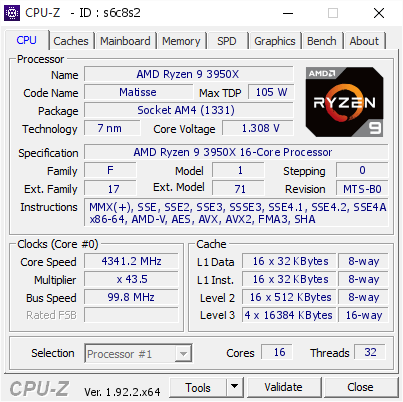
[s6c8s2] Validated Dump by Anonymous (2020-08-02 23:00:57) - MB: Gigabyte B550 AORUS MASTER - RAM: 32768 MB
it still has some decent results too
proven canopy
That's (probably) 'still too high - see the last part of that link I posted at the time
TL;DR - run stock or pbo for daily, practical use
sterile flame
ooof
proven canopy
Check out the pinned posts for more info- the community zen2 cpu/ram OC spreadsheet is very helpful imo
sterile flame
okay
latent wolf
Yeah it is
sand fulcrum
idk what is going on w/ my system when my 9600k is OC'd. I get random BSODs, all point to memory or drivers or Windows corrupt files... but it happens with fresh install of Windows, it happens if it is high OC or MSI Game Boost settings. Only time it does not happen is when the mobo is set back to stock. just gonna leave it stock i guess
 restive cargo
@proven canopy
Stock VS Asus Multicore enhancement on.
So enabled VS completely disabled.
It does what it says it is support to do. lmao
That's R15
cold jolt

proven canopy
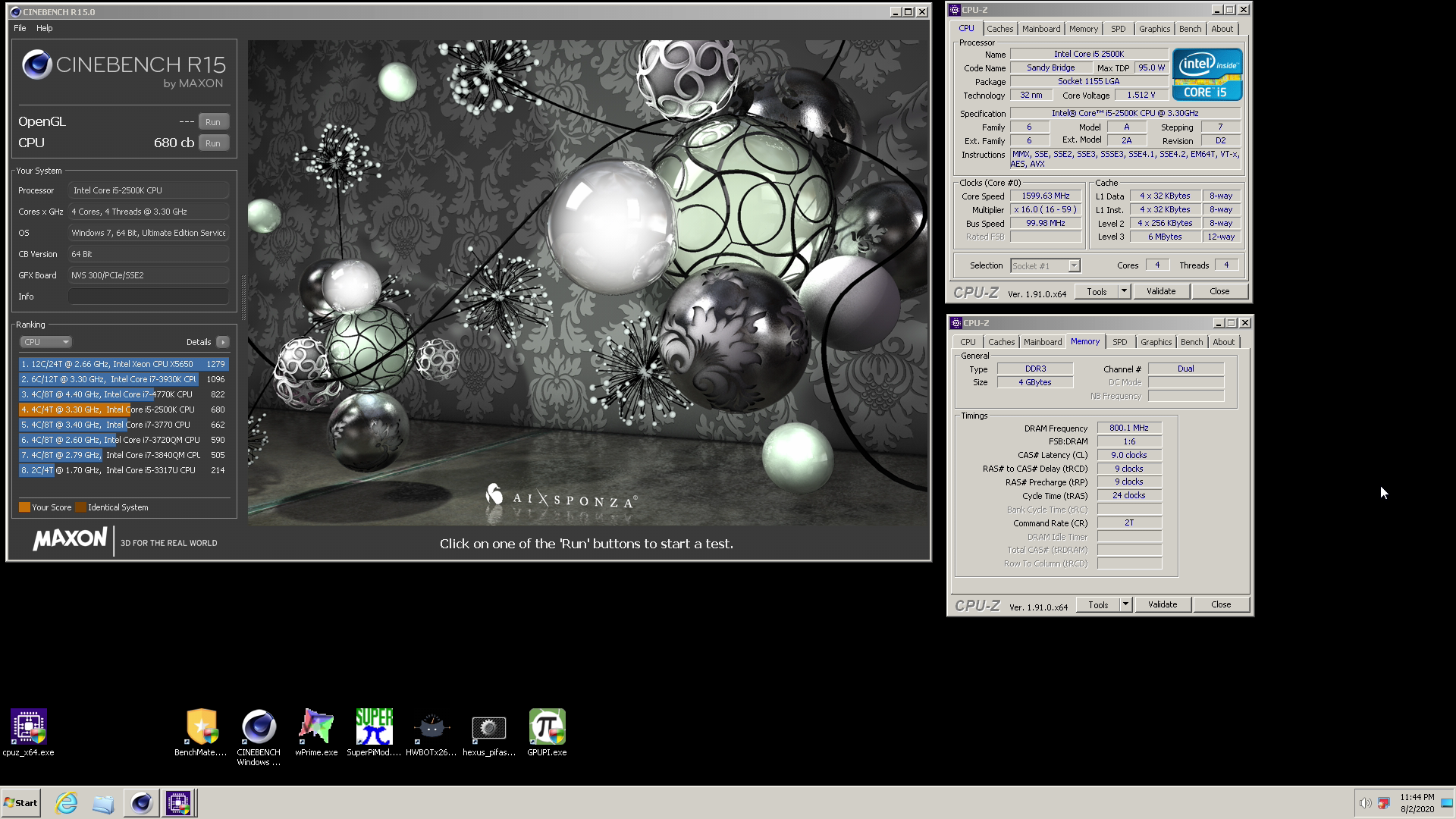
If we're racing to the bottom intender is going to win with some 800mhz potato athalon 
cold jolt
actually, one of these days I should see how far I could push this system. I still haven't gotten around to messing with it
need a decent cooling solution for it
but those stupid capacitors get in the way of the air cooler i bought
manic helm
why does you p3 have a heatspreader
cold jolt
its a tualatin
 manic helm
hmm I had one of those, but mine was a celery. Dont remember it having a heatspreader
manic helm
Hmm how long can samsung e die survive at 2v
proven canopy
Does it scale on voltage?
manic helm
I am trying to gently massage it into cl12 at 3837 but she don't want to go
proven canopy
No post?
manic helm
bsod in windows
proven canopy
Gotta bcdedit /maxmem etc for that
manic helm
in windows 10?
proven canopy
For cl12 - I thought so
HWBOT Community Forums
I recently had some trouble getting maxmem to work in my Windows 10. If I set maxmem in msconfig to e.g. 4000 it always resulted in 1.5 GB after reboot. I tried several things and in the end I found that this is working: Run CMD as admin and use this command line: bcdedit /set...
manic helm
hmm I will look into it. I had it at cl11 the other day, but it was not happy
proven canopy
Depends how video memory is mapped iirc -
With regard to whether or not you should /set maxmem or /removememory
or /truncatememory
Could try booting server 2012 r2
manic helm
Pretty sure I am going to kill this poor pentiums memory controller
everytime I click that link it crashes discord
proven canopy
The hwbot? weird lol. Their servers have been down/slow lately though
manic helm
no luck still either hanging loading windows or right after. I think its just the limit of my ram
dark linden
manic helm
looks like my install might be toast
manic helm
oh well, efi partition is gone. Probably time to reinstall anyways. I think this one started at 1703 or maybe even an older build than that.
Its been swapped between about 5 different computers
only thing I will miss is that I had the 3dmark 2001se running on that system.
proven canopy
You can rebuild the bcd , but ya, might just be easier to re-install
latent wolf
Oh Crap
 wicked wolf
ok so I have a strix b450-f gaming mobo and i have 3600 speed ram is it possible to hit that speed with my mobo?
Ik that its only supposed to go up to 3200
but whenever i set the fabrick clock to 1600 it automatically downclocks to 2133 which i assume it means it cant
but it should be able to, cause like b450 and 3600 speed makes sense?
idk
proven canopy
3600mhz ram runs fine on that mobo
3600 XMP rating really means 1800MHz dram clock , and in 1:1 that means a 1800mhz fclk
wicked wolf
yeah ik that but everytime i try it the mobo automatically downclocks it to 2133 mhz for some reason
latent wolf
The Mobo Will. You have to use Ryzen Master to get those kinds of speeds. Trust me I went through the same process till I found out to try Ryzen master to Overclock the RAM. Windows will see the speed that way when you use Ryzen master. Provided you apply and test and then reboot the system and let it run its stability chekc process
proven canopy
Use hwinfo64
latent wolf
That To. I just know Ryzen Master Works well for Overclocking the RAM and getting Windows to recognize it
Ryzen Master may not be good for OCing CPU but it sure works for OCing RAM well for within Windows
dark linden
Just two more joints to braze on the chiller
 stiff bobcat
@latent wolf uh Ryzen master is pretty damn good for over overclocking your cpu lol it works pretty amazing to me, I got my 3600 to 4.4ghz running smooth
 brisk jacinth
Dang
stiff bobcat
Yea I got a good one
latent wolf
Yeah I cant get my 2600X over 4.1ghz
anything higher becomes unstable
But I have to use Ryzen Master to get Windows to recognize my OC on the RAM. It works and nice thing is Ryzen master checks for Instability when you tell it to test the overclock. @stiff bobcat
tight plinth
So looking into nice RAM stability testing programs, I have found a program called "RAM Test" which is apparently the best compared to MemTest64/HCI. My RAM knowledge certainly isn't amazing so I don't really know how much of this is true. Curios on how true this is so I can test my RAM well
https://forums.anandtech.com/threads/techpowerups-memtest-64-is-it-better-than-hci-memtest-for-determining-stability.2532209/
AnandTech Forums: Technology, Hardware, Software, and Deals
Hello, I have some Crucial Ballistix Sport 4x8GB @ 1600 CL9 1.5v. I have been reading that some people pushed them to 2400 C11 1.6v, so right know I'm doing baby steps and I set them to 1866 C10 1.5v, I want to test its stability and I found this two programs. Anandtech says t...
manic helm
If I dont fall asleep waiting on stuff to download I plan on trying to play around with some ram overclocing again. Maybe get in a few more 3dmark tests.
manic helm
This z170 board is annoying. For some reason its completely ignoring the memory speeds I input for certain settings. Up to 3600 is working correctly but at 3866 it wants to boot at 3600, 3733 is booting at 3000. Sometimes it boots at the correct speeds, others it just boots at something random.
manic helm
figured out it only does it when I try and set 1T.
proven canopy
Two sticks? or four?
manic helm
2 sticks
proven canopy
1T isn't worth most of the time IME - that overclock headroom usually gets me tighter primary timings
Unsure what benchmarks benefit from 1t
manic helm
I have been trying to tweak the ram and get first place in superpi with this pentium. I am about .2 seconds off and cant get any closer on windows 10. might have to install windows 7 or xp.
I can get this ram to right at 3800 12-18-18 and but was trying to tweak the timings and realized it was doing weird stuff when the numbers started getting worse last night. Since then I have been trying to figure out this ram crap. Was up until 4am flashing different bios and playing with settings. Just figured it out accidently.
proven canopy
Could put the aio in an ice bucker
manic helm
I had it faster the other night on a different bios so I might need to flash back to that
But this is an older bios without all the mitigations so I thought the cpu performance might be a bit better
manic helm
I think this is all I am going to get on this board at cl11.
 tired prism
I just built a new pc with a asus x570 p motherboard and when i turn on the pc none of the keys are working to get into the bios and then a screen titled american megatrands comes up listing my pc parts and says press f1 to start the setup but that dosent work either. If a press the delete key or hold down any key when turning on the pc then it says keyboard not detected. I have an annepro 2 so i have to hit FN then the F1 key so i dont know if this could be a problem can somebody please help me.
 pallid spade
delete key usually gets you to the bios
tired prism
yeah that dosent work either
dull ginkgo
f11
normal ether
f10
dull ginkgo
also, have you considered that it didn't post correctly?
 hard ice
@tired prism what usb port are you using?
latent wolf
Sometimes its the Keyboard. I built a Friends PC that the Keyboard she got it didnt work till Windows Login screen. I had to use a secondary Keyboard that was generic to get into the BIOS. She had a CORSAIR keyboard and the BIOS didnt like it for some reason.
She got a different keyboard now and she gave me the Corsair one which my GF now has. I like my Alienware TactX keyboard. Ive had it for a few years now and hasnt failed me yet
neon rapids
yeah if it says keyboard not detected id try a different one
dark linden
dark linden
They are es g.skill sticks @cold jolt
Stickers are from a label maker
The other kit is a retail team group a0 bdie kit
proven canopy
What's the inside/outside for? which channel?
manic helm
I need some sponsored hardware for overclocking
neon rapids
wegg sponsor us
dark linden
@proven canopy sometimes stick placement can net you 10-15 mhz
wegg sponsor us
@neon rapids
I'd definitely jump at that
neon rapids
mike wer u at
normal ether
Can I be sponsored too
dull ginkgo
Sponsor us all
manic helm
Wonder if the big intel leak could lead to some tools for overclocking locked cpus eventually.
proven canopy
I think the bios utilities could lead to custom bios for H series boards getting unlocked memory
manic helm
intel is shooting themselves in the foot on the current gen by not allowing xmp on non z boards
neon rapids
couldnt you do it on last gen h boards?
proven canopy
Half of the problem is a lot of mobo's auto'ing 1.5v to the vccio/sa for 4000mhz and up
hard ice
"intel is shooting themselves in the foot on the current gen by not allowing xmp on non z boards" @manic helm, at least they are bunching up all their shots right now. The quicker they can (hopefully) get it out of their system and start doing interesting things again.
(on that note, it is interesting that intel Israel is poking their head out again with interesting stuff)
(for the lurkers, that is where Banias came from, which is what gave birth to the Core2 foundation)
manic helm
I think hwbot is drunk
jade pulsar
maybe tmrw i play around with some overclocking
proven canopy
put up some points for team 
jade pulsar
Ya I try, see how far I get
flint quiver
So have run into an interesting issue with trying to install windows onto the core 2 quad system, have a legit windows xp cd it wont read from to boot, tried making a bootable usb drive for xp and it wont boot from it. Same usb stick works fine with win vista and win 7 bootable drives. Was hoping to oc it and play around and figured xp would be best for this system (q660 2x8800gtx 12gb ddr2)
latent wolf
Thats a Weird one For Sure. Did you try the Boot Menu option when the BIOS splash screen comes up?
flint quiver
Yeah and on the win xp media (dvd or usb) it always pops up saying no boot media detected, putting the dvd into the machine that burnt a backup, same occurs with the genuine ms disc, it it pops up and does the auto run which makes no sense
latent wolf
Yeah Thats a really Odd one. I wouldnt even know a workaround. Wait I might. Have You Tried Changing the Boot Order in the BIOS to the CD/DVD Rom Drive as first? @flint quiver
dark ferry
I need some help concerning Gigabyte Aorus z390 sensors. Can anyone help?
flint quiver
@latent wolf lol dvd and usb were both set to first when attempting them, like I said Vista and 7 have no problems from dvd or usb but for some reason its not seeing xp.
latent wolf
Hmm Weird
XP normally Boots of DVD. Wait Did you Burn DVD or CD-ROM cause XP came on a CD-ROM if I remember correctly
It could just be a issue with the Disc Drive Honestly
manic helm
Turns out my 1050ti is a horrible overclocker compared to most of the ones on hwbot. Gonna just run some benchmarks on some stuff that no one else has ran like my laptop and see if I get any points. Maybe my macbook
flint quiver
I have the original xp dvd, maybe its a cd but I also tried burning it to a new dvd. I have the original vista and 7 dvds and they worked fine.
I can try looking through my boxes of old junk to see if I have any burnable cds still and try that but am ready to call it quits on xp lol
dark linden
put up some points for team
@proven canopy
2500 pts or bust
left bladeBOT
 Hei#8914 has been warned
Reason: Duplicated text
tight plinth
really?
neon rapids
L
tight plinth
lol. love ctrl Z
so I have an unstable undervolt on my 1080Ti but Im at a loss as for how it's unstable. I like trying the nice power virus of Furmark+extreme burn in+post FX and such. Basically Ill run for a bit and then FPS suddenly cuts down to half or a quarter of what it usually runs at. Tho everything else looks fine. My CPU clocks, utilization, and temp is fine and stays the same. Everything stays the same: GPU clocks at 2GHz, utilization at 100%, memory at 6000MHz, vCore at 1.050v - 1.131v (depending on temp). No PL/VL/TL is hit. What really confuses me is the 100% utilization before and after. Can only fix it with a PC restart
power consumption goes down and GPU temps go down as if a PL is suddenly added
have an XOC BIOS to remove PL, so maybe it randomly adds it back when it sees something wierd
manic helm
If you undervolt too far (assuming afterburner is used) the gpu driver crashes mid run and will usually drop clock speeds on the card to something like 400-800mhz. Have to reboot for the clocks speeds to reset. its not a full driver crash so you don't see a black screen or anything. usually just fans drop out to stock curve and clock speeds will fall off.
I see this happen a lot when I don't have enough volts for the core speed I am trying to run
tight plinth
ye, but it stays at 2GHz tho, unless it's not reporting correctly
manic helm
Sometimes afterburner or gpuz will show the clock speeds drop but not always.
The newest beta for afterburner seems to do ok showing the clocks drop, but I dont like the look of the new version and went back to an older build.
On mine i know it happens if the fans drop from 100% because I only bother with it on bench runs. I have a mild underclock on my 2080 just because its so hot right now.
also my 2080 is custom loop so no fans on that
tight plinth
yeah, I dont have any fans on mine cuz custom loop
so cant go that route sadly
but I guess it'd make sense if something wasnt reporting correctly
manic helm
most likely your undervolt is perfectly stable for games, but not for furmark.
tight plinth
I pushed it kinda eh at first and then went hard UV which was unstable in GTA at least. Decided to test it a bit more in Furmark to see what I could get and then looked into the crazy Furmark stuff. On decked out Furmark I can barely even UV much of at all.
but want it to at least be stable in Furmark with standard burnin+postFX as I think that is probs the acceptable line
 worthy snow
Hi guys, i got a B450 Tomahawk motherboard w/ Ryzen 7 2700 overclocked @ 4.025Hz with a good cooler.
I need your help cause i cant manage to overclock my RAM properly (Model: F4-3200C16D-16GT2KW // 4X8GO )
Overclocked the processor with Ryzen Master cause im begginner and will overclock with BIOS later
Keep getting crashes / blue screens - NONPAGED_AREA).
I've set the timings to 16-18-18-18-38 @ 1.35V
Preset settings Profile 2 on B450 for 3200MHZ.
Im a beginner in overclocking so if anyone could help me getting 3200mhz on this particular motherboard, or at least 2933MHZ, cause for now it only works at default settings which is 1866.
With 2933MHZ i managed to make it work, but it would crash every 2 hours or so...
Thanks a lot, and excuse me for my english 🙂 !
manic helm
timings are not correct. Should be more like 16-18-18-42-56 at 3200
worthy snow
timings are not correct. Should be more like 16-18-18-42-56 at 3200
@manic helm Hello, i used timings that are shown behind the packaging of the RAM (and some tech forums), thanks for that information i will try that 🙂
dull ginkgo
smol subtimings
manic helm
perhaps you misread them. You have one too many 16 in there
worthy snow
yea right it shows 16-18-18-38 on package
manic helm
that last timing I included is the tRC. It could be as low as 42, but start at something higher like 56 and test for stability. given the other timings it will probably end up somewhere between 48 and 54.
worthy snow
I probably did it really wrong, i have
Tcl: 16
Trcdrd: 18
Trcdwr :18
TRP: 18
Tras : 38
tRC: 56
Are those settings ok ?
Oh and command rate at 2
dull ginkgo
@manic helm you don't have to run GDM with CR at 1 at 3200mhz right
manic helm
GDM will basically make it 2T no matter what you set it to. You may see some improvement from 1T with GDM enabled though
GDM tries to force even timings
dull ginkgo
yea it forced tRP to be even on me
manic helm
I leave GDM enabled most of the time unless I am really trying to tweak timings. Not worth the hassle for daily unless you have some really good ram.
I don't know all the interactions between timings, but most timings are a function of another timing.
So for example trfc will be limited by I think its trc but I might be wrong on that. So even if you try and manually tweak something too low without altering the other timing it wont let you. I have a lot of this written down in a notebook somehwere, but its something like trfc cant be any lower than roughly tRC x8. Thats why if you have tRC set to 56 for example you will see the bios default to somewhere between 460 and 540. trfc has to wait for so many cycles of trc before it can cycle if you try to set it too low it would have to wait an additional cycle of trc before it can work so the bios just wont let it go any lower no matter what you manually set.
latent wolf
@worthy snow Check the Pins in this channel as there is a nice Google Doc that will help. Its helped me alot for trying different timings for my RAM till I got a Stable OC on mine of 3800mhz
proven canopy
@tight plinth Try ctrl shift windows b to reset the driver
manic helm
I have tried that before and it didn't work for me. Always have to restart.
wild hemlock
Can i overclock a cpu with a 4 pin mobo ? Ryzen 5 3600 and asrock matx b450
normal ether
i wouldnt
wild hemlock
How about this ASUS TUF B450M-PLUS GAMING AM4 AMD B450 SATA 6Gb/s Micro ATX AMD Motherboard
Or asrock atx b450 gaming K4
Both same price
mild moat
Why would you want to oc a 3600 tho
It handles itself very well and I wouldnt expect a oc to even grant you any extra tangible performance
wild hemlock
Well not really oc it I have a mobo but it fried I just want it to run the same
It says 3.6 stock but without doing anything it was at 4.10 in my mobo
And 3.9 when I was not gaming
Would it be the same in the 4 pin board ? I was only using 4 pins in the 8pin board my other 4 pin connector is really hard to plug in
proven canopy
Check the instructions in the manual on how to plugin both 4 pins
wild hemlock
I tried all possible ways the other 4 pin clip is broke and its just hard any way I try but the one thats good just goes right in either slot
I can still use it i just prefer not to remove it after and i had nothing but troubles with the mobo so I only used the one that I could remove
 finite frigate
 latent wave
I'm on a laptop and only can go up 10MHz on RAM and core or else my computer gets wayyyy to hot.
normal ether
Yeah, you’re not supposed to overclock on a laptop lol
robust cipher
undervolt :))
jade pulsar
some laptop even have oc settings locked
 graceful scroll
I want to overclock my processor, but I have no idea how to even start. Any one have any advice or good guides on how to overclokc?
I am not new to PC building, just to overclocking lol
normal ether
jade pulsar
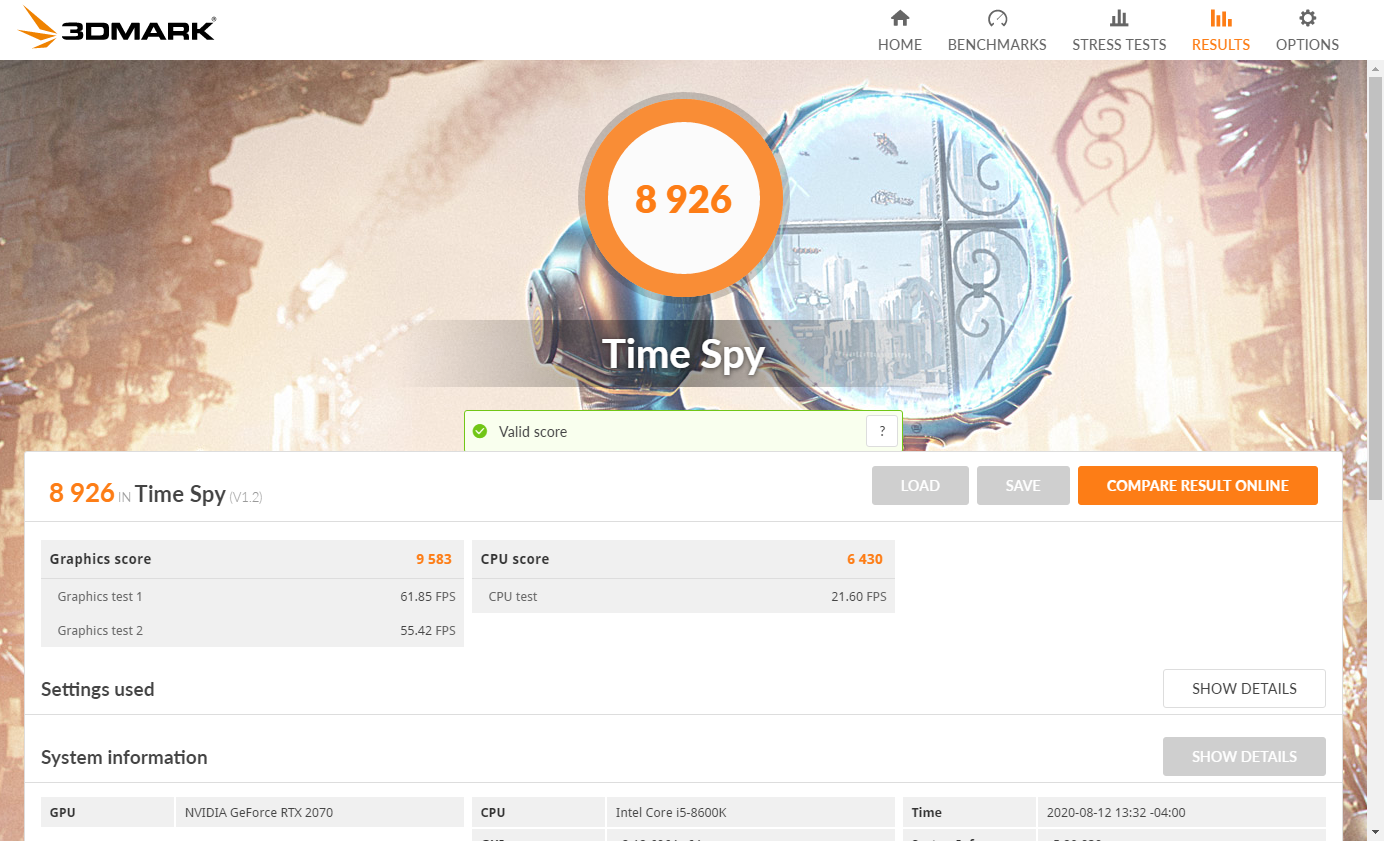
i will now try improve https://i.imgur.com/QN3vfsT.png

 dull ginkgo
Try to up the CPU score
Highest I got my 2070 to was 9800
Not too much to improve there
dull ginkgo

3DMark.com
AMD Ryzen 7 3800X, NVIDIA GeForce RTX 2070 x 1, 32768 MB, 64-bit Windows 10}
jade pulsar
i don't know how much higher i can get the cpu i think its overheating now
dull ginkgo
Rip
jade pulsar
😦
i need new cpu, i keep playing with settings later
maybe i can get cpu score up to 7k
 fast field
is this good?
jade pulsar
probably could get higher considering mr1 got 9900 with 3800x + og 2070
dull ginkgo
Seriously
jade pulsar
lol
dull ginkgo
@fast field my slightly OCed 3800x with 2 less cores got 10857 CPU score
soooo
you might want to look into that
I got a 9833 graphics score with my 2070 OG
it looks like average for a 3900x is more like ~12000
and average with 2070s around high 10000s
fast field
So what am i doing wrong lmao
dull ginkgo
do you have g sync on
fast field
Yeah, should i turn it off?
tight plinth
No TSE? only TS? sad
dull ginkgo
?
tight plinth
Got like top 87% of the 1080Ti scores despite being a trash bin. GPU boost+nice water cooled temps is nice
Time spy extreme
iirc, 4200 entire score, 2400 CPU, and 4900 GPU. My 6700k is really killing the score
For my PC
dull ginkgo
@jade pulsar rip gotta mess around with GPU OC again
latent wolf
I cant get above a 4924 on my setup then again I dont have the 3D benchmark setting turned on in my BIOS
Thats in Time Spy
proven canopy
That 3dmark bios setting won't change anything for modern benches, ignore it
latent wolf
ok. wasnt sure
So Im guessing Im at a decent number then for what my system is
R5-2600X 4.1ghz OC, 32gb DDR4 3800mhz, RX-5500XT at 1920mhz OC
MOBO Gigabyte B450 AORUS M
 jaunty grove
How do I set my vcore for my ryzen 5 2600 to 1.35v
twilit hedge
There will be an option in bios
twilit hedge
¯_(ツ)_/¯
jaunty grove
I have it on +0.240 and it’s close to it
I’m trying to run r20 to see if it will pass
If so then I’m good
jaunty grove
Ok I got it to pass r20 and r15 extreme at 0.264v the min was 1.356v and the max was 1.404v a little high for my liking but eh
Max of 70c with my beefy be quiet dark rock pro
 sinful hatch
hello......
proven canopy
Change it from adaptive voltage/offset to fixed voltage if you want to run 1.35v constantly
jaunty grove
@proven canopy how do I do that
proven canopy
Check the bios manual
proven canopy
no
 signal grove
@jaunty grove you probably want to stay on the lower side of voltages
especially if you're going to use fixed voltage
I just got a Ryzen 3600 (used to have a Phenom 965). Still learning about this new SoC and chipset though
manic helm
@FabianGuzman22#8063 that board doesnt have fixed vcore, only adaptive.
oh, they left
 devout ridge
I'm trying to achieve an overclock on my ryzen 7 2700 on the Asus b450-E Board. I'm having issues when applying any voltage for example 1.31v in the bios as i hate using ryzen master. I have set LLC (Load Line Calibration) to all of the different settings asus offers in the bio's yet i'm still having voltage increases under load/benchmark. the setting that seems to work best is the high setting the other settings are Auto, low, Medium and High i believe. but even on the highest setting voltages still climb to around 1.38. is this a board issue by any chance or some setting i have missed?
green locust
Can you oc a already oc card
dull ginkgo
yes
green locust
Ok
 winter hull
i need help getting to 6ghz
proven canopy
dull ginkgo
Help forks I want 6ghz on my iGPU without changing thermal interface
manic helm
that moment when you give the igpu all the volts thinking whats the worst that could happen and the worst might have happened
winter hull
so nobody wants to help me oc?
manic helm
more volts
Im the one over here trying to kill an athlon on a wraith spire. Don't trust anything I say
dull ginkgo
@winter hull we're joking around because that doesn't seem like a serious request to us
No extra information on anything
You're just asking for 6ghz
Can't just magically make your CPU run at 6ghz
If you want to start messing with OCing,
dull ginkgo
Get more what?
winter hull
more mhz
dull ginkgo
Have you already found your limit right now with frequency and voltage?
Max safe voltage you should run depends on the CPU, but research your chip and slap on a relative high voltage. After that just keep going up in frequency. When you're at a point where you can't go further, get better cooling, try repasting your CPU, get a better cooler, more fans, that kinda stuff, better cooling usually gets you better OCs.
And by the way, if you're going for 6ghz, that's likely not going to be good for daily, I hope you know that. 6ghz is usually a hefty OC that requires more cooling and high voltages that wouldn't be nice to the CPU in the long run.
Heh at the point you're at, you might be near the limit of your silicon, anyways good job on 59th highest freq achieved on Pentium 4641 @winter hull
Looks like you know what you're doing
https://hwbot.org/submission/4524460_rushed_down_cpu_frequency_pentium_4_641_6051.44_mhz

HWBOT
The Pentium 4 641 @ 6051.4MHzscores getScoreFormatted in the CPU Frequency benchmark. rushed downranks #1222 worldwide and #59 in the hardware class. Find out more at HWBOT.
manic helm
only 59th?