#overclocking
1 messages · Page 50 of 1
 hasty hill
Tried for 8100 but it crashed
Aww man guess I have to boot into safe mode now
Guess my computer is now running at 1 frame per minute

Oh great my oc is gone
So apparently I can only get to 2040 now
@torpid sun can you help
 torpid sun
Am confuse with what didn't keep up
hasty hill
My pc starts throttling at like 60° even though I set the temp limit to 88
And just now my gpu decided to boost up to 2070 and it crashed
hasty hill
Boosting down?
torpid sun
GPU clocks down if you hit power limit, voltage limit or temp is too high
nvidia core clock starts to decrease after 20c every 5c or so
 torpid sun
Maybe temp is lower haven't checked for awhile
hasty hill
Could my memory clock affect that?
torpid sun
If your GPU mem is clocked too high you'll have black artefacts in game, if it's unstable the game will crash
hasty hill
Ok ty
hasty hill
My clock speed will be faster in actual games than in a stress test right?
torpid sun
Depends on load of benchmark or VRAM usage tbh
hasty hill
I mean it'll be cooler in game so it should be able to go a little higher right?
torpid sun
Depends.
 torpid sun
I'm running like 2175MHz peak, 2145MHz in-game
hasty hill
Nice, my 2060 super will do 2050 at low temps so I'm hoping it'll do that in game
And I thought I could do 8k mem but it crashed after like 15 min
torpid sun
31c kinda high tbh https://www.3dmark.com/pr/268840

3DMark.com
Intel Xeon W-3175X Processor, NVIDIA GeForce RTX 2080 Ti x 1, 195186 MB, 64-bit Windows 10}
hasty hill
I would try that but I would probably get like 2k
torpid sun
I'm doing this with stock bios
hasty hill
Same
torpid sun
Would probably get 11K with flash
 hybrid topaz
 Phone: ::Ph
 cold jolt
when people go for overclocking records on LN2, does that involve single core clock speed or all core clock speed
 proven canopy
Both, depends on the bench.
Lot of 2d benches are single core + memory speed
superpi, waza, etc
proven canopy
Usually
cold jolt
is there a process they use to bin a specific core on the die? i would think certain cores have more potential than others
cuz ive seen motherboards where you can limit the number of cores used, but it doesnt allow you to choose which cores to disable
torpid sun
Barely anyone does LN2 benches on AMD for 3DMark because it's so bad at gaming FPS/3DMark CPU/GPU.
Infact goodluck finding any LN2 AMD results 
proven canopy
Some chips have per core control, most don't I don't think. Depends.
I think the chip/board/firmware can/should automatically pick the best core for single/dual etc.
cold jolt
Neat
 thorn harbor
I’m trying to overclock my RAM can anyone help me with that ?

 errant raft
I wonder if there are bios mods for RTX 2070 Super
torpid sun
Probably but why bother
errant raft
extra shaders wont hurt
I know that probably the shaders wont be 100% quality do to binning
proven canopy
Unlikely there are any mods to unlock shaders. If anything, you might find a mod to increase power limit.
 flint quiver
Well I got 3600 15-15-15-34 to work with 4 sticks but 8 it just won't stay stable and this stupid MSI Creator TRX40 bios is junk and they haven't even released the latest microcode while Asus has, going to buy a new Zenith II Extreme Alpha now that its back in stock locally and try to sell this MSI. I am able to run the 14-14-14-34 3200mhz kit at 14-14-13-28 3200 with some of the other sub timings optimized.
proven canopy
I wonder if there's a way to get 3600 cl16 or similar working on safe, daily volts.
flint quiver
Honestly I think this board just can't do it, the vrms just have a kinda thin heatsink and are partially exposed still. Give me a second and I will get a picture. The Asus has a beefy heatsink on the vrms and tiny fans in it
proven canopy
The zenith II extreme alpha is one of the strongest x399 boards iirc
flint quiver
Yeah its beefy
I really liked my Zenith II Extreme Alpha but 2 cpu mounting nuts ripped off mounting the Optimus block. Worked with them to determine that the Kraken x62 I first tried must have vertically torqued them and damaged them then when I tried to mount the block with the torque wrench it just couldn't take it and they came off. I would of gotten the same board but Microcenter was out of it when this happened and since I had the extended warranty got the only TRX40 board they had in stock.
And another thing I have noticed with this board, I can't get the full speed of my internet connection. I have a gigabit fiber connection and on my 2700k a speed test results in ~935 down and 985up. On this machine it doesn't want to go above 600 down, will do the 985 up. Have tried the mb drivers, intel drivers directly, doesn't make a difference. 600 down is still great but I want that other 300 the other machines getting.
 sour niche
can someone tell me whats a safe tempeture to overclock a 2070 while its stable?
super ^
proven canopy

Ask GN is back! We talk about GPU power target and if it "kills" GPUs, featuring KINGPIN and TiN
Ad: Buy be quiet!'s Straight Power 650W (https://geni.us/NZ8szyS on Amazon)
Get the bonus episode here: http://www.patreon.com/gamersnexus
Support us via the store: https://store...
 karmic tartan
Hey Im going to be overclocking for the first time soon. I've got a i7 8700k and i have no clue
 devout nimbus

torpid sun
AMD's IMC is bad, stop trying.

Your tRFC is way too high.
@flint quiver What voltage are you running? Should be 1.5v.
errant raft
My ram is meh i know
torpid sun
Hm, I'm currently at 3466 14-14-14-31 150gb/s 58ns
flint quiver
its running at 1.35v. I tried going upto 1.5v to get 3600 running but it just wont work. If I get it to boot it will get to windows and everything is fine but when I reboot it fails to apply and have to reset to 3200. I will be going back to the Zenith II today as I have never been a fan of this stupid MSI board
 dull ginkgo
Try 1.45v if it's b die
flint quiver
@dull ginkgo I tried going all the way up to 1.5v it just wont stay stable with the 8 sticks. 4 sticks its fine but then I'm back to 64gb which was the reason I upgraded. About to head to Microcenter and get the other board.
flint quiver
I did, I went up in steps of .05v all the way to 1.5. With 4 sticks it will run fine, the second I put all 8 in it will bluescreen the second it hits windows @3600
If you look at the previous picture I posted yesterday you will see MSI did a terrible job cooling the vrms
proven canopy
I don't think it's a ram voltage issue, rather, it's the TR memory controller.
What soc voltage?
errant raft
I think my processor degraded
dull ginkgo
1.4v
proven canopy
I think you just set too high of a manual voltage for daily use.
proven canopy
Well kinda - but the point is that it's silly to recommend a "save manual voltage max"
dull ginkgo
thats why I say avg max
it's the avg people to be find to be fine
so it's possible this bin is lower
proven canopy
I could be 1.325 for most workloads, but it's a waste of performance potential to run a manual voltage config for the vast majority of users.
errant raft
I have it on override and offset mode which I think it does adjustments automatically
dull ginkgo
I'm just saying iirc it's the average people find to be safe, which means 50% chance your avg high is at or below that mark :)
(Don't do it either way)
flint quiver
Just saw your message, its running .95 on auto and I tried upto 1.08v I think it was
proven canopy
People who recommend 1.325 as safe for manual fixed voltage don't know what they're talking about.
That's poor advice, and will lead to people damaging their hardware in a year or less.
errant raft
I basically degraded my R7 2700x I'm still selling it because I'm evil
Only for 100 dollars
I set my voltage on my 2nd gen to 1.385
Any lower it crashed
flint quiver
Forks I did buy the Zenith II Extreme Alpha today, haven't had time to do a tear down but it should be quick since I have some qdc's in the loop and can just disconnect them and take the mb out and not drain everything.
flint quiver
No lol
proven canopy
Nice, I wanna build qdc's into my next loop
errant raft
I'm kidding that would be horrible
flint quiver
BUT I did see someone did a conceptual render of a TRX40 ITX mb, looked nice but crammed
proven canopy
I'd put them far enough from the cpu/board such that if they leak, they won't hurt anything.
Saw a guy recently brick a $1500 board from a leaking thermaltake qdc
 twilit hedge
I saw an mITX threadripper picture... let me find it
flint quiver
Yeah I have 1 coming off the res and one going into the radiator at the front of the case, if the top one leaks it would drip onto the reservoir and would see it so not worried
errant raft
Thermal think
flint quiver
The bottom one would drip on a shroud and just pool with nothing there, the large size of the 1000d makes it easy
 twilit hedge
Found it!
flint quiver
Thats for 1st/2nd gen though :p
twilit hedge
Yeah, it hasn't been updated
flint quiver
I like the concept one on reddit
twilit hedge
Yeah
errant raft
Probably won't be because of how much power they take
flint quiver
Then I could fit 2 threadrippers in my 1000d 😄
twilit hedge
Also they're basically the size of the mobo
flint quiver
If only there were some good dual socket epyc boards available for purchase, all the things on ebay are custom server boards taken from hps or other brands
twilit hedge
There are some dual socket ones on newegg
flint quiver
I just looked those are all single socket
twilit hedge
errant raft
A AMD Ryzen Threadripper 3990X 64-Core would be a dream
twilit hedge
Nah, just do dual 64 core epyc chips
flint quiver
Why didn't that come up in my filter.....
twilit hedge
Dunno
flint quiver
oh because its not socket sp3 for latest and greatest EPYC's
twilit hedge
7000 series SP3
flint quiver
didn't see the dual sp3 option on mobile haha
twilit hedge
The pcie slots on this board are pathetic
flint quiver
Yep thats why I said good board :p
errant raft
Woah that's insane 😮
 dark linden
flint quiver
dark linden
flint quiver
And only 1 m2 slot come on
twilit hedge
Yup, xeons are expensive
Servers you usually don't have more than one m.2 drive, if that
flint quiver
https://www.newegg.com/supermicro-mbd-h11dsi-n702-ma015-o-dual-amd-epyc-7000-series/p/N82E16813183691 board and 2 EPYCs for that price
For the # of pcie lanes EPYC has it should have at least 2 imo
twilit hedge
You usually have a big fat raid or a NAS drive
The lanes are more useful as pcie slots than m.2 slots
errant raft
flint quiver
@twilit hedge depends really. All of our custom servers have m2 drives for fast access to data for training the AI system we use and then everything else is on sas storage and eventually warehoused off to tape.... yep tape lol
twilit hedge
Nothing wrong with tape. Good data density and stupidly good reliability
errant raft
Non refundable and non returnable
flint quiver
@errant raft thats actually a little less than my mb and 3970x were together lol
Only because I got extended warrenty or it was like 2500
twilit hedge
The fact that it's easier to convert from pcie to m.2 than m.2 to pcie might be another factor to only having one slot
flint quiver
Yeah 1899 for cpu and 849 for mb so 2749 so that cpu and board are only 50 bucks more
errant raft
I'm going to try to build a 5,000- 8,000 dollar computer because I didn't get my near 10,000 gift for graduation. I never had a ceremony yet.
flint quiver
We have enterprise class pcie ssds but they are $$$ and are used sparingly in our systems
5-8k can build quite the system
twilit hedge
What I think is cool is how the top tier pcie 4.0 ssd's can almost rival ram bandwidth
flint quiver
Until TR4 comes with DDR5 :p
twilit hedge
It's looking like it will get pcie 5.0 too though
errant raft
My buddy has a computer with 2 Titan RTX with a Threadripper 64 core 3rd gen I'm jelly
errant raft
Says he ordered Quadro RTX. I never saw proof so he is probably bsing me
errant raft
Most expensive one
twilit hedge
Ah, the 8000
errant raft
I never believe what he says because it's so far out there
twilit hedge
Just one up him, sell your house and soul, and buy a dgx a100
errant raft
Yeah you can't run games on it tho
errant raft
You know who might get one guess a YouTuber
twilit hedge
Linus?
errant raft
Yup
twilit hedge
That might be over the top even for them
Most of the really big projects they've done have had some use for them, I don't see what they would do with the dgx
flint quiver
Yeah your not going to just install windows on it, its going to come with a custom version of Linux or Unix
flint quiver
I doubt you will find drivers to power the "gpus" for windows, maybe the mb and the cpus and storage maybe
twilit hedge
Quantum computing is a messy business, they're unstable enough as it is
errant raft
Yeah I don't think we will see a use in the consumer space until 2040
twilit hedge
Already is tbh
errant raft
Yup
twilit hedge
My guess is that quantum computers will be coprocessors, more along the lines of a GPU or TPU
errant raft
Npus are odd. Your probably correct RTX 3000 may have it.
Idk I don't think the unchilled quantum Computer chip will be great
twilit hedge
Personally, I'd like to see a processor with an FPGA that an AI will dynamically restructure to be most effecient at whatever job it needs to do
Doing a lot of integer calculations? Okay, let's make some more integer cores. Neural nets? Cool, just throw together some hardware accelerated back propagation
errant raft
That would be very cool but probably take my computer hardware engineer job probably. Here is what I was talking about unchilled bhttps://youtu.be/v-_GQBszZYg

Researchers might have broken one of the biggest obstacles to practical quantum computers with something called ‘hot’ qubits.
» Subscribe to Seeker! http://bit.ly/subscribeseeker
» Watch more Elements! http://bit.ly/ElementsPlaylist
» Visit our shop at http://shop.seeker.com
...
twilit hedge
I'm not sure if it would, you would still have to design the fpga, and you would need to provide some base systems for the AI to target
 dark ferry
Someone once posted a link here with a list of CPUs and the percentage of what overclocks they got at which voltages. If someone could help me find it I would truly be in your debt.
dark ferry
Found it thank you.
 midnight zephyr
Can someone help me overclock my ram?
dull ginkgo
If Ryzen, Ryzen dram calculator
That's all you need for Ryzen
Also pins
Tho I didn't find pins helpful for ram oc :p
midnight zephyr
I dont have Ryzen
I have an Intel i7-9700k
and RTX 2080Ti
I have a 4x8 3200Mhz
Cl16
errant raft
I got to 1.22500 volts on my Ryzen
 vale nymph
that's H O T though
 past sable
What cpu is that
That's a bit toasty imo. I have a 3900x running an all core OC of 4.3 @ 1.25 and during a small fit p95 test I get 83-85 after 10min.
If it were to go even close to 90 I'd dial it back. That's just my take tho.
 mild moat
Id never feel comfortable running at 90+ degrees
flint quiver
So much more happy with this Zenith II Extreme board. Scoring almost the same with PBO off than what the Creator TRX40 did with it on...
16,888 was the MSI Creator TRX40 with PBO on, 16,852 is Asus Zenith II Extreme Alpha with only the memory timings tuned to what I was running on the other board, forgot to mess with pbo since I was excited to get running, now more tweaking to do.
proven canopy
What freq / timings is your memory at now
flint quiver
3200 still. Apparently there are a few things I can change still but changed almost all the settings and its stable running better than the Creator. Let me adjust the other timings after I finish cooking dinner.
dull ginkgo
@errant raft that looks like it's not running all cores 4.3ghz, which means it's not getting enough voltage in my experience
so yea
I would also suggest against upping voltage as that would push you closer to passing 95c under synthetic load
 sterile flame
used dram calculator for the first time. did everything very carefully and when it was all done i got repeated bsods and had to reset bios. any ideas?
i know theres not much you can get from that statement but im a bit confused as to where to go from here
i used the safe setting btw
cold jolt
your ram, motherboard, or cpu are simply incapable of the set clock speed or timings
so now that you know that the inputted settings wont work, try relaxing them a bit
decrease clock speed of ram by 200mhz or so
sterile flame
i didnt mess with speed just timings. should have made that clear mb
ill just tinker with some stuff
dull ginkgo
Did you do fast or safe preset
Fast usually has a decent chance of failure
@sterile flame make sure to do EVERY setting listed in dram calculator, especially the values on the side, like dram voltage, soc voltage, GDM, etc
sterile flame
i did safe and put everything i could find into bios.
off topic question: what would you say is / are the best stress test(s) for overclocking a gpu
dull ginkgo
Furmark for stress testing, unigen heaven for continuous load while messing with vram
There's a lot of things everywhere you'll need to change with dram calculator
If you miss a thing it likely will fail
sterile flame
👍
dull ginkgo
Like voltage is usually in a different section than dram settings
Sometimes the gdm settings and stuff are in a different section
If it's listed on dram calculator, there's a 90% chance you can change it somewhere in your bios
sterile flame
yeah there were only like 4 things i couldnt find and they might have been there. if i do it again ill look even harder
dull ginkgo
I ignored soc voltage on my first few tries, all failed, until I went and did Soc voltage and some other settings that weren't under dram settings
sterile flame
I have a 2070 Super: let furmark run for about 5 minutes with only a 50 mhz increase of core clock and got to around 78 degrees . I know these cards are known for getting hot but is that too hot?
dull ginkgo
Nope
Just like CPUs
As long as it's under 90c, no danger, and if it's under 80c, don't even worry about it
sterile flame
thanks that gave me a lot of confidence to overclock this ngl
dull ginkgo
Lol go slowly
sterile flame
i was scared ab my temps because my house gets a lil hot
dull ginkgo
Furmark is synthetic load
Worst case scenario
So if furmark doesn't reach a high temp, it's safe to say you won't thermal throttle or anything while gaming and other stuff
sterile flame
ok thanks! 👍
dull ginkgo
Just a warning computers can and will make the room hotter so turning on the AC could be a good idea
The PC might not mind a 2c increase in room temperature but you might
Or just any airflow in your room really
sterile flame
😆 yea for sure. its heating up outside fast so the ac is struggling a bit
i had to diy a case fan into my case because there really isnt room for more than 2
(with my radiator)
sterile flame
900+ on memory clock and its stable...
is this normal?
ill keep testing its stability but i havent gotten a single issue so far
dull ginkgo
It's fairly normal
I got mine to +1200 stable
But gets funky then crashes at +1400
sterile flame
okay i was a little scared to go past 900
dull ginkgo
Usually people don't get much performance gain after +800mhz mem, so I put it back down to that afterwards after I pushed it all the way
 south sentinel
I have a memory question please. my I9-9900 CPU says it uses DDR4-2666. I bought DDR4-3600. Will this be ok to use?
twilit hedge
@south sentinel As long as you don't mix them
south sentinel
I am not interested in overclocking, is it true i can just tell the bios to run it at 2666?
twilit hedge
You can, but you'll want to check all the timings
 robust cipher
not interested in overclocking
south sentinel
what would I check for
twilit hedge
Just make sure that the timings are the same for both the old and new sticks
robust cipher
i think he's talking about a new build
south sentinel
this is a brand new build that will only have 2 sticks of ddr4-3600
robust cipher
and is reading intel manufacturer things
twilit hedge
Oh, okay I thought the ram was what he already had
robust cipher
yeah then just xmp should work
twilit hedge
Yeah
south sentinel
what is xmp?
twilit hedge
Ignore that "max speed" thing. It's bulshevik
Just run it at whatever speed it's designed to be run at, otherwise it's pointless to have spent the extra on 3600MHz ram
robust cipher
D: trying to bypass the no cursing rule
jk yeah i agree
thats why people buy 4400mhz ram
even if its over the 'max speed' of every cpu
south sentinel
it was only $20 difference for the 3600 vs 2666, so i'm not out too much money
robust cipher
worth
twilit hedge
Just run it at 3600
robust cipher
yeah but after you build def turn on xmp
south sentinel
thnank you all very much, i appreciate this
robust cipher
good luck with your build! 🙂
south sentinel
thanks, Be safe
sterile flame
Ram is pretty important for cpu performance. It is an extension of the cpu
robust cipher
RAM is a resource that the CPU uses in order to display that performance
sterile flame
Imagine it's the 4th level cache. You want it to be fast and low latency
flint quiver
Well was able to get 3333mhz stable on the ram
flint quiver
Working on it, hard with a 8x16 nkit
proven canopy
If 1.1v soc is safe on that chip, maybe that'll let 3600 cl14 happen?
If not, 128GB is pretty chad regardless
Also, sup shingle
flint quiver
Lol that it is forks but its just like cars have a need for going fast :p
 cinder wadi
I tried overclocking my 64 GB CL14 3200 MHZ couldn’t even get up to 3600 oof
I only got to 3466
 vapid berry
 latent wolf
I set my CL15 3000mhz Corsair Vengence LPX at 3200mhz and it actually increased my system stability surprisingly enough. kept getting a Boot Failure in the BIOS so I looked up Corsair Vengence LPX 3200mhz RAM timings and it works perfectly. My Mobo only supports up to 3200mhz DDR4. I am running 32gb or RAM though so not sure if that had something to do with it.
 celest linden
What could I oc a ryzen 5 2600 too?
cold jolt
yeah, PBO is your best bet
celest linden
Whats pbo?
cold jolt
precision boost overdrive
marketing term aside, its just the ability of a ryzen chip to auto adjust voltages on the fly based on temperature to boost clock speeds higher
so its basically just another boost algorithm
 true wasp
its in the bios
celest linden
interesting
 fickle field
@celest linden ryzen 2600 will hit 4.2Ghz all core with 1.45volt, and if you pair that with a 3200mhz ram kit and actually run the ram at 3200mhz, you will crush games over 100fps all day. 😉
thats also assuming you have a graphics card to push those kind of frame rates and an aio cooler or beefier air cool for cpu, wouldnt take much over the stock one tho tbh.
the 2600 is so good
i rocked it with my 2080ti for a long time, transitioned from the 7700k
now i have 3900x. but the 2600 is amazing, i never looked back lol
message me personally if you have any issues or questions and ill be happy to help you out
celest linden
@fickle field i just I stalked a cryorig h7 cooler today and I have 16gb ram running at 3200mhz also My gtx1080 T.I. is getting g delivered soon think I could get 4hz on 2600 without getting too hot?
Currently got gtx 1660 super
flint quiver
Getting so close to that 3600mhz mem oc 😄 running tests at 3533 now
flint quiver
So best score was at 3333 it was 16913, lost it with all the runs I have been doing after bumping speeds and timings but this has been stable all morning, passed memtest with no errors (stopped after 5 hours). I'm thinking I might be able to tighten some things a little more. Am running the 1.45v and 1.0 on the SOC but did not change the CCD, IOD or VDDP voltages. I also did not change any of the termination block settings or cad bus block settings.
 bright briar
What’s the highest Overclock ever done on the i9-9900K
cold jolt
idk, google might know tho
proven canopy
flint quiver
And 3600 is booting finally now to run memtest and everything all over again.
Thanks for the help forks!
https://www.3dmark.com/compare/spy/12687409/spy/12683547 comparison between 3533@cl14 and 3600@cl14 🙂 need more speed
3DMark.com
CPU even boosted lower in the faster mem run and still scored more 
celest linden
Anyone help me do overclock ?
 jade pulsar
dark ferry
The Gigabyte z390 Aorus Pro Wifi UEFI is very confusing. Anyone familiar with overclocking on this board/bios?
proven canopy

My Patreon: https://www.patreon.com/buildzoid
Teespring: https://teespring.com/stores/actually-hardcore-overclocking
The Twitch:https://www.twitch.tv/buildzoid
The Facebook: https://www.facebook.com/actuallyhardcoreoverclocking
 orchid flame
I tried overclocking my 64 GB CL14 3200 MHZ couldn’t even get up to 3600 oof
@cinder wadi probably becase it was either dual or quad rank
LMAO
wait, forks and shingle are helping people OC on here ooh
flint quiver
Yeah it took patience but I was able to manage 3600. Trying to go 3200->3600 never worked and had to go up in steps. I'm sure I could of skipped a few but I went up every speed until I got 3600 working fine
cinder wadi
I have a 4 x 16 B Die 3200 CL14 but it's impossible to get 3600
proven canopy
What vccio/vccsa /vdimm
cinder wadi
1.45 1.3 1.3
proven canopy
hmm, weird, 9900k?
flint quiver
Have you tried to go up in steps? Mine did not like just jumping right to 3600
cinder wadi
i5 10400 waiting for my 10900K
flint quiver
Also not sure about your board but on mine I always start with the xmp/docp standard running and then start tweaking from there. Trying to just set a mem speed, timings and voltages always failed for me.
proven canopy
Memory training can take a few minutes of power cycling
flint quiver
Do you have power down mode turned off?
cinder wadi
What is that?
flint quiver
One of the memory settings, will let you run 1T command rate
cinder wadi
is it for the Z490 too cause when I was in there I never saw it
proven canopy
1t is not going to happen on 64GB on z490 lol
cinder wadi
oof
flint quiver
Really? 😦
proven canopy
Rather, that OC headroom is best spent elsewhere
Just run 3600 cl14 or something 64GB - that's be great
flint quiver
Current stable settings here
proven canopy
It's different on AMD - 1T + gdm is the way to go
flint quiver
Ah. I haven't built an Intel system since my 2700k. Have some 8th gen i7 laptop and the work laptop is an i9 but I've never tried to mess around with them. My i7 laptop gets way to freaking hot and would never do that, the work laptop gets hot as heck and needs an air cooled pad or it throttles to 100mhz.
Swift what timings have you tried for 3600?
cinder wadi
14 14 14 34, 15 15 15 35, 16 16 16 36 and some other ones
flint quiver
15 15 15 36 was the first one that worked for me and from there I was able to tighten things down. I did have to go from 1.36v to 1.45v going from 1733 too 1800
Try a lower trfc that 607 seems high, Forks correct me if I'm wrong for Intel
dark ferry
@proven canopy That's not the same bios.
proven canopy
what
flint quiver
Forks, think I could go any tighter or should I try faster?
proven canopy
I'd be very happy with 128GB at 3600 cl14
But if you're OC'ing for hwbot scores, go for it
What's your current soc voltage? I'd set that to 1.1v, dram to 1.45v, try 3800 on the ram and 1900 on the fclk
It's a negligible improvement for any productivity use case, but again, do so for those sweet hwbot points haha.
Also, run a userbench just for lulz
flint quiver
1.45v on the dram and 1.0 on the soc. Mainly wanted to get to 3600 as my development work load responds very well to to having faster memory to a point from what I have seen. The benchmarks are all just "craps" and giggles
 manic helm
that is very impressive. I see lots of people failing to get 64gb stable at 3200, much less 128gb
 waxen sinew
could i undervolt my r5 3600 with the stock 3.6 speed or no??
latent wolf
So I have a question. My Motherboard the Gigabyte B450 AORUS M supports 3200mhz DDR4. How far over that Can I overclock the RAM without causing issues?
I currdently have it OC to the 3200mhz as I have 3000mhz CL15
Brand of RAM is Corsair Vengence LPX
flint quiver
Had to loosen the timings to get 4.3ghz all core stable, now the fun of tightening things back down
latent wolf
@proven canopy You have Any Ideas about what I asked above farpetrad post?
latent wolf
BIOS only shows XMP1 at 3000mhz But that is what the RAM is rated for according to the Box
proven canopy
I meant what speed and timings are your kit?
Just link the product or post a userbenchmark link
latent wolf
Oh Umm Stock its CL15
Give Me a sec I will get the exact timings for ya
15-17-17-35
Thats The Stock Timings. I currently have it clocked at 3200mhz Using the timings for the same brand and type but at the 3200mhz Rating
My MOBO supports up to 3200mhz But was wondering If I could go over that without damaging the MOBO
I have it at 16-18-18-36
VENGEANCE LPX memory is designed for high-performance overclocking. The heatspreader is made of pure aluminum for faster heat dissipation, and the eight-layer PCB helps manage heat and provides superior overclocking headroom.
proven canopy
What cpu
latent wolf
Ryzen 5 2600X
proven canopy
Yes, you can go over that without damaging the mobo, has no effect on the mobo
On a zen+ chip, you're probably fine staying around 3200mhz with tight timings
Check the community spreadsheet in the pinned posts
latent wolf
I always forget to do that
Probably also a good idea to see what OC level My Mobo Supports up to as well
proven canopy
Doesn't matter
latent wolf
Maufacturer says 3600mhz OC
So In The Pinned Post I would just look for 3600mhz Timings for the Brand of RAM I have then?
If I want to go that high
latent wolf
Im at 3200mhz Now using the Tmings from the 3200mhz Kit
Only thing Is I dont know what Die I have
proven canopy
download thaiphoon burner
latent wolf
Die Density / Count
8 Gb D-die (Z01B / 20 nm) / 1 die
Thats What Thaiphoon Burner tells me
proven canopy
Just post the screenshot lol
latent wolf
Oh Crap. I Got 2 Sticks D Die and 2 Sticks Bdie
The D Die is Micron Tech and the B-Die is Samsung
Is 3600mhz Even achievable with 2 different Die Types? I know Samsung Dies hold OC better than others
latent wolf
Well So far it works at 3600mhz. Booted up first try
latent wolf
@proven canopy
proven canopy
Why the phone pic lol
latent wolf
It's only trial version but I think those are good numbers
Cause I had discord up on my phone
latent wolf
Is that High?
proven canopy
AMD ryzen is usually around 60-80ns
Intel 6th-10th gen can easily hit <40ns https://i.imgur.com/E32kbZs.png
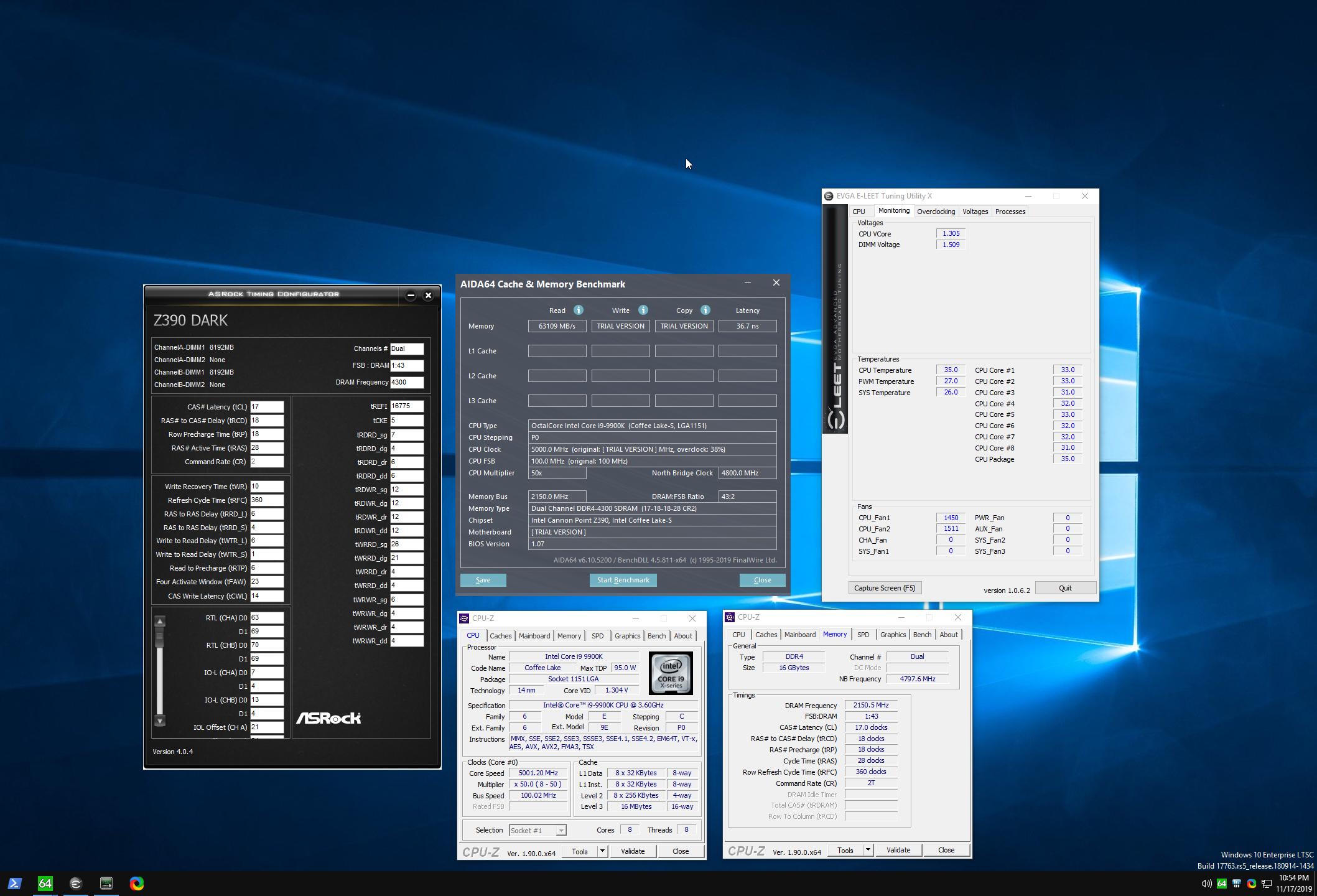 latent wolf
Huh Wonder why its so High then
My L1 and L2 Cache Latencies are low
Im a Dummy. I had Prime95 Running
@proven canopy That Probably looks way better
dull ginkgo
@latent wolf why it be running 2133cl15 default speeds
proven canopy
Ya, looks like XMP is disabled lol
cold jolt
is there a difference between having 2 SR modules on one channel vs having 1 DR module on one channel in terms of logical topology?
cold jolt
nvm
"There is only a little difference between a dual rank UDIMM and two single-rank UDIMMs in the same memory channel, other than that the DRAMs reside on different PCBs. The electrical connections between the memory controller and the DRAMs are almost identical (with the possible exception of which chip selects go to which ranks)."
very cool
latent wolf
@dull ginkgo I have been wondering the same thing and @proven canopy XMP is enabled
proven canopy
it clearly isn't lol
dull ginkgo
Some bios theres 2 different settings, one for enabling the correct profile, and one for enabling whatever profile was selected
dark ferry
Is anyone here familiar with the Gigabyte Aorus z390 F12c BIOS?
latent wolf
@proven canopy I will Reboot and Show You that XMP is On Profile 1
Same Brand and everything so I don't know why it's running at 2133 stock
proven canopy
Must have to play with settings more - seems like it's not applying correctly.
latent wolf
Is it possible it's cause I don't have Ryzen Master Installed?
proven canopy
Possibly
latent wolf
Unless it's just showing me BIOS 1 config and then BIOS 2 config on the same screen.
proven canopy
No, that's current value / (to be set) value.
latent wolf
Ok so It's showing the one I have set and then the base
proven canopy
No, it's showing what's currently set and what is to be set
latent wolf
Installing Ryzen Master now
proven canopy
Oh, I misread
latent wolf
proven canopy
I thought you said "because you don't have ryzen master installed"
But just keep trying different thigns imo
If I had that problem, the first thing I'd do is google "ram xmp (motherboard model)"
latent wolf
See its weird cause The system Is Responding way faster than what it did at the 3200mhz Settings I put in
proven canopy
TBH - you're not going to notice either way
latent wolf
According to Gigabyte Website My Mobo Supports XMP 2.0
latent wolf
I have the Timings Set at 14-15-14-14-28-42-1T
So In Ryzen Master what do I want to set the MEM Clock at for the 3600mhz?
proven canopy
Why do you have it set manual
proven canopy
Up to you
latent wolf
I honestly Dont know how to use Ryzen Master. Im used to doing OC fromt he BIOS
@proven canopy set The mem clk to 1800 with the 3600 timings in Ryzen Master. Restarting the PC now so it can stress test it
proven canopy
3600 is the speed, 14 14 14 etc are the timings
Check the community am4 ram oc spreadsheet in the pins for info on what to expect
latent wolf
That's where I got the timings from.
Ok so BIOS said RAM was at 2141 instead of 2133
proven canopy
Same thing, just bclk variation
latent wolf
Ah ok. So Ryzen Master is now running it's stress test on the 1800mhz mem clock. It apparently passed since it applied it. So If I understand since I'm running Dual Channel I should be at 3600mhz?
proven canopy
Nothing to do with dual channel
DDR4 transmits data on the rise and fall of the dram clock, so 1800mhz = 3600 MT/s
Dual channel just doubles the effective bus width
latent wolf
Ok. I admit I have alot to learn with the newer systems. This is my first DDR4 system.
proven canopy
Same for DDR-DDR3

In computing, a computer bus operating with double data rate (DDR) transfers data on both the rising and falling edges of the clock signal. This is also known as double pumped, dual-pumped, and double transition. The term toggle mode is used in the context of NAND flash memory.
latent wolf
Ok. I thought it was different with ddr3. So basically I know how to change things without really knowing what the heck I'm doing and just follow what others have done.
proven canopy
Same tbh
latent wolf
If it works that is all that really matters
It seems to be working even though certain things don't read the way they should based on how much faster the system responds.
dark ferry
Is literally everyone going to ignore me every time I ask the same question?
Is no one willing to be helpful?
proven canopy
I mean - if people don't know the answer, isn't it best that they don't make up advice to give?
This thread is still under construction. Please be patient and thank you for understanding. This thread is for the Z390 Aorus motherboard owners or
941 pages of posts to search through here
dark ferry
I feel like they do but no one can be bothered responding to me unless it's to insult my build or to accuse me of not already exhaustively trying to find the answers on my own, which I have.
And everyone keeps referring me to the same stuff I've already looked at. None of it applies to the new BIOS layout.
How am I suppose to do simple things like find Long and Short Power Duration when the new BIOS has moved where the option is and renamed it to something else with no descriptions and ZERO guides ANYWHERE as far as where these options now are or what they're called?
And I know for a fact all the people posting here with the same/similar model boards know the answer but just can't be bothered to tell me.
Like they're trying to teach me a lesson or some right of passage crap like holy hell just help me please.
proven canopy
I can tell you that I don't know any active overclocking enthusiasts in this discord who have a gigabyte z390 board.
I'd say that that forum thread is your best bet
dark ferry
Is that right? The very next post after mine is a Gigabyte BIOS screenshot and there have been several others in the past week or two.
So, I call BS on that statement.
I've already been to that thread and scanning through 941 pages for answers that aren't there isn't helpful.
proven canopy
Read better
That guy has a 2600x and some b450 board lol
So helpful for your use case, yes?
dark ferry
Oh my god.
He's Ryzen, good catch.
Not everyone who's posted Gigabyte in here is AMD.
And saying no one in here posts overclocks with these boards is a flat out lie.
proven canopy
yes, and the ones who have (to my memory, are usually asking very basic questions)
dark ferry
Stop arguing semantics.
proven canopy
keywords
dark ferry
Where can I increase my short and long power duration limits and disable c-states in the newer revised gigabyte z390 bios since they're not called the same things anymore?
Are these questions "too advanced"?
By the way I have spent countless hours trying to find the answer myself.
No one provides the answer anywhere on the known internet in any fashion where it is accessible.
Gigabyte wouldn't even provide me the answer.
They ignored everything I said and re-sent me the user manual I already have.
With the old style bios.
Useless.
Found it. Almost by accident.
Gigabyte is so dumb.
Thanks for the thread but no, it wasn't in there. I found it in a video I almost didn't even click on specifically about RAM overclocking but the guy just so happens to go off on a side tangent about the new layout and shows the options I haven't been able to find.
Or rather, how they can even be accessed.
twilit hedge
Were you as rude to the gigabyte support as you were here?
latent wolf
@dark ferry I mean wow Dude. I have a Gigabyte B450 AORUS M running BIOS Version F50. I have a Ryzen 5 2600X 6 core 12 thread with 32gb of DDR4 3000mhz. I have my Processor Overclocked to 4.0ghz in the BIOS and Ryzen Master Confirms that. Ive been trying to OC my ram and thats why I asked for help since it seems different to me tham what it was with DDR3.
I wont have a New BIOS update till the Ryzen 4000 series comes out since my motherboard will be able to support them based on an announcment made by AMD
dark ferry
No, I was not rude to them. My attitude here came out of stress and desperation and I apologize, but try to see my perspective as well before judging me.
I found my answer, almost by accident, in a video unrelated to what I was looking for.
Anyway I would love some feedback on my current OC settings and results if anyone is willing.
proven canopy
Download this if you want to display memory subtimings https://download.asrock.com/Utility/Formula/TimingConfigurator(v4.0.4).zip (you don't need an asrock board)
 normal ether

mild moat
devout nimbus

waxen sinew
gang
robust cipher

latent wolf

robust cipher

proven canopy


mild moat
latent wolf
So Question for yall. Doesn anyone know why Ryzen Master has to restart the computer every time you change a setting and apply it
cold jolt
same reason you have to reboot the pc everytime you change a setting on the bios
you just gotta
its just one of those things
latent wolf
Annoying if you ask me since Ryzen Master works from within Windows
 thorn ore
All Ryzen Master is basically is a software layer between you and the BIOS. You make changes in Ryzen Master, it makes the changes to the BIOS directly.
latent wolf
Ah Ok Hence the Restart
 ruby summit
Hey quick question. Is it possible to overclock a chromebook? Just wondering
latent wolf
If You can get into the BIOS Maybe
ruby summit
It's running chrome os so that may be difficult
It's got a strong cpu
Its a dual core Intel chip lol
latent wolf
Yeah Even though its Got Chrome OS you should still be able to get into the BIOS
cold jolt
most chromebooks are heavily locked down
in most cases, there is no user accessible bios
latent wolf
That Sucks
proven canopy
I think it could be a fun hobby-project, but like much of overclocking, (especially on a laptop) - I wouldn't expect any practical gains.
latent wolf
RAM overclock would probably be best case ona laptop and thats just cause of thermals
dark ferry
Idle // 35c
Gaming // 60-65c
1 hour Realbench // 88c
So far since finding the right bios options it's been perfectly stable.
 pallid spade
Hey guys! Every time I turn on XMP from my bios my CPU overheats and my fans go really hard, any reason why this may be happening?
latent wolf
Whats the CPU clock settings
dark linden
Setting up the new overclocking lab
Got 80 amps for benching
And two 240v single phase hookups for making big cascades
cold jolt
forks is gonna love this lmao
twilit hedge
Where are you that you an get 240 single phase?
dark linden
@twilit hedge the US
twilit hedge
You have a converter?
twilit hedge
Okay
proven canopy
Ya, we get 240 volt split phase here
twilit hedge
You have almost 10kW there
proven canopy
Each line 120v from either end of the transformer's secondary, neutral to a center tap
twilit hedge
Wow that's a lot
dark linden
You have almost 10kW there
@twilit hedge
That will be barely enough to run the cascade I am working on
It's first stage is 2x 28k btu scroll compressors
3.5-4kw of power just for the first stage
It should do -175 at 300W
But it is going to be at least a year before it is done
dull ginkgo
this look reasonable?
proven canopy
Ya
dull ginkgo
Turns out my ram can do Dram calculator fast preset, it's just in my bios tRCDWR goes after tRCDRD, but the other way around on dram calculator
and for some reason now thats correct fast preset works
why is ram so complicated
twilit hedge
It needs to be
proven canopy
You don't have to touch ram timings either
Setting and running XMP is 90+% of the benefit, for 1% of the effort of manual tuning.
dull ginkgo
true
proven canopy
RAM OC is more of a hobby IMO - aside from a few cases.
dull ginkgo
can you even touch vram timings?
through software without vbios mods
robust cipher
vbios mods?
proven canopy
Sometimes, ya - usually with a vbios flash.
twilit hedge
vram is always a known chip, size, speed, and connection, so the GPU can handle the timings automatically. Ram can be in so many different configs that you need to be able to change all those settings
dull ginkgo
alright
flint quiver
3hrs on memtest just hit no errors 😄
flint quiver
Haha this kit is the goat for real lol
dark linden
Getting ready to run ddr1 on ln2
 celest moss
wow, this is so cool
dark linden
i wanna see DDR-800 with a CL of 2
@cold jolt
Definitely not man. 560 is already the max of most bh/ch5 kits at cl2 on air with 3.8v. My best kit does 592-600 on air at 4v and on phase I can get it to about 625-640
I expect ln2 to top out about 650
But that kit is single rank so I am currently testing my dual rank ch5 kit that does 570 on air to see if the second rank makes a difference in performance to match the higher speed of the sr kit
dark linden
Got some bdbg that should be pretty decent as well
 crisp condor
dark ferry
crisp condor
dark ferry
@crisp condor I know some but I'm no enthusiast level yet. What are your questions?
dull ginkgo
 languid yoke
What is a safe voltage for Ryzen 3000 series these days? 1.3?
Like a voltage that you can run an everyday overclock and be comfortable with.
cold jolt
languid yoke
Why would I check pins for? Nothing to do with my question.
vale nymph
📌
jade pulsar
first link should have a place for safe voltages
languid yoke
@cold jolt Great article but no concrete values of what voltage should NOT go over really.
latent wolf
What CPU?
Cause Most Ryzen CPUs you dont want to go over 1.35v and thats due to thermal issues. If your using Hybrid Cooling like LN2 then you can push it further to get a higher clock speed
 fringe apex
Sounds like you didn't read the article.
TL;DR - you'd have to set it really low, and/or have a very narrow, unrealistic use case to not be missing out on performance.
Just let the chip do its thing.
Fixed manual voltages are silly on zen2
latent wolf
I have a Zen+ If I remember correctly since Im running a R5 2600X
Most of the Forums and from personal experience you dont go over 1.35v to the CPU on Ryzen unless using Hybrid Cooling
dull ginkgo
@latent wolf might want to read the article too
But anyways
The gist is, depends on the chip
There's sources saying their chip was decaying after a few months at 1.3v
There's sources saying they daily 1.4v no decline in OC perf
All depends on the chip
Pbo will be good
languid yoke
@dull ginkgo Thanks for the clarification.
dull ginkgo
You're welcome
languid yoke
@dull ginkgo I suppose that brings me to my 2nd question. Is there any point to use a liquid cooler on a 6 or 8 core Ryzen or just use the included stock cooler and don't waste the money?
cold jolt
3800x and up have TDPs above 95w
would suggest another cooler in that case
3700x and below are 65w
stock cooler is fine
languid yoke
Alright, thank you.
dull ginkgo
Air coolers are good too :p
languid yoke
@dull ginkgo I know they are. There's a few that are amazing but the reason I asked is because I currently have a liquid cooler now.
dull ginkgo
AIOs are just for when you want to throw money at stuff for 2c temperature difference yaknow
Eh, already own it, can't do anything now
languid yoke
Well I can always sell it if I really don't need it but I was thinking of just use it when I buy a new Ryzen chip.
Even if I don't need it.
Anyway, this is more about cooling now so I don't want to continue to type in here.
Thanks guys.
latent wolf
@dull ginkgo Im just stating what Ive read and from personal Experience. I run 1.32v on mine. And Im OC from 3.6ghz base to 4.0ghz If I went up to the 1.35 I could get 4.2ghz but I dont need it to.
And My system has been OC since the day I got it to 4.0ghz and thats 8 months ago
fringe apex
You have a zen+ chip though. Different lithography, architecture, etc.
latent wolf
But Ive also been Reading on the new Zen chips cause I am looking at getting into one that has PCIe 4.0 support
flint quiver
Still can't get 3800 memory working but I'm pretty happy with 3733
cold jolt
how does 3rd gen threadripper FCLK work? is it the same as the consumer ryzen chips?
3800mhz means 1900mhz FCLK, which is a 100mhz FCLK overclock, at least on ryzen
flint quiver
Works about the same, works best when you keep memory and fclk 1:1
cold jolt
yeah, but do you think that may be the issue or nah
flint quiver
Well the chip still has the same basics as a normal Ryzen just more of it but the chips seem to be the best bins from AMD. It hasn't been to hard to oc all 8 sticks. At first I tried to go from 3200cl14 right to 3600 and higher and that didn't work but once I went up in steps it had no issues going up with minor tweaks to the primary timings
cold jolt
ahh cool!
flint quiver
However 3800 is another story no matter how loose I have tried it wont boot, going to have to try increasing some voltages (SOC, DIMM, CCD, IDD, VDDP) when I have more time
cold jolt
what are all the dimms rated for
are they supposed to be 3800?
it might just be a limit of one of your dimms, considering you have 8 dimms, only one of them needs to be unable to hit 3800 for all of them to be unable to hit 3800
flint quiver
no they are 3200cl14 bdie
cold jolt
ohh, ok

 limpid trail
curious if im the only person with issues, i have 1650 super and everytime i max the memory with power limit to max i crash , but reviews show them getting max memory with no proble,s
problems
dull ginkgo
Overclocking depends on each chip ;)
past sable
200% pass on memtest so far.
proven canopy
Nice, good latency for zen2
 long vine
uhm, so. can someone please help me. i clicked on Load 5ghz oc settings on my asus mobo and know my computer is shitting itself
its currently running at 5.16 ghz
how do i downclock it?
 charred garden
I don't think Afterburner has any tuning tools for CPU. Are you running AMD or Intel?
normal ether
What CPU and motherboard do you have
long vine
I have i5 9600k and a 1660super
normal ether
I don't think 9600K can overclock that far
long vine
yeah bad idea on my part
charred garden
I think that's the problem. Lol.
normal ether
Just reset your CMOS and you'll be good to go
long vine
okay, so cmos is in bios?
charred garden
You can reset your BIOS to default or you can take the watch battery out of your mobo and put it back in after 10s.
Or on some motherboards there's a CMOS reset button on the back or on the board.
normal ether
long vine
okay thank you so much
bright briar
I am wondering what a safe voltage for an i9-9900K
I don’t have it but I am only wondering
normal ether
 chrome hare
Personally over 1.35v everyday is pushing it
sterile flame
1.325V degrades ryzen
sterile flame
yea
i got my 2700x to 4.2 on base voltage somehow
prob gon try higher
there was this one kid in the LTT discord and he got his 3900x to 1.45V @4.6ghz 
chrome hare
Got my 3950x to 4.4, 4.3, 4.3, 4.2ghz on the CCXs at 1.325v
Got a dud ccd on ccd 1
510 single 10,072 multi in cinebench 20
Under load though the voltage is 1.125v average
sterile flame
Which program should I use to check stability on RAM overclock?
sterile flame
@proven canopy I ran Aida64 on a X.M.P. profile at 3600mhz and 3 secs into the test it said hardware failure
proven canopy
Well, that's unstable
sterile flame
@proven canopy Any ideas on what I can do? Maybe bump voltages? Stock voltage on the XMP is 1.35v
sterile flame
I have a 3900x and 32gb TridentZ NEO 3600 RAM, I enabled XMP in the BIOS to 3600 and I run Aida64 and I get Hardware failure right away. I turn off XMP and it passes Aida no problem. How can I get this thing to run 3600mhz?
proven canopy
Set soc voltage to 1.1v, dram voltage to 1.45v and see if that works
sterile flame
My refined overclock from my first overclock attempt seemed to have paid off quite well!
Kaio-Ken X10!
long vine
could you get a i9 10980xe up to 5ghz? without issues
twilit hedge
With good enough cooling, I don't see why not
twilit hedge
What is this thing
proven canopy
Very cool, that retro koolance cooler. Please take that home lol.
robust cipher
top 10 cable management
sterile flame
So I was going through and looking at the QVL for my mobo, anyone know what this means for my RAM? I have 4 sticks of 8GB, cannot use XMP without a failure.
cold jolt
I'll see what I can do, it definitely needs some cleaning, but idk if there's a reason it's still here other than they had no reason to get rid of it
dark ferry
@bright briar Anything under 1.4 is fine. I run my 5ghz all cores on a 9700k at 1.38 volts daily and everything is peachy. Just make sure your TEMPS are under control. Run stress test to check temps as well, not just benchmarks and gaming.
 true shell
Hey guys, I’m new here and just have a question regarding voltage for CPU. I’m technically a beginner so I apologize for any dumb question but, if VID refers to what the CPU asks for, can VCORE still be significantly less?
I am running a 10900k 4.9 all cores and for some reason my Aorus board was automatically assigning around 3.5V for it (which sounds like overvolting from what I have read). I tried 2.5V and everything seems stable even after stress testing it. My question is, is it fine if VID is showing around 3.5
I’ve read that Gigabyte boards should not be left on auto settings due to the excessive voltage
proven canopy
uSES LESS
jade pulsar

true shell
So?
You’re saying my motherboard was definitely overvolting it?
Given that it was left on auto settings
jade pulsar
im no expert but i don't think vcore or vid should be anywhere near that
true shell
Sound about right from what I have heard, just wanted to confirm
I have it now on 2.5V
Just took it out of auto settings
true shell
Thanks for the input man! Anyone else that could educate me a but more in this i would truly appreciate it
jade pulsar
i don't think motherboard even allow voltage to be set above 2v. this is just something i found online https://i.imgur.com/rliFjj3.png
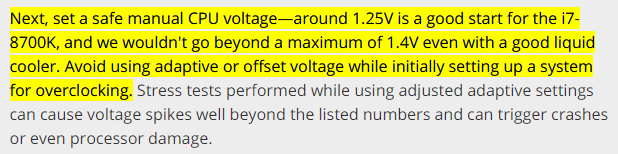

 dull ginkgo
Most chips I'm aware of, the literal max is 1.5v
like
you need to mod the bios to go higher than 1.55v or so in most BIOSes
jade pulsar
i think rog bios has limit of 1.8 or 1.9 maybe
true shell
What am I saying lol? I meant 1.35
My bad guys, I’m being a dumb ass lol
So it was 1.35 on auto and I dropped it to 1.25
I'm trying to send a screenshot but it won't let me. Anyways, if anyone has more input on this I will be on the lookout. Thanks!
jade pulsar
lol i was gonna say
1.35v should be fine, when overclocking you can try to get the voltage as low as you can to try to reduce heat
true shell
Sounds good! Thanks man
jade pulsar
When ocing i'd also avoid auto voltage at all costs it often just goes completely overboard lol
sterile flame
my 2700x runs default 1.4V buttttt im gonna ignore it
 eternal wyvern
How can I overclock a AMD Athlon II X4 630?
twilit hedge
Can you?
eternal wyvern
nope i never done it before
 sand fulcrum
so i have my new MSI MGP z390 Gaming Edge AC set to all core 49 core ratio w/ 44 uncore for my i5 9600k, and the voltage set to auto in bios, and it is showing voltage at 1.365-1.390, avg of 1.370. so question is should i leave it on auto or try to manually set lower?
latent wolf
@eternal wyvern Are you on a prebuilt or a custom Motherboard
Also Is it a K series Chip?
eternal wyvern
@eternal wyvern Are you on a prebuilt or a custom Motherboard
@latent wolf im on a pre built
Operating speed: Up to 2.8 GHz
Number of cores: 4
Socket: AM3
Bus speed: 4000 MHz
latent wolf
What Brand is the Prebuilt cause Most of them You cant overclock.
If ITs a HP you might be able to get a small overclock by overclocking the RAM if you are able to.
 stark cedar
so i want to flash my rx 5700 to the XT bios and it wont let me even when i tried to force flash it
latent wolf
@stark cedar The XT models have a modded BIOS from the Factory. From my understanding you cant flash a XT bios to a Base Card. I could be wrong.
stark cedar
ok from what i have seen online it cane be done with my card. i have the power color rx 5700
latent wolf
Hmm. Are you trying to do it from within Windows Environment>
stark cedar
and i tried flashing it with the powercolor RX 5700XT and the stock RX 5700XT
yes
i also tried CMd
latent wolf
Did you use CMd from in windows? May have to try flashing it Pre OS
stark cedar
like uefi
latent wolf
Yeah Kinda
stark cedar
no
latent wolf
I dont know how to get it to flash Pre OS to be honest but that might be the way you have to do it. I think I could do it from Within Windows If I had a secondary GPU in the system but I have to have a dedicated GPU as I dont have one built into my CPU
stark cedar
same here but i do have another GPU around
latent wolf
Like I could flash a gigabyte RX-5700XT BIOS to my 5500XT since Its the Same Manufacturer
That Could be the issue is the system is dependent on the GPU for Display and is locking out that capability
stark cedar
it would fry the card but yeah
latent wolf
I dunno if it would fry it. Depends on the Clocks
latent wolf
Voltage Isnt a Issue for me. I have a 850 Watt PSU and a gigabyte B450 AORUS M motherboard that supports PCIe 4.0
So Im sure it could handle it but Eh why try and fry a brand new card
No Point in that
stark cedar
yeah true
latent wolf
Interesting enough my Clock Speed is Faster than a Gigabyte RX-5700XT on my card. Then again I have the Gigabyte RX-5500XT OC 8gb version
stark cedar
thats odd
latent wolf
Thats What I was saying
VERSUS
What is the difference between Gigabyte Radeon RX 5700 XT and Gigabyte Radeon RX 5500 XT OC 8GB? Find out which is better and their overall performance in the graphics card ranking.
Check Out the Differences
stark cedar
but isn't the rx 5700XT still a lot faster
latent wolf
Bandwidth wise yeah. Mine is 128 bit where the 5700 is 256
Wouldnt a BIOS change update that or is that more of a Board designed thing
stark cedar
thats bored
latent wolf
Dam
stark cedar
wait idk
stark cedar
you may want to look it up
stark cedar
That's what I figured
latent wolf
Worth the res4earch though to find out. I still have a good card though
stark cedar
I tried uefi for the flash and it still didn't work thats odd
latent wolf
I think you may have to switch to a different card and set the 5700 as a secondary card to be able to do it
I swear I remember Jayztwocents doing a video on something like that. Might have even been Linus Tech tips
proven canopy
What flashing guide are you following?
proven canopy
AMD RX 5700 XT and 5700 Owner's Club OP is a work in progress, feel free to share links or make recommendations of things that would be helpful. Gamer'
stark cedar
I'm trying uefi flash now
im back on my pc i didn't know what to type so i typed exit
stark cedar
i was able to get it flashed it just took another card and like an hour
latent wolf
@stark cedar Im glad You were able to do it. So Having the 5700 in the second PCIe X16 lane made the difference when using a different card for the display then.
latent wolf
Hey It worked thats what matters
latent wolf
Yeah Not a problem. At least I was able to remember the whole card thing from a video I watched
flint quiver
 zinc patrol
@flint quiver but can it play crysis lol
 carmine canopy
@flint quiver what voltage?
flint quiver
1.35v
carmine canopy
ooh a bit high for my liking lol
zinc patrol
@flint quiver ryzen master profiles will override bios settings
its suggest you set everything in bios to auto
and make a proper profile in ryzen master
flint quiver
There is no profile set its the default and is just reading what the system is running. RM reboots my system with any changes so I would rather make changes in the bios.
If you would rather see hwInfo. RM is crap for messing around with the TR
zinc patrol
before your picture showed peak was set to 1.4


and avg core v was also 1.4
also this picture shows oc set at auto
and this https://cdn.discordapp.com/attachments/610602203849162772/732034620136226918/unknown.png set to manual


so you set something
also once you set a proper Manual OC profile in ryzen master it doesnt need to reboot unless you switch between auto,PBO,and manual
if you set manual and make changes to manual you dont need to reboot, if you set pbo and make changes to pbo then you dont need to reboot ect
latent wolf
If yuo change anything with the RAM you have to reboot. I know from experience
zinc patrol
right but most people are not tunning ram timmings inside of windows lol
latent wolf
Sadly I have to to get Windows to recognize the OC I have set in the BIOS
zinc patrol
yeah when i moved from 5930k to 3900x i went from bios ocs to windows ocs
im never going back lol
latent wolf
Yeah It sucks I have to reboot for it to take effect but It Works
zinc patrol
you have to reboot when editing oc settings inside the profile you have set?
latent wolf
To Enable the Profile I have to Reboot
I dont know how to set my cutom Profile as the Default Profile for it to load up automatically
zinc patrol
oh yes. to switch between profiles takes a reboot.
so for me if say i want manual OC to be what loads every time i pick profile one (just didnt feel like renaming it) i set it to manual OC i make all my oc settings changes. press save then press apply and it reboots. after this all you need to press apply and no longer need to reboot
there should be a check mark next to the profile that is marked as the one you get when the pc starts
at the bottom you can see the save and apply buttons. save first then apply. first time you do this on a new profile it will ask for a reboot yes. but as long as you stay inside this profile and OC mode it shouldnt ask again unless you touch the ram.
latent wolf
My OSD doesnt look like that for some odd reason and I updated my Ryzen Master
dull ginkgo
which part
latent wolf
Oh So Its Cause Im running a 2600X then
dull ginkgo
Mine doesn't have the CCD control because I only have 1 chiplet, but mine looks like theirs
also dif resolution but yea
zinc patrol
wonder if you need to restart everytime cuz you have last gen
latent wolf
Maybe
latent wolf
Thats weird
flint quiver
@zinc patrol I never set jack in ryzen master as I said before it is a pos. I opened it to show the settings as set in BIOS. That first pic voltage was AUTO with pbo and auto oc 200mhz like I said. In the second it is a manual oc again from the BIOS with a manual voltage of 1.35v set yet it uses less. If you had bothered to look at the pictures or what I said you would of seen that. If you want to pretend you know everything about a chip/system you haven't run maybe you should watch more videos first.
zinc patrol
relax there champ. i did watch videos. and i own a 39xx processor lol. i never claimed you set it inside ryzen master, i said you set something. i was just informing you that the default voltage both mobo and ryzen master set of 1.4v will lead to cpu degradation over time as this has been proven by many people using the cpus. you know from the videos i havent watched lol.
so you set something
@zinc patrol
maybe before getting all amped up try and read things
flint quiver
You have a 3900x not a TR big difference chief
zinc patrol
not when it comes to effectiveness of ryzen master and how PBO and manual oc works
also not when it comes to cpu degradation
everything i mentioned applies to any 3000 series cpu
if you would like to check my information you can educate your self via AMD its self or one of the many tech youtoobers saying the same
proven canopy
auto is fine
zinc patrol
not to mention TSMC made it very clear what the upper limit they speced the 7nm node for
you know the people who make them for AMD
AMD actually had to push a fix for their 3000 series cpus to meet the longevity requirements.
but what do i know i dont own a 3970x so that must mean i have zero idea about the manufacturing process and node specs set by TSMC
flint quiver
Well apparently you don't know what your talking about so maybe after you have another 15 years experience in pcs come back to me. For the last time VOLTAGE WAS ON AUTO with pbo enabled and +200 oc as the only settings changed in BIOS other than memory timings and dram voltage. As you can see in the video RM does not let me set a voltage for the profile nor does it let me edit pretty much any other setting besides ram so its a POS and I would never use it for anything other than seeing what the system is set for.
dull ginkgo
Auto overclock
turn it off
@flint quiver you see where it says "manual"?
click it
latent wolf
WOW No Need for hostility guys. Dam. So you have different settings. Im assuming based onwhat I read you are running a TR4 Socket CPU. From What I have read and understand some of the settings and thermals will be different between a TR4 and a AM4 based on the size of the Processors themselves
dull ginkgo
some things are different but don't blame RM without tweaking with it :P
flint quiver
I've hit manual before and it doesn't let me change very much other than the multiplier and ram timings. I'm old and like the bios tweaking as this is not a good ui
Also the point is he says I changed the voltage and it doesn't let me. This is what the system decided to run on AUTO when the bios settings are turned on.
flint quiver
PBO set to auto, voltage to auto, ratio to auto and look over 1.4
and with the 43 multiplier and 1.35v set in bios....
proven canopy
This post says it well https://www.reddit.com/r/overclocking/comments/f18cbc/reviewing_voltage_recommendations_for_zen_2/

reddit
202 votes and 170 comments so far on Reddit
dull ginkgo
Hitting manual usually requires restart
flint quiver
I've read that and other posts forks. This is voltage set to auto, pbo auto, no auto ac under prime95.
pbo enabled + auto oc 200
latent wolf
Is it possible It needs to be rethermal pasted
flint quiver
so under both it has run > 1.4v, and yes I realize 1.35 static is not good either
zinc patrol
This post says it well https://www.reddit.com/r/overclocking/comments/f18cbc/reviewing_voltage_recommendations_for_zen_2/
@proven canopy yep its very telling. and typically the people who literally make the chips for AMD prob know what their talking about when they warn that freqent peaks to the 1.4 ranges are not recommended.
reddit
200 votes and 170 comments so far on Reddit
@flint quiver also i wasnt telling you that you set it to 1.4 i was telling you that using auto/pbo will. and that its recommended by the people who actually make the chips to restrict it from doing so. AMD has already released a firmware upgrade for PBO once for certain chips to reduce the target GHZ so it gets to 1.4 less often.
proven canopy
What's wrong with peak voltages up to 1.5v