#overclocking
1 messages · Page 49 of 1
 uneven ermine
insert chip into b450 tomahawk
step 4
you only need the cooler when the cpu gets hot, save the energy and just dont install it untill u need it
setp 5
enter bios
stpn 6
turn everything to max, the pc will throttle itself down to the fastest speed it can run
done
thank you for learning how to overclock with zack
btw this course costs $30 so pay up
 dapper hound

 twilit hedge
It's not selling the course, it's a course as a service
 jade pulsar
thank you zack i finally got 7GHz on all cores!!!
 normal ether
Instructions unclear, overclocked my motherboard’s chipset
My A320 motherboard is now an X570
twilit hedge
I was able to get 8ghz on a pentium! Now I can finally play fortnite at 120fps! Zack's course is amazing!
 neon rapids
yo i just got my nvme drive to 8300/7400mbs read right zack is the next gn
 robust cipher
yo i overclocked my case to 14 ghz perfect tutorial
 dull ginkgo
holy crap thank you zack my CPU is now at 2c and 5ghz all core!!!
 proven canopy

 mild moat
Lol
twilit hedge
I was able to boost my 3300x to 16 cores!
mild moat
My i5 6400 now has hyperthreading
 errant raft
Yeah it's currently making a warp in time
twilit hedge
Cool
errant raft
Basically everyone's processors are going to be getting older and older every second
twilit hedge
If they're getting older faster that means time is running faster for them. You know what that means, right?
 More overclocking
 zenith peak
is the 20/30$ intel oc insurance worth it?
normal ether
I guess if you want to be safe
 cold jolt
EVGA Precision X1 doesnt auto adjust your voltage / clock speed curve like afterburner.
so thats epic
huuuuuuugh nvm it does
I need a software for nvidia cards that functions like this. any suggestions?
dull ginkgo
Wdym auto adjust voltage clock speed curve?
cold jolt
it makes it curvy for you
i want the gpu to run at a specific voltage and clock speed, not a whole slew of them
each one of those points represents a state
amd got it right, you get a handful of gpu states, and you can tweak them however you want
cold jolt
yeah, but its annoying working with these graphs
it takes too long
i want to test my gpu, and just set it to what i want to see if it crashes or not
proven canopy
 cold jolt
yes, but that doesnt force the gpu to run at a specific speed
proven canopy
Shift click drag to move the whole curve, ctrl click to bend it, L to lock v/f
cold jolt
it still just picks whatever state it feels like
proven canopy
Pressing L will - as long as you stay under power/temp limits.
cold jolt
i want to tell it to run at XMHz @ YmV
and thats it
not permanently or anything, just so i can build my own curve
 drowsy imp
What exactly is Overclocking and why or why not should you do it? I just recently built my first rig and still have a lot to learn. Anyone care to explain?
twilit hedge
First off, what CPU and GPU do you have @drowsy imp ?
jade pulsar

drowsy imp
I have an i7-9700k and a RTX 2070 super
twilit hedge
What cooling do you have on the CPU?
drowsy imp
Uhhh the Hyper 212 evo by cool master
twilit hedge
So first off....
But if you do decide to do it, it basically will take the cpu clock speed and make it faster. The advantage of this is the whole system will run faster. Downside is that it gives off a lot more heat, and due to the way elecvtrical circuits work going too fast will make things unstable and you'll have to slow down a bit before using your pc more
drowsy imp
ohhh okay gotcha gotcha so if i were to overclock i would probably need a stronger cooler, and better power supply?
curretn power power supply is an evga 700 BQ 80+ bronze
twilit hedge
Power supply should be good, cooler should be good
You won't be able to push quite as far, but you can get somewhere
 verbal wyvern
How far do u think I could get on an Intel i7 970 with a hyper 212
twilit hedge
Not sure. Every chip is different
 fickle ether
hey how do you over clock on a MSI B450 Gaming Pro Carbon Max Wifi Motherboard idk how
dull ginkgo
What do you want to overclock on it
 restive cargo
Fully lapped and delided I9 10900K.
That's a bit older photo but. Yeah it looks solid now.
It only managed to shave around 5C off the temps from stock though.
Worth the $700 risk?
As @proven canopy pointed out it for sure was not worth the risk and a chiller would have gotten me way better temps then all the work of the delid and lapping.
But as with everything you live you learn, and I just wanted to share my experience on that with you all.
 short blade
hey so usually i get about 60 fps in time spy, i'm trying to push voltage lower right now, does that 20 fps mean it's unstable enough to not die but suffer massively reduced performance?
@restive cargo i just watched derbauer delid and apply direct-die cooling to a TR 3960X
there are always greater risks you can take
should do it on a 3990X to one up him
 manic helm
proven canopy
manic helm
proven canopy
I mean, you can always pick up a chiller for your loop in the future.
proven canopy
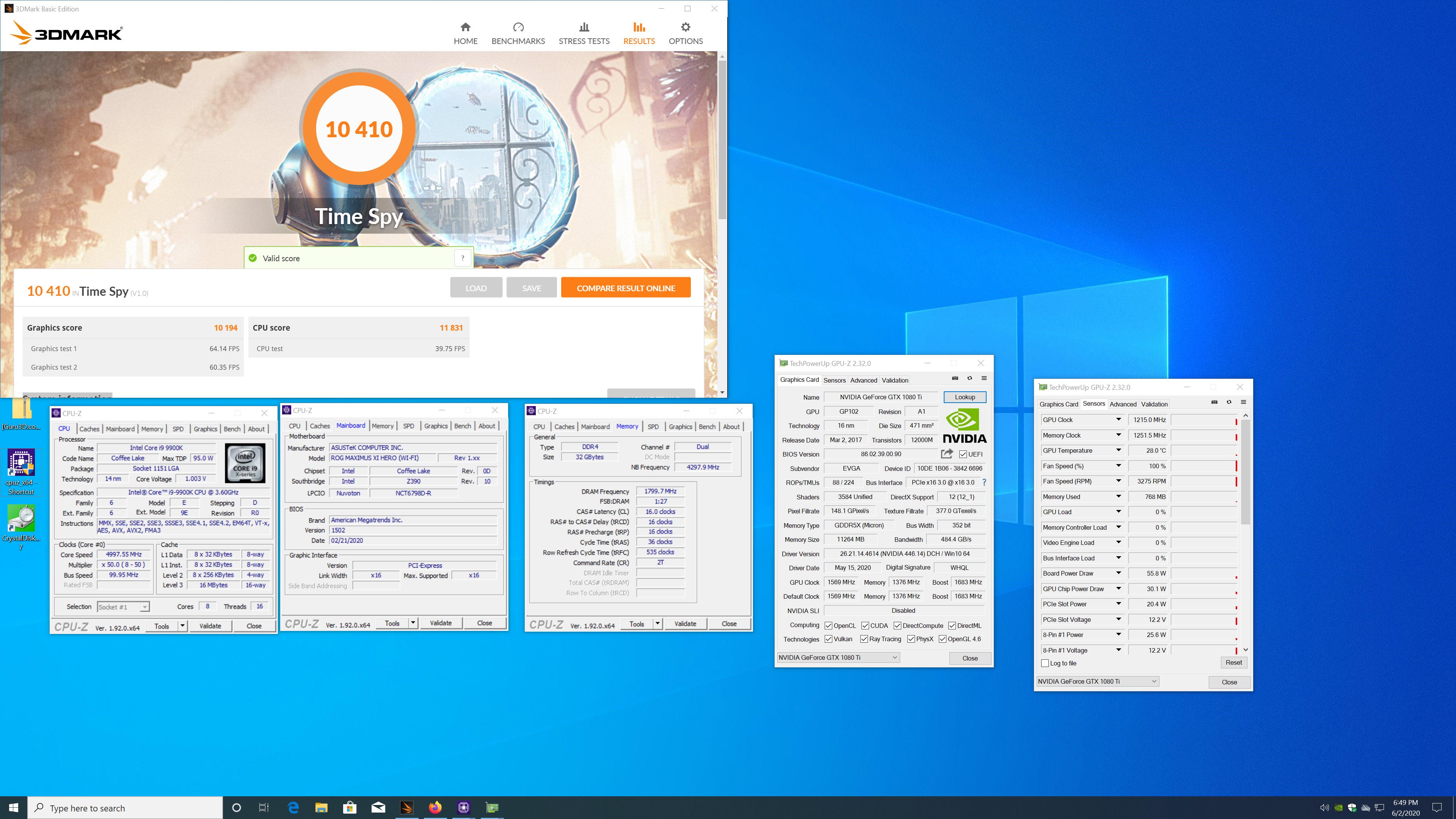
Played with a 1080 ti a bit today, ran time spy stock https://i.imgur.com/ZugNl45.jpg
 nova storm
How far can you safely push a 1600 AF on the stock cooler (wraith stealth)
normal ether
@nova storm depends on motherboard
and honestly I'd just leave it at stock. It's still decent at stock settings
The wraith stealth cooler might get a bit loud or too hot or whatever
But if you want to go for it, and have a good motherboard...
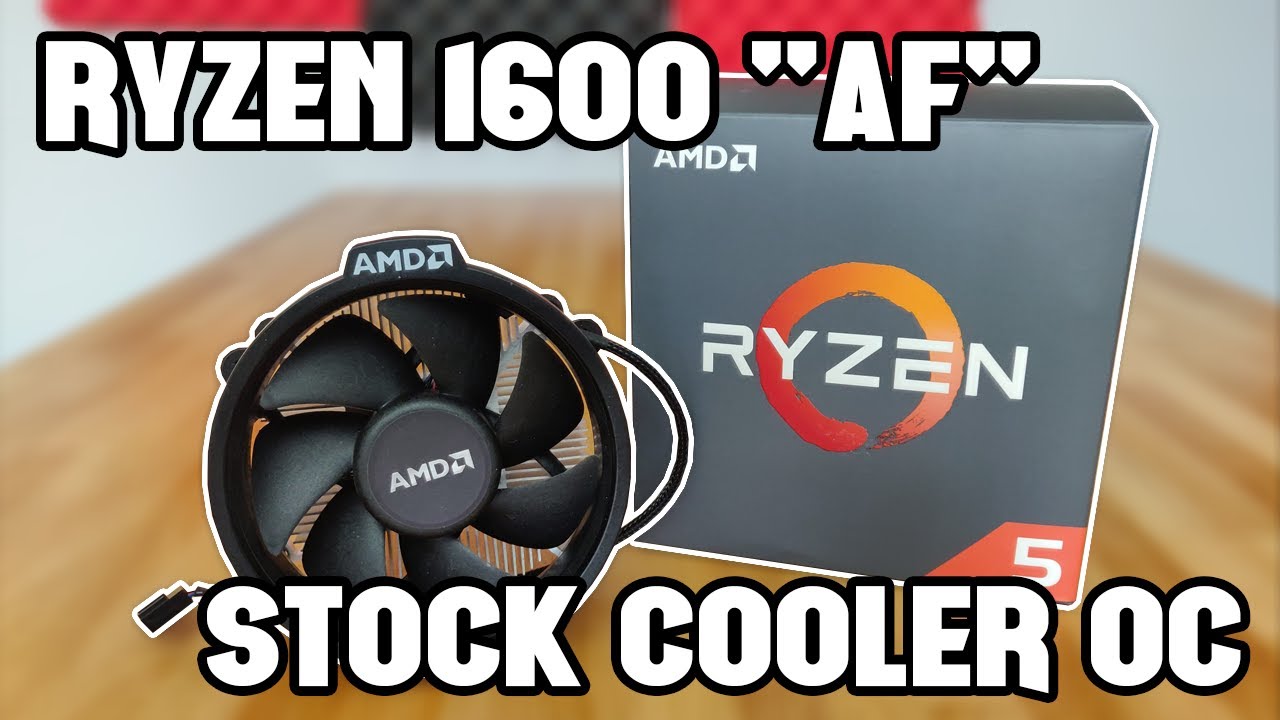
Can you get extra performance out of the 12nm Ryzen 5 1600 "AF" with the stock cooler? That's what we're here to find out.
Ryzen 5 1600 "AF" Variant on Amazon: https://amzn.to/2P60kxK
~My Main Rig System Specs~
Ryzen 9 3950X: https://amzn.to/350lGkW
Asus ROG Crosshair VII He...
nova storm
Thanks just wondering I never really planned on overclocking anyways.
 sterile flame
I can now control my bios using alexa and echo
mild moat
"Alexa, leave the Newegg discord server"
neon rapids
bruh alexa set my voltage to 2.7V
mild moat
Smh my head alexa
 hallow flint
Hey someone said I need to overclock more than just the MHz speed on ram can someone tell me what else
proven canopy

GitHub
C# WPF to automate HCI MemTest. Contribute to integralfx/MemTestHelper development by creating an account on GitHub.
hallow flint
Page not working
 weak bane
@hallow flint ez go to bios and changed the speed under advanced most likely
hallow flint
@weak bane i did the xmp speed and someone said there was another speed i think it was like flck or somthing
weak bane
Yeah I’m not strong in that yet lol still tryna get mine to 3733 so maybe google more YouTube I guess that’s what im finna do
dull ginkgo
Today is gonna be fun
 lofty totem
Oof
 vapid berry
F
lofty totem
I have 3000mhz cl15 ram y’all think I can push the frequency?
Maybe 3200 or should I keep at 3000
dull ginkgo
I'm gonna be pushing my ram as far as it can go
Primary timings and frequency
Secondary timings scary
dull ginkgo
So far, pushing both frequency up and timings down doesn't work
Prob best trying default timings higher frequency
Large fft time again
yay no crash
rip
vapid berry
F
dull ginkgo
just gonna go default and then tighten timings
proven canopy
Why are you testing mem stability in windows lol
proven canopy
Easy to bork things
dull ginkgo
also is command rate supposed to be 2t?
thought I set it to 1t
or should I use gdm
proven canopy
1T + GDM yes
 dense kiln
how far can i push a 3600 with the stock cooler?
dull ginkgo
rng
neon rapids
^
 ivory coyote
Hey everybody! This is my first time overclocking. I have an i5 9600k on a MSI Z390-A Pro. My cpu cooler is a cooler master Hyper 212 EVO with 2 Noctua fans on it, one intake and one outtake. Could I overclock this reliably to 5ghz do you think? Or do you think I don't have good cooling for it?
dull ginkgo
can I ask why 212 evo with 2 noctua fans..?
kinda wacky setup
why not just a u12s or smth
proven canopy
Check the historical binning statistics page from silicon lottery in the pinned posts
dull ginkgo
Ye
proven canopy
TL;DR - maybe, but probably not. Though you can likely get close.
dull ginkgo
they dont have data on 9600k
but overclocking is all chance
you'll have to test it to know
ivory coyote
Well I like how quiet the noctua fans are and had already bought a 212 evo. So I said screw it really
dull ginkgo
ah
ivory coyote
plus I want to try and make a good looking PC while using noctua fans. Challenge myself a little
dull ginkgo
just the heatsink on the 212evo isn't exactly the best
ivory coyote
ah
dull ginkgo
hey noctua fans can look nice when they fit in the color scheme :P
ivory coyote
Yeah that's what I'm going for haha
dull ginkgo
still waiting for a Noctua case xD
ivory coyote
lol
dull ginkgo
I'd love to get one
ivory coyote
I prefer the tan colors over black black/red or black/blue. And I'm not too big on LEDs
dull ginkgo
imagine like a Coolermaster H500 in beige and these fans
https://www.amazon.com/Noctua-NF-A20-PWM-Premium-200x30mm/dp/B071SLFBNY
just the airflow and cooling would be amazing
also makes noctua fans fit in the color scheme
I like black builds and white builds and all, but I do also like spicing it up with some brown/beige.
dull ginkgo
eh I don't really like green pcb :P
cold jolt
beige case
ivory coyote
I was actually thinking of getting a CM H500M so I wouldn't have to worry about airflow or getting a new case for a long while
twilit hedge
blue pcb, like an arduino
dull ginkgo
Well H500 no suffix is a really good case
ivory coyote
Yeah
cold jolt
color matching with noctua fans is hard
dull ginkgo
cheaper than h500m, bit fewer features, but still great
ivory coyote
I just like all the features the H500M comes with is all
ivory coyote
The gpu anti sag bracket is something I for sure want, I hate seeing GPU sag it gives me anxiety lol
dull ginkgo
lol fair enough
people get anxiety seeing like NH-D15 with how big the heatsink is but
it doesn't sag or anything
noctua mounting OP
ivory coyote
Yeah the 212 evo got me sweating when I first got it tbh. I went from some really old cooler on an old prebuilt to that
dull ginkgo
lol
ivory coyote
it was a classic round cooler with a fan in the middle
dull ginkgo
yea you shouldn't be unless heavily overclocking or getting a new intel chip
ivory coyote
Yeah
And I don't think I'll be upgrading my cpu till we see what happens between intel and AMD, MAYBE a 9th gen i7
just so I wont have to change out my mobo lol
dull ginkgo
you're gonna have to when you do upgrade xD
New intel chips moved on in terms of socket
ivory coyote
Yeah I saw
dull ginkgo
Hoping 5th gen amd does well
ivory coyote
But I don't know if I want to upgrade to that depending on how AMD does
dull ginkgo
because AM5 should mean another 4 years of compatibility on that socket
ivory coyote
That would be nice
dull ginkgo
well it should mean 2-4 years of compatibility on the board
ivory coyote
Though MSI's 10th gen intel board is a nice black and gold mobo which would work well with Noctua fans
dull ginkgo
maybe
ivory coyote
mobo's are the hardest part I think for a build unless you like black, gray, and white imo
dull ginkgo
lol
ivory coyote
I appreciate the change to black and gold with MSI
dull ginkgo
It's interesting
 uneven wave
very
neon rapids
okay so ive never actually messed around in ryzen master should i change anything under memory control
 south ether
dull ginkgo
south ether
dull ginkgo
don't
 devout nimbus
Why am I getting different clock readings from CPU-Z and EVGA X1
dull ginkgo
@devout nimbus likely you're just on the cpuz freq right now because the gpu isn't under load.
devout nimbus
Even when I lock the freq in x1?
I love this GPU cooling tho. Like never above 54 degrees when OC in tests
dull ginkgo
thats how gpu works
devout nimbus
I was just confused b/c evga has a 'boost lock" option
proven canopy
Click the sensors tab in gpu-z
devout nimbus
Okie, now the readings are matching
Thx
This is low-key addictive lol
Like I get so happy every time it doesn't crash
devout nimbus
I got a stable +1150 memory clock and +220 GPU
proven canopy
Nice, also state the clocks themselves vs the boost amount.
Since every card has a different base/boost clock
devout nimbus
Right 🙂 According to GPU-Z:
Base GPU clock: 1350 ==> 1570
Boost GPU clock: 1650 ==>1870
Memory Clock: 1750 ==> 2038
Not sure why GPU-Z is showing a much smaller memory clock than X1
proven canopy
It should be 1/4 of the PX1 reading.
GDDR6 is quad data rate
Same reason why task manager shows 3600mhz ram while cpu-z shows 1800mhz
 tame dome
jade pulsar
tame dome
jade pulsar
Gpu overclocking is usually done in msi afterburner @tame dome
Also check pins for info
proven canopy
GPUPi benchmark https://i.imgur.com/AP42kCC.gifv

 thorn ore
i'm trying to push core clock on my RX580 and i'm hitting spots where it soft crashes and my drivers are resetting me back to stock speeds. should i try pushing more voltage to see if it stabilizes? or is that a sign that my core just won't handle the speeds i'm trying to push
i haven't done any gpu overclocking prior to this, i used to just overclock my CPU back in the athlon xp days, heh
 blissful mirage
jade pulsar
blissful mirage
jade pulsar
push in overclocking? it really depends on the individual card. You can try out for yourself using the guides pinned in this channel
proven canopy
The colder you keep it, the more you can OC.
thorn ore
i think i've pushed my gpu as far as it will go, i'm up against board limits for power and pushing memory clock further, even with a little extra voltage for the controller causes all of my various benchmarking scores to go down. i'm not sure if there's anything else i can do, so i guess i'm done for now. i gained about 7% over stock score in heaven 4.0, and a little over 10% in time spy, so idk if it was worth it lol
vapid berry
xd
zenith peak
smort lmao
 latent wolf
So did anyone read the article from AnandTech today about the AMD Ryzen Processors?

 flint quiver
Running my cpu and gpu at full load the oc drops from 2055 to 2040 and can't figure out why
Everything is stable but that drop bothers me 😦
flint quiver
No so if I'm running a game it will show 2055 and be fine but the second I turn on something like folding@home on the cpu and gpu it drops to 2040.
proven canopy
Temp throttling
dull ginkgo
forks it can just override what you put in?
flint quiver
My systems power limit?
proven canopy
Check out the gif I posted a bit earlier - even at 15 celcius, it throttles by one 15C step
No, the GPU itself has a 320W or maybe 280W power limit
proven canopy
It's a limit set by the vbios
flint quiver
hmm let me fire up gpuz
proven canopy
Ya, you can check the power limit in the gpuz sensors tab
flint quiver
I see it going up to 230w for the board power draw and then goes back down to ~210 and goes back up
proven canopy
Lol nice, using the HX to an external rad somewhere?
flint quiver
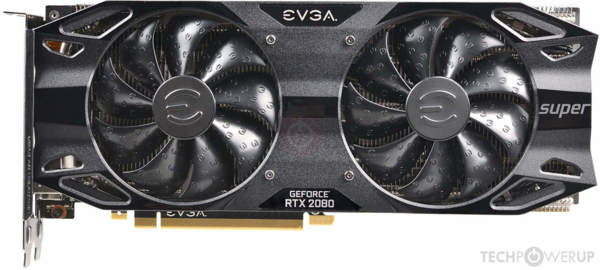
Looking up the device id this is the cards BIOS https://www.techpowerup.com/vgabios/212660/evga-rtx2080super-8192-190701 so it should handle 292w limit
 dark linden
Lol nice, using the HX to an external rad somewhere?
@proven canopy
Yeah I for 2 480 rads for 30$ off hw swap
flint quiver
What are you cooling?
proven canopy
Check the 2nd pinned post for more of mythical techs builds
@ farpetrad, check my gif posted earlier to see how to check power limit
proven canopy
Does changing the voltage slider help? Also, tbh - staying above 2000mhz core for all your use case is very, very good.
flint quiver
no effect, bumped it up a few and nothing changed
 past sable
@flint quiver I have a 2080 super xc ultra. Same behavior as yours. Thing is it didn't start happening until about a month after using it and only when using px1. I haven't gone back to msi afterburner to test. But OC no longer sticks andd backs down a bit while in load. This is with any OC applied doesnt matter how little.
Closest I'll get to 1900fclk
 late lantern
I could use some help with fsb:dram stuffs. Any help would be appreciated!
here are my specs: Ryzen 9 3900X, G.Skill 8Gb X 4 (F4-3600C16-8GTZKK),Asus Crosshair VIII Hero (wi-fi), Corsair Force MP600, Asus RTX 2080 Super, Seasonic Focus PX-850
I am struggling with getting my FSB:Dram to be anywhere near 1:1
I'm currently sitting at 3:51, but there's a major performance hit in any games with that ratio even after increasing my dram speed to 3400Mhz from the stock 2133MHz
How can I achieve 1:1? Do I need to set a specific CPU clock speed? Or is there a setting for FSB to be a specific speed? Or does it have to do more with the multiplier of the CPU clock?
My system is also unstable with DOCP 3600 for some reason, even with cpu and gpu at stock settings, perhaps that also has to do with the FSB:DRAM ratio?
proven canopy
When you enable docp, what's the soc voltage?
Should be around 1.1v
And the ram should be at 1.35v
dull ginkgo
FSB is something else I'm pretty sure
short blade
alright if chopsticks is here let him handle it he's smarter than i am
dull ginkgo
yeye
late lantern
I believe i set the fabric at half the dram speed, i don't think thats the issue
short blade
i am under the impression that ryzen's fsb is the infinity fabric
short blade
if i am wrong on that please correct me
proven canopy
If you just enable docp, it should automatically be running the fclk and the dram at 1800mhz (3600 mhz memory)
short blade
do you have ryzen master installed? it can verify whether coupled mode is ON or OFF
late lantern
i have tried that yea, although my FSB:DRAM was still nowhere near 1:1
short blade
dull ginkgo
My Dram:FSB is 54:3
late lantern
plus my system kept crashing, games crashing to desktop too with DOCP at 3600
dull ginkgo
I'm running 1:1 for fclk
proven canopy
In the pic you sent, you're already running 1:1
You have fclk oc'd to 1866* mhz
With bclk at 101mhz
late lantern
proven canopy
oh oops, I saw the other guy's aida thought it was yours
dull ginkgo
weird xmp profile looks fine
proven canopy
TL;DR - don't worry about whatever fsb:dram says
dull ginkgo
so your xmp profile crashes when you use it?
late lantern
well, my main concern is that i lost performance after setting my ram manually at 3400Mhz
and yea
short blade
lost performance compared to 2133mhz?
late lantern
3600 xmp crashes games to desktop, consistently
proven canopy
3:54 = 100mhz bclk : 1800mhz memory bus
Yes, if your ram is set manually to 3400mhz, that means dram freq of 1700mhz , which means 1700fclk if you want to keep 1:1
(you should keep it at 1:1)
As for why 3600 mhz on 4x8 with that kit crashes to desktop with 1.35v dram and 1.1v soc - that's unfortunate, most chips and ram sticks should be able to do that, especially on one of the best x570 boards, the C8H
late lantern
thats what's odd, I have the dram at 1700(3400 effective) and fclk at 1700 and its still not 1:1
proven canopy
fsb ratio is not what should be 1:1
dull ginkgo
fsb:dram doesn't matter
short blade
perhaps you can try bumping up dram and soc voltage a little bit?
proven canopy
3:54 = 100mhz bclk : 1800mhz memory bus
short blade
or if the ram isn't capable of running at xmp with stock cpu/gpu on a mobo that supports it, maybe you should consider rma?
late lantern
@dull ginkgo i haven't seen that setting but i may have just missed it
dull ginkgo
it might just be msi bios
proven canopy
You don't need to change that setting
dull ginkgo
it'll let you set fclk likely
late lantern
asus bios^^^
proven canopy
You can see both are at 1696 in his screenshot
dull ginkgo
Yea
proven canopy
i.e. 1:1
dull ginkgo
tRC looks really high?
proven canopy
That's set by the board, it's fine
dull ginkgo
late lantern
i'll set everything back to stock and try xmp again
proven canopy
You've got b-die, could just try 1.45 , will be fine
late lantern
yea its b-die
proven canopy
3600 16 16 16 36 should be
Low end b-die, but still
Could take 1.6v daily if you really wanted
But shouldn't need that
Even a bump to 1.4v might do the trick, keeping soc at 1.1
Maybe some additional settings in the asus bios like "xtreme tweaking" under the dram timings page
late lantern
i'll send bios screenshots in a few moments
dull ginkgo
@proven canopy CPUz reports 1.25v but Ryzen master reports 1.1v..?
is that an issue with software or
does CPUz report stock
or smth else
proven canopy
Idk, but that manual oc is stupid, lol
dull ginkgo
It's not really a manual oc
more a manual uc
Don't really like how hot it runs with pbo
4.2ghz 4ghz close nuff
so I like my 1.1v 4ghz
proven canopy
Woah, that's a high soc voltage
Wonder why auto puts it that high
Nah, i wouldn't set a manual core voltage
Not for daily, practical use anyway
late lantern
Do you think I should leave soc at auto?
proven canopy
I'd think manual 1.1
late lantern
Okay, I'll try that
dull ginkgo
@proven canopy , it seems that CPUz pulls the core voltage and Ryzen master the VID voltage, but then Aida64 disagrees with the VID voltage... But first, what's the difference between core voltage and VID voltage?
dark linden
Newegg keeps telling me my order will ship next week for the last three weeks
late lantern
dark linden
I want my apex xii :(
late lantern
here's my updated info^^
proven canopy
vid is what the chip asks for, v(x) is what the board/io chip are measuring the actual value to be
I want an apex XII lol. You going 10900k?
dull ginkgo
oh interesting
dark linden
10900k for those 3d golds
 leaden latch
anyone have any idea when the 10900k will be available again?
dull ginkgo
So my mobo has a voltage offset?
dark linden
Finishing up my autocascade chiller for destroying sli amd crossfire setups
anyone have any idea when the 10900k will be available again?
@leaden latch
Next week forever
The same as my apex. It will aways ship next week
leaden latch
next week newegg or everyone?
dark linden
It was a joke because every week they tell me next week and then that week they tell me next week
late lantern
ya know, i think i figured out what was happening when i enabled docp..... i was setting the fclk manually at 1800 whilst auto dram in the xmp profile
leaden latch
oh lol its sad dude i have been waiting forever and i ccant find anything that isnt overpriced
late lantern
i think i should've just left it at auto
proven canopy
Weird that caused the problem
late lantern
not to rain on other people, but i'm still in the process of troubleshooting something in this chat...
dark linden
I pre-ordered my apex xii first hour of it being up and it hasn't even been processed yet
proven canopy
You were always at 1:1 in the screenshots you've shown me
dark linden
Still in preshipment
late lantern
gotcha, its odd tho that i had a performance drop from 2133, i'll let you know if its fixed the "issue" in a moment
@proven canopy well the system is stable and most of the performance loss is regained
proven canopy
Nice, glad to hear it
That's with manual 1.1v soc, and 1.4v or something on the dram?
late lantern
thank you very much for your help!!! and yea 1.1 soc and 1.35 dram. I do have another issue that is a bit more involved, some of my games stutter every few seconds at random intervals. GTA V, R6, even minecraft. Minecraft is the most revealing one, and I've used it to pair down the stuttering to memory dumps, which also seems to be the same issue with other games. Is there a known way to combat this?
proven canopy
Weird, game mod off, not using geforce experience, no icue or other malware?
proven canopy
Neither of those should cause problems, but who knows
Stuttering due to memory dump related issues in minecraft is common
Can fix it by allocating more to mc
late lantern
i've heard of similar recommendations to uninstall icue but yea
dull ginkgo
Yea default is usually like 4gb iirc, could allocate more.
late lantern
i've allocated 12gbs to MC and the issue persists, if i remember correctly i changed the interval at which it dumps and that certainly helped but yea
proven canopy
12GB is a huge amount for mc, unless you're running a modpack like allthemods
Which is exactly what it sounds like
Could try the usual stuff like
sfc /scannow
or dism
late lantern
sorry, correction, i allocated 8gb
optifine installed too
for reference, here is my afterburner rn
proven canopy
Looks normal, though I'd max out the power limit for gaming
late lantern
i'm still confused about other games like r6, i can hold a stead 75fps but then at random intervals it drops to 65 in the middle of a match
proven canopy
That sounds like normal fluctuation to me
late lantern
what would be causing that stutter tho?
even if i can't fix it, im curious why it happens
proven canopy
Small fps fluctuations like that shouldn't be "felt" - I'd guess some background problems are causing something that you're actually noticing, but are hard to measure with an fps counter
Most fps counters average x last frames
I use RTSS + my monitor's hardware hz display
late lantern
gotcha
well, last question that i have rn.... what core/mem clocks do you think i could likely set on afterburner for my 2080 super?
it did white screen on me the other day after i set things too high, had to enter safe mode to fix it
regardless, just curious what you think i could likely get out of it
proven canopy
2000-2100 core during gaming, 2000+ memory (will read 8000 in AB)
Depends how much fan noise you're willing to tolerate. Nvidia gpu's kinda OC themselves based on temps.
late lantern
awesome, this was really really helpful!!!! Thank you so much!
proven canopy
np
 cobalt wharf
i have a question, whenever I try to even slightly overclock my i5-9600k, my pc repeatedly get a bsod. All my power settings were good when i overclocked so i'm not sure why this is happening, especially on a msi z370 motherboard with an overclockable cpu. Any ideas?
 sand fulcrum
what speed you getting the bsod at?
cobalt wharf
5.0ghz
sand fulcrum
sounds like my issue, i could get it to 4.9 but when i do 5GHz it bsod's but only when i did stress testing in Aida or OCCT
cobalt wharf
mine just crashes once it gets past the lock screen
sand fulcrum
you can try what i did, dunno the listings in MSI tho...
CPU Settings
CPU Ratio: 50
CPU Cache 45
Long Duration Power 120
Short Duration Power 150
Volt Settings
Core/Cache Offset
Offset Volt 50
CPU Load-Line Calibration Level 1
those were the settings in my AsRock so /shrug lol
cobalt wharf
ok i will try them
 cinder wadi
So I have 64 GBs xmp setting of 3200MHZ 14 14 14 34 what do you guys think I can try oc to
dark linden
3600 cl14 or 15 should be possible
dull ginkgo
you changed voltage?
cinder wadi
How much should it be
proven canopy
Probably have to increase vccio and vccsa to run at a higher frequency.
Same with dram voltage.
cinder wadi
How much should that be cause everything saids auto
neon rapids
b die should be fine at or around 1.45-1.5v
cinder wadi
So I should try 3600 MHZ 15 15 15 35 1.45V?
proven canopy
Ya, then set vccio and vccsa to 1.2v each, 1.25, or 1.3v if needed.
cinder wadi
Alright I’ll try that when I get home thank you.
cinder wadi
That didn't work
 odd inlet
cinder wadi
odd inlet
cinder wadi
@proven canopy 15 15 15 35 3600 MHZ with the volts you said what should I try now
proven canopy
Whatever you want to try. 3600 14 14 14 28 etc
I mean, you're going from great to great+ performance
OC at this point will be mostly for fun
proven canopy
Sure
proven canopy
yes, though in the future try show the label for each voltage row. I'd suggest reading some of the ddr4 overclocking material in the pinned posts.
1.45v on the ram and 1.3v on sa/io are generally considered safe, but i think it's important to understand.
cinder wadi
Anything need to be changed here?
proven canopy
no
cinder wadi
I can tell it’s not gonna work it’s taking a while to reboot and probably go into safe mode again
Yep it did
What should I change timing too now? @proven canopy
proven canopy
I'd suggest reading some of the ddr4 overclocking material in the pinned posts.
cinder wadi
Alr
proven canopy
GitHub
C# WPF to automate HCI MemTest. Contribute to integralfx/MemTestHelper development by creating an account on GitHub.
neon rapids
if it isnt working crank it up to 2.15v baby
dark linden
cinder wadi
@proven canopy that link saids nothing here
proven canopy
Why does everyone have trouble opening that link
neon rapids
dunno its working for me
proven canopy
Find it here https://github.com/integralfx/MemTestHelper
GitHub
C# WPF to automate HCI MemTest. Contribute to integralfx/MemTestHelper development by creating an account on GitHub.
zenith peak
nice
cinder wadi
I paid 500 bucks for 3200 CL14 B Die and I can’t even get 3600 with any timing
dull ginkgo
@cinder wadi you got ryzen or intel, if ryzen, tried ryzen dram calculator yet?
cinder wadi
Intel
dull ginkgo
rip then
because theres a ton of sub timings that could be screwing you up
Oh wait
have you been trying to run 1t command rate without gdm or something?
neon rapids
are you using like a 64gb kit?
cinder wadi
Ye
dull ginkgo
I'll prob need forks but I believe at higher frequency and lower timings, you'll either need to run at 2t command rate, or run 1t command rate with geardownmode, which limits some of the subtimings to be even
cinder wadi
Just got 3466 CL 14 14 14 34 working same timings as my 3200 xmp...
dull ginkgo
from a while back
cinder wadi
What’s GDM
dull ginkgo
Gear down mode
cinder wadi
Where do I find that
dull ginkgo
advanced dram settings usually
cinder wadi
On Ai Tweaker can’t find it
dull ginkgo
Here was my dram calculator values for 3600mhz cl16 for an example of some of the subtimings and stuff that could be changed
@proven canopy is there an intel dram calculator?
cinder wadi
I’m still trying to find GDM
cinder wadi
Yes please
proven canopy
There is no geardown mode on intel lol
Just run 2T
You have 4 x 16 GB sticks, don't expect 1T lol
I'd stick with that 3600 cl15 if it's stable
proven canopy
To clarify, GDM isn't an AMD only thing, its part of ddr4 spec.
It lets the ram run at half frequency when at high clocks while storing values on the address bus.
proven canopy
And it failed
Welcome to memory overclocking 🙂
cinder wadi
What should I try next
proven canopy
DISCLAIMER
There are risks involved, so don’t use excessive voltage. You've been cautioned. If you fry your RAM, don’t blame me.
INTRO
People often ask about overclocking the memory. It can be a bit mystifying. A simple guide is impossible to find, because there are ...

reddit
297 votes and 55 comments so far on Reddit
cinder wadi
Does it have any effect on being on a i5 10400 rn cause I’m going to i9 10900K when it’s in stock
proven canopy
Yes, better IMC
cinder wadi
Is that how i check for memory problems right
cinder wadi
https://hcidesign.com/memtest/ that site right
 dark ferry
Is 8 phase power enough to manage a 5ghz all core oc on a 9700k with a decent enough PSU? Or will I need to be looking to replace both my MOBO and PSU?
 torpid sun
Depends what power the phases are?
dark ferry
How can I find out? @torpid sun
torpid sun
Look at your motherboard page
dark ferry
I am. It's a budget board. Not much in depth info. Just says 8 phase digi power.
Digital PWM that's all it says.
dull ginkgo
What board is it?
proven canopy

 neon rapids
repping that 650 ti 💪
proven canopy
I couldn't get it to go much over 1000mhz core, even with temp at 10c idle, 20c load, idk why. I'll probably just bench 2d for now.
Also, yes I know userbench is a meme
torpid sun
Userbench
mild moat
Whats the general consensus on bios based, preset overclocks
vapid berry
userbemch
cold jolt
bemchmark
 mild moat

dull ginkgo
@proven canopy are some of my cores supposed to not boost to the frequency I set them to under prime95 smallfft? or does that mean they don't have enough power and I need to increase voltage?
dull ginkgo
Low heat :P
and round frequency
but can you tell me what is happening?
And the settings are set in bios
4ghz 1.1v
Forks I will always be asking questions about random things that don't make much sense
like how do I increase my SSD write speeds :D
errant raft
How good is msi auto oc detector work on EVGA cards?
I know this from my phone I'm not trying to disturb a test
sand fulcrum
idk how good it is tbh, mine said OC of 85 but I got it to 110 core clock and 1000 memory clock
errant raft
@sand fulcrum what card do you have
sand fulcrum
MSI RTX 2060 Super
dull ginkgo
OC scanner doesn't do memory clock
I think it's a good safe option
Without having to troubleshoot and mess with it
sand fulcrum
yeah it just does core clock, but still showing it was lower than what i could achieve, safe or no
errant raft
I offset my voltage by 100% seeing if I get a better Overclock
sand fulcrum
yeah i ramped core voltage to max (+100), power limit to 105%, temp to max (88) and then dealt w/ core and memory
flint quiver
@dull ginkgo did you only change all core ratio?
flint quiver
Ah ok then yeah you will need to start bumping the voltage up some to get that stable across all cores
dull ginkgo
Yea that was my suspicion
flint quiver
you have a 3600?
dull ginkgo
3800x
flint quiver
Ah ok, I have my wifes 3600 stable at 4.3ghz all core @ 1.125v
Her chips only a week old so think we got really damn lucky
dull ginkgo
Eh, I know my chip is bad bin, could only ever get 4.3ghz at about 1.36v or so
Think that's pretty good
cinder wadi
when your foot touch's the power cord then everything shuts down
flint quiver
Yikes hope you weren't in the bios and it reset everything
Beyond sad, my 2080s BLACK oc's well but doesn't put up good numbers
dark linden
Elpida hyper binning
dull ginkgo
Ram
flint quiver
Thats a neat tray where you get it?
dark linden
Ebay
flint quiver
sweet will have to get one or two for all the old memory sticks never thought about it :p
dark linden
@flint quiver
https://www.ebay.com/itm/283871211486

eBay
Premium Memory-Sticks-Tray-Holder-Case-for-DDR-DDR2-DDR3 DIMM Modules -Lot of 2. Condition is like New, as pictured.
Each tray holds 50 sticks of DDR, DDR2, DDR3, or DDR4 RAM. If they have heatspreaders, the RAM will need to be spaced out, and would hold 25 total.
The lids lo...
dark ferry
@dull ginkgo ASRock Z390 Phantom Gaming 4S 
sand fulcrum
So now that i have a larger aio (360mm vs 240 before) i thought i would try overclocking cpu again. Now it's showing in windows that it's 4.9ghz when the BIOS shows 5.0 settings. Any ideas?
dark ferry
@sand fulcrum AVX Offset?
sand fulcrum
Auto
dark ferry
Then maybe 100mhz is the offset.
And maybe when you're testing the system is seeing some kind of AVX instruction in the background?
sand fulcrum
It never did it before, hmm
dark ferry
Are you boosting all cores?
sand fulcrum
Plus the testing is set for no avx
Yes
Shows in hwinfo as 49x and 44x and in BIOS it shows 50 and 45
flint quiver
When you hit windows may not have enough voltage to be running 50 and 45 so is running what it can
sand fulcrum
Running core/cache voltage in offset mode with offset of 50mV and load line calibration at level 1, there was a vid i saw a cpl months back that suggested that for i5 9600k and it worked at that time but ran hot
dark ferry
Is it possible you're hitting a power limit? Did you max out your power draw limits in bios?
flint quiver
Yeah how much power is your psu?
sand fulcrum
650w
dark ferry
What CPU and what GPU?
flint quiver
know if its bronze, silver, gold, or platinum rated?
sand fulcrum
CPU is i5 9600k, gpu is 2060 super. Psu is Corsair 650w gold
sand fulcrum
Asrock phantom gaming 4
flint quiver
https://outervision.com/power-supply-calculator is pretty close to accurate for telling you how much power your going to need

Power Supply Calculator - Select computer parts and our online PSU calculator will calculate the required power supply wattage and amperage for your PC.
sand fulcrum
And yes gpu is
dark ferry
I have a very similar setup and I've hit a wall so I think I can help.
You have a budget 10 phase power design. I think it's actually 8+2. Minimal heatsinks on the VRM and relies heavily on passive cooling. Going for an all core OC which greatly increases power draw. With a GPU that's overclocked, also increasing power draw.
I myself have a similar board with 8 phase power and a 600 or 650 watt PSU with a 9700k and a 2070 Super. I noticed I can only seem to get 4.8 all core stable but I don't know everything about overclocking so I could be overlooking something.
flint quiver
I agree with @dark ferry I think your over the power the psu can provide with the OC on both
dark ferry
I "think" you're at your power limit.
One way you can test this is by removing the OC on the GPU and see if anything changes.
sand fulcrum
I'll drop the gpu and see if the CPU goes up
dark ferry
If it doesn't, you might just need a more efficient VRM (a better mobo) and a higher wattage PSU to match.
sand fulcrum
Recommendations?
dark ferry
I've been desperately hoping someone could help me squeeze 5ghz stable with my current build but in the end I really think I'm just going to be moving to a Gigabyte Aorus Z390 Elite or higher + a 750 watt psu.
I hate the idea of having to buy things twice without doing an actual upgrade...
Start with seeing if you can open up any power headroom. And make sure in the bios your long and short power duration are maxed out, but keep a close eye on temps and how much wattage that allows you to draw on the cpu. Should be fine but just be sure.
Also can't hurt to remove the side panel and see how hot your VRM is getting since the heatsinks on both our boards are as budget as they come.
sand fulcrum
the short and long power draws are at 120 and 150 respective
and the power supply calculator shows 473w recommended psu for what i have connected
GPU OC removed, rebooted, no difference
I'm gonna put back to 4.8 and be content for now lol
Thanks for the info tho folks, I'll try it if i get a diff higher end mobo
actually just came across something... opened Intel XTU and it showed ONE core at 50, other 5 at 49?
but BIOS was set to All Core 50
dark ferry
Did you factor in everything for the PSU? Fans? Controllers? How many displays are connected? Everything matters.
sand fulcrum
All fans, aio, both monitors, USB hub, gaming mouse and keyboard
dark ferry
One core at 50 and 5 at 49 sounds like silicon lottery.
sand fulcrum
In any case I'm dropping it back down to 4.8
dark ferry
Count yourself lucky I can't even get a stable manual overclock. I can only use MCE and it automatically pulls 4.8ghz on all cores with really low voltage.
Then when I try to manually OC it says well screw you buddy.
sand fulcrum
I can technically get it to 4.9 stable but it ran hot before, like 85-90c, so I'll stick with it where it is lol thanks for the assistance
dark ferry
During a stress test?
sand fulcrum
during OCCT or P95 yes
dark ferry
That's normal.
And also the point of those tests.
If the highest you're hitting during a stress test is 90c then you are fine.
sand fulcrum
like right now OCCT at 4.8 is 72-79c
dark ferry
It's an unrealistic scenario you'll never be putting your PC through in real world usage anyway.
Right, but just so you know that isn't abnormal or bad.
100c or straight up thermal throttling would be bad.
sand fulcrum
yeah, just when i saw it spike to like 92 in P95 testing at 4.9 once i was like "yeah no let's drop back" lol
dark ferry
You got nervous over nothing.
That also might have been a spike of a single core for a fraction of a second mind you.
sand fulcrum
It's my first system I've ever overclocked, so I wasn't quite sure
dark ferry
You have a little more leeway than you think and a stress test is designed to push the limits beyond what you'd ever realistically use.
If I ran prime right now on mine I'd definitely hit 90 but it would never get any higher. Then it sits at 30-32c idle and about 55-60c while gaming at 240hz.
sand fulcrum
running P95 now w/ 4.9 it's hitting 71-83 depending on core
haven't ran it on 4.9 since new aio so
errant raft
@dull ginkgo what cooler do you have
torpid sun
Getting 16gb x12 to work properly is an effort
dull ginkgo
@errant raft d15
torpid sun
4.6
torpid sun
 tepid notch
how safe is overclocking a monitor for hz i am wanting to get more than 75 out of the one i have
flint quiver
You will instantly know if it doesn't work. Monitor will flicker or colors will be wrong
As for safety I'm not sure, I wouldn't try it myself
tepid notch
oof ok
well i tested it for what it could do and it only went up to 80
im not going to worry about and extra 5
flint quiver
Thats not bad but yeah for only 5 extra hz doesn't feel worth the risk of burning out the monitor, no clue how well its put together in the back without opening it and I would avoid that
tepid notch
it is a sceptre and it said the resolution or refresh rate is not supported when i tried 81
flint quiver
Ah, mine will let me set any rate and I tried 1mhz over and it wasn't happy so I wont try anything else lol
 short otter

 watch ayMD cri when they can't hit same fps
dark ferry
watch ayMD cri when they can't hit same fps
dark ferry
Man I feel bad for the guys overclocking their monitors. My 144 manages 185 and my 240 manages 280. Not that I would use 280. I prefer staying in my Gsync range.
torpid sun
Want a cookie?
dark ferry
Is there a particular reason behind being a dickhead for no reason or?
Oh no wait, the fact that there's no reason implies that there was no particular reason...
vapid berry

torpid sun
 you're the one who bought a 240hz monitor
dark ferry
There doesn't seem to be a point within that statement.
dark ferry
I was making small talk relevant to the conversation that had just gone on.
And what does me buying a 240hz monitor have to do with anything?
What's the implication you were trying to make?
torpid sun
 why are you so defensive
dark ferry
Why are you so ignorant?
torpid sun
You're in an overclocking channel stating random achievements with your monitor refresh rate without any images to back it up, kinda pointless tbh.

dark ferry
It's overclocking. 100% relevant to the channel and the conversation that was going on. I don't need images to "back it up". It's a monitor overclock. The numbers listed are not all that uncommon for higher quality high refresh rate/fast response time panels. Your comment is the one that doesn't fit, wasn't relevant, and had no point other than to attempt to be toxic for no discernible reason. Are you like pissed off cause your monitors wouldn't overclock? What?
Whatever it is, get over it.
torpid sun

dark ferry
I must have hit the nail on the head. Nice to know your reason for being here is to be a troll.
torpid sun
Erm, troll? Did you see my pictures earlier? I'm actually posting here with performance metrics not pulling numbers out my rear.

vapid berry
ngl this convo makes me want to disable HT and use one core
 torpid sun
No but seriously what's the point in stating your overclock in a channel without proof?
 tight plinth
ngl this convo makes me want to disable HT and use one core
@vapid berry actually had to do that before lol. On an old computer with i7 960 or smth the AIO pump died. Think I disabled HT, went one core, went lowest voltage, pretty low clocks, and no turbo. Quite sluggish in program response time. But Windows itself stayed quite stable with cursor not freezing and such, so that was nice.
vapid berry
neat 
with a normal HT disable and one core, does the clock speed stay the same?
as an example, the i7-4790's 3.6-4.0
tight plinth
If you dont play with anything else like power stages, voltage, BLCK, etc and just set active core count to one without HT, core clock should stay the same
vapid berry
ah, gotcha
short blade
anyone know why my bios doesn't allow me to disable gear down mode? the option is grayed out and i can't change it from auto, my ram is running at 2T command rate even though i set it to run at 1T
tight plinth
well, no much to say as hardware and BIOS settings aren't stated much.
My assumption would be smth to do with OCing setting or not set in advanced mode in some BIOS setting
torpid sun
More likely due to using ram with poor ICs
short blade
@tight plinth good call
i poked around in other areas of the bios and found a second gear down / command rate setting
not sure why there are 2 settings for the same thing
but now it's running 1T according to hwinfo
trying to tighten down those 21s now
torpid sun
 those timings
torpid sun
3733 15-15-15-24 trfc 325 shouldn't be difficult on raisen
proven canopy
As for why there are two places with the same settings, some sections of the bios are mandated by AMD - another will be from the mobo vendor, I forget which takes priority over the other
I mean, if they're runnnig rev.e or mfr etc, probably have to keep the subtimings loose like that
torpid sun
Mm tru
Meanwhile I'm trying to get 12x16gb stable at 3800 cl14 on mine but I think I'll destroy the IMC before I manage that

short blade
@proven canopy yeah my fclk is 1867
i just followed ryzen dram calculator tbh
tried tightening further but got errors in memtest
these are cheap $80 modules so i'm satisfied with the performance
i got them for $72
proven canopy
65 ish ns latency aren't bad at all for budget modules
What's your soc voltage? 1.1v?
twilit hedge
That's Fahrenheit @sterile flame
cinder wadi
😂

 hasty hill
Is that Danny duncan
errant raft
@cinder wadi obviously my card is going to be cooler than yours unless you have liquid cooling
flint quiver
boredom leads to putting a kraken x62 on old hardware
Thermals are fine going to go higher
If this machine is stable it might make a nice plex server :p
proven canopy
That chip is still worth $100 or more on ebay lol
flint quiver
5.1ghz I can see why lol
proven canopy
What vcore? My 2500k's need 1.5v to hit 5.0 on avx loads lol
flint quiver
I set it to 1.39, trying 1.41 for x52 but seems to not like that and just rebooted
so now we try 1.425
flint quiver
so 1.45 seems to have done the trick now lets run some tests
and snap the second I opened cinebench boom
1.5 seems to be the magic # for 5.2ghz lets see if it can run
interesting watching hwinfo saying its only pulling 1.401v
boo it crashed
flint quiver
P8Z77-VPRO, seems 1.39@5.1 is the best I can get
errant raft
What's is the highest overclock possible on Ryzen 7 3700x with Aio and air
 stuck hedge
I have a Ryzen 7 2700 with no overclock applied. Base speed is 3.2GHz and in task manager it says current speed is around 2.8GHz but in Ryzen Master at least 2 - 3 cores (not always the same cores) jump around 3.75 - 3.8GHz while others are at 1.7GHz. Is all this normal? Also EDC (CPU) is always red; not sure what it means though.
torpid sun
stuck hedge
great response
 tropic sapphire
Hey I’m new to the computer building scene, what exactly is over clocking?
 brisk jacinth
Increasing your frequency on certain components to get an extra performance for “free” sometimes
@tropic sapphire
jade pulsar
you can adjust voltages and stuff to increase the clock speed on cpus sometimes
proven canopy
Clock goes up
Fps goes brrrrrrr
jade pulsar
lol
flint quiver
That’s a pretty good description lol
 robust forge
hey everyone, new to the PC game and I'm looking into overclocking my new build. Anyone got some one on one time they can spare to help me out?
jade pulsar
first, take a look at the pins
torpid sun
vapid berry
Pomwer sumplye
devout nimbus
Nice. You actually have a use for an AX series PSU, unlike me 🙂
 pine magnet
Anyone familiar with xeon overclocking? I've tried dabbling but it never posts. But it could be other issues.
Works fine on default settings.
twilit hedge
Talk to @torpid sun
twilit hedge
Do you have an overclocked xeon?
pine magnet
Old school one from way back like 2010. LGA 5660 if I remember correctly
6 core of that helps narrow down
Or I can boot up and check for exactly what it is
Xeon X5650
Guess my mb only let's me oc it to 2.92ghz. Or it's some other limitation. I've never played around with oc. But it seems stable at that setting. Base speed is 2.66ghz
flint quiver
Anyone able to help me oc my memory? Got a 8x16 Gskill 14-14-14-34 kit for my 3970x. Thaiphoon says its Samsung B-die. Ryzen calculator only has upto 4 slots so the timings its providing me are not working. The default ram overclocks that the MSI Creator TRX40 has don't work either.
errant raft
@flint quiver C-Die or SK Hynix
torpid sun
Just run 3733 15-15-15-35 1.5V tRFC 335 1T IF 1866, should work fine on that, what's your SOC/etc at?
flint quiver
@errant raft it’s B-die. I got it to post with the built in 3600 profile but the timings are junk. Will mess around more tonight unfortunately I actually had to go into the office and it’s so different having to work on a laptop again. At least it’s a good laptop.
flint quiver
These are the settings I tried, its the Calculate SAFE, figured it would be a good place to start.
hasty hill
how come my first couple times of running kombuster and upping the clock speed it didnt crash until around +140 but now its crashing around 120
Ok I've settled on +115 anything above that and it crashes after about a min
It's been running for like 4 min now does that mean it's stable?
Ok 7 mins now temp is stable and hasn't crashed
mild moat
Thats not very long
hasty hill
How long should I wait? I've never done this b4
mild moat
I'm not a very knowledgeable overclocker but I would stress test for at least 30-60 mins
hasty hill
K
hasty hill
Yeah it's stable at that I was kinda hoping for a little more gain but I guess there's not anything I can do
flint quiver
Ugh I can not get this ram to oc 😦
errant raft
I really wish I knew my full potential of my Ryzen 7 3700x. I mean highest overclock possible.
proven canopy
4.4 all core on ambient if you really want. Best to just run it default or pbo tho
If you want to bench higher than that, buy a chiller, phase change cooler, or ln2 pot.
proven canopy
@flint quiver What's your system config again?
flint quiver
Give me a second and I’ll get the pc part picker link before the ram kit
@proven canopy https://pcpartpicker.com/list/Nc6Jdm and let me see if I can find the ram kit to update it
And with the updated memory kit https://pcpartpicker.com/list/NDwyzN
@proven canopy its under a custom loop as well so thermals aren't an issue. Now using https://optimuspc.com/products/absolute-cpu-block-threadripper-3. Started with a Heatkiller IV Tr Pro which would run 66-70c full load and now I run 54-59c full load.
proven canopy
nice, optimus makes some of the best blocks on the market
Lol - you're running 8x16GB - what kind of OC were you expecting?
I'd be happy running 3600 mhz cl (anything) with that config
flint quiver
3600 was the least I want to hit
I had the 64gb 3600 kit but while working I had no issues hitting that and then paging so wanted to go up in capacity and figured a fast kit and a little oc would be better than the current large 3600 kits that are all 18-22--22-42
proven canopy
3600 16 16 16 36 1t + gdm would be decent goal
Could try for 3600 cl14 since b-die, tbh - I'm not familiar with TR ram OC on 128GB setups
3600 16 16 16 36 1t + gdm would be decent goal
flint quiver
Yeah I can't find much googling around for anyone doing all 8 sticks
flint quiver
Heres what I'm trying for vs what I'm running
I find it interesting that on the safe setting it wants me to lower tRAS to 30
errant raft
What should I change in pbo I forgotten about this part
flint quiver
I see in videos they all have xmp on when overclocking ryzen is that safe? Didn’t think you could override those settings....
When the profile is on that is
proven canopy
yes
errant raft
How high can I possibly go?
proven canopy
2000 mhz probably
flint quiver
My 2080s hits 8001 memory and 2055 clock. Newer version of precision x should have an oc scanner to show you what it can do.
sand fulcrum
my 2060S hits 2070 clock and 8100 memory, so your 2070S should be able to as well
errant raft
https://valid.x86.fr/s7d94e My cpu is pretty dang delicious

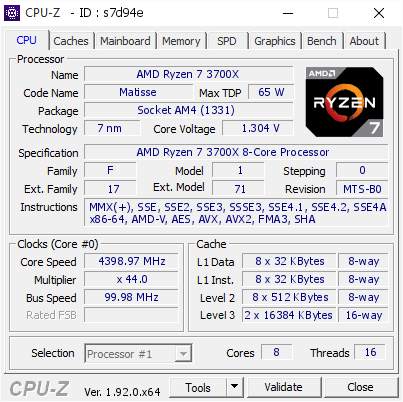
[s7d94e] Validated Dump by Daniel (2020-06-18 08:33:44) - MB: MSI MEG X570 UNIFY (MS-7C35) - RAM: 16384 MB
sand fulcrum
i shoulda went w/ a Ryzen but i went w/ i5 9600K lol https://valid.x86.fr/v658yx
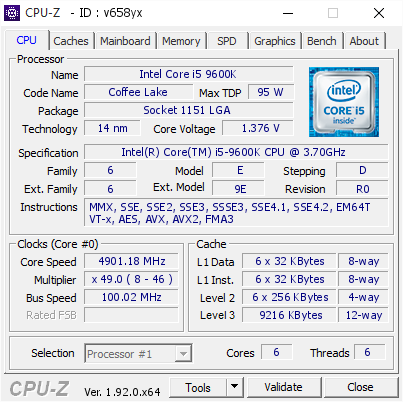
[v658yx] Validated Dump by MARAJADE (2020-06-18 08:45:38) - MB: ASRock Z390 Phantom Gaming 4 - RAM: 32768 MB
sand fulcrum
yeah mine won't go stable at 5GHz or higher w/o more voltage and heat than i am comfortable with
 native trout
i have mine on 1.3V at 5.2 stable
for normal use i clock down to 5.1 cause sometimes it gets angry at 5.2
sand fulcrum
you're also using an i7
sand fulcrum
i am using a 360mm aio atm
native trout
what temps are you getting on your cpu?
sand fulcrum
under load approx 62-68 depending on core
native trout
abt same here when im at 5.2 but tbh i think i just got hella lucky
5.2 is kinnda iffy dou cause stuff crashes occasionally but its not bad
sand fulcrum
sounds like it, when i go 5GHz it spikes to 85 but BSODs me so the voltage needs bumped and i just don't wanna risk as i also use the PC for working from home
native trout
ohh ok that makes sense, when i was doing overclocking for the first time i accidentally added a 0 to 52 so it tried clocking to 52ghz lol
safe to say i had to clear my CMOS
sand fulcrum
LOL
native trout
it was the scariest thing ive ever done
cause i never had to do it b4 and my mobo doesnt have a button so i had to bridge 2 pins which felt scetch af
sketch*
sand fulcrum
yeah guess some mobo vendors do not include the actual clear cmos jumper anymore, had to do it a few weeks back myself
native trout
yeah ig, tbh i kinnda wish it was more standard
sand fulcrum
the reset cmos button would be nice
native trout
btw something funny is that my cpu is nuts for ocing but my gpu is literally the worst overclocking gpu i have ever seen in my life
i oc'd EXACTLY 20mhz and i had to fully reinstall the card because of it commiting seppuku
its a 1660 ti but like reeeee
sand fulcrum
yeah my roommate and i got the exact same 2060S MSI cards and mine will OC by 110 & 1100 and his will only go 90/850
native trout
yeah the silicon lottery is an interesting thing
sand fulcrum
it really is
native trout
cause like one of my friends with a 8700k can only get to 4.9ghz but mine goes to 5.2 like idk
sand fulcrum
it's like my 9600K, some guys here have good 5GHz, or even 5.1, and i max at 4.9
sand fulcrum
yeah i don't have AVX offset either
flint quiver
Well was able to tighten the timings at the default 3200mhz with all 8 sticks and my Cinebench score did go up a bit :-D. The 4.2ghz was on a 3600kit....
flint quiver
Haven’t run it yet. Still messing around with 3200mhz with quick boots and cinebench followed by timespy and rebooting to change another setting.
torpid sun
You should be able to run the above memory timings I mentioned a few days ago if they're decent bins
flint quiver
They are b-die. Using al 8 sticks. The Creator TRX40 firmware also is not the latest microcode. Thinking I’m going to go and return it now that they have the zenith II extreme alpha in stock again and I liked that board a lot better.
torpid sun
Creator sucks for memory tbh
Also the alpha has zero benefits over normal extreme other than VRMs which you'll never need
flint quiver
It sucks at a lot of things. The 3rd m2 drive heat sink is loose
torpid sun
I don't buy MSI products anymore
flint quiver
Well when my zenith broke mounting a water block I had no choice but to get the creator it was all they had in stock.
errant raft
I love my MSI Unify
flint quiver
torpid sun
Rofl
flint quiver
2 mounting nuts just popped right off
In all my years building PCs have never had that happen and this mounting system uses the TR wrench
torpid sun
Wait, you're using Corsair ram?
torpid sun
Ah
flint quiver
But if I can’t get this to run stable with an oc it’s going to go back and I’ll just suffer doing work with 64gb until https://www.gskill.com/community/1502239313/1581390195/G.SKILL-Announces-High-Performance,-High-Capacity-DDR4-3600-C16-256GB-(32GBx8)-Memory-Kit finally gets released

G.SKILL International Enterprise Co., Ltd.
torpid sun
flint quiver
Tomorrow I may pull 4 sticks out to see if it will oc but I really needed the larger capacity for my workload 🙁
torpid sun
What is your workload
flint quiver
Running AI testing for work and all the results of testing the networks are stored in a db. Networks are trained in the cloud on data collected in the field and then can simulate all the sensors on a workstation to test.
torpid sun
But GPU?
flint quiver
Not gpu bound since I’m not training it
torpid sun
Hm
flint quiver
It’s memory bound from all the sensors being simulated for testing and all the data being collected and stored. The network itself takes milliseconds to process the data we’re asking it to and could be run on a smaller machine. I need the cpu power and memory for running the simulations and all the db activity.
Can run 4 simulations at once on the 3970x with a ccd allocated to a vm.
torpid sun
If it's ram bound the 3970X sounds like a bad choice?
flint quiver
Well it was bound at 64gb bc it was the only thing available in store when I built it
Finally got sick of it and like I said earlier I thought I would be able to oc a 3200 cl14 kit and do better than the 3600 18-22-22-42 kits on the market
flint quiver
Yeah can’t scroll through much or reddit without seeing the same
torpid sun
He's saying how much better the 2080 Ti Kingpin performed over my benchmark whilst I was literally on ambient with a stock bios founders
I'm not even sure if that's something to be proud of
flint quiver
Lol I got the gist he was comparing apples to oranges. It’s an epeen thing lol
torpid sun
I used to have a KP and sold it cuz it was trash for the price
If you want an XOC card get Galax
He tried arguing existence of KP then got mad when I mentioned Titan beats it at 200MHz lower in 3DMark...
But yeah do you have an Aida64 memory test for your rig?
flint quiver
Will run it when I get home from work. Passed out hard last night.
proven canopy
My 2080s hits 8001 memory and 2055 clock. Newer version of precision x should have an oc scanner to show you what it can do.
OC scanner has been built into px/1 / AB for a long time
It's a nvidia feature
I used to have a KP and sold it cuz it was trash for the price
How is this surprising in the least bit.
hasty hill
Quick question: is it okay that my gpu hits 70° during a stress test?
mild moat
Yep
hasty hill
And how come my gpu starts to go throttle at like 60° when I have it set to throttle at 88?
Like it started out at 2070mhz and now it's down all the way to 2010
Could the fact that I'm upping the memory cause that?
cinder wadi
I’m doing massive overclock when this gets finished
mild moat
Royal ram 
hasty hill
Well looks like dust won't be a problem
cinder wadi
I’m getting the rad and pump tmr
hasty hill
Nice
cinder wadi
It’s 64 GBs of ram 3200 MHZ CL14 @mild moat
mild moat
Price?
cinder wadi
500

