#overclocking
1 messages · Page 44 of 1
 small ether
 sterile ridge
Yes
small ether
Oh, ok
 sterile flame
hey guys what’s your highest temp and preferred when overclocking?
mine usually stays at 50-60
 neon rapids
anything under 80
 exotic rapids
anything under 90 is technically within spec
 uncut osprey
I want to over lock my Ryzen 3 2200G with Ryzen Master
What settings do I need to change?
 wild glacier
are you on the stock cooler
uncut osprey
Idk what that means
uncut osprey
Yes
wild glacier
I wouldn't try to oc
uncut osprey
Ok
wild glacier
it could run too hot damaging the cpu
uncut osprey
Alright. Should I buy a cooler or should I get a new CPU all together
wild glacier
Well with a 2200g is your build budget?
I mean do you have a gpu
it all depends on how much you want to spend
if at all
 quick rose
The cooler will transfer over to any new AMD build on the AM4 socket
wild glacier
oh I didn't know if they meant buy a new cpu for the cooler
any cooler that works on am4 will work for you
quick rose
IMO, though, a new CPU wouldnt be a bad idea
the 2200G is a litle on the low end.
For $100-150 you can really improve witha new processor
wild glacier
this is also trye
true lol
You could pick up a 2700x which already has a pretty good cooler and it's a nice cpu
 oblique schooner
or 2600
uncut osprey
How much are those about
oblique schooner
120
on newegg
also comes with decent stock cooler
u can overclock it to 4ghz on the stock cooler for it
uncut osprey
Ok I will check it out. This is the 2600 right?
sterile flame
Do i leave memory xmp enabled when adjusting timings? @sterile flame
 slow skiff
I have the Asus Prime Z390-P and an I9 9900K and want to overclock my CPU. Is my motherboard safe to overclock in?
sterile flame
Of course @slow skiff the VRMs for this board are the coolest on the market. Its a high end motherboard.
 stray rune
how do i know if overclocking is safe for my pc
 proven canopy
Running a userbench and posting the link is an easy way to share nearly al relevant specs with us - makes it easy to give further advice.
Linking a parts list/ pcpartpicker works as well.
 dull ginkgo
https://www.userbenchmark.com/UserRun/23344254
https://pcpartpicker.com/list/xwPqHB
Tryna maybe push my gpu slightly further, ideas? Not stable beyond +40mhz core, even with higher core voltage tweaking
 neon rapids
can u push mem higher? just slowly go up by 25mhz and when u hit the crashing point go up to 10 mhz until it stops
proven canopy
I wouldn't stress too much about not having OC headroom on core.
Idk about 2070's but try in 15MHz increments. The cooler your card runs, the faster the boost algorithm will allow it to OC itself.
dull ginkgo
I'll continue to try to slowly push mem
I think last time I was testing I got to around 200 and left a bit of headroom, I'll do it again tho
proven canopy
Here's the data for your same gpu's hwid, what model btw?
edit - oops https://www.userbenchmark.com/PCBuilder?tab=GPU&searchTerm=1462+3730
dull ginkgo
MSI RTX 2070 duke oc
 tight plinth
BIOS flash for higher power limit?
proven canopy
vbios flashing is popular on a lot of 2080 ti's, unsure about 2070's.
Good info found here
Last Updated: July 2, 2019 NVIDIA GeForce® RTX 2070 / SUPER RTX 2060 / SUPER Owner's Club → RTX 2070 / SUPER Owner's
 midnight pilot
Ok guys i need some recommendations
I have a Ryzen 5 2600 and GTX 1660 powered by a Corsair VS450 450W
The CPU and GPU draws something between 260-280W as I remenber
Am I capable of tuning things up a bit?
?
 reef folio
Probably a bit. I mean if you do it incrementally, each time running benchmarks to get them both at 100% load, you wont go wrong. If you get to a point it shuts down/bugs out due to a lack of power, then nothing is damaged and youll be able to restart into the bios to tune it down fine as it only crashes at high load.
450 is not much but a bit of room. I OCed my very inefficient 4690k like a mofo on a 450W.
 forest yoke
how do i overclock my gpu?
reef folio
MSI afterburner.
forest yoke
how much should i overclock
proven canopy
42
reef folio
"manually types in 42 volts" thanks forks!
forest yoke
why did it crash my pc?
 icy ridge
Ok I have a request of you all geniuses over here
I have a friend who overclocked his cpu and said everything on the Internet isn't really correct. He gave me this discord and said you guys would be able to help me overclock my cpu. I know the basics but I'm not very confident doing it myself. Could you help?
9900k
X62 temps around 60C under load for half an hour-ish
That's full synthetic
Rog strix z390e
8 pin eps
Yea
Ok I'm in bios
Ok
Thank you
 trim fern
@icy ridge air cooled or AIO and if air cooled which cooler
icy ridge
Aio
trim fern
120, 240 or 360
icy ridge
280
trim fern
What were you testing with to get 60c on full load
icy ridge
Prime95/powermax
Been stress testing with prime95 for almost 20 minutes now, sitting at 55° but my case is making unholy amounts of noise
icy ridge
Hehehe thanks guys I'm maintaining 5ghz on all cores stable
neon rapids
that sounds like good temps. What voltage?
 exotic sparrow
I just OCed my RAM from 2400 to 3200 using a software utility
i have hit infinity fabric
gigabutt has some good stuff
exotic sparrow
full pass of memtest86+
errors: 0
this is good RAM
it's a kingston and a NEMIX stick that have the same base speed (2400) and the same CAS latency
i dunno if they have the same chips but the NEMIX is micron
i should've looked at the kingston more closely
 noble nymph
I have an old cmos bios and I need help overclocking
Dm me as soon as possible
I’m trying to overclock the ram and cpu
proven canopy
All things overclocking go here. Learn to overclock, ask experienced users your questions, boast your rock-stable, sky-high OC and help others!.
exotic sparrow
is it unusual to be able to overclock DDR4-2400 to DDR4-3200, keep the same timings, and not suffer any errors in memtest? did i just win the lottery on this stuff?
proven canopy
Sounds like you might've scored some OEM unbranded samsung ICs in whatever sticks you bought.
proven canopy
No heat spreader? Could be the same situation, 2400MHz is the JDEC SPD default for some Micron Rev.E's iirc
proven canopy
karhu /HCI are the go-to ddr4 testing stability utilities these days, memtest is solid, but more of a classic
proven canopy
Perfectly valid, just a bit slower sometimes to catch trfc/trefi errors.
exotic sparrow
do the other tests do more strenuous tests?
proven canopy
That's why I mention it was/is a classic. karhu is just known for picking up errors surprisingly quickly.

GitHub
C# WPF to automate HCI MemTest. Contribute to integralfx/MemTestHelper development by creating an account on GitHub.
exotic sparrow
oh wow it's running like a ton of instances now
karhu is a thing i have to pay for
i make a point to use free software (both as in beer and as in freedom, it doens'
doesn't matter to me)
i've got 15 750MB windows open
running a minimum of programs because i've gotta communicate with people or i get bored
703.something MB rather
how long to run this @proven canopy
proven canopy
Whatever the testing utility recommends.
exotic sparrow
it isn't recommending anything to me
proven canopy
https://docs.google.com/spreadsheets/d/1dsu9K1Nt_7apHBdiy0MWVPcYjf6nOlr9CtkkfN78tSo/edit?usp=sharing

Google Docs
Zen 2 RAM Overclock
Please use AIDA64 for the benchmark results, Thaiphoon Burner and Ryzen Master for RAM/Timing information, and use a reliable RAM Stress Test (like Karhu RAM Test or HCI MemTest, etc). ANY FILTERS, SORTS, OR ENTRIES THAT OTHERWISE RUIN THIS SHEET WILL BE ...
exotic sparrow
i didn't buy karhu
i'm using the memtest thing you linked, to automate it
looks like i might be able to get more out of this RAM
but i don't want to do another stress test 😅
proven canopy
TBH - I just gauge stabilty during overclocking/benchmarking to give me enough confidence over margins of stability. I rarely touch things like prime 95 small fft, memtest etc.
But I would if I was collecting data to present for others to use.
exotic sparrow
i'm not doing that
proven canopy
For daily/work use, I run XMP because cba
Ya, I mean, those are my preferences/use case though - I think you're on the right track with your current approach to find the info you'l lneed.
exotic sparrow
well my answer is 3200
3600 was unresponsive and i had to give the BIOS a kick in the pants by resetting a few times to get my PC back
but i'm pretty confident after running memtest86+ for about 12 hours it's solid
so maybe i don't need to run anything else unless i notice instability
i could likely squeeze a little bit more out of it
but i think i'm fine here
looking forward to getting my 32GB of 3200 rated RAM and pushing it possibly to 3600 though, that would be nice
 tame ledge
rip my 2133 ram that i couldn't get past 2866
proven canopy
But for daily use, I just run some 3600 16 18 18 38 2x8 sticks of ballistix elite, micron rev.E I got on sale.
 fringe crystal
as far as ram, which is better for gaming, lower latency or higher speed?
 dapper hound
if lower latency you mean CL/cas then higher speed
what you want is low true latency last time i remember
there are true latency calculators out there
proven canopy
sterile flame
is their any point of overclocking 3970x?
dull ginkgo
(You could always have that Little bit of extra performance ;))
 short blade
so my ram modules are rated for 3600 MHz 18-18-20-40
i set it to 3733 MHz in BIOS and it automatically changed timings to 15-15-15-36
is that normal
i can't find any way to manually change timings
cpu-z still states 18-20-20-40
dull ginkgo
Ehm
On my msi board there was a "memory try it" or smth like that which gave you options for preset timings at each freqency
Maybe you used some kind of preset thing like that?
@short blade ?
Also I dont know anything with cl15 :p
short blade
yeah ive never seen cl15 either so it was weirding me out
dull ginkgo
Shouldnt there be a place to manually change timings
short blade
yeah i found it
dull ginkgo
If there is, change it to 18 20 20 40 ya know
dull ginkgo
Thats a rip
short blade
it wanted me to go 14-14-14-28 i thought that was too aggressive but tried anyways
had to open the case back up to short cmos after that
dull ginkgo
Lol
dull ginkgo
Going from 3600mhz cl18 to 3733mhz cl14 xDDD
short blade
yeah i didnt believe it
dull ginkgo
You could try 18-18-18-39
 dull ginkgo
Or smth like that
short blade
it's $68 ram i'm happy enough to run it at 3733 anyways
dull ginkgo
I cant tighten timing from 3600mhzcl16 so I might try running mine at 3733cl16 later
short blade
if I'm using stock CPU cooler on 3600X I should just use PBO instead of manual OC right?
short blade
apparently if it's not stable it automatically resets for you
dull ginkgo
If it doesn't work do the 18-18-18-38
short blade
so I won't have to short cmos
dull ginkgo
Yea
short blade
that's nice
dull ginkgo
Theres like a "retry count" for how many times you want the pc to try it before giving up
short blade
alright i think it's not stable lol
dull ginkgo
Oof
short blade
yeah it didn't even manage to boot with those timings
the 18-18-18-38 isn't 3733mhz anymore
seems the auto reset failed
time to open case again
short blade
well gonna try the other less tight 3733 cl16
if that fails ill just use the rated timings
3733 16-18-18-38
fingers crossed lol
nope still no boot
have to go cl18
trim fern
You're using which CPU?
short blade
ryzen 5 3600x
trim fern
If it is doing a boot loop just stick to 3600MHz
short blade
it's stable at 3733 18-20-20-40
trying for cl16 causes it to not boot
just using PBO bumped my cinebench score from 3744 to 4127
maximum 4.8GHz and sustained all core 4.6GHz
not bad
dull ginkgo
My 3800x has a higher 3dmarks cpu score at 4.3ghz manual than PBO
proven canopy
Post a screenshot, make sure you're running cinebench through benchmate.
Window's has had a trouble with real time clock accuracy since win 8
short blade
oh i was looking at the clock through cpu-z
and task manager
they agreed with each other
theres the score
proven canopy
Nice, do you enjoy overclocking and benchmarking? Join us on https://hwbot.org
short blade
mm i'm totally new to it and i'm running on stock cooling
dunno if i belong in an overclocking community
this is my first pc
thank you for the invite though
proven canopy
0 judgement there - the website is database first and foremost, most users prioritize learning the ins and outs of the os and software vs just dumping 10000v and litres on on2 on 100 chips.
People who get water cooling -level scores on ln2 are the ones looked down upon if anything hha.
short blade
so my 4127 with stock cooler beats this guy's 4126 with i5 9600KF on LN2

interesting..
proven canopy
Check the rules for the R20 using benchmate page. All Ryzen chips must follow.
Regardless, nice clocks
proven canopy
I didn't mean you're obligated to follow those rules- rather that windows is bugged
short blade
so does it report higher score than actual?
I pretty much know nothing about overclocking

proven canopy
It can, due to how the platform clock is implemented in bios, how the OS sees it, if dynamic tick is enabled etc.
Lol, no that's a really good score afaik - my best 3700x on air was 5k something iirc
proven canopy
I ran into a similar situation with gpupi 3.3 - the program was submitting the score to the wrong benchmark and I wound up on the front page to my surprise. Mods were chill, common mistake.
short blade
I was told if you're using stock cooler PBO will give you better results than manual
proven canopy
Manual ore oc is for the the very enthusiastic and determined overclocker haha.
PBO, or PBO with some kind of undervolt - even straigh up stock has been advocated.
Seen the overclock.net forums?
 boreal jungle
Recently I upgraded from an AMD FX-8350 to the i5-9600KF (huge difference) and managed to get a stable 5.0GHz overclock at only 1.320 Vcore. I know it's stable because I've tested this with Cinabench, CPU-Z's stress tests, and played some intensive games. On my old FX-8350 CPU, I had a good 5.0GHz overclock but it required at least 1.5 Vcore or higher to make it stable (that thing ran hot). Considering the i5-9600KF is a 2019 CPU, is it normal for it to have such a low Vcore? I'm not used to this kind of power after having my FX-8350 since 2012. Haha
The lowest Vcore I recorded on the i5 [so far] was 1.2950 at 5.0GHz.
quick rose
Yes, that's fine as long as the OC is stable.
 tidal arch
does anyone know how I can get a steady 165 fps with a laptop gtx 1060
i've already optimized my in-game settings for it but Idk how to get more power to the gpu
quick rose
TUrn settings down. OPtimizing with nVidia just means best settings for performance vs quality. Only way to get more FPS is to turn off beauty stuff
proven canopy
Are you willing to modify the gpu's cooler, bios, or use the pc in a very coold room?
tidal arch
yes
proven canopy
Like that -40c warehoues for blue bunny ice cream
tidal arch
ok not that cold
my room is already freezing
because I know that standard tower gpus can run most games on the same settings I have at a solid 144+ fps no problem
but I get so many drops with mine
and I have the fans at max speed as well
proven canopy
Run a userbenchmark and link us to help disagnose things.
tidal arch
aight
proven canopy
Pascal/Turing cards are limited all by their manufacturer vbios power limit, cooling headroom, and then finally, rely on the user to config it all to makke the most of the card.
Well - TBH - cheat sheet is -
Get MSI after burner, max out power and voltage sliders, enable doing so in settings if needed.
tidal arch
I was thinking about that, but I didn't want to fry my laptop
proven canopy
This is 90% of "best " - to get the last bits max out the fans, then tune the voltage/frequecy curve such that you're able to run as fast as possible without crashing due to not enough voltage and too uch heat
In general - I wouldn't expect to get any meaningful gains unless you had something very wrong to begin with
i think the SD for the GPU score distribution on laptop cards will be very narrow
tidal arch
UserBenchmarks: Game 44%, Desk 54%, Work 40%
CPU: Intel Core i7-7700HQ - 60%
GPU: Nvidia GTX 1060 (Mobile Max-Q) - 44.9%
SSD: Samsung MZVLW128HEGR-000L2 128GB - 160.1%
SSD: Phison APS-XS03-480 480GB - 50.5%
HDD: WD WD10SPZX-00HKTT0 1TB - 50.4%
USB: Imation Nano Pro II 16GB - 4.9%
RAM: Ramaxel RMSA3260ME78HAF-2666 859B CT8G4SFS824A.M8FD 16GB - 70.5%
MBD: Lenovo 80YY
here's the userbenchmark
the ram and the cpu are really good but the gpu is the only mediocre thing
trim fern
decent laptop
tidal arch
yeah I spent a chunk of change on this thing
proven canopy
Wanna post the link?
As for why I ask for userbench despite the community stigma , it shows:
windows version, GPU driver, ssd/hdd firmware, memory exact model -
Also - how each component is performing in relation to it's clones is invaluable for diagnostics.
reef folio
It's not worth OCing if your usecase doesn't exceed what it can do naturally anyway.
 pseudo dune
Had a bit of fun. It's kinda scary to continue though even despite the voltage is not that high, so I decided to stop here. For now. https://valid.x86.fr/lrzqkg
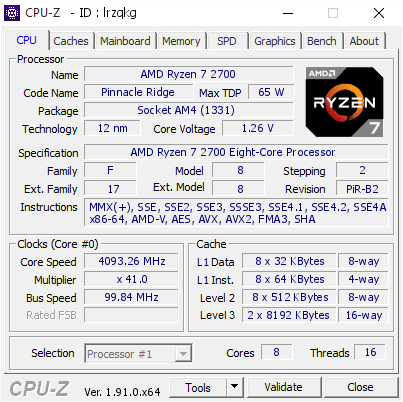
[lrzqkg] Validated Dump by woonflivver (2020-01-10 19:51:14) - MB: Gigabyte B450 I AORUS PRO WIFI-CF - RAM: 16384 MB
short blade
if 3DMark time spy completed with no issues can I assume my GPU OC is stable
im not pushing it very hard since im just using the stock cooling
zotac 1080Ti amp with +50 MHz core clock +250MHz mem clock
 midnight moss
So I got 3.95GHz stable now. 1.48v. temps are chillng below 60 most of the time. Idk why, but Radeon software makes my system crash. I just installed the basic drivers and I'm using msi afterburner and things are...ok. 120fps capped in lost sectors and open world unless there are lots of entities around.
proven canopy
What did yo uput 1.48V on?
midnight moss
Because it was crashing at lower voltages
And my temps were still under control
I probably should lower it some
It might have just been the Radeon software that was the issue
proven canopy
What monitoring software, what mobo/chip?
midnight moss
Hw bot, ryzen 1200, AsRock B450 Pro. Although I'm about to move it to a different mobo and mess around some because I want that mobo for a diff build. If I can find my thermal paste
I think the CPU itself might have issues from when I was trying to push it past 4000
Tbh
It ran 4000 for like a half hour
And I tried going higher...instacrash
No boot
Cmos clear pins are a godsend
No post actually
proven canopy
Ya, lot of funky bios stuff can be solved by pulling power completely, holding powre switch 10 secs, shorting cmos clera contacts for 10 secs - or any one / all of those.
Very platform dependent.
midnight moss
Yea. You think I could transfer this CPU and cooler to a diff mobo without adding thermal paste? As long as I don't smear any off I'd think it would be fine. I do need to find my paste though, I just opened that tube :/
proven canopy
I'd pick up a tube of mx4 or something for <1$ / gram. I recently tried buying 30g each of every flavor or chinesium paste on amazon and a lot of them perform surprisingly well. Hy810 is a shameless knockoff of arctic silvre 5 I think.
I prefer kryonaut or KPX for sub0, or anything half important.
midnight moss
Hmmm. Yeahhh I could just buy some more.
proven canopy
GD900 is some of the best performance/$ - toothepaste size tube for a few $
exotic sparrow
i'm OCing my R7 2700 to 4.0 on 1.35v, seems to be running a little hot
73C during prime95, idling at 50C or so
it's stable, though
but it's hitting 84C now so i'm gonna go mess with the vcore
question: at 1.30v it's not hitting 4.0GHz, do i need more voltage?
nvm it's throttling
exotic sparrow
took a bit of time but now we have 3.8 with peak temps in the 70s
this is fine.jpg
 shy sequoia
or just use PBO
shy sequoia
huh
dull ginkgo
Didnt with my 2700
shy sequoia
welp
 foggy solar
just got done doing some overclocking
https://www.userbenchmark.com/UserRun/23627974
https://valid.x86.fr/mpxp0w
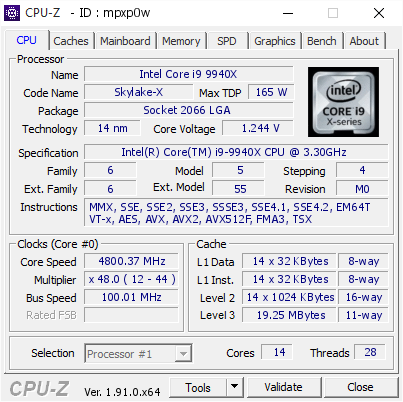
[mpxp0w] Validated Dump by Anonymous (2020-01-12 14:13:35) - MB: ASRock X299 Professional Gaming i9 - RAM: 65536 MB
 manic helm
Pbo works fine if you go back to a pre zen 2 bios. It was locked out on zen 2 bios.
They dont officially support pbo. Only zen 2 and threadripper 2000 officially support it. AMD allowed motherboard manufacturers to implement it on ryzen 2000, but they locked it out in the agesa for zen 2. Only option is to roll back to older bios or do without. Hopefully they will put it back in future agesa.
@dull ginkgo
Also it only worked on x cpus
dull ginkgo
ahhh
sterile flame
strange AMD locked out pbo from sec gen
 surreal patrol
Hello there, im new to cpu overclocking and would want some general tips. I have a 4790k with a fractal design S24 celcius cooler
Generally what makes an overclock stable or not
 vestal topaz
So what would guys say good numbers for the ryzen 3800x? I've tried looking on Google but found nothing
proven canopy
vestal topaz
Thqnks
proven canopy
TBH - I like userbenchmark for general use checks.
dull ginkgo
This us my 3800x run pre oc
https://www.userbenchmark.com/UserRun/23344254
 plush vortex
what would be the best way to OC my ryzen 5 2600 and rx 580 8gb? i've wanted to but idk where to start
 lone igloo
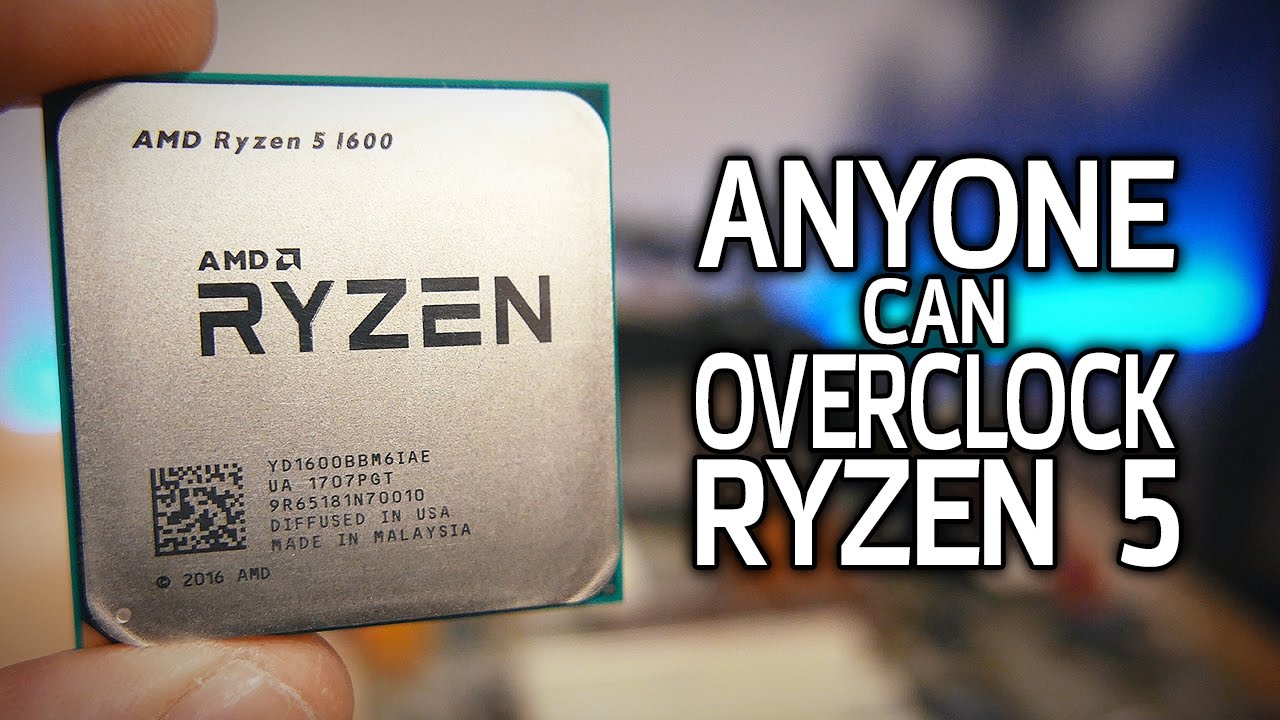
How To Overclock Ryzen 5! My BASIC Guide for Beginners
⇨ Sponsor Link - Corsair Vengeance RGB DDR4: http://bit.ly/PHCorsairRGB2
Ryzen 5 1400, 1500X, 1600 and 1600X CPUs - ▼LINKS/TIMESTAMPS IN DESCRIPTION▼
CPUs
AMD Ryzen 5 1600X - http://amzn.to/2oBHAFW
AMD Ryzen 5 1...
plush vortex
thank you!
 cinder wadi
Am I able to overclock a Intel Xeon 2643 0 Duel CPU
sterile flame
if anyone interested in some stock 3970x r20 results https://gyazo.com/8f10605a09f54af43e11fb804c475956

CPUZ too if interested https://valid.x86.fr/fepv19
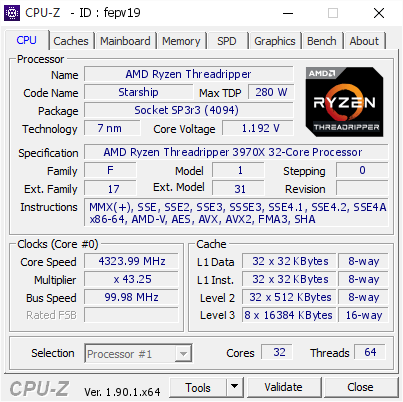
[fepv19] Validated Dump by Anonymous (2020-01-14 14:13:56) - MB: MSI Creator TRX40 (MS-7C59) - RAM: 65536 MB
reef folio
R20 is not reliable for CPUs after a point, in particular that test. There's not enough time for core boosts to stabilize
quick rose
Yes.
exotic sparrow
i'm gonna do blender
just did cinebench
was #6 in ranking, not the biggest score but okay
oh no i
i'm about to hit the Tj. Max
trim fern
So a 32 core TR beats a 24 core Xeon by like 30 points 
sterile flame
32core*
trim fern
I had pizza i am tired now
 vapid berry

neon rapids
o @sterile flame u have a px7 prime too?
sterile flame
Yeah it’s my workstation monitor
sterile flame
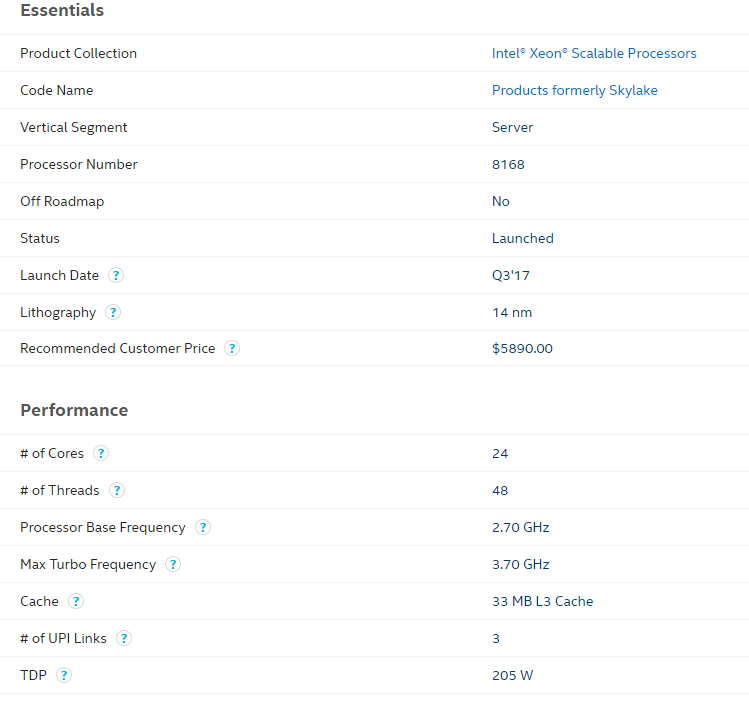
@trim fern that intel cpu is 48c,96thread by the way
anyway i am running blender 2.89 and clocks stabilized at 3.78ghz btw i am running stock
sterile flame

 sage bay
Was about to say - I love seeing this text channel get some love
trim fern
@sterile flame it says Platinum 8168 i am pretty sure this says 24 cores not 48 cores https://i.gyazo.com/5a76c500c4385b5ba7f4b8f067839fa4.png
 sage bay
xeon plats go up to 28 cores - that's the full HCC die. Rocket lake is 38 iirc
Both monolithic
sterile flame
yeah but i am saying way maxon had chip was in dual socket way
so it was running two of them
sage bay
Ya, I mean, silly to weigh brute force, but it's interesting to see inter-cpu or for zen2 interccx latency etc
Rather, how well it scales on various workloads. - like struggling on x265 vs cakewalk on stuff like blender
x265 on my 64c quad socket is pathetic. Cinebench is ok though. Keeps the room warm
sterile flame
if you look a little above chat you can see my running blender
sage bay
I mean, there's a reason why the chips in my board are <$1 per core lol
 left bladeBOT
 Vamps#0001 has been warned
Reason: Bad word usage
sage bay
2700x, 3600, any epyc -made years of server hardware obsolete in months
sterile flame
its crappy because of 1660 btw
trim fern
Also one is for a server the other is for a workstation
sterile flame
intel xeons are workstation too
sage bay
I enjoy the cooling/modding stuff. It's a challenge coercing a supermicro board to let a dell legacy bios tell it to run over spec bclk + max p stae
ecks no
sage bay
I've been using my laptop vs the z390 next to me for no reason the past 2 hours, I feel dumb
first time booting it in weeks, gotten used to the thinkpad
sage bay
1660 is one of the best placeholders to get imo
gt 1050 ti for streamer casual use, or 1030 would be my pick if used /cheap
Are you in the (ex) /r/oc discord, chinese nascar/bapo/2080 ti discord etc by chance?
sage bay
I'd say that was more clear cut back in win 7 - these days, you can strip either team's drivers down to the essentials
sterile flame
@sage bay this was my run on 5700xt if looking for best numbers https://www.userbenchmark.com/UserRun/23579595
sage bay
I only use windows for benchmarking / working with Azure adm/ wadk, hdk etc lately - but I 'm really interested in developing scripts / gui utility to help the folks who like to game / work more than tweak / fight with the OS
sterile flame
was before i put full coverage aio in cpu proby be little worse
sage bay
All air/cold air so far, but hoping to put in some work on the cascade / other water/ peltier stuff this week
sterile flame
nice
sage bay
Just so much reading/reasearch, feels exhaustive. I'm picky about hardware / tools / parts choice
sage bay
I barely subbed on hwbot since I figured I'd redo it all with legit data collection on the real cooling
left bladeBOT
Vamps#0001 has been warned
Reason: Bad word usage
sage bay
Lol, it might kick if you get a 3rd, it's a bit triggy happy, pm if if so
sterile flame
all i was saying out three mobos i was looking at i chose creator
not a fan of asus zenith for all gamey stuff
extreme and creator have same vrm and i prefer msi bios over gigabyte
sage bay
I really want an x299 dark, would be a fun $200 used ish local rig for 4x32GB work work , then drop in my b-die for internet points, any big compute goes to cloud- but I like having a local machine for time efficiency
sage bay
I haven't looked - what's on the vRM? Is is a 10x ir 3555 or something?
sterile flame
its true 16 phase with ir controller
sage bay
That or drmos teamed sicr639 has been asus's game
sterile flame
new
sage bay
Really? No doublers? or?
sterile flame
yeah no doublers
true 16 phase controller
gigabyte use it in their x570 boards than on trx40 every just copy phase count, controller
one
sage bay
i think few configs are inherently bad - there's a lot of nuance - but I think asus is making the right call to devleop towards fewer phases, no doublers, efficient , low ripple, decent transient response and all
I have a true 12 phase in the x570
sage bay
Ya - that's one of the very first consumer pwm controlles to do that
more I though
17 +2 or something silly
sterile flame
tbh i kinda thought 16 phase was overkill for ryzen but TR i get it
sage bay
Phase count is just the intro tothe specs though
Often overstated anyway, but I don't mind the adtertising, easy to see what's under the hood
sterile flame
tbh we got bullzoid to thank about making mobo vendor disclose their vrms now
sage bay
Ah ya the x570 aorus xtreme runs a 14+2 vs the 12+2 in the master, both are IR
Xtreme's FETs are wayyy stronger though, reallly, really overkill
sterile flame
yeah gigabyte went like how can we make most expsive x570 board D:
its kinda shocking tho on trx40 every vendor top flagship minus asrock is true 16 phase
sage bay
I remember actually watching that BZ vid - I like the guy, but I just don't watch enough video media in general to allocate 40 mins to each
sterile flame
hell even 500$ trx40 boards got 16 phases
yeah when i am looking for new mobo i go to him
sage bay
haha I'll look it up, I'm curious, but I'd bet - those chips actually need it
I like TiN, Asus_Raja, Elmor, OCN's Alpha C, most of the win-raid / hwbot crowd
sterile flame
yeah the creator is using 90a power stages too
sage bay
Hard to say from that alone - much of those specs are like monitor 1ms gtg, or like Ford saying the mustang is fast, though in this case, no doube here
Asus was weak on z390 strix/ROG for all but the top two boards - but only in relation to price and how much they circlejerked the VRM
sterile flame
yeah idk just going off bz stuff
sage bay
if they just spoke the truth - 4 teamed phases on a well built platform like a code/formula/, even the hero is ok
sterile flame
for my i9 9900k i am running z390 master D:
sage bay
That's a good one, 6x 2 ir 3555 iirc
sage bay
Nice, ya, should be really efficient. Those fets are on all sorts of hardware. asus runs 4x2 on their x299 strix E even, 10x2 on a few z390 or x299 etremes iirc
They have accurent temp monitoring fwiw
sterile flame
tbh i had issue with asus before so i usually skip them
sage bay
I loved my two M9A's, one ran a 9700k 5.0 no issues on a D15, took b-die to 4133 17 18 18 38 easily
I like the dimm.2 placement far more vs the evga dark's location
sterile flame
yeah i never had pleasure of using evga for mobo but i use their psus and gpus
manic helm
I had the opportunity to use a mobo from them in the 775 days. thought it didn't last long. but I have been happy with several power supplies, 3 gpu's.
sage bay
EVGA's had a handful of stunning boards, sr2, sr3 , all the darks haha, even some of the x299 small boi's, but nothing much more to write about.
I'll still be a 1600 T2 fanboy
manic helm
and I will always fanboy for aorus
sterile flame
sadly i will never be a fanboy of theirs
i had some bad experiences with their boards
i don't fanboy anyway
sage bay
I root for the engineers I/we never see, those guys GB matt must talk to via google translate and back - but man I hate this bios
cinder wadi
Am I able to overclock a Intel Xeon 2643 0 Duel CPU
vapid berry
through the roof
I'm joking I don't know
apparently your motherboard will also play a role in deciding that question so pay attention to that too
 humble sky
anybody else getting bsod's with windows update today?
humble sky
i find it weird it occurs aroudn the time of a windows update... im nervous because its a new pc build for me
i am prolly gonna have to run through the tests prime95 memtest
if im luckily it will be the hdd failing
vapid berry
oof
 exotic sparrow
that is the opposite of a big oof
PBO was disabled for 2nd gen ryzen on my board
i will have to get 3rd gen to reap the benefits
proven canopy
Running zen2 and letting the chip do the work is what zen2 excells in.
exotic sparrow
I OC'd my 2700 either way, 3.8GHz which is modest but respectable
but it's just like PBO because it doesn't stay 3.8 all the time
exotic sparrow
i can probably do that with a much better cooler
only working with a hyper T2 right now
overvolting will only increase the heat
sterile flame
i was interested in how pbo works on new trs but at looking at temps,power draw stock is better on 3970x
the chip pulls betweem 415-430 on package not even including mobo powers knows
 sturdy notch
Sooo question. I was doing a little overclocking on my gpu and now it won't output any display on my Display port. It will display off my HDMI until I login to windows then it goes black.
Obviously I screwed up royally. Is there a way to reset a GPU without having any way to see your screen
quick rose
Did you clock it in the BIOS or using MSI Afterburner or?
sturdy notch
I cant get it to output to my monitor at all to check anything
Well lemme try to load the bios on hdmi
I can get my bios up on my HDMI
sturdy notch
How do you get into that?
quick rose
did you flash it or just use software and what software did you use?
sturdy notch
MSI after burner
quick rose
Ah, K hang on
Best bet is to Safe mode boot, uninstall MSI AFterburner
Restart into Full Windows, reinstall MSI Afterburner.
Redo your clocks
Set Afterburner to NOT load at boot so this doesn't happen again
sturdy notch
Gotcha. What's the key for safe mode?
quick rose
Or, make sure your clocks are safe and set it to load at boot
WIndows button ON/OFF, hold SHIFT key, click restart
at the menu, select Troubleshoot then Advanced
CLick start up settings, then Click restart, then Safe mode
sturdy notch
Okay I'll try it
This is strange now my PC won't boot at all. Mouse and keyboard aren't coming on
sturdy notch
I removed the CMOS battery and put it back and I'm back up. Had to reset my ram speed and fans
I think the moral of this story here is to not mess with my stock clock settings because I'm clearly a moron 😆
quick rose
Lol, happens to the best of us
sturdy notch
It doesn't look like any of my MSI afterburner settings saved. Hope I didn't physically damage my card somehow. Hmm
sturdy notch
Hmm something is very wrong still tho. It booted to my desktop but then blacked out
Not sure at this point. I uninstalled afterburner told it to erase settings. Still can't boot with display port and my monitor goes insane after booting to desktop on hdmi
quick rose
Define insane
sturdy notch
Well now it seems to be working fine through HDMI but getting no output through display port
quick rose
That's kinda odd
sturdy notch
Man this is strange
Only thing left I know to try is a different display port cable. And then if that doesn't work I guess have someone look at the hardware
manic helm
what card is it. some of the rtx cards do this from time to time.
cinder wadi
Should I put my core voltage up to 100 using an RTX 2070 S
humble sky
anyone know how to interpret windbg memory dumps?
how do you match an exception address to a driver?
i cannot find a logic flow for using and interpreting the dump file info
(these 16 character adresses can be linked to their respective drivers or hardware by doing this or that)
 jade pulsar
Adding voltage to gpu gives it some headroom but really doesn't affect the performance much when overclocking.
you can leave it at stock and it should be fine
 jovial maple
3.85 on 2600 at 55 c should i p ush it harder?
 hard goblet
idle?
manic helm
most 2600's will do 4ghz. as long as its staying cool you should be fine
 random oyster
Does anyone know the best overclock for an i5 9600k? Currently, I have it at 4.8ghz, max temps at 60 c at 1.33 volts
 spring apex
Hey guys, first time poster here.
Currently have a R7 2700 non-x @ 3.2Ghz - I was attempting to OC to 4.1Ghz, but couldn't get the voltage right, I was able to get 3.8Ghz with 1.3v (can't remember exactly). But could never get a Cinebench off with anything over it.
Have just switched out my ASRock B450 Pro 4 to a MSI B450 Gaming Pro Carbon AC as a few posts online stated the ASRock board was poo for OCing.
Happy to say, I'm now running @ 4.1GHz, and can finish Cinebench tests! Best score so far is 4066 with a max temp of about 73 deg. celcius.
My question is though.. I didn't have to set a voltage for the OC, is this due to the board automatically managing the voltage? Or was i just lucky that it run at whatever it was set as?
dull ginkgo
Board prob had voltage on auto
quick rose
Well, the max boost for the non X 2700 is 4.1 ghz so......that's not really an overclock.
dull ginkgo
Bekora I mean 4.1 all core is still a oc
quick rose
Eh, kinda. PBO can do that too
jovial maple
no 55 c is while playing a agme
 fresh jackal
Is it "easy" / not to difficult to OC 2 sticks of 2666mhz ram to 3000 MHz ?
quick rose
Depends on the RAM
Gotta have good chips for that
And your timings will go up so it may negate the frequency boost
fresh jackal
Oh alright, might just buy directly a 3000Mhz kit then. Ty
proven canopy
What kits specifically? A link to the product page, or running a userbenchmark and linking it here is an easy way to share relevant info.
fresh jackal
For OCing 2666 MHz I was just asking in general, and if I were to buy a 3000mhz kit i would buy the G Skill Sniper X or something like that
proven canopy
I ask because OC headroom varies widely between various 2666mhz or 3000mhz or any xxxxMHz kits.
if you want a great 3000mhz kit for OC purposes - check out the ballistix sport 3000 cl15 kits , or 3200cl16, same Micron Rev.E in either
fresh jackal
I see. Thanks for the recommendations
That’s not what I really want though. Sorry if I expressed myself unclearly. All I would like is to run ANY 8x2 kit at 3000Mhz, I don’t care what brand it is or whatsoever
I don’t mind OCing <3000mhz kits if that’s the way to do it
proven canopy
I see. Not usually, no - but some very comitted enthusiasts wil lhunt ebay for unmarked, OEM samsung 2400/2133 kits to OC etc
But current ddr4 prices make 3000mhz xmp rated memory very cheap imo
fresh jackal
The cheapest 3000mhz DDR4 kit is priced at 80 USD where I live. Maybe I should get a cheap kit from Newegg / or any other website
Let me check PCPP
proven canopy
Does your config need 3000mhz memory specifically?
fresh jackal
No not really. I just want 3000+ because I heard Ryzen CPUs benefit a lot from fast ram
I’m building a R5 2600 system
proven canopy
Gotcha, yep, it certainly can. 2600's are great, amazing value on the used market. Let me know if you want input on component choice/shopping.
fresh jackal
I’ll do that, ty appreciated 😉
neon rapids
@fresh jackal I’d look into the ryzen 1600 AF model instead. It’s a 12nm 1600, so a 2600 with slightly lower clocks for $85
fresh jackal
Thanks for the recommendation, but 1600s aren’t sold locally. Buying one from from Amazon with shipping fees will be equivalent to buying a 2600 from a local website.
If I were in NA, I could’ve benefited from this decent offer indeed
exotic sparrow
R5 2600 is rated for 2933 so 3000 is probably good, but 3200 is better
 compact lion
What’s a good over clocking setting for a rygen 2700x with a stock cooler
fresh jackal
I don’t think you should oc too much with a stock cooler though
neon rapids
Just turn on PBO
 deep current
Hi, what is a safe voltage for a 3900X?
I was able to get 4.45GHz all cores at 1.35V, and it doesn’t go over 70C
Is that safe or should I try lowering the voltage?
 violet condor
foudn this "The safe voltage you should run is no more than 1.4v with a conservative Load Line. 1.35v with an aggressive load line"
also is 70c at load?
or at idle?
violet condor
i would assume a constant load
i wouldn't go above 1.35 just in case
but the temp is good too
deep current
I’m testing different voltages, I got a better cinebench score at 4.4 1.325V than 4.45V at 1.35
violet condor
you're the dude with the broken ram slots that rondomly fixed itself right?
violet condor
dope
so granted im not adept at oc at all, but i think 1.35v is fine, but i wouldn't go higher
the only "oc" ive ever done is clock my ram to its on paper spec lol
boreal jungle
As long as your CPU isn't going above 70C at 1.35v, that's completely fine.
I wouldn't go any higher than 1.35v.
When you're overclocking a Ryzen CPU that high, it's good to be around 1.35-1.37v, depending. But in your case, if 1.35v works, stick to it.
deep current
I was able to achieve 4.5GHz on 6 cores, 4.475 on 3, and 4.45 on 3
All at 1.35V and peak 68C
I’m working on getting the 3 4.475 to 4.5
PBO didn’t go over 4.1GHz for some reason
violet condor
thats still a lot better than stock tho
deep current
The fastest 2 cores can reach over 4.6
But I have to set the same speed for each CCX
I’m trying setting a 4c 4t CPU profile for single threaded tasks at 4.6GHz
Just to see how far I can push the best cores
violet condor
lol if i can get an aio i might try oc now
deep current
What cooler do you have?
violet condor
stock ryzen cooler right now lol
although i do have a better cooler, its just ugly
but i want an aio
proven canopy
Terk benching the 2990wx on a zenith extreme alpha
https://www.twitch.tv/theterk

 cold jolt
would one be able to achieve extremely high clock speeds if all but one core is disabled in the bios?
like, if you had a 9900ks, and you only ran it with 1c/2t
vapid berry
👀
cold jolt
wouldnt you be able to take that sucker up to the 6ghz range on a real good cooler
considering power wouldnt be a huge issue with only one core
and thermals would be 1/8 of what they normally are
well, there would be 1/8 less heat output
proven canopy
Ya, that's pretty common actually
I work voltage up and timings down when tuning from stock to a chiller / LN2(when that time comes) etc geekbench3/superpi/GPUpi run ,Set
Set core count to 2, HT off, 1.4v+ sa/io 1.4+ vcore 2.1vdimm to get the mem to train, then drop most of those back down other than core , usually want to aim for at least 4000 cl 12 11 11 18 2t 280 65555
proven canopy
That's just general convention - frankly I just googled around enthusiast forums / watched some youtube ln2 pouring sessions to get an idea then only had to test a bit for platform specific settings
no different than most of what I do I guess, intrenet makes it ez
cold jolt
ahh
so what about single or dual core on just a normal water cooling loop
or is about 5.4 5.5 just the limit with that sorta thing
hard goblet
yeah my core2duo can use some fresh wota.
proven canopy
I understand your question now.
tl;dr - you can test ecah core for bin pre-bench, 2, less heat ofc, HT off so no shred cache.
cold jolt
what do u use to test each core
proven canopy
But chips designed to be 1-2 cores - they're just older
FX 8350's do near 8GHz ln2, all kinds of old / or even "legendary" hardware from over the years all come with quirks
cold jolt
ive seen that
sterile flame
@proven canopy have you got hands on 3970x for custom Loop ocing yet?
proven canopy
Wasn't really planning to - the order I did make was pretty obviously a price mistake, just figured I'd try my luck.
I think the chip would love a solid custom loop - I woulnd't buy one for OC though.
Great VM/general HPC platform though
sterile flame
yeah i use mine for work with EK stuff minus rads which hardware labs
anyway good stuff 2990wx @proven canopy
proven canopy
Oh - lol, to clarify- I'm not that guy in the stream lol. I usually state that explicitly.
sterile flame
o
proven canopy
I post channel relevant streamers content here when they go live pretty often, my frinds at least
sterile flame
ahh makes sense
proven canopy
We've done collab pcpp / build advice / bench streams in the past, more to come once I get set up - hopefullly
sterile flame
its kinda funny how i have enable ln2 mode on creator or it won't post from cold boot
proven canopy
Hope that's safe. - should be ok if you're very attentive to all the voltages
sterile flame
its running pbo mode from MSI
proven canopy
Boards have a mind of their own often IME - things like VCC PLL , PCH etc can have a mind of their own
sterile flame
my buddy says TR still has cold boot issues anyway
proven canopy
Odd - CBB for 3970x shouldn't be higher than -80C or so
sterile flame
idk my buddy help me turn it on and i went bed for like 5hrs and posted fine but if i left auto i would not post
i been looking forums and such too all had same issue
i think i looked at forum where asrock has enable as defult since TR chips won't post otherwise from cold boot
its something to do with current firmware or bug in that makes TR won't post
proven canopy
AMD's HEDT platform can be stubborn. But the performance justifies every resulting headache imo. Especially on zen2
sterile flame
tbh minus cold boot issue its been way better than last gens @proven canopy
rock stable
i think only other fault i seen is temperature issues for some
but they proby not using right cooling for chips
like my with loop my chip never goes over 72c on advance tune pbo and chip is clocking 4,150
proven canopy
Getting zen2 TR to bench with acceptable timer precision has been giving a few guys some trouble. Idk - country cup ended late december
sterile flame
i think had some issues like that before too
i had reinstall windows like 3 times to get it right
i think all current TR issues is more new platform than chips micro code
proven canopy
Nothing wrong with the chip microcode
New bios on a small market segment product soon after launch always has a few bugs to fix
sterile flame
honestly i am kinda shocked MSI bios been rock stable for me
proven canopy
MSI's small army of Taiwanese dudes keep breaking that world record for memclk
sterile flame
yeah i think my creator has 5ghz profile for memory
its kinda shocking MSI is doing more extreme Ocing than Asus at moment
proven canopy
Asus ends of dominating the leaderboard usually. For motherboards at least, every bench
neon rapids
L
jovial maple
L
dull ginkgo
The Club they shall join
violet condor

jade pulsar
How many times is he going to get kicked for language
sterile ridge
Shhhh
dull ginkgo
@jade pulsar Once, ban for every warning after that
jade pulsar
True dat
short blade
how should I handle voltage on a R5 3600X
neon rapids
set it to PBO
 urban maple
Would anyone know why my and ryzen 7 2700 won’t overclock past 3.5ghz?
I’m using ryzen master btw
dull ginkgo
@urban maple have you changed voltage?
urban maple
Yes, I have changed voltages in many variations, but mostly around 1.3 volts
neon rapids
2700 or 2700x?
urban maple
Just a 2700. But I forgot the specific name of my cooler (got it about a year 1/2 ago) but it’s a single fan - liquid cooled - cooler master
@dull ginkgo
urban maple
Usually are
dull ginkgo
So what happens when you put it above that?
urban maple
Highest I’ve ever seen it go to while gaming was 65 ish
dull ginkgo
(Frequency)
urban maple
When it out it above 3.5 I’d run a stress test and my pc would crash
No bull screen it just goes black
dull ginkgo
Ok thats normal
Thats really wierd imo
I only get the black screen at like 4.2ghz
You only adjust freq and voltage correct?
No messing with memory on top of that?
left bladeBOT
 Gavin - Beanbag#4779 has been warned
Reason: Bad word usage
dull ginkgo
Rip
left bladeBOT
Gavin - Beanbag#4779 has been warned
Reason: Bad word usage
Gavin - Beanbag#4779 has been kicked
Reason: Too many infractions
urban maple
Yea I got that
urban maple
So I didn’t mess with the memory just the freq and voltage
Idk it’s really annoying I’ve tried looking up stuff about this and nothing helped
dull ginkgo
Can you take a screenshot of your ryzen master screen?
Just want to make sure nothing wierd
urban maple
I’ll be home in 15 minutes then I will
hard goblet
sterile ridge
Weird*
exotic sparrow
some of them don't OC very well
re: 2700s
mine doesn't OC very well
i actually messed it up in ryzen master and now i can't load ryzen master up
or it'll throw me into a reboot loop until the bios kicks in
neon rapids
ayy got 2.2ghz stable on my 1070 ti + 400 on the mem with a quiet fan curve
exotic sparrow
I can't get a decent OC on this CPU when before i had like 4GHz , idgi
neon rapids
did voltage get messed up?
exotic sparrow
using Ryzen Master it might have
also now i can't use ryzen master again because it'll auto-OC and send me into reboot hell again
unless i uninstall and reinstall
 orchid shuttle
can you overclock with hyper 212 evo. if so can i oc my ryzen 7 1700x on a x470 mobo?
exotic sparrow
maybe
 tranquil basin
@orchid shuttle test it with ryzen master
jade pulsar
All cpus are different, your mileage may vary
 latent wolf
Best Bet is to Not Overclock Over 10-15 percent of the Max Frequency when Using a Stock Air Cooler. With Liquid Cooling You can go as High as 20%. Anything more than that and you are asking for trouble.
sterile flame
1700x maxs around 4.0ghz and safer bet is 3,8-3,9
 dawn ether
What do you think would be a good aio and overclocking settings for r7 3700x?
dull ginkgo
@manic helm is that 4000mhz I see?
manic helm
ya, I don't think the poor athlon can handle it, but it wont be the limiting factor
dull ginkgo
cl18 tho
manic helm
actually 19. These sticks are about 3 years old
dull ginkgo
you cant exactly compare 3000g to higher end consumer hardware
manic helm
samsung e die
manic helm
yup there were no tight timing kits at that speed when i bought them
manic helm
not super tight timings, but I think I had it running in the past at 3600 16-18-18
for tonight I am just going to stick it in my x470 gaming 7 and play around with it with my rx480 and some Aorus 3200mhz ram. Tomorrow after I flash my b450 board I will put it in there and play with the integrated vega a bit. Might run some benches and compare it to my pentium which is also 2c 4t.
The integrated graphics on the pentium saw a big jump in performance with the faster ram, which is to be expected. It wouldn't hit 4000mhz, but it did 3800.
but its been a few years since I did any benchmarks with it
manic helm
Preliminary quick testing of the 3000g will get into windows at 4.3ghz. it hangs at 4.4 before loading windows
4.3 is not stable

 hard ice
nicely done :)
manic helm
Dont think i can make the jump to the next spot in overall score with my rx480 in the system. I would need another solid 400 points to beat out the next user.
might be stuck at #6 3000g unless I get motivated to put my cpu in my custom loop with my 2080
but thats a lot of work
I guess I could pull my rx580 out of my itx and do a quick crossfire run. that would put me somewhere in the neighborhood of 1st place I think. Pretty sure my crossfire could take that 2080ti in first
but that would have to wait till tomorrow
 slim warren
anyone have recommended overclocking settings for an i5-9600k and 2060S
boreal jungle
I’ve got 5.0GHz on my 9600KF with 1.32 core voltage. But I’m on a liquid cooler
Only difference between the K and KF is the KF has no integrated graphics, which gives you a little more juice to overclock, but I think you can hit somewhere around 4.8-5.0GHz easily.
slim warren
yea i a 240mm aio on mine
dawn ether
Anyone have any overclocking settings for r7 3700x on h115i?
dull ginkgo
everything depends on your chip
its different for every chip
you gotta trial and error test it
boreal jungle
yea i a 240mm aio on mine
@slim warren You'll be fine then. I'm running the Corsair H75 which is a 120mm at good temps.
slim warren
@boreal jungle what mobo are you using?
slim warren
RIP me u said cheap, after having my PC and watching videos etc., I definitely wouldve spent the extra money for it but I'm broke so if I want that its gonna take me a while to save up for it but ty.
I just wish everything PC relating isnt so expensive
 weary sage
should I revert my oc settings while the gpu isnt under load or nah
it idles at like 40 shouldnt be a big deal right
sterile flame
so when dealing with fclock, am i understanding that you should sync it to your RAM speed 1:2? i.e., 1600MHz fclock with 3200MHz ram?
sterile flame
nvm guess my issues were with ancillary RAM timings and RAM voltage
 wild halo
should i overclock my GTX 960 with msi afterburner?
 mortal yarrow
maybe
 lusty harbor
any idea how to overclock a 4790k with a B85 pro gamer motherboard from Asus without getting power surges
 peak flint
Idk if this is the place to ask but is it wise to enable MSI game boost and smart fan control?
 sacred kernel
manic helm
sacred kernel
manic helm
This little athlon 3000g still wont go over 4.2ghz stable, but I have it running 3800mhz ram @ 16-18-18-18-36-54 1T
I wish the memory controller on my 2700x was this good
 exotic glen
i have the ryzen 7 2700x with the wraith spire air cooler was wondering if i could overclock with that or should i get a better cooler before overclocking?
manic helm
Spire or Prism? The 2700x should have come with the prism. Prism is square, spire is round.
if its a spire you are probably not going to get much out of it. The prism is better but don't expect to get any amazing overclocks. Generally speaking with an X cpu you are better off just letting it boost on its own with PBO and XFR.
exotic glen
its the square one which ever one the 2700x comes with
so there is not a big upgrade to overclocking the 2700x?
 kindred trail
Overclocking 3900x to 4300 at 1.3 volts. The ryzen app and hwinfo app say the cpu is hitting 82c but asus app shows its 63. Which is correct
 bold pine
kindred trail
bold pine
kindred trail
Yeah on cinebench r20. It hit 82c which is just into the 3/4 temp zone I dont feel like it every stay there in any of my games or browsing. Dont want to damage it me extra 400 points over all stock
Idles at 40c might reach 50c playing around with multiple apps open not breaking 15% cpu utilization
Water cooled if that matters
 opaque badge
Do I need a better cooling on a ryzen 5 1600 at 3.7 ghz?
boreal jungle
Depends. What kind of temps are you getting?
 candid mica
should i increase my i7-9700k to 4.2MHz with a noctua u-12a?
currently at 3.8MHz my cores are at 32C with a max core of 48C
candid mica
yeah i meant 3.8GHz lol was reading 3800 MHz and forgot to convert it lol and alright i just dont want to overdo the GHz on it and make my processor die because of the cooler isnt powerful enough
sterile ridge
That wont happen
If it gets to the point of thermal throttling, it kinda just turns off
Its still bad for the cpu, but it wont burn it
candid mica
ah alright well i just bumped it to 4.2ghz and it idling at around 40C with a max core fo 50C
neon rapids
https://www.funkykit.com/reviews/cooling/noctua-nh-u12a-cpu-cooler-review/4/ its fine at 78c, as long as its under 85c its perfectly fine

Performance Performance of the NH-U12A cooler has been tested on the above-average gaming rig. Its most important part (at least for our tests) is the i7-9700K processor which is one of the more popular processors ...
 indigo jacinth
what’s the best software for overclocking an rtx 2070
 blazing venture
whatever brand that it is.
use the software that comes with it.
evga = precision boost
msi = msi afterburner
etc etc
indigo jacinth
what about gigabyte
blazing venture
do a little research 😛
dull ginkgo
MSI Afterburner I know for sure can be used with any kinda card
but brand specific overclocking tool might be nice, idk
quick rose
MSI AFterburner for anything, including AMD
manic helm
I do stuff for gigabyte/aorus, but avoid their overclocking software. Aorus engine is getting better, but afterburner is still better.
sterile flame
@quick rose o boy look at this result
short blade
anyone know why my gpu is stuck at 781mv randomly now
it says perfcap idle while running 3dmark..
short blade
nvm it was an afterburner bug
short blade
i can't get my zotac amp 1080ti anywhere higher than 1949MHz @ 1V, still have plenty of thermal headroom left
just bad silicon luck?
 prime quiver
I guess so
short blade
 zenith meadow
hello
I bought new pc and still newbie on this and first time
do I need to underclock on this I only play dota2 everyday
i have ryzen3600 and 16gb 3200mhz and rx 570 4gb
zenith meadow
@hard goblet if i have 170fps... do i need to lower it down to 144fps?
hard goblet
yes
zenith meadow
i thought more fps is better
i am learning undervolt on gpu, i am still downloading the benchmarker
hard goblet
yeah but look at your draw
zenith meadow
what is that?
zenith meadow
ahhh if 55-60 no need to undervolt?
hard goblet
i can tell thats not ultra settings
well my 570 is dead xD i love to play dota on it too...
crysis 2 maximum edition kill it
zenith meadow
the gpu util is 100% while cpu 28% is it okay?
hard goblet
4 hours ultra settings
zenith meadow
i always play since dota 1. first time trying 144hz monitor and when I play other games it takes 2 days to download but play only 1-3 hrs then quit
only dota till death
i dont know why i dont bored on this. i started in highschool then i am on the 2nd job now jahaja
hard goblet
i notice the character in dota is not smooth if i dont cap the fps xD
because of freesync
just the character
zenith meadow
by the way, i still need the freesync though cause i only use dvi port and my gpu doesnt support it. i found gpu with DP and its rx580 8gb from aliexpress iit worth upgrade?
zenith meadow
didnt experience it though after 1 month of try
hard goblet
you have 144hz?
zenith meadow
yeah
hard goblet
use display port
zenith meadow
my rx 570 dont have it
hard goblet
your gpu doesnt have dp?
zenith meadow
its also from mining card
zenith meadow
i am planning to buy rx580 8gb still from aliexpress
hard goblet
ow i see mining have u flash the bios yet?
zenith meadow
what do you mean flash? i updated the bios to the latest from msi site
hard goblet
buying mining card is fine if the last owner are taking care of the temp and its status
you lucky to get working one but sad no display port
zenith meadow
yeah its already 2 years to me now. no issue so far, just changed the thermal after I received it and blow the dust
hard goblet
flash bios = because they put custom bios there specific for mining
if they already remove it before selling it then +1
zenith meadow
many people buy mining card, its safe cause its maintain by miner. i found the video about from tech yes city
hard goblet
yup but sometimes people gets unlucky.. you got lucky tho
zenith meadow
cheaper than 2nd hand videocard
many listed on aliexpress with free shipping and just wait 15 days
hard goblet
yeah i bought rg350 on aliexpress few weeks ago
zenith meadow
better than buying brand new. worth a lot
hard goblet
yup
zenith meadow
only first time buying new parts right now. but still need case though.
hard goblet
i only play dota 2 only too xD my card is 5700
we do buy seasonic platinum psu lol in ali express too last year
from a miner
1000w ... and it cost like 40% off the original
good deal xD..
 pallid ermine
ive managed to get stable with my 5700 at 2040 core 1890 memory. hows that compare to the rest of yall?

 manic helm
@shy sequoia I can get into windows at 4.2 with my 2600 (non x) but never managed to get it stable. I was in the 1.5v range by that point and didn't want to push it any further. I hit a voltage wall around 4ghz. 4.1 is stable but takes over 1.4v
shy sequoia
Thank you for the insight
short blade
screen is artifacting beyond +250mhz on mem
was perfectly fine at +500mhz yesterday
any reasons for that
its artifacting at idle
short blade
ima try turning off this multi display power saver from nvidia inspector
cold jolt
k
short blade
cause thats the only thing i changed since yesterday
im running an undervolt below stock clocks so i really doubt core clocks are the issue
cold jolt
before or after the multiplier?
cold jolt
unless you got unlucky and got a bad chip
short blade
i think my gpu is near the bottom of the silicon lottery
comparing my undervolt results to others of same model
but im not terribly worried about it
i have to run 1.063V to get the same clocks some people can get at 975mV
but my temps peak at 66
so it's whatever
yeah ok i think it was just the power saver thing
maybe it was the switching between 607mhz and 1569mhz that was causing the artifacts
it was always just like 1 artifacted frame flashing on the screen
apparently nvidia gpus refuse to automatically downclock to idle speed if u have a 144hz monitor + a second monitor
so i was told to try this power saver from nvidia inspector
guess not
cold jolt
cool
short blade
kinda sad that my gpu silicon is bad, but i guess its better for someone whos just undervolting to get bad silicon rather than someone trying to push clocks as hard as possible
cold jolt
yeah ig
i mean its not like you get a huge perf increase anyway
but its good to save power
and produce lass heat
latent wolf
I have a MSI Radeon RX-470 ARMOUR OC 8gb GPU and when I try to overclock it to what a MSI Radeon RX-570 is My system runs really stupid and my GPU shuts itself off and I get a black screen. The Clocks arent that much different between the 2 GPUs. Anyone know why its doing this? My system is a Gigabyte B450 AORUS-M Motherboard-32gb of DDR4 3000mhz Corsair Vengence LPX RAM-Ryzen 5 2600X 3.6ghz 6 core 12 thread CPU with the RX-470 for my GPU.
sterile flame
lower the clock so it doesn't crash or raise your power limit to make it stable
latent wolf
I cant raise the power limit in Afterburner. Now when I used the latest Update for the RX series cards i was able to auto overclock to 1300mhz clock and 1650mhz on the Memory
But In Afterburner I cant get a stable overclock on it.
 spiral vigil
Who got recommended settings for a gigabyte 1660 oc 2 fan