#overclocking
1 messages · Page 43 of 1
 exotic sparrow
 spring valve
@exotic sparrow had to reset my pc
exotic sparrow
yes
 left bladeBOT
 aux#1337 has been warned
Reason: Bad word usage
exotic sparrow
that is normal
exotic sparrow
you should've been able to clear your settings, then set XMP, then restart
spring valve
I did exactly that and it didn't boot.
 sterile flame
Did you un raid it
spring valve
Dunno what that is
sterile flame
Well apparently you set it to raid mode
 neon rapids
@sterile flame 👀 what kinda cooler u got on that
 blazing venture
senior has won the lottery with that cpu
sterile flame
A 212 evo with deltas tied on with a Nike dadshoe shoelace
neon rapids
that’s about as bootleg as I’d expect from u ngl
sterile flame
and yet i yeet on everybody else with the same chip
 fringe crystal
Why a 212
sterile flame
for the memes
 manic helm
I overclocked a 6600k to 4.9ghz on a 14 year old TT big typhoon
it was a bit toasty though
realistic overclock goals on a 2600 should be somewhere in the neighborhood of 4-4.2 ghz
mostly closer to 4
manic helm
At 4ghz you can use it to get some #1 3dmark scores like this epic one I did

3DMark.com
AMD Ryzen 5 2600, NVIDIA GeForce GT 620 x 1, 16384 MB, 64-bit Windows 10}
😄
 manic helm
time spy extreme on a 1gb card. so much powah
It was surprisingly hard to get the few points I needed to get past the #2 guy
not much room for improvement with scores that low
sterile flame
Sup
sterile flame
manic helm
I have killed lots of hardware, never just from high clocks
 quick rose
Nope, it just BSOD's
You reset, good to go
I have killed a CPU with too much voltage though.....I kept it as a momento of my oopsie
manic helm
except maybe some ram on a radeon 32mb card back in the day, but that could have also been moisture
sterile flame
power=heat. if you undervolt a vega 64, you can reduce the heat and raise the frequency
manic helm
I stuck the case outside my window when it was about -10F
quick rose
WHOOOO
sterile flame
hell yea man, you can get mad overclocks like that
manic helm
she ran good until she didnt
sterile flame
This channel better
manic helm
later in life I just did a custom loop with the rads in a box that could go outside the window, but that was a condensation maker
quick rose
Still arguiing in main chat
-_-
Oh for sure
SOmeday I'll do a custom loop
but not in my NZXT H440
manic helm
This was around 2004ish
sterile flame
@solid arch look at all the room we have here :)
manic helm
had a giant tower and a separate box with the rads. Was a pain carrying it around so I put quick disconnects from an air compressor and big ugly brass ball valve shutoffs.
that system was so much of a frankenstein
I wish I could find the cpu block from it. I would like to try it on a modern cpu
sterile flame
my waterblock is arriving tomorrow, i'm pretty hyped to get this up and running
i got a massively powerful pump to boot
 sleek quest
PSA: Increasing frequency and only changing frequency will cause power consumption and heat to rise. To avoided this you also change voltage and/or use better cooling

Frequency itself can cause changes in heat, that's a very basic known about overclocking.
manic helm
I don't think this poor atom is going to do very well, Its been years since I tried using it.
the board boots after I fixed it, but cinebench is crawling along very slowly
 manic helm
A mighty 43 points in cbR15
you could possibly get up to 5000mhz on the ram
but you will need voltage
lots and lots of voltage
 vital dagger
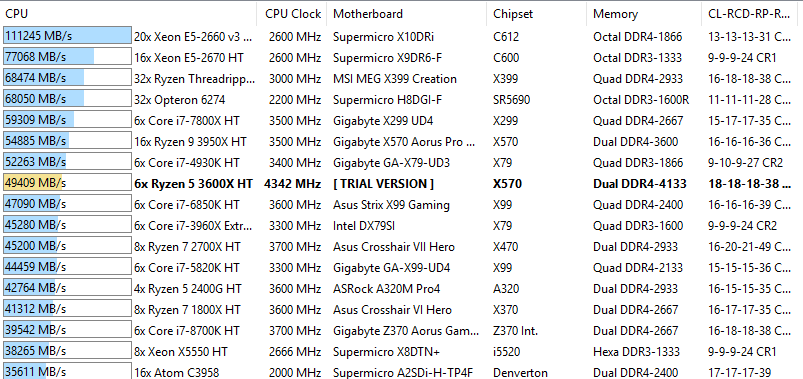
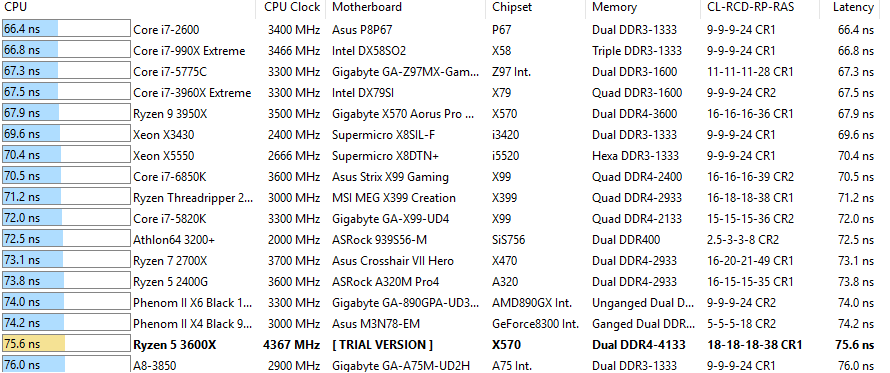
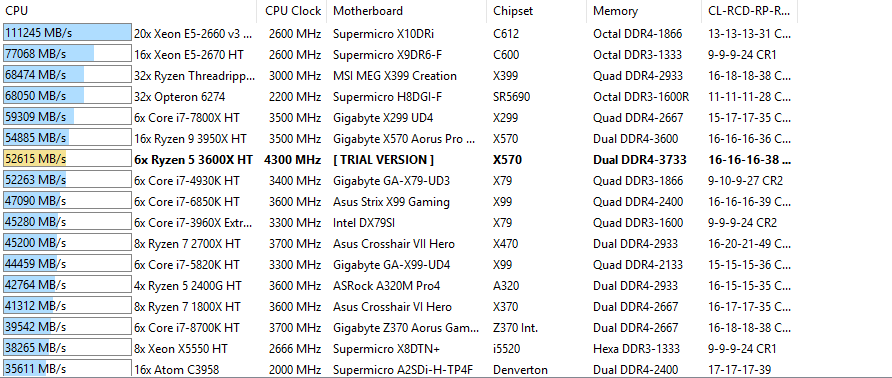
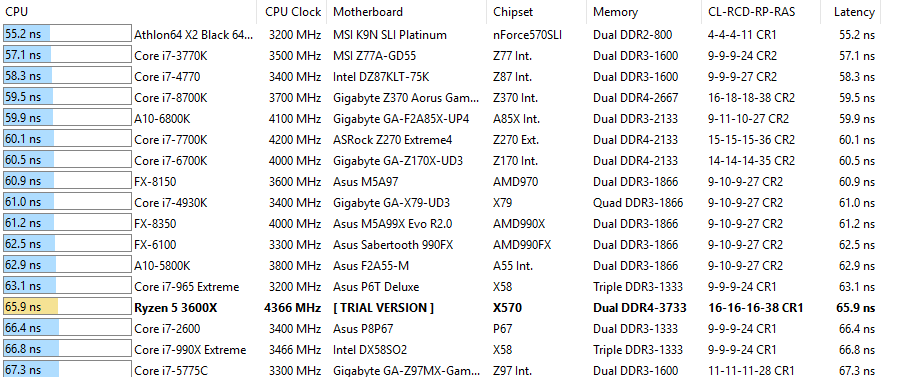
you get worse performance on ryzen 3000 parts when you are no longer in 1:1 with fclck
3800 1:1 (so 1900mhz) is the golden cpu territory, that + tight timings is about as good as you can get on them
mine hangs during boot when trying to start the gpu at 3800 1:1
so 3733 1:1 (1866) looks to be as high as I can get
manic helm
3800 is a lot to ask from the pcie at 1:1
vital dagger
it's all tied to the memory controller on the cpu
manic helm
ya, but you can drop out of 1:1 to get higher. performance might not be ideal, but it would allow you to play around with higher frequencies just for the fun of it
vital dagger
hence the 4133 xmp above, I tried it
been there done that, went back to 3733
i'm all set memory wise at least if the ryzen 4000 parts can do higher 1:1
manic helm
on my old z170 I had to drop fclk to 800 to get over 200 bclk. it would just freeze hard at POST
the fact that they can go that high is an improvement. my 2600 has issues with getting 3200 stable and my 2700x wont go over 3400
vital dagger
yea basically every 3000 cpu can do 3600 afaik stock
provided you have good memory/mobo
sterile flame
here's the thing though. it's not "frequency" per se, but workload and intensity of said workload. frequency (c) means nothing when latency and throughput are ignored. given these conditions, frequency allows for heavier workload over (t) period of time when latency remains the same. given heavier workload with latency being the same, throughput (d) increases. if throughput requirement increases, more transistors will need to switch within a clock cycle. there is a power requirement (p) for switching (z) number of transistors. there is a static number of transistors (a) within a core
the passage of clock cycles exists independently from that of throughput, however, the reverse is not true.
d/t=z
(z/a)=d
if z>a then d/a=c
p:d
What can we infer from this?
manic helm
that math is hard?
vital dagger
if every measurable metric is lower when tested when at a higher clock speed on it vs a lower clock speed, there's zero point going for the higher clock speed
now if my bandwidth increased a bunch at a higher memory speed but my latency suffered, there would be use cases that would benefit in some work loads
manic helm
I wouln't say zero point. its all about having fun if you enjoy pushing hardware to its max
vital dagger
but everything went down
manic helm
these guys pushing m die to 5ghz+ arent doing it for performance, its all for epeen
sterile flame
btw, IF is your bottleneck there my man. best latency you could ever hope for on a subzero suicide voltage run is 50ns for mem latency at IF clock of 2000
manic helm
LN2 clocks don't mean anything for real work, but people put a lot of effort into it
and a lot of money
sterile flame
but the conclusion we draw from what I posted was that power depends on throughput
vital dagger
there's an oc forum with a topic on 3000 part latency's and even at the highest 3800 with the tightest timings no one is getting sub 60 ns
manic helm
I am sure some people at intel are still bitter that amd holds the highest clock speed record
vital dagger
at least when I last looked a couple months ago, can't recall the forum now
sterile flame
best me and da boyz ever got on any zen was 50.4 or so ns on a 1920x
vital dagger
zen 2 has looser latency yea
manic helm
I think the best I have seen on my 2700x is around 70
vital dagger
zen+ can get tighter
manic helm
but I haven't pushed it too hard
sterile flame
power is correlated with clockspeed via throughput,
power scales slightly exponentially with throughput
when the throughput is bottlenecked by how many transistors may be switched in each clock cycle, then power and heat scale with frequency up until the point where throughput becomes bottlenecked by the latency/bandwidth limitations imposed by the other components
SO
FREQUENCY != HEAT
manic helm
higher frequency will increase heat even at the same voltage, but not enough to kill anything. especially modern hardware that monitors temps all over the cards and will throttle to protect itself
everything is power limited these days, so unless you go crazy and start bypassing power limits its really hard to kill a card
something like the vega 56 mods that GN used is definitely into the degradation range
sleek quest
you literally just argued for why frequency does increase heat.
here let me dumb it down for you. A transistor has 3 leads, A B and C. Positively charged materials is around Leads A and B with negatively charged material in between. Lead C is on the edge of the negatively charge material. When potential current is waiting at lead A and another current is applied to Lead C current passes to lead B and a small amount of heat is produced as a byproduct. if you were to rapidly pulse a current on lead C it would take more power and create more heat in a given time frame. If you pulse lead C even faster that's more total power used and even more heat. Lets call the pulsing of lead C Frequency as it is the speed of which you are pulsing. Increasing the frequency of pulses takes more power and creates more heat byproduct.
This is a VERY basic concept in entry to electronics. Now intender is correct if you don't disable safeties a CPU/GPU will clock down to save itself from over heating.
blazing venture
I like to throw caution to the wind.
sterile flame
did you read what I wrote?
 solid arch
Did you read what you wrote?
sterile flame
yes, heat is dependent on transistors that are actually switching.
sleek quest
yes and when you increase the the frequency of a CPU/GPU you increase the rate the transistors are activated, that's LITTERALLY what frequency means. Now technically that's 1 or 2 layers removed by IPC but the frequency means CLOCKS per seconds and IPC means INSTRUCTIONS per CLOCK. every instruction will activate transistors.
sterile flame
if all transistors are switching, then the chip would be consuming insane abounts of power
and idle and load would be the same
but that's not the case is it?
sleek quest
 if you are putting a CPU/GPU under load at 100% usage the reason it does more work at faster frequencies is because the transistors are activating much more rapidly
it's not a hard concept to understand
sterile flame
so there are transistors that are activating less rapidly on idle?
sleek quest
not really
sterile flame
then what do you mean activating much more rapidly
sleek quest
they activate just as rapidly as at full load, the amount work changes and the amount of transistors used changes
sterile flame
that's it man
the amount of transistors being used changes
with the amount of throughput
like if you had read what I posted you would see that's what I said
sleek quest
and I'm saying if you are at 100% load like you would be in a benchmark the reason it works better with higher frequencies is the transistors are activating more rapidly than if it was at full load with a lower clock
that's the entire point
sleek quest
you don't understand what you posted. increase in frequency at the same given load will cause more heat.
sleek quest
that's what I've been saying the entire time
 tight plinth
I would take a guess that Shingle took some sort of thermal dynamics course given the equations that were given
sterile flame
you make me feel like I haven't felt in years
sleek quest
less total load/usage != lower frequency
sterile flame
and yet equals less heat
sleek quest
that's a no brainer
sleek quest
more load and more frequency BOTH cause more heat
sterile flame
its loaded transistors per clock
sleek quest
when you run a stress test you are sitting at 100% CPU usage/load
that stress test at 3.5GHz will produce less total than that same exact test at 4.0GHz.
The load didn't change, the frequency did
sterile flame
lets say 5,000 out of 13,000,000,000 transistors are loaded per idle clock cycle. 12,999,995,000 are just chillin. clock speed is the same
no, the load very much so changes
you get more load per second with what you said
sleek quest
you can't increase the load more, it's literally 100% CPU usage there is no 110% usage, you don't have a magical extra core with extra transistors
you can increase the speed at which the load is handled
tight plinth
Get a shovel and dig some 💩 in a given amount of time.
Now do the same but faster. You now have dug more 💩 in the same amount of time. Therefore more load
sleek quest
load in this sense means % usage of the when all cores are being used to their fullest possible it's at 100% total, 100% on every core, 100% on every thread
sleek quest
the load doesn't change, the amount of work does
sterile flame
you still don't really quite understand it man
tight plinth
Two of the same CPUs but diff freqs, low (3.5GHz) and high (4GHz)
CPU high can do 114% of the load CPU low can
sterile flame
as i said earlier it's throughput dependent until you hit a bottleneck
tight plinth
Therefore you can see a 114% load
sleek quest
No i'm pretty sure my 140IQ brain understand it perfectly. Frequency increase at 100% CPU usage/load will be HOTTER. it's a well know fact of overclocking.
sterile flame

tight plinth
Just the perspective changes
sterile flame
big brain comin' through
nah, i'm out for real this time. if I stay I'll rip on you and get banned
sleek quest
maybe I'm explaining it too high level....
sterile flame

sleek quest
FASTER SPEED MEANS MORE HEAT.
did you get that one?
I can get in a call and say it slower for you
both usage of the CPU and clock speed are separate ways that both affect thermals
tight plinth
Think of load never changing perspective. When you OC the CPU the load is still looking at the base clock instead of the OC clock (again, we'll do 3.5 vs 4). At full load with that OC the utilization would look like 114% because it is comparing to the original clock
blazing venture
look you guys really need to chill with the back and fourth, keep it up i'm just mute everyone.
sleek quest
hei, you are thinking in terms of manual labor, not in the technical terms of a CPU.
If you think of load as work done, then sure. but that's not the proper terms for that
tight plinth
Which is probably where the miscommunication came through with this whole thing
sleek quest
fact is if you do the same thing at 2 different clock speeds the higher clock speed will be hotter.
that's all I've been trying to explain
tight plinth
Also what shingle was saying but in a different way
sleek quest
not really he is literally saying it isn't
tight plinth
Believe it was more of the physics stand point and how it was correlated but not directly related
I'm trying to keep it civil box
Don't worry
blazing venture
you guys can have a conversation all you want, but there is no need to start personal attacking eachother
 sleek quest
You're supposed to take screenshots of the under load temps when changing frequency before and after
sterile flame
here. better yet, clock it to 4.7ghz with 47 uncore, p95 it, then do one at 5ghz but with 39 uncore


 dapper hound
im telling your wife
vital dagger
system does not like CL14, causes a boot loop
everything set to CL15 seems to work, but for whatever reason is reporting CL16 still
sterile flame
How about I test this with an oscilloscope and some current meters:). What system? 2500k good?
sleek quest
New personal best :D
https://www.3dmark.com/3dm/42090311?
3DMark.com
AMD Ryzen 7 3700X, AMD Radeon VII x 1, 32768 MB, 64-bit Windows 10}
sterile flame
Nice! Have you tried any of the geekbench open cl computer? I wonder if r7s would dominate
sleek quest
I have not
sterile flame
I love cuda and the market for hardware as well as the community of support, but I competition in the market
sleek quest
Another personal best in the other benchmark :)
https://www.3dmark.com/3dm/42090768?
3DMark.com
AMD Ryzen 7 3700X, AMD Radeon VII x 1, 32768 MB, 64-bit Windows 10}
 trim fern
3DMark.com
AMD Ryzen 5 2600, NVIDIA GeForce GTX 1660 x 1, 16384 MB, 64-bit Windows 10}
sleek quest
considering the BEST score for that system is in the 14,000 range overclocked, that's not bad, congrats. @trim fern
trim fern
Ya i am not even overclocked lol
sterile flame
3DMark.com
AMD Ryzen 5 3500X 6-Core Processor , NVIDIA GeForce GTX 1660 Ti x 1, 8192 MB, 64-bit Windows 10}

 sleek quest
@sterile flame grats on beating Ecks in Firestrike 😄
sterile flame
Thank you 🐿
neon rapids
wait til I get my 1070 ti on there :v
 dull ginkgo
wait til I get my 3800x on there :p
neon rapids
🤔
 analog pecan
cuh
 granite sentinel
How much more power would be drawn from my psu if I overclocked a 5700 xt
I’m new to overclocking
dull ginkgo
Not that much
sterile flame
Sounds like we should start a leaderboard.
Separated per hardware to level the playing field.
dull ginkgo
I'm interested
manic helm
Do it
trim fern
Do it now!!
manic helm
closest thing to ecks score I have is with my old rx480 and 6600k
3DMark.com
Intel Core i5-6600K Processor, AMD Radeon RX 480 x 1, 16384 MB, 64-bit Windows 10}
and here is my 2080 and 2700x
3DMark.com
AMD Ryzen 7 2700X, NVIDIA GeForce RTX 2080 x 1, 16384 MB, 64-bit Windows 10}
trim fern
Ya but are you overclocked cause i am not
sleek quest
😄 yay I'm a bit ahead for fire strike at that level of hardware
3DMark.com
AMD Ryzen 7 3700X, AMD Radeon VII x 1, 32768 MB, 64-bit Windows 10}
manic helm
I never really ran firestrike very often
your cpu carried you in those tests. my 2080 was a tiny bit ahead of your vii in gpu tests
and I mean a tiny bit. .4% and 1%
quick rose
I don't think FireStrike likes overclocks with Afterburner. It never ran for me.
manic helm
honestly the only score I know my rank for is the one where I score 76 points in time spy extreme with my gt620 and got first place with all gt620's in extreme
sleek quest
Fire strike isn't as CPU weighted as Time Spy 😄
manic helm
my 2700x holds me back from getting top scores with my 2080
9900k's and x299 chips get too high of a score from the cpu tests
sleek quest
yea
manic helm
if I limited it to 2700x it might be ok
ya, #76 with 2700x and 2080
I should probably try and push into the top 50 someday
sleek quest
i love the new Radeon adrenaline 2, it makes overclocking a lot easier and more stable
manic helm
My gpu scores are higher than the #1 2700x/2080 score, I just haven't overclocked this cpu
manic helm
I really should try overclocking the cpu. still doubtful it will do much even on a loop
my first 2700x would overclock really well, this one not so much
sleek quest
my VII kinda won the lottery and performs above the average at stock so I hope that translates into decent overclocking XD
so far so good
funny enough when paired with the same CPU the VII has higher top results than the 2080
manic helm
my 2080 is watercooled. if I could get the power limit higher I could get better clocks, but its fairly maxed in most of my benches. I might have another 50mhz on the core if I felt like tweaking
sleek quest

sterile flame
Team name?
sleek quest
NewEggers
manic helm
Weggs
sterile flame
Could register on hwbot or just use excell for now
manic helm
if your gonna make a hwbot, I will have to bench all my horrible hardware
sterile flame
Basically - go to benchmate.org, download, run, screenshot with the built in utility, ez
manic helm
might motivate me to get this atom fully operational
sterile flame
I like hwbot because $$ down't buy rank - just globals but hardware points = skill, will garner respect regardless
manic helm
I did a horrible job soldering the capacitors on this atom board
I couldnt find any that matched so I just put some other ones that I pulled of a dead motherboard together in parallel and soldered them with some speaker wire to the board
even used lead solder, so no rohs cert for me
sterile flame
Wait, what specs? if you want I can probs help
manic helm
it works
sterile flame
Need to match polarity , type (e.g. electrolytic, ceramic, Al-Poly, etc) and capacitance or use a combo that has equivalent C and ESR/ESL
Voltage can be higher usually - as long the above is satisfied
manic helm
the board was laying in a box and 2 caps got pulled out and a choke was knocked loose
the legs for the caps were still in the board, but the rest was gone
sterile flame
Perfect. Ya, those 16v 80uf etc electrolytic caps love to just burst when they feel like it after 5 -10 years
manic helm
replaced it with some 25v ones off an old am2 board
I just guessed at the capacitance
the caps have something to do with the ram I think since it only sees 1 stick of ram now unless i increase the voltage to the ram then both sticks show up and work normally
might quit my day job and start doing this for a living
and when in doubt just hot glue it
I used to be good at soldering. this proved that I need to practice more often
I am hoping to get at least 1 good run in on 3dmark so I can get one of the last few steam achievements I need for 3dmark
sterile flame
Pick up a ts80/100 or used hakko, I like the cheap replaceable tips on the hakko. Buy 63 / 37 lead
blazing venture
Unknown F2-8500CL5-1GBPK F2-8500CL5-1GBPK 2GB
2048, 2048 MHz
1024, 1024 MB
Relative performance n/a - insufficient samples
manic helm
i am offended
blazing venture
lolol
manic helm
I feel bad for dragging down the benchmarks for the gigabyte ssd with it running on sata 1 port
I am pretty sure all those low numbers in that graph are from one of my old computers
dull ginkgo
My CPU bench was considered to be like 105% until they made the change :(
manic helm
ya they like to change things in favor of i3's
dull ginkgo
Now its down to like 83
manic helm
I think the last time I checked it said the i3 9350k was better than my 2700x
dull ginkgo
They consider a 3800x at most a 99% XDDD ha ha no
manic helm
I gotta go get my kids soon
I almost forgot it was early release day

something isnt right wiht my 2080 in that bench
dull ginkgo
For some reason I thought you were buying a kid because they released early
manic helm
I have enough, not gonna be buying any more
dull ginkgo
Well disable monitor sync then
manic helm
oh I see, I have gsync on that is limiting my gpu score
dull ginkgo
I'm sad that I just realised I bought the ram model with hynix c die instead of samsun b die
manic helm
c die does well enough. most of it can do 3773
dull ginkgo
I got the F4-3600c16D-32GTZNC
When I looked it up at first I didn't see the C at the end xd
dull ginkgo
I wonder if I can tighten timings to like 16-16-16-32 staying at 3600mhz
 cold galleon
If you are doing anything productive and you have sufficient cooling, you should be fine to get tighter timings on a good set of Samsung manufactured ram
dull ginkgo
I'm still pretty excited for tonight
cold galleon
Rise of Skywalker?
dull ginkgo
Putting the stuff into my PC and OCing it
cold galleon
Even better
manic helm
I wish I could go see star wars tonight
I don't think I will be finding tickets
Maybe sunday or monday
cold galleon
What general area?
dull ginkgo
I wonder, would having a CPU with a big heatsink next to the ram make the temps better?
Bc the fans on the cpu cooler pulling air
manic helm
I can't pre purchase, I would just have to get them whenever I had time to go
cold galleon
You would want a down firing tower or just more airflow for that
manic helm
c die doesnt get too hot though. mine have no airflow and usually stay around 35C
I have seen them get up to around 42C
neon rapids
3DMark.com
AMD Ryzen 5 2600X, NVIDIA GeForce GTX 1070 Ti x 1, 16384 MB, 64-bit Windows 10}
oh nice my gpu only hit 66c under load when oc'd
 rotund dust
sleek quest
rotund dust
sleek quest
 my only overclocking is with Ryzen Master and Adrenaline 2, sorry I can't help
dull ginkgo
Msi afterburner
 paper yacht
Yo guys, im an idiot in computers, a friend gave me a computer he didnt need anymore and it came with a Geforce GTX 620. I want to overclock this bad boy but i dont really know how to approach it or if ill break it. any advice?
i already have the software, its called msi afterburner
blazing venture
Not going to get much out of that 620
trim fern
Maybe LoL and CS 1.6 but that is about it
@paper yacht You're going to need a new GPU as that one wont do so much even if you manage to overclock it
What is the rest of your system like processor and memory?
paper yacht
uh how do i check that
trim fern

CPU-Z is a freeware that gathers information on some of the main devices of your system :
			Processor name and number, codename, process, package, cache levels.
			Mainboard and chipset.
			Memory type, size, timings, and module specifications (SPD).
			Real time me...
You can download just the zip version
left bladeBOT
 Ducky Boy#8945 has been warned
Reason: Bad word usage
paper yacht
alr
trim fern
no swearing
trim fern
Did you download it and see what your CPU is?
paper yacht
im downloading it rn
help
jesus why is it so like full of info
my brains gonna blow up
paper yacht
damn it
trim fern
Like i may have mentioned overclocking a GT 620 you can't do much
trim fern
You can keep it there so when you have a new GPU you could still use it
paper yacht
alr
trim fern
Do you own a console as well?
paper yacht
yeah, ps4
 echo zenith
Anyone have a good pc list for around 1k
trim fern
Could play Dauntless on there since it is also a cross platform game
cause my cousin plays on a PS4 and i play it on my Switch
paper yacht
wait so can i plug up my keyboard and stuff to the ps4 and play that way?
trim fern
Dauntless is better played with a controller to be honest
paper yacht
i mean yeah but i dont really enjoy controllers
trim fern
and certain games you can use a keyboard and mouse for consoles
paper yacht
ill look it up
trim fern
I believe Epic made their games work that way cause Fortnite works with keyboard on a PS4
But with Fortnite they have it keyboard vs keyboard and controller vs controller
trim fern
Well for Dauntless try it out with a keyboard first
also Dauntless is not Fortnite
There is one other thing you could use but to some would consider it cheating
which is using this https://gamesir.hk/collections/keypad/products/gamesir-vx
paper yacht
what is it?
trim fern
it would mimic a controller
paper yacht
ah no thats not
ehh\
idk
im just gonna download dauntless and see how it runs on very low
exotic sparrow
Dauntless is not particularly demanding
paper yacht
oh?
trim fern
It is when using a GT 620
exotic sparrow
it utilizes shadows and light instead of a lot of textures, just enough textures
GT 620? oof
exotic sparrow
that's unfortunate
paper yacht
yeah
exotic sparrow
you might do well running dauntless at a low resolution (848x480) and the lowest settings possible
but i can't say for sure
paper yacht
ill try it
cuz csgo runs at 50 - 60 fps on lowest settings and on 1260x760
depending on the map it can be 30 - 40
i also have this problem where if i change my res on any game, it automatically changes its brightness down
idk why
trim fern
@paper yacht when you have money to buy a new GPU i would suggest this one https://www.newegg.com/asrock-radeon-rx-570-rx570-4g/p/N82E16814930010
You'd be able to play CS GO at 1080p at very high and dauntless on high settings
trim fern
I am using my dream GPU which is a 1660
paper yacht
goddamn gg
trim fern
But also i only play Dauntless on my Switch so
trim fern
i like it better on a console than a PC to be honest because i could also do Lan parties a lot easier
paper yacht
makes sense, its portable
its funny cuz i have a Razer Deathadder Elite, and a Razer Cynosa Chroma and my pc sucks and my tv is my monitor
trim fern
Lets say you're using the RX 570 ok
paper yacht
yeah
trim fern
you could use this monitor without any problems https://www.newegg.com/lg-24bk430h-b-23-8-full-hd/p/0JC-000D-00610
Cause for FreeSync you could just use HDMI when using AMD cards
Also 75hz 1080p IPS for 105$ is very good
paper yacht
freesync?
trim fern
FreeSync pretty much eliminates any form of screen tearing when you have Vsync off
trim fern
Ya i have to replace my monitor cause while mine has FreeSync i can't use it cause for Nvidia cards you need to connection VIA Display Port
and this monitor is only HDMI and VGA
trim fern
as a screen shot ok
paper yacht
oh nvm most of the parts are unavailable
damn it i got to update my list
should i just buy the pc already built?
or should i buy the parts individually and make it myself
trim fern
For what you want to play your system is fine you just need to replace the GPU and maybe the memory cause i don't know how much memory you're using
paper yacht
oh alr
but like i also want to play destiny 2
i might wait until i can work, and then buy my pc tbh
echo zenith
So I made this list.. this is my first list and I plan on building it sometime in the next few months. Input will be helpful
trim fern
Your CPU can handle Destiny 2
paper yacht
oh alr
echo zenith
trim fern
Go for a 1660 Super and from EVGA @echo zenith
paper yacht
idk why i clicked the link tbh i know nothing
trim fern
MSI Ventus is like the bottle barrel card just like MSI's MK 1 series
Anyways for Destiny 2 the recommended CPU for the game is a i5 2400
with a 1050 Ti or 570 you'd be able to play on high settings
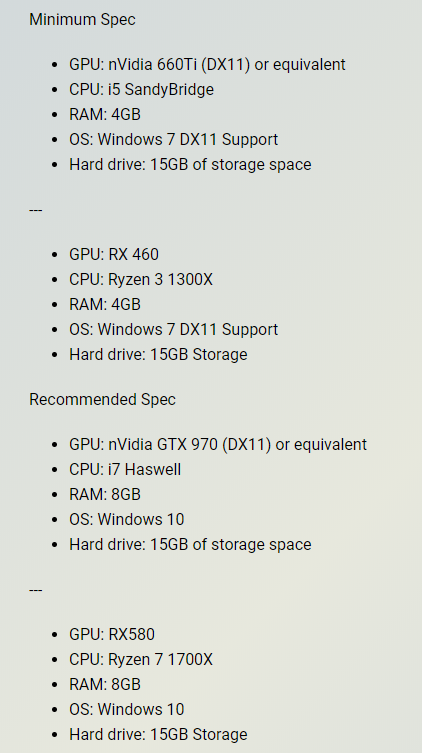
@paper yacht this is also for Dauntless https://i.gyazo.com/1b9049c4a69498708a603a7ecc487e5b.png

This is why i suggested the RX 570 cause you'd be able to play on high
paper yacht
uh simplify dummy brain no follow
trim fern
minimum is what you need for low settings and recommended is what is needed for very high
you have the minimum for CPU but the GPU i suggest would be like the middle ground
trim fern
The only time you would need to replace your processor is for newer titles
well newer more demanding
manic helm
oh I missed the guy trying to overclock a gt620
most of them overclock reasonably well, its fairly easy to improve performance by about 30%, but sadly an improvement of 30% only gets you from 6fps to 9fps.
sterile flame
What is the best you can get on a 3400g
paper yacht
well im here again and well
a 30% bonus is still a bonus so ty for the info yall
is there anything i can change in MS1?
cuz the top 3 are unmoveable even with the settings
should i max the rest out?
neon rapids
afterburner?
 reef folio
No pinned guides? Rip
dapper hound

manic helm
@paper yacht you can only change core and memory clocks. I was able to max out both sliders in afterburner, but I dont suggest you try to go that far immediately. Try something like +100 core and +100 ram. My core started to have issues around 850mhz for the few games i tried playing, but for benches i could max the slider. My ram went all the way to the max without issue. I might try unlock the BIOS some day for higher clocks but its just a card I have laying around so its no loss for me if it dies.
 midnight moss
Urpf
Cinnebench does not seem to know my clock speed XD
I am still the sadness with old CPU.
I realized I had to save the $$$ for taxes :'(
vital dagger
asus x570 tuf at default mobo settings
https://cdn.discordapp.com/attachments/380519382721495048/658104792157126693/unknown.png

enabling pbo gave no difference
I'm assuming as the default they have is "auto" that it's already enabled
pbo on + 200mhz setting and opening the window (it's winter) brought the room to 16c
cpu temp was locked on 68c during the test for a few runs after that, so a better cooler would help but kinda pointless for the small difference
manic helm
not bad, thats right where my stock 2700x scores
paper yacht
alr ive decided to sell my ps4 in order to buy a gtx 1060 and replace my 620
sterile flame
nice
paper yacht
scratch that, im buying a gtx 1660 since its better and cheaper for the christmas sale
trim fern
Still nothing wrong with a standard 1660
sterile flame
Depends on the price.
manic helm
the 1060's are way overpriced right now since they arent making them anymore
 fringe salmon
any old hardware is overpriced there
4790k for over msrp, ddr3 at ddr4 pricing sometimes, 8700k for more than 9700k usually. It's a mess
paper yacht
aw
exotic sparrow
the price of the vega cards is most amusing
the 56 is 279 and it's like well, that's not the worst i've seen
but the 64 is like 650-750 range
64s should be around the range of 250-275 at this point given their position in relation to the 5700
they are often that much used
neon rapids
rip undervolting on my 1070 ti
only got it to -50mV
but now it can do 2100mhz at 1.075V at like 65c
 vast cave
Hah I did a stupid and got a 2080 super
 honest hatch
i5 9600k 5ghz 1.328V idle temp 39c 😄 gaming 52-60c and stress test 10 mins max 70c
neon rapids
what stress test?
quick rose
Run that on an AIDA 64 test and see if it stays that cool. AIDA is hardmode
 full canyon
When I run AIDA 64 on my 3900x the temp monitoring on AIDA 64 and Ryzen Master seem to have a fairly sizable discrepancy... AIDA says i'm tapping out at 49c and Ryzen Master says 60c, is there one that's known for better accuracy?
quick rose
Ryzen master
full canyon
Ok cool thanks
 jaunty cosmos
what can i overclock my i7 9700k to if i have the Corsair h100i rgb platinum cooler
quick rose
Whatever the silicon lottery gods bestow upon you
Cooling is only part of it, not all silicon is the same
sterile flame
https://siliconlottery.com/pages/statistics
Probably something like 5.0 all core 0avx, +/- 100 MHz
 sacred wedge
So. Changed my cooler from a 120 to a 240 and the cooling is great now
blazing venture
awesome
sacred wedge
Was running 80c with stock clocks and memory at 2666mhz. Now cpu at 4.7 and memory at 3000 and barely touching 60c
 stone axle
something about my build doesnt seem right
sacred wedge
I know nothing and am new to all this but would like to know what doesn't seem right
stone axle
something is bottlenecking and my gpu and cpu get overly hotter than before
quick rose
Game? hardware specs?
stone axle
mw, pubg, halo, kf2, smite, warframe, specs are gpu: asus gtx 1070 turbo ram: g.skill ripjaws v ddr4 2400 (2x8) 16gb psu: raidmax thunder 535w Mobo: Asrock AB350m Pro4 SSD: 512 gb WD black pcie m.2 HHD: Hitatchi 3tb 7200 rpm 64 mb cache cpu: 2600x
quick rose
I don't see anything there out of place other than the slow DDR4 ram. What do you mean by overly hot?
Has your FPS dropped?
stone axle
well my gpu reaches 180 farenheit which it never did through hdmi but now through displayport it like gets hot and my frames skip so much its hard to enjoy games
stone axle
idk its age, but i open asus gpu tweak or try to but it never wants to open, and EVERY time i log in the fans say 31
quick rose
Instead of ASUS GPu Tweak, try MSI afterburner. Works with any nVidia card. Uninstall the ASUS software first
See if that gives you a different result
stone axle
whats the best way to uninstall
quick rose
Windows 10 - Apps and Features
stone axle
ALSO on my gf build i put my old 2600 in, bios and cpuzid say its running normal temps but speccy says its hot, which to believe?
is afterburner THE best?
stone axle
might get my dads gigabyte aurous 1070 as well
stone axle
do you recommend kombuster to test gpu??
quick rose
No, If you're going to overclock, use something like the Heaven benchmark
Having too many GPU software installed can create problems
stone axle
ok so i have afterburner
quick rose
do the fan speeds register?
stone axle
fan speed says 31 %
sterile flame
If you're curious about overall PC performance, running a userbenchmark and linking us the results can usually help
quick rose
To the right of the fan speed number it says AUTO
Click that and make it Light Gray
then click the checkmark
stone axle
power limit 100% temp limit celsius, core clock 0, memory clock 0
quick rose
That's fine, those are for overclocking
Just want to see if the fan speed increases with load
stone axle
so click auto then the check below it
quick rose
Fire up heaven or another benchmark and see if the fan speed goes up with temperature
Ya
AUto should be light gray
Not dark gray
quick rose
K, check it then run a benchmark or something to see if the speeds go up
stone axle
wehre
 stone axle
do i download speccy or cpuzid or where do i read
stone axle
so use heaven instead of userbenchmark
quick rose
I think it's a better test. userbenchmark didn't get my GPU very warm
stone axle
hit run or play now
quick rose
run
stone axle
nvm thats an ad lmao
quick rose
LOL!!!
stone axle
so what do i need to read
quick rose
Your GPU temps and fan speed during the run
stone axle
so i tab out??
quick rose
You preivously said it hit 82C
stone axle
it is laggin whuile typinhg wtf
stone axle
benchmark has been saying 82 C but msi says 61C
wait only becasue i tabbed out it reach 82c in benchmark thing
quick rose
MSI fan speed go up above 31?
stone axle
file:///C:/Users/Adair%20Bear/Unigine_Heaven_Benchmark_4.0_20191224_2116.html
it went to 57 while i was tabbed out, and it is lagging while tpying rn with that app runing
quick rose
The benchmark score isn't important. The fan speed and GPU temps are
Lagging is fine, it's a whole system test.
More concerned with GPU temp
stone axle
it reach 82 in the software but while tabbed it dropped to 62 ish
quick rose
Yeah, that's normal while tabbed
So, I'd try and set a your fans to 100% and see if you can hear them
CLick the gear icon under the Fan speed box
then the FAN tab
Then set it all to 100% and see if the fans spin up.
stone axle
all of the points on the chart?
stone axle
theres like 6 points, put them all to 100
quick rose
yes, just to see if the fans speed up
quick rose
Ok, so we know that they work
stone axle
its ablower type gpu
stone axle
nope
quick rose
oof
stone axle
but the curve it had was weird
quick rose
Well, it's just a generic curve
I would custom set your own curve to have it go 100% around 70C or so
and see if that helps with temps
stone axle
the curve it shows on default had the fan run 50 % until it greaches 80C then theyre supposed to spin 80%
quick rose
I'd go 100% at 70-80C
quick rose
I would run like 30% at 30C peaking out at 100% at 75C or something
quick rose
Sounds good
stone axle
or did ytou think 100% at 75 was better? also do i need to tweak anything in msi?
quick rose
Click apply, then the check mark in the original window
quick rose
Ye
check temps
ALso, if you haven't cleaned out your card in a year or more, now's the time
stone axle
which check mark
stone axle
so apply, ok, check mark?
quick rose
Yes
stone axle
it was grey
stone axle
so
the highest it hit was 71c, but the fan was running full blast loud the whole time it was that hot, what is a good degree area to be in for that
quick rose
71 isn't bad
However
If the card is over a year old, I'd recommend taking it out and removing the shroud and cleaning it with compressed air
stone axle
it was pulled out one of those slim desktop builds
now could it getting hot be why i was also having frames freeze and stutter even in simple games? or? almost like the g sync wasnt working
stone axle
so youre saying i should try gaming on it at these settings and see if its still suttering
quick rose
AND CLEAN IT to help keep it cool and the fan from blasting. 😉
stone axle
ik a 1070 isnt the BEST for 1440p 144hz but it can run some games decent, i dont expect it to get those frames in pubg or cod but i didnt understanding why it was stuttering so bad, making games unplayable
ill probably figure out how to take it apart and clean it , is it hard on blower types
stone axle
base clock is 1506 and boost is 1750 on afterburner it says, do those matter?
stone axle
BUT is it bad for the fan to run 100 alot?
quick rose
It shouldn't. Typically a sign that either the card cooling fins are dirty or the thermal paste needs replaced
stone axle
youre saying it shouldnt run at 100% too often?
i really appreciate the help btw its been bugging me and i didnt know why it was performing worse after upgrading monitor and cpu
rn the fan says 1822?? mhz?
now my proccessor is warm as well when starting games? normal??
quick rose
Things being used get warm
It's normal
fan running at 100% with a blower style is fairly typical as those coolers don't work all that well
Keeping it clean can help keep the fan speeds down
quick rose
Oh, much better than blower style
stone axle
does pubg use alot of cpu and cores
because my cpu gets hot on it
also what games do ypu play id be up to playing sometime
stone axle
my cpu is 64C rn is that bad
stone axle
well its got the worse cooler of the 2 lol
stone axle
the cpu cooler is the stealth instead of the spire because we i had to temporarly put it on there
while i wait for a refund from my water cooler
quick rose
SOUnds like it's working just fine if temp is only 64C
If it were in the 70's I'd use something else
neon rapids
70 is still fine, 85+ isn’t so I’d start worrying if it was 80c+
neon rapids

quick rose
I wouldn't run my processor at 75-80C
coolers are so cheap, keep it cool, keep it happy
exotic sparrow
26 dollars for a Hyper T2
130W TDP
if you have an AMD CPU you probably can even overclock pretty nicely on it
 wide robin
So I pushed my ryzen 5 2600 to 3.95 ghz but it wont sit stable at 4 ghz and I've pushed my voltage to 1.32V. When I run at 3.95GHZ I can run a cinebench test all the way through but at 4GHZ it wont stay stable. Most people can hold 4GHZ stable so I'm assuming I just lost silicone lottery or should I try to bump up voltage and see if it'll stay cool
 green jetty
wide robin
green jetty
wide robin
didnt even see it lol
 hollow mirage
@wide robin have you tried 1.356v or 1.41v?
also if you don't think you'll get that much performance from 50mhz then don't bother
i can get my 2600x up to 4.15ghz stable all cores at 1.42v on the stock wraith spire cooler surprisingly.
spring valve
Hi guys currently have a I7 6700K Overclocked at 4.2Ghz and want to OC it to 4.3Ghz or more. Want to keep everything cool and stable. What do i change in the bios? Motherboard: ASUS Maximus VIII Hero ATX. If you need pictures of my voltages lmk
I have overclocked to something like 4.7 and I had a blue screen so I lowered it to this so its nice but now its time to change to find my match.
 rain hatch
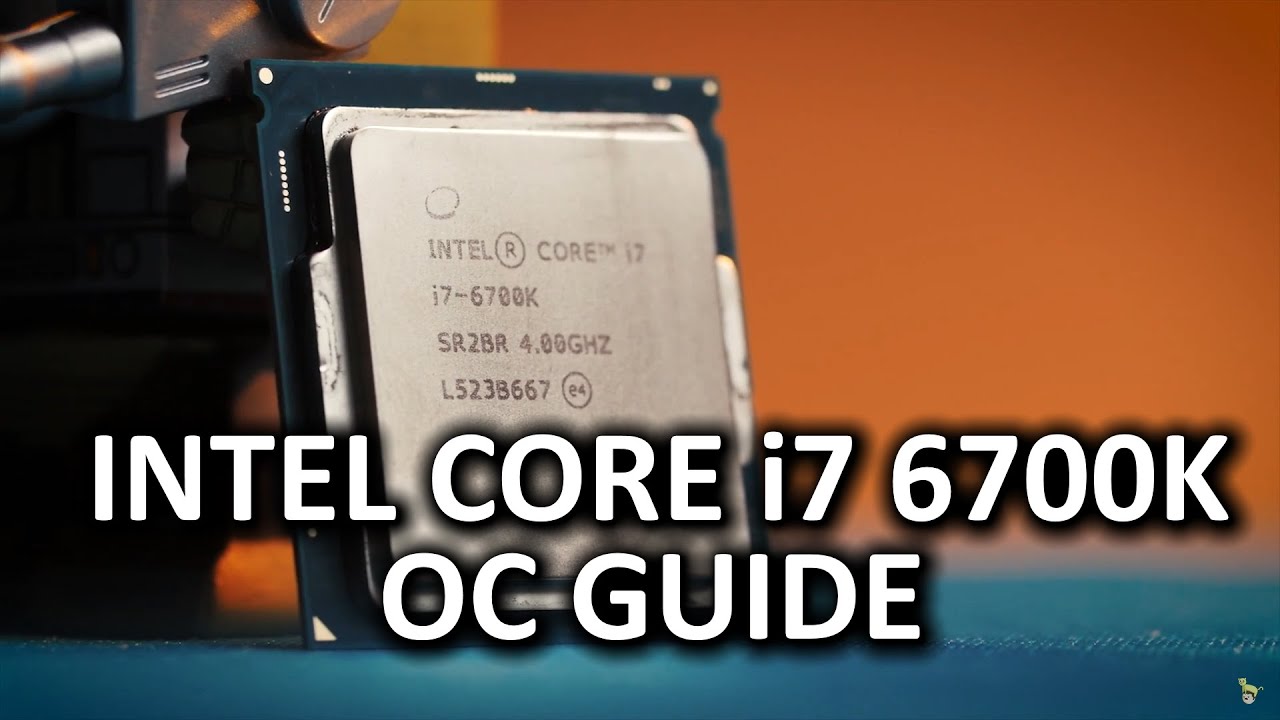
How can you get the most out of your new Intel Skylake CPU?
Discussion: http://linustechtips.com/main/topic/449645-intel-skylake-6700k-overclocking-guide/
Support us: http://linustechtips.com/main/topic/75969-support-linus-tech-tips-our-affiliates-and-sponsors/
Join our co...
Follow this guide
Should get you somewhere, if not, at least more understanding
rain hatch
Ahh hmm, I don't have much experience with that, but the general idea is increase clock multiplier till u r barely unstable, increase voltage for that clock, check if u r stable, repeat
Ull have to ask someone else for more detail
Also obviously don't increase voltage by high amounts at once lol
stone axle
theres still suttering when playing games what do i do
sterile flame
Skylake Overclocking Guide Haswell Overclocking Guide [With Statistics] Skylake Overclocking Guide [With Statistics] Welcome to the
sterile flame
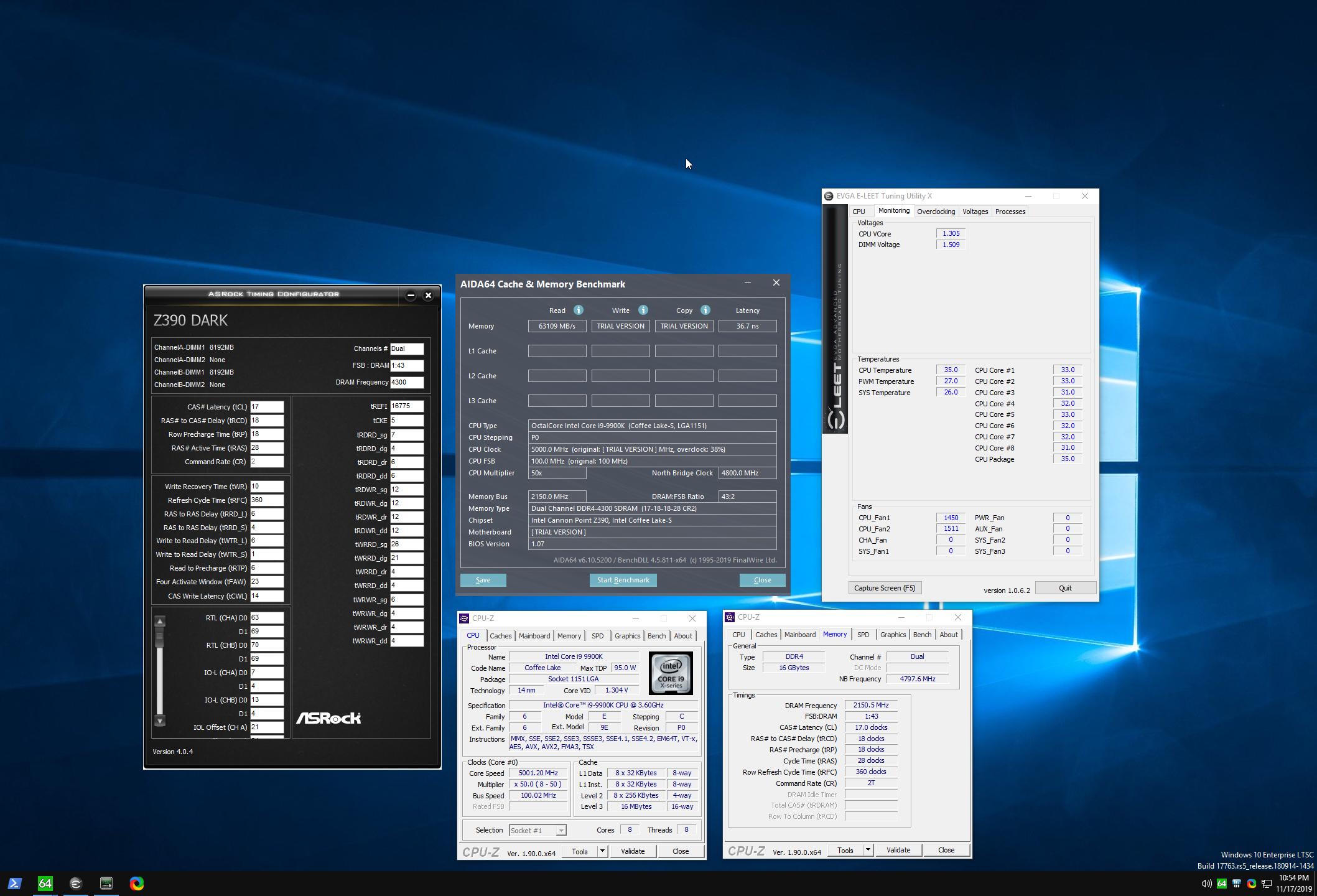
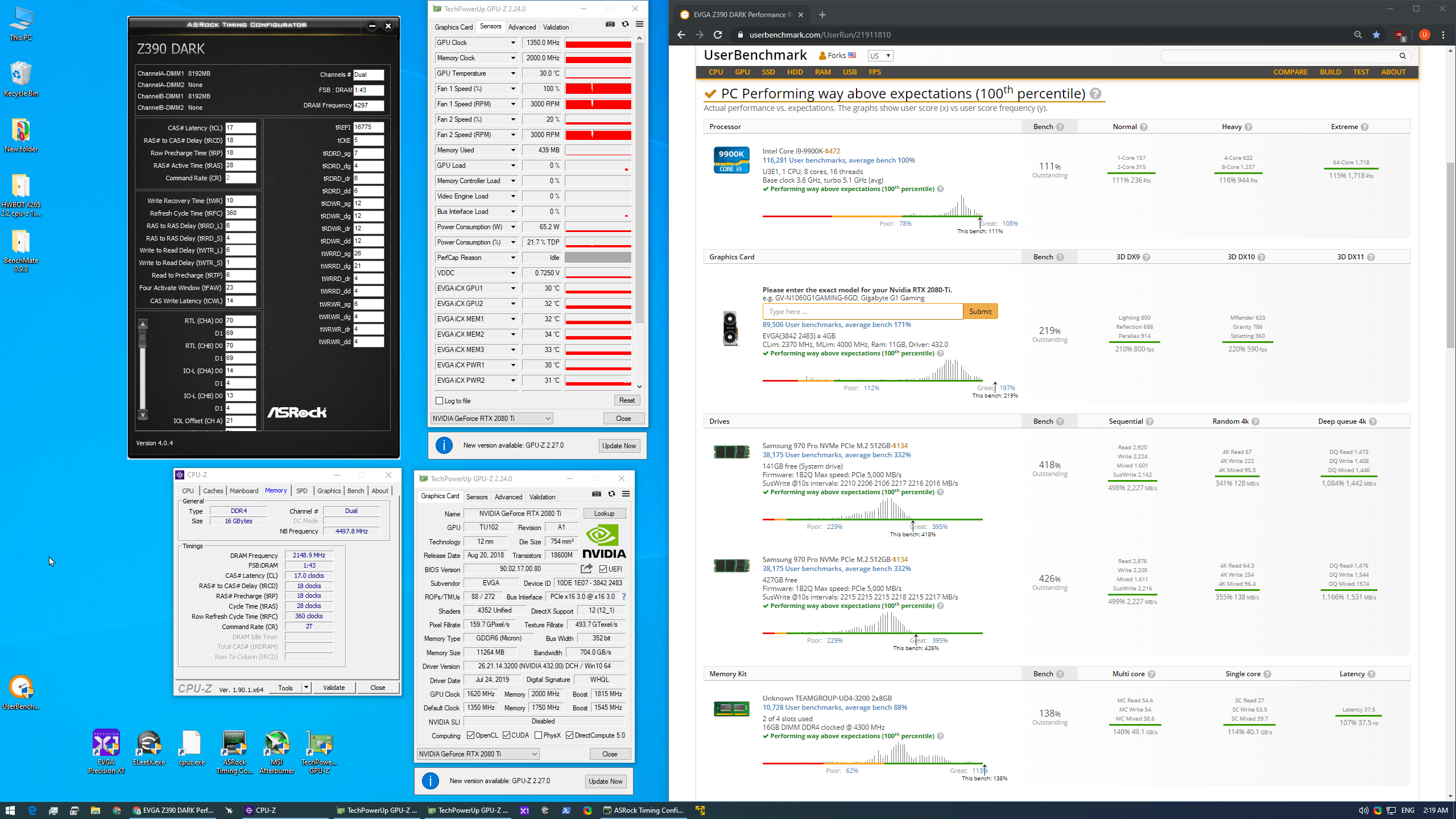
Sorting through some olds pics - figured this is a good example of how any good b-die kit can be manually clocked/timed to whatever you fancy.
This is with a $100 kit of Teamgroup dark pro 3200c14's, tRFC/tREFI at a very relaxed 360/16k
Given 1.5v vdimm, 1.25v sa/io - I'm guessing there's much more headroom to explore by tightening (all the) subtimings haha
https://i.imgur.com/E32kbZs.png
I know userbench is a meme - but funny example of how easy it is to smash https://i.imgur.com/nJVvIv2.png
 midnight moss
Lol it said my ram was 113% one time
Speaking of
I tried putting my sticks in single channel. And I was actually able to overclock them to higher frequencies
But
Ya know performance wise
 lone igloo
that makes sense
lone igloo
one channel only uses one lane so you can reach higher clocks but with 2 channels you double the lanes/bandwidth
midnight moss
I had the same number of sticks
lone igloo
same number of sticks on one channel vs same number of sticks on 2 channels
midnight moss
Yea
Single vs dual
As in putting them in where they belong
Vs riiight next to each other
lone igloo
so the higher the bandwidth the higher the latency which results in lower clock speeds its a give and take game
midnight moss
Ahhh gotcha
lone igloo
more channels = more bandwidth
midnight moss
That makes sense
lone igloo
the reason we use dual channel instead of quad channel is to find the middle ground between latency and bandwidth
midnight moss
Gotcha. Would it be possible to build a PC that has a custom motherboard that loads everything from your drive to a slower ram drive of quad channel 32 sticks and use 2 8s as system ram?
Slower than the ram
Other ram
Ack I think you know what I'm trying to say
lone igloo
you probably could but one thing I always tell people looking for the most speed is "you are always limited by your slowest part"
midnight moss
Yea
lone igloo
nvme drives are very fast now comparable to ram of the past or "slow ram" lol
lone igloo
I would say on a best you could buy nvme ssd you could hit like 5gbps read speeds and ram can probably do around 17gbps. However back when we had 5400 rpm hdds ram was like 100,000 times faster
its a great time to be a gamer
sterile flame
dual channel ddr4 can do 45-60 GB/s read, write or copy pretty easily
lone igloo
holy wow it got a lot faster lol
I didnt look it up or anything those are possibly ddr2 or ddr3 speeds
sterile flame
64 bits /channel, one transfer on each rise/fall of the dram clock signal, so for 3200c14 - that's-
128 b * (1600 * 2) /8 for 51.2 GB/s max read
edit - or just 3200 *8 /1000 = 25.6 GB/s per channel.
lone igloo
@sterile flame yes I see so ddr4 so should be able to reach a maximum speed of 64 GB/s and ddr3 was limited to a max speed of 16 GB/s
that is stupid fast
sterile flame
DDR4 can be pushed to 5000MT/s , there's no hard limit at 64GB/s read on dual channel - but it depends on the platform's architecture + config ofc.
 quasi jewel
i have a i5 6600k and my question is is it smart to overclock on a single fan water cooler?
quick rose
Maybe a little bit. Most 120mm AIO's are just OK for cooling. It can't hurt to try and see what your temps are.
reef folio
I mean, run a benchmark that forces it to full load for an amount of time. If your CPU maxes out at less than 70, you have a little bit of room to overclock.
quasi jewel
so if on the full load bench(like the one on msi aftherburner) reaches less then 70 i can oc to about 4.0?
quick rose
OC until your temps get too warm
Intel says maximum Tcase is 64C
So, maximum core temp is 80C or less.
wide robin
Overclocking is a slow process @quasi jewel (sorry for the ping) like they were saying ^ you need to investigate into your chi. He's suggesting not over 72 so pull up a program that can watch temps for you then run a benchmark like Cinebench, CPU-Z, prime 95 etc. See what your temps get to right now. If you're manually over clocking go into your BIOS and set your multiplier a bit higher and run your bench mark again (I usually go by 0.5 ghz per run until it either overheats or becomes unstable) if you can run your benchmark within heat limits after bumping up bump it again (bump it based on how close you were to 72) if you hit the limit then don't go any farther. There is also the possibility you increase it and the system freezes. If that occurs up your cpu voltage to make it stable again then run your benchmark and monitor temps
Sorry for the long message it's just kind of a slow monotonous process. It can take a little while to figure it out and you want to make sure you do figure it out. My first time out I didn't know what I was doing and destroyed my cpu like smoke and all
Going online and seeing what other people can get with similar coolers can be useful because you can get a benchmark but you can get screwed by the silicone lottery
If you're real close to 72 ignore my 0.5 ghz do like 0.1
manic helm
why would 72C matter for a 6600k. TJmax is 100C.
You should have no problems with running it up to 90C without worry, but I would suggest trying to keep it under 85C just for longevity sake. I am currently running my 6600k on a cryorig c7 in a tiny 5.7L itx build. clocked at 4.5ghz it usually sits around 80-84C under load.
I dropped the clock to 4.2ghz for the sake of my ears since the fan on the c7 screams like a banshee at full load
@quasi jewel
generally speaking I would say try and keep it under 1.3v and you should be good. I think my chip is slightly better than average silicon, but I have had it up to 4.9ghz. I ran mine 24/7 at 4.7ghz for about 2 years at 1.37v on a 240mm aio and temps usually maxed around 75C. Now that its in my itx build I do 4.2ghz at 1.22v.
dull ginkgo
Is 3rd gen ryzen just bad for oc or would it be my b450 mobo limiting it?
Its not heat because its like 60 degrees under load
 minor cape
Can anyone link me a guide for AMD master OCing with Dram?
sterile flame
@minor cape is this https://youtu.be/7w1EGPZUESU what you're looking for?

Play World of Tanks for free: https://tanks.ly/2KnfvSl New players will receive 500 gold, 7 days premium time, and a T-127 by using my code TANKTASTIC. Thanks to Wargaming for sponsoring this video.
Overclocking AMD’s 3rd-gen Ryzen CPUs is pretty different from previous ge...
If not. Its still a really great video
minor cape
nope seen it
minor cape
Has to do with the ryzen master itself
sterile flame
3rd gen ryzen OC's itself better than what all but few users would be willing or capable of doing.
I see it as a feature - no /s intended -almost like how an 8 speed dual clutch automated transmission is often superior, yet less fun than an H pattern
quick rose
2
 wise python
Thanks
quick rose
YW
 raven edge
Can someone tell me the highest frequency to overclock my 1700X?
 shy sequoia
ur gonna have to test that yourself my guy
raven edge
mines at 7.3 GHz atm
 ember orbit
sterile flame
ember orbit
sterile flame




 exotic sparrow
those would be record clocks
 fresh jackal
I know nothing about OCing can a Ryzen 5 2600 be at least very slightly OCed with the stock cooler ?
blazing venture
maybe slightly.
manic helm
I overclocked mine to 4ghz on the stock cooler, it got warm.
fresh jackal
Or are there cheap coolers out there capable of OCing 2600 and 3600 also since I’ll be upgrading (more than a little, would like to push em GHz)
Yeh, I guess the stock coolers aren’t the best ones for OC
manic helm
and generally somewhere around 4-4.1 is about as far as they like to go
fresh jackal
Yeah, alright
manic helm
I can get mine into windows at 4.2 but its not stable
fresh jackal
I heard there are decent coolers though
For cheap
That can keep the CPUs cool most of the times
manic helm
I have the cooler from my 2700x on it now
quick rose
Scythe Mugen is a good air cooler
manic helm
anything like a hyper 212 should be good enough if you are looking for cheap
quick rose
Mugen 5 Rev b
fresh jackal
If I can afford both which one between hyper 212 and Mugen will have lower temps when OC
manic helm
I think there is one mugen that is fairly cheap, but if you are looking at spending that much money and have the space also look at the noctua d15
manic helm
there is one rev of the mugen that is $50, the others are around $100
quick rose
Mugen 5 Rev b
fresh jackal
I’ll think about it, I think shouldn’t spend too much money on a cooler though
I was thinking about the stock one for a long time
But then I thought about OCing and was like why not
manic helm
honestly anything more than that scythe is going to be overckill
the 2600 is not that hot of a chip
quick rose
Nope
manic helm
with the stock prism cooler at 4ghz mine usually stays under 65C
fresh jackal
Will be upgrading to 3600 or even 4xxx in the future though
manic helm
well stock from my 2700x
quick rose
If you're upgrading to that, go Mugen 5 Rev b or better
the 212 on my 3700x was no better than the stock cooler
fresh jackal
Yeah, alright
quick rose
I know the 3700x has more cores and runs hotter than the 3600
manic helm
if you can wait it out for the 4000 series it will probably be worth the upgrade assuming they don't have supply issues
manic helm
I have decided to hold on to my 2700x. I originally planned on getting a 3900x, but the lack of supply kind of stopped that.
fresh jackal
Yeah, those are not in stock very often from what I see
manic helm
but with the 4000 series so close I feel like it would be a waste considering my 2700x still fits my needs for now. I just have to avoid the urge to upgrade.
quick rose
Yes
fresh jackal
If a CPU fits my needs I would stick with it for as long as possible
fresh jackal
Unless you want to test out something newer
quick rose
25% floating point
manic helm
they probably wont have stock in stores until the end of feb or march
fresh jackal
Intel or AMD ?
manic helm
intel
fresh jackal
Yep I guess that’s true
manic helm
I wouldnt expect amd to have anything on shelves before may
fresh jackal
AMD people might be switching to 10th gen
quick rose
Nah
manic helm
there are always fickle people that swap constantly
fresh jackal
Competition is still pretty alive between those two companies
manic helm
When I was younger I constantly bought hardware, I try not to buy as much anymore.
quick rose
I upgrade every 3-5 years
fresh jackal
The only computer hardware I own is a gaming mouse a MacBook Pro and a case lol
First build in March-april I think
Anyways thx for them coolers I’ll check em out
Happy Sunday
quick rose
Happy SUnday!
sterile flame
Hey guys, whenever my pc wakes up from sleep it freezes, and its a new build. Has a 9900k and 32 gb of ram at 3600 mhz... Processor seems stable at 5.0 ghz turbo, and its watercooled so my temps are always 40-50c even under load. Anybody have any idea what could cause this?
I have lifetime malwarebytes premium on and it scans everyday... so I dont think its a trojan causing usage spikes either...
sterile flame
um, how can I overclock the ryzen 7 2700x without damaging anything?
 woven path
make sure you have a good cooler, and dont over voltage
lone igloo
Shouldnt be able to damage anything only like a 1% chance. Most of the time the cpu will shut itself off prior to damaging itself but yeah like @woven path said dont go crazy with the voltage
quick rose
Voltage is #1 CPU killer
raise everything else up until it quits, then raise voltage carefully
lone igloo
and slowly
sterile flame
scary
All things overclocking go here. Learn to overclock, ask experienced users your questions, boast your rock-stable, sky-high OC and help others!.
sterile flame
yeah man voltage killyness is relative
shy sequoia
i've yet to kill anything overclocking and my brain is like most of the time
manic helm
if you haven't killed anything are you even overclocking
But in seriousness, it requires some effort to kill modern hardware though. I occasionally see someone who just shouldn't be allowed near a computer, but most people are too afraid of killing something to ever push hardware far enough to kill it.
then there will be that one guy thats like, I overclocked my 9900k to 5.3ghz on air with 1.5v and its stable. And you just cant convince them that its a bad Idea.
shy sequoia
i mean yes
i am overclocking
my rx580 runs at 1499mhz
for some reason 1500 does not work
and precision boost overclock reaches 4.2Ghz on my ryzen 5 2600x
but like i'm just using fans and air coolers i have no reason to be heavy overclocking
 astral trench
wtf man my rx 580 gets 1685 on air stable
and my 1600x gets 4.2 ghz on my dark rock pro 4 cooler at 65c max when using cinebench
R20 and blender
shy sequoia
how in the world do you get 1685
rain hatch
He goes fast
manic helm
Mine only does about 1585
shy sequoia
how about memory
manic helm
honestly never really pushed the memory
 sterile ridge
Is the h100i a good enough AIO?
sterile ridge
Sweet
 short blade
how difficult would it be to overclock 3600MHz RAM to 3733
sterile ridge
Pretty hard
short blade
my modules are rated for 3600 but ive heard 3733 is the sweet spot for ryzen 3000
my motherboard supports 3600 and 3733 so should i bother
sterile ridge
Eh
dull ginkgo
I think 3600 is the sweet spot, since avove that you need to oc infinity fabric
And it depends on what ram modules you have
quick rose
Not worth the bother
 clever moat
hey guys new to overclocking. just delidded my 7700k and put thermal grizzly liquid metal, no silicone to seal and have it clamped with the mobo. tested with aida64 extreme - stock i was getting 55-62c. i jumped straight to 4.7ghz and 1.29 volts. is that okay?
 tender niche
simple question. components are only six-7 months old should i wait till warranties are out before trying to oc?
rain hatch
They're quite unlikely to go faulty at stock settings
So I don't see the benefit of waiting
But it's up to you
clever moat
Yes and no
shy sequoia
are your temps normal
clever moat
After panels closed its 68-72 under load, highest spike was 78
clever moat
Its the first time i manually set a voltage and just read that voltage is the main cause of killing a cpu so just asking if it was fine 😭
Oh okay
Def not
shy sequoia
your pretty safe my guy
clever moat
Thanks homie
 thorny zealot
Hello
i got a question can i overclock a i7-9700k on a asus prime Z370-p II motherboard the cooler i would be using is a cooler master hyper 212
sterile flame
yes but not too far
you can overclock, but just not very much, you will be thermally limited most likely
 small ether
Can I overclock my pentium?
 exotic rapids
the manufacturer has a specified speed at which the product runs
small ether
Ok
quick rose
No, your H61 motherboard doesn't allow that
blazing venture
I wouldn't suggest you over clocking anything on your pc Flight.
exotic rapids
overclock the case duh
 celest linden
@exotic rapids u overclock ur monitor?
exotic rapids
i have not found time to properly do it
celest linden
Oh
small ether
Can I overclock my downloaded rgb?
exotic rapids
but raise it 1hz at a time, play a game for 5 min and check for errors
celest linden
U know a good overclocking video I can follow for monitor??
celest linden
Gpu?
exotic rapids
yes
celest linden
NvidiA
exotic rapids
ok you overclock in the nvidia control panel
celest linden
Will it break the monitor or will it fix itself?
celest linden
I guess 80 is ok
celest linden
Could I just say it was a power surge?
 wild glacier
Unless your monitor is rated to run higher on the box or smth
like mine came 120 but it said 144 on the box
quick rose
The effort to go from 75hz to 80hz isn't worth it. Especially at the cost of color quality which typically happens
midnight moss
Yeah. I mean the difference between 60 and 80 tho...
That is noticable
Just shake your view a bit
You can see the frames
If it's 60
Or worse XD
small ether
@quick rose and @wild glacier Are you online 24/7???
sterile ridge
Seems like it