#building-and-recc-chat
1 messages · Page 656 of 1
 stoic island
 vocal veldt
Okay I need help please
stoic island
With?
vocal veldt
Okay so I have this HP desktop which I'm trying to upgrade for a friend
I got it for free as part of a review deal and it is by far the worst desktop I've ever dealt with
I need a power supply that has two ATX 4 pin outputs and a 6 pin PCI-E rail that fits an itx/ftx case
the motherboard doesn't have the standard 24 pin power input
stoic island
Uhm
Usually non-24pin is proprietary
But really old PSUs might have 2x4 pin for that
vocal veldt
that's just it, it's proprietary and HP has been of no help
stoic island
I forgot what old pcie power standard was
vocal veldt
old PSUs don't have dual ATX 4-pin, they have molex
stoic island
It was something else before 24pin.
vocal veldt
20+4, and molex
stoic island
I seem to remember something else, but oh well, who knows.
vocal veldt
the thing is I was hoping that either A) there was a psu that I could direct fit or B) an adapter to turn 24 pin to dual 4 pin with 6 pin
stoic island
Looks like I'm misremembering things
vocal veldt
well any help would be appreciated here as I'm sort of stuck
if there isn't an option I'll have to go down the route of buying an entirely new motherboard, scrapping the crap mb from HP and just using the processor, ram, hdd etc
stoic island
That's my suggestion, maybe even a completely new build, depending on what was in there.
vocal veldt
It's a Ryzen 3 3200g one 8gig stick of DDR 4 2600 ram, a 1 tb hard drive, a DVD/RW optical drive that can be recouped from the piece of crap computer.
the mobo is this proprietary piece of crap but it does of the B550 chipset
stoic island
I mean, there's also the really wacky B550a crap that was only for prebuilts
vocal veldt
according to CPU-Z and Aida it's just the normal B550 the I don't think the 3200g would have worked at all on the B550a as it is 100% incompatible with the Vega onboard graphics
stoic island
From what I seem to remember, it's the other way around
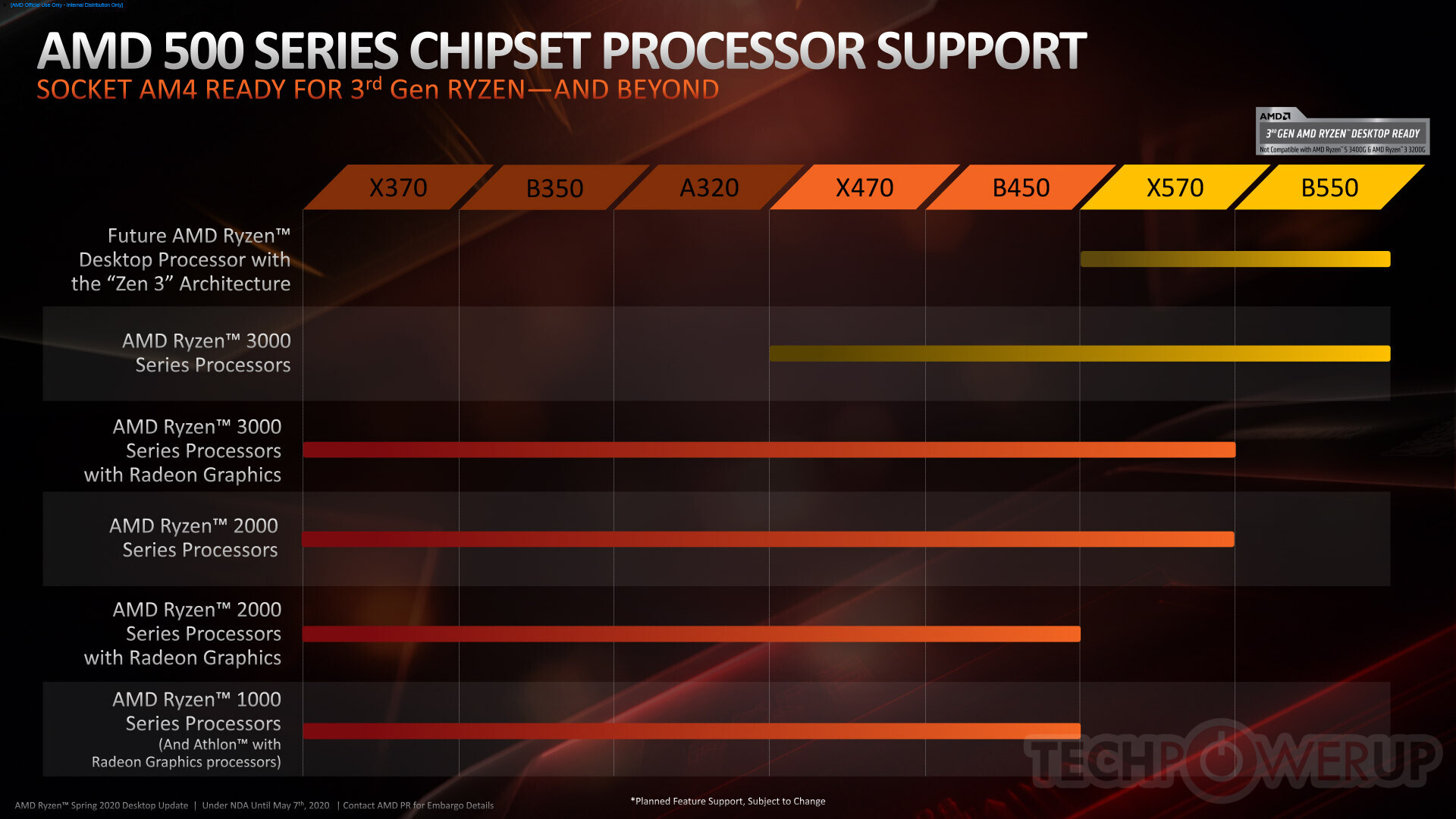
https://www.techpowerup.com/img/RA9JH1QLWDI5IekI.jpg
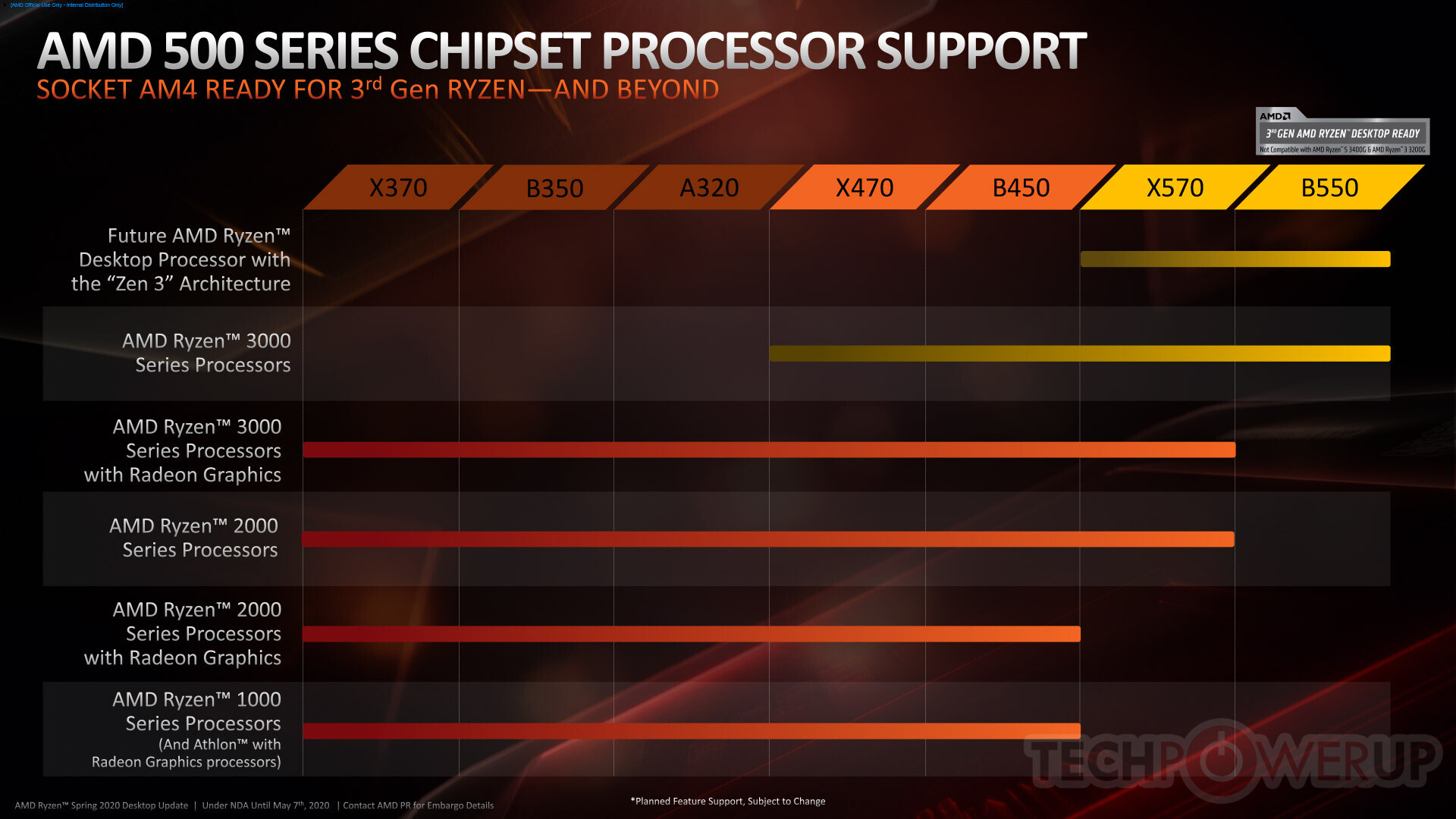
The actual B550 chipset isn't supposed to be able to support 3200g and 3400g
The "B550a" (pretty sure that's the name) was just modified b450
vocal veldt
well the B550 chipset in general wasn't meant to be compatible with the 3000 series with onboard graphics, the B550a as I recall was actually a lower speed variant meant for mobile devices (cheap/low power laptops) the B550 can be made compatible with 3000 series chips with modified bios which slows down the 3000 series chips and reduces the boost performance
so B550a is sort of like a mobile chipset between the B550 and B450
stoic island
Here's a video from 8 months ago that might help @vocal veldt
https://youtu.be/mBympJkflks

AMD's B550 chipset has been rescheduled a lot, but some variant of "B550" already exists on the market: B550A motherboards, like the ASRock B550AM Gaming in OEM PCs.
Sponsor: be quiet! Straight Power 11 Platinum (https://geni.us/l2yOrw8 | be quiet! website)
In this video, we'...
It's not really a mobile board
vocal veldt
I watched that one
stoic island
yea not really a mobile chipset
vocal veldt
I never said it was a mobile board I just said the intended purpose was for mobile platforms
stoic island
It's desktop
vocal veldt
that didn't stop it from being rolled out to desktop motherboards
stoic island
I mean... this is quite distracting
vocal veldt
You took that out of context if you're going to quote me, quote me fully "meant for mobile devices (cheap/low power laptops)" keyword "meant"
stoic island
I'm sorry, but there are no socketed motherboards that are meant to be mobile so that's why I had to point out there's a huge difference there.
stoic island
Maybe I should clarify, no ATX socketed motherboards.
vocal veldt
even atx socketed do appear in some variant mobile motherboards; and the chipset has nothing to do with the socket used for the main cpu
stoic island
But anyways, within the video itself, Steve talks about it being B450, right here.
https://youtu.be/mBympJkflks?t=239
AMD's B550 chipset has been rescheduled a lot, but some variant of "B550" already exists on the market: B550A motherboards, like the ASRock B550AM Gaming in OEM PCs.
Sponsor: be quiet! Straight Power 11 Platinum (https://geni.us/l2yOrw8 | be quiet! website)
In this video, we'...
At the 4 minute mark.
vocal veldt
and again I've already watched that video
I follow him as one of my main tech tip guys
vocal veldt
and there is a difference; the B550a and B550a Pro have PCIE 4 and are capable of addressing faster Ram
why is my link being deleted?
stoic island
First, Ram has nothing to do with chipset, second, A good amount of B450 boards actually launched with PCIe 4.0 if you look back, but that support was removed in later bios updates.
Link is deleted because bot is screwy
vocal veldt
Chipset has a lot to do with Ram actually
stoic island
Excuse me?
vocal veldt
Chipset (north and south bridge) control over all PCI lane exchange on a motherboard
stoic island
It's memory traces and IMC that helps with the max ram freq
Not chipset
chipset doesn't mess with it.
vocal veldt
no
Chipset has a great deal to do with memory bandwidth limits and how information is shunted to the CPU
that's why north bridge on cpu in the Epyx line is such a big deal
it allows for more throughput and more pci lanes
and direct ram management by the cpu
stoic island
and with IMC being on the chip, it doesn't have to do with Motherboard chipset..?
vocal veldt
it does
stoic island
Unless you want to include the northbridge functions on the chip itself as chipset?
vocal veldt
IMC is only one part of the equation
not all chips have bridge on chip technology and the B450 and B550 and non-Threadripper chipsets don't have bridge on chip tech
except for core density a Ryzen 3 3200g is no different than an Athlon from 2010
(overgeneralizing here)
in any case it looks like there isn't an answer here to my initial question so I'm going to look at alternative motherboards
stoic island
I'm trying to look around for evidence of that, but what I'm coming upon is the following, "The memory controller, which handles communication between the CPU and RAM, was moved onto the processor die by AMD beginning with their AMD64 processors and by Intel with their Nehalem processors."
@vocal veldt If there are more pieces present, please go ahead and elaborate.
I'd like to learn more if there are more pieces to it.
Here's also a snippet from Anandtech
I'm not sure where the motherboard chipset has a say in ram frequency.
 north umbra
Hey guys, can you help me pick the parts for my pc build?
 little leaf
sure budget and purpose
north umbra
2000 dollars and for gaming and streaming
little leaf
when are you building
north umbra
Early next year
little leaf
come back then
little leaf
don't do that
north umbra
Ok thank you for the advice
little leaf
you won't know if any of the parts ccame doa
 little osprey
Does this look right?
 inland parrot
should i buy the motherboard on newegg or amazon
little leaf
what ever is cheaper
little leaf
S12III is a bomb
don't buy that
that wifi adapter is over priced
get a b550 pro vdh wifi
inland parrot
this is my build alrealy bought some of the stuff
i bought the wifi adaper already, case and power supply
little leaf
Well that psu might blow up on you lol
inland parrot
dont worry it will be getting shipped next week
what psu do you recomned for the build like that
little leaf
A seasonic focus gold
inland parrot
and wifi router
stoic island
s12iii isn't a blowing up thing, but it's low quality and has failure issues.
inland parrot
how many watts
little leaf
550-650
inland parrot
then you said that the wifi rounter is to overpiriced
little leaf
ya you could easily just a board with wifi for like 5 dollars more
inland parrot
like which one
little leaf
b550 pro vdh wifi
 serene spire
How much are the new Ryzen Chips going to cost anyone know. So I can place hold them on my parts list
stoic island
Yea, prices were shown for 5600x, 5800x, 5900x, and 5950x
serene spire
Do you know how much the 5600x will cost
stoic island
I'm guessing AMD is waiting to release the 5600 and 5700x for later in response to intel chips
300$
serene spire
Ok thank you. I just wanna place hold them so I don’t have to worry about it
 eager hazel
I don’t know if I should get a asrock b450 steel legend or a b450 pro 4
inland parrot
Is this a good psu for my build that i posted here
inland parrot
What about this
 last zenith

inland parrot
Nice so this one is okay
stoic island
RMx is great
those are completely different end of the spectrum lol
TT Smart is the "likes to blow up, stay away" section
RMx is like "one of the best consumer PSUs" section
last zenith
Its better than my main pc psu
 pallid summit
you'd benefit from 3600mhz ram instead of the 3200mhz
and the price difference is marginal
stoic island
bruh
 gritty zenith
only $300
 sullen spoke
Ships from China
sullen spoke
prob 3rd party seller
stoic island
It's this or nothin smh
https://www.corsair.com/us/en/Categories/Products/Power-Supply-Units/axi-series-config/p/CP-9020087-NA
The CORSAIR AX1600i is the ultimate digital ATX power supply, built using only the best components and state-of-the-art gallium nitride transistors to deliver more than 94% efficiency. Compatible with CORSAIR iCUE
Pinnacle of great PSUs
:D
gritty zenith
very hard to say just from one end
little osprey
Hm
gritty zenith
where's it coming from
gritty zenith
what is that
little osprey
It connects all the fans to a single board
inland parrot
Lol
gritty zenith
all about that 优质电源 80+
little osprey
So wait it's a fan controller wire but where does it plug into
gritty zenith
case fan port on ur mb
little osprey
All I see is sys fan
little osprey
It doesn't match with the thing
little osprey
3
gritty zenith
cuz it looked like u was holdin bouth
little osprey
They are both 3
gritty zenith
i have dog poo memory
send a better pic of the cable tho smh
can't tell
actually
in the picture u sent u were holding two cables, the smaller head should be the fan connector to the mb
little osprey
Fan connector
gritty zenith
sweet child
little osprey
Its a mess
little osprey
Z390 aorus pro
gritty zenith
wifi or no?
gritty zenith
didn't matter anyway
unfortunate
you can use any of these ports
there is like a plastic notch to guide connector
send a picture of the connector specifically the smaller one from the picture you sent earlier just to make sure you got the right cable
gritty zenith
i mean
it looks like itt
still a little hard to tell but it looks like the correct cable
is there a label on your controller for that cable
little osprey
Well
No
The 4 pins are all connected to the board
And the bottom wire is a sata power
Which I don't know where that goes either
gritty zenith
that controller is confusing the heck out of me
and kinda unnecessary tbqh your mb has like 6 fan headers
wym the bottom cable is sata power
gritty zenith
pic?
little osprey
gritty zenith
ah
you connect one of the sata power cables from your psu
given that it isn't a radioactive one
gritty zenith
yes those connect one of them to the connector you showed last
gritty zenith
usin m.2 ssd?
gritty zenith
okay so one m.2 ssd and one hdd alright then yeah another sata power for that
little osprey
Does it matter which one
gritty zenith
whichever one is less messy
gritty zenith
pretty
where is that one coming from?
sorry i keep asking im not super expert to know just from pin count
little osprey
It's in
gritty zenith
can you show where on the board that one is
gritty zenith
show where on the fan controller
gritty zenith
do you know the name of this fan controller?
little osprey
No it came with the case
gritty zenith
imagine
little osprey
The fans were all pre installed
gritty zenith
whats the name of the case
gritty zenith
it goes to this spicy boi
the bigger of the two cables
and the smaller of them s h o u l d be able to connect to here
that should allow you to control the rgb of the fans through software
little osprey
Wait so one goes there and the other all the way over there
gritty zenith
neither cable seems to be necessary as far as i know, but i can't say for sure bc your case dont got no manual
smh
little osprey
gritty zenith
o my
little osprey
I have this fan cord but I don't know where it goes because on the thing where all the other ones are it doesn't have a label for fan
little osprey
They all come from here
That circuit board
I just need to install the gpu and wire then I'm done smh
Also I am worrying about the prongs for this because it says key but I don't know if anything plugs into it
gritty zenith
lord what a weird case
gritty zenith
wiat
of those 3 most recent pics
that first one
close up flash
cant see too clearly
gritty zenith
oo okay
you made sure to refer to the manual to connect your case connectors right? i dont remember their spots off the top of my head so
little osprey
Case connector's
Like the little two piece plugins
I'ma go to sleep soon but I'll be here tommorow to finish it :/
gritty zenith
alright hopefully you get someone else who can help u a little better than i can lol
little osprey
Ay no sweat youve helped me more then my friends have and that's saying sum
Ciao and thanks a ton
 runic thicket
built my pc today
i have a lot of troubleshooting to do
it doesnt detect the hard drive, the ssd is running ridiculously slow, it doesnt detect my gpu (lists it as a pci device, cant download drivers since it doesnt recognize a gpu), displayport doesnt work and hdmi is stuck at 64hz (no more no less)
monitor is pnp generic monitor
ram is wrong clock speed
gritty zenith
ram never runs at the clock speed it is rated at right out of the box, and the clock speed it will run at also depends on the cpu you have, as well as the motherboard, for the gpu you might want to check which slot you have it in, that it is seated properly as well as powered properly, same goes for the HDD, although there is a possibility you just have a bad hdd. SSD could be running slow because of something else taking up lanes
im no expert but thats my take
inland parrot
I know i have ask this question before but, what is the best all round motherboard for both gaming and gernal use for my build
gritty zenith
you’ve already got a good pick right there
my brother is on the ds3h and it does him well for the things he does
depends on how far your needs extend to be quite honest
that board specifically is super feature rich for its price point, i mean for instance a few months ago i dont recall any sub $100 board that could go up past 3600mhz speeds for ram
 junior crescent
looking for my first pc, budget is 1800, streaming, gaming and editing
 granite imp
@charred moat you just gotta flip this switch
looking for my first pc, budget is 1800, streaming, gaming and editing
@junior crescent prebuilt or you wanna build yourself
 deep skiff
is that not a vga cable
 dire crescent
 idle compass
can someone help me i want to build my first gaming pc my budget is 600 dollars i plan to use it for school work and moderate gaming fall guys and warzone and thats pretty much it
stoic island
sure
idle compass
ok
stoic island
@idle compass something like this
https://pcpartpicker.com/list/3rNccT
idle compass
i might also use it with my 3d printer
do i need to get some kind of adapter
@idle compass something like this
https://pcpartpicker.com/list/3rNccT
@stoic island Alright
Can I change the case @ Mr111 [Read your manuals]
stoic island
there's a reason it's that
it's cheap
stays under budget
at 595$ I don't think you have room for improvement :P
Unless you want to stretch that budget
idle compass
I dont mind
stoic island
then run the case by me before you swap it
idle compass
Alright
then run the case by me before you swap it
@stoic island https://www.amazon.com/Cooler-Master-MasterBox-Mid-Tower-Crystalline/dp/B0839Y7933/ref=redir_mobile_desktop?ie=UTF8&aaxitk=9Tt1kXcAuIm.1xfXd-cilw&hsa_cr_id=5429895360901&ref_=sbx_be_s_sparkle_mcd_asin_0 Would this case work or no
stoic island
td500 mesh yea
stoic island
:)
little osprey
You just happened to pick his all time favorite case lol
deep skiff
@stoic island is this not a vga cable lmao
granite imp
is that not a vga cable
@deep skiff How else do you power your monitor?
 mighty grove
if i am taking the storage from my old pc do i need to install windows, this is my firdt build so im not sure
idle compass
https://pcpartpicker.com/list/jCsLDc I might build this list what do you guys think
mighty grove
idk if ur joking but i would get a different monitor
stoic island
@idle compass no
idle compass
I have no idea about pc's some dude from here dmed me it
What about this https://pcpartpicker.com/list/ZbkJVc
mighty grove
wait so i dont need to install windows again
stoic island
for what
mighty grove
so im building a pc and im using the hard drive from my old pc
do i need to reinstall windows
im dumb
idle compass
@stoic island I did a budget change lol my budget is now 3k, what list you reccomend me now
Since you said the other ones r bad Idk what to get
 languid nimbus
If you’ve got a 3k budget and can wait a few weeks (you’ll have to wait for the 3080 anyways unless you’ve already gotten it), then the new ryzen cpu lineup is coming out soon and will be worth looking into
stoic island
lmao what
I thought you wanted a 500$ list
@idle compass for doing what? and when are you building?
languid nimbus
well that’s a pretty dramatic jump
stoic island
that is a huge jump
deep skiff
hm yes my budget went up 5 times
stoic island
@idle compass but anyways, seriously, what do you need it for now, and when are you building?
stoic island
Okay, then this list will very likely be changed when the time rolls around depending on parts avaliable and stock and pricing
Just gaming? Anything else?
idle compass
No
stoic island
Need Monitor+Headset+Mouse+Keeb?
idle compass
Yes
stoic island
all of the above?
idle compass
Mhm
little osprey
Hey guys
I have a 1500 budget, what do you recommend I buy (just for what’s in the tower, monitor and other peripherals are not included)
stoic island
Most important question is when are you building?
idle compass
how do u go from 600 to 3k
@stark bramble Hehehe idk
stoic island
What happened to freezer ii 360mm :(
 stark bramble
oof
stoic island
@little osprey just some specs to think about is I'd think at least 10600k/5600x+3080
little osprey
I was thinking a 3080 founders edition and a Ryzen 7 3700x
But what motherboard should I do? That’s my biggest dilemma
I already have a PSU in mind (Corsair 850W 80+ Gold Modular) and storage (Seagate 2 TB 7200RPM HDD and a 512 GB NVMe SSD) but I am stuck on the motherboard
just some specs to think about is I'd think at least 10600k/5600x+3080
@stoic island you think a Ryzen 5 3600x is enough for a 3080?
 hearty surge
what parts would anyone recommend to someone whose never had a P.C.?
little osprey
What will you use it for
hearty surge
Gaming
stoic island
I'm back
@little osprey when you're building, 5600x will be out.
@hearty surge all depends on budget
little osprey
@little osprey when you’re building, 5600x will be out.
@stoic island I see
stoic island
btw @idle compass this is a list to start off with
https://pcpartpicker.com/list/j4fyfP
hmm might add a dac+amp
eh might as well
@idle compass I'm done, no idea what else you could even want other than another monitor depending on what you do
https://pcpartpicker.com/list/qmshqp
idle compass
Okay ty might build it
Also what do you think about this monitor https://www.samsung.com/us/computing/monitors/gaming/32--odyssey-g7-gaming-monitor-lc32g75tqsnxza/
 mystic needle
hello
i am wondering if anyone has tips on building pc, im hearing to not buy one rn because of new parts
to not buy parts*
little osprey
Man Newegg is doing a sweet deal on the Ryzen 5 3400 for $139 and my Ryzen 3 3100 is already on its way to my house today lmao and that was 131. Why you do this to me newegg lol
stoic island
@mystic needle rule of thumb for building PCs : Wait for as long as possible, then buy everything at once.
mystic needle
@stoic island would it be a good idea to purchase in december? considering there might be sales for christmas? or is that like not a thing
stoic island
Yes, I'd say that's a good point.
stoic island
Pcpartpicker.com does a lot of the checking for you
Use it, it's useful
Hell, make a list on right now and I'll tell you what I think about it.
mystic needle
alright will do! thank u very much
quick question, is intel more for work related pcs?
stoic island
It's not that simple.
inland parrot
Hey what ssd brand do you use and what hdd brand do you use and how much storage for both
stoic island
@inland parrot standard setup is 512gb ssd+ 2tb hdd
@mystic needle yea Ryzen should work better at that budget
inland parrot
So what brands are reliable for both ssd and hdd
 stoic island
My personal preference of 3 SSDs is Team MP34, WD SN750, and ADATA SX8200 Pro.
Which one
Need model not brand :p
inland parrot
inland parrot
Cant i have one sata and the other one NVMe drives
deep skiff
why not just have 1 nvme tho
stoic island
Why do you want a SATA m.2 drive
inland parrot
Because my motherborad supports it and i can also get a mvme
inland parrot
Okay
stoic island
Most good motherboards support 2 NVMe M.2 drives
stoic island
Ughhhh
Why
Mobile pcpp is broken, I'm gonna edit it further when I'm back to my laptop, but this for now
https://pcpartpicker.com/list/zT4M8J @inland parrot
inland parrot
Already bought the case for the other build
inland parrot
Really have you used it
stoic island
Don't like the looks of the heatsink, seems not great
inland parrot
Let me guess its sucks
Like the rest of the builds that always get changed
I am just using my computer for gernal stuff,gernal gamingand heavy gaming if i need to
Games going to play, watch dogs, cyberpunk 2077, Gta 5 or Gta6 if it comes out, borderlands etc
I am not going to pro for gaming
Just want be able to play games with my future wife if she is into games and just enjoy them
 balmy patio
o i thought it was jus me
stoic island
@cursive wharf have you taken a look at pcpp today? a ton of things are just gone, B550m pro-vdh wifi, Arctic freezer ii 280mm and 360mm
I have no idea what happened to them
they're just gone
freezer ii 360mm is out of stock so that might be a reason, but like pro-vdh wifi is in stock right here
https://www.newegg.com/msi-b550m-pro-vdh-wifi/p/N82E16813144331
north umbra
Hey @stoic island, can you give me some advice if I should buy the ryzen 9 5900x right away?
Once it will be released
stoic island
Wait at least until benchmarks to make a decision.
which should be a day or two before release
@inland parrot this then, ignore case.
https://pcpartpicker.com/list/dDqHNP
Pro vdh wifi isn't on PCPP for some reason, it's a decent board for 110$ with wifi
2060 KO is just better imo, it has extra stuff in case you every do workstation things
Focus GM is just cheaper, being same quality
stoic island
@little leaf compatibility filter is off, no idea what's going on
little leaf
strange
inland parrot
I head in this chat seasonic psu is a bomb
stoic island

you see this?
:P
Seasonic S12iii is crap
Seasonic Focus GM is great
Same thing with corsair PSUs
inland parrot
Oh i see now
stoic island
Corsair VS is a literal bomb, CXm Green Label not far off,
Corsair RMx is top of the line
there's a reason we made that into an emoji, because it's very true
inland parrot
Well i got Corair RMx for my Psu
little leaf
s12iii is really bad
stoic island
as explained earlier :P
inland parrot
Okay question, What model Gpus are good for everything, upgrades, relabilty, every time of gaming, heavy,light and mid gaming etc and all around stuff and gernal use
stoic island
Lemme just say this
The GPU die itself determines it's performance in 95% of situations
(2060 KO is in a unique situation)
so any RTX 2060 placed next to each other (except for 2060 ko, special case), would only have something like 5% variance
 blazing steppe
It Doesn't really matter, does it?
stoic island
the only things different between partner models is just a different heatsink
@inland parrot except RTX 2060 ko is a very special case. It's actually a cut down RTX 2080 die, not the usual RTX 2060 die.
I'll link a video rq about it
inland parrot
And that goes with the motherboard too
stoic island

We discovered something that slipped past NVIDIA and EVGA alike: The RTX 2060 KO performs 26% to 47% better than a normal 2060 in some applications.
Sponsor: Get Linode Cloud Computing (https://geni.us/NehI9e - code GNEXUS20 for $20 credit)
It's not just that TU-104-150 is no...
Motherboard has a bit more stuff about it, but yea, that's one I choose the cheapest B550 board with wifi I can think of, because that mobo has good enough VRMs, I doubt you will need good sound chip, it has 2 m.2 slots that are both NVMe.
inland parrot
So choosing the cheappest B550 motherboard in my case for my build gets you more upgradeblity in cpu, ram,ssd, hhd and gpu
pallid summit
512 gb nvme ssd's are about 2 dollars more than the 256 gb model you have
 odd crypt
Not really
stoic island
@inland parrot cheapest b550 motherboard that has wifi and isn't crap.
odd crypt
Its like 12
 severe hemlock
@odd crypt solid storage and processor, but I do not know if that case will fit everything in without any issues. I would go with the NZXT H150 if room/space isn't an issue for you
severe hemlock
Why?
odd crypt
I wont
stoic island
why would you want to choke your stuff
odd crypt
Cause it has terrible air
severe hemlock
I have seen it's pretty solid
stoic island
With cases, if you can have better airflow in a case at the same price
why the hell not
why would you choose to spend more for less airflow..?
severe hemlock
I didn't know it had bad airflow to begin with. I was starting off with that one as a rook and haven't had any issues since
stoic island
Yea it works fine, it's not a completely metal box
there's a side vent on the front
but you can do much better
with cases, why not get better for either cheaper or much better airflow?
severe hemlock
What cases would you recommend instead? Looking to learn
stoic island
I'm a performance > looks person
severe hemlock
I agree. Me too, just didn't know it was that bad compared to others.
For how much more?
severe hemlock
It depends on pricing exactly. You could just install your windows on your ssd and games on HDD if the budget is looking tight
odd crypt
Yea i was gonna load up with ssd and use hdd for games
 foggy hazel
consider this thought @odd crypt : ditch the hdd. upgrade to a 1tb ssd. add in a HDD down the line IF you need one.
severe hemlock
I like that too, but it depends on what he's looking to install right away
I don't know how many games he's looking to install as soon as he has his PC
foggy hazel
no matter what, he is limited by his (potential) data cap :)
odd crypt
Over like 10
foggy hazel
and that still leaves plenty of space
foggy hazel
there IS a 1tb
odd crypt
Not when i looked
foggy hazel
@stoic island you remember which vendor it is that normally has the mp34 1tb the lowest? (pcpp has removed it from their listing)
ah, its newegg that is doing "funny" things
that gives you a bit of an idea about the normal price
odd crypt
Ye
severe hemlock
@stoic island which cases would you recommend that could fit a build with an H510?
stoic island
A lot of cases, usually MX330-g air
3 included fans, mesh.
or for mATX, Coolermaster MB311L
both 60$
foggy hazel
 stoic island
Papermaster, master of paper launches
 urban light
Thoughts?
little leaf
whats the purpose of the build?
 small osprey
Yeah r9 kinda overkill
foggy hazel
32gig of 3600cl16 would be my recommendation
small osprey
Tbh 5600 would be good enough
urban light
Yeah r9 kinda overkill
@small osprey ok
foggy hazel
nah, nothing overkill about the 5900
urban light
Tbh 5600 would be good en
@small osprey ok
small osprey
Eh
foggy hazel
you are focusing on the "gaming" part @small osprey
urban light
It is only a hobby tho
small osprey
Ah for video editing not overkill
foggy hazel
photo and video editing
and i have said this before, but going below 8 core is imo, not a smart idea
small osprey
Why not smart
foggy hazel
might as well change to CL16 memory @urban light
urban light
Ok
foggy hazel
@small osprey because every single console has a 3700x in it.
small osprey
The 5600x is better than 3700x in both single and multi core workloadds
foggy hazel
build while looking forward <- is imo the smart thing to do
urban light
Ok
foggy hazel
and also, 1800+ £ is not exactly budget :)
small osprey
So what cpu would u recommend to get now for gaming and slight video editing
foggy hazel
3700x and above for what is out "right now"
urban light
and also, 1800+ £ is not exactly budget :)
@foggy hazel i don’t think I said budget tho
small osprey
Well including zen 3
foggy hazel
5800x and above for what is coming soon.
@urban light the budget i am talking about is based on the list amount
small osprey
Mm
foggy hazel
when is that again?
small osprey
November 21? Something like that
small osprey
November 27
foggy hazel
ask again before then
small osprey
Mm yeah 27
foggy hazel
because we will have actual performance numbers for the cpu you have listed, and we will know IF the amd GPU's are competitive
small osprey
5800x is too expensive for me
450 is a bit much
I could go from 3080 to 3070 butt
foggy hazel
it is what it is.
stoic island
I still have my conspiracy theory of 3600 3700x being hold back to respond to Intel prices
foggy hazel
you mean the zen3 variants?
stoic island
they could bait Intel into setting what they think is lowballing AMD, for AMD to lowball them >:D
yea
small osprey
Do u think that 5600x + 3080 is better or 5800x + 3070
urban light
3080
foggy hazel
depends on what you are doing @small osprey
urban light
imo
foggy hazel
as always, its workload dependent
small osprey
Gaming mainly and light video editing maybe
stoic island
gaming, 3080.
foggy hazel
productivity = 5800x will reign supreme
small osprey
Well yeah but mainly gaming
foggy hazel
but as always, its a question of "which type of performance matters the most for you"
small osprey
Might be able to get 5800x + 3080 butt idk if my parents will allot more budget
foggy hazel
and we wont really have hard numbers to use in that debate until later
 cloud oasis
Wait so 5800x is gonna be better than 3080?!
urban light
One more question how good is the o11 to build in
stoic island
5800x as in CPU
foggy hazel
@cloud oasis read.
stoic island
3080 as in GPU
cloud oasis
oh
urban light
As this is my first pc
stoic island
O11 is the expensive splurge case
small osprey
Mm
stoic island
it looks great... if you spend like 100$ for fans
urban light
I don’t actually the 011 I have the Pcmr version
small osprey
I think the p500a is the best looking case
urban light
imo, 011 is ugly as sin.
@foggy hazel na it’s just common which is y I got the Pcmr edition
foggy hazel
as long as you are happy about it, and i can avoid using it :)
urban light
What u don’t like the Pcmr version
stoic island
@foggy hazel I mean, how else are PCMR reddit-ers going to stuff in a crap ton of RGB?
foggy hazel
and having the PCMR "badge" on it is NOT earing it any favours in my eyes
foggy hazel
i know
urban light
Lol
foggy hazel
IF you want rainbow barf up the wazoo? go for it
cloud oasis
😂 WAZOO
stoic island
That's the only thing I really see it as reasonable for :P
urban light
Na I’m going black and white
foggy hazel
if you want a case that you can stand looking at in a month? go with something else
urban light
I’ve had it for a month
stoic island
You know Naed, how do you feel about the Coolermaster H500?
urban light
But not with anything in it
stoic island
No suffix
foggy hazel
throws smelly socks at @stoic island
cloud oasis
too far
foggy hazel
because the design is bad :P
foggy hazel
i dont mind bulky cases IF there is a reason for them
bulky for the sake of being bulky? no thank you
remember, my personal rigs (non work ones) are all itx
stoic island
@foggy hazel by the way, do you believe 2x200mm fans can give better airflow than 3x120mm?
I see the H500 as a case that has a reason to be bulky, the 200mm fans.
Heh
foggy hazel
technically they should be able to spin slower
you are comparing a 4,32 area vs 8.00 area @stoic island
but IF that bears out in actual implementation? i have no idea
stoic island
Well, one of the things is that H500 can get fairly close thermals to good cases with 3x120mm like the P400a
foggy hazel
what is the noise like?
 cursive wharf
Should try testing with 2x140mm. Noctua has a bit better airflow/static pressure and such iirc
Compared to 3x120mm
foggy hazel
that reminds me: the GN video you linked @stoic island, Steve should imo take a step back and look at how he appears in his videoes
stoic island
Hm?
foggy hazel
and also: yes, the driver issue he mentions is quite normal-ish
just his whole "spiel" about the MSI stuff
its imo ... very .. borish.
stoic island
Borish?
foggy hazel
he is not jays2cents
stoic island
Side note, surprisingly 'high' noise
foggy hazel
he should stick to the facts
and leave the "fake" outrage and pearl clutching to "jokers" like jays2cents
stoic island
You're losing me on the analogies :(
foggy hazel
i dont take jay as being serious as a site at all
this is fine
any industry needs outlets that are not super serious
GN has tried to project themselves as being quite serious
stoic island
I kind of use GN as my baseline of "serious", so I think I missed something with his stance on the subject as not being serious
foggy hazel
doing the whole "we are so mad! bla bla bla" around the MSI gpu story? that imo is stepping down into the territory that jay roams in
stoic island
Ah I see
 empty cape
On a 275R Air Flow case... should I mount PSU with fan down? my PC is on a desk.
Both PSU and CASE manuals aren't clear about it lol
 exotic bison
so I put in my new corsair controller pro and now all my fans are running at 1500+ rpm on idle. Any ideas on how to fix this?
foggy hazel
@empty cape generally you point it at the vents :)
empty cape
@foggy hazel there is a vent top and bot
I opted for bot.. since it will have it's own air
foggy hazel
down :)
empty cape
I took this decision :)
foggy hazel
aye, down :)
 celest wharf
Hello everyone - I am new to the chat group and working on my first build. I purchased a tower and a power supply (which does not come on and am returning) but realized that I want a power supply that has a place to plug in the switch built into the case. I cannot seem to find that feature on any of the power supplies. What should I be looking for?
stoic island
@inland parrot again, Model>Brand, and MSI B550m Pro-VDH saves you money as it has built-in wifi, and you don't need an extra adapter.
And again, you can have a NVMe drive for the same price, Sx8200 pro at 65$.
And EVGA RTX2060 ko has a reason to be choosen over the Asus GPU at the same price.
@celest wharf I'm sorry, what do you mean by "has a place to plug in the switch built into the case"?
inland parrot
Looking at relibity and upgradeblity for the b550
stoic island
Yes, and B550m pro-vdh wifi does that.
it doesn't have VRM overheating issues like low end x570 does
there's no reason why it wouldn't be reliable, and upgradability is uniform across all B550 boards as long as they have 2xM.2 slots supporting NVMe, since PCIe_1 having PCIe 4.0 is guaranteed by the chipset.
celest wharf
@stoic island I want to be able to turn the power supply on and off from the front panel of the case
foggy hazel
that is done via a connector that goes to the mainboard @celest wharf
celest wharf
Oh, Ok got it. thanks.
stoic island
The power connector that comes from the case plugs into a connector on the motherboard.
@celest wharf you can leave the switch on the PSU on, and when just the PSU is on, the computer itself doesn't turn on until you tell the motherboard to turn on via front panel button.
inland parrot
@stoic island i will just choose gigybabyte because it does matter what the brand is, its the model
celest wharf
Ok, did not get that far yet but that makes sense.
stoic island
Hm?
celest wharf
Does anyone have a preference for power supplies? I just want something that will last and is not too loud
stoic island
I'm telling ya you can save ~30$ by going B550m Pro-VDH wifi, because it has built-in wifi at 110$
@celest wharf sure, what components do you have?
inland parrot
Yeah but i aready bought the wifi card aready
stoic island
oh rip
inland parrot
Yeah i bought it yesterday with my case
foggy hazel
@inland parrot something to remember, we cannot read your mind :) (saying this to ease that future conversation)
stoic island
@inland parrot then grab the ASRock B550m pro4, same price, better sound chip.
celest wharf
I just have the case and power supply so far. I wanted to hear the fans built into the case so I installed the power supply and tried to turn it on without anything else installed yet
stoic island
uhh yea that's what's supposed to happen...
Things (generally) only work once you have a CPU installed into the motherboard.
inland parrot
celest wharf
Makes sense now. Still have everything else coming
stoic island
Yea, try it again when everything is in, but what other components do you have planned to be installed? (Since you want a PSU suggestion, I need to be able to estimate the wattage requirement :)
@inland parrot my question is, why do you even have a gt710 xD
It's like an iGPU by today's standards afaik
inland parrot
@stoic island I dont, saw it at work today
stoic island
It's a smol lil GPU
celest wharf
I have a EVGA 600W BR power supply that will probably do everything I need to. Have a MSI MPG B550 motherboard coming but have not chosen the processor yet. Looking at a AMD 5 3600XT or equivalent processor. Then a decent graphics card and a good sized SSD
stoic island
What price range of GPUs are you looking at? and do you want me to pull up some other reasonably-cheap PSU options (Please give some numbers for budget ranges if you can, it's fine if it's a bit broad)?
celest wharf
No, I am good with the PSU for now since you explained what was going on. Looking for GPU in the 150 - 250 range -- want to do some simple gaming, video editing, and have it last a while
stoic island
Oh fair enough, I'm thinking something like a 1660 super, like this (Usually ~230-240$, a bit overpriced right now)
https://www.bhphotovideo.com/c/product/1513260-REG/zotac_zt_t16620f_10l_gaming_geforce_gtx_1660.html

Buy ZOTAC GAMING GeForce GTX 1660 SUPER TWIN Fan Graphics Card featuring Boostable to 1785 MHz, 1408 CUDA Cores, Turing Architecture, 6GB of GDDR6 VRAM, 14 Gb/s Memory Speed, 192-Bit Memory Interface, DisplayPort 1.4 | HDMI 2.0b, Dual-Fan Cooler. Review ZOTAC GTX 1660 SUPER
celest wharf
Looks decent -- what can I get if I go up to the $350 level. Would it be a very big improvement?
stoic island
Well, something like a RTX 2060 at 320$
Here's a 2060, @celest wharf and where would that performance matter for you? I.E., like are you looking for better GPU performance in specific programs..? Or like in specific games..?
https://www.newegg.com/gigabyte-geforce-rtx-2060-gv-n2060oc-6gd/p/N82E16814932115
celest wharf
Don't really know at this point. My main use will be the new microsoft flight simulator program and the scenery graphics that go with that. But looking to build something that has decent performance for whatever I decide to do. I do not need it the be the fastest or best -- just decent
stoic island
hm, the new microsoft flight simulator is quite GPU intensive
celest wharf
How do you think the RTX 2060 would handle it?
cloud oasis
No
celest wharf
suggestions?
stoic island
Take a look at these 2 videos to get a feel for the performance you'd get with either GPU @celest wharf
It's not going to be anywhere near a perfect comparison, but you'd just be getting a feel at 1080p.
https://youtu.be/ASYW2fHS5k8?t=103
https://youtu.be/-EzBtcEnkNE?t=4
cloud oasis
I say get 3080 and zen 3
stoic island
damn the video preview embeds were big
@cloud oasis we're talking ~300$ GPU budget...
cloud oasis
oh
inland parrot
I work at amazon warehouse btw
cloud oasis
tell us when 3080 instock pls
stoic island
A guy I knew worked at a warehouse in I think New York, and basically got scammed out of like 8 hours of pay because of technicalities
so I don't have a great perception of Amazon warehouse jobs...
foggy hazel
@cloud oasis that is a fairly certain way to break a number of rules.
so in other words. (in case you didnt know) please dont do that @inland parrot
foggy hazel
aye, normal procedure :)
stoic island
There's a good chance you wouldn't know either :)
foggy hazel
depends on inventory system, you can do a lookup internally @stoic island
stoic island
(I mean, they won't know incoming and what hasn't been sent out, etc)
inland parrot
If there is a thing am coming to amazon unless they tell us to tell people
foggy hazel
incoming is generally listed in the system (again, depending on the system)
stoic island
Yea true
 prisma stag
guys
which corsair rgb hub do i buy
do control all the corsair rgb
i see like 3 different corsair products
but idk which one to get
which one is used for what iwant
 potent prairie
What products do you have?
prisma stag
Corsair h100i and 4 LL corsair fans
potent prairie
Do you have a Corsair RGB fan hub?
And I forget, does the H100i have a usb plug or does it need a hub?
prisma stag
h100i has usb
so not worried about it
just need something for my 4 corsair fans
they have rgb cables
but no hub
potent prairie
Ok, then you need a fan hub and a either a lighting node or a CoPro
Lighting node is way cheaper, CoPro can control fan speed instead of your mobo
potent prairie
All of those are gonna be cheapest on ebay most likely
Yes. That and a Lighting node or Copro
The fan hub is basically a way to connect all the fans in series so it can be on a single channel for a Lighting node or CoPro
Looks like corsair.com is cheapest for that fan hub
Oh wait, corsair.com is OOS
potent prairie
Yes
potent prairie
Yes, the rgb from the fans --> RGB fan hub --> Lighting Node Pro or CoPro --> Mobo
prisma stag
where do i plug the power for the fans?
potent prairie
The mobo, or the commander pro if you want to control the fan curves from iCue
potent prairie
Yes. Fan curves set how fast your fans go at a given temp
potent prairie
If you want to control your fan curves in iCue yes
little osprey
I have returned
prisma stag
ok awesome night
i was under the impression
that all i needed was rgb hub
but u got me all cleared up
potent prairie
Anytime. I'm a iCue guru 🙂
prisma stag
night
potent prairie
Ya?
prisma stag
can u help me with one more thing hten
potent prairie
Sure
prisma stag
my h100i
the usb cable that goes to the block
my cpu cooler wont connect to icue
unless i wiggle that cord and hold it in a certain position
potent prairie
Your easiest bet is an RMA
prisma stag
sweet
potent prairie
Corsair has a pretty good warrenty
prisma stag
are they picky about returning all the screws and stuff?
cause i mixed all the screws with the rest of my pc build screws
potent prairie
I'd include what you know came with and forget about the rest
prisma stag
awesome
languid nimbus
You’ll have to download the iCue software, I believe
little osprey
I need help with my monitor :/ I finished the build but the monitor says when I turn it on is wrong input
languid nimbus
I don’t think it’ll work without it
potent prairie
They accepted my AX1200i without a receipt and with only half the cables (though it was a one time deal)

 potent prairie
Sweet
potent prairie
Nice to have a backup. Hope you have some spare thermal paste then 🙂
potent prairie
Nice
prisma stag
idk how to apply it tho
cause i bought it
not knowing the h100i was already applied on
so i didnt have to
potent prairie
A pea sized amount in the middle is fine
Or you can spread it around if you really want
prisma stag
what do i wipe my old thermal paste off with?
foggy hazel
stock has pre-applied paste
prisma stag
alcohol and paper towel?
small osprey
Yeah
foggy hazel
no need to wipe if he has never used the stock cooler before
small osprey
Yeah
prisma stag
i have naed
foggy hazel
ah, fair :)
small osprey
If u have then wipe off
prisma stag
and put stock 3700x cooler on it
potent prairie
Ya, there'll likely be some left from the h100i
potent prairie
Anytime