#building-and-recc-chat
1 messages · Page 650 of 1
 stoic island
 haughty badger
maybe 300
haughty badger
i could go more, if it's worth it
stoic island
Well optiplex+1650 could work too
 wary geode
400 is prime for ti
stoic island
lemme check pricing
wary geode
i mean yeah that works but 9100f is cheapest
haughty badger
sorry....sounds like you're all speaking in code 🙂
stoic island
ye I'm gonna make a 9100f list brb
stoic island
@wary geode lmfao this isn't 400$
https://pcpartpicker.com/list/Tg6v68
that's a rip
stoic island
@haughty badger anyways we'll be going through ideas until we get to smth good forya
wary geode
i can show pc cost for me
stoic island
sure
haughty badger
thx
wary geode
one min lemme finish a chemistry lab
stoic island
aight
 little osprey
I'm in avid rn
It's boring
@stoic island what are some tips you can give me on making better lists?
little osprey
Okay what budget?
stoic island
Any
let's say 1500$ or 1000$, that's quite common
@haughty badger also, are you looking for it to be a good gaming pc for today (within budget of course), or just for minecraft and school?
little osprey
Ight
haughty badger
she's not into FPS much...not like my son who does overwatch and for honor
she's not into FPS at all
stoic island
I mean, any type of game, just minecraft or anything else?
haughty badger
just minecraft i guess
wary geode
jk lol
haughty badger
school stuff, zoom, youtube, twitch
she likes among us now...but plays on her phone. she might want to switch to pc.
wary geode
thats what i do
bstock has 1650/1050 for 60-100
power supoplys are about 20-30$ on bsotck too
this is with tac
use amazon warehouse as well
@stoic island
thats what i do
the mb can be as low as 40$ on warehouse
ram 42
cpu 50
but yeah any case is fine diy pc is good
haughty badger
is this much better than some refurb with an older i5 and ddr3?
wary geode
yes @haughty badger
uses newer components that are much faster
and more relaible parts
faster ram faster processor if you want to spend the extra 5 for a motherboard with type c
16gb is overkill for what youll use but in case of fps and triple a it should do great
haughty badger
os needs to be added too? 🙂
learning about bstock and amazon warehouse for the first time.
what's "tac"
 cloud oasis
u dont have to buy os
haughty badger
k 😉
i'm trying to find stuff on bstock...searched for 1650, 1050, Gigabyte B365M
nothing coming back
what am i doing wrong?
stoic island
@little osprey so with that, you need to be willing to sacrifice some things to stay under budget.
haughty badger
thanks @cloud oasis @wary geode
cloud oasis
U need at least 8gb usb tho
wary geode
@haughty badger on Wednesday
At random times check only for graphic cards and power supply
It’s called EVGA mid week madness
little osprey
Is it worth mounting two extra 120mm fans at the top of the case?
(Assuming 3 in the front and 1 exhaust is already mountiled)
 arctic jungle
@little osprey are they rgb?
little osprey
No
arctic jungle
@little osprey then no
 balmy patio
rgb also gives you lower ping
little osprey

I would
Rgb looks good for looks and all but it's more expensive with them as well
@little osprey
That's not my question
Yes get the extra fans
Do you have enough space for them though
It would help regulate the temp throughout the build for mine I already have 5 and 1 exhaust
 young bluff
u want positive air pressure in ur case
so more intake fans = more positive pressure
positive air pressure also keeps the dust away
little osprey
@little osprey nice status
 fickle rock
I did not realize how time consuming and frustrating this would be @stoic island
I did read my manuals but it's a pain in the ass to get the z73 to look nice like the pros make it 
that being said, this is my first time building, I have completed the cpu. mobo install, ssd installation (nvme), and now am placing fans in both the radiator and the case
I have two commander pros and a lian li dynamic o11xl, couldn't find manuals on fan setups, I did hear about the arrows, any recommendations?
on how to face them
I also put in the aio, but just need to install its fans
fickle rock
Also
Am I doing it right
It’s kind of unsettling look
I tried it the other way but it was too tight and idk I feel like it would screw up and flood
But in this manner it does kinda get in the way of the ram s colors I guess ?
@stoic island I mean like in the positioning with the whole push pull stuff
fickle rock
Yeah look at it this way
It’s not plugged in yet tho like screwed in
Should be fine I guess ?
I just prefer looking at the ram cus this is my first rgb build and first time building lol
fickle rock
oh no
I uh...I did at least some sort of research, a few videos
and DEF learned that is not the way to go (no offense to those that do that)
what do you think? Is that fine or I should play with it left side maybe?
stoic island
that's fine
fickle rock
should add that i did move a bit at least 5 times in trying to get it before screwing in
if I get paste in the future i could always re arrange it no?
 junior crescent
could someone make a pc list for 5000 usd that is capable of streaming, gaming, editing 4k and UE4 work
cloud oasis
5k
junior crescent
yes 5k
junior crescent
yea i know
 languid nimbus
When do you need it by, ea?
AMD just did a conference on their new cpu, that’ll be worth waiting til the beginning of November if you can
junior crescent
i'm buying it next week
languid nimbus
Welp
cloud oasis
Intel or amd
junior crescent
intel
cloud oasis
k
 slate thistle
cloud oasis
slate thistle
cloud oasis
U want rgb fans or no @junior crescent
junior crescent
Sure
 gritty zenith
oi
if they wanted a $5k build might as well give it to em with a full rog build
lol
 cursive wharf
@junior crescent why intel? You seem to be more on the workstation side, in which case AMD destroys Intel
also what 4k quality are you going for? Editing with actually nice bitrate for 4k takes a lot of RAM
Also, get a cheap AMD CPU and wait for next gen, then upgrade to highest end
 weary bluff
Is my gpu in all the way? I don’t want to force it.
The card works but the led won’t turn on
gritty zenith
if it clicked when you put it in then yes
i get the fear every time too but it just how it is lol
 calm crypt
If the led is t working could be software just tryi installing software that is odd tho that there no less
Led*
gritty zenith
@junior crescent https://pcpartpicker.com/list/h8mfrr the list that was already sent to you is far more practical, but if you really have $5k to throw in a fire, this is a fully ROG build, complete with a 4k 144hz monitor and everything that can cater to ROG aesthetic for just a bit over $5k
idk if rog is ur thing but a lot of ppl like it so
weary bluff
@calm crypt i already tried the software
 granite imp
If anyone is looking for a windows key for a reduced price. Let me know, i found a reliable eBay seller that has physical keys with the key sticker.
granite imp
Nah, the key comes with the removable sticker
Great if you sell your builds
You get lower prices the more keys you buy too
granite imp
I’d much prefer free keys
gritty zenith
windows is free tho wym
granite imp
free keys
@cloud oasis show me the way
cloud oasis
idk
granite imp
windows is free tho wym
@gritty zenith yea but it’s more like windows with its arms and legs amputated
 wary geode
doesnt work
gritty zenith
here's a trick
go to your mate's house (one that got activated windows 10) and get their windows 10 key (takes a couple commands in cmd) and boop free key
 little leaf
@weary bluff that doesn't look like its in the slot all the way
gritty zenith
thats what i did
gritty zenith
i already used it too many times 
cloud oasis
dang
gritty zenith
by "thats what i did" i mean that i took the key from a used surface book i bought
little leaf
I just use enterprise
gritty zenith
ewuwe
cloud oasis
What does activated windows have that unactviated doesnt
little leaf
no water mark
gritty zenith
the ability to use your own wallpaper
cloud oasis
Is that it
gritty zenith
at least it didn't let me use my own
little leaf
you have an ugly ass water mark in the botom right
gritty zenith
all the time
and it shows up in most if not all applications too
fullscreen or not
cloud oasis
U can get rid of that tho im pretty sure
little leaf
So why can't you spend 5 dollars on a windows key again?
gritty zenith
lmao
little leaf
oyster brain?
gritty zenith
if its only $5 u might as well take the risk dummy
since oem is $100
if it works its 95% off
wary geode
cntrl i have a way
gritty zenith
if it doesnt you bought a quarter pounder
little leaf
littearly just look at the reviews
cloud oasis
what is it
gritty zenith
customers
cloud oasis
really
wary geode
dont wanna do it dont want many to knwo
little leaf
micro is it the .bat file?
little leaf
oh I have a bat file searches through everything for a code
little leaf
works every time
little leaf
no
gritty zenith
idk if my key will work again for my third pc
wary geode
took some time to figure out but im glad i did
gritty zenith
ah u did it huh?
 hard plinth
Uh so a couple days ago I bought this case of newegg called the diypc s2-bk-rgb "color black" and I cant figure out how to control the RGB on the case
Could someone help me out with this
hard plinth
😐
gritty zenith
did you connect the power?
gritty zenith
bc usually if its not controlled by a controller then its just one cable that connects the lighting from the case to the mobo
and in cheaper cases its just a cable that connects from light to mobo and it turns on automatically when you turn on the system
calm crypt
@calm crypt i already tried the software
@weary bluff hmm was it used or new
 balmy girder
Guess who's back, back again... how decent of a pc could I build with a budget of 500-600 usd? Thats capable of editing videos and rendering 3d stuff
weary bluff
nvm
cloud oasis
@balmy girder search videos
 drifting timber
anyone getting a ryzen 5000?
 vital warren
many people
hard plinth
ah ok
fickle rock
Umm
Are corsairs screws usually difficult to screw in for their ql120s???
Running into trouble I think
Can anyone help me with building in a dynamic xl?
Literally just fans and psu left afaik
Gpu should be easy
 pine ember
Literally cant look at build pics anymore. The amount of jealousy I feel towards everyone's build compared to my own is unbelievable LOL
hard plinth
@wary geode are you sure it's a sata cable I cant find it
hard plinth
wary geode
si
hard plinth
That right
wary geode
si
hard plinth
So um big question
wary geode
yes
hard plinth
Ah thanks mate
wary geode
there should be one attaches
 still roostBOT
 SpectreMge#6576 has been warned
Reason: Bad word usage
gritty zenith
oml i keep forgetting
@pine ember maybe if i send pics of my terrible build it'll make you feel better
 kind hemlock
So I’m replacing my prebuilt’s motherboard with an i7 9700 to a B550M board and a Ryzen 5 3600, I’m pretty sure I’ve plugged everything in right (this is my first time modifying PCs in general) except my old power button plug doesn’t fit in the new motherboard’s socket :/
Where should I go to pick one up? Preferably in person I kinda need this back up ASAP
If you have an answer please @ me 🙂
 jovial night
Any recommendations for a first time petg custom waterloop build
Gunna dive in on a full custom on my next build
little leaf
@kind hemlock why would you chnage that out a 9700 is better?
 shell marten
Its official shipping power supplies to canada has become impossible lol
fickle rock
hey so i am confused
so I have an 850 evga gold+ iirc
and it has space for an 8pn cpu connector which I put in
but not for another one that is 2x 4pin
it only has space for 1 other 8pin
should i try to put 1 4pin in there?
calm crypt
@carmine geyser can u afford an extra 100 bucks? If so this is better https://pcpartpicker.com/list/ if not then swap the ram for what I put and the PSU for what I put
Or if u have patience even better to go for a 3070
 summer dirge
Question fellas/gals z490 Gigabyte master or Asus Hero wifi for a 10900k
 carmine geyser
okay
still roostBOT
 Davgnar#8784 has been warned
Reason: Bad word usage
fickle rock
Messed up **
This should be on the kraken right ?
But the thing is idk if it can fit because of the orientation and I already screwed in the radiator
It would hit my ram
It’s plugged into the top
An anyone help? 
 ripe wedge
@fickle rock heyo I know of a installation video that can help ya with that
I have the same one but havent installed it myself yet
thats either the z63 or z73 right?
https://youtu.be/_GQW9omloPw?t=388 @fickle rock I have it starting at the part you will need
In this video I'm going to show you how to install the brand new NZXT Kraken Z73 Cooler in AMD AM4, TR4 and sTRX4 based systems.
NZXT CAM Download: https://www.nzxt.com/camapp
NZXT Kraken Z73: https://amzn.to/37CWV0u
NZXT Kraken Z63: https://amzn.to/2tZeI3l
BECOME A MEMBER: ...
but yea u need that on it cuz it has the pump header I think
fickle rock
I just saw this guy lol
Z73
I’m just confused because both he and the manual just skip the parts where you connect the usb part and the other part I dk what that is
fickle rock
I top mounted it
But I think there’s a problem see
It’s my first time building so that’s one problem
Two is that idk how I can get the other part ( managed to get the usb part in but trying to find the usb 2.0 on my mobo rn)
fickle rock
Or is it the usb thing
ripe wedge
so the tiny connector with the stuff coming off it
one should say aio pump on it I believe
ripe wedge
yea
fickle rock
The top part goes on the kraken ?
still roostBOT
Davgnar#8784 has been warned
Reason: Bad word usage
ripe wedge
yes the tiny end the rectangle one
goes in next to the usb plug
and you should have enough clearance with ram
fickle rock
I put it back on
There I think I got it
I have usb 2.0 ports for the case and I need 2.0 for the kraken as well but the MB manual doesn’t really help find where to put them
ripe wedge
you might want to unplug the usb plug and route it through the back
it should be long enough
the USB headers should be on the bottom of your motherboard
bottom row
or check the right side
they are usually on the edge
of the pcb
fickle rock
Yeah found it (the way to bring it under)
I’d this usb 2.0?
Yeah referenced the manual
Sorry for spam it’s literally my first build been on this all day lol
ripe wedge
looks like it
fickle rock
Lmfaoooo
It’s frustrating though
I don’t know where to put the usb 2.0 ports for the Lian li
The double ones at the bottom
 real merlin
i have a poggers build does someone want to check it out?
stoic island
Mayybe
real merlin
ill send it to you
gritty zenith
if its so poggers prove it
stoic island
Spoiler alert
It's not poggers
 jagged ember
Oof
stoic island
You know what is a poggers list?
This parametric selection
https://pcpartpicker.com/user/Mr1111/saved/ry3RvK
jagged ember
So is this segway to our sponsor
gritty zenith
imagine not usin a 1200w 80+ platinum fully modular psu
cloud oasis
Tru
summer dirge
10900k on the way, still debating what board to get, maybe i will wait and see what might go on sale this month for Asus
 sharp bear
I am planning to get the corsair crystal 280x, any advices ?
ripe wedge
@serene spire first of all id wait on ryzen 5000
id probably try to snag a Ryzen 7 5800x if you can
but if you cant fit it in ur budget then a 5600x
 serene spire
I would like to keep it under 1700$ @ripe wedge
But If I have to go over by a little that’s fine
ripe wedge
The Ryzen 5 5600x probably is more powerful than the Ryzen 7 3700x but you give up 2 cores for faster all around speed
serene spire
How much is the 5800x gonna be if you know at all @ripe wedge
serene spire
5800x is off the table for me most likely. @ripe wedge
ripe wedge
Also they release Nov 5th
serene spire
Which chip is the best for stream quality and gaming performance
ripe wedge
Any modern ryzen cpu 3000 series and up
The 5600x most likely will perform better than a 3700X
While being priced the same
serene spire
Alright. So 5600x it is. Thanks that helped a lot actually. Been stuck for a while on that parts this
serene spire
I definitely will be I watch Linus jays2cents and bitwit the most
serene spire
I’m new to the whole pc thing so I really wouldn’t know to much about who Is good or not but I like jay2cents because he seems like he knows enough to be able to give advice for every level of knowledge
ripe wedge
Ah
Well if you want to learn more technical stuff and deep dive and news and stuff check out gamers nexus
serene spire
I definitely will. I’ve learned a lot in just a little while if I knew what I know now even 8 months ago I’d have myself a best of a pc by now
Beast*
 foggy hazel
@serene spire i would suggest that you keep an eye on anandtech for the written review of the zen3 series
foggy hazel
100% because of Ian Cutress
because the zen2 VS zen3 might be a bit more complicated than it looks
so details details and more details will help you :)
serene spire
Alright will do and thank you for all the help learned a lot more helpful stuff today.
ripe wedge
Well that L3 cache improvement might be a large factor in performance aswell
Where they pushed all the L3 cache together
foggy hazel
you can scratch the "might" part of that :)
ripe wedge
Lol
serene spire
This build I do will be the first time I even look inside a pc in person so
foggy hazel
it IS a large factor of where they got the performance lift from
ripe wedge
Well we won’t know til reviewers
foggy hazel
unless they have derped on the design (which is very very unlikely) cache changes like that are generally the reason for performance upticks
but 100% agreed, wait for reviews
another sidenote to keep in mind. Since Dr Su became the ceo, they have been very "sane" with their "this is the performance level we have" messaging
ripe wedge
Like you are talking about their openness err like being as close to accurate as they can with information they release?
foggy hazel
aye, Su has been sticking very close to the actual numbers
again, that does NOT mean anyone should preorder
ripe wedge
They already did better than Nvidia with showing some fps numbers before release of rdna2
foggy hazel
its just a very interesting way of doing things
ripe wedge
So we will see how that will play out for them with releasing numbers early
foggy hazel
aye
 icy lagoon
Ayyyy they came and the mother boards here today
balmy patio
niice
 night iron
Excellent can’t wait to see your finished build.
little osprey
i’m building a pc with a ryzen 7 3700x and a 3070. Will the 3700x stock cooler be cool enough?
stoic island
yes
little osprey
thank you
 ashen cove
Can anyone help me make a build?
 plain cloak
So I found out what my mom's old desktop PC is, and what chipset it has
She got that Gateway DX4200-09
With that AMD 780G chipset
AM2 socket..
 lean silo
That old desktop PC would be nice for playing Windows XP era games
icy lagoon
@icy lagoon looks like it's gonna be a fantastic build
@arctic jungle thanks so much the mother board gonna be here today and me and my uncle are going to build it
Tomorrow
arctic jungle
nice!
 uncut pelican
Best corsair liquid cooler for ryzen 7 3700x/3800x?
cloud oasis
not corsair but arctic liquid freezer
stoic island
@ashen cove yes, if you still need help.
ashen cove
Yes please!
granite imp
Can I hot swap displays while running dual monitors?
 open gazelle
Hello everyone. Someone has major audio issues with their Kraken Kitty Edition headphones. We have run every type of audio troubleshooting option and we don't know what it could be.
 sullen spoke
what kind of issue, and droq you mean change out display? yes it will just change desktop to adjust to number of displays connected
granite imp
Ty
open gazelle
It would suddenly drop out, disconnect and cause havoc on stream where drastic frame drops occur and sometimes crashing.
 small osprey
?? How does a headphone cause crashing and fps drop
Have u tried with different headphones?
sullen spoke
well that sounds interesting lol
stoic island
That seems like a software issue to me
I assume you already went through all the software drivers and debugging that way
@open gazelle tried checking USB drivers?
sullen spoke
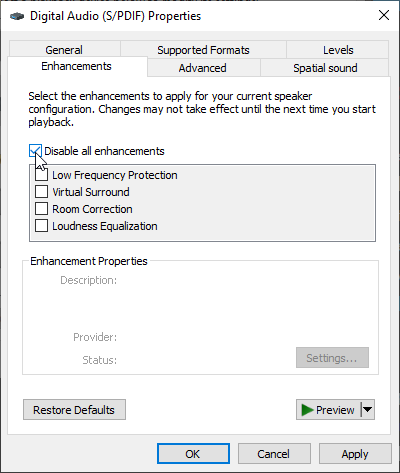
disconnect or drop out sound? if so that could be a physical connection issue. some other fixes would be to turn off any kind of post processing like virtual surround sound or enhancements here https://i.imgur.com/CLfOVCH.png
 small osprey
Might be the recording software if it only drops out during stream
sullen spoke
ye it sounds more software related than hardware. i cant imagine headphones alone would cause frame drops
stoic island
USB drivers as in for the USB controller on the mobo
open gazelle
Well, the frame drops would occur with the headphones suddenly cutting out
And apparently their USB ports are all functioning normally too
2.0 and 3.0s across the board
sullen spoke
well it is possible for a pc to lag to the point where it cuts out audio but ive only seen that happen twice ever
small osprey
Does the frame drop occur when just listening to music or only during stream?
open gazelle
Anything. I'm in DMs with them now and they couldn't even watch a normal youtube video with nothing running in the background
Not even syanpse is installed
vital warren
i had something a little similar to that and switched usb
open gazelle
It just suddenly cuts out for a few millisecondes
Their audio jack port functions just fine if they plug in any other headphones
small osprey
Mmm maybe the usb connector is bad
There is this wd40 type thing that makes electronic connections better
I used it to fix the jack in my moms car
U might want to look into that
open gazelle
Hmmmm
 fluid fable
Hey all, I'm thinking about getting parts to build my first PC. Anyone have any suggestions that would meet my needs? I'm building a unit to put Linux on, and use for learning pen testing, cracking,etc...so I know it needs to have some power, but I don't want to underpower it or spend thousands of dollars on parts just yet
balmy girder
How much would adding custom water cooling with soft line tubing cost?
 night storm
If your going to work on penetration testing and cracking, you should do your own research and figure out what you want out of the system.
carmine geyser
can i get a build that's 1700 and under please
or spec a build for 1700 and under ty
little osprey
My friend is wanting to get a good $1200-$1500 build and he's looking into vr any suggestions on lists?
 idle compass
i want to build a pc for gaming i have 5k usd budget also i will use my oculus rift s with it
idle compass
can anyone reccomend me some parts i have 5k usd budget
little osprey
@small osprey ?
little osprey
LOL ight thanks appreciate it
small osprey
@carmine geyser https://pcpartpicker.com/list/CrLP68 this is a good list for u too
little osprey
He said he wants rgb sorry for not saying that earlier any replacement cases?
small osprey
Rgb? U could get the p500a or the td500 which both come with rgb fans
little osprey
Ight thanks
 fast dust
@small osprey add some more fans to that
and theres room for more storage
and more ram
and a better motherboard
you literally have 2k more to spend. Use it :P
fast dust
good luck finding a P500A in stock
cloud oasis
do i get lian li tho
fast dust
get whichever you like the best
cloud oasis
i also think its gonna be a pain to install fans
idle compass
https://pcpartpicker.com/list/FR4jgs is this list good? i might build this if its good
cloud oasis
nice get it
fickle rock
this is so painful but it'll probably be so rewarding
day 2 of doing this (complete first timer/noob) and soon i'll be able to turn it on
idle compass
are you trolling
me? im not trolling my budget is 5-10k usd
foggy hazel
@idle compass IF your budget is that size. Contact a boutique shop and have a chat with them
OR if you are hellbent on doing it yourself. Supply more details for what you want
idle compass
reccomend me
 hoary kayak
Can anyoje build me a pc in pc part picker thats like 580 dollars
 wintry kettle
i need help. i recently built a computer and every so often it will turn off (usually 2-5 times in a 3 hour period). i have not noticed any real pattern it will turn off sometimes when gaming but not when i am stress testing or or doing full system test attempting to get the same power draw. its not the cpu overheating and its not drivers and the system has more than enough power ive tried having it plugged into the wall and a small surge protector and im not to sure why its doing that been trying to solve the problem for a a long time and idk what it is. i noticed the it started happening a week or two after i finished the build. anyone know what it could be?
foggy hazel
could be ram errors
wintry kettle
ok
foggy hazel
https://www.memtest86.com/ <- that could be a start

MemTest86 is the original self booting memory testing software for x86 computers. Supporting both BIOS and UEFI, with options to boot from USB.
wintry kettle
i dont think its bad ram casue its almost brand new
foggy hazel
age does not matter for that
 clever oyster
@hoary kayak https://pcpartpicker.com/list/kg7XLP
foggy hazel
you could easily just be unlucky @wintry kettle
wintry kettle
true that would be a bummer ill check
foggy hazel
@clever oyster you forgot a ssd
kind hemlock
@kind hemlock why would you chnage that out a 9700 is better?
@little leaf i think I damaged my i7, plus it would cap out at 100% cpu usage when having valorant open with chrome and nothing else lol
clever oyster
@hoary kayak https://pcpartpicker.com/list/mPrrHz
It’s 615 but I tried
Someone might be able to do better
foggy hazel
https://pcpartpicker.com/list/sggt68 <- that is imo a more sane option
because adding a HDD later is a simple thing
having to add a ssd later is a more complex thing, because you would either be doing a reinstall and/or doing a clone of the partition(s) that house the OS
fickle rock
Has anyone here built on a crosshair ?
The manual is a bit confusing as to where to plug these in
foggy hazel
which one of them?
fickle rock
VIII
fickle rock
Oh crosshair VIII
foggy hazel
yes... which one
fickle rock
foggy hazel
just grabbing manual to get the specific details
page 1-24
is where you want to look @fickle rock
still roostBOT
Davgnar#8784 has been warned
Reason: Bad word usage
fickle rock
Dang lmaoo
foggy hazel
:)
foggy hazel
open original on the one i did
re: + / - : look ont he connector you have in your hand, on the back of it, there will be a small triangle mark
that is the +
fickle rock
I mean on the mobo
Is there a specific pin for the - and +
Or do they just have to go in that slot
foggy hazel
pin1 = +
fickle rock
Thank you
foggy hazel
and it does not matter for power button at all
foggy hazel
i generally dont plug that at all
because its just a annoying light that blinks at times :)
gritty zenith
still building?
fickle rock
Yeah had to give it a break yesterday
gritty zenith
noice
fickle rock
I was completely new still am and just watched a few vids
So new manuals are like ????? To me
foggy hazel
i have been building for decades, and i still take a look at a manual when i build
foggy hazel
simply to check that the manufacturer has not invented some new way of being "innovative" (aka, effed something up)
gritty zenith
i always check just to make sure the case connectors are still where they should b lol
and because i haven't memorized
definitely gonna have to use the entirety of the manual when i build in my velkase 3
fickle rock
How long will you be on
Lifesaver for helping me refer to the manual lmaoo
As so does mr 111’s name says 
Hey
I have one vga monitor iirc
But my gpu is all hdmis soooo do I need to connect the vga to the PSU or?
gritty zenith
nnnoooo
does your monitor not have any other ports?
if you only have one monitor that only has vga then your choices are get a vga to hdmi adapter (not recommended) or get a new monitor
foggy hazel
@fickle rock you might be lucky and there is a adapter in the GPU box
but it is NOT recommended to use that longterm
gritty zenith
yeah thats super outdated
foggy hazel
(quality is poo)
gritty zenith
^
foggy hazel
and i will not be on more more than a minute or two.
past midnight here on my end :)
gritty zenith
oof
fickle rock
Ah well thanks for sticking around
Kinda sorta figured it out
The vgas are to connect the gpu to the psu right
I do have the 8 pins and the gpu is 3 8 pins (holy)
little osprey
MSI GTX 980ti - GPU
Intel core i7 6700K 4.00GHz - CPU
8.00 GB RAM
ASRock H170M Pro4 motherboard
1TB HDD storage
Windows 10 PRO
how much do i pay for this
ripe wedge
not more than $600-700
also having just a hard drive isnt great
you will want an ssd for the boot drive even if its small
cloud oasis
should i get asus xii maximus hero or is it overspending
junior crescent
Could someone make a pc list for a white micro atx pc that is capable of streaming and gaming for 2000 aud
 stark bramble
@cloud oasis overspending
 prisma stag
@stark bramble let him
cloud oasis
@stark bramble it fits in with budget tho
prisma stag
@cloud oasis get it
cloud oasis
lol shut up u play league im not gonna listen to u
prisma stag
@cloud oasis ur on ur 47th build list u waste ppls time
stark bramble
@cloud oasis which maximus
stark bramble
K one sec
cloud oasis
stark bramble
Ok uhh that's a no
ripe wedge

cloud oasis
y
stark bramble
Save on mobo and upgrade smth else
stark bramble
Maybe get 1 tb ssd
ripe wedge
lol me getting a $300 mobo
little leaf
little leaf
is this your pc now?
 exotic dragon
I'm about to buy it
stark bramble
https://pcpartpicker.com/list/PDyK8J
Try this i also suggest getting a 1440p monitor @cloud oasis
exotic dragon
once the 3070 is coming out
little leaf
horrendous
exotic dragon
can you explain more or?
stark bramble
What are u doing with the pc
little leaf
the ssd over priced
stark bramble
Just gaming?
exotic dragon
I need 32gb of ram
stark bramble
Or also video editing
little leaf
for?
exotic dragon
Video editing and rendering
little leaf
then don't get a 3600
stark bramble
^
exotic dragon
Isn't it video card heavy?
little leaf
no
stark bramble
Get 2x16 not 4x8
cloud oasis
i dont like msi
exotic dragon
this system can do anything right?
little leaf
yes
exotic dragon
wait I can put the OS and programs in the same ssd?
little leaf
yes
little leaf
that list is still bad
little leaf
that list is still bad lol
stark bramble
Bruh then u make one
exotic dragon
Do I have to buy more fans or is that case's fans good enough @little leaf
exotic dragon
what happens if I don't
junior crescent
MPG z490 gaming edge pair with the 10600K
plain cloak
@spiral zealot I used that dock thing you told me about, and it worked perfectly. My mom wanted me to tell you thank you.
(Sorry for the random ping btw)
fickle rock
anyone here use the kraken z73?
when I boot my pc it says cpu fan error
I only plugged in the aio pump to where it needs be
the aio usb, and fans
fickle rock
hey all is it common for asus mobos to give cpu fan error? I found a fix that requires me to go into the bios and turn off fan monitoring (which seems to be common) but I just want to be sure
the nzxt aio does show a temp digitally, all my fans turn on and are running, so there isn't really an issue is there? I can show a vid if needed
stoic island
@fickle rock usually cpu fan error is it yelling at you for not having anything plugged into cpu_fan1 or whatever
fickle rock
Yeah nothing is plugged into that since it’s an aio I just plugged the pump in
There’s a 4 slot left for the nzxt rgb but I don’t have nzxt stuff so I let it be
Should I just go into bios and turn off fan monitoring ?
It fit just fine
Sorry for spam just kinda nervous and trying to get things done right. Already got a huge job to do with cable management
Also is it normal for an aio to display different temps than your BIOS? Being as I haven’t loaded windows or gotten nzxt drivers etc
 spiral zealot
@spiral zealot I used that dock thing you told me about, and it worked perfectly. My mom wanted me to tell you thank you.
(Sorry for the random ping btw)
@plain cloak awesome, glad to hear it worked!
 fleet pagoda
What is the most optimal cpu and gpu to run 144hz steady on fortnite and i wanna play other games like warzone but but idc that much how much fps i get on there aslong as its 60 or above
I wanna get a nice pc w the 3070 and a ryzen 5 3600x but its to much money but the 2060 super is like 400 so i figure might as well get the 3070 but idk bc im scared to spend my own moneu
Current specs are r9 380 and a intel xeon e5-2620
fleet pagoda
But im not trying to spend over 1k
 celest horizon
3600 + 3070 is fine
fleet pagoda
Theres a 3060?
celest horizon
Not yet
fleet pagoda
Do u know when it would come out
celest horizon
no
fleet pagoda
Oh it should be relatively cheap then right since the 3070 was 500
Tbh ill prob wait for 3060 and cop that w the ryzen 5 3600x
 viral ore
stick with your current gpu for now, that cpu needs an upgrade, as it has crap single core perf
whereas that gpu could totally game at 1080p no sweat
settings adjusted, of course
prisma stag
Nobody can go back and start a new beginning, but anyone can start today and make a new ending
fleet pagoda
Ok
 green wren
In my opinion if you’re going from that pc to possibly a 3060/70 with a 3600 I’d just buy all new parts. Power supply included.
fleet pagoda
Alr ty 🙏🏻
wintry kettle
I NEED HELP please. my computer has been turning of randomly and i have no idea why when i put it under load it will turn off but only sometimes. I've checked for faulty ram, CPU temps are perfect, fan speed and air circulation and heat is not the problem, my power supplies not over heating, I've factory reset it cleared every drive and reinstalled windows, ive plugged in and unpluged the internal cables making sure there in the correct spot and plugged in fully. ive been trouble shooting for days and i have no idea why ive changed power settings and ive c hanged fan speeds. what do you guys think the problem is?
cloud oasis
does it turn on while ur playing games?
like does it turn off immediately or a while after u turn on
wintry kettle
it will do it when ever not immediatly and not just with games
stoic island
@wintry kettle you can try Prime95 smallfft, then furmark, then both at once. To test CPU stability, GPU stability, and then overall stability including PSU.
But that's only just checking if it's a hardware thing
wintry kettle
ok i will
stoic island
I dunno what else you can do if it's software or something else.
wintry kettle
thanks
 muted haven
Hi!
So I recently got a PC and wanted to see if I got the best deal for my money
(I'm going to list specs below)
I paid a total of around $515 or so and Here is what I got
Dell 9020 Optiplex
i5 4690 3.5ghz 4c 4t
16gb DDR3 1600mhz RAM
gtx 1650 4gb DDr5
512GB SSD
2TB HDD
Windows 10 Home
Feel free to ping me in here to lmk as idm pings! If you have any alternative $500 pc builds lmk! Thanks 😄
little leaf
Diy
fleet pagoda
Wtf is a dell 9020 optiplex
little leaf
An optiplex lol
little leaf
A dell
fleet pagoda
👍
little leaf
Lmao its a line from dell
ripe wedge
basically the average office pc @fleet pagoda
but they can be good for lower end gaming
fleet pagoda
Ah
ripe wedge
usually u can buy them cheap and throw in parts
fleet pagoda
If i applied for a job and its been 5 days should i call the store that i applied 2
I haven’t heard anything back
 lyric thistle
I feel like 500 is a bit much for an Optiplex but that's not taking the upgrades done to it into account so maybe I'm just going in circles
 high mantle
5900x or 5950x?
lyric thistle
@hoary kayak no :p
ripe wedge
but to pc standards its a decent little rig
the case that ya picked out is fun to build in
but id suggest getting a NVME ssd
high mantle
rip my gtx 1080 without raytracing lol
ripe wedge
@high mantle probably a 5900X
high mantle
yeah im looking at the 5900x too it seems the best for the price
ripe wedge
cheaper and probably about the same gaming perf as 5950X
the 5950X has more cores thats all
for like what $200 less?
ripe wedge
@hoary kayak also that Silicon power ssd isnt amazing
lol custom loops are nice but I dont feel like I need to do one
high mantle
im debating putting a $200 waterblock on my 1080 or if i should try getting a 3080
ripe wedge
prolly the 3080 option
3080s will become more available as we get closer to 2021
and by early 2021 Q1 we should see a lot of restocking
high mantle
yeah
ripe wedge
@hoary kayak also another thing that power supply is literally a bomb. I suggest getting something like a Corsair CV450
high mantle
i got a random ass 1000w power supply from amazon for like $120 years ago and its still going on like a champ lol
ripe wedge
lol
high mantle
probably not the smartest with the hardware im gonna be putting in but oh well
ripe wedge
I bet if you even pushed it to like 800W it would die
high mantle
yeah
ripe wedge
I have a corsair RMx850 on the way
high mantle
i dont think my pc will even go over 500 w when its complete anyway
ripe wedge
me neither but I want upgrade room for a 3080 later at some point
high mantle
thing is idk if the 3080 gets 165+ fps 1440p for my monitor so if I get it it might be a waste
might wait for the next generation of gpus
ripe wedge
it should. I am bottlenecked by my cpu basically rn and I have a 2070S and play most games at ultra at 1440p 144hz
I have a i7 9750H rn
have the 10700K coming this upcoming week
ripe wedge
like on rainbow six siege on vulkan cranked settings I get maybe 140-160 fps but depends on the map
oof that cpu will definitely bottleneck the 3080
high mantle
thats good because i just ordered a completely random one
ripe wedge
I mean not the best but works
high mantle
lol
ripe wedge
and u have had it so long now that I think its good lol
high mantle
yeah
lyric thistle
Oof
high mantle
good ol intel UHD graphics
lyric thistle
That doesn't usually freeze the computer though?
high mantle
for some reason my cpu's intergrated graphics doesnt even show up in my performance tab
ripe wedge
@lyric thistle what does?
lyric thistle
Idk Im noob 😭
ripe wedge
its usually my SSHD that freezes my pc for a few secs or my cpu that makes me freeze for a few secs
my SSHD got a 13% score on UB
30mb read and like 5 write lol
actually worse lol
high mantle
my cpu is actually pretty decent with no major issues its mainly just not fast enough and my motherboard is complete crap and is a complete POS
ripe wedge
high mantle
OOF
high mantle
backup all the data on that thing lol
ripe wedge
I just have games on it
green wren
Ouch
lyric thistle
Laptops often use two different GPUs if they have a dGPU and an iGPU, using the dGPU for performance and the iGPU for power saving, and desktops usually have the iGPU disabled when you use a dGPU
high mantle
ok i figured but even when I pull my graphics card out I cant get my computer to boot up... probably just my super old motherboard
lyric thistle
Or thicc n heavies like my brother's laptop 🙃
high mantle
yeah like my lenovo flex5 has an intergrated ryzen 4000 and radeon apu
cpu is good but gaming is bad
ripe wedge
my laptop only weighs like 6 pounds
has a 2060 non max q

heres my laptop lol
oop that one was broken cuz the gpus
high mantle
i heard ub biases intel cpus right
ripe wedge
this one was better
I mean UB should be used with a grain of salt
but helps you get a general idea of things
high mantle
ye
i really want the new ryzen cpus already because I have so many things I need to upgrade once they come out
new mobo, new ram, distro plate, waterblocks, ram, radiators,etc
ddr3 gang lol
ripe wedge
cant wait to see them top the charts on UB and 3dmark
high mantle
gonna wind up spending $2k on upgrades probably 😅
ripe wedge
lol yea im putting my pc together now and ive bought like 1.6k worth in parts lol
mainly cuz my cpu cooler was so dang expensive
I bought the Z73 lol
high mantle
ive just been constantly upgrading my pc from 2014 onward
hence the i7 4790k
but this round of upgrades is gonna be the most major since im replacing most of the parts lol
basically not the same computer anymore
except for a few hard drives
fickle rock
Lol I put the message in the wrong channel 
Wanted to thank everyone for being cool and helpful during my build! No pings cus time zone
little osprey
Hey guys do you think a Ryzen 5 3600 / 3600x will bottleneck an RTX 3080
little osprey
It will bottleneck to an extent, like everything does
This build might give you an idea of what kind of performance to expect
https://youtu.be/p--m-H1IoVw

It's time for the best value RTX 3080 system I could build! I've put together an RTX 3080 and Ryzen 5 pairing, that's set for 4K and 1440p gaming at 100FPS and beyond! I'll be showing you the whole build process, step-by-step, followed by detailed benchmarks in the latest AAA ...
@little osprey 🐦
Thank you so much mate
@little osprey
night iron
Not too bad @austere condor
 empty ginkgo
Hey guys I'm a newbie and I'd like to mount my first pc. Does the following parts are compatible?
Cooler master mwe 550 80+
XPG z1 3200 udimm
Ryzen 3600x
Cooler master 300l mini tower case
Gigabyte rtx 2060 OC
XPG sx8200 pro
Asus prime b550M-A wi fi
I know is a budget pc but that's the most I can spend.
little osprey
I think everything is compatible
but you should still wait for other responses i'm pretty new to this thing too
little osprey
is this a good combo? https://www.newegg.com/nzxt-liquid-cooling-system-kraken-x/p/N82E16835146066 and two of theas https://www.newegg.com/corsair-co-9050073-ww-case-fan/p/N82E16835181131
yes or no
( new builder)
 autumn wolf
me personally id recommend getting a corsair cooler if youre getting corsair fans or getting nzxt fans if youre getting a nzxt cooler to avoid downloading multiple softwares
little osprey
thanks for the recommendation but the thing is i have an h510i and im not sure what to do should i get the nzxt rgb fans?
sharp bear
https://pcpartpicker.com/list/QFtWZZ
Any advices about this Build, where i can get better advantage for less prices ?
little osprey
autumn wolf
well again to what i said with the cooler, if you have a corsair aio, then get corsair fans
and i wouldnt recommend that case since its a full tower, meant to hold 2 pc's
could just save money and get a mid tower or micro/mini depending on what build you want
@sharp bear could go for a different b550 board (mainly because of price and also because i personally dont support msi anymore), depending on what youre doing, you could go for just a mp34 500gb and get a 2tb seagate barracuda, 20 series cards i wouldnt recommend buying new at this point; only used or try and go for a 30 series card as they perform better, go for a cheaper case unless you really do like that lian li case, for a 20 series card that psu is fine but maybe 700w or higher if you do go for a 30 series card; monitor that one is curved which me i dont recommend unless you like curve but i also dont recommend cause again, i dont support msi at this point
sorry for the lot of text
sharp bear
its alright bro thanks for all those advices though
Do you think the 20 series will get cheaper ?
autumn wolf
they already have if you look enough
some 2080/s/ti have been bought for as low as around the $200ish mark give or take
probably more so now around the $500ish mark would be a bit more common but if youre willing to search, you can find some deals
sharp bear
so you mean to get a used one ?
autumn wolf
thats what i said in the wall of text, yes. not really worth buying new at this point because of price drops and how much they cost compared to 30 series cards but thats up to you if you arent comfortable with going for a used card
sharp bear
okay thanks, and about the case what would you advice instead ?
autumn wolf
though biased, my name. lol. but in seriousness, my name is a good case, phanteks p400a mesh though i think theyre releasing another case soon called 360a or something like that which would also be good, lian li lan cool 2 mesh which is also a good case for starters. fractal design meshify c is also a really nice case but try and get it on sale if you do go that route and also do a bit of research cause its a "smart case" so its slightly smaller than a normal mid tower but is a great case
sharp bear
Thank you for all of the advices !
autumn wolf
long list of good cases
autumn wolf
cm or nxzt?
 unborn flicker
my modest build. https://pcpartpicker.com/list/tXYWZZ
 opaque raft
I've got a radeon 5600 xt that I used in a build for my brother that isnt performing to expectations (<60fps on mid settings), does anybody have any suggestions?
little osprey
Modest build for over $3000 lol
1k for a 2080s? Just get a 3080
And I'm not sure that cooler will be enough for a 10700k, might wanna double check with some people here
Also 1000w psu is overkill
@unborn flicker
stoic island
@autumn wolf CM ofc
@unborn flicker did you already build it?
@opaque raft drivers.
unborn flicker
Ye about a month ago did the stepup program and got the 3080 @stoic island
opaque raft
@stoic island I downloaded the drivers, some applications (warfare, pubg) work while others (fartnite, minecraft) don't. Never seen anything like it, hence why I'm here
unborn flicker
@little osprey its been fine sofar the dual fans are doing the trick sofar
little osprey
Alright good to know
 frosty ginkgo
Hello, I am not sure if this is the right room but I have a question about finding out the right type of RAM for my dell.
foggy hazel
post the model of your machine @frosty ginkgo
frosty ginkgo
dell inspiron 3250
foggy hazel
frosty ginkgo
I got a ram upgrade but my system did not recognize it.
foggy hazel
page 7
frosty ginkgo
Oh okay thank you
foggy hazel
you are very welcome
frosty ginkgo
What specs am I looking for? I got 2 sticks of DDR3 and they did not work I am not sure why.
foggy hazel
see what it says about the specific type on page 7
frosty ginkgo
Okay thank you. I am looking at type and speed?
foggy hazel
that L there at the end is most likely the cause
the mainboard MIGHT only work with DDR3L modules (which are low volt modules)
(and for the lurkers, yes, there are oem boards that are limited like that)
frosty ginkgo
ooooooohhh okay! Someone opened a window because I see the light! 😆
ripe wedge
some oem boards only will take some ram which is why it is important to check the memory support lists
frosty ginkgo
Thank you so much I have been looking at the specs for a while trying to find the deference.