#building-and-recc-chat
1 messages · Page 637 of 1
 stoic island
 prisma stag
that price i put on aio is with tax and shippping
stoic island
to put into perspective
best 360mm aio on the market imo, 125$
arctic freezer ii
and the 240mm and 280mm versions are around 105$ and 115$ respectively
prisma stag
what would u suggest for a better anti virus
 ornate shoal
why are pcs expensive
 hazy aurora
Right guys would a 750w psu be good for genral overclock on both cpu ryzen 5 3600xt rtx3080 on tuf x570 mobo
hazy aurora
Or should i go for 850
 night storm
Sent my motherboard off for RMA 😦 something physically wrong with motherboard)
prisma stag
is over clocking easy?
hazy aurora
Ish you have to take your time
stoic island
750w is fine
prisma stag
like 30 min job?
stoic island
overclocking is always your own risk to take
night storm
@prisma stag I have used Avast since about 2006 and haven’t gotten a virus since
stoic island
and your own adventure to partake in
hazy aurora
If i use a psu calculator it only suggests for it without oc
stoic island
@night storm just because you haven't gotten a virus doesn't mean the antivirus is good at detecting em :P
night storm
But these days Windows is pretty good
prisma stag
imma over clock everything to the burning max
stoic island
I like malwarebytes
@prisma stag aka kill your chips?
I mean you're welcome to just blast voltage on everything to full and kill them after a week, your choice :P
 small heron
i downloaded a program to give me two mice and it instantly gave me a virus after i successfully used two mice on the screen on two different physical mice
@stoic island
ornate shoal
atleast you have two mice
small heron
was pretty cuel
hazy aurora
Pit voltage up untill find a stable clock then reduce the power to bring temps down
small heron
i had to fact reset my pc
ornate shoal
so how much is a good pc like 1.5k
stoic island
1000$ standard start
ornate shoal
in this landscape
stoic island
700-800$ budget start
prisma stag
i just spent $2500 on mine
stoic island
~400$ used hardware start
prisma stag
=[
stoic island
1500$ and above is great
2000$ and above is you better have a job that requires it
3000$ and above is rich boi I see
prisma stag
dont fall into the rgb club =[
ornate shoal
me and my homies hate rgb
small heron
B club for life
stoic island
yas
prisma stag
uve seen my build
stoic island
need to go soon so make it quick :P
prisma stag
will it be able to run all games ultra settings?
stoic island
yes
stoic island
good frames
prisma stag
ok awesome
stoic island
have you seen the "can it run crysis" mode on the new crysis
like damn
<60fps on a 3080
ornate shoal
I want to play in 1440 at max but most always avg 60 fps 😞
 vague willow
 polar prism
what cpu do you have? thats not as good as most stock coolers
 foggy hazel
is there any particular reason you want to cook your cpu like that?
 little osprey
I like the fact the fans are rgb and they're visible from the side panel
My side panel isn't acrylic and has a small portion where you can look into
The side fans coolers are any as visually appealing with it
foggy hazel
okay, so a visuals first choice. I am going to leave you to do that on your own. Best of luck
little osprey
I have a 5 3600
Well visuals is important, but I'd rather get one that also functions decently too
polar prism
that wont be better than most stock amd coolers
 void sonnet
yeah man, rgb stuff is pretty cool. I say go for it
void sonnet
You might want to go for something a little better tho
little osprey
I saw the wraith, but it looked like only the border lit
And I have all my case fan slots used up
polar prism
yes, but the thermals work
 obsidian wolf
Can I speak with y’all about the build I have in mind??
little osprey
@obsidian wolf sure
obsidian wolf
I will just give me some minutes
little osprey
👍
 little leaf
@static yarrow what site though?
 cloud oasis
Just put rgb strips on ur stock cooler
obsidian wolf
- Seagate FireCuda 2TB Solid State Hybrid Drive Performance SSHD – 3.5 Inch SATA 6Gb/s Flash Accelerated for Gaming PC Desktop (ST2000DX002)
- Fractal Design Define 7 Gray Brushed Aluminum/Steel E-ATX Silent Modular Tempere
- AMD Ryzen 5 3600 6-Core, 12-Thread Unlocked Desktop Processor with Wraith Stealth Cooler (6 processor counts) or AMD Ryzen 7 3800X 8-Core, 16-Thread Unlocked Desktop Processor with Wraith Prism LED Cooler
- Corsair RMX Series, RM750x, 750 Watt, 80+ Gold Certified, Fully Modular Power Supply
- Corsair Vengeance RGB Pro 32GB (2x16GB) DDR4 3200 (PC4-25600) C16 Desktop Memory - Black or HyperX Fury RGB 32GB 3733MHz DDR4 Ram CL19 DIMM (Kit of 2) 1Rx8 RGB Desktop Memory Infared Sync Technology, 32GB kit (2 x 16GB) (HX437C19FB3AK2/32)
- XFX RX 5700 Xt Thicc III Ultra 8GB Boost Up to 2025MHz GDDR6 3xDP HDMI Graphics Card (Rx-57XT8TBD8)
- GIGABYTE Z390 AORUS ULTRA (Intel LGA1151/Z390/ATX/3xM.2 Thermal Guard/Onboard AC Wi-Fi/RGB Fusion/Gaming Motherboard)
Thats whay i being looking at
I had a recomendation
from
my Brother to pick ryzen 7 over ryzen 5
and after that he said everything was fine
 mild trout
@stoic island isn't that because it's super CPU limited?
little osprey
@obsidian wolf use pcpartpicker
Especially since that motherboard isn't compatible with ANY ryzen chips
Hey guys fyi, PCPP is down
 trail ravine
night storm
trail ravine
night storm
It’s down cause y’all trying to put 3080’s in the floppy drive
 torn locust
I have a question about replacing a video card (mine just died...) is this the place to ask?
RIP GTX780 hehe
little osprey
Sure
night storm
How do you know it has gone to the afterlife
torn locust
Windows has turned it off as it has a problem. I put it in different slot, same issue. GFX artifacts and other weirdness have been happening for a while
torn locust
So, I have an Asus MAximus hero VI Mobo, was thinking about get an RTX2060, will that work on that old thing?
little osprey
Do you have a pcie x16?
torn locust
Yeah, it has 2
little osprey
Your good
torn locust
well, that was easy haha
little osprey
Lol yep
torn locust
thx
little osprey
Just plug it in, install driver's, go game
torn locust
fingers crossed haha
little osprey
Motherboard compatibility really is important for nvme, CPU, and ram
torn locust
It's been a long time since I put one together. New record age for a computer of mine haha
torn locust
wow!
little osprey
Well I upgraded to a better one
torn locust
I figure a 2060 will be a nice upgrade and hopefully everything else will keep chugging along for a while 😛
little osprey
I went from a Gigabyte Radeon 570 to an Asus rog Strix Radeon 5500xt
torn locust
yay bigger numbers! XD
torn locust
nice
little osprey
Actually...more than doubled
torn locust
My monitor does 60, so as long as I hit that I'm good.
little osprey
Went from mid 40s at 1600x900 to 100+ at 1080p on a tv
torn locust
I'm running at 2560x1600, and for modern stuff the 780 wasn't really cutting it anymore anyway. Not surprising given how old it is but it was still doing pretty good at lower resolutions for the most part.
little osprey
Btw, are you going to be using rtx or streaming?
torn locust
I was hopping to do use some RTX stuff (cyberpunk is coming...)
torn locust
Ah, yeah. I like me some o that fancy lighting hehe
little osprey
Lol
I woulda gone 2060 too but I don't stream, I record. Nor do I use rtx. Most of my games aren't rtx compatible
And those that are I have GeForce Now which has built in RTX
Btw, I have a server challenge. Let's say I have $8k to spend on a desktop and I want to go AMD, what would be y'alls recommendations?
torn locust
One way to do it. I don't have much that'll use it now (minecraft? lol) but would be nice to have it for cyberpunk with all that glowing stuff haha
little osprey
Yeah
My younger brother didn't believe me about the graphics improvement in Minecraft with rtx so i googled an image. He didn't speak for the rest of the day.
torn locust
yeah, it's not for java version though so I probably won't use it, although who knows. I've seen the screenshots, very cool!
little osprey
Sadly I play Java and modpacks
little osprey
Lol
little osprey
?
 inland atlas
@little leaf dont worry i already got theo to take care of it
little leaf
I see
 pastel briar
yay incorrectly delivered parcel has been successfully recovered....
 ornate lodge
Best £600 pc???
 calm lily
Hello fellow Neweggers. I am looking for assistance in building my PC
I require a computer with 32GB of RAM in order to run Toon Boom
Would any be able to help me out selecting parts that are compatible?
 errant berry
whats toon boom
calm lily
It's an animation program
errant berry
oh
calm lily
Is it as easy as clicking on "Build a PC" and choosing the "mainstraim" and then replacing the 16gb ram with a 32gb?
 mossy citrus
@calm lily wait a few weeks, ryzen 4000 is coming out
 gusty moat
does anyone know if I'm able to upgrade desktop order when ordering from newegg? for example, they have a deal on CLX SET with AMD Ryzen 3 3200G 3.6GHz, GeForce GTX 1650 4GB, 8GB Mem, 480 SSD, WiFi, MS Win 10 Home but I want 32GB Mem and WInPro (64bit) ... will they do that for me? or whatever they have boxed is what they sell?
mossy citrus
thats a bad deal
gusty moat
um thanks.. recs please.. pretty please 🙂
was browsing but those are my min requirements and w/in my price range
calm lily
@mossy citrus What is ryzen 4000
gusty moat
Art, AMD chipset
calm lily
thanks mate!
 tall mantle
@gusty moat I like CLX a lot and their customer service is great but its just overall better to build your own pc so you can have the most customization and you can be happy with the build
and if you do your own you can get all those parts you mentioned ebfore
gusty moat
thanks Bhurger.. I used to do that, but I've been 10 years removed from doing that and not sure I'm comfortable with it this these days.
tall mantle
ah
 mighty grove
rip to all the fallen soliders that bought ibuypower pcs
tall mantle
well im pretty sure that theres a custom build thing for clx on their site
so you can get that 32gb of ram you wanted
and windows 10 pro
gusty moat
thank you so much.. will head there now
tall mantle
yeah you should be able to customize certain builds, so you get what you want
btw when I got a CLX pc a few years ago the power supply killed itself within a few weeks so maybe upgrade the psu in the customization options
stoic island
the hell is a clx
I've never heard of them
Pricing doesn't look great tho
for example, NZXT 999$ on the left, CLX 999$ on the right
the 1050$ one does have 3600+1660ti but NZXT still has better everything else
@calm lily I had a guy that needed a PC for Toon Boom a few weeks ago, when I looked into it, it seems that toon boom likes Intel chips (Only listed intel chips for recommended specs), and did not require much GPU accel. That's gonna be some things to think about while waiting for new parts to be out :)
This was one of the lists I gave him (In CAD, not USD)
https://ca.pcpartpicker.com/list/YYpLvW
 arctic jungle
@stoic island they take way to much profit on those -_-
stoic island
They really do
 ashen cove
Is anyone familiar with VR headsets and such?
ashen cove
Thanks haha
little osprey
Is pcpp still down?
 latent lava
When are 4000 series Ryzen coming to desktop
stoic island
Yes
 supple pumice
hi
stoic island
hi
supple pumice
I just received a ABS Gladiator Gaming PC, I would like to add my old SATA drive to it, are there any instructions or manuals to show how to do this
stoic island
Well, there should be a lot of youtube videos, but is usually quite simple
Put the drive in the drive bay, and then connect sata and sata power
supple pumice
Ok Thanks
 ionic veldt
You shouldn't need to do anything besides plug it in the the DRGB slot and enable lighting in the software for the lights to turn on right?
I just received my lian li 011D distro plate, and I don't think the lights work
 forest sky
What is a good amount of ram 16gb or 32gb and what MHz
stoic island
for what situation
stoic island
Ryzen vs Intel, Intel motherboard chipset, all matter for frequency
@plush mist 60-70$ actually
stoic island
and amount matters depending on the situation
so I'd like them to explain their situation
so we can help them make a better purchase :P
 plush mist
true true
 maiden haven
 uncut pelican
stoic island
uncut pelican
stoic island
@maiden haven go watch ltt
 shell wind
will anyone be able to speak with my and walk me through my asssembely at 330?
stoic island
What time zone
shell wind
est
stoic island
And come back again when you have everything and is ready
shell wind
i have everything
stoic island
@foggy hazel think you have time?
shell wind
just need an hour
 abstract garden
can someone help me? (dm me)
 small osprey
https://pcpartpicker.com/list/qqTpx6 any suggestions?
 vital warren
can save a few bucks on mobo, and monitor is a little pricey for 1080p 144hz
stoic island
That storage hurts me
vital warren
^^
stoic island
@small osprey I'd go AMD r5 3600 in a build with only a 2060s
vital warren
and you don't need to pay $100 for windows
stoic island
Such a big portion of the budget is spent towards cpu+cooler+mobo there
 sleek kraken
Man hopefully 3080s get an actual stock at some point...
stoic island
@sleek kraken slowly :(
sleek kraken
Haha
small osprey
can save a few bucks on mobo, and monitor is a little pricey for 1080p 144hz
@vital warren wut motherboard and monitor u recommend?
abstract garden
https://pcpartpicker.com/list/Bvw7Dx any thoughts
 whole stag
I think RM Is better not sure
stoic island
RMx>RM
abstract garden
yeah
vital warren
pretty sure the msi mpg z490 gaming plus was a little cheaper
whole stag
Oh
vital warren
and sceptre has some 144hz monitors on the more budget side along with other brands
don't know much off the top of my head
can def save over $100 on monitor and put it towards something else
abstract garden
This is the one i have right now
and it’s pretty nice
the only slight problem is the viewing angle if you’re looking upward at it
But when are you ever not looking directly at it
stoic island
If no one shows up, you can just follow this, with some modifications like putting in CPU differently, and just send msg when you get stuck
https://youtu.be/v7MYOpFONCU
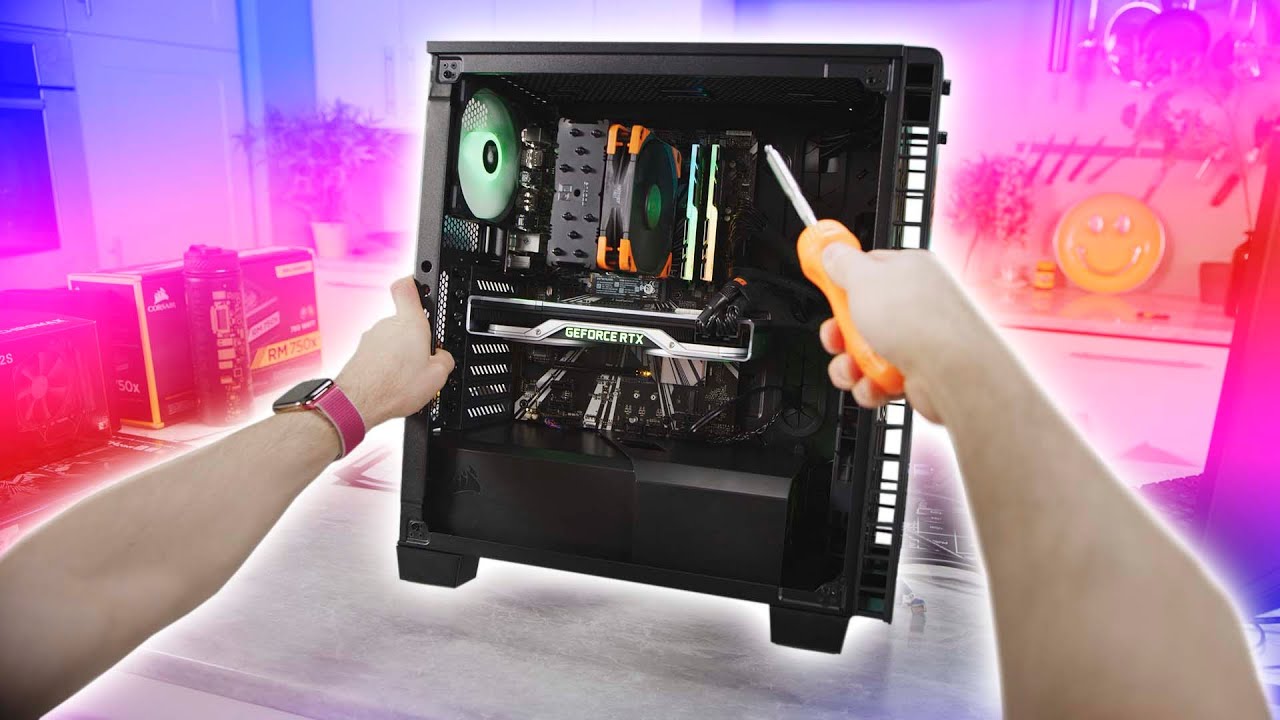
Thanks Intel for sponsoring this video! Learn more about how to build your own gaming PC at https://lmg.gg/edWob
Linus is taking the reins away from our film team and giving you his own view of building a gaming PC. This is a first person build guide featuring Intel's 9700K C...
small osprey
stoic island
@small osprey why intel
 solid leaf
Who is willing to make me a gaming pc with a budget of 1400? Please dm me :0
stoic island
Why DMs when you can send messages here
small osprey
@small osprey why intel
@stoic island uh i just like intel
stoic island
What about no
little leaf
shell wind
how do i put the ssd in the mobo
little osprey
2 questions, 1 how is a rtx 2070 super with a r7 3700x. 2 is ebay reliable to buy parts from
little osprey
yea i know but i dont have that much money and my current cpu is a ryzen 5 2600
plus i already have the 2070 super
little osprey
so then what cpu would get me better performance?
shell wind
no i dont see a slot
little osprey
or should i stick with the 2600
stoic island
In-between the CPU and the first big pcie slot @shell wind
small osprey
no i dont see a slot
@shell wind there might be a cover on ur motherboard
little osprey
i just feel like it bottlenecks, cause i see people getting better performance with the same card as me but idk
small osprey
for the ssd slot
shell wind
should it be lifting up at an angle when i push it in
stoic island
there should be a standoff where you screw it in
little osprey
also im trying to spend as little money as possible but my hard drive died so i need a new one, would an ssd be worth or just another hard drive?
shell wind
where are the screws
stoic island
a standoff like this so the SSD goes in flat
should've came in a small bag in the motherboard box
shell wind
could it be a littler black scxrrew
small osprey
Mainly 3600
@stoic island will a r5 3600x be a bottleneck for 2070s?
anyone? will a r5 3600x be a bottleneck for 2070s?
nope nvm
apparently not
shell wind
what do i do after the ssd
stoic island
No
small osprey
nah
shell wind
which one is the cooler
shell wind
the ryzen
small osprey
??
shell wind
or thye antec
 vocal hare
what?
small osprey
ryzen is a cpu
shell wind
what do i atach to the mobo
vocal hare
i mean they come with coolers
shell wind
which one that has a fan
small osprey
? u put the cpu cooler on the cpu
vocal hare
you'll have to be more specific
whole stag
Yeah it’s installed
small osprey
then u put the cpu cooler on the cpu
whole stag
You got it man 👍
shell wind
i did the ssd and the gskull ripjaws
vocal hare
its got instructions in the box
shell wind
and the little razen square\
small osprey
the cpu
vocal hare
3600x so wraith spire
whole stag
Yeah you do
vocal hare
so gotta unscrew those brackets
whole stag
And the stock cooler has thermal paste on it
small osprey
oh nvm then
whole stag
For Ryzen
small osprey
idk
vocal hare
wraith spire you gotta remove the brackets and back plate
whole stag
Does the stock cooler come with a manual or the motherboard?
shell wind
how do i instal the coler i dobnt get it
vocal hare
cooler
whole stag
Those brackets
whole stag
Yeah and there is this back plate
shell wind
the black things with the screws next to the razen square
whole stag
Yea
shell wind
then what
shell wind
cuase idk
now what i took out the sacrews
screws
what do i do after i take out the screws
vocal hare
just line it up
 indigo stream
Hey, I'm looking for some technical support! I just built a pc and I'm getting no signal 😦
vocal hare
is the display cable plugged into the correct place?
small osprey
check all connections and go over all steps again
whole stag
Did you run DDU Before switching graphics cards?
small osprey
make sure things r where they r supposed to be
indigo stream
I tried the hdmi on the motherboard and the graphics card
whole stag
Are the power pins plugged in
vocal hare
i find that sometimes people think you still use the mobo hdmi instead of the gpu
whole stag
If its a modular psu make sure all of the cables are secure
indigo stream
this is my first build so im learning 🙂
vocal hare
does everything else turn on?
indigo stream
everthing lights up fans run
whole stag
Yea
whole stag
The cooler?
whole stag
Doesn’t matter which way its facing
shell wind
k
vocal hare
if it fits you're good its just aesthetics and cable management otherwise
 echo light
OK, I am a HS teacher (English & IT) and I need to replenish trainer kits for distance learning. I am looking for a reasonably priced (because I need 35 of them) motherboard / CPU pairing that is durable. No major performance requirements here, they are mostly built, have a few labs done on them and then dismantled.
To be honest, my brain hurts and I just can't search anymore
shell wind
i got paint on my hand is that bad
vocal hare
paint?
whole stag
No?
vocal hare
you mean thermal paste?
shell wind
from the bottom of the cooler
vocal hare
omg
echo light
🙂
whole stag
Thats thermal paste
shell wind
is that bad
whole stag
No
vocal hare
is it a lot?
whole stag
You may have taken it off
small osprey
thats supposed to happen
vocal hare
ok
small osprey
it allows heat to transfer from the cpu to the cooler
vocal hare
how much thermal paste did you get on you
whole stag
Yea
shell wind
not that much
whole stag
Did you hold it by the bottom
shell wind
maybe idk
small osprey
bruh
whole stag
Oh
whole stag
Also please tell me the cpu is matched with the golden triangle
small osprey
omg
whole stag
With the triangle on the socket
vocal hare
it looks like it?
whole stag
Ok it is
small osprey
do ur research and know wut u r doing before u start building
vocal hare
you don't need much research
indigo stream
I've got a vga and boot led on the motherboard that are on
small osprey
etc
vocal hare
just doesn't make sense to hold it by the bottom
vocal hare
you properly install the gpu?
whole stag
You gotta open the pcie slot I believe
With a little knob or something
On the side
Show us how it’s installed
shell wind
will i have to put pressure to put the screws in for the cooler
indigo stream
ive got an asrock b550 phantom gaming 4/ac motherboard and the gpu is in the top pci slot
vocal hare
take a picture its easier to see whats wrong that way
whole stag
You do NOT Ever want to put pressure on the cpu cooler
vocal hare
if it wont line up you've somehow got it wrong
whole stag
Just screw it in
vocal hare
no pressure on the screws is needed
whole stag
Yeah they have a spring lock mechanism that keep them from over tightening
vocal hare
pressure on the cooler overall is not
whole stag
Now screw the screws down
shell wind
i have to put pressure
vocal hare
not all one screw
whole stag
Yea
small osprey
switch between screws
whole stag
Dont put pressure
shell wind
the left side workls but the right side i would need to put presure for it to work
whole stag
Uh
vocal hare
do like 3 turns on one and 3 turns on the diagonal screw
whole stag
Screw them until they lock up the ryzen stock cooler has a spring lock mechanism
Lots of cpu coolers have
vocal hare
you have to makes sure all the screws are at least threaded before going in onthem
shell wind
did it
 indigo gulch
Should I be able to post without a graphics card?
shell wind
alll tight no pressed i hade to cross screw and cross tighten
whole stag
Nah you need display to see anything @indigo gulch
shell wind
now what
small osprey
like dont ask other ppl for every single step
vocal hare
@indigo gulch i mean you got intel or amd?
of you got intel its likely you have integrated graphics
amd unless on a apu does not
whole stag
All AMD G Series processors have an apu
small osprey
shh wut
whole stag
Yeah so Vega 8 and Vega 11
vocal hare
you're just not making it easy
shell wind
Do i plug the gooler in next to the gskull thing
little osprey
What's going on
whole stag
@indigo gulch if you could send us a photo of how your gpu is plugged in
indigo gulch
On the graphics card there is an 8 pin and a 6 pin connector. I have the 8 pin connected but do I need to plug into the 6 pin as well?
whole stag
Yes yes yes
vocal hare
its need for power
whole stag
All the connections need to be fullfiled
vocal hare
why so you think its there?
whole stag
Now see if it posts
small osprey
btw guys is the amd stock cooler adequate for r5 3600x
vocal hare
should be enough
whole stag
If your not crazy overclocking then sure
vocal hare
for gaming
small osprey
cuz i was thinking of buying noctua nh-d15
vocal hare
it'll light up on heavy stuff
whole stag
That works too
vocal hare
@small osprey seems a bit overkill
small osprey
yeah i agree
vocal hare
but it works
whole stag
If you have the money to spend go for it
vocal hare
212 evo probably keeps it cool
small osprey
k
shell wind
do i plug the cpu coller here?
whole stag
Doesn’t the 212 evo have a bad mounting mechanism
vocal hare
the old one i believe
shell wind
@ me
whole stag
Yes plug it into that one
vocal hare
i had a 212 evo in the fx days
small osprey
is the hyper 212 black edition better @vocal hare
vocal hare
i believe its different just watch a vid
 jaunty cedar
COP?
small osprey
kk
 mystic yew
Building first pc , purchased a i9 cpu and zz490 motherboard. What is a compatible and good cpu cooler for this config?
jaunty cedar
use
small osprey
@mystic yew u want liquid or air?
mystic yew
air
small osprey
k
get the noctua nh-d15
if u want it to look a bit better get the chromax.black version
but that cooler is pretty big
whole stag
@indigo gulch plug the other one in
vocal hare
@indigo gulch we told you you need both cables in
@mystic yew depends on needs air or liquid
mystic yew
thanks
small osprey
np
shell wind
where do i put the silver thing
small osprey
"silver thing" what silver thing. be specific
shell wind
the thin one that has bendy things
 urban light
Hey guys I might be able to up the budget for my pc build to £1700
If I could is this a good build
https://uk.pcpartpicker.com/list/GdBz8M
I know it’s probably not the best but I also want it to look good all white
 meager dagger
Thats Good!
urban light
Thanks
shell wind
urban light
and the case is the lian li Pcmr edition
meager dagger
IO Sheild?
urban light
What
meager dagger
There is a super good case for 80$
whole stag
Maybe RMx over RM
meager dagger
Comes with 5 pre installed fans
 spiral zealot
IO shield goes in the rear panel of the case, there should be a vertical opening near the top of the rear panel, and it will snap into there
but make sure you line it up with how the motherboard will sit into the case
meager dagger
Yep, goes in the case
spiral zealot
that fills the gaps around the ports on the back of the motherboard, so you don't get dust and stuff coming into the case
spiral zealot
noice
meager dagger
Great
small osprey
@urban light u should get the rmx psu
urban light
Hmm what’s that
small osprey
its a better version of the one u have rn
urban light
Oh ok thanks
small osprey
np
vocal hare
@indigo gulch dont forget to enable xmp for your ram
 still roostBOT
 Sundayy25#5174 has been warned
Reason: Bad word usage
whole stag
Uh
 slate ice
Just finished my first build in a Musetex Phantom...
There are def things I would change about the case.
shell wind
i am trying to atach the mobo but dont know what to do i attach the io bored but i dont know what wires to put threw the thing to connect to the mobo
@little osprey
foggy hazel
read the manual @shell wind
 analog hearth
And a book
meager dagger
My GT 720 just came in the mail🤗
 tidal horizon
looking small form factor. 4 monitor ports. upgradeable ram, graphics card possibly / th
 odd crypt
I have a question
 elder aurora
need a review of my pc parts list
elder aurora
using this new setup along w monitor for gaming+schoo;
odd crypt
K
elder aurora
MSI Optix G27C2 27 inch 1ms 144Hz Full HD Curved Gaming Monitor with Adaptive AMD Free Sync and Wide LED Anti-Glare Screen 1920 x 1080p... Corsair Vengeance RGB Pro 16GB (2x8GB) DDR4 3600 (PC4-28800) C18 AMD Optimized Memory – Black... Cooler Master MPY-5501-AFAAG-US MWE 550 Gold Full Modular, 80+ Gold Certified 550W Power Supply, 5 Year Warranty... Samsung (MZ-V7E500BW) 970 EVO SSD 500GB - M.2 NVMe Interface Internal Solid State Drive with V-NAND Technology, Black/Red... Asus ROG Strix B450-F Gaming Motherboard (ATX) AMD Ryzen 2 AM4 DDR4 DP HDMI M.2 USB 3.1 Gen2 B450... AMD Ryzen 5 2600 Processor with Wraith Stealth Cooler - YD2600BBAFBOX... Rosewill ATX Mid Tower Gaming PC Computer Case 3 Sided Tempered Glass Dual Ring Blue LED Fans Great Cable Management/Airflow - CULLINAN V500 Blue...ZOTAC Gaming GeForce GTX 1660 Super 6GB GDDR6 192-bit Gaming Graphics Card, Super Compact, ZT-T16620F-10L... Seagate BarraCuda 2TB Internal Hard Drive HDD – 3.5 Inch SATA 6Gb/s 7200 RPM 256MB Cache 3.5-Inch – Frustration Free Packaging (ST2000DM008)
lmk what you think
facts
at my dads i have tempered glass panels and its a pain
to keep clean
@odd crypt lmk what you think
odd crypt
Send it in pcpartpicker
elder aurora
ok how do i do that
odd crypt
Ok
foggy hazel
@elder aurora wrong link, see how @odd crypt's link has a string of characters at the end?
night storm
Your link no good. It’s not to your build
 deep skiff
copy this link
night storm
It’s to website not your individual build it needs a string of letters after the list/ that identify your individual build
elder aurora
night storm
Yay
elder aurora
ok is that it?
slate ice
@little osprey I wiped it down right before I took the pic
deep skiff
yeah thats the right link
slate ice
@little osprey but typically when building I strip the case down to barebones so no fingerprints
elder aurora
@deep skiff @foggy hazel @night storm ?
foggy hazel
@elder aurora not cool.
night storm
Lol you paying us?
elder aurora
what?
foggy hazel
@elder aurora dont just randomly @ people.
foggy hazel
if people have the time, knowledge and desire to answer. They will
shell wind
just built s pc and the fan is really loud is that normal
elder aurora
can anyone rate parts list for me?
elder aurora
https://pcpartpicker.com/list/k4XMGc here is list if anyone has the time to look really quick
shell wind
which hdmi do i plug my monitor into
whole stag
GPU
shell wind
?
whole stag
The thing at the bottom
shell wind
the graphincs card?
whole stag
Yes
shell wind
or the mobo
whole stag
Graphics card
shell wind
i got no signal
shell wind
do i need to install windows first
whole stag
Did you plug in all the pins on the gpu
Make sure all the slots are filled
Like on the side
shell wind
where?
whole stag
Go into your pc
shell wind
no
whole stag
Make sure the gpu has all of the pcie connectors it needs
shell wind
its a 2060msuper and has 8 plugged in right now(2and 6)
shell wind
where would that be
whole stag
Its on the front of the gpu
 limpid tangle
Spent some time trying to polish my 10+ year old PC, and suggestions? Case has no cable management provisions.
shell wind
yeah only 8
whole stag
When you turn your pc on does it have a light that is lit up
shell wind
where is the light
whole stag
On the motherboard
whole stag
Ok make sure all of the cables on the psu are plugged in tight
whole stag
Are the fans plugged into the fan controller and is the fan controller that came with the case plugged into sata?
spiral zealot
the fans on the case have to be plugged into the motherboard or a fan controller if they aren't already
spiral zealot
if it does, use that
i don't know what case he's working in
but they need to be plugged into something
shell wind
i think i need to plug in the fans o the mobo
whole stag
Scroll up
shell wind
td500 mesh
whole stag
Yea
small osprey
Bruh u still aint done? I left for two hrs
spiral zealot
a first build can take a while when you've never done it before
shell wind
thanks
small osprey
yeah
shell wind
where on the mobo do i plug in the fans
spiral zealot
checking to see if that case came with a fan controller for actual fan power, or just for the RGB
if it has a fan controller that controls speed, all the fans would plug into that, and then that would have 2 cables, one that powers the controller from your power supply, and then a single cable that would go to one of the fan headers (locations of headers will be in the motherboard manual)
shell wind
how do i know hwich one i have
small osprey
Does ur case come with a fan controller?
shell wind
it has fans on it if thats what ur asking
spiral zealot
i don't think it comes with a fan controller for speed, just argb
from what i'm seeing
td500 mesh can come with or without argb controller
small osprey
Then plug ur fans into the motherboard
whole stag
And is it sata powered?
small osprey
It should say on the mobo, or in the manual
shell wind
idk
spiral zealot
so you want to try and find that splitter
a 3 to 1
that's from the td500 mesh manual
shell wind
can someone talk to me
whole stag
Huh
shell wind
by voice
spiral zealot
i can't, i'm working and in/out of video meetings
shell wind
anyne else
small osprey
I cant either im kinda tied up rn
whole stag
On the motherboard
spiral zealot
it came with the case, so it would be with the accessories
shell wind
where the mobo is big
whole stag
Oh the splitter
small osprey
A three to one cable
spiral zealot
look at the picture i sent, it shows what the splitter looks like
it will have 3 connectors on one side, and one on the other
small osprey
In ur case accessories
spiral zealot
as far as where it plugs into the motherboard, look at the motherboard manual, and it will show you where the sys_fan header is
you plug the fans into the 3 split connectors, and the 1 connector on the other side goes into the sys_fan header on the motherboard
shell wind
it is already conected where do i plug the ONE into
shell wind
it is where do i put the sigle cord
small osprey
Sys fan
whole stag
Sys fan
whole stag
What motherboard?
shell wind
sys fan???
spiral zealot
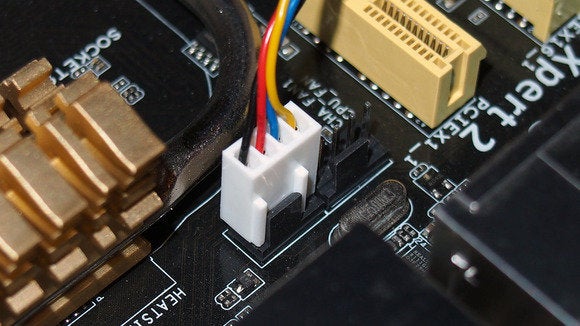
it will be a small 4 pin connector, and the board itself will label it either system fan or chassis fan
it might be chassis fan as well
different brands use different terms
cha_fan, sys_fan, chassis fan, they're all different terms for the same thing
shell wind
wheere on the mobo is it? i.e next to the ram..etc...
spiral zealot
that's the one
small osprey
Yeah
shell wind
well that than is not the issure right?
whole stag
Or POST
shell wind
ok
whole stag
Turn it on
spiral zealot
that's fine, just line up the tabs
whole stag
Yea
shell wind
so one can be empty
spiral zealot
yep
shell wind
k doing it now
spiral zealot
there are 2 different ways to power case fans, one uses 3 pins the other uses 4
but you can plug a 3 pin fan into a 4 pin header and it will work
shell wind
im putting in somthing with three but the mobo has 4
whole stag
Find Sys_fan
shell wind
@spiral zealot
spiral zealot
make sure that you're lining up the tab on the motherboard header with the slot on the fan connector
it will only fit one way
shell wind
but i can do 3 on 4 pin right?
spiral zealot
yes
whole stag
Wont that cause a shortage???
spiral zealot
no, 3 pin is DC power which works on a 4 pin PWM connector
if you connect a DC fan to a PWM header, the motherboard just runs it in DC mode
shell wind
ok i think i got it
spiral zealot
it will be a snug connection because it's just friction that holds it all in place
shell wind
now should i put eveything back and see if i get a signal??
spiral zealot
yeah
shell wind
should i put the glass and the back of the case on?
spiral zealot
i always say don't do it, it's bad luck in PC land to close the case before it all posts
shell wind
no signal!!!
spiral zealot
where are you plugging your monitor into?
spiral zealot
ok
shell wind
now what
spiral zealot
can you send pictures of what it all looks like?
just what the motherboard as a whole looks like right now
whole stag
Yes inside the case and also the backpanel and the psu
spiral zealot
is nothing turning on, or only some things?
whole stag
Is it beeping?
shell wind
whole stag
Is your cpu cable plugged in?
shell wind
WHATS THAT
whole stag
Ok that is important
spiral zealot
it would be in the top left of the motherboard, and would be either a 4 pin or 4+4 pin connector from the power supply
whole stag
Yeah
spiral zealot
i can't tell in that pic
whole stag
It looks unplugged
shell wind
where
shell wind
razen
spiral zealot
and it will look kinda like the power plug on the video card, except it will be either 4 pin or 8 pin
spiral zealot
yeah, up there somewhere
shell wind
what do i put in
spiral zealot
there will be a cable from the power supply with a connector on the end that says CPU
that connector needs go into the right socket, it's usually labeled something like CPU_ATX12V or something
shell wind
thats in
spiral zealot
ok
did you fliip the switch on the back of the power supply itself
out of the box it will be turned off
so you have to turn it on before you power up the system for the first time
shell wind
yes
spiral zealot
ok
shell wind
huh?
spiral zealot
when you turn on the system, do any of the fans start spinning?
cpu fan, gpu fan, etc
we know the case fans don't start
but what about the rest of them
shell wind
the gpu fan and the cpu one;
spiral zealot
hmm ok
spiral zealot
i can't think of anything else except to check all the connections one more time, make sure everything is secure
you can try finding a different fan header on the board to try and run the case fans
sometimes you'll have cha_fan1 and cha_fan2
vocal hare
@shell wind mate did you just go into this blind?
shell wind
no
i was guilded by a vid and a person
cha fan 2 didnt work
will it go in the wrong way or it wont push down
spiral zealot
it will go in if it's flipped the wrong way around ,make sure the tab and slot are lined up
spiral zealot
there's a slot on the fan connector and a tab on the motherboard header
the tab lines up in the slot
when you plug it in
shell wind
i dont get it

 shell wind
all faans spinning but no signa;
prisma stag
hey guys i got question
my buddy was telling me something about once i build my pc and everything and turn on. that since i have ryzen 7 3700x i might have to get an older cpu to get the bios or something like that???????????
whole stag
Yeah
spiral zealot
that was a thing that used to matter when 3000 series ryzen first came out
but not anymore
@shell wind ok, so now we need to figure out the video issue. which connector are you using to plug into the video card? HDMI, displayport?
just gonna make sure that you have your monitor set to the same input as what cable you're using, in case it's not auto detecting and switching over
stoic island
@spiral zealot it was only a problem for b450 and before too
x570 never had an issue :)
spiral zealot
well yes
but it's simpler to just say that it's an issue that used to matter but doesn't now
rather than breakign down chipsets and all that
stoic island
aye
prisma stag
does newegg have gift cards?
stoic island
Yes, but no physical gift cards
prisma stag
good i just need to do 2 different payment methods so ill buy giftcard on one
shell wind
i got the monitor on
stoic island
There's digital gift cards I'm pretty sure
still roostBOT
 Sawzall2#6735 has been warned
Reason: Bad word usage
prisma stag
just for shi and giggles
shell wind
it says reboot and select proper boot device
spiral zealot
that's progress!
shell wind
does that mean intal windows
whole stag
Yes
spiral zealot
yep