#building-and-recc-chat
1 messages · Page 632 of 1
 foggy hazel
@granite delta so is there any reason you unscrewed that?
 granite delta
No
granite delta
I did
foggy hazel
where did it say to pull that off?
 cursive wharf
forgive my ignorance of AMD coolers as I've never done one in person, but I think you're suppose to?
https://www.youtube.com/watch?v=NMn-9V3WbCw
cursive wharf
I think that's putting it on
foggy hazel
which page is that in the manual @granite delta ?
because that does not align with what i am seeing here
cursive wharf
that is for some weird AMD stock cooler. Most use the standard mounting bracket
so basic wraith cooler is basic mount
 granite delta
I think you guys are misunderstanding me
foggy hazel
read
granite delta
I apologize
cursive wharf
prism is clip based and stealth/spire is screw based
cursive wharf
which AMD CPU did you get?
foggy hazel
considering the photo you sent?
granite delta
Sorry naed
foggy hazel
yes, it sure looks like you have a backplate that is unscrewed
you might have seen me say this before: We cannot read your mind
cursive wharf
so you got wraith stealth?
granite delta
Let me rephrase my question so you guys can understand a bit more
I’m sorry
I know I’m being a pain
granite delta
I just wanted to know if you use the backplate
foggy hazel
hence why we keep on asking.
cursive wharf
helping sometimes requires a lot of info
foggy hazel
because IF we give you the wrong answer. I know who gets the blame :)
cursive wharf
which may mean a lot of questions
granite delta
Because in the manual it doesn’t say to put it back
To pair it with the cooler
The top part
cursive wharf
basically, you add the backplate and then the cooler on top
granite delta
Ok ty
cursive wharf
and screw in the four cooler screws
granite delta
That was my basically my question
foggy hazel
that is the only part that matters really
the rest is for a different "mount" style
granite delta
Okie
cursive wharf
issue was I think that the instructions didnt say anything about backplate, so confusion started
cursive wharf
nor the default screws
granite delta
Yeah
cursive wharf
you use the cooler screws
granite delta
Yeah
 little osprey
ARESGAME Power Supply 500W 80+ Bronze Certified PSU
good power supply?
 pale dust
how does egpu performance compare to a similarly specced pc?
if i was using a 1k laptop with the gpu?
foggy hazel
GPU wise? fairly similar
CPU wise is the main problem
you are power limited in a laptop (normally)
 analog hearth
@granite delta here I can help
 vocal hare
300
analog hearth
https://google.com or the manual
Search the world's information, including webpages, images, videos and more. Google has many special features to help you find exactly what you're looking for.
vocal hare
oof im in build chat
foggy hazel
read the manual mate
i linked it earlier @granite delta
i mention it again
because there is something wrong with the ram.
granite delta
Fixed
Thanks for telling me
The manual doesn’t tell me which exact spots to put it, it just tells me 1, 3
So I watched a video
foggy hazel
i know, because i have it open here.
foggy hazel
your name was put on it, for that exact reason.
foggy hazel
see above
granite delta
Ok
 cloud oasis
 keen thunder
Computer won't post
 stoic island
Debug LEDs?
keen thunder
Don't know where they are
stoic island
Does the board have them?
stoic island
It doesn't have any it seems...
@keen thunder so you don't have that to work off of, what gets powered and what doesn't get powered? I.E., do CPU fans spin, case fans spin, GPU fans spin, motherboards light up, PSU fans spin, etc?
keen thunder
Fans spin
Case and gpu
Also psu
Rgb lights on fans also work
I've tried resetting the cpu and ram
stoic island
No display output?
keen thunder
None
stoic island
Try reset cmos
keen thunder
And my keyboard doesn't light up
Ok
How do I reset it
Should I just use a screwdriver and then boot
stoic island
Easiest way to explain is to just look at this, battery method.
https://www.intel.com/content/www/us/en/support/articles/000025368/processors.html
Intel
Defines CMOS technology and how to clear CMOS using the jumper or battery methods.
(Reset cmos is the same across Intel and AMD)
keen thunder
Ok
granite delta
Is it bad that it won’t budge all the way in?
little osprey
yes
 sharp gulch
yes
little osprey
push harder
 pastel abyss
reseat the whole thing
so I've got bad luck.
the mag B550 has no ram slots that work.
tested with a verified working stick and 3 beeps again
stoic island
time for rma/return
little osprey
I would like to reinstall windows on my M.2 SSD and have it as my main with my older evo 860 as my backup. Currently, I have my evo 860 as main and M.2 as backup. How can I go about reinstalling windows on my m.2 because when I go to reinstall it it always choses my evo 860 😦
little osprey
I thought about just pulling it off but wasnt sure if that would potentially screw something up
pastel abyss
@stoic island do you know if I buy a 2nd B550, and return this one, if I'll get the money evened out??
well turn the pc off when you do that Extremeties
I usually pull the power cable and then press the power on button to suck the lingering pixies out
little osprey
Of course. Thing is, I have some fans connected to my Icue commander for RGB that's also connected to my evo 860 ssd for power. If I unhook the sata from the evo 860 will that mean the RGB/iCue will no longer have power?
stoic island
?
pastel abyss
but either way, the PSU will power the other stuff
stoic island
Likely not, shipping/return costs
stoic island
Wait how the hell do you power a commander with a ssd? Daisy chain sata cables can work if you just take a device off
Cover shipping costs no iirc.
You could look into getting a RMA if you want a board replacement from manufacturer
pastel abyss
yeah I'm just trying to cut shipping time down
stoic island
anyways @little osprey win10 installation media should ask you which drive to install on
pastel abyss
idc if someone holds the $180 til they receive the board
pastel abyss
Using Newegg's shipping label is quick and easy. We'll deduct the price of the shipping label from your refund amount and you'll be able to print your label from the convenience of your own home.
MSI owes me
yeah so I'm just going to buy another one
Does anyone have recommendations for mobos or is this the wrong channel??
pastel abyss
 desert gulch
Just personal preference
pastel abyss
I don't want wifi, and I want pcie4
desert gulch
Are you going b550 or x570?
pastel abyss
I'd like 128gb of ram
desert gulch
Whats your budget for the mpbo?
pastel abyss
idk, $180 to $220?
depends on if something's just WAAAY better
but I'm not doing a $400 mobo
pastel abyss
it's pointless to me
desert gulch
Hes really smart and knowledgeable
pastel abyss
that's for people doing WORK. this is a gaming/internet pc
I have VR, but everything can handle that with my card
what's the major differences between the 550 and the 570?
I'd still like to see the option to EXCLUDE things in your searches
desert gulch
@pastel abyss main difference is x570 has pcie gen4 slots, while the b550 doesnt have any
So the chipset is slightly different
X570 is also just a hogher end board
B550 is thw more budget x570
desert gulch
Yeah idk
Still the x570 has gen4 m.2 slots
Even tho you wont really need that
@pastel abyss that b550 has pcie gen4 for the cpu, not slots where you put GPU and stuff
desert gulch
So the cpu socket is the same for both basically, but the gpu slots are different
Same with m.2 drive slots
pastel abyss
I read it as, it's going to be a pcie3 if your cpu isn't good enough
pastel abyss
but my RYZEN 9 3900X would make it pcie4
 winter marsh
only a DOOC and it still doesnt work
if enabled the system wont boot, got so bad i had to do a system restore to get rid of a bad boot file
x570 asus tuf gaming wifi
turns out it's notorious for bad ram speeds
 little leaf
why?
winter marsh
its the mobo/bios that are hard on even spec'ed ram
winter marsh
didn't know that prior to purchasing it
its floating 32gb of Team T-FORCE DARK Za 3600 mhz ddr4
winter marsh
nope
little leaf
lmao you should probably try that
because if it doesn't work in a different slot its probably the ram
Unless I mean
winter marsh
this is a common issue with the mobo/bios posted on the manufacturers forums
little leaf
I wouldn't think that all 4 slots couldn't run spec
winter marsh
cpu is the ryzen 5 3600xt, with caps at 3400 mhz anyway
 stoic island
@pastel abyss from the top, 1 dimm per channel with single rank can run 4866mhz, 1 dimm per chann with dual rank can run 3866, etc.
1 dimm per channel means 2 sticks total for most consumer boards, and 2 dimms per channel means 4 sticks total. SR and DR mostly are dependant on capacity, 8gb sticks are most likely SR, but 16gb and 32gb sticks are most likely DR
winter marsh
Hello,
I built a new PC a couple of weeks ago.
Important bits:
Motherboard: TUF Gaming X570 Plus WI-FI
CPU: Ryzen 3900X
Memory: G.Skill Trident Z Neo RGB DDR4 @3600Mhz (2x16GB)
sorry but its not the sticks, its the mobo bios
little leaf
@cloud oasis x570 not needed and 3700x not needed unles you are editing or work stations
cloud oasis
Yes i am
winter marsh
it doesn't matter what ram it is
little leaf
on then a 3700x is fine
cloud oasis
Im getting 3700x for work
little leaf
If you like rgb a 220t td500
or p400a are good options
the mobo is a little pricey
and 850 watts aren't needed but are fine for overhead
Gara I would at least try the other slots to make sure
stoic island
Anyways from what I see, you should try manual freq and timings
At try single stick at a time
winter marsh
was to cap the system off with a rtx 3080 asus tuf gaming vga, but we all know how that turned out
stoic island
Mobo side xmp issue just doesn't feel right
little leaf
^
I wouldn't jump to conclusions so quickly since you haven't done any troubleshooting
winter marsh
i don't feel like feel like doing any more system restorations to remove corruptions
stoic island
Xmp profiles can be faulty, decently common actually. Like if they shipped with the wrong voltages or something in the profile.
?
Troubleshooting doesn't just corrupt your system?
winter marsh
yup, safer to wait for a bios refresh
stoic island
???
little leaf
what???
foggy hazel
@winter marsh i strongly suggest you read some manuals
little leaf
Read the manuals
foggy hazel
it seems there is a strong disconnect between that you think and how it actually works
stoic island
You might be making assumptions you don't know you're making
pastel abyss
So Mr1111, my 32gb of 3600 would "max" out that mobo
winter marsh
no reading required to restore a 2tb ssd
pastel abyss
the screen shot. I'm planning on eventually getting all 4 slots at 32gb, but they're 3600, so they'd be 2DPC 2R at 3600 right?
stoic island
So are you planning on 128gb of ram?
foggy hazel
depends on the specific sticks @pastel abyss
pastel abyss
yeah so that's the fastest ram it can handle at 128gb basically
or I'd have to find expensive ram
winter marsh
Quote Originally Posted by RedSector73 View Post
check your using from the CPU, RAM slots 2 & 4 not 1 & 3.
Yes, confirmed. Definitely using correct 2 & 4 (or A2 & B2) slots.
Quote Originally Posted by RedSector73 View Post
Did you change bios recently - last 2 weeks or anything
pastel abyss
down the road yeah, maybe in 2-3y
winter marsh
tried and failed
pastel abyss
Naed, I was told to ask you about what mobo I should get
stoic island
Try using a single stick of ram, test it in each slot.
And learn to do manual frequency and timings if possible.
pastel abyss
I've RMA'd my MSI Mag B550 due to dead ram slots
foggy hazel
@pastel abyss you and @desert gulch seemed to have answered your questions thou? but please, ask away if you have more :)
pastel abyss
just seeing if you had a suggestion on which mobo would pair nicely with the RYZEN 9 3900X and the g skill I bought
foggy hazel
any of them really
stoic island
@winter marsh I'd suggest you get more familiar with what the issue is, and do more testing to figure out what exactly is failing.
pastel abyss
I keep digging through pcpartpicker for the stuff I'd like and the mag b550 seems to be the best choice
foggy hazel
from what i remember of your situation, you are not planning on oc'ing or anything. So anything will work really
pastel abyss
no, no OC. I try to keep my pc at it's middle work load
I like my psu chonky and enough of everything to stay cool
except my hdds. I usually pack those too tight.
I need a new ssd for this laptop. I got like 14gb left on a 500
foggy hazel
rule of thumb: dont pack your ssds like that
stoic island
By the way Naed, are you aware of any Bios issues with the b550m pro vdh wifi? I never noticed until a guy asked about it, but on Newegg, there are a bunch of reviews talking about not booting with a 3600(x), and blaming it on the bios. Or could it be a case of people not reading their manuals?
foggy hazel
silly has a tendency to breed silly @stoic island
stoic island
Just was a bit more concerning with the volume of blaming on bios
Didn't make any sense to me
foggy hazel
could also just be a bad batch
 prisma stag
So is no one going to help me?
stoic island
I mean, b550 not compatible with 3600..??? Or cmos being bad
prisma stag
Lol im just kidding, just wanted to act like the drama queen from earlier
pastel abyss
lol
foggy hazel
again, without more info, from people that know what they are doing. Its impossible to say.
stoic island
Things get buried easily, just ask again :p
pastel abyss
I was like, who's this and when did they ask a Q?
stoic island
Yea, from the like minute of looking on google it was just forum posts about not posting and nothing major
pastel abyss
is the chipset from 550 to 570 that much different?
foggy hazel
@stoic island the general "things did not magically assemble themselves" error routine that the normal user does. Goes something like this
pastel abyss
I don't like the fact that installing an M.2 kills sata and/or pci slots
stoic island
There are some semi-major differences, but usually don't really apply to the usual consumer
pastel abyss
but it seems like all these mobos have weird things like that
foggy hazel
Look at where they bought it. Check reviews. Someone else complain about something? good, read that, then complain about the same thing. Completely bypassing the part where they logically ask themselves IF that is the error they have.
stoic island
Eh, it's shared bandwidth with m.2_1 and sata_5 and sata_6 that's fairly common iirc
It doesn't just kill the ports
It kinda takes the bandwidth
foggy hazel
@pastel abyss the "shared bw" is also a thing on some x570 boards
pastel abyss
so the 3 "hdds" would share bw
winter marsh
did a recommended bios update, which happened to be already installed.
pastel abyss
ok
stoic island
Bios updates are very rarely the issue
Sometimes it just does the job clear cmos should've done.
winter marsh
successfully set DOCP to 3600mhz, booted up and got 2400 mhz in cpuz
its a common issue with this mobo/bios
stoic island
Hell, most times it does the job clear cmos does and it just takes the credit
Bios settings can get funky, doesn't mean the version of the bios had issues.
winter marsh
works well enough for bad system oc, but this ins't that case
pastel abyss
SLOW RAM! dundunt dunt dunt dundunt TAKE IT EASY!
stoic island
Wait where does it say 2400mhz in CPUz
There's a section that's meant to tell you jedec defaults
prisma stag
im wanting to turn my computer into gaming computer
prisma stag
can i show u what i have and u tell me what i should do
stoic island
Sure
prisma stag
one second let me find it to get accurate name
ASUS Laptop L203MA-DS04 Intel Celeron N4000 (1.10 GHz) 4 GB Memory 64 GB eMMC SSD Intel HD Graphics 11.6" Windows 10 S 64-bit
prisma stag
yea
stoic island
That's not going to happen.
prisma stag
but i can turn into a gaming computer
pastel abyss
oof
 ripe wedge
unfortunately
winter marsh
that it does
stoic island
You can't without some extreme bootlegging
ripe wedge
that laptop might only be able to play games like League of Legends
stoic island
@winter marsh that's correct now it seems
foggy hazel
@prisma stag simple question: are you serious?
stoic island
3600c18
pastel abyss
Among us is super fun...
winter marsh
basically the DOCP/XMP has no impact
stoic island
Ahem
That's exactly what I was talking about
It's meant to say 2400mhz there
Jedec defaults
ripe wedge
@prisma stag the processor is too weak and it would be better to just buy an older i5 office desktop and throw in a graphics card like a gtx 1050 or like a gtx 970
along with a power supply upgrade
prisma stag
well idk im just tired of this computer being so slow @foggy hazel i mean its so bad that i lag in discord
winter marsh
tried that
foggy hazel
@prisma stag save up, buy a new one.
stoic island
SPD tells you what your ram is rated for, not what it's running at.
The first tab told you what it was actually running at.
pastel abyss
yeah Sawzall, how much were you going to spend?
stoic island
Which was 1800mhz, (3600mhz effective)
prisma stag
id like to keep it budget friendly
pastel abyss
well laptops can't really get upgraded
stoic island
@winter marsh anyways it looks like you have your ram running at rated speeds, congrats, nothing is broken.
pastel abyss
youd want a desktop if you want to game-game
foggy hazel
and as was said earlier @winter marsh https://discordapp.com/channels/500085440221806603/589689072692494356/757110065005199491
prisma stag
like $500 if possible
ripe wedge
https://www.ebay.com/itm/Dell-Optiplex-7010-sff-i5-3570-3-40GHz-8GB-RAM-500GB-HD-Win-10Pro-64-bit-DVD-ROM/114414422693?epid=11003828914&hash=item1aa3a18aa5:g:4Z0AAOSw6a5fY71k @prisma stag something like this along with buying a dedicated graphics card like a gtx 1050 would be good

eBay
I will be more than happy to work with you.
not saying you should by this specific one but these older computers can be good for entry level gaming
stoic island
500$ could do Apu but yea
winter marsh
My ram is just fine, its 3600 Mhz out of the box
stoic island
Your best bet is a good optiplex, with a GTX 1650 and a SSD imo
foggy hazel
@winter marsh you are completely missing the point :)
stoic island
Y'all remember who it was that made a video on an optiplex+gpu build?
prisma stag
hmmmm what about ram
stoic island
Ltt made the 200$ thing but I thought someone did an optiplex+1650 video
winter marsh
i recycled two dell 7020 with gtx 1060 6gb, and 500 watt psu
ripe wedge

Amazon Affiliate Links (We get a kick back if you use these to buy anything!)
1TB 2.5" SSD: https://amzn.to/2QfXqWT
HDD Caddy: https://amzn.to/34QteH3
MSI GTX 1650 4GB Low Profile OC: https://amzn.to/2PQ1k9Q
Computer Toolkit: https://amzn.to/2svGbbY
Today, I attempt to put to...
@stoic island
prisma stag
ok
winter marsh
no the point wasn't missed it's simply moot.
prisma stag
wish i could just take what i wanted from these corporations
foggy hazel
yes, what you complained about was not a thing
as you showed yourself. The ram is running what it is supposed to
pastel abyss
so that's the 3600 at 2880 vs 2555 thing?
foggy hazel
no @pastel abyss
pastel abyss
I was trying to figure all that out when I first put the build together
stoic island
Uh what?
winter marsh
the dell case transfers weren't that bad, just that the cable adapters had to be purchased to make em work
prisma stag
yea guys i think im just gonna buy an alien ware or something, this building might be out of my league
pastel abyss
DDR4 3600 (PC4 28800) and you can get like DDR4 3600 (PC4 25550)
stoic island
Uhhhhhh
pastel abyss
Sawzall, it's not too hard
foggy hazel
@pastel abyss thats a screwup from the person who made the name
pastel abyss
if you've plugged in a nintendo cartridge is akin to that
stoic island
Isn't 25560 3200mhz?
ripe wedge
@stoic island oof thats not a lot of air room
winter marsh
Features
Armor design for perfect protection
Aluminum alloy heat sink with high performance
High thermal conductive adhesive
Tailor made for AMD
Selected high-quality IC
OC Profile Support
Energy saving with ultra-low working voltage
foggy hazel
3200 is 25600 @stoic island
stoic island
Ah close enough xD
foggy hazel
at least by jedec numbers
stoic island
Ofc
foggy hazel
heck knows what it is after you let the marketing department loose on it
pastel abyss
Naed, now that I'm redoing the search, none of them have the other value lol
guess you're right on that
stoic island
Can't go around marking things as "1799.86mhz"
foggy hazel
much more "practical" to just call it "Super duper fast!"
stoic island
Tbh idek where the 28800 and 25600 come from and what exactly they mean
foggy hazel
and throw in some random v1, v3
stoic island
It's ddr frequency *8
pastel abyss
I read up on the math that produces the numbers
it has to do with the pins and frequency
prisma stag
hey guys i dont want a $100 hdmi cord but i dont want a $10 hdmi cord, any reccomendations on a decent one?
stoic island
288pin ddr4 is the same across both of em
ripe wedge
cheap hdmi cords are fine
winter marsh
anyway thanks for some info, i'm off to snooze to a few movies to trying again tomorrow
ripe wedge
no different from expensive ones
stoic island
@ripe wedge standards.
ripe wedge
displayport is ultimately better though
prisma stag
im worried about them being secured in place
pastel abyss
I usually look for the smaller "head" on the cable
ripe wedge
@stoic island I suppose but a cheap hdmi can do the job 90% of the time
stoic island
Can't expect some 1.2 to run 4k120 because you heard hdmi 2.0 can do that
pastel abyss
this way you know it'll plug in, next to anything
pastel abyss
price and what I'm looking for
stoic island
B550 tomahawk is pretty overpriced for what it offerd the usual consumer
stoic island
Soo why not say a B550-a pro
I would like to say pg4 but that went out of stock then really high price :(
pastel abyss
so you're saying this? https://www.newegg.com/msi-b550-a-pro/p/N82E16813144330
stoic island
Mhm, just one to take a look at as an example.
What does the tomahawk offer YOU that the b550-a doesn't?
pastel abyss
usb 3 ports just looking at the IO
stoic island
?
stoic island
Lol
foggy hazel
yes, we have plenty of examples of that
pastel abyss
thinks Naed made the graphic
stoic island
Naed definitely secretly works for the MSI marketing team
foggy hazel
But i know how thankless a job it is. And the actual info is there. just misplaced
so yes, it could be better. but it is not missing info
unlike just about every other marketing department flyer
stoic island
Anyways, alright, if you need more usb ports, what exactly do you need them for and how many?
pastel abyss
well have you heard of Mugen?
foggy hazel
with what @stoic island said in mind: Keep in mind, we cannot read your mind
pastel abyss
we use wired arcade sticks
and eye no controllers dont need usb 3, but if I'm buying new, I'm buying new
little osprey
Whats everyones opinion on enabling "Hardware-accelerated GPU scheduling" in the graphic settings of windows? I keep hearing about this but havent turned it on
pastel abyss
I did like the fact that the 2nd m.2 had a cover
stoic island
@little osprey from what GN tested it to do, it does basically nothing right now, except add instability to the average user.
foggy hazel
@pastel abyss a piece of advice: Focus on the specs instead of the makeup of the pig :)
stoic island
But again, how many ports are you looking for?
little osprey
Alright cool, thanks Mr1111
What about the "Variable refresh rate" in the windows settings?
pastel abyss
so my pc I've scrapped, I think I had 12 usb ports
I was super heart broken when my 4 port usb 3 pci card wouldn't fit
that thing was like $60
stoic island
I'd think variable refresh rate in windows would be wacky compared to doing it from Nvidia control panel or Radeon equivalent.
I'd assume you've heard of G-sync and Freesync?
little osprey
Yes, I have a gsync monitor
stoic island
G-sync is an implementation of varible refresh rate.
To enable g-sync, you enable it with your monitor's OSD, then go to Nvidia control panel, and where it says set up g-sync
And it doesn't really care about windows settings
little osprey
Yeah, I have it turned on. I was just asking about these options within windows cause they're somewhat new to me. Trying to squeeze out as much performance/fps that I can from my system. Currently have a i9 9900k on a 2080ti and Im getting somewhat low fps in certain games which is kinda odd.
stoic island
Well, where exactly are you getting those issues?
We can try to troubleshoot the problem right at the stem
little osprey
Mainly CoD Warzone and Marvels Avengers. Both games Im getting lower fps than I thought Id be getting. Warzone, at 1440p I get around 60-120ish fps depending on where Im at on medium-high settings with AA turned off. I see other ppl with my same setup getting like 150+ fps and think to myself, what the hell. Avengers, Im getting like 40ish - 100ish fps @ 1440p with settings set to medium-high with AA off again
foggy hazel
"thought id be getting" <. do you have any reference for that?
because gut feel is a very bad indicator for stuff like this, unless your job is doing it
stoic island
I gotta sleep now, so I'll leave you with Naed for now, good luck with your issue :)
little osprey
When I see and hear people with similar setups getting almost double of what Im running, I raises questions, why
foggy hazel
not saying your framerate is high or low. Just that unless you have some reference. its very hard to figure out
"similar setups" <- same problem
details details and more details :)
they all matter for figuring out what you are actually supposed to get
and word of warning, unless there is actual evidence when someone says "i get X frames in Y game" you have no idea if they looked at their bank account and counted pennies or if it was actually a framerate number
stoic island
Give all the information and context you can. Maybe the issue could be as simple as you're running a single stick of 8gb ram in single channel.
little osprey
Again, someone, I think it was actually Mr1111 who posted it of a guy playing Warzone with an i9 9900k on a 2080ti with in-game footage of his fps and performance
He was consistently hovering above 150 fps with maxed out settings at 1440p.
stoic island
Youtube benchmarks can be decent places to compare against, but details :)
And if you're the person I'm thinking of, did you try using MSI afterburner with rtss?
little osprey
Yes I am
little osprey
Yeah, I got it working
stoic island
Alright. See if you could record it, and bai
pastel abyss
wth does * PCI_E2 will be unavailable when installing the PCIe card in PCI_E4 slot. mean??
pastel abyss
I think this is one of the reasons I went to the tomahawk. just reading that is like wtf
and since my ryzen 9 doesn't have graphics, the onboard wont work right?
foggy hazel
correct
pastel abyss
digging down into these mobos is time consuming
foggy hazel
i am going to leave you to it, time to actually do some work.
little osprey
temps for my cpu hovering around 60-62ish C while in-games decent temps?
pastel abyss
I think so?
yeah so the 570 has the fan on the chipset and that's where the gpu is going
idk. it's stinking hard to select a mobo
cloud oasis
asus tuf x570
pastel abyss
Not available. See similar items below
little osprey
With OSD on
pastel abyss
3rd Gen AMD Ryzen Processors DDR4 4400(O.C)/ 3466(O.C.)/ 3400(O.C.)/ 3200(O.C.)/ 3000(O.C.)/ 2933(O.C.)/ 2800(O.C.)/ 2666/ 2400/ 2133 MHz Un-buffered Memory <<<complete lack of 3600 for some reason
 sour fox
just ordered the Corsair 4000x to replace my 280x. Got a PCIe riser cable to mount the GU vertically also
little osprey
First PC build was just trigger happy to get something please be nice 🤣
 plush wigeon
Xidax is overpriced.
little osprey
I had a friend go there and build one but I said oh well might as well wanted something. I should have put time into actually buying part by part
plush wigeon
Is there no gpu with that?
little osprey
I have no idea this is the first PC I’ve ever gotten
plush wigeon
$747 for integrated graphics is a bad deal
little osprey
I will definitely have to buy new stuff for sure but hey at least I can somewhat upgrade it right
cloud oasis
Also u dont need to buy a os
little osprey
I just hope when I start it up it works somewhat, and don’t fry lmao
 cloud oasis
You couldve bought a actually decent pc with that money
little osprey
I asked around to people I know and got ignored. So I’m like hey you know what drop money on something that’s garbage now I think about it. I was hyped for it
pastel abyss
yeah that's pretty rough rohxs. you might want to consider canceling it??
little osprey
Tbh I wish I could it’s already in shipping
Like I got the money to buy new parts just need some advice and a list of what I should buy to run decently. Don’t need some OP PC. But I wanna be able to run certain games, learn to do GFX and VFX.
pastel abyss
honestly man, I would return it. even if you lose $50 in shipping
the ssd is the only decent thing in it as far as I can see
little osprey
Ok the moment it comes to my house I’ll ship it back
 quasi silo
ok I have a question about hardware
pastel abyss
so talking to a buddy, I showed him this pic
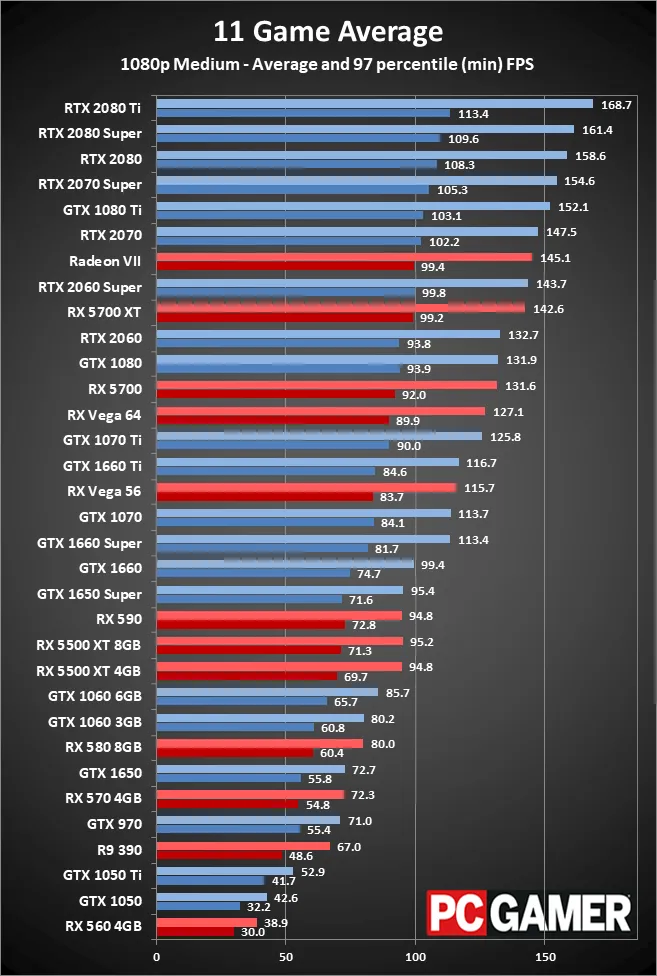

the 1660 SUPER and above is the only cards I'd consider buying
quasi silo
if I have an M.2 SATA SSD, is it the same as a 2.5" SSD?
pastel abyss
no. the m.2 looks like a pcb and the 2.5 ssd has a plastic case
quasi silo
yeah I get that difference
pastel abyss
so that depends on the mobo. the m.2 will/can be faster
quasi silo
okay, thanks
pastel abyss
the ssd depends on the SATA speeds
and the ssd obviously. but the m.2 has more lanes of talking from what I understand
like it can talk, say 64 messages at 1 second, and the ssd can do like 4
pastel abyss
but again, it's up to the mobo. m.2 is based off of pcie slots
quasi silo
it's just because I'm building a new computer and dont really know that much about SSD territory
pastel abyss
if you're used to 5400/7200 hdds, get an ssd and it'll be night and day
quasi silo
yea okay
pastel abyss
the m.2, people have differing opinions
like some only have games because it's faster. some like the OS because it's faster
quasi silo
my build is a Ryzen 5 3600, RX 580 OC, 16GB 3200mhz RAM and the SSD is the only think I'm unsure of
let me check my motherboard make rq
yeah MSI B450M-A pro max
pastel abyss
so you're at pcie 3 and you can see under specs that the speed of it drops if you install pcie cards
or older cpus*
quasi silo
so my CPU will be slower?
pastel abyss
no, no
so the slower cpu can never go faster than what it is
the newer m.2 can be faster than older cpus
like I believe m.2s are like 7x faster than sata ports.
quasi silo
okay poggers
pastel abyss
certain cpus cant even talk as fast as sata
so the mobos can fit older cpus and newer ones. so you can upgrade next year or w/e. just makes it easier on the customer
quasi silo
I'm also wondering if it'll work with the given ports
pastel abyss
that one right?
little osprey
yes
pastel abyss
your mobo has
little osprey
most are on the 300-450 end tho
pastel abyss
4 x SATA 6Gb/s ports
AMD CPU 2 x SATA 6Gb/s ports*
- SATA5 and SATA6 ports will be unavailable when installing a M.2 device in M.2 slot.
little osprey
the samsung evo SSDs might reach that spec listed
pastel abyss
so if some ssd is on sata 5 port, and you have an m.2 in the 2nd m.2 slot, they share the speed
quasi silo
okay like a bottleneck?
pastel abyss
yeah, there's only so many lanes to talk to
but I think if only 1 hdd is talking, it can take all the lanes
quasi silo
yeah the M.2 is the only thing I'll have in there
pastel abyss
yeah from what I've been told they slow down. like how it says they'll be unavailable is a half truth
quasi silo
also, what about a windows install? I cant get a hold of one considering I'm using linux ubuntu and having issues making a windows usb on it
yeah okay
pastel abyss
so like pcie 3 x16, if you use the m.2, I THINK the pcie 3 card/gpu drops to an x8 and the other x4 go to the m.2
that's what was frustrating me about getting a new mobo
little osprey
can't you have multiple OS on a same boot drive?
pastel abyss
my 1080 fe is pcie 3, so I could put it in the 2nd x16 slot and keep the m.2 open if I buy a hdd
little osprey
I think you can
quasi silo
can't you have multiple OS on a same boot drive?
@little osprey you can but it's a pain for me to sort out
and I dont have windows any more as a result
I cant make a bootable usb in ubuntu either
little osprey
yikes
quasi silo
if anyone has any way to get windows back without windows itself, then PLEASE DM ME
little osprey
Yeah I’m good lol. Looking up some stuff
pastel abyss
use pcpartpicker
little osprey
Lmao it’s all good it’s my first PC
pastel abyss
well even the pros use that site. it's pretty easy and you can get a good feel for costs
and it helps understand compatibility and all that
little osprey
Ok I’ll look it up right now and add up the prices for stuff still have a budget and what not
pastel abyss
since you're trying to not spend a fortune, I'd say go AMD. you get more for the money
little osprey
Yeah AMD I’ve heard some good stuff about it and everyone I know runs it
pastel abyss
faster top end speeds are "better" than more cores, but there's a trade off
you don't want a 4 core 4.2ghz vs a 16 core 3.8
the 16 just slaughters it
pastel abyss
but some might trade a 10 c 4.2 over a 12 c 3.8
little osprey
if you're on heavy budget amd is the option
So right now I’m looking at cases lol I don’t know what good and bad. Because I know you need room. And my budget is $800
do you have a partpicker list?
pastel abyss
dont go to case first
look at that for a second
I personally build for HEAT
I'm not trying to get a 125w cpu
my house is hot af
little osprey
my advice: don't buy nzxt cases
pastel abyss
your chunk of your budget needs to be cpu and gpu
little osprey
just saves you the pain of your pc becoming an air frier
pastel abyss
then mobo and ram
little osprey
yes
pastel abyss
then everything else
pastel abyss
well you have to match the psu to the build
little osprey
Can you guys send links m to certain products through the website since you guy’s know way more than me
true
little osprey
are you planning to buy right now or can you wait?
wait
WHAT

Probably got it from a miner lmfao
epic deal
I’m looking to buy soon. Like imma contact the company I built from then get my money back. I’ll have a good amount of money to spend.
 still roostBOT
 Odb718#2217 has been warned
Reason: Bad word usage
pastel abyss
oof.
this is what I meant to type

EVGA
Ready for 4th Generation Intel Core Processors (C6/C7 Idle Mode) Introducing the latest in the EVGA power supply lineup; the GQ series. These power supplies take some of the best features from EVGA�s award winning power supplies, like EVGA ECO fan mode for near silent opera...
little osprey
epic
Ok what’s a good motherboard for in range of Pc build up to $800
alright gonna say probably for your budget a ryzen 5 3600 should be the base cpu
the mobo of course adapted to the 3600
pastel abyss
AMD Ryzen 7 2700X is like $25 more
little osprey
true
pastel abyss
both would be great starting chips tho
so if you spend more on the cpu, you got less for other stuff
little osprey
ram just pick the cheapest 3200 Mhz tbh
pastel abyss
and rohxs, like I mentioned, some people want more cores, some want faster cores
little osprey
those are very unlikely to vary in discernible quality
I’ll do the ryzen 5 for the cou
Cpu*
pastel abyss
depends on what you're plans are
pastel abyss
I'd say an $80-$90 mobo would be good
little osprey
My plans are to game a little don’t know exactly what I want to play. But also do VFX and GFX
little osprey
try stretching for a 2700x
gonna give you better performance than r5 3600 in that case
pastel abyss
and dont be scared to plan on upgrading the cpu next year or so
pastel abyss
if you're going to do vfx and all that, fat ram is needed. I would stay away from doing a 2x8 and just get the 1x16gb stick instead
little osprey
Is this a good Motherboard? With the Ryzen 5
pastel abyss
this way when you start getting better at graphics, you can pop a 2nd stick in and feel it
little osprey
Lmao I honestly have no clue about anything. Legit new
pastel abyss
totally cool man
I'm not as knowledgeable as I feel I'm coming off. But I've been doing this for a while too. there's always something else to learn
little osprey
that's a good b450 tho try looking up a b550 just in case
if you're going atx
Yeah I feel you on that. You know way way more than me. I think like with my budget build something somewhat decent and put it together will teach me how to do stuff also
pastel abyss
so do you know the difference between micro atx and atx?
little osprey
Not one bit tbh
pastel abyss
the atx will not fit in a micro atx case, but micro atx can fit almost all cases
you have stand offs, and you just put the screw spots where you need them
the micro atx will only have 1 pcie slot
I'd go regular atx
little osprey
Ahh ok so that means certain Motherboards can only fit certain cases
pcie slot for what?
pastel abyss
atx is the most common
pastel abyss
as long as you don't somehow buy an extended atx board or something crazy, you'll be gold
little osprey
I just wanna be able to have the space know what I mean that’s another thing lol
pastel abyss
most boards will come with 2 long pcie slots, and 2 or 3 pcie 1 slots
little osprey
2 long are for the gpu
you're only getting 1 gpu in the build though with this budget
So question with this site. You can click Add on a certain part like I did cpu first then went to motherboards. Will it show only compatible parts?
pastel abyss
it should, yes
little osprey
you should at least know the basic of what you want in your build though since some mobos are made with less pcie x16 slots(big) and more space for other slots
yes
only compatible chipsets
pastel abyss
I think there's a way to disable that, but usually it's set to be compatible only
and that mobo is probably your best bet for the cost
little osprey
Ok I’ll put something together and tell you guys what I all looked at lol would make it way easier I’m a bit slow lmao
try a 5700xt for card imo the best for what you're looking for
pastel abyss
for Ram, I like g skill. I used to have corsair in my first build back in like 2005
little osprey
corsair too expensive tbh
ram from what I know doesn't really matter
just focus on it being at least 3200mhz
pastel abyss
well for photoshop it really does
pastel abyss
ah, yeah
little osprey
also yeah ik lmao
I purchased a rig for mainly photoshop editing and drawing
since oof my current pc has massive leaks
2008 pc moment
pastel abyss
I think the 5700xt is a little pricey for an $800 build
little osprey
yea
but they probably can fit in the card in the rig
takes almost half the budget tho
mainly talking depending on what case and storage options they choose
now if this is a full rig then yeah
Ok can I send a link it will show what I have so far lmao
this is just the pc itself with no peripherals lmao
My brain hurts 🤣
yea
send it
Well lmao saw the price 🤣 dang it
little osprey
Fr lmao
pastel abyss
Corsair Vengeance RGB Pro 16 GB (2 x 8 GB) DDR4-3200 CL16 Memory
drop that and get 1 stick of 16gb for like $60
I wish we could edit this build
facepalm
pastel abyss
little osprey
Why are you buying a cpu cooler lmfao
pastel abyss
yeah the edit button was at the top right
little osprey
Or could you make one and send me the link to that and I go click part of what you guys say good. And hey man idk what I’m doing 😂
making a rig
hoping it's good
that mobo kinda overkill with 3 pcie
x16
pastel abyss
pastel abyss
yeah the budget still needs work
little osprey
Yo what the heck you only got $600 see yall know 200x more then me
pastel abyss
well it's $700
little osprey
Yeah true lol still better than what I’d be buying from Xidax lol way better
little osprey
I’ll email them right now
pastel abyss
you can buy an OLD Dell, and get a psu and a case for dirt cheap
and maybe some other viable aspects
little osprey
well that one you made is p good
could get a 5600xt or a 2060 on there if possible but the rest is for the case so it's good
100 bucks for a case tho
lmfao
pastel abyss
this was linked earlier
little osprey
maybe just spend a lil more on a modular psu and put a case in there that's not from nzxt and boom
you got a rig
pastel abyss
eBay
I will be more than happy to work with you.
little osprey
So I’m about to email them and say I would like to cancel the order lmao. That money will reaper in my bank account right
pastel abyss
wow that took a while to get down to a workable link
I mean that thing comes with a hdd you know has an OS on it lol
BAM! C:/ drive
little osprey
Lmfao I’ve been on the short-bus a few times if you know what I mean so. But if I’m right when I cancel the money will come back to by account lol
pastel abyss
if the company's on the up-and-up
they might not want to let that money go so easy?
little osprey
Oh that’s a bit dumb lmao they better give me the money back
pastel abyss
I mean, I think they sold you a shirt in a computer build
I'd google the heck out of it rn.
see if anyone else has had problems
little osprey
You can still get a refund if you don't touch the pc I think
description
So I originally purchased it the 9th would that mean I’d get a full refund
idk this return policy kinda greedy
still roostBOT
 Frous#4068 has been warned
Reason: Bad word usage
little osprey
whoops
pastel abyss
it seems like you'll get your money back
little osprey
Right I know what you mean should I just say f it and just send it and say I’d like to cancel the order and explain why, and see what they say about a refund. Because when I originally purchased lmao I accidentally clicked buy 3 times my house computer is bad so it froze. So we called and they gave us my money back
pastel abyss
ok but yeah they're taking... what.. $140??
little osprey
cringe policy lmao
Eh that ain’t bad though just to cancel it would be waste of time just to have it
yeah
I wish I joined this discord before I payed for it 🤣
you'd have gotten a 1k rig
letsgoooooo
wait would you have?
or your budget is 800 because you compensated the refund loss?
"refund"
Ok don’t know if I should say how much I have in my account but oh well
pastel abyss
no worries man
BUT

eBay
I will be more than happy to work with you.
if you put the right gpu in that ^^^ you could play VR
and another stick of ram and probably a psu but w/e
the i7 is just stoopid for under $100
little osprey
So in my account as of now I have about $870 maybe $900 if I cancel this PC build I’d get what like 600 something back. I could raise the price also will have like 1700 lol
Maybe a little less
pastel abyss
yeah so I just did my mobo/cpu/ram/cpu fan for $900
and the mobo arrived dead
so if something like that happens to you, know it happens man
little osprey
Right I understand
pastel abyss
but $1700 is waaaaaaaaaaay more than $700
I'd build the $700 pc and put a 3080 in it lol
little osprey
Exactly. Well I ain’t spending 1700 🤣 I gotta keep some lol like I’d say a $900 build and actually take yalls advice lol
Ok I just sent in the email about wanting to cancel order
pastel abyss
gl
little osprey
Thank you lol. I’ll definitely keep looking at stuff for sure.
pastel abyss
that Dell I linked doesn't seem too upgradable :\
little osprey
I want an actual case though something nice lol
pastel abyss
it caught my eye. the PC I just upgraded from had the same cpu
NewEgg almost always has a great deal on cases
watch their shell shockers
little osprey
So may I ask what’s the parts that actually make it fast and functional like CPU’s and what else. Cause then you gotta get ram, and a card, and something to keep it cool
pastel abyss
yeah so I like Noctua fans.
some people go water for the cpu. I don't know about that
little osprey
Yeah I tbh don’t like the idea of water cool
pastel abyss
like I mentioned before, my house is HOT and the notcua fans keep it cool.
I actually just added a fan to that build
little osprey
Are noctua fans brown? If I’m not wrong. And I’m in the basement the coldest part of the house got my own little room
pastel abyss
it's $60 for the fan
yeah, but now they make them black for people who have plexi cases
little osprey
Ahh yea ok good cause I wanna be able too see the rgb if something has it I’ve always like that stuff
pastel abyss
I'd go through those and see if something catches your eye
little osprey
Rbg lol rgb is something for an Xbox lol. And ok also the other link is something to a build to help me since you know more right?
little osprey
Yeah or is it a build you did
pastel abyss
well it's an edit of your build.
I had linked it a while back
but I added the 3rd party fan
it's not super needed. but if you're increasing your budget, I'd consider it
little osprey
Oh ok well I’ll use that then. Tbh I’ll just have to wait till the money returns to my account then
Also I’d like to say thank you to you and frous for helping me even though I’m a sped
little osprey
Ahh ok bet thank you.
pastel abyss
and like most stuff, as time goes by, some of the prices will change
you could watch for the price to drop, and buy each part by itself
or try to get everything from newegg all at once
little osprey
So then with this I could select a case, and buy it then it will be shipped out it together and instantly work?
little osprey
Yeah I know that I’d have to fully build it
little osprey
But like once all it comes I build it then I can jump straight in
little osprey
Ok
pastel abyss
are you on a phone or a laptop or what right now?
little osprey
Phone sadly
pastel abyss
cuz you can make a usb drive to make the os installation
or you'll need a dvd drive and the disk
little osprey
Is there a way I could get it pre installed or would I have to do that
pastel abyss
hmmm
well like I mentioned, that $50 pc has a 500gb with win 10 on it
when you do that, the pc thinks it's pirated
and you have to boot a number of time for all the drivers to swap out to the new mobo/setup
it's usually 5 boots from what I've done in the past until it boots like normal
little osprey
So the best option is to get the dvd drive and the disk then and do it that way? Or like I can have my cousin get the windows 10 on a usb and put it in the pc and download it
Sorry for being so complicated also lol
pastel abyss
was just reading up about reptile and/or ermac in MK11
if your cuzo can make you a win10 boot thumb drive, do it that way
little osprey
I’ll talk to him tomorrow then I’m sure he can
He’s way smarter with that stuff then I am. For sure
pastel abyss
even if you had to borrow a dvd drive and had it outside the case and the sata cables were hooked up, you could read a dvd that way too
if I were you, being this new, youtube how to boot into the bios screen
it'll look foreign to you at first, but it's pretty easy
you just want to tell the pc which sata port to boot to first usually.
if there's no os, it'll move onto the 2nd choice
so you could make the thumbdrive be #1, install windows, then go back into bios and change it back to C:/ booting 1st
that process takes about an hour
little osprey
I guess when I come across that I’ll definitely message the chat again. And ask about it tbh. Cause no way I’ll remember that lol. But imma send you the build link you sent but a little changed then let you see it. Then wait till my money comes back then buy it
pastel abyss
sounds good. I'm not always in newegg. so you can shoot a PM if you need MY help. but most people in here will help out
little osprey
Bet and no worries I know some of these people in here will always be willing to help anyone who is new like myself just like you did
Ok so if I get a RGB case I can change the colors right 🤣
little osprey
Ok
pastel abyss
I don't particularly care for leds, but yeah
little osprey
See I want them so my room just isn’t so dark and I plan on making a nice setup and what not
Lmao bruh the fact the price I’m getting with this stuff and it’s definitely 10x better than what I was gonna do for my xidax build is crazy
little osprey
Lmao I really wish People was able to clown on me In a way but I guess some people make mistakes for their first ever build right lol
Mine was a terrible mistake 😂
pastel abyss
aye but there's hope
little osprey
Exactly lol and with help from you and frous definitely getting a better build too
Something that I can actually do stuff on and not fry the cpu
little osprey
Something kinda like
pastel abyss
I like the psu at the top, but that's cuz I'm old
no leds, full tower, 4 dvd slots
not that there's a need for them now
pastel abyss
I am headed to bed. nice talking with you
winter marsh
hiddy ho, looking for innovative information
little osprey
Hello
winter marsh
back again after so light work, I refuse the later until the kids vacate the room
but i am assuming I'll have to clean a video card that has a shaky display under load
the pcie slot isn't the greatest as its a stock dell 7020 micro atx
but it don't thinks it's sagging from the vga's weight