#building-and-recc-chat
1 messages · Page 517 of 1
 normal brook
 lyric thistle
looking up if it matters
normal brook
You could accidentally be putting it in a x8 slot. Which could potentially slow it down.
 robust plover
@normal brook do you mind going on best buy and looking at the $750 gaming pc and seeing if it's good or not
normal brook
@robust plover , yeah.
normal brook
@robust plover It's decent for the price, the ram is a little lacking. I would get 16GB.
But you can buy that separate with the money you're saving from the $850 computer.
robust plover
Ok thanks
normal brook
@robust plover a good thing to do to check if you're getting a good price is to build the same computer on newegg.
If you can't beat the price on newegg, it's probably a decent price.
robust plover
Ok thanks
normal brook
How do you paste in images?
I checked the motherboard manual.
Looks like the second slot is capable of x16
 pastel briar
@polar goblet what middle piece? the connectors will just slot into place, also use the top slot which is PCIE 16x, some boards will cut the second slot by half (not sure about your board) but the top slot generally is where you want to put the GPU for maximum performance
 latent storm
hey crazy, his board has two x16 slots i believe
 polar goblet
Ah back in the day you use to be able to knock those out to open up the slot ha
 last cypress
@pastel briar thank you, I’ll check it out and see if i put it on the right header. Also, does it make a difference if it’s an AIO liquid cooler?
latent storm
what processor do you have
polar goblet
Okay yeah it fits in between the two
Ryzen 9 3900x
The wrath prism cooler looks like it might be blocking it though
lyric thistle
does it actually do 16 lanes on the second slot tho
latent storm
it says it’s x16 mode
 sudden turret
it wont block it
lyric thistle
that's 2nd gen Ryzen spec
lyric thistle
is this the second 16x slot? four lanes if so
I remember other Asus spec sheets being more specific 😔
lyric thistle
ctrl v
normal brook
Nvm.
lyric thistle
oh wait
lyric thistle
wow
polar goblet
I will eventually buy the pcie expansion so I can mount it vertically. But I have to wait on shipping and ready to get this baby up and going
When I use the expansion. It’ll go in slot 1 as well?
normal brook
@polar goblet Is there really not room? Sounds pretty strange that the card wouldn't fit in the top slot...
 little leaf
@polar goblet it should mount on the top slot
polar goblet
Didn’t look like it. Or just a tight fit. I’ll try it in 3 mins
little leaf
What do you mean by tight fit
normal brook
@polar goblet It will fit. It goes into the second and third case slots.
You're probably thinking it goes into the top one.
polar goblet
Between the gpu and the wrath prism cooler.
Wanted to give them some space in between
normal brook
Ahh.
That is a thing, but the fans arent starved.
If they fit, you should use the top most slot.
polar goblet
But it’s fine for now. I’ll move it when the expansion comes in the mail
 little osprey
anyone ever get those enlabs dust filters? or any random dust filters? wondering if they choke airflow like crazy
normal brook
@polar goblet Be careful, some of those vertical mounts put your GPU fans right against the glass case starving it for air.
polar goblet
Oo okay noted! Let me put it there and see for the moment
pastel briar
@last cypress it can, if your board has a pump header the pump should to that, the fan should go into CPU1 and that should make every thing happy
 midnight pelican
whats cmos
lyric thistle
mostly for time keeping and settings in the BIOS, basic small data like that
midnight pelican
isnt that ur oc profile?
lyric thistle
it keeps it alive
little osprey
cmos is cmos
midnight pelican
ah
midnight pelican
what if it runs out of battery
midnight pelican
would u need to buy a new batteryy
lyric thistle
time is no longer kept if you unplug the computer
settings too
yes
unless you don't mind losing that (mostly) trivial data every time it's unplugged
midnight pelican
does it charge the battrey while the computer is on
sudden turret
no
lyric thistle
unimportant
lyric thistle
it's not going to wipe your drives
midnight pelican
i have a tiny flashlight and i dont have any other button batteries
so ill just use that one for now
little osprey
ok
lyric thistle
although if you leave an SSD unplugged for a long time it will slowly leak its data and wipe
little osprey
lmao
little osprey
the data just drips out in liquid form
lyric thistle
it probably takes a really long time, so if you turn on your computer like once a month or whatever it's fine
yes
liquid data
which the ISPs collect in their data sponges
little osprey
@midnight pelican plz be joking lmfao
midnight pelican
wait
but u said they can store data in liquid
so what if theres a bunch of data in water we dont know abt
we should see if we can read the data in waer
water
lyric thistle
the dinosaurs have been sending rudimentary programs in their drinking water this whole time
but anyway, your data should be safe on an SSD
just don't leave it with precious data for a decade on a shelf
midnight pelican
what if i open up my hdd and scratch it up with a screw driver
lyric thistle
then it's broken
normal brook
I'm going to create a youtube channel.
lyric thistle
nice
normal brook
Pretty stoked.
I just need to figure out what kind of mic I'm going to get.
I want the little ones that you wire through your shirt.
Oh and I need a capture card.
lyric thistle
you could take the microphone out of an old laptop and fashion it into a lapel mic
normal brook
Was thinking about the Elgato 4k60 card.
Nice.
I like the way you think.
Maybe I will just hang and old laptop from my neck at all times.
lyric thistle
lol

In this video I'll be showing you several different things you can make from old, dead laptops! Also, head to http://squarespace.com/diyperks to save 10% off your first purchase of a website or domain using offer code PERKS
How to wire up laptop screen backlights: https://yo...
normal brook
I think I saw this on my youtube feed.
I'm kinda hungry and my girlfriend is feeling a little lazy to make food...
So to combat this situation, I'm going to look up delicious looking food.
And see if it makes her want to make food. xD
 desert gyro
Anyone got any 600 dollar pc builds by chance
normal brook
Damn it didn't work.
She just laughed. She saw right through me.
@midnight pelican WD Black 1TB
midnight pelican
cool
normal brook
@desert gyro Market is a little tough right now. Finding stuff in general is hard let alone for a good price.
last cypress
@pastel briar hey it worked I had it on the wrong header, I turned on my Pc and it booted up and went straight to Bios instead of getting Cpu fan error message and to press F1 to enter bios. Thank you so much for the help.
little osprey
Ok so I’m kinda stupid, I upgraded from Ryzen 2nd gen to 3rd gen without updating the bios beforehand, is it possible to update the bios without taking the pc back apart?
lyric thistle
lol no
sudden turret
you'll need that ryzen 2 in it
normal brook
@little osprey depends on your motherboard.
little osprey
Gigabyte b450 i
normal brook
Some motherboards have the ability to update bios without a CPU installed.
lyric thistle
there are some motherboards which have a BIOS update feature where you don't even need a CPU to do it, but those are few
little osprey
Alright, well thank you guys, you were very helpful. I guess I have a project for tomorrow
pastel briar
@last cypress your welcome glad to be of assistance and glad to hear you got the issue resolved 😄
polar goblet
Ok the gpu fits!
I’m guessing it locks in it when I put it in? I can’t reach back to to lock it if so?
It is blocking my mother board fan though...
There’s a small gap I guess in between them
normal brook
It does lock in.
There is a little tab you have to press down on the right side of the PCIe Port.
@polar goblet I will look up which port the manufacturer recommends.
Actually, by the picture, I can already see which one.
The top one has the ASUS reinforcement metal on it.
Where as the bottom one doesn't.
polar goblet
So when im shopping for a extension when I vertical mount. Should I be looking for a pcie 4 one? Since I’m using a ryzen 9 3900x?
I was looking at this pcie extension but it’s 3
normal brook
They both should work.
But PCI4 is supposed to be built with thicker traces.
So PCI4 would probably be better.
little osprey
so who thinks intel is still the better CPU for Gaming vs the Ryzen
normal brook
It still is technically.
Ryzen is just better bang for your buck.
I think Ryzen 4000 series will change that though.
Super stoken.
stoked*
 obtuse flax
AMD for those sweet cores
normal brook
If you're looking for 100% gaming performance, intel is still better.
little osprey
yea by like 12 for fps i believe
normal brook
Haha, it's marginal.
little osprey
so since i can't post just yet my pc build pics here, here is my link to my IG with my build and some others. pc_mods__by_john
well i can't even post in the IG chat channel lol
polar goblet
Since my gpu is plugged into my mother board pcie.
I only need to hook up the video cable to the psu ya? It’s getting its power from the motherboard?
normal brook
Nice. That is done correctly. But, to get a little more power out of it, providing two separate cables two each PCIe power connector will give better performance.
It will be minimal, but Linus or Jay did a video on it once.
It does give a little boost to performanc.e
polar goblet
Installing Windows
normal brook
Where did you buy it?
Ahh nice.
Just so you're aware. Ebay has super good pricing on the keys.
$5.
Who knows if they're legit or not, but it's $5.
polar goblet
Oh wow haha alright bet. Looks like this one worked. It’s installing. Not sure if it’s pro or home yet
normal brook
Hahaha.
polar goblet
Does this not work yet on startup? Have both screwed in the back.
Windows is only looking for Ethernet though
normal brook
It is possible your wifi isn't included on the windows 10 image.
the drivers specifically.
pastel briar
hmm, need thoughts, Server found for $49.60 (total with shipping included), slightly older model (doe NOT bother me) but it doesn't specify 1 or 2 CPUs
1 CPU would mean its configured for dual core operation
2 CPUs would mean it is configured for quad core
stated to have a Xeon 3075 (dual core CPU) looks to (possibly??) have 3GB??? ram (odd configuration but what ever), unit is a IBM X3550 M1, do you think it would be worth the buy? I would be integrating it into my folding farm, part of me says yes, but the logical side is saying "no, run the F away, it does not have enough cores for work"
so I am curious what you guys think...
$27.11 (unit cost)
$22.29 (Shipping)
normal brook
Usually it will use the built in windows drivers for it, but it might not, so you might have to download the drivers from the manufacturers website.
@pastel briar Check local ads. I bought one for $35.
It has 2 64bit 4 core cpu's, and 32GB of RAM
pastel briar
yea local sadly is a bit dry at the moment due to COVID going around in my area...
pastel briar
im literally at New York's door step
normal brook
I suppose that's all that matters.
pastel briar
add it to my folding farm
 deft zephyr
Can someone help me, i am tryning to get a ssd
pastel briar
because more cores means ripping through the work loads, meaning we find a cure to this COVID mess faster so I can get on with life
normal brook
Do you have a price limit?
pastel briar
because the servers are working just fine, and based on info, there are more CPU workloads then GPU workloads (if that makes sense)
polar goblet
Luckily I bought a 50 ft Ethernet cable a long time ago lol. Running it down the stairs to get setup
deft zephyr
I mean under 70 for a 500gb, is that doable?
deft zephyr
Also does the WD Blue SN550 500GB NVMe work to boot up windows?
normal brook
@deft zephyr what form factor?
pastel briar
@deft zephyr .... good luck, god speed man... that will be difficult with the way the market is at the moment, not impossible but increasingly difficult it seems
deft zephyr
That is the one i am looking at
deft zephyr
Does it boot up windows
normal brook
Those are x4 PCIe lanes I blieve.
 tepid basalt
even an hdd does
normal brook
Yes it will boot windows if you install windows on it.
deft zephyr
Alr
pastel briar
@deft zephyr as long as the BIOS is configured you can use just about any drive to boot the OS
deft zephyr
Thanks
tepid basalt
but if you use the drive to boot window
deft zephyr
Ok i will be going with that ssd
normal brook
@deft zephyr, are you worried about speed? The larger the flash memory drive, the faster it usually is.
deft zephyr
No i am not worried about speed
normal brook
Then that blue drive is a great choice.
It's probably the fastest for that price and storage capacity.
deft zephyr
As long as its faster then my old hdd that took 40 seconds to boot something
It is right?
tepid basalt
well... yeah..
deft zephyr
K thanks
normal brook
Well, there are some other choices now that are x4 PCIe lanes, but they're cheaper drives.
I just checked.
polar goblet
So I cleaned out my gpu because it was dusty and it looks brand new!
But when I turned it on the fans go “errrr” 😢
Like it’s hitting something
polar goblet
Haha funny not funny
deft zephyr
Im sorry
pastel briar
@polar goblet did you possibly bind the fan, catch a wire? get something jammed in between the fan blades and the GPU heatsink?
deft zephyr
It is ussualy 69.99
normal brook
They have the WD Black for the same price as the WD Blue on newegg right now.
deft zephyr
But it is out of stock
deft zephyr
Oo should i get it? it is litteraly 10 dollas more
deft zephyr
How much better is it
normal brook
It's almost twice as fast.
deft zephyr
Jesus
normal brook
well, 50% faster I supper.
deft zephyr
deffenitly getting it
normal brook
suppose*
polar goblet
Do I need “armoury crate” app? It’s trying to download
deft zephyr
wth is that
polar goblet
Nvm I’m gonna say no and download it later if needed
normal brook
It's an ASUS motherboard app I believe.
It looks like only coffeelake CPU's support it? o_o
polar goblet
Now that I’m setup. What are some things I should do? Any settings needed done?
normal brook
If you got 3600 ram or something higher than 3200MHZ, it's going to default to 3200MHZ unless you overclock it.
Actually, it will default to something lower than your 3600MHZ unless you train it.
 stoic island
...wdym overclock it
normal brook
Idk if it goes to 3200 or 2666 or something else. I can't remember.
stoic island
you mean apply XMP profile?
deft zephyr
How long does neweg take to deliever
normal brook
Yes, XMP profile is overclocking the RAM.
@deft zephyr, it's pretty quick for me. Not as fast as amazon though.
deft zephyr
Ok thanks
deft zephyr
Nah thats fine
polar goblet
Ok I’ll look into that.
normal brook
I should have got Neo's. I got the AMD version of the Trident Z RGB's.
Mine defaulted to 2666 though.
Thats what triggered my mind it wasn't the 3200
deft zephyr
Also dont i need a usb to boot up windows?
stoic island
wdym?
normal brook
@deft zephyr, you will need install media, yes.
polar goblet
To install Windows yes
stoic island
Neo was the AMD version of the trident z RGB...
deft zephyr
Yeah ok thanks
normal brook
No they're two different things.
deft zephyr
And if windows has already been installed on my old HDD(now broken) Will i still need to download windows again?
deft zephyr
i wish ram was that cheap when i bought my pc
polar goblet
Hmmm I still don’t have WiFi on this
deft zephyr
For that price i will get 8gb of 2666
stoic island
I have no idea why that says "for amd" lmao
stoic island
I'm pretty sure thats the exact same as the normal trident zs
deft zephyr
cuz no one likes intel
normal brook
It was a thing they did.
lyric thistle
marketing?
normal brook
I think they're single rank vs dual rank and have SK Hynix chips.
stoic island
just slaps "for AMD" on an existing ram package?
normal brook
I think it's marketing.
stoic island
Most got hynix chips
stoic island
?
normal brook
Look at the timings.
stoic island
oh I see
normal brook
They're like 18-16-16-35 or something.
polar goblet
@normal brook
Maybe I should let Windows 10 finish doing all it’s updates first?
Or should I be okay to download the motherboard drivers?
stoic island
18-22-22-22-42
normal brook
@polar goblet Windows updates will often install most of the drivers for you.
deft zephyr
Newegg has so much cheaper things
normal brook
I would focus on Windows updates first.
Is it 18-22-22-22?
Man I got horrible RAM.
normal brook
Well 18-22-22-42
tepid basalt
18 on what speed?
normal brook
3600
normal brook
I haven't attempted to get anything better yet.
I will, but not yet. No room to setup my computer right now lol.
normal brook
Really?
stoic island
huh
tepid basalt
but the place I'm moving out have yet to finish their construction
normal brook
That's pretty good.
polar goblet
So it seems like I only have 3 cha fan slots on this mother board.. but I have 4 fans.
1 top left, 2 at the bottom.
One of my fans aren’t plugged in as I don’t know what port I could put the last one in
Asus tuf gaming X570 plus WiFi
normal brook
@polar goblet They sell splitters.
tepid basalt
normal brook
The fan header is rated at 1amp and the fans typically only pull .33
tepid basalt
u can actually use the aio pump header bc they're 4 pins right?
stoic island
normal brook
So you could technically have 3 fans on 1 header.
tepid basalt
and the cpu opt header can be used as a fan header too
normal brook
Yeah.
normal brook
Put it in the CPU opt header.
tepid basalt
yep
normal brook
Is that fan controlled via CPU temp? xD
tepid basalt
also, if you have an asus vga with fan connect, you'll get 2 additional 4 pin fan header
normal brook
His is MSI.
tepid basalt
well when you cpu heats up, your chasis fans are supposed to work harder anw right
so it makes perfect sense to make used of that cpu opt
normal brook
I'm going to start a youtube channel trying to explain how to fix computers.
These questions you guys ask really help out.
I never thought about the CPU_OPT header being controlled by the CPU or not.
tepid basalt
well it's just dumb naming
that header is for 2 fans air cooler but comes with no splitter iirc
normal brook
Yeah, but a splitter would do that too.
I guess if you have a radiator with multiple fans.
It would come in handy then.
tepid basalt
well...
an aio's fan is basically considered chasis fan
so you'll just plug it into your motherboard's fan headers anw
and those fan headers receive the same signal as the "cpu header", am I right?
because it makes no sense to send different signal to different fan headers
tepid basalt
just add more work to the mobo
tepid basalt
well logically, it should be that way
normal brook
I have questions for you guys if you wouldn't mind.
I've never had RGB until recently.
I've built my system with mostly RGB components.
But it's lacking a little.
It's not enough to look cool.
It just looks kinda weird, so to fix it, I am going to install all RGB fans.
tepid basalt
💸
normal brook
I don't want the proprietary fans like Corsair has.
Are there any ARGB light/fan controllers that don't have proprietary connections?
I'm ok with spending money.
I'm pretty good at saving, so I've saved for whatever this will cost.
I was considering the Corsair QL 140mm until I found out they were proprietary connections.
tepid basalt
well it depends on where you live...
normal brook
USA
normal brook
Same lol.
polar goblet
Update:
Windows update gave me WiFi ability. Ethernet was required first with what windows 10 I had on the usb
normal brook
Nice
polar goblet
Since I have a MSI gpu I guess I should use MSI after burned to oc?
normal brook
I don't think it matters, but yet.
Afterburner.
I think a lot of people use Afterburner because there are good graphs on it.
Even if they have non-MSI GPU's.
but yeah*
polar goblet
Bet thanks!!
Does it matter what slots I have my ram in?
I have 2.
Slot 1 taken (close to cpu cooler)
Slot 2 empty
Slot 3 taken
Slot 4 empty
normal brook
That's not true.
It does matter which slots your ram is in.
Your motherboard manual will tell you.
@polar goblet
tepid basalt
well that's what I said, just slot into channels
 clever sluice
https://pcpartpicker.com/list/36xqgJ I got this list from someone, opinions on it ? It’s for gaming and my budget is 1,518 USD
tepid basalt
your budget is 1.5?
normal brook
If your budget is that high, you could have a 2080
tepid basalt
and this build is 1.1
normal brook
I would look into it further.
If you want to spend 1500, you could have a much better build.
tepid basalt
do u want to maximize this build or just fine with the price now?
clever sluice
I want to maximize it
normal brook
My budget was 1000 and I have a 2070 and a 2700x
tepid basalt
then I'd go with a nicer motherboard and a cooler
normal brook
So you're stuck with it?
clever sluice
Stuck with what ?
pastel briar
ok, so I seem to be having an odd issue with steam now....great
clever sluice
The build no
normal brook
the 3600?
clever sluice
Everyone else says it’s the best for gaming currently
tepid basalt
but upping the cpu won't bring that many fps
normal brook
I see a monitor in there. Does the build have to be below 1500 including monitor keyboard and mouse?
It will too, a lot of games are starting to utilize more cpu cores.
tepid basalt
so 3600 is just fine
clever sluice
I’ll show u my original build list that someone else made
normal brook
Back a couple years ago it was a max of 4.
But now more and more games will benefit from more than 4 cores.
clever sluice
little osprey
you ideally want 8, 6 is good for now
clever sluice
I’m like I suppose I could return it if I truly need 2
I’m trying to play games like arma 3 , rust and squad
normal brook
For a $1500 build I would.
clever sluice
@normal brook I also need a good monitor tho
normal brook
@tepid basalt That's a single game.
little osprey
putting the monitor into your build list isnt usually how that goes, they mean 1500 with monitor
tepid basalt
normal brook
That is true.
tepid basalt
here's another for you
tepid basalt

TechSpot
Having tested 3rd-gen Ryzen processors with the RTX 2080 Ti extensively, our idea behind this new feature is to add mainstream and budget GPUs to the mix in a benchmark run that reflects more settings and resolutions gamers will likely use when tuning their PCs for gaming: we'...
clever sluice
Oh sorry
 fringe wharf
how do you post a build
tepid basalt
the whole article fyi
normal brook
Look at something from Gamers Nexus.
clever sluice
I was going for a 2070 super for my graphics card
tepid basalt
heh
little osprey
nice
tepid basalt
pls link one from gn
normal brook
I would do a 2080 super too.
clever sluice
Yea but like I’m only 15 and I don’t have a job to afford that good stuff
little osprey
Ek velocity block and ek gpu block with 240 dual slim rad and a 360 triple thicc boy rad
i dunno jf i should get a 2060 or wait for 3060
save a little extra for the 2080 super vs the 2070 super
2070 super*
tepid basalt
just wait lol
normal brook
Holy crap.
clever sluice
Lol
little osprey
i wish i splurged a couple more hundred for the ti
normal brook
I just got stuck with a 1:53 minute youtube ad without a skip button.
fringe wharf
It wont let me put the link to my build.
little osprey
yeah if your going for a high price gpu go straight fkr the 2080 super, if not, a 2060 and 3600 will do you well
tepid basalt
you have to get lvl 3 firsrt
normal brook
Refreshed the page.
little osprey
so since i can't post just yet my pc build pics in build chat, here is my link to my IG with my build and some others. pc_mods__by_john
fringe wharf
oh ok
little osprey
I did a ryzen 5 3600x with 2070 super for my brother trying to ball on a budget gaming pc lol
i feel like 3600 will start giving you stutter long before your gpu is outdated
tepid basalt
we don't know about that
clever sluice
So yea
tepid basalt
all we know is the smt on 3600 gives much better 1% lows
little osprey
the 3600x build i did for him is working flawlessly
clever sluice
Some stuff I’m taking out of it tho
little osprey
why put a 3600 with an x570?
tepid basalt
drop the psu omg
clever sluice
I also need WiFi
little osprey
could get an 3700 and b450 for similar price though
I did the x570 for cpu upgrade and butter board and it was one sell for cheap on newegg
clever sluice
So I need a WiFi board
little osprey
alot of the B450 boards are out of stock
yeah ive noticed lol...
yea the x570 has wifi as well so was a perk for my brother
are you talking about my ig build? old_snake?
or the pcpart picker lol
little osprey
i dunno ur build
normal brook
You're going to spend a lot more than if you wait.
little osprey
i have legit no pc and even im trying to wait for ampere lol
stoic island
when I checked it last, there are no x570 board with wifi in stock at any sensible price
little osprey
x470 isnt aby cheaper atm
stoic island
B450 too.
normal brook
x570 has a crappy south bridge fan.
stoic island
x470 sometimes can be cheaper than b450.
normal brook
Just one more thing to go bad.
stoic island
not if you go aqua 
clever sluice
little osprey
your chipset fans dont spin anyways unless using pci4
well on my @pc_mods__by_john on IG you can see some builds i did
tepid basalt
stoic island
lmao
tepid basalt
ftfy
stoic island
karozy
normal brook
I think we should build @clever sluice a computer.
tepid basalt
waddup?
stoic island
u tryna link smth or just trollin
tepid basalt
oh
normal brook
Ikr?
 still roostBOT
 Karozy#6688 has been warned
Reason: Bad word usage
little osprey
lol
normal brook
You sent the top website.
clever sluice
I was really hoping to have a pc by the time steam sales came and like summer . So like idk what I should do , I already bought the ryzen 5 3600
 sullen spoke
smh
little osprey
damn, always buy GPU first
if you are buying in parts
how can i add specs to my name, is that show in this server only?
right click your name in user area
select rename
or right click your name in chat
lol
normal brook
How are you supposed to find yourself?
clever sluice
2070 super is good ?
little osprey
It might not let you change your name yet until a certain rank
normal brook
2070 super is good, but with a 1500 budged, you should get a 2080 super at least.
little osprey
2070 super is good, but i'd shoot for 2080 super if you can
2060 or 2080 super, in betweens are kinda a bad price
clever sluice
@tepid basalt look good in my opinion
stoic island
yea...
tepid basalt
no it's not
stoic island
a lot of money spent on aesthetics
normal brook
CmonBruh, I will build you a better computer.
little osprey
yes custom loop just cost me a good penny
normal brook
Do you have a keyboard and mouse?
clever sluice
Yea
tepid basalt
I don't change your case because I don't know if that's your personal preference or not
normal brook
But you need a monitor?
clever sluice
Yea
stoic island
I see like 200$ extra spent on aethetics at least Karozy :p
 silk estuary
2060 ultra or 2070 super?
normal brook
What monitor do you want?
little osprey
2070 super
stoic island
also, take a look at the Mag272cqr
little osprey
i try to find a 37 ish monitor, 1080p 60hz, with local dimming... but it dont seem to exist..
or tv
NZXT has good cases and aren't a pocket eater
stoic island
it's cheaper for nearly the same specs
tepid basalt
the only rgb there is the ram and the cooler tho?
clever sluice
https://pcpartpicker.com/list/R9wgq3 with this build I would have like 215 dollars left which I could use to buy a better mouse or keyboard and games
normal brook
@clever sluice do you have any brand preferences?
little osprey
32" ultra wide 2560x1440p 165hz
little osprey
noo lol
i want something that scales with 60 for streaming, 120 might bbe alright
I got a deal on it from Dell
stoic island
Focus g saves 40$, iirc aorus pro wifi was 140$, so saves 20$ there, no need for cooler, saves 40$ there, save 30$ for 3200mhz ram without rgb, and save 50$ going for mag272cqr
tepid basalt
well his previous choice was rgb ram
tepid basalt
so i think he likes that
clever sluice
@normal brook yea I guess Logitech or razor idk I’ve tried them out at the store and they seem good . Idk it doesn’t matter let’s just focus on build ig
little osprey
yeah but if he has the money to spend on the aesthetics let him, gotta have that preference and style you like
normal brook
Alright man.
I'm going to build you something disregarding everything you have but the case.
little osprey
logitech over razor 100%
stoic island
sad aorus pro wifi went out of stock either today or yesterday
little osprey
yea its out of stocky
clever sluice
Well I like the rgb but just go without rgb for now and I’ll see if I have any money left to add rgb
little osprey
I prefer my Razer over logitech
little osprey
maybe im too old and razor is good now iuno, they used to be such trash at everything
I wouldn't sacrifice what you like. gotta have what makes you excited about your pc too.
fringe wharf
Will pc parts get cheaper after lockdown? or will they stay relatively the same
little osprey
prices have seem to change that much to me... as long as its stocked properly
havent***
fringe wharf
oh ok. im pretty new to the whole looking for parts and trying to build my own pc thing
little osprey
I love it, i wish i could build a computer everyday
i build one in 20 minutes now and then im sad its over
hell no lol, i have custom loop in my pc
fringe wharf
lmao. how would you build a gaming pc including mouse keyboard and monitor for 1500
little osprey
build a watercooled thinkcenter
ehh if you're doin it in 20 mins then cable management isnt happening lol
cables are easy enough
yea i know it is, it's my fav part.
i dont route them stuck to my case or anything but its nice enough
I guess I've put together more aio build system then just aircooled
fringe wharf
I wish for the day when i can make more money and build my pc
little osprey
windows are lame unless you spend 500 extra on asthetics lol
I route them appropriately and etc.
yea i have a glass side panel on my case
next i'm probably going to a custom desk build with a custom loop in it
clever sluice
@fringe wharf I wish for the day where I can decide on what parts to get lol
fringe wharf
@clever sluice same lmao i dont know anything
stoic island
Nahhh right after fresh windows
little osprey
lmao i've bent one on my old amd phenomenon
first boot is hell
straightened it out and worked
fringe wharf
whats the problem with first boot?
clever sluice
I know some stuff but I can’t decide what to buy since there’s so many different parts and brands and everyone says to buy different things and it’s hard because I only have a certain amount of money and no job since I’m young so if I mess up and buy a trash part I’m screwed @fringe wharf
little osprey
my first ever try worked actually 😂 many since have not though
normal brook
What is wrong with prices right now?
stoic island
I have most of stuff fitting on my SSD :D
normal brook
Holy crap.
little osprey
1tb ssd il be alright :p
fringe wharf
@clever sluice lmao exactly. I dont have enough cash cause im still tryna save for other things. and then theres always the battle over cpus and shiz
stoic island
@normal brook other countries have even worse
I don't like working with Canadian ppl on PCs now
Prices too wack
little osprey
sorry mr1111 xD
lyric thistle
smuggle American computers to them
stoic island
I got 1tb SSD+2tb HDD
little osprey
you could do a i5 9600k 16gb 3200mhz ram 1tb ssd 2070 super decent z390 board 650watt psu and a decent case for around 1500
little osprey
m2 not ssd
stoic island
It's just sad sometimes the price difference
little osprey
is 9600k hyperthread? if not, dont buy it pls
lyric thistle
no
stoic island
You could also do 2080super with 3600 for ~1500$ iirc >:D
little osprey
the i7 is
lyric thistle
I too trust in my corporate overlords
stoic island
Newegg ftw
 balmy shore
.
fringe wharf
i second that
little osprey
you could of waited for the 4000 series ryzen or the 10th gen intel
normal brook
Best I can do because of horrible prices right now
Doesn't include that monitor though.
Really difficult.
stoic island
PSU price is wack
little osprey
yes
normal brook
It is wack.
stoic island
Mwe gold 650w was okay a bit back
normal brook
It was the cheapest 700+ PSU I could find.
stoic island
No need for 700+ lol
As Hei always says, 550w is all you need for 3950x+2080ti full load
normal brook
If you buy a car, do you have your RPM's at 8000 where ever you go?
normal brook
You don't want to do that to a PSU either.
Sure the computer wont be pushing 550 watts all the time.
lyric thistle

normal brook
But it will be getting up there often with gaming.
little osprey
570 is the best value gpu, if you want something more beefy then get a 1650 super @last forge
lyric thistle
450 or bust
normal brook
With roughly 800, you put your power curve at the most economical too.
stoic island
..?
little osprey
is getting a higher then needed watt good for making a silent build though?
stoic island
650 is mine
Efficiency difference between 60% and 100% is minimal afaik
Also 550w is 3950x+2080ti under full synthetic load
Like furmark/p95
normal brook
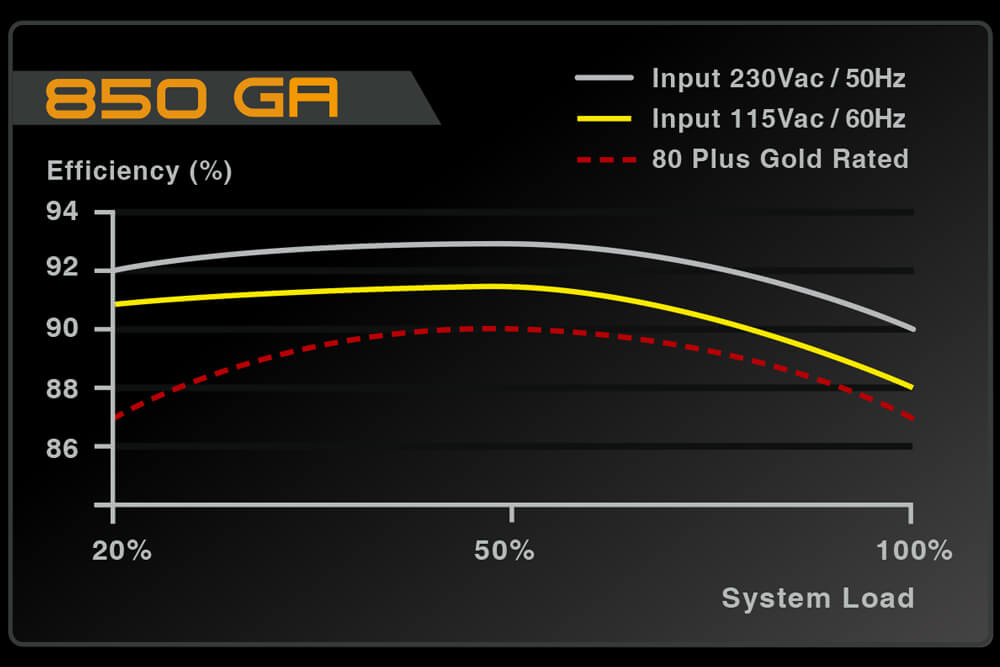
Look at the efficiency chart for this PSU.
If you're at roughly 400 at full bore gaming.
little osprey
450 is plenty for average gamer, 550 for enthusiast, 650 for extreme money dosent matter builds, and anything higher is specialty computing
normal brook
You'd want to be in the middle of that chart.
That's a nice PSU.
If I do say so myself.
stoic island
Between 91% and 89% is minimal imo
normal brook
I agree that you can get by with lesser PSU's. But if you get a slightly higher wattage one, you're babying it all the time by default.
Your PSU has the ability to fry everything in your build.
stoic island
And protections prevent that.
normal brook
Not always.
little osprey
what about noise and thermals though? would getting a cx650 be quiter then a 450
stoic island
That's why we choose models with good protection.
clever sluice
Wdym ?
stoic island
G3 actually has a large vulnerability in terms of protections, do I think I'll ever reach that point with my G3? No.
stoic island
I'll never be pulling a 1000w load on my poor psu
normal brook
probably like $300 more.
stoic island
Melt the caps it would
Since G3 has too high ocp and otp
But I'm never going to draw 1000w with a 3800x and rtx2070
little osprey
how well does 3800 oc?
stoic island
Silicon lottery my man
little osprey
big range?
stoic island
Mine specifically? Not well relatively.
little osprey
thats unfortunate lol
a laptop cpu can't go into a desktop pc since they're mobile version, unless that manufacture makes full blown socket laptops like alienware does
i havent overclocked since the phenoms, got my 955 to 3.6 on a 15 dollar cooler
stoic island
Anyways it was easy for a 2070super to be in a <1000$ build pre-corona
little osprey
i didnt know alienware did that, good to know
stoic island
Now a 1200$ or so build would prob be good for a 2070s
little osprey
you have to buy thee model those that has the full blown sockets in it
they are neat for sure
stoic island
A few laptops have desktop CPUs
little osprey
yea but not all models have it
of any brand
just have to pay attention to the CPU it has
stoic island
Elutroniks makes custom laptops with desktop chips iirc
little osprey
is waiting for ampere make the most sense? i have no pc :( im legit playing demos on ps3 lol
silk estuary
Anyone know where i can find a cheap-ish 4k 32-36 inch monitor?
stoic island
Go to pcpp and sort by cheapest? :P
stoic island
Take at look at these I guess?
pastel briar
in all honesty, most likely going to be a hard thing to do, I would start with PCPP and go from there
little osprey
samsung seems to have issues with panels failing
and to get it fixed or replaced is a very strange process
stoic island
Owie ram
Go g.skill aegis 3200mhz cl16 if that's in stock
You can get Seagate barracuda 2tb for like 5$ more
Other than that, looks good
 mellow basalt
There are multiple different ones for g.skill aegis
normal brook
Man I am tired.
stoic island
I would say go to sleep, but I stayed up last night till like 1am staying on this discords
latent storm
normal brook
Wow. Something is going on with my internet connection.
 somber magnet
thanks
stoic island
I want AMD in that :p
latent storm
not gonna lie i don’t know much about intel 😳
somber magnet
i could go intel or amd, i know boards that fit in the case
which is super small btw
not even 12 inches tall
latent storm
btw i don’t you don’t really gotta pay that much for windows
stoic island
Interesting case
latent storm
it looks pretty balanced but again i don’t know much about intel and intel boards
somber magnet
again, i have a few months to make a decision
stoic island
I'm gonna suggest AMD for bang for the buck
latent storm
^
somber magnet
i have to get a job first and stuff, i'm kinda a minor
latent storm
what’s the difference between itx and atx
latent storm
is it just smaller than mATX?
stoic island
Yea
latent storm
interesting
stoic island
Heh I made that list so long ago
somber magnet
the particular case i found isn't even 12 inches long on any dimension
latent storm
bruh
stoic island
..?
latent storm
that’s tiny wtf
stoic island
Well can I ask why you want that case so badly?
stoic island
Pepper.
latent storm
alright
somber magnet
i like small stuff and it ends up around the same total with lists i make
stoic island
Bc I can't even find an image to the case that was in the build
The geeekshop link doesn't load for me
I mean, how does the H100 look for you?
It's a bit wide, but it's a nice small case
little osprey
My recent pc mod and first custom loop build
somber magnet
i did the math and all, the parts on my list would fit
stoic island
I'm sorry but the stuff in the list are just quite unorthodox
latent storm
hey johnny
little osprey
hey
latent storm
will two 140mm intake and two 120mm exhaust ruin airflow/pressure
stoic island
Nah
little osprey
nope
little osprey
thanks
normal brook
Who painted that?
little osprey
me
little osprey
nzxt H710i
somber magnet
mmm but back to my question, im more concerned about if its good, not if it's unusual or unconventional @stoic island
normal brook
@somber magnet what's the question about the small case?
little osprey
Is the GTX 950m a very good card?
normal brook
It's a pretty low end card.
little osprey
It's the one in my laptop
somber magnet
@normal brook my list up above, i'm asking if it's considered good, im not necessarily looking for info on lower cost parts or anything
somber magnet
someone sent it for me
stoic island
Well, the SSD situation isn't optimal.
little osprey
out of all 1tb nvme drives at 200 cad, the a80 is best?
stoic island
The cooler is pretty bad afaik
Intel is just ugh
I like a80 the best so afaik yes
normal brook
I don't' understand the two 1tb drives.
little osprey
got the hp ex950, xpg sx8200 pro, wd sa500 and teamgroup mp34
normal brook
Doesn't make much sense.
little osprey
lot of options
normal brook
Why wouldn't you just get 1 2tb nvme drive?
little osprey
raid maybe?
stoic island
Go a80 out of those choices@little osprey
little osprey
okidoke
stoic island
@somber magnet what exactly is the CPU cooler clearance in that case?
normal brook
It is a good build if you don't care about money.
stoic island
I just don't like that CPU+cooler situation
normal brook
I think you've wasted a lot of money on things that could be forgone for a better graphics card.
stoic island
Might be too much heat for that dinky looking thing
normal brook
It's a sff build.
stoic island
Mhm
somber magnet
60mm
stoic island
I'd like to put in like a NH-L9s
somber magnet
the case only supports 2.5", whats the issue?
normal brook
The motherboard doesn't support NVMe?
stoic island
(it does afaik)
 terse stag
I have a EVGA Geforce GTX 1060 and MSI 970 Gaming and a AMD FX - 6300 Six-Core Processor with 16 GB of Ram and a 64 bit operating system i was wondering how bad is that
somber magnet
it supports nvme yeah
stoic island
@somber magnet I think the question is why you have 2 1tb drives, and not one fast 2tb drive
normal brook
That is the question.
somber magnet
abbdnbhdch ill fix it in the morning
normal brook
Pepper, raid 0 is basically pointless now, if that's what you were going for.
somber magnet
im not looking for raid
normal brook
@terse stag your setup is a little old, but not too bad.
normal brook
Something is broken man.
You should be getting like 150fps.
Check your graphics card drivers.
terse stag
wanna see a picture of the pc?
normal brook
Yeah.