#building-and-recc-chat
1 messages · Page 482 of 1
 silk helm
 sacred obsidian
you would be looking probably aroudn the 1200$ range for gaming laptop that can run MHW.
well, there some ITX cases that are extremely portable but difficult to build in, and it also gets expensive to go small
 sullen spoke
laptops are usually more expensive
silk helm
And there's also the problem of needing a display
sullen spoke
but you can find some that are a decent price
sacred obsidian
laptop would be the easiest for traveling. but if you had a hotel, you could usually hook up to the TV via hdmi.
if you're super savy, you could always build a small display that could attach to the small case.
but again that might get pricy 😛
silk helm
Yeah, I was considering a Dell G3 that was on sale last week for Presidents day, but I'm open to recommendations on models
sacred obsidian
i have a dell g7 and theyre... okay
one of the big things with laptop is cooling. it can affect performance in a big way.
i definitely don't mind my g7 but i also have a desktop for heavy gaming and im pretty sure MHW is a heavy game.
silk helm
It's not the most urgent problem, but I was thinking about it and thought I'd ask while the topic was on my mind
sacred obsidian
thats fair.
 wide sparrow
yoooo
sacred obsidian
you could always keep an eye out on good deals. when i got mine it was a 1400$ laptop and i got it for 1000
sacred obsidian
what gpu?
wide sparrow
1060
sacred obsidian
6gb or 3?
wide sparrow
6
sacred obsidian
what cpu?
wide sparrow
I7 8750h
wide sparrow
yeah almost maxed out
sacred obsidian
but mine has 16 
wide sparrow
Eeh
silk helm
I believe this is the one I was looking at
https://www.dell.com/en-us/shop/gaming-and-games/dell-g3-15-gaming-laptop/spd/g-series-15-3590-laptop
wide sparrow
I just didn't put the money to get 16
wide sparrow
I would get an alienware instead 👀
sacred obsidian
woops wait no this one
sacred obsidian
ye
i thoguht they both had 1660 tis
but yeah just do reviews or compare benchmarks on them
wide sparrow
Don't get their crappy hard drives. Just buy a sata 2.5 inch SSD with your laptop
sacred obsidian
cause 2 laptops with the exact same specs could have drastically different performances due to cooling and layout.
silk helm
Yeah, I'm pretty sure improper heat dispersion was the main reason my last one broke
sacred obsidian
CLEAN YO LAPTOP 
sacred obsidian
its mostly just smudges around the touch pad i was kidding lol
oh hey your power button didnt rub off
 cursive wharf
@true comet Good good
silk helm
My last one was a "gaming laptop" that only had an integrated graphics card
 mild roost
That laptop is nasty. I cleaned my keyboard it was relaxing.
I had q tips to clean and they turned black brown.
wide sparrow
Nope I took care of my laptop pretty good. Cleaned it all the time with wipes for keep it clean
sacred obsidian
wide sparrow
Oof
sacred obsidian
my power button decal pealed like 2 weeks after i bought it
wide sparrow
did you preorder yours like i did?
wide sparrow
I did
mild roost
You’re tabs are interesting btw JP
sacred obsidian
and on sale
wide sparrow
Ah
uuuugh
yeah they are
How long have you had your laptop? Did you clean up the insides of dust build up yet?
I had to tear down mines completely
silk helm
So, what would be a good time to buy a laptop before summer?
sacred obsidian
wait galacticpain how is your laptop "dead"
uhhhhhh. whenever you see a deal you like lol
silk helm
Something is wrong with the motherboard
sacred obsidian
i dont think theres any big notable sale between now and summer
sullen spoke
you can always peek in #tech-deals every now and then
wide sparrow
You can wait for presidents day.....oh wait
mild roost
Can wait for cyber Monday
mild roost
Or when the stock market crashed again
silk helm
Not sure exactly what, but when I got a diagnosis run on it they said the battery was badly bloated and the motherboard would most likely need to be replaced
silk helm
Yep
sacred obsidian
oof
 stoic island
sounds like them trying to make money off of you but what do I know
sacred obsidian
if you could, i would take out the battery, plug it in, and see if it works again.
if so, you might be able to get away with just buying a new battery.
silk helm
Hated the laptop basically the whole time I had it though
stoic island
Best time to buy is usually black friday
 fresh summit
what build do you think i would get more performace out of idc about the prices diffrents intel https://pcpartpicker.com/list/GchWJb amd https://pcpartpicker.com/list/bNg88M
stoic island
I'm not too familiar on other times where you get good deals in the US
@fresh summit budget?
wide sparrow
2080ti
fresh summit
around $1450 but i would like to keep it around 1375
wide sparrow
oh boy
stoic island
can I critique the lists?
fresh summit
yeah
stoic island
I like the AMD list better
fresh summit
also only gaming no streaming or work
stoic island
but you can do fine on a B450 board
fresh summit
dont i need to update bios for 3rd gen
stoic island
oh then for just gaming, you only need a R5 3600
Many motherboards don't need bios upgraded
Check manufacturer page for the motherboard
fresh summit
ok
stoic island
I just remember MSI B450 max boards being 3rd gen compatable
I'm not sure what products from other brands are
sacred obsidian
you would get better performance out of the amd cpu build which i know mr1111 said, but im agreeing 😛
stoic island
Also, you probably don't need a liquid cooler, get a nice u12s or something (Low maintaince, low noice)
fresh summit
do you think it would be better to go with the r5 3600 and go with a rx 5700xt insead of a 2070s
fresh summit
is it worth the extra 100
stoic island
first is just ease of use, nvidia generally has better drivers. second is pure performance, it's superior overall, and using a r5 3600 you have enough room in your budget for it
fresh summit
cause i have a few friends with a rx5700xt and it is getting really close to the 2070s
sacred obsidian
the thing with b450 is that most mobos will be manufactured after the release of the bios update, so as long as you get one that is released after, it will have the latest bios update. but its best to contact the retailer to confirm if that specific board would have it.
wide sparrow
Mmmm
fresh summit
ok
stoic island
Also, you get the ability of easily streaming if you ever want to
sacred obsidian
the 2070s should be noticeably better than the 5700xt
fresh summit
ok
stoic island
5700xt is pretty much the same performance as 2070 iirc
and 2070S is better than both
fresh summit
ok
sacred obsidian
its not a huge boost, but it is better.
stoic island
yea
stoic island
alr
 half temple
What parts Should I chose for 500$
sacred obsidian
as for is it worth the boost for 100, its up to you.
stoic island
500$ build? are you building it now or can you wait a little to save up
half temple
@stoic island right now if possible
stoic island
thats a bit of a tight budget
half temple
@stoic island just want something for light gaming
stoic island
what games do you play
half temple
@stoic island pubg sir
stoic island
also, do you want to have Keyboard, Mouse, Monitor included? or do you have those
half temple
@stoic island just the PC
fresh summit
i did the 2700x so i dont need to worry about bios and im sure the 3600 wont make to much more of a diffrents
stoic island
lemme think
@fresh summit that motherboard is GUARANTEED updated bios, and 3600 is quite a bit better than the 2700x because of the IPC improvements by 3rd gen ryzen
fresh summit
ok
stoic island
Thats the selling point of the MSI max boards lol
fresh summit
3600 or 3600x
stoic island
3600
fresh summit
stoic island
@half temple how much storage do you need? or plan on needing?
half temple
@stoic island 120gb is best for now cause I only play pubg
stoic island
@fresh summit That PSU isn't the best, you might want to switch that out for like a CX 550w or something
fresh summit
ok
 blazing vine
https://gyazo.com/4494ee5bcdd7cc3d486d07f995eaf06e any cheap upgrades I can get?
stoic island
wait @half temple do you need wifi or do you have ethernet
blazing vine
With gtx 1050
half temple
@stoic island I have cable
stoic island
alright
This should be a pretty damn good PC for the price, I can try to shave some more cost off if you need me to
https://pcpartpicker.com/list/h2B88M
@half temple
half temple
@stoic island thanks I going to look over it
 little osprey
What are we talking about?
stoic island
Amanda wants to see if they can get easy upgrades on a prebuilt
heres the image
I'm currently trying to figure out what motherboard it has
I gotta go, yall continue with this, I'll prob be back in a bit
 wispy matrix
https://pcpartpicker.com/list/bTNRwh my build is done
 little osprey
rtx 2060
super
drivers are leapyears better
i heard driver problems are bad on amd
rn
stoic island
I would say get a rtx 2070s with a 1080p 144hz monitor
driver issues are slowly getting fixed
little osprey
i think the 2060s could do that but the 2070s would be better
stoic island
I doubt 2060s can do that lol
I really doubt it can run 1440p 144fps
unless you're doing low settings
little osprey
the 2070 cant do 144 1440p
 dull tangle
So yea I’m back with a problem with my build. Idk what’s causing this but my pc makes this weird buzzing noise. If I push on the side of the case the noise stops. Any ideas of what it might be
sullen spoke
true a 5700 will not be able to run games 1440p 144hz
stoic island
hmm
little osprey
@dull tangle can you be more specific
sullen spoke
I'd probably recommend at very least a 2080s for that
sullen spoke
or 2070s i guess
stoic island
@dull tangle can you open up whatever you're touching and take a photo?
dull tangle
Ight
sullen spoke
but 2070s would have to turn settings down in some games
dull tangle
It’s the back panel
stoic island
because if touching it stops the noise, the noise is coming from something that is touching the panel
little osprey
yeah
stoic island
so opening it up would give us some possibilities
stoic island
Usually coil whine is from within, so prob not
I wonder if its a fan with loose bearings or something thats like vibrating
sullen spoke
I have a fan somewhere that makes a grinding noise until you touch it in the right spot at the right time
it's weird
dull tangle
Idk if this is good enough
stoic island
huh
sullen spoke
can be improved a bit but it's not too bad
dull tangle
It’s my first build
stoic island
one possibility is one of those cables is barely touching a fan
little osprey
i dont see anything
stoic island
and pushing on the back panel pushes the cable away from the fan
because there isn't many other possibilities
dull tangle
This only occurs every once in a while. It’s weird
stoic island
check where the cables go and move them if they're too close to touching a fan
sullen spoke
What's the issue
sullen spoke
cool
dull tangle
Someone also told me I might’ve not screwed something in. But I’ve checked and double checked everything and I didn’t see anything that could be screwed in
stoic island
so, cables, you checked?
dull tangle
In the process
stoic island
alr
stoic island
yea they're checking that rn
sullen spoke
try to find exactly where it is coming from
stoic island
if you can't find the source rn, take off the side panel, and run your PC until you hear the noise, then locate where exactly it comes from
dull tangle
I think I found the source
Unplugging my back case fan made the noise stop
Although from what I can see no cables were touching it
stoic island
wierd, so nothing touching the fan blades?
prob means the fan has a loose bearing or something
dull tangle
No
stoic island
if you have replacement fans, replace I guess
dull tangle
It’s the stock case fan so that might be it
stoic island
when did you buy it?
dull tangle
Christmas
stoic island
ah
thats a bit too long
if it was like within a month, you prob could've RMAed it for a new fan
idrk tho
dull tangle
Was thinking about buying some Noctua fans. Guess I have more of a reason to now
stoic island
whats your budget?
Noctua fans are amazing, prob the best in terms of quality and lifespan
but they do get a bit expensive
 viral ore
they are
dull tangle
I don’t have one I just want good ones
dull tangle
If they have it in black I’ll go for it
 indigo mulch
just buy a stick of butter and freeze it then leave it in your compter
stoic island
wtf no
indigo mulch
good cooling
stoic island
also ditto noctua doesn't do black fans usually
dull tangle
I’ve seen some on amazon
dull tangle
I’m not a fan no pun intended of the cream brown thing they are known for
stoic island
I'm a  of
of  brown
brown
look at these nice thicc big bois
Arctic P12 fans are really nice budget fans.
the black fans in the front are arctic p14 fans, the gray fan at the very back is a noctua nf-p12 redux
the beige fans are noctua nf-a14s iirc
dull tangle
Aight thx
blazing vine
ight its a MAINBOARD KIT GX-281 AMD B350 RTL8111GA ACER LOGO DTX W / O 1394 LF DB.E0D11.001
stoic island
huh
might be an issue
it doesn't have bios that allows for 2nd or 3rd gen compatability
can't update it to have 2nd or 3rd gen compatibility either
blazing vine
welp
stoic island
so CPU upgrade isn't an option
blazing vine
crap
stoic island
unless you want to like swap everything
blazing vine
any motherboard recommendations?
stoic island
wait can you open it up and make sure the cable that plugs into the motherboard is standard 24 pin?
because sometimes pre-builts are scummy and use some wierd cable, and makes it impossible to upgrade motherboards without also replacing the power supply
this is 24pin
stoic island
you need to level up
stoic island
yea just private msg me
wispy matrix
https://pcpartpicker.com/list/bTNRwh can someone make this cheaper
stoic island
yes
always
@wispy matrix again, are you sure you want 1440p 144hz when your video card can't handle it?
wispy matrix
I don’t know much someone helped me with this
stoic island
because the rx5700 is not good enough for 1440p 144fps gaming
its good enough for 1080p 144fps gaming tho
 latent bronze

wispy matrix
Can you fix it
latent bronze
You do know he could play on high settings which will still look very good and get that 144 fps
wispy matrix
I’m trying to get a dual monitor setup
sullen spoke
dual monitor no problemo man, just watch what main monitor you are shooting at and if the gpu can keep up
latent bronze
yes at 1440p with a 5700
sullen spoke
depends on game
AAA games probably not
competitive game yes
5700xt is basically a oced 5700
latent bronze
You don't have to max out the game
stoic island
Even if you don't max
latent bronze
You can still make the game look as pretty as possible and still get 144 fps at 1440p
wispy matrix
Wolfz I gotchu I seen some for good prices
stoic island
galaxy is in Philippines just warning you
wispy matrix
Case fans?
latent bronze
https://i.gyazo.com/6999827484ce38028f5bac6af51716fd.png This is at ultra settings to imagine when bumping it down to high settings
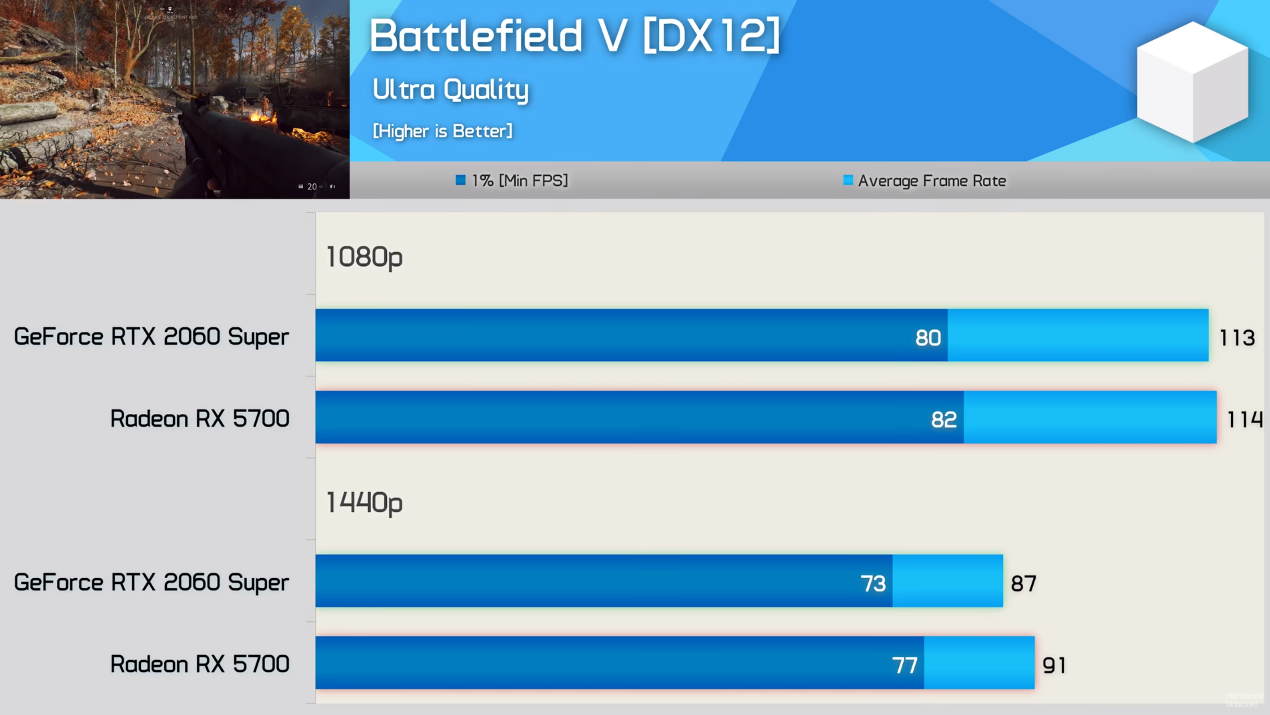

Bruh
stoic island
going off this
https://www.youtube.com/watch?v=Pnf-CTXBdQI

Apex Legends PUBG Fortnite RX 5700 & Skylake i7 6700k @4.7GHz frame rate test benchmark. tested at 1080p - 1440p resolution.Thanks for Watching.. stay tuned for more videos.. Get The CHEAP GAMES and support this channel at: https://www.kinguin.net/?r=13225 or https://www.cdkey...
latent bronze
Trusted source vs your untrusted source https://www.youtube.com/watch?v=Sse7IQw6sio
Gigabyte Total Gen4 Solution Provider: https://www.gigabyte.com/MicroSite/522/gen4.html
Support us on Patreon: https://www.patreon.com/posts/geforce-rtx-2060-30745219
Merch: http://crowdmade.com/hardwareunboxed
Radeon RX 5700 XT - https://amzn.to/2Js33xB
Radeon RX 5700 - htt...
stoic island
your source is nullified since it doesn't provide the stats we're looking for
blazing vine
lol
latent bronze
Really and to trust your source that is asking for money in his description
sullen spoke
rip
wispy matrix
I’m going for 1200
stoic island
I'll find more sources then
blazing vine
so can my motherboard be easily replaced?
wispy matrix
Depends
stoic island
oh right
latent bronze
And lets not forget this simple fact right here https://i.gyazo.com/3a4f9c2304f3162020d806ec6a30e743.png


That be some really old drivers there
 jaunty karma
Still need a fan <_<
wispy matrix
Galaxywolfz I guess I can’t help bc I’m from the states
jaunty karma
Rip
stoic island
@blazing vine might be an issue because your mobo is DTX, which means the standoffs might be different than conventional say ATX boards
sullen spoke
you know you can use websites from Philippines
blazing vine
what would I need to replace in order for it to be compatible with atx?
sryz I'm being a pest
latent bronze
@stoic island It is his site so and you asked him for his site
wispy matrix
Also my build
stoic island
@jaunty karma I think this works
https://www.easypc.com.ph/products/details/e8fe0a0b-cd8b-4c01-a7b4-4473bbf19d7e
no lol, he also said easypc
latent bronze
That is like asking for chocolate to only refuse it when someone would give it to you
blazing vine
dang who would refuse chocolate
wispy matrix
https://pcpartpicker.com/list/bTNRwh can someone make this cheaper but with a dual monitor setup and fix it to make it right
 teal bison
what are you using it for @wispy matrix
wispy matrix
Gaming and streaming
teal bison
well if you are streaming you probably want to get an nvidia card
latent bronze
Streaming go with Nvidia or change the 3600 to a 3800
teal bison
https://pcpartpicker.com/list/j7xn9G changed nvme to sata, was only a bit slower and 12 extra gb, changed gpu for streaming, and changed mobo to save money
wispy matrix
You saved me a lot of money
teal bison
other than that i think overall your build was solid, just some money saves that dont sacrifice a lot of performance
wispy matrix
It was around 1256
teal bison
you could also go down to 3200 mhz on your ram and save like $12 if you want
wispy matrix
I will keep it as is
jaunty karma
@stoic island
teal bison
sure thing
jaunty karma
It has white led
cursive wharf
@teal bison @wispy matrix GX2 lacks DRAM cache and thus shouldnt be used
teal bison
oh does it?
stoic island
You should be able to use the fan without the led
teal bison
should he get the wd blue instead then?
jaunty karma
How much is one noctua fan
latent bronze
Why would you also down grade the board?
cursive wharf
@wispy matrix Go with this https://pcpartpicker.com/list/kJcWJb
wispy matrix
Hei it’s right at my budget I like it
stoic island
Had to check lazada
 astral flame
A
stoic island
Aparently Noctua fans are like 1800php
sullen spoke
Lazada 
cursive wharf
@jaunty karma modular?
jaunty karma
Semi
jaunty karma
3 bucks
Its 3 bucks
For some what reason
Lazada pricing is bad
2bucks for led fans while non can be up to 6bucms
cursive wharf
Tht CM PSU is good afaik
sullen spoke
Lol
jaunty karma
What? @cursive wharf
jaunty karma
Wot
cursive wharf
Coolermaster V semi modular
cursive wharf
Also most LED fans (no RGB) have it hooked up directly to the PWM fan header
if not all
jaunty karma
stoic island
O right
 agile onyx
Could someone help me build a pc for fortnite to get 244 fps on low settings
wispy matrix
that’s gonna cost a lot
cursive wharf
at what res? 16k? glhf with that
cursive wharf
Also why high refreshrate at low? Your view distance should at least be set to max which then wouldnt be low settings
wispy matrix
CPU I would go with a threadripper
sullen spoke
Yes view distance max, everything else low
cursive wharf
Even shadow distance can be helpful sometimes
sullen spoke
True but most people don’t use
cursive wharf
shadow quality can be low, but distance can be useful for the extra help in making moving objects appear "bigger"
cursive wharf
as now you see not only the surface of the object but also the shadow
 mossy pine
Hi. I have 2 questions. If im building a pc, if i did liquid cooled, would there be any fans needed at all and also will liquid cooled keep the dust out of the case??
stoic island
Hei, explain it all to this man
cursive wharf
With an air cooler the heat gets dissipated over the CPU. With a liquid cooler it gets dissipated else where. Surface area can sometimes be increased with a liquid cooler due to radiators being able to be bigger and have a higher fin density. So heat is still dissipated the same more or less. Unless you have enough surface area to passively dissipate the heat then you'll need fans
Which that amount of surface area will depend on the CPU
stoic island
The simple answer is yes, and no.
cursive wharf
^
stoic island
Fans needed bc look above, dust will still get pulled in by the fans.
mossy pine
What do u mean surface area
sullen spoke
Both use fans, one on top of the cpu, one on the side of the case
The area of the surface of the fins
More is better
mossy pine
Ok don't the cpu come with heatsink
cursive wharf
Surface area of a 3D object. With a cube that is just 6*(h^2) as that is the surface area of one side and there are six sides
stoic island
You can choose to use that heatsink, replace with a liquid cooled method, or replace that with an aftermarket heatsink
cursive wharf
If you put a bunch of holes into the cube then more of the surface will appear, thus higher surface area
sullen spoke
Some amd cpus come with a heat sink that is actually decent
mossy pine
Ok so either way im going to still need fans and have dust lol
stoic island
yep
sullen spoke
I mean there are ways to make fanless PCs but it is difficult
stoic island
fanless PCs dont cool anywhere as well as PCs with fans
mossy pine
Ok didnt know if there was a way to keep dust out completely and not have the fans noise/failing
sullen spoke
There will always be dust sadly
stoic island
because if you use an AIO, the pump could fail, and you wouldn't know, and that could damage your system.
sullen spoke
It is always nice to clean ur pc once in a while
mossy pine
Ok. Maybe ill just get a really good fan thats reliable lol
stoic island
Noctua fans are generally very good and very reliable
sullen spoke
Noctua is good but not rgb
stoic island
they are also very quiet
sullen spoke
They can be a bit pricey
mossy pine
Rgb?
stoic island
lights
mossy pine
Oh i dont need fancy lights lol
stoic island
Noctua gang :D
mossy pine
Ok thanx all
jaunty karma
 warped moat
Needs more rgb
sullen spoke
Not enough
 orchid ermine
Need help just got done building my pc and turned it on and it keeps say please power off and plug in pci-e chords for graphics card.
 visual vault
So hey guys I was in this chat desiding on 1070 or 2060 for a gpu I got a 2060 and now I’m balling although I realize how I can’t stream because my cpu can’t handle it, do y’all think for budget I should get a ryzen 2700x?
sullen spoke
Check that the card is completely in the slot, make sure you have the external power cords plugged in and it is in the psu
orchid ermine
Yeah it's all in made sure of that more likely gonna take it to a professional tomorrow. I'm still a lil new to pc building
sullen spoke
2700x or 3600 are good cpus for streaming. I will say the 2060 should be a good card for streaming using the NVENC hardware encoder as I believe it has a newer version of nvenc than the 10 series cards
Did you ever manage to get into bios @orchid ermine
What is your current cpu @visual vault
visual vault
Ryzen 2400g
orchid ermine
No and amd ryzen 5
sullen spoke
Is the vídeo cable plugged into the gpu or the mobo @orchid ermine
@visual vault ye if you can a 2700x or 3600 would be good. A 2700x has more compute power while 3600 basically gets slightly higher fps btw
visual vault
Ok I think I may go for the 2700x then as my next pc purchase
sullen spoke
Sounds good
Always keep a lookout for new hardware if you want
Also btw make sure when you stream you have the nvenc encoder selected and not x264 @visual vault
visual vault
Yeah I know part, doesn’t it use less resources with the nvenc encoder
sullen spoke
Is uses less cpu
 still roostBOT
 Fierce#1994 has been warned
Reason: Bad word usage
visual vault
Whoops
I think I only changed It on obs not obs streamlabs
Oml I may not even need to upgrade I forgot to switch to the new encoder
sullen spoke
Lol
In abs studio there is also a nvenc(new) under advanced settings
Has a bit better performance
visual vault
That’s halarious
I can still tell I need that upgrade but it’s handling it well although slightly studded every no and then
sullen spoke
Yeah a cpu upgrade would still be very helpful with that gpu
visual vault
Very true I’m still gonna get one just interesting that I forgot to change the encoder
 outer locust
whats a great cheap pc that could run almost everygame on 144fps?
I saw in scatter volt, he made a pc with 1600 af and rx 5600 xt
is that good?
teal bison
it wont really be able to run games at 144fps without turning the settings down but that is a good cpu/gpu combination
also depends on the games you play
outer locust
okay
uh scattervolt made a build with that setup for $700
are there any ways to make it cheaper with at least 1tb?
teal bison
so like a 120 ssd and a 1tb hdd?
teal bison
not sure but we can bump it up to 240
i think itd be enough but just to be safe
and how much do you care about aesthetics?
i assume not a lot if you are trying to go as cheap as possible
outer locust
yup
I mean go for the better looking one if they are the same price
but yeah it doesn’t matter, as long as it performs well
teal bison
ugh pcpp is being wierd for me
well pcpp is like dying on me or something but here is a list, like if you refresh the page it goes from $710 to like $690, guess it just depends on what it feels like
https://pcpartpicker.com/list/MTVsV7
probably can go cheaper, but again my pcpp is being weird and not displaying prices correctly and i have to go to bed but good luck@outer locust
teal bison
ya you too, was supposed to be in bed an hour ago lol
actually an hour and 18 minutes
outer locust
oof sorry
cursive wharf
@teal bison pcpp has been failing to properly get the prices so lot of the time the price of one of the components will just be nothing
Also didnt I already complain to you about GX2 being dramless?
 tulip narwhal
im looking for a good pc under $1k AUD preferably around 800 or less
also need a very cheap monitor
wispy matrix
Change of plans by build is going to be 600$
stoic island
?
 void wolf
So I got a new case—Lian Li TU150—and a new power supply for it. New case has amazing options for cable management. However, the cables on the new SFX power supply are too short to take advantage of this. I am irritated.
wispy matrix
I’m doing a prebuilt any suggestions I have 600$ budget
 vivid atlas
doing a prebuilt ?
 upper condor
Cringe
teal bison
@wispy matrix at 600 you are going to have a lot of compromises on quality of components on a prebuilt
little osprey
https://pcpartpicker.com/list/ZLvzXv is this a good priced build? I’m trying to keep it under 600
wispy matrix
I’m doing a prebuilt sorry for wasting your time miles
little osprey
Oh I was asking about it for myself
warped moat
@little osprey you can get the 1600 AF for 85$
little osprey
Yeah
wispy matrix
Oh
little osprey
https://pcpartpicker.com/list/Xc3V27 I changed some stuff around, hows this
warped moat
Looks decent. That ssd is kinda small tho. Look at getting an hard drive later on
upper condor
@little osprey https://pcpartpicker.com/list/23c3Nq
little osprey
@warped moat yeah that’s the plan
What’s the difference between the 2600 and the 1600 af
little osprey
Ah
 foggy hazel
@little osprey , consider that the ram you are buying is semi-wasted on that cpu
little osprey
Wdym
foggy hazel
and i didnt see you latest list, that is my mistake Miles :)
the 3200 is what you want (just as you have on your latest list)
little osprey
Oh yeah
latent bronze
@little osprey the difference between the 1600 AF and the 2600 is like 5 fps difference
little osprey
Oh wow
latent bronze
and also the 1600 you picked on your original list is the 1600 AE not AF
little osprey
Yeah
 quaint terrace
which pc parts are usually just plug and play when upgrading/switching?
latent bronze
1080p?
little osprey
Yeah
latent bronze
So the 1650 Super would be enough for those games
cursive wharf
@little osprey I'd switch that PSU. BR is not that great, get a Corsair CX
little osprey
I did in my newer list
cursive wharf
Which you did. I'm just blind
little osprey
Yeah lmao
cursive wharf
So yee, you good
little osprey
Coolio
cursive wharf
Just as a note tho, 450w will be limiting for upgrading
little osprey
Yeah, but it won’t be that much to upgrade it in the future
cursive wharf
PSU lacks the PCIe connectors to do so. Only one 6+2 pin PCIe cable
But if that's the case then meh
 wraith stag
not sure why but my PC won't turn on now?
wraith stag
Nothing like it's absolutely not even powering on
sullen spoke
is the power supply plugged in and switched on
wraith stag
Yes it is plugged in
sullen spoke
is it turned on, PSUs usually have a power switch next to the plug
wraith stag
Mine does not
sullen spoke
is this a pc that you built or bought?
wraith stag
Received
sullen spoke
like from someone you know?
wraith stag
Yeah. It was working fine, was gonna take out everything to put in a new case I was gonna buy today. Decided against the new case and now it's not turning on.
sullen spoke
so there is no response when you click the power button right?
wraith stag
None at all.
sullen spoke
did you touch or do anything to the pc sicne it last turned on?
wraith stag
Yes I removed everything like I said Bc I was gonna put it in a new case
sullen spoke
and now it is back in the case?
wraith stag
Yes.
stoic island
probably some wires might be loose or something
check connections that you might've forgotten to plug in
sullen spoke
did you plug in the power button cables
wraith stag
I had everything back in the spots I was supposed to and nothing.
sullen spoke
can we see a picture perhaps
stoic island
So it doesn't turn on at all or is it just no display
sullen spoke
not at all
wraith stag
Well now unplugged everything to start from the beginning.
sullen spoke
you didn't forget the 24pin mobo and the cpu power cables right?
wraith stag
No I did not.
Everything on it is pretty old tho.
sullen spoke
check for labels on plugs or mobo to make sure it is in the right place
wraith stag
Could I have done damage to the mobo
sullen spoke
most likely you just forgot to plug something in or put something in the wrong slot/header
wraith stag
So this is the mobo
sullen spoke
oh yeah that is old
wraith stag
Oh yeah it is. So I plugged in the power supply and now I'm stumped
upper condor
Is there no 24-pin?
sullen spoke
well I think I see the front panel io on the top of the pic
but I can't see which pins are for power button
sacred obsidian
do you have it plugged in in these slots?
upper condor
Yeah, 24 pin is a must
wraith stag
sullen spoke
there should be cables coming from the case somewhere
ok so it looks like the power button is for pins 6 and 8
wraith stag
? I'd assume these?
sacred obsidian
no
sullen spoke
now to see which pins are 6 and 8 
sacred obsidian
it should be like a black female plug or many small black female plugs coming from the case itself. the wires should be able to be seen around the front top of the case or near the power button or usb plugs
sullen spoke
wherever the power button is on the case, look around there on the inside of the case
sacred obsidian
it oculd be one big plug all together though
sullen spoke
it's probably going to look a little different looking at how old the mobo is
wraith stag
stoic island
might be it
foggy hazel
Hd audio has a different pinout
sullen spoke
¯_(ツ)_/¯
foggy hazel
That is the front panel connector
stoic island
should be it
wraith stag
There's four extra pins out??
sullen spoke
I'm going to guess match up the missing hole on the plug with the missing pin on the header
there could be extra pins
wraith stag
boys we have power
sullen spoke

wraith stag
Now does it matter where the plugs for ssd and hdd are plugged in or
Like obviously I know there spots for it but I have several
wraith stag
Okay turns on but now I have no screen lmao
still roostBOT
 Lord Xemnas#4723 has been warned
Reason: Bad word usage
viral ore
@indigo mulch ok
over here ig
so you just need a tower for now
on about 600 USD?
or are you not in the US?
indigo mulch
cad
viral ore
ok brb
indigo mulch
Yes
indigo mulch
I’m getting another computer I don’t know what motherboard is in it but I’m just waiting until the guy clears the hard drives
indigo mulch
alright
viral ore
because odds are it could have some salvagable components inside
like the case and ram
indigo mulch
Case might be old as well
viral ore
or, if its good enough, the motherboard
indigo mulch
I have DDR3 ram
viral ore
ok, so wait till you get that other pc, when you do, let ppl here know the specs of it, and your budget
because i might not be here when that happens
indigo mulch
indigo mulch
I got told to clean the pins or whatever but I don’t know how
viral ore
a q-tip and some isopropyl alcohol
will do it
dude go away
yeah, that works too
not really
when its got a dab of isopropyl on it
not really as much
and, if the pins are actually dirty, the alcohol will help
you are contributing literally nothing
indigo mulch
I can show you all the parts I have if you would like
These are the hard drives I have the other two are 500gb
viral ore
im asking all the questions, and gathering all the data, your just jumping the gun and listing random ass parts
so you have HDD, RAM, and whatever the other pc your getting comes with.
indigo mulch
I have another hard drive that’s 1tb in a different computer that’s here witch works but the internet doesn’t work on it
viral ore
is the other pc yours?
indigo mulch
Yes
viral ore
its a mATX tower case
so boom, you have a case, even if we wanna change out the motherboard
the case can hold 3 HDDs
and an ATX psu
so its perfect
airflow isnt that great, so gonna have to shoot for lower wattage components
i checked
indigo mulch
This case is ugly
viral ore
it has a removable io
indigo mulch
I have three hard drives then I have the one in this computer witch I’m going to remove and put it in the other
And then I’m going to get the other computer and take the hard drive out of it
So I’m going to have five hard drives
viral ore
nice
indigo mulch
So now o just need an ssd for the operating system
viral ore
well, i guess lets just wait and see what the other system your getting has in it
once you open that, we will know what you have to actually buy
indigo mulch
Fun part is I’ve got all these systems for free
Like near me?
I could buy from newegg amazon
I don’t know any others
Stores near me
I could go bestbuy
Only thing near me that I know of
Yeah
sullen spoke
Is there a..... microcenter near you
indigo mulch
No
I live in Ontario
In between Ottawa and Kingston
I’ll look at it in a minute
still roostBOT
 噬魂#7752 has been warned
Reason: Bad word usage
wispy matrix
I have a question my system says the storage is full but this is what it shows
stoic island
Where does it say storage is full
wispy matrix
I was trying to download a game but it said storage full and I can’t do anything about it bc I’m new to this stuff
stoic island
That's why
Fortnite takes like 60gb to install, and the installer is trying to download it into your main drive
And there isn't enough storage on the C drive
Check if you can change download location
stoic island
Is D your SSD or HDD, out of interest?
stoic island
Also when you download fortnite, it'll ask you to choose a download folder, choose a folder within the d drive
Because it usually defaults to system drive
 true comet
Hey chat!
viral ore
hey
 sudden turret

 wanton sail
Question, so i have the b450 motherboard with 4 fans plus cpu cooler and looks like motherboard only has 3 sys fan would I just put 4th fan on cpu_opt?
Not used to the names on this board used to just sysfan and fan lol
true comet
Wondering if this is the best motherboard for the build - had some guys in here working on it yesterday https://pcpartpicker.com/list/rqYn9G
I want to make sure everything will work nicely together here
teal bison
its kind of overpriced id say, 120 is pretty close to entry level x570 and more expensive than other motherboards with better vrms
 subtle halo
120$ x570?
teal bison
at least according to the list i use, it might throttle your cpu if you want to upgrade in the future, but if you dont plan on upgrading then ive heard it has good sound and io
no but 150 is where x570s start
like the prime-p, UD, and phantom gaming 4
also i dont know the regular price but its on sale right now so when it goes off sale that will bring it even closer, unless it is one of those products that is basically always on sale
cursive wharf
@teal bison So, not everything is about VRMs right
sound chip, network chip, USB ports, M2 ports, PCIe ports, etc
teal bison
no but it limits his upgrade potential in the future, you can buy better sound cards and wifi cards in the future but upgrading a vrm requires a whole new mobo
sullen spoke
There are many parts on a mobo
cursive wharf
I mean, if you plan on getting a OCed 3900x, why use a $115 board (tomahawk)? You have a $500 CPU and a $45 cooler, if you plan to upgrade get a better mobo
As that board can run upto even a stock 3950x, but max on the OC side is 3700x (maybe 3800x too)
Plus, at the time of upgrade, most people would just replace everything all together as it's been 3 - 5 years where you need a new mobo anyways
true comet
is a BIOS update something would be needed?
sullen spoke
mmm depends
depends how new the stock is that the seller has and how they sell it
They are updated in factory now but if you end up getting older stock then it would need an update, you can always try to contact the seller, newegg it looks like
wide sparrow
@sullen spoke ok..I'll talk here
sullen spoke
better
half temple
Is the Msi X370 still good enough for the Ryzen 9 3900x
wide sparrow
Doubt
wide sparrow
Exactly. The amount of amps required for that chip are too low on that older Mobo design
o
sullen spoke
at least some do
but yeah check the power limits for the cpu on the mobo, make sure it can supply enough power
wide sparrow
Is there a spreadsheet that shows what works and what doesn't?
@cursive wharf can I see that spreadsheet of yours for Mobos?
sullen spoke
lol
half temple
I have a Msi x370 titanium is the power good enough
sullen spoke
for a 3900x?
the vrms might get a bit toasty
blow some aire on em and it looks like it could
true comet
Sorry chat family stuff - so I didn’t mean to spark anything in reference to the build. I was hoping perhaps anyone could confirm this would be the best purchase of up to $1,300
For gaming - Fortnite a little league
tulip narwhal
https://www.wepc.com/builds/best-gaming-pc-under-400/
someone rate this and tell me if i should buy it
cursive wharf
Poor SSD (dramless) and PSU (too cheap, might be group regulated which is a no no)
With an OC on CPU and not much in multi tasking, this gives much better perf due to GPU
https://pcpartpicker.com/list/nHFJp8
tulip narwhal
thankyou
 teal imp
https://pcpartpicker.com/list/dcVdGc thoughts?
little osprey
Yeah I’m buying a amd 5 3600
vivid atlas
It has very good VRMs, that is what is exceptional about the MB itself. (tomahawk max)
You should adjust your board choice in function of your needs (M.2, PCIe slots, sound chip, wi-fi)
I/O is important too (there should be everthing you need)
@little osprey
little osprey
I plan on using a 1tb ssd m.2 and it says some of the SATA ports won’t be able to be used is that a issue ?
cursive wharf
@teal imp RX580 is like closer to 100 used isnt it? Also should note that SSD is most likely a rebrand. Cant really tell the difference between the two+ X3 models that are out there. Only one of them is good. I wouldnt suggest the risk as the other model is terrible
vivid atlas
that's normal, some SATA ports will be disabled if you used one or more M.2 slot(s)
little osprey
Will I even need sata ports ?
cursive wharf
depends on how much you like storage
vivid atlas
if you plan to buy sata storage yeah
little osprey
I only plan to use the 1tb ssd m.2 as my only storage
vivid atlas
you should be fine
cursive wharf
In the next two years you wont change your mind?
and slowly start to buy more drives
vivid atlas
yeah, try to future-proof, maybe 1TB won't be enough
little osprey
I only plan to use it for 2 games atm I don’t plan on saving videos or photos
teal imp
@cursive wharf im still not sure if i want to go with ssd. Im still a old school hhd fan. But this would be my first build.
vivid atlas
atm though...
little osprey
Yeah if I play other games in future I plan on deleting them off the ssd
The older games
Plus In 2 years I’m sure I’ll upgrade most of all my pc
vivid atlas
think about what you should get and what you plan to buy in the future
IMO 1TB M.2 seems like a very good start.
little osprey
Would you like to see my build list ?
vivid atlas
if you didn't buy yet, people from the server could come up with recommendations 🙂
little osprey
I’ve only bought ram and case so far
vivid atlas
drop the list if you want 🙂
cursive wharf
SSD is dramless, so depending on scenario perf will suck super badly
Also unless you plan to OC heavily I wouldnt get that board
vivid atlas
nothing is wrong with acrylic, but just want to point out the fact that your case's side panel isn't tempered glass
little osprey
Yeah Ik
vivid atlas
alright then 🙂
cursive wharf
Will help with load times on games, or just general usage
little osprey
Then why would performance be a issue ?
vivid atlas
also, note that your case comes with 1 fan only (included)
little osprey
Yeah I read everything before I bought
cursive wharf
as SSDs with DRAM are $5 more, and will just be better in general
Decided to change things around for better RAM and SSD. Lowered mobo, tho no real changes happened as board quality is the same for the two
https://pcpartpicker.com/list/tyhDQq
vivid atlas
My bad, missed the part when you said that you already bought the case and the RAM.
little osprey
I already purchased ram
cursive wharf
as did I, welp
little osprey
My buddy has a brand new asrock b450 pro4 atx he said he would sell me for 70$
Should I grab that instead of the tomahawk
vivid atlas
Thats totally fine imo.
cursive wharf
If it has the BIOS for 3000 series, yeah
vivid atlas
make sure it's new
little osprey
Yeah it does says on box
cursive wharf
Then get that
vivid atlas
that's right
little osprey
Alright I appreciate it I’m mostly building it just to play rust and escape from tarkov
little osprey
I appreciate that man , thanks.
foggy hazel
@little osprey as i told you, when you asked about it earlier. A receipt is needed for that "new" mainboard
 compact yoke
Hi! I'm looking to build my own custom PC for the first time. However, I have a lot of specific needs as it will serve for video editing. I'll be using DaVinci Resolve with some After Effects, Photoshop and occasionally some Adobe Premiere. After Effects is notorious for eating most of the memory and storage, and due to the video editing I'll need some powerful GPUs. So, my questions. Would it be possible to have two GPUs as well as two SSDs? The two GPUs would be to separate the graphical demands from the softwares (I'll be running simultaneously), and the two SSDs are for a redundancy for After Effects. Putting a second storage lets After Effects read-write on one so the main SSD doesn't corrupt. If so, what kind of motherboard will be able to support it? Will I be needing two separate motherboards, and if so, is it possible to run a dual motherboard setup? My budget is pretty high so expensive components aren't an issue. Thanks!
foggy hazel
those are fairly trivial things to solve @compact yoke [edit: so -> to]
what is your current setup ?
compact yoke
Sorry...not exactly sure where to ask and I was directed here
foggy hazel
you are asking in the right spot :)
what i mean by trivial is this: Your list of requirements are simple enough to work with :)
compact yoke
Oh ok ok great. Right now I'm running on a Mac due to my job. But I can't stand it anymore and I've never been an Apple guy. Luckily I can custom build my own PC for work
foggy hazel
what about licenses ?
compact yoke
One of my biggest issues is with After Effects. For the last six months, the read-write has been getting slower and slower, not to mention the render time.
For Adobe?
foggy hazel
aye
compact yoke
I have Adobe Creative Cloud. It's a non-issue
foggy hazel
actually, can you give me .. 10 minutes? (because i just stepped in the door from work)
and then we can dig into it
foggy hazel
np :)
alrighty @compact yoke
you got the ability/time to join the voice chat and talk over the quirks?
foggy hazel
fair, text it is then :)
you say that you are allowed to spec your own machine.
is your pipeline not dependant on colour calibration?
compact yoke
Yes. And since I have carte-blanche on budget I'm looking at some higher end specs
I have a monitor for colour correction
I mostly focus on editing and effects. I do SOME colour correction but it mostly goes to my colleague
foggy hazel
just a quick note: please keep in mind, i have to ask some questions that might seem a bit weird/silly (but since i cannot read your mind, please be patient). Also I would not be helping you if i didnt try and make certain you are aware of what you are potentially getting yourself into.
i hope that makes sense ?
compact yoke
Yeah of course! That's why I'm here! I'm pretty strong on software but hardware, not so great...
compact yoke
When you say colour calibration, do you mean colour correction (in Resolve for example)?
foggy hazel
because it is not the walk in the park that MacOs is
i mean calibration on the application level
compact yoke
Oh ok ok
Yes I use Windows at home
Hence why I want to get rid of my Mac at work
I use Parallels just to use Windows sometimes at work lol
foggy hazel
it works, it is just not as "easy" as it is to do (and keep consistent) as it is on the mac. hence why i ask
because it can be a ... not so welcome .. surprise for people
compact yoke
Yeah of course
I've been using Windows all my life. I've only been using Mac for a year due to work and it's driving me crazy
foggy hazel
could you give me a brief rundown of your machine at work?
spec wise that is
(just curious about what end of the spectrum you are currently located at)
you can pm me the info if you dont want to post it here
compact yoke
MacBook Pro Mid 2015
OS X El Capitan
2.8 GHz Intel Core i7
16 GB 1600 MHz DDR3
AMD Radeon M370X 2048 MB