#building-and-recc-chat
1 messages · Page 480 of 1
 upper condor
@lofty swan https://pcpartpicker.com/list/grxkHB
Oh oops
Nvm ur waiting a few months
 foggy hazel
https://pcpartpicker.com/list/t48yHB <- that is about as scrapped as it "can" go, if there is a 2070S involved
mind, there is a board, that if you can find it in stock, that will save you 25-ish bucks
but. as mentioned earlier, there is no point in doing more now
@lofty swan does that make sense?
@upper condor was it you that asked about newegg earlier?
@stoic island the newegg conclusion was that he ended up taking the chance, but got a secondary recommendation for a board that could be updated without a cpu IF he wanted.
 cursive wharf
Here is my take on super very estimate build
https://pcpartpicker.com/list/v4Dfx6
Forced mobo price incase it's in-stock at time of purchase
foggy hazel
aye and both your list and my own are making ... trades ... to get remotely close
cursive wharf
RAM is e die so not to bad, if you want to OC that is. SATA SSD and mobo is the main trades I see
foggy hazel
if we get technical, ram, ssd, psu on yours.
psu (high cost), mainboard, ssd on mine
my list is what it is because of refusing to go down.
it is however very academic for both of us, since it seems he has left the building long ago :)
cursive wharf
Yeah, given the "1k but actually maybe 1.1k budget" I tried to stick closer to 1k
foggy hazel
@stoic island go ahead, you had a question?
 stoic island
I thought you were talking to newegg ppl about how old their stock was
since we were talking about older bios and stuff
but yea it doesn't really matter
if they wanted to gamble a little, its okay
 zinc beacon
Hello. I hope your day ia going well. I'm essentially PC building illiterate but want a gaming PC. I am getting my tax retrun soon and I'm looking to get a pre-built for myself but also want to ensure that I'm getting my money's worth. I don't know a lot about it but I know I need something that will run all of todays games without an issue..also if it helps I'm just trying to stay in the budget of under 1k. Thank you
foggy hazel
@zinc beacon 1k for the machine itself or?
zinc beacon
I suppose, you mean am I looking to spend more for an additional monitor and mouse etc.?
foggy hazel
aye
zinc beacon
Any help would be greatly appreciated but yea, I can spend addional on the accessories n such
stoic island
Quick question, why do you want pre-built instead of building it yourself? Ppl here like me like to suggest building it yourself.
foggy hazel
do you have a headset or anything at the moment?
foggy hazel
okay
zinc beacon
An OG ps4 at that
foggy hazel
re: building: let me ask you this: Can you dedicate some hours to sitting down, reading a manual or two and not rushing through things?
some hours = 3 in total really
@zinc beacon
zinc beacon
I absolutely could
Is it truly that quick?
foggy hazel
aye
it would require that someone like myself is around when you do build thou, most likely on a voice/video call with you, but it is simple enough
the important part is "dont rush"
@zinc beacon see above
zinc beacon
Thank you so much.
foggy hazel
do you have a rough estimate for when you would potentially be buying parts?
(i am not US based, so your tax return dates are like black magic to me)
zinc beacon
End of the month to the beginning of March more than likely. Is 16GB of ram a ridiculous request or is it 8GB more than enough?
foggy hazel
16 is the norm
you actually asked at a really good time, we quite literally just finished talking about another 1k build
https://pcpartpicker.com/list/v4Dfx6 <- keep in mind, this is not final, but it is something that COULD be done
just to give you an idea about things @zinc beacon
zinc beacon
Thank you im gon a check it out now
foggy hazel
best of luck
stoic island
Oh and naed, this was my suggestion for the 1k build, but what would you suggest swapping the mobo out for? https://pcpartpicker.com/list/rbNWJb
because that mobo isn't 3rd gen compatable afaik when I checked manufacturer page
foggy hazel
that works for the bottom line @stoic island
as in, close enough, there are options at the same price
but that psu has to go thou :)
but again, as mentioned above, it is a start
foggy hazel
Hei was not exactly enthused about it
stoic island
ah lemme see
oh wait
I see where I went wrong
gd 2017 is B+
gd 2019 is B
I can't find reviews on it, so I can't say much
Most interesting thing is I can't find a source from the LTT tier list
@cursive wharf Can you supply some more information on the topic?
cursive wharf
There are a few GDs out there. Think there might be 7, different regions get different ones maybe. V1 is 2019 and is missing UVP/OTP, has a low quality fan iirc, maybe something else. No real reviews on it so can only go be paper specs
stoic island
Ah I see
 little osprey
Idk what to do now... I finished my build. I have windows 10 on a USB, but idk how to boot that...
foggy hazel
@little osprey move the usb stick to the first spot
little osprey
Wdym?
foggy hazel
look at the picture you linked
little osprey
Mhm
little osprey
Or the one with the "U" on it?
 sudden turret
cant just spam F12 during start ?
little osprey
MSI B450 PRO
sudden turret
typically F12 or F2
foggy hazel
@little osprey focus on what you were doing.
sudden turret
F11 for MSI
foggy hazel
you are it @sudden turret i am going to bed :)
little osprey
 lime forge
ooh, i have that bios
sudden turret
shouldn't now that you rearranged the order.
upper condor
Yes @little osprey
little osprey
Okay... So how do I save and exit?
 still roostBOT
 Galerus#8315 has been warned
Reason: Bad word usage
little osprey
sudden turret
that's just showing what you changed.
sudden turret
once you install, you might have to go back into bios and change it so harddrive is first priority
 upper condor
Big brain
 loud apex
Rgb gives fps
little osprey
Where can I get Microsoft10 for free
upper condor
@little osprey not allowed here
sudden turret
@upper condor
or give him the url

@little osprey https://www.microsoft.com/en-us/software-download/windows10
 mint tendon
if windows isn't authorized how invasive is the watermark?
 deep skiff
mint tendon
deep skiff
mint tendon
can you change wallpaper still?
upper condor
Yes, but have to do something different
 icy plume
can't say i blame you
 tranquil dust
you can right click on the image you want as your desktop and select "Set as desktop background"
in case you didnt know
 shut rampart
I'm sad
upper condor
@shut rampart why
 ripe olive
Hey guys I need a bit of help with a build
I was on this discord a whiiiilee ago, but recently came into a substantial amount of money
And wanna make a new list
cursive wharf
Prices change over time anyways due to deals and changes in the market. So a new list should be made anyways if you were one to plan the build many months in advance
ripe olive
Ok
Im planning on ordering in the next 2 weeks
Budget is around 6000, dont wanna spend that much
I want 1440p-4k gaming at 144hz if possible in that budget
cursive wharf
I mean if it's a just gaming the PC itself is like 1.8k as going more doesn't do much. Unless you do some video encoding/rendering/something else, or need a bunch of storage, or want water cooling, etc, then budget will increase for the PC. Then there is monitors/peripherals
cursive wharf
So then just PC and monitor? Pretty high budget for just that as a note
 hearty fern
What
ripe olive
Thats max
hearty fern
$6k
ripe olive
But obvs I dont wanna spend that much, but I can
hearty fern
So can you answer if its the entire setup, or just the monitors
Nvrmd
Desks too or...?
ripe olive
Monitor and desktop
Or two monitors for streaming
But I dont know what I need to achieve 1440p144hz max settings
ripe olive
@hearty fern
hearty fern
I mean, with a budget of nearly half that you can get a 3900x and 2080 ti, along with an ips 4k 60hz for video editing abd a 144hz one for gaming
 polar fossil
oh
 cinder crown
Honestly I wouldn’t spend more than $3k on a good gaming streaming setup
Always upgrades available if that path ends up being a profitable route
 still frigate
Is $2000 range good enough for a editing/rendering PC or should I go higher?
upper condor
@shut rampart wdym
cursive wharf
@little osprey what is the build for? Gaming, something else? As the 2.5k USD one given already can be optimized
little osprey
Probaly gaming / streaming
cursive wharf
just the PC? Or need a monitor as well?
 sullen spoke
aio or custom
little osprey
Doesn't matter
cursive wharf
@little osprey Here is one with a custom loop
https://pcpartpicker.com/list/767grV
Eh, I guess I should try changing mobo so that you can OC the 3900x decently well
little osprey
Yeah
sullen spoke

little osprey
Hey
cursive wharf
@little osprey There you go. Better mobo, about $10 more tho
https://pcpartpicker.com/list/GbNTZf
little osprey
Im torn between the gigabyte b450 Aorus pro WiFi mobo and the msi tomahawk max mobo . Because of bios update out of box . Was curious if I get a WiFi adapter for the tomahawk max , will it instantly install the drivers when I connect it to the usb or will I have to find the drivers and install them
cursive wharf
Aorus Pro WiFi is just better then Tomahawk
foggy hazel
@little osprey hello again.
little osprey
@foggy hazel How you doing man.
foggy hazel
fine, was just waiting on you to finish typing.
little osprey
I wish they just had the Aorus pro WiFi at bestbuy so I could see it on the box before I bought
I was told by gigabyte that it should have the updated bios out of box but Newegg wasn’t sure
foggy hazel
yes, because they dont track things like that.
sullen spoke
depends how long it has been in stock i guess
foggy hazel
it has to do with the question of them using "first in, first out" in the warehouse.
if they do, not a problem.
if they dont? its a dice roll
cursive wharf
The seller (Newegg I assume) should be able to verify tho. They should, because that means making some money for a bit of work
little osprey
Yeah they told me to contact gigabyte directly
Which I did and that guy told me it will support amd 3rd gen out of box it’s just knowing if the ones shipped out have it or not
Which I’m sure they do but just a risk that would set me back if it didn’t work in my favor
And Ik they put it on the newer stocks boxes if they do support it but I have no way looking at a box online .
cursive wharf
Im surprised Newegg has no note system where you can put a note on a customers order for "make sure to get 3rd gen supported" or smth of sorts
so whoever looks into the inventory to ship will see said note
sullen spoke
ask @royal pelican lol
cursive wharf
They already have
little osprey
Yeah Newegg isn’t much help at all . Atleast the people they have you talk too
cursive wharf
Newegg has no implement thing for testing it, or knowing anything
little osprey
@foggy hazel That ram got delivered today
But only reason i was looking into the msi tomahawk max is because they sell that at my local bestbuy and even on there website it says it supports 3rd gen out of box
Newegg says it does too
cursive wharf
I wonder if you request for the item to be from newest of stock if they can do that (basically making sure it's 3rd gen ready by being new stock)
foggy hazel
msi has 1 big advantage, you can update bios without cpu and ram
little osprey
Yeah I prefer the Aorus pro WiFi but just the bios is a issue .
Is there any plug and play WiFi adapters ?
I’ve read that windows 10 will automatically download the drivers for a WiFi adapter when you first plug it into the usb but I’m not sure if that’s true
Because I won’t have have a way to connect to the internet without WiFi and I won’t have a disc drive either
cursive wharf
I'd advised against USB WiFi
At least a cheap PCIe add in would be better
Also, is Newegg the only option for the board? You can always ask another seller
As it's seller dependent as to whether they can properly check or not
whether they do first in first out on stock
foggy hazel
@little osprey please try and run the logic of this through your mind :)
little osprey
I’ll see before I place the order for mobo
foggy hazel
"I’ve read that windows 10 will automatically download the drivers for a WiFi adapter when you first plug it into the usb." <- how? how exactly is it going to connect to the internet to download anything?
little osprey
Because Most things you plug into the usb downloads drivers instantly for it like keyboreds and stuff Atleast it has for me in the past
But I don’t have much experience with windows 10
foggy hazel
no, that is not "downloading" that is loading from the "already there" banks of drivers
little osprey
Ah okay
foggy hazel
and this is not isolated to windows 10
its a logic problem
if you come to a locked door, you need the key
the key is the internet connection
little osprey
Gotcha I’ll shoot for the Aorus pro WiFi I was thinking about taking my pc to build at my parents house that way I could direct connect the internet because where I’m at now isn’t possible with where the router is at
foggy hazel
:)
what you can do, if you are worried about things, is when you have made the windows boot usb stick. Download the drivers for the mainboard onto that stick. it is what most other people do :)
foggy hazel
yes, but it wont do you any good on the gigabyte board
because it would require something you dont have.
little osprey
Older cpu
little osprey
Alright I figured that . If things don’t work out with the Aorus pro I’ll just return that and pick up the tomahawk max
Hopefully I get a newly stocked one 🤞🏻
@foggy hazel I’ll have all the parts within 3 weeks
little osprey
Most of the other mobo with WiFi that support 3rd gen out the box are pricey unless you know of one under 200
foggy hazel
anything msi will work, because, as i said, their boards can update the bios without a cpu
little osprey
Alright I’ll look into it, thanks again man always appreciated !
foggy hazel
as always, you are very welcome :)
foggy hazel
it is a feature that i hope gets adopted by all the other vendors
stoic island
Yea
I would've bricked my board if not for the bios flashback thing lol
Never mess with CPU memory values
I saw memory and thought ram, and placed in values accordingly
Bad bad idea
foggy hazel
well done
stoic island
Yea... Not my proudest moment
 slow robin
Has anyone here used an xfx graphics card before?
foggy hazel
yes
upper condor
@slow robin it depends on which one, but whats the question
stoic island
@foggy hazel what happened to your techie role
upper condor
OoF
sullen spoke
we needed a new regular with the loss of tomie
slow robin
@upper condor well I'm thinking of getting an rx580 but I'm kinda nervous cause I don't want to end up with a doa card
slow robin
I'm guessing it's all luck then
foggy hazel
all you can do is make certain you buy from a vendor with a good return policy
slow robin
I'll definitely do that thanks
foggy hazel
you are very welcome, best of luck @slow robin
 vestal cove
First match on
icy plume
@lyric thistle mr. freeze would also be a poor choice, he would freeze your pc entirely
 lyric thistle
😔
hire Mr Freeze and Jack Jack
and position them in the room based on your temperature needs
icy plume
are there any benefits to vertical mounting your GPU or is it just an aesthetic thing?
lime forge
its better for water cooling apparently
other than that, just aesthetic
i have mine vertical mounted, i LOVE the look of it and my temps are good
 latent bronze
So he says
lime forge
ecks
my temps are good
never hitting above 70 is good.
under load.
idle 40.
half a centimeter from the glass.
latent bronze
idle 40 
latent bronze
Bet if it was mounted horizontal you would of been like 28 idle
lime forge
see, i would test that theory, but im too lazy to open my pc up because there is no reason to since my temps are fine.
who cares if idle is 40 if it never hits 70 under load
deep skiff
tl;dr dont vertical mount unless you watercool
lime forge
sigh
deep skiff
thank you for coming to my tedtalk
latent bronze
So wait you never hit 70 or you never hit above 70
lime forge
ive never hit above 70
vertical mount hides the relatively ugly portion of your motherboard and looks amazing
so like
yep
deep skiff
it looks bad change my mind
deep skiff
lime forge
am i wrong?
deep skiff
idk i dont vert mount mine
lime forge
do you have an evga card?
latent bronze
Performance over looks anyday
deep skiff
that could be noctuas slogan ngl
latent bronze
performance is an opinion?
deep skiff
vertical mounting is stupid cause u need a riser cable
lime forge
why do you think people buy apple? their opinion is looks over performance
keyword opinion
lime forge
im talking about the majority of users who just do web browsing and stuff
sullen spoke
macs don't look that great to everyone
lime forge
sigh
i started another debate
anyways
vertical mount is pretty cool for the extra $40, some will say that your thermals wlll die, but i know 2 other people with vertical mounts and air cooled cards and they havent had issues.
keep in mind there are brackets that hold it away from the glass too
but then it takes all ur pcie slots lol
they do sell longer pcie cables though, if you wanted to wrap around other expansion slots
latent bronze
You forgot to add in the yet after issues
latent bronze
yet
deep skiff
the only reason to vertical mount is watercooling or sandwich style cases
latent bronze
Well your statement is half true
deep skiff
yeah a pretty bad reason
lime forge
no its completely true, they have not had issues. had as in the past tense.
latent bronze
which is why people add in the yet
deep skiff
look its more expensive for basically nothing end of story
lime forge
its just nitpicking everything i say
and its honestly super annoying
now im going to sleep.
deep skiff
yeah cause ur a mod were supposed to do that :v
latent bronze
It is not nitpicking because there is a lot of people in the tech world that doesn't suggest using a GPU vertically unless you're using it in a waterloop or the GPU is a hybrid card
half a centimeter as well is hardly any air going into the card
latent bronze
But you're not suffocated your GPU are you
 sacred obsidian
its verticle mounted in a case that comes with verticle mounting, pretty close to the glass panel. the thermals are fine but i also have a ton of positive pressure so theres no reason why there wouldnt be plenty of air getting to it.
 idle jacinth
i'd like to have comments on this build, it's what i plan buying in the next month or so... i had a budget of 1500 (cad) originaly but i think the extra 4-500$ is worth it! other than wating for deals, could i cut in the price somewhere without loosing too much performance? also, the 5700 xt seems great but the reviews says : horrible GPU or fantastic one... so is the 2060 super would be a better choice for the same price? the RGB and all this is not important for me, only performance and the RTX in game is not important too! https://ca.pcpartpicker.com/list/M8BJp8
foggy hazel
@idle jacinth you still online?
idle jacinth
yep
idle jacinth
not buyed wet! probably gonna be mini-jack cause it's my last priority
foggy hazel
reason i ask is that if you are going mini-jack, it would not be a bad idea to get a board with at least a good soundchip on it
next question
you planning on doing any streaming?
(also, reason for the questions is the modified build list i am working on for you) [edit: is]
idle jacinth
im open for suggestion for the mother board, it's juste the best / price i found that support 3600 ram...
i may stream a little but just for fun, nothing serious!
idle jacinth
half and half... i don't mind having a system that not super quiet, but i would like to have something that is not loud as farm fan in my house lol
idle jacinth
probably not! i like a good stable system that don't require to look at temps and all
idle jacinth
would be great to have it but it will be wired so not an obligation
idle jacinth
only requirement is 4 slot, 64 gig and compatible with ddr4-3600 ram
the case was choosed to work with the noctua nh-d15 that i'd like to keep for sure!
foggy hazel
fair enough, just be aware, much as i personally like the d15, it is a fair amount of change being used on it
idle jacinth
what do you mean?
foggy hazel
the money you use on it, could be used somewhere else
that is all i am saying
the only thing it really gives you is absolute silence
and it does deliver on that front.
in spades
idle jacinth
okok but if it's a question of 25-30$ (cad) i'D prefer to keep it... cooling is probably one of the last thing i'd want to cheap on it
foggy hazel
fair enough, i just prefer to inform you about it upfront
idle jacinth
fair enough
foggy hazel
give me a moment to find a gpu, and i have a list for you
idle jacinth
great thx!!
foggy hazel
https://ca.pcpartpicker.com/list/kW7BzN <- this shuffles things around a bit
lets take it from the top
cpu is the same, cooler is the same
mainboard has been changed, it has wifi and a good soundchip
i know it doesnt say on the spec page for the board, but it supports up to 4400mhz ram
so, you are fine with 3600
ram is a slightly faster version of what you had, for a slight amount more, the extra cost is imo worth it.
ssd has been changed, same performance for cheaper
Hdd has been changed, better and cheaper
GPU has been changed, faster and more convenient for streaming
case was kept the same
psu was changed, more reasonable wattage, the other was overkill
ODD was kept the same
any questions @idle jacinth ?
and sorry for the info dump :)
idle jacinth
is the SSD as reliable than the 970 evo?
foggy hazel
yes
idle jacinth
and the psu was a 850 for the possible futur upgrade and longevity
foggy hazel
what you are paying for, is brand name basically.
you can run a top of the line system on a 550 watt system
with room to spare
yes, i know, 850 is a bigger number, but you really really dont need it.
idle jacinth
ok ok and being honnest, is the gigabytes GPU is reliable? had bad comments...
foggy hazel
it is fine
but, keep in mind, there is nothing that protects you from random faults.
idle jacinth
and why nvidia and not amd for the GPU? only for the streaming or it will really be easier to use?
foggy hazel
it IS mass manufactured parts we are talking about
the streaming side of things is just pure convenience, the way they do things in regard to that is just simpler to setup
and as things stand at the moment, things are wonky on the amd side with drivers
idle jacinth
okok that's what reviews said too!
honnestly for a 50$ difference i think you optimised it at max! thx!!
foggy hazel
https://noctua.at/en/mainboard/MSI_B450_Gaming_Pro_Carbon_AC <- this is something you might not have thought about, the cooler also has to fit the board
Designed in Austria, Noctua's premium cooling components are renowned for their superb quietness, exceptional performance and thoroughgoing quality.
and the d15 does fit on that board
stoic island
Can confirm.
I got a d15 on that board
idle jacinth
great! now i just need to hope for great deal in the next month lol
foggy hazel
best of luck, and do make certain you keep an eye on the actual product numbers/model numbers when buying the parts
the HDD especially, because the not so good version is just one number off
idle jacinth
ok i will keep an eye on this!
foggy hazel
also, if you scroll down the list
you will see a warning
about the bios.
you can safely ignore that one. Because even IF your board shows up with an old bios, you can update it without a cpu installed.
(that is btw a feature exclusive to that board (and select others) from msi)
foggy hazel
based on what i know about other builds i have made over the years for Canada? not really.
keep an eye out for shipping ofc
it is easy to be cheapest in item price if your shipping is 20cad higher than number 2 on the list :)
if you dont know, on the list, if you click on the product itself (not the buy button) you will get a list of sellers that offer that product
https://ca.pcpartpicker.com/product/t797YJ/msi-b450-gaming-pro-carbon-ac-atx-am4-motherboard-b450-gaming-pro-carbon-ac <- how it looks for the mainboard fx
idle jacinth
yep for sure i will keep en eye on the shipping side! but some (like mike's computer) has horrible reviews lol
foggy hazel
i dont see any products being sold from them on the list (as the cheapest option at least)
one last thing to note:
with that mainboard, i would actually recommend that you go mini-jack for your headphones
with that said, anything else you would like to know?
idle jacinth
nope thx! i don't think we can do really better without lowering the performance!
foggy hazel
not really no
i have a question thou
do you really need a optical drive?
(i am just curious)
idle jacinth
not really, but for the price i but it if i need it for x or y reason like drivers of other
foggy hazel
you wont need it for drivers,
anything that comes on a cd in the box is outdated anyway
windows is done from a usb stick
but ofc, it is your choice :)
idle jacinth
indeed but hey.. on a system of 2k cheaping on a 24$ optic... lol
foggy hazel
aye aye :)
and i will give you this notice up front, if you show the list to others and they complain about the board or the psu. please just tell them to come here and have a chat :)
idle jacinth
lol ok
stoic island
Hey Naed, is that board the cheapest option in Canada? Because usually I see cheaper boards available in the US.
foggy hazel
with wifi and the good chip? yes
stoic island
Ah I see
idle jacinth
and last question... is the ram is low enough for the noctua?
foggy hazel
also, the no-cpu boot bios update carries weight/value too
yes, it wont be a problem @idle jacinth
idle jacinth
ok great!!
foggy hazel
you can after all decide where to place the fans on the d15 :)
stoic island
Checked it, you might need to move the second fan like I did
foggy hazel
which wont matter one bit if you do
stoic island
The ram height is 42mm, but d15 with second fan over ram slots has 32mm clearance
Yea, that's the reason I did it :)
foggy hazel
you can easily run with only one fan if you want too
foggy hazel
aye
stoic island
Image thingy
foggy hazel
so, just to make certain, no more questions @idle jacinth ?
idle jacinth
nope! but now that i see the noctua... gosh that's HUGE LOL
foggy hazel
oh yes
and good :) good luck on the build when you get the parts.
and if you have questions down the line, drop in or throw me a pm
just know that i am in europe, so timezones etc
idle jacinth
great!! big thank!! just for fun, evga vs gigabyte for gpu, service and reliabili?
stoic island
There's always someone around, for better or for worse.
foggy hazel
its a wash
as i mentioned earlier, its all mass manufacturing
i have been doing this for long enough that i have had expensive parts from supposed superior companies break in a week and cheap parts from supposed shoddy companies last a decade or more [edit: week]
idle jacinth
okok but it was more a question of : in general is one better than the other and the after sell service
foggy hazel
as i said, its a wash
stoic island
What exactly does "a wash" mean?
foggy hazel
doesnt matter
idle jacinth
ook
foggy hazel
is basically what i means, hm, yeah, now that i think about it, that phrase might be really old by now :D
just shows my age i guess
idle jacinth
lol
stoic island
Well, it could be just not a thing in the US
foggy hazel
also that
idle jacinth
neither in canada lol
foggy hazel
:)
cursive wharf
Its a wash, as in its a mix due to mixing dirt and water/soap/whatevs? My random guessing here for what it means
cursive wharf
Yeah with that take I'd never be able to guess it well
foggy hazel
@upper condor about the above?
foggy hazel
ask away :)
upper condor
I have 2 things that say "D-RGB FAN" and "M/B D-RGB 3-pin"
And there doesnt appear to be anywhere they go om my mobo
foggy hazel
i know next to nothing about rgb stuff
sudden turret
digital rgb
sudden turret
what do you mean, no room
foggy hazel
@sudden turret different way of saying 5 and 12v rgb?
sudden turret
yeah it's just marketing.
foggy hazel
ah
upper condor
Should I send pictures of them? Its a 3 pin and then inside out 3 pin
sudden turret
3 pin is ARGB
foggy hazel
mainboard model would be more helpful perhaps?
sudden turret
so if you have fans that are argb, should be good to go
upper condor
Yes i do, but will there still be rgb if I cant plug that in
foggy hazel
there should be 2 12v connectors on that board.
sudden turret
not on your fans.. no
foggy hazel
and that is the limit of what i know :)
sudden turret
but if the mother board has rgb, then its just software controlled.
sudden turret
I think you're confused
upper condor
I think I am
There is a button on the front of the case that changes the rgb
That plugs in
So will I just not be able to use adressable?
Im fine with that
sudden turret
so yeah, you can't plug those in.
sudden turret
what case is that
sudden turret
what
don't try plugging it in to anything that isn't 4pin rgb
it wont work, and will most likely fry your board.
er 3pin*
 inland atlas
I keep hearing thsi weird vibrating heartbeat like noise coming from pc
I tried my storage and im hoping tis not my power supply
sullen spoke
can you identify which area of the pc it is coming from
inland atlas
Im thinking powersupply
stoic island
Can you like open it up while it's on to see where exactly it's coming from?
inland atlas
Def my powersupply
but its not like the fan is bad its completely new
Just vibrating.
 subtle halo
xD
 unkempt niche
I pretty much did this for fun but do you guys think this is a pretty decent build or no?
stoic island
Why are there 2 AIOs?
unkempt niche
Hm?
stoic island
There's 2 liquid coolers in that list
With only 1 CPU in the list
Oml that's unbalanced
RTX 2070S powering 2 1440p 165hz monitors..?
unkempt niche
Oh
stoic island
Yea sorry
unkempt niche
That’s okay
stoic island
I might be on the offensive
unkempt niche
I am only 17 i barely know much about computers but i would like to learn more about them
stoic island
It's simple to get into
I guess I should start giving explanations for everything now
sullen spoke
well here is one important thing from what you listed. HDDs or hard drives are very slow today, now we use SSDs or solid state drives which make the system much more responsive
unkempt niche
Ah okay
stoic island
RTX 2070s as a GPU would only comfortably power one 1440p 165hz monitor
sullen spoke
I mean I have a 2070 powering a 1080p 240hz panel and it's o k
stoic island
That CPU is likely overkill, normal tasks would never take over 8 cores, so 16 cores is only useful for those that have heavy workloads.
sullen spoke
I would get that cpu 😦
stoic island
Itech, would you say the average person doesn't fully utilise more than 4 cores or
sullen spoke
I wouldn't go less than 6 cores in my opinion, but never under 4
I mean the average person doesn't need 8 cores true
stoic island
Alright, so I believe a 3700x would work?
sullen spoke
but 8 cores is still really nice
stoic island
Yea lol
sullen spoke
If I were to upgrade now I am either getting a 9900k or a 3900x
stoic island
My 2070 only barely keeps up with 1080p 144hz high/max settings
So 2070s might not even be great for powering a single 1440p 165hz monitor
Tho I could just have a bad 2070
unkempt niche
Alrighty then i will make some changes and come back
Hopefully it’s not as bad as it was earlier
stoic island
Huh?
sullen spoke
I don’t play AAA games and when I play competitive game it is usually at medium or high
stoic island
I have r6s on max except shadows and something else turned down to low, and I can get it to 240fps stable with that
But with shadows and everything maxed, I chill at like 150fps
sullen spoke
Yeah I’ll admit it ain’t the best it could be, also doesn’t help that my cpu can’t keep up in some games, but it does a pretty good job
stoic island
Yea it does do a good job, but I still have some doubts for 1440p 165hz max
I was actually planning on a 1440p monitor at some point, but decided that my GPU would need to be upgraded
sullen spoke
The upgrades never end
sullen spoke
I need a cpu, cpu cooler, a case, a dac, a mic arm
stoic island
What CPU you on rn?
I really should get dac and amp and external mic and all, but I'm too lazy, so I'm chilling with a headset, and prob will be chilling with a headset
Oh yea, something I found interesting is that Noctua ships free brackets for upgrading to new socket
So I'm prob gonna chill with a d15
stoic island
Seems good enough to last a good while
sullen spoke
It bottlenecks in some games
cursive wharf
@unkempt niche So this a gaming only build?
stoic island
Half an hour eh?
stoic island
They said they'll make some changes and come back 32min ago
sullen spoke
I think it is more of just having fun than actually building something
cursive wharf
lol, tho answer the second stuff
streaming, video editing, anything else?
unkempt niche
Pretty much for gaming and doing homework
cursive wharf
hw can very depending on classes
unkempt niche
I’d say my price point for a pc would be at least to $3000
cursive wharf
just document writing more or less?
cursive wharf
coding anything specific?
unkempt niche
I will hopefully be taking a class that has to do with coding
In my senior year so i would like for it to be able to code i guess pretty much basic stuff
stoic island
Likely not enough to warrant a more powerful CPU
cursive wharf
want a ultrawide display or two displays?
stoic island
(or, one Main monitor and one Secondary monitor for discord/other stuff)
sullen spoke
2 is very nice for productivity
subtle halo
$3000 for basic coding is ❤️
two monitor is good also in programming
one for ui one for code
side by side
cursive wharf
@unkempt niche This is the list I have done
https://pcpartpicker.com/list/GLKTZf
stoic island
No price available?
cursive wharf
what?
unkempt niche
Ah
stoic island
Wierd
The ASUS board shows up as "no price available" even tho it's in stock at b&h for 160$
cursive wharf
isnt complaining to me
stoic island
Prob just mobile pcpp acting up
cursive wharf
wouldnt be surprised
stoic island
They might just want 2 1440p panels, idk, what panels they get depend on what their needs are
stoic island
(like I don't think I can fit an UW on my desk)
cursive wharf
unless you have things at the side all you need to worry about is the stand tbh
stoic island
Yea I have things on each side, PC on one side, and a lamp on the other
Could move both but too lazy rn
cursive wharf
my lamp is sitting on a box to be above my monitor, cuz im UW gang
stoic island
Lol
cursive wharf
could make room on the side if I tried, but meh
stoic island
I might stick to 16:9 for dem gaming purposes
cursive wharf
I mean, more FOV generally speaking on UW
so it'd be better for competitive would it not?
stoic island
Well, in siege at least, it's common to turn the resolution down to 4:3 so everything is stretched
cursive wharf
To keep everything closer to the center of the screen and move eyes less?
or is it cuz FOV is done weirdly on siege where horz FOV is fixed and vert FOV changes?
stoic island
That and 'stretch' each pixel to see stuff better
Siege fov afaik is just horz. change
Fov also usually not maxed out to 90
Usual fov is around 82
cursive wharf
Yee, im beginning to see how it works
stoic island
Anyways, UW is prob quite a bit better for emmersive beautiful gameplay
cursive wharf
yeah
little osprey
May I get assistances on picking out a " NEW TOWER " for my Build please an thank you
little osprey
stoic island
Ehm
That's....
The FX processor is like 4 generations old
And very expensive at that
There was a 1000$ build somewhere brb
This one
little osprey
I just need a NEW CASE. Not worried about my part's right now
sudden turret
rofl
little osprey
NO the inside is good to go the Case on the other hand I need a New one
stoic island
Well, the phantech p400a is a nice case
stoic island
?
little osprey
Will this help " Steel / Plastic ATX Mid Tower
2 x USB 3.0 / 2 x HD Audio Front Ports
3 External 5.25" Drive Bays
7 (4 x 3.5" + 3 x 3.5"/2.5") Internal 3.5" Drive Bays"
stoic island
Is that what you need or..?
little osprey
That's what my Case Has right now an would like to find one that has that
stoic island
Why's that? You only have one 3.5in drive
little osprey
Evil laugh Cause im planning on having more HDD add
stoic island
I think the focus g has a few bays
little osprey
Stand by
stoic island
Coolermaster H500 should also have a few bays
little osprey
All the case is good but it's lacking a few things
Door that I can open an my CD/DVD Drive is there
stoic island
its quite uncommon for modern cases to have bays for cd/dvd drive
little osprey
Ok thank's for trying to help.... I'll keep the case I have then
 errant berry
Is a i5-9400f with a 1660 ti better or a ryzen 5 2600 with a radeon rx 590?
 south hawk
imagine still using cd or dvd drives lol
 nocturne sparrow
Any advice or critiques for this build? note I'm bringing a 1070 over from my current build.
https://pcpartpicker.com/list/xbpwmg
latent bronze
cursive wharf
@nocturne sparrow With a 1.1k build you can easily get those specs and a 2070 Super if you stop worrying so much about looks
as a lot of money has gone to looks
nocturne sparrow
@cursive wharf a new gpu was not a consideration tho.
latent bronze
Thermal paste is kind of meh that you picked
cursive wharf
The thing is, with that budget you can get a PC that performs even better due to a 2070S being about a 1080Ti in perf
So unless you like CPU heavy tasks, get a new GPU
or need a hecking lot of storage
stoic island
Well hei, could you make a <1000 list focused on good perf without a GPU, and semi focused on looks?
how I understand it is that they want to upgrade GPU later
when next gen GPU drops
cursive wharf
I mean it's basically this, but no GPU
https://pcpartpicker.com/list/yZGTZf
nocturne sparrow
for $12 more i would stick with the p1 but also I can acquire a 3600x for much cheaper than pc picker lists
cursive wharf
changed mobo as it was pricy for what I assumed you needed or wanted
RAM is basically the same quality more or less but cheaper
The P1 is dramless and thus can suck super badly in some scenarios. Chose a non dramless one
GPU is well, GPU
case is meh
PSU is better
dont go for P1
latent bronze
You do know you could sell the 1070 to make back money as well
stoic island
they might just want an NVME ssd tho
stoic island
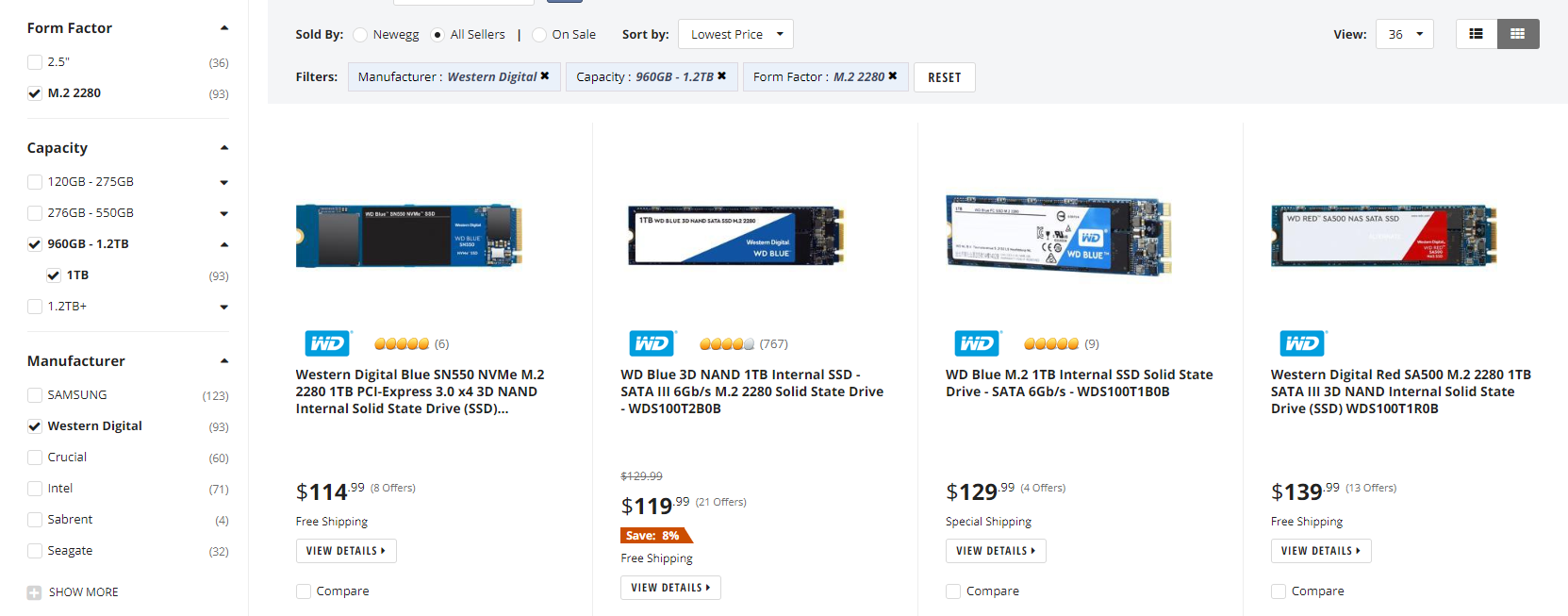
whats the best price to perf 1tb nvme ssd as of now? prob not sabrent now since its more expensive
nocturne sparrow
yeah i do want a m.2 nvme
cursive wharf
I mean sabrent wasnt the best price to perf ever i dont think. Use to be okay, now is not really
but right now cheapest decent 1tb NVMe is this
https://pcpartpicker.com/product/j8qhP6/mushkin-pilot-1tb-m2-2280-solid-state-drive-mknssdpl1tb-d8
nocturne sparrow
also you aren't taking into account mine was a micro build
stoic island
huh I keep remembering sabrent as 130$ xD
M-ATX boards can fit in mid tower full ATX cases
latent bronze
Isn't the WD Blue NVMe just as fast as that one for less money?
stoic island
WD Blue NVMe?
theres no 1tb option on the SN500 if thats what you mean
the other m.2 wd blue is SATA 3
foggy hazel
it is the 550 he is talking about
latent bronze
foggy hazel
also, there is a oem-only version of the 500 that is 1tb
stoic island
this is all I get
foggy hazel
@stoic island now you know why it is risky to trust search functions on sites :)
 latent bronze

stoic island
figured it out
nocturne sparrow
lol. but works for me. I search "wd blue sn550" and I see the 1tb in the results
stoic island
I was searching sn500
latent bronze
If i was very productive in a lot of things i would be using this one https://www.newegg.com/western-digital-black-sn750-nvme-2tb/p/N82E16820250114
cursive wharf
@nocturne sparrow well SN550 is still dramless anyways. But here is a new list
https://pcpartpicker.com/list/PnK9wh
SN750 is just overpriced. a decent 2tb NVMe is like $240
$250 on Newegg, $240 on Amazon for a 2tb of same perf
https://www.newegg.com/mushkin-enhanced-pilot-2tb/p/N82E16820226891?Item=N82E16820226891
latent bronze
So how much would a good one be then
foggy hazel
or is it me that cannot read... yeah, me that cannot read.
sn750, msrp prices: 1tb = 250, 2tb = 499
keep in mind, that was back in January of last year
latent bronze
Prices can also jump up within a year
i bought this a little over a year ago for 110$ and now the price is this https://www.newegg.ca/team-group-l5-lite-3d-1tb/p/N82E16820331115?Item=N82E16820331115
foggy hazel
what is interesting about the prices on those sites, is the "before" one
latent bronze
That SSD is for my games pretty much
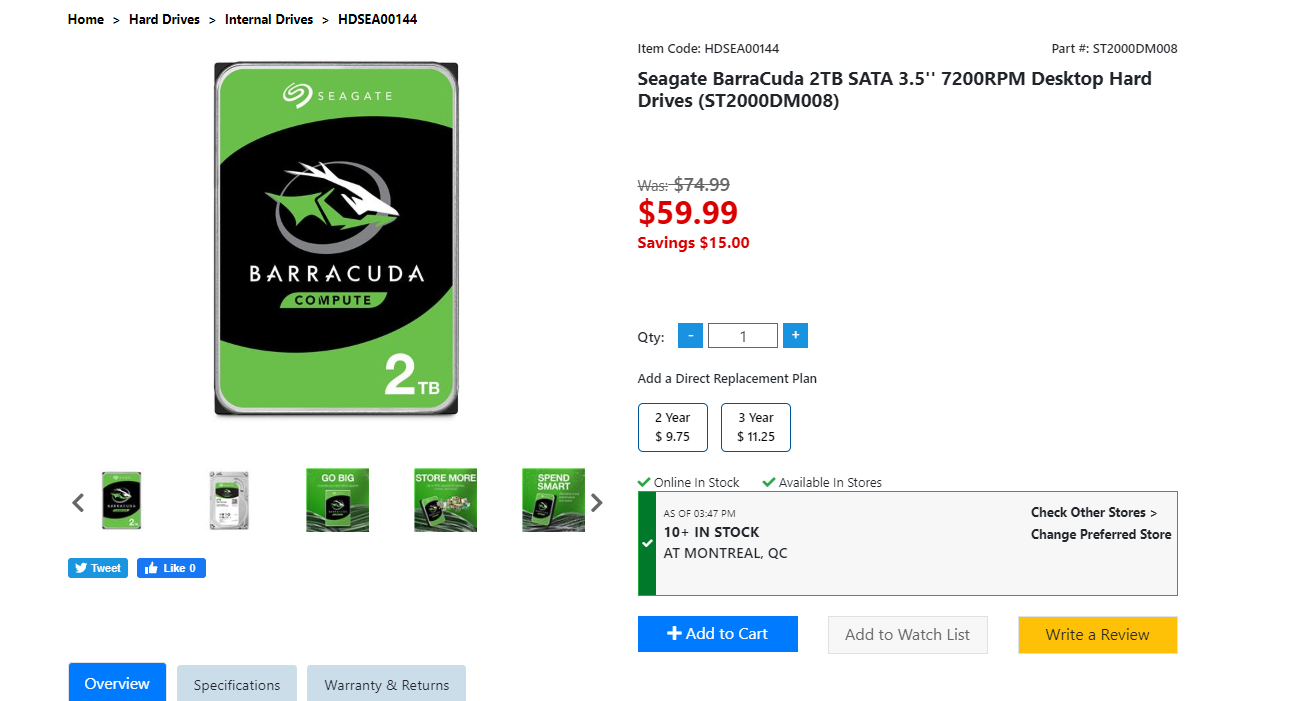
Dumb question but i haven't used a standard hard drive in a system in a long time is this pretty decent to use just for things such as my downloads https://www.newegg.ca/seagate-barracuda-st2000dm008-2tb/p/N82E16822184773
cursive wharf
@latent bronze I mean still $122 if on a sale
https://www.canadacomputers.com/product_info.php?cPath=179_1088&item_id=124714
cursive wharf
as for the seagate, I havent heard any issues of that. But I dont look a whole lot into HDDs
also oof
latent bronze
the closest store to get that SSD https://i.gyazo.com/4487604263520b8737cc78f78b9a7c96.png

I have been using SSHD and SSD's for a long time i haven't been in touch much for hard drives except when using it as externals
stoic island
Seagate 3tb has reliability issues is all I know
cursive wharf
3tb is the major one, but some others too
foggy hazel
@latent bronze yes, that seagate is fine, just be aware that there is a model with only 64mb cache, the one you have there is the 256mb one.
latent bronze
So the 256mb is what i should get then right
latent bronze
I have one that is a 64mb but i use it as an external so i never tried to use it as a internal drive
foggy hazel
real effing easy to mix up
wont matter all that much, but normally they are so close in price that you might as well :)
latent bronze
Ya and the 3TB i just looked at is only 5400RPM
latent bronze
Well would be for things like downloading my anime
foggy hazel
something to think about. I have setup systems where the download drives was laptop hdd
simple for the lack of noise
latent bronze
but still 2TB is more then enough for me since on my hybrid i used before i never went past 800gb
foggy hazel
it all depends on the use case in the end :)
latent bronze
The thing i don't understand is my older 1tb hybrid lasted me for like 6 years and it is still working fine but the FireCuda 2TB i have had it for like 2-3 years and it started making a clicking noise and also corrupting any files i would download (thankfully everything i had before that happened turned out fine)
foggy hazel
well, that is mass manufacturing in a nutshell @latent bronze
sooner or later your number comes up for having something that is just wonky
latent bronze
Also the 1TB was the Momentus XT
foggy hazel
aye
latent bronze
FireCuda i feel they cheap'd out on it
foggy hazel
and i know that it is VERY tempting to say "its because of X Y Z!!!!!" it really isnt. it is "just" statistics
ofc, once in a while there are legit bad batches of products.
but it is not something that the manufacturers does on purpose
latent bronze
Oh i know there are times that there would be a faulty product cause i have bought things in the past that came out bad but when i would replace it then it would be working
foggy hazel
because it is just about impossible to get rid of the "i have heard that bla bla bla" rumours after that
latent bronze
Also for that hard drive it looks like i will be going to my local PC shop instead https://i.gyazo.com/580cad19a5cd40423abef68679e1d3c4.png
 foggy hazel
aye
as always, make certain you check the model number when you have it in your hands :)
latent bronze
I looks on the site all the one's ends with a 8 and not a 7
foggy hazel
aye, just check when you have it in your hands :)
for your own sake :)
mistakes happen etc
latent bronze
You know what is surprisingly good for a gaming keyboard
foggy hazel
whatever you like using?
latent bronze
Be surprised from this
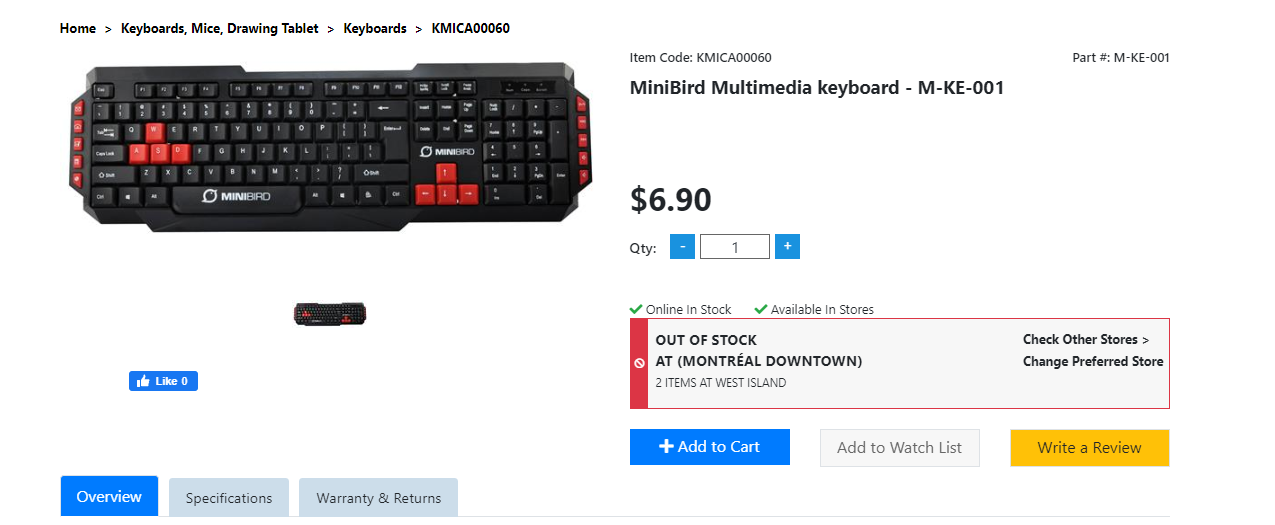
2 buddies of mine are using it and it is still working great
foggy hazel
hey, if they like it, all the power to them for that :)
latent bronze
Ya but most 7$ keyboards doesn't tend to look like that as well
sure there is no RGB but still
cursive wharf
Im probably going for Wooting Two if I cant find an analog full keyboard that has better price to perf
latent bronze
Next week
Mr1111 [#AirCoolingGang]
I've been convinced to get this now
instead of the GMMK
latent bronze
Well cheap keyboards like that are useful when selling a full system
stoic island
yea
foggy hazel
heh, i have an old usb keyboard with a trackpoint integrated that gets used for just about all builds i make
for the initial setup etc
latent bronze
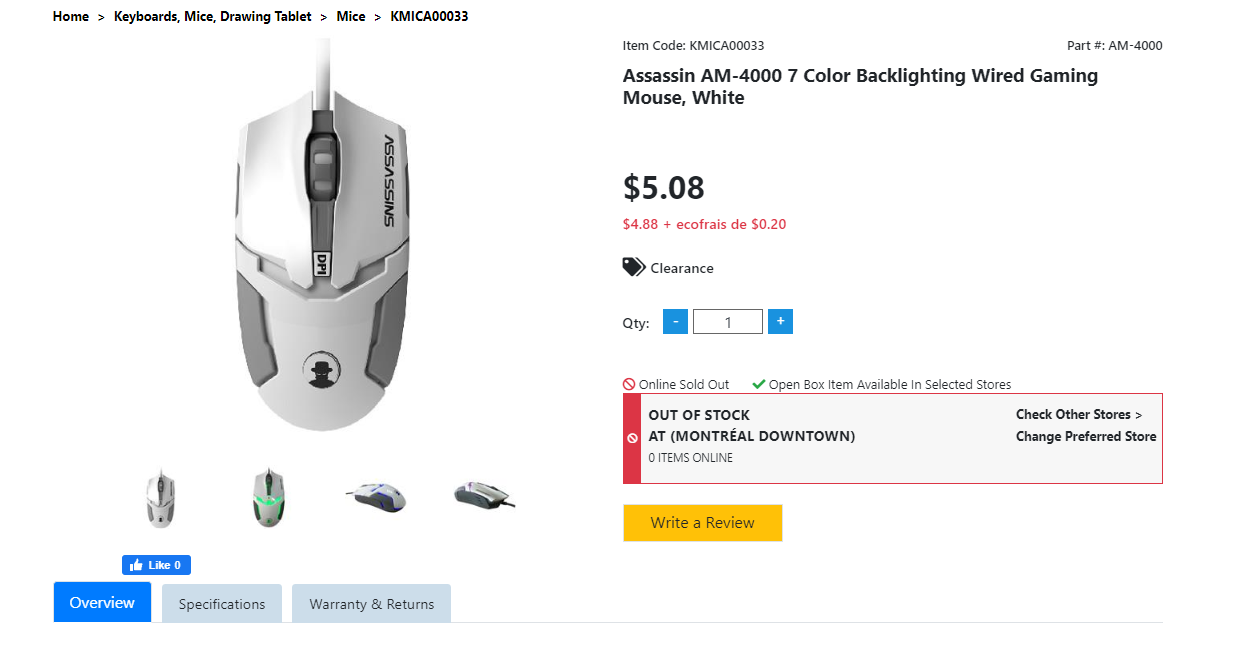
Look at this one that sold out for 5$ https://i.gyazo.com/da88057a357062a58bcb5b0adb28a5ca.png
 foggy hazel
simply for convenience
latent bronze
Lot of people wouldn't think that is a 5$ mouse
cursive wharf
looks wise is decent for price. But what about actual sensor quality, switch quality/lifespan, etc?
latent bronze
Anyways i am looking for a new keyboard and will to try brands i have never used cause the A on my keyboard right now isn't working that great
latent bronze
@cursive wharf https://i.gyazo.com/f5b9823c160ac3edd7e5b7c55a0c887e.png
 cursive wharf
doesnt say much tbh. You'd probobaly want some model numbers
 viral ore
but for 5$
latent bronze
@viral ore let me rephrase that i am looking for a keyboard that is between 10$ and 50$
cursive wharf
but for $5 (CAD?) seems good
latent bronze
yes that mouse is 5$ CAD
I feel tempted to try this out https://www.canadacomputers.com/product_info.php?cPath=21_273_274&item_id=100282
latent bronze
and it looks cool and full RGB
stoic island
semi mechanical
cursive wharf
is that just "mechanical feel" that is a gimmick and basically untrue?
viral ore
i think its rubber dome with a twist
latent bronze
it gives the feeling of a mechanical
I tried this one out and it actually felt nice https://www.canadacomputers.com/product_info.php?cPath=21_273_274&item_id=112774
foggy hazel
mech boards are not the end solution to everything, it comes down to the preference of the user
latent bronze
it looks like it but it doesn't feel like it
latent bronze
I go to my store once in awhile and they had it on display so i tried it out
it sort of feels like a standard membrane keyboard just not as high on the keys
I have also played games on a laptop so i know the feeling of it doesn't feel like a laptop keyboard
@viral ore the one keyboard i want to own i know i can never afford it lol
foggy hazel
just a question of saving
latent bronze
I am already saving to replace my motherboard and CPU
foggy hazel
there is no decree that says you have to upgrade everything at the same time Ecks :)
latent bronze
Well this is what i am saving money for https://i.gyazo.com/45784af3c6a3815dfbf8227ea315fd1d.png

I have a Ryzen 3 1200 so i can update the bios on that one to support 3000
viral ore
i put 600 into my keyboard, 290 is nuthin lol
latent bronze
and no that board doesn't have flashback
stoic island
sassy what you have
viral ore
old keyboard
viral ore
no
latent bronze
there are some others that uses it but i looked up for that ASRock board and doesn't have it
viral ore
its just solid metal and plastic, with little that can go wrong
latent bronze
Besides if i was to sell my old CPU i would prefer to have it on the board i have now
or put it in a case with like a 500w PSU and a GTX 1050 Ti
 wispy matrix
Can someone help me find cheap dual monitors to stay under budget https://pcpartpicker.com/list/jBMtL2
1200
stoic island
bruh
thats not happening unless you grab like 60hz 720p monitors
why not just single monitor
 teal bison
ya 1080p 60fps 1ms is like $100
deep skiff
yust get a 1080p 144hz panel
foggy hazel
@wispy matrix https://pcpartpicker.com/list/JH2sV7
a fairly major shuffling around of parts, but 1209 usd with 2 monitors. It is not goint to be super pretty, but it is what you asked for.
icy plume
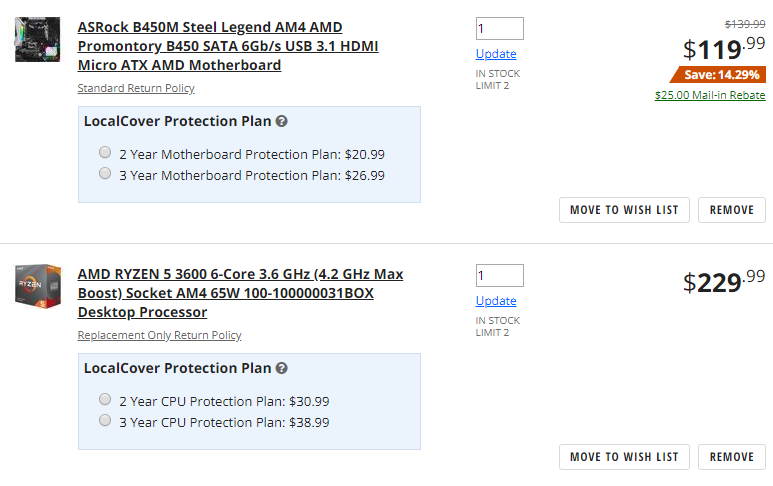
and remember not to include the mail in rebates as a deduction, they're a bad idea if you want to be able to return it, should it prove defective
foggy hazel
@icy plume if you mean in general? yes, agreed.
icy plume
yes
foggy hazel
there should not be any counted in what i linked :)
icy plume
exactly
stoic island
Naed said 1209 USD, the list is 1209 USD before rebate.
foggy hazel
@stoic island i think you might want to read the conversation again :)
icy plume
lol
stoic island
Hey, it's close enough to the brain
 coarse coral



 icy plume
theo stop scaring me