#building-and-recc-chat
1 messages · Page 473 of 1
 viral ore
 foggy hazel
hm, that looks like a btx board
viral ore
sff is the third smallest one
foggy hazel
cheers, didnt see the sff part
viral ore
btx one is the second smallest one
or
maybe it also is btx
what do ya know ur right naed
the usff is the proprietary one
foggy hazel
the smallest is picobtx
foggy hazel
https://cdn10.bigcommerce.com/s-2nchx8is/products/12206/images/46142/608fc14a-61f7-4592-acd9-71dfdc1d85c2__32614.1554371564.1280.1280.jpg?c=2 <- this one you mean (usff)
 viral ore
thats crazy
foggy hazel
that is the usff you mentioned
viral ore
no, the usff is much smaller
foggy hazel
ah, page 3
viral ore
neat
foggy hazel
link me the board you talked about?
 foggy hazel
look at the ram slots vs the one i linked
aside from a different "shape/orientation" the actual area is quite close between those two at least
https://i.ebayimg.com/00/s/MTAyNFgxMDI0/z/MUQAAOSwVuNbIJyW/$_57.JPG?set_id=8800005007 <- this the one you meant @viral ore ?
 viral ore
no
foggy hazel
because that is quite small for its time
viral ore
the one i was thinking of when i meant usff was real small, but i didnt realize that that form factor was only in the new optiplex pcs
tbh, i thought all optiplex boards aside from the MT were proprietary, didnt realize they were btx
 olive hollow
Is it okay to have this protective film thingy over the fan?
olive hollow
Even if the fan is blowing outwards?
 sacred obsidian
is that the front of the case?
sacred obsidian
my case has the same filter on front and top
sacred obsidian
i would just leave the filter on. doesnt hurt and it looks like there only one fan on there so dust could still sneak in through the sides
uh
rosewill somethin or other
sacred obsidian
wait i lied
i mean it has magnetic filter on front and top
but ones 2 fan and one is 3 fan
also has a single dust filter on the bottom for psu fan
sacred obsidian
but the filters look exactly the same except ones longer lol
olive hollow
no i only have 4 fans, i had it set up as 1 blows out 3 blow in but i decided to change it to 2 and 2
and the magnetic filter is on the top and bottom
so i should just leave it on?
sacred obsidian
you cant take it off or leave it on.
it might have slightly better dust protection with it on but shouldnt be much if the fans are blowing out
olive hollow
okay thank you guys
sacred obsidian
np
 little osprey
God I wish I had money to build something
get a job
I’m 15
and?
Not really a viable option
Pretty sure California says naw till I’m 16
can't you mow lawns and clean gutters?
 warped moat
 celest horizon
reddit
 tardy olive

GUYS HOW CAN IMPROVE SETUP
Looking for something like this https://cdn.discordapp.com/attachments/574740748801540107/668955004538978334/image0.jpg
but without the laptop
with like more monitors and a keyboard and mouse
 foggy hazel
whatever you think is important to you. it is YOUR setup
 austere radish
would be getting a 3950x kinda stupid with i guess ryzen 4000 coming in lets say q3
?
little osprey
It will still be a boppin cpu
 cursive wharf
depends on what you do and what you have
 icy steppe
Anyone know of a good res, pump, and 2070s coolers? im looking to do a custom loop in my Lian LI Dynamic case when i do a new build in the next few months
foggy hazel
@icy steppe do yourself the favour and post in #old-cooling
little osprey
https://pcpartpicker.com/list/CnLjBZ an AMD build rather then Intel
foggy hazel
for your sake, i hope you have had a look at the QVL of that board
 teal bison
also i heard 1st gen TR had a lot of problems, but i dont know if they have been fixed
teal bison
3900x is 500 and then at least a 115 mobo
oh is it 470?
but yeah i think the rest of the build is overpriced
cursive wharf
only useful thing that TR build has would be PCIe lanes and memory bandwidth. Tho PCIe lanes dont seemed to be used and memory bandwidth generally wont make such an improvement with that CPU, probs would want a more powerful CPU instead
Instead of buying Windows full price, get a R VII as that is a better built GPU for workstation loads
foggy hazel
depends on what kind of workstation loads the person is doing @cursive wharf
cursive wharf
true I guess
foggy hazel
cuda is not going to work just because you say so @cursive wharf
cursive wharf
Was originally a 5700XT in the build. Switching out to a R VII is safe to say it'd give at least a slight boost in perf, if it were GPU bounded
foggy hazel
combine the two previous things i said, and you have the answer to that.
cursive wharf
yeah
 short arrow
https://pcpartpicker.com/user/MightyMase04/saved/yyTrVn
Any suggestions?
Pls ping me with replies
cursive wharf
@short arrow Switch out the mobo that has a better sound chip
https://pcpartpicker.com/list/ZQ6PQq
 wintry ore
So I'm making my first build in about a week, should I go with a ryzen 7 2700 or a ryzen 5 3600
 wintry dragon
3600
wintry ore
sorry 2700x
 latent bronze
But there is nothing wrong with the board he picked
cursive wharf
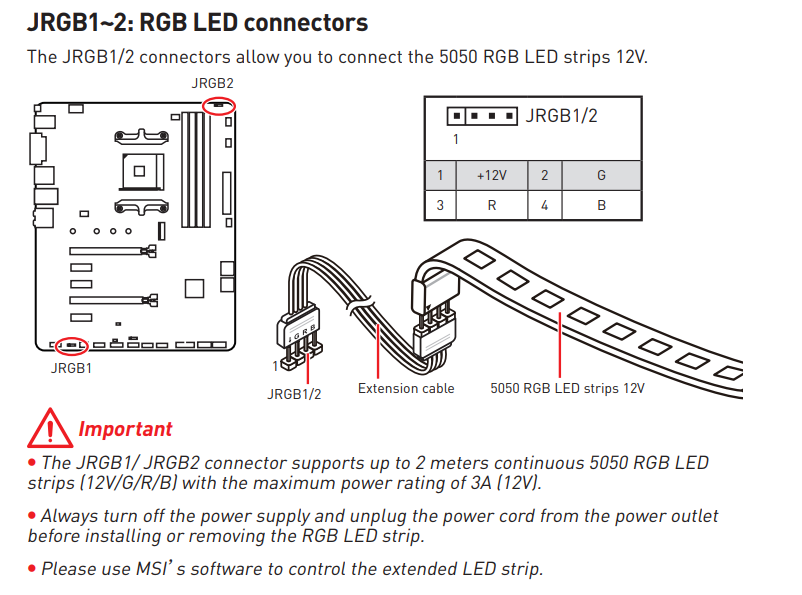
@latent bronze except for less M2 slots, no 12v RGB headers, less 16x PCIe lanes, no WiFi, less USB 3.0 slots if you want a tomahawk instead of a Aorus Pro WiFi for example (which is the same price)
all just for better VRMs that arent being used
latent bronze
no 12V RGB header maybe you should use your eyes a little better https://i.gyazo.com/d7c6f6678925716eb375bbe69295ac7d.png

straight from the manual of that MSI board
You can read everything here https://download.msi.com/archive/mnu_exe/mb/M7C02v1.2-EURO.pdf
teal bison
What would you guys recommend upgrading next? At christmas i upgraded the cpu from an i3-8100. And yes, i know, i made some... interesting... purchasing decisions. This was a couple years ago when didnt know hardly anything about computers. I was thinking of waiting until ampere and upgrading my gpu, as i'm happy with my performance right now
https://pcpartpicker.com/list/74vvdm
 grizzled bloom
First pc build recommendations
teal bison
what is your budget?
grizzled bloom
I would say around 800 is my limit
grizzled bloom
Games: Fortnite, Call of duty, GTA
little osprey
Is my power supply ok for my setup ? https://ca.pcpartpicker.com/user/OAlex_/saved/VC4dD3
grizzled bloom
I would probably start streaming later on
And 1080 or 1440
But for now it would be strictly gaming
teal bison
do you live in the US?
grizzled bloom
Yes
teal bison
latent bronze
@grizzled bloom https://pcpartpicker.com/list/dXQM4n
grizzled bloom
Yea I’m been on the site before but I’m new to pc and I don’t know what would be good and what would be a waste of my money and time
latent bronze
He picked the wrong 2060
grizzled bloom
I’m slow bruh I saw the links and didn’t know that they had parts already picked out 😂
teal bison
that psu isnt very well tiered, at least in the ltt tier list
latent bronze
yes because personal experience should always be over ruled by Linus
https://www.youtube.com/watch?v=dhGZgWcQDM8 This guy is friends with Linus and he even goes to say how dumb of a thing Linus did when he tested out that APU

You SHOULDN'T put the AMD Athlon 3000G alongside an RTX 2080Ti...or should you? 🥴
Never buy THIS Mystery Tech 🎁 https://youtu.be/97voWteTjXM
How next gen Ryzen will change the game 💻 https://youtu.be/aUvB-3gG1YA
Linus' video on the Athlon 3000G https://www.youtube.com/watch?v=JI...
teal bison
thats not related at all, the list isnt made by linus, its made by members of the forum
latent bronze
so even worst then
 rough loom
not necessarily. Because a collective group cross checking components is often times very efficient
latent bronze
But here is the thing what if some gets a faulty PSU and just dismiss it after using is once and then share that information on it being bad and end up being on the low tier what does that say really
Cause everything you pretty much buy could be faulty it is a chance we all take but there is people that buys something once and dismiss it as something bad
rough loom
The psu list is often cross checked over multiple sources. ive looked and checked
then also looked over by the moderation staff
cursive wharf
@latent bronze a good 450w is better then a cheap and poor 620w
M12/S12 sucks. Complete overrated garbage
Dont want your PSU dying now from some missing modern protections because you decided to go for a higher wattage?
Or get instability at running 450w plus despite being a 650w
rough loom
Personally lowest I would go is a decently rated 550
to skimp on the one thing that can make or break all the components in your system in a failure is stupid
saving 20-30 bucks on something that could cost you many hundreds if not more is not a risk to cost I would ever advise
cursive wharf
If you want to know what the LTT tier list is based off of, go take a look at the sources and tell me whether it's based off of actually testing voltage ripple/regulation, transient response, mutli railing, protections, capacitor quality, fan quality, noise (from fan or coil whine), operating temperature, hold up time, inrush current, efficiency, and solder quality; or whether it's based off of "her der, I got a faulty PSU!!111! This PSU bad"
teal bison
had to go but thanks guys
wintry dragon
Im making a vaporwave themed pc and was gonna laser engrave the front panel, anyone got some suggestions for what i should put on it? (text or an image dont matter)
rough loom
Superglue vapes in the shape of a wave on the front
wintry dragon
what does that even mean
i think i get what you are saying but i cant afford that many vapes lol
wintry dragon
anyone else got suggestions?
cursive wharf
@grizzled bloom So, few changes Ive made from everyone elses build
https://pcpartpicker.com/list/BJ6PQq
-cooler: 212 is overrated garbage. Way too overpriced
-mobo: getting you a board that has a good sound chip, WiFi, few other features here and there
-SSD: GX2 is DRAMless and HMBless. So it can have sucky performance. Also not NVMe
-memory: overpriced for what they are
-case: bad airflow
-PSU: lacks protections to keep your PC safe. So it is garbage
grizzled bloom
Thanks y’all
latent bronze
212 EVO RGB is a great cooler i don't know what you're talking about
47c max temps i was getting while gaming and i am using a 2600 as well
SSD is perfectly fine there is no issues with it and if system is used for gaming there is no performance difference really between a 2.5" and a NVMe
cursive wharf
$44 for a cooler or $21 for a cooler that performs better? What do you want to choose?
The pricier one that is worse in perf, or the cheaper one that is better in perf?
latent bronze
how is the 212 evo RGB worst?
cursive wharf
Also note for SSD, DRAMless/HMBless can very easily make a difference
which was my main concern. Just so happened that the cheapest SSD that had DRAM/HMB was an NVMe
As for the cooler, could be fin volume/density or fan quality. But it doesnt perform as well as a Gammaxx 400
latent bronze
Well i own the 212 EVO RGB and honestly better than the Deepcool i was using and i am using a R5 2600
latent bronze
Got one from a AMD CPU
cursive wharf
and, even if it was worse. Good luck comparing the 212 to the Macho Rev C (a $44 cooler)
Why does it matter what CPU it is? The heat output is the same in both tests
direct comparison
probably more heat too given that it is an older CPU OCed
Even noise level is eh
Gammaxx 50% fan = 58c @ 20.7dB
Hyper212 100% fan = 70.7c @ 22.8dB
So not only does the Gammaxx beat it in raw cooling performance, but noise normalized performance too
latent bronze
Tests in here shows the 212 Evo to be better http://www.frostytech.com/articleview.cfm?articleid=2696&page=5
Deepcool Intel Heatsink Temperature Comparisons - FrostyTech.com
But hey i guess all CPU's should be the same temps then right
cursive wharf
But uh, think about an OCed delidded 7700k, good AIO vs 212. ambient temp is 20c. OCed 7700k is not doing to go over 150w by much. So temp should be 35c right? Even on a good AIO temps are like 65c+
So idk how that 212 got a 16c over ambient on a 150w load
 cyan plaza
so ya a computer is using a pegatron 2ad5 version 1.03 motherboard and they asked me to put in a newer GPU with 4 hdmi ports... this is a 4-5 year old motherboard with a I7-3770 cpu it's not even on pc parts picker as well it was prebuilt from bestbuy. if anyone can find even if it' possible it's probably better just for a new build 🤐
 kind osprey
Okay is amd gpu driver still issue with a fan?
 sharp perch
can anyone make me a 2000 dollar setup that can game on 1440p over 144 fps
 steep plover
Sure
Do colors matter?
And what about rgb? @sharp perch
Full setup (monitor, keyboard, and mouse)or just pc?
Ping me whenever.
Also what form factor?
Just gaming or are you doing streaming or work?
foggy hazel
@sharp perch you have already asked for a build a couple of times. What changed?
 sudden turret

steep plover
https://pcpartpicker.com/list/r8qQcq @sharp perch this is what I came up with without any answers.
sharp perch
@foggy hazel its a little expensive because I need to get peripherals as well
foggy hazel
then post the previous build links @sharp perch and ask for a scaled down to X budget version
the previous builds will answer a bunch of the questions that @steep plover asked
and that any other list creator should ask
@steep plover side note: you are aware that the build you posted is using a 2.5" ssd when a faster m.2 drive is cheaper?
foggy hazel
np
foggy hazel
it is called having a memory.
sharp perch
:)))
foggy hazel
sorry, not trying to correct everything about the build @steep plover, 3200 ram is considered the sweet spot for 2xxx series (3600 is sweet spot for the 3xxx series)
steep plover
I take no offense and always try to be open to helpful respectful input.
sharp perch
well you know what the problem is with me I just am changing the price because idk if its gonna be to mutch for just the same or higher price
because idk if I can pay everything
steep plover
2070 or 5700 XT?
foggy hazel
also, there is the ages old debate about "is CLC+CPU worth it over a higher sku CPU with stock cooler?"
foggy hazel
@sharp perch my advice to you would be: come back when you are 1-2 weeks away from purchasing
sharp perch
and I heared that the gpu prices are going down
foggy hazel
let everyone else worry about the prices.
come back when you are close and know what you can actually spend on a machine
steep plover
https://pcpartpicker.com/list/HLg4YH @sharp perch just finished.
steep plover
Ok
foggy hazel
a little cheaper then the samsung you had earlier, but way faster :)
and before you select it, not the Rocket Q
steep plover
I saw lol.
foggy hazel
as in, the one on your list is the right one
foggy hazel
observation: currently, you are using 165+140 for cpu+clc = 305 total
steep plover
Is that bad?
steep plover
And it could run on stock
foggy hazel
easily
foggy hazel
aye, there is a V kit for about 85-ish iirc
foggy hazel
https://pcpartpicker.com/product/4xGnTW/phanteks-amp-650-w-80-gold-certified-fully-modular-atx-power-supply-ph-p650g_us01 <- that will save you something
steep plover
Which would bring the price down to about 1850
foggy hazel
power is plenty
foggy hazel
https://pcpartpicker.com/product/zcH8TW/gskill-ripjaws-v-32-gb-2-x-16-gb-ddr4-3600-memory-f4-3600c16d-32gvkc <- that is the V kit you want, better timings
(if we are getting into the nitty gritty of things)
(and yes, the V kit stuff is quite like the sabrent stuff, identical names etc etc)
steep plover
They should just add another letter or something
foggy hazel
now, the astute lurker would notice that the budget is not all used. That is because the customer has not voiced any real preference in regards to peripherals, so some free cash there is practical.
steep plover
And tax in some cases.
foggy hazel
IF the customer ends up being okay with the list as it is, a instant upgrade on the cpu to the 3800x (for 30usd more is a given)
steep plover
Yes
foggy hazel
also, IF they decide, "i want rainbows everywhere!", there is some budget free for doing that [edit "" !]
steep plover
Speaking of unicorn barf, I’m making a build all about it and it’s $200 more expensive than just the normal build.
So 😐
sudden turret
lol
foggy hazel
that sounds like weak rainbows IF it is only 200 more [edit: what -> that]
steep plover
Which it’s my LAN build so I’m kinda building it to be showy
I got 120LLs on eBay brand new cheaper than amazon.
steep plover
I made the mistake of doing a Q300L which is kinda big.
foggy hazel
shoebox = fractal design node 304
steep plover
I should’ve done a cube.
foggy hazel
:)
steep plover
Once I upgrade my GPU on my main build I’m moving the old one to my lan build.
 wide sparrow
@last rover ah yeah. A white build. Specs?
 wild pulsar
Anyone ever deal with powerspec?
 mint tendon
what's y'all's opinion on 2060 super?
steep plover
If it’s price is competitive go for it.
It’s a good card but not as budget friendly as the 5700 and 5700 XT
 crimson vector
so liek
my friend got his tax returns
and what do you guys think of what a threw together for him
....oh
foggy hazel
dont quit your day job?
the idea at the core of it is good
the parts are a bit ... fun?
sacred obsidian
you're over paying on the SSDs, ram, peripherals, windows, and probably the capture card.
crimson vector
he wanted a streaming system and gave me a big budget
foggy hazel
the core of it, as i mentioned, is good
sacred obsidian
its not a bad system by any means, just over priced imo lol
foggy hazel
some of it is just overpriced :)
crimson vector
when you can afford it you have to give it some theme, i know you can get plainer parts and all, i suppose i could just go western digital
crimson vector
i don't western digital is cheaper ssds
foggy hazel
why pay more for slower parts?
crimson vector
i just like samsungs software
foggy hazel
you wont be interacting with samsungs software at all
sacred obsidian
._. samsung doesnt have software for drives
crimson vector
their wizard
foggy hazel
@sacred obsidian wrong.
crimson vector
i installed it on my older sisters pc
sacred obsidian
wat
crimson vector
yea
crimson vector
drive optimization for someone who has no clue what that means
i just gave it a timer
then poof
done
sacred obsidian
i still call SSDs hard drives lol
foggy hazel
@crimson vector the features of Wizard are not needed thou.
sacred obsidian
just better ones
crimson vector
i'm gonna get indirectly bitched at though i told him i would refrain from changing it any more
sacred obsidian
although if you want that case, if you got microcenter near you, you might be able to get it for 60-70 bucks still
foggy hazel
you want the quick and dirty on what is wrong with the list?
crimson vector
this is all still in theory crap
sacred obsidian
cbus?
crimson vector
you're gonna say too much rgb
foggy hazel
(i dont give a rat about the visual, that is your choice)
 rustic blade
rgb=bad
sacred obsidian
rgb=200 more horsepoewr
crimson vector
then the next thing is the price of that 2080 compared to other 2080s
foggy hazel
no
crimson vector
then wut
sacred obsidian
the 2080 is fine lol
rustic blade
solid colors/fade/any other lighting effect = good
foggy hazel
Bad PSU
sacred obsidian
what psu tho
foggy hazel
paying that much for a CLC when a higher SKU cpu is worth more to him
crimson vector
i found a cheaper corsair gold
foggy hazel
it has nothing to do with the "bronze" part of it
please discard all things you think you have heard are "good"
sacred obsidian
some corsair psu's are good, some are bad.
foggy hazel
becuse so far, the only thing i am seeing is questionable choices
crimson vector
please don't basically tell me i'm a moron
and just explain why
i have bpd, it's not fun
sacred obsidian
hes not trying to be mean i promise. naeds one of the better techies on here lol
foggy hazel
what is the budget?
foggy hazel
give me 4-5 minutes
crimson vector
try to stay msi, please and thanks
foggy hazel
should not be a problem
sacred obsidian
are you in the US btw?
foggy hazel
question: is wifi needed?
crimson vector
i have no clue
foggy hazel
(this is a note for future reference: old build scraped to the box: $2067.07)
sacred obsidian
id say just add it. at 2100 he should be able to afford it lol
crimson vector
it was
sacred obsidian
with little compromise i think
crimson vector
oh, the capture card and 1 foot hdmi cable stay too
sacred obsidian
but your build was really good, some things are just a bit high priced when they dont need to be. like samsung SSDs are really good SSDs, but you can get the same performance out of cheaper SSDs and idk why they keep the prices up. especially when not terribly long ago they were the one who flooded the market to make SSDs cheaper in the first place.
at least im pretty sure it was samsung 🤔
crimson vector
probably WD
sacred obsidian
I love WD personally but apparently their SSDs are considered bad i guess.
foggy hazel
wd make some decent ones
 still roostBOT
 JoeMo218#0521 has been warned
Reason: Bad word usage
sacred obsidian
iunno people keep saying their new nvme drives are horrible specs.
crimson vector
...frigg
sacred obsidian
yeh it happens lol
crimson vector
i got a wd black for my crappy? build
sacred obsidian
i doubt its crappy
crimson vector
i paid for it with college money and pain in the now
sacred obsidian
like i said, I love WD. I use their drives when possible.
 sullen spoke
wd black is fast
foggy hazel
sn750 is decent iirc
sullen spoke
and expensive
sacred obsidian
iunno all the WD drives ive seen have been priced competitively
sullen spoke
Woah $0 that's a good deal
foggy hazel
@crimson vector i am working on my own copy, you wont see changes until i share a link
sacred obsidian
your build is pretty good
sacred obsidian
only thing im unsure about is the PSU
sullen spoke
sacred obsidian
theyre a good company
foggy hazel
https://pcpartpicker.com/list/9XXNx6 <- that is a start @crimson vector
sacred obsidian
but some of their psus are just horribly bad. but same with EVGA and corsair. not all of their psu are bad but some are at risk of things like, coil whine, or exploding, or meltdown
foggy hazel
that is scraped to what i listed earlier
1 tier up on the GPU
4 more cores on the cpu
2 sticks of ram instead of 4, same capacity
sacred obsidian
also you can get windows 10 for like 10 bucks or less on ebay or other sites.
foggy hazel
same or faster ssd's
crimson vector
i mean i got the hard drives out of my acer predator g3
foggy hazel
a proper PSU
crimson vector
it had a fanless psu
foggy hazel
those are the changes i have made
foggy hazel
here is the obvious trade-offs i have made
There is no CLC (water cooling)
it is using the stock cooler, this is fine. it will perform just as well for all he will notice
but that CLC used a LOT of budget for no real gain
sacred obsidian
water cooling is good if you wanna OC but thats not neccesary, you'll get great performance without OC.
crimson vector
why CLC and not AIO
crimson vector
what about front fans
foggy hazel
as i said, i stripped it all back to work on the list, easier for me
let me re-add those things, hang on
here is the list you brought originally, with the parts i found
crimson vector
neat, thank you very much
foggy hazel
you are very welcome :)
now you mentioned fans
how tied are you to that specific case?
crimson vector
i was hoping to keep it red and black without going overly ugly
crimson vector
the red and black is specifically for him
foggy hazel
yes, but you are here now, so it is YOUR build :)
you make the choices about stuff like that
i have no idea what you (him) want :)
crimson vector
de case stays
foggy hazel
fair
then a single front fan would not be a bad idea to add to the build
single or double
crimson vector
single
foggy hazel
there
that is the same fan as what is included with the case
so it will end up with, 1 front, 1 rear, 1 top (back)
crimson vector
yep
foggy hazel
now
i know you said to "stick to msi" (if possible)
i am just asking (because i am curious)
but why msi?
crimson vector
personal preference along with the fact i already know the way around their stuff
foggy hazel
fair :)
it is fairly rare to get people here that have a marked preference, hence my curiosity
btw, main reason for the ram change is 2-fold
price (2 * 16 is cheaper vs 4 * 8)
and IF he wants to upgrade down the line, to more ram, he just buys 2 * 16 again, and he wont end up with 4* 8 sticks that he isnt using
crimson vector
oki
foggy hazel
and yes, i know the MX drive doesnt look fancy
sullen spoke
but sometimes there is a price to pay
foggy hazel
but that and the other changes are all for the better and it helps fund the upgrades to CPU/GPU
sullen spoke
and that price... is looks
foggy hazel
and those two will be appreciated down the line
crimson vector
most likely
foggy hazel
i personally have NO idea about that capture card, so i cannot comment on that
crimson vector
i really want to spite him because my friend asked me for advice after he already bought this huge clunky case with all of its available fan space filled with molex conector fans
its the one other people use
i sent him a tutorial on how to make it work with 1440p
i WISH i had access to that shrug ascii thing
crimson vector
but still
foggy hazel
yes
crimson vector
i want to spite the other one because he also wants to stream
foggy hazel
have fun with that
for this build, you might want to swing by eposvox on youtube (in regards to the capture card), fairly certain he has a review etc of that one.
foggy hazel
he knows what he is talking about, and he is not 100% technobable or pr speak
crimson vector
that exact video
foggy hazel
kk
last note: you might want to see if you can get the person who will be using this, to get his hands on that mouse before he buys it
it might not fit his hand
just saying
but that is for you to figure out with him :)
anything else you need help with? or any questions @crimson vector
foggy hazel
you are very welcome
crimson vector
i'll tell him what he says if it's anything substantial
foggy hazel
:)
foggy hazel
i have no idea what that means :)
crimson vector
computer networking technologies
foggy hazel
ah
crimson vector
i know how to tell a router what to do
if it's cisco
and even then it's been 2 years
foggy hazel
sounds like the prep course for certification
crimson vector
yea but it was in high school
foggy hazel
ah
crimson vector
we also did basic computer stuff
thusly my basic computer knowledge
BUT
my entire year joined just for the computer stuff
foggy hazel
so a renamed general IT (soft and hardware) kinda thing
crimson vector
nah our schools it program split
foggy hazel
fancy :)
crimson vector
3/4ths of the 2 years we spent were focused ENTIRELY on networking
we were basically the Digital Media rejects, though
foggy hazel
i am old enough that all we got offered was "learn to type on this abomination of a 286"
foggy hazel
again, no idea what that means
crimson vector
all the right type
some
stupid
sci fi typing course
that we did over and over
foggy hazel
:)
crimson vector
and over
foggy hazel
welcome to the rest of your life :)
crimson vector
i type anywhere from 200 to 300 words per minute now
foggy hazel
and with that, i am out, it is late as heck here
crimson vector
at the cost of random typos steaming entirely from muscle memory of how certain sequences would go
foggy hazel
(other side of the world and all)
crimson vector
ah
 inland atlas
I checked everywhere. my hardrive ect. but i keep here this subtle heartbeat like vibrition
vibration**
crimson vector
you're aware of what it takes to run a gen 3 ryzen on a gen 2 board?
foggy hazel
@crimson vector you are aware that "that" board has had support for it since 2019-07-11 right?
meaning, unless you can find a retailer with stock that old, it wont be a problem
@mint tendon the 970 is a bit expensive for what it is, grab a sabrent rocket instead
foggy hazel
and that board was one of the ones that got a late bios update for it, most got it in may
@mint tendon https://pcpartpicker.com/list/p3dYmg suggestion for a slightly different take
personally i would not choose the tomahawk, but that is up to you.
mint tendon
why is that?
mint tendon
what wont i use?
foggy hazel
the only real use the tomahawk has is IF you plan on OC the pants of the cpu
mint tendon
oh
foggy hazel
and if you want to even try that, you would need to pay for a cooler, which you havnt selected
mint tendon
also that board doesnt have 2 m.2 slots
foggy hazel
and imo, it is not worth it on neither 2000 or 3000 series
ah, i grabbed the wrong mx500 then :)
https://pcpartpicker.com/list/WVCVmg <- that is the fixed list
identical prices tricked me on the mx variants
mint tendon
oh ok
foggy hazel
is your headphones minijack or usb?
foggy hazel
your headphones, what connectors do they have?
mint tendon
i have arctis 9x that i use on my xbox so i was gonna get the usb plug for wireless conetivity for controllers
foggy hazel
okay, so onboard soundchip wont matter.
mint tendon
yeah plus i have speakers plugged into my monitor
foggy hazel
do you have any use for Wifi?
mint tendon
i wanna gett wifi but i might just do a usb dongle cause at school imma use ethernet
foggy hazel
updated with a different mainboard, and a different PSU because mainboard change gave more room in budget
also, the whole "bronze/gold etc etc" doesnt mean anything really
also, that mainboard has wifi
mint tendon
oh ok cool
foggy hazel
and it is all a bit cheaper than what you arrived with :)
foggy hazel
an easy fix is to kill of the 2.5 and scale the m.2
foggy hazel
you will only be missing 500 gigs
you can always add in another drive down the line
foggy hazel
and adding in a 2.5 drive is about 4-5 minutes of work
mint tendon
true
foggy hazel
you could go and look for a m-atx case if you wanted
since that board is a m-atx board
would potentially take up a bit less space for you
but that is for you to figure out :)
best of luck with the build @mint tendon
if you dont plan on buying in the next 2-3 weeks, swing by again and drop the link
mint tendon
thanks i like that case is the thing haha
foggy hazel
and i will have a look and see if things are still as they should be (pricewise)
mint tendon
alright yeah might not be for awhile lol im big broke cause of sollege
foggy hazel
save the link, it will tell any future person you ask a fair deal about what the system is for etc
mint tendon
alright will do
cyan plaza
so anyone want to help me with this build https://pcpartpicker.com/list/zPLBGc
it's a none gaming build but i need 6 ports currently there all 5 hdmi which i might have to convert to mini hdmi, no sound through is needed, it's going to be mainly for showing videos and using audacity for playing and recording sound
problem comes with gpu, case, and cooler which i'm not sure what i need
cyan plaza
@upper condor but i have a 6 port hdmi hook up for i'm using it for 2 projectors, 1 tv, and 2 monitors XD
cyan plaza
is there something that can be close to it, i'm not playing games on it
 upper condor
There are multiple cards at 250-300
So look at them and look for the ports you need
The main ones are: 2060, 5600 XT, 1660TI, 1660 Super
I might have missed some
Doesnt matter how important having all those connectwd are, that card sucks poop
cyan plaza
ill have to find something else 1 hdmi doesn't cut it because it's doing exactly what the $400 bestbuy computer is currently doing but using a splitter to split 4 screens
 worn idol
He only needs video output, the power isn't important
cyan plaza
the only thing i pretty much use on heavy side is audio audacity 😅
worn idol
That card will work fine as long as you get a bunch of mini displayport to hdmi adapter cables, I haven't seen a card with that many video outputs before
cyan plaza
there not cheap at all...
around 1-2K
https://pcpartpicker.com/products/video-card/#o=6&sort=price&page=1 it goes 2GB for around 300 then 1K for 6GB and 1.5K for 16GB
worn idol
As long as your not doing any video rendering or gaming 2gb will be a lot
cyan plaza
it's basically for a friend's church, instead of going to bestbuy to buy a prebuilt for something that over priced but it's the display which i'm used to gaming pc not something with a simple task used only on a sunday 😂
i did see this as well https://www.amazon.com/dp/B00C7EPSVS/ it's not on pc parts picker
worn idol
If it's just for a church just buy the cheapest one you can find
Do any of the monitors use any other video connectors?
cyan plaza
😅 there all hdmi but the 2 screen projectors instead of them going fiber they used hdmi > Ethernet > projector
but all of them are hdmi
worn idol
So one of those cards with multiple mini displayports would probably be best
 fair wing
Hello guys .... I'm Planning to build my own storage server using at least 4 of Seagate Exos HDD 16TB SAS 12Gb/s.... can you please suggest me the best Raid Enclosure/Subsystem
here is the link for the HDD that I already got 2 of it: https://www.newegg.com/global/jo-en/seagate-exos-x16-st16000nm002g-16tb/p/N82E16822184808?&quicklink=true
little osprey
Whats the point of cpu boost if it runs worse
 supple schooner
https://pcpartpicker.com/list/Bk9RgJ is this a good build?
sudden turret
that mobo will need bios updated to use that cpu you chose.
 vivid atlas
Other than that, the PSU isn’t great and the cooling on a FE card neither (maybe you already know this)
I would change the PSU to something like a Phanteks AMP or Corsair RM(x)
supple schooner
And how easy is a bios update without a copy in it?
sudden turret
youll need a gen 1 or 2 .. unless the mobo can do it without cpu, which I don't think it can.
foggy hazel
@sudden turret that board has had bios support since 2019/06/04
so, unless @supple schooner finds a retailer with stock from before then, it will not be a problem
if he wants to make 100% certain, then he can contact the seller and ask them what bios is in the board he is buying.
It is in their interest to know this and their interest to convey this to a customer that asks
@cyan plaza did you end up finding a solution?
supple schooner
Thank you for letting me know about this info!
cyan plaza
ya or close to, i can probably cut some of the psu power as well down going for lets say 600-650 psu instead of 750 @foggy hazel
latent bronze
7750?
cyan plaza
ya 6 mini display ports
either that or go and buy 2 gpu with 3 hdmi ports each
😅 i think this is why everyone is getting confused because where all about gaming making a none gaming computer
foggy hazel
@cyan plaza your goal is duplicated output right?
as in, 1 source to 6 identical outputs right?
cyan plaza
no ill need them all different at lest 3-4 will be identical and 2 will be different
cyan plaza
there is no rendering being done
foggy hazel
there kinda is, but that is technically not something you need to worry about :)
question: why the Audigy card?
cyan plaza
because the more expansive ones can go to $1,000-$5,000😅
foggy hazel
what is it that you think you will be getting on that Audigy that the onboard doesnt deliver?
cyan plaza
we use audio audacity which unless there is a better way the sound travels comes from a soundboard to the pc record voice, as well can travel as well back to the soundboard
cyan plaza
we use this which we have sound coming in and returning to
cyan plaza
o ok
foggy hazel
you are just bouncing a signal back and forth so you can record things
is how it sounds
cyan plaza
ya wasn't sure how the motherboard if it just handles fine
foggy hazel
maybe by chance you selected one with a good soundchip on it :)
cyan plaza
because currently for the current computer it's just using the mic input but it's a "beats" computer...
well thats good enough then 😄
foggy hazel
are you open for a bit of a revised build?
cyan plaza
this is what the church computer is using right now https://support.hp.com/us-en/document/c03136300 with a 5 way splitter
Specification details and configuration options for the HP Pavilion Elite h8-1260t Configurable Desktop PC
sure
foggy hazel
because you have a couple of things you dont need on it
yeah, the audiochip will definitely be an improvement :)
sacred obsidian
wait naed are you good at sound stuff too?
foggy hazel
-ish
cyan plaza
kinda it would be nicer for somewhat improved sound
sacred obsidian
o: ima hit you up at a later date to revise my podcast setup
weve been having issues xD
foggy hazel
wrong copy/paste :)
cyan plaza
o lol
foggy hazel
https://pcpartpicker.com/list/h2czhg <- there
that does everything the old one did
for a bunch less
and yes, i changed the case and the storage
case: i can vouch for the define Mini C being a sturdy lump of metal
and it is a bit smaller
foggy hazel
ah, you need wifi? 2sec then
foggy hazel
storage: it makes sense to have a fast drive for booting, because in case something goes wrong, you want to be up and running asap
sacred obsidian
out of curiousity, why do they need 6 outputs?
cyan plaza

ProPresenter is the choice in worship software for church lyrics and video playback or live presentation software for broadcast lower thirds and graphics.
sacred obsidian
i cant find that info lol
foggy hazel
"video wall"-ish use case
sacred obsidian
oh
cyan plaza
pulse i use spotify this program and audacity, so having a separate screen would be nice for that
it's a pain in the butt using audacity, pro, and Spotify on 1 screen because i have to flip through them in a super short time
foggy hazel
aye
sacred obsidian
i feel that
cyan plaza
this is what people see
sacred obsidian
i use at least 2 programs at a time which is why i went ultrawide 😛
cyan plaza
this is what the people on stage sees in the back
foggy hazel
if that is what your customer wants, then that is how it is
sacred obsidian
i wasnt trying to say its a bad idea or anything i just couldnt find the reason why above lol. i was curious. it makes sense to have that many for something like that.
foggy hazel
it was not a critique @sacred obsidian :)
cyan plaza
😅 currently it's this set up
so ill confess it's actually the church i go and i run the computer as well as the sound system, i'm the customer 
because of the backlash if i brought this up i was trying to avoid most talk
foggy hazel
i will post a link when our bot starts behaving as it should @cyan plaza
sudden turret
please hold, your time here is important to us.
cyan plaza
ok thanks
sacred obsidian
i figured it was the church you attended lol. noone should give you any slack for that
cyan plaza
elevator music starts playing
sudden turret
try a link now.
foggy hazel
sudden turret
ayeeeeeeeee 🙂
foggy hazel
that is for you @cyan plaza
sudden turret
mee6 is in time out
 lyric thistle
Cisco Opus 1
cyan plaza
thanks but should i stick with VisionTek Radeon HD 7750 or go with 2 gpu with 3 hdmi each like Gigabyte GeForce GTX 1050 Ti 4?
foggy hazel
in theory, the 7750 is the simpler way of doing it
in theory
and for stuff like this, keeping it simple is strongly suggested
cyan plaza
ya because ill have to convert everything from hdmi to display port, gpu would cut that off
straight hdmi to hdmi
foggy hazel
it is you that have to figure out how to get it to work for YOU
so it is entirely up to you what you want to try and deal with
cyan plaza
😅 i feel like i'm in the unknow territory exploring
foggy hazel
(not saying that to be negative, but what i might select is not guaranteed to be what you will like to use)
cyan plaza
well ya i'm trying to choose what can do the jobs either 6 mini display port or 2 gpu with 3 hdmi
🤔 would this card work https://www.gigabyte.com/us/Graphics-Card/GV-RXVEGA64GAMING-OC-8GD#kf

GIGABYTE
Features Powered by AMD Radeon™ RX VEGA 64 GPU 8GB 2048-bit High Bandwidth Memory (HBM2) WINDFORCE 2X 100mm Fan Cooling System Radeon™ VR Ready Premium Feat...
3 hdmi + 3 DP
foggy hazel
it has the same pro/cons as the 7750
aside from costing a fair deal more potentially
cyan plaza
ill have to see the price difference because of the mini dp to hdmi ill have to buy
foggy hazel
aye
remember to take proper stock of the hardware that you have currently
and do yourself a big favour, dont promise it will work by any fixed deadline
cyan plaza
well can confirm none of that, everything is hdmi
foggy hazel
aye aye :)
cyan plaza
soo did some pricing it's just around $105.00 more, i might just go with that, it would be easier
foggy hazel
i am just going to put this forth, so you know my opinion.
there is a reason a lot of the special hardware for this stuff costs a LOT of money.
cyan plaza
😂 yes it does
foggy hazel
you might not run into a corner case (for your sake i hope you dont), but if you do... best of luck
you are going to need it
cyan plaza
it would be nice to ask around but this stuff seems kinda, there are no computer builds and such, i did check the reviews though, ill have to talk to the others about pricing because yes it's not cheap, maybe in like 30 years it might
foggy hazel
there are 2 ways to solve your current challenge
one costs a lot of money, takes about 45 minutes to setup
the other is what you are doing
foggy hazel
that does not mean that the way you are doing it, will not work
it might just take a LOT of time to setup as you want
cyan plaza
thank you you everyone for helping 🙂
foggy hazel
you are very welcome, and best of luck :)
foggy hazel
where is the PSU?
foggy hazel
please add and post again
cyan plaza
The motherboard M.2 slot #1 shares bandwidth with SATA 6.0 Gb/s ports. When the M.2 slot is populated with a PCIe-based M.2 drive, two SATA 6.0 Gb/s ports are disabled. do i have to worry about that 🤨
foggy hazel
nope, no worry for you
just plug your sata based drives in, starting from port 1
it is the last ports that will be disabled
cyan plaza
ok thanks
 swift fern
Nvm I need a PSU. Not compatible
foggy hazel
ok @swift fern how much of the parts that are purchased are actually not up for negotiation?
or are they old "moved from old machine" parts?
swift fern
yeah 😦
 sick bane
Looking for recommendations on a new gaming laptop? Currently have MSI and looking for replacement under $1000. Capable of running titles like GTA V
foggy hazel
with that you can save on those two parts, you can get a 2080super instead @swift fern
@swift fern do you actually need/want the WIFI on that mainboard?
swift fern
no but I want bluetooth 4.0
foggy hazel
for?
swift fern
Xbox One Controllers
foggy hazel
dont they have a dongle like the previous gen did?
(not a console gamer, so i honestly dont know)
swift fern
they do but it's bluetooth as well
foggy hazel
hm
@swift fern https://pcpartpicker.com/list/HPJWzN
there you go
cheaper and faster
with a psu that is
IF you are willing to spend a bit above 1500, then a m.2 drive would be recommended
that would look like that https://pcpartpicker.com/list/F3RXJb
foggy hazel
use case?
 orchid ruin
I need a case yes
upper condor
@foggy hazel kodelic told me the problem, ill simpligy it. His pc was working fine but then it didnt boot, he changed everything except the hard drives and it still doesnt boot
foggy hazel
you working on it @upper condor ?
upper condor
Yes
foggy hazel
shout if you need to
upper condor
He keeps saying he'll change the psu again
But the hard drive is the only thing thats the same
foggy hazel
strip to essentials and go from there.
upper condor
A weird thing is it was working fine, and then he plugged in a fan he forgot to and then it didnt boot
foggy hazel
has he unplugged that specific fan?
upper condor
Yeah he tried to boot out of the case and it still didnt work
orchid ruin
@foggy hazel ah okay, gaming and light editing
heavy gaming and some very cpu intensive games
orchid ruin
light video editing from time to time
foggy hazel
so, i am guessing, you plan to stream too?
orchid ruin
no
orchid ruin
im not planning to stream
foggy hazel
you need wifi?
orchid ruin
ummmm
foggy hazel
need/want really
foggy hazel
fair enough, i ask because it is easy enough to budget for a mainboard with wifi at this stage of the build :)
orchid ruin
yeah, I know. I just wanna upgrade from my current build lol
orchid ruin
I have a pcie usb extention and 16 gb of ram
foggy hazel
what kind of ram?
orchid ruin
yeah lol, I mean, put in whatever it needs, I can always save up more
foggy hazel
but, it is appreciated that you mention it now :)
orchid ruin
it can be a couple hundred dollars off
foggy hazel
you located in the US or?
orchid ruin
isreal
foggy hazel
hm, no idea about your local market, so all i can give you is a list that can work as "things as close to this as you can get"
orchid ruin
ight
foggy hazel
2 reasons for asking about location: Currency and region availability
orchid ruin
yeah, region availability is pretty bad here lol
orchid ruin
can be both
foggy hazel
okay, so there is some value in going for a decent soundchip on the board
foggy hazel
give me about 5-10 minutes
orchid ruin
thank you
foggy hazel
good, that solves the m.2 ssd then
orchid ruin
a big ssd would be nice
foggy hazel
https://pcpartpicker.com/list/GLxKK4 <- have a look at this, it is a starting point
i will be back in a bit
@orchid ruin
foggy hazel
and back
the challenge is going to be how to get those parts
the reasoning behind the parts is this (starting from the top)
CPU: it does not make much sense, at your budget, to buy anything but the 3rd gen
Mainboard: cheapest board that has a good soundchip on it (realtek 1200 variant in this case)
Ram: as mentioned, it is "good enough" (but it is the first or second thing i would upgrade)
SSD: the sabrent just makes sense as a fast OS and games-that-like-fast-storage drive
HDD: that mech drive is just a fair deal for the price, it can be cut if you dont need/want it.
GPU: A good performer, (but we might want to have a chat about it, because availability), also that is the only real nod towards lights at all in this build
Case: solid case, nice to build in. sized to fit the mainboard, because why go with a bigger case. Also, has a glass side, because of the RGB on the GPU.
PSU: Just a very solid unit. (availability might be a pain thou)
@orchid ruin that is the sum of it really :)
orchid ruin
thanks!
I have been looking to try the 2070 super, should be a great card, much better then my rx 580 lol
foggy hazel
that it would :)
foggy hazel
but save the above list, and if you have trouble with finding specific parts, come back and have a chat :)
orchid ruin
I did save it
foggy hazel
remember this.
The psu is the heart of your machine
it can be VERY tempting to save on it. for your own sake, dont.
but be aware that there are a bunch of very overpriced models on the market :)
orchid ruin
I did save on it on my current build
what happens if I do? Is it unsafe or something?
foggy hazel
what happens if your heart stops?
other things dont take too kindly to that
and it has a tendency to kill other things at the same time
orchid ruin
no, if I need anything I will @ you or someone else who is online
foggy hazel
aye, feel free to just @ me even if you end up asking someone else, it is nice following the builds we make :)
orchid ruin
yep, I will update you if I will remember lol
foggy hazel
and seeing as my timezone is CET, i will most likely be around
orchid ruin
indeed, one hour behind me
 blissful garden
does anyone think a 3d printer would be a good addition to my setup?
teal bison
if you want one, go for it
sacred obsidian
3D printer is kinda a novelty. i love mine but i also haven't used it in a while.
 trail perch


 viral ore
dont you think building a case will be easier with a smaller motherboard
also, what are you using 32gb of ram for
 hearty oracle
size doesnt matter tbh, im building the whole case, so i can make it any size i need
and i will be doing some 3d modeling for a side project, and some side gaming
figured it help with both
viral ore
16gb is plenty for that sort of thing, so feel free to cut back on that if you want to
latent bronze
Meh it is a decent system
hearty oracle
i might than, im trying to keep a little cheaper haha, but when i start clicking it just keeps going up Xd
teal bison
@hearty oracle do you plan on OCing?
hearty oracle
probs not, at least currently, maybe in the future
teal bison
you can remove the cooler and maybe get one later if you do want to OC, but the stock cooler is just fine
for stock
hearty oracle
that cooler is for the video card haha, its going to be a fun build
teal bison
oh ok
hearty oracle
ya im not a fan (haha) of the fans that come with most video cards, they are just so loud.
teal bison
also you dont really need that much wattage on your psu, if you are trying to save some money
you can save like $60 by going with a 550W
or like $50 if you want to be a lot overkill and get a 650W
hearty oracle
cheapest plat rated i see is 120, but im not familiar with that so i dont mind payin few extra bucks for psu,
viral ore
tbh, the efficiency isnt too big of a deal, its the other parts of the psu that are important
so, a $60 550w 80+ bronze will do just fine
as long as the rest of the psu is good enough
there are other people here who can recommend a good psu
idrk
hearty oracle
hmm something to think about
cursive wharf
@hearty oracle What's your upgrade path? Apart from VRMs tomahawk is pretty bad. Unless you plan to go 3900x with modest OC then dont get the tomahawk. Get a board with more M2 slots, USB ports, better sound chip, ect
Also, allocate the GPU "CPU" cooler money to the GPU itself. Downclock it if you want quietness, then set it to stock for better perf when needed.
Also ya, dont go by efficiency rating
hearty oracle
what mobo would you think of switching too?
cursive wharf
b450 TUF Pro Gaming if you want to stay as cheap as possible
b450 Aorus Pro WiFi for slightly better, cuz WiFi. Think price is the same as Tomahawk.
little osprey
anyone know if you can make a customized laptop the same way as you would a desktop? I may be going to air force boot camp in the next few months and I'd rather a laptop then a desktop
hearty oracle
i know you can change things in them that you need, im not sure if there is a place that sells shells for labtops.
sacred obsidian
i believe there was a case that was like a laptop thing but it was huge and bulky and i doubt its still made lol
fair wing
Hello guys .... I'm Planning to build my own storage server using at least 4 of Seagate Exos HDD 16TB SAS 12Gb/s.... can you please suggest me the best Raid Enclosure/Subsystem
here is the link for the HDD that I already got 2 of it: https://www.newegg.com/global/jo-en/seagate-exos-x16-st16000nm002g-16tb/p/N82E16822184808?&quicklink=true
viral ore
This one here is newer and according to reviews is better:
https://shop.westerndigital.com/products/network-attached-storage/wd-my-cloud-pro-series-pr4100#WDBNFA0000NBK-NESN
 craggy tapir
I bought a ton of stuff during the newegg anniversary sale and wanted to know what you all think of the new build https://pcpartpicker.com/b/HKCbt6
vivid atlas
Good, deals ! 👏🏼