#building-and-recc-chat
1 messages · Page 463 of 1
 sacred obsidian
 next nymph
But I don’t see any bent pin
 cedar portal
looks ok to me
sacred obsidian
take a pic of the actual socket as well
 cursive wharf
@cedar portal Grand RGB also isnt that great. For $90 you can get the Phanteks AMP which is significantly better quality
https://www.amazon.com/dp/B07W6S2ZJP?tag=pcpapi-20&linkCode=ogi&th=1&psc=1
next nymph
cedar portal
@cursive wharf roger that
sacred obsidian
yeah no i dont see anything out of the ordinary from the pics, so maybe your cpu is fine
what mobo do you have
sacred obsidian
the only thing throwing me off is, that little hole in the middle
that looks liek something is supposed to be there
but idk i cant find a clear picture of the socket online
cedar portal
Maybe? Even Newegg's product images can't zoom the close.
 muted patio
Still looking lol
cedar portal
maybe not
https://www.overclock3d.net/gfx/articles/2018/04/12091149644l.JPG
there doesn't appear to be anything there
 muted patio
Ehm, hang on
cedar portal
you can zoom in here: https://www.overclock3d.net/reviews/cpu_mainboard/asus_rog_strix_x470-f_gaming_review/2
 next nymph
IIRC that hole has always been there
sacred obsidian
yeah it appears as normal
muted patio
Zoom in on that
Looks like something sticking in the socket
Open Original
And check the corresponding area of the CPU carefully
 stoic island
Gawd damn Bekora with the 20/20 vision
sacred obsidian
i noticed that but it looks similar to the ones around it
muted patio
No, it doesn't
sacred obsidian
looks about the same depth
muted patio
There's a shiny ball in the middle
cedar portal
gonna have to get a magnifying glass and look
muted patio
It lights up different than the ones around it
cedar portal
that honestly looks like a trick of the light
next nymph
It might just be the light reflection but I’ll check anyways
sacred obsidian
i brushed it off cause it looks to be same depth as others and same shape, just not quite as dark. if the pin broke off itd be quite a bit higher imo
next nymph
But it’s not a pin
cedar portal
check the pins on teh CPU in that same area and see if any of them are shorter than the rest
muted patio
Right, might not be a whole pin
next nymph
Or it might be something else that’s preventing contact
sacred obsidian
bekora
you might be right
i noticed this iregularity earlier, i just counted the pins
thats the same area
next nymph
Hmm, you might be right. I'll check it out later
I’m checking it right now and can’t find anything
No missing or damaged pins as far as I can see
muted patio
I mean, worst case is reinstall it, reseat all of your ram and check the BIOS
next nymph
And the motherboard doesn’t have anything
muted patio
Might be worth a CMOS reset also
next nymph
Hmm, apparently it works now on the first slots
I suppose there was something in there
sacred obsidian
maybe it wasnt seated all the way
your ram should be in slot 2 and 4
if you only have 2
muted patio
Lol, like the old NES. pul the cartridge out, blow in the slot, put it back in and BAM. It works.
sacred obsidian
yeah but thats super weird. never heard of something stop working and then randomly start working again in that manor
unless he just didnt give it enough tim to boot
next nymph
No, I left it around 5 minutes at a time and the RAM error light stated on
I have the RAM in 2 and 4
sacred obsidian
oh yeah if the ram error light was on then you were having a ram issue
which is weird
but good thing its working again lol
next nymph
I will run some tests and if it works correctly I’ll install the new cooler tomorrow
This time I’ll be more careful
sacred obsidian
alright good luck!
next nymph
Thanks! And thanks to everyone that helped me!
sacred obsidian
its what we're here for 
 median sail
I can’t remember if it’s ok to. Use liquid metal between ihs and the cooler
Or if it’s just that you use it in the actual die
If you delid
My brain is being very dumb right now
Because I’m about to do both
Because I know for GPu they just put straight on die before you put in in water block but
Idk if you don’t delid if you can just use it as paste instead
cursive wharf
It will also eat the die over long periods of time
 strong crescent
What is good motherboard upgrade for my rygen 2700x or should I upgrade my gpu which is a gtx 1070 windstrike oc from gigabyte.
cursive wharf
Unless you're running a320 you shouldnt really have a reason to upgrade your mobo. As for GPU you'd looking at a pretty pricy upgrade, at least $300 and then some OCing for what'd be just a moderate upgrade (2060 KO). Probs spending $350 on a decent 5700 with a flashed XT bios would get you performance that'd be worthy of the upgrade
 foggy hazel
@cursive wharf the 2060 KO is a evga exclusive variant (it is one of their old old series that have been revived)
 charred plank
hi guys, i am considering to have a pc only not including monitor and peripherals with a max budget of usd1,000 as of now, i am considering some of these general parts
amd r5 3600
any 4xx chipset motherboard
rtx2060 super
2tb hdd
if there's a suggestion to add to my build, i am okay with that, my last rig was 13 years ago and i have been using laptops since then, ssd/nvme is optional to me since i never had privileges to use them due to budget constraints in the past, of course, this will be a full system build with case and power supply included. i live in a country where i can't buy anything from newegg directly, so i am considering to ask opinion from you guys as about general items being suggested and i will cross check the local prices
p.s, local market in where i live in, usually has renowned brands being sold such as gigabyte, asus, some are asrock and biostar, msi i think present as well but i didn't pay much of an attention to that.
foggy hazel
that budget would normally contain a ssd in some shape
it is a part that is well worth sacrificing something else for.
it would be helpfull if you can give the country you are located in.
because then when potential parts are being suggested, it can be checked if it is available
charred plank
i live in Malaysia, particularly close to Brunei
this pc is not so urgent as of yet as i am still waiting for other things to come into place first, but i think i should ask first
foggy hazel
any idea about roughly when you plan to purchase ?
charred plank
not anytime soon probably mid year, my house doesn't have any internet so it is particularly useless to own such pc without any connections to the world in my opinion
foggy hazel
:)
so what you are looking for is basically a general chat about what parts will in theory suit you
foggy hazel
then i would say: just lurk if possible :)
foggy hazel
aye
it is way too far away now
and if that is the timeframe (6-ish months)
then i would not recommend that you start picking up the individual parts yet
because IF you have DOA parts? that is going to be annoying to deal with 5-6 months later when you can actually test the parts
charred plank
i see
 onyx ice
Hello, what do you think about this built, do I have to make any changes to make it better? Budget is around 1200, and for sometimes need to use wifi. https://pcpartpicker.com/list/dpYZFG
 vivid atlas
Good build, if you really wanted to save some money you could consider getting a 3600 instead of 3600X since it would handle a 5700 XT properly
But that’s up to you
foggy hazel
you could save a bit of money by going with a mainboard that has Wifi built-in
vivid atlas
Also, there are some cases with better airflow than that NZXT one if I’m not mistaken
onyx ice
Friend said, that if wifi part somehow crash on mobo with wifi built-in, it would be a pain 😅 that's why I chose adapter.
With a case yes, maybe better could be, būt don't want to go over 80 for it.
foggy hazel
built-in wifi is fine
and IF it stops working completely, at that point, buy a add-in
also, please tell your friend that he doesnt know what he is talking about :)
onyx ice
But there isn't decent mobo with wifi for less than 150, couldn't find one 😅
onyx ice
B450 arorus pro wifi, is it friendly with 3000 AMD? Won't need to flash it?
foggy hazel
depends on how new the stock the shop has is
boards that have bios f40 or newer (talking about the Aorus here), will support 3rd gen
F40 was released for download 2019/05/16
onyx ice
Nice, good to know, thanks
foggy hazel
also, most, if not all vendors are usually quite happy to tell you what bios version a given board has
because it helps them, help you better
and cuts down on rma
 dark thistle
https://pcpartpicker.com/list/FQ8kjp
Build thoughts?
cursive wharf
@dark thistle I wouldn't get a 750w of that PSU quality, 550w is fine. Also you have the cpu but upgrading the mobo?
 timber vessel
Can anyone give me a parts list that will play escape from tarkov on high at 100fps? Starting from scratch.
Or 100+ im kinda on a budget
next nymph
Hi
I’m installing a cooler on my PC but the fan splitter has one 4 pin connector and one 3 pin
Is it missing a pin or is it supposed to be like that?
stoic island
@next nymph thats normal
 celest horizon
The missing pin is what sends back the fan rpm to the board - the 4th pin is a pwm data signal to control fan speed. >1 tach pin connected would double, triple etc rpm haha
stoic island
Afaik splitters usually split 4 pin into 3 pin and 4 pin
celest horizon
Ya, but fans barely sip current usually - so it's not rare to see 3-4+ fans off a single pwm 4 pin header
 little osprey
Alright folks say you are building a Gaming Tower for a Total of $1,400, what would you build? (Feel Free to DM)
Starting with a case.
hey guys is it safe to put cables behind the psu?
i’m cable managing rn
sacred obsidian
what do you mean
little osprey
2070 super dropped its price to $499
cursive wharf
@little osprey https://pcpartpicker.com/list/kWcndm
probs get an NVMe or something cuz you still have $70 left to spend
Also note, 2070S always had the $500 price
little osprey
Ahh
stoic island
Wierd cooler pick
cursive wharf
thermalright is an underrated cooler brand
celest horizon
Markedly less capable vs the pro tho
cursive wharf
yeah, but is out of stock or prices rose
stoic island
Ah
stoic island
I haven't seen that psu before, but if its good thats fine
cursive wharf
I dont know much of Phantek's PSU lineup, just know that the AMP is pretty decent
little osprey
That build is great, gonna replace the 550w for a 700w PSU and throw is some Noctua Case Fans.
celest horizon
mugen/ninja both good perf/$, gammax400 $20 is great
stoic island
Not necessary for more fans, but you could if you want
celest horizon
Arctic P12/P14 5 pack is $30
stoic island
550w is enough, but if you want to future proof, like 650 is fine.
little osprey
Yeah, I am future proofing for down the line.
stoic island
(Spatula those fans are fine but like noctua fans are like 20 bucks each lol)
cursive wharf
@little osprey voltage ripple/regulation, transient response, protections, is/isnt group regulated, cap quality, fan quality, noise, and multi rail are some things to consider when thinking about PSUs
cant just pick one randomly
cursive wharf
They arent always correct tho, but mostly
stoic island
Its a good source for generally how good the psu is
Ofc you can look deeper into it, but definally a good first look
cursive wharf
yeah. Anyways back to PSUs and why 750w isnt that great of an idea, I'd generally associate a 750w PSU with a 2.5k+ PC, at which point when considering how clean the power should be, the PSU would probably cost like 130 or more
550w - 650w is where I'd stay
stoic island
I'm just going for 750w bc I can pour a fair bit of money into my build over the years
Like I'd like to have a good chance of putting high end hardware in after a few years and be fine with this psu
little osprey
Well currently I am building a new rig. My current rig is about $1.2 at the moment. That is running a 700W Vega PSU
No problems other than Radeon Drivers.
cursive wharf
stock 3950x + 2080Ti wont even pull more then 650w
even with a moderate OC I doubt it would pull that
a decent OC would tho
cursive wharf
heighest end xx80Ti card has always been 300w or 375w since the removal of dual GPUs on a single PCB for consumers (690 was the last iirc)
celest horizon
I wouldn't fixate on the rating - look at the sales, look at Luke's list - if something pops out, that's your bet
HOF 2080 ti power limit is 400+ , same with trio
Highest launch power limit was the ftw3 at 373, many reference PCB/FE were 280/300 iirc, but all got an official update to 320
cursive wharf
Well, always been the special cards (like HOF) that had higher power limits
But the general card is going to stay at the 300/375 unless another GTX 480 happens
cursive wharf
but, as Ive said, your PSU price should be proportional to your total PC cost. So for the LTT list I'd be getting an A+ PSU or better if it were 750w+
which are kinda pricy (but so will be the PC)
As sadly Bitfenix disappeared.
Also, Spatula as you seem a bit more informed about these fun things, do you know what happened to Bitfenix?
I assume Tariffs?
little osprey
Ouch.
celest horizon
Turing cards are well pair with more PSU headroom than most people think they need. Especially the uP9512P cards like the EVGAs
No idea, I don't really read/watch tech news lol
cursive wharf
Sucks cuz they were so good for the price. Like same price as A tier but being A+
celest horizon
Don't put too much decisionmaking weight the initial reviews - al kinds of issues can be impossible to detect, predict etc
little osprey
I would like to say thank you though Hei the build guide and information.
celest horizon
Google the corsair hx620 - probably the best example of this, around late 2000's - glowing reviews, easily double digit 1 year failure rate lol - but thes days PSU's are just plain better across the board
cursive wharf
like double digit % or raw numbers?
celest horizon
I just skimmed the threads, idk who really knows. I think jhonnyguru said he thought it was probably single digits - still huge vs the norm, then or now
Failure mode + what else it nukes along with it are vitally important IMO as pure reliability for $$ builds
Servers just run failover/load balancing boards, so non issue
cursive wharf
Well, 10 PSU failures out of I assume the multiple thousands that are made dont seem super duper bad
cursive wharf
yeah, makes more sense
@little osprey np. As something to consider, with the remaining money you could up your PC with a 1tb SATA drive and 650w PSU, or 512 NVMe and 650w PSU. Should still be able to fit a larger PSU which can still help with upgradability
or just a 1tb NVMe and same 550w PSU
 mossy citrus
is the 2060s a good 1440p gpu?
or is the 5700 better
 sullen spoke
depends on the game, but mostly 5700 is a bit faster at 1440p
 plush harness
i need help deciding on a few parts.anyone willing to help
 worn monolith
I am lookin g for a server workstation preferable a tower low noice,
virtualization, can spin upto 30 VMS
expandable memory
can anyone suggest the configuration
 gentle bay
Hows this bench
UserBenchmarks: Game 100%, Desk 90%, Work 78%
CPU: AMD Ryzen 5 3600X - 95.2%
GPU: AMD RX 5700-XT - 109.7%
SSD: Samsung 860 Evo 1TB - 99.8%
RAM: G.SKILL Trident Z RGB DDR4 3200 C16 2x8GB - 69.8%
MBD: MSI MPG X570 GAMING PRO CARBON WIFI (MS-7B93)
worn monolith
compute not much graphics
 woven horizon
UserBenchmarks: Game 102%, Desk 107%, Work 95%
CPU: AMD Ryzen 7 2700X - 83%
GPU: MSI GAMING X 2070S - 106%
SSDs: Samsung 850 Evo 500GB - 89% Crucial P1 3D NVMe PCIe M.2 1TB - 236% Sandisk S3 1T02 1TB - 88.4%
RAM: G.SKILL Trident Z Neo RGB DDR4 3333 C16 2x8GB - 103%
MBD: MSI MPG X570 GAMING EDGE WIFI (MS-7C37)
@gentle bay
it looks like your ram isnt using the xmp profile
also is your ram in dual or single channel
 serene current
Good evening. Not sure if this would be the right channel, but I'm looking to build a decent setup on a fairly small budget ($500 at the moment). Would anyone mind giving me some insight on the following combo?
- AMD Ryzen 7 2700
- MSI Performance Gaming X470 Gaming Plus mobo
- G.SKILL Ripjaws V Series 32GB
Will be reusing current case and periphreals for now
cursive wharf
x470 gaming plus has no real benefits to b450 tomahawk
 viral ore
also that
serene current
I run a couple heavily modded games, and after an hour, I end up with around 95% RAM usage
On 16 gb
gentle bay
How do i use the XMP profile? @woven horizon
viral ore
so you do need 32
gentle bay
And its dual
gentle bay
Oh i c
woven horizon
@gentle bay go into the bios and under xmp profile select profile 2
viral ore
depends on the ram you have now tho
cursive wharf
also, is that just a memory leak or you have other programs you can close?
woven horizon
i had spotify steam and discord running
serene current
I run Steam in offline mode, don't have spotify, and discord stays closed when gaming (use the mobile app)
viral ore
what type of ram are you using now? you might be able to still use it
woven horizon
sorry i was not reading your post my comment is of no value just ignore it lol
serene current
Honestly, don't remember. It's about 5 year old potato. I'd have to search my order history. lol
woven horizon
but i will say i have several things running and only use 60% of my ram
serene current
Yeah, it's old DDR3
viral ore
oh, if its 5 years old, the ram probably isnt DDR4, and probably isnt reusable
yeah
so nvm
would you need a new gpu?
or is your current one fine
serene current
GPU seems to be fine. GTX 960. Am planning on upgrading it later on
viral ore
yeah, its good enough for now
woven horizon
for now but youll notice the gpu is lagging behind for sure
viral ore
but, a B450 motherboard, either a 2700x or 3600, depending on if you really need more cores, and 2x16gb ddr4
what kinds of games do you usually play, and what cpu do you have now?
serene current
Skyrim, Fallout series, Civ, etc.
It's a AMD FX-4350
woven horizon
tomahawk or the steel legend are a good choice
woven horizon
unless you are getting the x some games perform better because of the cores and not the core frequency
woven horizon
civ will
viral ore
games like that usually can go ham with threads
serene current
Ok, so the Ryzen 7 2700X, MSI B450 TOMAHAWK MAX a better comboination?
woven horizon
you dont need the max unless you want to guarantee ryzen 3rd gen support out of the box you can always update the bios before upgrading to 3rd gen
serene current
But, if I go with the Ryzen 5 3600 over the 7 2700/2700X
woven horizon
Then yes get the max
its kind of ugly of them to charge a little more for a bios update tbf
serene current
They gotta pay the people to do the update somehow...lol
woven horizon
I'm assuming those boards are new stock and they would have the bios installed during the manufacturing process and not recalled stock that's been updated.
serene current
True, true
Ok. I think I know the direction I will be going once I decide to pull the trigger. I really do appreciate the help and insight yall have given!
 magic harness
hello i need help i just bought a new 3900x to replace my 2700x my mother board is a asrock x570 phantom gaming x ram is G.SKILL Flare X Series 32GB (2 x 16GB) 288-Pin DDR4 SDRAM DDR4 3200 (PC4 25600) ssd XPG SX8100 1TB PCIe NVMe Gen3x4 M.2 2280 when i try to install it goes to bios and no further the board pics up the cpu but it wont boot to windows just keep acting like its loading windows i gave up swaped back to my 2700x cpu what am i missing
sacred obsidian
well one, when switching cpus you gotta give it a bit
and 2, did you try to reinstall windows
i mean its more likely you gotta just wait a bit if all you did is update cpu
another thing you can do is while using the 2700x, update your bios, then reinstall 3900x
but i doubt thats the issue as it should support 3000 series out of the box i believe
 proud helm
yes it should
he should prob reinstall.windows like u said
pc newbies be like
but hey thats what this discord is for
what the dumbest question youve ever seen in this discord ping me
sacred obsidian
i mean you shouldnt really need to redo windows when going from a ryzen to a ryzen
but it does help
sullen spoke
You can try but windows shouldn’t be the problem, but windows sux so idk
proud helm
yea
sacred obsidian
windows is bae you shush
sullen spoke
Well it’s gone now
proud helm
yea rip
sacred obsidian
nope windows 10 is better fite me
proud helm
guYz i nEedz hElP mY pEnTiuM nO fiT iN mY x570 Max PRO GaMiNg MobO iM sO mAD soMeOme fIx PleAsE
 edgy zephyr
What windows Longhorn was fun
sacred obsidian
theres no bad questions mrsupr3me everyoen gotta learn somehow
sullen spoke
Just shove it in @proud helm
cursive wharf
Supr3me, put thermal paste on the socket and the put the CPU in, maybe it'l help connecting the pins of the CPU onto the mobo
sacred obsidian
oh god i thought you were giving serious advice for a min and just wording it wrong and i nearly had a heart attack
cursive wharf
sometimes I wonder if adding /s is a good or bad idea. Giving bad good advice and seeing people have heart attacks be happy is really fun
sacred obsidian
i mean even if you do that a lot of people dont know what /s means lol
and a lot of people are learning to build pcs for the first time and might take that super serious
cursive wharf
Well, I did single someone out who we knew was already joking and say that. So I'd hopefully assume that people wouldnt take that as best practice themselves
Kinda like how if you know how someone lives there life, give advice to them on what they should fix and how, then a bunch of people that overhear I feel like wouldnt be "oh, I should do that as well"
sacred obsidian
i know but its possible for someone to come by and go "oh what if that fixes my issues" lol
i only worry cause ive seen a couple people irl actually do that ;-;
cursive wharf
oof, tis is unforunate
makes agreement that for people to join they must not hold me accountable for damages that my jokes may have done
sacred obsidian
lmao
 prisma kernel
Does anyone have any experience with the DIYPC Skyline 6? I'm having some issues with the LEDs.
 dry tinsel
no idea, the CPU should work fine
aah scroll down Anni scroll down
i'm too tired for this 💩
gotta wake up and have coffee
 subtle halo
xD
proud helm
the verge pc build guide is the best build guide to exist
dry tinsel
a special place in hell for you if you recommend that to people seriously, there are some people who would believe it and build their PC that way
 lyric thistle
step one, put the thermal paste in the cpu socket. this helps keep the cpu nice and cool during those intensive processing hours. then put the cpu in the socket. you'll need to make sure the corner arrows do not line up. the arrow indicates direction of current flowing out of the part, so they should ideally be in opposite corners. now you will need to put the fan on the cpu to get the cooling directly to the processor. this is the optimal cooling setup, without a heat sink, because those things are hot and just heat up the cpu. you should be good to go from here.
 toxic ledge
in need of help upgrading my gfx card, if anyone can help. i currently have the Radeon RX 560
dry tinsel
was a great GPU in the day
i played through mass effect: andromeda of all things on it, it was a beast
toxic ledge
doesn't do it for me currently, with streaming and playing tarkov. even last night streaming darksiders genesis the stream was super choppy
dry tinsel
yeah, of course
now it's not enough unless you tune your settings quite a bit
would you like your GPU to assist you in rendering the video stream?
if you're serious about streaming, any nvidia 20xx card will stream well
toxic ledge
right right, i have tarkov set to pretty much the lowest of the low. i would like to do that and run games without a problem, but budget lol
dry tinsel
your budget is?
toxic ledge
right around $200 atm, when taxes come back i can possibly go higher
dry tinsel

eBay
Used MSI Radeon RX Vega 56 8GB Video Card, tested and works great. Has upgraded Vega 64 BIOS loaded. Can be switched between 56 and 64 bios using dip switch on the top of the GPU (dual bios).
this is a strong GPU
but you'll need a strong CPU still to encode your stream
toxic ledge
i'm on DDR3 atm as well
dry tinsel
what's your CPU
toxic ledge
sec
should've started by saying i'm brand new to the upgrade scene. most iv'e done is put ram in lol. AMD 6300 six core
 latent bronze
eh FX 6300
toxic ledge
it's a prebuilt rig that i got to try PC gaming/streaming. couple of people i play with regularly say it's a decent tower to upgrade
latent bronze
You're going to look into building a new system within a years time
toxic ledge
that's what the guys said too
should i just look for a whole new setup for the tower in general then? like a massive upgrade to DDR5 or whatever is most current?
latent bronze
Lay down your budget and games you play and/or plan on playing
cursive wharf
@timber vessel PSU is meh, bad for price, GPU overpriced, so it RAM
dry tinsel
wouldn't an RM650 be the same price?
toxic ledge
budget atm is $200 may go up when taxes come back, currently playing tarkov, rocket league, darksiders genesis, csgo
 tranquil dust
@timber vessel your address is shown on the top
cursive wharf
@dry tinsel V56 without BIOS flash is like 1070 perf right? So 1660S is not far behind for only $20 cheaper and loses NVENC
latent bronze
@toxic ledge are you playing and plan on keep playing those games at 1080p?
toxic ledge
yep
timber vessel
@tranquil dust meh just my work zip code...
cursive wharf
Also yee rm550 is about same price. 650 is on average 110
latent bronze
When you get your tax return you can go for a Ryzen 5 system with a GTX 1660 Super if you still plan on streaming as well
dry tinsel
1660 Super has NVENC?
toxic ledge
what is the Ryzen? cpu? i'm new to the upgrade scene
latent bronze
yes
cursive wharf
Yee, new on as well
cursive wharf
Only bad NVENC is on 1650 non super, all others have new NVENC
latent bronze
@toxic ledge Ryzen is the newer AMD CPU's
latent bronze
Could of just went with back then a 1060 instead of doing it that way
or even a 1070
 hollow grove
Wat
toxic ledge
@latent bronze can you link the part you're talking about please? i'd like to take a look at it
latent bronze
toxic ledge
thanks man
what cpu would be the in between for me?
not the absolute best but would last a while?
hollow grove
Ryzen 5 2600
toxic ledge
thanks man
latent bronze
What games do you plan on playing in the future
cursive wharf
2600? Why not 1600 AF
hollow grove

cursive wharf
it's literally a 2600 but okay
cursive wharf
There, that is a not bad deal
toxic ledge
tarkov, rocket league, maybe WoW. but i'm on DDR3 currently, will that 2600 work?
or will i need a new mobo as well?
cursive wharf
Again, 1600 AF and not 2600
hollow grove
Or just get a 3950x
toxic ledge
if i need a whole new setup, can you kind folks link all the stuff for it? i'm a noob to this
lol
toxic ledge
i mean i do/don't with taxes coming hopefully soon. but if a massive overhaul is needed to stay current, then i'll do my best to stay current
toxic ledge
can you link please? i'm a pleb
hollow grove
But it saves dat cash money
latent bronze
You only go A320 if you don't overclock at all
hollow grove

toxic ledge
don't even know what that means lol
hollow grove
How much do you think you’ll be able to spend on a pooter?
toxic ledge
i don't need a top of the line build guys lol
latent bronze
Overclocking a CPU would boost the performance of it
toxic ledge
couple hundred for sure
hollow grove
Ok than a320m and a 1200
latent bronze
having a board that doesn't allow it will make it crap
toxic ledge
would you guys rather i post what i have currently and go from that?
hollow grove
That’s stinky @cursive wharf
latent bronze
Well i know you're using a FX 6300
toxic ledge
right
cursive wharf
Too bad. Getting get much more when you have "couple hundred" is something I'd like to see you do
latent bronze
3rd gen i7 is still a lot better than the FX 6300
toxic ledge
i guess the real question is do i NEED to overhaul
latent bronze
Well for the Optiplex
hollow grove
Yes
latent bronze
@toxic ledge if you plan on playing anything newer you would need to do a new build
hollow grove
You could get a new pc for like 600$ that’s pretty cash money
But idk if that’s too much for u
cursive wharf
A new not so bad one is $500
toxic ledge
i got this one for like $550 i think, but i think it's 2 years old now
cursive wharf
Can maybe tighten it down to $450
hollow grove
I got a 2600 and a rx 580 plus x570 for 500
toxic ledge
memory is scuffed
lyric thistle
Costco sells an i5-9400 computer for 500
cursive wharf
With probably no dGPU
latent bronze
cheapest and also only an open box https://www.newegg.com/abs-computer-technologies-rogue-se-ali328/p/N82E16883102793R
hollow grove
@toxic ledge
Are you gonna buy a prebuilt or build it
I don’t know if you said that
toxic ledge
either or man, i wouldn't mind trying to build, but it really doesn't matter to me. @latent bronze can i get glass for that one? like to see the inner works
toxic ledge
link me all the parts lmao. i'm not kidding, i'm a pleb with this stuff
i'm older and can barely find the stuff you guys are asking about lmao
latent bronze
For prebuilt this would be the best bang for the buck https://www.newegg.com/abs-computer-technologies-mage-e-ala115/p/N82E16883102726
which is also using a B450 board
nvm it says A320
hollow grove
So first ig would be a 1600 af, than some b450 board I’ll get the links rq
latent bronze
Ok this one is using a B450 and a Ryzen 5 3600 as well https://www.newegg.com/ibuypower-slate-106av2/p/N82E16883227920
hollow grove
Or you could get that
latent bronze
It does come with a keyboard and mouse and also for your old system you could sell it for a couple hundred
lyric thistle
you could add an old hard drive, or buy a new one and put it in there as well
latent bronze
Building it to get similar specs would cost him almost the same thing
and besides that it would be plug and play for him
hollow grove
I mean it is more fun lol
lyric thistle
I'd put a new hard drive in the old computer and use your current one though
latent bronze
@toxic ledge the ibuypower system all the games you mentioned you will also get over 100 frames
 latent bronze
and he is waiting for his tax returns
latent bronze
and if he sells his old system for 250$ to 300$ he would be able to afford that without any problems
toxic ledge
i have a cyberpowerpc prebuilt right now
but like i said, i like to see the interior of it
latent bronze
i wouldn't go for that since the CPU is a lot weaker then the Ryzen 5 3600
and CS GO is still a more CPU than GPU game
hollow grove
The Ryzen 5 3600 isn’t a good deal rn
toxic ledge
he said it would be 60fps constantly, he builds pc's in his spare time so i kind of trust what he says, but here i am in the techiest tech forum i can think of lol
latent bronze
@hollow grove You know that is for X570 boards right not the CPU's
latent bronze
and in gaming the 3600 is a lot better than the 1600AF/2600
 lyric thistle
lol I love that thinker
toxic ledge
i'll just look at prebuilts i guess. would that be the better option? seems like alot of back and forth for parts
latent bronze
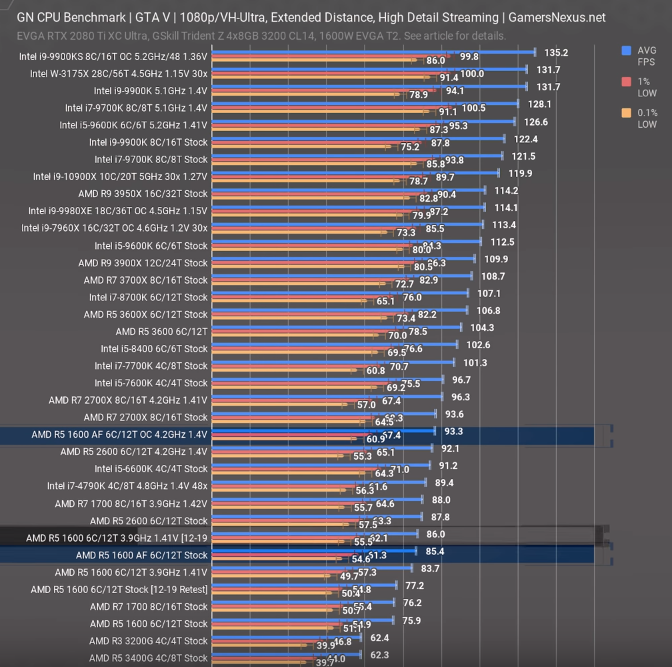
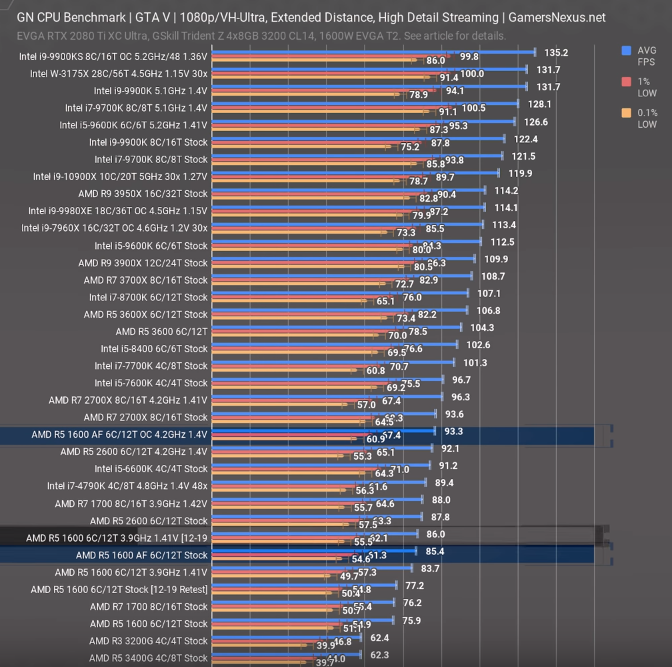
Lets use this as an example ok since GTA V is more of a CPU game https://i.gyazo.com/cda9c5a3be7dd11b4ea69b5a00a64405.png
 hollow grove
I mean like I’m just saying if he needs value it’d be good to get a 1600af you could get a motherboard and a cpu for the price of the 3600
latent bronze
so 1600AF 85 fps and 3600 104 fps
hollow grove
Not even 10% better
I doubt this guy has a higher than 60 FPS monitor
Ok I can’t do math that’s like 20%
latent bronze
Overall it is better to future proof a system then using something a couple years old
Remember games like Destiny 2 as an example was released in 2017 and the recommended is a R5 1600
so who knows how long till it gets to the point of the 2600 becoming the recommended
hollow grove
The 1600af is a 2600 but slightly not as good, it’ll be good for a fat minute. The like i5 4xxx is still good
lyric thistle
yey
hollow grove
c
latent bronze
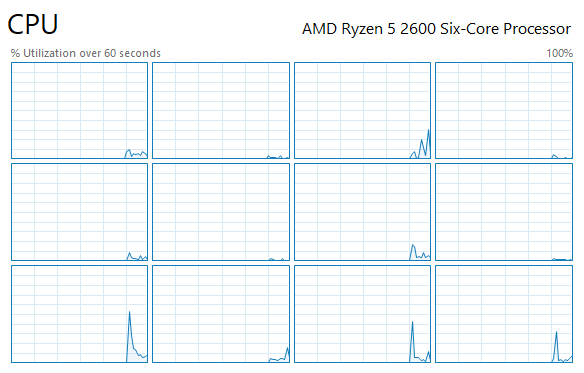
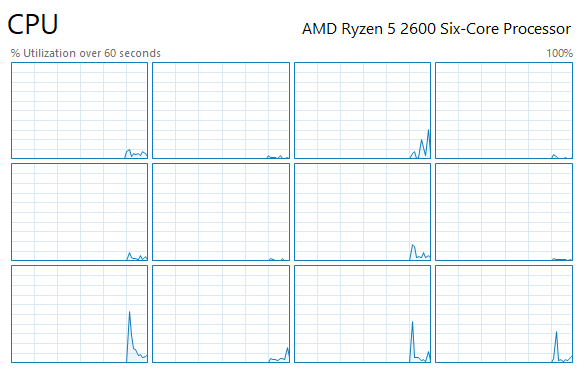 hollow grove
I’ll be honest I don’t feel as if any of this is actually helping @toxic ledge at all
So just get a prebuilt 🙂
latent bronze
9th gen i5's in gaming performance is pretty much on par with the 2600/2600X so the 3600 is higher in performance which would be a lot better @toxic ledge
hollow grove
Plus you get more threads for extra things like multi tasking and gaming
I think it’s 4 vs 12 threads
latent bronze
I am actually going to build my friend his new system cause his i7 970 is starting to show its age
toxic ledge
@latent bronze is there a prebuilt that has what you're talking about?
hollow grove
Yes there is!
latent bronze
@toxic ledge This prebuilt is the one i am talking about https://www.newegg.com/ibuypower-slate-106av2/p/N82E16883227920
@hollow grove 9th gen i5's are 6 core 6 thread
viral ore
That's decent for 850
viral ore
I mean, you could do better building
cursive wharf
What is the budget? Still 500?
https://pcpartpicker.com/list/JMrBTC
viral ore
But it do be coming with da epic gamer keyboard and mouse
latent bronze
Sassy it does also include a nice cooler for overclocking
viral ore
Epic
latent bronze
Why a R3 1200
viral ore
Ppl who give rating like that usually don't know anything
cursive wharf
I haven't looked in a bit so idk if prices have changed. Last I heard it was $500 budget
viral ore
Just read some of those one star reviews, people are usually just clueless idiots
hollow grove
tru
lyric thistle
^
viral ore
It funny sometimes
lyric thistle
it's great
viral ore
But it always is good to read, because you can see many reviews making a single claim if there really is an issue
cursive wharf
Still, $25 upgrade for a 1600AF, and $20 upgrade for a decent air cooler, totalling $545 for the same as that prebuilt that is over $800
hollow grove
Nutrients
cursive wharf
Also $25 upgrade for half tb SSD
hollow grove
True* WTF why did it make it nutrients? 
viral ore
SSD mandatory
hollow grove
Not true
sacred obsidian
ssd isnt mandatory, just super nice lol
cursive wharf
Win 10 is much nicer for boot times on an HDD
viral ore
For win 10? I deem it a necessity
vivid atlas
Mandatory for boot at least
latent bronze
The prebuilt for over 800 Hei is using a 3600 and a 1660 instead of a 1600 AF and a 1650 Super
cursive wharf
1660 is like what, 7 fps better then a 1650S? So not noticable. Missed out on 3600 tho
hollow grove

viral ore
I don't think so
cursive wharf
But, prebuilt has single channel 8gb instead of dual channel 16gb total
 toxic ledge
why is this so hard guys lol, i want to see the internals, i want to run games/stream smoothly, but i can't find an inbetween for me
honestly might just upgrade the internals. iv'e got the space for it.
cursive wharf
I mean what was the budget?
toxic ledge
it started out as a budget for a new gpu and it was $200, then i considered just upgrading as a whole which got moved to buying prebuilts and i said a couple hundred for that so
sacred obsidian
well if your pc is woefully out of date you can upgrade your cpu mobo and ram for about 200
but getting a new gpu at 200 might be a stretch unless you buy new
cursive wharf
You'll be buying used unless you have a budget of like 700+ on buying a prebuilt
sacred obsidian
also my suggestion would be a total upgrade budget of 400, not 200
toxic ledge
the prebuilt i have now was like 5-600 i think, new at best buy. but it's a couple years old now i think. memory is scuffed
total upgrade budget off 400 huh, i'm on DDR3, what can i do with that?
cursive wharf
So basically you can keep the storage, case, and PSU
toxic ledge
so i need a mobo, gpu, cpu?
cursive wharf
cursive wharf
1600AF is just a slightly UCed 2600
Literally
So it seems fair to just put it in as $85 tbh
cursive wharf
Idk why not mine. Cheaper CPU for same perf, better mobo, about the same RAM, and not overpriced GPU
Totaling at the asked budget as well
toxic ledge
alright, whos link do i take lol
sacred obsidian
well yours is literally the same cpu as mine but not located for sale on amazon or newegg
cursive wharf
It is for sale on Amazon
sacred obsidian
they both say ryzen 5 2600 but that cpu is 120
sacred obsidian
oh it shows up as 2600 lol
sacred obsidian
toxic ledge
@cursive wharf for that SSD, i have a Samsung T5, that would still be good right?
i don't have much on it atm besides tarkov and rocket league
cursive wharf
toxic ledge
so i could scrap that?
cursive wharf
Can scrap the SSD then as you already have one
toxic ledge
sweet
sacred obsidian
fair enough hei but iunno it doesnt show that on my end
wait isnt the t5 a portable ssd?
toxic ledge
i'll keep this in mind @cursive wharf
not sure @sacred obsidian i originally bought it for my xbox one before i got back into pc gaming
it's a 500gb i think
does the SSD being portable make it a bad choice as far as SSD?
cursive wharf
I mean there aren't many upgrades that would work well with just $30. So an internal SSD would help for being a boot ssd
sacred obsidian
if it works tho then scrap the ssd bump that 1650s to a 1660 or 1660s
toxic ledge
oh the one you posted @cursive wharf is internal?
cursive wharf
Yes
toxic ledge
can you not run 2 SSDs?
sacred obsidian
yeah you want it to be internal
toxic ledge
ahhhhh, i see
sacred obsidian
you can
toxic ledge
then i'm lost again lmao
sacred obsidian
but if you want your pc to be fast, you want windows loaded on an internal ssd
toxic ledge
oh ok ok ok, so for $400, @cursive wharf-s cart is good?
toxic ledge
nice, you guys are a f-ton of help, really appreciate it
sacred obsidian
even if it moves out of am4, you could still get a r9 down the road for a good power boost
cursive wharf
No problemo
lyric thistle
internal SSDs can be put into an external enclosure that uses USB, but you can't take an external drive out of its case and mount it inside a computer
toxic ledge
maybe i can get the wife to order some parts for my birthday this weekend lol
cursive wharf
@sacred obsidian no no. No r9
cursive wharf
Mobo is a bit better, but not really too r9 ready
cursive wharf
You can do it, but VRMs would get uncomfortably hot
But r7 should be a bit more acceptable
sacred obsidian
trying to pull up specs and the browser doesnt wanna work with me lol
proud helm
replace 2600 with 1600af same peformance
toxic ledge
oh wait, that 6 core doesn't have a buy option on the cart, will i have to find it somewhere else then?
proud helm
85 on amazon
proud helm
oh sorry
toxic ledge
lolol
sacred obsidian
lol
its cool
so wait @cursive wharf would the 1600 do vr fine as well? cause minimum spec is 2600
cursive wharf
proud helm
yes it should be fine
toxic ledge
oh sweet @cursive wharf thanks
cursive wharf
Yeah, may need a slight OC tho
toxic ledge
a what
proud helm
overclock
sacred obsidian
for VR
cursive wharf
Nothing you really need to worry about for your needs
toxic ledge
Pepehands i'm lost
proud helm
but wouldnt that cooler not be enough
he would need a noctua third party cooler or a wayer cooler
sacred obsidian
i was asking if you can play VR games with the cpu you would be getting lol
proud helm
im a little hesitant with oc but idrk
cursive wharf
Slight OC on the 1600AF to put it back to 2600
proud helm
oh ok
toxic ledge
oh that would be badass man, i'd like to play beat saber lol
sacred obsidian
lord kraken, do you have a micro center near you
toxic ledge
A WHAT
proud helm
if you dont need to oc theres no reason to thats my logic
sacred obsidian
its a store called micro center
 wind leaf
yeah
proud helm
if you do heavy video editing then sure
wind leaf
it’s a huge cube shaped building
proud helm
but if u game and regular desktop usage no reasom to oc
toxic ledge
never heard of one of those stores
sacred obsidian
if you buy from micro center, they price match, and if you go buy the motherboard you get 30$ off cpu, so i got my 2600 for 90 bucks
google microcenter near me
wind leaf
i live in houston. i’ve seen micro center before
sacred obsidian
eyyyyy houston bros
wind leaf
you’re from houston lol?
toxic ledge
discord, bringing people together lol
proud helm
i live in alabama so closest micro center is in atlanta
wind leaf
maybe it’s just in big cities
sacred obsidian
tiem to go to atlanta mrsubr3me
proud helm
i dont understand how does micro center make any money eith that many expensive parts
with*
wind leaf
the micro center by me is huge
sacred obsidian
actually they usually beat amazon prices
cursive wharf
I once found someone in my city on the LTT server, semi smallish city
sacred obsidian
like theyre priced really well
toxic ledge
closest micro to me is in columbus, 2 hour drive lol
sacred obsidian
nike is the second person ive met who resides in houston lol
proud helm
sweet home alabama
sacred obsidian
oof. if you wanna make that drive, you could get the 2600 for 90 if you also buy the board there. roughly same price, no oc needed.
wind leaf
i’m debating on building or buying a prebuilt gaming pc. just wanna run some games at 144 fps and maybe stream like fortnite or something. People say building it is much cheaper and more fun but idk.
wind leaf
can i hear your reasons
sacred obsidian
if you wanna hit 144 fps you're going to over pay for prebuilt
wind leaf
why should i build it
toxic ledge
well poo, i don't really go up that way often. guess i'll just get it from hei's link
sacred obsidian
plus by knowing how your pc works, when something goes wrong you can fix it yourself
sacred obsidian
depends on budget
wind leaf
i’m completely new to pc building
sacred obsidian
whats your budget
wind leaf
I added you so i can ask you more questions in dm or whatever
ok my budget is around like $700-$800
right now i have $600 saves
saved
sacred obsidian
okay is that with monitor and peripherals or just the pc?
wind leaf
i don’t have a monitor or peripherals
sacred obsidian
yeah lol
proud helm
so 600$ bruh
proud helm
not really
sacred obsidian
which is why i round up
proud helm
yea
sacred obsidian
actually hol up
wind leaf
ok let’s exclude the monitor and peripherals for now
wind leaf
i was thinking this
sacred obsidian
@cursive wharf was the corsair cxm bad?
 upper condor
On the topic of monitors theres an AOC 144hz on sale for 145
sacred obsidian
nike are you fine with playing fortnite on low
upper condor
Of from 190
sacred obsidian
this is me trying to get you in pretty decent specs but pc and monitor is 800
you still need keyboard and mouse at least
dry tinsel
that SSD is very small, barely enough for windows and some useful programs
sacred obsidian
thats the point tho. budget build lol and store everything on hdd
it was originally my bare minimum vr build
 jolly scaffold
How does this look I wanna fix up my old pc to run things like rust csgo and gta
I’ll be getting a 2070 super
 limpid merlin
RAM, CPU, MOBO, and the AIO are all overpriced @jolly scaffold
jolly scaffold
Alrighty
stoic island
Find a MSI b450 max board
jolly scaffold
Okay
wind leaf
what about r5 3600
1660ti
b450 tomahawk
16 gb RAM
 little osprey
lmao
latent bronze
Some people still prefer Intel over AMD
sacred obsidian
Wait intel has a 6600k too?
latent bronze
10th gen comes out i am going to that
sacred obsidian
Some are wrong ecks
latent bronze
@sacred obsidian Intel had a 6600K for a long time now
sacred obsidian

I probably should’ve been more clear when I said I had a 6600k then cause I had the old amd one xD
latent bronze
Ya a A6
sacred obsidian
A8
latent bronze
AMD should of kept using APU's with the dual gpu style
latent bronze
It's ok depending on what you do
wind leaf
ok for example, playing fortnite at 144 fps
latent bronze
You'd have no problem
wind leaf
what about while recording or streaming
proud helm
yes its a 6 core cpu
latent bronze
But fortnite going over 60 is pretty pointless since there would be console gamers that could be doing as good or better
hollow grove
@wind leaf I have an rx 580 and on save the world at epic settings I cap at 70 so idk if you’ll get 144
wind leaf
an rx 580 is better than a 1660ti?? i’m new to this btw
latent bronze
1660 ti is a lot better than a 580
wind leaf
oh ok
hollow grove
It isn’t 50% better
latent bronze
More like 60%
little osprey
isn't 1660ti kinda pointless now with 5600xt destroying it>
proud helm
wym i have an rx 580 i play on epic view and medium everything else and i get over 150
hollow grove
It ain’t 60% better 😂😂😂
I play all epic and I get
Wait actually I might have vsync on
I’ll check later
 tranquil dust
lol
proud helm
thats why
wind leaf
v sync drastically changes fps
wind leaf
turn off v sync
latent bronze
If you have vsync on and it is a 60hz monitor you would be at 60 fps then
hollow grove
I know
 daring hare
I'm just internally screaming since I got a 1660ti before the 5600xt was announced but I still needed to make a proper build so RIP
proud helm
but freesync and gsync does somethinf
proud helm
lol
wind leaf
so i should get a 5600xt
proud helm
yes
hollow grove
yes
proud helm
jinx
latent bronze
If streaming no
hollow grove
Actually get a 5700xt
proud helm
if streaminf get the titan rtz
wind leaf
why not for streams?
proud helm
rtx
hollow grove
Nvenc
daring hare
If your plan was to get a 1660ti for gaming then yes, however if you are going to be streaming it may still be worth it for the 1660ti
proud helm
jk
little osprey
nvnenc is better for streaming but navi is better for recording
hollow grove
I mean technically if you have an old GPU somewhere you can plug it in and use it to encode
little osprey
since HEVC
daring hare
^^
proud helm
im jp guys calm down
tranquil dust
😳
daring hare
And also just depends on what you are going to be playing since the 1660ti is good for pretty much most games except for some of the more intensive modern games @wind leaf
proud helm
guys
tranquil dust
no skam😳
hollow grove
😏
wind leaf
facts i’m actually confused rn
wind leaf
nice one
proud helm
hhahahha lmaoaooaoaooao
little osprey
@wind leaf do you plan on streaming or just gaming with recording on side?
latent bronze
@wind leaf just go with the build you originally wanted
hollow grove
Didn’t he want a 6600k
hollow grove

little osprey
i would just go with ryzen 5 3600 and and b450 tomahawk max and like 16gb ddr4 3600 cl16
wind leaf
good for streaming too?
hollow grove
The 1660ti is stinky
proud helm
1660 super?
tranquil dust
or streamlabs
little osprey
if plan on streaming buy rtx 2060 for 300$ its better buy than 1660ti
tranquil dust
😳
hollow grove
1660 ultimate
wind leaf
i’m on a budget so i cannot do that @little osprey
proud helm
1660 thanos edition
little osprey
@wind leaf whats your budget?
tranquil dust
isnt ur budget like 1500 or was that someone else
proud helm
bugdget lol
wind leaf
$700-800
tranquil dust
ah
little osprey
ahh i make pcpartpicker list
proud helm
go with the 9900k and gt 1030
hollow grove
Yes
proud helm
with am4 mobo and 12gb ram
little osprey
you have all monitor and keyboard and mouse yes? @wind leaf
hollow grove
Get a 10980xe
wind leaf
yeah all of that is handled just the pc
little osprey
ok
latent bronze
@proud helm ok that is enough trolling you are going to confuse him more with that
foggy hazel
it is so very easy to see from the activity here who doesnt ever need help. @proud helm @hollow grove
little osprey
@wind leaf you US base right?
wind leaf
yes
foggy hazel
@little osprey thank you for helping @wind leaf
wind leaf
yes thank you
latent bronze
@wind leaf to be honest the list you had was perfectly fine
wind leaf
really?
i wanted extra opinions
and plus idk how much power supply and sd and all that stuff
latent bronze
Right now i stream at 1080p with a 1660 non ti and i have no issues with my games while streaming and my cpu is a ryzen 5 2600
hollow grove
600w for future
little osprey
i think on orignal build it was 6600k
thats why i was building new one for him since that cpu is so outdated
latent bronze
little osprey
o different build my b
latent bronze
This was the guy with the 6600k build
hollow grove


 foggy hazel
@hollow grove please go back and read some reviews. Then you can chime in when you have knowledge that is useful
latent bronze
Also from what i remember fortnite plays better with nvidia over amd
I remember seeing a video of the 1650 super doing about 30 more fps over the 8gb 5500 xt on fortnite
Which the game Nike mentioned earlier that he would be playing is fortnite
little osprey
yeah your original build would be perfect @wind leaf
hollow grove
The 5600xt is 17% faster than the 1660ti but no nvenc
It’s almost 300$ for a 1660ti why not just get a 2060
little osprey
he dose not the have budget for it and alot retailer have yet to drop their pricing to nvidia new pricing
cursive wharf
2060 KO is $300, what is 5600XT price?
little osprey
Ko is also sold out last time i checked
little osprey
he plans on streaming nvenc is better than amd on board encoder
little osprey
he could stream on 3600 proby no problem but idk if plans on doing that
upper condor
Up to him
little osprey
or he could just save up some more get both
upper condor
True
jolly scaffold
Ryzen 7 2700x
1660 super
B450 tomahawk
Corsair 650 watt
Barracuda 2tb
Trident 16 gb ram
How’s this changed from original to AMD
jolly scaffold
Yeah
upper condor
You could get a lot more
little osprey
ok i buld pcpartpicker list for you
upper condor
Unless you need peripherals
little osprey
you have monitor and and keyboard and mouse right?
foggy hazel
the most glaring thing that is missing is a ssd
upper condor
I heard the 2700 bottlenecks rtx card
jolly scaffold
Yeah I have a pc rn and good monitor just need to be updated
upper condor
Cards