#building-and-recc-chat
1 messages · Page 416 of 1
 fossil hedge
 stoic ember
i didnt unscrew anything
fossil hedge
yeah
stoic ember
i was just trying to fit it in like that
fossil hedge
yeah thats proububly your issue
stoic ember
i see i see
so its better to take everything apart..well not everything but at least the part where the card goes
fossil hedge
you have to take off the PCI gaurd bracket
 sudden turret

stoic ember
i see
sudden turret
don't throw em away either, just put them back in the mobo box
sudden turret
don't hesitate to come back. someone is always around to help
stoic ember
awesome
thanks a lot!
so this card should be good?
i am not trying to go crazy
i just play csgo...nothing else
fossil hedge
yeah thats a good card
stoic ember
that should be enough right?
stoic ember
i have a toaster now
but it is effecting my game play....no smoth at all...also i have a 144hz monitor but with the card that i have no it can only run 60hz
so i need to buy something else so i can put that 144hz to use
 deep skiff
If you can spend $30 more, this card is about 15-20% faster and newer https://www.newegg.com/evga-geforce-gtx-1660-super-06g-p4-1068-kr/p/N82E16814487479
fossil hedge
well the 1060 can run a 1080p mointer fairly well
100 more and you could get a 2060 or a super
deep skiff
yeah but that 1060 is overpriced, a 1660 is the same price and newer
it’s old stock trying to be sold for more due to the small amount of cards they have
deep skiff
like your current build?
stoic ember
i mainly use it for trading and gaming on the weekends
yea my gpu is bad
so what do you suggest nachos?
give me some ideas
i am ready to purchase today
deep skiff
what budget?
deep skiff
ok I’ll find a gpu
stoic ember
thanks
i only play counter strike global offensive and rainbow six siege here and there
so those two are kind of a necessity for me
lol
deep skiff
https://www.newegg.com/evga-geforce-gtx-1660-super-06g-p4-1068-kr/p/N82E16814487479 yeah I’d go with a 1660 Super, or if you want to deal with mail in rebates (take months) you can get a 1660 TI for 245 https://www.newegg.com/gigabyte-geforce-gtx-1660-ti-gv-n166toc-6gd/p/N82E16814932131
deep skiff
yeah the ti is around 5ish% faster than the 1660 super, but the super has way better value unless they ti is around $250
stoic ember
hey nuclear so i ended up getting this since the other one you suggested was not in stock atm
u think this is a good option? it looks the same as the one you suggested above just a different brand
will this work with my 144hz monitor?
if nuclear is not available atm, any1 else? any opinions?
on my purchase compared to what nuclear suggested
 lime forge
itll work
you might not hit 144fps
but it will work
depends on what games you play
 latent bronze
You do know i get 165 fps in Destiny 2 with a 1660 non super 😛
@stoic ember what games as well are you playing?
deep skiff
all of the dual fan ones perform very close, so I’d just grab the cheapest 2 fan model you can find
stoic ember
thanks guys
@latent bronze i am a CSGO player. thats about it. i play rainbow six siege here and there but thats about it
 pseudo osprey
Hey would you guys go with an i5 9600k or a ryzen 7 3700x
sudden turret
depends what you're doing.
latent bronze
CS GO you will get more than 144 fps
sudden turret
but 3700x is far superior in core/thread count
pseudo osprey
Well im mostly going to game but i would like to futureproof myself
latent bronze
I believe even the 3600X is better than the 9600K
pseudo osprey
Oh ok thanks
latent bronze
R7
sudden turret
yep.
latent bronze
Well just saying but the 9600K is about 5% better than my 2600 and the 3600 is about 10% to 15% better than my 2600 so um ya
 ornate tulip
Am I lesser for having purchased a samsung 1tb evo ssd instead of a 1tb pro ssd? I think I'm gonna paint the notch red and pretend I got a pro.
The pro was like 160 dollars more
ornate tulip
Going to be used for rendering and opening large files and such. I currently have an 850 256 gb pro. I am moving to a 1tb 860 evo. :S
I'm scurred
I didn't get an m.2 because I heard they don't have as many writes, but I see they make a m.2 970 1tb evo for ~169, about 20 more than I paid for an encased 860
latent bronze
I honestly have no idea where you keep hearing these things from
ornate tulip
Linus tech tips 😦
goddang, it's 20 bucks cheaper at microcenter than newegg and amazon :S
sudden turret
lol..
 polar holly
They do have less writes but the write count is still high enough that my 970
Evo lasted around 3 years using at as a render station for thousand plus frame animations regularly
Maxing it to max then emptying it once I was finished
ornate tulip
@polar holly did you get a warning that the drive was failing or did it die all of a sudden? 3 years kind of freaks me out
polar holly
Nah I moved it to my home system after three years because I got a optane drive to switch to. It still running
So i now only use it for gaming and day usage
latent bronze
If i remember a SSD lasts like 5 times longer than a hard drive
polar holly
I believe the endurance of a 970 evo is 600x the data storage amount and a pro is 1200x. So a 1tb evo will have the endurance for 600tb
 still roostBOT
 timid nacelle
 short arrow
Yessir
latent bronze
@short arrow If you're going for the Max boards get a 3600 then
The Max versions are updated for 3000 series
short arrow
I'm getting the max board because it's only $5 extra, and has a larger bios chip
Max also supports higher frequency ram
latent bronze
Only for Gen3 chips
short arrow
Correct. Sort of future proofing if you will
latent bronze
 latent bronze
So why not get the 3600 instead for future proofing
short arrow
Because I can't afford it
I don't have the extra 50 dollars
And Im not old enough to get a job or drive, so I get all my cash from random odd jobs
latent bronze
You know black friday is like 2 weeks away
short arrow
I'm at 630 out of 777.95, and my parents are making me buy all at once
latent bronze
pretty sure a few things on that list will be cheaper so you have that 50$
short arrow
Aaand, my mom won't let me buy until I have an extra 250 saved up
I won't be able to buy until after Christmas
 austere condor
Looks slick. Good parts list, almost like I picked it all out. XD
latent bronze
Well wait and see what the prices will be on black friday
short arrow
Pretty much, I would have to earn another $300 in 2 weeks
latent bronze
The thing is no one knows how cheap it will be so maybe you might have enough on that day
austere condor
Id expect 2600x/2700x to go on a flash sale. So yeah I'd say wait for it, and get a better deal on the CPU. Newegg last year had a killer bundle sale on a 1700x and board for a damn good price
short arrow
More like $400
Because regardless of what the rest costs, my mom is making me save up extra, equivalent to the price of the gpu after tax and shipping
austere condor
If you live near s microcenter Id get their 2700x and Mobo bundle
$130 for the CPU then a board bundled, get $30 off
deep skiff
can you bundle the tomahawk max with the 2700x?
austere condor
Probably if they have it in stock
If not, an a pro, gaming plus, or normal tomahawk would all be a good option
latent bronze
Only thing i can get on black friday is a new controller for my Switch >_<
deep skiff
im just waiting for switches sales :v
latent bronze
OG will go on sale but i doubt the new model and lite would
deep skiff
not those switches
 chilly marsh
the new nintendo switch model is 300 rn @latent bronze
latent bronze
yep which is the normal price
chilly marsh
lets hope it goes on sale
latent bronze
I have been thinking of getting the new Switch and hack my old one
chilly marsh
brother is planning on buying it either black friday or christmas for both of us
latent bronze
If i was to hack my Switch i would need this after https://www.playdistribution.com/wp-content/uploads/201881392.jpeg
 chilly marsh
lol
latent bronze
Hey man playing Killer Instinct arcade style is the way to go
chilly marsh
i just hope at least one of the two items on my wishlists are on sale during black fri, cyber monday, or at least christmas
latent bronze
Canada has those and boxing day 😛
Boxing day is like black friday but lasts for a week
chilly marsh
nice
latent bronze
There is always people from Vermont and New York that comes here during that time
cause 500$ 43" 4K TV's would be selling for like 150$ instead
 weak glacier
About to start the PC build process
got a credit card through Amazon with interest free financing
 round flare
don't pull a linus
weak glacier

latent bronze
What are you going to play with that .... Overwatch?
 round flare
karen is offended
latent bronze
He is always offended
lime forge
theres literally nothing wrong with that gpu...
it should handle most games, even if its on low settings
round flare
Are you gonna speak to the manager of 950 now
latent bronze
You do know the new COD with a 1050 handles on the lowest settings at 30 fps right
 gloomy rock
1650 is one of the minimum specs on modern warfare
latent bronze
For older games it is fine but for modern games forget about it
gloomy rock
There's no way you booting that on a 950 and playing it
lime forge
well from what im picking up from the specs list, they are on a budget, and budget builds cant always run the latest and greatest
round flare
karen said most games
lime forge
^
lime forge
they got the 950 for free tho
gloomy rock
Alright, technically every game since before like 2008 is most games since games have been around for so long
lime forge
also @weak glacier get this ram instead, its cheaper and faster https://www.newegg.com/team-16gb-288-pin-ddr4-sdram/p/N82E16820331354
round flare
I thought they said it was free cause pc part picker doesn't have a price for it
I didn't know if it was a joke or not
weak glacier
I see that in like every budget build, gotcha
weak glacier
My friend made most of this
round flare
so you have the gpu already
weak glacier
I just replaced the ryzen 3 he put for 89 with the 3600
gloomy rock
@lime forge you're looking at timing as well as speed right? 3200 with very bad timings can be worse than 3000
weak glacier
Idk PC's well but I figured 5 was better than 3 for 30 bucks lol
latent bronze
And you updated to the latest bios?
lime forge
those timings are fine
latent bronze
@weak glacier is that the motherboard you are using now?
round flare
B450 tomahawk brother
lime forge
@weak glacier if you got an extra $100, this would do wonders for that PC https://www.ebay.com/itm/MSI-Radeon-RX-570-Gaming-X-4GB-Graphics-Card/153651424273?epid=19005254072&hash=item23c656ac11:g:0C8AAOSw-ixdUp7B
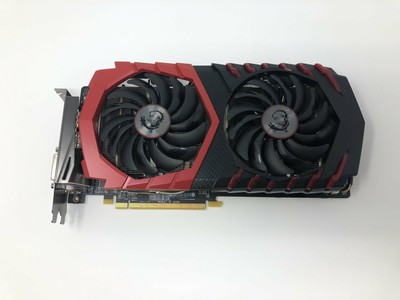
eBay
We evict them from your item with a careful vengeance.
weak glacier
I have a solid Spectre monitor and the case is also something I'm getting free
weak glacier
Is that used?
gloomy rock
Just making sure you're checking. I had someone claim that cl 19 3600mhz was faster than cl 14 3200mhz
lime forge
ooh i found a 580 for cheaper
weak glacier
I don't wanna buy something used
lime forge

eBay
We evict them from your item with a careful vengeance.
round flare
4gb 
gloomy rock
My pawn shop was selling a 970 for $40
lime forge
4gb is finnneeeee
weak glacier
doesn't that literally say fan defect?
round flare

latent bronze
Or he can bid and try to get this for less https://www.ebay.com/itm/DELL-Nvidia-Geforce-GTX-1050-TI-4GB-Very-lightly-used/274094334672

eBay
Find many great new & used options and get the best deals for DELL Nvidia Geforce GTX 1050 TI 4GB, Very lightly used at the best online prices at eBay! Free shipping for many products!
round flare
It literally does LMAO
gloomy rock
Bruh it does say fan defect
round flare
Karen you're throwing
weak glacier
i don't want to but anything used, especially not from an individual
buy*
i don't got money to gamble
round flare
Just rx570 dood
lime forge
here

eBay
Very good condition gigabyte rx570 8gb graphic cards. Has all the typical display ports. Extensively tested and benchmarked. Includes card only no boxes. Setup to be used for gaming and used in w10.
gloomy rock
@lime forge can I talk to your manager about your postings?
lime forge
there
round flare
8gb
lime forge
i found a 8gb 570 for $85
round flare
I approve
lime forge
now stop complaining 
round flare
Never 
lime forge
alright
gloomy rock
Banned
lime forge
later losers 
round flare
Ok karen
round flare
Stop with that emoji
 latent bronze
That case looks like it has no airflow
lime forge
when you do get RGB, i recommend this case
im using it right now
relatively cheap, tempered glass, vertical gpu mount, psu shroud, grommets for wires
it checks all the boxes
lime forge
thats exactly the same as the one i posted earlier but with holes in the front
round flare
Did you finish talking to those managers
lime forge
lol im just procrastinating
latent bronze
Didn't Box take away your techie licence for a reason Karen?
lime forge
somebody paid me in a month of nitro to do some homework for them lol
round flare
also you have no storage
round flare

weak glacier
storage will be a 500 gig ssd of some sort
lime forge
theres plenty of people who arent techie who help
weak glacier
and yes that's all I need to start
round flare
Im not a techie but I also don't know anything about tech 
don't worry minecraft won't take up 500gb
or whatever you plan on playing
lime forge
roblox 
 weak glacier
indie games, tycoons, valve titles
lime forge
950 will handle those just fine.
still roostBOT
 Joe 🦃#0001 has been warned
Reason: Bad word usage
round flare
half life 3 
weak glacier
round flare
frick no
latent bronze
pretty sure he knows since he got a warning
weak glacier
that's my current laptop
lime forge
just reinforcing
weak glacier
yeah im not in any no swearing servers so now I know
weak glacier
as cheap as the laptop is the ryzen stuff in it is just awesome
latent bronze
The laptop is decent for media 2005 games and emulation really
weak glacier
runs stuff it shouldn't be able to run at the price point
lime forge
good laptop, personally id swap the hard drive out for an SSD, but thats nit picking
latent bronze
if it was the 2500U then you wouldn't have any problems playing on medium to high settings
weak glacier
it has a silicon power ssd
lime forge
oh
weak glacier
i adore it, cheap and it's lasted me a couple years
latent bronze
You don't have Geforce Now do you?
weak glacier
me?
latent bronze
should sign up for it cause it is free
weak glacier
I think it's called free sync?
latent bronze
It is mainly playing your steam games on the cloud so even your laptop you have can play most games maxed out
weak glacier
and how much is that
i play on WiFi and haven't had good experiences with cloud gaming.
i can play games fine but cloud gaming no
latent bronze
You just sign up for it and wait for the invite
Here this would also show you what i mean as well https://www.youtube.com/watch?v=7N_tNfBxCxE
Enjoy the videos and music you love, upload original content, and share it all with friends, family, and the world on YouTube.
latent bronze
I use Geforce Now on my laptop once in awhile when i want to give my main system a break which for me i have no issues but then again i have a very fast internet connection
weak glacier
yeah it's not viable for me
my new isp doesn't work very well with the Ethernet over power stuff I bought
idk why
the one I had previously, it worked great and gave me awesome speeds
latent bronze
He was using ethernet in the video as an example you can still use it over WiFi but your wireless router would need to be a dual band 5GHz
weak glacier
yeah now it's only 25mbps
whereas WiFi is many times faster
logical right
but yeah I just want a desktop that can perform noticably better than the laptop
it's basically a Minecraft, Warframe, and left 4 dead on lower settings.machine
Warframe has pretty bad fps but I can get away with playing it on certain settings without cringing horribly
latent bronze
My laptop is actually better than the one you have cause for games like Overwatch and Left 4 Dead i can pretty much play on high settings but the reason i use Geforce Now on my laptop is for games like The Division 2 which wont run natively on it
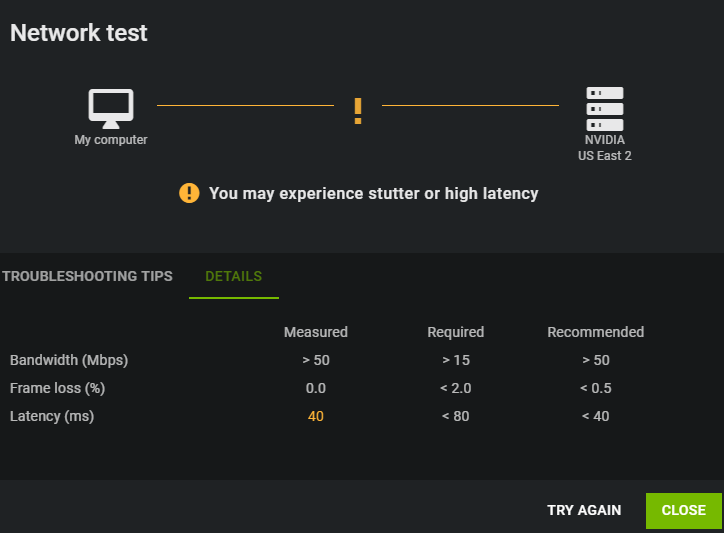
This is just an example from my desktop right now for the connection needed for it https://i.gyazo.com/e1ce809f678ee52e3b457aff44367fd5.png
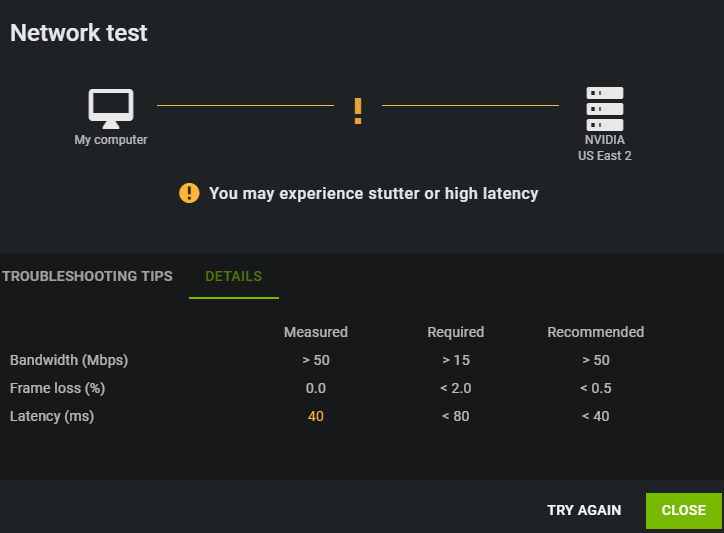
normally everything is good but lately i have been too lazy to swap servers
@weak glacier Just letting you know for now the games you mentioned the GTX 950 will be alright but if you plan on playing more demanding games you are going to need to replace the GPU
weak glacier
I'd get a better gpu later on
the only ones recommended to me though were all used off eBay though
latent bronze
Also when you get a new GPU try out World War Z
weak glacier
which I do not have any interest in
latent bronze
If you love Left 4 Dead you would like that game
 hollow glen
Primary game is WOW
 tropic estuary
can you buy thermal pads for gpus?
tropic estuary
does ryzen 3rd gen run good with 3200mhz memory?
 fluid raven
sudden turret
fluid raven
sudden turret
not so much the cas, but just 3600mhz in general
ornate tulip
Quick question for anybody. I ended up getting the m.2 EVO from Samsung. The motherboard I got comes with a heat shield with mild adhesive thermal pad. Should I leave the sticker on the SSD?
I'm thinking I'm going to leave the sticker on and that it's probably not meant to be removed, and will work with the heatsink on the motherboard.
latent bronze
yes it is the warranty for it
latent bronze
pretty much
ornate tulip
Awesome!!! Thank you much.
Does the CPU just drop in? I'm about to start putting this thing together.
I washed a few videos, it looks like it just drops in and is flat. I almost remember my phenom 2 having actual pins that dropped in.
*watched
ornate tulip
Yeah, the triangle in the corner and two notches, right?
lime forge
latent bronze
For AMD just drop it in and don't move it around
lime forge
make sure you do that part right
ornate tulip
it's an intel chip, i9. The contacts seem flat as opposed to being male/female
^definitely zack
latent bronze
still don't want to move it around just put it on top and it is ok
lime forge
my dad jiggled around his 9940x 'just to be sure' and i sat there like 
luckily it still works
latent bronze
usually don't want to do that cause it could bend or dmg the pins
both AMD and Intel
ornate tulip
I'm not going to force anything at all, right? that would be insane
ornate tulip
I'm just going to set it in and close the latch back down without pressure
latent bronze
If you're using a 3rd party cooler and you have to put thermal paste just do this http://www.circuitremix.com/images/124/apply_1.jpg
 lime forge
id do a bit larger than that but thats just me
latent bronze
that is more than enough and would spread when you put the cooler on
 pulsar garnet
put the paste on the socket then put the cpu in
lime forge
alright im out
pulsar garnet
yeah
lime forge
👋
ornate tulip
thanks for your help zack!
pulsar garnet
no guarantee it'd be nice
gloomy rock
@ornate tulip yes you can but I'm not responsible if you get poisoned
latent bronze
Make sure to write your will so someone can get that PC lol
ornate tulip
😄 lol
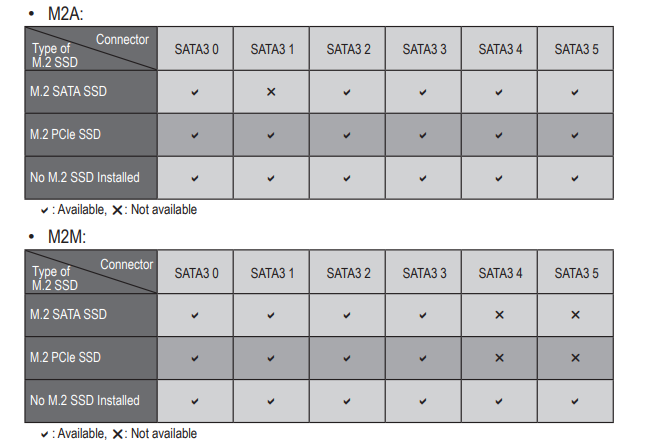
I wonder if it would be better to install in M2A or M2M slot. One may be blocked by CPU fan, and the other might get hot from the video card. Anybody have any suggestions?
I think I'm going for the top slot
latent bronze
What is the board
pulsar garnet
read the manual
ornate tulip
Auros z390 pro wifi
latent bronze
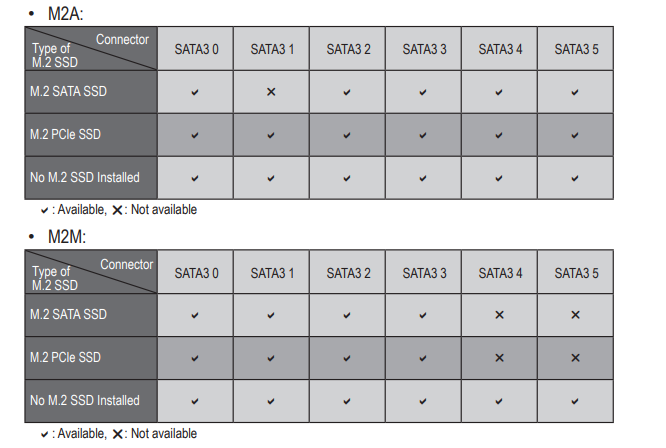
cause some that has 2 M.2 slots usually one is made for NVMe while the other would be for like Sata type
This should help https://i.gyazo.com/4cce320f302d392bc4e39b543763edbb.png
 ornate tulip
Hmmm I guess the top slot shares with the SATA 1 bandwidth and the bottom slot shares with SATA 4 and 5 (??)
latent bronze
tells you which sata ports would be disabled
normally as well the top M.2 is the faster one
ornate tulip
Nice thanks, I see that in the manual and wasn't sure what that meant. It seems like with PCIe it wouldn't affect any of the memory paths (what are they called, ports? connectors? I think they share bandwidth)
I'm gonna put it in top, thanks @latent bronze
latent bronze
np
ornate tulip
OK I think I did it, it looks like this, kind of catty wompus https://cdn.wccftech.com/wp-content/uploads/2018/09/DSC_0257-Custom.jpg
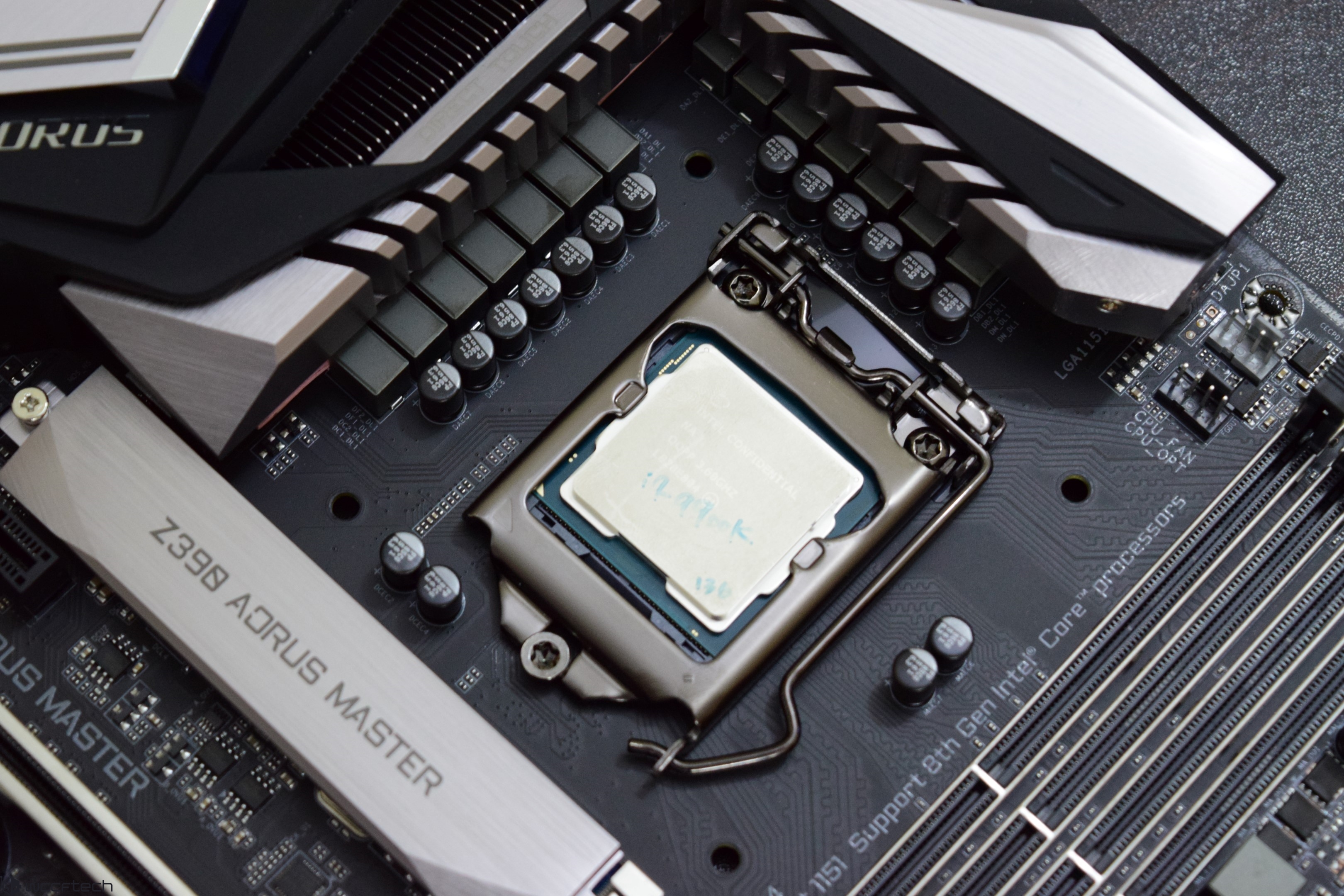
I just dropped it in, it had an ever so slight wiggle. I left it, pressed the thing down, and it looks like that ^
lime forge
👍
ornate tulip
If anyone's there, the CPU heatsink BARELY fits! I can slide a piece of paper in and out of it but it doesn't touch the glass. Are the stand-off bolts in the case what the motherboard sits on? There are no plastic washers or anything? I did read the installation manual and that seems to be the case but wanted to see if that's normal. If I add anything else I don't think it will fit!
The bolts seem pre-installed, 9 altogether
?
I will try to watch some builds.
 elfin rampart
Can someone make me a $600 pc build
austere condor
@elfin rampart https://pcpartpicker.com/list/Xqzb8M
 little osprey
Is this build decent
•Gtx 1060 3gb
•Intel i7-8700
•16gb ddr3 ram
•1tb hdd
•256 gb ssd
•Corsair h60 water cooler
•80+gold 500w
•Asus ROG strix B450-F
austere condor
GPU is a bit lacking compared to the CPU, ram isnt compatible, cooler is meh but, its a non K CPU, and none of it will work since you have a B450 motherboard
@little osprey
just, a bunch of random parts that dont work with each other, like, physically not compatible
so no... not a decent build
little osprey
@austere condor thank you a friend was selling me all these parts to build my own good thing I didn’t buy them
austere condor
@little osprey what is your budget to build a system?
cause you can buy some of the parts and work with that to build a pretty decent PC
little osprey
@austere condor 900 I’m a starter to this
austere condor
wow, for $900 you can get MUCH better parts than all that
little osprey
This is what a friend told me to get
lime forge

little osprey
lime forge
you can get a lot better
little osprey
The motherboard is trash since the one that he told me to get is not available there
austere condor
i would highly recommend to never take computer advice from your friend ever again
little osprey
🤣🤣ok good to know
little osprey
Yes fr he was prob trying to mess me up since I’m new to all this
little osprey
Yeah
austere condor
@little osprey https://www.youtube.com/watch?v=gHY6ygHj80c

How To Build a Gaming PC in 2019! Part 1 - Hardware Basics ⇨ Sponsor - Squarespace! 10% Off via http://squarespace.com/paulshardware PART 2: THE BUILD -- htt...
watch this video, and part 2 and part 3
sudden turret
good thing you're not a Techie role.
austere condor
@little osprey you like fancy lights and RGB or no RGB?
sudden turret
did you check the QVL on that ram/mobo @lime forge
lime forge
i have no clue what that is
 sudden turret
would have to check
austere condor
@little osprey
https://pcpartpicker.com/list/XHfYHB
i would purchase something like this for a $900 PC
sudden turret
lime forge
found it
sudden turret
that just means it'll for sure work with ryzen.
 sudden turret
😐
lime forge
guess ive been lucky
sudden turret
did you miss that part where amd has had ram issues.
lime forge
ive never bought an amd system
sudden turret
and here you are giving advice?!
austere condor
yeah back on Zen, Zen+ and Zen 2 has fixed just about all of those issues @sudden turret
austere condor
1st gen ryzen was picky with ram and their boards until BIOS updates started rolling out to fix the majority of the problems, with 3rd gen ryzen, there arnt any issues that i have seen
sudden turret
I've had issues with 3rd gen
austere condor
as long as you stick to reasonably known brands you're fine
sudden turret
the ram i got from dennis wasn't compatible with my 3700x
austere condor
old kits from X99 era you essentially gotta watch out for
1st generation DDR4 is picky
i have a kit of it
works great on intel, XMP wont work on a ryzen CPU though
sudden turret
it's still a good habit for zack to check 😉
austere condor
so its stuck running 2133
@lime forge
lets run down your list so you can see whats not well optimized about it
-
CPU great, good choice
-
Board is overkill for the budget. X570 is still quite expensive for the average system, and there really isnt a benefit that can be used today running a X570 board over a B450
-
ram, good, good speed, ok timings, and price
-
660p for MOST people is going to be fine, but, just looking at it from a tech perspective, its aweful. QLC nand (saving 4 bits of data per cell) is very price efficient, but not for speed or reliability. just because something is NVMe doesnt mean its good. the way that drive caches data is wonky, no dedicated cache.
-
awesome HDD, but 3TB of space for a budget gaming PC? might be a bit overkill
-
1660ti doesnt make any sense now adays to buy new. 5700 is $20 more for a big performance boost, or the 1660 super is $50 less for 3-4% slower performance? something like that. its just not the best option today.
-
H510 is a really popular case because it has been advertised like no other. if only the performance was there. its ok, but leaves a lot to be desired. better cases for less, and nice looking cases that perform better for the same price are out there.
-
no PSU. but you caught that, but that would have put you over budget anyways
lime forge
i thought i had selected the psu
i just forgot it
and i chose the case because it looks good ;p
austere condor
should look for options that are good in performance and looks
lime forge
and i chose x570 because he is new to building and i figured it would be easier than updating the bios
also the 2tb hard drive was $50
austere condor
MSI B450 MAX boards are shipped with the latest BIOS for Ryzen 3000
 livid bolt
Guys which cpu is better i7-9700k or amd ryzen 7 3800x
sudden turret
depends what you're trying to do.
livid bolt
Gaming
sudden turret
those are both pretty over the top to just game on
imo.
"for purely gaming there is very little reason not to consider the i5-9600K which, when overclocked, offers almost equivalent gaming performance but at a 35% discount."
livid bolt
Well i only want my pc (ye i will be getting a pc) for gaming and maybe some school works
livid bolt
Ye lol
sudden turret
but yeah, you can go lower on the cpu bracket, and still do what you want.. while saving a lot of coin.
livid bolt
Will i be able to fun the latest game smoothly
austere condor
3800x shouldnt even be an option. the 9700k is much faster. but, its also quite a bit expensive. most people will be just fine with a R5 3600 for a gaming PC unless they are going for high refresh rate gaming
sudden turret
unless of course you want bragging rights.
I have a 3700x to just game on, totally ridiculous
but I wanted new shiny.
but I probably won't buy another cpu for 10years.
austere condor
yeah, but $100+ more for 2-3% more performance for bragging rights, isnt the best use of your money
sudden turret
there is no price on bragging rights
austere condor
(but... i totally understand where you're coming from)
sudden turret
😄
austere condor
not like i just spent $800 on a custom loop to get a few more % out of my CPU
austere condor
#worthit
austere condor
i lost the ability to use 3.5in HDD's
sudden turret
meh who uses thoses anywayys
austere condor
so, i have to get something 2.5in to do more storage
$86 right now for a 1TB SSD from newegg
sudden turret
oooh that is sweet
austere condor
i would love to keep all samsung drives in my rig
but
i think a QVC is still mroe expensive
*qvo
same thing
XD
but yeah, cant say no to that
thats cheap AF
livid bolt
So which cpu do u recommend?i5-9600k?I want to run every game smoothly im not a streamer
austere condor
R5 3600 is the best option today for PC gaming for the price
livid bolt
I haven’t decided yet,but im a big fifa fan and i will play games like call of duty and so
latent bronze
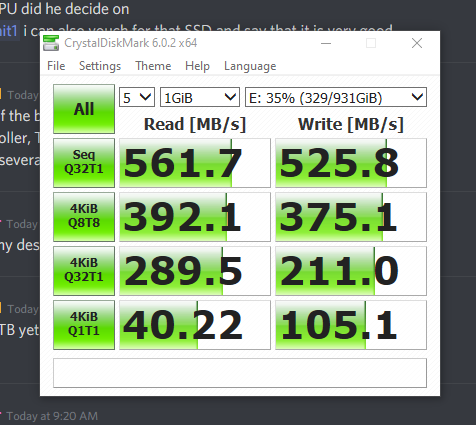
Hey look my SSD lol
austere condor
MSI B450 A-Pro Max, Gaming plus max, Tomahawk Max, @livid bolt
latent bronze
But what CPU did he decide on
@austere condor i can also vouch for that SSD and say that it is very good
austere condor
yeah, one of the best in terms of budget options
great controller, TLC nand etc etc
ive bought several in the past
latent bronze
using 2 in my desktop and 1 in my laptop
latent bronze
Thinking of replacing my 480gb 2.5" SSD with this https://www.newegg.ca/western-digital-blue-sn500-nvme-500gb/p/N82E16820250116
@austere condor This is my results for the 1TB drive https://i.gyazo.com/bc93445cc162d2736268f2b9e6a1f8ef.png
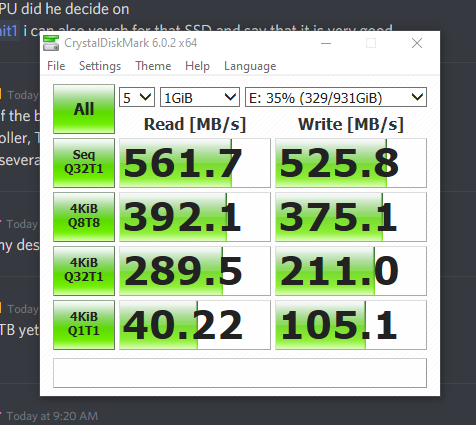
the same one you showed
livid bolt
@austere condor can you send me a link of that motherboard?Where can i buy it?
latent bronze
@livid bolt You can buy it on newegg
sudden turret
newegg 😉
austere condor
livid bolt
Which one do u recommend
latent bronze
Gaming Plus Max
I believe Tomahawk Max would be better but if your budget is a little tight as well i would go with the Gaming Plus Max
austere condor
a-pro, gaming plus, tomahawk are all the same board
the MAX ones are bios updated out of the box for Ryzen 3000
tomahawk has better VRM cooling on it though
livid bolt
I have a 1200$ budget can you help me build a gaming pc?I want to run everygame smoothly.I am big fan of fifa but i play heavy games like mw red dead 2 sometimes too.I am not a streamer or anything,i will use the pc for school too
Im not good at building pcs
So if you could help me i would appreciate it a lot
lime forge

latent bronze
That's what she said
livid bolt
It will be able to run games like mw good right?
latent bronze
yes
ornate tulip
so a lot of the cables from my PSU are split into two 4 and 2 plugs. Do I treat those as a single 6, for example? I can assume they can be joined or separated for different situations?
latent bronze
What do you mean
latent bronze
my mind is a little tired right now cause of lack of sleep
sudden turret
but yeah Jerry.
ornate tulip
awesome, thanks @sudden turret . I plugged the MOBO power supply cord into the "ATX" slot (as it's described in the manual) and the USB plugs from the case into the USB port on the mobo. Does that sound right? Do you or anybody else know how many "CPU" cords I should use for an i9? I see there are 8 pins on the MOBO split into two sections of 4 and 8 pins. I'm a little confused.
Can't seem to google my question or not sure what to search for.
sudden turret
usually the extra plug for the 12v rail is for overclocking
probably ok with using the 8pin rail
ornate tulip
I see. It's listed as "atx_12v_2x2/atx_12v_2x4"
and it's a row of 2x2 and a row of 2x4
sudden turret
which mobo is it
ornate tulip
"GIGABYTE Z390 AORUS PRO WIFI LGA 1151 (300 Series) Intel Z390 HDMI SATA 6Gb/s USB 3.1 ATX Intel Motherboard "
sudden turret
ornate tulip
That makes me feel like I should use them all! :S I don't want to fry the thing
sudden turret
not going to hurt anything. fill it up
ornate tulip
I think I would need two CPU cables from the PSU (Seasonic focus gold 850watt)
sudden turret
@warm nova is our resident aorus nerd.
ornate tulip
😄 Alrighty, I hope you're right. Seems kinda weird to use two power cables but that image definitely makes it seem like it should get used
sudden turret
well
most the time like that the extra one is for over clocking, to give more power to the mobo
i'd plug in just the 8 pin and roll with it
 warm nova
The 8 pin is necessary, the 4 pin is optional
sudden turret
if that's how that .. yeah
so the 4 pin would provide the extra uNF for OC.
time allen grunts
Moar powah
ornate tulip
Should I just do that? I'll start with the 8 pin
ornate tulip
Awesome, I'll just do 8. Thank you @sudden turret ^naaaa that kinda scares me a little 😛 maybe in the future but I just wanna get the thing to turn on for the time being
sudden turret
right on, let us know if you need help for anything else. and we expect to see some build pics 🙂
ornate tulip
For sure!! 😄 I got a crummy camera but I'll take some pics.
ornate tulip
So before I go and install a bunch of fans wrong, fans blow from their front-facing emblem back behind them, right? So an intake fan would be pointed with the front/emblem out, right??
and exhaust would be emblem in? They really kind of suck instead of blow, no?
lime forge
ornate tulip
Perfect!!! Thank you Zack, wanted to confirm.
sudden turret
what case do you have?
ornate tulip
Lian Li PC-o11
lime forge
i did something right 
sudden turret
how many fans?
ornate tulip
I was going to have 4 intake on side and bottom (2 each) and 2 exhaust at top. I have 10 fans total, there are slots for 9
sudden turret
nice
lime forge
woah
ornate tulip
I've gotten lots of conflicting information about whether exhaust or intake should be more prominent
lime forge
usually you want more intake than exhaust, if possible
sudden turret
and how you have it set up
lime forge
but it still moves air ¯_(ツ)_/¯
sudden turret
I like to pull air up from the bottom, and out the top.
 tidal bluff
i usually follow the flow directions of the case manufacturer
ornate tulip
I heard also that even vents with no fans would be considered "exhaust" and the back of the case is basically open, a giant vent. ^directions are kind of sparse 😦
sudden turret
think like air flow basically
but get all set up and give us a good picture, and we can help tweak/fine tune anything.
ornate tulip
definitely! Is it OK to "daisy chain" fans? I'd assume they'd be controlled by the same fan port if they are
latent bronze
Wait how are you going to have 4 on the side if only 3 can fit?
ornate tulip
2 intake on bottom, 2 intake on side, 2 exhaust on top and CPU fan blowing to the back, which is open
sudden turret
depends on the fans, dont want to put to much stress on one fan header
ornate tulip
It would be 2 max
sudden turret
should be ok
ornate tulip
@latent bronze I'm torn about the whole intake/exhaust thing. I'm gonna try this and check temps. There were so many different videos saying one thing or the other. I figure the entire rear of the case is basically an exhaust if there's air blowing at it
Thank you as well boX
ornate tulip
That's what I'm thinking, yeah
sudden turret
good air flow
latent bronze
It is an exhaust port but nothing to help really to push it out quick enough really which is why when you look at a lot of build images as well for that case they tend to have the sides doing exhaust as well
sudden turret
but he has alot of fans, more than enough to keep air circulating
if anything get 2 80mm fans for the back exhaust
ornate tulip
I was going to do 2 bottom left (in the pic), two bottom side, and two top left blowing out.
sudden turret
¯_(ツ)_/¯
since you're not over clocking I'm sure your temps will be fine with that arrangement
ornate tulip
That's a good idea, yeah. It is heavy on intake without much exhaust. I can put three on top but it would be nice to have an extra in the back, but there aren't any spots
latent bronze
Well i would suggest when everything is built to use Aida64 to stress the system
sudden turret
eh
ornate tulip
Maybe just on the vent, a smaller fan like you said. ^hmmmmm
sudden turret
no need to stress the system
latent bronze
But it would help him know how well the system would work out and for the airflow as well
sudden turret
or just regular use..
ornate tulip
I might do that a little down the road, I'm just hoping it powers on! 😛 ^true, yeah.
I'm not trying to blow it up, just hoping the power button works, lol!
sudden turret
thoughts on All in one coolers? 🙂
latent bronze
asking him or for yourself?
latent bronze
I don't know your cooling setup
latent bronze
i remember the former mod (not saying names cause i dont know if it is taboo) cooling setup cause he always talked about it
latent bronze
Looks almost the way my case is designed but a little smaller
sudden turret
ive since changed the fans,and the loop flow but it give you an idea
to lazy to give current picture
ornate tulip
Is there any reason to have two SSD drives and one backup HDD? I got an encased 1tb SSD and it was suggested to get M.2, so I currently have both but was going to return the encased SSD. Should I keep it and use it as backup? I already got an HDD but I wonder if there is any benefit in any way to having two SSD drives. Two backup drives would be nice, I think.
sudden turret
more the better 🙂
ornate tulip
Hmmmmmmmm
sudden turret
how big are the ssds
ornate tulip
each one is 1tb
sudden turret
games run better on ssd
oh wow
wish I had a 1tb ssd
lol
but yeah you could return one, if you don't think you'll use it up
ornate tulip
I have a 256 gb ssd currently and it's awesome, I just got more space because it was really cheap compared to when I got my 256 gb
sudden turret
1tb gaming , hhd for overflow
ornate tulip
Would it make sense to use it as purely a backup? Like mirror the main drive?
sudden turret
what is your OS going on?
ornate tulip
The M.2 ssd on the motherboard
sudden turret
gotcha
ornate tulip
I was going to use that as THE main drive, with OS, software, current files, etc
sudden turret
that's what I do
ornate tulip
Then I figured the extra SSD could be backup, but I could also return it :S
sudden turret
m.2 os/software SSD for my main game I play, then everything else goes on my hybrid drive
yeah 1tb ssd would be some decent pocket change back
sudden turret
true
ornate tulip
for 256 years back I paid like 250 I think :S
sudden turret
yeah they were bad expensive back in the day
I paid 127 bucks for my 250gb nvme. 😠
ornate tulip
When did you buy it? I bought a 1tb EVO plus for 199 to replace the 1tb EVO ssd encased drive.
sudden turret
gotta go get the kiddo from school, dang rain and cold outside.
ornate tulip
Ah, thanks for your help boX! Have fun! 😄
Last ssd I got was a 2.5" 256gb Samsung pro for like 250 bucks.
livid bolt
@austere condor what are some upgrades i can make in the future?
ornate tulip
I'm about to turn this thing on, should I pray or just do it?
ornate tulip
@sudden turret I turned it on and it went to BIOS, and had CPU temp and fan RPM and everything!!! 😄 IT'S ALIVE!!!
I only have wireless keyboards and I wonder if I'll be able to proceed without a simple wired keyboard. ?? I tried to plug in wireless but I can't control anything, presumably because there aren't drivers installed.
@boX it's looking promising. I haven't installed the GPU yet, was going to wait until I installed windows but I'm not sure what would be best. For the time being, I am not able to edit the BIOS because I have no wired keyboard/mouse. Wondering if that's needed or if there's a workaround, or if I should run up to bestbuy or something.
ornate tulip
Seems like RF works but bluetooth doesn't work. Should be good. All is looking pretty good boX! 😄
Hasn't blown up or spat acid into my face yet, no house fires.
sudden turret
eggcellent
ornate tulip
I'm getting error messages when installing windows. It says "Windows installation encountered an unexpected error. Verify that the installation sources are accessible, and restart the installation" or "Windows cannot install required files. The file may be corrupt or missing. Make sure all files required for installation are available, and restart installation." ....
little osprey
How do these parts sound
Intel I7-6700K 4Ghz Quad Core
GTX 1050 TI 4Gb
MSI B360M Pro
EVO SPEAR AMD edition 16Gb (8x2 Gb sticks)
400 Watt power supply
ADATA 512 Gb SSD
latent bronze
1060/1660 would be better
little osprey
I’m on a budget :/
latent bronze
You can find a 1060 used for under 200
Can try and win this for like 100$ https://www.ebay.com/itm/ZOTAC-GeForce-GTX-1060-6GB-GDDR5-Graphics-Card/143441880933

eBay
Find many great new & used options and get the best deals for ZOTAC GeForce GTX 1060 6GB GDDR5 Graphics Card at the best online prices at eBay! Free shipping for many products!
latent bronze
1050 Ti is not bad but you would want to have something that could last more than a year
lime forge
used 1070 for $200
latent bronze
He just said he is on a budget
latent bronze
If he can win that 1060 for under 100$ it would be far better than a 570
ornate tulip
well folks, seemingly working awesomely. The whole affair was somewhat anticlimactic.
I'll post some pics if I'm able. The thing I was worried about most was the clearance of the heatsink, which clears by about a sheet of paper's thickness.
 golden forge
Anyone know any good Black Friday sales coming up? I’m looking for a CPU (preferably 3900 AMD) but, I love “shopping” for stuff... even though I don’t buy it, lol.
fossil hedge
well
I bet anything linus tech tips, bitwit, jay2cents, pauls hardware, and proububly gamers nexus will be doing somthing like a build giude on black Friday. you could check them when you want to buy somthing
chilly marsh
its eh
sudden turret
fossil hedge
I bet anything 2nd gen threddrippers, old thredripper motherbourds, 10 series GPUS will drop proububly if there are any left
intel is proububly going to keep theres the same.
little osprey
I'm a AMD guy i have blown through 13 Intel chips
pseudo osprey
Hey does anyone know a motherboard similar to this that supports ryzen 3rd gen and is around this price thanks MSI Performance Gaming AMD Ryzen 2ND and 3rd Gen AM4 M.2 USB 3 DDR4 DVI HDMI Crossfire ATX Motherboard (B450 Gaming Plus Max) https://www.amazon.com/dp/B07XHH4YG4/ref=cm_sw_r_cp_api_i_ZGp0Db1MKBZ62
little osprey
that one supports 3rd gen ryzen
i would be hesitant to throw a 3900x/3950x or one of the higher end 3rd gens just because it may have lackluster VRMs and stuff, but i can't confirm that
but a 3600 or something like that should be fine on that kinda board
pseudo osprey
You think 3700x or a 3800x should be fine
deep skiff
I mean the 3800x is 330 at microcenter and 355 on amazon, id pay 25 more for better binned and +200mhz
that’s like saying the 9900ks isn’t worth it because you can oc it to 5ghz all core
lime forge
ah i forgot it was on sale
little osprey
I think the 9900ks vs 9900k is a slightly larger performance bump vs 3800x vs 3700x - regardless, a sale/discount/combo etc could pull either premium SKU down in price such that the gap in cost is trivial even with such a small performance margin.
 tulip jolt
Can someone tell me if the Ryzen 7 2700x is good for gaming and streaming Im building my brother a new pc for Christmas
lime forge
yep
tulip jolt
Is this a good motherboard https://www.amazon.com/gp/product/B07FKTSWNG/ref=ox_sc_act_title_2?smid=ATVPDKIKX0DER&psc=1
lime forge
yes
tulip jolt
will that work with that cpu
lime forge
yes
tulip jolt
alright thanks
lime forge
np
 west finch
Are you getting that motherboard baccarat you're making a small form factor pc?
deep skiff
if you do need a itx board, i'd go with this one instead as the only thing it really doesnt have is 2 m.2 nvme drive spaces, only 1 https://www.amazon.com/dp/B07F83RY49?
latent bronze
@limpid fossil For what games is your son playing or plan on playing and how much is your budget
little osprey
I need help building a pc that can stream and play fortnite with no input delay on my pc, looking to spend around 1.5-2k
No input delay on my controller^
polar holly
@little osprey at what resolution and refresh rate are you aiming for
round flare
oh if you're streaming the 2700x is also great
if you're only playing fortnite the video card doesn't need to he insanely beefy
polar holly
round flare
oh ye 32 gb of ram would be nice too
I picked that kit cause the timings and speed were good
polar holly
Thats the top end of the budget but has amazing specs
round flare
3900x might be more than they need though
I was gonna do 3700 originally but they didn't say what else they planned to do with the system
polar holly
yeah but to eliminate lag or any overhead from the streaming to delay inputs or anything else on the system if they care to start video editing and recording while streaming
little osprey
a 3900x is probably overkill tbh, i have been testing out streaming 1080@60hz, using nvenc to capture 4k gameplay, encoded to 1080@60, and i am at like 25% cpu usage
i.e., he can likely get away with a 3700/2700
i know that's gpu capture but
little osprey
honestly that's similar to what i'd start with
polar holly
Yeah but for anything post processing having the extra cores will help with that. It also includes a 2560x1080 75hz monitor
little osprey
yeah especially using an amd card that doesn't have the nvenc those extra cores will pay off imo
i am pretty sold on the nvenc tbh for casual streaming and i would probably swap that out for a 2070s but that's just my bias
round flare
I was originally going to put in a 2080 super but realized that is very over the top
unless they want to play in 4k
little osprey
i would jump up to 32gb ram and a 3700x, that ends up being...what, $250 more?
polar holly
Which one are you talking about
round flare
mine probably
little osprey
emporer's, yeah
polar holly
for that i would also reccomend a less expensive case for that one imo
little osprey
it's interesting seeing how differently people value things
round flare
polar holly
yeag but is the 4 less cores and the smaller rad for what 100 dollars worth it
little osprey
yeah i think that 75hz ultrawide is very lackluster
that 5700xt will be pumping way higher than 75 fps
polar holly
i use it as my daily
little osprey
well, for some games at least
round flare
I picket the red devil because it's supposed to be the "best" of all of them right
little osprey
i think the overwhelming majority of people who are going to be focusing on gaming will get a lot more mileage out of the dell 1440 144hz panel
for an inexpensive panel
a little extra real estate for 144hz is not a good trade for me but ymmv
latent bronze
Some monitors you can overclock it so it can go past 75hz
round flare
mine went from 120 to 144 
sudden turret
wont last long
round flare
the box said it's supposed to oc 
latent bronze
I have a 60hz monitor and i have it overclocked to 72hz and i have been using this for like 2 years
round flare
don't bully my monitor
little osprey
yeah like, i would rather just spend an extra $50 and get a much better panel
hell the 144hz panels are the same price if not less expensive
i would die if i went back to a sub-100hz panel after having one for some time
again ymmv but
polar holly
if you havent tried it many people arent able to tell. i got my esports frineds to see if they can tell but they cant tell between 144 hz and 75
round flare
I could only see the difference between 60 and 144
any increment lower than 40 I couldn't see
I might just be blind tho loo
lol
little osprey
i notice much less of a difference between 100 to 120 or 144, but the difference between 60 and 90 is huge
at least for me
polar holly
like check this video you may find it interesting

We decided to test the theory that you CANT see a difference between different refresh rates... these results were surprising to both of us... Learn more abo...
little osprey
yeah i watched that, and said the same thing
he's blind, or i am just blessed with special eyes
 vague willow
Lol
polar holly
it all depends on what your eyes can pick up on and what you did growing up
little osprey
i have sat there and hard capped my fps in games between 60/90/120/144 and i can tell them apart, at least
yeah, i guess i should say i played baseball and could see the spin on the laces as the ball came out of the pitcher's hands
sooooo there's that
vague willow
I personally cant really see a huge difference
little osprey
like 120/144 i can't tell much but
pulsar garnet
I can definitely see a difference between 60 and 120 or 60 and 144
little osprey
60/90 is big
pulsar garnet
But not 120 144
polar holly
but can you tell 75 and 120
little osprey
yes
polar holly
thats where its hard to tell
i use a 240hz panel for work and its like whats the difference from 144
polar holly
i mean work bought them so like i dont care
little osprey
and the fact that the 240 probably has poopy colors cuz it's most likely a TN panel
i think i just saw that AUO released a 240hz ips? panel, maybe it was VA, but it was a 240 and definitely not TN
little osprey
but is yours an acer x27 PogChamp
need more gpu
like double the GPU
https://www.blurbusters.com/acers-upcoming-240hz-1ms-ips-monitor-apparently-revealed-acer-xv273x/ fwiw

You don't hear '240Hz' and '1ms' and 'IPS' in the same sentence often. But they're coming! There's another 240 Hz 1ms IPS beast revealed -- this time by Acer. It's the Acer XV273X. One worth keeping an eye on.
latent bronze
At least use PLS
polar holly
Yeah like idk why we needed them i still use my personal one for the color accuracy and hdr support
fossil hedge
https://cdn.discordapp.com/attachments/579494285523812352/645803627428052992/Screenshot_417.png my super duper engine

deffnelty not a steam engine
 stark spruce
That looks cool
fossil hedge
thank you
its got about 200hp
rpm of 2400 max
and proububly about as safe as my guns pointed in the wrong derection
 onyx galleon
looking for some reccomendations for some ram
onyx galleon
i have never heard of that company. new egg sent me here for ideas
lime forge
theyre a good brand
onyx galleon
i got 16gb ddr4 300mhz gskill ripjaws v right now. My game lags bad in BF5. Im thinking the ram is the issue
little osprey
Same memory as linked, just playing around with timer / uefi settings. D15 20C ambient. https://i.imgur.com/E32kbZs.png
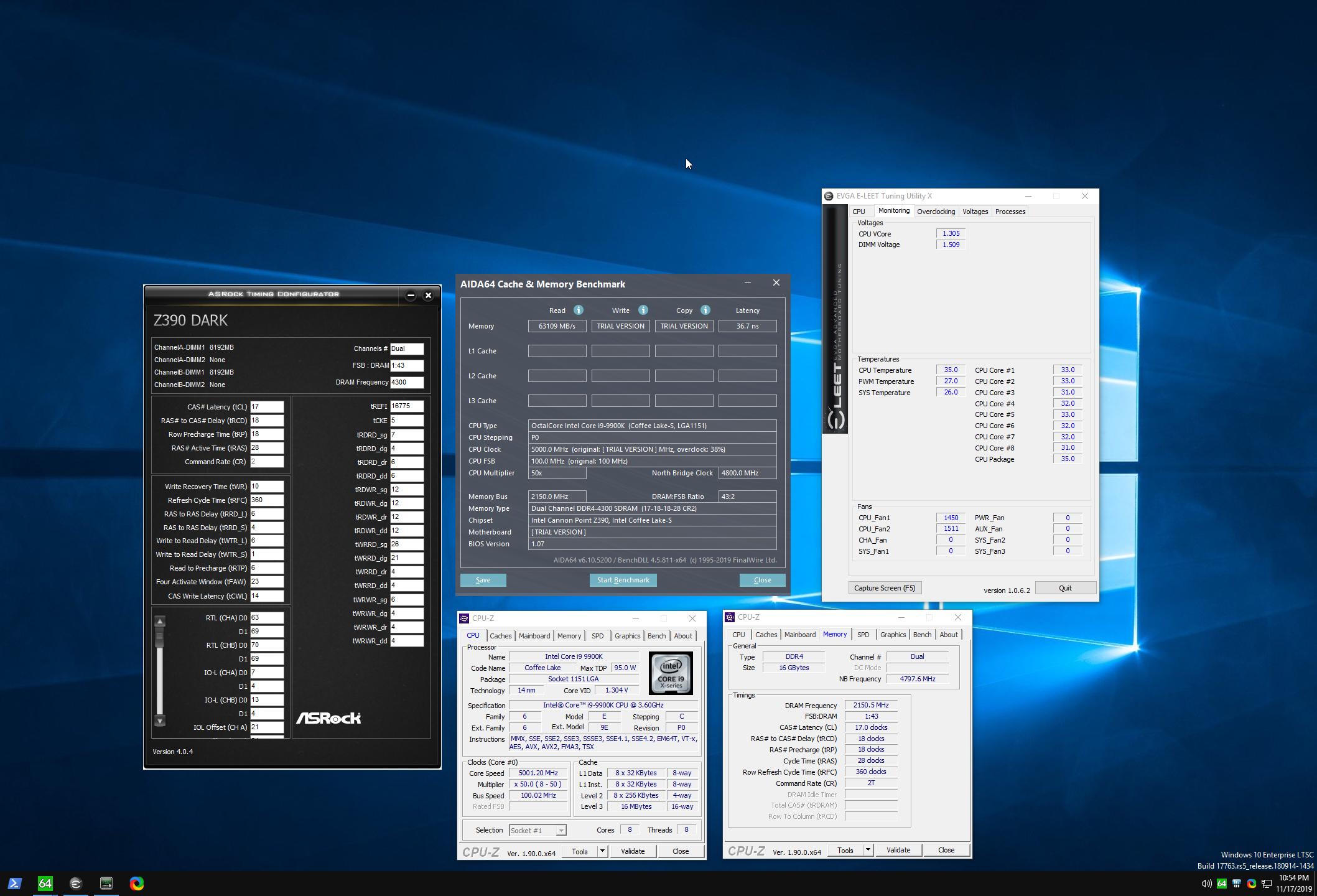





 onyx galleon
idk any of that stuff
little osprey
What gpu/cpu?
little osprey
it's unlikely that 16gb of ram is what's causing the slowdown in the game
as 16 is still usually enough
 gaunt fiber
Thoughts on the xfx 5700xt thicc 3?
gaunt fiber
I like the slick clean design
I know me too
I mean I heard it wasn't good at cooling
Maybe I'll just go for the 2070 super
round flare
your choice
gaunt fiber
Yeah I know, what about the 50th anniversary 5700xt? Single fan though.
gaunt fiber
Same lol. I'm trying to go for a clean build and I haven't really decided on a gpu yet
I feel the Radeon vii is a bit expensive
gaunt fiber
I'm not to good with the pc talk lmao what's a blower mean. I feel stupid asking that
round flare
No you're good lol
gaunt fiber
Lol
gaunt fiber
Ah ok
round flare
it's louder
gaunt fiber
Noise doesn't bother me
round flare
the thicc 3 has mo reviews on newegg so I couldn't tell you
gaunt fiber
I was looking at the 50th anniversary and it's the same as that just gold and black
round flare
the sapphire nitro + has a similar design to the thicc 3
if you wanna take a look at that
but I gtg
later
gaunt fiber
See ya, thanks for the help
pulsar garnet
@gaunt fiber anniversary gets loud
i have a nitro+ 5700 XT and it's nice and quiet
no issues playing anything at 1440p
gaunt fiber
That's fine. Noise doesn't really bother to much
pulsar garnet
personally i'd really suggest a sapphire card over blower
gaunt fiber
But yeah I figured with one fan it would get pretty noisy
I'm just looking for a good clean slick you
Gpu
little osprey
you probably don't want a blower card
gaunt fiber
Ive been looking at the 2070 super and Radeon 7 but the 7 is expensive
No I wouldn't buy a blower card
pulsar garnet
nitro+ is a nice looking card imo
if you set the RGB to off or solid it isn't flashy either
gaunt fiber
It's not bad I just looked at it a moment ago
little osprey
there's no reason to get a radeon 7 tbh for gaming
pulsar garnet
it's also got a great cooler
little osprey
unless it's cheap
gaunt fiber
Yeah that's what I was thinking @little osprey
pulsar garnet
R7 is outdated unless you need 16GB VRAM
little osprey
which is unlikely
pulsar garnet
5700 XT is better for gaming
little osprey
yep
gaunt fiber
I figured with the 16gb vram
pulsar garnet
and unless you want RTX or like the look i'd suggest 5700 XT over 2070S
but imo RTX isn't worth it unless you get at least a 2080
gaunt fiber
Okay good to know
pulsar garnet
too much of a performance hit with 2070 or below
gaunt fiber
When I start my build my CPU is going to be the ryzen 7 3800x.
So I figured maybe the 2070 wouldn't be to bad for that.
But I'll end up getting a 5700 more than likely
pulsar garnet
2070S and 5700 XT are about the same performance wise
little osprey
the 2070 and 5700xt are $100 different (2070s is ~25% more expensive than 5700xt) yet they perform within 5-10%
gaunt fiber
So the better buy would definitely be the xt
pulsar garnet
at 1440p 2070S only performs like 3% better average FPS than 5700 XT
little osprey
from a value point yeah