#building-and-recc-chat
1 messages · Page 412 of 1
 latent bronze
There is a lot of systems i can come up with for 1200$ total but need to know those bases first
 polar holly
@latent bronze already sent a spec list and full build around his upgrade perimeters
latent bronze
and what does this list look like then
polar holly
3700x, tuf WiFi x570, with a 2060 super, 16gb 3600 ddr4, with a noctua nhu12.
He’s currently running a older and system so it’s in the same ecosystem for processor.
latent bronze
You should of done that list using PCPP
polar holly
I did I am not at my workstation so I can’t send it right now
latent bronze
Also if he is just gaming i would of went with a 3600 instead
polar holly
I dm’d everything along with possible things to exchange based on his current case to make sure the size of the cooler would fit. Along with if the current specs of the power supply would be sufficient for the upgrade
I wouldn’t have since that would not be future proofed the system for long term use. With the new system I have no idea if he wants to bridge into streaming or video editing. So I set the system to something that makes both possible
latent bronze
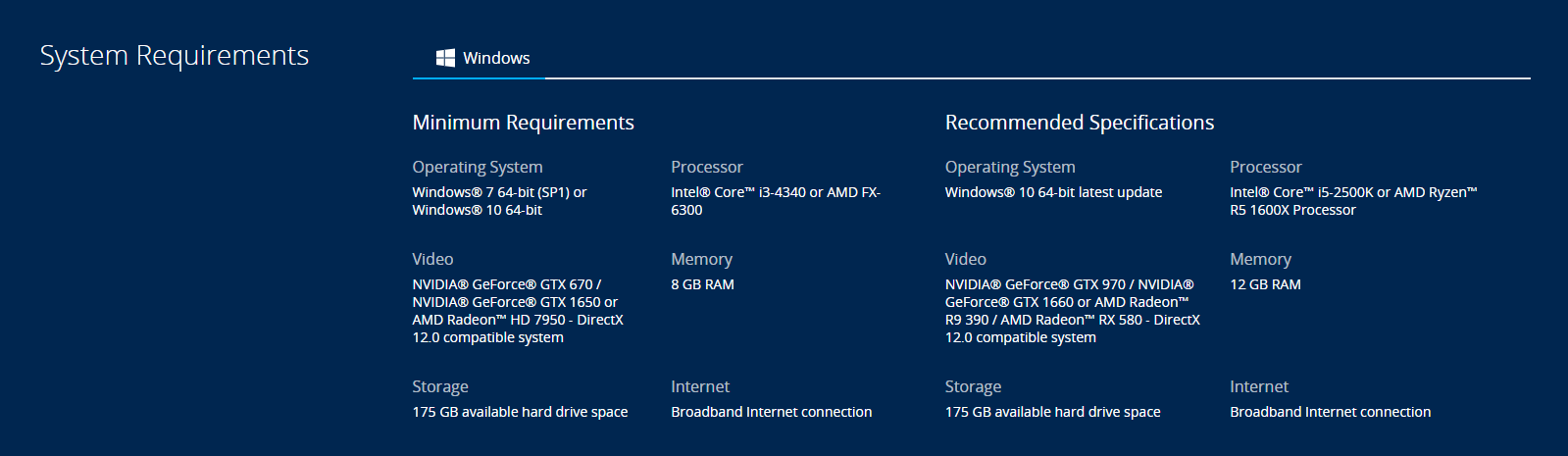
You do know a lot of games right now are recommending first gen Ryzen's right because i have seen a lot of games coming out recommending just the 1500X or the 1600 for the 3600 is future proofing
polar holly
The recommended specs for game is the lower end of the hard ware to run it. Higher level hard ware is advised for running a game at anything near ultra settings.
latent bronze
There are games right now that i play that recommends a 1600 and cause i am using a 2600 instead i am able to play games on ultra without any problems
polar holly
For example the new call of duty coming out this month is recommending a 2700, and a 2080 super. For ultra settings. So I do believe a 3700x and a 2060 super is future proofing along with the option to start streaming and video editing
polar holly
That was the announced recommend spec list. So it may perform better but your cutting your cores for that ips improvement.
latent bronze
Also this is the recommended settings for that game https://i.gyazo.com/4a40e4ab084f648f0693583ae6be5d11.png

So ya 1600X is the recommended which he would still be future proof with the 3600
polar holly

Recommended PC Specs have arrived for #ModernWarfare + NVIDIA Ansel & Highlights are coming to the game!
Learn more --> https://t.co/mRzDxGKLXN
Likes
161

 Twitter
These are the full list of recommended parts for each setting
latent bronze
Besides that for these kinds of games you want the most fps so no way people would be playing on ultra settings
people would do it for benchmarking yes but playing the game is a different story
polar holly
Correct but the minimum specs don’t offer the max FPS, rather the higher end hardware would provide more
 quick jasper
Any good pre built gaming pc under 1K?
latent bronze
Depends on what you plan on playing
@quick jasper This is under 1K https://www.newegg.com/p/N82E16883289037
quick jasper
I plan on playing games like Cyberpunk & red dead redemption etc.
latent bronze
So that would be more than enough right there
RDR2 recommended is a 1500X with a RX 480/GTX 1060 so you would have no problems with that prebuilt
quick jasper
Cool. What about in regards to the simulation gaming? Also I think I would like something with a RTX card or the latest GTX cards other then the 1060 & RX 480/580 series cards. They feel like a modern 670 series cards to me.
@latent bronze Would you recommend any of the ABS computers from neweeg?
latent bronze
@quick jasper it would depend what is inside the system and if the case has great airflow
quick jasper
Are the latest Ryzen & I5’s good to go with current GPU’s ant bottleneck issues?
polar holly
@quick jasper it depends on the card and the cpu. But for the most part they are
 lime forge

 austere condor
going into my PC today, will post pictures when i got it all built
 gaunt zinc
 austere condor
lime forge
austere condor
lime forge
oh no D:
austere condor
Gotta cool it somehow, XD
 round flare
Not the noctua chocolate fans
austere condor
Eventually plan to do a custom loop, but I don't have $500+ to drop on a proper loop right now
 little osprey
Watercooling parts are insanely expensive. I went full chinese - except for 1 block to use on non-expendable chips, maybe $100 total haha.
Galvanic corrosion is a menace
round flare
My local fry's has kits go on sale from tt that they price at 250 ish
idk how reliable they are
 deep skiff
yeah kits are much cheaper
deep skiff
wut
round flare
I'm confused
deep skiff
so am i
round flare
wait kits come with all the parts correct
and buying individual parts is well
buying individual parts
is that where I got mixed up
little osprey
Kits vary a ton though lol. I have both $10 and a $90 block. So much stuff I've ordered has been stuck in customs coming from ebay china/etc. I'll post to tech'n around eventually lol.
 soft holly
round flare
soft holly
round flare
Yes I think they very recently released them
They're really bright
they sync with razor chroma iirc from the vid I saw
and a few other programs
 glossy thicket
So, I’m new to the whole PC building thing, but my friends all say that its a memorable experience and helps you appreciate your wonderful machine more. My current (really crappy school) laptop is on its last few legs and I am looking for an upgrade. I have a price range of about 900 dollars that I can spend and now about to ask a big question. Should I go and build my own from parts (which Ill need you guys to tell me what to buy) or get Team Liquid Alienwear Aurora PC?
 maiden citrus
What are you trying to use the pc for?
 quaint terrace
definitely build your own ^^
Im guessing its for gaming 
polar holly
@glossy thicket it depends on the use case of the pc
glossy thicket
Mostly gaming and some offtime work stuff
But I primarilly play CS and League currently
So id like something that can handle newer games but I dont need a super beefy
polar holly
@glossy thicket ok do you have a preference on anything such as amd, intel, nvidia
glossy thicket
None at all
quaint terrace
ryzen 5 2600/3600
gtx 1660ti
500 ssd
650 psu 80+
16gb ram 3200
case with good airflow
noctua cpu air cooler
little osprey
So I have a Geforce GTX 1060 3 GB.
Intel Core i7 - 7700 @ 3.60 GHz
16 GB RAM.
I am planning on replacing the graphics card this month, but do you think I should replace other parts too or can I survive on it for a little longer?
polar holly
https://pcpartpicker.com/list/vV3d6R @glossy thicket
 prisma goblet
That CPU should be good, but the 1060 3Gig is a horrible thing, it shouldnt have been produced. The very least go to the 6gig card but if you have it 'd go 1660ti or 2060, super if you can find one.
@polar holly only issue i have with that list is the 450w psu. 550w is my minimum, leaves plenty of room for upgrades later and its actually better and more efficient to run a PSU around 50%
polar holly
@prisma goblet I agree but with the budget of 900 it’s difficult to find one that is of reputable brand. If there is one to be found I would say link it to the original person so that he can use t instead
little osprey
@prisma goblet I am gonnna get a 2070 super. but i was more curious on everything else
polar holly
If you plan to upgrade to the 2070 super everything in your build should be fine to work with it with no bottlenecking. @little osprey
prisma goblet
What Susanoo said.
polar holly
I usually recommend upgrades when there is noticeable performance penalties in the applications that the pc is running.
prisma goblet
@polar holly in regards to your statement on the PSU. Drop the 2060 super for the 1660ti, the price difference is 150 not only would it bring the build under budget, it would give room for a better PSU. The performance of the 1660ti is the same as a 2060/1070
polar holly
I am at a rough point in recommending the 1660ti due to the amount of games that are pushing to use the new rtx system. But yes it would be a good substitution if the person using it does not plan to pursue those
glossy thicket
Alrighty, so ill probably pick up a 1660ti as i probably wont be using the games to the max and or am perfectly fine with lowering graphics by a tad
 limpid merlin
I would always recommend a rx 5700(xt) over an rtx card unless the user REALLY wants rt...cause generally most people never use it due to the garbage performance
 pulsar garnet
^
Unless of course you want the high end stuff like 2080S/Ti, where RT doesn't annihilate your performance
austere condor
ight
lets break down that list as to why it is a bad recommendation
CPU - GREAT CPU, absolutely amazing performance, comes with PBO which the 2600 doesnt have, but, the problem is, that 2600x is $50 more thna the 2600, which just isnt worth it. 2600 is the way to go
Motherboard - Asus TUF B450m-plus is a midrange priced board with entry level stats. its a pretty weak 4 phase and has rather inadequate VRM cooling.
Ram - $3 more and you can get youself a proper kit of Micron E-die, which is known to be an excellent overclocker, pushing 4400mhz on cheap kits
SSD - I didnt know a whole lot about the A55, but it seems to be "decent" im not sure what controller they are using on it or how much cache it has (or if it has a dedicated cache) but its a 3D nand SSD using TLC, so your standard budget SSD. its a good price, i'd probably use it as a secondary storage drive though. I'd much rather have something along the lines of a L5 lite 3D which is tried and tested to have a really solid SSD controller, and is quite fast for its budget price
CASE - Oh boy, the Cooler Master masteroven series, grant it, this one is better than some, there are much better options for a proper airflow focused case with solid build quality at that price or cheaper
PSU - Corsair VS, its not a "bomb" per say, but, its not a well built power supply. lots of other good options for $3-$5 more, or hell, even less.
Fans EK Vardar I've heard are pretty good, and im assuming you picked them out to compensate for the masteroven's poor stock airflow. but now you're essentially spending $80 on a case, why not get a good $80 case that comes with fans?
@polar holly @glossy thicket
for a build i would recommend, there are two ways to go
focus on getting a top tier GPU and getting a CPU thats good enough for most things, or getting a really decent CPU and getting a step down from a top tier GPU
https://pcpartpicker.com/list/kfW6Xv
or
https://pcpartpicker.com/list/9FVHNq
either would be great options for a $900 gaming PC
@glossy thicket
latent bronze
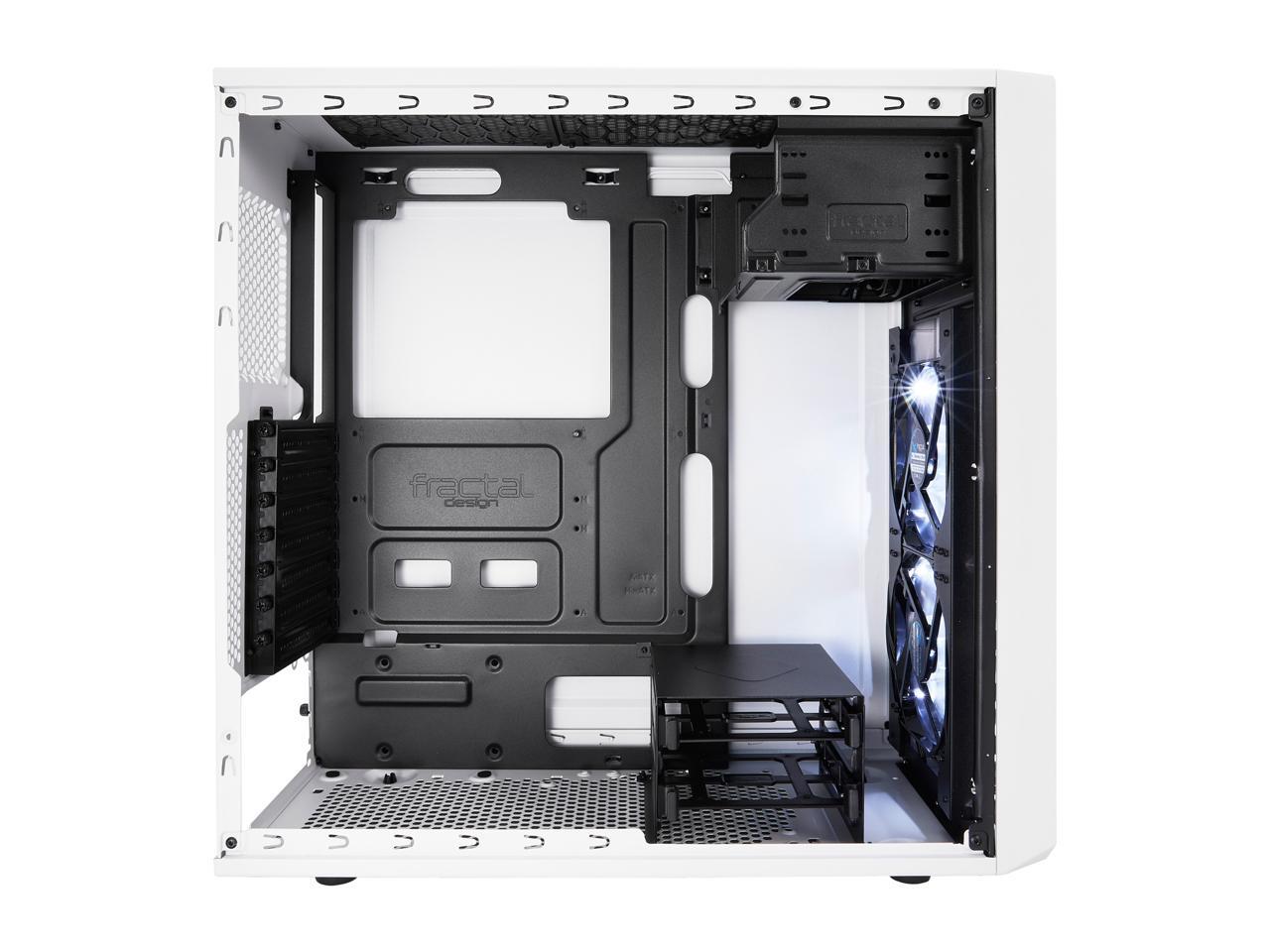
I would go for the Fractal Design Focus G Mid Tower case instead also why not the 2700X instead of the 3600 cause while they both perform the same pretty much they also both cost the same and he wouldn't need to worry about flashing his bios if he doesn't even know how to
Also i got to question the blower XFX card
austere condor
the R5 3600 is significantly faster for gaming
and the MSI Max boards dont require any BIOS flashing, they are ryzen 3000 ready
and $289 for a RX 5700 is extremely impressive performance for quite a low price. the blower design isnt amazing, but again, for the price/performance, there is nothing on the market that even comes close right now.
also, while the Fractal Design Focus G is a good case for the $50 range, after building in both the Zalman S cases and the Focus G, i would definitly recommend the Zalman S over the Focus G in terms of ease of building and ease of cable management, and then, in my opinion, the Zalman S2 is a more asthetically pleasing case design and layout, rather than having the older design of the internals of a Focus G
Full window, full length PSU shroud, superb airflow performance out of the box with three stock fans, decent cable management options, etc etc etc puts the Zalman S2 a ways ahead of the Focus G from my personal experience with each case
@latent bronze
 sudden turret
hey Demon, want the techie role? :p
austere condor
um... sure? what does that mean? lol
sudden turret
makes you higher up in the food chain.
austere condor
actually have a Zalman S2 on order right now for an upcoming build
😄
I really liked the S3, S2 is the same chassis but with a mesh front rather than a solid one
sudden turret
I like any and all boxes.


 elder canyon
 austere condor
i want to try out more higher end cases eventually, but, my local market just doesnt liek buying more expensive PC's once im done building them and need to sell them
latent bronze
It has airflow but for a budget system
austere condor
no not really, i build a $200 PC in it and CPU and GPU idle temps were bonkers
like... 75-80C idle temps on the CPU
lol
on water
it was BAD
latent bronze
Built a system for my cousin and his Ryzen 3 1200 idle was 35c and the 1050 Ti was between 30-40c on idle
austere condor
its usable if you keep the side panel off, but once thats on it just seals in the heat
latent bronze
The side panel is still on and i saw those temps when i was testing out his system before giving it to him
and i even left it on for 24 hours
austere condor
that and a 1200 and 1050ti dont put off as much heat as a 8320 and RX 480
latent bronze
FX chips are perfect for winter
latent bronze
But also when i say budget systems i don't mean using used parts
austere condor
just sitting here with a couple chrome tabs open and discord, i can feel the heat comming off my 7980xe
latent bronze
I used the 3.1 before for myself but when i had the 570 inside i knew i needed to change the case as i saw the card getting very hot
austere condor
yeah, i was running a 120mm AIO i think from antec on the 8320, that case just couldnt keep up with the heat
sudden turret
yeah this one is the 8,000 something
I always forget, @ripe osprey sent it to him
8350 maybe
latent bronze
I think i still have an image of that old case when i had it
sudden turret
or 8320
latent bronze
latent bronze
That picture was taken on the LG G5
sudden turret
always liked that model AIO
austere condor
yeah! it looks cool and it was something different than your standard asetek design
latent bronze
One thing you could do as well which i have seen a lot of tech tubers doing now a days is flipping the PSU
austere condor
rarely would you want the PSU to be drawing in air from inside of the case and blowing it out
in that situation, the GPU and PSU are so close, they would be fighting over air, making both hotter
little osprey
What would you estimate the difference in air pressure between the inside vs outside of the case to be in such a scenario?
austere condor
well for that specific case, it would have been negative pressure, as i only had a single 120 intake, then it would have been running the AIO and PSU as air out
little osprey
But I agree for builds in cases with feet, might as well use the bottom intake for the PSU unless it's going to sit on a shag rug or something.
austere condor
with how i had it set up, it was a bit more balanced, the intake fan bringing in what air it could through the front panel's poor ventilation, and the GPU essentially bringing in air from the PCIe slot under it from the rear of the case, and the AIO cooler pushing air out
little osprey
I think I had assume ecks meant flip it the other way vs what I had imagined.
Either way, lot TDP there, might as well polish the looks haha
austere condor
if the angled sides of the front panel were vented, and they left the big flat piece as tinted acrylic, it would still keep the same shape and look, and could still show off your RGB fans, but it would make the fans you use up front actually useful
internals of the S3 (same case as the S2 other than the front pannel) just make more sense for a modern design than the focus G
@latent bronze you see what i mean?
and the Zalman S cases are a LOT more forgiving for cable managment too
i put a 1000W power supply in that S3
so it has more than enough room for cable management for just about anything you want to put in it
for the Focus G? not so much
and its like $6 cheaper and comes with 3 stock fans rather than the two on the Focus G
latent bronze
https://c1.neweggimages.com/NeweggImage/ProductImageCompressAll1280/11-352-067-V11.jpg Well from the inside they both look pretty much the same

the only difference that i like is the front for the Focus G
@austere condor I think the one you're thinking of is the micro ATX version
austere condor
nope
the one i own is the normal Focus G
but yeah, preferring a focus G for how the front looks, and me preferring the more modern look and design of the internals of the Zalman S line, basically boils down to opinion.
deep skiff
for sff yeah
and for cases like the S1, a4 sfx, ncase, or other that can fit even a 92mm rad the rad will cool better
 fossil hedge
 verbal bone
Not funny didnt laugh
 acoustic stag
^
 unborn igloo
Don't you just hate when somebody messes a build up with a gtx 1060, while all the other parts are high end?
lime forge
1060 is a pretty great card
unborn igloo
I'm talking ryzen 9 high end..
little osprey
LULW seems silly man
lime forge
i mean if gaming isnt their focus then a 1060 is perfectly fine
my dad has a 9940x and a 2070
unborn igloo
People would just put a gtx 1060, or even worse, an rx 570 in a system like that..
little osprey
but what would you be doing with a 3900x that wouldn't benefit from a better gpu even if it's not gaming? don't a lot of productivity suites leverage some of the GPU?
 unborn igloo
Yep
little osprey
i mean, if i'm completely wrong, correct me instead of just dismissing it, i know photoshop doesn't leverage a lot of gpu for example but isn't blender CUDA accelerated?
unborn igloo
You can wait a little while for a gpu if you have a 3900x..
Instead of wasting money on a gtx 1050
 vague willow
Isn't that like a huge bottleneck
little osprey
especially if he's editing videos or something, isn't adobe's video suite CUDA accelerated too? i can't stand that lol, the implication that i'm saying stuff that's wrong (which is very possible) but not being corrected
acoustic stag
@little osprey running VMs is done entirely on the CPU
there are a lot of applications which require a good CPU
adobe's suite is CUDA accelerated but is mostly CPU dependent
little osprey
i know that, i am not disputing that, i am trying to understand what his use case is, cuz for just running VMs and/or a server it's pretty inconsequential, but for productivity he could definitely benefit from a better GPU in certain use cases
acoustic stag
for blender it depends on what your particular renderer and workload is
 stable oar
Anyone knows about pc building
latent bronze
I believe almost everyone here knows
lime forge

 digital cipher
need help anyone here knows anything that i do to test a motherboard without a cpu to make sure it works before i get the cpu only have 15 days of warranty and was wondering if i can test without cpu
acoustic stag
Your best bet is going to a nearby hardware store to do it
They should do it for free
digital cipher
i dont have a hardware store near me closest one is bout 3 hrs away
little osprey
Anyone on, someone asked me about building a PC and they gave me a budget of around $300. I need a second opinion on what I came up with
little osprey
little osprey
alright thanks
 steady breach
hey everybody, i am looking for psu cables for about 30 to 40 dollars total, can somebody give me a reccomendation?
little osprey
What psu
 chilly marsh
you can research that
acoustic stag
cooler master NR600
has great airflow as well
just add 1-2 fans to the intake
and make sure they're 120mm to ensure full compatibility
little osprey
thanks
steady breach
@little osprey just extension braided cables
acoustic stag
anything that isn't cablemod is fine really
 brave bridge
Hey all, I'm gonna do a Ryzen 3700x build with 32gb ram. Anyone recommend a good ATX mobo?
little osprey
@brave bridge yeah sure bud, What are your goals Big boy overclocking? or just casual OC and gaming with good features? or will you not OC at all?
acoustic stag
before you start your build, think about what you actually need vs nice to haves
little osprey
Hey guys, so sometimes in the middle of a csgo match my computer will randomly restart itself. My CPU temp is not peaking over 65 C. Also tested my psu with a multimeter and it was reading 12.2 Volts. What should I do?
12.2 sounds normal, but doesn't rule out anything. I'd run hwinfo64 start playing csgo for 5 mins, alt tab, screenshot the readings. If unfamiliar with how to show all sensors at once, I can link a gif
 sand kayak
Hi I am new to pc gaming like literally never seen one other than in a picture
And I am trying to build my first one I have a minimum requirement that I need and a budget but I don't know which parts to get and which ones are compatible
acoustic stag
ok, what games do you want to play @sand kayak
little osprey
@little osprey What is hwinfo64?
sand kayak
I don't really need anything too powerful I'm mainly getting a computer to try streaming
lime forge
whats your budget?
deep skiff
@little osprey its shows information and details about your pc
sand kayak
600 max
chilly marsh
that isnt too bad
little osprey
Gotcha I'm downloading it right now
sand kayak
Because I still have to get all the accessories for it
chilly marsh
600 for the pc only or including accessories
sand kayak
I would like to do both so I can get it all at one time but I want something that will work and be upgradable later on
chilly marsh
so you want to use 600 for both the pc and accessories?
sand kayak
If possible but I was told out her wise
chilly marsh
its better to dedicate those 600 toward your pc
its recommended, unless you really have no more money other than that
little osprey
@little osprey So what should I look for in the sensors
chilly marsh
do you have the monitor @sand kayak ?
sand kayak
No I have the TV I use for my Xbox if that works
acoustic stag
it's above 600 sadly
lime forge
 chilly marsh
are you able to spend a bit more than 600?
little osprey
Same
acoustic stag
vengeance often struggles to hit rated speeds
because of being low bin hynix M die
you might have older vengeance
chilly marsh
better for him not to get a 570 but a 580 since his budget allows for it anyways
acoustic stag
which was better
sand kayak
Overclock it maby idk
lime forge
eh, my vengeance works fine for me
chilly marsh
@acoustic stag 's list is very good @sand kayak , those are really good parts for your budget
acoustic stag
it's a hit or miss kit
sand kayak
Ok qtr does that mean
Wtf
It won't blow up or kill itself if I push it to far right
@acoustic stag
acoustic stag
no
it's not related to killing itself
its just not as fast as advertised
thats what it means
sand kayak
Also how do youtubers do that thing were they can use 2 screens at once
O ok that's cool
chilly marsh
yeah
sand kayak
Yah but u can play games on one and watch Netflix at the same time
sand kayak
Btw what is the main difference between @acoustic stag build and @lime forge
lime forge
doggos build has better graphics but costs a bit more, mine fits your budget, has very slightly worse graphics, and its easier to build
sand kayak
Owww that's what that was for😂
chilly marsh
most people would prefer @acoustic stag build
its only a bit more if you have some more money to spare
less than 30 dollars more than 600
so ye
round flare
zacks build has more rgb I think
sand kayak
Yes just wondering
lime forge
that one has the same graphics as doggos
chilly marsh
that answers your question
sand kayak
Rgb the the color thing
lime forge
and easier to build
and has rgb

wait
here
a bit more expensive
but
better

with the difference being the case, that one comes with fans and its a bit bigger which is always good.
sand kayak
I was just about to ask would it matter if I change the case
acoustic stag
I wouldn't recommend a steel legend
chilly marsh
not really
round flare
My debugs saved my life
lime forge
if you wanna take the risk, just make sure you do all your research on how to build before you get started
fossil hedge
 sand kayak
Ok you keep saying all these words that I don't know what they mean so either you're going to have to tell me what they mean stop saying them lol
lime forge
basically the motherboard doggo wants you to get has some lights on it which can help tell you if theres an issue with the system
chilly marsh
yes
acoustic stag
you can look up a manual which shows you what issues relate to how the LEDs turn on
sand kayak
Ok got it so https://pcpartpicker.com/list/3VpTHB
Get rid of any static electricity
Don't touch thermal paste or CPU watch YouTube videos and try not to kill myself then let you know how it goes
lime forge
idk how youre gonna build the computer without touching the cpu lol
lime forge
just hold it by the edges, DONT touch the bottom of it
round flare
yes^
chilly marsh
you need to handle the cpu very carefully, just dont touch the bottom and you should be fine
what zack said also
lime forge
i cant stress it enough, watch as many youtube videos as you can on it
sand kayak
Thx guys u were a lot of help I would have been looking for a month in total if you guys had not help me @chilly marsh @round flare @lime forge @acoustic stag
round flare
Also don't get super stressed
lime forge
yeah, no problem
round flare
You'll make it harder for yourself
lime forge
once again, watch like a thousand videos lol
lime forge
building pcs is a big investment, watching videos on how to build them is a very good idea
round flare
If you see reactions to that don't watch those
lime forge
the verge build guide got taken down lol
round flare
not helpful
fossil hedge
round flare
When you search up pc build guide there's a lot of verge reactions
sand kayak
What is verge anyway
fossil hedge
news corp
chilly marsh
you're welcome @sand kayak
fossil hedge
media source
sand kayak
See now you're going to make me watch it if you wouldn't have told me I would have never thought about it
chilly marsh
guys just dont tell him bout it
lime forge
good luck, they deleted the video after much hate
chilly marsh
it isnt necessary
lime forge
yeah
chilly marsh
literally useless to tell him
thats like telling a stranger's wife, dont cheat on him.
chilly marsh
just watch a ton of pc build videos, be confident, and you should be A OKAY
acoustic stag
also, use some common sense
chilly marsh
and when you DO build it, the motherboard manual will help you out even more
lime forge
also while youre building, dont just guess stuff, if you have a question we are always here lol
especially me, i never leave
lol
round flare
also cable management
chilly marsh
yes
round flare
Don't get lazy with that
lime forge
pfft
acoustic stag
almost all cases have certain cable management features
sand kayak
Okay and also I have built 2 racing drones so the motherboard thing shouldn't be that hard
round flare
you'll regret that later if you try to fix with all parts already in
acoustic stag
like routing 12v EPS from the top of the motherboard
lime forge
cable management isnt too important, so long as you can route the cables to the back and back to the front youre fine
round flare
looking neat makes you feel better
unless you're me and you shoved them into the corner
but shhhh
round flare
that's what mine looks like
lime forge
front looks stunning (not to be full of myself ) but the back looks like a dumpster fire
lime forge
but dont let that intimidate you, i have things like a hard drive, AIO, and cable extensions. All of those things you wont have @sand kayak so you wont have as many wires.
round flare
if you use nvme drives you don't have cables
acoustic stag
vertical mount is literally choking your card for no good reason
unless you have the special mount kits
which cost quite a bit
lime forge
 i like it because it looks good
round flare
rgb
lime forge
and ive been monitoring my temps, they look fine
it blocks the ugly part of my pc, and the temps are good
so i like it :D
 chilly marsh
i like everything neat
lime forge
ugggg i just realized the rgb isnt working on my top right fan
round flare
the rgb works on my fans but it won't change colors
sand kayak
Yeah I'm OCD so cable management is very very important
lime forge
i have so much rgb in my pc i thought the top right fan was working, turns out its just reflecting the rest
D:
round flare
The 12v cable that came with the case just refuses to work
sand kayak
By the way do you have to liquid coolers or is that just too regular fans and 1 cooler
By the way I've heard vertical Mount before what is that mean and how do I not do it
lime forge
the processor we recommended has a cooler included, just use that one and dont overclock and youre gonna be fine
pretty much any build guide out there will tell you how to install the gpu non-vertically so dont worry about it
also that case doesnt have a mount for vertical gpus, so dont worry about it lol
round flare
I overclocked on my stock cpu and my temps are fine
acoustic stag
it is a liquid cooler
round flare
but yeah don't do it
sand kayak
Ok I will add one next week when I get paid
lime forge
hm?
he was asking whether or not liquid coolers were necessary
but yes, i have an h100i rgb platinum
sand kayak
Nope I was talking about yours
 sand kayak
Also since you brought it up what is the difference other than noise
round flare
liquid still makes noise lol
lime forge
aios are harder to install, but they look better and cool better
but for a first time build, id go with the stock cooler
acoustic stag
AIOs generally make more noise
air coolers beat them in noise normalized testing
just dont go for an AIO unless you like the aesthetic
sand kayak
Okay I got to go cuz I have work in the morning but thanks for helping me
lime forge
cya later
round flare
Yes but that's when you buy that massive noctua chocolate rock monstrosity
lime forge
aios are for people who care about looks >:D
and have money to spare
i didnt have to pay for this, so uhhhhhhhhhhh
i lucked out haha
round flare
bruh
lime forge
im mad that one fan isnt lighting up though
now i gotta take it all out, and reconnect it
the side panel is so annoying to put back on
acoustic stag
especially when you have cables blocking the way
lime forge
acoustic stag
otherwise it wont fit
lime forge
for mine you gotta just push it on then slide
round flare
Are we talking about side panel installation
acoustic stag
yes
round flare
I just kind of shove it on
acoustic stag
not the glass one
round flare
it works
lime forge
everyone does
acoustic stag
glass one is easy
acoustic stag
only if the other one was like the glass one
lime forge
my dads case is so nice, theres literally an inch of space for cables in the back
mine may as well have half a centimete
centimeter*
also his doors go on with a hinge
just set it on, swing it close
so easy
sand kayak
Hi I am back what about software firewall WiFi and Bluetooth
@acoustic stag
@lime forge
@round flare
acoustic stag
you can use ethernet to download the drivers
the board I used doesn't have an inbuilt wifi module unfortunately
so you'll have to get a wifi card
sand kayak
Yes but what the hell is a driver and how do I get it I know it supposed to be on a flash drive but I know nothing else about it
acoustic stag
it doesn't need to be on a flash drive
sand kayak
How do I get a Wi-Fi card what is a Wi-Fi card
acoustic stag
wifi card is basically how you can connect your PC to the internet using wifi directly
you can get it online
I'd recommend ethernet wherever possible though
it's better for gaming and generally has faster speeds
sand kayak
Yes but you always need Wi-Fi
acoustic stag
you don't really
round flare
If you wanna go portable maybe but
acoustic stag
I don't use wifi
little osprey
ethernet is boss
sand kayak
How much more would it cost because if it won't hurt anything you can only help
round flare
Idk much about wifi cards ask doggo
sand kayak
@acoustic stag
acoustic stag
around $20-40 for a PCIe one
its unnecessary cost
you can run a ethernet cable from your router for much cheaper
sand kayak
Yeah I know but I'm in college so I'm always moving back and forth and I'd like to bring a computer with me that's not a complete brick
acoustic stag
I'd recommend a laptop in that case
moving around PCs isn't fun
even the smallest of mini ITX builds are much less portable than laptops
$600 can get you a decent laptop
you can game on it as well
sand kayak
Yeah but they burn out so quickly
sand kayak
No I mean like for me whenever I've used one for an extended. Of time it literally overheats and I burnt out a motherboard apparently because it wasn't sitting it down correctly
round flare
Or just wait on purchasing anything until after college
unless you really need it for school
acoustic stag
you can reduce the amount of heat a laptop generates by some relatively simple things
like repasting it
round flare
Just don't use it on your lap or and cloth surfaces and make sure it has good ventilation
acoustic stag
you can also get a laptop cooling pad
and its easier than building a PC
you don't need to build anything
little osprey
what do you guys think of the phanteks diffused rgb strips?
latent bronze
which one's the RGB or the ARGB
 neat raptor
Hello, gaming desktop noob here and I have a question about motherboards
acoustic stag
ask them
neat raptor
So awhile back i was the impatient guy who should have built a PC but instead went to the closest best buy and bought a prebuilt as soon as i had enough money. To be honest its actually treated me pretty well but ive been wanting to make upgrades and im pretty sure the motherboard in this pc super limiting on upgrades. Is there anything i need to know or be aware of when buying a new motherboard, anything i should take into consideration?
Like i cant find any information on my current motherboard and cant even find if most additional ram is compatible with it or not so ive been thinking about just buying a new motherboard but i dont know much about the process
Am i safe to buy just any motherboard and it should be okay in my PC i guess is what im trying to reassure or is there stuff i need to make sure is compatible etc etc
acoustic stag
can you send me a pic of the inside of your PC?
that should allow me to recognize the mobo
little osprey
fossil hedge
 stone warren
Can anyone help me with a tech issue
fossil hedge
cool
 shut olive
Yeah nice chat
little osprey
Lol
shut olive
“I’m so proud of this community...”
brave bridge
@little osprey I'm gonna use it more for video/photo editing and my 100 chrome tabs...lol. I do want to do a lil bit of gaming as well. Not sure if I need to OC or not.
 neat canyon
hello guys, i am looking to see if i can pick at your expertise i am looking at getting a M.2 drive for a build i am doing and i have never used one before and dont know much about them https://www.newegg.com/p/N82E16813119006 https://www.newegg.com/samsung-970-evo-500gb/p/N82E16820147690
i am just trying to see if they are compatible as the M.2 has NVMe 1.3 and the motherboard doesnt say anything about that
 weary igloo
Hey all, just finally getting my setup together and am running into some issues. My pc boots up but won’t register to the monitor. My ram, aio cpu cooler, gpu, and psu seem to all be working fine however nothing else that I connect to the motherboard such as my keyboard,mouse, and mousepad are even responding with their rgb. Is my motherboard DOA?
sudden turret
@weary igloo what are the specs? any trouble shooting lights on mobo? try one stick of ram for starters
 timid nacelle
@weary igloo check your front panel connectors if they are in wrong then your pc won’t turn on
little osprey
Any tips before i drop 3k on this rig?
Not sure where to improve/cut
i would swap out the "black" GPU for an XC/XC ultra, but that's totally up to you
Why?
they're binned better
Binned?
they have the potential for slightly better performance when overclocking because it's better silicon
Ooooh
but it's pretty minor
This is a common area of contention.
the XC ultra has a better cooler
The thing is, if you're dropping $1k+ on a graphics card in what's probably a $3k+ setup - .... are you really that budget conscious?
yeah, my thoughts, if you're looking to spend 3k, 3100-3200 isn't that much of a stretch for something better
White a bit better
binning is just the process of them testing the actual chip and seeing which perform better
I'm gonna bid on this tbh I bet it's a borked shunt mod/bios. $5 fix https://www.ebay.com/i/133210969624?ul_noapp=true

eBay
Find great deals for EVGA GF RTX 2080 Ti FTW3 Ultra Gaming 11GB GDDR6 Graphics Card -NOT WORKING-. Shop with confidence on eBay!
How much binning do you think they do though
Nvidia does
you're right, i'm just helping explain what binning is
EVGA - the community assumes so, but we can't be sure
oh soz, didn't see that
and this is more just my opinion, but with 10th gen chips coming out soon(TM), you will see a drop in 9th gen prices, or you may be swayed by the uplift in performance (however minor it may be) to the 10th gen
Ya, x299 just got slashed
i usually universally say "get it now" but when stuff is coming out soon (the dates i saw said 10th gen should be coming in a month or so)
I posted in tech deals
i think it's not going to hurt to wait
latent bronze
What would happen if the fix on that card would cost almost the same as a new 2080 Ti 🤔
little osprey
almost, it'd be effectively same as new
EVGA warranty would 100% transfer no problem unless it was a b stock AND > 1 year after ship
well
It depends if I could fix by non physical means
that bent shroud makes me think someone just orangutaned it in there
Like flashing the bios with an SPI programmer
latent bronze
Also remember there is no refunds for that card as well
little osprey
what
latent bronze
the ebay link you posted says no refunds
little osprey
the bracket on the back of the GPU is bent and it makes me think someone just got really rough putting it in there
That woudl be expected lol
KR in the SKU means it wasn't b stock
serial number is about 4000 cards after mine, and mine was very early, around oct 2018
@little osprey i presume you have other storage you're bringing over? cuz 500Gb is going to leave you feeling pretty cramped
So it's likely samsung, bad forme, good for whoever buys
Yeah transferring all my firecudas from my old pc and selling the parts
at least IMO, i feel really bad with anything less than 1Tb of SSDs
latent bronze
If i do an intel build i am thinking of buying this GPU to put in my system to sell https://www.ebay.com/itm/XFX-AMD-Radeon-RX-560-4GB-GDDR5-MINT-CONDITION-Used/323950117834
little osprey
i think that build is fine, yeah, just swap out the GPU and decide for yourself if waiting a month or two for 10th gen will be worth it (i don't think the 10th gen CPUs will really warrant the upgrade, but it does have the added benefit of having the 9th gen CPUs drop in price) @little osprey
sff? maybe sure, otherwise? nah
latent bronze
wubs black friday is next month as well so there will be a drop in pricing
little osprey
that's a crapshoot though tbh, i wouldn't rely on the parts i wanted being dropped in price
sure lots of stuff will be on sale but if he gets everything else and then waits a month hoping that CPUs get dropped on black friday or whatever, then he's sitting with his...you know in his hands
but if he were gonna do that he'd probably just wait to get anything at all until black friday so he could see what's on sale
but i'm not sure he's overly concerned with saving a couple bucks here and there
i overpaid for my 3900x cuz, well, it's my money and i want it now

For all of what, $60? I don't see it a waste if your time is valuable
yeah, i think it was $550 vs. the MSRP of 500, honestly $50 to me is pretty inconsequential in this context
Same reason I often tell people just go or a nice , x570, bios flashback mobo for zen2. You'll save yourelf the trouble in time andeffort
latent bronze
Well if it is only a month away it would be smarter to wait then cause everything would be on special then so you would be saving way more than like 60$
little osprey
it's totally impossible to predict what will and won't be on sale
outside of the fact that 9th gen prices will drop when 10th gen comes out
and what's $60 when you're spending $3000+
latent bronze
Well it is black friday and most things will drop in prices
little osprey
ok, well he can decide for himself, i don't think it'll really be worth waiting but that's just me. I really doubt he's overly concerned about $100-200 even if he's dropping that much on a PC
not to mention if everyone waits, and then he tries to buy everything then, you may have availability problems
latent bronze
Well if you think about it that 200$ could be put into a better parts as well
little osprey
lol, i mean he's looking at a 9900k and a 2080ti, outside of swapping the 2080ti to a FTW3 or something there's not much room to go up
latent bronze
One thing that concerns me is all the RGB except for this one part https://i.gyazo.com/c04b75e57f0d2c85ab4b50f91cb2ce39.png
 little osprey
Good idea, ill wait till black friday. Forgot to lose those fans lol
Im just gonna uae white light
Use
i wouldn't expect deep discounts on the high-end parts
I might get evga 2080 super xc, the tis are still pretty damn expensive
only you can answer this but will that be enough GPU power for what you wanna do? for example i have the acer x27 (4k/144hz) and i pretty much had zero choice
if you're only playing CS:GO or something at 1440 then you'll be plenty ok with a 2080s
All of those cards are beasts - if you order from EVGA hmu for a discount code. - I love my ftw3
latent bronze
Wait how did you have no choice?
little osprey
Discount code?
Haha, let's see how many fps csgo gets on 4k, 9900k 5.1, 2150 core, 2205 mem
bets?
Im getting one from evga, so hmu with that sequence
well, i have a 4k 144hz monitor, what other choice did i have?
Duh GV100
cuz a 2080 (supers weren't being made when i bought this) was not enough for what i needed to do
PogChamp
Titan's in sli, chiler
gv100 beefi bois
the performance uplift between the 2080 and the 2080ti, especially in 4k, is rather significant
i still need a lot more GPU performance but that will come with time
Highest ill ever go os 1440 at 144 hz... i think a 2080 super xc will do that on ultra settings for most games...
Is
sure will, yeah
They're different die's ya. Titan RTX, quadro 8000, 2080 ti are TO102A/nona
2080, 2070 super are TU 104, 2070/2060s are tu104.. something
There are 4 possible dies a 2070 super could have come from
pm
you'll see noticeable gains between the 2080 and the 2080ti even at 1440, but i think you'll be good, of course depending on what you play
I'd say - if you're heasitating because of the lack of gains to wallet - keep the money, you'll see those gains better than 2080 vs 2080 ti. If not, buy what makes you happy
i am addicted to "MUST HAVE BEST STUFF (within reason)" so i admittedly have a problem lol
within reason = not buying titan RTX over 2080ti cuz performance uplift within margin of error is not worth 2x price
for someone who only games, that is
Oh I think we have the same bug
Titan RTX has some downsides
Memory bus is only 65 bits wider for 9? % more theoretical bandwidth, but there are other cons.
Need to waterblock for one, even then, it's just double the gddr6, it's a fantastic ML/AI card to learn on IMO
little osprey
tfw you redeem your 711 rewards for a free red bull and they conspired against you to shake up the one can that they knew you wanted so that it would spill all over your keyboard
latent bronze
So it looks like the GTX 1660 Super will has the same specs as the standard but instead of GDDR5 it will be GDDR6
@little osprey What are your thoughts on the 1660 Super
little osprey
None, not interested in it for personal use.
I'm sure someone will ask at some poitn and I'll read the guru3d / techpowerup benches for fps and toms article for power use at some point.
 fallow knoll
So i am selling my old PC, https://pcpartpicker.com/user/LightDarkness/saved/#view=zCMYHx and there is also 8gb of ram in it. With all that, whst should I sell it for? Pcpartpicker doesnt know the price of the gpu or the case so factor that in.
Just not wanting to sell it for super cheap so they can turn it around making a huge profit and making a fool of me but also dont want to sell it for to expensive and no one buy it.
little osprey
no storage?
it's fine if you sell without storage, but if you include it that'll affect the price of course
cuz i only see maybe $350 there
$400 perhaps
gpu is $30-60 used, would have to check ebay recent sold history
latent bronze
350$ for that is a little much
little osprey
i'm factoring in some kind of storage too as that looks like it was built and used
like he was just pulling up his past build to estimate how much it is worth
i think if you put it up for $300 you'd find someone to buy it pretty quickly, but there's almost no money to be made on that
i would keep it and turn it into a media box for my TV, but that's just in my situation
latent bronze
Total for that system used is more like 175$ and even adding something like a 1TB HDD would get at most 225$
fallow knoll
Well someone is offering 275 for the com po uter. And the gpu when i bought it was 150. The one on pcpartpicker lies. I have a 4gb not a 2 gb for the gpu
latent bronze
RX 560 4gb is still roughly in the 50$ range
 warped ridge
Idk if this is the right chat, but my house got hit hard by the Dallas tornado and we got 1-2 years before we have another home built. My whole setup got destroyed and I have been allowed to spend tons of money for a new setup and desk. Anyone mind replying and @ me or dm me with ideas of cool spacious desks or insane PCs?
round flare
I smell the rgb in the air
warped ridge
Anyone able to put me together a pc around 2.5k-3k
weary igloo
Hey all, I have a new build that is being less that cooperative. I fear the motherboard is to blame. Ryzen 3600, ROG STRIX X370-I gaming motherboard, G-Skill Trident Z rgb, NZXT kraken M22 aio, Evga gtx680 (believe my 970 is dead) and a Corsair cx850m for the psu. Whenever I plug anything into the motherboard such as mouse,keyboard, etc there is no rgb. I am also not receiving any sign of life to my monitor. Any help would be appreciated!
digital cipher
does anyone here use the uphere rgb fans
lime forge
ive heard theyre pretty great for the price
latent bronze
@digital cipher they're ARGB fans so if your board doesn't have ARGB headers then you can't use them really
acoustic stag
you can simply buy an ARGB hub for that
latent bronze
He can but for those uphere series it has to be compatible
steady breach
Maybe this @warped ridge https://pcpartpicker.com/list/rDRNNq
austere condor
what is that
there is several issues if thats supposed to be a gaming PC, or a streaming PC, or a editing PC, or just anything else really
acoustic stag
is this 2017?
austere condor
if I was wanting to build the biggest baddest gaming PC today, i'd go with something like this
could change out the cooler for something like a NH-D15 if you dont want a AIO cooler for asthetics
little osprey
Why the ti black? $1100 for a non a chip is a lot, EVGA is great though.
little osprey
https://www.evga.com/products/product.aspx?pn=11G-P4-2382-KR
With a 5% off discount code 29OR9CPT20N35CI
But ya, not many sales. I'd personally go with the ftw3 for $1025 on b-stock, and sell for a 3080 in 6 months.
EVGA
The EVGA GeForce RTX 20-Series Graphics Cards are powered by the all-new NVIDIA Turing architecture to give you incredible new levels of gaming realism, speed, power efficiency, and immersion. With the EVGA GeForce RTX 20-Series gaming cards you get the best gaming experience...
austere condor
yeah there you go, better card for the price
little osprey
Or go 9900k, z390 master, 4x8 3200c14 or equivalent, 2070 super.
Depends how long the user wants to keep the same cpu/board. Some may be ok upgrading gpu sooner vs later, others not.
the elite/pro are 4 layer pcb, ultra/master 6 layer , all are t topology.
austere condor
he does have up to 3k for just the system
so going 9900k/z390 master
could fit within the budget
but for a dedicated gaming PC
its not really worth it in my opinion and experience
since i just sold off my 9900k, Z390 master, and 4x8GB ram
 austere condor
^
little osprey
How did you like the board? I've never had any asus/gb z390 somehow
austere condor
never had any issues with it, worked how it was supposed to. i'd personally never pay that much for a board, because i bought mine used for $145
idk if its worth it to spend $280 on a motherboard tbh
little osprey
There was this combo for 9900kf + z390 master for 620 on newegg that was very tempting a few months ago
austere condor
guess i scammed some kid then, yikes. XD
little osprey
Usually ya, x570 annoyingly locked a lot of features that I value past 300, both my M9A's were $<100 and made *good 9x00k platforms
But ya, idk, I've always liked that z390 master from a hardware perspective, at least on paper.
Having used the x570 master bios - :/
austere condor
i sold my 9900k, Z390 master, and 4x8GB trident Z RGB for $850 shipped to someone on reddit
little osprey
I wouldn't feel bad about it - maybe it was worth the convenience to them.
little osprey
I sold a 3900x for $720 🙃
sudden turret
Must be nice
austere condor
i think the 560ti's are not that great of an idea, but yolo that 2500k
little osprey
Also, my 6AN to G1/4 BSPP fittings are still somewhere in china mail, so I'd have to kinda re-tap the threads on the $10 blocks.
Oh ya, it's just a $300 limit, and I have two of those, an artifacting 780, a 1080, or 2080 ti
Ya, got my original 2500k plus a $30 shipped ebay chip I'll donate to the actual build.
austere condor
i got this rig together for $313, i bet if i could swap some bits around i could get it under $300 😄
find different ram for it, and drop the HDD and ez
under $300
little osprey
Haha it's for toastybros - the community chat decided to go b450/zensoomething I think - I decided to see how well my rando parts collection 2500k, p67 560ti did
austere condor
little osprey
If I set out to build best bang/buck from used ebay/craigslist/fb etc from scratch, I'd definitely use more sensible options lol.
austere condor
they are having a competition over on their discord?
swap this ram out for some random 1x8's i have laying around
rather than having the brand new prices of the ram
could totally reck in a $300 build off 😄
i just built it last week
little osprey
I have a 1x8 1600 cl9 I think, I'll pm you
austere condor
that would be DDR3
this is DDR4
i have a 2x8 i just bought for $40 on its way
and some decent 1TB drives for $10 ea
little osprey
whats a good MB for the Threadripper
acoustic stag
Asus ROG x399 zenith extreme seems like the best one
It's also the board all LN2 overclocks are done on
but if you can't afford that, the MSI x399 creation is an option as well
Asrock and gigabyte boards are significantly worse in the VRM department so I won't recommend those
round flare
friend who wants to get into pc gaming asked me to make him a list under 1k
how did I do
I'm waiting on your guy's opinions because I don't trust myself to build something very good 
polar holly
@round flare make sure the power supply has all the connectors required some don’t have the correct amount for a the cpu
Other than that if he plans to play 1080p 60 that will be a good build
deep skiff
i really don’t see using 1.5tb of storage, but if he needs more he can just buy a hard drive later down the line
lime forge
moar hard drive storage increases computer performance 
round flare
I can assure you my friend will eat through that space faster than anyone
I'm fine with the psu and case change but he really wants that rgb 
lime forge
lol my ssd is larger than my hard drive
round flare
🇰
 sullen spoke
Would hard drives have issues with photo or video editing
little osprey
They could be slower vs ssd depending on how they're used.
little osprey
@deep skiff It's really good for the CPU too i'm at 1.35 Volts at 4.2 ghz on 2950x
little osprey
probably not, as it won't fit in the same socket
I may get a 24 core CPU tho
the 2970WX
little osprey
yeah
deep skiff
thats still pretty good
little osprey
it has the best binned IMC too
so you get the best mem oc on 2950x
but honestly i might just sacrifice 100mhz on mem and CPU clock to get 24 cores
32 Core is pointless
round flare
can't see anything
sand kayak
@lime forge
sand kayak
Ok um one min
lime forge
sand kayak
Sorry it took so long but
https://pcpartpicker.com/list/DCpbXv
@lime forge @round flare
round flare
You don't have a motherboard
sand kayak
Also I didn't see the motherboard I found on Amazon on pc builder
The name of it is msi b450
round flare
The tomahawk?
sand kayak
Or
4.3 out of 5 stars 77Reviews
MSI Performance Gaming AMD Ryzen 2ND and 3rd Gen AM4 M.2 USB 3 DDR4 DVI HDMI Crossfire ATX Motherboard (B450 Gaming Plus Max)
round flare
that's an amd board
sand kayak
?
round flare
Won't work with your intel cpu
sand kayak
Ok got better idea
round flare
Also, if you give the guys here a budget I'm sure they could build you something really good
like give you a list I mean
sand kayak
Yah you did then I got the money in hand and it all went to hell
round flare
?
sand kayak
I asked u for a build for 600 and u gave me one but then I got 900 in my hand yesterday and decided it need to look cooler
And I wouldn't need a keyboard and mouse or monitor and I could just use the Bluetooth one that came with my Mac computer and my TV as a monitor
So I was wondering if that build was ok but u said I need a dif motherboard so what would u do to make it better preferably with keyboard and mouse inside of a $900 budget
@round flare
Brb at me when you respond
round flare
Here you go https://pcpartpicker.com/list/tWD29G
@sand kayak
wait for more suggestions though I'm not the expert
sand kayak
Ok thanks
sand kayak
;?
sand kayak
? Speak dummy
round flare
It's cause I had the 3600 originally but switched it to 2700x
sand kayak
Remember I have no idea what you're talking about
sand kayak
Also I would really like it to have color
round flare
The strix board I showed has color
The 2700x comes with an rgb cooler
and I could pick a flashier case
sand kayak
Ok I know I'm being really really difficult but could you also show me a build with monitor keyboard mouse and color for 900 please
And then I won't ask you anymore questions I promise I think
round flare
Oh with peripherals?
I mean, if you want rgb peripherals I might have to drop some performance
Do you want mechanical?
keyboard
sand kayak
What do you mean mechanical what's the difference
chilly marsh
mechanical keyboards and membrane keyboards are different
round flare
Mechanical is more responsive usually
chilly marsh
membrane is cheaper and isnt preferred and just used for office work or whatever
mechanical is better in every way in general
round flare
Yup
sand kayak
Okay mechanical
chilly marsh
there are many mechanical keyboards
round flare
But going with rgb peripherals would mean dropping something to stay under 900
Are you fine with the case being matte
or gloss or smth
sand kayak
Yes I'll put it like this I'm mainly going to a computer so I can try streaming on YouTube and I have $900 budget and would like it to have color and come with a keyboard and mouse I'll get the monitor later
And if you can do that you're amazing
round flare
Ok so definitely keeping the 2700x if you want to stream
Hmm
Well I'll see what I can do
sand kayak
Ok thx
sand kayak
Ok tex
@chilly marsh
By the way I just want to let you know you're awesome thank you so much
chilly marsh
he could save some money by looking for a cheaper case, and possibly going for a gtx 1660 Ti
thats def possible esp for his budget
chilly marsh
if he really wants rgb over performance thats his choice
round flare
Hm
chilly marsh
literally the gtx 1660 non Ti is better
i have it rn
rx 590 is just an oced rx 580
so its eh
1660 Ti is under 300
round flare
Can't think of what to drop
I cheaped out on the case
Degraded the ram
still over 900
is there a cheaper 1660
Actually, I've seen some of the parts on that list on sale recently
I bet it could be under

 chilly marsh
what peripherals he got rn
round flare
some bluetooth default mac ones
chilly marsh
damn
if he had 900 dedicated to only the pc
could have had more potential
we could pick a similar cpu but lower price
chilly marsh
is he planning to buy his parts during this month?
round flare
Not sure
But they had an amazon order ready to go earlier so I'd assume soon
they didn't say what they wanted to play mainly so that rx590 build could be just fine
chilly marsh
he could get a ryzen 7 1700x instead
chilly marsh
^
sand kayak
Um different ones I don't know exactly I've never play games on the computer other than Minecraft which kept crashing I don't have a keyboard because I've never needed 1 it just came with it and I have a $900 budget because I would like to get it within the next four weeks and I don't have any of the stuff you need for a gaming computer that's why I was saying I would like to have it all in 900 but if it would make it better I can't go to a maximum of 1000 what that's the way over-the-top to me
Spell-break Ark Atlas Minecraft Apex Legend SMITE League of Legends rust and I can't really think of any others right now
@chilly marsh @round flare
chilly marsh
got it
some of those games are dirt easy to run and the rest are ok
does he have the monitor already @round flare ?
round flare
rx590 build it is
Also no @chilly marsh
They said they would use their tv
which is a no go for me
round flare
I could squeeze in a monitor if I make some adjustments but it would still be a little over 900
round flare
A decent 1080p 144hz with freesync under 130
chilly marsh
our list and recommendations are good for his price range
round flare
i'd say so yeah
chilly marsh
im pretty sure you cant get a 144hz monitor under 150
almost all that ive seen are at cheapest above 160
if not above 170
chilly marsh
you know what nvm
chilly marsh
apparently that crap got cheaper in like less than half a year
jesus christ everything is dropping nowadays
they now above 150
prices are awesome
chilly marsh
mine was originally like 190, deal was 170, so it isnt a big deal that i find out they now 150
round flare
we can agree on the rx590 build right
chilly marsh
i mean sure
kinda eh but ig
if he already had a decent keyboard and mouse, we woulda went for the 1660 Ti
but he doesnt even have those sadly
i mean its aight, he can just upgrade in a couple years
chilly marsh
even my young dumb bu TT couple years ago was interested in peripherals before i got into pc building