#building-and-recc-chat
1 messages · Page 410 of 1
 dark raven
 little osprey
Main benefit to a cooler on say - 3700x, 3900x especially - is silence imo
 latent bronze
I wouldn't trust getting a cooler on ebay
little osprey
Ebay can be more of a gamble some timres more than others, but you can easily get a feel for what sellers/listings are likely to make for a smooth transaction
 deep skiff
but I would 100% support buying used
little osprey
I picked up a $30 2500k , and another 64 cores today, 0 issues.
 silver lion
How about this: https://pcpartpicker.com/list/p9GJx6
little osprey
3600 man - they're $195 now
go msi gaming plus for that price range board, ditch the cooler, is that a platter boot drive in 2019? Jokes aside - I think you'll be happy with any of the partve we've suggested.
silver lion
English please
latent bronze
One thing i have experienced with those Gammaxx coolers for AMD you have to strap it on the old AMD way
silver lion
i'll just use the stock cooler
latent bronze
the stock cooler would be alright for now but if you want something to cool it better save up and go for one of these https://pcpartpicker.com/product/VHtWGX/noctua-nh-l9x65-se-am4-cpu-cooler-nh-l9x65-se-am4
silver lion
It's the same person I just changed my name
latent bronze
We know
silver lion
foof
latent bronze
All you did was remove arctic >_<
silver lion
deep skiff
I’d go for something else, since that’s kinda a smaller form cooler
It’s just a taller l9
silver lion
Do pc parts go on sale for a lot during black friday?
latent bronze
ya but that is bestbuy
silver lion
ok
latent bronze
places like Bestbuy and Staples from my experience is they usually charge more than what you can buy online
silver lion
have you ever bought parts from Black Friday?
latent bronze
I am in Canada so our black friday is a little different
silver lion
Oh.
latent bronze
We will have great sales as well just not the type like "first 5 of this is 90% off" and then watch a bunch of people get sent to the hospital
latent bronze
I have seen news reports of people actually getting killed over a 60" 4K TV that is being sold for like 100$
latent bronze
around Xmas the cost might go up
silver lion
really?
latent bronze
Xmas is the season to make money
silver lion
Well Black friday this year starts November 29th
latent bronze
Is your thanksgiving around that time as well?
latent bronze
yes
latent bronze
I would wait till black friday first to see what deals you can get cause also you never know you could maybe get the 2600X for like 100$ instead
silver lion
But at my best buy people are at the store at 5PM and stay there all night until it opens the next day.
latent bronze
or they could even have the X570 boards and the 3600 cheaper which could equal up to your 600$ build
buy it online
silver lion
Yeah I will
How much do you think a $300 Vega 56 will drop to? this is for a friend.
latent bronze
on a black friday maybe to like 200$ give or take
But it also depends if they want to give that one a sale
silver lion
Ok the friend has a pc and was looking for a gnu upgrade
latent bronze
tell your friend to get the 5700 instead of the vega 56
silver lion
Ok that's what I thought would be better.
Right now he has a FX8350 8 core clocked at 4.00 ghz
latent bronze
he needs to change that
silver lion
someone built it for him
latent bronze
if i remember a Ryzen 3 is better than the FX 8350
latent bronze
a lot
little osprey
@silver lion https://pcpartpicker.com/list/sph7Pn fixed list
latent bronze
fixed a list that doesn't fit his theme
latent bronze
You're gaming at 1080p right?
silver lion
yeah
latent bronze
so no point in the 590 to be honest
little osprey
In total it is $20 more but is a list I can actually recommend without feeling like I am putting a your parts at risk
@latent bronze that is a nonsense statement
A 590 wont be doing 144hz 1080p ultra even
silver lion
Im mostly gonna play fortnite all low settings
latent bronze
with a 580 you can max it out
silver lion
Im trying to get as much fps as possible
little osprey
@latent bronze I would like to see a single modern aaa game where you can get 1080p ultra 144fps with a 580...
latent bronze
@little osprey this is your thing you are thinking of every game besides for the games people would play
silver lion
would fortnite get at least 144fps with a 580 all low settings
little osprey
@latent bronze I'm thinking of every aaa game since the 580 launched and none would make your statement true. And @silver lion yes but I presume you will play more than one game with lowered settings if you are planning to buy a whole pc
latent bronze
when someone would build a system you question what they plan on doing with it and if it is mainly for gaming check to see what they play or want to play and then go on from there because yes the 590 would be fine and all but sometimes it can be too much because lets say he wanted to play a game like Overwatch as an example no one would recommend a 590 for that game at 1080p
silver lion
i hate overwatch, but i see what your saying
latent bronze
I use games like that as an example
The thing is he kept trying to tell me to get a 590 as well without thinking of asking what i am playing just thinking of every game out there which the games i play Nvidia would have a better benefit
little osprey
@latent bronze i dont think you have played overwatch. That game also wount be doing max settings 100fps on a 580.
it actually is pretty hard to run as you ramp settings up
especially on the gpu
latent bronze
I get 100 fps on Overwatch with a 4gb 570
silver lion
Im pretty much gonna play rainbow six siege and fortnite
latent bronze
i play it cause i have friends to play with as well
little osprey
Overwatch's engine and gameplay favor much higher fps - many players using tweaks to bypass the cap and aim for 400 fps
silver lion
I'm not gonna play overwatch
latent bronze
@silver lion we're not talking about just you in the matter of the examples
little osprey
not to mention im pretty sure the br is lacking ocp on the 12v rail
which really isnt something you want to be missing
it also uses a sleeve bearing fan
which isnt going to last long
and the steel legend is a pretty low amperage board compared to the tomahawk (overall this point doesn't matter too much)
i also would suggest paying a couple $ more for a 10ns kit
and not buying an x variant of the 2600 as zen plus has no binning process
Hey, you said something I agree with
Wait, the x570 steel legend vs b450 tomahawk? with reference to cpu vrm?
latent bronze
B450 Steel Legend
little osprey
th b450
the x570 steel legend actually is pretty amazing in terms of ripple
also there really shouldn't be anything stated there that is up for debate or disagreeable with
no ocp on 12v rail is factually a really bad thing
zen plus parts arent binned on the x variants
How do you measure ripple? If not yourself, what sources?
Scope and differential probe?
and 10ns kits are factually better than 10.6 kits
@little osprey generally if a board doesnt have low switching frequencies and has a high phase count ripple wont be high
So, while that may be a valid theory - how confident are you ?
confident in what? that a high switching frequency and phase count will result in less ripple than a lower phase count board with a lower switching frequency? that isnt really up for debate and is a factual point so it isnt really a matter of confidence and instead a matter of basic understanding
Rather, I ask again, have you personally measured, recorded, analyzed and shared your data with the community?
If not, what source(s) have led you to be so confident about these board characteristics. They must be pretty convincing, I'd love to see them. Always looking to learn tbh.
What about higher order harmonics induced from the pwm carrier frequency?
Even if Vripp is lower - increased EMI - especially where you don't want it - can cause more problems than ironing out those last few db of ripple - and that's my guess
edit- to clarify - I'm just stating a possible reason why one can't be so confident about initial assumptions
silver lion
https://pcpartpicker.com/list/gsMCJb The power supply comes with the cords and stuff right?
little osprey
yes
silver lion
ok good, it fits perfectly with the color scheme
 limpid merlin
none of the rbg/leds in that build match lmao
little osprey
i really dont think electromagnetic interference will be effecting the input voltage or current to a cpu or how stable that signal is
silver lion
No im getting the case with black white and blue
little osprey
No? But you were going on earlier about how ripple on soc is important
limpid merlin
cause that green makes me wanna just say go with no leds
little osprey
What about the memory , pcie, PCH etc traces
silver lion
lol
little osprey
@silver lion i will heavily recommend against that psu as it doesnt have labeled protections unless you can find a review that went in depth on protections for it
limpid merlin
Also you won't really see much of the LED from the PSU and would probably be better off with a lighting strip
Seeing as the case has a psu shroud
little osprey
Don't be a fool, wrap your tool
silver lion
foof
limpid merlin
what keybaord @quick tide
little osprey
@little osprey ripple on the soc is important and again is filtered by the soc vrm. the soc voltage and ripple correlate with the imc for ryzen and high or low spikes will cause damage or crashes. The traces also wont be likely to get close enough to cause any major interference (also for this part I need to double check some diagrams i have on am4 pin outs but im pretty sure on teh socket the pcie and soc traces are going to very different portions of the socket than the soc or vcore voltage are coming in from)
@silver lion protections as in sip, ovp, uvp, ocp, ucp, otp, etc
is filtered by the VRM? I wasn't implying EMI would reach the soc by first affecting the 12V plane or EPS12V / 24 pin ATX connector
Please explain the difference between the terms SOC and IMC in context to zen2
ripple on the psu side is filtered by the capacitors
soc voltage is what goes to the imc and also goes to the gpu if applicable in the case of an apu. the imc is the integrated memory controller and not a voltage source
limpid merlin
@little osprey https://www.newegg.com/evga-600-bq-110-bq-0600-k1-600w/p/N82E16817438100?Item=N82E16817438100
Other than this only being bronze rated how would this be over his original?
little osprey
this is why when pushing ram people will up the soc voltage as it will decrease the likelihood of an imc failure (most ram overclocking on zen is limited by the imc)
@limpid merlin bq line completely lacks ocp and otp
otp matters less but ocp is a huge issue
ocp in my opinion is the most omportant protection period
if a psu is missing ocp do not use it
(when i said gpu there i meant integrated gpu to be clear )
the s12iii does lack otp which sucks but it maintains all connected part protections
also avoid the s12ii as it is not the same psu and lacks ocp, uvp, and otp
same with the m12ii
limpid merlin
https://www.newegg.com/thermaltake-smart-m-series-sp-650m-650w/p/N82E16817153187?Item=N82E16817153187
This any better, just trying to find something that'd work for him that isn't $100
little osprey
i dont have info on that but im gonna guess no
the commander iii and s12iii and cx are his best bets
especially the commander iii
that psu is literally a god send
limpid merlin
"Heavy-duty protection circuitry of Over Current, Over Voltage, Under Voltage, Over Power and Short-Circuit
protections."
little osprey
@limpid merlin there are plenty of psu with that description on newegg that are missing protections or only have partial protections
such as missing ocp on 12v rail in many of them
What PSU do you currently use? If you had no budget, what would be your picks for a ~750W , 1000W, and 1200+W unit?
Most importantly - why?
 tender field
little osprey
tender field
little osprey
why did you buy ll fans or a corsair aio...
latent bronze
That is a Deepcool Matrexx isn't it
little osprey
or an asus x570 board...
Lol got some hate got asus x570? Too few phases there? Need moar doubler?
tender field
I want rgb
little osprey
asus basically used a high amperage design to get by the poor testing methodology of most reviewers where they will only test temps (which only matter if you are hitting a pont where mofets get damaged) and realized basically none check what really matters in a vrm so they dont have to focus on ripple or transient response in their design at all
and the x570 crosshair viii is a joke
a single soc phase and 7 vcore phases
i would honestly take any non asus x570 board over it
latent bronze
@tender field is that the Deepcool Matrexx 55 case?
little osprey
i specify non asus as asus somehow also has all the other boards on x570 i consider worse
also corsair aios mostly are just bland asetek aios using the standard pump, radiator, and block of all other asetek aios but with a higher price
so in other words a bad deal
latent bronze
I am asking cause if it is you would be better off keeping the tempered glass panel off
little osprey
What kind of ripple and transient respones testing do you do?
Do you think that 7 phases for core vcc and another, each with a pair of IR 3555's is insufficient in terms of transient performance for say, a 3900x in the C8H?
If so, which voltage controller, FETS/powerstages / chokes / general design would you go with? What's a mothboard that "knocked it out of the park" in your book?
 next sand
biostar x570
latent bronze
@little osprey has he still never answered your question on that?
little osprey
Saves us both time to drop it
little osprey
i didnt answer because im not always watching the chat...
 chilly marsh
yeah im not even gonna read the context of this convo lol
little osprey
a good source would be buildzoid but for much of my analysis i feel my own understanding on a vrm and different components should be enough to draw a fare conclusion if there is no available direct source who tested the ripple or transients of a board or if I do not have direct access to that board to test myself
also, better ripple and transients matters for any cpu. it isnt a matter of "can i handle this cpu with this much ripple". you are thinking of rated amperage which isnt really relevant with ryzen as most ryzen parts are low power
i actually have thought of making my own board as well and maybe having it printed and buying the components to complete it but that will have to wait as i still need to finish laying out the block diagram for my planned low latency (unfortunately not so saleable) architecture that i have planned out awhile ago and i also need to finish the turing, volta, pascal, (Vega maybe but the block diagrams for it aren't too far off so i might not make one for gcn 5.0 or 5.1), and skylake/coffeelake block diagrams first.
i also would like to make a proper rdna block diagram but i cant find an ir die shot of any navi 10 or navi 14.
(with navi 14 ir die shots being difficult to find for obvious reasons)
Well hey, I've got a few Intel, AMD, and other boards, cards, chips etc from the last few gens, if you're particularly curious, I'l lbe happy to give whatever it is you want to test a shot - transient response, ripple, vdroop , w/e. Can't measure anything nearing 1 GHz - but other than ddr4 etc - not too important usually.
im more interested in the die shots under an ir microscope for gpus and cpus
if you have an ir microscope however those images would be appreciated
IR microscope? Like infra red?
yes'
next sand
popcrn, you want to make your own motherboard or GPU card?
 wraith terrace
can someone help me pick out a psu am so confused how much i actually need
 stark spruce
Pcpartpicker.com does a great job of estimating wattage for you
little osprey
@next sand I plan to eventually make my own motherboard for the hell of it and am making an architecture focused on the task I do such as raytracing to render assets and scene light baking (which really is a pain)
@stark spruce it really doesnt as they calculate wattage off tdp
stark spruce
As far as I’m aware it overestimates slightly so you may end up with slightly more psu than you need
little osprey
@stark spruce that isnt at all what it does or how it works or how you select a psu
You want a psu to be around 50% load or just over that
You also dont calculate off tdp
As tdp not only doesnt mean power draw but in certain cases is very far from that
stark spruce
According to them, They estimate what you’d expect under full load
And I understand tdp
little osprey
The best way to calculate wattage is to ignore tdp, not use pcpp, and do basic research into what your parts will draw and attempt to target 50% load on a psu
As again, most psu efficiency curves max at 50% load and will have major dropoff sub or post that
One of the psu with a better curve with less of a dropoff is the commander iii again
stark spruce
Again I understand psu efficiency curves, I don’t need someone explaining them to me. Most people aren’t shooting for the highest efficiency they just want something that will work.
Plus if you were truly going for highest efficiency you want average use case to be around 50-60% load not full load at 50-60%. If you set full load at 50-60% of the PSU, you’ll drop way below that at idle.
little osprey
The reason you want max efficiency at full load has to do with tempa
*temps
Full load is where you will see temps spike up on the psu and also where you will see a psu start to see issues if you have some sort of dust buildup or a case that restricts airflow to the psu.
stark spruce
So you are saying if my full load is 500w I want a 1000w psu?
 sudden turret
🤔
 vague willow
Aren't you supposed to have like 100w more than required to be safe or something?
little osprey
@stark spruce no system realistically with a single modern gpu will get to 500w unless using some server grade cpu.
stark spruce
I was just using it as an example not necessarily an avg real world situation
deep skiff
@little osprey have you seen a Vega with power play mods
little osprey
@vague willow no, leaving your system with only 100w until tripping ocp is not a good idea as with many psu that will result in crashes from power spikes or even high temps that may kill the psu in a high dust or low airflow scenario
deep skiff
they draw like 300 alone
vague willow
Soo more than 100
deep skiff
Just get a 650-750w and you should be fine
vague willow
?
stark spruce
You also didn’t answer the question @little osprey
little osprey
@deep skiff even a v64 system with its power limit removed wont realistically be nearing 500w and generally someone pushing just the GPU isnt pushing the cpu as much
@stark spruce the answer is yes. If someone has a system drawing 500w they likely have multiple high power gpus and some sort of high power CPU like a 9900k
stark spruce
Thank you for answering the question
little osprey
Hmm, from my time overclocking vega I really cant see that happening. My guess is gn may have overdone the voltage as even if fully boosted at stock voltages it literally cant reach that wattage. The big issue on vega however does tend to be power throttle hence why you can go directly from 1400mhz to 1600mhz on the core from a power mod or undervolting without touching the core
But as switching frequency unlike voltage isnt a squared relation with power if voltage isnt changed at most you will see a 13% power increase without touching voltage
stark spruce
You don’t want a PSU to be at 50-60% load at PC full load
Plain and simple. When the pc idles you’ll most likely be down around 10% PSU load which is where efficiency can drop below 50% for some PSUs
little osprey
Did you fail to read any of what I wrote?
At idle wattage first off wasted power is almost nothing so not much power is wasted as heat so a psu wont overheat from that
deep skiff
Give it 100-200w more than it needs
The psu fears this man https://www.reddit.com/r/overclocking/comments/brpm0e/firestrike_extreme_w_flashed_galax_vbios_1000w/?utm_source=share&utm_medium=ios_app&utm_name=iossmf

reddit
Posted in r/overclocking by u/colecodez • 7 points and 5 comments
little osprey
Load wattage however heat does become an issue and in the case of dust buildup or poor ventilation a psu will overheat
There are certain psus where this would need to be more extreme to become an issue but many post half load do get pretty close to cap damaging temps or tripping otp
stark spruce
This is what psus must meet to achieve The different levels of 80 plus certification
little osprey
Which is irrelevant to the conversation...
stark spruce
Not really
little osprey
Temps and efficiency relate but even the certification other than titanium only test 3 points which allows for major dropoffs inbetween those test points with certain designs and also again shows that at those test points other than half load efficiency can be lower
There are even psus that in half load would count a tier or 2 higher than they are rated as
Which again suffer from hard dropoffs in efficiency and as a result temp increases on the higher than half load point
As more power is getting lost to heat in terms of percentile with a larger overall wattage temps will exponentially increase
little osprey
@deep skiff if a psu has poor cooling and they have a restrictive case and at the lower point hit otp and their system shuts down or they lack otp and the psu dies (both cases pay is effectively useless for them now) then yes
deep skiff
But the majority don’t do that
 sudden turret
sigh
little osprey
Skimming through all that - let's not give dangerous, poorly informed advice on matters that could result in a fire hazard -ya?
'
 lime forge
@little osprey please stop sending messages to all the channels with that
little osprey
i am trying to get rid of the unread alert. it won;'t go away otherwise @lime forge
i think its a glitch
lime forge
try updating/restarting discord
lime forge
have fun
 jagged fern
Hello
lime forge
hey
little osprey
I thought a certain someone else changed their name for a sec, relieved
lime forge
haha
silver lion
What is a mod trainee
chilly marsh
exactly what it says
silver lion
what does this mean on PcPartPicker: Note:Some physical dimension restrictions cannot (yet) be automatically checked, such as cpu cooler / RAM clearance with modules using tall heat spreaders
chilly marsh
it doesnt know whether certain parts it says can fit with one another
silver lion
Ok thanks
chilly marsh
anytime

 shy coral
just found someone supposedly selling a gaming pc with a i7 8700k and 11g video card with 16 gigs of ram
for 450$ seems fishy lmao
lime forge
yeah, i wouldnt trust that
 shy coral
right
his reasoning was "he really needs the money his loss"
also looks water cooled but he didnt add that in the description 🤔
limpid merlin
Used 1080 doesnt go for 400, its 330 at best and that's for strix models or similat
lime forge
ive never bought used so i wouldnt know 🤡🤡
deep skiff
@lime forge let me educate you on 1080’s used with my oc’d 1070 ti strix 😉
lime forge
shhh
 soft holly
Hey guys i know ive been constantly asking and changing my build but thats it its finally over im gonna order the parts tonight but before i do did i miss anything??? Change or something
lime forge

latent bronze
It is an alright build but i would check on reviews for the MSI cards
lime forge
forbidden cpu cooler
little osprey
Check the GQ review as well - don't remember that one off the top of my head - it's not a superflower like most EVGA
deep skiff
id look at a 5700xt like powercolor or sapphire also
lime forge
yeah thats a fantastic card with fantastic brands
latent bronze
some of the cheaper MSI cards i have known for them getting quite loud
 latent bronze
Telling us that wont throw us off then
little osprey
Pulse is good, personally I'd get the strix and hope it has a good warranty
soft holly
The GQ has pretty good reviews
latent bronze
i would look for reviews outside of amazon
lime forge
- ew at&t
- charge ur phone
- read articles about the products too
- shop on newegg.com

(jk about the first one)
latent bronze
zack you forgot to tell him to charge his phone
little osprey
Look at both quantity and quality of amazon/newegg reviews - to make sure a unit isn't obviously prone to failure - then go check reviews by Aris from Tom's hardware, jonnyguru, etc
lime forge
@latent bronze #2
latent bronze
i didn't see cause you said ur instead of your lol
 magic vigil
What's the best z390 for overclocking under $350
 fossil hedge
say hello to my most arodinamic drag race car of a drag cof... .08
capable of staying stable at 150m/s
chilly marsh
what.
chilly marsh
ok?
fossil hedge
ok.
 fallow knoll
Someone help me understand the difference between the two if yall dont mind.
The one that will be in stock on oct 6th is what the video shows i should get. The one that is in stock is what is available
vague willow
Well one is 550watts and the other is 500watts and 80+ white certified
80+ is the ranking system for quality
As for which one to get idk bruv
little osprey
@fallow knoll both lack otp and ocp and if im not mistaken use sleeve bearing fans so they are a good way to kill your system
 bright quartz
explain to me what otp and ocp is please
little osprey
@soft holly you can save a ton of money and get a 5700 and end up with a sort of faster gpu, avoid the h510 as it has terrible airflow and is overpriced along with being a pain to build in with custom cables, that lpx kit is really overpriced for 10ns and lpx kits have issues reaching rated speeds due to binning issues, change ssd to something using the sm2258g as it will last longer and save you over 50% on the ssd.
@bright quartz overcurrent protection and it is probably the most important protection your psu can have
bright quartz
I wonder if mine has that
little osprey
if you have that evga psu then no
bright quartz
Smart Series 600W
little osprey
let me double check as i havent checked the smart series in a long time but im pretty sure it is missing primary protections too but again give me a sec to check
lime forge
thermaltake power supplies 
lime forge
just expressing that i like thermaltake
little osprey
if from this line it is missing otp which isnt too big of a deal as it has ocp and unless missing ocp otp doesnt really matter much (unless a fan fails and you are the type of person to replace the fan and not rma). @bright quartz

TweakTown
Page 5 [Test Results and Final Thoughts]... Thermaltake's latest mainstream power supply is easy on the pocket and delivers more than most would expect.
little osprey
if they are from the same line likely no
in terms of protections and base design that is
bright quartz
cool
little osprey
overall i would say you are much better off with the psu you have than people getting cxm psus which also lack 12v ocp
both versions of cxm do
bright quartz
I traded out a 430W EVGA for my new 600W Thermaltake
little osprey
considering how many evga psus are missing primary protections im willing to bet you got the better end of that deal lol
bright quartz
I had a GTX 950, which at the time I thought was giving me issues
lime forge
just the jump from 430 to 600w alone is a good upgrade
bright quartz
so until I got a new gpu, I was going to use my gtx 770
which needed way more power
so I just upgraded power supply
and used my 770
I figured out that it wasnt the 950 giving me issues, but my power strip I was using
and also my monitor
so I went in a big circle of PC parts lol
I bought a new monitor and a gtx 1070
lime forge
1070 (ノಠ益ಠ)ノ彡┻━┻
bright quartz
what does that mean
lime forge
it means 1070 kicks butt
bright quartz
in a good way?
lime forge
yes
bright quartz
yeah, its way better than my 770
I play Rainbow 6 Siege
I get about 50 more fps than my 770
lime forge
nice
little osprey
Haven't seen you around, how's it going?
little osprey
i have been bored as i agreed not to break some diet which involves not drinking ;-;
Keto? tbh I'd be down for a health/food/fitnes channel
keto is part of it
bright quartz
Life is short, eat calories
little osprey
I need to post more in the overclocking channel, gotta keep it alive haha
 agile gust
@little osprey I think once I get the new PSU and all the new cables in I am going to take some new pictures. Seeing how its a new PSU, new GPUs, bridge, all that good stuff. Its not a new build, but a redo for sure.
little osprey
Seems like a few others caught the 3dmark bug last night, makes me happy to see
little osprey
@agile gust Nice - happy to help/give input if wanted as always
Also - to anyone - hmu for my EVGA associate code and you can save 5-10%
bright quartz
I have a whole second computers worth of parts on my shelf, but no case that will fit it all
agile gust
Always glad to have people like yourself here to help with the stuff I dont know much about. You able to join voice?
I have a funny story for ya
little osprey
Mobo box works as a nice test bench
agile gust
it does. I also have a Praxis wetbench
little osprey
hey - I could appreciate some build advice for once - I've been looking at options for a 220mm to 600mm PCIe shielded + stranded riser. Phantaks has 2 high quality one? 1 questionable, thermaltake as well, and of course china goods
agile gust
Yes it would be
little osprey
TBH - I'm a diehard seasonic PSU fan
lime forge
i just got the phantecks one, my dad got the thermaltake one, will keep you posted on how well they work
agile gust
@noble jewel is my HERO!!!!
lime forge
i've heard good things about the phantecks one, especially because it had that 90 degree adapter
if its going in a thermaltake case with a thermaltake mount for it i recommend the thermaltake one because it mounts nice
 warm nova
I have been really happy with my evga
well, I have 3 of them. But my G2L is about 3 years old
and has been great
I have a 650 B3 as well but it doesnt get used very often.
little osprey
I should take more pictures lol.
warm nova
The other one I dont even remember the model. I think its a bq or something like that.
little osprey
Of like - aesthetically appealing builds - not just parts on a desk looking like a hood-rich flex
little osprey
Nice, link the part to show what's in it - but even bad b-die is good die
warm nova
I haven't tried to tweak it yet other than trying to get mixed ram working, but the bdie doesnt seems to want to boot higher than 3200 at xmp volts and timings.
but I have all 4 sticks working at 3200 which is more than I expected to get
little osprey
I wouldn't really mix sticks either tbh - I'm loving these ballistix 3600 c16 RevE's though, would make a great 4x16 rig on high end once the price drops
bright quartz
deditated wam - minecraft kid
fallow knoll
@little osprey why are sleeves bad?
little osprey
?
@fallow knoll what do you mean?
you mean sleeve bearing fans or psu cable sleeves?
sleeve bearing fans are bottom of the barrel and not designed to last long at all
little osprey
If PSU death by sleeve bearing fan failure was compared to PSU death by fluid dynamic, or ball bearing failure - it'd be like the difference between your car's left, or right tire suffering a blowout ifrst.
Tires are important, but there are more important components under the hood that I have questions about.
most psu failures or effective failures will be due to a fan failing which will cause a constant tripping of otp or a cap pop if otp isnt in place (which isnt too big of a deal if all other connected part protections are in place).
fallow knoll
Well @little osprey i went with EVGA 600 BR, 80+ Bronze 600W, 3 Year Warranty, Power Supply 100- BR-0600-K1 https://www.amazon.com/dp/B07DTP6QKG/ref=cm_sw_r_cp_apa_i_bebMDb3TCQBEQ
little osprey
@fallow knoll i would pretty heavily suggest against that as it doesnt yet have a full professional psu review and knowing evga's other psu's in similar positions it is more than likely it doesnt have full ocp.
fallow knoll
It is being delivered tomorrow :/ what cheap psu as cheap as $60 would you recommend?
little osprey
commander iii 600w mostly
and cx550w is another option but i would not really recommend it nearly as heavily as the commander iii for most systems
fallow knoll
That is a $110 psu
fallow knoll
Also, with a Ryzen 5 2600 should I stick with my 8Gb (2 sticks of 4) 2400 mhz or upgrade to 3200 mhz sticks?
chilly marsh
better to save up for 16gb instead
little osprey
The commander iii is $60
You should instead look at both timings and clock as there are 3200mhz kits that are slower than 2400mhz kits
Hell, the slowest ddr4 kit I have seen to date was a 3200mhz kit
It was 3200mhz cl22
fallow knoll
Oops meant 16gb. I have 2 8gb stick with 2400mhz.
That is the one I purchased a while back from someone on letgo and have beem using it. Is it decent enough to keep or no?
Its brand is Ballistix
deep skiff
Zen+ doesn’t like fast ram as much as Zen2, I’d say keep it
latent bronze
But Zen+ does like fast memory cause i noticed a performance difference when going from 2400MHz memory to 3000MHz memory
deep skiff
but is it worth $70?
sudden turret
zen eats up my 3600
latent bronze
for faster memory of course
fallow knoll
So I am building my computer right now, I have the Rosewill Cube Mini ITX/Micro-ATX/ATX Mid Tower Gaming PC Computer Case, and I have the Gigabyte B450M DS3H Motherboard. I installed the motherboard, but there is no place to plug my case fans in. And with my EVGA 600 BR it doesn't have a place for me to plug the case fans in either. Anyone know what to do.
 fallow knoll
There are 3 case fans and the cpu fan. The cpu fan is in one and then one case fan is in the other
Two of my fans arent running
chilly marsh
do you have a fan hub
fallow knoll
No. How much does one cost?
chilly marsh
usually pretty cheap
 sweet charm
Yea, but just wanted to get other options too.. have the same set in mind... was thinking about a set not many would get??
little osprey
Finally someone else that realizes that getting trident a rgb 10ns ram kits is a good way to waste money
But I think the olloy kit is $10 cheaper on some other site based on pcpp
little osprey
@sweet charm dont look at just the clock
Plenty of 3600mhz kits arent even 10ns
And as a result are effectively slower
sweet charm
Yea I know, but need it for ryzen 3rd gen
little osprey
Doesnt change a thing
Third gen ryzen doesnt magically ignore the effective latency
sweet charm
Yes it does😂😂😂
I know
Tryna get the fastest speed possible with the lowest latency possible too
little osprey
@sweet charm both clock and timings relate to the effective latency of the ram
little osprey
generally 10ns is the best point to target
cheap and usually will be fast enough
and many 10ns kits will use higher end dies like e dies
sweet charm
Oh okay
 scarlet spear
You help him next time then
little osprey
@scarlet spear i was agreeing with your recommendation
scarlet spear
But you said tridents were a waste of money
Oh you mean literally
A good way to waste money
Not a bad way
@sweet charm olloy carries a 3600 version
sweet charm
What would be the best of the best?
scarlet spear
Depends on what you consider the best
Best middle ground is what we’ve been talking about
 quaint terrace

scarlet spear
Didn’t Corsair come out with some new 4600 platinums?
latent bronze
If you're talking about for Ryzen 3000 CPU's then 3600 would be the best to use right now
little osprey
@scarlet spear i was agreeing with the olloy
scarlet spear
Oh I see
little osprey
the trident kit is just overpriced for the speed it is at
sweet charm
I want the $600 set
😁😁
But
I only got a budget of like 200-250
Want to use it all up
scarlet spear
200-250 for ram?
agile gust
Could get you some RAM and then water cool it. I am going to be doing it in my new build.
agile gust


You take the RAM and strip it on the heat sink or buy it without it and put theirs on and add the top part.
Although you want to go with non-rgb DIMMs with just side heatsinks.
little osprey
that doesnt seem to even run any liquid to a block over dies so that isnt too good of a deal nor would it at all be effective
agile gust
and you have used this and know?
little osprey
not to mention making that sharp of a turn with hard tubing that fast would not be easy and it will basically create a hot box over the ram dies while not also kill a good portion of the loops flow rate
agile gust
Do you even water cool at all?
little osprey
yes and that should be apparent by now
little osprey
looked at all hte images and no liquid seems to flow past the dies
little osprey
it simply has a small effectively flow impeder that touces the top layer with liquid which isnt where any hotspots will be
agile gust
try putting it on a wetbench and testing it before you try and give an opinion on it.
little osprey
so unless you run -30c liquid through it the heat gap wont be enough to rapidly dissipate the heat
wait a minute, were't you the guy who tried to argue ek is good?
trust me when i say you may want to take some outside advice on this and save your money
little osprey
your loop will thank you and so will your ram as it wont have a hotbox blocking multiple angles of airflow from passing the heat spreaders
agile gust
is my OPINION inside advice now?
You have never used the product to say what it will do it is all your opinion. I however have tested it and know that is not the case.
little osprey
your opinion on anon subjective topic is not really relevant. the dies objectively aren't on the top of the ram sticks and this isn't a debate and the thing objectively isn't running liquid past the side
i would like to see the flow of your loop before and after installing the thing and the temp on your ram before and after (more to see you try and gather the data than because i think it will be of use to your "opinion")
agile gust
Go get you some and test it yourself. Gain some knowledge. I did my homework when it came out.
little osprey
this i doubt
especially considering the idea that no liquid or compartment allows any flow past the dies seemingly was a new revelation to you
you see, when someone extensively researches a product they will at the very least understand flaws and details that can be spotted merely with a simple glance
it would be like me "extensively researching" primochill vue only to somehow not notice it is an opaque fluid
little osprey
although i had to give it short use cycles in order to avoid it thickening
 cunning jay
How is knowing the creator of a video game relevant to pc parts? What sense does that make? @agile gust and he isn’t just some know it all, he actually gives viable reasoning behind his statement then just saying “I’ve done my research” which you clearly haven’t.
deep skiff
well honestly nobody's given any proof in these arguments, so they could be making it up
and saying ek is bad, yes blocks like heat killer 4’s may be a little better, but it will have little impact on the performance
cunning jay
Very little is a broad statement in terms of general performance
deep skiff
Very broad sums up all the arguments
cunning jay
Ah, the adventure of arguments. What an amazing thing
deep skiff
popcorn just said ek was bad, never gave any proof, and never gave any better alternatives
cunning jay
Other then the obvious competition for watercooling. People sleep on Koolance and Byksi or however you spell em. Obviously we have heatkiller and that’s just 3 companies to name. EK is only popular because they have an amazing marketing team. But their lead designers are horrible and lack the common sense to “copy” the better companies while still overpricing the components
With EK you arnt paying for the component, you are paying for the name. And the name is quickly fading as other companies are gaining traction
But then again, their marketing team, will swoop in an save the day and that’s how we see “ All EK system” videos
Same with asus with their ohhh so powerful “strix” aspect
deep skiff
im not arguing against that, I think that’s a good and valid point
im just saying I’d like to see proof and statistics on the points
cunning jay
If I had the time and cared enough about the argument (sleepy time soon) then I would provide spec charts. Maybe catch me at a later time.
deep skiff
i wasn’t talking about you, I was just talking about in general the lack of evidence. So far it’s just “x is better, don’t get y” with some reasons but no proof
little osprey
@deep skiff I gave my top picks as alternatives in the past such as xspc and bykski and I also sent a list of the common issues almost all ek blocks share.
Note this is the worst block design bykski has as the fins arent in the flow direction
So the fact that almost every ek block loses to it is pretty sad
sudden turret
by a fraction of a Celsius.
little osprey
@sudden turret the gap grows while you have a larger loop with more parts and the flow goes down and you are pushing warmer parts that are harder to cool
Not to mention that bottom end bykski block also has a lower flow impedance than any of the ek blocks
cunning jay
Also, when you charge the price EK does, you expect it to win even if it’s a fraction of a Celsius. No excuses here @sudden turret
little osprey
^
charging the most and having the worst quality and some of the worst performance numbers isn't really something to be proud of
little osprey
@lime forge the thing is that the block there is a block that goes as low as $50 and is their lowest tier block
yet it all around beats ek in not impeding flow and beats almost all of ek's blocks in performance
Kinda want that bykski gpu block ngl
this is a cpu block comparison
but their gpu blocks are amazing too
I know, I've just been looking around at options on ebay/amazon
just harder to find individual comparisons for gpu blocks as there are so many variations per pcb
Ya, usually you see blocks for FE , asus, and EVGA most often - others sometimes, but less so.
Not my taste - but smart move on corsair standardizing their microfin fab to cut costs.
corsair uses modified asetek blocks for their custom loop parts
they dont actually really make anything themselves other than the shell
sort of like their aios lol
On the hydro x line? I know the rads/tubing were hardwarelabs/other
soft holly
Hey guys so i just finished building my pc, i installed windows and everything was good. I turned it off and an hour later when o start is it just keeps loading. I checked the booting option and its set to UEFI: window boot manager (m.2 ......)
Any ideas what could be the problem
 round flare
I'm really confused my case tells me that in order for the mobo to control the rgb fans that come in the case I need to plug in a cable to a header which I already did
I keep trying what that manual tells me and nothing
Any ideas it doesn't register them in the setup either but they spin
little osprey
Lol, forgot - best move it here
@round flare are you sure that the correct pins are in the correct spot. rgb if not argb will have a 12v, red, green, and blue pin and you have to make sure the correct outs co to the correct ins
IIRC the board/connector have an arrow on the +12V common anode
latent bronze
@wind lark performance comes first over looks
 wind lark
Yeah it has vega 11 graphics for now but im gonna get an rx 590 for christmas
deep skiff
@latent bronze noctua ceo be like
latent bronze
Well there is a lot of great cases out there with great airflow and it isn't anything fancy
If someone wanted a little bit of looks and performance i would honestly suggest this case https://www.newegg.com/petrol-blue-fractal-design-focus-g-atx-mid-tower/p/N82E16811352073
@wind lark Go a little higher like a RX 5700
round flare
@little osprey sorry for the late reply, this is what the case manual says
And I don't know why the picture turned upside down lmao
I lined up the arrow like it said on the 12v grb header
It doesn't let me switch it
to any modes
latent bronze
If the case/board/fans doesn't come with the included wire you have to buy it yourself
little osprey
@round flare it is possible your rgb strip could use a different pattern for the colors so try to manually wire it if you have to
if the issue is the wrong color occurring that is
round flare
no the issue is it's stuck in the same color and the motherboard won't control them not that they're the wrong color
they're stuck at full blast and it's annoying
the case does come with that cable
I plugged it in like it says
little osprey
what motherboard is it?
some dont have software controlled rgb headers and will just feed a single color signal through the rgb header
round flare
Msi X570-A Pro
latent bronze
@round flare what are you trying to light up
latent bronze
Did you plug them into the RGB header?
latent bronze
It would look something like this https://c1.neweggimages.com/NeweggImage/ProductImageCompressAll1280/12-987-031-01.jpg
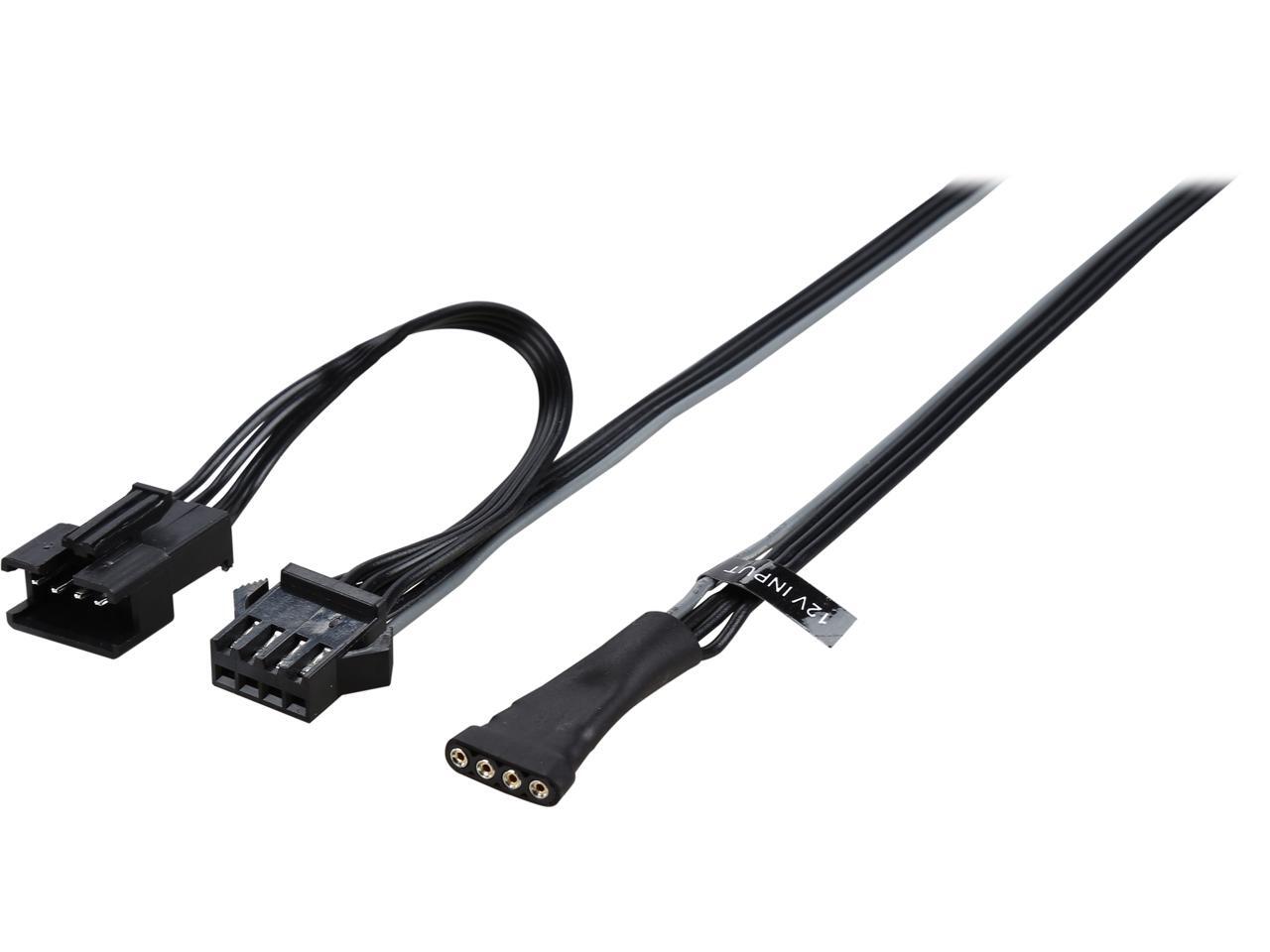

the connector on the right side would go into the RGB header
round flare
Is the rgb header on the back side
because there's this thing I have nothing plugged into
it's in like this little panel all the fans are plugged into
I can't explain but I have that cable
I'll see if that's where I'm supposed to put it
latent bronze
normally the headers would be located here https://i.gyazo.com/5784b73e20895be04f7fd69228e5c276.png
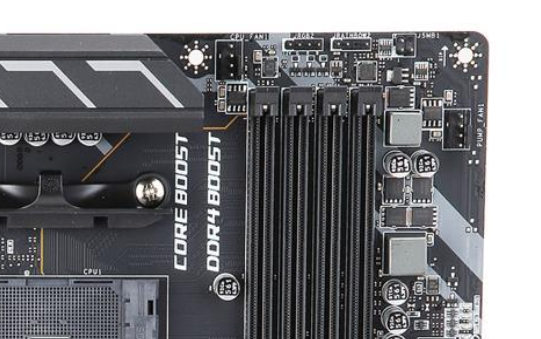

sometimes on the bottom
chilly marsh
ye
chilly marsh
your mb manual is your best friend when plugging all those cables in
it'll prob help you the most
round flare
I've looked at it and the only thing it tells me is cpu and m.2 installation
chilly marsh
try to understand and follow it, and if you dont understand certain things, you can ask people here, but usually it should help you understand everything
did you look through all of it?
latent bronze
https://i.gyazo.com/211e369925d96b0a6dcba847382b9c88.png straight from his manual and already i see 2 RGB headers
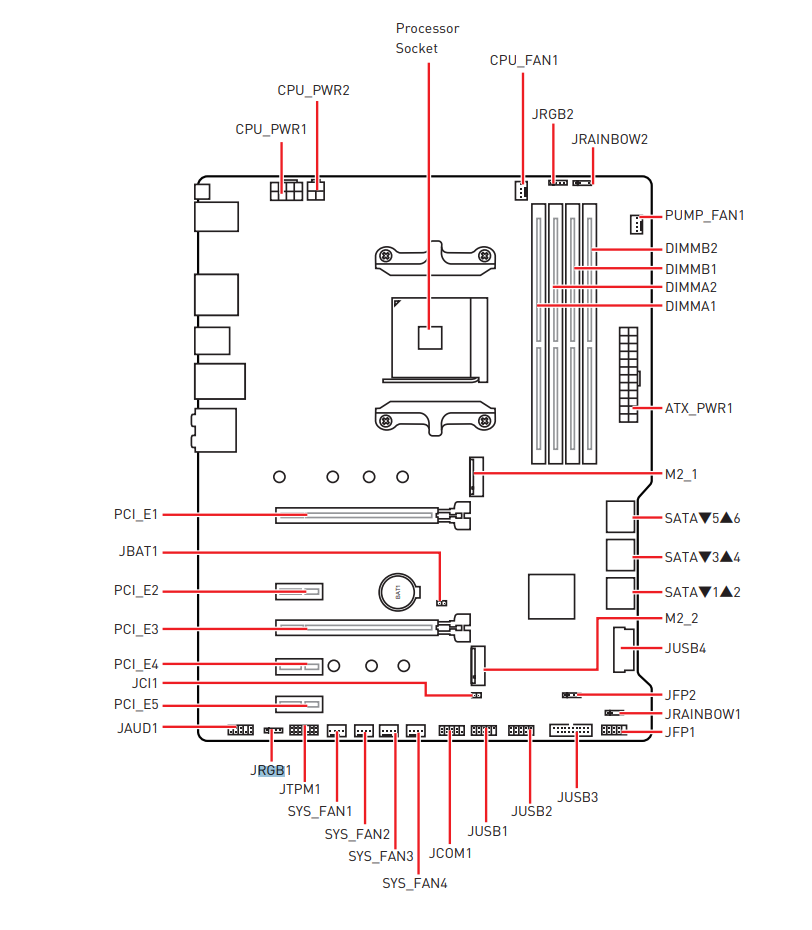
 chilly marsh
same
latent bronze
one of them highlighted
latent bronze
take a picture of what you have plugged in
if it doesn't look similar to the connector i mentioned then you have it wrong
round flare
Give me a few need finish some stuff up
latent bronze
ok
latent bronze
The fans are also hooked up to the fan headers on the board or are they being powered by the PSU
round flare
Are those the fan headers
 rough loom
4 pin little cable XD
round flare
yeah the makes sense sorry it's my first build
I can't see anything like that though
chilly marsh
for my first build, i tried to understand as much as i could in the manual, then plugged whatever it said to plug in lol
i already knew what to plug for the cpu and whatnot, only things that took more thinking was where the smaller cables plugged into the mb
round flare
Do I look for the manual online because the only one I have is the quick install
chilly marsh
it should come with your mb
latent bronze
It will actually say fan on it
wind lark
Will it damage my pc if it’s on the carpet?
little osprey
no
 bronze python
Just dust
lime forge
little osprey
Dust 2 is better
latent bronze
^
quaint terrace
https://pcpartpicker.com/list/xfkrHB i think im gonna settle on this o: gonna start buying this coming weekend
im still open for any suggestions though, if any, thanks ^^
gonna be my first build so im still a little nervous teehee
oh and also theres like a note/compatibility thing, if anyone would like to explain it a little more or i guess suggest on what to change
deep skiff
@quaint terrace get the rx 5700xt gaming x, $17 shipping is too high and it performs the same as the nitro+
quaint terrace
MSI gaming x? O: oooh
 nimble osprey
opinions on reselling my old pc: 2 4gb rx 480s, i-6700k aio cooled, 16gb ram, 256gb ssd, 1tb hdd, z170-k asus mobo, 850w
Prices?
latent bronze
500$
nimble osprey
psu bronze, it's just a 120mm
latent bronze
I was mainly looking more on the CPU, GPU and the 8gb of memory
deep skiff
16gb u mean
nimble osprey
of gpu mem)
latent bronze
he said 2 4gb
deep skiff
oh ic vram
nimble osprey
sounds good 🙂 thanks
round flare
Looking at my current build what should I upgrade first and what to https://pcpartpicker.com/list/fy96hg
 coarse coral
cpu
latent bronze
3400G is a good APU if you are trying to cut corners on cost
coarse coral
3600
latent bronze
round flare
what about 2700x
coarse coral
3600 is 10%+ faster than 2700x and about same price
and your board natively supports the new ryzens
round flare
I don't run any intensive games besides d2 which is the only one that takes a bot of a toll
*bit
yes I'm on a budget
latent bronze
RX 570 is still a good GPU but i would go for Sapphire over MSI
deep skiff
yeah thats a great price for a 3600
 valid heron
Hey guys I’m trying to get a a wish list for stuff to save up to I was wondering what you guys think is the best pc possible to build at the moment
deep skiff
@valid heron what price range?
round flare
can't do much about the gpu I already bought it and I got a great deal at 130 I think
deep skiff
yeah thats a good price for a 8gb card
latent bronze
oh ok
valid heron
@deep skiff unlimited
valid heron
@deep skiff go crazy
round flare
Unlimited
latent bronze
just for me for now on i am only going to buy GPU's that specializes in that GPU brand type
round flare
W H A T
latent bronze
which is why for my 1660 i went for EVGA
round flare
Crossfire titan rtx's
round flare
sorry I'm bad at pc'ing
deep skiff
oh boy here comes my x570 aqua build imma have fun
little osprey
was someone buying a 3600
round flare
me sir but not this instant
little osprey
Ah - I was just gonna link the discount and promo code - both are in tech deals
round flare
Unfortunately won't be able to right now but it's definitely the first thing I'm gonna upgrade before the end of the year
latent bronze
I think he sound something better than a promo code
round flare
microcenter
but seeing that go on sale again is like the lottery
they have too many things
deep skiff
anybody know how much ram the x570 aqua can support?
latent bronze
64gb i believe
round flare
Wait is that the white board with water cooling I saw on bitwit
deep skiff
i thought it was 128 but idk
latent bronze
i haven't looked at memory too much so if there is 32gb sticks then yes it would
deep skiff
if its the most overkill build its gotta have that board
round flare
so are you gonna sli rtx titans
valid heron
Yah if you guys can send me your favorite build I would appreciate it
latent bronze
If i won the lotto i would build a water loop system with that board
would make things easier as well
and for the case i would use that one from Lian Li
round flare
I would get elon musk to build me an ice cooled case
wait what would happen if you put a pc in a vacuum
like an air vacuum I mean
latent bronze
There are people that has built a PC inside of a freezer before
latent bronze
This i find would be the best case for easier to build water loop cooling with the ASRock Aqua https://i.ytimg.com/vi/GceR7tKrtjQ/maxresdefault.jpg
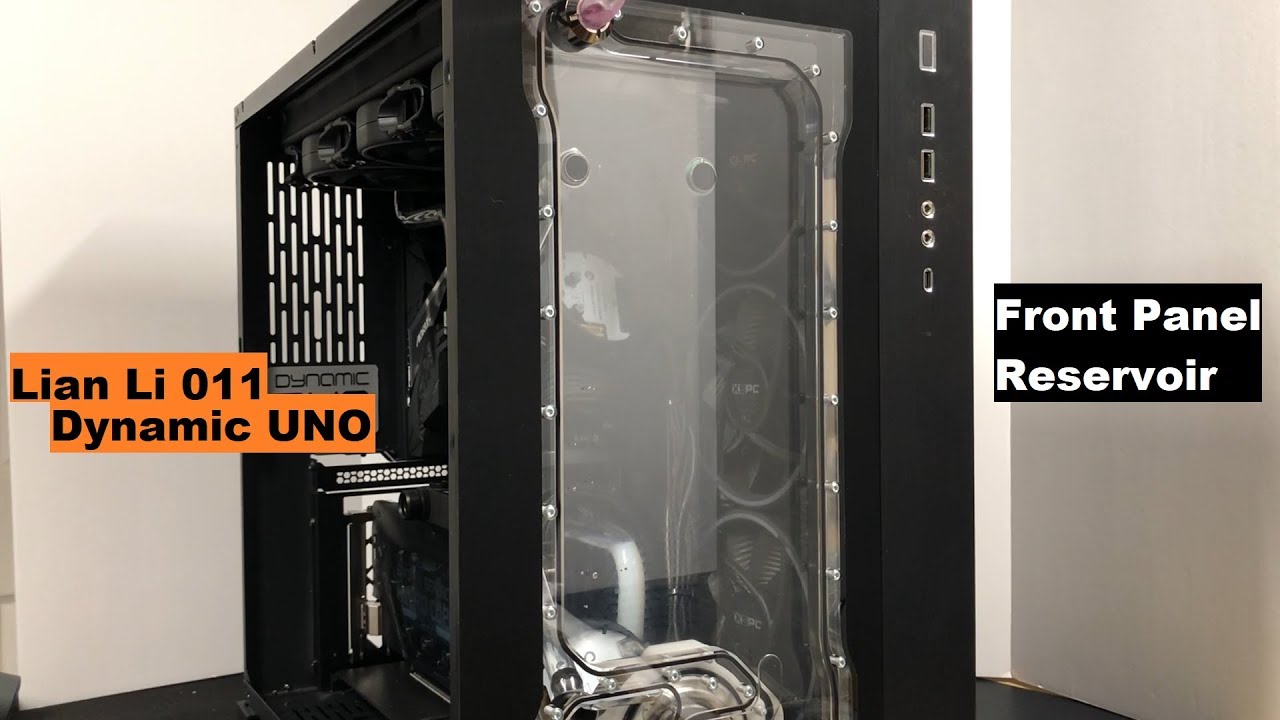
 round flare
here you go
also this was me looking at prices only ok don't hurt me
Idk much about pc
deep skiff
sli'd 2080 ti's are better than sli'd rtx titans for some reason
latent bronze
you mean hybrid
deep skiff
you can replace it with a waterblock easily
they designed it with customizing it in mind
latent bronze
Well one thing is for sure i would still be cheap if i won the lotto cause i would use a 2060 super lol
round flare
nothing wrong with saving money
latent bronze
ya but if you won 50 million dollars that is just being cheap even after spending 1000$ on a motherboard lol
oh and putting a Ryzen 5 3600 in it lol
I would call it the cringe worthy system lol
round flare
raspberry pi is my rig after winning the lottery
latent bronze
I already own the Pi 3, 3B+ and 4 (with 2gb of memory)
round flare
what can it run
latent bronze
3 and 3B+ you can run RetroPie which is retro games and the Pi 4 since that OS isn't out yet can use it for browsing and media
valid heron
Thanks for the help you guys
agile gust
@lime forge What do you think?
lime forge
i think that graphics card is cutting it real close 😬
other than that, its very clean
chilly marsh
lmao
deep skiff
if you replaced the case it'd look much better tho
agile gust
idk I found it online
chilly marsh
it looks very nice, just the case could be improved
agile gust
thought ti was pretty impressive to fit it in
chilly marsh
it was
 uneven elm
Hi Guys! I was wondering if someone could help me with a laptop configuration/specs comparison between 2 devices
I am considering buying the ASUS Zenbook Flip laptop. There are 2 choices that I have: Zenbook Flip S or Zenbook Flip 14.
The Newegg website is selling both (which appear to have identical specs), but have a $300 price difference. Could someone take a look at the two links below and help me understand if there are any major differences in the devices? If not, I may as well go for the cheaper one.
Here are the links for both devices. I was wondering if there is any major difference between the two.
little osprey
screen size, connectivity (first has 2x usb 3.1 type a and 1x usb c, the second has 2x usb c), screen size, and the second one has an older kaby lake cpu, honestly i am unsure why it is more expensive, but i am missing something
the first one has a newer cpu that has a slightly higher turbo
uneven elm
first one = first link?
little osprey
yes
uneven elm
Another thing I noticed was Whiskey Lake
Not sure how important or significant that is.
uneven elm
To me, the cheaper one is more appealing because it has an HDMI port.
and the larger screen size
although I wonder if there is an actual difference in the display material used for the touch screens on both devices. I am not familiar with this tech at all.
little osprey
i'm not sure what i am missing on the flip s (second link) that makes it more expensive as the first link is technically newer
i'
am not either, sorry, i was just reading off the spec sheet
it appears on paper that the first one is "better"
which makes me wonder why it's $200 less
uneven elm
Me too. Upon further research, I learnt that both laptops were released last year. The blue is a few months newer than the grey
little osprey
i don't know if there's a different case material i am missing
uneven elm
but technically, the grey one seems ahead. IDK
little osprey
that is strange, the grey one has a newer cpu
uneven elm
Quite strange.
little osprey
as far as i can tell the only difference is the cpu, the ports, and the size of the screen
uneven elm
and the weight I guess.
little osprey
especially if the first one has the extra ports, it's cheaper and newer, technically faster cpu (although to be fair the impact of that extra 600MHz boost is probably somewhat insignificant in every day use)
yeah, but that's by virtue of larger screen and case
uneven elm
yeah, I figured a difference of that much is actually insignificant.
little osprey
i'd presume they may have different SSDs inside but the tangible impact of that is insignificant
uneven elm
lol, thank you! you are making my decision so much easier
little osprey
i keep looking at it to make sure i'm not missing something glaring but i think the first one is definitely the better buy
uneven elm
GREY:
14-inch LED-backlit Full HD (1920 by1080)
NTSC:72%, wide 100% sRGB color gamut
178° wide-view technology
1,000:1 Dynamic contrast ratio
ASUS Eye Care technology for up to 30% blue-light reduction
7.15mm-thin bezel with 80% screen-to-body ratio
BLUE:
13.3” LED-backlit Full HD (1920 x 1080)
60Hz refresh rate, wide 100% sRGB colour gamut
178° wide-view technology
Corning® Gorilla® Glass
ASUS Eye Care technology for up to 30% blue-light reduction
6.11mm-thin bezel with 80% screen-to-body ratio
Found another difference. Blue one claims to have gorilla glass while grey doesn't.
Not sure how to compare the displays. If you know anything about the display specs above, I'd really appreciate your input
 steady breach
@uneven elm Are you looking into gaming?
uneven elm
No, just regular use. For university, work and a little bit of photoshop here and there.
so Microsoft office suit heavy
steady breach
then have you looked at the razer blade?
uneven elm
I have not.
steady breach
it may have more cores or a better screen for cheaper

Razer
The Razer Blade Stealth 13-inch laptop ultrabook features a more powerful NVIDIA GeForce MX150 4GB graphics and the new Whisky Lake Intel Core i7 processor.
see if you like
well built with i7 with gaming on the side if you want
or razer blade 15

The Razer Blade is available in various specifications. Configure display and graphic cards, storage and color that suits your style.
 golden forge
I am sure this has been talked to to death by sooo many people... but Intel i9 9900 vs AMD 3900x. Intel is less expensive and runs roughly the same as 3900x. I do a lot of film editing and so far, my i7 8700 isn’t to bad. Intel seems good, but I am just wondering if the more cores/ threads is worth it over Intels higher Ghz.
I also have the motherboard and fan for an intel cpu so, as I am looking to upgrade, I am having to keep that in mind. AMD = new Mobo, Cpu, and fan. Intel upgrade= New cpu and that’s it.
 scarlet edge
Are you sure that your CPU is the bottleneck?
What's your CPU, GPU, RAM, SSD usage/speeds looking like while you edit?
Also, have you tried overclocking the CPU you've got?
golden forge
As of right now: i7 8700 (not the K), Nividia 1080, 16GB, 1 tb ssd/ 4tb hdd. My ram seems to be the culprit (which is why I just bought 32 gb and is coming today). I put ram at 10 gb max on premiere and it is hitting that max. I’m not just editing 720 or 1080 vids. I’m doing 4K edits with a lot of overlays. I’m not an expert on how adobe works with cpus but, I’d say those extra cores and threads would really help in this case. GPU isn’t really helpful.... I also game a lot and during this past Modern Warfare beta, the game was using 45% ram, 90-99% cpu, and 20% GPU. I am noticing that with newer games and updates for games, CPU’s are getting heavier work loads. More than the gpus, which is weird to me.
@scarlet edge
scarlet edge
@golden forge Here is a good video to check out which compares benchmarks between the similarly priced 3900x and 9900k. 3900x seems to take the lead but you will need to consider the extra cost of a new motherboard, extra build time, etc. https://www.youtube.com/watch?v=yqQ2X1y0jvw&feature=youtu.be&t=616

For the AMD R9 3900X CPU review, we're focusing first on production workloads (Adobe Premiere, Photoshop, Blender, V-Ray, et al.) and secondarily on gaming. ...
golden forge
Yeah. Thats why I am looking at the intel. HOWEVER.... the mobo I have now would suck if I used it for the 9900. The years between them and the updated parts to help the 9900 run smoother isn't there on my mobo. So, either way, I am looking at getting a new mobo if I want to upgrade to anything ( 9900 and 3900x specifically).
little osprey
if what you're doing scales more with cores, then it's a pretty easy choice, but if it scales with raw speed you're probably going to be best suited staying with the intel build
 polar brook
I just tonight replaced my psu and now my pc won’t boot past the bios...any ideas ?
Ryzen 2700
32gb Corsair
Evga 750 g5
Gigabyte x470 ultra gaming
rough loom
check the connection to the mobo and drives
polar brook
They are good took them back off and reconnected
rough loom
any errors?
polar brook
Kernel something or another is the only one I could catch otherwise it was a quick bsod and bios also says preparing automatic repair after that happens
polar brook
I’m in bed atm...I gave up have to work in the am I can when I get home from work tomorrow
rough loom
suspects are either power to mobo or cpu if you just did psu only
polar brook
I know after the last windows update it’s crashed quite a bit with kernel stuff
Yeah psu only
polar brook
The ssd that it boots on is kinda old
rough loom
try to boot from a install USB
polar brook
I did...freezes at boot part
rough loom
weird
polar brook
I’ll get the exact error code after work tomorrow thank you for helping
And yeah I’m lost as to wtf is going on
rough loom
np man. hopefully its something that can be traced easily
polar brook
I wanna try not to bring it in to a shop
 peak crane
It's probably PSU failure.
If you specifically replaced that part and that part only.
little osprey
Did you perhaps accidentally plug a pci-e 8 pin in the CPU 8 pin plug?
I've done that more than once after a long day of fiddling
If you show the plug I can tell right away
polar brook
Idk how or why but let it sit over night and it booted right up
rough loom
perhaps a bios reset with power off
I have a weird glitch where my sound hardware legit desyncs untill I hard boot then reboot once hot and then its fine
polar brook
Definitely weird for sure
Well at least I get to finish it now when I get home from work
This is a bit unacceptable LOL
little osprey
aw man that'll be behind a panel lol
just SMASH it in there
(not what you should actually do)
 still roostBOT
 tweeds4200#9663 has been warned
Reason: Bad word usage
rough loom
I bent a panel trying that. dont do that XD
little osprey
i definitely did too but i was fed up with the garbage corsair case
so it earned that
rough loom
cable extensions will help on my next build
polar brook
I got the case for free so I can’t complain about it
little osprey
polar brook
I appreciate everyone helping out
little osprey
sorry, just being a smart alec lol
polar brook
Nah your good I dish it out so I can take it as well 😉
rough loom
dear mighty tech jesus. Bless me with SSD's for my build for these HD's are outdated and sloooow
rough loom
i need 2 1 tb's and a hybrid Storage drive for other things
polar brook
Are nvme drives worth it compared to a regular ssd
little osprey
i have picked up two 1tb 860 evos for i think $130? each i think
rough loom
yea. they fast and out of the way
little osprey
if they're same price or cheaper, or slightly more expensive (~10%) i say definitely
it depends on what particular drive but generally yeah
rough loom
I got 2 more months of working till my credit cards are flat so I can buy them
polar brook
I have a new egg card lol
little osprey
my 950 pro from my skylake build in 2016 was almost $1.25usd/GB but i just picked up a 1tb 970 evo plus for $194
256gb 950 pro
polar brook
This just happened
little osprey
i can't seem to pull up my receipt from my 950 pro but it was comically expensive compared to now
polar brook
That’s the one I got last night
rough loom
The kernel security check failure happens due to:
Memory problems
Outdated drivers
Viruses
Corrupted Windows system files
Security programs
A damaged or corrupted hard disk
little osprey
that could be a lot of things
rough loom
gonna guess. mem, hard disk, or OS issues
polar brook
Now it won’t boot past bios again
rough loom
start with memory first I guess
little osprey
i guess start with what you can, disable any overclock or memory xmp
polar brook
It’s all factory I reset it all last night
rough loom
reseat your ram
start with 1 stick at a time
stupid thing like that is you could have something as dumb as a sata cable failing
polar brook
This is with 1 stick of ram