#building-and-recc-chat
1 messages · Page 409 of 1
 sudden turret
 autumn wolf
depending on your actual gpu, the plugs can vary but should be psu into the power brick and the other end should say pcie
there should be a few different plugs that goes into the gpu depending on how many pins there are
8pin, 2x6pin, 2x8pin 8pin x 6pin, etc
 valid dagger
autumn wolf
valid dagger
autumn wolf
2x8pin. so you'll need 2 cables that have 8pin pcie or 1 cable that has 2 if your power supply provided one
valid dagger
Found it phew
@autumn wolf only thing left is my hff
Hdd
I cannot find the psu cord for that
autumn wolf
there should be a sata cable
theyre skinny plugs and the end should be 1 8pin psu cable
valid dagger
Found it
 rough loom
@scarlet quarry thats why the HAF-X is still one of the top contenders on GN's case list to this day
200 front, 200 side, dual 200 top for the rad. and a 140 rear. And used to be some special brackets for gpu directed cooling ducts and a special one for a 80mm behind the drive cages.
 stark spruce
I have a haf932 case which is very similar. One of the best cases for airflow.
 latent bronze
jumped in his time machine to go back to 2009
rough loom
only downside, they are a B#%ch to clean and weigh a metric ton
stark spruce
It was built in 2011 so pretty close Ecks lol
rough loom
and the acrylic side panel scratches easy
stark spruce
The 932 only has a small acrylic side. As far as cleaning its really not bad
rough loom
though its just acrylic so...drill the rivets and cut a new piece and paint the rivets and put them back in
latent bronze
Well this article said it was published in 2009 http://www.pcstats.com/articleview.cfm?articleID=2325
Cooler Master HAF 932 Full Tower Case Review - PCSTATS.com
stark spruce
I wasn't saying the case wasn't that old just stating the age of my PC lol
latent bronze
Also talking about the case not your system
stark spruce
lol
rough loom
oh yea. HAF-X i think was like 2010
back when graphics cards were jet engine hot. this puppy used to cool two 680 superclocks
If they made a new version. Just change the side panel to tinted tempered glass. Add 1 more 200mm and update the IO front and it would be perfect. I would buy it again
stark spruce
I agree
rough loom
the extra bay cages where drives would go arent needed anymore
were used for like....temp monitors and fan front mounted controllers for Liquid back in the day
 wary saffron
hi
 deep skiff
hi
 lime forge
hi
deep skiff
@lime forge hi
lime forge
@deep skiff hi
wary saffron
Can someone tell me if this is a good build i only have a 650 CAD budget
CPU: AMD Ryzen 3 2200G 3.5 GHz Quad-Core Processor-108.75$
Motherboard: Gigabyte B450M DS3H Micro ATX AM4 Motherboard-90$
RAM: Corsair Vengeance LPX 8 GB (1 x 8 GB) DDR4-2400 Memory-45$
HDU: Western Digital Caviar Blue 1 TB 3.5" 7200RPM Internal Hard Drive-52.75$
SSD: Kingston A400 120 GB 2.5" Solid State Drive-27$
GPU: MSI Radeon RX 570 8 GB ARMOR OC Video Card-179$
wait
also
lime forge
sounds like a good budget build
but
you can get a 2tb hard drive for the same price
wary saffron
Case: Cooler Master MasterBox Q300L MicroATX Mini Tower Case-58.50$
PSU: EVGA 500 W 80+ Certified ATX Power Supply
for
lime forge
wary saffron
yeah
lime forge
yep
wary saffron
ok thank you bye!
lime forge
cya
 fallow knoll
Sooo, I was on here a while ago and got help making a build, but now looking on, and talking to a few people, I will prob never overclock, nor run 4k. So could someone possibly help me build a pc that would have plenty of ram, runs almost any game at 1080p amazingly?
 elder loom
fallow knoll
elder loom
fallow knoll
See, I am not super super smart when it comes to the hz stuff, so help me understand that, and preferably under 1300 if possible, if not, doesnt matter for budget then.
 pulsar garnet
 chilly marsh
with your budget @fallow knoll you can run most games at 1440p with 60+fps
fallow knoll
Well, i have been kinda looking around online trying to learn more about it, and from what I can see to my knowledge, an AMD Radeon RX 580 would serve me well
But i dont know that much and yea 60hz is fine. If i can go way cheaper than 1300 for 1080p because I dont need 1440p, then i want to go cheaper lol. If i can save money then by all means why not right lol
chilly marsh
whats the lowest you plan to go for
even with a 600 budget, you can get 60fps for most games
if not more
fallow knoll
I mean spending 600 through 700 would be nice.
And would that be like 60fps for games like skyrim and Eco?
fallow knoll
Well then hell yea lol, that pricing is fine. I just don't understand basic pc building when online
I'd be one happy human if you'd enlighten me on how to spend just that much for a comp to do that lol
fallow knoll
Alright, thank you.
chilly marsh
heres a start
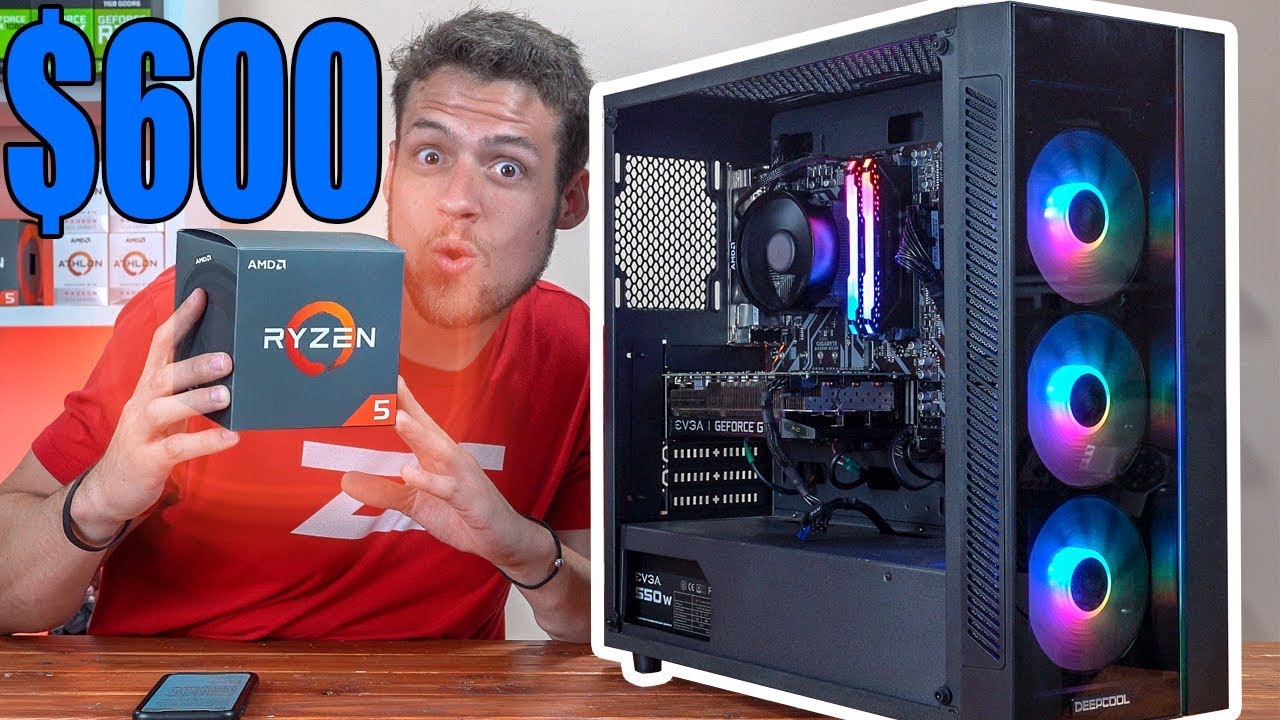
Today we are benchmarking and building a $600 gaming PC build with a Ryzen CPU that you did NOT expect ;) Let me know what you thought of these impressive be...
thats a decent video
the build is above 600
below 700
latent bronze
sadly in a case that doesn't have great airflow
chilly marsh
if you see parts that arent to your liking, maybe the case isnt for you, you can choose a couple of cases you like for the price, and see if its good
there it is @latent bronze
if you dont like certain parts, choose some others but that are similar and you can ask us, and we'll see if its a good price, whoever is on
latent bronze
I used to have the standard RGB one which the only difference is the PSU shroud and the airflow sucked
fallow knoll
So that is a good build but nit a good case?
chilly marsh
ye
so you can research some cases below 90 bucks or something with all around good features and airflow, whatever you like man
color, airflow, how big, etc etc etc.
latent bronze
There is cases like this one which is shorter on the height but wider on the sides https://www.newegg.com/p/N82E16811147273
chilly marsh
do you like shorter but wider, or taller but a bit less wide but more average or traditional
mr @fallow knoll
latent bronze
Well that case his system can look a lot more cleaner cable wise
chilly marsh
depends
latent bronze
PSU is on the other side which the only thing is the 4/8 pin CPU cable, 24 pin MB cable and the GPU cable if the GPU needs it
fallow knoll
I dont have much room on my desk wide wise
So taller and skinny is my usual go to, but im sure i could squish things on my desk over or off if needed lol
latent bronze
Well you have 10$ options like this from Ikea that you can have if you don't have desk space
You can toss a what if and good chance i will have a solution for it 😛
and that table also comes in black cause i have that table next to my bed lol
fallow knoll
Soo on that cideo posted, he doesnt post the link for a cpu cooler, and I might just be dumb (100%) but i dont see where he talks about it.
latent bronze
@fallow knoll the CPU cooler he is using is the stock one
So it is already included
latent bronze
Hope you have a SSD for the OS
fallow knoll
He has one on the build. A 120gb
latent bronze
240gb minimum
latent bronze
You have other things like programs and such
rough loom
programs and downloaded things can add up quickly. plus not all programs allow you to change what drive they are installed on
latent bronze
it is usually just safe to go with 240gb for the minimum and most tech youtube channels usually says it
rough loom
120 is only really good for like a test bench drive
and thats not even with games on it
latent bronze
Windows also takes up like what 50gb
fallow knoll
Ah okay. So bump it up to 240gb or should i go for more than that?
Because i dont mind spending a bit more
rough loom
if you can afford more I would
latent bronze
120gb/128gb i would use as a USB 3/C External for games
Well for swapping between my desktop and laptop >_<
rough loom
I have a 1tb just standard HD and im using 577 out of it and im not even sure what all of it is thats on there
just adds up over time
latent bronze
https://i.gyazo.com/aea3bcd35cc4d83784d77b528fa0d7de.png These are all my drives lol

Other games as well is Uplay, B.net and Epic
fallow knoll
So, that case you listed above is good?
latent bronze
yep it is for sure better than the Deepcool one
and easier to clean as well
@fallow knoll For SSD's as well if you were to use a 2.5" version i would go with this one https://www.newegg.com/western-digital-blue-250gb/p/N82E16820250086
fallow knoll
Well, looking at the prices, i see a 500gb western blue scorpio blue for 42 bucks
And even 1tb for 52$ should i go for that?
latent bronze
You know i am talking about SSD's
fallow knoll
Oh, i guess i am not looking at that line lol
latent bronze
speed wise is alot different as well
latent bronze
You can if you want it is up to you in the end but like you also said you have a 4TB hard drive which would be good for a secondary
fallow knoll
Yea. I mean, I have time and money to wait to buy stuff so if it does ever catch up on me, i could upgrade at any point, couldnt I?
latent bronze
You can upgrade drives or even add more
fallow knoll
The case you recommended bas case fans right? Or do i have to go out of my way to buy some?
My wife just asked that, and im unsure
latent bronze
I have 3 SSD's in my system which i use 2 for games and a 240gb for the OS and you can see in the image i am using less than 50% of my drive for the OS and programs
The case comes with pretty good fans already and i believe you can add in 2 more
fallow knoll
Would i need to add them in or should it be fine?
latent bronze
You can add 2 more for exhaust
When i look at cases i always go for airflow than the looks
last time i went for looks i had bad airflow
fallow knoll
Yea
latent bronze
For cases that would usually come with at least 3 fans already try it out and see if it is enough cooling and if it is not just add some more
fallow knoll
Well case and motherboard are on their way now. Next paycheck I'll buy the rest. Got a child on the way so gotta basically save 50% of my check so limited lol
 near ingot
Hey has anyone used the ASUS AM4 TUF Gaming x570 with a 3700x? Did anyone have any problems recently?
 fossil hedge
nope.
 little osprey
It's a popular pick for 3700x and up on x570, big userbase for support.
 steel flame
@latent bronze ty
 swift glen
hey folks, I am looking for a MB to support my GeForce GFX 970 graphics card; it wont fit on my older MB as it covers up SATA ports - its a double wide 11" long card..
latent bronze
And not even telling us which chipset it is
 vague willow
F
 astral hatch
Opinions?
https://pcpartpicker.com/list/jYkyp8
 short basalt
Looks like a rather nice combination
deep skiff
https://pcpartpicker.com/list/Y66dn7 here’s one for $16 more with a better gpu and psu, and the non X 2600+ a cheaper nvme drive
little osprey
I'd recommend spending a bit more to get a 3600, maybe another $50 on a nice air cooler for quiet performance, if you want, you could find a 550W+ Gold for $70-$90.
It is very important to evaluate PSU's on a model specific basis vs by brand - that RM650X is an excellent unit, I'd pay the extra.
This type of memory is a crowd favorite for zen2, both for compatibility and OC potential.
https://www.newegg.com/ballistix-16gb-288-pin-ddr4-sdram/p/N82E16820164107
astral hatch
My budget is 900 tho...
little osprey
Best budget CPU and mobo?
little osprey
I have an optiplex rn I wanna build a new system
 dark raven
How much, because new systems will most likely need a new case, optiplexs are hard to get the new boards to fit in
Also ram is needed too
little osprey
$550
dark raven
Ddr3 and ddr4 are NOT compatible with each other
Ok, one moment
Any needs or wants?
little osprey
Most likely going ddr3
little osprey
Def want a rx 580 gpu and psu is 500 watt
I have gpu case and psu and ssd I just wanna see if I can get a cheaper mobo and CPu
dark raven
Case? Why you need that
Ok, here's the deal
No one making new CPUs and boards will allow ddr3 you must either buy a older CPU, like my favorite the i7 4790k or go with ddr4
With a matching board for it
little osprey
Like I’m ordering parts offline I have everything selected I just wanna know if there are any cpus and mobos that are cheap
little osprey
dark raven
Ok
little osprey
Amazon and Newegg
dark raven
So you can't use ddr3 on any ryzen board
little osprey
I didn’t even notice it said ddr4
dark raven
It litterally will not fit and it will break the system if you Force it
little osprey
So find ddr4? Correct
little osprey
Corsair vengeance ddr4 8gb work
dark raven
You can probably get ddr4 pretty cheap, Don't pay extra for higher speed, if it's 2133 and 2400 at same price get faster but if 3200 is more expensive, take your chances with the cheaper
I litterally just got generic Corsair ram and I can get to at least 3200mhz on a 2400mhz ram
little osprey
Word thank you
deep skiff
what kind of volts tho
dark raven
I forgot
deep skiff
somebody got their ddr2 stable at 2.15V 👀
 still roostBOT
 lockinhind#6726 has been warned
Reason: Bad word usage
deep skiff
L
dark raven
Wow
little osprey
So does it matter what cpu / mobo I get as long as it’s ddr4 ?
dark raven
Not world of Warcraft either
little osprey
Cuz I wanna keep the build cheaper then upgrade later
dark raven
Yes it matters
CPUs have supported boards, i78700ks will only work on lga 1155, xeons I think use lga 1156, and ryzens use am4
Your CPU and mobo are fine
Basically ask someone to look before you buy
Probably in here
Better yet, ask 2 people
little osprey
Should I get a lower priced cpu or keep the current one ?
dark raven
Ryzen 3 is a ok cpu
Not great but I can play currently released games
Just streaming while gaming might be a problem
little osprey
Should I get a better one then? I wanna be able to get good FPS on games like the new cod and fortnite
dark raven
Unless you're streaming or recording no
little osprey
Ok ty
dark raven
You will be fine at 1080p med-low for the new cod
little osprey
Thank you
 gaunt socket
Which mid-tier card should I get? The 1660 ti, the 1070 ti or the 2060 ti?
 coarse coral
2060 super is pretty good
fallow knoll
So on the build for thst one video far far away ago, the mother board is a Gigabyte B450M DS3H Micro ATX AM4 Motherboard. My current PC has a MSI B350 PC Mate. Is the one i have better or the old one better?
deep skiff
the 450m is better, a newer chipset design
fallow knoll
Okay. Is there a big difference in the two or not really? Like should I purchase the new one?
deep skiff
what cpu are you planning on using?
fallow knoll
Well, currently I have the AMD Ryzen 3 1200, but the one on the list for the new computer is AMD Ryzen 5 1600
deep skiff
for first gen the b350 should be fine
b450/x470 was for ryzen 2xxx, and x570,(whenever b550 drops) is ryzen 3xxx
fallow knoll
So then the build of thst one video is not too good
deep skiff
depends on the pricing. a lot of the b350 boards are more expensive than the b450, due to the low supply of the first gen ryzen boards/chips, and they stopped making them
fallow knoll
Well my friend offered to get me the b450 for free. So should i go ahead and take and use it? Would it benefit me at all?
https://pcpartpicker.com/user/LightDarkness/saved/#view=2KCPnQ
This is basically what the video showed minus the case and headphones lol. As well as the storage. Should i get the new mother board and all that stuff? As well as if I have the money should I go for a bigger better gpu?
deep skiff
:( pcpartpicker is down rn
latent bronze
@fallow knoll If your friend is giving you a free motherboard why not replace the CPU for a Ryzen 5 2600 instead
 quaint terrace
anyone got suggestion for a $1200 usd gaming/streaming pc build?
little osprey
.
An Nvidia card may be more appropriate if single PC streaming is a priority interest
 wise hawk
I’m having some issues getting a new build to run right, is this a good chat to ask some troubleshooting questions?
deep skiff
Probably this or #general-chat
wise hawk
Well I’ll give it a shot here first.
Part list:
https://pcpartpicker.com/list/fgfpdX
First time build for my brother. Had plugged in and correct I thought, but after turning power on, fans run for 20 seconds, no video then turns off. Restarts again after a few seconds and repeats.
Took things out one by one, but with just the RAM in it still cycles. Ran paperclip test, power supply fan turned on. Not sure what the issue is, and would appreciate any recommendations.
 agile bear
does your motherboard give you an lights of any sorts that could indicate an issue?
little osprey
I'd recommend 3600, b450 gaming plus or b450 tomahawk, ram is perfect , cooler is great, ssd is great, I'd pick a cheaper and or better PSU
 gloomy rock
Why not a 3900x and 2080ti 
agile bear
lol cuz an atom processor is superior
gloomy rock
I made a part list earlier with a slight cpu bottleneck. It was like over 6 grand with a Celeron
Oh it was 18 grand
agile bear
sir that is considered by many to tickle their fancies
little osprey
Don't cheap out on the mobo like that, get an XI apex, come on
agile bear
also no 8k panels smh
agile bear
where is the custom wata loop
gloomy rock
Air cooling is better imo. You can match water cooling with air cooling and air-cooling looks sexier imo
I hate, no, absolutely despise the look of the loops running to and from components
agile bear
then at least get a nicer looking aircooler maybe one with a vapor chamber
gloomy rock
The air cooler is nice and simple. Not pumps, no radiators, just one big sexy breathing square on some edgy aluminum.
Maybe, see that's a good idea
little osprey
Lol, have you seen my recent water build dumpster fire
gloomy rock
I may be salty because I tried making a hydro loop before and the tubbing had a hole that was too small to see, started the pump and lost an 8700k and gtx 1060. Had to replace them both. My board was saved
And no, I'd love to see that
little osprey
I should get up and finish, but from yesterday's pressure test https://puu.sh/Ek754/f6c482ae40.jpg

 agile bear
beautiful
little osprey
But ya, I'm a huge AIO hater, haven't touched anything water until now
agile bear
why hate on aios?
chilly marsh
everyone has their reasons for things
agile bear
wata coolin
gloomy rock
I just hate it because I lost a couple hundred dollars worth
little osprey
I think a lot of people buy AIOs for the wrong reasons e.g. because you need an AIO for a 9900k etc, reality shows top tier air - D15 or equivalent is close enough to the best AIOs, especially in steady state, though they can have the advantage for burst performance with a cold coolant temp
deep skiff
has 10 480mm rads hahaha
little osprey
As for the "right" reasons - in my opinion - aesthetics, undefined preverence, size constraints, RGB, less fragile, etc
gloomy rock
I do hate water cooling due to the risk and the chance of leaking.
But I will admit, I can see why people like it.
little osprey
Ya, if you've ever seen me give build advice, I try to be very clear about what I think should be left to preference
But stress the facts as not to mislead - e.g. "I have to get aio for x CPU"
 hearty verge
little osprey
hearty verge
little osprey
Smart choice.
hearty verge
Going to ditch the liquid metal too.
little osprey
I strongly recommend you do - and be very careful cleaning it up, I would use paper towel, then coffee filters, and very lastly, isopropanol
hearty verge
for some reason the t.prob iirc doest work.. is that normal?
hearty verge
yes cool labs
I might be wrong about the sensor. But I thought that I saw it in the bios, or a program saying it was NA.
What should this CPU be when its idle?
I think I hover around 40
little osprey
Idle temps aren't really that useful, say, under 40 something is fine
post your PSU and GPU models when you can, the cpu-z shows the rest
I just ask people to run a userbench because it saves a ton of time
 west finch
why use iso for cleaning instead of acetone?
little osprey
Gives all the data we need to do most troubelshooting
hearty verge
What program is the best to get all the info?
little osprey
Acetone will eat things you don't want it to, doesn't help much when trying to scrub LM residue off - though I've only used it on conductonaut
Can someone recommend me a egpu enclosure that will work with a 2080 extreme from gigabyte aorus?
@hearty verge https://userbenchmark.com

Top Market Research & Genuine Product Insight from our Users. Quickly find category leading products with UserBenchmark.
Run that, post link here after you reset to defaults in bios
Feel free to dm me with recommendations
If you want to make it go quicker, take all but your boot drive offline
hearty verge
physically unplug or disable in the BIOS?
little osprey
@little osprey Razer Core v2 seems popular - I'm not a fan of razer, but I know many are
I’ll check what size the gpu has to be. Thank you
Disable in bios is fine, TBH leaving them on is ok as long as you don't mind waiting 5 or so mins for the full benchmark to run, it might give info that could help optimize your storage drives
little osprey
Ya, might take 5-10, nice system btw, that really is high end ram, also, revodrive must've been nice. 2080 ti sli too
hearty verge
@little osprey
The only thing that I wasnt sure about was this.. my PSU didnt have a plug for this part. Was unsure if it was important.
little osprey
It'snot
I'd actually recommend replacing the PSU - but only due to my assumptions made given you have SLI 2080 ti's, an ssd that was probably $700 new, ram was likely 300, etc
But most importantly, that PSU has a high-ish failure rate
little osprey
No, that's likely un-related to your current problems
hearty verge
with defualt BIOS settings ,and XMP 2 for the RAM clocked at 4000mhz and all cores set to 5.0ghz the computer will freeze make a loud buzzing noise, then reboot. With the same settings but clocked to 2666mhz it seems stable.
little osprey
Ya, definitely don't only set XMP, one of the problems is that XMP will set your vccio and vccsa far too high - could make the OC unstable, and likely degrades the IMC over time
hearty verge
OK - so what do I need to do?
little osprey
This is only a problem with high freqency memory - 4400 is way up there
Did you reset to optimized defaults?
f5 in bios I think
hearty verge
Not yet - lll do that now.. just defaults then reboot?
little osprey
Yes
little osprey
Ah, I was about to ask why dram voltage was still1.4v
hearty verge
That’s with default not correct?
OK.. rebooted and back up to the desktop.
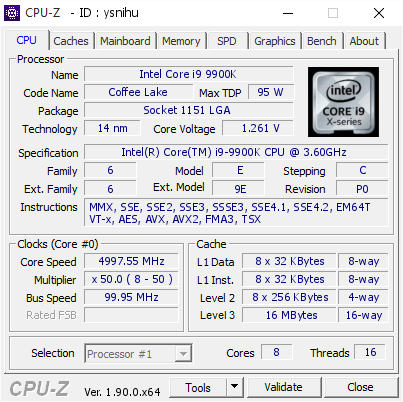
[ysnihu] Validated Dump by DESKTOP-8QJ1PHC (2019-09-24 04:58:59) - MB: Asus ROG MAXIMUS XI HERO (WI-FI) - RAM: 16384 MB
OK.. why is it saying the CPU is at 93C ?
core temp never went that high in the MAX
hearty verge
that is the CPU-Z I just RAN.
little osprey
It's bug orsomething, check the url you've posted
Happened to me a few days ago
Also idk why your gpu's never showed up in userbench, but I bet it's because you have the revodrive installed in a slot that uses cpu lanes, and the GPU's refuse to SLI without x8 each.
Can fix that by moving it to a slot at the end of the board
hearty verge
I think the board clocks to x8 when there is a second PCIE card inserted. 😦
OK.. do I need to check sensors, summary only?
just run hwinfo64?
little osprey
yes, it does, more specifically, the cpu has 16 lanes to give, and 4 additional lanes to talk to the PCH
Some slots on the board use CPU lanes, some use PCH. Everything using PCH bandwidth shares that up/down link to/from the CPU
little osprey
Right click the icon in the bottom right tray, make like this https://puu.sh/EkHbZ/82c7d07b18.png





 little osprey
Button in the bottom left corner
hearty verge
It doesnt have it all..
Would TeamView be better?
Need 8k to display it all.. omg..
little osprey
Don't really need it all tbh, it's just because you have a ton of components
you can click, then shift click to select a range and hide
Or scroll and send multiple screensots
I make gifs like the one I sent because otherwise people send 15 screenshots of a tiny window
little osprey
Hide these https://puu.sh/EkHzo/ec70a6d608.png


Just seeing if everything is default, but also - this is one of the most popular and useful monitoring tools, you seem like you're pretty serious about PC gaming/hardware, figured this willhelp you a ton
little osprey
Realistically, I'd aim for 3600c14 , even 3200c14 on the memory, trying for higher clocks won't hurt the hardware, but failed overclocks with questionable stability can cause all kinds of windows issues, high voltages will damage hardware if careless.
If you want something comprehensive, check this outhttps://www.tweaktown.com/guides/8481/coffee-lake-overclocking-guide/index.html
little osprey
No. Basically, I would set XMP on, but then set memory frequency to say - 3600, then - very importantly, set vccio and vccsa to somewhere between 1.25 and 1.35
hearty verge
I have 4 sticks of this memory, but I cant get them working when they are all installed. so 32 gigs.. and I only have 16 placed,
XMP or XMP2 ?
What is c14?
little osprey
Without making this more complicated than it has to be:
Starting from optimized defaults in bios:
set cpu overclock to manual
Set core ratio to 48
Set to "by all cores"
Set XMP to XMP (not 2) if there are two options
Set vcore to manual mode
Set voltage to 1.2-1.3
Go to digi+ vrm, set LLC to level 5
Set VCCIO voltage to 1.2-1.35
Set VCCSA around there too
little osprey
I mean, I can tell you exactly what I'd do if I were you, but up to you how you want to proceed
TBH, 1st priority is clean all that LM off, re-paste with anything else.
Until then, set CPU ratio to like42 and vcore to 1.15 or something, idk, then turn off HT
little osprey
Yes, XMP is set under overclock tuner , idk why asus puts it there and not under something called "XMP setting" lol
little osprey
Did you see what I mentioned earlier about the heat problems
little osprey
Lol, I have almost the same parts, just got a capture card today too, I could've just made a 3 min video to copy - I can find a few good example vids on youtube if you want
Oh, also dram voltage set that to 1.35
Not important really, 1.4 is fine
TBH, leave it 1.4
hearty verge
I’m going to reposts when my new cpu comes in.
I was running stable at 5ghz all cores with ram at 2666
Re-paste*
little osprey
New CPU?
little osprey
Oh, vccsa = cpu system agent voltage
little osprey
almost, cpu core voltage override is what you use to set vcore
Given the current cooler setup, personally, I'd set it to 45h
Again,I'd recommend reading through a coffee lake OC guide like the one by tweaktown, or der8aur, buildzoid, luumi, raja from ROG asus, etc
hearty verge
hearty verge
Are you getting me to lowball it because you figure I’m over heating?
little osprey
Yes
hearty verge
Why do you think I’m over heating though?
little osprey
Because the CPU-z you sent showed 93F at <1.3 Vcore
That shows the cooler is seriously deficient
hearty verge
You are talking about the link I sent?
little osprey
93C* yes
little osprey
What benchmark
hearty verge
It’s a multi threaded lle pluging for project 64.
It cooks!!!
My system is quite stable usually.
little osprey
Anyway, I can wrap up a clarified summary of what I recommend if you want, but ther are many right ways to configure a system like this, and also many wrong ones
hearty verge
I agree. How about I get the other cooler installed. Test some more when I get it.
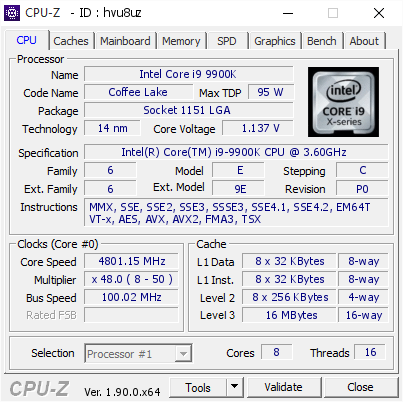
[hvu8uz] Validated Dump by DESKTOP-8QJ1PHC (2019-09-24 06:59:53) - MB: Asus ROG MAXIMUS XI HERO (WI-FI) - RAM: 16384 MB
I dont get how its hotter..
little osprey
cpu-z might be wrong, to test, keep hwinfo running, run whatever benchmark you want, eevn just opening 50 (actually 50) chome tabs by spam clicking bookmark folders will work
Close the chrome, don't close the hwinfo the whole time, then send the hwinfo screenshot
hearty verge
This is me runnig YUZU, and Project 64 LLE plugin with all cores maxed..
No heat issue.
peaking at 70
when I CRASH the it can be 50c
little osprey
Oh ya, CPU-z is just wrong
Those are actually very good temps, I would not touch the cooler a bit
hearty verge
As soon as I put it to 50 all cores instant freeze and reboot.
little osprey
So - when referencing anything to do with temp/load always give the core temp and the package power, or core max, etc
hearty verge
However when I set the ram to 2666 it’s stable. I’m at a losss
little osprey
Lots of reasons, but largely, 4400 is an unrealistic - and actually kinda slow - config, given you have to run cl 19 and higher subtimings
If the number 4400 is the priority, you can config to make that work, but hey, that's preference
hearty verge
Ok but it’s set to 3600 now and I crashed
little osprey
Because you still have core mult set to 50 with 1.2 vcore. Now that we (I) know the temp problem was just a cpu-z artifact - I'd say set 1.3 manual (there are other options for this - check that guide) and run 50x core, 45x cache, 0avx offset, HT on, 1.2-1.35V on both vccio/ vccsa.
Anyway, at the very least, now you know how to use hwinfo64 haha
Can you see why this is a very useful utility?
hearty verge
Ok. It’s bed time for now. But I will give it a go tomorrow if I get time
It’s actually go so much info it hurts to look at.
little osprey
Ya, you can hide, recolor, customize, etc. Glad your system seems to be working well. I think you'll be just fine
hearty verge
I hope so. Thank you for taking the time to help me out. I do hope that I can get it running in it’s sweet spot.
Just set the v 1.31 and it got a little further didn’t heat up, then crashed. The program crashed instead of the computer then the computer froze. Looking at hwinfo looked normal.
little osprey
Did you set LLC (load line calibration ) to level 5 under AI tweaker -> digi + vrm?
Oh, btw, when you hide groups, or edit hwinfo64 settings, close the program to save them
right click the tray icon->settings to export a config, change more settings
hearty verge
I did set to 5. And just adjusted the clocks and all cores to 49 and ram that test it. Worked.
Changed the other settings you said to the higher options.
Going to test 50 again. Then it is bed time.
Why does it say my colts are 1.27?
Crash on 50 all cores. :(. Bed time.
Convinced it’s the RAM. :(.
little osprey
No, nothing unexpeted tbh, ya no reason to rush, happy to help.
 surreal tendon
hiya, im new to the newegg community, i wanna build a 500$ PC, to start gaming and minor content creation. So i was wondering if anyone could give me some help
coarse coral
$500 is almost an impossible budget for those needs
latent bronze
@surreal tendon If you only have 500$ good chance most of your parts will have to be used
Processor wise though if you have a microcenter near by you can get the Ryzen 5 1600 for 80$
This is what your system would look like https://pcpartpicker.com/list/YJB327
Later down the road you can add something like a 4TB hard drive in it
If you don't have a microcenter near you then the only option are buying a used 1500X/1600 which they go for between 70$ to 120$
latent bronze
You can save a little with the Intel 660p 512 GB M.2-2280 NVME Solid State Drive
west finch
dang @little osprey you've really got your hands full trying to explain that you can't just set your cpu to 5 ghz without adjusting many other settings...
and on top of that, there's zero guarantee than someone's specific 9900k chip would even reach 5 ghz stable with any settings
 tidal bluff
kinda funny how i could get a 5ghz from a i5 7600k but a 9900k cant?
west finch
silicone lottery
a 7600k also only has 4 cores/4 threads to deal with overclock and temperatures
a 9900k has twice as many cores and 4 times as many threads
it is always way harder to reach higher clocks on CPUs with high core count
most 9900k's reach 5 ghz without any issues (with proper supporting voltages and cooling of course)
hearty verge
I have proper cooling, and I have tried several voltages. I really think the RAM is the issue, as I can run 5ghz without issue when I clock my RAM to 2666mhz.
I also have 2 modules that I cant use 😦
I tried to return it and see if I could swap it all for some QVL stuff, but Newegg wouldn't let me cause I went over the return period. That's understandable. I was given the option to return it with a stocking fee. but after shipping and the fee I would of lost 70 bux. 😦
So I look at it..
it haunts me. 😉
What is the best most reliable RAM I could buy for an Asus Hero XI (Wifi) that can take a good OC?
little osprey
What do you mean you have 2 modules you can't use?
I think your ram is fine. It's A2 PCB b-die - decently high bin, I mainly just recommend manually setting the vccio and vccsa voltages regardless of how you proceed. This will keep you from burning out of degrading your IMC - hard to say what voltage is safe forever, but auto is out of the question
And again, I think the cpu could probably do 5.0 all core ht on 0AVX with just a bit more voltage. You have a lot of potential performance to get out of the hardware yo have now with only some settings to change.
hearty verge
I’m glad you are optimistic. I will run thorough the guide. But I have gone down this rabbit hole before and I ended up turning on AI and letting it clock my system to a poor little 4.7.
little osprey
I'm not confident based on faith alone though, I have the same or simiar parts and do a lot of benchmarking. The "full picture" of data from hwinfo64 makes it far easier for me / anyone to help troubleshoot.
 velvet crater
i have a 2070 super and the hdmi port on it isn't working
sudden turret
use displayport :p
little osprey
@tidal moon
 tidal moon
I tried installing a modified BIOS.
little osprey
Easier to receive tech help in this channel. Posting your system specs, and pictures showing how components are connected will help us help you.
sudden turret
modified bios? eeep..
deep skiff
that is a first gen board, id go with this https://www.newegg.com/p/N82E16813145083?Item=N82E16813145083&nm_mc=AFC-RAN-COM&cm_mmc=AFC-RAN-COM&utm_medium=affiliates&utm_source=afc-PCPartPicker&AFFID=2558510&AFFNAME=PCPartPicker&ACRID=1&ASID=https%3A%2F%2Fpcpartpicker.com%2Fproduct%2FhpRzK8%2Fgigabyte-b450m-ds3h-micro-atx-am4-motherboard-b450m-ds3h&ranMID=44583&ranEAID=2558510&ranSiteID=8BacdVP0GFs-KL16QBpe3HNN3pwbQQUNMA
little osprey
Okay so I need help when building my pc cuz I know how to install cpu ram motherboard and stuff I just need help with wires cuz I have no idea how to do it
 inland lichen
is there any companies out there that will customize a desktop, for example leave out power supply unit, hard drives, and disk drives
?
yes? no? maybe so?
fossil hedge
why exactly...
inland lichen
cause i have good componets already
fossil hedge
are you not wanting to build it?
as in, are you not wanting to assemble the entire pc?
inland lichen
yes
fossil hedge
I will not judge. (says wail judging). I can promise you, that it will be cheaper to build your own computer, but if you don't want to, would you mind telling me which components you are not looking for?
inland lichen
psu, disk drives, hard drives
fossil hedge
I suppose you will be buying your own monitor.
inland lichen
i was going to buy components but my friend that was going to help me install them is leaving and newegg won't deliver to po box with next day delivery, i have my own monitor
fossil hedge
I see. is it the fact that you don't want to break anything that matters more then your ability to?
(I am searching around just making small talk)
inland lichen
yes and wouldn't that void warranty if i messed up up installing it myself
fossil hedge
not nesscarly... amazon is really lenient on what they call damage.
I ran a rc car at 30mph into a curb and returned it withought half the parts and they gave me full price
also, the things you might damige, is like the CPU, or by putting stuff in wrong. but honstely if you just watch a few videos you could save 200+ usd
inland lichen
yeah but then there is length and width problems with case, and just don't want to play back and forth RMA
fossil hedge
pcpartpicker
that is you lord and savior of compartblty, does all the checking for you.
inland lichen
okay thank you
fossil hedge
honestly what your looking at is a cumputer with no hhd, and no psu, because nobody ever uses a disk drive.
this company Is allowing some things to be excluded, such as the hdd, https://www.xoticpc.com/
Custom build your next gaming computer, laptop, or notebook from our extensive selection and finance options. Take your gaming to the next level with XOTIC PC.
you might be able to get rid of the power supply, but I can't figure out how.
.
.
.
also if you need a starting point for pcpartpicker, here's something that's completely compatible, https://pcpartpicker.com/list/HPLQzN
feal free to edit and such, here's some resource's for assemble:
inland lichen
almost done with my build i will show you in a little bit
fossil hedge
cool yeah I can help a bit.
deep skiff
copy the link at the top of the build, not the url
inland lichen
oh okay
fossil hedge
Intel Core i7-9700K is surpassed by the ryzen 7 3700x,
a water cooler of that size will work, but is overpriced. something comparable to a air cooler from noctua woudl proububly functoin better...
inland lichen
not a fan of amd
fossil hedge
why exaclty.
inland lichen
always have worked with intel, and i have an amd right now, and nividia works well with intel
fossil hedge
so, I put together a air cooled ryzen 7, 3800x 32gbs ram at optmal speed, a 2080ti, and a nioce case.
and yeah in some cases ryzen has problums with gpus, but in most cases higher end ryzen will work pretty noic.
inland lichen
why mid tower? i always find mid tower has no room
inland lichen
it will fit 2 hard drives and 2 disk drives with all the other stuff
fossil hedge
mid towers are fine, in my opinoin. I just like phanteks, there pretty good
but if you still don't like amd, then here you go.
i7 9600k, noctua cooled, 32gbs ram, and a rtx 2080ti
chilly marsh
if i had more of a budget, i woulda went with the p350x
fossil hedge
I love phanteks, best case for the best price.
chilly marsh
good company
inland lichen
so if i buy that build they will send it to me all put together?
fossil hedge
no, you will put it together, but it makes sure everhting is going to fit. pcparpicker is just that, a pc, part, picker.
sorry if thats not what you thought it was.
inland lichen
oh yeah that was what i was looking for, those parts put together
fossil hedge
yeah they fit
this one: https://pcpartpicker.com/list/JhrFf9, is really good. for intel at least. but if you change you mind on amd, this one is still better: https://pcpartpicker.com/list/Y2LQzN.
inland lichen
no i was looking for a company that puts together components so i wouldn't have to buy a whole new computer since i have workable components
fossil hedge
yeah... pc part picker just finds parts so that you could build a cumputer. see, most companys that I searched through don't allow you to leave out somthing like the PSU. I bet if you contacted some places like support at name brands for per-builts, they might just be helpfull and give you a lower price for leaving out parts.
sorry I couldn't be much help.
inland lichen
all good no worries
fossil hedge
I really recommend building it, but yeah, its kinda spooky and stuff.
inland lichen
if i was buying something cheap i would but last time i built a computer i was 8 years old, 30 now
back when 16kb was the top speed lol
chilly marsh
cant you just use your parts then supply the other ones and build it yourself?
fossil hedge
oh yeah I have a powerbook I use for daily drive so I can't speak.
chilly marsh
isnt too hard
inland lichen
i am worried about putting together cpu and motherboard, and installing motherboard on my case i have
chilly marsh
whats the inside like
inland lichen
Would those items fit in this case
chilly marsh
how tall is it, how l0ng
inland lichen
chilly marsh
you just gotta research your parts descriptions, see their physical sizes, then see what sizes your case supports
fossil hedge
or you could just use pcpartpicker
inland lichen
dunno and dunno, and don't know what the case is
fossil hedge
is it a midtower?
inland lichen
yes
fossil hedge
because if it is it'l fit the motherbourd and the GPU
the cooler too
there pretty small parts the ones I choose
mid tower supports atx moterhbourds, and pretty much every gpu under 300mm.
chilly marsh
and for your parts, just go to the website they on and go and find the actual size lol, and if you really dont know your case, your last resort could either be measuring your actual case, or getting a new one
inland lichen
i bought a custom computer from friend 7 years ago
fossil hedge
plez us pcpartpicker list,
watch some vids
I have to go to bed and such,
I hope I wasin't a burden, and more of a helpfull ally in this great expanse of pc lands
inland lichen
all good thank you
chilly marsh
nah you helped a lot warlord
all now is up to him to decide what he'll do with the advice
fossil hedge
cool.
fallow knoll
Is the ryzen 5 2600x better than the ryzen 5 1600?
lime forge
yes
 gentle prairie
I'm looking for a 360mm (preferably) CPU AIO non-addressable RGB cooler that's compatible with an Asus rog strix B450-F motherboard. (12v, not 5v). Any suggestions?
hearty verge
@little osprey I have a question, and on observation about Core VID in CPU-Z
Should that not read the voltage of the overide?
This might be my issue... I turned off all my FANS, and my CPU heated up to 100c and without a crash, while OC to 4.9 on all cores.. so its not heating its voltage issue. However I cant get my voltage to show over the 1.235v..
Is there a setting i'm missing?
little osprey
Did you get a chance to read a coffee lake oc guide? I sent you two that I thought were well written .
hearty verge
I did, but I cant seem to figure out why my voltage doesnt read 1.36 in CPU-Z
HWinfo64 says its 1.25 as well.
Is there somthing that is limiting the voltage, and I just cant increase it anymore?
What was the second? the first one you linked The Coffee Lake Overclocking Guide" has outdated BIOS related settings (i think) as the terminology is different in my BIOS. This is making me a little confused, and the v-core setting doesnt seem to want to go up, and when I set to 5.0ghz the compter will freeze.
agile bear
LNO2 it
little osprey
1.2V? in that asus "overclocking" program"
Probably has to do with your core ratio settings. e.g. turbo all cores to 5 vs at most 1 at 5, 2 at 4.9, etc
hearty verge
Its Asus program, not tuning with it, just viewing it's info.
@little osprey no matter what document or video I follow, I can't get an all core OC of 5.0, unless I put my RAM to 2666 - I bet I could do 5.1 at with the RAM underclocked (need to test still). I am leaning towards the RAM being the problem. Where do you live? want to come visit? 🙂
If I was to stream my computer, would you be willing to walk me through the whole OC process for my equipment? I would be willing to pay you for your time, or make a donation.
I can stream directly from my computers HDMI to my laptop, that way you can see the BIOS, and any issues that occur. DM me if you are interested.
 sterile slate
ive been researching quite a bit on how to build pcs and how they work. im not gonna lie still kinda new at this. but im thinking i want to try to build my own. are their any cheaper parts you could recommend or any tips
sterile slate
are there any brands to stay away from or anything like thay
sudden turret
ive never really had a problem with brands, just read reviews, all the reviews.
reviews are your friend 🙂
my goto psu of choice is Corsair
and ram as well
sterile slate
thanks for the tips. i kind of have a parts list i wanted to get but ive been stuck on the motherboard and ram.
 crystal seal
Ok guys I’m gonna drop my parts list and you let me know what you guys think. Feel free to give any advice or ask any questions you may have.
New PC build parts list
- Intel Core i9-9900K $469.99
- EVGA GeForce RTX 2080 Ti 11 GB Twin Video Card $1069.99
- Corsair 32GB 3200 megahertz ram $179.99
- Samsung SSD 970 pro $159.99
- ASUS ROG Strix Z390-E Gaming LGA 1151 ATX Intel Motherboard $232.00
- CORSAIR HXi Series, HX850i, 850 Watt, 80+ Platinum Certified $199.99
- Corsair Hydro H115i Platinum 280mm RGB Water Cooling Kit $132.99
- Elgato 4K60 Pro MK.2 - $249.99
Total: $2,993.16
deep skiff
For streaming u might want to go with 3900x due to 4 more cores and 8 more threads
little osprey
Got a pc partpicker link?
 edgy copper
Specs whilst running apex + several other background apps, what yall think?
latent bronze
But Apex is not that demanding of a game
@edgy copper You could play Apex with a Ryzen 3 1300X and a 3gb 1060 and still have it on like high settings and it still wouldn't be demanding unless you're on like a i5 750 and a GTX 750 Ti then it would be demanding
deep skiff
little osprey
@deep skiff avoid vengeance ram as corsair uses low end dies and has a failed binning process that results in most not even reaching rated speeds. Also avoid the cxm as it lacks ocp on the 12v rail.
"avoid vengeance ram" all of it? why
For ram I suggest you get the cheapest 10ns kit you can find (usually olloy 3000 cl15)
@little osprey yes
Not to mention that for their rated speed they are stupidly overpriced
What IC is in the Oloy
That $83 kit is only 10ns while olloy 10ns kits tend to go for $65 to 70
For the psu I would suggest getting a commander iii 600w when they are back in stock if you arent buying today
 grave spade
I just found All botw amibo cards including champions and a thing to keep them in for only 10$
little osprey
Why do you reference 10ns - the time it takes 3000c15 to read out 64 bits (first word) vs recommending mmory with ICs that are known to work well with x cpu?
@little osprey most ram use the same dies and the same pcbs so unless you can weed out which ones are using e die or b die that is a terrible way to recommend ram
The entire idea that certain companies work better is a misconception
All the company makes is the heat spreader
Yes - do you not see that was what I was asking you?
What really matters is the effective latency
The effective latency is what the actual ram speed is
Not just the clock
Which is the XMP rating slapped on by the brand - not all 3000c15 is created equal
TBH - that oloy might have some decent higher bin cjr - who knows, but we do know with confidence that 3000c15 ballistix sport is micron rev e
To oc past the rated speed I recommend manually tightening timings and clocks
As is 3200c16, both have AES in the sku
What? To OC freq, you also recommend tightening timings ? or ?
And while ballistic do use e die the rated speed they are binned for still is 10ns. This is why I said unless you can weed out the exact kits that use e die or b die
Based on how new the olloy kits are I have had a hunch they are using e die too
The ballistics kits are also a good deal but again do gost a good bit more
That would be great - if you have them, why haven't you just checked in thaiphoon? or are they blank
I dont have the olloy kit
I use a binned b die kit
Which kit?
I have gotten it as low as 7ns when really pushing it
Actually I jus noticed team group now has the cheapest 10ns kit on the market
You keep using that metric - I have no idea why - I nderstand why it's important - but most people use a real benchmark
Because it is the effective speed of the ram...
Using just vlock or just timings is literally useless
And there's more to it ..
Many 3600 kits are slower than 3000mhz kits
You can also add sub timings to the equation but that will barely effect the effective latency
Slowf or fast ram isn't a unidimensional scale
Actually it pretty much is
Oh boy
However fast the ram can respond to a command and get data to the cpu is all that matters
That is why it is wise to look at ram purely by the effective latency
For overclocking again you do want to look for specific dies
And maybe binned variants of those dies after a certain point
I think I want to look for some Excedrin first
But most users seem afraid of any effective ram overclocking so this falls out of being necessary for most people buying
Post your memory benchmarks / screenshots
I usually dont push memory daily unless I get a new part I want to push it with
For example when I was using a baseclock oc to get my 2700x to 4.41ghz is when i was pushing me.ory inorder to try to catch a 7700k stock in single core score
Also something I dont like doing too often as baseclock overclocks really quickly become a pain in the ass if they fail
Next time I plan to push my kit is when the 3950x is out as I do plan on taking some records with it and hopefully I wont need to use ln2 to hold the records but I do have a pot designed planned for if that does become necessary
https://pcpartpicker.com/list/Yw2ttp @deep skiff this is what I think will fit you better but if you do plan on overclocking pay the extra for olloy or ballistics ram
deep skiff
Also I’ve never heard of that psu
little osprey
The commander iii is pretty good
Unlike the cxm which lacks the most important protection
Ocp
What pot is that? Ln2, wow, you must benchmark a lot! What benchmarks would you go for?
I mostly like firestrike and cinebench for benchmarking
Superposition is a pain in the ass however
I ran into issues where it would clear my vega overclock and force it to run stock when I was overclocking v64 (I checked and it wasn't power throttling as I specifically designed my voltage curve to avoid power throttle at each point
I want to see you take those records with the 3950x - those ln2 guys don't stand a chance
I haven't used ln2 before but I have a copper pot design planned to allow for more dynamic thermal control over the core dies and a thicker plate over the io die to save some ln2 as that wont need to be as dynamically changed
little osprey
@deep skiff basically the commander iii has 4 12v rails, a double ball bearing fan, at 700w load only hits 50c, all protections but otp which doesnt matter as it has ocp so a cap pop wont kill anything connected and because it doesnt get remotely hot and has a fan that uses the least likely to fail bearing design, has one of the best efficiency curves of all the gold rated psu, and an acceptable warranty.
 warm nova
why in the world would you want a 600W psu with 4 12v rails.
little osprey
@warm nova it splits the load better than having a single rail handle the full current draw on the 12v.
so basically you have fewer amps on each 12v rail as it is split amongst 4
 oak fulcrum
Hello, can I ask a build question here ?
Hello ? Anyone there ? How does this work ?
lime forge
yeah, you can ask a question here
stark spruce
🎵 Is anybody out there? Is anybody there 🎵
deep skiff
n0
edgy copper
Is that David Bowie?
 river gale
What would be the minimum part requirements to run a game like BDO on max setting with no lag?
agile bear
What’s bdo
little osprey
On remastered settings - a 1080 ti / 2070 super or better probably.
can someone help me with error code 99 on asrock z390 taichi?

Newegg basically said they can only do rma if its within 90 days and they can't help me otherwise
What have you tried so far?
I've tried unplugging my sata ssd
I've changed ports for my ram stick
I have no graphics card, I am just using intel integrated
I have tried to use the keybo
*keyboard to push the buttons on the screen, but I have Microsoft wireless 2000 so I don't know if it needs windows, but if I remove it and my mouse, I get I believe d7, witch is no recognized keyboard or mouse.
I have reset the cmos
Have you tried both the hdmi and DP outputs?
I don't have a dp monitor, but I see the splash screen so I don't think that should be the problem.
so I use hdmi
this is my first pc build
 robust plinth
Fun
river gale
@little osprey is that card a dual or single slot? Do I need 2? I knew the card would be expensive, wasn't expecting it to be 1550... I really hope that's not American.
little osprey
ikr. so stressed bc I have no advanced techies other than me in my family so.
A used 1080 ti is about $500 USD, a new 2070 super is $500+ , either will likely be 2-3 slot.
I would not recommend SLI
river gale
Maybe... Its hard to sort through a search for these and find the right model type.
river gale
searching 1080 lists 0 products
little osprey
pc part picker tends to be like that.
river gale
yup
deep skiff
pcpartpicker also has little stuff on itx parts
little osprey
i gave up on that and just manualy checked compatability in newegg specs.
river gale
Is there somewhere to read up on different makers. I'm partial to ASUS, but I'm not of the mind to think they are competitive with the other graphic cards. I just don't know them for that area.
I know they are okay... But what are they doing in making graphic cards?
Does an ASUS MB communicate better with an ASUS Graphic card when compared to others?
 next tangle
3600 and a 1660 or a 2600 and a 1660ti for streaming games like fortnite and editing/recording/rendering things?
 limpid merlin
@river gale the brand of the card doesnt really matter, the only thing they can do differently is set fan curves, give better heatsinks, and set slight factory docs, and bin their chips for the more expensive versions
 soft holly
What do you guys think about this build? Should i change anything?
lime forge
only thing i would change is from amazon to newegg
soft holly
Should i get a cpu cooler like 212?
And idk if the ram i chose would cause clearance issues
lime forge
default cooler on the 3600x is great, i wouldnt
then you dont have to worry about ram clearance either
soft holly
Cause newegg has the trident z rgb for the same price
lime forge
that corsair ram is a tad faster, but not by much and it wont make any noticible difference
deep skiff
i would drop the 3600x to a 3600 (you can always buy a better cooler later) and the 2060S to a 5700xt like the pulse or nitro+
little osprey
So ordering my parts for my first pc build I’m getting a Rx 580 8gb with 16 gb ram and my cpu idk if I should get a r5 1600 or 2600.
2600 is kinda pushing my budget but is it worth the extra cash or would the 1600 have the same speed
This is my build ^
deep skiff
here's a little cheaper 580 8gb, and i would keep the 2600 https://pcpartpicker.com/list/hMKZL2
little osprey
Thank you 🙏🏼 is there a difference between the 1600 and 2600
deep skiff
the 2600 is the successor to the 1600
the 1600 is first gen, the 2600 is second gen, and the 3600 is current gen
little osprey
Ok ima get that one then that mobo is compatible right
deep skiff
yeah, 2600 works with b450, x470, x570 and b550 when it comes out
little osprey
Works right outta the box?
deep skiff
yeah
soft holly
@deep skiff what’s the difference between the 3600 and 3600x
Im going with the 2060 s cause i have a g sync monitor
deep skiff
the 3600x has a little bit better cooler and has a slight boost formula change
next tangle
I know I'm asking this but could someone put a list together for me under 600$ for gaming, streaming games like fortnite, editing videos and rendering
lime forge
if i were you id save up for a larger budget if thats what you plan on doing
next tangle
Oh I can't
limpid merlin
oooor go used 😉 @next tangle
soft holly
Would the 3600 be able to handle streaming and gaming
little osprey
Yes, the 3600 is a great choice right now.
river gale
The thing with a public forum is that you get a wide range of answers that muddles what you should be getting...
I've never played fortnight and never want to, lol
little osprey
Did you decide on what GPU to get?
river gale
No, there seems to be a wide range of what will handle the job.
little osprey
1080 ti's won't likely be available new at a viable price, as such, a 2060s, 2070s, 2080s etc are probably the better pick unless you're comfotable buying used.
Yep, can be hard to figure out how much PC gets the job done - it's very subjective based on preference
river gale
Yah, I'm worried about refurbished because how can you really vet a part with that many tiny components on it. It seems like its the manufactures product with their warranty removed and some additional risk.
little osprey
That's a valid concern. I think a safe middle ground would be something like a $250 or less 1660 ti.
I prefer EVGA because of their customer service and warranty, but everyone has their favorites.
river gale
has navida made hardware upgrades since the 800s? From 500s to 800s all they did was software upgrades.
little osprey
Yes, Fermi, Kepler, Maxwell, and Pascall all saw hardware upgrades. The 580>680>780, 980 1080, and finally Turing's 2080 have all brought performance increases.
river gale
Water cooling or air?
little osprey
For a new build? or?
river gale
Yah, I can't salvage the one I have now. I don't want to go AMD again.
little osprey
Watercooling for performance sake is unessesary imo. Water cool for aesthetics, for fun, compact design etc
river gale
Pretty much. The only real issue is the proper application of Thermal Paste.
little osprey
yea. thas me building my first pc trying to apply thermal paste to the cpu.
little osprey
The funny thing is of all those architectures other than maybe kepler if on the same node Turing is the worst ler die space 
A 2080 is a significantly larger die than a 1080ti
And this is because Turing is overly built for int which gpus dont really do much of
Yet under focuses on floating point and shading in design which does matter for a GPU
Turing also had too tall of a memory controller and a wide l2 area which resulted in some wasted space
It is just all around a poorly made arch
I also wouldnt really recommend the 2060s or 2070 and would also semi have a hard time recommending the 2070s in the current market
I also wouldnt recommend a 2060
My advice really is not to look at company and instead look at what you get as both companies have a failure rate and it usually is about the same
Actually because AMD's heavy overvolting theirs may actually be slightly lower but still nothing that I would say you should use as a reason to buy them either
deep skiff
@river gale whats wrong with amd? they have good products rn, and a lot better price/performance than intel or nvidia right now
@lime forge no stop being a fanboy
little osprey
My advice again stays the same and ignore any company and instead look at what you are getting with the money you use
deep skiff
^
river gale
overheating and the physical number of cores
little osprey
Heat is by cooler design and not company lol
And even the blower navi cards dont really overheat stock and while technically louder than Turing cards are only on par with some louder ambient sounds your house will have
Reference turing cards that is
 elder canyon
Intel cpus are hotter than amd ones
river gale
I don't find programs use multicores in their programming. I find intel has faster individual cores.
little osprey
The difference there is only 6% and only is arguable for Intel as a "faster single core" when getting a cpu with smt
So if you arent getting a 9900k again you are mistaken
elder canyon
What cpu she gettin
latent bronze
If i was to ever replace my system for Intel this would be my build https://ca.pcpartpicker.com/list/DDkG3t
The case in that list i would be replacing my old parts into that one
little osprey
not to mention it really is hard to find a scenario where someone with a 3600 will be cpu bottlenecked
elder canyon
Oh nvm
latent bronze
I am going to have a 1060/1660 near the end of this week so
Also have to admit not that bad of a price
little osprey
you could also get a 590 and likely save around $50 and end up with the same perf as a 1660 but more vram and fewer lod issues @latent bronze
little osprey
not to mention the 1060 all around makes 0 sense
latent bronze
590 is just an overclocked 580
@little osprey There is a model from Zotac as well that is a GDDR5X version so it is a little more performance from the standard 1060
little osprey
no, the bandwidth is the same so the variant of gddr5 used doesnt matter
so it is a 580 basically still with less vram again
and a 1660 again is on par with a 590 but still less vram and around $50 more
and just ahead of a 580
again just like a 590
latent bronze
if you overclock the 580 by at least 5% you get a 590
little osprey
it is more like 10 to 15%
and that is basically the gap from a 580 to a 1660 too so your argument of it being a 580 in design doesnt really matter if you are looking at performance
latent bronze
standard editions are more like 5% it is OC edition for the cards that you would get 10% more
little osprey
no, the difference from oc editions and normal variants of almost any card is within a single percent in most scenario as the effective clocks are usually the same
and you really are underestimating the difference in effective clocks from it and a 580
it is also on a more refined version of the same node which is why it has a higher peak oc usually and even stock is better than most 580 will oc to
latent bronze
It has been debunked a lot with a lot of people testing the 580 to the 590 not really noticing that much of a difference which is why they refer to it as an overclocked 580
little osprey
and even if we grant your logic then the 1660 and 1060 would once more not really be logical as the 580 then is a 1660 in performance (it really isnt and again i would suggest against comparing them as again the gap is pretty large but when a 1660 and 590 are compared it is single percentiles in either direction)
@latent bronze it isnt a matter of debate. the 12nm node by tsmc is just a refined version of their 14nm node with higher peak bins and a higher lower tier bins. the 590 is effectively a heavily overclocked 580 with clocks around where you would need to start either blocking a 580 or have a really good golden sample stock to reach.
they are the same in terms of die design but that is irrelevant to clocks and performance
if i offered you a 1060 clocked at 1hz or one clocked at 2ghz which would you take
especially if the one at 1hz would peak out at 1500mhz on its silicon which is lower still than the 2ghz 1060 in this hypothetical
latent bronze
Just would like the point out another difference as well https://i.gyazo.com/3e34b512452bfe44ff1734f4a981decf.png
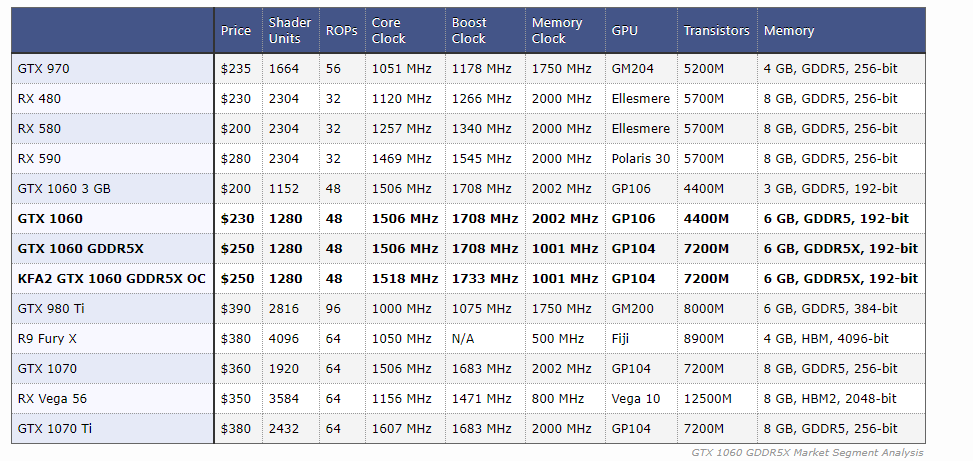

lower memory clock same architecture as a 1070 and higher transistors
little osprey
the die in use doesnt effect performance when the extra sm are disabled...
this should be common sense
much like why a vii doesn't match an mi60 and only matches an mi 50 despite all being on the same die (excluding fp64 where half is lasered off the vii and it cant compare to either)
and both gp106 and 104 are the same architecture
but they disabled or lasered off defective parts of the die or working parts of unused dies to make it literally a 1060
and that is the number of transistors on the die
not the number of transistors in use
as again most are lasered off
the bus width and vram clock also stayed the same so despite using gddr5x it is still the same bandwidth and there wasn't really a performance gain
th the gddr5x 1060 is still only on par with a 580 but again with less vram and again more lod issues
you can make a number of performance tiers off a single die
hell, almost all gcn 5.0 cards are on vega 10
and almost all if not all 5.1 cards are on vega 20
here is a good analogy. Which has more water between a 30 oz cup with 10 oz of water and a 60oz cup wit 10oz of water?
 zealous pilot
just helped my roommate build his first pc feelsgoodman
fossil hedge
cool good job
latent bronze
So if a 1070 is 25% better than the 590 and the 590 is 8% better than the 1060 and the GDDR5X model is 6% better than the normal 1060 wouldn't that mean the GDDR5X 1060 is on par with the 590 then 🤔
deep skiff
It’d be 2% slower
latent bronze
but that 2% is pretty much like a frame or half of a frame
little osprey
no because you literally made up those proportions and performance gaps. i can do the same and say the 1060 gddr5x is 100% slower than the normal 1060 and the 590 is 200% faster and it is just as valid of a claim as it is baseless and wont match up with any testing
my advice to you is to look into hardware unboxed
as he does large test to find more quantitative data to compare gpus
latent bronze
i just did my research just now and also watched a bunch of video's based on those research kind of think why i haven't been talking for said amount of time
little osprey
you clearly didnt do any research other than maybe user benchmark which really is one of the worst sources you can use
latent bronze
ya i have been doing completely nothing for 30 minutes
little osprey

Corsair Dominator Platinum RGB: https://bit.ly/2TOVBof Support us on Patreon: https://www.patreon.com/hardwareunboxed GeForce GTX 1660 - https://amzn.to/2ClT...
latent bronze
You do know there is forums that people has done tests between the standard vs the GDDR5X model right which they've only seen a 6% difference in performance
little osprey
the difference from a 1660 and 590 is 4% and his error margin when testing in 5%
so they are equal
latent bronze
It is time to start laughing because you're showing a video from what almost 7 months ago which in time with driver updates and all there can be changes
little osprey
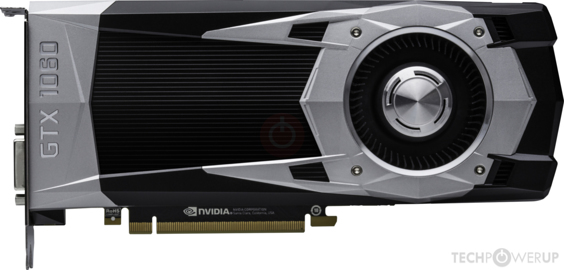
TechPowerUp
NVIDIA GP104, 1709 MHz, 1280 Cores, 80 TMUs, 48 ROPs, 6144 MB GDDR5X, 1001 MHz, 192 bit

TechPowerUp
NVIDIA GP106, 1709 MHz, 1280 Cores, 80 TMUs, 48 ROPs, 6144 MB GDDR5, 2002 MHz, 192 bit
notice how they are literally the same bandwidth...
that is the only advantage you can see from adding a new memory type and is not seen there as the memory wasnt clocked higher and instead was failed spec gddr5x used to avoid putting it to waste...
latent bronze
I have done my own benchmark video's of the 570 and with games like The Division 2 i have had people comment 3 months later asking why they are getting like 5 more frames which i also have to tell them that drivers can prove a difference
Also you just pointed something out there as well
Explain how the 590 would be like a 1070 when there is this much of a gap between the 1060 and 590 https://i.gyazo.com/26eaeb90ae2bc2f2e6ea05a5884ea897.png

 little osprey
drivers for both cards are the same as they are treated as the same card in terms of commands drivers give...
@latent bronze tech powerup is not good at comparing parts as it is based on a pretty ill formed equation by the config of the part and not by the actual performance
they are used for their data base to compare the layout of different cards but using it as a source for performance is a joke
latent bronze
So if it not good why are you using it then
little osprey
so you can see the cards are literally configured the same
there is no added bandwidth
peak memory clocks are the same
and bus width is the same
latent bronze
i like AMD as much as the next guy but if there is something similar or better why would i buy something you would suggest
little osprey
again, it isnt better than the normal 1060 6gb...
i really dont know how this is difficult for you to understand
memory type doesnt change performance if bandwidth is the same
latent bronze

• Buy those RGB lights: https://amzn.to/2SbaXiK • Buy that MSI RGB monitor: https://amzn.to/2JaLba0 • GDDR5X GTX 1060 Ti on Sale: http://bit.ly/2J9nYoC • htt...
little osprey
i dont think you watched that video
he explains the bandwidth again is literally the same so the new vram doesnt matter
latent bronze
well it is a 1060 still of course it is going to have 6gb
little osprey
you realize the 1060 6ghb also has 6gb....
the 1060 3gb is a cut down 1060 6gb and is on par with a 570 lmao
but again less vram and in this case major lod issues
https://www.techpowerup.com/gpu-specs/geforce-gtx-1060-3-gb.c2867 here is the 3gb 1060 for reference

TechPowerUp
NVIDIA GP106, 1708 MHz, 1152 Cores, 72 TMUs, 48 ROPs, 3072 MB GDDR5, 2002 MHz, 192 bit
it isnt just less vram
it is 10% fewer sm
@latent bronze
latent bronze
ree?
little osprey
@latent bronze so do you understand why you are mistaken finally?
 silver lion
Ecks? do you remember me
latent bronze
not really to be honest
still roostBOT
 Arctic_Sinczx#8715 has been warned
Reason: Bad word usage
silver lion
ok\
you were kind of arguing with a guy and said he knew nothing about my pcpartpicker list when i posted the link
latent bronze
ya looked back now
silver lion
ok, well i have a new and better part list, and it will probably look cool (RGB)https://pcpartpicker.com/list/NgTYJb
latent bronze
It is a nice build but i would still change the GPU for one from like Sapphire
silver lion
Ok, would it still be around 160 dollars?
silver lion
That's the same one I was thinking of adding.
latent bronze
MSI isn't that bad but the model you picked i have heard a lot of complaints based on the noise of the card
silver lion
oh ok
latent bronze
pretty much that armor card is just way more budget wise
deep skiff
unpopular opinion but I would just get the 2600+better cooler
silver lion
The blue RX 580 from sapphire looked really cool, and would go with the colors of the build.
How is the 2600 even different from the 2600X
latent bronze
gaming performance wise without overclocking about 2% to 5%
really depends on the game as well to be honest
silver lion
I Probably won't Oc because I have no experience with it and I wouldn't wanna mess anything up.
latent bronze
The only difference between the 2 is the 2600 has a lower base clock
silver lion
I heard that the stock coolers weren't half bad either
deep skiff
The 2600x has a slightly better cooler also
but a $20 cooler would be better than either
latent bronze
They're ok but still better to get an after market cooler
dark raven
CPU base coolers are junk
deep skiff
I have a 2600x and would of probably gotten a 2600+ better cooler
the prism is a decent cooler @dark raven
latent bronze
@dark raven That isn't completely true
dark raven
Not that decent
latent bronze
if it is Intel then yes it is junk but for AMD side of things it is different
dark raven
It's enough to run base clock with minor oc
little osprey
One thing to note - nice CPU coolers like Noctua D15's last as long as you avoid breaking them - Noctua even sends free mounting hardware sometimes
silver lion
@dark raven I'm not gonna Oc really at all
dark raven
But it's huge