#storage-devices
1 messages · Page 17 of 1
 red jay
 keen urchin
ok
red jay
i was looking at the samsung Z-NAND PCI-E stuff the other day for myself but those are so expensive for what its worth
red jay
ya i see those more and more often on builds
red jay
also saw a samsung QVC 1tb which is like the SATA kind of that drive
keen urchin
how much is it?
red jay
 weary tusk
Typically the qvo 1tb's are around $100
red jay
yep, this is more like for those that can only do SATA. like older laptops
keen urchin
terrible*
i love any of these but the price to storage is terri le
:) i corrected my typo before i even made it
but that rgb looks sooooo good
512gb could be enough for me but when i could get the dame thing but in 1tb for $10 less......
same*
red jay
the sequentials on these new PCI-E 4.0 drives that are on the way. https://www.techpowerup.com/256871/corsair-mp600-pci-express-4-0-ssd-is-now-up-for-preorder-usd-250-for-1-tb

TechPowerUp
First seen at Computex this year, Corsair seems to be first to market with a PCI-Express x4 Gen 4 SSD. Amazon Japan has the Corsair MP600 listed now for pre-order, with a "July 13" release date - it was also listed on Amazon US earlier today, but the product page has vanished...
keen urchin
i saw that
pcie 4.0 ssds would FLY
but expensiveeee because theres no competition really right now
red jay
for large data transfers, yeah there is no competition to those
the expensive PCI-E sticks are better at small file read / writes tho
keen urchin
hm
i have my eyes on that corsair one
i wanna build a ryzen 3000 build later this summer so a pcie 4.0 drive would be amazing and a big flex to everyone here in the server >:)
red jay
em board prices on zen 3000..
keen urchin
yep
weary tusk
Is you needed fast read write and wanted an nvme, with a desktop you could get a pci adapter
keen urchin
uh
red jay
might see cuts later but not expecting unless intel makes a move which isn't to happen soon
keen urchin
but if the intel processors cost $1000 and the amd processors cost like $350, would it even out with the board prices?
or am i dumb
o wait i forgot
i9's arent 1000 anymore
but the i9 doesnt come with a cooler >:)
much less an rgb cooler
with a good design and pretty decent performance
(the wraith prism is a very good looking cooler imo)
red jay
it is, got one on one of my ryzen rigs. performs well too..
keen urchin
yep
nothing for overclocking, but for budget builds and u dont wanna buy an extra cooler but you still want it to look good..... amd is a great option
even their lower end processors have decent looking coolers
intel's stock coolers look a bit dated
red jay
possible to OC a bit with it as well, as long as the ambient isn't too bad
red jay
the soldered IHS helps and the chips are effective anyway
i custom WC'ed my 2700X but it really didn't help out too much
compared to other solutions that is, like AIO
red jay
those CPUs don't want to go above certain frequencies but i'm hoping for that to change with the new gen a little
keen urchin
dont have to worry about ram clearance, and it wont make any more noise than it would with the regular case fans because the radiator and fans would be taking its place
so long as the aio has good fans
 sudden shell
Water cooling seems like a gimmick to me since the liquid you put inside isn’t ice cold, so I mean how is it supposed to help out
red jay
see you
keen urchin
(water cooling isnt a gimmick) ok bye
red jay
you're having water carry the heat instead of heatpipes, it tends to be more effective
especially when the room is cool so the water temps are low as well, that's when it seriously shines
sudden shell
Not everyone has that, my point is why can’t someone invent watercooling where the water or whatever you put in it is always cold
red jay
you can do that, you would be chilling the water with some form of compressor. it would be chilled water but that's some hassle
might have to worry about condensation on some end sometimes
sudden shell
Possibly
 latent smelt
the water stays cool from the radiator.
 south cove
Question: I understand that the new X570 mobos have a higher power consumption and thermal output and that PCIe is backwards compatible. So if I were to stick a PCIe 3 M.2 SSD into a X570 mobo, would it run hotter as compared to a PCIe 4 M.2 because of the increased thermal output from the mobo? Would it pose a hazard to to the SSD? Thank you in advance for your help.
 vestal ingot
The SSD has its own power consumption which will cause it's own heat. The increased chipset power shouldn't effect it assuming you have adequate case cooling anyway.
red jay
and if you're worried about it, you could passive sink the SSD or buy one with it, AND actively mini M.2 fan cool it as well.
latent smelt
ssd only uses like 5w
vestal ingot
Always recommend passive sink on m.2 if your Mobo doesn't already have one over it. Very low cost to ensure a bit longer life of your drive.
red jay
reduce thermal throttling while at it also, consistent benching can low down 4k on samsung NVMe, i've seen this with my old 960 pro
south cove
Ok, thanks for the information! 😃
red jay
amazon is fine, they have better prices on some things. you can argue about worker's conditions but then don't buy any toys since we can all guess the situations overseas 🙂
also newegg shafted hardocp badly in past on ad revenue thing, along with selling non-computer cheap stuff killed them for some people.
red jay
i'm fine with both these days i guess
latent smelt
just kinda rude posting amazon stuff in a newegg discord in my opinion.
red jay
it was a random google result
like can't we post links to intel CPUs on AMD discord? you see where i'm getting
it's up to the person to buy from X or Y anyway
 fast helm
no it's just a courtesy thing... like, this is a newegg discord as the mod said... so like... you would think that common sense would tell you to post newegg prices and links... idk. just me.
red jay
there is no rule or so, like i said, i can give many examples of this. just because you're in a ford discord, doesn't mean you can't post a chevrolet truck, and then some..
i can see where you're coming from though.
latent smelt
thats a null example, cause you would send someone off to go buy a chevy in a ford discord.
well
you might.
but it'd still be rude lol.
wouldnt* i mean
red jay
yeah gotcha
keen urchin
im not gonna walk into mcdonalds with a burger king meal
keen urchin
shhh im tryna help your side
latent smelt
lol
keen urchin
smh
latent smelt
I have on one occasion pull into mcdonalds drive thru and asked for a whopper
UNINTENTIONAL
I was just reeeeeeally tired.
fast helm
OH NO LMAOOOOO
latent smelt
yeah they lady was like "uhhh sir... this is mcdonalds"
hahaha
I w as like " well damn you are right.."
keen urchin
rip
keen urchin
brb
latent smelt
❤
red jay
i went into a nokia store back when those were actually common and asked for xperia. was sleepy as well 😄
latent smelt
lol
 proud vessel
ok, so I need some help from someone who iis much more knowlagable than me... I have a drive that says it has fatal errors, but the drive has not had any changes for a long while. It shows in device manager as well as disc management, but I can't get it to read in any way. there Is data ON THE DRIVE so I don't want to format it if I don't have to
 sacred fern
Is the drive plugin loose? Idk what else could be the problem
 halcyon viper
@warped anvil
Which are the places in India have free shipping delivery?
I'm sorry for the ping.
 fallen fulcrum
Hi
latent smelt
hey.
 warped anvil
Hit up @teal sequoia , @halcyon viper. 😊
latent smelt
might want to send them a direct message 😃
 dire reef
can someone help. i need 1tb storage space but i can't find any good deals
 proven palm
just a sec
 undone dune
ssd? hdd? m.2?
dire reef
anything cheap, i really dont care
proven palm
dire reef
cool, i thought i was seeing some for like 25 bucks but i must be haluycinating
dire reef
are refurbished usually in good shape or is it not worth the risk to pick one up
proven palm
when it comes to hard drives, especially mechanical ones i don't really recommend refurbished or used
dire reef
ok. Also, how do i transfer files from one disk to another. Is it just copy and paste or more complicated
dire reef
What about like the folders for programs
cause i don't have room to update windows, but i can't figure out how to get space without flat out deleting stuff
undone dune
if your motherboars supports m.2, https://slickdeals.net/f/13192093-1tb-hp-ex920-m-2-pcie-3-0-x4-nvme-3d-nand-internal-solid-state-drive-ssd-99-99-free-shipping-via-newegg?src=frontpage

Slickdeals
Newegg has 1TB HP EX920 M.2 PCIe 3.0 x4 NVMe 3D NAND Internal Solid State Drive (2YY47AA#ABC) for $99.99. Shipping is free. Thanks Discombobulated
Note, offer valid through July 4, 2019 or whil ...
proven palm
programs are a little more complicated, it would be best to reinstalled on the new drive
sorry for the slow responses i've been on a call at work for an hour and a half
dire reef
your all good, thanks for the info
dire reef
like 20 - 60
undone dune

dire reef
but i would really like the cheaper options as i don't have a job
undone dune

Slickdeals
$52.99
With Promo Code: EMCTCTW27
https://www.newegg.com/Product/Product.aspx?Item=20-167-460&
this is only if your mobo supports m.2
undone dune
alright
 deep zodiac
dire reef
deep zodiac
dire reef
is this an ok option for someone on a tight budget as a secondary storage device
https://www.newegg.com/p/N82E16822148840
keen urchin
i wouldnt get a hard drive unless its 7200rpm
that one doesnt have it listed
but seagate is a good brand
dire reef
it is listed as 7200 RMP under specifications, should i get it
dire reef
NEvermind, i was looking at the wrong one
latent smelt
I'd get that barracuda
dire reef
ok, thanks for the help
dire reef
yea, i was looking at that one too
 desert folio
https://www.newegg.com/p/N82E16822184773?Item=N82E16822184773 THIS IS WOULD BE MY RECONMENDATION.
dire reef
thats tempting
desert folio
59 bucks and faster then others
desert folio
best bang for the buck IMO
dire reef
Well i bought the barracuda and the AOC 22V2H 21.5" Full HD 1920x1080 Ultra-Slim Monitor. Lets hope and don't regret it
 ionic forge
What's the best mix for storage? HDD and SSD / HDD and M.2 / etc?
keen urchin
in a perfect world all m.2 ssds
keen urchin
i personally recommend a 512gb nvme m.2 ssd + a 2tb 7200rpm hard drive
ionic forge
if i store games on the m.2, will they boot faster
ah ok ok
thanks for the explanation
 wise palm
Take on WD black nvme m.2 ssd's?
wise palm
size?
keen urchin
and you get 1tb nvme ssd storage
 dapper canopy
it's Quad Layer chips, not nearly the endurance and read/write life of SLC, MLC, and TLC drives
just don't count on the same lifespan and you'll be OK
lol
keen urchin
yes but
dapper canopy
it's cheap for a reason
wise palm
lol
dapper canopy
"you get what you pay for"
keen urchin
yeah
wise palm
you said there was something about those samsungs yourself.
keen urchin
i know
dapper canopy
is that the new pci-e 4.0 drive?
wise palm
yeah
dapper canopy
yeah it's fast, if it's on a qualified X570 board, otherwise speeds will be capped at what the pci-e 3.0 bus can handle
which is around 23-2400MB/s iirc
wise palm
I will have an X570 board.
wise palm
Its a hefty price tag too.
dapper canopy
idk much about the corsair drives or the OEM manufacturer for them
yeah
ofc, all the new pci-e 4.0 I would expect to be pricy
the godlike MSI board @ 699 is ridiculous imho
lol
wise palm
for sure. lol I really like that board and was comparing it to the creation at 499
but yeah I like the sn750 wd black ssd's a lot too.
dapper canopy
I had one of the first wd black nvme drives, 250gb I think
got it on a trade, it was OK but slow for nvme
replaced it with same size 960 evo
wise palm
you seen the speeds on the sn750's these days?
I thought those numbers were pretty nice.
 ionic nebula
guys when i start up my pc it tells me to choose a os and the other one doesnt work how do i get rid of it?
red jay
@ionic nebula That's because you have multiple partitions on your storage drive with multiple operating systems installed. You need to figure out which partition has the OS on it that you use and then erase the partition with the OS that you don't use on it.
ionic nebula
rip
red jay
@ionic nebula If you need help you can message me in a DM and I can walk you through the process.
 iron geode
are Samsung 970's gen4 PCIe?
keen urchin
i dont think so
 gloomy ferry
there's only 1 gen 4 pciE ssd even announced rn
keen urchin
its the corsair ones
but theyre crazy expensive
right now anyways
they have a temporary monopoly
iron geode
Gotcha; yeah that's a big rigged in corsair's favor rn
rip
Will I be at a performance disadvantage if I put a gen 3 m.2 drive in a gen 4 PCIe mobo?
keen urchin
well it will run at gen 3 speeds
so still fast
but you wont utilize the full potential of the board and processor
iron geode
Okay; rip
iron geode
That's what I'll probably also do..
Would it be sacrilegious if I use an x470 mobo?
with a ryzen 3800x ^^
keen urchin
plenty of people are doing that
just make sure its ryzen 3000 compatible
or use ur current processor to update the bios
iron geode
gotcha
red jay
yeah x370's and x470's will need a bios update to be compatible with the ryzen 3000 series cpu's.
gloomy ferry
oh right I didn't even think of that
so if it needs a bios update... but I don't already have a cpu for that slot....
iron geode
Are the Corsair M.2 drives reliable? I was wanting to go with Samsung; but the Gen4 drives are almost the same price when comparing these two...
https://www.newegg.com/corsair-force-mp600-1tb/p/N82E16820236548
https://www.newegg.com/samsung-970-evo-plus-1tb/p/N82E16820147743
gloomy ferry
Those the brand new ones? If that's the case there's no way to know
I actually really need to know this...
 astral tree
Actually inland makes pcie4x4 drives as well
You can bundle them at microcenter for an additional 50$ off with 3000 series + Mobo + 5700(x) for a total of $150 off the bundle

There's a 2tb version as well
 shut tundra
Aorus has one as well, it based on a phison controller I think, and available at newegg.
dapper canopy
between corsair and gigabyte, especially with memory products, I would choose corsair simply for my personal experience with their customer support in the past
never used their SSDs but had plenty of their RAM modules over the years
dire reef
Please help. My 2tb drive isn't working
red jay
@dire reef ^
red jay
no prob
dire reef
Hey, so you know how a normal drive had the files like program files and program files x86. How do you get those on a new drive
red jay
@dire reef With either a new windows install or cloning a drive, is the proper ways.
dire reef
So... Which of those is simpler and has less complications @red jay
Or anyone who knows
red jay
@dire reef It's easier to install windows on the drive if you really want the program files folders on there. I don't get why you would though if it's not your main drive.
red jay
Yeah, of course.
@dire reef ^ Also idk about other platforms but in Steam you can go to settings and "downloads" then "steam library folders" and put in a new download location to download to.
iron geode
so this might be a dumb question, but are 3.5 inch wd black hdds powered by sata or molex?
dire reef
Yeah, I know that works. When trying to download unity it wouldn't let me select a different drive
red jay
@dire reef I mean are you downloading it from steam or uplay or what?
dire reef
I downloaded the unity hub just online
But when I select my other drive in the setup wizard or won't let me click continue
red jay
@dire reef Did you try putting a folder in that other drive and then try installing to that folder? you could name it "games" or something
dire reef
I will try that. That could be the issue
dire reef
It works now, i was just being stupid
red jay
@dire reef Glad to hear it works, enjoy.
dire reef
thanks, me too
proven palm
WD and Samsung are you best bet for warranty service
keen urchin
WD is Western Digital just fyi
 spare flint
So im looking into getting an SSD for my prebuilt PC, and have very little knowledge of PC's myself. My question is, how would I know which type of SSD/ if an SSD would be compatible with my build's current state as an added item, and not a replacement? @ me or DM if you can help thanks in advance
Currently running a TB HD (sata) and 2 TB EHD (external - USB)
 ocean osprey
usually SATA data ports aren't the main issue when talking about storage expansion, SATA power ports (from the PSU) are. My board is almost 5 years old and has 10 SATA 3 6Gbps data ports on it.
an SSD will need both, so you'll want to check how many 15-pin SATA power jacks are coming out of the back of your PSU before checking the board's available data ports @spare flint
if you'rew smart and have a modular PSU, you can just add more if you're out anyway, but it's best to check
you'll know if you've found a SATA power jack as they have SATA in huge letters on one side of them lol
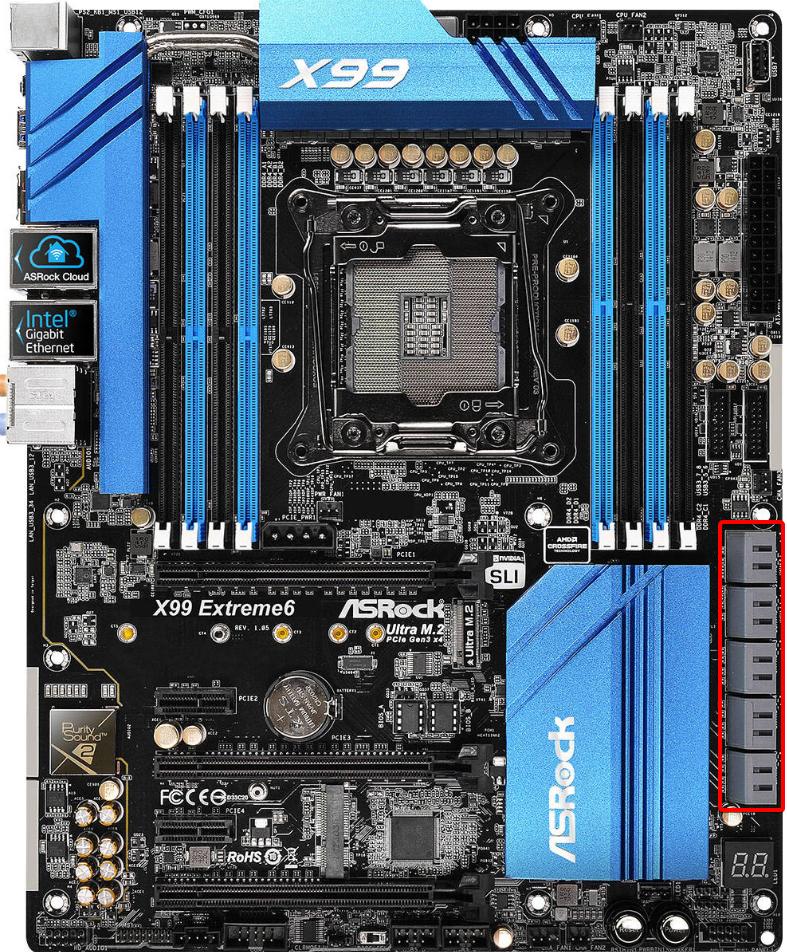
most motherboards--even in prebuilt machines--have at least 4 SATA data ports, usually along the PSU side of the board
using a higher-end version of my board as an example the red box contains the data ports https://i.imgur.com/vVE321c.jpg
 dusk apex
Can a tone identify those? Got them from a solid 2009 PC my cousin had laying around for 4 years
Anyone*
Aslo that too
 tardy zealot
Second one is a creative labs sound card... model number is in top right corner for research purposes.
Ram looks to be DDR2 few generations older,
proven palm
that was a beast of a sound card for its time
and yeah that's DDR2 https://www.newegg.com/kingston-1gb-240-pin-ddr2-sdram/p/N82E16820134487
dusk apex
Thanks. Yah my cousins parents told me to take his old pc because it's just sitting there doing nonthing so now I am parting it out and getting money to build my own PC
Also got this... for some reason it goes for almost $200 still but that's refurbished
dusk apex
Intel 2 duo
My cousin out too much thermal paste on it and a little spec of thermal paste is on in the pins of the motherboard... it bothers me so much
proven palm

red jay
@dusk apex Maybe you can dig it out with a needle as best you can.
dusk apex
👌
red jay
Or depending on what pins you're referring to, a q-tip might work. @dusk apex
dusk apex
Just noticed there is only 1 refurbished on just like it going to $200
Hmmm
Maybe I can sell it for $150
 pseudo elm
i just got an m.2 ssd and put it in the m.2 slot but when i push it down against my mobo it just bounces back up
how do i fix this?
proven palm
you put the screw that came out of the motherboard back in it
 magic marten
@proven palm I know I might sound stupid but can you have an ssd and a hard drive in one PC?
proven palm
yes
you can have as many SSDs and hard drives as you can physically fit and have power and data connections for
like that
 crisp belfry
@dusk apex You can't really trust those prices, there isn't exactly a market for old hardware like that unless there happens to be an enthusiast of some sort looking for it speficially
outside of a niche collector/enthusiast market, hardware that old is pretty much worthless
magic marten
Alright, also @proven palm Does every motherboard have a ssd socket
tardy zealot
M.2 no... regular SSD runs off a SATA cable so yes
red jay
@proven palm Quit showing off... 😉
proven palm

proven palm
Macrium Reflect is a good choice
proven palm

~~The Squeaky Clean Method for a Clean OS install: https://www.youtube.com/watch?v=N0Tv0FaoR8U Video Project List 1: A Good SSD. GadgetClass Recommends t...
 low pebble
after the cloning what do you do?
proven palm
that video walks you through the whole thing
low pebble
ok
 fallen oar
Looking to get a M.2 SSD any recommendations? Also any recommendations for HDD? My mobo is a MSI b450m bazooka v2 if that matters for anything.
 proud hawk
Does anyone here have a Corsair MP600 and have any comments on it?
I'm looking to upgrade from an old Samsung 650 SSD (I think)
red jay
@fallen oar I'd suggest at least this for an M.2 SSD unless you want larger storage: https://www.newegg.com/mushkin-enhanced-helix-l-500gb/p/N82E16820226898 it's a pretty fast M.2 drive. And for a HDD this is a good 2TB one for little money: https://www.newegg.com/p/N82E16822184773
pseudo elm
i just installed my m.2 ssd but i cant find my drive in file explorer
any idea where to find it or where it would show up?
undone dune
right click the start menu on the bottom left. then left click disk management
look for the m.2 and then format it and include a drive letter if needed
pseudo elm
um ok gimme a sec
undone dune
red jay
Careful with that haha. You can format something important with a misclick. First, expand the window
pseudo elm
ok
red jay
click and drag the bottom right corner of the window to expand
red jay
Haha sorry, didn't mean to imply such, thought you'd send another screenshot after
pseudo elm
its all good
"465.75 GB Unallocated"
that would be my new drive correct?
its a 500gb
undone dune
are you making this a data storage drive or os drive
pseudo elm
i wanna make it my boot drive
undone dune
oh
pseudo elm
bc its an ssd
 pseudo elm
and i have an hdd as my boot drive currently
red jay
Well, if you want to clean install windows on it, download the media creation tool, then use it to make a usb installer
and I assume you know the rest
undone dune
hope you have a 8gb or more usb stick
 undone dune
you'll need one to create a usb bootable drive to install windows 10
pseudo elm
ill go try to find one real quick
undone dune
you need to back up all your data/files
write down all the places you need to go to download drives/software
pseudo elm
onto an 8gb drive?
pseudo elm
so i just back up windows 10 on the 8gb drive
 pseudo elm
visible confusion
undone dune
as soon as you install windows 10 on the m.2, it will be a fresh copy that will need you to reinstall drivers
pseudo elm
and is that hard?
undone dune
previous files in document, pictures, video, etc folders might be fine but just in case save it somewhere safe on a diff drive or large usb stick
pseudo elm
ok ill go try to find a usb drive real quick
red jay
what, no, don't do any of those things
undone dune

red jay
Wait, to be clear, you have a new, blank ssd, and you want to install windows to it?
 undone dune
are you going to tell him to data migrate?
red jay
@undone dune no
@undone dune Maybe I misunderstood you and we're actually saying the same thing. I'm telling him to install windows fresh to the ssd
undone dune
yeah
red jay
Then just take ownership of whatever is on the rest of the drives connected to the pc
red jay
Ah
pseudo elm
which will probably happen
red jay
I was gonna say just unplug the sata cables etc
undone dune
yeah he can do that too
red jay
A bit harder if they're m.2
pseudo elm
wait so am i getting a usb drive or no?
undone dune
yes
pseudo elm
ok brb
undone dune
you need it to fresh install win10
red jay
yes, also, you might check and see if you could benefit from a bios update
undone dune
8gb last time i checked yeah
pseudo elm
ok
red jay
Lol, I sent this streamer building their first pc (9900k + 2080 ti ) a windows key and told them how to use the media creation tool and to not pay for windows
Nope, theypaid for windows, and install 1607 off a flash drive
red jay
At least 1607 didn't have that garbo WDM
But you can't use a 20xx card past.. 1709? idk
Mabe 1709 LTSB
undone dune
not sure
red jay
Idk, honestly I like 1903 despite all the headaches with multi monitor / g-sync / dx9 / wdm related aids
red jay
Also, windows pretty much grabs all the drivers you need
undone dune

red jay
haha why?
undone dune
no idea
red jay
I didn't notice much of a change.
I need to re-benchmark, best is like 12700 with a 7700k/2080 ti
undone dune
with firestrike?
red jay
oh, no timespy
undone dune
o
red jay
I've changed a ton since then
Also, your suggestion to backup isn't a bad idea at all, just depends if he has like, a big usb 3.1 external laying around or something
But it'll take hours without block level access e.g. clonezilla
undone dune
9026 with time spy 7700k/1080ti but that was 3 months ago
red jay
did you de-lid? And are you hopping on zen2?
undone dune
no plans
undone dune
you're going to lose all the data on that drive when creating a windows 10 installer
pseudo elm
ouch
undone dune
so if its data you want to keep better put it on the HDD for now
red jay
@undone dune I always get people to run a userenchmark, easiest way I've found to figure out someone's system, see what parts they have, bios version, mobo, gpudriver, xmp settings all that
undone dune
yeah
red jay
Wait, why would he create the windows installer on the external hdd?
red jay
Tell him to use a flash drive
 red jay
Also, maybe have him run a userbench and we can see if his mobo/bio/cpu/ram really NEEDS a bios update
undone dune
@pseudo elm it needs to be a usb drive not external
red jay
If not critical, then probs not worth the effort
pseudo elm
ok back
undone dune
the os was able to detect the m.2's unallocated space so im sure hes ok for now
pseudo elm
the drive i had was an external with a usb connector
but now i just have a regular flash drive
undone dune
has to be a usb flash drive i mean
undone dune

pseudo elm
the flash drive?
red jay
Better yet, it's simply good practice in the fist place to cloud backup on googledrive, onedrive, amazon aws, whatever anything important anyway
pseudo elm
wait so i just drag the flash drive onto my desktop?
red jay
Is there anything on the flash drive
pseudo elm
nope
red jay
Have you watched a guide/vid or something on how to install windows?
I'm sure you can find something by Linus, Tech Deals, whoever
Also, do you need a windows key?
red jay
Run this and send us the page https://www.userbenchmark.com/

Top Market Research & Genuine Product Insight from our Users. Quickly find category leading products with UserBenchmark.
red jay
If you're interested, watch some guides on how to enable xmp and what it does.
pseudo elm
is it important?
red jay
Also, it looks like windows is currently installed on that wd blue
pseudo elm
yep
red jay
Uh, it looks like windows is on this thing https://www.amazon.com/dp/B073SBZ8YH
ionic forge
red jay
It's a good m.2 NVME drive for $100
ionic forge
yeye
red jay
Also, I love microcenter
ionic forge
im kinda iffy on the intel 660 so maybe this one will be better
red jay
I made a facebook group in 9th grade named "Microcenter is the the best computer store ever"
 ionic forge
im paying 100 so ye
red jay
at the microcenter?
ionic forge
amazon has it for $102
red jay
Using it for boot?
red jay
That's a very good idea, just don't raid 0 them
great choices all around. If you were to spend more, get a nice 750 pq or focus plus for $120
Or just grab a 3700x
ionic forge
Thanks for the tips! Helps a bunch :)
pseudo elm
remember when i said i wasnt stupid?
i was wrong
turns out this whole time i had an ssd and i thought i had an hdd
and also my discord is acting up a bit
red jay
Easy mistake, don't worry about it. WD Blue is the name model name they give to their HDDs.
pseudo elm
ok
i dont think i mentioned it but i have a prebuilt and i forgot most of the specs
thats the main reason i thought i had an hdd
ok so how do i get windows onto my m.2 ssd?
red jay
Never seen this but give it a try https://www.youtube.com/watch?v=vHS_3qi0kXg
From earlier
I'm sure you can find something by Linus, Tech Deals, whoever
Also, do you need a windows key?
 carmine thorn
YEA YOU SHOULD BE ABLE TO CLONE IT
pseudo elm
would not cloning it mean that i have to buy windows?
red jay
Maybe, but check your pms
low pebble
woah
magic marten
@red jay ^
magic marten
fastest ssd for a budget of 30 dollars, a friend wants to know. you know any? @shut tundra
 wary urchin
you can prob get a 240gb for that price
proven palm
do you know if your friend has an M.2 slot @magic marten
proven palm
alright, just a sec
magic marten
alrighty.
proven palm
yes, for sure
magic marten
alright, thanks.
magic marten
@proven palm I have a 500 GB hard drive, is it better if I put the 35 dollar SSD to like help boot up apps or set it as my boot drive
proven palm
use the SSD as your boot drive
magic marten
like my start up boot drive
magic marten
O-
how do I do that..
i already have my pc up and running tho
And it has windows on it
proven palm
the entire point of an SSD like that is to put windows on it
because windows on a mechanical drive is torture in comparison
magic marten
Gotcha, so I have to re download it?
proven palm
download that - create a bootable flash drive
shut down the computer, disconnect the hard drive
plug in the flash drive, boot the PC and it should go straight into the bootable flash drive
install windows to the SSD
magic marten
O-
proven palm
when you're in your new install of windows, go ahead and hook the hard drive back up to SATA data (yes it's fine to hook up a hard drive while windows is running - SATA is hot swappable)
magic marten
Is there a video for this?
proven palm

How To Set Up a New PC - A Paul's Hardware Tutorial ⇨ Sponsor - Tt View71 Snow |Buy: https://amzn.to/2Ln1FPU |Info: http://bit.ly/PHTTView71 ► TIMESTAMPS ◄ 0...
watch that
 maiden rivet
Hey, so I have a question. I'm planning to clone files from an old laptop hdd over to a new ssd because the hard drive is bad. If I try to clone it, will I run into problems since it has bad sectors in the hard drive? The laptop is still useable but it becomes very unusable when it starts trying to read/write to bad parts of the drive. I'm afraid when it tries to copy over data from this part it might fail (or possibly cause problems with the new drive).
proven palm
that's a tough one
maiden rivet
I also have no idea what's on the section of the hard drive that's bad either
proven palm
your best option may be to do a fresh install of windows on the new SSD and then salvage what you can from the drive to limit the reads and writes
or you could try to disable the bad sectors
maiden rivet
I've tried disabling them before
proven palm
using Victoria?
maiden rivet
Still run into the same problem. Not sure if there's multiple bad sectors. I wouldn't be suprised though because this laptop is 11 years old and has a stupid amount of use out of it lol
proven palm
then yeah, installing fresh to the SSD and trying to salvage off of the hard drive may be your best bet
or as a last ditch effort https://www.youtube.com/watch?v=nZz9L-brF7U&

How to Fix A Bad Sector on a Hard Drive ►►►SUBSCRIBE for more: https://www.youtube.com/user/Britec09?sub_confirmation=1 When a hard drive starts to show sign...
maiden rivet
Could it hurt anything to try it?
maiden rivet
I'm trying to repair this old laptop. It kinda doesn't make a lot of sense considering the age and amount of use it's had, but the laptop surprisingly still runs decent and It's a good way for me to practice working on laptops. It probably has 10,000+ hours but it still runs good.
It definitely needs a new storage device before anything though so I think i'll probably go ahead and try to clone the drive
and cross my fingers it works lol
proven palm
yeah, sounds like a plan
 thick warren
Is there a way I can use an SAS Hard drive on my PC
red jay
Yes. Easiest way is to buy an HBA like a dell H310 on ebay, probably flash it to IT mode and pick up some sf 8087 to 4x sata/sas breakout cables. If more than 8 drives, grab an HP sas expander
Not the best picture, but it worked for 20 drives. https://puu.sh/DUB9M/5bc07fc4fb.png
 thick warren
Could you send me a link to it all? I’m kinda dumb when it comes to SAS hard drives
I can’t find the HBA
red jay
I realize now, maybe there's a simpler solution
thick warren
What would that be?
red jay
Maybe an adapter card or something far more elegant and cost effective. I'll be back in an hour or so if you still need help
thick warren
Alright, thanks. Just dm me if you can
low pebble
@red jay what build you rocken
iron geode
So I'm wanting to get a corsair mp600 m.2 for my build; but I'm concerned about how hot it runs. Any info on that would be very helpful.
red jay
@iron geode I found this article on the subject: https://www.guru3d.com/articles-pages/corsair-mp600-pcie-4-nvme-ssd-review,6.html

Guru3D.com
It's time to review some next-level M.2. NVMe in a sixth gear, yes we review the Corsair MP600. Of course it is an SSD you can seat into any PCIe 3.0 compatible PC, however, if you place it into a ... SSD Operating Temperatures
iron geode
@red jay Thanks much!
red jay
No prob.
iron geode
I do have another question; would you recommend the MP600 stock heatsink to be used on the ROG Crosshair VIII Hero or would the stock mobo heatsink do the job better?
red jay
@iron geode I'd use the top slot with the mobo one. It's bigger so it stands to reason that it should cool better.
iron geode
Gotcha, i should probably just get the parts and do some of my own tests to see how they compare
red jay
Might as well.
iron geode
Whenever that happens, I'll try to remember to let you know how it goes
 icy trench
how do i make disk c my main one, i thought i did but i guess not (im a noob)
proven palm
you would need to either cut down on the size of your windows install and clone it over to the new drive
or
disconnect the hard drive and reinstall windows to the SSD
icy trench
what's the easiest method
proven palm
looks like a brand new install
i would disconnect the hard drive, reinstall windows to the SSD
boot into windows on the SSD and then connect the hard drive again and then format it
low pebble
wait if you do that and reinstall windows, is windows free?
red jay
Yeah. You still keep your version of Windows
low pebble
damn
red jay
Oh and hey everyone
red jay
No. Not really
It's just moving all your info/Boot up files to another ssd
There are programs to help you with that. Had to do that when building my PC. To transfer all my files from one drive to the new one.
From what I'm understanding, you want to make a certain drive the C:/
low pebble
ok so you unplug you hardrive and boot in windows, form there you redownload everything to your ssd and your hardrive should act like a new dirve?
low pebble
what program
red jay
Hold up. I have it on my laptop (lemme boot it up real quick)
You have a casing for the original hard drive? To connect to USB? That's how I did my transfer at least.
red jay
Alright
low pebble
what was that program you were going to recommend
red jay
It's a program from easeUS
low pebble
is it free?
red jay
There is a trial. Been using the trial
proven palm
is it a brand new drive @fallen oar
red jay
@red jay 3TB: https://www.newegg.com/p/N82E16822178994
2TB: https://www.newegg.com/p/N82E16822184773
red jay
I heard they fail a lot is that true?
@red jay
@red jay Seagate is just as good as other brands. With any HDD there's a failure possibility especially since they have moving parts that ware out or can get damaged in shipping etc.
red jay
 worldly canopy
hm... I should look in to getting an internal storage drive
anything in particular I should lean toward or avoid?
tardy zealot
M.2 for speed... SSD for speed and storage size, regular HDD for pure storage.
 cloud blaze
You can get an M.2 with good size now for a good price
Evo Plus at 500gb is like 110$
red jay
m.2 is the physical connector spec, m.2 drives can be either SATA, NVME or some other type of host interface
 tawdry pagoda
M.2 1tb ssd looking at intel or samsung can you give which would be better
tawdry pagoda
Thats what I thought thanks
 fleet juniper
Intel would probably be cheaper
I've seen a lot of people recommend the 660p model for a budget option
I have a Samsung 512GB I re purposed from my laptop which has been working fine.
magic marten
@red jay
Do you know if this SSD is any good?
And would it be good for boot drive
proven palm
never heard of the brand, tbh
red jay
@magic marten I've never heard of that brand, looks like one of those things you should walk away from and never look back, lol.
magic marten
Alright, it comes with some power bank idek what it's for.
Mad weird, but it has great packaging.
and alright.
 pliant grotto
Anyone know if the Silicon Power A80 256 GB M.2-2280 is any good for $45
proven palm
Silicon Power is fine with their budget drives
pliant grotto
k
fleet juniper
@pliant grotto The HP EX920 is anothe budget option in that price range: https://www.newegg.com/hp-ex920-256gb/p/N82E16820326777
 kind pelican
Hey there i was wondering if I could get some help about a new m.2 drive I picked up and if it will fit my asus hero viii mobo
 faint raven
hey guys so i have an asrock z390 pro4 motherboard with just a single 1 tb ssd. I want to increase the storage of it just to make sure im good in the future. Would you recommend getting an m.2 and moving my os to it or just getting a 2-3 tb hard drive to make sure i have enough space in the future or another tb ssd. as of now it feels like the ssd speed is quick enough and i dont believe i need the m.2. Just looking for some advice. thanks
red jay
@faint raven what is the 1TB SSD you already have, 2.5" ?
faint raven
honestly im not exactly sure because i just got the pc and it was prebuilt
red jay
@faint raven Ideally someone should have their OS and all their other stuff on SSD's as SSD's work faster than HDD's and are usually more reliable and last longer, but you have to go with what you can afford. I recommend at least your OS on an SSD so windows can operate as fast as possible. You could buy a small m.2 SSD for your OS and use the 1TB SSD for games, maybe even upgrade the 1TB to 2TB SSD in the future. Here's the cheapest M.2 of a good brand, that is also pretty fast, that newegg has: https://www.newegg.com/patriot-scorch-128gb/p/N82E16820225108
@faint raven If you're really thinking HDD for pretty large storage capacity, good Brand and speed, this is a good value: https://www.newegg.com/p/1Z4-000B-00982?Item=9SIA5AD9BE7871
faint raven
Thanks for the input. I haven’t added any parts to a pc internally before. Will these be easy to add in to my computer and move the os?
red jay
@faint raven No prob. Easy enough with a little experience. You can clone the OS to a different drive but it's really to do a clean OS install and then just copy things over like "pictures", "documents", "downloads" folders etc.
 wheat osprey
noob question - so i have the components for a new rig to upgrade. is it possible for me to do the lazy way and just move the m.2 ssd and my storage ssd and power it up? lol
wheat osprey
m.2 is my OS drive yes and the ssd drive is my data (3rd party applications, steam game installations, etc)
so the Win 10 OS is tied to mobo?
getting a new key is np if thats all that is.
latent smelt
Yeah
I had to redo my key few days ago with this x570 mobo.
5 bucks on ebay.
@wheat osprey
 plain sentinel
If u get the full retail key then customer service might do it for free
But the eBay option is probably better if you’re paying for a key
 viral venture
is an ssd always a good thing for pc's
red jay
@viral venture Yes, if you get a good brand, type and speed.
wary urchin
as long as it's from a respectable company yes.
viral venture
can you guys link a couple of ssd's on newegg that are like 120$ or lower
 turbid torrent
You want nvme? Sata? What is it for?
Is it something you need cache for like a boot drive or is it an image and video drive?
tardy zealot
Or you can go to Newegg.com and look.... lol
viral venture
lol sorry
red jay
@viral venture Yeah what SSD - 2.5"? M.2?
viral venture
ssd 2.5
red jay
@viral venture For 2.5" considering brand, speed and capacity, I suggest this: https://www.newegg.com/crucial-mx500-500gb/p/N82E16820156173
plus it has average 4 out of 5 egg review.
viral venture
oh dang and affordable
red jay
Yeah and I have a Crucial 2.5" from back in like 2013 and it's still going strong.
viral venture
true. also the process of putting the os on an ssd always confused me could u explain that
either in chat or in a call
wary urchin
you dont put it on the ssd
you put it on a usb, then you plug it into your pc and make it boot from that usb
then it'll install windows
whatever drive you select it will install the os onto it
viral venture
so it would go on the ssd but i would boot like i did when i build the pc
red jay
@viral venture https://www.microsoft.com/en-us/software-download/windows10
wary urchin
download to your usb, if you need help on that, there's videos on how to download it to your usb
pseudo elm
i got an m.2 ssd a while ago but didnt format it because i didnt need the storage and didnt really want to mess anything up
how would i go about formatting my m.2 drive?
pseudo elm
just for storage
 spare thunder
are you on windows
pseudo elm
i was originally planning on making it my boot drive but then i was like nahh its too hard
yep
spare thunder
windows 10 right?
pseudo elm
yes
spare thunder
okay go to the search bar in the bottom left corner and type disk management
pseudo elm
alright
spare thunder
it will have the part at the top saying create disk partitions or whatever
pseudo elm
i dont see that
spare thunder
type create and format
and see if its there
and it says create and format hard disk partitions
pseudo elm
where do i type that?
im just trying to make sure that my m.2 drive shows up and that i can actually install stuff on it
spare thunder
wym
pseudo elm
i type in "create and format" and i click on "create and format hard disk partitions" and it just brings me to "disk management"
the same thing i was already on
spare thunder
as a web search?
spare thunder
type in create and format hard disk partitions
spare thunder
okay and is the m.2 plugged into the pc
pseudo elm
yes
spare thunder
do you see a partition that says unallocated
pseudo elm
yes
spare thunder
then allocate it
spare thunder
right click in the actual part that says unallocated and hit format
pseudo elm
where?
spare thunder
after u right click on the unallocated part it pulls up the list
pseudo elm
i right click and it says "new simple volume, new spanned volume, new striped volume, properties, help"
spare thunder
click on the actual bar thoguh not the name part
pseudo elm
thats what i did
spare thunder
hit new simple volume
spare thunder
lol yeah sorry i was so bad at explaining
pseudo elm
its all good
spare thunder
its been a while so i was trying to remember
spare thunder
btw tho it wont automatically put files in there so you either have to choose it when you download things or go to files and move them there
low pebble
if you have a HDD and have everything on it. if you have a sdd can you just unplug the HDD to reinstall everything on the hdd
low pebble
plz help
 mild dagger
Will I as an average consumer notice the difference between an 860 eco vs qvo?
 exotic cipher
hey can i post a link from new egg on this hd
undone dune
yup
 tulip bloom
Noob question here. I've never had a mobo with a m.2 heatsink like the x570 aorus master does. Do I need to remove the sticker on my m.2 for the heatsink to work or does it work with the sticker on there?
red jay
No need to remove the sticker. You might have to peel off some protective plastic covering the blue thermal pad on the heatsink. The manual has good instructions on m.2 installation stuff.
Most m.2 drives in the vast majority of non-synthetic use cases don't need a heat sink at all, but if the board has one, might as well use it.
tulip bloom
@red jay Thanks for the reply! I did indeed peel off the protective plastic on the thermal pad on the heatsink. I was just unsure if the sticker would cause thermals to be worse if left on.
 edgy pilot
so i have a external 2-bay raid thingy that has usb 3.0 and e-sata. It has an option to do JBOD. How would the bandwidth be on usb 3.0, and there is only one e-sata port, would it actually be able to recognize both drives??
exotic cipher
 vapid moon
is ne1 willing and able to help me with m2 troubleshooting? :/
keen urchin
did it boot before?
vapid moon
yes
keen urchin
stupid question; did you forget to turn the power supply switch back on?
keen urchin
the video cable is plugged into the graphics card, right?
keen urchin
alright
vapid moon
using msi z170 mobo....
keen urchin
which specific one
red jay
@vapid moon Someone should (if possible) take the back panel off that case and route some of the cables through the back there to allow better airflow and so you can see your parts better.

An overview on cable management for your desktop PC. ▷ CHEAP GAME CODES: http://bit.ly/bitwitcodes [G2A] ▷ SIGN UP, PROFIT: http://bit.ly/goldminebitwit [G2A...
vapid moon
k
keen urchin

vapid moon
im begging you!!
red jay
@vapid moon Are you sure the monitor cable is plugged into the back of the video card and not plugged into the motherboard?
proud hawk
HP EX950 M.2 2280 2TB PCle Gen3 x4, NVMe1.3 3D NAND Internal Solid State Drive (SSD) 5MS24AA#ABC https://m.newegg.com/product/9SIA2W08NS3756?m_ver=1
Think this is a good 2TB SSD?
 red jay
That is a good SSD, but you can probably get something that will suit your needs just as well for much less. Like https://www.newegg.com/p/N82E16820167462
proud hawk
Hmm
proud hawk
So. Should I pick up a 2TB 660p SSD?
proud hawk
@undone dune maybe if you send me your megumin doll
undone dune
Doll? D:<
proud hawk
Figurine
proud hawk
Where did you get that pic of me
undone dune

proud hawk

 lean vector
So I did some back of the envelope (actaully wolfram alpha) calculations, and based on the performance of existing asics using SHA-256 encryption, all passwords under 7 characters long could be exhaustively hashed for roughly 908 million month-dollars. Whatever combination of months and dollars that multiplies out to that figure. although that doesn't factor in the 174 billion kWh needed to run the boards alone, let alone the server that's supervising them and routing the data to the storage medium that probably doesn't exist yet. 6.49*10^32 bytes of storage you would need to store the password and hash pairs. months were calculated as 1/12th of a year, sue me if it's not exact. that power cost based on median US electricity cost is 23.2 billion dollars. that's 3.6 dollars per person on the Planet. I love that the internet lets you answer questions no one would really ask.
so, my question is, is there any way to store that much data?
and have a fast retrival.. it could be stored in order of the charachters of the passwords....and also a second time in order of the hashes....how would you procxess that much data so you could have the hash to password reverse mappings?
 frigid monolith
i got lost after the second line sorry
 junior jackal
...what?
red jay
@lean vector That's a good thought experiment. Don't forget that password. https://puu.sh/E7Tx4/9756e9f738.png


 stone oxide
Samsung makes the best stuff
red jay
Unpopular opinion, if you have a use case for 4k random read QD1 and or testing out pc hardware for fun, grab a 280GB 900p pcie AIC new on newegg/ebay for <$300.
The AIC form factor likely doesn't suffer from the same temperature problems the m.2 22110 can in some systems.
Also, sup @ Kenny
 hard pulsar
sup
turbid torrent
I want to go from a sata 512gb Sandisk ultra boot ssd to a pcie 3.0 one. Does anyone have extremely fast pcie ssds? Price doesn't matter too much.
 sweet badge
Uhhh Samsung has some fast one, like the 970 evo
red jay
Budget? How much do you value responsiveness?
low pebble
can you suggest a vid so i can make my ssd my boot drive
 cold atlas
looking for info on how to install a M.2 SSD using a drive bay. I realize I miss out on the speed the drive offers, but already have 2 SSD's in an adapter utilizing the 2nd PCIe slot. I'm guessing I need some sort of adapter for it as well, but where do I find info on the precise type of M.2 card i have so I can get the right adapter.
https://www.newegg.com/intel-660p-series-2tb/p/N82E16820167461?Item=N82E16820167461 <-- SSD in question.
red jay
You might be able to use a pcie 4x riser. What mobo model? A pic works too.
cold atlas
Mobo is ASUS Sabertooth 990FX
lol, just remembered that the mobo would be important
pcie 4x riser? as in it will hold 2 M.2 SSD'S? I'm on a tight budget, so it may be out of my range?
*hold 4 SSD's
Adapter currently using in the PCIe slot https://www.newegg.com/intel-660p-series-2tb/p/N82E16820167461?Item=N82E16820167461
there was a screw up on my part, i removed serial number info so newegg wouldn't except it back. so i'm trying to use it. does me no good sitting inb its box
red jay
It's possible to put more than one m.2 drive in a riser, but I don't think devices with that capability will be within budget or compatible with that mobo.
cold atlas
i can use voice chat if it makes it easier
red jay
Did you link the same drive?
cold atlas
ya, i was thinking i saw adapters with more slots, but ignored because of price
red jay
Text seems fine for now, but a pic of the mobo would give the best info - only if comfortable.
Probably fine without.
I'll check the mobo manual,
Though, 990FX is an old platform, are you interested in a new ryzen 3rd gen build? Those are extremely popular these days
cold atlas
i will link the 2 drives currently installed, and the 3rd by itself
both of those on this adapter installed in 2nd pcie slot
red jay
Got it, nice choice of 660p btw
cold atlas
it's the 3rd drive, same as first (top link). 2 purchased, only 1 installed
ty
oh... i see you're a mod in training. hope it goes well for you
i'll never need all this storage, but hey... it's just sitting in a box
and as for changing out my current mobo.... not too sure about that for now.
i'm on disability, so just adding the SSD's was, in a manner of speaking, a splurg
but i'm always open to suggestions and advice
Also... I have no idea what a "ryzen 3rd gen build" is. I just now looked it up.
It looks like I'd pretty much have to build a whole new PC? Yikes! 😮
red jay
Hey, I'll get back to ya, I wanted to login to discord on my phone just to make uploading pics easy
cold atlas
no worries mate
So I guess the bottom line is, what adapter do i need to put this: "Intel 660p Series M.2 2280 2TB PCI-Express 3.0 x4 3D NAND Internal Solid State Drive (SSD)", into an old school sata drive bay.
red jay
About the possible upgrade, if what you got works and you don't need more, nothing wrong with keeping it the same.
But if you want more performance, you can certanly get it on a newer platform.
Well, you'd want to use a similar adapter to the one you already have
That exact same adapter would work
cold atlas
ya, i was hoping my current pc, about 4yrs old now, would last ~8-10 years. previous system i built lasted almost 6. Still have it actually... and works fine
red jay
Though, the one you have has a slot for both m.2 nvme and m.2 sata, I'll have to read up on that to be sure I'm giving you the right info
cold atlas
but i don't have any pcie slots open, both are used
red jay
This board, right? https://www.asus.com/media/global/products/H9GanpgqHG8yN8yQ/QmYGR1qqrbeHA6bl_1000.jpg

 red jay
I count 4
I'll see which slots are fed by the cpu/PCH. I'm unfamiliar with 990fx's architecture.
cold atlas
actually... my board has a "R2.0" after the 990FX
i'm thinking that isn't important to this discussion tho
"which slots are fed by the cpu/PCH" = greek to me. 🙂
i do research prior to buying, but only what i think i need to know
obviously you have forgotten more then i'll ever know
red jay
It might be, but you're 100% right, revision number can be very important.
Haha nah, I just was an intel guy from 2007ish to present with only a few AMD systems recently.
cold atlas
oh... kewl
red jay

 cold atlas
ah. well, ive ALWAYS gone AMD on ASUS boards
red jay
THis is the important part