#old-monitors-and-tv
1 messages · Page 37 of 1
 patent lagoon
 magic lotus
Its the one thats not available rn
patent lagoon
He's talking about how it actually looks
magic lotus
?
magic lotus
Ehh
Ima use it for a triple monitor
Thats why im looking for 27'
Tbh i dont really no much of monitors
patent lagoon
Uhhh
Just know 24" is optimal for 1920x1080
And 2k for 27"-34" at most
After that just look into TVs
magic lotus
So like you mean a 24' inch is good for gaming and it will have better view
patent lagoon
Wym view Lmao
magic lotus
idk
magic lotus
welp unless if it looks good in a triple monitor setup
patent lagoon
And the monitor isn't too big to where I can't even view the corners without actually tilting my head
magic lotus
Just about when you said that
I was gonan send this

Buy Samsung CHG90 49" 32:9 Curved 144 Hz FreeSync HDR LCD Monitor featuring VA (Vertical Alignment) Panel, HDMI + DisplayPort + MiniDP Inputs, 3840 x 1080 Resolution, 3000:1 Static Contrast Ratio, 350 cd/m² Brightness, 178°/178° Viewing Angles, 1 ms (MPRT) Response Time, 1.07 ...
patent lagoon
Huh??
Idk if your card can even run that we'll
*well
Or you're just sending just bc I said TV
magic lotus
?
patent lagoon
Why'd you link that big monitor for
magic lotus
Idk
Is this one a good one https://www.newegg.com/p/0JC-004Y-00031
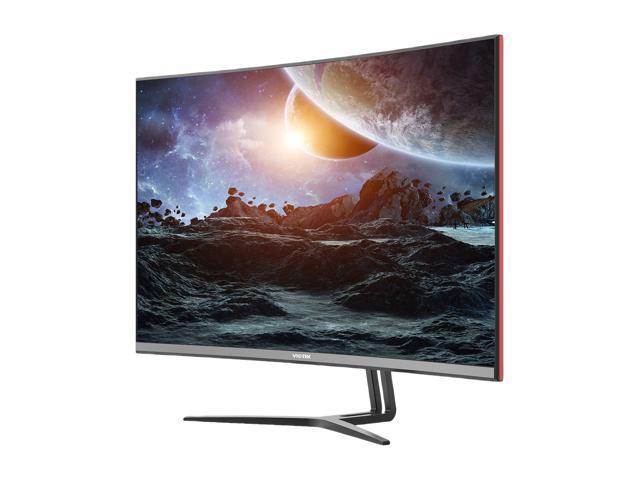
Buy Viotek GN32DB 32" curved gaming monitor, 2560x1440 2K WQHD, 144Hz, AMD FreeSync, 4ms, VESA mount, DVI, HDMI, DP with fast shipping and top-rated customer service.Once you know, you Newegg!
Or this
patent lagoon
Your card can barely run 2k
Depending on what you play of course
Or its just gonna blow up on you

patent lagoon
You spend $700 on a last gen card??
Bro
That might be the biggest L I have ever seen
patent lagoon
It's last gen bro
Jeez
You got played
My card outperforms it for $400 less
Brooo
Return it and get something better if you can
My goodness
patent lagoon
2080 super
magic lotus
A asus rog strix rx5800
patent lagoon
Jeez bro
magic lotus
BRU
patent lagoon
That doesn't exist
magic lotus
I forgot that name of the card
But I dont even got that much money
For a 2080 super
patent lagoon
Then how did you spend $700 on a last gen card
patent lagoon
Can you return it?
patent lagoon
Ya
magic lotus
If you say that it doesnt work well of a 2k monitor
patent lagoon
It won't
magic lotus
The monitor I'm using rn its
patent lagoon

Based on 510,931 user benchmarks for the AMD RX 5600-XT and the RX 580, we rank them both on effective speed and value for money against the best 639 GPUs.
magic lotus
A 2k 32'
patent lagoon
Here's my card vs ur card
magic lotus
And it works perfect
patent lagoon
And I'm mid range in 2k
Ya but are all the games you play actually running in 2k
And at what settings
I'm actually in pain rn
patent lagoon
How many frames brother
magic lotus
Like 180fps
patent lagoon
But what games you playin
magic lotus
Warzone
Gta
Beam ng
Flight simulator
Pcbuild something like tht
Minecraft
And it's not even slow
patent lagoon
Ig that card goes crazy then
magic lotus
Huh
patent lagoon
For it being last gen I didn't know there were rx580s that were like that
magic lotus
Well if it was last gen
ItS been working fine for me
I've even watched YouTube videos 4k
patent lagoon
Your monitor is only 2k tho lul
magic lotus
So why does it let me watch 4k videos
patent lagoon
It's just a setting on YouTube
magic lotus
K
patent lagoon
I'm not entirely sure how it works
magic lotus
k
patent lagoon
But uhh
magic lotus
Welp my graphics works fine
patent lagoon
Ig get whatever monitor you want then
magic lotus
K
magic lotus
400down
magic lotus
Change my mind 285$ down
Yeah
32'
At least more then 165' to 140' he and curved maybe
Gaming
Asus
patent lagoon
Where
 shy plover
AOC on amazon
magic lotus
Walmart and amazon
patent lagoon
Ya
That's what the man with the beefy gpu needs
Wait
Found one
VIOTEK GN32DA 32-Inch WQHD Curved Gaming Monitor | Cinema-Quality 1440p 144Hz 4ms w/AMD FreeSync & FPS/RTS | HDMI DVI DP 3.5mm | Fully Adjustable Stand (VESA) https://www.amazon.com/dp/B07X1LCMLS/ref=cm_sw_r_cp_api_i_CXHiFb0TKXTCZ
shy plover
yeah the 1ms ones are 430+
magic lotus
patent lagoon
Ya
 silk vigil
For it being last gen I didn't know there were rx580s that were like that
@patent lagoon yea I’ve got a rx580 and it’s pretty good with any game it doesn’t get 100fps on ultra settings but it’s a good card.
I’ve got a monitor 27” 165 hertz 1440 with an i7 7700 rx580 and it does pretty good I play gta on medium and get around 60fps to 40 on fiveM.
patent lagoon
Ya but pushing the specs he listed tho
Kinda crazy ngl
But still could've got a better card for that price tbh
silk vigil
Yea mine was a cyber power pre built 2 1/2 years ago for my 11 year old Christmas lol
 willow thorn
The votex monitor doesn’t ship to my location. I was thinking of getting a ultra wide spectre monitor but it’s only 85hz
 silver wyvern
the RX580 is from 2017 and was $229 NEW -- you can get them new now for $150 -- performance similar to a OC'ed RX480 from 2016
 lilac ivy
Interested in new monitor and would like either a 27" 144hz or an Ultrawide. May be a stupid question, but I have a very high ping in games, for example often 140+ms in COD:MW. So how important is 1ms GtG when have such high ping?
 covert solstice
gtg is how fast a monitor can change colors
lilac ivy
I understand that, but saying is it worth pushing for a 1ms over a 4ms etc?
patent lagoon
Well they're kinda two different things
 visual pilot
Monitor advertising is stupid
The response time is not accurate at all @lilac ivy
As long as the g2g/mprt are in the ballpark of like 1ms/4ms, doesn't matter.
lilac ivy
That’s what I was gathering. So for a competitive person but not tournament level play, what would y’all suggest for a 27” or 34” UW that will perform well?
visual pilot
Don't go uw for comp is my opinion
Could go for a 27in 240hz 1080p monitor
A good amount of those around
lilac ivy
Meaning I’m a competitive person but don’t play competitive level.
lilac ivy
Thought the extra FOV for FPS was the draw on UW. If go 1440p is there a considerable difference in 100hz and 144hz?
lilac ivy
Some of the budget UWs are which is why I was wondering.
 maiden wedge
Any good 1080p 120-144 hz monitor? Preferably 27-28"
maiden wedge
yo
i have such a weird issue
i just replaced my rtx 2070 super.. running it with z490 and i7 10th gen
cause it was Coil Whining
its still Coil Whining but only when I turn off one monitor it's so weird
 brave cipher
So there are more 32 inch g7 in stock should I test my luck exchanging to see if get golden unit that doesnt have gsync flicker or send mine into samsung. Already exchanged once
 cinder sleet
Is the curvature too much?
I’m looking at that 32 g7 too, but I’m worried about distortion at 1000R
Plus, G-Sync ultimate is a thing now, I’m guessing it will be a big difference versus ordinary gsync
brave cipher
No curve isnt bad you gotta definitely have it centered, gsync brightness flickers in pendulum demo n some games though
maiden wedge
im looking into upgrading my old clunky monitor. are there any recommendations for a 1080p144 monitor that's around 26, 27" and doesn't cost like over 250?
patent lagoon
@maiden wedge why so big?
maiden wedge
wait 26 is wrong
around 24 is fine i think
i thihnk that's the standard for 1080?
 stiff birch
any recommendations for a 24 inch 1440p 144hz monitor?
stiff birch
Why 27” @sage trail
And then are there any recommendations for 27” 1440p 144Hz monitors? Like low input response time is very preferred. Something that’s not like super washed out/a lot of ghosting either. Idk how to look up a monitor up to this standard either because I can’t see it in person but have any of you used a 1440p 144hz monitor for gaming that you really liked?
 fringe ridge
Have u guys seen the 49 in 5K curved Samsung monitor
Mkbhd did a video on it

Samsung Electronics America
At 49”, and arced to match the curvature of the human eye, the G9 marries unmatched immersion, with unbelievable performance, pixel perfect image quality and incredible visual design.
240hz 1ms delay 1000r curvature
$1700
covert solstice
the g9?
 sage trail
G9 is old news lmao
@stiff birch why not 1080p 144hz? That way you can get a 24" monitor and have it be way cheaper
stiff birch
@sage trail for some reason I get lower FPS with 1080p than I do with 1440p DSR
sage trail
Besides, if your trying to hit a consistent 144hz, you are already planning to sacrifice game quality for performance
That's not how computers work...
stiff birch
I’ll show you hold on
sage trail
Your testing methods are insufficient
I don't need to see it, trust me, it's something else
stiff birch
In gta 5 on the same settings except at 1440p my FPS is a solid 90-100
sage trail
What are the specs of your machine, and what are you trying to use the monitor for?
sage trail
Mostly fps games?
stiff birch
No
I play Minecraft, Gta, CSGO, rocket league, Celeste, portal
Many genres of games
 wary plover
Portal gang
stiff birch
I have a 3800x and a 2080 super
sage trail
Oh I see
sage trail
So, 24" 1440p 144hz monitors are stupid expensive
stiff birch
If I could make it 90% or more at 1080p that’s be perfect
sage trail
So your stuck with 1440p 27" or 1080p 24"
sage trail
The true metric we care about is pixel density
The pixel density of those types of monitors is very similar
So it's all really about physical size preference. Would you prefer a larger monitor?
stiff birch
Size doesn’t matter I just don’t want it to be super pixelated from up close
sage trail
How far is the monitor from your face about?
stiff birch
Like a foot and a half
sage trail
I would definitely suggest 24"
stiff birch
Okay
Honestly though if the issue of the 60% utilisation at 1080p can be fixed I don’t mind a 144hz 1080p monitor
stiff birch
But that’s why my frames are lower on 1080p
sage trail
No, it isnt
stiff birch
Is it because gta 5 is just an unoptimised game
stiff birch
Okay
sage trail
1440p will not give you better fps, that's not how physics work
stiff birch
So 1080p 144hz at 24 inches is better?
sage trail
So for now, I'm suggesting a 24" 1080p @ 144hz, because I think that would be idea for you, and your system will allow you to hit a consistent 144hz in games
The pixel density is similar to a 1440p 27" panel
stiff birch
There isn’t a huge difference between 1440p and 1080p at that size is there right?
stiff birch
Okay I see
This is very helpful
I have a 60 Hz monitor right now and it’s kind of trashy
sage trail
Most freesync monitors are gsync compatible
Most monitors are 24 or 27, it's kinda hard to find other sizes
stiff birch
Okay I understand
Thank you so much for the insight. I’ll head my research over to 1080p monitors at 24 inches now instead and I’ll probably come back later if I have more questions, but thanks again!
sage trail
Np
 timber lynx
lg 27gl850 vs lg 27gl83a or any other recommends for a 1440p monitor ?
timber lynx
27”
brave cipher
so after 4 samsung odyssey g7 32 inch im pretty sure they all have gsync flicker issues
maybe not so much the 27inch
stiff birch
Which 24 inch 144hz 1080p monitor would you recommend? AOC 24G2 or The BenQ Zowie xl2411P
Or some other?
patent lagoon
@stiff birch you could get a couple cheaper options from sceptre
 mint brook
Can a gync display work for freesync too?
 quaint mist
Hello hello. I haven't been here on the Newegg discord in quite some time. I'm looking to find a 144hz (or more, but adjustable to 144) 1440 or 4k monitor for $250-375
I'm also looking for it to be Gsync compatible as i'm looking to purchase a 2060 super ASUS or EVGA GPU in the future. (currently I have the 970 strix and I need an upgrade!)
@mint brook you can find a list of the monitors on the website, i'll link you via DM
I'm looking for anywhere between 24-29 inches (do they even make 29s?"
quaint mist
Is it bluelight resistant? I'll go take a look
 copper swan
Hmmmm I don’t remember but I think I remember seeing an Asus 165 hz 1440p monitor that is I’ll look into it
quaint mist
Appreciated. I have epilepsy. i'm on an old AOC monitor and it's like 60 hz and i see lots of flicker when my PC has been in rest mode and I boot it back up
copper swan
Asus TUF Gaming VG27AQ 27 advertises “eye care” but it’s outside the budget you listed it’s like $429 but I’m pretty sure it has less vibrant colors but a better contrast for playing in dark environments
quaint mist
I was told a family member could help me throw in $100, plus sales should be around the corner.
https://www.amazon.com/AOC-E2252SWDN-22-LED-Monitor/dp/B00L1FLM32 this is the old monster i'm still using lmao
on an i5-3570k -- I just picked up a Ryzen 5 3600X not too long ago and plan to switch to AMD
copper swan
Would motion blur effect anything? The article I’m reading says something about more subtle contrast and motion interpolation play a factor too
quaint mist
i'm looking for 1ms delay if that's what you mean?
"flicker free"
and blue light resistant. I don't care if there are speakers or LED in the monitor.
backlit is always nice though.
copper swan
The asus one is 1ms but it’s advertises something about “extreme low motion blur sync, eye care”
quaint mist
I've been looking at Viewsonic, Lenovo, and I think it was MSI
Optix-G32CQ4 looks alright?
 deep fern
Input lag and response time are 2 different things, in addition the rated response time is usually the minimum response time, in reality it can be higher more around 4-6ms average. Extreme low motion blur(elmb/ulmb/etc) strobes the backlight to help with motion blur which is caused by response time, but sometimes doesn’t work at the max refresh of monitor or with adaptive sync turned on(this depends on the panel). I don’t recall that I have seen a 1ms input lag monitor yet but who knows
stiff birch
anyone have a recommendation for a 1080p 144hz 24inch monitor? I use it for gaming so low input lag will be nice but also good color accuracy and not washed out. I don't need a super budgety monitor but I don't want it too overpriced either. Is the AOC 24g2 a good monitor? Or the BenQ Zowie?
visual pilot
MSI g241
maiden wedge
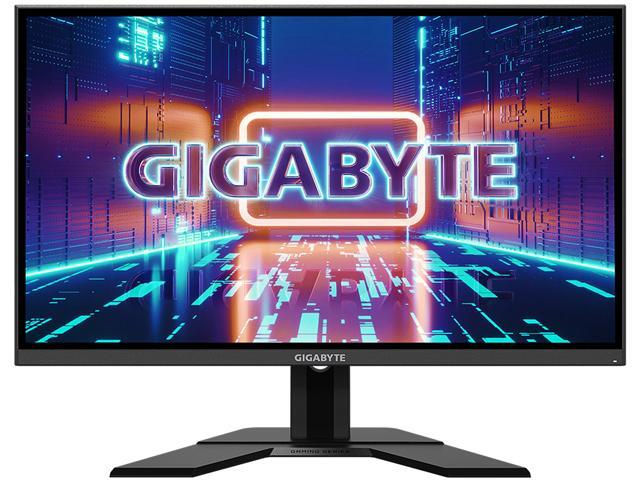
Buy GIGABYTE G27F 27" 144Hz 1080P Gaming Monitor, 1920 x 1080 IPS Display, 1ms (MPRT) Response Time, 95% DCI-P3, FreeSync Premium, G-Sync Compatible Ready, 1x Display Port 1.2, 2x HDMI 1.4, 2x USB 3.0 with fast shipping and top-rated customer service.Once you know, you Newegg!
@covert solstice would this be a good monitor?
maiden wedge
i got an HP w2207 in a box of free electronics and its really nice
yt thinks it can do 8k can it?
maiden wedge
I need a good 1080p 144hz monitor with one dp and either 1 or 2 hdmi's
27-30 inches
 quaint mist
What's the best 1440 gaming monitor with adjustable hz (preferrably 144) on the market for under 300?
2 HDMI preferred.
ok lets be realistic, under 400.
https://www.amazon.com/dp/B07YGZL8XF?tag=amazondn01-20 this looks pretty alright in my opinion, but you guys are the pros.
patent lagoon
Bruh
You need a curve or nah?
Adaptive sync?
FreeSync?
G-sync?
@quaint mist
quaint mist
Pork
quaint mist
I'm on an old AOC 60 hz and i'm not really a fan of em anymore since this ol boi has some bad flicker
but i'll look
quaint mist
Eeeh looking for IPS
patent lagoon
Thought so
quaint mist
Aye.
patent lagoon
I'd go 27" for 1440p imo
Well if you wanna give an VA panel a chance then that aoc is the way to go
Cause a lot of the ips with the rest of the specs are simply wayy too over budget for me
So I had to settle
And I don't regret it either
quaint mist
I think 500 is top.
fam member said they could throw in $100
- hopeful stimulus
Ooh!
check that bad boy out
quaint mist
Do any come with out of box calibration
Also I'll check this out for any more suggestions after my nap :)
 charred rain
@quaint mist wdym
"calibration"
litterally everymonitor i've used is plugin and use
magic lotus
Is 1ms good then 4ms
 left breach
Depends if you play on competitive level or not
If not it won’t make much of a difference.
covert solstice
expensive ones designed for professional use (creating photos or video stuff) have to be calibrated really well, most dont come calibrated but you can just check something like rtings.com and copy their calibration for the monitor
quaint mist
Good to know about displays
AORUS FI27Q looks like a nice monitor but I've never known Aorus to make monitors.
ViewSonic ELITE XG270QG looks nice too.
 sage nacelle
any recommendations for a ~100 monitor
left breach
@sage nacelle 4MS response time IPS panel 21.5 inches 1080p 75hz refresh rate under $100
sage nacelle
perfect, thank you!
left breach
No problem.
sage nacelle
might even get 2 if they’re only 90 haha
left breach
I mean you could. They aren’t curved though if that’s your thing
left breach
Yeah.
 serene scroll
Any recommendations for a 240hz monitor
quaint mist
Probably getting a ViewSonic ELITE XG270QC
(wasn't talking to you, @serene scroll -- was just making a post)
 versed bridge
Usually if you want a monitor to come with calibration, you'll have to get one of the higher end ones targeted towards content creators. It is usually possible to calibrate other monitors though with a tool
quaint mist
IPS is best for dark room, right?
patent lagoon
tn lmao
maiden wedge
Cvvvvvvv
charred rain
pffffffff
u don't need more than 165/144 for gaming
is ur getting 240, that means it's most likely 1080p
and at that point, spare your eyes and get 2k 144
mint brook
Lol imagine when they start making 480hz monitors, even though it would be impossible to tell the difference from 240 to 480
sage trail

stiff birch
btw i just bought an OPtix G241. Was it a good purchase? I still have time to cancel the order
I have a 2080 super and a 3800x
sage nacelle
what resolution is a 25 inch
covert solstice
usually 1080p tho
maiden wedge
yo does anyone know a 200hz 1440p (2k preferred) monitor that has 0.50/1 ms response that is 24-27 inch (27 inch preferred)
sage nacelle
FHD 1080p is what amazon says
versed bridge
@maiden wedge You know that 2k is lower resolution than 1440p, right?
 simple snow
covert solstice
simple snow
covert solstice
144hz is pretty nice
patent lagoon
night and day difference imo so im not going back @simple snow
versed bridge
144hz hands down
patent lagoon
^^^
 fringe vapor
Can someone help me find a 27” 144hz monitor, both good in a dark setting as well as a light setting
patent lagoon
@fringe vapor aoc cq27g2 if you can find it for $260
fringe vapor
Thanks you @patent lagoon
Any recommendations for a curved monitor?
Just wondering
 wanton musk
how do i find the right monitor mount?
wanton musk
its a tv
but i call it a monitor
@mint brook
it has 4 screw holes on the back
and i wanna mount it vertical
 open laurel
like discord, searching and watching tutorial, coding and such
not really for gaming
open laurel
okay
wanton musk
144 is for gaming and such
open laurel
great
thanks for the advice
but
if im in game, can i move my mouse to the second monitor while in game, or do i have to tab out and then move to it ?
mint brook
Tab out
 heavy palm
Tab out
versed bridge
Tab nine
maiden wedge
Just ordered this bc there is nothing on the market hopefully it’s not as bad as I think
4ms makes me cringe but whatever
looks good is it ips
va 😦
idc really i just wanted a new monitor
sage trail
y do 4ms make u cringe?
versed bridge
4ms gtg is pretty darn good
 trail yew
And va is pretty good too lol
maiden wedge
Idk idk a lot ab monitors someone else told me it sucked
trail yew
Nah, thats a good monitor
maiden wedge
Ok great to know
 hexed yarrow
@patent lagoon whats your recommendation?
hexed yarrow
anyone know anything about the MSI Optix MAG270VC2?
patent lagoon
what gpu does ur pc have?
hexed yarrow
rtx 2060 but its a laptop
it gets pretty good frames on most games
im getting a keyboard and monitor before i get a pc so when the time comes i can just buy the pc and not worry about perihperals
 chrome heart
best monitor for gaming to make a triple monitor setup? GPU- 5700xt overclocked
hexed yarrow
1080 for now
 lucid flax
I know somebody a few days ago was going on about how IPS monitors are not good for gaming.
patent lagoon
@hexed yarrow ahttps://www.amazon.com/dp/B08462DXV2/ref=dp_cerb_1
or they have a curved version for $10 cheaper
mint brook
@lucid flax imagine thinking IPS was bad for gaming lol, I have an LG ultragear that has IPS and it is a 1 millisecond response time.
 compact beacon
Does anyone know the best deal for a 240 hz monitor? 144 hz as well?
144 hz not 240
unless 240 an insane deal
 dreamy spruce
Why does the color change on one monitor when I start a game on the other monitor? certain setting?
 dense bone
Anyone have a 144hz 1440p 24-27" monitor for under 300?
 marble ice
dreamy spruce
marble ice
dreamy spruce
WHy are my colors changing when I start a game?
 proven salmon
@dreamy spruce if you use nvidias video software the “picture” setting pertain to static stuff like desktop, chrome, etc. while the “video” setting affect games. make you you make them both the same or at least set the game one how u want it
 radiant flume
Hey have $250.00 budget any suggestions for a curve gaming monitor.. greatly appreciated
patent lagoon
@radiant flume what specs you want?
@dense bone aoc cq27 g2
I was able to get mine for $260
 light bone
I just got aoc g1, g2 is better in what ways?
stiff birch
IPS panel i believe
light bone
I see, i got it because i needed a monitor right NOW and the market is pretty dry
On amazon anyway
stiff birch
24g2 is on amazon rn
for like $212 instead of like $189
but who cares that's not a lot
deep fern
colors changing sounds strange
i'd check gpu control panel settings, also best if your game has same res and refresh as desktop
patent lagoon
??
 versed rivet
 opaque sedge
Can someone find a 24 inch monitor with thunderbolt 3 port under 200USD? It’s for a macbook.
Ping me if u find one. Thanks 🙂
 cosmic nacelle
@opaque sedge we do not except macs
patent lagoon
***accept
dense bone
Need a 27-32in monitor 1080-1440p 1ms response time and 144hz.
 fleet gulch
 median mantle
165Hz better. But 144 is wonderful compared to 60.
opaque sedge
@opaque sedge we do not except macs
@cosmic nacelle Yeah ik lmao, but it’s for my aunt and she’s a teacher and her school is about to start. She needs another monitor.
covert solstice
tbh id just get a thunderbolt hub and a normal monitor
cosmic nacelle
@opaque sedge thank Jesus I thought that was your gaming rig
opaque sedge
Lol yeah
visual pilot
@vernal timber cherry mx brown, but Gateron browns have a better tactile feel
 vernal timber
Shiiiit
visual pilot
And also dampeners don't dampen the tactile click afaik, only bottom out
trail yew
I can agree that o rings suck
covert solstice
yes
 late hatch
hmm, I really like orings
 full moat
yes, your shape gave that away :P
 ocean fiber
Hi guys, which monitor do you recommend? IPS or OLED? for about 144hz and 2k
 odd echo
ips if you have the budget
 remote granite
do you need a different hdmi/dp cord for 144hz
proven salmon
depends on the cord
if u have a trash cord and try to run too high res or fps through it youll probably blackscreen
maiden wedge
Use a DisplayPort
 whole sorrel
Depends on the revision
If it's like 1.0 or something from 1954 you won't get 144Hz
 sharp geyser
I need advice..I'm waiting for next gen gpu to build a new pc, I currently have a msi 970. I have no preference yet if I with an am AMD or Nvidia build. However I need a new monitor now and I want to future proof myself for my new PC build. I think I want a 2560x1440 curved monitor and I'm going to build around a solid 1440, 144hz. Basically I think I want something affordable and I'm not going to shoot for 4k or ultra wide. Can you recommend me a monitor! Also how much do I need to worry about being locked into Freesync / Gsync at this stage are most cards capable of working with either?
mint brook
If you have amd, it won't work with gsync
If you have Nvidia, it will work with freesync
And of course Nvidia will also work with gync
sharp geyser
Okay good to know the amd card won't go with a gsync monitor. Likely I wasn't going to do that combo as it seems like if I choose AMD it's usually to save a few bucks, and it would be the same with the freesync monitor.
mint brook
Yeah
 primal mortar
can someone get me a link to a cheap monitor that is good for work
 final timber
thoughts on the samsung G9?
final timber
Linus sez it's good, but a lot of people complain about bleeding
a 49' UW seems godlike though
I just want a goood display once the 3000 series releases
 wild coralBOT
 Davgnar#8784 has been warned
Reason: Bad word usage
final timber
uh *small? I was saying kinda tired of small low def/fps monitors lol
quaint mist
Thoughts for under $350?
en_gb
27-inch IPS display with NVIDIA G-SYNC technology, lightning-fast 165Hz refresh rates and unique ergonomic base for high-performance gaming.
quaint mist
well nvm i thought it was under 350 thats a used one
brave cipher
anyone try the acer predator 32 inch w/ gsync
Acer Predator Z321QU 31.5
i have odyssey g7 32 inch but its riddled with gsync flicker n tried 4
sage trail
try returning it
brave cipher
i have 3 times
sage trail
wdym
its under warrenty, right? i think there was a recall for those models, but idr why
brave cipher
i was looking into the Acer Predator Z321QU 31.5 which is 165hz gsync, no hdr
g9 was pulled, g7 they dont wanna admit any issue
i still am in return period but just wondering if anyone has tried the acer
like in destiny 2 i gotta set sync to 120hz and flicker goes away, but 240 its bad
sage trail
i guess the gsync flicker is a common g7 issue
brave cipher
yes esp on 32 inch its more wide spread
brave cipher
its a beautiful moni9tor otherwise heh
sage trail
also, any monitor that costs more than 300 is gonna be quality, so dont even worry about it
unless it has manufacturing defects of course
brave cipher
yes the acer is same as g7 but 165hz oc actual gsync module, 300brite, 3000contrast
i have it reserved just dunno its va panel too
but open box
maiden wedge
Any good 1080p 144hz monitor?
maiden wedge
ASUS VG248QE
 unreal iris
Anyone know of any sub 700$, 240hz, ips or va, 1440p displays... preferably between 19 in. And 27in.
proven salmon
@unreal iris OMEN X 27” 240 Hz 1ms Gaming Monitor, QHD 2560 x 1440p, AMD Radeon FreeSync 2 HDR, HDR, DCI P3, (6FN07AA) https://www.amazon.com/dp/B07SCX1JG2/ref=cm_sw_r_cp_api_i_UtgnFb0VMTR3Z
unreal iris
Thank you I will look into it☺️
proven salmon
what gpu do u have? 1440p at 240 fps is a little unrealistic
unless u have dual gpus
unreal iris
I actually do not have a pc yet... planning on building one after rtx 3080ti/super gets released and am just figuring out prices to expect
quaint mist
I'm actually doing the same taco
But not 3080. 2080.
Prices will be in the low thousands I'm sure. A 2080ti is 1000.
GeForce RTX 2080 Ti XC GAMING Graphics Card, 11GB GDDR6, Dual HDB Fans & RGB LED
quaint mist
Instead of getting an RDNA2 I'm getting the 2080super and a ryzen 7 3800x
When the RDNA has been out a little while I'll pick one up.
RDNA2*
 wise marlin
Cheapest 240hz monitor?
sage nacelle
rate?
From the perfect 23.8" 3 Side Near-Edgeless design to superb QHD resolution (2560x1440), this is a monitor that's sure to make an impression. It's a perfect display of 99% sRGB color gamut that deliver superb vibrancy. In-Plane Switching panel design that provide undistorted c...
maiden wedge
Is 24 inches at 1080p 144gz a good size for a monitor?
visual pilot
yes
 dawn blade
I use the hp 25x and it’s done me good @maiden wedge
quaint mist
Anyone know of a good IPS 25-27 1440 (QHD) for under 400? Gsync or Gsync compatible
Looking at the Dells, the Viewsonic Elite, and an Acer Predator/ASUS ROG
proven salmon
aoc agon series has some good ones. youll probably have to get a refurbished or used one but theyre good
quaint mist
Was looking at those.
quaint mist
Is a refurbished a good idea
proven salmon
i bought the 24 inch agon used and it was great and right not i have a 24 inch benq zowie thats refurbished and thats great too. honestly never had a bad experience with either used or refurb
deep fern
also depends where you get it used/refurbished. I've bought used lenses from b&h and they've lasted years
copper swan
Y’all seen the LG 27GN950-B?
Looks like a promising and affordable 4K monitor
@maiden wedge whats your price range?
brave cipher
Does qled for monitors make contrast and brightness just look amazing and adjust without over saturation of whites.. cause any other va or ips just overshoots and makes everything look blah
I'm wondering since samsung does more tvs that the contrast % doesn't work the same way as a standard monitor manufacturer?
 vernal prism
Why are monitors way cheaper on Amazon then they are on Newegg
 reef umbra
What do you guys feel is the best sub 200 144hz
 ocean narwhal
Is there a huge difference between a 1080p 165hz and a 1440p 165hz and is it worth the extra money?
 willow hemlock
it will look better
but your computer might not be able to get the full fps at 1440p
depends on what games u play
ocean narwhal
I have a 2060 super, it’ll do 1440
 violet stratus
So I've been harassing BenQ about providing their BenQ Customized VESA wall mount adapter plate for EX3203R and EX3501R to Canadians and they first said it would be available through Amazon.ca, then when it never showed up I bugged them again and they said it changed to Newegg.ca and that they were ordering a bunch. Anybody get any word on that?
 nocturne python
https://www.newegg.com/black-acer-predator-xb1-xb241h-24/p/N82E16824009908?item=9SIA1CZ5AX4517&source=googleshopping&nm_mc=knc-googlemkp-mobile&cm_mmc=knc-googlemkp-mobile-_-pla-electronic+express-_-gaming+monitors-_-9SIA1CZ5AX4517&gclid=Cj0KCQjw7Nj5BRCZARIsABwxDKJbBlkBByG6w_ayTd7hmRsevAq45WG3ko4zeUV1WgXysF7mQssAAQwaAlvtEALw_wcB&gclsrc=aw.ds I'm looking for a monitor and this one is standing out since it's 24inch, g-sync and 144hz, anyone have anything wrong with it?
I just don't know very much about LED screens and how bad image retention is
 solemn sapphire
It's TN. Not great colors. Pricey for a TN
nocturne python
I'm just looking for g-sync and 24 inch with 144hz-165hz. Are there any better options?
reef umbra
Tn as far as I know is best for competitive
But ips is better quality ain't it?
But rn I'm really not sure if I really pay the extra premium for the ips panel
Like I just want a good cheap 144 hz the AOC 24g1 looks solid enough, but at the same time the Sceptre E248B is also sub 200 and is ips
nocturne python
I'm willing to overpay a bit for g-sync
hexed yarrow
I just bought a new monitor and I can’t tell if I have a pixel stuck on grey or a dead pixel
quaint mist
What about samsungs PLS?
 oak pelican
 burnt cove
Link to cheapest 1440p 165hz not curved monitors with 1ms or less delay?
versed bridge
burnt cove
Is it really worth the money to go from a 1080p to 1440p?
Bc I found this one that I think would be great. https://www.amazon.com/gp/aw/d/B07TNM8L6S/ref=ox_sc_saved_image_9?smid=ATVPDKIKX0DER&psc=1
@versed bridge
 nova wing
144 hz or 240 hz
 dusky magnet
 graceful tree
hello, i'm looking to upgrade my 1080p144 AOC C24G1 to a curved 1440p monitor with at least 120hz. i've been looking at the AOC CQ27G1/CQ27G2 but i've heard their responsiveness is not the greatest (they're advertised as 1ms but apparently that's just marketing), does anyone have experience with these monitors? i can afford to spend more but i also wouldn't mind saving some money. willing to take any recommendations as well. up to $500 is okay if the price is justified.
alternatively are there any resources that show true/measured response times of many different monitors?
I would place 9/10 importance on responsiveness, 6/10 importance on color quality, and 1/10 importance on brightness and viewing angles. 250 nits is already more than enough for me.
please ping or dm me, it's 4 am so i'm going to bed for now.
patent lagoon
Check this out on @Newegg: GIGABYTE G27QC 27" 165Hz 1440P Curved Gaming Monitor, 2560 x 1440 VA 1500R Display, 1ms (MPRT) Response Time, 92% DCI-P3, HDR Ready, FreeSync Premium, G-Sync Compatible Ready, 1x Display Port 1.4, 2x HDMI 2.0, 2x USB 3.0
https://www.newegg.com/p/N82E16824012013?Item=N82E16824012013&Source=socialshare&cm_mmc=snc-social-_-sr-_-24-012-013-_-08152020
@graceful tree
nocturne python
reviews for Asus TUF Gaming VG259Q, I'm getting mixed messages here
nocturne python
why is it so hard to find a good 144hz 1080p screen with g-sync that doesn't brick after a year or have issues for most people
and I'm not going ultrawide or 32 inch
this is a cry for help btw
graceful tree
@nocturne python FWIW I was very happy with my AOC C24G1, I just want better to pair with a 3080ti
not g-sync but the freesync worked flawlessly with my nvidia card
@patent lagoon thank u king this looks great so far I'll look more into it and let u know if I go with this
patent lagoon
I was going to go with that but I found an aoc model similar to the one you have with the same specs as that gigabyte for less @graceful tree
graceful tree
CQ27G1/2?
patent lagoon
G2
graceful tree
I was looking into it, it's got much lower color coverage and the actual response time is quite high
so I was looking for other options
graceful tree
yeah 1ms is what they market it as but independent testing showed much higher
I just woke up I'll find the review again after my morning routine
also fwiw I was happy with the AOC product itself but their customer service was atrocious (took 8 months to rma and got ignored in multiple occasions until I went to their social media)
graceful tree
in my case I accidentally scratched it and it was my own fault, but they advertised a 1 year accidental damage warranty, so they should still honor it promptly
@patent lagoon so I couldn't find info on the gigabyte monitor you linked but toms hardware measured a 7ms true response time on the 32 inch version of it
while the AOC one I think was like 17ms
patent lagoon
Oi
graceful tree
found it

RTINGS.com
The AOC CQ27G1 is a 27 inch curved screen, 1440p monitor. It's a great choice for gaming thanks to its incredibly low input lag and quick response time, resultin...
i assume the G2 is similar
since they're almost the same price and from the same company
nocturne python
is there a good 1080p 144hz option though
graceful tree
@patent lagoon after doing some research i decided to buy the gigabyte monitor you linked, $280 seems like a really good price and i hear gigabyte has great customer service
from my research it seems significantly better enough than the AOC monitor to justify the slightly higher price
nocturne python
@graceful tree what's the gigabyte one called
nvm I see it
why would anyone need a curved monitor
you're already so close to it there's no point
nocturne python
this one looks promising
I was hoping to get a 24inch as I pretty much only play csgo and some escape from tarkov
but this would work
nocturne python
I prefer flat personally
versed bridge
Same
nocturne python
Lmao 1000r would just have stretched sides
versed bridge
It so happy tho
nocturne python
well viewing angles would come into play
👀 TN 1000r
the sides of your monitor become acid trip zone
versed bridge
nocturne python
does anybody here have a good reliable 24in 144hz 1080p monitor with adaptive sync/g sync
heavy palm
@nocturne python I use the dell s17dg something. I got it for ~$330 and it runs games very smoothly. Also the colors on tarkov look nice : )
nocturne python
https://www.amazon.com/dp/B07XV1519W/ref=cm_sw_r_cp_apa_i_OjeoFbMW5WAJB this one looks the most appealing so far
g sync and 1080p
graceful tree
@nocturne python curved monitor feels more immersive to me
nocturne python
I don't like them
graceful tree
I didn't think it was that big of a deal until I returned my curved monitor and had to use my regular flat second monitor as my main monitor
after using curved a flat screen feels unnatural and uncomfortable
the bigger the screen the bigger the impact
nocturne python
I'm not looking for immersion though because I mostly play competitive games
nocturne python
I'm not looking for a curved tho
graceful tree
all I'm saying is I was in the same boat as you until I tried one
nocturne python
but they make your peripheral vision not pick up as much stuff on the edge of the screen
graceful tree
idk I have no problem seeing minimap on bottom right corner
nocturne python
I'm talking like you barely see an enemy on the edge of the screen
graceful tree
I'm top 0.1% playing the role that hinges entirely on map awareness
so I don't think curved monitor impedes that lol
graceful tree
I think you think the curve is much more exaggerated than it actually is
nocturne python
it depends on the monitor
graceful tree
it's actually harder to see the edges of the monitor on a flat screen than on 1500R
graceful tree
the edges of a 1500R monitor follow the curvature of your eyes, the edges of a flat monitor are comparatively farther away
nocturne python
not on a 24inch
if you look at esports tournaments they always have the 24inch 240hz BenQ monitor
it's the industry standard
I would get that one but I bought AMD so I can't hit 240fps reliably
graceful tree
well yes because they go for 240hz which uses TN panels more often than VA panels, and VA panels are the easiest to curve
professional gamers would obviously value 240hz over curved
I'll take 165hz and curved I'm good but I'm not a professional
you're looking at 144hz so that's not really an important consideration anyways
graceful tree
of course
median mantle
@sweet falcon HELP
FELLOW TECHIES HELP
@wary wave @deep fern @full moat
I have been trying to figure out this guy issue.
deep fern
median mantle
He has an Acer 1920x1080P monitor that has a max refresh rate of 144hz.
Butt Windows only shows 1920x1080P in Ultra HD which of course won't run at 144hz.
In the PC resolution options, the max resolution is 1680x1050.
I don't know why it's not showing 1920x1080P under the PC resolution options which is what he needs for 144hz.
deep fern
try a custom res maybe
median mantle
Im stuck and I give up.
 wary wave
drivers installed for the gpu? correct cables?
deep fern
do they speak
median mantle
TECHIES UNITE
deep fern
make sure all the gpu, cable and monitor support hdmi 2.0
 sweet falcon
The 144hz is not showing up still
Hello guys
This is my current gpu
MSI RTX 2060 VENTUS XS
deep fern
i'd also try using a different cable. could try reinstalling drivers like statik said, could try custom res and see if it is out of range
covert solstice
tecc
sweet falcon
This is my current monitor
My current monitor is
GN246HL Bbid
I installed the latest drivers for the gpu
But after going to nvidia control panel
144hz doesnt show up at all
Also using an hdmi 2.0 cable
I have no idea what to do next
 urban sandal
would i be possible for some1 to join via teamviwer
deep fern
the monitor is HDMI 1.4
deep fern
try windows settings > display > advanced display settings > display adapter properties > monitor tab and see if you can do anything there
sweet falcon
from the drop down menu
the highest hz
is 60
😦
techghost do you mind connecting through teamviewer
maybe it will be easier that way
if you have the time ofc
if not than its fine
median mantle

sweet falcon
thanks a lot for any help that you can provide
deep fern
im not in an evironment to be in a call rn sorry
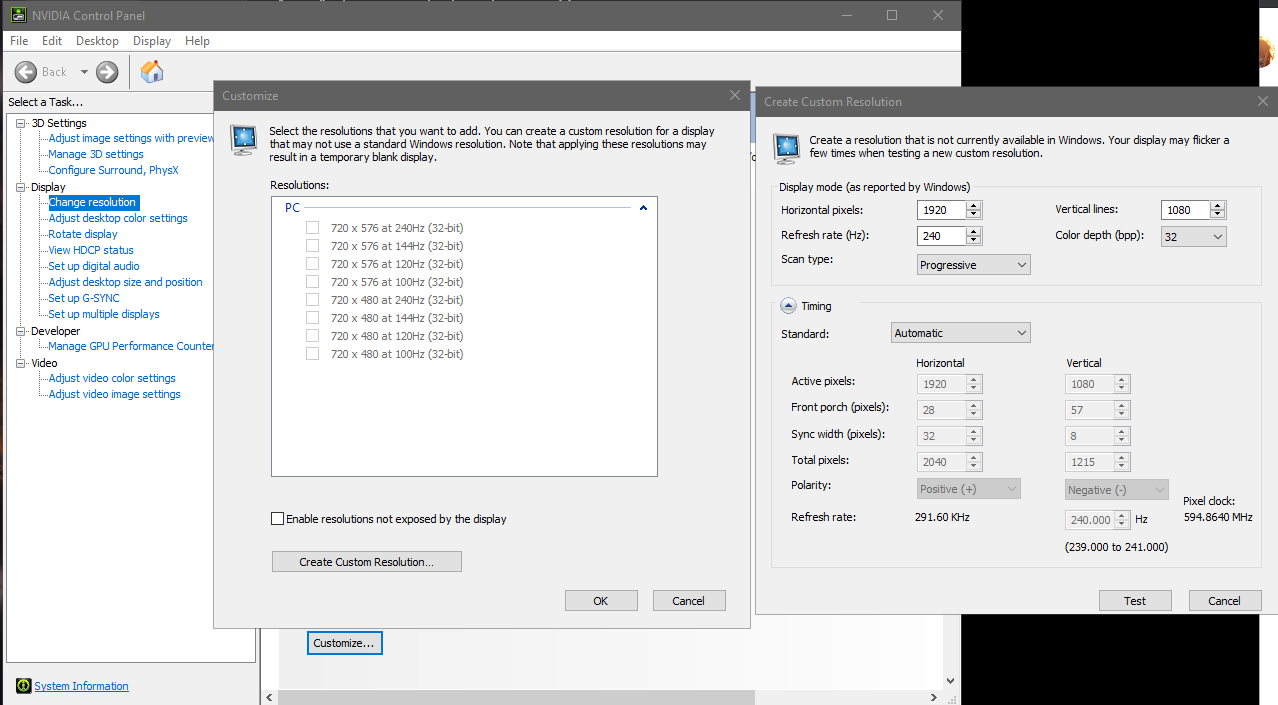 median mantle
DO THAT
1920x1080P at 144hz
If it doesn't work it's borked.
@sweet falcon
Try this
sweet falcon
it only allows me to customize the resolutions listed under this section : Ultra HD, HD, SD
should i proceed?
when i try to click the pc section
the customize
greyes out
deep fern
hmm, i see some people say with that monitor you need DVI Dual link connection
median mantle
Dumb stupid Acer
sweet falcon
lol
median mantle
lmao
sweet falcon
😦
median mantle
Curses
deep fern

Tom's Hardware Forum
I bought an Acer GN246HL Monitor, and it was showing 60hz refresh with my HDMI (I did not know 1.2 hdmi could not carry 144hz) So today I went and bought this Dvi-Dvi-d Cable...
sweet falcon
ok that is fine
can one of you guys point me out to a best buy link, amazon so i can make the purchase
median mantle
I don't even think that GPU has DVI.
deep fern
dp to dual dvi
covert solstice
yeah dvi sucks

 deep fern
maybe something like this https://www.newegg.com/p/37H-0013-000F7?item=9SIAN17BSJ5404
sweet falcon
bryce i think i have to return this hdmi 2.0 to bestbuy since it doesnt serve the purpose
correct?
median mantle
yes
deep fern
wait hmm that link is 3rd party seller
median mantle
The dumb Acer HDMI port probably is 1.2 or some dumb stuff.
Stupid Acer.
Like the actual port on the monitor not the cable.
deep fern
i saw listed as 1.4 somewhere but i guess it is wrong
deep fern
old monitor model maybe
sweet falcon
they are still in the flintstones age i guess
😦
@deep fern or @median mantle
point me out the correct cables/products that i need to buy
to make this work please
thanks in advance for your help
deep fern
i no expert with dvi but that looks like dual link
can check monitor port too see if that looks like it
sweet falcon
tech i am no good with this stuff and i dont want to buy the wrong thing. can i send you a photo of the back of my gpu and monitor?
like private message
@deep fern
deep fern
sure
deep fern
ye that should work
sweet falcon
thank you so much
buying it now
thanks for your help
is there any survey to complete for your ratings or anything like that
i like to help as well
if there is such a thing
do you want me to shout you out in display chat?
you have been very helpful
thanks so much
@median mantle thank you for your help as well. it was a learning lesson
now i know how to proceed in the future
deep fern
haha nah thats fine, feel free to update us if all goes good
sweet falcon
thanks my man
oh one more thing @deep fern
this product that i am buying
the cable does it matter what version it is
like the hdmi
1.3, 1.4 or 2?
or in this case that doesnt matter at all
deep fern
wait
sweet falcon
sure
deep fern
mmm my mistake you need a active adapter which are a bit more expensive, this looks like one that will work with 144hz https://www.amazon.com/3D-CAC-1010-DisplayPort-Dual-Link-Adapter/dp/B07T16LLB8/ , though you will also need the dvi cable separate with this
@sweet falcon
sweet falcon
@deep fern wait so i need this https://www.amazon.com/AmazonBasics-DisplayPort-DVI-Display-Cable/dp/B014RWWWT8/?th=1 and this https://www.amazon.com/3D-CAC-1010-DisplayPort-Dual-Link-Adapter/dp/B07T16LLB8/
both?
deep fern
not the first, the second and a cable like this https://www.amazon.com/Cable-Matters-Dual-Link-Feet/dp/B007NJ0S1W?th=1 unless you can find a active adapter with both male ends
sweet falcon
i see
ok so i will be able to connect one of these cables to that adapter then the cables going out of that adapter to the gpu and the monitor
am i understanding this correctly
?
@deep fern
deep fern
on adapter dp port go to gpu and usb to power, then dvi cable from adapter to monitor
 hallow orbit
What’s the best curved gaming monitor to buy for my first build?
quaint mist
I've been looking at the Samsung Odyssey 5
So pricy though
Same with the Gigabyte/Aorus. The ViewSonic Elite, all 1440 IPS 144hz
And I'm pretty sure all Gsync compatible
hallow orbit
Cool
maiden wedge
Can someone help me understand how tf stand alone monitors work
versed bridge
@maiden wedge What about them?
deep fern
same as laptop monitors but standalone 
maiden wedge
should I get a vertical monitor and a landscape monitor or should I get a 49 inch ultrawide?
lilac ivy
Any opinions on the AOC CU34G2X?
hallow orbit
Can somebody tell me what excellent monitor I can buy?
 civic igloo
Check this out on @Newegg: ASUS ROG Swift PG35VQ 35" 21:9 Ultra-WQHD 3440 x 1440 2K Resolution 200Hz 2ms HDMI, DisplayPort NVIDIA G-SYNC HDR-10 Flicker-Free Low Blue Light LED Backlit Curved Gaming Monitor
That’s an excellent monitor
visual pilot
is UW
civic igloo
UW?
visual pilot
yes
visual pilot
one sec there was a good one at like 330$

Buy Pixio PX278 27" WQHD 2560 x 1440 2K 1ms (GTG) 144Hz 2xHDMI DisplayPort AMD FreeSync Flicker-Free Low Blue Light Backlit LED Gaming Monitor with fast shipping and top-rated customer service.Once you know, you Newegg!
fringe vapor
I was looking at the omen 27i but someone told me I could find better
visual pilot
https://www.newegg.com/black-nixeus-nx-edg27-v2-27/p/3D4-000B-00003
this is an option from specs wise
yea IPS is always preferred
That's not IPS, the title is confusing, it's AHVA, which is kinda like IPS but loses a bit of color, and not the same as VA
fringe vapor
Hey @civic igloo
visual pilot
No idea
fringe vapor
I finally finished my pc
visual pilot
that's why I just said it was good spec wise
visual pilot
here
actually good monitor @fringe vapor
https://www.amazon.com/dp/B07NFK9XST
IPS>VA>TN
and aparently AHVA is somewhere inbetween IPS and VA
color wise
covert solstice
i would say va=tn for gaming and normal use tn panels have gotten a lot better which color
civic igloo
I don’t think I’ve seen an AHVA panel in person, are they more affordable?
visual pilot
seems like it
civic igloo
Might have to look into that
civic igloo
Never heard of it until today and then I gave em a quick Newegg search
Doesn’t look like there are a ton of em there
 solar ginkgo
I'm looking for a good 27+inch, 1440p, 120+hz monitor under or at $300 (before or after any promotion). Any suggestions?