#old-monitors-and-tv
1 messages · Page 31 of 1
 lilac basalt
 lucid flax
Man, why do the monitors I like keep selling out before I can commit to buying them?
 tired geyser
Just commit
 whole sorrel
Go commit buy
 graceful tree
is it bad to unplug a dp cable from a monitor while it's on
i use my main monitor for my switch too so when i use my switch i'd like to have my main monitor disconnected from my pc so my gpu can idle
is it safer to shut down first or does it not matter
or will my gpu detect that the monitor is not actually using it and idle itself?
i think it still sends signal to the monitor
 trail yew
I think its fine to just switch the input
But if your not using the pc for anything while using the switch why not just put it in sleep? Idles better in sleep😉
Oh wait nvm your saying you use the same cable for the switch and the gpu right?
graceful tree
no
i use dp for pc and hdmi for switch
into the same monitor
but i use my pc for discord
trail yew
So just switch the input when using the switch then
graceful tree
will my gpu idle itself
trail yew
Do you have a screen saver?
graceful tree
huh
trail yew
Does your screen automatically turn black after a few minutes?
graceful tree
yeah
graceful tree
since my main monitor is 144hz my gpu usually refuses to clock below 1480mhz even when only displaying the desktop
but with main monitor unplugged it clocks down to 139mhz
trail yew
Oh you have a dual monitor setup.
trail yew
Well if the switch is on the 144hz monitor anyway your gpu won't be doing much then
graceful tree
yeah i was just wondering since the gpu still sends a signal even if the monitor is set to a different input right
trail yew
Oh lol I get your question now
I dont think it does but don't quote me on that 😂
Guess I wasn't very much help then lol sry
graceful tree
it's ok
my main question is just if there's anything bad about unplugging the dp cable while it's sending signal to the monitor
trail yew
No I don't think so
graceful tree
ok thank you
 full moat
@graceful tree nothing bad about that
what you might be able to do is disable hardware acceleration in some of your applications
that might let the GPU clock down
graceful tree
yeah I've tried that
disabled in discord and firefox
google says nvidia cards just don't like to go full idle when you have a 144hz monitor and a second monitor
it dips from 1569 (stock clock) to 1480 that's all
full moat
i dont really work all that much with monitors beyond 60hz
so, i cannot help you beyond what i said above
graceful tree
as long as i can unplug it freely then there's no issue
 mighty oxide
Good evening . I am in need of a full screen replacement with hinges for the following HP Pavilion model: 15-cs0073cl and prodid: 3TU13UA. Serial number 5CD9030VBR Any assistance would be greatly appreciated
 tawny scroll
any thoughts on the Acer - XF270HUA 27" IPS?
 haughty brook
 hazy ether
so my 2070 super works great and all however the cable I bought specifically for 144hz gaming doesn't support 144hz
hazy ether
can anyone recommend a good dual link dvi to HDMI
 sage trail
idk, its just a cable
look on ebay

eBay
HDMI is fully backward-compatible with DVI hot plug for DTVs. Connect DVI devices to HDMI devices and vice versa. Therefore, we do not suggest Hot Plug action for any HDMI cables. 1080p Resolution - Cable can display up to 1080p video signals.
 stable trout
what are people's oppinions on the msi optix G24C4
 cedar stone
I have the msig24c had for about a year now great monitor and recently ordered a msi g271c
 visual pilot
I have the mag241c
It's great, had it for about a year now.
@stable trout to me, it looks like a pretty good 1080p monitor, if its at or below 200$.
stable trout
Ok
It’s currently $179.99+$4.99 shipping for me, so I’m definitely thinking about buying it
(On Newegg of course)
visual pilot
alright
tired geyser
Any good 144hz 1440p monitors
visual pilot
MSI Mag272cqr
tired geyser
Thx
trail yew
Quick an easy 😂
 analog shell
MSI monitors 👍🏽
lucid flax
I have a question... why are all the MSI monitors curved?
visual pilot
@lucid flax not all of them are. Look at all these flat panels.
Just most of them are
because MSI wants curved monitors I guess
I like it
 karmic shadow
im happy with my CV27Q i dont regret. i noticed cool thing about this monitor is that any issues can be fixed by updating monitor's firmware. so thats useful
 deep fern
Mr1 a msi fan boy
karmic shadow
im a gigabyte fanboy lol
trail yew
Those monitors are probably his desktop wallpaper 😂
tired geyser
My screen saver is a slide show of all asus rog products from the past 10 years
cedar stone
after using curved using flat monitors feels wrong
trail yew
Lol
 plucky jackal
any benefits to a curved monitor?
trail yew
In dual monitor setups it allows a cleaner experience. Or if its a big monitor like 32in or something it helps to dial things in
visual pilot
It's curved
trail yew
Ah shoot your right I forgot that benefit
visual pilot
Theres no like "oh just because it's curved the pixels are suddenly brighter"
it's just curved
it's your preference
trail yew
I mean what I said before is still right tho. Still preference tho
whole sorrel
I don't think they make 150p monitors
 woven mulch
Anyone have recommendations on a 1440p 144h monitor around $400?
trail yew
@plucky jackal no
It wont distort your image. Only scenario is when doing intense photo editing when your working on like individual pixels 😂
stable trout
if you were working on individual pixels, you would usually zoom in anyway
so definitely not
woven mulch
Is the AOC CQ32G1 any good? It has a 4ms response time but im currently using my 32" tv from Seiki..
 tame grove
usually a monitor is alot better for PC related things than a TV
woven mulch
I assumed so lol. Generally there are ups and downs for both sides. I just ordered the monitor so hopes that it arrives on time undamaged, and its what I need. I looked that the response times for the TV that I currently have and its at about 7ms. Is the difference between 7ms and 4ms noticeable?
tame grove
it starts to be. You wont notice much of a difference between 4 ms and 1 ms. 7ms becomes noticible specially when up close
but with anything. you probably wont know untill you experience faster displays
woven mulch
Thats what I was hoping to hear. Im new to the computer world. I just built mine last week.
tame grove
well welcome and enjoy your new rig
in time you'll fiend for more power like the rest of us XD
woven mulch
I already am lol. I wanted at least a 1650 super in my build but they sold out the day before I purchased the parts so I had to suffice with an RX580 (The performance difference is little but noticeable.) Im hoping to upgrade it somewhere down the line but the next thing im looking to get are better peripherals. Display wise im happy with the AOC CQ32G1 that is on its way simply due to the price and good reviews ($303 USD) But Like all good things, that is eventually gonna have to go for an upgrade.
 leaden karma
Whats everyone’s thoughts on the upcoming eve spectrum 1440p 240hz ips
deep fern
never heard of eve spectrum
trail yew
Same
tired geyser
Are there any 4k 120 hz displays?
visual pilot
16k 1Hz :D
tired geyser
I mean ok
 quartz sinew
^
lilac basalt
hello, I'm a newbie, can someone give me a lead on how to set up a wireless display for my server. Not allowed to have the server on the kitchen table -- its too large. The mouse and keyboard are wireless. Likewise, if I can have the display wireless. Any solutions out there -- idk
 olive token
 mighty grotto
does anyone know how to link up displays
like daisy chain them or something
the first will be an ultrawide and the second will just be a normal monitor
 severe depot
I opened a water and some of it sprayed onto my monitor and it looks like the screen is corroding where those droplets landed
Is there a way to fix this
My monitor is glossy and my other monitor is matte but the matte monitors screen wasn’t affected
 north hearth
google is a wonderful tool
i have no idea how that would corrode the protectectiv layer on a screen tho, hope u find a fix
north hearth
i just got a new display, its the sceptre at 144hz, i know its budget and that its temporary but the display seems rather dark, like the darker parts are harder to see
how do i fix
google no help
north hearth
fiddle fiddle i go then
 fallen aspen
I'm using sceptre and the screen is pretty good lol
north hearth
ye, looked like a good choice until i decided to upgrade to asus or smthin
north hearth
it was a brightness problem
turned up the brightness and turned down the backlight
works way better now
 dull lark
Anyone have any recommendations for monitors with g-sync?
 opaque sedge
thoughts on the Westinghouse WM32DX9019? i know its cheap for a gaming monitor, but I'm just looking for a start.
 woven summit
Does anyone know if the MSI Optix MAG271CQR is a good choice?
visual pilot
@woven summit thats a good monitor, but you can also get the better MAG272CQR at the same new price
woven summit
Ok thanks
 undone crow
any suggestions for a not so expensive monitor that can be used for a vertical setup with the OEM mount
woven summit
Also, has anyone heard if Razer’s Raptor 27 is any good?
quartz sinew
i mean tbh if it's razer i wouldn't recommend it
they charge you heavily for that brand 
deep fern
I agree that the quality of razer products doesn't feel great but I still like them
but i also got on sale so
¯_(ツ)_/¯
 neon otter
I'm considering a new monitor I last bought a monitor 10+ years ago I feel like the market is way different now and some monitors that have similar specs have huge review discrepancy's. How much does it really matter? I know a bit about the current specs to know I'm looking for atleast 144hz 1440 res but that's about it
 empty trench
Does anyone know what the best 1440p monitor is that has a fast refresh rate with great picture quality?? I mean best budget! 1440p monitor thanks
cedar stone
I think its an aoc one but they sell out quick linus made a video on it @empty trench
trail yew
@neon otter basically there's three types of monitor panels, "VA, ips, and TN" which just refer to the way the pixels are laid out. Ideally ips is the way to go if you want the best possible picture quality. VA is a close second tho and usually cheaper. TN panels don't have great viewing angles or picture quality but usually have much higher refresh rates at cheaper prices. I hope that helps
tawny scroll
I found a nice acer 2560x1440 144hz ips panel for 329 on bestbuys site.
if you want cheaper than that the AOC is the way to go but again it is usually out of stock. @empty trench
 tough wren
lucid flax
tough wren
lucid flax
Man, so many of the gaming monitors on Newegg are out of stock. Including the one I had just about talked myself into buying
cedar stone
I just got mine
 acoustic tulip
There’s legit no cheap g sync monitors so rip
 elder vapor
Should I play 144hz no g sync or 120hz and g sync
elder vapor
But for some reason I can’t have g sync with 144hz
 copper scarab
Basically - these days - if a monitor comes with a display port - it'll be g-sync compatible, + regular VESA freesync.
That's the norm, and yes there are exceptions.
like the top esports monitor for csgo , the BenQ XL2546
elder vapor
I’ll try again
sage trail
@maiden wedge ask again here without all the clutter
i have questions that will help u decide
i cant send msgs in general for some reason
but, the pixel density is similar, you are right, but the 3 inches might not make as big of a difference as you think
 maiden wedge
@sage trail restart your discord
sage trail
ok
sage trail
they are all very good
maiden wedge
Want a relatively decent one but nothing overkill that’s expensive so don’t wanna spend more than needed
sage trail
the real expensive one is IPS
sage trail
im sure, its very nice
maiden wedge
Then between tuf and samsung
sage trail
even though IPS is fantastic, i use a VA panel, and its very similar
maiden wedge
Msi and sams sorry
The problem is
Im using a tn
So i dont know va and ips
Quality wise
Id be gaming
sage trail
both VA and IPS are a big step up from TN quality wise
maiden wedge
Yeah i hear va is half way between ips and tn
Ips is supposedly best
But has light issues on the edge?
So that puts me off
sage trail
i would say VA and IPS are similar, they are both good for certain things
sage trail
IPS has good color accuracy, but VA typically has better contrast
VA has fine colors
much better than TN for sure
maiden wedge
I forget what contrast effects
sage trail
lights and darks
maiden wedge
On my tn like. Il have an issue where
Sometimes something that’s supposed to be just dark black. Looks greyish or pixelated sometimes
Thats one thing i hate
Noticeable with other colours but mostly with black
sage trail
yeah
maiden wedge
So when i play games that are in the dark
They dont look great because of the pixelated colouring
Idk how to explain it
You may of seen it
Unless its a 1080p thing
sage trail
i would go with the MSI one, as there arent really any huge benefits to paying 100 more for the samsung one
thats just a TN thing
i use a 1080p 21.5 inch VA, and its fantastic
sage trail
branding most likely
maiden wedge
Possibly
sage trail
its also a samsung panel
maiden wedge
The msi one looks better than the tuf one imo
sage trail
which will be good for when u have to turn your head
maiden wedge
Curved maybe good
But
Ive never used it
So i dont know
Plus
I sit across from my tv not right next to it
sage trail
when you look at a flat surface from an angle, you arent looking straight on to it, your looking at it at an angle
the curve helps to remedy that
so when you pivot your head, your still looking straight onto the pixels
its a very slight curve
maiden wedge
What angle?
Do we know?
The msi physically looks more appealing than the tuf however the tuff is a flat panel
So
Idk yet
maiden wedge
sage trail
like i sit 2ft away about
maiden wedge
sage trail
well, my face is about 2ft from monitor
maiden wedge
Ah is it?
sage trail
ITS HDR???
maiden wedge
That looked flat ngl 😂
sage trail
it really did tbh
the AORUS is so much more because its IPS, but also G-sync
that makes sense
sage trail
lmaoooo
sage trail
oh
sage trail
well, all freesync monitors are g-sync now
sage trail
all do now
sage trail
nvidia made all freesync monitors work with gsync
maiden wedge
Get the freesync version cos its cheaper
sage trail
yeah
sage trail
the fancy hardware inside old gsync monitors is irrelevant now
maiden wedge
It kills me tho
sage trail
its all done in software now
maiden wedge
@sage trail msi has hdr ready
sage trail
but the tuf one is HDR400
maiden wedge
Hm
What il do
Is google a search comparison
And see what reviews say
Because they’ll have experience of both
@sage trail apparently msi has a samsung display
Also msi is a sva and tuf is va??
@sage trail msi has many more colours than tuf
Here
Msi allows higher bit colours etc
Too
sage trail
yeah, apparently the sva has a more refined subpixel layout
sage trail
yep
maiden wedge
10 bit colours (8+ something) as opposed to tuf 8 bit only
So whilst it may have hdr 400
sage trail
i mean, its probs not tru 10 bit
sage trail
you still thinking of paying 250 more?
its not worth the money
get 250 worth of games
visual pilot
@maiden wedge go MSI.
lucid flax
Is this monitor worth it?
https://www.newegg.com/p/N82E16824475052
 covert solstice
and it’s 27in
lucid flax
So, what monitors would you guys recommend?
lucid flax
I wonder how long it'll be before it restocks
 drowsy steeple
does anyone know of any good 1440p monitors?
visual pilot
MAG272cqr
north hearth
^
maiden wedge
^ getting this eventually
visual pilot
^me too
 paper prawn
Hello! Does anybody know where I can find a part for a screen replacement? I have a dell inspiron 15R 5537 touch screen. When I opened the screen the part I am looking for is Part # N156BGE-LB1. Any thought?
north hearth
full moat
budget?
 supple void
@drowsy steeple budget and size will determine what you want, look at the Acer ED322QR
 fast basin
I need a good monitor around $100 because my current one is crapping out
visual pilot
I would suggest saving up a bit more if possible
fast basin
thats what im trying to do but i cant work right now
visual pilot
https://www.newegg.com/product/N82E16824011162?m_ver=1
This is the cheapest 144hz monitor I can see right now, though out of stock, it's 150$.
lilac basalt
@olive token -- thanks, Chromecast will do the trick -- thx!
full moat
panel type
old but still valid relevant article

Today we will be focusing on the differences between IPS, TN, PLS, and VA panels, but we will also be covering CRT for grounding, despite CRT not being an LCD panel type. -
 deep dust
that’s the only difference i could find, is a va panel really worth ~$30 more
full moat
that is for you to decide
mighty grotto
does anyone know why watch dogs 2 wont go into 21:9?
elder vapor
is elmb sync the same as g sync
deep fern
no
elder vapor
what is it
deep fern
elmb is backlight strobing, a technique used to reduce motion blur. G sync synchronizes frames to remove screen tearing
most monitors cannot use both at the same time even if they have both features, only select few can
it may also be refered to as ulmb or ultra low motion blur, elmb is asus' name for it
elder vapor
my monitor does not have g sync but it does have elmb
deep fern
you can try it out, I have never used it but supposedly it works really well in some panels to reduce motion blur
 pearl venture
i have heard about asus elmb is useless and harmful to our eyes :(
deep fern
¯_(ツ)_/¯
all I know is blue light is harming which is why there are blue light filters
The strobing from elmb is too fast to visually see but idk
 mossy fjord
 rigid crest
Looking for as cheap as possible 144hz 1440p 27inch monitor
full moat
its a horrible monitor thou
visual pilot
(not 144hz tho fair enough)
full moat
that was the wrong link .. blergh!
aye, i noticed @visual pilot :)
that was the right link
and its still a horrible monitor
visual pilot
(Might need to explain why it's bad? spec wise looks alright)
full moat
arent you all kinds of demanding today @visual pilot :P
visual pilot
I mean, I always got my questions and jumping to my conclusions :p
visual pilot
Fair enough.
deep fern

 marsh scroll
I'm looking to buy a 144Hz Ultrawide for my main PC, and use the existing 60Hz on a streaming PC. Is this advisable if I'm planning on broadcasting/recording at 60 FPS?
visual pilot
Well, 60fps gaming won't feel great for you @marsh scroll...
For the viewers, no problem.
marsh scroll
Yeah I'm sure making the jump is gonna spoil the hell outta me, but if I'm gonna make PC my main gaming platform, may as well start acting like it's more than just a Switch with mods.
 vocal raft
“Won’t feel great”
me with 25 fps
visual pilot
bro
We've all experienced the entirety of the spectrum
I got 144hz panel now, used to play on a 60hz panel with iGPU
 wary plover
fallen aspen
wary plover
fallen aspen
i play on 85Hz 
fallen aspen
ey i gave up 144hz for an ultrawide and im okay with that.
 odd echo

lol
that feeling when your VR headset has a higher refresh rate than your monitor
"guess ill play esports in vr now"
fallen aspen
by 5 frames
not gunna make a huge diff lol
but tbf im waiting for VR esports.
gunna be so much cooler
odd echo
im interested in the future for racing cars
visual pilot
Lmao
odd echo
if they can somehow simulate it to the point where its indistinguishable (arm tracking, leg tracking, fully motorized chairs and stuff) would it replace traditional track racing?
because less chance for death?
then again it would never be the same with switching out tires and all that
so idk
fallen aspen
imagine real cars racing, by real people, but remotely using VR
fallen aspen
TM deafkid dont steal
fallen aspen

but no so like theres shooters in esports right
imagine using vr with omnis for esports
they have to still do the physical work but noone gets hurt
fallen aspen
why shaky
odd echo
this is why i prefer Oculus, their software acts like floating touchscreens so you dont need to point
fallen aspen
just be a shotgun user
also yes. 100% that.
wmr requires pointing with a lazer. it sucks
cause the same button to click is the button to grab and move the windows 
 fallen aspen
I hate it tho. ive been spoiled by oculus.
odd echo
its a very "windows" approach
fallen aspen
If they continue and develope it well then sure cause oculus home sucked at first too
what flashlight feature?
odd echo
its their version of passthrough
i forget which combo of buttons you press
but it allows you to activate a sort of passthrough mode
oh
press the windows button and the grab button on the side at the same time
that will activate it
fallen aspen
brb ima try it
odd echo
(assuming youre on the latest build of windows)
your menu should look something like this
it works like this
but because the cameras have such a limited FOV, it does not work well.
Oculus passthrough is the absolute best
in the rift s at least
fallen aspen
its not bad
not great, but not bad
im actually suprised with how well the inside out tracking works on this headset with only 2 cameras.
odd echo
it better work lol...
yeah but the FOV of the cameras is an issue
of they just slapped a couple more cameras on it it would be fine
but 2 is kinda meh
fallen aspen
yeah but seeing how low it is, like im surprised i can lift my controllers over my shoulder no problem
fallen aspen
if only the controllers werent friggin bricks lol
odd echo
yeah...
if only the controllers put buttons where your fingers rest
and had good side buttons
and actual face buttons
and a not blocky design
fallen aspen
so the grip buttons are fine to me.
odd echo
(i hate the wmr controllers)
fallen aspen
everything else sucks
odd echo
yeah
odd echo
meh, i wouldnt go that far (im not easily immersed)
but its a lot more natural because its analog instead of binary
fallen aspen
eh for me these are the most immersive controllers I've used yet.
it feels very natural to me
i do wish it had a small track pad tho
odd echo
i havent needed a trackpad at all yet
i love the face buttons
its a lot better than the trackpad i had on my wmr headset imo
fallen aspen
Like I wish that little sensor to the left was a mini trackpad instead of just a sensor
odd echo
what does it even sense?
fallen aspen
when your thumb is above the a and b button i believe
somethin like that
they got rid of it on the new ones
odd echo
mine still tracks if my thumb is on the buttons though
they just added capacitive sensors right into the button i think
fallen aspen
yeah i think they did what they did on the thumbstick
odd echo
i also like how they moved the oculus button a but
fallen aspen
theres a sensor under the thumbstick i believe too but hidden
odd echo
later tonight i think
fallen aspen
i need to make room for vr 
odd echo
do it
fallen aspen
i dont have enough space lol
im looking into maybe getting a house soon so ill dedicate an entire room to gaming with more than enough room for VR
 sinful bay
What do u need
In terms of details
Preferably 144 ghz 1ms response time at 1080p
It would b cool if it was curved but idrc
Ideally in 100-200 range
sinful bay
Which would u go for
trail yew
For 200 bucks
trail yew
Ha I new you had a better option 😂
visual pilot
lol
 merry harness
What is the cheapest 31.5" or 32" monitor available? Refurb is fine.
visual pilot
Why?
merry harness
I have a Pixio PX329 That I'm really happy with. Would like a second monitor to have more things visible at once, and would like it to match the size of the first one
Oh, and performance is kind of irrelevant - most I'd be doing is coding on it.
visual pilot
The thing is, the cheapest 32in monitor would likely be 1080p, making it worse looking
merry harness
Define worse?
visual pilot
Well, here are your options
Pixel density would be
oh boy
crap
27inch for 1080p is already noticeable
32in..
merry harness
Assume it has a couple of terminals open, maybe an email. Spreadsheet at most.
How would the density affect me? Like, would words be legible?
 still ember
Yeah
But it's bad to see
I have a 768 by 1366 11 maybe 12 inch display and I can see the space between the pixels
I can't imagine a 32 inches 1080p display
visual pilot
Like words will be harder to see
imagine this
on your current display, a letter could have like 50 pixels to display itself
but on that, a letter could maybe only be displayed using 8 pixels
text could be distorted
especially when you compare side by side 1440p and 1080p
merry harness
Good point. I'm going to need something 1440p i guess
visual pilot
But, this display could be "good enough" for you.
https://pcpartpicker.com/product/4jbCmG/acer-eb321hqu-cbidpx-315-2560x1440-60-hz-monitor-umje1aac01
1440p 60hz
31.5in
but still fairly expensive
merry harness
I've been trying to show y
'all a screen shot of the past two monitors I've bought for the sake of context
but your room wont let me upload, and gets mad at every image hosting site ive tried
So I'll write it out lol:
Pixio PX329 32" 165Hz 2560x1440 WQHD (refurbished) - $272.18
☝️That's my good monitor.
Acer ET322QU BMIpx 31.5" WQHD 2560x1440 75Hz (refurbished)- $185
☝️This is what the pixio replaced. I was happy enough with it, but it started behaving weirdly after being packed up for a move
Point being I definitely want to spend less than I did on Pixio.
I guess that Acer is probably the best I can hope for in terms of a sweet spot between Cheap, 32", and able to display text legibly?
merry harness
Wait you guys
dang - I wanted to show you a link to a monitor that was supposedly
34" 2K 100Hz 3440x1440
$120 😂😂😂
but your room didn't let me type it smh
there we go!
So yea, what do you think the odds are of this monitor A-actually getting delivered and B-actually working lol
 willow hemlock
its gonna be 34 cm lmao

 flint sierra
hello all! I was wondering if any of y'all had any suggestions for a midrange, 1080p/1440p superultrawide monitor. I'm planning on using it for video editing and CAD rendering, so I think a 49 inch would be a good size. Does anyone know of any good monitors that would fit that line of work? I've never seriously shopped displays before so I don't know what I'm really looking for
all I've really figured out so far is screen space is super valuable
full moat
@flint sierra so is screen resolution
having a physically large monitor aint going to help you if the resolution is low
deep fern
ultrawide monitors around that size can also be very expensive
cheapest I've seen is maybe 800 but res was too low
flint sierra
I'm not too concerned with price
I'm setting a budget of 1500$
if that's reasonable
deep fern
well in that case there are monitors like this:
https://www.bhphotovideo.com/c/product/1439971-REG/dell_u4919dw_49_super_wide.html
https://www.bhphotovideo.com/c/product/1457462-REG/lg_49wl95c_w_49_class_32_9_ultrawide.html

Buy Dell U4919DW 49" 32:9 Curved IPS Monitor featuring In-Plane Switching (IPS) Panel, HDMI + DisplayPort + USB Type-C Inputs, 5160 x 1440 Resolution, 1000:1 Static Contrast Ratio, 300 cd/m² Brightness, 178°/178° Viewing Angles, 8 ms Response Time, 1.07 Billion Colors, Bu...
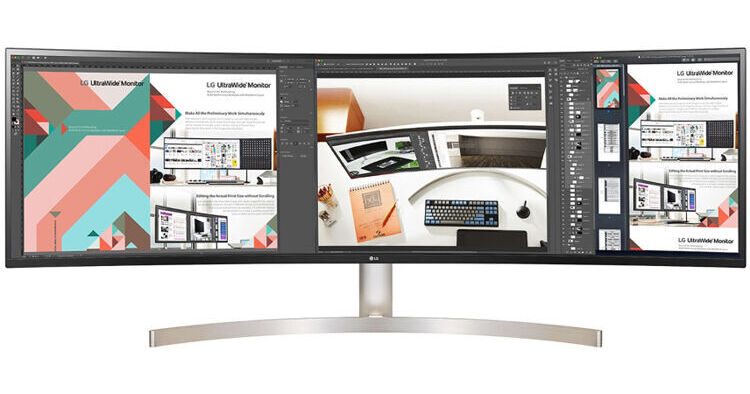
Buy LG 49WL95C-W 49" 32:9 Curved UltraWide HDR IPS Monitor featuring In-Plane Switching (IPS) Technology, HDMI | DisplayPort | USB Type-C Inputs, 5120 x 1440 Resolution, 1000:1 Static Contrast Ratio, 350 cd/m² Brightness, 178°/178° Viewing Angles, 5 ms Response Time, 1.07...
You will have to look into them a bit more for color and stuff, but I will also say dual monitor is also nice
It is very pleasant to work on a project with multiple monitors
full moat
dual or triple for design work, is imo superior
because it offers freedom in placement of the monitor itself
flint sierra
I've got 2 monitors already, but they're 24 inches, and use really crappy VA panels
deep fern
I personally like being able to open like premiere pro and audition on separate displays to work from
full moat
i dont think neither @deep fern or myself are saying you need to go "identical" multiple monitor
i have different sized monitors here right now
deep fern
same
flint sierra
ohhh
full moat
because one is permanently in a vertical
its something to think about at least @flint sierra
also, a ultrawide requires deskspace in a "different" way than a multi monitor setup does
which is also something to think about
flint sierra
all my monitors are vesa mounted
so desk space isn't really an issue, although I might need a mounting bracket with a higher weight capacity
full moat
and unles those vesa mounts are on flexible arms, it misses the point i was trying to make :)
flint sierra
ye I think I understand
full moat
because having things "fixed" in place is imo limiting to productivity
but that is also its own topic all by itself :)
 quiet cliff
Can anyone recommend a decent 200$ monitor? My old one went out on my a few days back and im using a crappy HP 1366x768 rn
 north chasm
Can someone recommend a 32 inch 144 hz 2k or 4k monitor under 450%
quiet cliff
Jesus 32 inch
full moat
quiet cliff
Thx
quiet cliff
OK, ill keep that in mind.
lucid flax
I hope the cheaper gaming monitors start rolling back into stock. I can't afford to drop 3 or 4 hundred dollars on a monitor.
whole sorrel
Why not 1600x900 for 20 bucks
 sharp panther
I'm running a 34" Ultra wide and a 27", both curved.
lucid flax
I don't get the deal with wanting a monitor the size of a small TV.
sharp panther
I'd get a monitor the size of a large tv if I had room and could afford it, but I need to stick with small tv sized monitors
 trail moon
What are some good monitors 1440p 144hz. Have a 2080s coming in and I want to push it. Currently I use a 4k 60hz but I've realized 4k gaming is mehh over the last few years.
300-400 range.
visual pilot
MSI Mag272cqr
trail moon
MSI Mag272cqr
@visual pilot
Ty, do you know if any non curved alternatives?
visual pilot
Usually not really, but I'll take a look. Most of them are curved.
trail moon
Also I'm new to this server and I'd like to personally thank you. You're active answering everyone on all the channels. I appreciate you bro. @visual pilot
visual pilot
Thank you!
Well, theres the MAG272QR
@trail moon
Scratch that, it's in stock on amazon.
https://www.amazon.com/MSI-Non-Glare-Adjustment-Optix-MAG272QR/dp/B082QKFJB2/
visual pilot
You're welcome
trail yew
Thatll go good with your new 2080😉
trail moon
Yes! I'm excited aF.
trail yew
Tn is most definitely not lol
sinful bay
do I get MSI G241 or mSI G24C4
the 241 is 10 dollars more atm
or another monitor altogether
sinful bay
are they both curved or just the g24c4
trail yew
I dont believe the g241 is curved
trail moon
The basic way of explaining what you see when staring at an ips and a TN is that TN has a matte like finish on the panel while ips has a gloss like finish. It's all preference imo.
trail yew
Tn also has poorer viewing angles and color accuracy tho
sinful bay
how do I decide if I don't have two example in front of me
TN isnt on the table atm
its VA vs IPS
trail yew
Thats a good question
trail moon
I have no clue what va is lol
trail yew
I would either try to find reviews on it that compare them or wait till this is over and go to a store to compare
sinful bay
yea ur totally right about going to a store
only issue is I need something to keep me sane
trail moon
Tn also has poorer viewing angles and color accuracy tho
@trail yew and this is true. But IPS also has slower response time right?
Both have pros and cons
trail yew
Not necessarily
trail yew
Just more expensive for higher refrrsh
sinful bay
what were u saying not necessarily to
trail moon
To the ips vs tn
sinful bay
ah
trail yew
Jayvee comment
sinful bay
both monitors have the same specs
trail moon
Thanks for educating me some @trail yew
sinful bay
the 180 dollar one is curved and VA
trail yew
Np lol
sinful bay
the 190 is not curved IPS
trail yew
Because for just gaming there is not going to be a big difference between panels
trail yew
Sure
trail yew
Only thing is curved is not that noticeable at that small of a display but I mean... it's still cool lol
sinful bay
yea but since there aren't any other differences really I might as well get that
except panel type which u said doesnt matter
thanks
trail yew
For only gaming it doesn't matter
sinful bay
👍 👍
trail yew
Ok just clarifying 👌
sinful bay
well
just my luck
one is only availible for in store pickup
the other is new and hasnt made it to stores yet
trail moon
Thoughts @visual pilot in comparison to what you showed me? Just looking at multiple options.
visual pilot
wait
You might've linked the wrong thing
because there is this under the same listing, but much more expensive
https://www.amazon.com/LG-27GL83A-B-Ultragear-Compatible-Monitor/dp/B07YGZL8XF/ref=mp_s_a_1_1?crid=1KDFTGD38LW08&dchild=1&keywords=lg%2B27gl850-b&qid=1587663589&sprefix=lg%2B27GL850%2Caps%2C181&sr=8-1&th=1
1440p 144hz
trail moon
Woops, yeah I just linked the wrong one. You think it's possible to find that for cheaper somewhere?
maiden wedge
599.99
visual pilot
Well, all I can see is out of stock.
That is 4k though, and I thought you only wanted 1440p?
trail moon
But don't care for 4k rn
visual pilot
ah I see
trail moon
Correct.
It was only because it shows cheaper than the 599
For $375 I would def buy it
visual pilot
But I'm just a MSI fanboy, it's your choice that matters for you.
I would go MSI, because the MSI panel has 165hz refresh rate compared to the 144hz refresh rate of the LG.
165 vs 144hz is a small difference, slightly noticeable, but comparing spec to spec, 165 > 144
trail yew
^
trail moon
That's a good point.
I have to admit the bezel is also way sexier on the msi
So if I end up getting a 2nd one later it will look better on my desk.
visual pilot
It's your choice, get whatever is more worth it in your opinion.
sinful bay
why are monitor prices so high right now
trail moon
Supply + demand
sinful bay
so am I just stuck paying a ridiculous price if I want one now
trail moon
Shop around. Set in stock alerts.
trail moon
Amazon, Newegg, microcenter, b&h, nowinstock, etc
 boreal knot
Are 49in ultrawide monitors worth it coming from a dual monitor user? I have been thinking of getting one so I have the real estate of 2 monitors but can game on both.
deep fern
the only games I would use something like that on would be racing games
I prefer double monitors and 49" displays are usually $1000+
boreal knot
That is what I was wondering about since I plan on getting a 2070s and people say its overkill for 1080 144hz.
boreal knot
I was just trying to think ahead since I might go for a simplistic setup.
 deep swift
is it possible to extend to your tv, and play sound through your tv
like play sound through tv speakers
 languid plinth
sinful bay
languid plinth
sinful bay
anyone know of some cheaper cherry mx brown keyboards
or anything like that
tactile + quiet
covert solstice
probably gateron browns, either silenced or o-rings
leaden karma
anyone here?
this may sounds stupid but ijust finished my first ever build
how do i set up dual monitors?
my main is a asus 1440p 144hz i also have a asus 1080p 60hz that id like to be able to connect as a screen for discord stream etc
 violet acorn
Hey everyone. I just bought and recieved a sceptre c248b-144r, but when i connected my xbox i noticed some bad ghosting. I looked up online how to fix it and people said to turn on the "overdrive" setting, but it is nowhere in my settings or even my manual but if i download the manual online it is inside that version?
Does anyone know why the option is missing? Or how i could possibly fix the ghosting???? Or could it just be i used an xbox to test it?
My pc build is coming in a few weeks so i cant really test out high framerate gaming on it yet, or maybe its just the game i picked to test out (Overwatch on the xbox) but im just really confused why the option isnt on my monitor???
covert solstice
can you get to the hud on the monitor (usually a button or joystick on the back of the monitor)?
violet acorn
U mean the osd screen with the settings? Yeah, i got into it, but the setting wasnt under any of the options
violet acorn
So i looked at the box my monitor came in and the back of the monitor, turns out i actually got a "c248b-144rk" model, but the thing is even when i download THAT manual on their website, the overdrive feature is still listed under the system tab?
I dont understand why my monitor is literally missing a feature that would help my ghosting problems???? Is there some advanced settings or something i need to enable before i can edit it???
full moat
welcome to budget monitors
violet acorn
Yeah, i was expecting some troubles, but why is the option literally on the online manual, but not in my physical copy of the same manual or in my settings?
violet acorn
So basically im just stuck with ghosting lol?
full moat
unless you can prove that you have the wrong monitor vs what you ordered? yes
violet acorn
Hmmm, well will the ghosting at least get better when i use 144hz instead of my 60hz xbox?
full moat
and i have no idea where you ordered it, but just in case it is newegg, do keep in mind that i dont have anything to do with the store or customer service there
violet acorn
Oh, i ordered it off of amazon. I just like the newegg discord, theres a lot of good people in here that helped me chose parts and stuff lol.
full moat
re: 60hz vs 144: if you are lucky, yes
violet acorn
Okay so theres still hope lol. Thats great news actually because i will be using my tv for my xbox once i get my pc build in a few weeks anyway's. I am just trying out the monitor with my xbox to adjust coloring and stuff, i really hope that switching to 144hz will fix the ghosting issue cuz otherwise thats like 200usd down the drain
 eternal flower
does anyone know any sub 200$ monitors that are 144hz, and are reliable? I just made my first build, and someone who was going to givfe me a monitor backed out, so now i'm in need of a monitor
deep dust
hey
so i’m looking for a monitor that’s 1080p or 1440p and 144hz and preferably ips or va
lucid flax
Right now any monitors that are quality and not ridiculously expensive are sold out
 solemn sapphire
What's the advantage of getting a native 120 hz display vs a 120 hz overclockable one?
visual pilot
why 120hz and not 144hz?
solemn sapphire
Well, just because the overclockable display I already have boosts to 120hz and not 144hz.
visual pilot
There is no difference if you've successfully overclocked it without any issues
(Just looking at refresh rate)
graceful tree
i've got a really old second monitor (i think it's from 2007, it's got a windows vista sticker on it, but it's 24" 1080p75) and it's been serving me well so far, but recently i've noticed occasionally it will start to make a very strange high pitched buzz and the screen will get darker for a few seconds before returning to normal. it also has 1 dead pixel now that i can largely overlook because it's the second display and is hard to see on a dark background. anyways, is it just dying or is it a fixable issue?
 feral scaffold
Do you guys think an ultrawide that is 100hz and is 350 dollars is worth it?
feral scaffold
350 dollars
Oh I said that
@visual pilot wait
Or should I go with a 200 dollars 30 inch ultrawide
visual pilot
If it's 1080p and TN, hell no.
if it's 1440p and IPS, hell yes.
Other specs really matter.
just saying "350 dollar ultrawide" does not give me much information to work with
visual pilot
Please just link the monitor or give me the name of it
feral scaffold
Sceptre C345W-2560UN 34-inch Curved Ultrawide 21:9 Super Creative LED Monitor 2560x1080 Frameless HDMI DisplayPort Up to 100Hz, Machine Black 2020
@visual pilot
feral scaffold
Ok
visual pilot
Is there a reason why you need such a large monitor?
Because that pixel density will be horrible
feral scaffold
I just want a single monitor that can take up an amount of space
A 27 inch non ultrawide wouldn't do it
visual pilot
Ah, thats probably going to put you in a tough situation, I would at least reccomend a good 34in UW 1440p monitor, but that might put you over budget. What is your budget?
feral scaffold
You know what
 neat cosmos
Unless sale/rebate pretty sure UWQHD is $450 min
visual pilot
That might get you something
feral scaffold
What can you reccomend?
visual pilot
Trying to find a config that will work, give me a moment.
feral scaffold
Mr11
I usually play on high settings
And I usually only get 85 to 90 fps
Wouldn't you think it's better to get a 85 hz monitor?
visual pilot
I would still reccomend 144hz monitor for the future
you can use a monitor in your build for a long time, even after you make a completely new build
So a good monitor is a good investment imo
But anyways, this is the cheapest 1440p 144hz monitor with (on paper) good enough specs
https://pcpartpicker.com/product/HbCD4D/viotek-gn27d-270-2560x1440-144hz-monitor-gn27d
trying to find a 27in 1080p monitor that would look okay next to it.
aw shoot it's out of stock right now
feral scaffold

Sceptre
4.5 out of 5 stars 699Reviews
Sceptre 30-inch Curved Gaming Monitor 21:9 2560x1080p Ultrawide Ultra Slim HDMI DisplayPort up to 200Hz AMD FreeSync FPS-RTS Build-in Speakers, Metal Black (C305B-200UN) 2019
Look at that
280
For 200hz
visual pilot
I mean it's just I would really advise against 1080p 30 inch
lemme see if I can find a pixel density demonstration or something
@neat cosmos can you do your thing here? I gotta go eat lunch
feral scaffold
Oof
But I dont really do hardcore gaming
I rarely sometimes play 2 hours a day
I mostly only do school work
neat cosmos
So 30" UWFHD is 92.6 PPI
feral scaffold
Ok
neat cosmos
What a lot of people think of as best choice for a 1080p non UW is 24", which has 91.8 PPI. So seems like 30" UWFHD is fairly decent
full moat
as long as you couple if with a decent distance
because the format of the ultrawide is going to bring you "close" to some parts of the screen
but again, it can be really complicated to wrap your head around how it actually "feels/seems" if you have never tried it
 north marlin
I’m looking for 300 dollar monitor preferable ips panel 144hz
full moat
yes, you can get 27inch monitors with that budget, but they are all 1080p
visual pilot
(still on preorder tho)
north marlin
My friend got this any good for 220

LG USA
Get information on the LG 27GL63T-B. Find pictures, reviews, and tech specs for the LG 27GL63T-B 27GL63T-B.AUS 27 Inch UltraGear™ Full HD IPS Gaming Monitor with G-Sync® Compatibility
deep fern
I wouldn't buy a 1080p display larger than 24"
north marlin
Y?
graceful tree
agree, i own 2 24" 1080p screens, i think 24" is the max that still looks good enough
north marlin
According to his xbox it does support 4k but only at 60hz
Or at least what he said
What he sent me
deep fern
Last I checked consoles weren’t very good for high refresh rate
visual pilot
@deep fern that's TV specs, not if console can run it, just the TV specs.
 dark wolf
deep fern
dark wolf
deep fern
I think a 4K tv is plenty for console
 timid glen
Can someone please point me in a good direction to look at Gaming Monitors using a 5700 xt and R7 3700x. Thanks
visual pilot
@timid glen first, what budget?
timid glen
$500
 elder maple
1080p or 1440p?
visual pilot
Second, what will you be doing with it? Gaming, video editing, Photoshop, etc?
timid glen
Not professional. Mainly go pro footage for fun
visual pilot
Alright, then I would suggest you look at the MSI MAG272cqr, and then the Gigabyte FI27Q.
Both are 165hz, the latter is an IPS panel, but a fair bit more expensive. The former is a great panel too, though VA is worse than IPS for color, VA panels still have very good color gamut.
@timid glen I haven't checked stock recently, if both are out of stock, I can go find the other good monitors at that range.
Both of those monitors are 1440p, as I believe you can run it fairly well.
If you have any questions and concerns, please ask.
timid glen
Ok, I’ll take a look at both. A quick glance at the Gigabyte, and I’m leaning that direction. I’ll follow up.
visual pilot
Usual pricing (Pre-corona), was about 400$ for the MSI panel, and ~500$ for the Gigabyte panel, if the current price is much higher, it might not be worth it.
visual pilot
Yea.. If you look at pre corona pricing, it was ~500
I would suggest you buy that if it goes back on sale for ~500$
a few days ago it was 500.
MSI MAG272CQR is still 400$.
https://www.newegg.com/p/N82E16824475051
 cursive goblet
So I’m getting a 2070super with r5 3600 should I go 1080p or 1440p
cursive goblet
Yes